
 Anil Salvi
 Contents
- 1 Datagma Pricing 2026 – TOC
- 2 TL;DR: Datagma Pricing at a Glance (2026)
- 3 Datagma Pricing Overview: All Plans Side by Side
- 4 How Datagma’s Credit System Works (Explained Simply)
- 5 The Real Cost Per Contact on Datagma
- 6 Hidden Cost Datagma’s Pricing Page Won’t Tell You
- 7 Who Should (and Shouldn’t) Use Datagma?
- 8 A More Cost-Effective Datagma Alternative: Saleshandy
- 9 FAQs About Datagma Pricing
- 9.1 1. How Much Does Datagma Cost?
- 9.2 2. What Is the Real Cost Per Phone Number on Datagma?
- 9.3 3. Does Datagma roll over unused credits?
- 9.4 4. Can I Cancel My Datagma Subscription Anytime?
- 9.5 5. What Is the Difference Between Datagma’s Regular and Popular Plans?
- 9.6 6. Is Datagma Worth It in 2026?
- 9.7 7. What Is the Best Datagma Alternative in 2026?
If you’re checking out Datagma pricing right now, you’re probably wondering:
“How quickly will these credits disappear once my team starts prospecting daily?”
Datagma offers four plans, starting with a free tier and scaling up to $209/month.
But here’s what the pricing page doesn’t make obvious upfront.
Datagma runs on a credit-based system, and not all credits are spent equally.
You’ll use 1 credit to unlock an email address, but a single mobile phone number costs 30 credits.
And that 30:1 ratio is what really determines whether the platform feels cost-effective or painfully limiting after a few weeks of usage.
I’ve seen teams sign up for the Regular plan, thinking 3,000 credits will comfortably last a month, only to burn through most of their quota chasing mobile numbers within the first two weeks.
So I did the math for you.
I broke down every Datagma plan, calculated the real cost per email and per phone number, analyzed what users are actually saying on G2 and Reddit, and mapped out exactly where Datagma fits into a modern prospecting stack, and where it falls short.
Datagma Pricing 2026 – TOC
- TL;DR: Datagma Pricing at a Glance (2026)
- Datagma Pricing Overview: All Plans Side by Side
- How Datagma’s Credit System Works (Explained Simply)
- The Real Cost Per Contact on Datagma
- Hidden Cost Datagma’s Pricing Page Won’t Tell You
- Who Should (and Shouldn’t) Use Datagma?
- A More Cost-Effective Datagma Alternative: Saleshandy
- FAQs About Datagma Pricing
TL;DR: Datagma Pricing at a Glance (2026)
If you’re trying to decide whether Datagma pricing is worth the cost for your team, here’s a quick breakdown.
Datagma uses a simple credit-based system:
So while emails stay cheap (under $0.01 each on Popular), phone numbers can eat through your credits much faster than most users expect.
Here’s how the Datagma plans compare in 2026:
Note: Emails/Year and Phones/Year reflect a balanced credit split. Actual allocation is flexible so that you can use all credits on emails, all on phones, or any mix.
Datagma Pricing Overview: All Plans Side by Side
Here’s the honest review of Datagma pricing.
So let’s break that down right now. There are four Datagma plans plus an Enterprise option. Here’s what each one actually means in real life, not the marketing version.
Free Plan: $0 Forever
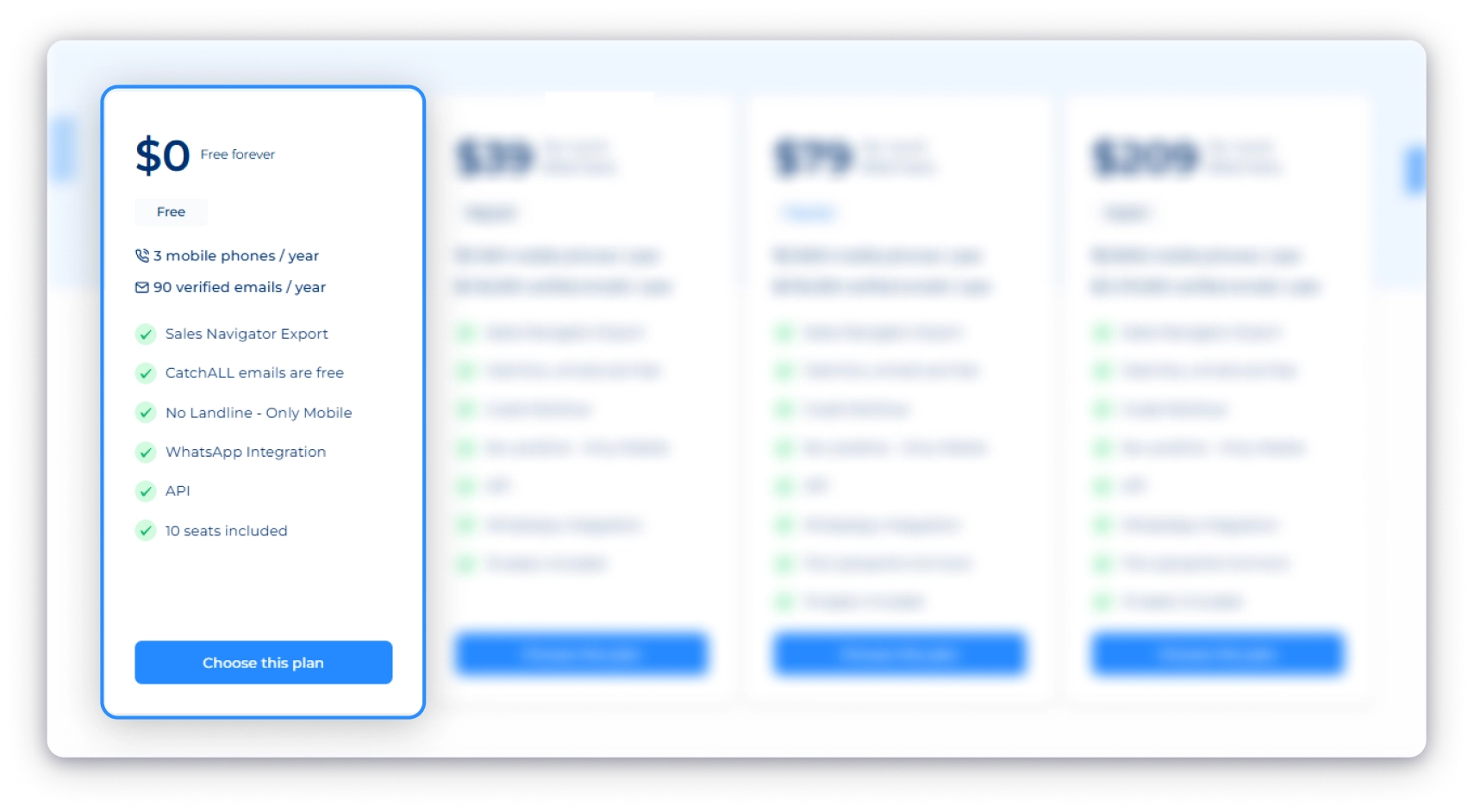
Think of this as a test drive for your outbound workflow.
As a data enrichment tool, Datagma gives you free access so you can quickly check one thing: does it actually find the kind of B2B contacts you need?
It’s worth understanding how it works. Datagma runs on real-time extraction, meaning it pulls data live from public sources instead of relying on a fixed database.
That keeps data fresh, but results can vary depending on your niche and geography, which is why this free plan exists in the first place.
What you get:
- 90 verified emails per year (about 7–8 per month)
- 3 mobile phone numbers per year
- Sales Navigator export
- Chrome extension for LinkedIn enrichment
- Full API access
- WhatsApp integration
- 10 user seats
What you don’t get:
- Credit rollover (use them or lose them)
- File upload enrichment (no bulk CSV processing)
- CatchALL emails (starts at Regular)
Who this is for: Anyone evaluating Datagma before committing budget. Individual contributors, freelancers, or ops managers testing data quality for a specific market.
Regular Plan: $39/Month (Annual) | $49/Month (Monthly)
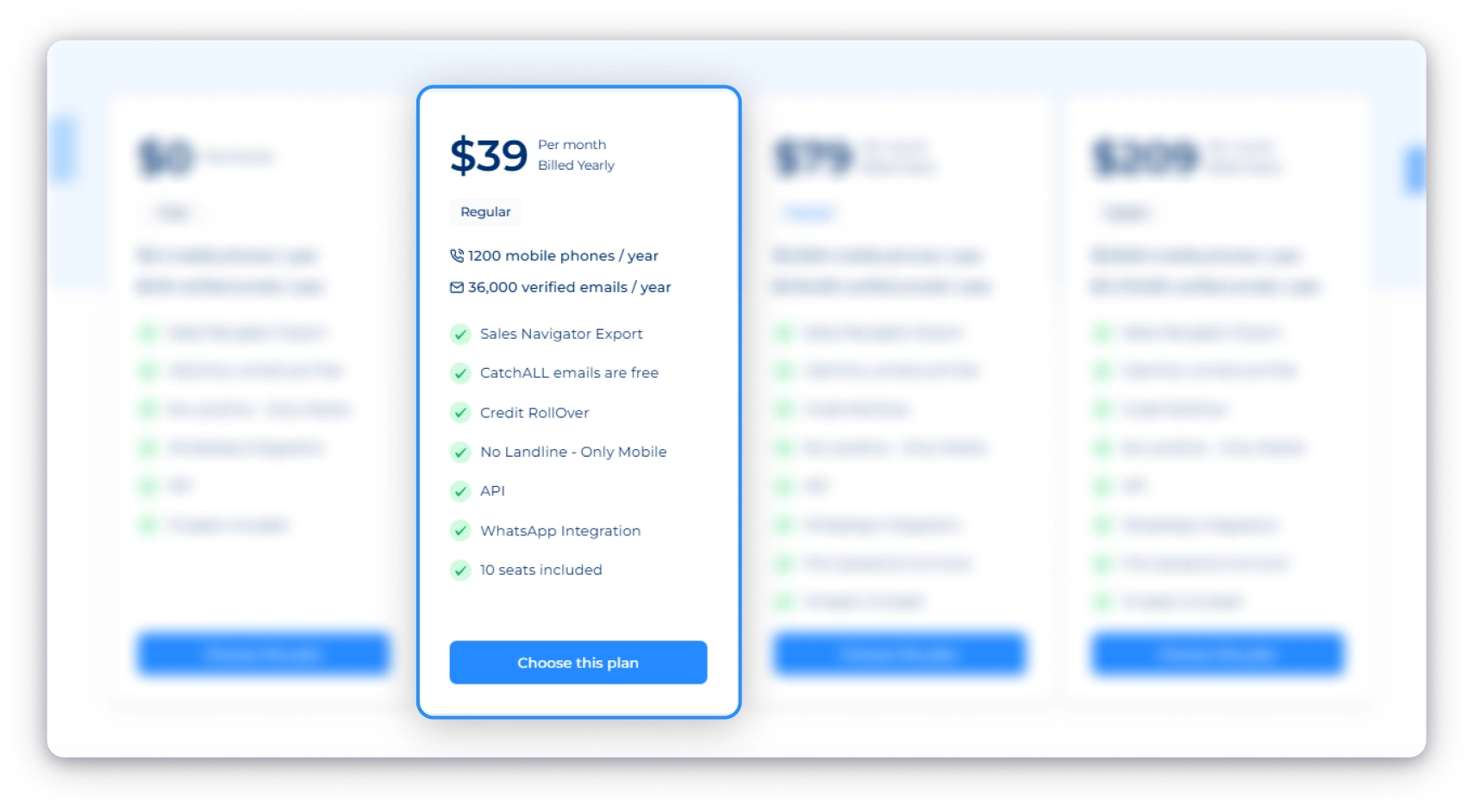
This is where things get real. The Regular plan is Datagma’s entry point for people who actually want to use the tool, not just test it.
What you get:
- 3,000 verified emails per month (36,000/year)
- 100 mobile phone numbers per month (1,200/year)
- Credit rollover for up to 12 months
- CatchALL emails at no credit cost
- Sales Navigator export, Datagma Chrome extension, full Datagma API access
- HubSpot, Pipedrive, Zapier, Make, n8n integrations
- WhatsApp integration
- 10 seats included
- All emails verified by ZeroBounce
What you don’t get:
- File upload enrichment (you’re enriching contacts one by one through the Datagma Chrome extension or API, no bulk CSV)
Who this is for: Solo SDRs, freelance prospectors, and early-stage startups doing outbound on a budget. If it’s just you or one other person sending cold emails and needing occasional phone numbers, this plan handles your volume comfortably.
Popular Plan: $79/Month (Annual) | $99/Month (Monthly)
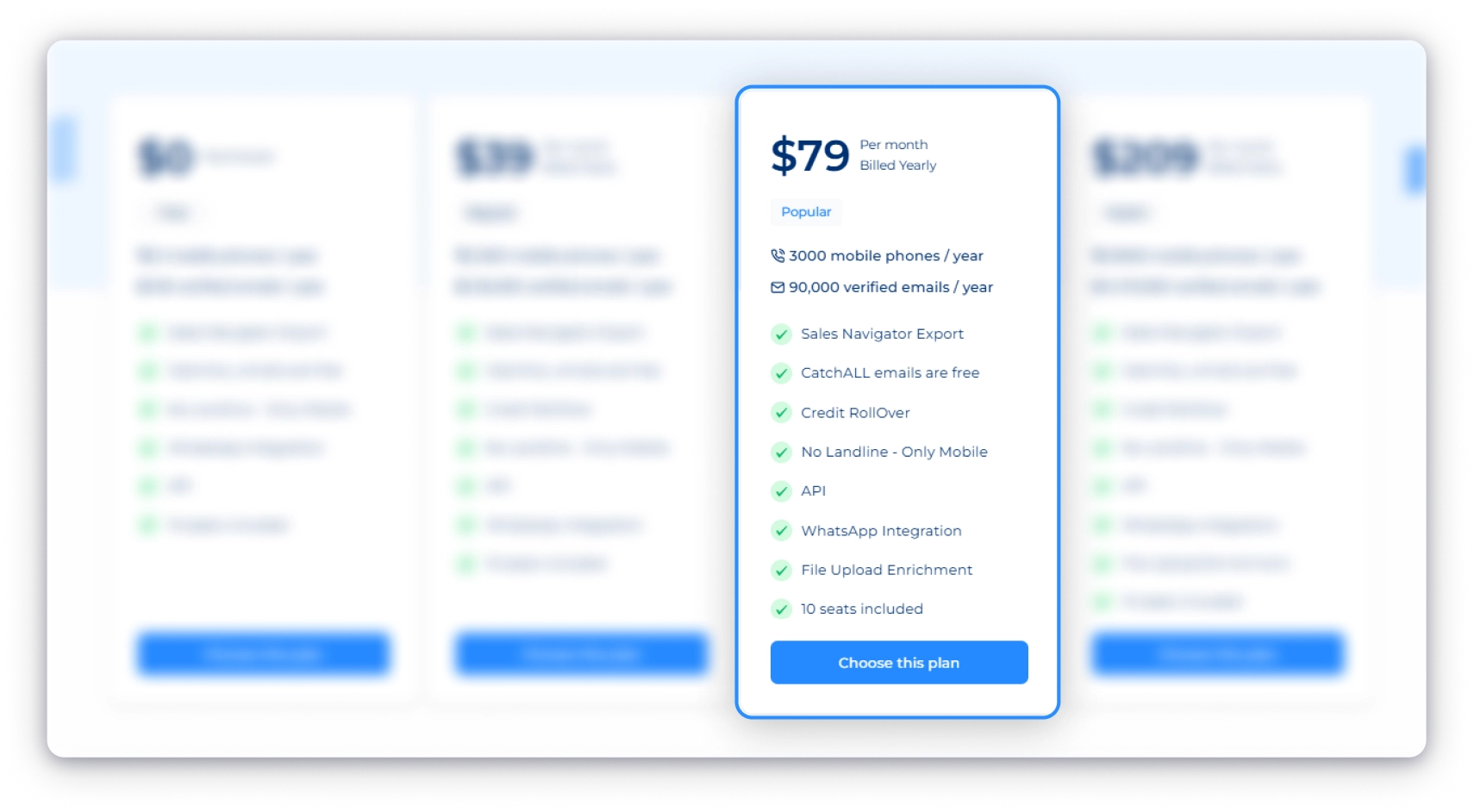
This is the plan most teams end up on. And the reason isn’t just more credits, it’s the workflow.
What you get:
- 7,500 verified emails per month (90,000/year)
- 250 mobile phone numbers per month (3,000/year)
- Everything in Regular, plus file upload enrichment (bulk CSV processing)
- Credit rollover, full API, all integrations
- 10 seats included
What you don’t get:
- Still no landline numbers (only mobile phone numbers)
- Pay-as-you-go flexibility
- No Dedicated Account Manager (that’s only with the Enterprise plan)
Who this is for: Small sales teams of 3–5 SDRs, agencies doing prospecting for clients, and growth marketers enriching bigger lists every week.
Expert Plan: $209/Month (Annual) | $249/Month (Monthly)
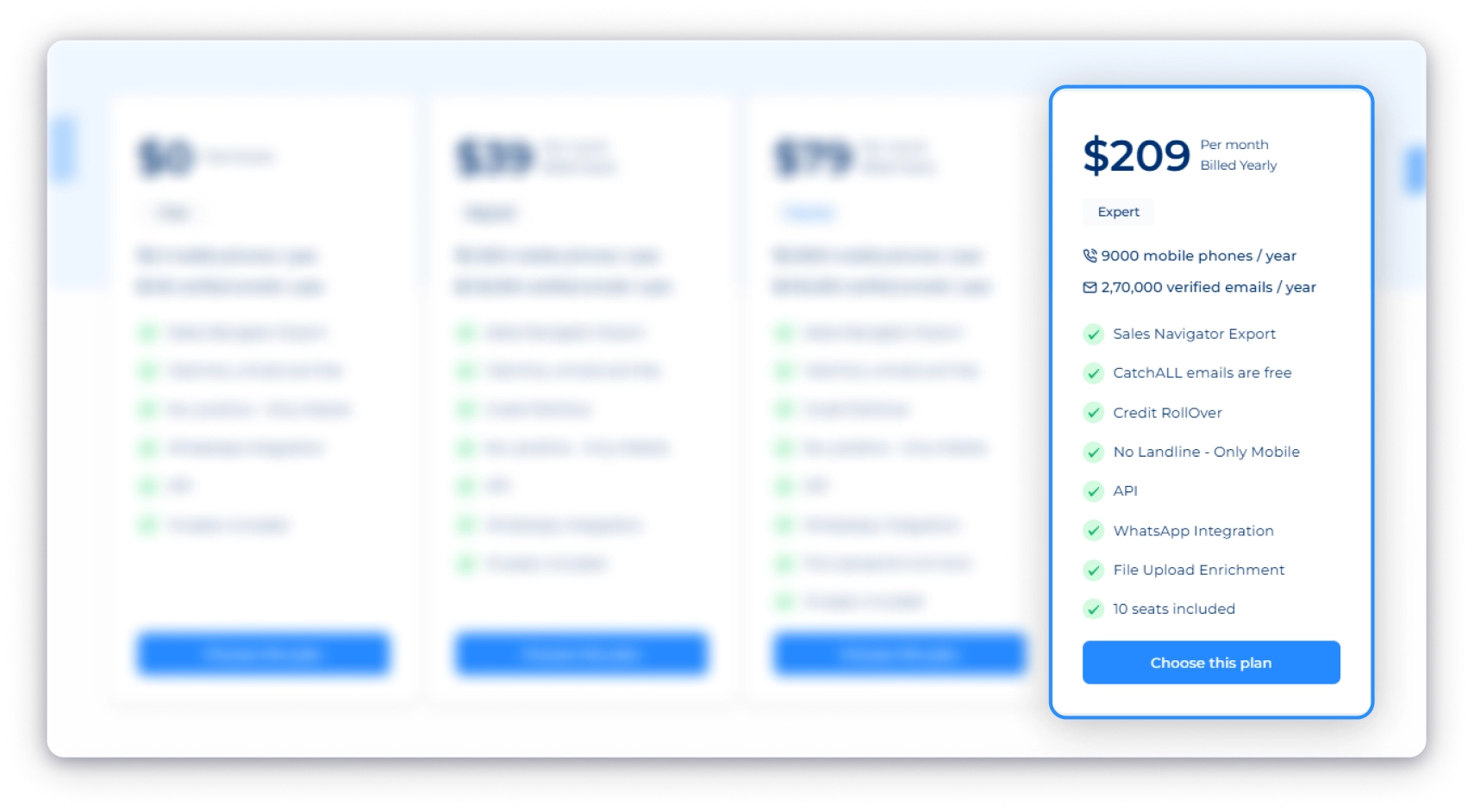
The highest-volume Datagma pricing tier. Built for teams where outbound isn’t a side activity, it’s the whole game.
What you get:
- 22,500 verified emails per month (270,000/year)
- 750 mobile phone numbers per month (9,000/year)
- Everything in Popular, plus higher API rate limits
- File upload enrichment, all integrations
- 10 seats included
- Best per-credit cost across all self-serve plans
What you don’t get:
- Dedicated account manager (that’s Enterprise)
- Pay-as-you-go flexibility
- Still no landline numbers (only mobile phone numbers)
Who this is for: Funded sales teams with 5+ SDRs, outbound agencies running multiple client campaigns, and revenue teams doing daily CRM enrichment at volume.
Enterprise Plan: Custom Pricing
Outgrown the Expert plan? Or need something more tailored? That’s what Enterprise is for.
What you get:
- Custom credit volume (as large as you need)
- Pay-as-you-go billing
- Dedicated account manager
- Custom onboarding and SLAs
- Volume discounts
What you don’t get:
- No standard pricing is listed on the website.
Who this is for: Large outbound agencies, enterprise sales teams with 10+ users, and teams enriching hundreds of thousands of records per month.
How Datagma’s Credit System Works (Explained Simply)
This is the part of Datagma pricing that confuses most users. The plans look simple at first, until you realize emails and phone numbers don’t cost the same. Not even close.
Datagma credits work on just two rules:
- 1 credit = 1 verified email (includes basic company and person data)
- 30 credits = 1 mobile phone number
That 30:1 difference is what really determines how far your plan goes. If your team needs to find phone numbers at volume without the 30:1 penalty, there are other ways to approach it.
Why the 30:1 Ratio Matters
Take the Popular plan as an example. You get 180,000 credits per year, which sounds like a lot.
Now break it down:
- If you use everything for phone numbers: 180,000 ÷ 30 = 6,000 phone numbers/year (about 500/month)
- If you use everything for emails: 180,000 ÷ 1 = 180,000 emails/year
Same plan, same price, but email gives you 30x more reach than phone data.
That’s why Datagma pricing feels affordable for email-based outreach but can get expensive quickly if your workflow is phone-heavy.
What It Looks Like in Real Use
On the Regular plan, you get 6,000 Datagma credits per month. Here’s how usage typically breaks down:
- Email-only: 6,000 emails
- Phone-only: 200 phones
- 80% email / 20% phone: 4,800 emails + 40 phones
- 50/50 split: 3,000 emails + 100 phones
The takeaway is simple: your credit mix matters more than your plan tier.
The Real Cost Per Contact on Datagma
Plans and credit numbers are useful context. But what actually matters when you’re comparing tools or getting budget approval is this: what is the real Datagma cost per contact?
Here’s the math the Datagma pricing page doesn’t show you.
What Each Email and Phone Actually Costs
| Plan | Annual Cost | Per Email | Per Phone |
|---|---|---|---|
| Regular | $468/yr | $0.013 | $0.39 |
| Popular | $948/yr | $0.010 | $0.32 |
| Expert | $2,508/yr | $0.009 | $0.28 |
And that’s if you spend all your credits on phones only. The moment you mix in emails (which you will), the effective per-phone cost goes higher. For comparison, tools like Saleshandy charge 1 credit per phone, the same as an email.
What This Looks Like for Real Teams
Solo SDR on Regular ($39/mo)
Sends about 80 cold emails a day and occasional follow-up calls. Mix: 90% email, 10% phone.
- 5,400 emails + 20 phones per month
- Cost per contact: ~$0.007
✅ Regular handles this comfortably.
3-Person Sales Team on Popular ($79/mo)
Cold email with call follow-ups three days a week. Mix: 70% email, 30% phone.
- 10,500 emails + 150 phones per month
- Cost per contact: ~$0.007
✅ Popular works. 50 phones per rep per month is enough for a mixed motion.
Cold Calling Agency on Popular ($79/mo)
Phones are the primary channel, email is secondary. Mix: 10% email, 90% phone.
- 1,500 emails + 450 phones per month
- Cost per phone: ~$0.18
Growth Marketer on Popular ($79/mo)
Runs demand gen. No phone outreach at all. 100% email.
- 15,000 emails per month
- Cost per contact: ~$0.005
✅ Datagma at its best. If you never need phone numbers, the value is hard to argue with.
The Quick ROI Check
At $79/month on Popular, each email costs roughly a penny. If your cold email campaign books one meeting per 10,000 emails, and that meeting carries $5,000 in pipeline value, a single booked meeting covers about 6 months of the annual plan. Most outbound teams convert at a much better rate than that.
Hidden Cost Datagma’s Pricing Page Won’t Tell You
The sticker price is only the start of the story. Here’s what you should know before signing up.
1. Real-Time Extraction Means Variable Hit Rates
Datagma doesn’t pull from a stored database. It scans the public web live every time you search for a contact. That’s how it keeps data fresh. But it also means if someone’s email or phone isn’t publicly indexed anywhere, you get nothing back.
If you’re using the Datagma email finder for cold outreach at scale, emails are where users report more inconsistency, especially at higher volumes.
One contributor to those bounces: catch-all emails. Datagma delivers these for free, but they haven’t been fully verified. If you send it to them without running a separate verification step, you’re gambling with your domain reputation.
Before committing to annual billing, test the free plan on 20–30 contacts you already know and verify the bounce rate yourself.
2. It’s an Enrichment Tool, Not a Lead Database
Datagma enriches the contacts you already have. But it doesn’t help you discover new leads from scratch.
You can’t search by industry, company size, geography, or job title to build targeted prospect lists. That means you’ll still need a separate lead database before Datagma can do its job.
For most teams running a full outbound motion, the real monthly spend with Datagma as the data enrichment layer looks something like:
Datagma ($79) + cold email tool ($50–$99) + dialer ($30–$55) + CRM ($0–$50) = $159–$283/month total.
That’s worth knowing before you evaluate Datagma pricing on its own.
3. Mobile Numbers Only, No Landlines
Datagma only provides mobile phone numbers. You won’t get direct office lines, company switchboards, or landline numbers.
That can be limiting for teams targeting senior enterprise buyers who are often easier to reach through office numbers than personal mobiles.
4. No Credit Top-Ups on Self-Serve Plans
Run out of credits before the billing cycle ends? There’s no simple way to top up on self-serve plans.
Your only options are:
- Wait for the next cycle
- Upgrade to a higher tier
- Or move to Enterprise for custom overage pricing
For agencies or teams with unpredictable prospecting volume, this creates unnecessary planning friction.
That’s also why many teams skip lower Datagma plans entirely and move up early just to avoid hitting usage limits mid-month.
5. Annual Lock-In with No Public Refund Policy
Datagma’s annual plans save around 20%, but they also lock you into a full 12-month commitment with no public refund policy.
And unused annual credits don’t carry forward.
So if you underuse your plan, those unused credits disappear at renewal with no rollover or reimbursement.
Monthly plans cost more, but they give teams flexibility to test the platform before committing long-term.
So, it’s safe to start with monthly, validate the data quality on your market, then consider annual billing once usage becomes predictable.
Who Should (and Shouldn’t) Use Datagma?
If you’re evaluating Datagma pricing because your current data tool keeps hitting you with overages, limited phone credits, or unpredictable monthly costs, this section helps you decide whether Datagma actually fixes the problem or simply replaces it with a different one.
- Run mostly email-first outbound campaigns where low email enrichment cost matters most
- Already have prospect lists and only need email or phone enrichment
- Use automation tools like Clay, Zapier, Make, or n8n and want API-friendly workflows
- Want job-change signals to reach prospects shortly after they switch companies
- Operate on a smaller outbound budget where low monthly entry pricing is attractive
- Need a searchable database to discover leads from scratch
- Run phone-heavy outbound campaigns where mobile enrichment costs add up quickly
- Target regions outside the US or Western Europe where match rates may decline
- Want prospecting and outreach in one platform instead of stitching together multiple tools
- Need strong public reviews, enterprise case studies, or vendor credibility for procurement approval
At the end of the day, the real question isn’t simply whether Datagma is affordable.
It’s whether Datagma fits the way your outbound workflow actually operates.
If your team needs more than enrichment alone, the better long-term value may come from a platform that combines verified lead data, prospecting, and outreach in one place.
A More Cost-Effective Datagma Alternative: Saleshandy
Saleshandy gives you a searchable database of 852M+ verified contacts across 42M+ companies.
That’s the biggest difference right there. Instead of bringing your own list and hoping the enrichment tool finds the data, you start inside the database. Search using 75+ filters like job title, industry, company size, revenue, tech stack, and location to build targeted prospect lists in minutes.
Unlike Datagma, Saleshandy doesn’t stop at data. Cold email outreach, calling, and CRM are built into the same platform, so you don’t have to pay separately for the rest of your outbound workflow.
Here’s how Datagma pricing compares to Saleshandy’s lead finder side by side.
| Feature | Datagma | Saleshandy |
|---|---|---|
| Database | No stored database (real-time extraction) | 852M+ contacts, 42M+ companies |
| Starting Price | $39/mo (Regular, annual) | $49/mo (annual) |
| Cost Per Email | $0.013 | $0.019 |
| Phone Number Credits | 30 credits per phone | 7 credits (email + phone) |
| Email Verification | ZeroBounce | Waterfall across 9 providers ✓ |
| Search Filters | None (enrichment only) | 75+ advanced filters |
| AI-Powered Search | Not available | Sage AI ✓ |
| Cold Email Outreach | Separate tool ($50–$99/mo) | Included ✓ |
| Built-in Dialer | Not available | Included ✓ |
| Built-in CRM | Not included | Free on every plan ✓ |
| Free Trial | 90 emails + 3 phones/year | 50 credits + 7-day trial |
Datagma isn’t a bad tool. If you already know who you want to contact and mainly need real-time email enrichment, it delivers solid value at a fair price.
But if your workflow is phone-heavy, you need a searchable prospect database, or you want to avoid managing multiple outbound tools separately, the limitations show up quickly.
For teams that want to find prospects, enrich contacts, send cold emails, and manage outreach from one place, Saleshandy eliminates the fragmented stack and the credit penalty in one move.
FAQs About Datagma Pricing
1. How Much Does Datagma Cost?
Datagma cost starts at $0 on the free plan. Paid plans start at $39/month (billed annually) on the Regular plan, $79/month on Popular, $209/month on Expert, and custom pricing for Enterprise. Monthly billing is available at roughly 20% higher per month.
2. What Is the Real Cost Per Phone Number on Datagma?
On Regular ($39/mo annual), each phone costs approximately $0.39. On Popular ($79/mo annual), around $0.32. On Expert ($209/mo annual), approximately $0.28. These assume you’re spending credits only on phones. Mixing in emails increases your effective per-phone cost.
3. Does Datagma roll over unused credits?
On monthly plans, unused credits roll forward for up to 12 months as long as your subscription stays active. On annual plans, all credits are issued upfront at the start of the billing cycle, but any unused credits are lost when the annual cycle resets. There is no carryover into the next year and no refund for unused credits on annual billing.
4. Can I Cancel My Datagma Subscription Anytime?
Yes. You can cancel from your account’s billing tab anytime. Canceling stops the renewal. You keep access until the end of your current billing period.
5. What Is the Difference Between Datagma’s Regular and Popular Plans?
The biggest difference is file upload enrichment. You can only bulk-enrich a CSV spreadsheet on the Popular plan ($79/mo) and above. The Regular plan ($39/mo) requires you to enrich contacts one at a time through the Chrome extension or API. Popular also gives you 2.5x more emails and 2.5x more phone credits per year.
6. Is Datagma Worth It in 2026?
Datagma pricing offers strong value for email-first teams targeting US and Western European contacts at under $0.01 per verified email. Where it gets complicated is phone-heavy outbound (expensive at 30 credits per phone), contacts outside the US and Western Europe (lower match rates), and teams that need more than enrichment (no built-in outreach, dialer, or database search). If you need the full outbound stack, tools like Saleshandy deliver enrichment, outreach, plus a searchable database starting at $49/month.
7. What Is the Best Datagma Alternative in 2026?
For teams that need prospecting, enrichment, and outreach in one platform, Saleshandy is the most cost-effective Datagma alternative. It offers a searchable database of 852M+ contacts, 1-credit-per-phone pricing with no 30:1 penalty, a built-in cold email platform, dialer, and CRM, all starting at $49/month.