


LeadIQ has built a strong reputation as a B2B sales prospecting and data enrichment platform.
But while exploring the tool and G2 reviews, 3 major problems caught my eye:
- Phone numbers that don’t connect.
- Emails tied to companies the contact left years ago.
- And a credit system that makes those misses sting even more.
I wanted to see for myself whether the tool lives up to the hype or if the cracks in the foundation run deeper than a few unhappy users.
So I signed up, explored every corner of the dashboard, broke down the Universal Credits pricing, and cross-checked what real users are saying about data accuracy, integrations, and the missing pieces in LeadIQ’s workflow.
This LeadIQ review covers the features that actually matter, what each one costs in practice, and where the tool leaves a gap you’ll need to fill with something else.
Let’s get into it.
LeadIQ Review- TOC
- TL;DR: Is LeadIQ Worth It in 2027? My Scorecard
- What Is LeadIQ, and Who Is It Best For?
- How I Evaluated LeadIQ
- LeadIQ Features Reviewed: What Works and Where It Falls Short
- LeadIQ Pricing in 2027: How Much Will You Actually Pay?
- LeadIQ Pros and Cons: What I Found and 1,193+ G2 Reviews Say
- The LeadIQ Alternative Worth Considering in 2027: Saleshandy
- Final Verdict: Is LeadIQ Worth It in 2027?
- LeadIQ Review: Frequently Asked Questions
TL;DR: Is LeadIQ Worth It in 2027? My Scorecard
If you’re short on time, here’s my honest take on LeadIQ after exploring the platform and reading through 1,193+ G2 reviews.
LeadIQ is a sales prospecting (for B2B) and enrichment tool for US-focused SDR teams that already have a separate outreach platform. But it falls short on phone accuracy, non-US coverage, and pricing transparency.
What Is LeadIQ, and Who Is It Best For?
LeadIQ is a B2B sales prospecting platform that combines a built-in contact database with a Chrome extension for LinkedIn capture.
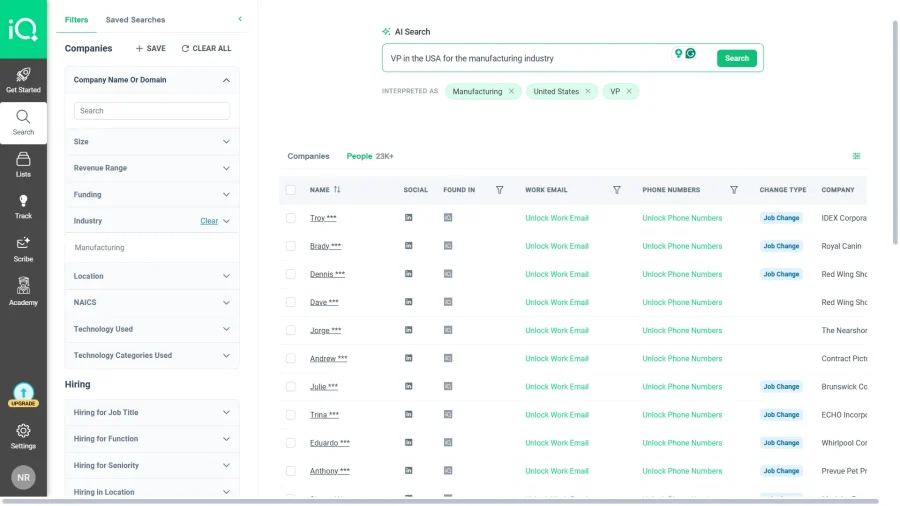
Inside the dashboard, I could search for prospects using filters like company size, revenue, industry, location, technology stack, and hiring activity.
The AI Search feature even lets you type a plain-English query (I tried “VP in the USA for the manufacturing industry”), and it translated that into filter chips automatically, returning 23K+ matching contacts.
On top of the database, the Chrome extension lets you capture contacts directly from LinkedIn and Sales Navigator and push them into your CRM or sales engagement tool.
Founded in 2015, it has grown into a tool that SDRs and BDRs genuinely like using for one specific job: turning LinkedIn profiles into CRM records without leaving the browser tab.
On G2, LeadIQ sits at 4.2/5 with 1,193+ reviews.
Beyond the Chrome extension, LeadIQ offers Scribe AI for personalized email drafting, Champion Tracking for job change alerts, and an API/MCP connector for programmatic access.
But here’s the thing that shapes this entire review: LeadIQ is a prospecting tool. It doesn’t provide built-in outreach.
It finds contact data. It doesn’t send emails, warm up domains, run sequences, or manage replies. For that, you need a second tool. And a second subscription.
That distinction matters more than most review articles admit.
✓Who LeadIQ is built for:
- SDRs and BDRs who prospect heavily on LinkedIn and Sales Navigator
- Sales teams that already use Outreach, Salesloft, or Gong Engage for sequences
- Mid-market and enterprise organizations with US-focused ICP
- RevOps teams looking for clean CRM enrichment with native Salesforce/HubSpot sync
!Who might find it limiting:
- Teams that need cold email outreach and data in a single platform
- Anyone targeting European or APAC contacts (coverage is weaker outside the US)
- Small teams that can’t afford a separate prospecting tool on top of an outreach subscription
How I Evaluated LeadIQ
A review should be based on actual product exploration, not just recycled G2 summaries. So here’s how I approached this.
I signed up for LeadIQ’s Free plan (50 credits, 1 user) and explored the web dashboard, filters, and enrichment workflow.
The testing covered real ICP searches, credit usage, and what the dashboard can and cannot do without the Chrome extension.
To get a broader picture, I also went through all 1,193+ G2 reviews, looking beyond star ratings to identify recurring patterns.
This included tracking complaints about data accuracy, phone numbers, pricing, and integrations, along with specific user quotes to support the findings.
Finally, I verified all pricing against LeadIQ’s official website and the G2 pricing page. Where numbers conflicted (and they did), I flagged it.
LeadIQ Features Reviewed: What Works and Where It Falls Short
I reviewed LeadIQ’s key features to see how well they help you find accurate contacts, save prospecting time, and simplify outreach.
Here’s where LeadIQ delivers value and where its limitations could cost you.
1. Database, Prospecting Hub and Chrome Extension: How Easy Is It to Find Leads?
The moment I opened the dashboard, I went straight to the Search tab.
LeadIQ has its own built-in B2B database, and the filter panel is well-organized.
Filters include Company Name, Size, Revenue Range, Funding, Industry, Location, NAICS, Technology Used, and even a full Hiring section with filters for job title, function, seniority, and location.
What caught my attention was the AI Search bar at the top.
I typed “VP in the USA for the manufacturing industry,” and it instantly translated that into three filter chips: Manufacturing, United States, and VP.
Within seconds, 23K+ matching contacts showed up in the results table. No manual filter stacking required. For someone building a prospect list from scratch, that’s a real time-saver.
The results table itself is clean. Names, social links, work email, phone numbers, change type, and company data, all laid out in customizable columns.
Contacts are masked until you spend credits to unlock them (1 credit per email), which keeps you from burning through your allocation mindlessly.
And the Chrome extension is the best part of the product.
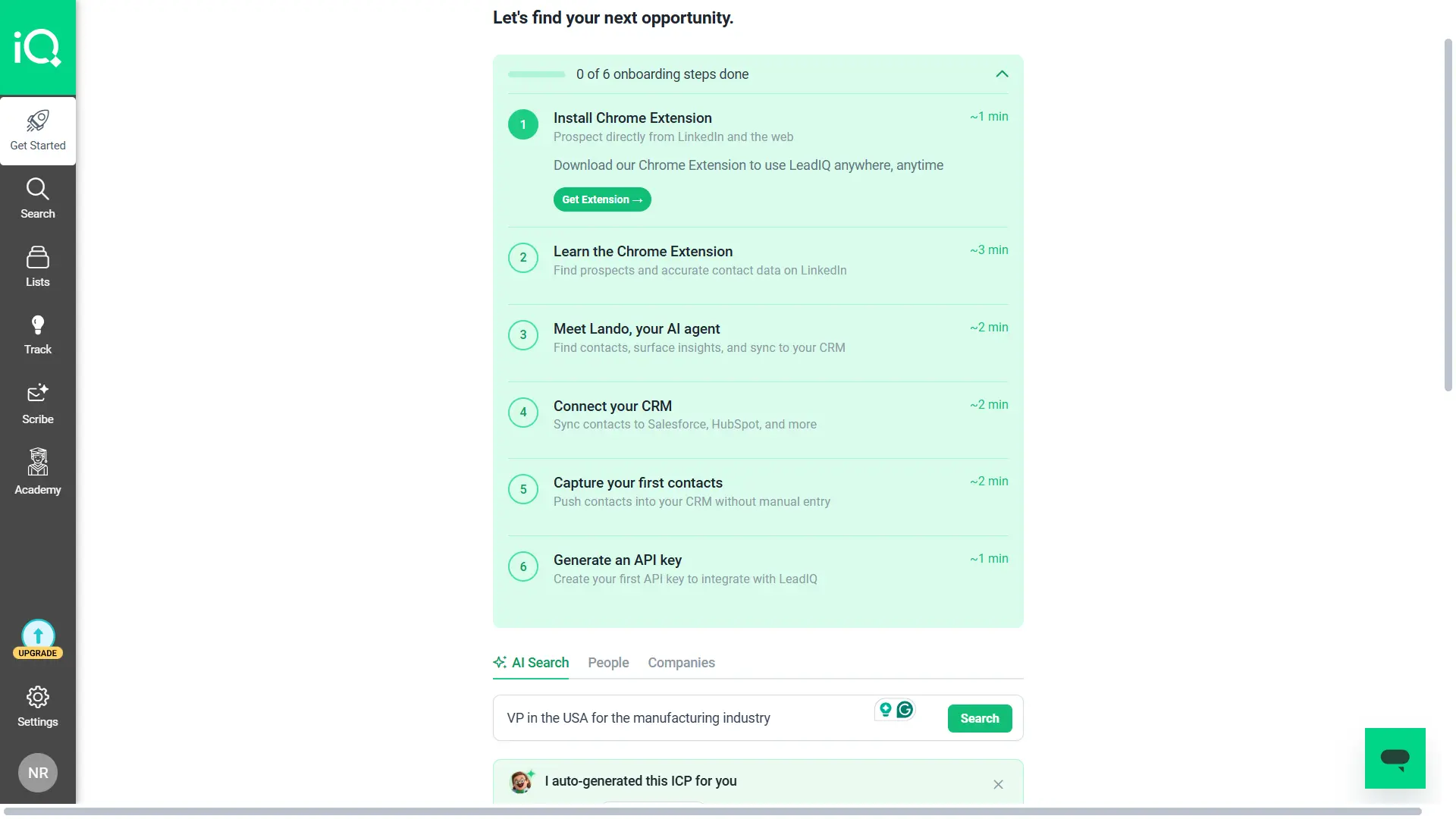
When I installed it and opened LinkedIn Sales Navigator, the overlay appeared right on the profile. One click to capture an email, another click to push it to a CRM or saved list. No tab switching, copy-pasting, or spreadsheet gymnastics.
Also, it was easy to use, I’d say. And 129 G2 mentions back it up.
A LeadIQ review from G2:
Andrew F., a Head of Partnerships at a small business, summed it up in his 5/5 review: he called using LeadIQ with LinkedIn Sales Navigator “like magic” for extracting contacts.
The “Capture All” feature lets you batch-select profiles from a Sales Navigator list and save them in one sweep. I can see why one enterprise SDR on G2 said it cut his prospecting time from an hour down to 30 minutes.
It worked as expected, though it maps to the existing filter taxonomy rather than doing a separate semantic search.
Where it trips up: The web dashboard alone is more limited than you’d expect. Populated list views, Scribe AI, and core capture workflows all depend on the Chrome extension being installed. Without it, you’re looking at a search interface that can find people but can’t do much with them.
A few G2 reviewers also noted that the basic search functionality doesn’t always match expectations, and leads sometimes don’t translate cleanly into Outreach sequences.
2. Data Accuracy: Can You Trust LeadIQ’s Emails and Phone Numbers?
Finding contacts is only half the job. The other half is whether those contacts are actually real.
To test this, I ran multiple searches inside LeadIQ’s database, unlocked a handful of contacts, and paid close attention to what came back.
Based on my testing and 230+ G2 mentions across four accuracy-related categories, data accuracy remains LeadIQ’s biggest concern, despite being one of its main selling points.
1. Email Accuracy: Decent, Not Bulletproof
For US work emails, LeadIQ performed reasonably well in my testing. Most emails I unlocked looked like valid company-format addresses, and the tool clearly leans on LinkedIn profile data to match contacts with their current employer.
But here’s where it gets tricky. LeadIQ sometimes pulls old emails from a previous company, even when the contact’s LinkedIn profile clearly shows they’ve moved. That’s not a minor glitch.
If you’re sending cold outreach to an email that bounces because the person left that company a year ago, you’re wasting credits and hurting your sender reputation.
A LeadIQ review from G2:
Melissa E., a sales associate, gave LeadIQ 3/5 and noted exactly this: the data isn’t always accurate, sometimes pulling an old email from a prior company even when LinkedIn clearly shows the person is at a new company.
2. Phone Accuracy: The Elephant in the Room
If email accuracy is a yellow flag, phone numbers are a red one.
When I explored the unlock flow, I noticed there’s no way to preview or validate a phone number before spending credits on it. You pay, you see the number, and you hope it connects.
The problem is that phone lookups cost 10 Universal Credits, compared to just 1 for an email. So every wrong number burns 10x the budget of a wrong email. That math gets painful fast.
G2 backs this up with 40 explicit mentions of “incorrect numbers,” making it the third-highest con overall.
A LeadIQ review from G2:
One verified user rated LeadIQ 3.5/5 and wrote bluntly that the numbers and emails are often wrong.
Another mid-market user noted that phone data is frequently missing altogether, not wrong, just not there.
3. Regional Coverage: Strong for US, Thin Everywhere Else
I ran searches targeting contacts in both the US and European markets. The difference was noticeable.
US queries returned dense, well-populated results. European and APAC searches came back thinner, with fewer matches and more gaps in phone data.
I’m not the only one who noticed.
A LeadIQ review from G2:
One small-business reviewer on G2 wrote that they’d love to see improvement on mobile numbers and European contact data specifically, as coverage there is thinner compared to US-based contacts.
If your ICP spans multiple regions, this is worth factoring into your decision.
4. Company Enrichment: Occasional Mismatches
A LeadIQ review from G2:
One enterprise user (4.5/5) reported that LeadIQ sometimes enriches the wrong company record by attaching a contact to it and redirecting that contact to the wrong account.
That’s not just inaccurate data. That’s contaminated CRM records that your team will have to clean up manually.
The bottom line on accuracy: LeadIQ’s email data is workable for US contacts. But phone numbers are unreliable at 10x the credit cost, non-US coverage has visible gaps, and there’s no confidence scoring to help you gauge risk before you spend. That combination can burn through credits fast with nothing to show for it.
3. Scribe AI and Lando: Do They Make Prospecting and Personalization Easier?
Scribe AI is LeadIQ’s AI email writer for personalized outreach messages.
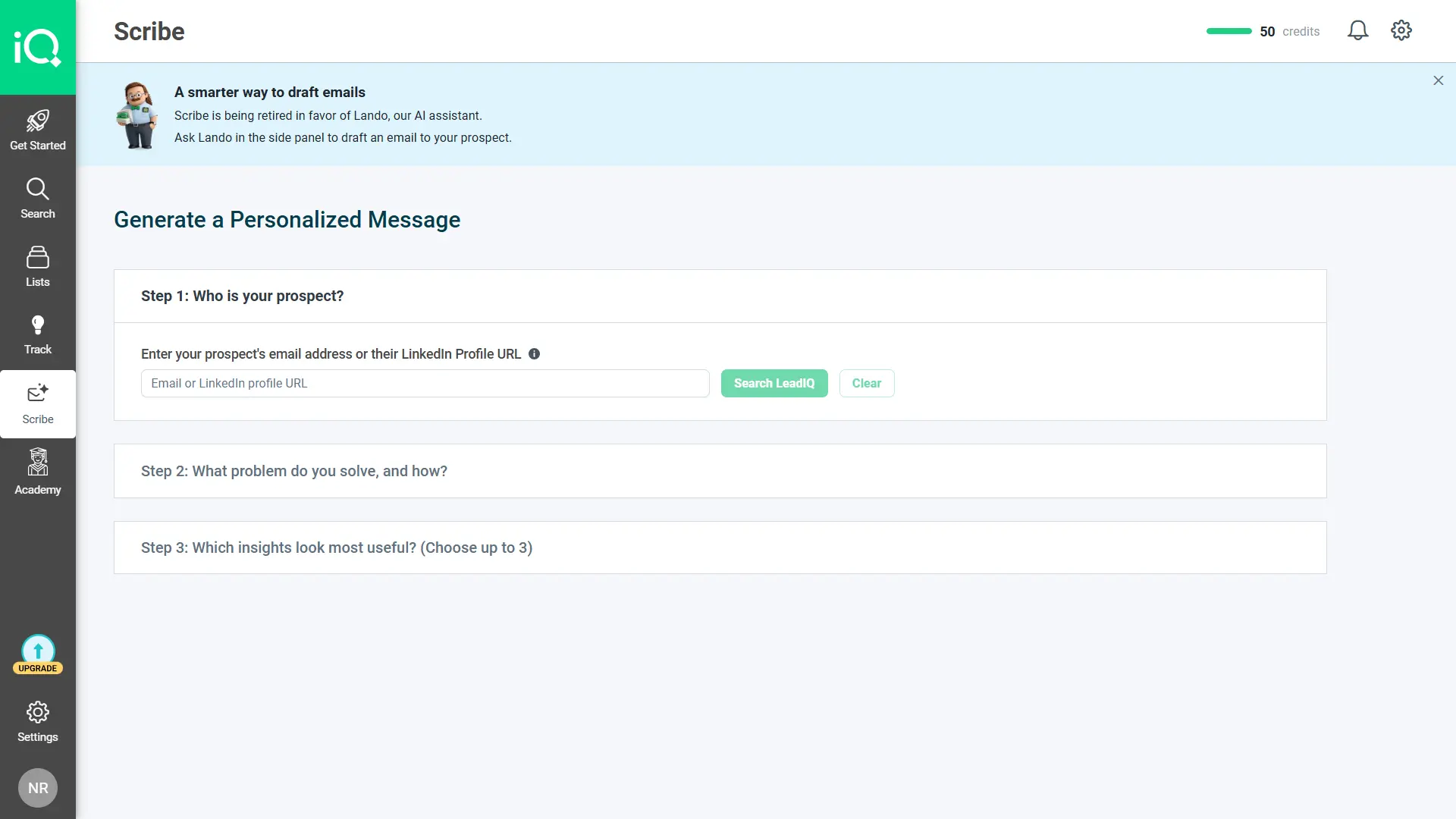
It lives inside the Chrome extension (not the web dashboard) and uses prospect data to generate cold emails, openers, and value propositions.
Here’s how it works: you select up to 3 “insights” about a prospect, things like their LinkedIn activity, work history, or fun facts, and Scribe generates a personalized email you can insert directly into LinkedIn, Gmail, Outreach, or Salesloft.
A LeadIQ review from G2:
One user, Shelby V. (5/5), praised LeadIQ’s AI for creating cadences and personalized messaging, calling it among the best available for that purpose.
But there’s a cost angle most reviews skip. Scribe AI runs on Universal Credits: roughly 1 UC for every 3 emails generated, 0.15 UC per opener, and 0.33 UC per value prop.
On a team running high-volume outreach, that adds up alongside your prospecting credit spend.
Lando, LeadIQ’s AI agent, is described as a broader assistant that finds contacts and surfaces insights.
In practice, I found its main visible use was auto-generating ICP criteria from a free-text prompt. Type a company description, and Lando suggests filter parameters. It’s useful for getting started, but to be honest, nothing groundbreaking.
The catch you can’t miss: Scribe generates emails. LeadIQ doesn’t send them. You still need to export to Outreach, Salesloft, or another platform to actually run a campaign. So you’re paying credits for AI-generated copy that still requires a separate tool to deliver. 😞😞
4. Job Change Alerts: Can You Reconnect With Buyers Who Switch Companies?
I found this one genuinely useful feature for enterprise sales teams with longer deal cycles.
Champion Tracking monitors your saved contacts for job changes. When a past buyer or champion moves to a new company, LeadIQ alerts you. It’s a warm re-engagement signal that can shorten sales cycles significantly.
You upload a CSV of target accounts or contacts, and LeadIQ checks daily for hires, departures, and title changes.
There’s a catch on the Free plan, though: you can only track 10 accounts per seat, and it’s limited to account-level tracking only.
Contact-level tracking requires the Pro plan or above. And re-uploading a CSV overrides your entire existing watchlist, which feels unnecessarily rigid.
5. CRM Integrations: How Well Does LeadIQ Fit Your Sales Workflow?
LeadIQ’s integrations are strong!
On G2, “Seamless Integrations” ranks as the 4th-highest pro with 80 mentions. 🤩
The tool natively connects with Salesforce, HubSpot, Outreach, Salesloft, Gong, and Sales Navigator.
A LeadIQ review from G2:
One legal services reviewer on G2 (4.5/5) highlighted the native Salesforce integration as a standout for automating the enrichment workflow across contacts, accounts, and new leads.
Contacts push automatically, so reps aren’t double-entering data.
For teams with an existing sales tech stack, this plug-and-play behavior is a real time saver.
But there are friction points:
The same Salesforce reviewer mentioned that LeadIQ sometimes struggles with parent and child accounts, enriching the parent’s data and applying it across all child accounts without differentiating between offices or sites.
- An enterprise user reported frequent authentication and login issues.
- Another noted that some leads don’t translate cleanly to Outreach sequences.
And here’s one that caught me off guard: the Nooks integration requires you to be on a specific LeadIQ Data Hub plan. If your team is on a different tier, the setup simply won’t complete. That’s an unexpected upsell gate on what should be a straightforward integration.
6. API and MCP Connector: Can You Automate Your Prospecting Workflow?
For teams with technical resources, LeadIQ offers an API and MCP connector that lets you search and enrich contacts programmatically.
The pricing is credit-based: 1 UC per email, 10 UCs per phone, 3 UCs per company export, and 0.1 UC per profile data pull via the API. You only pay for returned data, which is fair.
Admin controls let you set limits by product line, team, or individual user, so credit spend doesn’t spiral.
This is a solid developer tool. But for the majority of SDRs and sales managers evaluating LeadIQ for day-to-day LinkedIn prospecting, the API won’t be a deciding factor.
Worth Exploring: Learn how Saleshandy’s MCP integration helps you find prospects and automate outreach workflows using AI. (It’s available on every paid plan, starting from the base tier.)
LeadIQ Pricing in 2027: How Much Will You Actually Pay?
If there’s one section of this review that could save you money, it’s this one. Because LeadIQ’s pricing is not as straightforward as it looks.
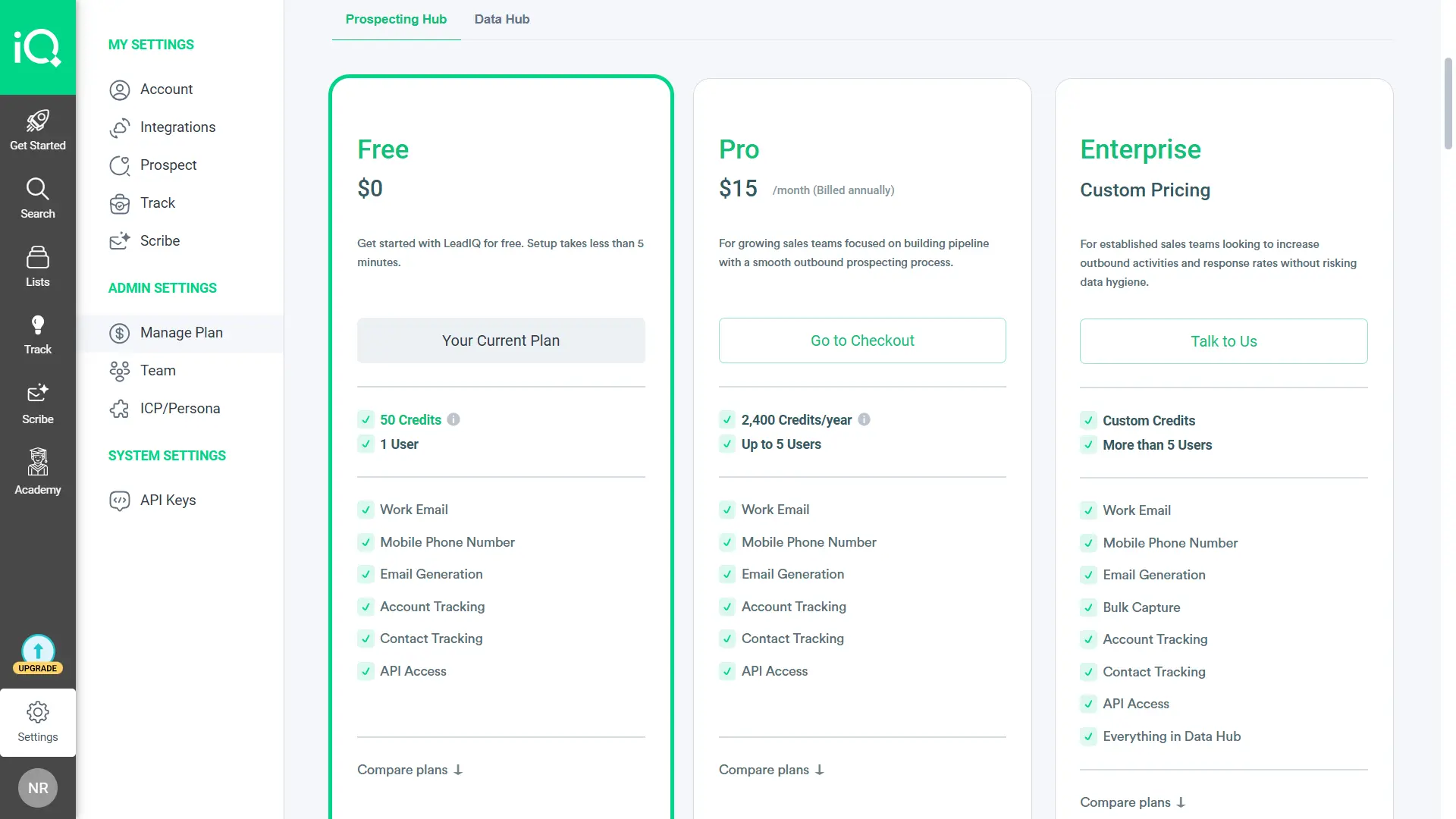
LeadIQ’s Free, Pro, and Enterprise Plans Compared
Here’s what I found across LeadIQ’s dashboard and G2:
| Plan | Price | Credits | Users | Best For |
|---|---|---|---|---|
| Free | $0 | 50 credits/month | 1 user | Individual reps trying the tool |
| Pro | $15/mo (annual) | 2,400 credits/year | Up to 5 users | Small to mid-size SDR teams |
| Enterprise | Custom | Custom credits | 5+ users | Large orgs with dedicated support |
How Do LeadIQ Universal Credits Work?
LeadIQ uses a Universal Credits (UC) system, one shared pool that covers all products: Prospecting Hub, Data Hub, and the API.
Here’s what each action costs:
Admins can set limits by team, product line, or individual user, which is helpful for budget control.
The Real Cost of Finding Emails vs. Phone Numbers
Get a glass of water, because here’s where the math gets uncomfortable.
Let’s say you have a team of 5 SDRs, each prospecting 200 contacts per week. That’s 1,000 email lookups (1,000 UCs) plus maybe 100 phone lookups (1,000 UCs). You’re burning 2,000 UCs per week just on contact data, before factoring in Scribe AI usage.
Now remember: those phone lookups cost 10x email lookups. And 40+ G2 reviewers say the phone numbers are frequently wrong.
One small-business user called the credits “way too expensive.” A mid-market user flagged that LeadIQ is raising prices in 2027 and changing plans.
The listed price looks reasonable. The real spend scales faster than you’d expect.
And here’s the kicker: after all that credit spend, you still need a separate tool to actually send outreach. That’s another subscription on top.
LeadIQ Pros and Cons: What I Found and 1,193+ G2 Reviews Say
Okay, let me lay the cards on the table.
Here’s what real users consistently praise, and what they consistently flag, based on the full G2 dataset.
What LeadIQ Users Like Most
1. The Chrome extension is genuinely fast (129 G2 mentions)
This is the hill LeadIQ can die on, and they’d be right to.
The one-click capture from LinkedIn and Sales Navigator is the product’s defining feature.
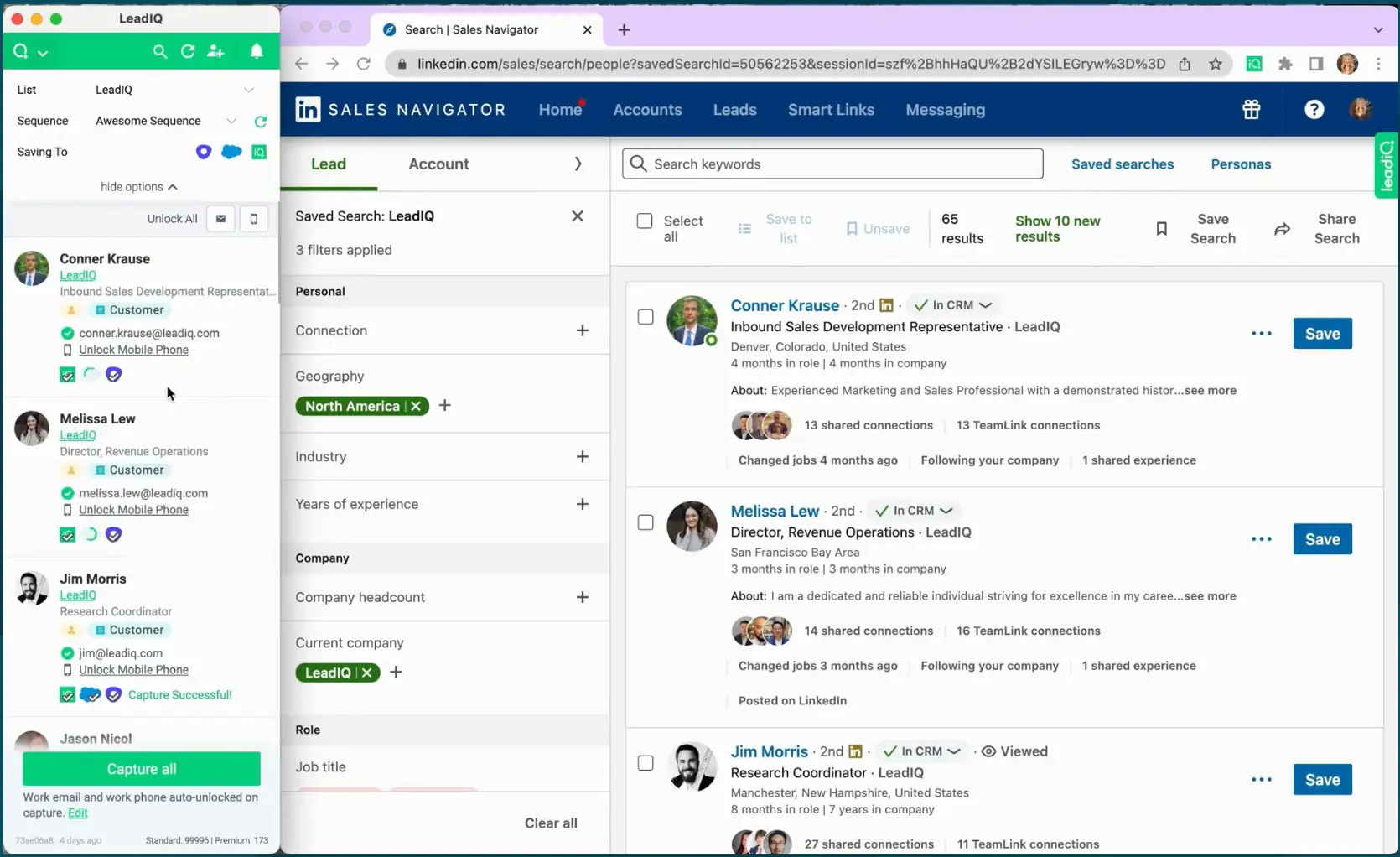
Users consistently say it cuts prospecting time in half. One verified user said it turned prospecting from an hour-long chore into a 30-minute workflow.
2. CRM integrations save real time (80 G2 mentions)
The Salesforce and HubSpot sync works. Contacts push automatically. This means reps don’t have to upload twice. For teams with an established CRM workflow, this is plug-and-play.
3. Setup is quick, and the UI is clean
Multiple reviewers highlight the easy onboarding and polished interface. LeadIQ’s G2 badges (Most Implementable, Highest User Adoption) back this up. You can be up and running in minutes, not days.
So, Where LeadIQ Users Say It Falls Short
1. Data accuracy is inconsistent (230+ combined G2 mentions)
I’ve covered this in depth above, but it bears repeating.
Four of the top five G2 cons are variations of the same problem: incorrect data.
- Old emails,
- wrong phone numbers,
- mismatched company records.
A LeadIQ review from G2:
One reviewer wrote plainly that when LeadIQ says a contact is verified, that’s not always true.
2. Phone numbers are the weakest link (40 explicit G2 mentions)
At 10 credits per phone lookup, unreliable phone data is the most expensive mistake you can make on this platform.
One user flagged that phone data is missing more often than it’s wrong, which is almost worse.
3. Non-US data is thin
If your ICP spans Europe or APAC, multiple reviewers warn that coverage drops off significantly compared to US contacts. This isn’t a minor gap. It’s a structural limitation.
Looking Beyond LeadIQ? Explore 8 Best LeadIQ Alternatives and Competitors in 2027.
4. No native outreach, no warm-up, no sequences
LeadIQ finds contacts. That’s it.
You can’t send a cold email sequence, warm up a domain, rotate senders, or manage replies inside LeadIQ. Every one of those workflows requires a separate tool and subscription.
5. Credit pricing lacks transparency
The Universal Credits model is confusing. Pricing varies by source. And a 2027 price increase has already been flagged by current users on G2.
The LeadIQ Alternative Worth Considering in 2027: Saleshandy
If you’ve read this far, you’ve noticed the thread running through this entire review: LeadIQ captures data but doesn’t help you with the next step (outreach).
For every contact LeadIQ finds, you need a separate platform to actually run outreach. That’s an extra subscription, extra onboarding, and extra workflow friction.
But Saleshandy was built to close that gap. It combines a B2B lead finder with 852M+ verified contacts across 42M+ companies, plus a full multichannel outreach stack in one platform.
Here’s how they compare side by side:
Saleshandy is Better Because:
One platform for lead generation and outreach instead of paying for two tools
852M+ verified contacts with 9-provider waterfall enrichment for better match rates
Unlimited email accounts and free warm-up (TrulyInbox) on every paid plan
No per-seat pricing. A 5-person team pays $34/month, not $75+ per user.
Who should still choose LeadIQ:
Credit where credit is due. If your team lives inside LinkedIn Sales Navigator, already uses Outreach or Salesloft for sequences, and your ICP is primarily US-based, LeadIQ’s Chrome extension is genuinely the fastest in the category.
Champion Tracking is also a real differentiator for enterprise deal cycles that Saleshandy doesn’t currently offer.
But if you need data and outreach under one roof, the math favors Saleshandy.
Final Verdict: Is LeadIQ Worth It in 2027?
LeadIQ is a well-built prospecting tool. The Chrome extension is excellent. The CRM integrations work. And for SDR teams that already have their outreach infrastructure in place, it does exactly one job: capturing LinkedIn data fast, and it does it well.
But “does one job well” is also the limitation.
For teams that want data and outreach in the same platform, I’d recommend trying a 7-day free trial with 50 free credits.
LeadIQ Review: Frequently Asked Questions
1. Is LeadIQ Trustworthy?
Yes. LeadIQ holds a 4.2/5 rating on G2 from 1,193+ verified reviews. It earned four Spring 2026 G2 badges, including Leader and Most Implementable in the Mid-Market category. Data accuracy has known gaps (especially phone numbers and non-US data), but the product is legitimate and widely used by enterprise SDR teams.
2. How Much Does LeadIQ Cost?
LeadIQ’s in-dashboard pricing shows a Free plan ($0), Pro plan ($15/month billed annually), and custom Enterprise pricing. G2 lists different pricing: Starter at $75/user/month and Pro at $135/user/month. The pricing discrepancy across sources makes it worth checking leadiq.com/pricing directly. The Universal Credits model means actual spend depends heavily on your usage pattern, especially phone lookups at 10 credits each.
3. How Does LeadIQ Work?
LeadIQ works through a Chrome extension that captures verified email addresses and phone numbers from LinkedIn profiles. Contacts push directly to Salesforce, HubSpot, Outreach, or Salesloft. It also offers Scribe AI for email personalization and Champion Tracking for job change alerts. The tool does not include native email sending or sequencing.
4. Is LeadIQ Accurate?
Email accuracy is generally reliable for US work emails. Phone number accuracy is significantly weaker, with 40+ G2 reviews flagging incorrect or missing numbers. European and APAC data coverage is thinner than US data, with multiple reviewers calling it out specifically. Company enrichment sometimes attaches contacts to the wrong account record.
5. Does LeadIQ Have a Free Plan?
Yes. LeadIQ offers a permanent Free plan with 50 credits per month for 1 user. It includes account-level tracking for up to 10 accounts. Contact-level tracking and expanded credits require upgrading to a paid plan.
6. Can LeadIQ Send Cold Emails?
No. LeadIQ captures and enriches contact data but does not include email sequencing, warm-up, or any outreach features. You need to export contacts to a separate tool like Outreach or Salesloft to run email campaigns.
7. What CRM Does LeadIQ Integrate With?
LeadIQ natively integrates with Salesforce, HubSpot, Outreach, Salesloft, Gong, and Sales Navigator. It lists 9 verified integrations on G2, including Claude, Okta, and Rox AI Agent Swarm. The Salesforce integration supports automated enrichment for contacts, accounts, and new leads.
8. What Is LeadIQ’s Universal Credits System?
Universal Credits are a shared credit pool that covers all LeadIQ products. An email lookup costs 1 UC, a phone lookup costs 10 UCs, a company export costs 3 UCs, and Scribe AI generates roughly 3 emails per 1 UC. Admins can set limits by product line, team, or individual user to control spend.
9. What Are the Best LeadIQ Alternatives in 2027?
Top LeadIQ alternatives include Saleshandy (852M+ contacts with built-in outreach, starting at $34/month), Apollo.io (4.7/5 on G2, all-in-one platform), Lusha (4.3/5 on G2, budget-friendly for small teams), and Cognism (strongest for European data with phone-verified mobile numbers). The best fit depends on whether you need data only or data plus outreach in one platform.



 Pritesh