
 Dhruv Patel
 Contents
- 1 Cold Email Software- TOC
- 2 Head-to-Head Comparison of Top 3 Cold Emailing Platforms
- 3 How I Tested These Cold Email Tools
- 4 My Honest Review of Top 10 Cold Email Software
- 5 How to Choose the Best Cold Email Software
- 5.1 1. Check Pricing Plans
- 5.2 2. See the Core Sequence Features
- 5.3 3. Check if the AI Features Are Actually Worth the Hype
- 5.4 4. Look if It Provides the Latest Outreach Capabilities
- 5.5 5. Level of Personalization It Supports
- 5.6 6. A Deliverability Stack You Can Trust
- 5.7 7. Team and Client Management
- 6 So, Which Is the Best Cold Email Tool?
- 7 FAQs
Cold emails can get you an ROI up to 500%.
But hitting those numbers depends heavily on the tool you’re using.
I tested 28 popular cold email tools over 4 weeks, looking at deliverability, personalization, lead data quality, pricing, and real-world performance.
And only 10 made the cut.
In this blog, I will share the best cold email software for 2026 with their pros, cons, pricing, and who each tool works best for.
Let’s get into it!
TL;DR: Which Cold Email Tool Should You Pick?
- Saleshandy — Best for high volume senders like agencies and sales teams scaling outreach with AI automation, 830M+ B2B database, built in CRM, and unlimited accounts starting at $25/mo.
- Apollo — Best for teams that want prospecting (210M+ contacts) and multichannel outreach in one platform.
- Instantly.ai — Best for teams who want unlimited inboxes, fast warm up, and a clean UI to scale quickly.
- Lemlist — Best for teams that want to stand out with personalized images, videos, and multichannel sequences.
- Smartlead — Best for agencies that need advanced deliverability controls and unlimited sender accounts.
- Woodpecker — Best for small teams that want a simple deliverability focused tool with condition based campaigns.
- Snov.io — Best for solopreneurs or small teams that want lead finding, verification, and outreach in one platform.
- Mailshake — Best for sales teams that want straightforward email outreach with dialer and LinkedIn automation.
- Klenty — Best for sales teams running structured multichannel cadences with AI personalization and CRM sync.
- Reply.io — Best for teams that want an AI SDR to automate multichannel outreach across channels.
Cold Email Software- TOC
Head-to-Head Comparison of Top 3 Cold Emailing Platforms
These three tools come up in almost every cold email comparison, and for good reason.
They each take a different approach to outreach, pricing, and deliverability.
I’ve broken down the key differences below so you can see exactly where each tool stands without reading through every section.
| Feature | Saleshandy | Apollo | Instantly.ai |
|---|---|---|---|
| Pricing |
$25/mo Flat-fee Unlimited accounts |
$49/mo per user Per-seat + credits |
$30/mo Flat-fee Agency = extra workspaces |
| Email Accounts | ✓ Unlimited (all plans) | Limited — capped by plan tier | ✓ Unlimited (all plans) |
| B2B Database & Verification |
830M+ contacts Real-time A-grade verification No credits charged for unverified |
210M+ contacts ~65% accuracy outside US Credits charged per action |
450M+ contacts Separate lead package required Not included in outreach plans |
| Deliverability Suite |
Unlimited warm-up
Sender rotation Inbox placement test ESP matching Bounce detection |
Basic warm-up (new, beta) Manual inbox rotation No inbox placement test No ESP matching |
Unlimited warm-up
Sender rotation IP rotation (higher plans) Inbox test on higher plans |
| AI-Powered Sequences |
AI sequence generation A-Z variant testing AI reply categorization |
AI sequence builder AI personalization AI lead scoring |
AI sequence writer A-Z testing Advanced AI on HyperGrowth only |
| Built-in CRM |
✓ Included Kanban pipeline + activity timeline Built for cold outreach |
✓ Included Full deal management Sales CRM (not outreach-first) |
✓ Included Basic CRM workflow Lighter than full CRMs |
| Agency Support |
Unlimited clients — free Unlimited team members White-label available |
Not built for agencies No client workspaces Per-user seat pricing |
Separate workspaces per client Agency from HyperGrowth ($77.6/mo) Costs scale fast |
| Best For | Agencies and sales teams scaling cold email with AI, a large database, and built-in CRM — without per-seat costs. | Teams that want deep prospecting data (210M+ contacts) with multichannel outreach and sales intelligence. | High-volume senders who want unlimited inboxes, fast warm-up, and a clean UI to scale quickly. |
How I Tested These Cold Email Tools
I didn’t just skim feature pages and compare bullet points. I signed up, connected inboxes, built sequences, and sent real campaigns to see how each tool actually performs when you’re relying on it day to day.
Here’s exactly what I evaluated — and why each criterion matters:
Every tool in this list was evaluated across all six areas. Where a tool stood out — or fell short — I’ve called it out in the individual breakdowns below.
My Honest Review of Top 10 Cold Email Software
I’ve broken down each tool based on the six criteria above: setup, deliverability, sequences, data quality, pricing, and prospect management.
For each one, I’ll cover what stood out, where it fell short, and who it’s the best fit for.
If you prefer a video walkthrough, here’s a quick breakdown of how these tools compare:
Now let’s get into the individual reviews.
1. Saleshandy
G2: 4.6/5 ⭐
Best For:Agencies, sales teams, and founders who want to scale cold outreach with AI-powered automation, unlimited accounts, and a built-in outbound CRM, starting at $25/month.
Saleshandy is an all-in-one cold email platform built for high-volume outreach that actually gets replies (+ revenue)
It gives you everything you need to scale outreach an 830M+ B2B database to find verified leads, unlimited email accounts, a deliverability stack that actually works, a built-in outbound CRM, and SMART AI CoPilot.
(Without doubling your cost 🥳)
What stood out to me was that I didn’t need three separate subscriptions to run a full outbound workflow.
With most tools I tested, you end up paying for a database on one platform, a CRM on another, and a sending tool somewhere else.
That wasn’t the case here everything I needed was already inside one tool.
If you’re running high-volume campaigns for your team or your clients, that matters.
You spend less time stitching tools together and more time on conversations that actually move deals forward.

Here Are the Core Capabilities of Saleshandy 👇🏼
- Email Deliverability Suite
This is where I’d start with any cold email tool. If your emails don’t land in the inbox, nothing else matters.
Saleshandy gives you a full deliverability stack from the first plan. Unlimited email warm-up, sender rotation across all connected accounts, spam word detection, and sequence scoring that flags issues before you hit send.
What stood out to me was the Inbox Placement Test. Before you send a single campaign email, you can see exactly where your emails are landing. Primary inbox, promotions, or spam, across providers like Gmail, Outlook, Yahoo, and others.
And it doesn’t just show you the results. If something looks off, it flags the issue and tells you what to fix so your emails actually reach the inbox. - AI Sequence Copilot
Writing cold email sequences from scratch takes hours. Saleshandy’s AI builds complete multi-step sequences in minutes.
You feed it your website URL, ICP details, and campaign goals. It generates subject lines, opening emails, and follow-ups that are ready to send.
You can also create up to 26 AI Variants per step for A/B testing, so you’re not writing every version yourself. - B2B Lead Finder (800M+ Contacts)
The quality of leads Saleshandy gives is unmatched. Most tools give you a small or limited-coverage B2B database, but Saleshandy’s lead finder offers a huge 800M+ database that verifies data in real-time.
You can hyper-target leads using 75+ data points like company filters, buying signals, and recent news. - AI Prospect Enrichment
A name, title, and company isn’t personalization. It’s a mail merge.
Saleshandy’s AI Enrichment hyper-personalizes your cold emails with real, up-to-date prospect data.
You can use it to generate icebreakers, company summaries, and custom fields that turn into merge tags you drop directly into your sequences.
For teams sending hundreds of cold emails a week, this cuts hours of manual research per campaign. - Unified Inbox
When you’re running campaigns across dozens of email accounts, tracking replies becomes chaos. Saleshandy pulls every response into a unified inbox.
AI automatically sorts replies by sentiment. Interested, meeting booked, not interested, out of office. You see what matters first and reply directly without switching between email accounts. - Outbound CRM
Saleshandy offers a Kanban-based CRM without paying for a separate tool or upgrading to a higher plan.
You can track everything like emails sent, replies, opens, clicks, notes, tasks, and sequence activity about a prospect in one view. - Multi-Channel Outreach
Cold email alone doesn’t close deals anymore. Saleshandy lets you build sequences that combine email, LinkedIn, phone calls, and WhatsApp in a single workflow. - Cold Email Infrastructure
Setting up domains and configuring DNS records is the part most people dread. Saleshandy handles all of it by offering cold email infrastructure.
You can buy secondary domains and email accounts directly inside the platform. It takes care of SPF, DKIM, and DMARC setup and starts warm-up automatically.
For anyone who’s spent hours troubleshooting authentication, this saves a full day per domain. - Agency & Team Features
Saleshandy doesn’t charge per client. You get unlimited clients on every plan with agency-friendly features built in.
The Scale plan adds white-labelling so your clients see your agency’s branding. Each client’s campaigns, prospects, and reporting stay completely separate. - Integrations & MCP
Connects with Salesforce, HubSpot, Pipedrive, Zoho, and Zapier.
You also get webhooks, a full API, and MCP access that lets you control Saleshandy directly from your LLM for workflow automation.
Pros of Saleshandy
- One of the largest and most current B2B databases with 800M plus contacts
- Supports waterfall enrichment across 7 or more major data vendors
- Strong value for money pricing plans with unlimited accounts and clients starting at $25 per month, while many competitors charge per seat
- AI supports the entire workflow, from finding leads to personalization and sequence writing, which reduces manual effort at scale
- Built-in CRM with a Kanban view, a feature most cold email tools do not include
- Deliverability remained strong in my tests, with reliable inbox placement across different ESPs
- MCP access is a useful addition for teams that already rely on AI assistants in daily work
Cons of Saleshandy
- The free trial is limited to 7 days
Also Read: Saleshandy Review
How Much Does Saleshandy Cost?
Saleshandy keeps pricing simple. You pay based on the plan tier, not the number of users, email accounts, or clients.
| Plan | Annual (per month) | Active Prospects | Emails/Month | Lead Finder Credits |
|---|---|---|---|---|
| Outreach Starter | $25/mo | 2,000 | 6,000 | 50 |
| Outreach Pro | $69/mo | 30,000 | 150,000 | 100 |
| Outreach Scale | $139/mo | 60,000 | 240,000 | 100 |
| Outreach Scale Plus | $209/mo | 100,000 | 300,000 | 100 |
What every plan includes: Unlimited email accounts, unlimited clients, unlimited CRM prospects, email warm-up, sender rotation, AI-powered sequences, and unified inbox. No per-user fees.
Key differences between plans:
- Starter → Pro: Adds unlimited team members, integrations (Salesforce, HubSpot, Pipedrive, Zoho), API/webhooks, MCP access, AI variants, and subsequences
- Pro → Scale: Adds white-labeling for agencies, unlimited teams, SSO, 1,000 accounts per sequence rotation
- Scale → Scale Plus: Adds a dedicated success manager, custom prospect, and email limits
You can start with a 7-day free trial — no credit card required — and get 5 free lead finder credits to test the database.
Cost example: A 5-person team on Outreach Starter pays $25/month total. The same team on Apollo Professional pays $395/month. On Klenty Growth, $350/month. On Lemlist Multichannel Expert, $435/month.
Check out how it competes with the other email outreach tools 👇🏼
What Other Users Have to Say?
“I was able to set up and manage my cold email campaigns effortlessly, with everything from follow-ups to personalization running smoothly.
Within just 3 weeks of using it, I landed 5 new clients — something I had struggled with before. The UI is clean, the deliverability was strong, and the automation saved me a ton of time.
Highly recommend it to anyone serious about scaling outreach and getting real results.”
2. Apollo
G2: 4.7/5 ⭐
Best For: Teams that want a large prospecting database combined with built-in multichannel outreach and automation
Apollo.io is primarily known for prospecting, but it also has strong multichannel outreach capabilities.
You can use the best outbound email software to find relevant prospects and engage them through multichannel sequences that include:
- Automated emails
- Manual emails
- Automated LinkedIn actions
- Phone calls
- and other manual actions
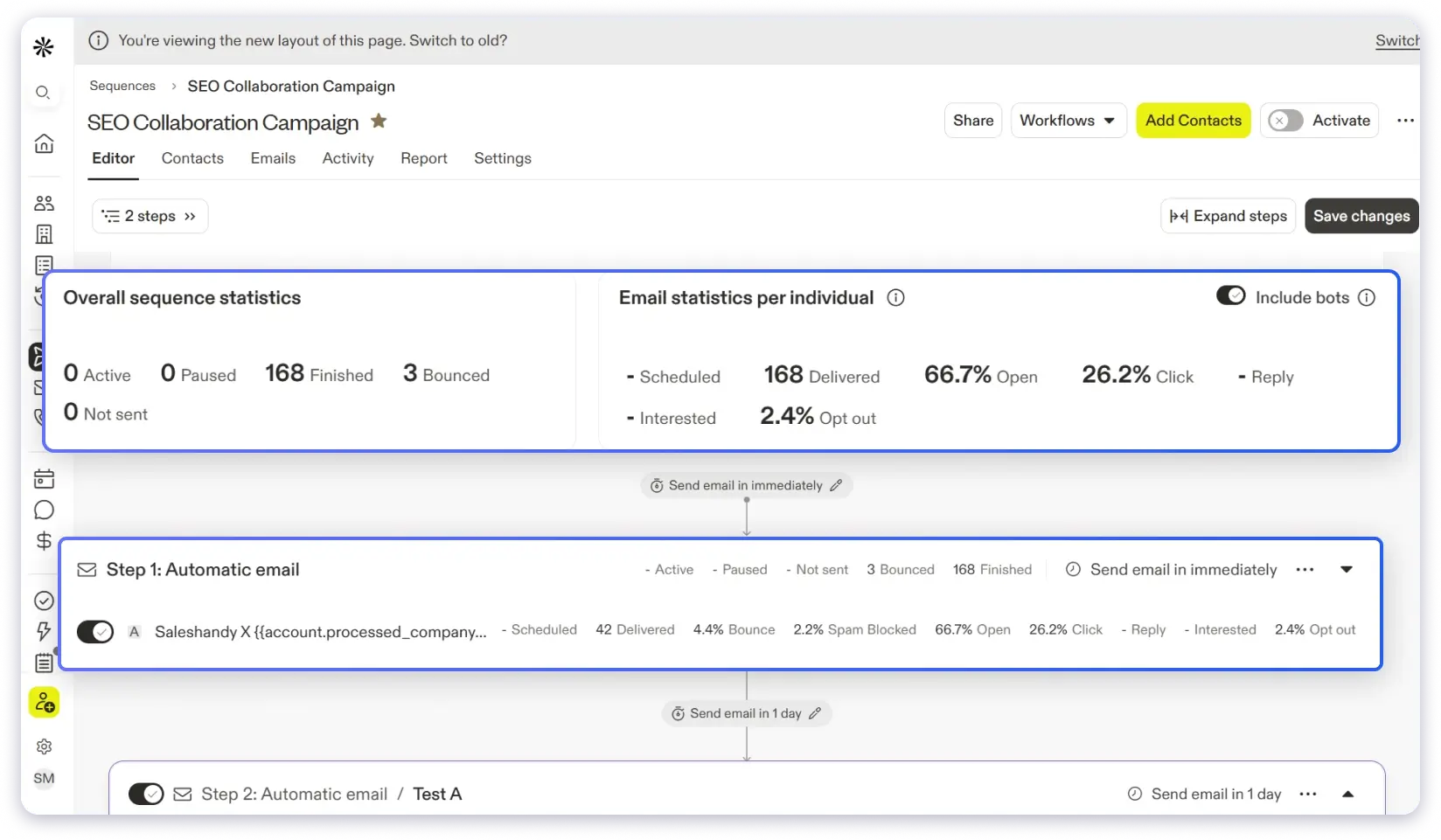
What I liked the most about Apollo is how its AI features and automation capabilities saved me hours of manual work.
All that said, there are trade-offs.
The accuracy of email addresses often drops to around 60–72% outside the US.
Additionally, scaling cold email campaigns can become expensive due to the platform’s pricing structure.
Here Are the Core Capabilities of Apollo 👇🏼
- Lead Database and Prospecting: Apollo.io has a large database of over 210M contacts from 35M+ companies globally. You can use the 60+ filters to narrow down on the right prospects and quickly build targeted lists.
- AI-Assisted Sequence Creation and Personalization: You can use Apollo’s AI to build tailored sequences quickly and also personalize messages at scale.
- Workflow Automation: You can automate the entire process of finding prospects and reaching out using personalized sequences.
Pros of Apollo
- Apollo automatically scores your prospects to help you prioritize the most relevant ones
- You can add personalized videos directly with the Vidyard integration
- Apollo supports integrations with multiple platforms like Pipedrive, HubSpot, Salesforce, Clay, etc
- You can record your calls and meetings, get them transcribed automatically, and receive insights to help you close deals
Cons of Apollo
- It does not have warm-up capabilities.
- It is very expensive and is not scalable.
- Apollo is not ideal for agencies managing multiple clients.
- Unused credits are not rolled over to the next month’s quota
Also Read: Alternative options to Apollo.io
How Much Does Apollo.io Cost?
Apollo charges per user per month with a credit-based system on top:
| Plan | Annual (per month) | Credits (per year) | Key Features |
|---|---|---|---|
| Free | $0 | Limited | 2 sequences, basic filters, Chrome extension |
| Basic | $49/user | 5,000/year (~416/mo) | Advanced filters, A/B testing, and meeting scheduler |
| Professional | $79/user | 10,000/year (~833/mo) | Unlimited sequences, dialer, and AI features |
| Organization | $119/user (min 3 users) | 15,000/year (~1,250/mo) | International dialer, custom reports, SSO |
Hidden costs to watch for:
- Additional credits: $0.20 each (minimum $50 monthly or $500 annual purchase)
- Credits expire at the end of each billing cycle. No rollover.
- Revealing a mobile number costs 8 credits. A team revealing 500 mobile numbers burns 4,000 credits.
- Seat reductions are not allowed mid-term. You pay for all licenses until the contract ends.
Cost example: A 5-person team on Professional (annual) = $395/month.
Add $100/month for extra credits, and you are at $495/month with no warm-up, no agency features, and credits that expire monthly.
What Other Users Have to Say?
“Apollo combines enrichment and Outreach in one tool…
Sequences are easy to set up, and integration with HubSpot is native, which helps us save a lot of time.
Database is updated regularly, but data accuracy can vary in certain regions, and there is a daily limit on sending email, which can feel restrictive.”
3. Instantly.ai
G2: 4.8/5 ⭐
Best For: Individuals or small teams who want a simple setup with unlimited warm-ups and quick campaign launches.
Next cold emailing tool on my list is Instantly.
It is a sales intelligence platform that lets you launch outreach campaigns while helping your emails land in inboxes.
Just like Saleshandy, you can connect unlimited email accounts and run unlimited warm-ups.
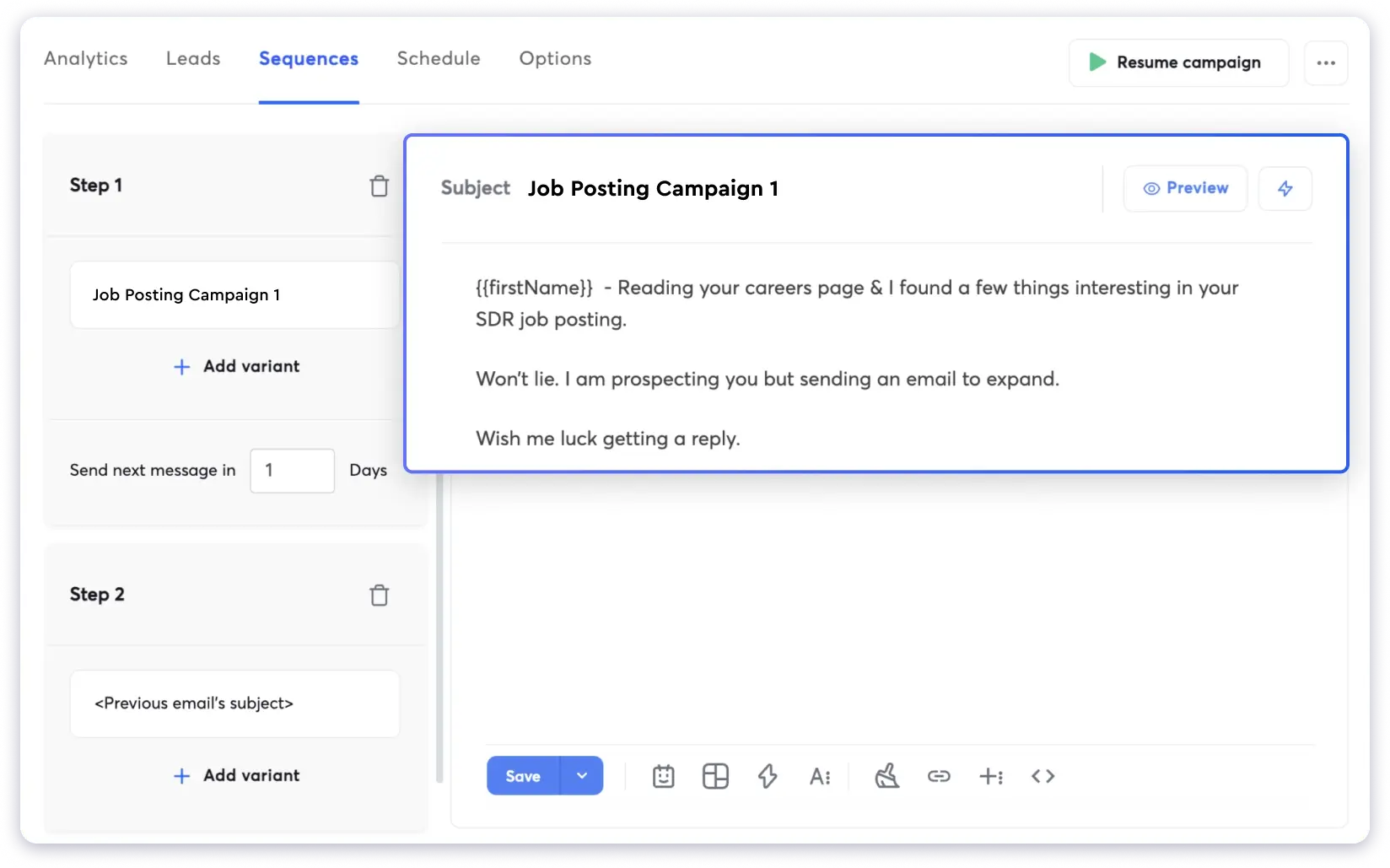
The interface of Instantly is very easy to use. I was able to set up a test campaign in just a few minutes.
From uploading the prospect list to using its campaign builder to frame my email, everything felt simple and fast.
However, I couldn’t use any of its AI features, like the sequence generator or personalization, so I had to use custom variables to personalize emails, which felt pretty disappointing.
AI features aren’t available in the basic plan. You have to subscribe directly to the Hypergrowth plan to access them.
On the other hand, agencies have to pay $77.60/client/month to create a separate workspace.
Here are the Core Capabilities of Instantly👇🏼
- AI Sequence Writer: It generates complete email sequences based on your offer details, target audience, and case studies
- Lead Database: You can find and enrich leads from a database of 450M+ contacts
- AI Personalization: Instantly allows you to run custom AI prompts or use the web research agent to generate personalized content or fields
- Deliverability Toolkit: Along with giving unlimited email warm-up, it also gives you features like IP rotation, ESP matching, and inbox placement tests
- Integrations: Instantly doesn’t offer many native integrations, but with API and webhooks, you can integrate third-party tools.
Pros of Instantly.ai
- Built-in CRM that allows you to track the multichannel outreach activities
- With website visitor identification, you can contact and identify B2B website visitors
- It has a Done-For-You set up that allows you to build a solid email infrastructure
- Instantly offers real-time enrichment across 5+ providers with waterfall enrichment
Cons of Instantly.ai
- All the advanced & AI features are available in the hyper-growth pricing plan
- Some users on G2 have said that there is a learning curve for the advanced feature
Also Read: Instantly Alternatives
How Much Does Instantly.ai Cost?
Instantly splits pricing across three separate products. Here is what the Outreach (Sending & Warmup) plans look like:
| Plan | Annual (per month) | Contacts | Emails/Month |
|---|---|---|---|
| Growth | $37.60/mo | 1,000 | 5,000 |
| Hypergrowth | $77.60/mo | 25,000 | 100,000 |
| Light Speed | $286.30/mo | 100,000 | 500,000 |
Important: These prices are for Outreach only. If you also want:
- Lead database (SuperSearch): Starts at $37.90/month (annual) as a separate subscription
- CRM: Starts at $47/month as a separate subscription
The minimum cost for outreach + leads + CRM on Instantly is $122.50/month (annual billing, all three base plans stacked).
What Other Users Have to Say?
“I’ve been using instantly.ai for my cold email outreach, and it has completely changed the way I run campaigns. The platform is super intuitive, and I was able to get up and running in minutes.
Deliverability has been excellent, and the automation features save me countless hours each week. I also appreciate the analytics dashboard. It makes it easy to see what’s working and quickly optimize my campaigns.”
4. Lemlist
G2: 4.5/5 ⭐
Best For: Sales teams running highly personalized multichannel outreach campaigns with custom landing pages and clickable images
Lemlist is one of the best multichannel outreach tools available.
You can launch personalized outreach campaigns across Email, LinkedIn, WhatsApp, and Calls.
When I was setting up my test campaign, I found Lemlist’s campaign builder unique and very intuitive.
It visualizes your campaign steps in a flow chart or branches. This is very helpful if you’re doing multichannel outreach because you can clearly see what’s coming next.
Where Lemlist really stands out among all the cold email tools is its personalization features.
Apart from text-based personalization, you can also create custom landing pages and clickable images that grab attention and increase engagement.
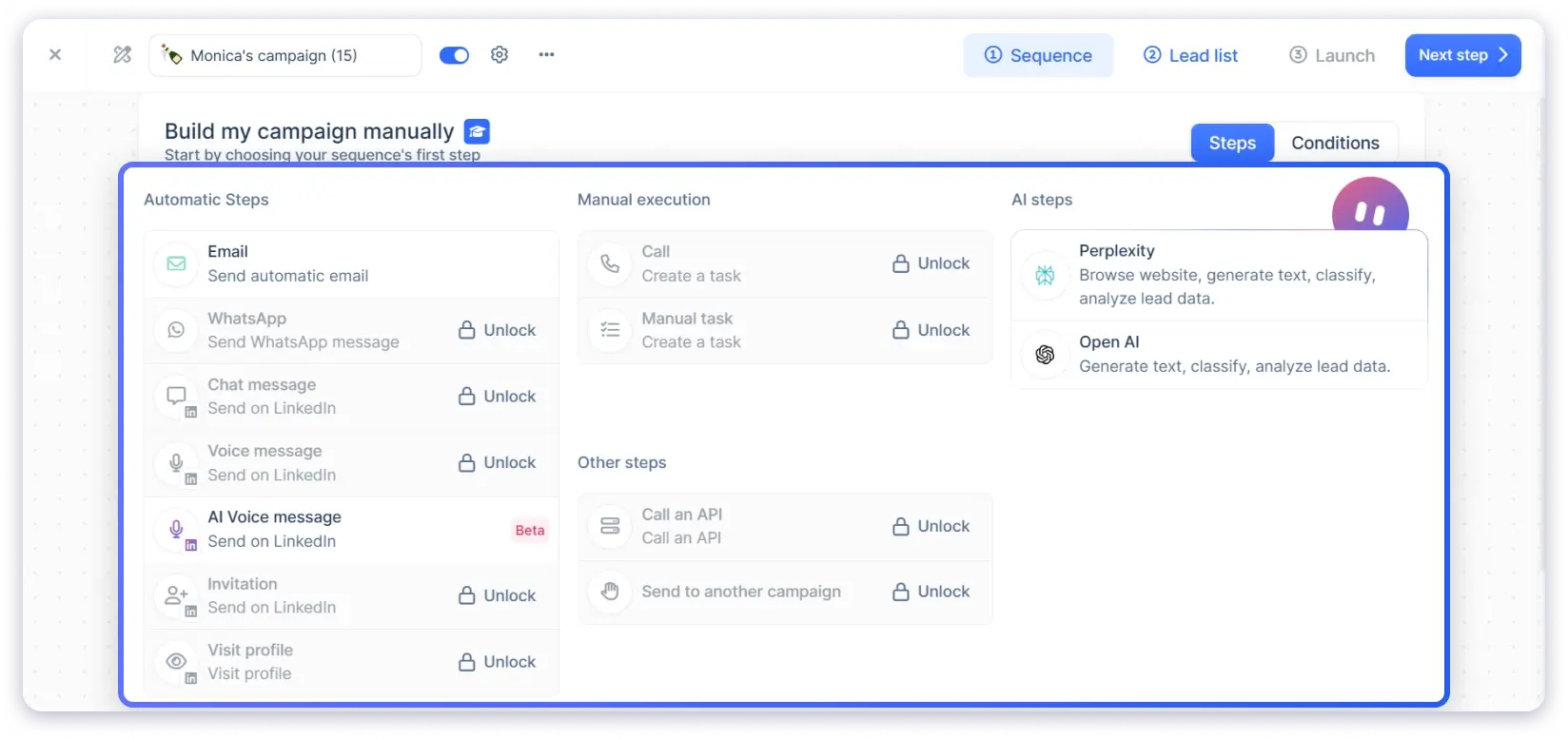
That said, where Lemlist disappointed me was in its limited email deliverability capabilities compared to the other cold email platforms like Saleshandy.
Apart from email warm-up and inbox rotation, it has no other features to maximize deliverability.
If you’re an agency, you can use Lemlist’s Cockpit feature to add and manage clients, but it’s pretty expensive.
As you have to buy a separate plan for each client you add through the Cockpit.
Here Are the Core Capabilities of Lemlist 👇🏼
- Email Outreach & Automation: You can run advanced email sequences with multiple follow-ups, either with AI or manually
- Prospecting: It gives you access to a 450M+ leads database for finding quality prospects
- Personalization Tools: The tool lets you create customized images, use text-based personalization, and add custom landing pages with tailored content
- Multichannel Outreach: You can do LinkedIn outreach, cold calling, and WhatsApp from one platform
- Analytics & Reporting: You can track key metrics, such as open rates, reply rates, and bounce rates, directly from the dashboard. The platform also offers an advanced reports section, where you can use customizable widgets to get the insights you need
- Integrations: Lemlist offers native integration with CRMs like HubSpot, Pipedrive, Salesforce, and other sales more
Pros of Lemlist
- Website visitors tracking to identify high-intent companies visiting your site
- Chrome extension that helps you to directly prospect within LinkedIn, Gmail, HubSpot, and Salesforce
- It offers waterfall enrichment and allows you to enrich your data from multiple sources
- Lemlist has a built-in email finder & verifier
Cons of Lemlist
- The pricing plans are very expensive, especially for small businesses
- To add additional email accounts, you need to pay $9/month
Also Read: Lemlist Alternatives
How Much Does Lemlist Cost?
Lemlist charges per user per month. Here is the breakdown:
| Plan | Annual (per month) | Contacted Prospects | Emails/Month |
|---|---|---|---|
| Starter | $24/mo | 500 | 6,000 |
| Growth | $126/mo | 10,000 | 120,000 |
| Scale | $903/mo | 100,000 | 1,200,000 |
| Max | $6,666/mo | Unlimited | Unlimited |
Cost example: A team of 3 on Multichannel Expert (annual) = $261/month. Add WhatsApp for all three users ($60/month), and you are at $321/month before any extra senders or deliverability add-ons.
What Other Users Have to Say?
“It brings everything under one roof – multi-channel outreach (email, LinkedIn, calls, WhatsApp) plus Lemwarm for deliverability. Having it all in one place saves me from juggling multiple tools and makes it easier to manage campaigns end-to-end.
The fact that it’s continuously adding features to centralize outbound makes me more likely to stick with it long-term. Customer support is great too.”
5. Smartlead
G2: 4.6/5 ⭐
Best For: Businesses that want advanced deliverability features (SmartDelivery, SmartServers, IP rotation) and unlimited email accounts from the base plan.
Smartlead.ai is another popular cold email automation tool that lets you scale your campaigns with ease.
Where Smartlead really stands out is its deliverability features.
Tools like SmartDelivery, SmartServers, AI warm-up, unique IP rotation, and dynamic ESP matching all work together to help keep your emails in the primary inbox.
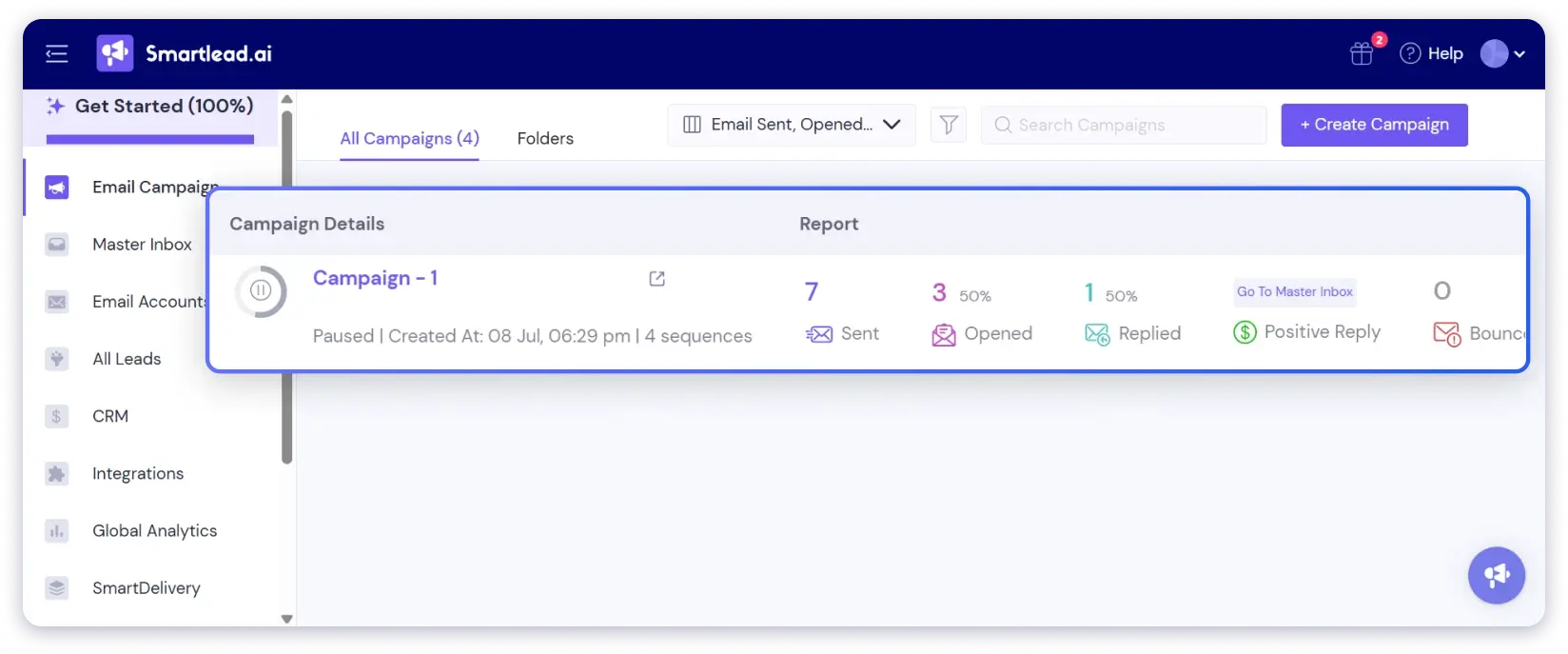
Even if you stick with the base plan, you still get a lot of value.
It includes unlimited email accounts, warm-ups, and unique IP rotation, features that most other tools charge extra for.
While building my test campaign, though, I found Smartlead’s interface a bit outdated.
The purple and white theme wasn’t very appealing, and the campaign builder felt cluttered.
Another downside of Smartlead is personalization. Other cold email software on my list provides custom merge tags and AI-driven personalization, but Smartlead still offers only basic merge tags.
Here Are the Core Capabilities of Smartlead 👇🏼
- Personalization: The platform allows you to personalize your emails with merge tags and Spintax
- Unified Unibox: It centralises conversations from all inboxes and categorizes them
- Automation & subsequences: You can use Behaviour-based flows, reply intent categorization, sub-sequences, and reminders
- Integrations: Smartlead offers integrations with Clay, HubSpot, Salesforce, Pipedrive, Zapier, Make, n8n, etc.
- Omnichannel options: You can automate email outreach and add manual steps for phone and LinkedIn outreach.
Pros of Smartlead
- It allows you to connect unlimited email accounts
- Smartlead now comes with a built-in CRM
- With its centralised master inbox, you can track and manage your conversations
- You can compose emails with AI using its integration with GPT-4
Cons of Lemlist
- Many users have complained about the tool’s outdated interface.
- Unlike other cold emailing tools, it doesn’t have a built-in B2B database or a Chrome extension for prospecting, which means you need to rely heavily on third-party tools
Also Read: Smartlead Alternatives
How Much Does Smartlead Cost?
Smartlead’s basic subscription is priced at $32.50/month when billed annually.
| Plan | Annual (per month) | Active Leads | Emails/Month | Key Limits |
|---|---|---|---|---|
| Basic | $32.50/mo | 2,000 | 6,000 | No integrations, no CRM |
| Pro | $78.30/mo | 30,000 | 150,000 | CRM, integrations, 1 free client |
| Custom | Varies | Up to 12M | Up to 60M | Custom limits |
Add-ons:
- SmartProspect (lead database): $59/month (on top of base plan)
- Extra agency clients: $29/client/month
Cost example: Pro plan + SmartProspect + 5 agency clients = $78.30 + $59 + $145 = $282.30/month (annual billing).
What Other Users Have to Say?
“Smartlead makes cold email outreach at scale easy. The unlimited inbox rotation, built-in warmup, and powerful deliverability tools mean we don’t have to worry about emails landing in spam.The UI is clean, and the campaign setup process is intuitive.”
6. Woodpecker
G2: 4.5/5 ⭐
Best For: Users looking for an easy-to-use interface and condition-based campaigns with free email verification for catch-all domains.
Next up, we have Woodpecker.
A cold email software known for its ease of use and clean interface.
Many users on G2 have praised Woodpecker for its intuitive UI, and I’d readily agree. While exploring the platform myself, I felt the same.
It’s easy to create sequences, especially condition-based campaigns that let you send more personalized and targeted emails to your prospects. Plus, it offers free email verification for catch-all domains.
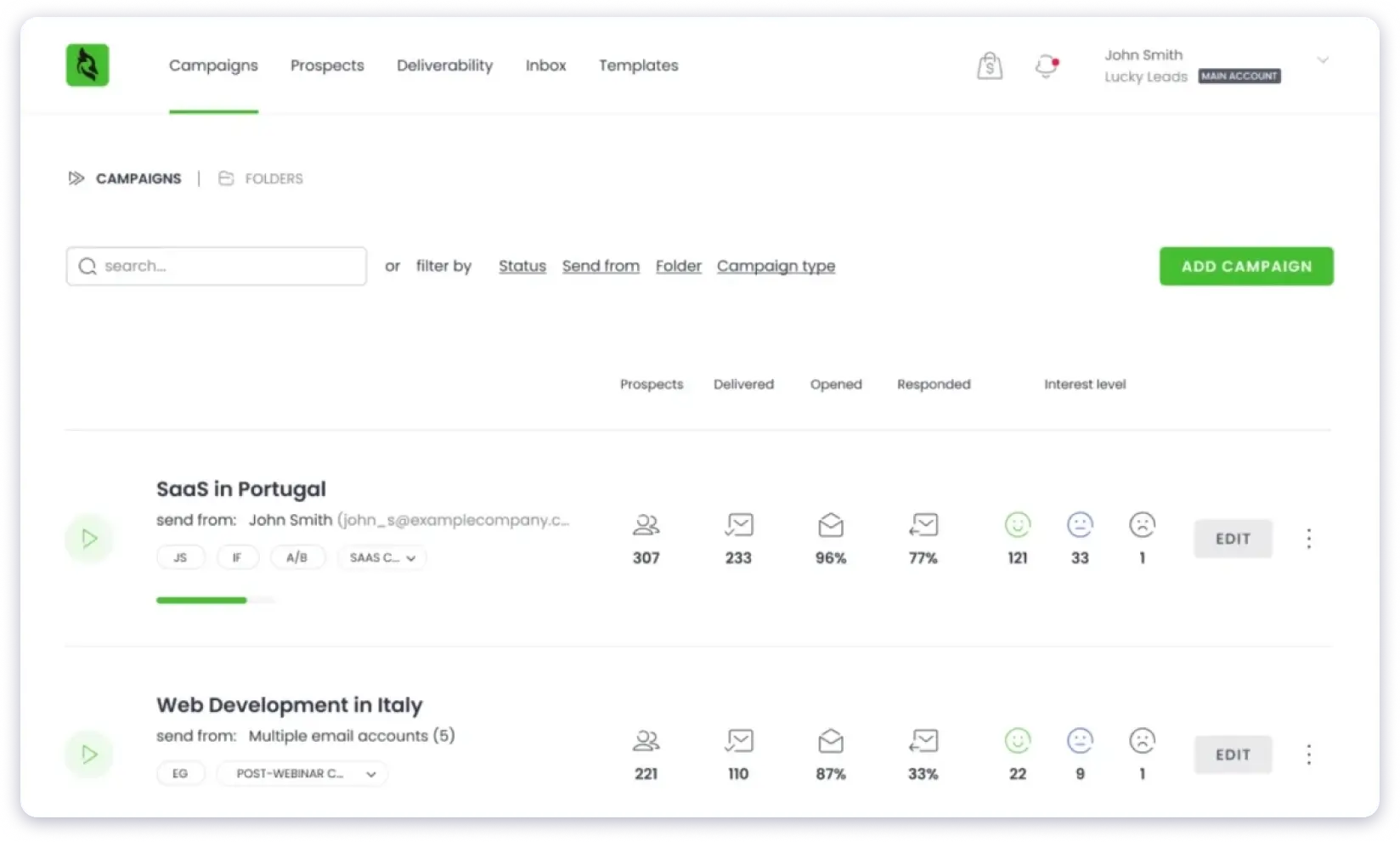
That said, Woodpecker’s pricing plans are quite complicated.
You have to pay additional fees for features that should be included in the base plan, for example, $5 for email warm-up, $20/mo integrations, and $5 for white-labeling.
Also, its LeadFinder is slow and often gives inaccurate results.
Here Are the Core Capabilities of Woodpecker 👇🏼
- Deliverability: Woodpecker has a good set of features, such as email warm-up, inbox rotation, adaptive sending, etc., to boost and maintain deliverability.
- Personalization: You can personalize your emails with dynamic custom tags and spintax.
- AI Interest level detection: It analyzes your client’s message and tells whether they are interest in your offer or not
- Integration: With Woodpecker, you can integrate many tools in your workflow, like Clay, Persana, two-way sync with HubSpot and Pipedrive, and many more.
Pros of Woodpecker
- You can automate LinkedIn outreach
- It allows you to adjust your daily sending limits
- Woodpecker also offers a spam words and links checker
- You can do a domain audit with the SPF and DKIM checker
Cons of Woodpecker
- The pricing plan is based on the number of prospects you can reach out to, which is quite restrictive.
Also Read: Woodpecker Alternatives
How Much Does a Woodpecker Cost?
Woodpecker charges based on contacted prospects per month.
| Plan | Annual (per month) | Contacted Prospects | Emails/Month |
|---|---|---|---|
| Starter | $24/mo | 500 | 6,000 |
| Growth | $126/mo | 10,000 | 120,000 |
| Scale | $903/mo | 100,000 | 1,200,000 |
| Max | $6,666/mo | Unlimited | Unlimited |
Add-on costs (not included in base price):
- LinkedIn automation: $29/LinkedIn account/month
- CRM integrations (HubSpot, Pipedrive, etc.): $20/month
- Agency panel: $27/client/month
- Extra warm-ups: $5/inbox/month
- Extra Lead Finder credits: Paid packs
Cost example: Growth plan + 3 LinkedIn accounts + integrations + 5 agency clients = $126 + $87 + $20 + $135 = $368/month (annual billing).
Saleshandy starts at $25/month with unlimited email accounts, 830M+ database, built-in CRM, LinkedIn tasks, and unlimited agency clients. No add-on stacking.
What Other Users Have to Say?
“Woodpecker offers tons of tools specialised for cold-outreach. Their sequencing is easy to use and set up, and after adding your leads, you just let it run.
Honestly, Karina from Woodpecker was so supportive in answering my many questions and helping me get started, which gave me a sense of relief.”
7. Snov.io
G2: 4.5/5 ⭐
Best For: Teams wanting a straightforward sequence builder, drip campaigns with automated follow-ups, and AI writing in one platform.
Snov.io lets you find prospects and reach out to them through cold emails and LinkedIn.
You can connect unlimited email accounts to scale your outreach, which is a big plus for growing teams or businesses with high-volume needs.
However, it does restrict you to strict email sending limits, so it’s worth checking the plans carefully and choosing the one that suits you best.
While trying out Snov.io, I found its sequence builder straightforward. You can create drip campaigns with automated follow-ups, use the AI Writer, and run A/B tests.
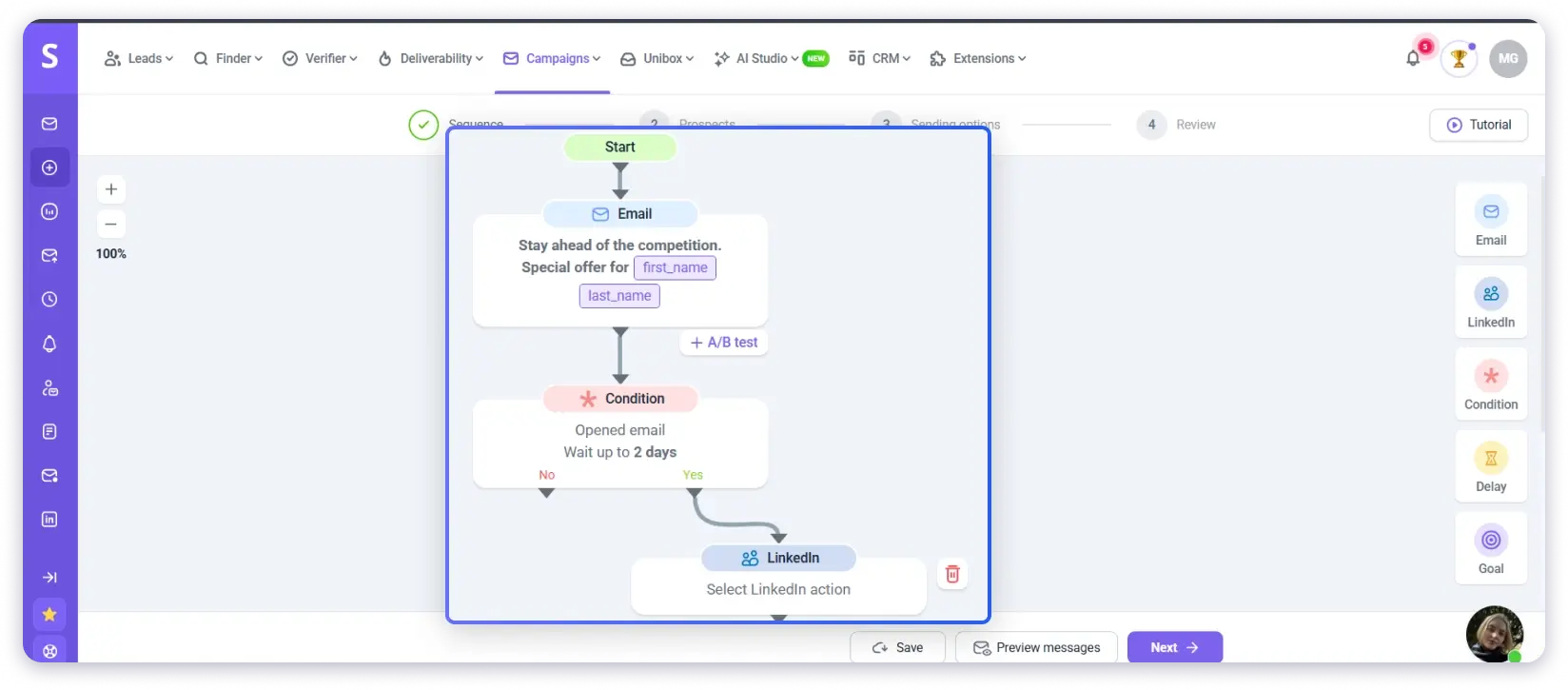
I also liked how intuitive it was to personalize emails at scale and add conditions for follow-ups to optimize campaigns for the best results.
If you’re looking for simplicity mixed with solid cold email automation functionality, Snov.io does a decent job.
Snov.io also offers a Magic Pixel feature that allows you to track open rates safely. However, I wouldn’t recommend using it, as tracking pixels aren’t a best practice and can hurt your deliverability in the long run.
Here Are the Core Capabilities of Snov 👇🏼
- Deliverability: Snov.io comes with some handy deliverability features, like email verification, warming up new email addresses, ESP matching, etc.
You can also set sending limits for your email accounts to avoid getting flagged by email service providers. - Drip Campaigns: The Snov.io email drip campaigns feature lets you nurture leads, build relationships, and guide prospects to enter the sales funnel using AI.
- Agency Portal: Snov.io has a separate pricing plan for agencies, in which you get unlimited seats and can add unlimited clients.
Pros of Snov.io
- It has a built-in email finder and verifier
- With its Sales CRM, you can track all your outreach efforts from a single place
- Snov offers a Domain and IP blacklist detector
- Chrome extension allows you to prospect on LinkedIn
Cons of Snov.io
- LinkedIn automation is not included in the price plans and is purchased separately at $69/mo/account
- Many users have complained about the slow customer support assistance
How Much Does Snov.io Cost?
Snov.io has a credit-based system with separate quotas for credits and recipients:
| Plan | Annual (per month) | Credits | Recipients | Warm-up Slots |
|---|---|---|---|---|
| Trial (Free) | $0 | 50 | 100 | 1 |
| Starter | $29.25/mo | 1,000 | 5,000 | 3 |
| Pro S | $74.25/mo | 5,000 | 25,000 | Unlimited |
| Ultra | $553.50/mo | 100,000 | 200,000 | Unlimited |
Add-ons:
- LinkedIn automation: $69/LinkedIn account/month
- All plans include unlimited team seats, unlimited emails, and unlimited campaigns
Cost example:
Pro S (annual) + 2 LinkedIn accounts = $74.25 + $138 = $212.25/month.
What Other Users Have to Say?
“Snov.io makes it easy to find, verify, and reach out to leads all in one place. The platform is simple to navigate, and the email sequencing and automation features help save time for our team.”
8. Klenty
G2: 4.6/5 ⭐
Best For: Users who want to start with cold emailing and then expand into full sales engagement across multiple channels
The next cold email tool on my list is Klenty.
It is an AI-powered sales engagement platform, but it has solid cold emailing automation capabilities and offers a completely different pricing plan for it.
This makes it a good choice if you want to start with cold emailing and then expand your outreach efforts to other channels, such as cold calling, LinkedIn, SMS, and WhatsApp.
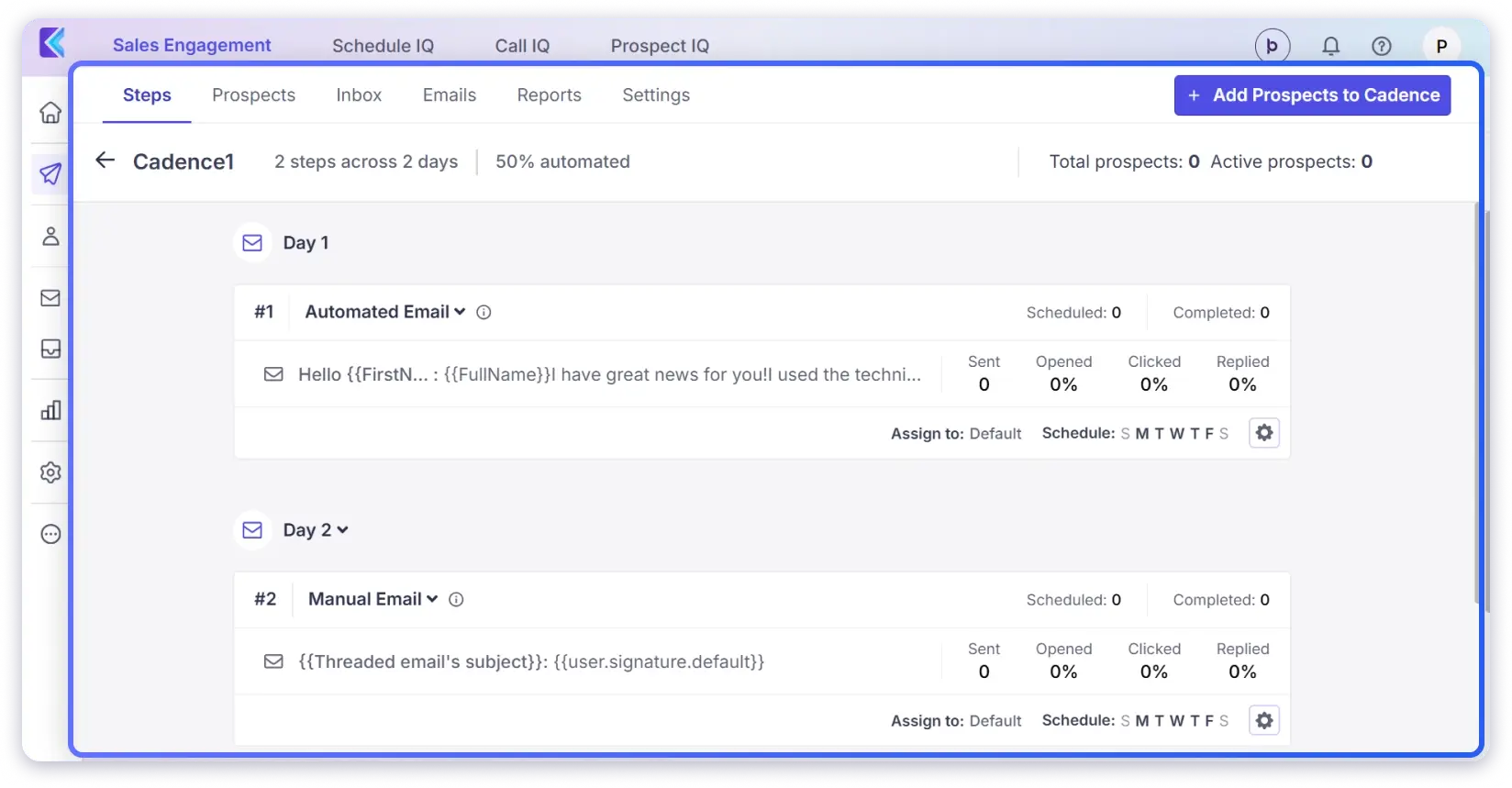
The feature that impressed me the most was its AI SDR.
This powerful tool learns your value proposition and customer pain points, identifies prospects, researches them, and creates a personalized multi-channel outreach campaign.
Plus, it also offers a built-in tool to clean and enrich prospect data based on a specific target list.
Here Are the Core Capabilities of Klenty 👇🏼
- AI Email Writer (Ask Kai): It helps you create hyper-personalized emails. You simply have to prompt for details about your business and prospects.
- Reply Detection: The AI reply management categorizes responses (e.g., Interested, Not Interested) to prioritize follow-ups.
- AI List Builder: It helps you find accounts that match your ICP and buyer persona and scores them based on your inputs. It also finds contact details with the waterfall enrichment method.
- Sales Engagement Workflows: You can build workflows that trigger actions based on prospect behavior so that no lead slips through your emails.
Pros of Klenty
- Automated follow-up campaigns with intelligent scheduling
- The platform offers powerful AI personalization for each prospect and account
- It offers unlimited inboxes within a single domain and automatic email rotation
- It even offers a strong email deliverability suite (warmup, inbox rotation, spam checks)
- Responsive support team praised by many users
Cons of Klenty
- It has a steep learning curve for new users when using its advanced features
- Multichannel outreach is not available in basic plans
How Much Does Klenty Cost?
Klenty charges per user per month:
| Plan | Annual (per month) | Key Features | ||
|---|---|---|---|---|
| Startup | $50/user/mo | Email outreach, personalization, basic CRM sync | ||
| Growth | $70/user/mo | + Multichannel (calls, LinkedIn, SMS), dialer, advanced automation | ||
| Plus | $99/user/mo | + AI features, Call IQ, conversation intelligence, coaching | ||
| Enterprise | Custom | + SSO, IP-based restrictions, monthly CSM review |
Add-ons:
- Prospect IQ (data enrichment): $80/month for 1,000 emails + 200 phone credits
- Call IQ (standalone): Starts at $20/user/month
- Additional Prospect IQ credits: Paid packs
Cost example: A 5-person team on Growth + Prospect IQ = $350 + $80 = $430/month (annual). No leads database, no CRM included (you bring your own), and warm-up is not part of the platform.
What Other Users Have to Say?
“I’ve been using Klenty for the past six months, and it has truly streamlined my outbound outreach process. The platform is very intuitive and easy to navigate, making it accessible even for those new to sales automation tools.
One of the standout features for me is how seamlessly Klenty automatically creates and groups leads from LinkedIn, then uploads them directly into the platform.”
9. Reply.io
G2: 4.6/5 ⭐
Best For: Teams that want multi channel outreach and a simple AI powered tool at scale for their entire sales efforts.
Reply.io allows you to automate and personalize sales outreach with strong multi-channel capabilities.
You can also use it to manage a large part of your sales cycle.
From prospecting to follow-ups, Reply keeps everything organized so you can stay focused on closing deals.

What makes it a strong email outreach tool
You can connect unlimited email accounts and set up advanced automation with ease.
The AI-based personalization makes your emails sound more natural, and the deliverability tools help your messages reach the inbox more often.
I found the AI Variables feature especially useful.
It helped me personalize emails at scale by pulling details for each prospect and creating opening lines that felt real, not spammy.
It added the human touch my outreach needed.
Here are the Core Capabilities of Reply.io 👇🏼
- Multi-channel Outreach: You can create and automate your outreach sequences on channels like email, LinkedIn, SMS, calls, and WhatsApp
- Deliverability Toolkit: It offers features like email warm-up, spam checker, and inbox rotation to ensure your emails land in the inbox
- Unified inbox: With Reply, you get a centralized inbox to manage and respond to conversations from all your multichannel replies
Pros of Reply.io
- The interface is user friendly and easy to understand
- The AI SDR can automate large parts of your sales workflow
- It comes with strong CRM integrations that work well with your existing tools
- You can use its AI personalization tools to boost engagement and response rates
Cons of Reply.io
- Some users have faced bugs and slower performance at times
- Many G2 reviews mention LinkedIn bans linked to their automation features
- Users on higher plans have reported rigid contract terms and unexpected billing concerns
How Much Does Reply.io Cost?
Reply.io offers several plan types depending on your use case:
| Plan | Price | Contacts | Key Features |
|---|---|---|---|
| Email Volume | $59/mo | 1,000 active | Email only, unlimited mailboxes |
| Multichannel | $89/user/mo (annual) | Varies | Email + LinkedIn + SMS + Calls, 10 mailboxes/user |
| Agency | $166/mo (3+ users, annual) | Varies | Unlimited clients, unlimited users |
| Jason AI SDR | Starts from $259/mo | AI-managed | Fully automated prospecting and outreach |
Cost example: A 3-person team on the Multichannel plan (annual billing) = $267/month. Add the Jason AI SDR for full automation, and you are at $767+/month.
What Users Have to Say?
“Reply.io is extremely helpful in performing pre planned outreach for any number of people. I use this almost every day as I manage mail merges via Reply.io. I set up sequences, check delivery, open, and bounce rates, pull reports, and export lists when needed. All of this feels intuitive to use.”
10. Mailshake
G2: 4.7/5 ⭐
Best For: Sales teams that want a simple cold email tool with a built-in phone dialer and LinkedIn automation without a steep learning curve.
Mailshake is one of the easiest-to-set-up cold email tools on my list.
What I noticed about Mailshake is that it doesn’t try to do everything. It focuses on email outreach, adds a phone dialer and LinkedIn steps, and keeps the rest simple.
The Shakespeare AI writer was decent for generating first drafts of cold emails.
I gave it my campaign goals and target audience, and it produced usable subject lines and body copy. It still needed editing to sound natural, but it’s a good starting point if you’re staring at a blank email.
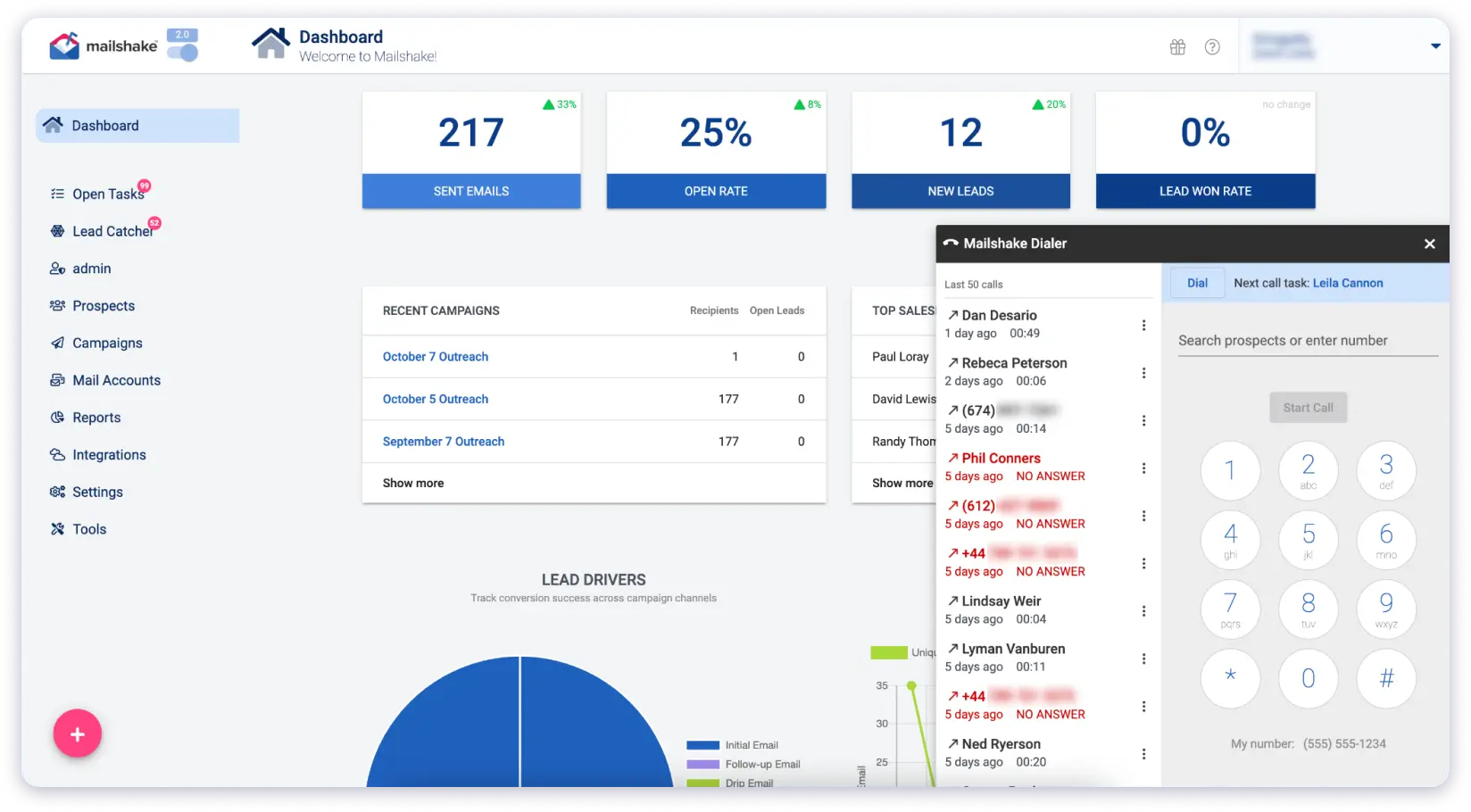
The power dialer is where Mailshake stands apart from most email-first tools on this list. You can add call steps directly into your sequences and make calls from your browser.
If your outreach process includes cold calling alongside email, having both in one tool is convenient. You get unlimited dialer minutes for North American numbers on the Sales Engagement plan.
One thing I found limiting was there’s also no free trial. You have to commit to a paid plan upfront, which makes it harder to test before buying.
They do offer a 30-day money-back guarantee, but that’s not the same as exploring the tool risk-free.
Here are the Core Capabilities of Mailshake 👇🏼
- Automated Email Sequences: Build multi-step email campaigns with automated follow-ups that stop when a prospect replies.
- Power Phone Dialer: Make calls directly from your browser with call scripts, notes, and outcome tracking built into sequences.
- LinkedIn Automation: Send connection requests, messages, and profile views as part of multichannel sequences (Sales Engagement plan only).
- Lead Catcher: Identifies engaged leads based on opens, clicks, and replies so you can prioritize follow-ups.
- Email Warm-up & List Cleaning: Built-in warm-up and email verification to protect sender reputation.
- A/B Testing: Test different email versions to find what gets the best response.
- CRM Integrations: Native connections with Salesforce, Pipedrive, and HubSpot. Plus 1,000+ integrations via Zapier.
Pros of Mailshake
- Clean interface that’s easy to learn. Most users get their first campaign running within a day.
- The power dialer is genuinely useful if your outreach includes cold calling.
- Strong customer support. Multiple reviewers mention responsive, hands-on onboarding help.
- Ready-to-use mailboxes let you spin up sending accounts quickly without manual DNS setup.
Cons of Mailshake
- No free trial. You pay before you can test the tool.
- Per-user pricing gets expensive fast. A 5-person team on the Email Outreach plan costs $225/month (annual).
How Much Does Mailshake Cost?
Mailshake offers plans are per-user. Each additional team member adds the full cost. No unlimited accounts. No flat-rate pricing.
| Plan | Monthly | Annual (per month) | Key Limits |
|---|---|---|---|
| Starter | $29/user | $25/user | 1 email account, 1,500 sends/month |
| Email Outreach | $59/user | $45/user | 2 email accounts, unlimited sends |
| Sales Engagement | $99/user | $85/user | 5 email accounts, LinkedIn + dialer |
For comparison, Saleshandy’s Outreach Starter gives you unlimited email accounts at $25/month total. Not per user. That’s a significant difference if you’re planning to scale.
What Users Have to Say?
“Mailshake stands out for its clean, intuitive interface that makes setting up and managing cold email campaigns incredibly straightforward, even for teams without deep technical expertise. We love how quickly we can build personalized sequences, add conditional logic for follow-ups, and incorporate multi-channel touches like phone and LinkedIn tasks all in one dashboard.”
How to Choose the Best Cold Email Software
Picking a cold email tool isn’t just about features.
It’s about finding one that fits how you actually work — your team size, your budget, and what your outreach looks like day to day.
- Pricing Structure and Total Cost
- Core Sequence and Automation Features
- Real Value of AI Capabilities
- Modern Outreach and Product Innovation
- Depth of Personalization Options
- Deliverability Infrastructure and Protection
- Team and Client Management Flexibility
Here’s what I’d focus on.
1. Check Pricing Plans
Every tool looks affordable on the pricing page. But once you look at the details, you’ll find some of them charge per user per month. Others sell their database, CRM, and warm-up as separate subscriptions that stack on top of each other.
So before you commit, add up what you’ll actually pay. Your team size, the number of clients you manage, and the extras you need. That’s your real cost.
2. See the Core Sequence Features
This is the feature you’ll use every single day. So look at the basics first.
- Can you build multi-step follow-ups without overcomplicating things?
- Does it pause automatically when someone replies?
- Can you A/B test subject lines and email bodies easily?
- Can you add conditions, like sending a different follow-up based on whether someone opened your email or not?
If the basic sequencing feels slow or confusing during a free trial, it’s not going to get better once you’re running 10 campaigns at once.
3. Check if the AI Features Are Actually Worth the Hype
Every cold email tool in 2026 claims to be “AI-powered.” But there’s a real difference between AI that generates a full multi-step sequence from your website and ICP in minutes, and AI that just rewrites your subject line slightly differently.
The way to test this is simple — run one real campaign using the AI features and see if the output is something you’d actually send.
If you’re rewriting 80% of it anyway, the AI isn’t saving you time. It’s just adding a step.
4. Look if It Provides the Latest Outreach Capabilities
The cold email space moves fast. Tools that were leading two years ago can feel outdated if they haven’t kept up.
In 2026, the features that actually move the needle include AI prospect enrichment that fills in research before you send, waterfall data verification across multiple providers, inbox placement testing so you know where your emails land before you hit send, and MCP access that lets you connect the tool directly to your own AI workflows.
If a platform hasn’t shipped anything meaningful in the last 6 months, it’s probably coasting.
5. Level of Personalization It Supports
First name and company name stopped being personalized a long time ago.
What you want now is the ability to pull in real context recent funding rounds, job changes, company news, tech stack, and turn those into merge tags that drop right into your sequences.
Some tools do this with built-in AI enrichment.
Others make you do it manually or through a third-party tool. The difference between a cold email that gets ignored and one that gets a reply usually comes down to how relevant those first two lines feel.
6. A Deliverability Stack You Can Trust
Warm-up and sender rotation are just the starting point now.
What separates serious tools from the rest is what they offer beyond warm-up.
Can you test inbox placement before launching a campaign?
Does it catch bad data early with AI bounce detection?
Does it score your sequence for spam triggers before you hit send?
Does it monitor blacklists and warn you before your domain reputation takes a hit?
If your cold email automation tool offers advanced deliverability features, then it’s worth the purchase; otherwise, it’s just waste of money.
7. Team and Client Management
This one matters most if you’re running a bigger team or an agency. Therefore, when you are looking for a cold email platform, make sure the following criteria are met.
Can you add team members without your bill multiplying per seat?
Can you onboard new clients without buying separate workspaces for each one?
Is there white-labeling so your clients see your agency’s branding instead of the tool’s?
And does each client’s data stay completely separate?
If you’re managing outreach for even 3 or 4 clients, these things directly affect your margins and how much time you spend on admin vs. actual selling.
So, Which Is the Best Cold Email Tool?
If you’re here, I’m guessing you care about getting better at email outreach.
Tools like Saleshandy, Lemlist, Instantly, Apollo, and Woodpecker are leading the space right now.
And if you want to see how they compare, you can check out these detailed breakdowns:
My take is simple. Choose a cold email tool that is actually designed for outreach and keeps all your campaigns in one place.
And for that, Saleshandy is the best pick. Here’s why:
- Quick sequence creation with AI Sequence Copilot
- Amazing email deliverability stack (unmatched)
- Unified inbox to manage all replies in one place
- Native CRM integrations to keep your pipeline updated
So, I will suggest that you take a leap of faith and choose a cold email outreach tool that best fits your needs.
FAQs
1. What is Cold Email Software?
It’s a tool that helps you send cold emails, manage replies, and automate most of the outreach process. These tools make it easy to scale your outreach while still keeping messages highly personalized.
2. Is Cold Emailing Legal?
Yes, it’s legal — as long as you don’t spam. Many people break compliance laws by sending mass, untargeted emails. The key is to create genuine, personalized campaigns.
3. How is Cold Email Software Different from Email Marketing Software?
Cold email software is for 1:1 sales outreach (personalized emails to prospects). On the other hand, email marketing software, like Mailchimp, is for bulk promotional campaigns to opt-in subscribers.
4. What’s the Best Cold Email Platform for Startups or Small Teams?
Startups usually look for affordability, deliverability, and ease of use. Tools like Saleshandy are popular because they combine AI-powered sequences, strong deliverability features, and CRM sync in one place.
5. Which Is the Best Free Cold Email Software?
Well, no tool will let you send cold emails forever for free. But almost all of the top cold email software on my list offer either a free-forever plan or a trial that gives you the key features you need to run outreach sequences..