
Cold email is one of the most effective ways to create opportunities, whether you are generating sales leads, looking for a job, raising funds, recruiting talent, building partnerships, or earning backlinks.
It worked in 2020. It works in 2026. And it will continue to work because a relevant message sent to the right person can still start a conversation.
But cold email has also evolved.
The strategies, benchmarks, and expectations around cold email have evolved over the years.
Whether you are starting from scratch or looking to improve your campaigns, understanding what cold email is, how it works, and what results to expect is essential.
This guide covers everything from the fundamentals of cold email and how it differs from email marketing to list building, campaign setup, deliverability, email writing, and performance tracking.
It is backed by our benchmark report, which analyzed 53.1 million cold emails sent between January and June 2026 across 60,000 sequences, providing real benchmarks for reply rates, meeting rates, and other key metrics you can compare against your own campaigns.
Let’s get into it!
What is Cold Email – TOC
- TL;DR: Cold Emailing Explained in 2026
- What is a Cold Email?
- Is it Legal to Send Cold Emails?
- Does Cold Email Still Work in 2026?
- What are The Benefits of Cold Emailing in 2026?
- What are the Various Use Cases of Cold Email?
- How to Send Cold Emails That Get Replies?
- Cold Emailing Best Practices to Achieve the Desired Outreach Goal
- What are the Best Cold Email Tools?
- How to Measure the Performance of Your Cold Email Campaigns?
- Start Sending Cold Emails That Get Replies
- FAQs on Cold Email
TL;DR: Cold Emailing Explained in 2026
- A cold email is a targeted message sent to someone you have no prior relationship with, usually to start a business conversation or create an opportunity.
- Cold email can generate meetings at scale. A $34/month plan with 6,000 emails can reach around 1,200 prospects and generate 24 to 36 meetings at typical conversion rates.
- The average cold email conversion rate is 2% to 3% meetings per prospect contacted when targeting, messaging, and deliverability are working together.
- A healthy cold email reply rate is 3% to 5%. Our analysis of 53.1 million cold emails sent between January and June 2026 across 60,000 sequences found an average reply rate of 3.7%, while top-performing campaigns crossed 10%.
- Keep cold emails short. Emails between 50 and 80 words with a single soft CTA perform better than messages that push for a meeting immediately.
- Follow-ups drive a significant share of results. Nearly half of positive replies come after the first email, with the first follow-up alone generating 26.4% of positive responses.
- Smaller campaigns often perform better because they allow for more relevant messaging. Sequences targeting fewer than 200 prospects achieve around twice the reply rate of sequences targeting 500+ prospects.
- Always verify your email list before sending. Verified contacts have a lower bounce rate (1.53% vs. 2.55%), helping protect your sender reputation.
- Deliverability starts with your setup. Warm up email accounts and configure SPF, DKIM, and DMARC before increasing sending volume.
- The right cold email software helps manage sending, deliverability, and replies in one place, so you can run campaigns without relying on multiple disconnected tools.
What is a Cold Email?
A cold email is a targeted message you send to a person with whom you have no prior connection.
Its primary goal is not to close a sale immediately, but to start a relevant business conversation, secure a meeting, or build a professional connection
Cold Email Example
Here is a cold email that follows every rule in this guide.
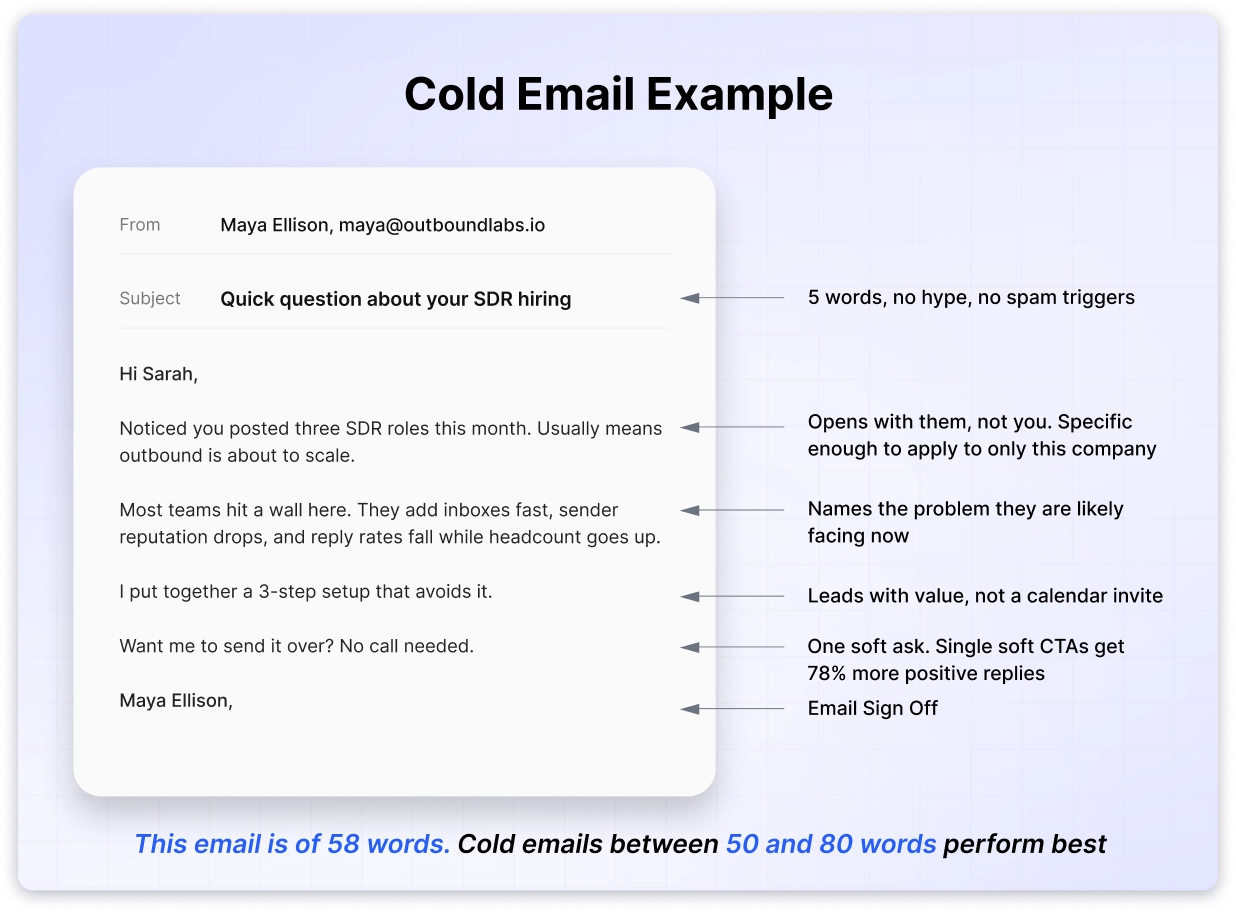
Read it again and notice what is missing. No “I hope this email finds you well.” No paragraph about the sender’s company before the prospect’s situation. No 30-minute meeting request from a stranger.
It opens with something true about the recipient. It names a problem they are likely facing. It offers something useful. Then it asks for one small thing.
That structure is what separates a cold email from spam.
Cold Email is Not Spam
Spam is sent in bulk to anyone, with no relevance and often no real sender identity.
A cold email is targeted at a specific person for a specific reason, and it comes from a real address you can reply to.
The recipient decides which one you sent. If your email could have gone to 5,000 people without changing a word, they will read it as spam, and their inbox provider will eventually agree.
Cold Email vs Email Marketing vs Warm Email
This is where most people get confused, so it is worth being precise.
All three involve sending email. The difference is the relationship you have with the person receiving it.
| Cold email | Email marketing | Warm email | |
|---|---|---|---|
| Relationship | No prior contact | Subscribed or opted in | Some prior interaction |
| Consent | No explicit consent | Explicit opt-in | Implied through engagement |
| Sent to | One person at a time | A list, in bulk | One person at a time |
| Goal | Start a conversation | Nurture, promote, retain | Continue a conversation |
| Volume | Low per send, highly targeted | High, one message to many | Low |
| Typical reply rate | 3% to 5% | Rarely measured by replies | Much higher |
| Sent from | Dedicated sending domain | Marketing ESP | Your normal inbox |
Cold Email vs Email Marketing
Email marketing goes to people who asked to hear from you. They downloaded something, signed up for a newsletter, or bought from you before.
Because they opted in, you can send the same message to thousands of them at once. Success is measured in opens, clicks, and revenue per send.
Cold email goes to people who have never heard of you. There is no opt-in, so relevance has to do the work that consent normally does.
That changes everything about how you send. You write one message for a small, specific group. You send from a separate domain so a bad campaign cannot damage your main one. And you measure replies, not clicks.
The practical difference: an email marketing blast to 10,000 subscribers is normal. A cold email blast to 10,000 strangers will get your domain blocked.
Cold Email vs Warm Email
A warm email goes to someone who already knows you exist.
Maybe they replied to a previous message, met you at an event, visited your pricing page, or connected with you on LinkedIn. There is some thread of prior contact to pull on.
Warm emails perform much better because you can reference that shared context in the first line.
Most cold email sequences are built to turn cold into warm. The first email is cold. Once someone replies, every message after that is warm.
Is it Legal to Send Cold Emails?
Yes. Cold emailing is legal in most countries, including the US, the UK, Canada, and across the EU, as long as you follow the rules that apply where your recipient is based.
The confusion comes from people mixing up cold email and spam. The laws do not ban unsolicited email. They ban deceptive, untraceable, and unstoppable email.
Here is what the main regulations actually require.
1. CAN-SPAM (United States)
CAN-SPAM permits cold email without prior consent. You must:
- Use accurate “From,” “To,” and reply-to information
- Avoid misleading subject lines
- Include a valid physical postal address
- Provide a clear way to opt out
- Honor opt-out requests within 10 business days
There is no consent requirement. Penalties apply per email, so a careless bulk send can get expensive quickly.
2. GDPR (European Union)
GDPR is stricter but still allows B2B cold email under “legitimate interest.”
You need to document why your outreach is relevant to that person’s professional role, contact them at a business address rather than a personal one, tell them where you got their details if asked, and honor deletion requests.
B2C cold email under GDPR effectively requires prior consent. If you are selling to consumers in the EU, cold email is not the right channel.
3. CASL (Canada)
CASL is the strictest of the three. It generally requires express or implied consent before you send.
Implied consent can exist if the person published their business email publicly without a statement refusing unsolicited mail, and your message relates to their role.
4. PECR (United Kingdom)
The UK allows B2B cold email to corporate subscribers without prior consent, provided you identify yourself and offer an opt-out. Sole traders and partnerships are treated more like individuals, so tread carefully there.
The short version: identify yourself honestly, have a real reason to be emailing that specific person, and make it easy to stop hearing from you. Do those three things and you are compliant almost everywhere.

This question about cold emailing being legal arises because many people confuse cold emailing with spamming!
Don’t worry. If you just remember to follow the best practices, your emails will not land in the spam folder.
Does Cold Email Still Work in 2026?
Yes, and I have the numbers to show what “works” actually looks like.
Across 53.1 million cold emails sent through Saleshandy between January and June 2026, spanning 60,000 sequences, the average reply rate was 3.7%.
Top-performing campaigns crossed 10%. The best cleared 15%.
That gap is the whole story. Cold email did not stop working. Most people are just running the version of it that never worked.
What Cold Email Success Looks Like in 2026
| Metric | Average | Good | Top performers |
|---|---|---|---|
| Reply rate | 3.7% | 5% to 8% | 10%+ |
| Positive reply rate | 3% to 5% | 5%+ | 8%+ |
| Bounce rate (verified list) | 1.53% | Under 2% | Under 1% |
| Meetings per 100 prospects | 2 to 3 | 4 to 5 | 6+ |
If your reply rate is under 2%, something specific is broken. It is almost always the list, the setup, or the ask, and I cover all three below.
What Changed in Cold Emailing in 2026
Three things made cold email harder, and none of them are about writing.
- Inbox providers got stricter: Google and Microsoft tightened bulk sender requirements. Authentication that used to be optional is now the price of entry.
- Volume stopped working: Sending more is now actively counterproductive. Sequences under 200 prospects get roughly twice the reply rate of sequences over 500, because you cannot write something specific for 5,000 people.
- Everyone got the same tools: AI made it trivial to produce a personalized-looking email at scale, so recipients got much faster at spotting one.
Why Do Cold Emails Still Work in 2026?
Because the alternative channels are worse.
Ads cost more every year. Cold calls reach a voicemail. LinkedIn DMs are capped and increasingly ignored.
Cold email is the only channel where you can reach a specific decision-maker, at almost no marginal cost, with a message written for them.
At roughly $2 per meeting booked, nothing else in B2B comes close on cost.
What are The Benefits of Cold Emailing in 2026?
If you do cold emailing correctly, the benefits can surprise you in 2025. Let me list a few of them for you.
- Scalability
- Automation for Personalization
- Highly Targeted Approach
- Most Cost-Effective Lead Generation Channel
- Can Be Opted by Small Teams As Well
1. Scalability
Cold emailing allows you to scale like no other lead generation strategy.
Using secondary domains and doing proper email warmups, you can quickly scale and send up to 10,000 emails. (daily)
(Note: I advise sending up to 50 emails per day/email account to keep email deliverability intact.)
2. Automation for Personalization
Generic emails will not work in 2025, not the usual Hello {{first name}} for sure!
But who has to personalize every email, right? That is where email personalization tools come in.
Yes, many tools today dynamically change content and update their intent based on user behavior.
Advanced tools also use buyer intent to take personalization and relevancy to the next level.
3. Highly Targeted Approach
You can segment your prospects based on your Ideal Customer Profile (ICP) before you start sending cold emails.
This way, you’ll be able to tailor your messaging to what actually matters to them — their role, industry, pain points, or goals.
That’s what makes cold emailing such a highly targeted and effective approach.
4. Most Cost-Effective Lead Generation Channel
Unlike traditional marketing and sales methods, you do not need to spend much on advertisements or referrals in cold emailing.
All you need is a valid email address and a well-crafted message.
Also, Saleshandy’s basic plan starts at just $25/Month (billed annually). It offers a 7-day free trial. It’s a must-try!
5. Can Be Opted by Small Teams As Well
Lastly, cold emailing is also considered easy to adapt because of its low-cost, low-effort format.
Even the smallest team, with one person, can start doing this to generate leads using the automation and AI features available in the tools.
What are the Various Use Cases of Cold Email?
Let me share how many places you can use cold emailing. The potential here is unlimited!
- Lead Generation Purposes
- Booking More Meetings
- Networking & Partnerships
- Link Building (SEO)
- Hiring and Career Growth
- Industry Wise Use Cases
1. Lead Generation
Lead Generation Agencies
Getting new clients for an agency can feel like a non-stop battle, especially with so much competition.
Use case: Cold emails give you a direct way to start conversations with businesses that might need your services but don’t even know you exist yet.
Lead Generation for Agencies
Helping {{Company Name}} Land More Clients
Hey {{First Name}},
I came across {{Company Name}} and was impressed by your work in [industry].
Many agencies struggle with consistent lead flow, and I believe we could help.
Would love to share how {{Company Name}} can attract more clients.
Open to a quick chat?
Best,
{{Your Name}}
Did you Know?:
Directories are the hidden gem for lead generation marketers to generate highly targeted leads.
Use this method by listing your agency in Saleshandy’s Agency Directory
Small Businesses
Small agencies don’t always have the luxury of big ad budgets or massive referral networks.
Use case: Cold emailing makes it easy to reach potential clients without spending a fortune.
Using personalized outreach, small businesses can cost-effectively generate leads, introduce their solutions, and nurture prospects into long-term clients.
Lead Generation for Small Business
More Clients, Less Effort
Hi {{First Name}},
Growing a business takes time, and finding the right opportunities can be challenging.
We’ve been working with businesses like {{Company Name}} to help them connect with ideal clients faster.
Should I send over a few ideas?
Best,
{{Your Name}}
Startups
Startups need to find businesses quickly. They can’t afford to wait for leads to come in organically, which can be very slow.
Use case: Here, cold emails can help you skip the waiting and get your product/service in front of the right people faster.
Startups
Scalable Growth for {{Company Name}}
Hey {{First Name}},
Startups need traction fast, and having a consistent flow of potential clients is key.
We’ve helped companies in similar positions build scalable lead-generation strategies.
Would love to share some insights—open to a quick chat?
Best,
{{Your Name}}
2. Book More Meetings
Getting people actually to show up for meetings is half the battle.
Use case: Instead of chasing them down with calls or DMs, cold emailing gives you a simple way to schedule more meetings without being annoying.
A short, to-the-point email with a clear value prop makes it easy for prospects to say “yes” and lock in a time.
No fluff, no hard sells, just a simple invite to chat.
Asking to Book a Sales Meeting
Helping {{CompanyName}} Achieve [Specific Goal]
Hi {{First Name}},
I came across {{Company Name}} and was impressed by {specific achievement or challenge they may face}.
We’ve helped similar businesses achieve {specific results} and thought it might also be valuable for you.
Would you be available for a quick call to see if this is a fit? Let me know what works best for you.
Best,
{{Your Name}}
3. Networking & Partnerships
Business Partnerships
Cold emailing can also be used to establish partnerships with other businesses.
Use case: It involves reaching out to potential partners and explaining how your company can benefit theirs.
How can you connect? You can email them a compelling offer that ultimately aims to close the deal.
Business Partnerships
Exploring a Potential Partnership
Hey {{First Name}},
I came across {{Company Name}} and saw an opportunity for us to collaborate.
Given our shared focus on {industry or goal}, I believe we could create something valuable together.
Would you love to explore this further in a quick chat?
Best,
{{Your Name}}
Networking
Every business in every stage needs to network.
Use case: Cold emailing isn’t just for sales; it’s a great way to connect with people with whom you might get business.
How to approach it?
A casual, non-sales email can start conversations that lead to career growth, partnerships, or valuable insights from people who’ve been there and done that.
Networking
Connecting With Like-Minded Professionals
Hi {{First Name}},
I admire what you’re doing at {{Company Name}} and wanted to reach out.
I’m always looking to connect with professionals in {industry} and share ideas.
Would you love to exchange insights? Are you open to a quick chat?
Best,
{{Your Name}}
4. Link Building For SEO
Getting high-quality backlinks is tedious, but cold emails make it much more manageable.
Use case: Instead of hoping for organic mentions, contact site owners directly and pitch a collaboration.
A short, friendly email highlighting mutual benefits can go a long way in securing links, boosting your SEO, and driving more traffic to your site.
Link Building
A Quick Win for {{Company Name}}
Hey {{First Name}},
I came across some of your content at {{Company Name}} and enjoyed it.
I'm reaching out about a potential collaboration that could be mutually beneficial.
Would you be open to a quick chat?
Best,
{{Your Name}}
5. Hiring & Career Growth
Recruitment
Finding great talent isn’t just about posting a job and hoping the right candidates apply. Sometimes, you must go to them. That’s where cold emails help.
A simple, personalized message can catch the attention of high-quality candidates, making hiring faster, easier, and way more targeted than sifting through random applications.
Hiring
Helping {{Company Name}} Find the Right Talent
Hi {{First Name}},
Hiring great talent is challenging, and I wanted to see if {{Company Name}} is looking for ways to connect with high-quality candidates more efficiently.
Would love to share some ideas. Open to a quick chat?
Best,
{{Your Name}}
Freelancing
Freelancing involves reaching out to many potential clients daily. But as we know, freelancing gives you little time to do all these operations and sales tasks.
Use case: Using a cold email automation system can help freelancers find new clients.
Offering Freelancing Services
Helping {{Company Name}} with [Service You Offer]
Hey {{First Name}},
I noticed that {{Company Name}} is doing great work in [industry].
I specialize in [your service] and have worked with businesses like yours to {specific benefit}.
Would love to explore how I can support your team open to a quick chat? Let me know if you’d be interested.
Best,
{{Your Name}}
Internship Applications
If you’re looking for an internship, waiting for job postings isn’t always the best move.
A direct, well-written email can put you on a company’s radar—even if they weren’t actively hiring interns.
By showing enthusiasm and explaining why you’d be a great fit, you can land opportunities that others don’t even know exist.
Looking For Internships
Excited to Learn from {{Company Name}}
Hey {{First Name}},
I love the work {{Company Name}} is doing and would be thrilled to intern with your team.
My background in {your skills] makes me a strong fit, and I’d love to contribute.
Would love to discuss—open to a quick chat?
Best,
{{Your Name}}
Job Application
Use case: Job seekers can use cold emails to introduce themselves to hiring managers, even if a job opening hasn’t been posted yet.
A well-written email can showcase skills, express interest in the company, and create new career opportunities.
This proactive approach helps candidates stand out and increases the likelihood of securing an interview, especially in competitive industries.
Applying For a Job
Interested in Joining {{Company Name}}
Hi {{First Name}},
I came across the {job title} opening at {{Company Name}}, and I’d love to apply.
My experience in {your expertise} aligns well, and I’m excited about the opportunity.
I would love to connect. Open to a quick chat?
Best,
{{Your Name}}
6. Industry Wise Use Cases
IT /SaaS
IT and SaaS companies often rely on cold emails to acquire new users and book product demos.
Since these businesses operate in a highly competitive space, direct outreach helps them efficiently engage potential customers.
Use case: IT and SaaS companies can use cold emails to nurture prospects into paying customers by highlighting pain points and showcasing solutions.
Lead Generation for IT/SaaS Companies
Scaling {{Company Name}} More Efficiently
Hey {{First Name}},
Many businesses focus on improving efficiency to drive better results.
We’ve worked with companies like {{Company Name}} to build consistent growth strategies.
Would love to share how this could fit into {{Company Name}}’s goals. Open to a quick chat?
Best,
{{Your Name}}
SMM (Social Media Marketing)
Social media marketing (SMM) companies need a steady flow of leads, and cold emailing is a great way to reach businesses that need their expertise.
Many companies struggle with social media management but don’t actively seek help.
Use case: A well-crafted cold email can introduce SMM companies, demonstrate value, and encourage businesses to explore how social media marketing can improve their brand presence.
Lead Generation For SMM Companies
Helping {{Company Name}} Grow Faster
Hi {{First Name}},
Businesses like {{Company Name}} always seek ways to improve efficiency.
We’ve been helping companies streamline their client acquisition process for better results.
Should I send over a few insights?
Best,
{{Your Name}}
Didn’t find a use case that suits you?:
Check these 60+ templates and use cases for cold emailing.
Explore 27+ cold email templates
How to Send Cold Emails That Get Replies?
This section covers the full cold email strategy for 2026, from working out who to contact through to getting a reply in your inbox.
I have broken it into eight steps, in the order you should work through them. Most cold email campaigns fail because of something in the first four, so it is worth going in sequence even if the writing part is the bit you actually came for.
Each step includes benchmarks from my analysis of 53.1 million cold emails, so you know what good looks like before you launch instead of finding out afterwards.
Step 1: Define Your ICP
The first thing to do when you plan a cold email campaign is decide exactly who you are targeting. This is your ideal customer profile, or ICP.
Most people answer this too broadly. They describe everyone who could benefit from what they sell, which looks like a bigger opportunity on paper but produces a list full of people with no real reason to reply.
The group you actually want is narrower. It is made up of the companies that convert fastest and stay longest once they do.
Getting this right matters more than anything you write later, because a tight ICP is what makes a specific opening line possible in the first place. You cannot write something relevant to 2,000 companies that have nothing in common.
Here is the difference in practice.
| How not to define your ICP | How to define your ICP | |
|---|---|---|
| Who | B2B companies that need more leads | Series A SaaS companies, 50 to 200 employees, that posted 2+ SDR roles in the last 60 days |
| Buyer | Sales leaders | VP of Sales who owns pipeline targets and just inherited a growing team |
| Their problem | They want more pipeline | Founder-led outbound worked, but it is breaking now that reps are running it |
| Your opener writes itself? | No | Yes |
How to build your ICP
Start by looking at your best existing customers. Who converted fastest, stayed longest, and got the strongest results? Whatever those companies share is the pattern you are trying to find more of.
From there, define the firmographics: industry, headcount, revenue range, geography, and growth stage.
Then define the person, not just the company. Job title, department, and the specific problem they own. Be careful to separate who benefits from your product and who actually signs off on buying it, because those are often two different people.
Next, look for buying triggers. These matter more than any other filter, because a trigger gives you a reason to email someone this week rather than any other week.
Buying triggers worth tracking:
- Hiring spikes in a relevant department
- Recent funding round
- New market or region entry
- A change in their tech stack
- Leadership change in the team you sell to
- Product launch or major announcement
Finally, validate before you scale. Send to a list of 50 and see what comes back before you build one of 5,000.
💡Pro tip: Match the job title to company size. Under 50 employees, founders and CEOs replied most in my dataset. Between 50 and 500, it shifted to managers and directors. Above 500, C-level executives were the most responsive. The same targeting rarely works across every company size.
One thing worth knowing before you move on. If you are emailing anyone in the EU, GDPR requires that the recipient could plausibly benefit from what you are offering. So a tight ICP is not just better marketing, it is part of what keeps your outreach lawful.
Once you know who you are looking for, the next job is finding their email addresses.
Step 2: Find and Verify Their Email Addresses
You will also want some context to go with each email address, like their role, their company size, and what the business has been doing lately, because that is what lets you write something specific later on.
This is where a lot of campaigns quietly go wrong. People pull a list together from wherever they can, upload it, and start sending without checking whether those addresses are real.
Then the emails start failing to deliver, and the whole campaign underperforms for reasons that have nothing to do with what was written.
So it is worth doing this part properly.
Where to get email addresses
| Source | Speed | Accuracy | Best for |
|---|---|---|---|
| Verified B2B database | Fast | High | Building at scale from your ICP filters |
| LinkedIn + email finder | Medium | High | Precision targeting on named accounts |
| Manual research | Slow | Highest | 50 high-value accounts |
| Scraping tools | Fast | Variable | Volume when accuracy is not critical |
| Bought lists | Fast | Low | Avoid entirely |
The fastest route is a verified B2B database. Saleshandy’s Lead Finder gives you 852M+ contacts across 42M+ companies, and you can filter by role, industry, revenue, tech stack, or lookalikes to match the ICP you just built.
It also surfaces 50+ buying signals, so you can find the hiring spikes and funding rounds that give you a reason to reach out now.
What matters more than the size of the database is what happens when a contact is missing an email. Most tools return a blank and move on.
Saleshandy runs waterfall enrichment instead, checking a second and third data source before giving up, which fills the gaps that would otherwise leave holes in your list. And because every email is verified at the point of reveal, you only pay for the addresses that actually resolve.
If you are working from a list someone else built, whether it came from a scraping tool or a colleague’s spreadsheet, run it through the free email verifier before you upload it anywhere.
Why verification matters
When an email address is invalid, the message bounces, meaning it never gets delivered at all.
Inbox providers watch how often that happens to you, and a high bounce rate signals that you are sending to a list you did not build carefully. Once that happens, they start filtering your other emails too.
| Bounce rate | What it means |
|---|---|
| Under 1.5% | Healthy. This is where verified lists land |
| 1.5% to 2% | Acceptable |
| 2% to 3% | Warning zone. Clean your list |
| Above 3% | Stop sending. You are damaging your domain |
In my dataset, verified lists bounced at 1.53% while unverified lists bounced at 2.55%.
One last thing people forget until it causes a problem. Keep a suppression list of everyone who has opted out, and check every new campaign against it.
That is a legal requirement under CAN-SPAM and GDPR, not a courtesy, and it is easy to breach by accident when you are running several campaigns at once.
💡Pro tip: Know your industry’s baseline before you judge your results. SaaS generated the highest reply rates in my analysis, followed by Information Services and eCommerce. Financial Services and Real Estate were the lowest, because those buyers are more relationship-driven and wary of unsolicited contact.
Now you have a clean list. But how you split that list matters just as much as how you built it.
Step 3: Split Your List Into Small & Targeted Campaigns
This is the finding most people resist, because it goes against everything cold email used to teach.
When I looked at the relationship between campaign size and reply rate, the pattern was consistent. As campaigns got bigger, reply rates fell.
| Campaign size | Sequences analyzed | Emails sent | Reply rate |
|---|---|---|---|
| Under 200 prospects | 103,255 | 4.55M | Roughly 2x |
| 200 to 500 prospects | 7,119 | 4.47M | Roughly 1.5x |
| 500 to 1,000 prospects | 3,827 | 4.45M | Baseline |
Look at the emails sent column. All three groups sent roughly the same volume, around 4.5 million emails each. The difference was purely in how that volume was divided.
Now, that is not because small lists are somehow magic.
It is because a list of 150 similar companies lets you write something specific, while a list of 2,000 mixed companies forces you into language vague enough to fit all of them. And language that fits everyone resonates with no one.
What this looks like in practice
❌Don’t: one campaign, 1,000 prospects
“Hi {{First Name}}, most businesses struggle with lead generation. We help companies like {{Company Name}} improve their sales process.”
Applies to everyone. Lands with nobody.
✅Do: five campaigns, 200 prospects each
Campaign 1 — SaaS companies hiring SDRs “Noticed you posted three SDR roles this month. Usually means outbound is about to scale, and that is where founder-led motions tend to break.”
Campaign 2 — Companies that just raised “Saw the Series A announcement. The hiring plan on your careers page suggests sales is the next thing to figure out.”
Same total volume. Completely different results.
Here is what the strongest senders in my dataset actually did. They were not sending fewer emails overall.
They split the same volume into more campaigns, building separate ones for VPs of Sales, sales managers, SDR leaders, SaaS companies hiring reps, and companies that had recently raised funding.
Three to five segments is enough to start. You can always split further once you see which ones perform.
Ways to segment your list:
- By job title, because a VP and a manager care about different things
- By company size, because the problems change as headcount grows
- By industry, so your examples land
- By buying trigger, which gives you a ready-made opening line
What to avoid: segmenting by geography alone, unless timezone is genuinely your only variable.
With your campaigns defined, the next step is making sure those emails actually reach an inbox.
Step 4: Set Up Your Domains and Email Accounts
Before you send anything, you need somewhere to send it from. And this is the part that decides whether your emails arrive at all.
You can write the best cold email of your career, but if it goes out from an email account that inbox providers do not trust, it lands in spam and nobody ever sees it.
Here is a setup that works for most teams starting out.
| Recommended setup | |
|---|---|
| Sending domains | 2 to 3 lookalike domains |
| Accounts per domain | 3 to 5 |
| Warm-up before sending | 2 to 4 weeks |
| Starting volume | 10 to 20 emails per account per day |
| Settled volume | 30 to 50 emails per account per day |
Buy separate domains for cold email
Never send cold email from your main company domain. If a campaign goes badly, and early ones often do, the damage lands on the same domain your invoices, support replies, and customer emails go out from.
Buy lookalike domains instead:
Good options:
- try-acmelabs.com
- acmelabs.co
- getacmelabs.com
What to avoid:
- Your primary domain, acmelabs.com
- Anything unrelated to your brand, which reads as suspicious
Set up your DNS records
Every domain you send from needs three records in place. These are settings that live with your domain and prove to Gmail and Outlook that you are who you say you are.
| Record | What it does |
|---|---|
| SPF | Tells receiving servers which servers can send on your behalf |
| DKIM | Signs your message so it cannot be altered in transit |
| DMARC | Tells servers what to do when SPF or DKIM fails |
Without them, your emails get filtered before a human sees them. In 2026 both Google and Microsoft treat this as a baseline requirement rather than a nice-to-have.
This is normally the step where people give up, because configuring DNS records by hand is fiddly. Saleshandy’s email infrastructure buys the domains and configures all three for you in under ten minutes, so you can skip the part where you are reading DNS tutorials at midnight.
Warm up every new email account
A brand new email account that suddenly starts sending 50 emails a day looks exactly like a hacked account, and inbox providers treat it accordingly.
Email warm-up fixes this by sending and receiving small volumes of normal-looking email on your behalf, gradually building a history that shows you are a real sender.
Run it for two to four weeks before you go live, and keep it running alongside your campaigns rather than switching it off once you start sending. Never send from an account that has been warmed for less than two weeks.
It is included free and unlimited on every Saleshandy plan.
Scale by adding accounts, not volume
Start at 10 to 20 emails per account per day in the first week and build from there. Most teams settle somewhere between 30 and 50 per account per day.
When you need more volume, add more email accounts rather than pushing the existing ones harder. Sender rotation then distributes your campaign across every connected account automatically.
Ten accounts sending 30 emails each looks like normal business activity. One account sending 300 does not.
Check which folder you are landing in
Delivered is not the same as reaching the inbox. An email sitting in Promotions or Spam still counts as delivered, so your reporting looks healthy while your reply rate sits at zero.
Inbox placement testing shows you exactly where your emails are going, and there is a free tier at two tests a month.
💡Pro tip: Match your email provider to your prospects. Google Workspace accounted for 44% of sending in my dataset and delivered 97% of cold emails, while Microsoft 365 handled 33%.
Sending from the same provider your prospects use is consistently linked to better inbox placement, so warm up in the environment you plan to prospect into.
One more thing worth knowing. Cold email deliverability is no longer just about avoiding spam words. Google and Microsoft now evaluate sender behavior too, including who you email, how consistently you send, and whether your activity looks natural over time.
Your accounts are ready. Now comes the part everyone wanted to start with.
Step 5: Write the Cold Email
A cold email has five parts, and each one has a specific job to do.
Here is the whole thing before we break it down.
The subject line
Its only job is to get the email opened, so this is not the place for your pitch.
Across my dataset, cold email subject lines with four to five words consistently outperformed every other length.
Shorter than three felt incomplete, longer than six got truncated on mobile, where most email gets read first.
Good: “Question about your Q3 hiring”
Bad: “Revolutionize Your Outbound Strategy”
The opening line
This is the highest-leverage sentence in the whole email, because it decides whether anyone reads sentence two.
It has to pass one test: could this sentence apply to a thousand other companies?
Fails the test
“As a VP of Sales, you’re probably focused on pipeline this quarter.” “I saw your company wants to grow revenue.” “My name is Alex and I help companies like yours…”
These prove you read a job title. Nothing more.
Passes the test
“Noticed you posted three SDR roles this month.” “Saw you’re using Salesforce but there’s no enrichment in your stack.” “Your guide to B2B outreach links to a page that now 404s.”
Each one applies to one company this week.
Bad personalization is worse than none, because a merge tag wrapped in generic praise tells the reader you sent this to everyone and hoped they would not notice.
The problem
Once you have proved relevance, name what is likely going wrong for them right now. Not your product, not your company, the thing they are actually dealing with.
“Most teams hit a wall here. They add inboxes fast, sender reputation drops, and reply rates fall while headcount goes up.”
This is where you earn the right to talk about yourself. If you have correctly named a problem they recognize, they will want to know what you do about it.
The value
Now you can introduce what you have, but frame it as something useful rather than something for sale. A framework, an audit, a short breakdown. One sentence is enough.
“I put together a 3-step setup that avoids it.”
You are not explaining your product here. You are giving them a reason to say yes to the next line.
The call to action
One ask, and make it small.
Emails with a single soft CTA generated 78% more positive replies than emails pushing for a meeting, and emails with multiple CTAs performed worst of all.
That makes sense from the recipient’s side. You are a stranger asking for 30 minutes, so the default answer is no. But “worth a quick chat?” costs them almost nothing to answer.
| Soft CTAs that work | Hard CTAs to avoid |
|---|---|
| “Want me to send it over?” | “Here’s my calendar link, pick a slot.” |
| “Worth a quick chat?” | “Let’s get on a call this week.” |
| “Does this resonate?” | “Book a 30-minute demo.” |
| “Should I share the breakdown?” | “Are you free Tuesday at 2?” |
Once they engage, asking for a call becomes natural, because by then it is the obvious next step rather than a demand from a stranger.
How long should a cold email be?
Between 50 and 80 words, with one or two sentences per paragraph.
Most cold emails are read first on a phone, and a dense block of text gets closed before it gets read.
A simple process:
- Write it naturally first, without worrying about length
- Open it on your phone and look at it
- If any paragraph runs longer than two sentences, break it up
- If the whole email is over 80 words, cut 30%
- Remove any word that does not contribute to the core message
Pro tip: Ignore your open rate. The average across my dataset was 21%, but Apple Mail Privacy Protection inflates that number by an unknown amount. A 15% open rate with a 3% positive reply rate beats a 50% open rate with zero meetings booked. Use open rates to test subject lines and nothing else.
For subject line formulas, personalization techniques, and more examples, see my full guide on how to write a cold email.
Step 6: Choose the Best Time to Send
When I analyzed send times across the dataset, Tuesday between 9 and 10 AM in the prospect’s local timezone consistently produced the highest reply rates.
| Day | Performance |
|---|---|
| Tuesday | Best, particularly 9 to 10 AM |
| Wednesday | Strong |
| Thursday | Strong |
| Monday | Weak, especially mornings |
| Friday | Weakest, avoid after 2 PM |
There were some regional differences worth knowing:
- US and UK: 8 to 10 AM local time performed best
- APAC: afternoon sends consistently beat mornings
Whatever you do, send in the prospect’s timezone rather than your own. That is the mistake people make most often, and an email arriving at 3 AM local time reads as automated before anyone even opens it.
💡Pro tip: Do not over-invest here. The gap between the best and worst sending day is only 2.1%.
Timing is real, but it is one of the smallest levers you have. If you are optimizing send times before you have fixed your targeting, you are working on the wrong problem.
Now, most people send that first email and wait. That is where they lose almost half their results.
Step 7: Plan Your Follow-Up Emails
If you take one thing from this guide, take this.
44.5% of all positive replies came from follow-up emails, not the first send. And the first follow-up alone accounted for 26.4% of them, which makes it the single most valuable email in your sequence after the opener.
| Sequence step | Share of all positive replies |
|---|---|
| Follow-up 1 | 26.41% |
| Follow-up 2 | 10.88% |
| Follow-up 3 and beyond | 7.23% |
Most senders give up after two emails. They send once, get nothing back, and conclude cold email does not work, when really they stopped one message before the replies started.
So how many follow-ups should you send? Four to six emails in total, spread over 20 to 21 days. That was the shape of the strongest sequences in my dataset.
But the number matters less than what goes inside them.
Every follow-up needs a new angle
Here is something I noticed across the highest-performing sequences. The follow-ups that worked introduced a new insight, a different use case, or a fresh angle on the problem. The ones that failed just said “circling back.”
Follow-ups that add nothing
“Just bumping this up.” “Circling back on my last email.” “Hi, still interested in chatting?” “Following up one more time.”
These remind the person that you want something and that they already ignored you once.
Follow-ups that give them a reason to reply
“Ran the numbers on a similar company. The one change that drove most of the result was segmenting by region in the first line. Took their reply rate from 3% to 14%. Happy to share the breakdown.”
“Last one from me. Timing’s clearly off, but here’s the playbook anyway. It’s the step-by-step process a company your size used, and you can run it without me. If it’s useful and you want to talk, I’m around.”
If your first email did not get a reply, sending the same message in different words will not change the outcome. You need to give them something they did not have before.
A cadence that works
| Day | Angle | |
|---|---|---|
| 1 | Day 1 | Initial value offer |
| 2 | Day 3 | New insight or data point |
| 3 | Day 7 | Social proof from a similar company |
| 4 | Day 12 | Different angle on the problem |
| 5 | Day 20 | Free resource, no strings attached |
💡Pro tip: Space your follow-ups by who you are emailing. Decision makers like VPs and C-suite responded better to 2 to 3 day intervals, while users and managers responded better to 24 to 48 hours.
For templates and more sequence examples, see my guide on how to write a follow-up email.
Your sequence is running. There is one more thing that separates good campaigns from great ones.
Cold Emailing Best Practices to Achieve the Desired Outreach Goal
You can trust me that if you follow these best practices, you won’t struggle with email deliverability issues or legal penalties.
- Use Multiple Email Addresses
- Make Sure Your Email List is Verified
- Make Sure Your Email Accounts are Warmed Up
- Send Follow-up Emails
- Use Unsubscribe Links
- Make Sure the Email Content is Under 100 – 150 Words
- Always Add a CTA in The Cold Email
- A/B Test Your Emails
1. Use Multiple Email Addresses
This means using secondary domains with your primary domain.
It is always better to safeguard the sender reputation of your primary domain, as reverting it takes time once it is ruined.
Under each secondary domain, you can buy multiple emails. This helps in running bigger campaigns efficiently.
So, using secondary emails reduces the risk of your domain getting blacklisted.
How?
When you send the same emails using secondary emails, ESP takes it as separate actions. Hence, it won’t flag you as spam.
2. Make Sure Your Email List is Verified
Email list verification is non-negotiable whether you get your leads manually or buy leads from a third party.
These lists often contain outdated, inaccurate, or inactive emails. By verifying them, you can remove the ones that harm your campaign.
3. Make Sure Your Email Accounts are Warmed Up
Everyone wants to scale quickly.
But with properly warmed-up email accounts, the speed of scaling and the results of the efforts double.
It’s like winning the trust of ESPs once you are not here to spam. After that, you can gradually increase the number of emails you send daily.
It’s ok if you feel you are not well informed to do this all by yourself. You can utilize email warmup tools and leave the rest on them.
4. Send Follow-up Emails
You increase the chance email opens by ~30% when you send a follow-up email.
A perfectly written follow-up email has often been more effective than the first email because of its value.
With Saleshandy’s mobile app, you never reply late. With live notifications and scheduled replies, you never miss out on closing a deal!
5. Use Unsubscribe Links
Users should be free to decide whether they want to receive emails from you or not. That’s also the legal requirement.
Even when you carefully prepare your lead list, some people might no longer want what you offer.
So, giving an unsubscription link like the one shown below can clearly show ESPs that you don’t wish to spam anyone!
6. Make Sure the Email Content is Under 100 – 150 Words
Cold emails should be short and to the point. You don’t have to show creativity in them.
You have limited time before the reader closes your email or marks it as spam to convince them you have a genuine solution to their problem.
Hence, keep the word count under 100 to 150 words max.
7. Always Add a CTA in The Cold Email
You have written the cold email with the purpose of making a sale.
Even if you don’t pitch the service in the first email, it is important to direct them toward the next steps you want them to take.
Make sure your CTA doesn’t ask for too much.
It’s a cold email, and the prospect doesn’t really know you, so it would not make sense for them to make bold decisions just based on one email.
Instead, go for a low-commitment CTA and slowly move towards making a decision.
8. A/B Test Your Emails
Last but not least, keep testing your emails with different versions. This will help you understand what works for your prospects.
Tools like Saleshandy allow you to A/B test your content (up to 26 variants) and do it all on automation.
Want more detailed tips for perfecting cold emails? Check this: Cold email tips.
What are the Best Cold Email Tools?
There are plenty of cold email tools available today. To save you time, here are three options worth considering
1) Saleshandy
Saleshandy is an AI-assisted, all-in-one cold outreach tool. It’s safe to say if you use Saleshandy, you will need little to no need to add integrations.
It has everything you need to run a successful cold email campaign and scale it in 2026.
Why Saleshandy?

- Complete Email Deliverability Toolkit – Includes account health checks for DNS records, blacklisting, and much more. (check here)
- Highly Personalized Content – Utilize merge tags, long texts, variable tags, and spintax.
- Saleshandy’s B2B Lead Finder – Access database of 700M+ B2B professional profiles. You can scrape up to 10,000 leads at once here.
- Powerful AI Features – Get AI variants, AI bounce Detection, and AI Reply Categorization to save hours.
- Advanced Automation – Enable automated follow-ups & sender rotation.
- Unified Inbox – Manage all replies in one place for a seamless workflow.
- Intuitive Visual Reports – Easily track performance & make data-driven decisions.
- Mobile App – Receive live notifications & engage instantly.
These are just a few; there are many more amazing features at a very reasonable price of $25/ month (billed annually). Check here for more pricing plans.
Want to give it a try? Follow the below-mentioned steps.
- Sign up on Saleshandy.
- Create your account with easy-to-follow tutorials.
- Run a campaign and see the results after a week. (7 days free trial available)
- Optimize and start closing deals!
2) Instantly.ai
Instantly.ai is a cold email tool built for teams that want to send at scale without overcomplicating setup.

It focuses heavily on deliverability and inbox placement, making it easier to manage multiple sending accounts and rotate emails safely as volume increases.
Instantly also offers built-in warm-up, simple campaign creation, and basic personalization features to help teams get started quickly.
That said, Instantly is best suited for teams that prioritize high-volume outreach.
Some users may find its reporting and advanced personalization options limited compared to more workflow-driven platforms.
3) Smartlead
Smartlead is one of the best cold emailing tools that makes your outreach efforts easier.

A few of its loved features are dynamic IP rotation, email warm-ups, and decent cold email templates.
But. Smartlead users commonly rant about paying too much for add-ons.
In the end, if you want to pick just one to start, I would recommend Saleshandy due to its price effectiveness, user-friendly UI with guides and tutorials to learn how to use it quickly, and its latest features.
You can also explore saas cold email to understand how cold emailing applies to SaaS businesses.
How to Measure the Performance of Your Cold Email Campaigns?
You need four numbers to measure the success of your cold emai campaigns.
1. Reply Rate
Replies divided by emails delivered. This is the metric that matters most, because it measures whether your message worked on a real person.
Benchmark: 3.7% average. Under 2% means something specific is broken.
2. Positive Reply Rate
Replies that show actual interest, excluding out-of-office messages, unsubscribes, and rejections.
Benchmark: 3% to 5%. This is the number that predicts pipeline.
3. Bounce Rate
Emails that could not be delivered.
Benchmark: Under 2% on a verified list. Above 3% and you should stop sending immediately and clean the list, because you are actively damaging your domain.
4. Meetings Booked
The only number that connects to revenue.
Benchmark: 2 to 3 meetings per 100 prospects contacted.
A Note on Open Rates
Open rates have become close to meaningless.
Apple Mail Privacy Protection and similar features pre-load tracking pixels, which registers as an open whether or not anyone read anything. Any open rate you see now is inflated by an unknown amount.
Use opens as a rough directional signal for subject lines if you must. Do not report them as a success metric, and never optimize a campaign around them.
How to Diagnose a Failing Campaign
Work backwards through the funnel:
- High bounce rate? List quality problem. Verify and rebuild.
- Low replies, delivery looks fine? Check inbox placement first. You may be landing in Promotions.
- Landing in the inbox but still no replies? Targeting or offer problem. Your message is reaching people it does not apply to.
- Getting replies but no meetings? Your ask is wrong, or you are reaching people without authority to say yes.
Start Sending Cold Emails That Get Replies
Cold email is not complicated. It is just unforgiving of shortcuts.
Get the list right and small. Get the setup right before you send anything. Write 50 to 80 words that prove you know who you are talking to. Ask for something small. Then follow up four to six times with something new each time.
Do that, and you will land in the range my data shows is achievable: a reply rate above 3.7%, and 2 to 3 meetings for every 100 prospects you contact.
Most people skip the setup, write too much, ask for too much, and quit after one email. That is why the average is 3.7%, and the top campaigns clear 10%.
FAQs on Cold Email
1. What does cold email mean?
A cold email is a targeted message sent to someone you have no prior relationship with, usually to start a business conversation. It differs from email marketing because the recipient never opted in, and it differs from spam because it is written for one specific person with a legitimate reason.
2. Is cold email illegal?
No. Cold email is legal in the US, UK, Canada, and EU as long as you follow local regulations. CAN-SPAM in the US permits cold email without consent if you identify yourself accurately and offer an opt-out. GDPR allows B2B cold email under legitimate interest. CASL in Canada is stricter and generally requires some form of consent.
3. Does cold emailing really work?
Yes. Across 53.1 million cold emails I analyzed in 2026, the average reply rate was 3.7% and top campaigns crossed 10%. Typical performance is 2 to 3 meetings per 100 prospects contacted, at a cost of roughly $2 per meeting.
4. Is cold email still effective in 2026?
Yes, though it works differently than it did a few years ago. Volume-based sending has stopped working, authentication is now mandatory, and small targeted campaigns outperform large ones roughly two to one. The channel is effective; the old tactics are not.
5. How Long Should a Cold Email Be?
Between 50 and 80 words.
Shorter than most people are comfortable with. But most cold emails are first read on a phone, and a dense block of text gets closed before it gets read.
A practical process: write it naturally first without worrying about length. Then open it on your phone. If any paragraph runs longer than two sentences, break it. If the whole email exceeds 80 words, cut 30%.
Keep paragraphs to one or two lines. White space is what makes an email look answerable.
6. What is the 30/30/50 Rule for Cold Emails?
This rule simply means 30% of your cold email success comes from list quality, 30% from your copy, and 50% from your follow-ups.
The takeaway is the useful part: if you are spending most of your time perfecting the first email, you are optimizing the least important third.
7. How many follow-ups should I send?
Four to six emails in total, spread over 20 to 21 days. 44.5% of positive replies come after the first email, and the first follow-up alone generates 26.4%. Each follow-up should add a new angle rather than just bumping the thread.
8. How many cold emails can I send per day?
Start at 10 to 20 per mailbox per day for the first week, then ramp gradually. Most teams settle in the 30 to 50 range per inbox per day. To send more, add mailboxes rather than increasing volume on existing accounts.
9. What is a good cold email reply rate?
3% to 5% is healthy. The average across my dataset was 3.7%. Above 8% is strong, and above 10% puts you among the top performers. Below 2% signals a problem with your list, your setup, or your offer.
10. Do I need a separate domain for cold email?
Yes. Sending cold email from your primary company domain risks your main business communication if a campaign goes badly. Use lookalike domains, with three to five mailboxes on each, and authenticate all of them with SPF, DKIM, and DMARC.
11. Why are my cold emails going to spam?
Usually one of four causes: missing authentication records, a new domain sent at volume without warm-up, a high bounce rate from an unverified list, or spam-trigger language in the subject line. Check them in that order.
12. What is the difference between cold email and email marketing?
Email marketing goes to people who opted in and is sent in bulk to a list. Cold email goes to people with no prior relationship and is written for a small, specific group. Email marketing is measured in opens and clicks; cold email is measured in replies and meetings.


 Anil Salvi