Picking between Lemlist and Instantly for your cold outreach?
Lemlist promises multichannel sequences, LinkedIn automation, and personalized images that no other tool matches.
Instantly claims unlimited inboxes, built-in warmup, and AI agents that can book meetings for you.
(Both sound incredible on their pricing pages.)
But here is the thing. Pricing pages and landing pages tell one story. The actual product dashboards tell a very different one.
I signed up for both tools, logged in, built campaigns, ran their lead finders, tested every AI feature, tracked credit consumption, and pushed every button I could find.
And I found gaps that neither tool’s marketing will ever show you.
Some “included” features quietly eat credits on top of your plan. Some “unlimited” plans have hidden caps that only appear after signup.
And one tool does not even have a working home dashboard.
(Yes, really.)
In this comparison, I will walk you through:
- What I actually saw inside each tool’s dashboard
- The real credit costs behind every AI feature
- How each tool handles campaigns, deliverability, prospecting, and personalization
- What you will genuinely pay at different team sizes
- A clear verdict on who each tool is best for
Let us get into it.
Lemlist Vs Instantly – TOC
TL;DR: Lemlist vs Instantly
If you are short on time, here is the honest verdict.
- Choose Instantly if you run email-only cold outreach at scale, need unlimited sending accounts at a flat monthly fee, and want AI agents that can auto-reply to leads and book meetings through Calendly.
- Choose Lemlist if you need true multichannel outreach — email, LinkedIn, WhatsApp, and calls — in a single sequence, with image personalization and AI campaign generation built in.
(Keep reading for the full breakdown with real numbers, dashboard observations, and specific gotchas I found inside both tools.)
| Feature | Lemlist | Instantly |
|---|---|---|
| Starting Price | $79/user/month (Email Pro) | $30/month (Growth, annual) |
| Pricing Model | Per seat (per user) | Flat fee (volume-based) |
| Email Accounts | 3 per user (Email Pro), 5 per user (Expert) | Unlimited on all paid plans |
| Multichannel | Email + LinkedIn + WhatsApp + Calls | Email only |
| Lead Database | 450M+ contacts | 450M+ contacts |
| Email Warmup | Lemwarm (included on paid plans, NOT on trial) | Unlimited warmup (included, tiered pool limits) |
| AI Agents | No autonomous AI agent | AI Sales Agent + AI Reply Agent (credit-based) |
| CRM | Built into platform | Separate paid product ($47–97/mo) |
| Credits System | 200–400 free/month, don’t roll over | 100 free trial credits, monthly credits expire in 2 months |
| Free Trial | 14 days (no credit card) | 14 days (no credit card) |
| Best For | Multichannel, personalization-heavy outreach | High-volume, email-first outreach at scale |
Lemlist vs Instantly: Feature-by-Feature Comparison
I tested both tools across eight critical areas. Each section includes what I found inside the dashboard, a comparison table, and a clear winner.
Lemlist vs Instantly: Who Has the Better Sequence Builder?
Your sequence builder is where campaigns live or die. If it is clunky, slow, or locks key features behind upgrades, your outreach suffers before a single email goes out.
I built campaigns inside both tools to see which one actually delivers on its promises. Here is what I found.
| Feature | Lemlist | Instantly |
|---|---|---|
| Campaign Creation | AI wizard (7-step) + Manual + Templates | One-step naming, then straight to editor |
| Multichannel Steps | Email + LinkedIn + WhatsApp + Calls | Email only |
| AI Sequence Generation | Yes (built into creation flow) | Yes (requires Instantly Credits) |
| A/B Testing | Yes | A/Z testing (up to 26 variants, Hypergrowth only) |
| Condition-Based Branching | Yes (lead behavior triggers) | Yes (basic) |
| Scheduling Flexibility | Yes | Yes |
What I Found Inside Lemlist
When I clicked “+ Create campaign” inside Lemlist, a modal popped up with two clear paths side by side: “Create with AI” and “Create manually.” There is also a “Start with templates” option with 100+ pre-built sequences.
I went with the AI route first. The wizard walked me through seven steps: company name, lead sources, lead review, pain points, value propositions, copywriting rules, and sequence review.
(What impressed me: it auto-scraped my website, pulled the company description, and detected my location — all before I typed a word.)
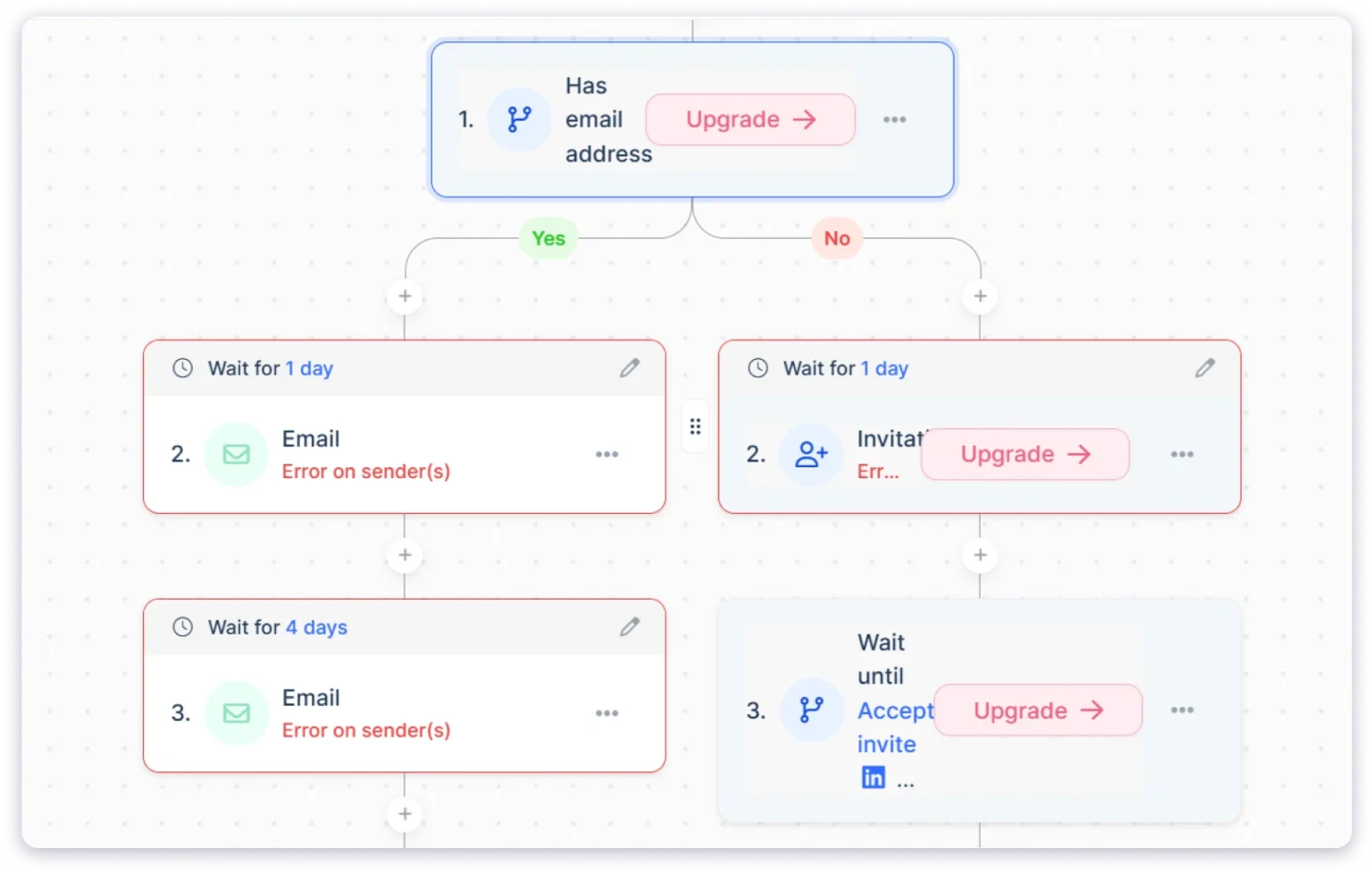
The sequence builder itself uses a visual flowchart layout.
I added an email step, then a LinkedIn profile visit, then a connection request, then a follow-up email with a 3-day delay between each. The drag-and-drop interface made it easy to rearrange steps.
One thing that frustrated me: If you start an AI campaign and abandon it, Lemlist shows a persistent blue banner that says “You have not finished your campaign creation with AI” with a link to continue.
And clicking “Create campaign” always routes to the AI wizard first. Getting to a manual campaign requires an extra click. It feels like the tool is pushing you toward AI creation whether you want it or not.
Users on G2 confirm the multichannel flexibility is a real strength. One reviewer said: “I run a five-step sequence every Wednesday for 30 new candidates combining email, a LinkedIn connection request, and a scheduled call task.”
What I Found Inside Instantly
Instantly’s approach is the opposite of Lemlist. When I clicked “+ Add New” from the Campaigns page, it asked for one thing: a campaign name. That is it. One step, and I was inside the editor.
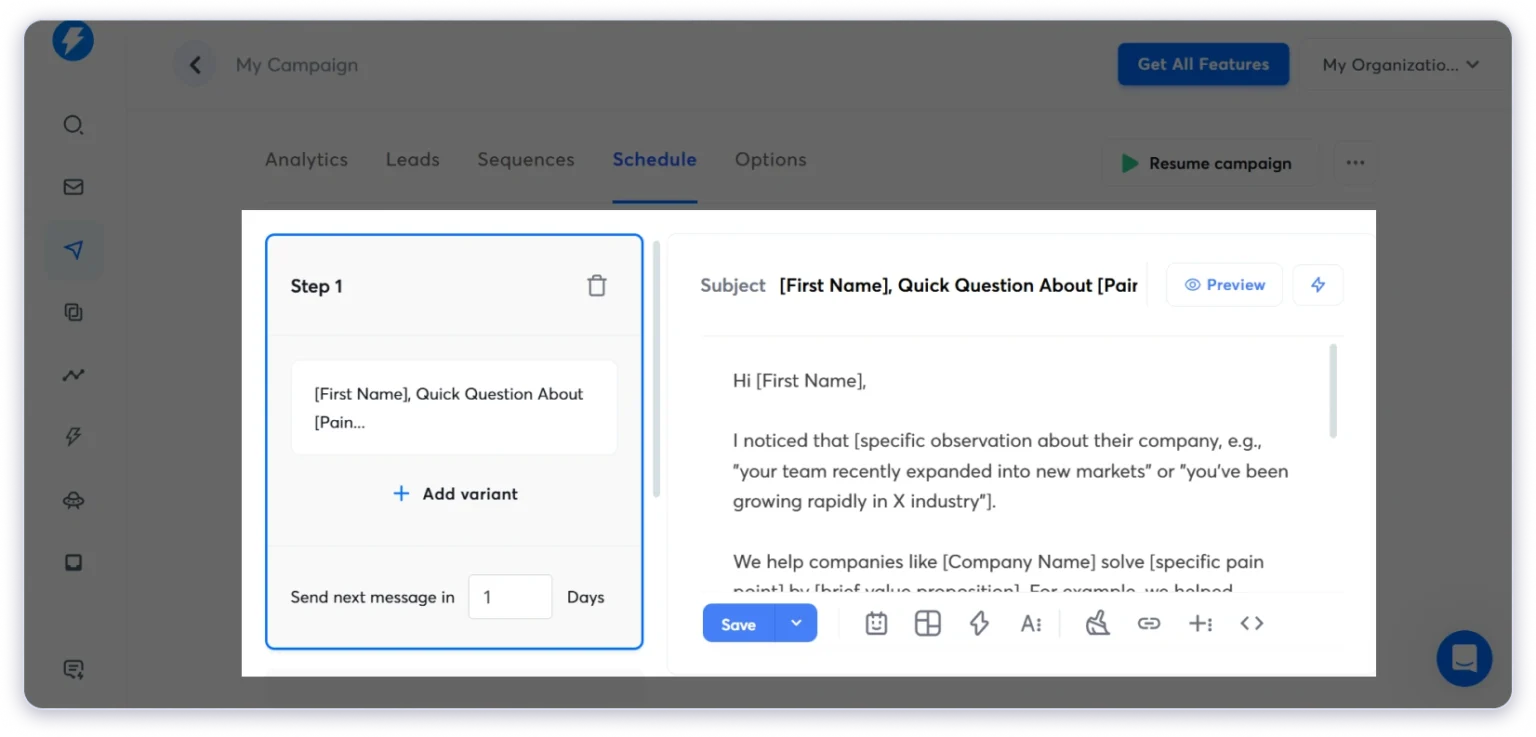
The editor has a left panel for step management and a right panel for the email body. I saw a subject field, body area, and a toolbar at the bottom with icons for save, schedule, AI/Spintax, formatting, variable insertion, and HTML view.
(The simplicity is refreshing. No 7-step wizard. No nag banners. Just name your campaign and start writing.)
But Instantly is email-only. No LinkedIn steps. No call steps. No WhatsApp. If you need multichannel sequences, you will need separate tools on top of Instantly.
I also noticed that the AI sequence generation and A/Z testing features require both the Hypergrowth plan ($97/month on Outreach) AND Instantly Credits (a separate subscription starting at $9/month). On the Growth plan, you get basic sequences only.
One G2 reviewer captured the appeal well: “I like how quickly I can set up a campaign. Other tools have too many unnecessary bells and whistles that some people can find overwhelming.”
Who Wins This Round?
Lemlist wins for multichannel. No other tool at this price lets you mix email, LinkedIn, calls, and WhatsApp in a single sequence with condition-based branching.
Instantly wins for email-only simplicity. If your outreach is purely cold email, the one-step campaign creation and unlimited inboxes make it faster to launch.
The gap neither fills: Lemlist charges per seat, so scaling multichannel campaigns gets expensive fast — $79-109 per user per month. Instantly locks AI features behind two separate paywalls (Outreach plan tier + Credits subscription).
Lemlist vs Instantly: Who Offers Better Personalization?
Personalization is what separates cold emails that get replies from cold emails that get deleted. Both tools promise AI-powered personalization, but the depth and cost are very different.
I tested every personalization feature in both tools. Here is the breakdown.
| Feature | Lemlist | Instantly |
|---|---|---|
| Custom Variables & Merge Tags | Yes (pre-defined + custom) | Yes (custom only, no pre-set library) |
| Spintax | Yes (via Liquid syntax) | Yes (native + AI Spintax Writer) |
| AI Icebreakers | Yes (1 credit per request) | Yes (1 credit per row via AI Prompts) |
| Image Personalization | Yes (built-in) | No (requires third-party tools) |
| Video Personalization | No | No |
| Conditional Logic | Yes (Liquid syntax) | Yes ({% if %} logic) |
| AI Email Writing | Yes (via AI variables) | Yes (0.5 credits per row via AI Email Agent) |
What I Found Inside Lemlist
Lemlist’s personalization is the strongest I have tested in any cold email tool.
Beyond the standard merge tags, I found an “Ask AI” button inside the email editor. Clicking it opened a window where I could tweak my email copy in real time — fix grammar, shorten it, or switch the tone between friendly, casual, and professional.
But the feature that genuinely impressed me was the Icebreaker Generator.
I entered a prompt like “Create a one-sentence compliment based on LinkedIn profile details,” and it generated tailored opening lines for each lead.
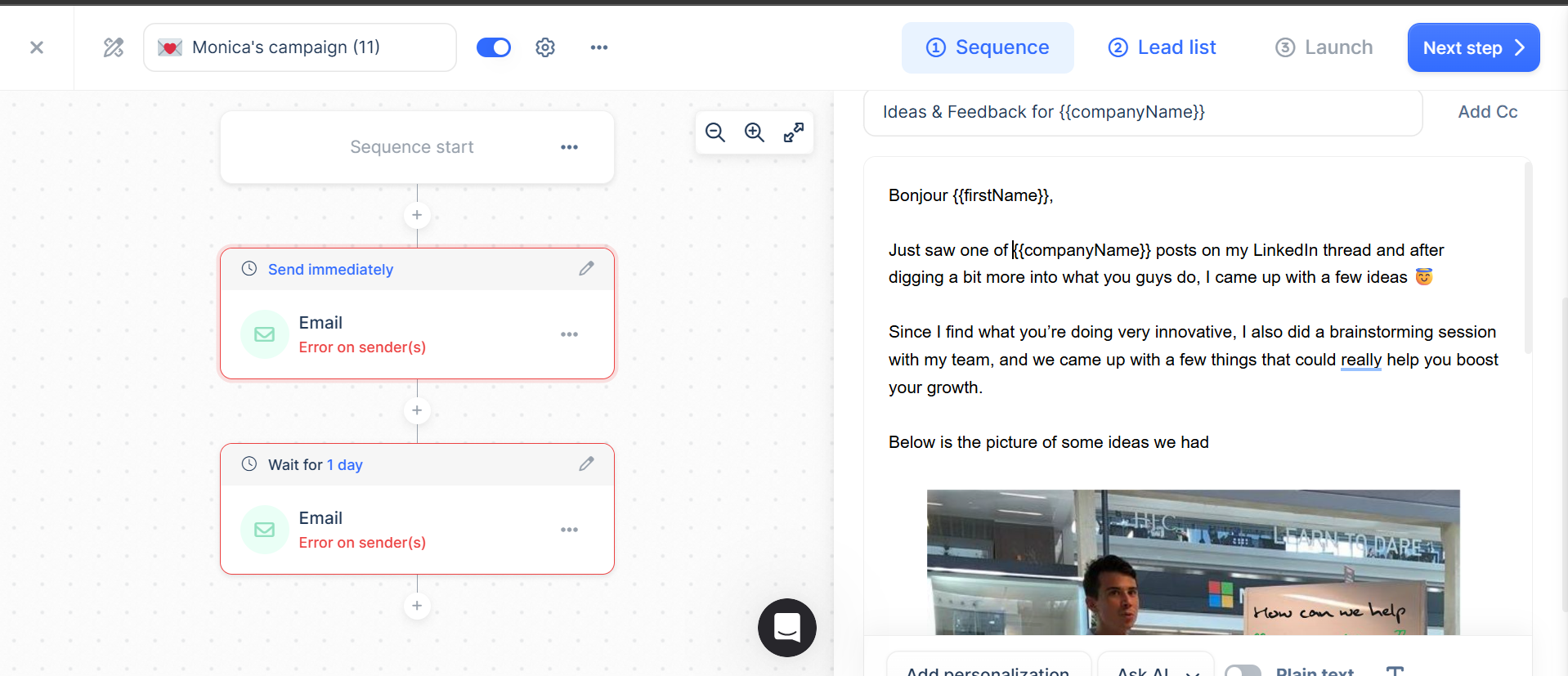
Each icebreaker costs 1 credit, and with only 200 free credits per month on Email Pro, that is 200 personalized openers before you need to buy more.
Lemlist also supports native image personalization — you can embed each prospect’s name, company logo, or LinkedIn photo directly into email images. This is not available in Instantly at all.
One G2 reviewer nailed why this matters: “Dynamic image and video inserts make campaigns feel genuinely human, and the multi-channel sequences are seamlessly built in.”
What I Found Inside Instantly
Instantly covers the fundamentals: custom variables, Spintax, conditional logic, and AI-generated personalization lines. It supports multiple AI models (OpenAI, DeepSeek, Anthropic), which is a nice touch.
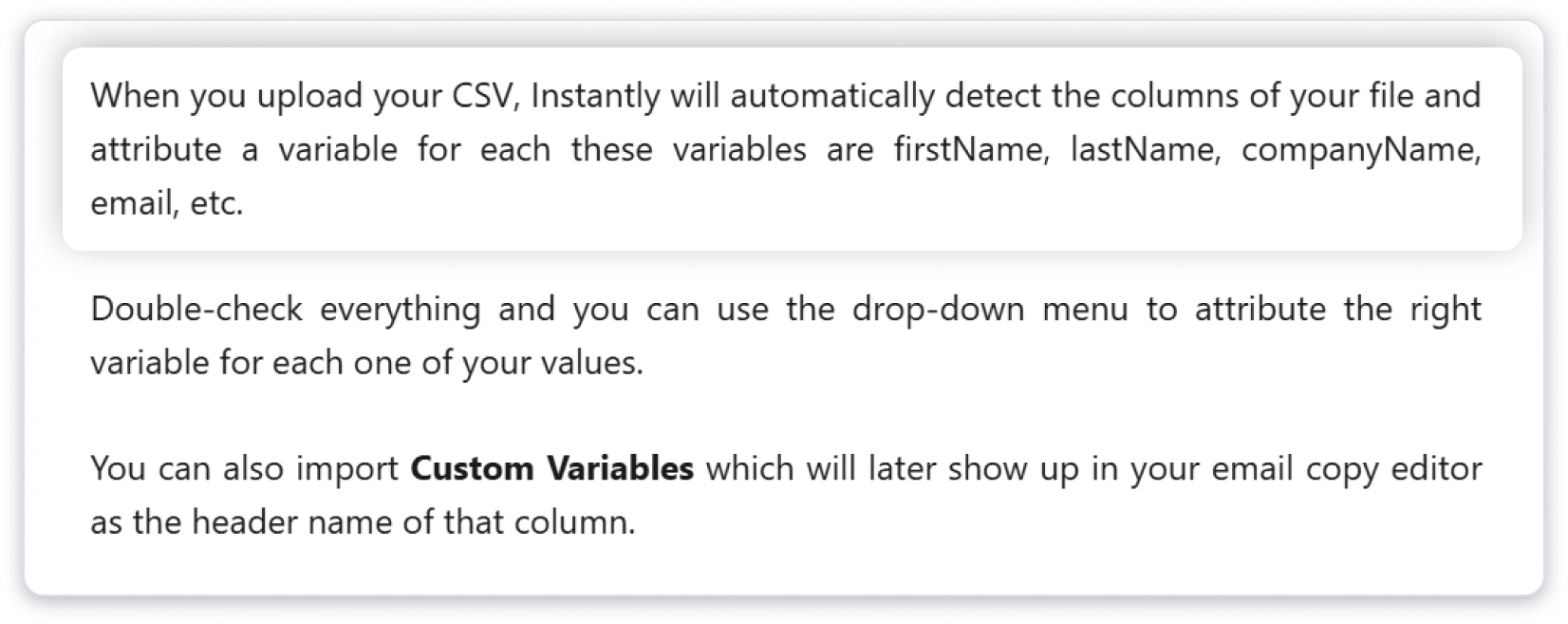
But when I tested it, I hit an unexpected snag. There is no pre-set list of merge tags like {{FirstName}} or {{CompanyName}} waiting for you.
You have to add custom fields manually when creating your lead list, and only then does the system detect and assign them in the sequence.
(It felt unnecessarily complex. In Lemlist, variables are ready to use from the moment you open the editor.)
What their pricing page does not tell you is that all AI personalization requires Instantly Credits on top of your plan.
The AI Email Agent costs 0.5 credits per row. Custom AI prompts cost 1 credit per row. And the AI Spintax Writer, while useful, also consumes credits.
Who Wins This Round?
Lemlist wins clearly. Native image personalization, built-in AI icebreakers, Liquid syntax for advanced logic, and a pre-defined variable library make it the more powerful personalization tool. Instantly handles the basics well, but the lack of image personalization and the credit cost on every AI action hold it back.
Lemlist vs Instantly: Who Has Better Deliverability?
This is the section most buyers care about. None of the other features matter if your emails land in spam.
And this is where I found some of the biggest gaps between what both tools promise and what they actually deliver.
| Feature | Lemlist | Instantly |
|---|---|---|
| Email Warmup | Lemwarm (NOT available on trial) | Unlimited warmup (tiered pool limits) |
| Sender/Inbox Rotation | Not available | Built into campaigns (automatic) |
| Bounce Detection | Yes (via Deliverability Hub) | Yes (auto-banning bouncing accounts) |
| Spam Monitoring | Yes (inbox placement charts) | Yes (94 blacklist monitoring) |
| Inbox Placement Testing | Yes (built into Deliverability Hub) | Separate subscription ($47-97/month) |
| ESP Matching | No | Yes |
| Health Score per Account | No | Yes |
What I Found Inside Instantly
Instantly includes unlimited warmup on all paid plans. When I navigated to the Email Accounts section, I saw columns for each connected account showing emails sent, warmup emails, and a health score.
The warmup dashboard shows inbox placement rates, spam saves, and daily volume.
Instantly claims the largest warmup pool on the market, and it mimics human conversations automatically with advanced settings like weekdays-only mode and read emulation.
(So far, so good.)
But here is what their marketing does not mention. There are warmup pool tiers, and exceeding your limit has serious consequences:
- Growth plan: Only 100 accounts stay in the standard warmup pool (green flame)
- Hypergrowth: 500 accounts in the standard pool
- Light Speed: 1,000 accounts
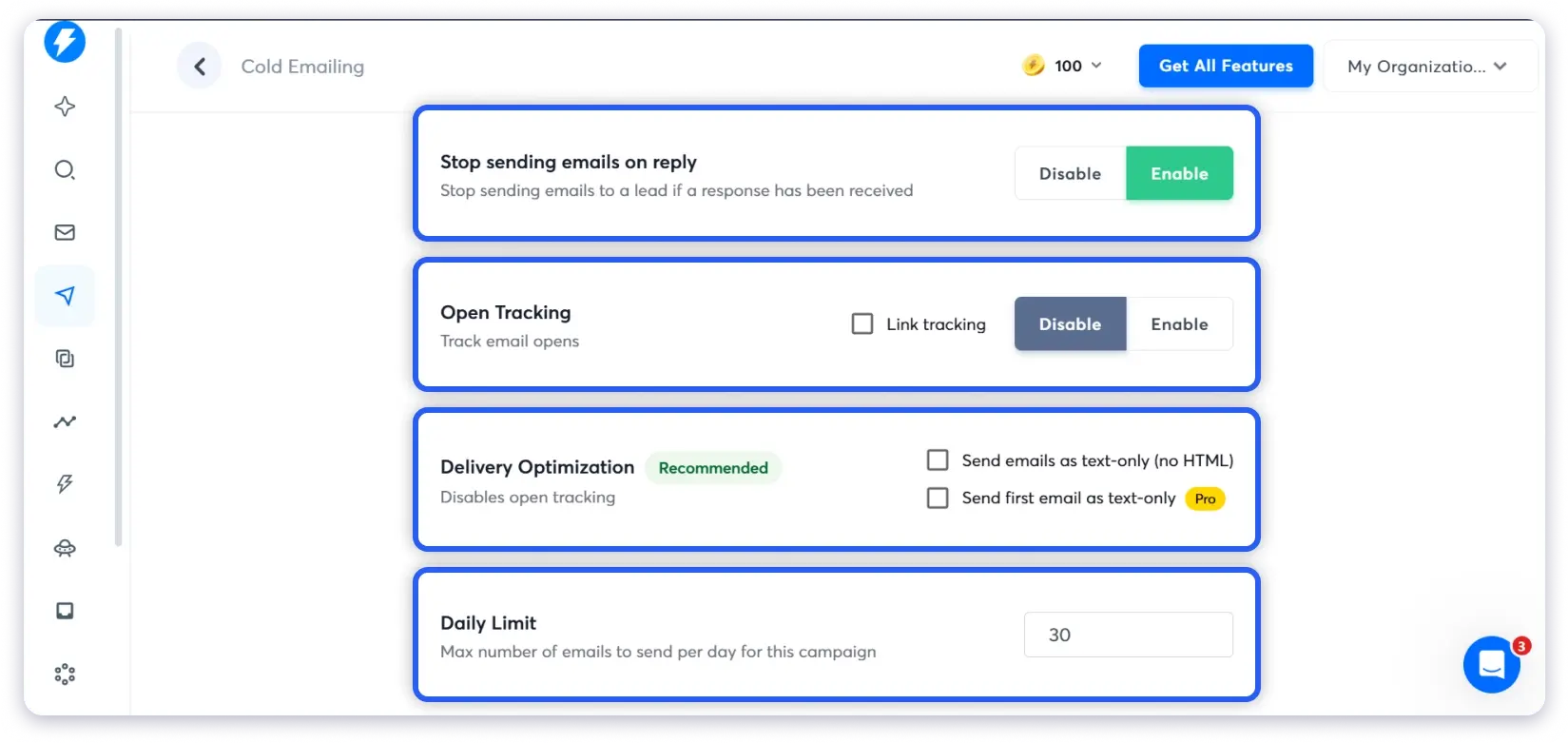
If you exceed your plan’s SMTP limit, ALL your accounts — not just the excess ones — get moved to the Basic warmup pool (orange flame). That pool has fewer positive signals and is less effective.
I also checked the Advanced Deliverability section inside Settings. Two AI filters — “Unlikely to reply” and “Hostile prospects” — both showed a yellow “Pro” badge. These are locked behind a paid plan upgrade with no indication during signup.
Inbox Placement testing is a completely separate subscription starting at $47/month. You get 2 free tests, then you need to subscribe.
And despite all these warmup features, deliverability is not guaranteed.
One G2 reviewer shared their experience: “I sent 300 emails, and 244 of them landed in the spam folder. The open rate was a mere 21%, far below my usual performance.”
Another reviewer raised a deeper concern: “The claims of 98% deliverability are not believable. We have been testing inboxes that warmed up for over one month and did only 5 emails per day for a week. Sending individual emails to Outlook accounts and they are landing in spam.”
What I Found Inside Lemlist
Lemlist’s Deliverability Hub sits under Analyze in the sidebar (tagged “NEW”). It has four tabs: Warm-up, Outreach, Inbox Placements, and Alerts.
The Outreach tab shows total emails sent, delivered vs bounced, bounce trends, and performance by email provider. The charts are well-designed and genuinely useful for monitoring deliverability over time.
But here is what I did not expect. When I opened the Warm-up tab, I saw empty charts and a yellow warning: “You currently don’t have mailboxes linked to your account warming up.”
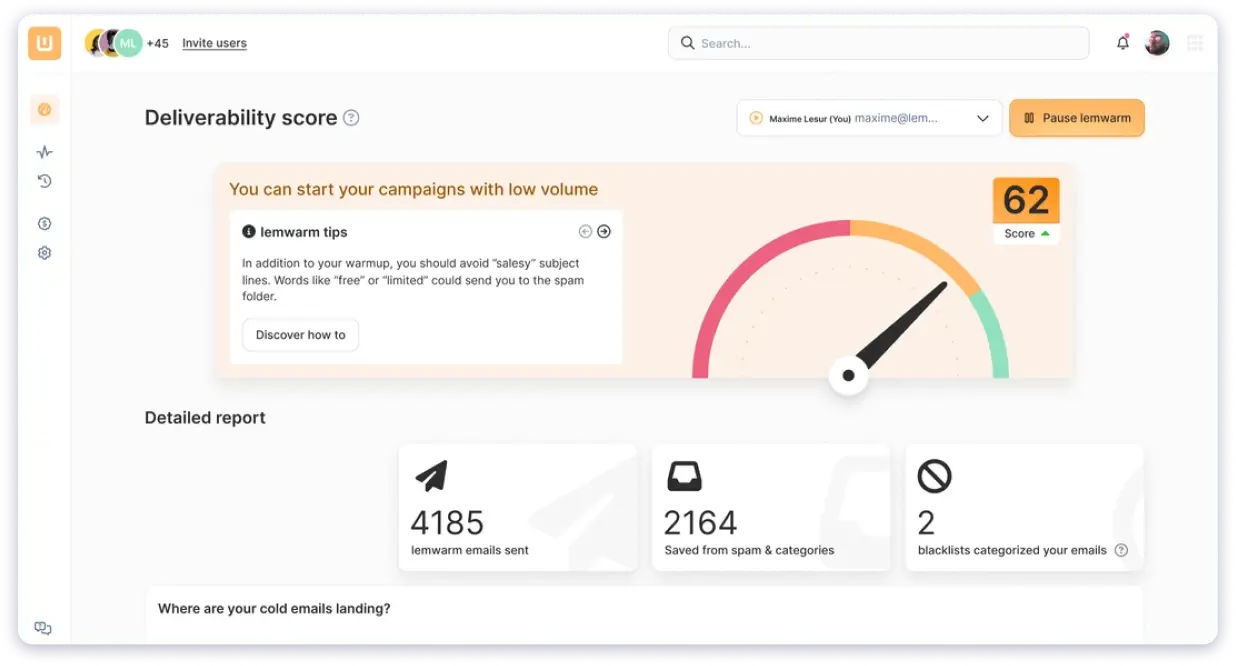
That is because Lemwarm is not available during the free trial. You cannot test deliverability during your 14-day evaluation period.
For a tool that costs $79-109 per user per month, not being able to evaluate the warmup during the trial feels like a significant gap.
Instantly wins on warmup infrastructure. Unlimited warmup across unlimited accounts, automatic sender rotation, health scores per account, and ESP matching give it a clear edge for email-first teams.
Lemlist wins on deliverability monitoring. The four-tab Deliverability Hub with bounce trends, inbox placement charts, and provider-level breakdowns gives you better visibility into what is happening with your sender reputation.
The gap both leave open: Instantly charges separately for Inbox Placement testing ($47-97/mo). Lemlist does not offer sender rotation at all. And Lemlist’s warmup is locked during the trial, so you cannot evaluate it before paying.
Lemlist vs Instantly: Who Has the Better Lead Finder?
Finding the right prospects is half the battle in cold outreach.
Both tools have built-in lead databases, but the credit systems, database sizes, and search experiences are very different.
I ran searches in both tools to see how they compare in real usage.
| Feature | Lemlist | Instantly |
|---|---|---|
| Database Size | 450M+ contacts | 450M+ contacts |
| AI Search | No | Yes (natural language search) |
| Filters | Job title, seniority, location, department, experience, company, keywords | Job title, location, industry, employees, revenue, lookalike domain |
| Email Finding | 5 credits per email | 1 credit (Instantly-found), 2+ credits (partner-sourced) |
| Phone Finding | 20 credits per phone number | Not available natively |
| Email Verification | 1 credit per lead (Debounce) | 0.25 credits per lead |
| Credit Rollover | Free credits: No. Purchased credits: Yes | Monthly: expire in 2 months. Annual: expire in 1 year |
What I Found Inside Lemlist
Lemlist’s People Database lives under Find & Manage in the sidebar. When I opened it, I found a split layout with filters on the left and a results table on the right.
The filter options are solid. I could search by current job title, seniority level (with individual toggles for Owner, CxO, VP, Director, Manager levels), location, company, department, keyword in profile, and years of experience.
I ran a quick test search filtering by “CxO” seniority. The result: 2,904,660 contacts. Displayed 100 per page with 30 pages of pagination. The volume is impressive.
(It feels like having a mini b2b data built right into your cold email tool.)
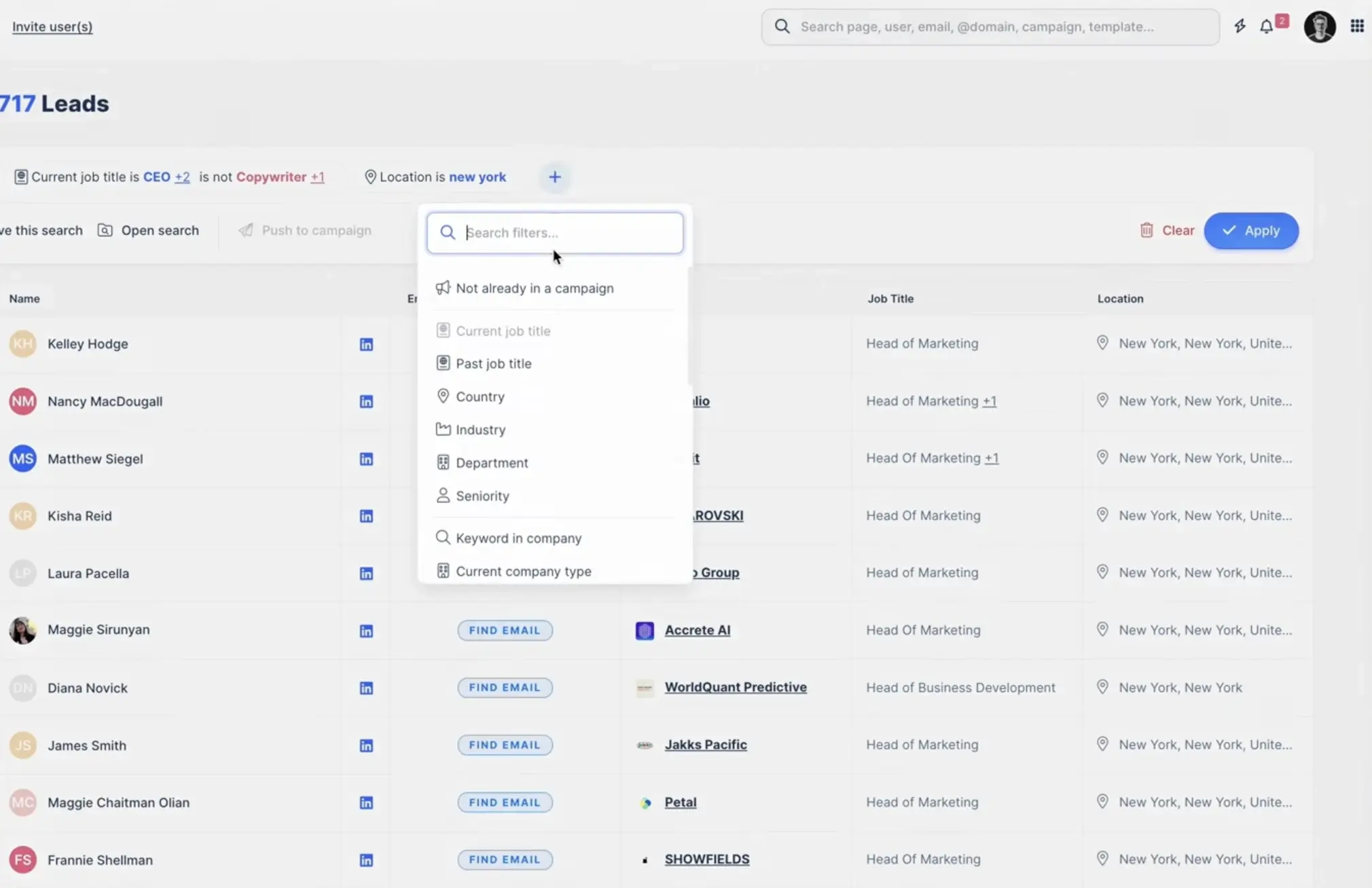
But here is the catch that was not obvious from the search results page. Credit costs are not shown inline.
Each lead shows email and phone icons, but there is no label saying “this will cost 5 credits” until you actually trigger enrichment. You only discover the real cost when you click.
And those costs add up quickly:
- Finding one verified email: 5 credits
- Finding one phone number: 20 credits
- LinkedIn enrichment: 1 credit
With only 200 free credits per month on Email Pro, that gives you just 40 verified emails or 10 phone numbers before you need to buy more credits at $0.01 each. And free credits do not roll over.
This G2 reviewer captured the frustration perfectly: “Lemlist finds a contact during the search process, but when we add that lead to a campaign, the platform charges credits for the email and phone number even when the system cannot actually find the email address.”
What I Found Inside Instantly
Instantly’s SuperSearch sits in the sidebar with a magnifying glass icon. It has two tabs: SuperSearch and Lead Lists.
The standout feature is the AI natural language search.
Right in the center of the screen, there is a large input field with a placeholder: “E.g Engineers in New York in software companies with more than 500 employees.”
You type a plain English description of your ideal prospect and hit the purple “AI Search” button.
(I tested this, and it worked well. Genuinely faster than setting individual filters.)
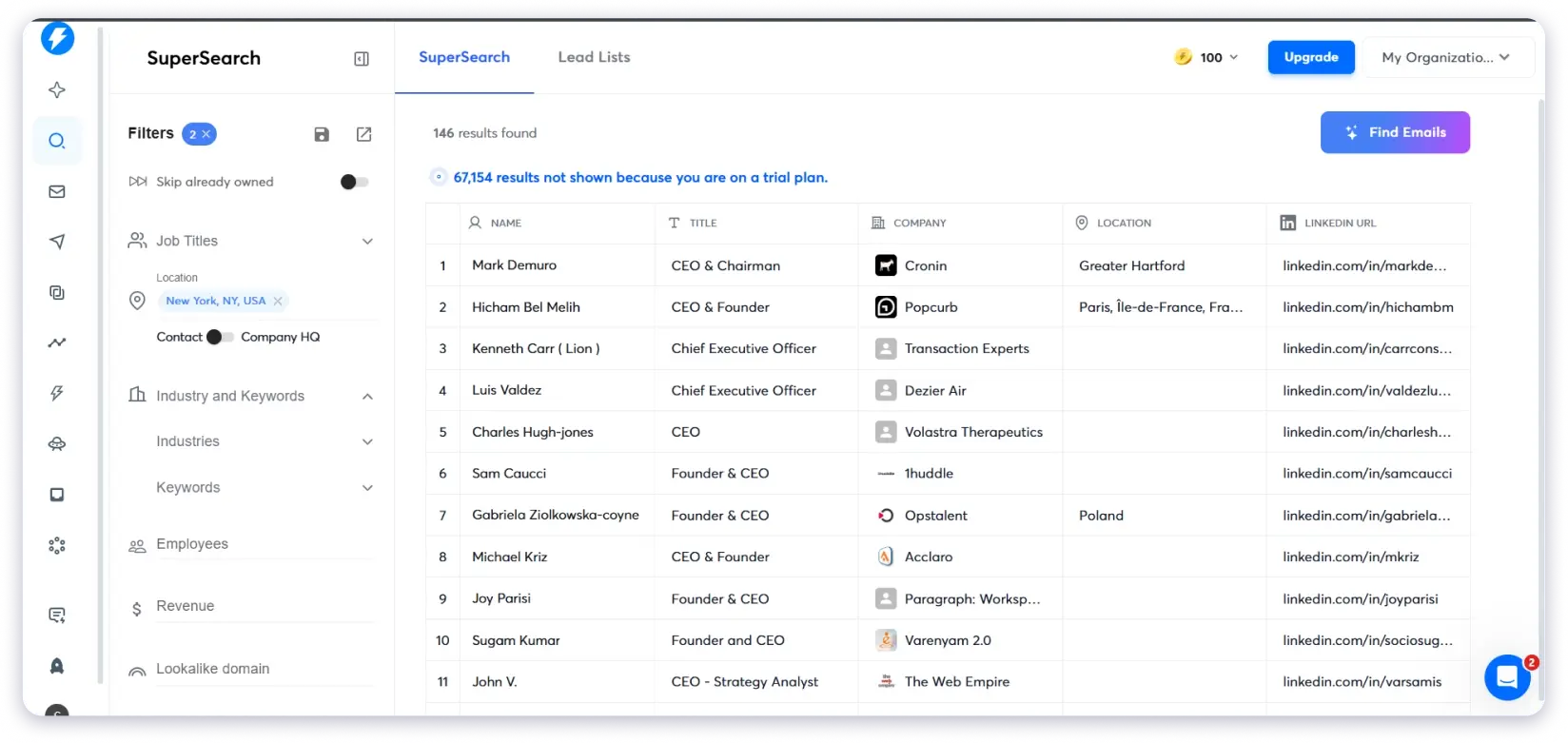
But SuperSearch is not included in the Email Outreach plans.
It requires a separate Instantly Credits subscription starting at $9/month for 150 credits. The 100 free trial credits are one-time only.
The credit system is also more complex than it should be:
- 1 credit = verified email found by Instantly
- 2+ credits = email sourced from partner providers
- 0.5 credits = AI enrichment
- 0.5 credits = fully enriched profile
- 0.25 credits = email verification
Monthly plan credits expire 2 months after purchase. Annual credits expire after 1 year.
One G2 reviewer flagged the data quality issue: “The leads provided aren’t vetted — often leading to outdated contact information. I find their search functionality poor, failing to provide relevant results for specific technologies.”
And the credit system has its own problems. Another reviewer shared: “The credit usage is inaccurate and when you point out your remaining credits do not equal the number of credits you paid for, you’ll be gaslit.”
Lemlist wins on filter depth and phone number finding. Instantly wins on search UX with its AI-powered natural language search.
The gap both leave open: Both databases have 450M+ contacts, but credit costs make heavy prospecting expensive on either tool.
Lemlist’s free credits expire monthly. Instantly’s expire in 2 months. And neither offers true credit rollover on free allocations.
Lemlist vs Instantly: Who Has Better AI Features?
AI is the biggest battleground in cold email right now.
Both tools have invested heavily in AI throughout 2025-2026, but they focus on very different things.
And the credit costs behind each feature are not obvious until you are inside the product.
I dug into every AI feature in both tools.
Here is what I found.
| Feature | Lemlist | Instantly |
|---|---|---|
| AI Sales Agent (Autonomous SDR) | No | Yes (5 credits per generated lead) |
| AI Reply Agent | No (reply scoring only) | Yes (5 credits per reply) |
| AI Campaign Generator | Yes (7-step wizard) | Yes (via Copilot) |
| AI Copilot/Assistant | No | Yes |
| Reply Scoring | Yes | Yes |
| AI Icebreakers | Yes (1 credit per request) | Yes (1 credit per row) |
| Own API Key Support | Yes | Partial |
What I Found Inside Instantly
This is where Instantly genuinely pulls ahead.
When I navigated to the AI Agents section, I found a dedicated page for configuring autonomous AI agents. Instantly has two:
AI Sales Agent — This is an outbound SDR in a box. It finds leads matching your ICP, enriches them, writes personalized outreach, sends follow-ups, and turns replies into booked meetings via Calendly. Each generated lead costs 5 credits. There is also a daily limit of 10 leads per day by default.
AI Reply Agent — This reads incoming replies within 5 minutes, 24/7. It handles objections, sends follow-ups, shares calendar links, and updates your CRM status automatically. Each generated reply costs 5 credits — even if you edit it or decide not to send it.
(That last part is worth repeating. You are charged 5 credits per reply generated, whether you use it or not.)
I also explored Instantly Copilot, and this is a genuine standout. It is a ChatGPT-like assistant built directly into the platform with quick actions: “Find Ideal Prospects,” “Generate a Full Campaign,” “Write a Sequence,” “Audit My Workspace,” and “Weekly Analytics.” It has memory, task management, and tracks how much time it has saved you.
(Copilot felt like the most genuinely useful AI feature I tested across both tools.)
One G2 reviewer agreed: “Unibox, CoPilot and AI agents are everything you could ever want.”
The critical detail: ALL of Instantly’s AI features require Instantly Credits on top of your base plan.
This is a separate subscription starting at $9/month for 150 credits. Here is the full credit breakdown I confirmed through their support chatbot:
- AI Reply Agent: 5 credits per reply
- AI Sales Agent: 5 credits per generated lead
- AI Prompts/Writing: 1 credit per row
- AI Email Agent: 0.5 credits per row
- AI Web Research Agent: 0.5 credits per row
- Email Verification: 0.25 credits per lead
- Copilot: credits per action (varies)
And one hidden detail: the AI Inbox Manager uses your own OpenAI API key instead of Instantly Credits. That is a bring-your-own-key requirement not mentioned on the pricing page.
What I Found Inside Lemlist
I looked for a dedicated AI Agent or AI SDR section inside Lemlist’s dashboard. It does not exist. There is no standalone page, toggle, or dashboard for an autonomous AI agent.
I asked their support chatbot directly: “Do you have an AI SDR or AI agent?” The answer was clear: “We have lemlist AI, but it’s not a full AI SDR that books meetings or sends replies for you.”
What Lemlist does have:
- AI Campaign Creation — The 7-step wizard that auto-scrapes your website, generates pain points, and builds a full multichannel sequence. This is well-designed and saves real time.
- AI Variables/Icebreakers — Generate personalized content per lead at 1 credit per successful request.
- Reply Scoring — Automatically categorizes replies as Interested or Not Interested and stops sequences for uninterested leads.
One smart feature: If you connect your own OpenAI API key, your API credits are used instead of lemlist credits for AI variables. This can save significant money if you are generating AI content at scale.
One G2 reviewer highlighted the value: “The platform provides impressive flexibility for multi-channel outreach. I also like the built-in AI toolkit, which helps streamline workflows and fine-tune messaging.”
Who Wins This Round?
Instantly wins for AI automation. The AI Sales Agent and AI Reply Agent are genuinely autonomous — they can find leads, write outreach, handle replies, and book meetings without you doing anything. No other cold email tool at this price has this capability.
Lemlist wins for AI campaign creation. The 7-step wizard that auto-scrapes your website and builds a full multichannel sequence is the best campaign creation experience I have tested.
The catch for both: Every AI action costs credits. On Instantly, those credits come from a separate subscription. On Lemlist, they come from the same pool as enrichment. Either way, heavy AI usage gets expensive fast.
Lemlist vs Instantly: Who Is Better for Agencies?
If you run an agency managing outreach for multiple clients, tool pricing and workspace management can make or break your margins.
Both tools offer agency features, but the cost structures are dramatically different.
| Feature | Lemlist | Instantly |
|---|---|---|
| White-Label Portal | Not available | Yes (Hypergrowth + Light Speed only) |
| Multi-Client Workspaces | Yes (separate teams, separate subscriptions) | Yes (separate workspaces, separate subscriptions) |
| Guest Seats | 5 on Email Pro, 5 on Expert, Unlimited on Enterprise | Unlimited on Hypergrowth + Light Speed |
| Team Members | Unlimited viewers, but only seated users can send | Growth: Cannot invite anyone. Hypergrowth+: Unlimited |
| Extra Email Accounts | $9/month per additional address | Unlimited on all plans |
What I Found Inside Instantly
Instantly is clearly built with agencies in mind.
When I clicked the workspace area in the top right, a dropdown revealed a search field, the current workspace, and a “+ Create Workspace” option. You can create separate workspaces for each client.
White-labeling gives your clients a custom branded login page where they see your logo, not Instantly’s. Clients can access Dashboard, Campaigns, Analytics, Unibox, CRM, and Blocklists through this portal.
But the economics are rough for agencies. White-label and team invitations are only available on Hypergrowth ($97/month) or Light Speed ($358/month). And each client workspace needs its own subscription.
So if you are managing 10 clients: $97 x 10 = $970/month just for the Outreach plans. Add Instantly Credits for AI and prospecting across each workspace, and you are easily looking at $1,500+ monthly.
I also confirmed through the chatbot that SuperSearch is not available through the agency white-label portal. Your clients can only access it through team member invitations.
What I Found Inside Lemlist
Lemlist does not have a white-label option. I searched the entire dashboard and settings.
No custom branding, no client-facing portal, no white-label domain configuration.
Multi-client management works by creating separate teams via the team switcher at the top of the sidebar. Each team needs its own subscription. Guest seats are limited to 5 on Email Pro and Multichannel Expert (unlimited on Enterprise).
One frustrating finding: When I tried to access the team management settings, the page loaded a blank content area.
The sidebar appeared, but the main pane was completely empty. This happened on the billing and integrations settings pages too.
It appears to be a rendering bug during the trial that prevented me from examining team features at all.
Who Wins This Round?
Instantly wins for agencies — white-labeling, unlimited team members on higher plans, and separate workspaces per client give it a real agency-focused infrastructure that Lemlist simply does not have.
But the cost is brutal. $97 per client workspace per month adds up faster than most agencies expect.
Lemlist vs Instantly: Who Has Better Reply Management?
Getting replies is only half the job. Managing those replies — categorizing them, responding fast, and routing hot leads — is what turns opens into booked meetings.
Both tools offer unified inbox features, but the access levels and AI capabilities differ.
| Feature | Lemlist | Instantly |
|---|---|---|
| Unified Inbox | Yes (Multichannel Expert only, $109/mo) | Yes (Unibox, all plans) |
| Reply Categorization | Sentiment-based (Interested/Not Interested) | AI-categorized (Interested, Meeting Booked, Closed, OOO, Not Interested, Wrong Person) |
| Reply Within Inbox | Multichannel Expert+ only | Hypergrowth+ only (Growth = preview only) |
| AI Reply Handling | No | Yes (AI Reply Agent, 5 credits per reply) |
| Mobile App | No | Yes (push notifications for replies) |
What I Found Inside Instantly
Instantly’s Unibox manages replies from all connected accounts in one place.
The auto-categorization into six buckets (Interested, Meeting Booked, Closed, Out of Office, Not Interested, Wrong Person) saves real time when you are managing replies across dozens of inboxes.
The AI Reply Agent can auto-respond to interested leads within 5 minutes, 24/7.
And the mobile app with push notifications means you can catch hot replies on the go.
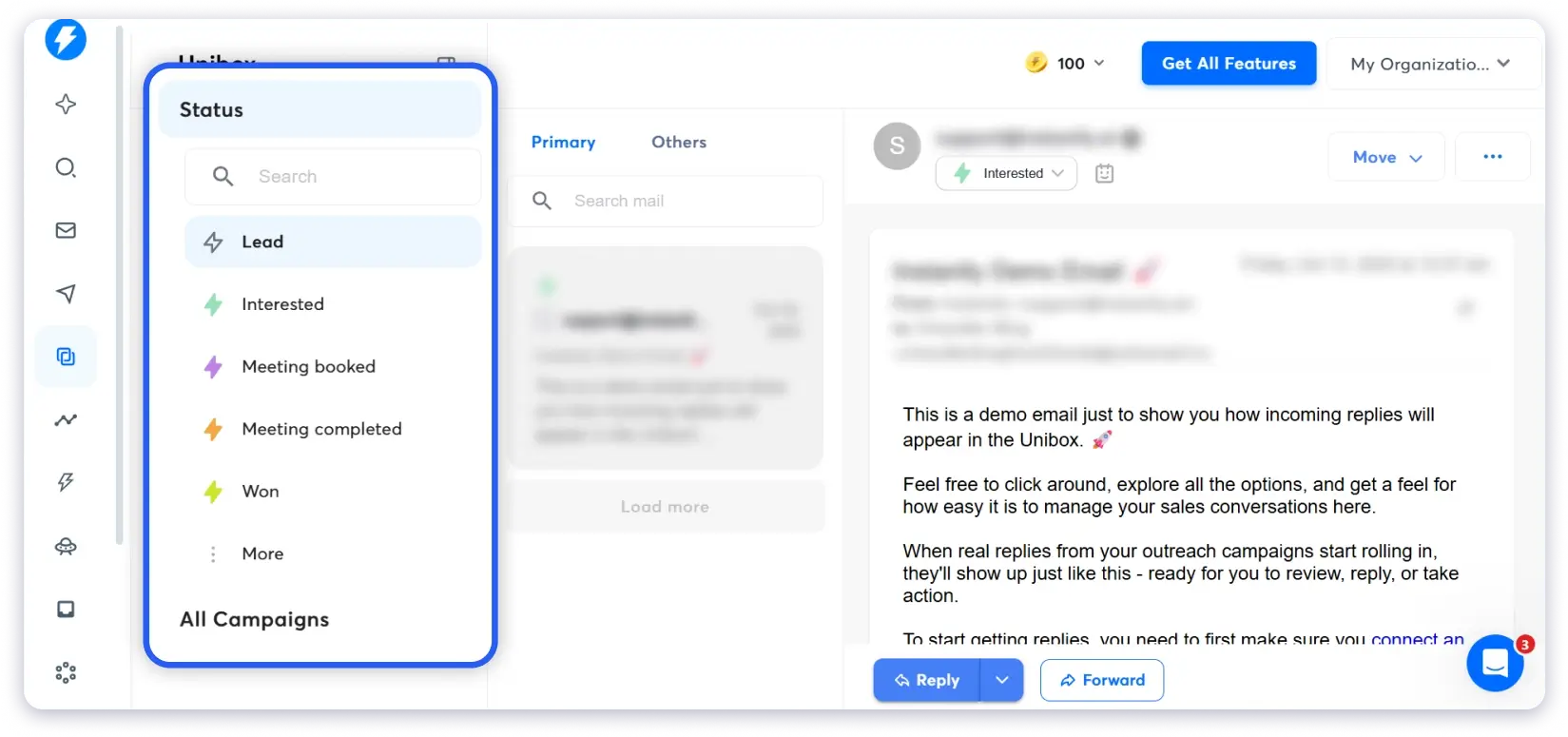
(But remember — you can only reply within Unibox on Hypergrowth or above. Growth plan only lets you preview replies. That is a significant limitation.)
What I Found Inside Lemlist
Lemlist’s unified inbox works across all channels (email, LinkedIn, calls), which is a natural advantage for multichannel users.
But it is only available on the Multichannel Expert plan at $109/month for new customers. Email Pro users do not get it.

The reply scoring feature automatically tags replies as Interested or Not Interested and stops sequences for uninterested leads. This works without credits and is built into all plans.
Who Wins This Round?
Instantly edges ahead with the AI Reply Agent, mobile app, and more granular reply categorization across six buckets. Lemlist’s multichannel inbox is powerful but locked behind a higher price tier.
Lemlist vs Instantly: What You Will Actually Pay
This is the section that matters most. And it is where both tools’ marketing falls apart.
I dug into both billing pages and confirmed pricing through each tool’s support chatbot. Here is the real math.
Instantly’s Five-Subscription Problem
When I opened Instantly’s billing page, I found five separate product subscriptions:
- Email Outreach — The core sending platform ($30-358/month)
- Instantly Credits — Required for AI features, lead finder, verification ($9-1,700/month)
- CRM — Pipeline and deal management ($47-97/month)
- Website Visitors — Track US website visitors ($97-397/month)
- Inbox Placement — Deliverability testing ($47-97/month)
What their pricing page shows: “Starting at $30/month.”
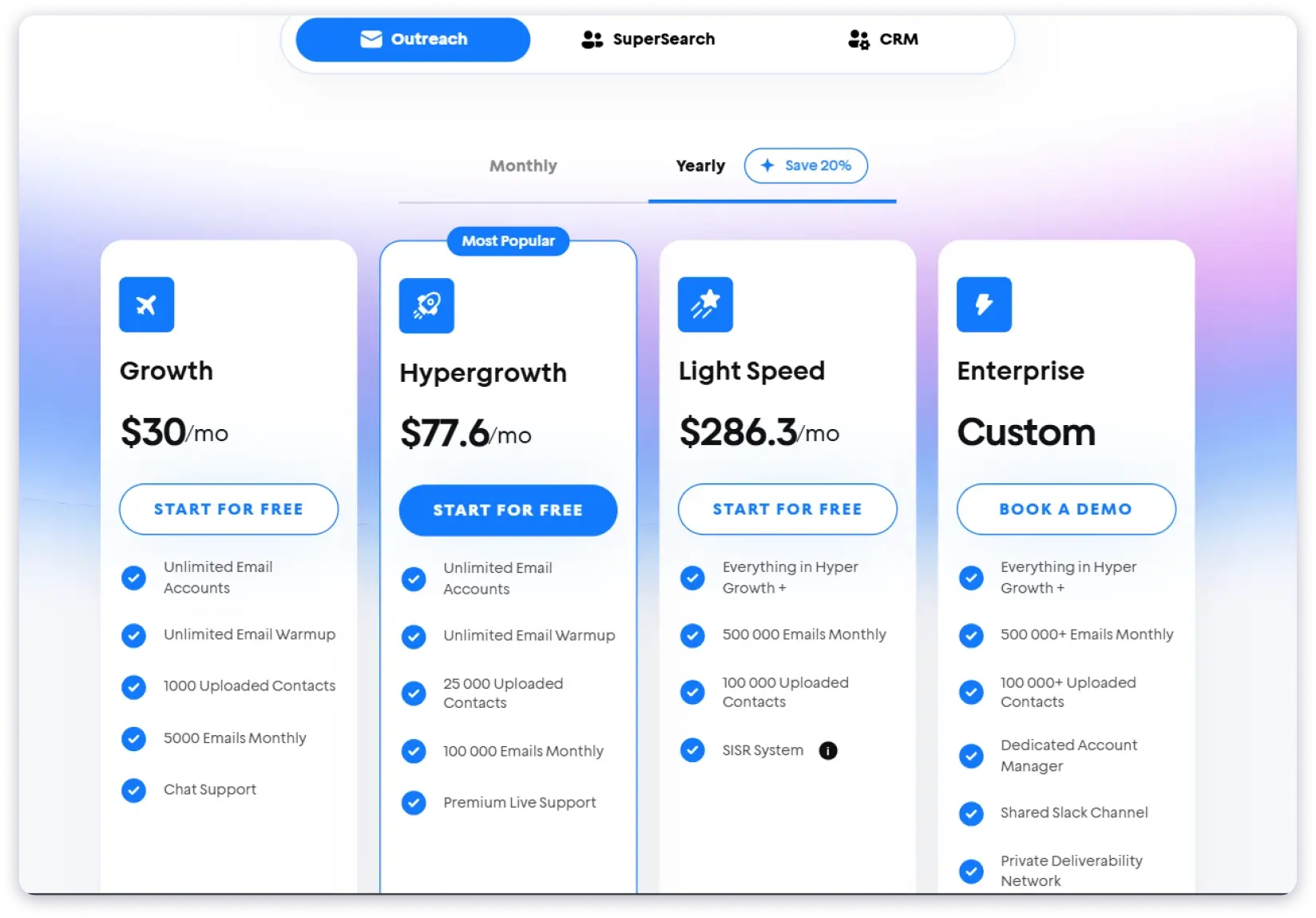
What a realistic setup costs: Outreach ($30) + Credits ($47) + basic CRM ($47) = $124/month minimum for a functional cold email setup with AI and prospecting.
This G2 reviewer experienced the pricing climb firsthand: “Over the past few months our bill climbed from $47 to $147 with no feature upgrades and hardly any notice. Invoice language is confusing; credits are ‘prorated’ in Stripe, yet the adjustments are invisible in the dashboard.”
Another reviewer was more direct: “Their sales page is misleading; the ‘Growth’ plan advertised at $47 includes search and lead credits, but it turns out there are different plans leading to confusing extra charges.”
Lemlist’s Per-Seat Problem
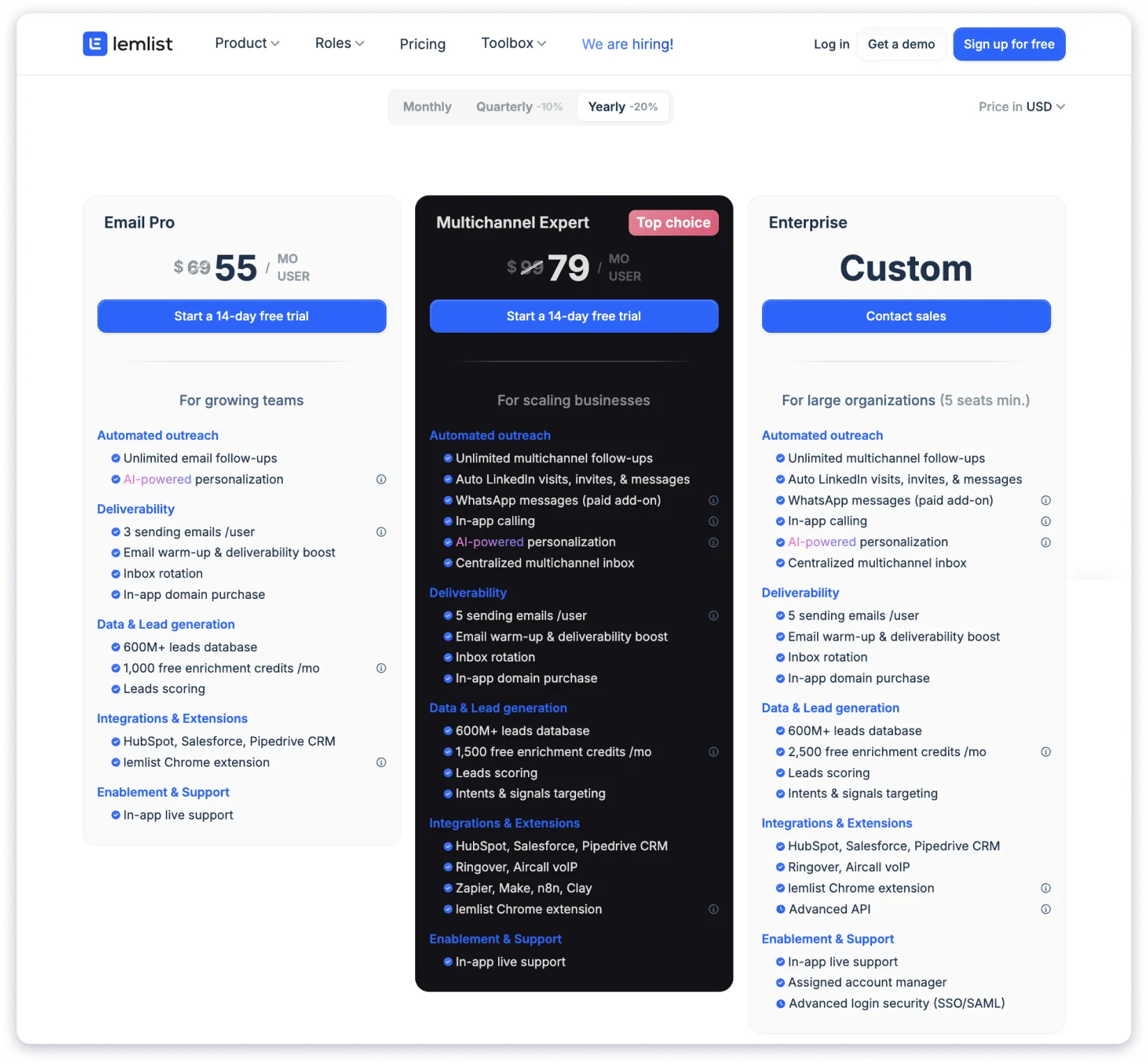
Lemlist charges per user, per month. And in February 2026, they increased prices by $10/user/month for new customers:
- Email Pro: $79/user/month (was $69)
- Multichannel Expert: $109/user/month (was $99)
- Enterprise: Custom pricing (minimum 5 seats, annual billing only)
Extra email accounts cost $9/month each beyond the plan’s included 3 or 5. WhatsApp is $20/month per seat on top of Multichannel Expert.
One G2 reviewer summed up the frustration: “They entice users with a certain pricing model that seems affordable initially, but once you start using the platform to any significant degree, you find out that the costs mount up quickly.”
Another reviewer highlighted the scaling problem: “The product is expensive compared to the competition especially when looking at aspects such as domain rotation — in Lemlist’s pricing model this will mean that you will need multiple licenses.”
Real Cost: 4 Scenarios
| Scenario | Lemlist | Instantly |
|---|---|---|
| Solo founder (email only) | $79/month (Email Pro, 1 user) | $30/month (Growth Outreach) |
| Solo founder (email + AI + leads) | $79/month (includes 200 credits) | $77/month (Growth Outreach $30 + Credits $47) |
| 5-person team (multichannel) | $545/month (5 x $109 Expert) | $97/month (Hypergrowth) + $97 Credits = $194/month |
| Agency (10 clients) | $1,090+/month (10 seats x $109) | $970+/month (10 workspaces x $97 Hypergrowth) |
✅ Key takeaway: Instantly is significantly cheaper for solo operators and small teams doing email-only outreach. Lemlist’s per-seat pricing makes it very expensive as your team grows. But at agency scale, neither tool is affordable.
Lemlist vs Instantly: Integrations and Support
Both tools integrate with popular CRMs and automation platforms. But the depth of native integrations and the quality of support differ in ways that matter for daily workflows.
| Feature | Lemlist | Instantly |
|---|---|---|
| Native CRM Integrations | HubSpot, Salesforce, Pipedrive | Pipedrive only (HubSpot/Salesforce via Zapier) |
| Calling Tools | Aircall, Ringover | No native calling integration |
| Automation Platforms | Zapier, Make, n8n, Clay | Zapier, Pabbly |
| API Access | Multichannel Expert+ (Advanced on Enterprise) | All plans |
| $20/month add-on (Expert+) | No | |
| Support Channels | Live chat + email | Live chat + email (Intercom Fin Bot) |
| Onboarding Help | Higher plans only | All plans |
What I Found Inside Instantly
Inside Instantly’s Integrations page (accessible under Settings), I found native connections to Aimfox, Airtable, Contactout, Findymail, Google Calendar, OpenAI, Pipedrive, Wiza, and Zapier. API Keys and Webhooks sections are also available even on the free trial.
Notable gap: No direct HubSpot or Salesforce integration. For the two most popular CRMs in B2B sales, this is a surprising omission. You need Zapier or webhooks to connect them.
One frustration with support: The Intercom chatbot (Fin Bot) auto-opens on multiple pages, overlaps UI elements, and blocks content. On several pages during my testing, the chatbot covered buttons I needed to click. It was genuinely intrusive.
Support quality is a consistent pain point in G2 reviews. One reviewer shared: “There is no one in this company that is willing to help customers. You have access to an AI bot and a weekly webinar. That’s it.”
Another reviewer reported: “Support has been incredibly slow and unhelpful. It takes 12+ hours to get a reply, and you’re stuck dealing with what seems to be AI bots rather than a real person.”
What I Found Inside Lemlist
Lemlist lists HubSpot, Salesforce, and Pipedrive as native integrations on Email Pro and above. Multichannel Expert adds Zapier, n8n, Make, and VoIP integrations with Aircall and Ringover. Advanced API access is Enterprise-only.
The onboarding experience is better documented — Lemlist has an extensive academy with tutorials, guides, and walkthroughs. Their support chatbot (Lemmanuel) responded accurately to every question I asked during testing.
One G2 reviewer confirmed the integration value: “I believed lemlist was just an email tool at first, but it quickly became the place where I centralized all my outbound outreach.”
Who Wins This Round?
Lemlist wins on integrations. Native HubSpot and Salesforce support, calling tool integrations, and WhatsApp (as an add-on) give it more connectivity out of the box.
Tie on support. Both offer live chat and email. Instantly includes onboarding on all plans. Lemlist has stronger documentation and community but reserves onboarding for higher tiers.
What Real Users Say: Common Complaints
Before making any decision, it helps to hear what people who use these tools daily actually think. I went through dozens of G2 reviews for both tools. Here are the patterns that kept showing up.
Lemlist: What Users Complain About
- Pricing adds up fast: Collin S. on G2: “They entice users with a pricing model that seems affordable initially, but once you start using the platform, the costs mount up quickly. Their support agents sometimes convey pricing information that differs from what is actually charged.”
- Credit system is expensive: Johnny W. on G2: “The platform charges credits for the email and phone number even when the system cannot actually find the email address or when the person is no longer working at that company.”
- Chrome extension is unreliable: Verified User on G2: “VERY BUGGY. When you import leads from a LinkedIn Sales Navigator search results page, it imports a random amount of leads. It will import MANY, MANY exact duplicates. In the meantime, they’ve burned through your credits for finding email addresses for all of those duplicates.”
- Lead finder UX needs work: Verified User on G2: “There are a lot of UX areas that are surprisingly missing — no sequence step-skipping, no ability to unify branches in the sequencer, no user-friendly way of understanding how tokens are used.”
Instantly: What Users Complain About
- Pricing climbs without warning: Verified User on G2: “Over the past few months our bill climbed from $47 to $147 with no feature upgrades and hardly any notice. Credits are ‘prorated’ in Stripe, yet the adjustments are invisible in the dashboard.”
- Deliverability is inconsistent despite warmup: Abdullah A. on G2: “I sent 300 emails, and 244 of them landed in the spam folder. The open rate was a mere 21%.”
- Support is hard to reach: Brian E. on G2: “I am spending close to $400 a month with this company for no results and zero customer service. There is no one in this company that is willing to help customers.”
- Credit system is confusing: Justine P. on G2: “The credit usage is inaccurate and when you point out your remaining credits do not equal the number of credits you paid for, you’ll be gaslit.”
- Contact limits are misleading: Verified User on G2: “In reality, you can only send out emails to 25,000 contacts per year. Every time you run a campaign sending to the same people, they all count twice.”
Final Verdict: Lemlist vs Instantly
After testing both tools side by side, logging into both dashboards, building campaigns, running lead finders, and tracking every credit cost — here is my honest recommendation.
Pick Instantly if:
- Your outreach is email-only and you need to scale fast
- You want unlimited sending accounts at a flat fee
- You value AI agents that can handle replies and book meetings autonomously
- You are a solo operator or small team focused on volume and speed
Pick Lemlist if:
- You need true multichannel sequences (email + LinkedIn + WhatsApp + calls)
- Visual personalization (custom images, AI icebreakers) is core to your outreach strategy
- You run targeted, quality-over-quantity campaigns
- You want native CRM integrations with HubSpot and Salesforce
Neither tool is perfect. Instantly’s real cost stacks up across five separate subscriptions. Lemlist’s per-seat pricing and missing features like sender rotation leave gaps. Both tools charge credits for AI and prospecting on top of plan pricing.
So what is the best alternative to both Instantly and Lemlist
If both tools feel like they are asking too much for what they deliver, Saleshandy is worth testing.
It combines unlimited email accounts, an 800M+ lead database with credits that roll over, AI-powered sequences, a built-in CRM with Kanban-based prospect management, and agency-ready features with white-labeling — starting at $25/month. No per-seat charges. No separate subscriptions. No credit expiry.
FAQs
1. Is Lemlist or Instantly Better for Cold Email in 2026?
It depends on your outreach strategy. Instantly is better for high-volume, email-only campaigns with unlimited inboxes at a flat fee. Lemlist is better for multichannel outreach combining email, LinkedIn, WhatsApp, and calls with advanced image personalization.
2. How Much Does Lemlist Actually Cost in 2026?
Lemlist’s Email Pro plan costs $79/user/month for new customers (increased from $69 in February 2026). Multichannel Expert is $109/user/month. Annual billing drops these to about $63 and $87 respectively. Every team member needs a seat, extra email accounts cost $9/month each, and free credits (200-400/month) do not roll over.
3. How Much Does Instantly Actually Cost in 2026?
Instantly’s Email Outreach starts at $30/month with annual billing. But it has five separate products billed independently: Outreach, Credits (for AI and lead finding), CRM, Website Visitors, and Inbox Placement. A realistic setup with AI features and prospecting costs $77-124+/month. Credits on monthly plans expire after 2 months.
4. Does Instantly Support LinkedIn or Multichannel Outreach?
No. Instantly is email-only. For LinkedIn outreach, you need Lemlist or a separate LinkedIn automation tool like Expandi or Dripify.
5. Does Lemlist Have an AI Agent That Books Meetings?
No. Lemlist confirmed through their support chatbot that their AI is not a full AI SDR. It helps with campaign creation, icebreaker generation, and reply scoring, but it does not autonomously reply to leads or book meetings.
6. Does Lemlist Have Sender Rotation?
No. Lemlist’s support confirmed that inbox rotation and sender rotation are not built-in features. This is a notable gap compared to Instantly and other cold email tools that include sender rotation on all plans.
7. Do Credits Roll Over on Lemlist and Instantly?
On Lemlist, free monthly credits do not roll over — they reset each month. Purchased credits do roll over until used. On Instantly, monthly plan credits expire 2 months after purchase. Annual plan credits expire after 1 year.
8. Which Tool Has a Bigger Lead Database?
Both Lemlist and Instantly have 450M+ contact databases. If database size is a priority, Saleshandy offers 800M+ contacts with waterfall enrichment and credit rollover.
9. Can I Use Instantly for Free?
Instantly offers a 14-day free trial with no credit card required. You can connect 2 email accounts, upload 250 leads, send 1,000 emails, and get 100 free Instantly Credits plus a 1,000 bonus for testing the AI Sales Agent (expires after approximately 2 months).
10. Which Tool Is Best for Agencies?
Instantly has better agency features (white-labeling, multi-workspace management), but each client workspace requires its own subscription ($97+/month on Hypergrowth). Lemlist has no white-label option. For agencies needing unlimited clients at a flat price, Saleshandy includes white-labeling and unlimited workspaces from the base plan at $25/month.