Most sales teams don’t lose deals because of bad pitches.
They lose them because follow-ups slip, conversations stall, and no one can tell which deals are actually moving forward.
I’ve seen it happen firsthand, a pipeline that looks healthy on paper, but when you dig in, half the deals haven’t been touched in weeks.
That’s not a people problem. It’s a visibility problem.
And it’s exactly what the right sales pipeline management tool fixes.
A good pipeline tool gives your team a clear, visual view of every deal in play — from first contact to closed-won.
It replaces the spreadsheet chaos with structured stages, automated reminders, and reporting that lets you forecast revenue based on real data instead of gut feeling.
I spent time evaluating over a dozen pipeline tools to find the ones that actually make a difference — not just the ones with the longest feature lists.
This final list covers the 8 best sales pipeline management tools for outbound teams, enterprise orgs, small startups, and everyone in between.
Here’s a quick look at all 8 before I break them down:
Sales Pipeline Management Tools- TOC
TL;DR — Best Sales Pipeline Management Tools at a Glance
- Saleshandy CRM — Best for outbound & cold email teams
- HubSpot Sales Hub — Best for all-in-one pipeline + outreach
- Salesforce Sales Cloud — Best for enterprise sales teams
- Pipedrive — Best for startups & small teams
- Freshsales — Best for AI-powered pipeline insights
- Copper — Best for Google Workspace users
- Monday Sales CRM — Best for visual pipeline & customization
- Streak — Best for lightweight CRM inside Gmail
What I Looked For When Evaluating These Tools
Not every CRM is built for pipeline management, and not every pipeline tool works the same way.
I’ve watched teams adopt expensive CRMs only to end up tracking deals in a spreadsheet anyway — because the tool didn’t match how they actually sell.
So before getting into the list, here’s what I paid closest attention to:
- Visual pipeline view: Can you see deal stages at a glance? Kanban boards and drag-and-drop views make a real difference in daily workflow — you should never have to dig through tables to know where a deal stands.
- Automation: Does the tool handle follow-up reminders, stage updates, and task assignments on its own — or does your team still do it manually? The less admin, the better.
- Reporting & forecasting: Can you pull pipeline health metrics, conversion rates, and revenue forecasts without building custom dashboards from scratch?
- Integrations: Does it connect with your email, calendar, outreach tools, and whatever else your team already uses?
- Ease of use: Will your reps actually open this tool every day? If it takes weeks to set up or hours to learn, adoption drops fast.
- Pricing transparency: Are key features gated behind expensive tiers, or do you know what you’re paying for upfront?
With that framework, here’s how each tool stacks up — and more importantly, who each one is actually built for.
8 Best Sales Pipeline Management Tools
Before diving into each tool, this table gives you the high-level picture. I found it useful to see which tools include outreach natively versus which ones are purely CRM.
| Tool | Visual Pipeline | AI Features | Free Plan | Cold Outreach | Starting Price |
|---|---|---|---|---|---|
| Saleshandy CRM | Yes | Yes | 7-day trial | Yes (native) | $34/mo |
| HubSpot Sales Hub | Yes | Yes | Yes | Limited | Free / $15 |
| Salesforce Sales Cloud | Yes | Yes | No | No | $25/user |
| Pipedrive | Yes | Yes | No | No | $14/user |
| Freshsales | Yes | Yes | Yes | Limited | Free / $9 |
| Copper | Yes | No | No | No | $9/user |
| Monday Sales CRM | Yes | Limited | Yes | No | Free / $12 |
| Streak | Yes | Pro+ only | No | No | $49/user |
Now let me walk you through each one.
1. Saleshandy CRM
Saleshandy CRM is one of the few pipeline tools built specifically for outbound-first teams.
Unlike traditional CRMs designed around inbound leads and deal management, Saleshandy CRM is built around cold email workflows — where prospecting, outreach, and pipeline tracking happen in one place.
And the CRM comes included free with every plan, even the Starter tier at $34/month. That combination of outreach plus pipeline management at no extra cost is why it tops this list.

The CRM uses a Kanban-style visual pipeline that shows prospects organized by stage — Not Contacted, Replied, Interested, Closed, or any custom stage you create.
You drag and drop prospects as conversations progress, making it easy to spot who’s stuck and who needs a follow-up without scrolling through spreadsheets or switching between tools.
What really sets it apart is the prospect activity timeline. Click on any prospect, and you see their full history in one place — emails sent, replies received, opens, clicks, notes, tasks, and sequence activity.
You always have context before taking the next action, which means follow-ups feel personal instead of generic.
Key features for outbound pipeline tracking
- Kanban-based visual pipeline with custom stages and drag-and-drop functionality
- Unified prospect timeline showing emails, replies, opens, clicks, notes, and tasks in one place
- Built-in cold email sequences with automated follow-ups and sender rotation
- B2B Lead Finder with 852M+ contacts and 25+ filters to build targeted prospect lists
- Custom fields and multiple views for different roles (SDR, AE, manager)
- 1:1 emails, notes, and task creation directly from the CRM
- Unlimited email accounts and email warm-up included on all plans
Pricing
Saleshandy’s CRM is included free with all outreach plans.
Saleshandy’s Starter starts at $34/month (billed annually) and includes the full CRM, unlimited email accounts, email warm-up, and 1,500 lead finder credits / month.
Higher plans (Pro at $76/mo, Scale at $149/mo) add more volume, team features, and integrations. There’s a 7-day free trial with up to 50 free lead credits, no credit card required.
I didn’t have to set up a separate CRM or worry about syncing data between my outreach tool and a pipeline tracker — everything lives in the same place.
When a prospect replies, I can see their full engagement history, add a note, move them to the next stage, and send a follow-up — all without opening a different tab. For outbound-first teams that generate pipeline through cold email, that kind of workflow saves hours every week.
The Lead Finder with 852M+ contacts is a bonus that most pipeline tools don’t offer. You can go from finding a prospect to running a sequence to tracking them in the CRM — the entire outbound workflow in one tool.
Saleshandy CRM is purpose-built for cold outreach workflows. If you need advanced deal-stage automation, complex multi-team pipelines, or deep revenue forecasting, a traditional CRM like Salesforce or HubSpot will serve you better.
It’s not trying to replace enterprise CRMs — it’s filling the gap for teams that need pipeline visibility without the overhead.
2. HubSpot Sales Hub
If Saleshandy is built for outbound-first teams, HubSpot is built for teams that want everything in one ecosystem.
Pipeline management, email tracking, meeting scheduling, deal forecasting, marketing automation — it’s all under one roof.
Where I found HubSpot most impressive is how tightly it connects your sales pipeline to everything else in your go-to-market motion.
Marketing campaigns, service tickets, and sales activity all feed into the same contact record.
If your team needs cross-functional visibility — sales knowing what marketing sent, support knowing what sales promised — HubSpot handles that better than anything else on this list.

The free CRM tier is also surprisingly capable. You get contact management, a visual deal board, and email tracking without paying a dime.
For a team just getting started with pipeline tracking, it’s a genuinely low-risk way to begin.
That said, the jump from free to paid can be jarring.
The moment you need features like sequences, custom reporting, or advanced automation, you’re looking at the Professional plan at $90/user/month — a significant step up.
Key features for full-lifecycle pipeline management
- Drag-and-drop pipeline with customizable deal stages and automated deal creation
- Email tracking, templates, and sequences for outreach
- AI-powered forecasting and pipeline health insights (on higher plans)
- Native integrations with Marketing Hub and Service Hub for full lifecycle tracking
- Meeting scheduler, document tracking, and live chat
Pricing
Free CRM with basic pipeline features. Paid Sales Hub plans start at $15/user/month (Starter) and go up to $150/user/month (Enterprise). Sequences, forecasting, and custom reporting are locked behind Professional ($90/user/month) and above.
The ecosystem is the biggest draw. When your marketing, sales, and support data all live in the same system, you stop losing context between handoffs. I also appreciated how clean the free pipeline is — you can genuinely run a basic sales process on it without paying.
For pure cold email outreach, HubSpot’s sending limits and deliverability tools aren’t as specialized as purpose-built platforms like Saleshandy. And once you need outbound-specific features, the pricing climbs fast. Most of the useful sales features live behind the $90/user/month Professional tier, which can price out smaller teams quickly.
3. Salesforce Sales Cloud
Salesforce is the CRM that most enterprise sales orgs end up on at some point — and there’s a reason for that. It’s massively customizable, integrates with practically everything, and offers AI-powered insights through Einstein.
I wouldn’t recommend it for small teams.
The setup alone can take weeks and often requires a dedicated admin or consultant to configure properly.

But if you have complex sales processes with multiple teams, regions, and deal types, Salesforce gives you the flexibility to model exactly how your business works.
No other tool on this list comes close in terms of depth and customization.
The tradeoff is clear: you get unmatched power, but you pay for it in complexity, cost, and time-to-value.
Key features for enterprise pipeline management
- Multi-layered pipeline views with custom objects, fields, and validation rules
- Einstein AI for lead scoring, opportunity insights, and deal predictions
- Advanced forecasting with collaborative forecasts and pipeline inspection
- Workflow automation, approval processes, and process builder for complex sales motions
- AppExchange marketplace with thousands of integrations and add-ons
Pricing
Starter Suite begins at $25/user/month. Professional is $80/user/month, Enterprise is $165/user/month, and Unlimited goes up to $330/user/month.
Most teams end up on Professional or Enterprise. Add-ons for AI, CPQ, and advanced analytics are priced separately.
The depth of customization is unmatched. I could build pipelines, reports, and workflows that mirror virtually any sales process. Einstein AI has also gotten more useful with recent updates — especially for deal scoring and surfacing next-step recommendations. If your org needs that level of control, nothing else delivers it.
Steep learning curve. Expensive once you factor in implementation, training, and add-ons. For small teams or outbound-first workflows, Salesforce is more CRM than you’ll ever use. If your sales motion is straightforward — cold email, follow-up, close — you’re paying for complexity you don’t need.
4. Pipedrive
After evaluating enterprise-grade tools like Salesforce, using Pipedrive felt like a breath of fresh air. It was built around one idea: make pipeline management visual and simple.
The entire interface is a Kanban board where you drag deals between stages. I had it set up and running in under an hour.
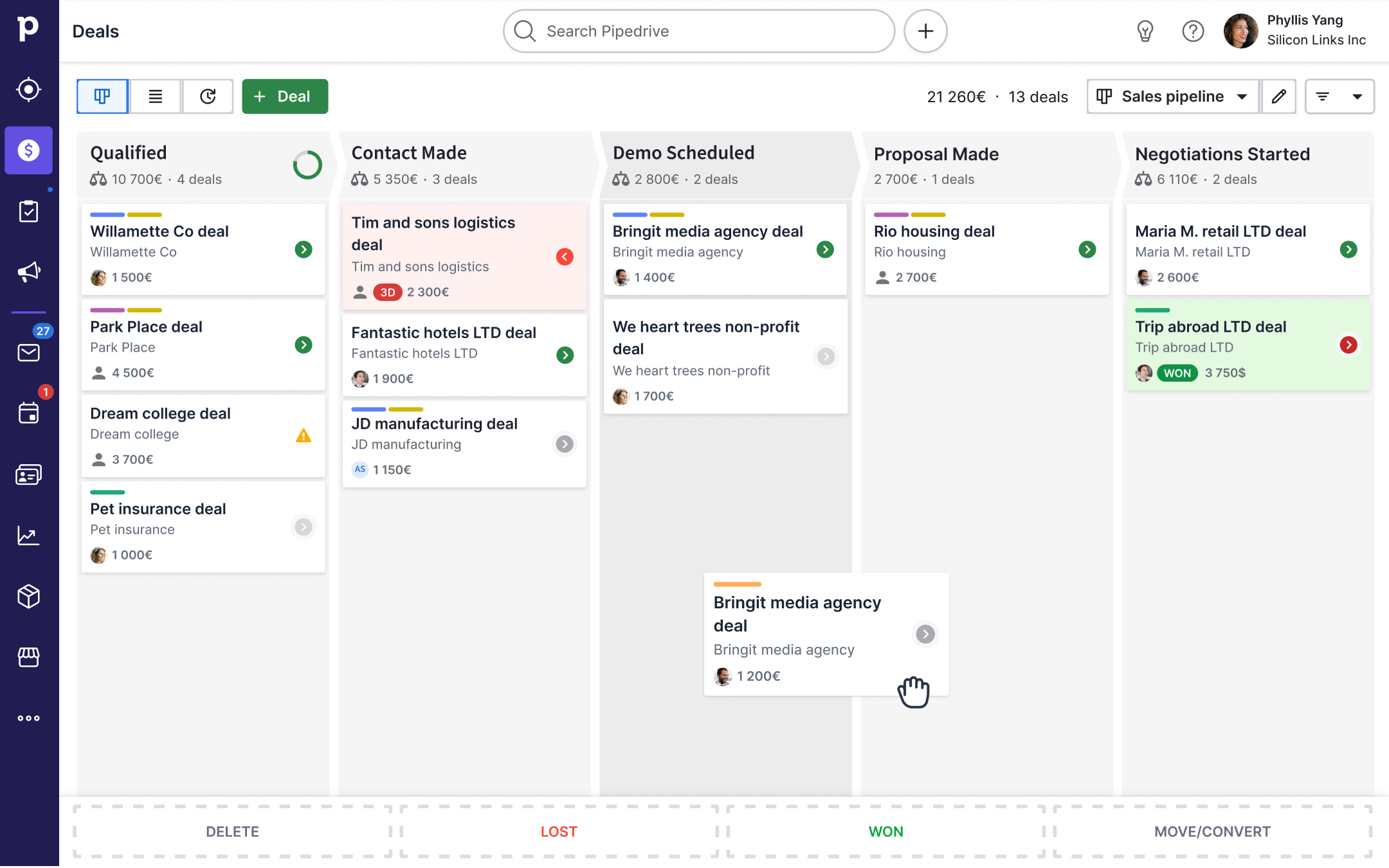
What I appreciated most is that Pipedrive doesn’t try to be everything. It does pipeline management — and does it better than most CRMs that pack in dozens of features nobody ends up using.
Key features for visual deal tracking
- Kanban-style pipeline with customizable stages and activity-based selling methodology
- AI Sales Assistant with deal scoring and next-step recommendations
- Revenue forecasting based on historical close rates
- Two-way email sync with templates, open tracking, and click tracking
- Workflow automation for deal updates, follow-up reminders, and lead assignment
Pricing
Plans start at $14/user/month (Essential) and go up to $99/user/month (Enterprise).
The Advanced plan at $29/user/month is the sweet spot for most small teams, adding automation and group emailing. 14-day free trial available.
The depth of customization is unmatched. I could build pipelines, reports, and workflows that mirror virtually any sales process. Einstein AI has also gotten more useful with recent updates — especially for deal scoring and surfacing next-step recommendations. If your org needs that level of control, nothing else delivers it.
Pipedrive doesn’t have built-in cold email sequences or a lead database. If prospecting is a big part of your workflow, you’ll need a separate outreach tool alongside it — which is exactly the gap Saleshandy fills.
Reporting is also limited on lower plans. You won’t get deep pipeline analytics until you move to Advanced or higher.
5. Freshsales
Most pipeline tools show you deals and let you manage them manually.
Freshsales takes a different approach. It uses Freddy AI to actively score your leads, predict which deals are likely to close, and suggest what to do next.
I found this especially useful for teams juggling a lot of active deals.

Instead of scanning your pipeline and guessing which prospects to call first, Freddy surfaces the ones most engaged and most likely to convert. It’s the kind of prioritization that usually takes a sales manager’s intuition — automated.
Key features for AI-driven pipeline prioritization
- Freddy AI for lead scoring, deal insights, and email content suggestions
- Visual pipeline boards with drag-and-drop deal management and customizable stages
- Built-in phone, email, and chat capabilities for multi-channel communication
- Workflow automation for lead assignment, follow-ups, and deal updates
- Territory management and sales forecasting for growing teams
Pricing
Free plan for up to 3 users with basic pipeline and communication features. Growth plan starts at $9/user/month, Pro at $39/user/month, and Enterprise at $59/user/month. Freddy AI features are available from Pro and above.
The AI scoring is genuinely helpful — not just a gimmick. I could see which leads had the highest engagement scores and prioritize my day around them instead of working through a flat list. Having phone, email, and chat built in also means reps don’t need to juggle separate tools for every conversation.
Third-party integrations are more limited than what you get with HubSpot or Salesforce. Some teams end up needing Zapier to connect their broader stack, which adds cost and complexity.
Advanced reporting also lags behind dedicated BI tools — if deep analytics matter to your team, Freshsales may feel limiting.
6. Copper
Every tool so far has been a standalone platform.
Copper takes a different approach — it embeds directly into Google Workspace.
If your team lives in Gmail, Google Calendar, and Google Drive, Copper feels less like a CRM and more like a natural extension of tools you already use.

I tested it alongside Streak (which is also Gmail-native) and the difference is that Copper offers a fuller CRM experience — contact management, deal pipelines, task automation — while still living inside your inbox.
Key features for Google Workspace pipeline management
- Deep Google Workspace integration with automatic contact and email syncing
- Pipeline management with visual deal tracking and task automation
- Chrome extension for managing leads and updating deals from Gmail
- Activity tracking and relationship insights based on email interactions
- Custom fields, reports, and workflow automation on higher plans
Pricing
Starter at $9/user/month (billed annually), Basic at $23/user/month, Professional at $59/user/month, and Business at $134/user/month. 14-day free trial with no credit card required.
The Gmail integration is the smoothest I’ve seen in any CRM. Copper auto-populates contact records from email interactions, which cuts down on data entry dramatically. If your team already uses Google Workspace, the adoption curve is nearly flat — most reps can start using it within a day.
Copper only works with Google Workspace. If anyone on your team uses Outlook or another email client, it’s a dealbreaker — there’s no workaround. Reporting and automation are also limited on lower plans, and the overall feature set is lighter than full-scale CRMs like HubSpot or Salesforce.
7. Monday Sales CRM
Monday Sales CRM takes the visual, flexible approach that made monday.com popular for project management and applies it to sales.
Where most CRMs give you a fixed pipeline structure you have to adapt to, Monday lets you build your pipeline view from scratch — custom boards, multiple view types (Kanban, timeline, table, chart), and strong automation capabilities.

What stood out to me is the level of control. I could set up different board views for different team members — SDRs see one thing, managers see another — without needing a developer or admin.
Key features for customizable pipeline workflows
- Fully customizable boards with Kanban, table, chart, and timeline views
- Automation builder for deal assignments, notifications, and stage-based triggers
- Lead scoring and integrations with email, calendar, and Slack
- Pre-built sales templates for quick setup
- Dashboards with real-time pipeline reporting and team performance metrics
Pricing
Individual plan is free forever. Basic starts at $12/seat/month, Standard at $17/seat/month, Pro at $28/seat/month, and Enterprise is custom pricing.
Minimum of 3 seats on paid plans. 14-day free trial available.
The Gmail integration is the smoothest I’ve seen in any CRM. Copper auto-populates contact records from email interactions, which cuts down on data entry dramatically. If your team already uses Google Workspace, the adoption curve is nearly flat — most reps can start using it within a day.
Copper only works with Google Workspace. If anyone on your team uses Outlook or another email client, it’s a dealbreaker — there’s no workaround. Reporting and automation are also limited on lower plans, and the overall feature set is lighter than full-scale CRMs like HubSpot or Salesforce.
8. Streak
If Copper is the full CRM for Google Workspace, Streak is the lightweight version.
It’s a Chrome extension that turns your Gmail inbox into a basic pipeline tool — customizable stages, email tracking, and mail merge, all without leaving your inbox.
I found it works best for freelancers, solopreneurs, and small teams that manage everything through email.
The setup takes minutes, and the interface feels like a natural part of Gmail rather than a bolted-on tool. For teams that just need basic deal tracking without a full CRM, Streak removes the overhead entirely.
Key features for Gmail-based deal tracking
- Pipeline management directly inside Gmail with customizable stages
- Magic Columns that auto-populate data from email interactions (last reply, days in stage, tracked views)
- Email tracking with real-time open and click notifications
- Mail merge for personalized bulk email sending
- Shared pipelines and team collaboration on paid plans
Pricing
Pro plan at $49/user/month (monthly) or $39/user/month (annual). Pro+ at $69/user/month with automations, advanced reports, and AI Co-Pilot. Enterprise at $129/user/month (annual) with custom roles, data validation, and priority support.
If you live in Gmail, Streak is almost invisible in the best way — it just works inside your existing workflow without any context switching.
The Magic Columns are clever. They auto-track things like when the last email was sent, how long a deal has been sitting in a stage, and how many times an email was viewed. That kind of data usually requires manual logging in other CRMs.
Streak only works with Gmail — no Outlook, no standalone app, no mobile CRM outside the Gmail app. The feature set is also lighter than dedicated pipeline tools. No built-in calling, limited automation on lower plans, and basic reporting. For teams beyond 5–10 people, you’ll likely outgrow it.
How to Choose the Right Sales Pipeline Management Tool
After going through all 8 tools, the pattern is clear: the “best” tool depends entirely on how your team sells. Here’s a quick decision framework:
If you run outbound and cold email: Saleshandy CRM gives you prospecting, outreach, and pipeline management in one tool — with the CRM included free. No other tool on this list combines all three at that price point.
If you want an all-in-one platform: HubSpot Sales Hub connects your pipeline to marketing and support under one ecosystem. It’s the most complete option if your team needs cross-functional visibility.
If you’re an enterprise team: Salesforce Sales Cloud is the standard for complex, multi-team pipelines with deep customization. Expensive and complex to set up, but nothing matches its flexibility at scale.
If you want simplicity: Pipedrive is the cleanest visual pipeline tool for small teams. Streak works if your team is even smaller and lives entirely in Gmail.
If AI-driven insights matter most: Freshsales’ Freddy AI offers predictive deal scoring and next-step recommendations at an accessible price point. Salesforce’s Einstein does similar things but costs significantly more.
If you’re budget-constrained: Copper starts at $9/user/month, Monday CRM has a free tier, and HubSpot’s free CRM all give you pipeline functionality without breaking the bank.
If your team runs on Google Workspace: Copper is the fuller CRM option. Streak is a lighter alternative if you just need basic deal tracking inside Gmail.
Choose the Best Sales Pipeline Tool
There’s no shortage of sales pipeline management tools on the market. The key is matching the tool to how your team actually sells.
If you’re an outbound-first team running cold email campaigns, Saleshandy CRM gives you the rare combination of prospecting, outreach, and pipeline tracking in a single platform — without paying extra for a CRM.
For teams that need an all-in-one ecosystem, HubSpot is hard to beat. And if you’re an enterprise org with complex processes, Salesforce remains the most customizable option available.
Whatever you choose, the goal is the same: give your reps clarity on who to follow up with, why it matters, and what to do next.
That’s what turns a messy pipeline into predictable revenue
FAQs
1. What is a sales pipeline management tool?
A sales pipeline management tool is software that helps sales teams track deals from initial contact through to closing. It gives you a visual representation of where each prospect sits in your sales process, automates follow-up reminders, and provides data on pipeline health, conversion rates, and revenue forecasts.
2. What’s the difference between a CRM and a sales pipeline management tool?
A CRM stores all customer and prospect data — contact details, interaction history, notes, and more. A sales pipeline management tool is a specific feature within a CRM that focuses on tracking deals through stages. Most modern CRMs include pipeline management, but some tools (like Pipedrive or Streak) specialize primarily in the pipeline functionality rather than broader customer data management.
3. Which sales pipeline management tool is best for small teams?
Pipedrive is ideal for small teams that want a clean, visual pipeline without complexity. Saleshandy CRM is a strong fit for small outbound teams because you get pipeline management plus cold email outreach in one tool at $34/month. HubSpot’s free CRM is another solid option for teams on a tight budget.
4. Are there any free sales pipeline management tools?
Yes. HubSpot CRM, Freshsales, and Monday Sales CRM all offer free plans with basic pipeline features. Saleshandy offers a 7-day free trial that includes full CRM access with 5 free lead credits. These free options work well for individuals or very small teams getting started with pipeline tracking.
5. Can a sales pipeline management tool help with cold outreach?
Some can. Saleshandy CRM is specifically built around cold email workflows — it combines outreach sequences, prospect tracking, and visual pipeline management in one platform. Most traditional CRMs like Salesforce or Pipedrive focus on managing deals after the conversation starts, so you’d need a separate outreach tool alongside them.
6. How do AI features help with pipeline management?
AI-powered pipeline tools like Freshsales (Freddy AI) and Salesforce (Einstein) analyze deal activity and engagement signals to predict which deals are most likely to close. They can flag stalled deals, recommend next steps, and improve forecast accuracy — which helps sales leaders make better decisions about where to focus coaching and resources.
7. What should I look for when switching pipeline tools?
Focus on data migration support, integration with your existing tech stack (email, calendar, outreach tools), the learning curve for your team, and total cost of ownership including per-seat fees and add-ons. Most tools offer free trials — use them to test how well the tool fits your actual daily workflow before committing..


 Dhruv Patel