
Most people do not struggle with what to write in a newsletter.
They struggle with where to put it.
- Where does the headline go?
- Does the image come before or after the text?
- Where do you place the button?
- How many sections is too many?
That is exactly what a newsletter template solves.
It gives you a structure to fill in rather than a blank page to figure out.
This blog covers the types of newsletter templates, when to use each one, and 8 ready-to-use templates with sample copy you can customize and send today.
Let’s get started!
Newsletter Templates – TOC
TL;DR: Quick Overview
1. What is a Newsletter: A newsletter is a regular email sent to people who signed up to hear from you weekly, bi-weekly, or monthly.
2. Why People Send Newsletters: Businesses and creators use newsletters to stay connected, share updates, and build trust over time.
3. What a Newsletter Template Is: A template is a pre-built email layout with sections like header, content blocks, CTA, and footer.
4. Why Templates Matter: Without a template, emails take longer to create, lack consistency, and often miss key conversion elements.
5. Types of Newsletter Templates: Common types include promotional, educational, product updates, event invites, curated roundups, social proof, and re-engagement.
6. How to Pick the Right One: Match the template to your goal, like promote, educate, announce, or re-engage, based on what you want the reader to do.
What Is an Email Newsletter Template?
A newsletter template is a pre-written email structure you can reuse without starting from scratch every time.
- It saves time.
- It keeps your messaging consistent.
- And it gives every email a clear purpose before you hit send.
Think of it like a document format.
A header at the top, sections for your content in the middle, a call to action, and a footer at the bottom.
7 Types of Email Newsletter Templates
Not every newsletter has the same goal. Here are the 7 main types and when each one works best.
| Types | What it Does | Best For |
|---|---|---|
| Promotional | Announces a sale, offer, or discount to get readers to take action | Product launches, seasonal deals, free trial promotions |
| Educational | Teaches readers something useful with no selling involved | Brands building trust and authority over time |
| Product Update | Shares what is new, a feature, a fix, or a milestone | Software companies, apps, any team that ships regularly |
| Event / Invitation | Invites readers to a webinar, demo, workshop, or event | Businesses running live sessions or community events |
| Curated Roundup | Packages the best links, news, or resources into one email | Media brands, content creators, industry newsletters |
| Social Proof | Shares customer stories, results, and testimonials | Brands that want to build trust with undecided readers |
| Re-engagement | Reaches out to subscribers who have gone quiet | Any brand with inactive subscribers on their list |
8 Email Newsletter Templates (As Per Use Cases)
Each template below includes the type it belongs to, the goal of the send, why it works and a sample copy that you can customize and use.
- Template 1: Product Demo or Trial Invite Newsletter
- Template 2: Product Launch Announcement Newsletter
- Template 3: Limited Offer or Discount Newsletter
- Template 4: Educational or How-To Newsletter
- Template 5: Case Study or Social Proof Newsletter
- Template 6: Event or Webinar Invite Newsletter
- Template 7: Re-engagement Newsletter
- Template 8: Company Update Newsletter
Template 1: Product Demo or Trial Invite Newsletter
Type: Event / Invitation
Goal: Get subscribers to sign up for a live demo or start a free trial.
Why it Works:
- Telling readers the agenda up front removes hesitation to sign up.
- A specific date and time commits feel real and low risk.
- Three bullet points answer the one question every reader has: “What is in it for me?”
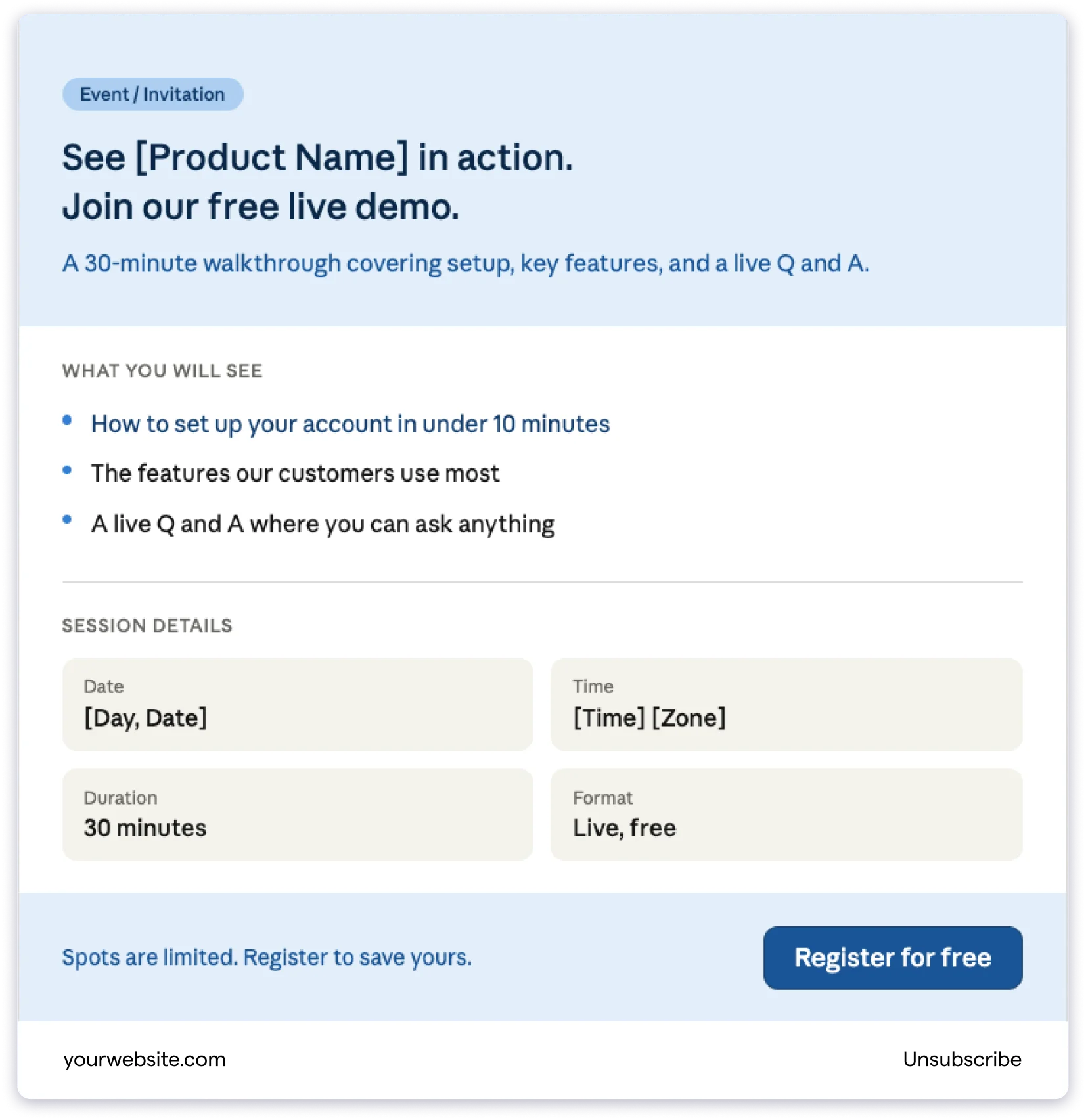
Sample Copy:
Subject: See [Product Name] in action, register for our free demo
Headline: Watch [Product Name] Live. No Signup Required to Join.
Body: Join us for a free 30-minute live demo and see exactly how [Product Name] works.
Here is what we will cover:
How to set up your account in under 10 minutes
The features our customers use most
A live Q and A where you can ask anything
Date: [Day, Date] Time: [Time] [Timezone]
CTA button: Register for Free
Template 2: Product Launch Announcement Newsletter
Type: Promotional / Product Update
Goal: Tell your subscribers about something new you have built or shipped
Why it Works:
- Naming the feature in the subject line tells readers what the email is about before they open it.
- A product visual next to the copy makes the new feature feel real, not just described.
- One direct CTA gives readers a clear next step.
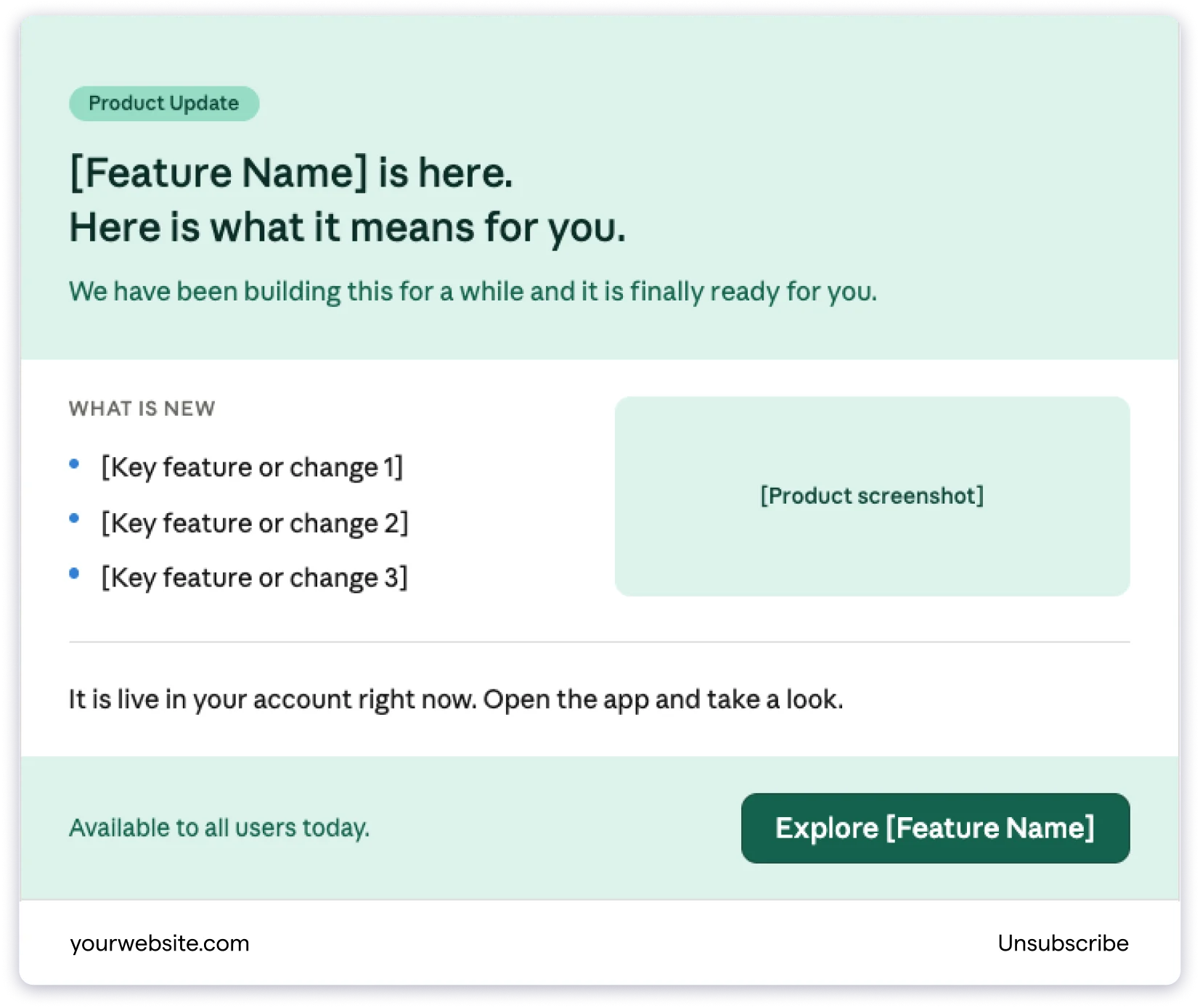
Sample Copy:
Subject: Introducing [Feature Name], now live for all users
Headline: [Feature Name] is here. Here is what it means for you.
Body: We have been building this for a while, and it is finally ready.
[Feature Name] lets you [one-line description of what it does]. It is live in your account right now.
What is new:
[Highlight 1]
[Highlight 2]
[Highlight 3]
CTA button: Explore [Feature Name]
Template 3: Limited Offer or Discount Newsletter
Type: Promotional
Goal: Drive sign-ups or purchases before a deadline
Why it Works:
- Putting the discount in the subject line gets the click before the email is even opened.
- A visible deadline near the CTA gives readers a real reason to act now.
- Short copy keeps the offer front and centre without burying it.
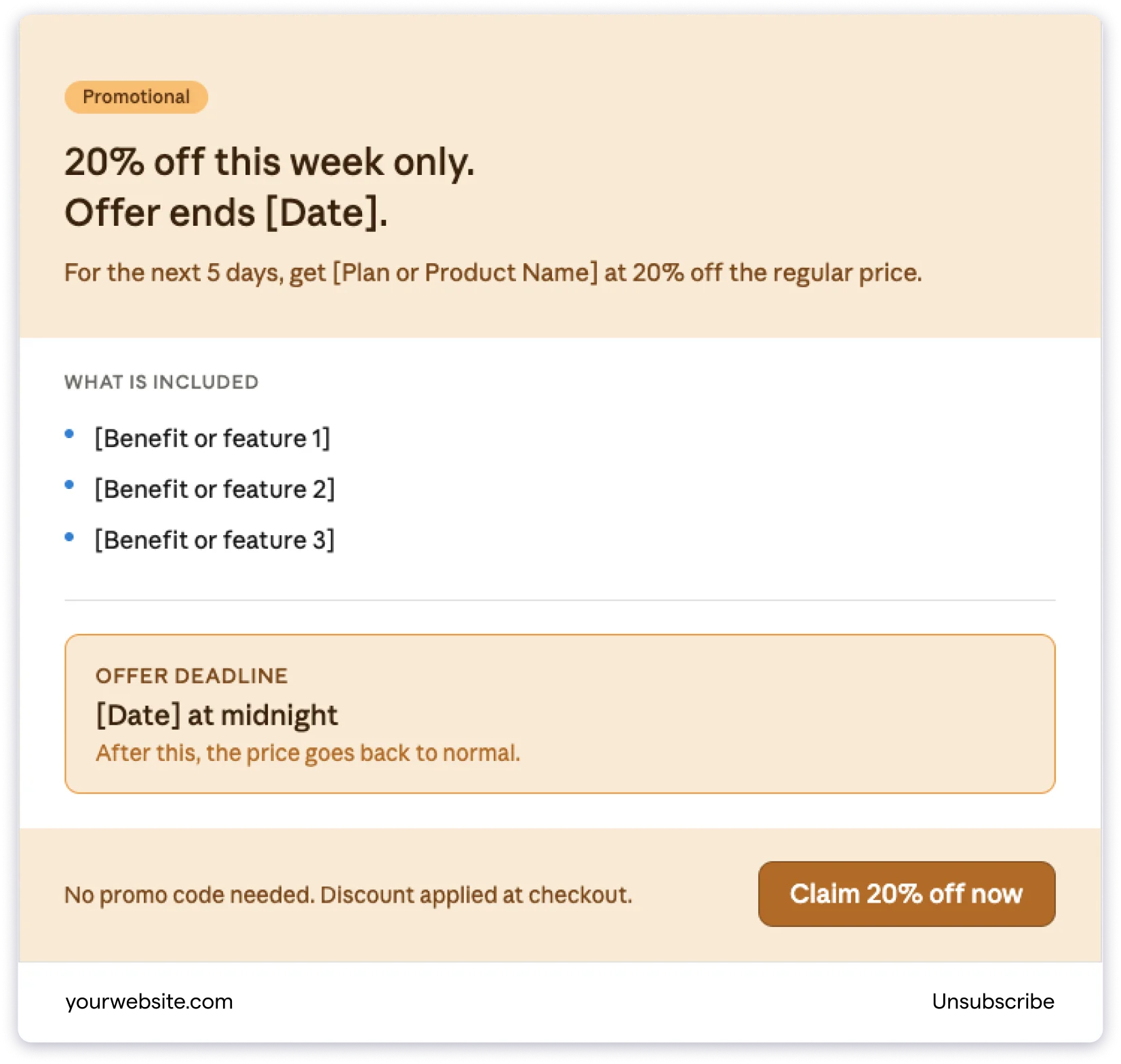
Sample Copy:
Subject: 20% off this week only, offer ends Friday
Headline: Your Subscribers Deserve the Best. So Do You.
Body: For the next 5 days, you can get [Product/Plan Name] at 20% off the regular price.
What is included:
[Benefit 1]
[Benefit 2]
[Benefit 3]
This offer ends on [Date] at midnight.
CTA button: Claim 20% Off
Template 4: Educational or How-To Newsletter
Type: Educational
Goal: Teach your subscribers something useful and build trust over time
Why it Works:
- Teaching without selling builds more trust than any promotional email.
- Numbered steps make the lesson easy to follow and quick to scan.
- A soft CTA at the end feels natural because the email has already delivered value.
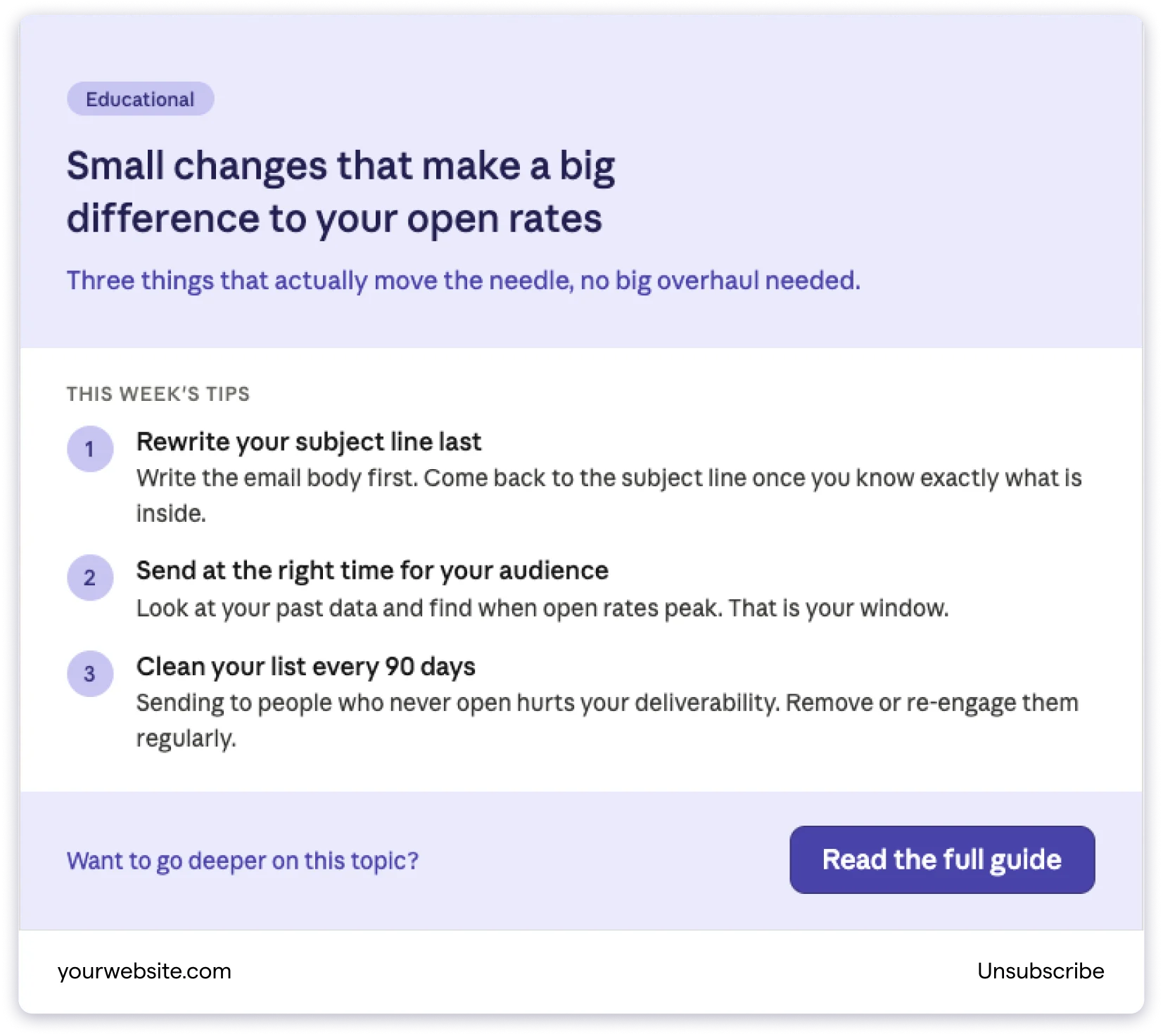
Sample Copy:
Subject: 3 ways to improve your email open rates this month
Headline: Small Changes That Make a Big Difference to Your Open Rates
Body: Getting people to open your emails is half the battle. Here are three things that actually move the needle.
1. Rewrite your subject line last.
2. Send at the right time for your audience.
3. Clean your list every 90 days.
Want to go deeper? Here is a full guide on improving email performance: [link]
CTA: Read the full guide
Template 5: Case Study or Social Proof Newsletter
Type: Social Proof
Goal: Build trust by sharing a real customer result
Why it Works:
- A result-led subject line is more compelling than any claim you make about yourself.
- Specific numbers are far more believable than vague statements like “significant growth”
- A short story with a link to the full case study works for both busy and curious readers.

Sample Copy:
Subject: How [Customer Name] grew their email list by 40% in 60 days
Headline: Real Results from Real Customers
Body: [Customer Name] came to us with a problem. Their newsletters were going out regularly, but engagement had plateaued.
In 60 days of using [Product Name], here is what changed:
Email open rate up by 35%
Click-through rate doubled
The subscriber list grew by 40%
The biggest change? They switched to a consistent weekly newsletter using a structured template. That consistency alone changed how their audience engaged.
Read the full story to see exactly what they did.
CTA button: Read the Case Study
Template 6: Event or Webinar Invite Newsletter
Type: Event / Invitation
Goal: Get subscribers to register for an upcoming event
Why it Works:
- A clear info block with date, time, and duration means readers find the basics instantly.
- Listing takeaways answers the first question every reader asks: “Is this worth my time?”
- One registration CTA with no competing links keeps readers focused on one action.
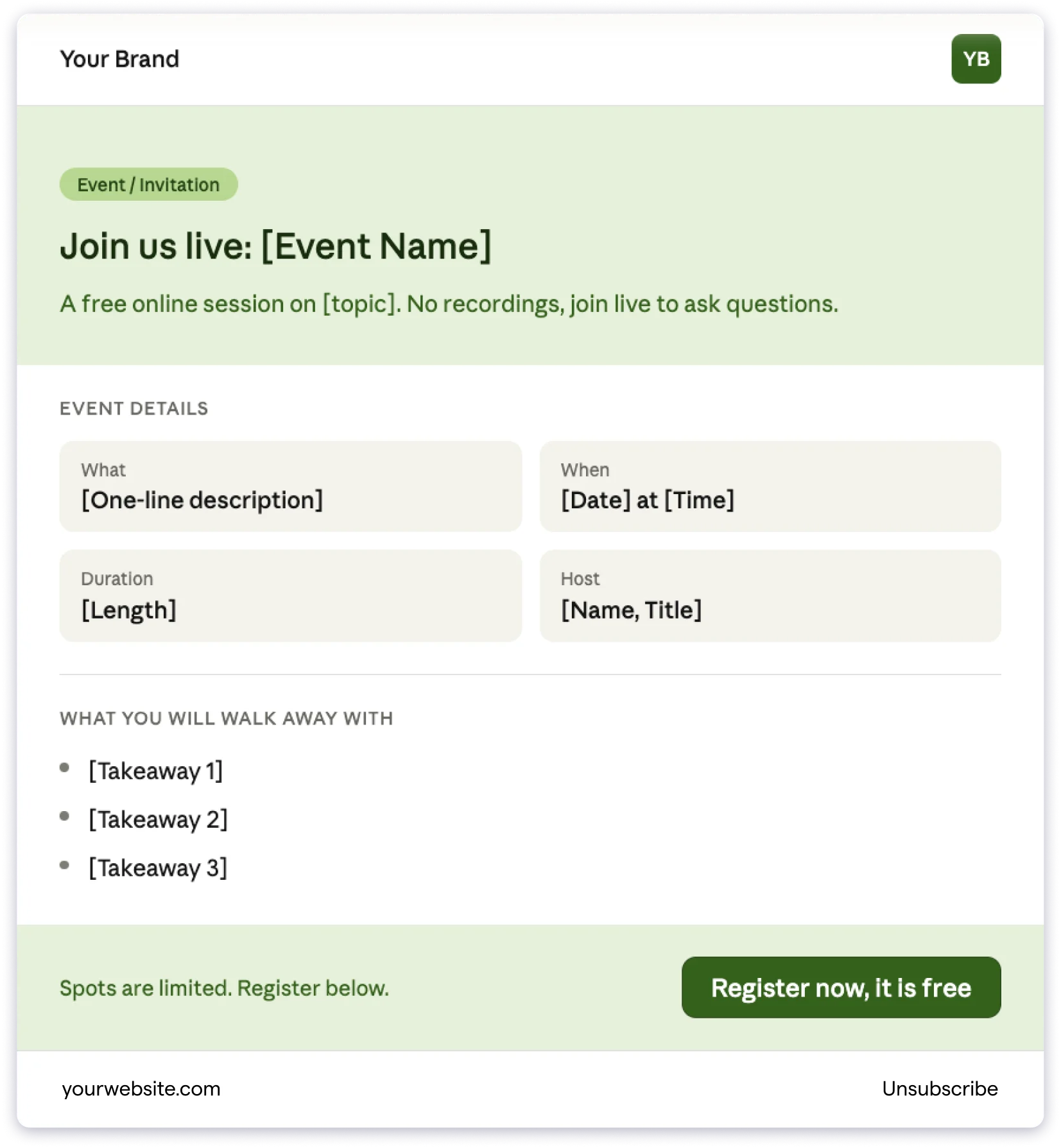
Sample Copy:
Subject: You are invited: [Event Name] on [Date]
Headline: Join Us Live: [Event Name]
Body: We are hosting a free online session, and we would love for you to join.
What: [One-line description of the event] When: [Date] at [Time] [Timezone] Duration: [Length of event] Host: [Name, Title]
What you will walk away with:
[Takeaway 1]
[Takeaway 2]
[Takeaway 3]
Spots are limited. Register below to save your seat.
CTA button: Register Now, It is Free
Template 7: Re-engagement Newsletter
Type: Re-engagement
Goal: Bring back subscribers who have stopped opening your emails
Why it Works:
- An honest subject line feels like a real question, not a campaign, and stands out in the inbox.
- Giving readers two clear options removes pressure and actually increases re-engagement.
- A short warm email makes the brand feel human rather than automated.

Sample Copy:
Subject: Still want to hear from us?
Headline: We have Missed You. Have You Missed Us?
Body: It looks like you have not opened one of our emails in a while. That is okay.
We just wanted to check in. We send [describe your newsletter, for example: weekly tips on email marketing, monthly product updates, curated reads on design], and we want to make sure it is still useful to you.
If you are still interested, great. There is nothing you need to do. We will keep sending.
If things have changed and you would rather not hear from us, no hard feelings. You can unsubscribe below anytime.
CTA button: Yes, Keep Me Subscribed
Template 8: Company Update Newsletter
Type: Product Update / Company Update
Goal: Keep subscribers informed about what is happening at your company
Why it Works:
- Short, named sections like “What we shipped” make the email scannable in seconds.
- A conversational tone makes updates feel personal rather than like a press release.
- Linking each section to a full read keeps the email short while satisfying curious readers.

Sample Copy:
Subject: Here is what is new at [Company Name] this month
Headline: Your Monthly Update from [Company Name]
Body:
What we shipped
This month, we launched [Feature/Update Name]. It does [one-line explanation]. Read more about it here: [link]
What we are working on
We are currently building [upcoming thing]. It will be ready by [timeframe]. We will share more details soon.
From the team
[Optional: a short personal note, a team milestone, or a customer shoutout]
Thank you for being a subscriber. We will be back next month with more updates.
CTA: Read the Full Update on Our Blog
What Makes a Good Newsletter Template?
The template is only a starting point. What you fill it with matters just as much.
Here are five things that separate newsletters people look forward to from the ones that get ignored.
- Keep One Goal per Email: Every newsletter should do one thing. Like announcing a product, sharing a tip, or inviting someone to an event.
- Write a Subject Line That Earns the Open: Be specific. “3 ways to improve your open rates” will always outperform “This month’s newsletter.”
- Make It Easy to Scan: Use short paragraphs, clear subheadings, and bullet points so readers can pick out what is relevant to them in seconds.
- Use One Clear Call to Action: Every newsletter should end with one thing you want readers to do next. Read an article, register for an event, or claim an offer.
- Be Consistent: The newsletters that build the most loyal audiences are the ones that show up regularly.
Conclusion
A newsletter only works when it shows up consistently and looks like it was made with intention.
Templates make both of those things easier.
They take the guesswork out of layout, keep your emails looking polished every time, and free you up to focus on what actually matters: the content inside.
The readers who look forward to your newsletter every week are not waiting for a perfect email.
They are waiting for a consistent one that gives them value.
FAQ on Email Newsletter Templates
It is a pre-built email layout with sections already in place. You fill it with your content and send it. It saves time and keeps your newsletters looking consistent every time.
There are 7 main types: promotional, educational, product update, event invite, curated roundup, social proof, and re-engagement. Each one works best for a different goal.
Start with your goal for that particular send. If you want to promote something, use a promotional template. If you want to teach something, use an educational one. Match the template to the purpose of that email.
A header with your logo, a hero section with a headline, short content blocks in the body, one clear call to action, and a footer with your contact details and an unsubscribe link.
There is no single right answer. Weekly works well for tips and curated content. Monthly works well for company updates and roundups. The most important thing is picking a frequency you can stick to consistently.
No. Tools like Canva, Mailchimp, Brevo, and others have drag-and-drop editors where you can pick a template and fill in your content without any coding or design experience.
![9 Guest Posting Email Templates That Actually Get Accepted [2026]](https://www.saleshandy.com/blog/wp-content/uploads/2026/05/Best-Guest-Post-Email-Templates.webp)
 Anil Salvi