
RocketReach promises to make finding emails and phone numbers of decision-makers easier. But how accurate is its contact data? And is it worth paying $33 to $142 a month?
To see how well RocketReach delivers on those promises, I spent two weeks testing it with real prospects, checking email accuracy, exploring its features, and seeing how far its lookup credits would take me.
Some results were impressive. Others exposed limitations worth knowing before you subscribe.
Here’s what you’ll find below:
- Email find rate test of decision makers
- Email verification accuracy test and unexpected results
- Hands-on experience with RocketReach’s key features and limitations
- Breakdown of RocketReach’s pricing, plans, and lookup credits
Let’s get into it.
RocketReach Review- TOC
- TL;DR: My Honest RocketReach Review
- How I Tested RocketReach
- The First 2 Minutes with RocketReach
- RocketReach Features Breakdown
- RocketReach Pricing Explained
- Pros and Cons of RocketReach Worth Considering
- The RocketReach Alternative I’d Actually Recommend: Saleshandy
- Final Verdict: Is RocketReach Worth It in 2026?
- Frequently Asked Questions
TL;DR: My Honest RocketReach Review
I scored RocketReach 2.3/5 ⭐after two weeks of hands-on testing.
Here’s the short version. Email accuracy is actually HIGH when RocketReach has the person you need. But they’re missing more executives than you’d expect.
The catch-all detection fails exactly where it matters most. And the sign-up quietly enrolls you in a perpetual data-sharing agreement.
Here’s how every feature scored:
| Feature | Score /5 | Verdict |
|---|---|---|
| Database Coverage | 2.5 ⭐ | 50% find rate across 4 named executives. Atlassian’s CTO and Canva’s CEO are both missing from the database entirely. |
| Email Accuracy | 4 ⭐ | When RocketReach has the contact, email accuracy is high. Both found emails in my test matched independent ground-truth sources exactly. |
| Email Verification | 2.5 ⭐ | Disposable and invalid-domain detection work. Catch-all detection does not, despite RocketReach’s marketing claim. I verified a nonexistent @hubspot.com address as “safe to send.” |
| Search & Filters | 3.5 ⭐ | 21 filter fields and free browsing before credit spend is a smart design. The company filter UX adds friction that cost me a credit during testing. |
| Chrome Extension | 4 ⭐ | The strongest feature in the product. Instant reveal, multi-email surfacing, and company data pulled from the same panel without consuming a lookup credit. |
| Outreach (Sequences) | 2 ⭐ | Email-only sequences. No LinkedIn, no WhatsApp, no SMS. The daily sending cap on Free is zero, and the sequence builder is mailbox-gated. |
| CRM Integrations | 1.5 ⭐ | Zero native CRM integrations on Essentials ($33/mo). Salesforce, HubSpot, Outreach, Salesloft, and Bullhorn all require Pro ($75/mo) or higher. |
| Pricing Transparency | 1 ⭐ | Pricing is A/B tested across geographies and visitors. Four independent third-party sources show four different prices for the same plan. |
| Data Privacy | 1.5 ⭐ | Signing up with Google or Microsoft auto-enrolls you in the Community Program, granting RocketReach a perpetual data-sharing license. GDPR is disabled by default. |
| Saleshandy (recommended alternative) | 4.5 ⭐ | 852M+ verified contacts, built-in real-time verification across 9 providers, waterfall enrichment, native CRM integrations on every plan, transparent pricing, and no per-seat fees. |
If you want to skip ahead to how Saleshandy compares against RocketReach directly, that comparison is one scroll down.
How I Tested RocketReach
I signed up for RocketReach’s Free plan.
Here’s what the test looked like:
- Sample size: 4 named executives across 4 buckets. The Free plan gives you 5 Lookup Credits total, and I kept one in reserve for the Chrome extension test.
- Buckets: Enterprise US (Yamini Rangan at HubSpot and Rajeev Rajan at Atlassian), Non-US (Melanie Perkins at Canva), Startup (Guillaume Moubeche at Lemlist).
- Ground truth sources: Clay, Derrick, AddToCRM, and Getlatka. Pulled independently of RocketReach so the comparison was clean.
- Metrics tracked: find rate per bucket, email confidence grade accuracy, catch-all detection accuracy, credit depletion by day, UX friction count.
- Reviews cross-checked: 30+ verbatim quotes from G2 (only 3 organic reviews across 5+ pages), Trustpilot, and Capterra across 12 themes.
PS: I work at Saleshandy. I’ll make the Saleshandy comparison transparent in its own section near the end. Everywhere else, I’m telling you what I actually saw inside RocketReach.
The First 2 Minutes with RocketReach
Sign-up took under 90 seconds. No credit card, no phone number.
I clicked Google sign-in. The dashboard loaded. And honestly, I just stared at it for a second.
The sidebar was collapsed to a column of icons with zero labels. I had to hover over each one to figure out what it was. Not a dealbreaker, but a strange first impression for a product priced at $33 to $142 a month.
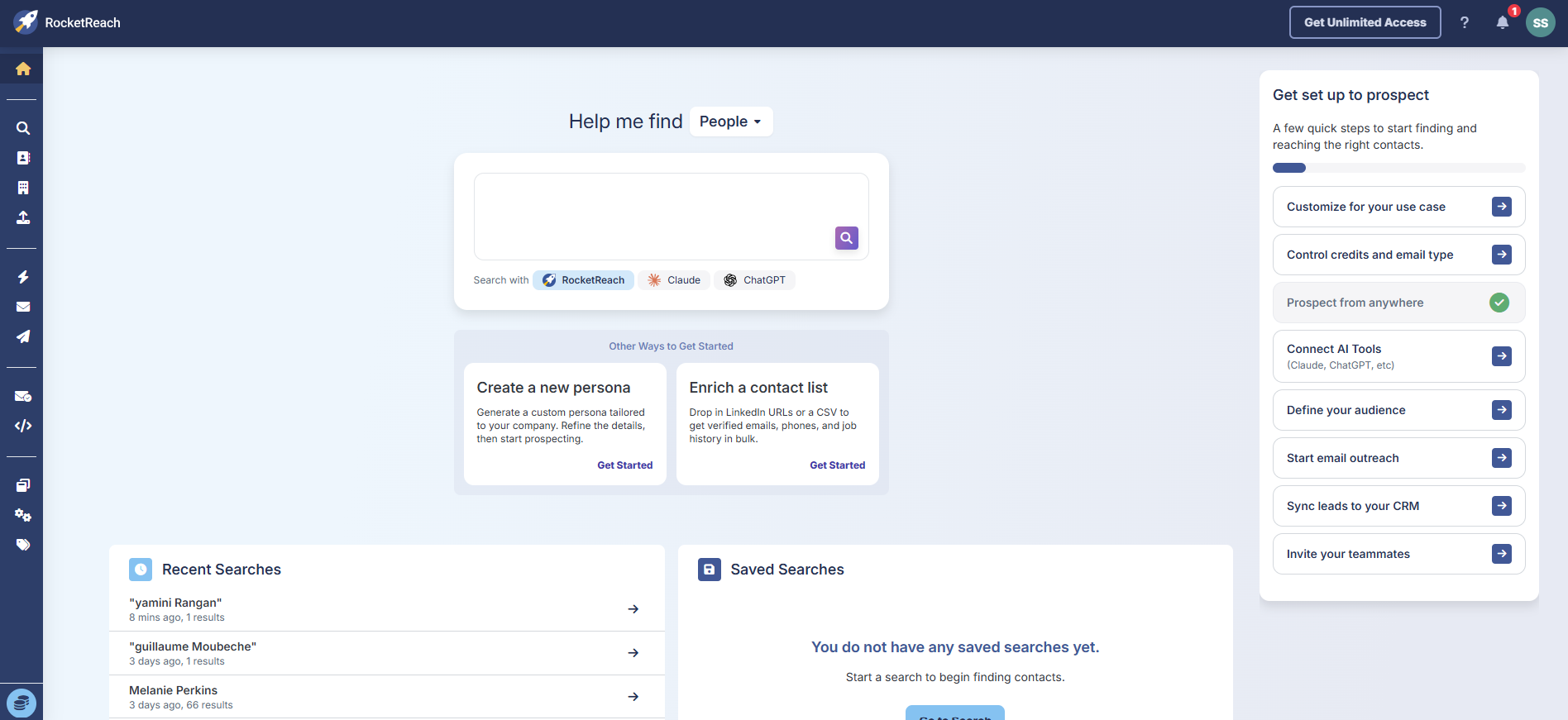
Once I expanded it, the layout clicked. There’s a Discover section for finding people. An Engage section for sending them emails.
An Applications section hiding the verifier and MCP plugin. And an Other section where RocketReach parked everything they couldn’t categorize cleanly the extension, integrations, pricing. The checklist on the right walks you through what to do first.
I got three separate credit pools on sign-up:
- 5 Lookup Credits (for revealing contact info)
- 5 Company Export Credits (for downloading company data)
- 10 Verify Credits (for checking email deliverability)
These pools are INDEPENDENT. A Lookup Credit does not touch your Verify Credits. Most reviews treat them as one bucket. They are not.
Then the weird part happened. I noticed a Settings tab, clicked through to Privacy out of habit, and found something I didn’t sign up for.
Signing up with Google had auto-enrolled me in RocketReach’s Community Program. The terms grant RocketReach a “nonexclusive, unrestricted, irrevocable, perpetual” license over my contact data. That includes email headers and signatures from the connected Google account.
Nothing about this showed up during sign-up. No popup, no checkbox, nothing in bold red letters saying I was handing over my address book. I had to go hunting for the opt-out myself.
Psst: GDPR compliance was also disabled by default. For a tool that handles personal contact data, that’s a strange default to pick.
RocketReach Features Breakdown
I tested every feature in the sidebar over two weeks. Here’s what I found, feature by feature.
1. Search & Filters
Search sits at the top of the Discover sidebar. 21 filter fields. Two are gated behind paid plans (Technologies and Shared Team Tags). The rest work on Free.
You can browse search results for free. You only spend a Lookup Credit when you click “Get Contact Info” on a specific person. That’s actually a smart design decision. You qualify prospects before committing a credit.
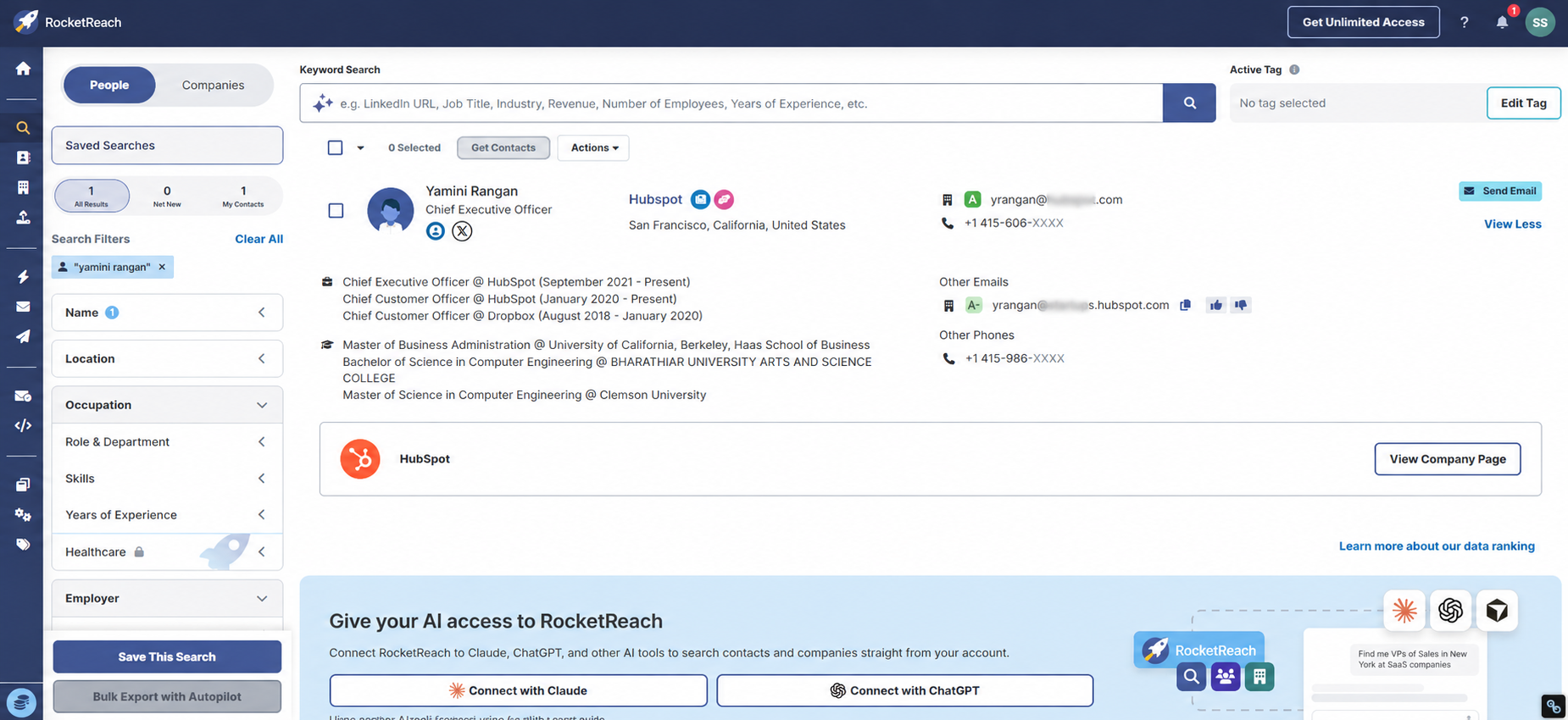
So I ran my find rate test. Four executives across four buckets. Here’s how it went:
| Prospect | Company | Bucket | Found? | Email match | Credits used |
|---|---|---|---|---|---|
| Rajeev Rajan | Atlassian | Enterprise | No (0 results) | N/A | 0 |
| Melanie Perkins | Canva | Non-US | No (0 results) | N/A | 0 |
| Guillaume Moubeche | Lemlist | Startup | Yes | Exact match (A grade) | 1 |
| Yamini Rangan | HubSpot | Enterprise | Yes | Exact match (A grade) | 1 |
50% find rate. The CTO of a 12,000-person company (Atlassian) and the CEO of a $26B+ company (Canva) are not in the database.
But when RocketReach HAS the data, it’s accurate. Both found emails matched my independent ground truth exactly, A-grade confidence.
What G2 reviewers say about Search:
“the categories are limited.”
Jeff W., ★3.5, February 2026. Read the full review on G2.
“The lack of filters and the database not being large enough.”
Brice A., Audience Manager, Publishing, ★2.0, May 2021. Read the full review on Capterra.
My verdict: Search works well when RocketReach has the record. 50% find rate on named executives at major companies is lower than I expected.
2. Chrome Extension
The Chrome extension is RocketReach’s best feature. Not even close.
I installed it in three clicks. It’s Chrome-only, so Firefox and Edge users are out of luck. The incentive is nice though. Install the extension and you get 5 bonus Lookup Credits.
Then I opened Dhruv Patel’s LinkedIn profile (he’s a Saleshandy co-founder) to test it. The extension panel popped open on the right side of the page and populated instantly:
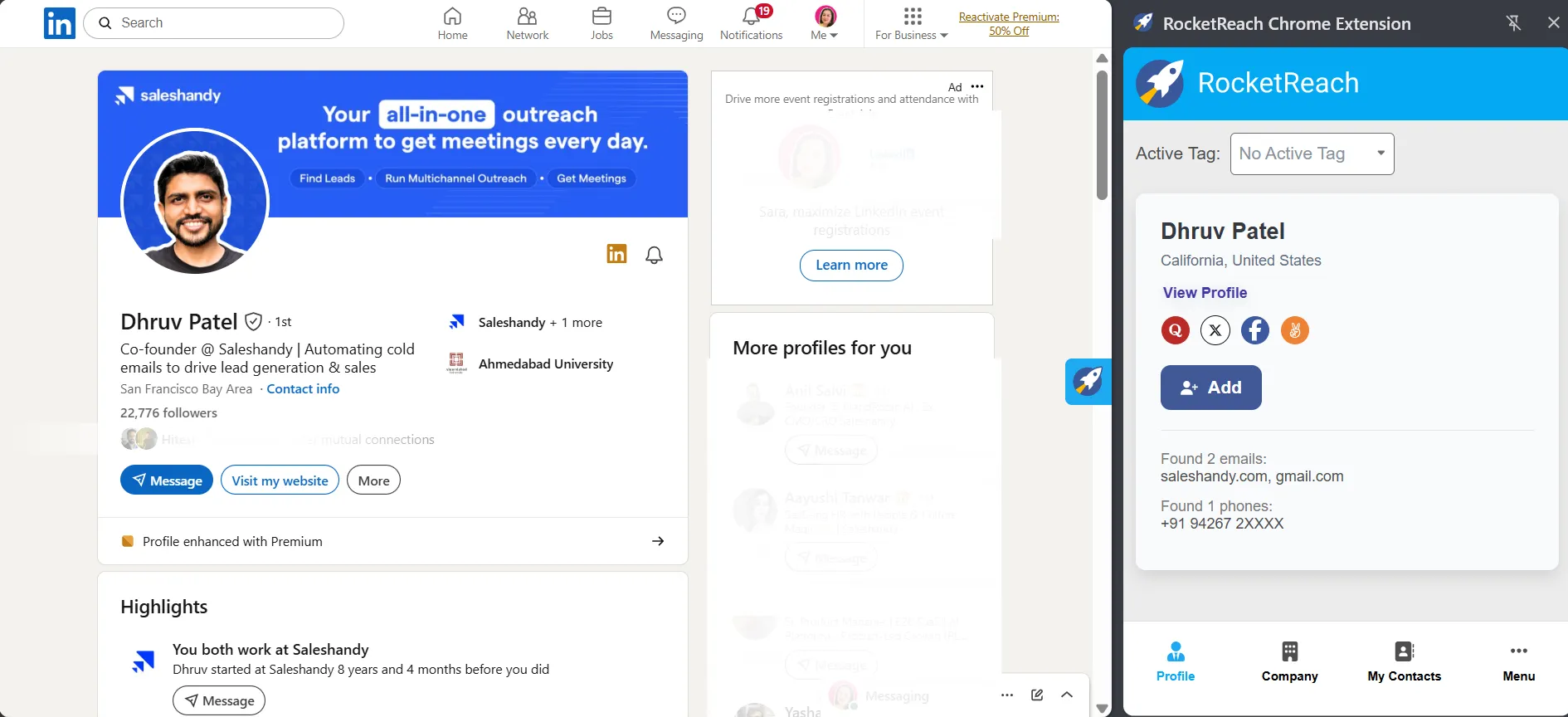
- 2 emails returned (saleshandy.com domain and gmail.com)
- 1 phone number, masked on Free (+91 94267 2XXXX)
- Social links across Quora, X, Facebook, and Peerlist
- Location showing as California, United States
The reveal happened instantly. No loading spinner or “generating” delay to deal with.
Then I clicked the Saleshandy pill on Dhruv’s profile. The same extension panel INSTANTLY swapped to the Saleshandy company card. No credit consumed for the company data. Industry, employee count, revenue estimate, full Ahmedabad address, X and Facebook, Crunchbase handle. All in the same panel, zero friction.
To be honest, this is the only feature in RocketReach that felt genuinely polished. Everything else has rough edges.
“The best part of using RocketReach using their browser extension”
Morgan V., Marketing and Sales Assistant, Publishing, ★5.0, February 2022. Read the full review on Capterra.
“Chrome extension freshly scrub data from pretty much all social media”
Matthew M., Consultant, Telecommunications, ★4.0, July 2024. Read the full review on Capterra.
My verdict: This is the one feature worth installing even if you stay on Free.
3. Upload List
Upload List accepts CSV and Excel files for bulk enrichment. You drop a list of names or companies in and RocketReach fills in missing contact details.
Each enriched row consumes one Lookup Credit. On Free, you get 5. So you can enrich 5 rows before you hit the wall.
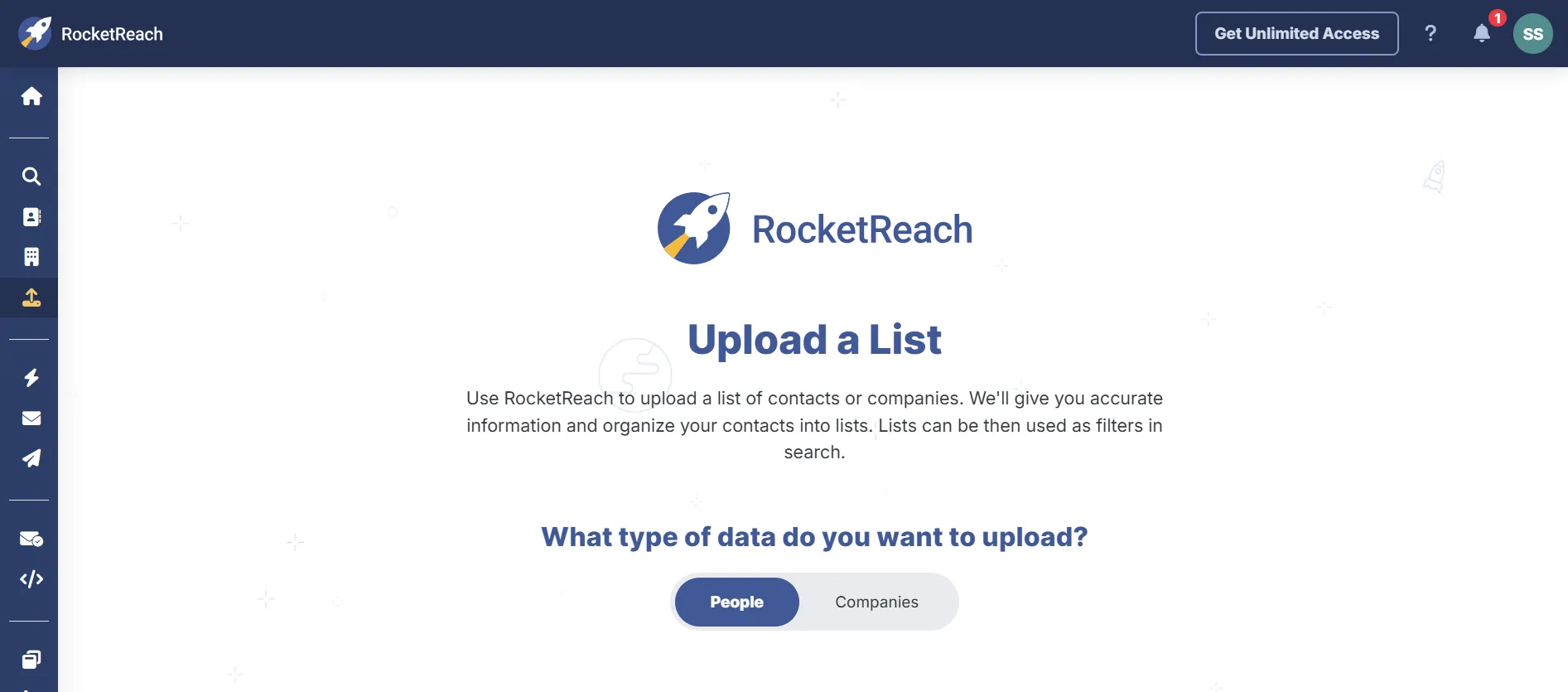
I didn’t run a full CSV test because of the credit cap. The upload interface itself is clean, and based on the reviews, the bulk workflow is a strength when you have enough credits.
“Bulk lookups were simple to run. Uploading a list and getting contact data back was fast.”
Gustavo S., Partner, ★0.0, October 2026. Read the full review on G2.
My verdict: The feature works. The Free plan doesn’t give you enough credits to prove it.
4. Verify
This is where I spent most of my second week.
RocketReach claims “over 200M verifications monthly” and “proprietary catch-all detection” on the Verify page.
The second claim caught my eye because catch-all domains are exactly where most verifiers fail.
So I decided to test it properly.
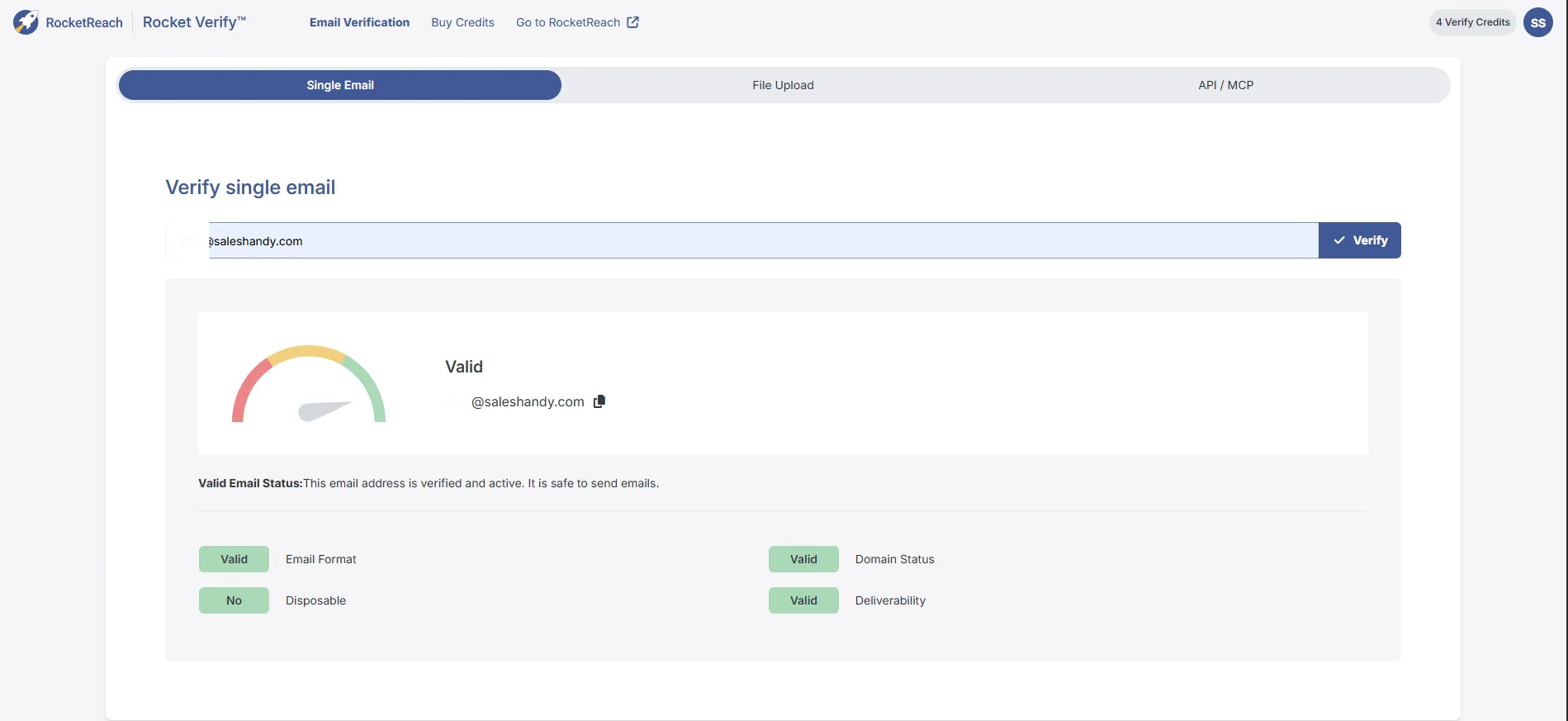
I ran 5 emails through the Verify tool. Here’s what happened:
| Email tested | Result | Format | Domain | Disposable | Deliverability |
|---|---|---|---|---|---|
| yrangan@hubspot.com | Valid | ✓ | ✓ | No | Valid |
| guillaume@lemlist.com | Valid | ✓ | ✓ | No | Valid |
| fakeperson12345@hubspot.com | Valid ⚠️ | ✓ | ✓ | No | “Safe to send” |
| test@thisfakedomain99999.com | Invalid | ✓ | ✗ | ? | Invalid |
| test@guerrillamail.com | Don’t Mail | ✓ | ✓ | Yes | Don’t Mail |
Row three is the one.
I made up fakeperson12345@hubspot.com. That mailbox doesn’t exist and never has. RocketReach marked it “Valid” with the exact message: “This email address is verified and active. It is safe to send emails.”
(Yes, really.)
Here’s what’s happening. HubSpot runs a catch-all mail server. A catch-all accepts every email sent to its domain, no matter whether the mailbox exists. RocketReach’s “proprietary catchall detection” did not detect this.
That’s a direct contradiction of what the Verify page promises. And it’s not a small gap. A huge chunk of enterprise B2B domains run catch-alls. HubSpot. Many Google Workspace setups. Lots of mid-market companies that just route everything to a central inbox. Any address at those domains will pass RocketReach verification whether it exists or not.
So you send to a “Valid” address, the email bounces or disappears into a black hole, and your sender reputation drops.
“I’ve had quite a few bouncebacks from emails that score highly on RocketReach.”
Peter B., Managing Director, Financial Services, ★2.0, May 2021. Read the full review on Capterra.
“56% delivery rate with the Rocketreach contacts”
Andy A., PowerPoint Guy, Design, ★3.0, April 2024. Read the full review on Capterra.
My verdict: The Verify tool catches the easy stuff: fake domains and disposable services. It misses the one failure that actually hurts you. Verifying catch-all addresses as “safe to send” at scale will damage your domain.
The catch? Saleshandy’s Lead Finder verifies every email in real time across 9 providers at the moment you reveal.
Catch-all handling is built into the sender logic, not slapped on as a label. See how Saleshandy’s data compares.
5. Outreach Features: Messages, Sequences, Autopilot
RocketReach bundles three outreach tools under the Engage sidebar. Messages for sending individual emails. Sequences for multi-step follow-ups. And Autopilot for automated outreach based on search criteria.
All three are gated or capped in ways that’ll frustrate anyone running real outbound. Let me show you how.
Messages
The Messages tab is where RocketReach sends emails. On Free, the Daily Email Limit shows 0/5. (Yes, zero!)
Nothing works until you connect a Gmail or Outlook mailbox. No SMTP, no IMAP, so if you don’t live in Google or Microsoft’s world, you don’t send from here at all.
Once you connect a mailbox, you get access to the template editor. And this is where things get weird.
The template editor gives you four merge variables. FOUR. First Name, Last Name, Full Name, Current Employer.
That’s it!
Modern outreach platforms give you 20+ variables including industry, LinkedIn job title, recent company news, custom fields, firmographic data.
With four variables, your personalization caps at “Hi {{First Name}}, I saw you work at {{Current Employer}}.” You’ve written better cold emails in Gmail!
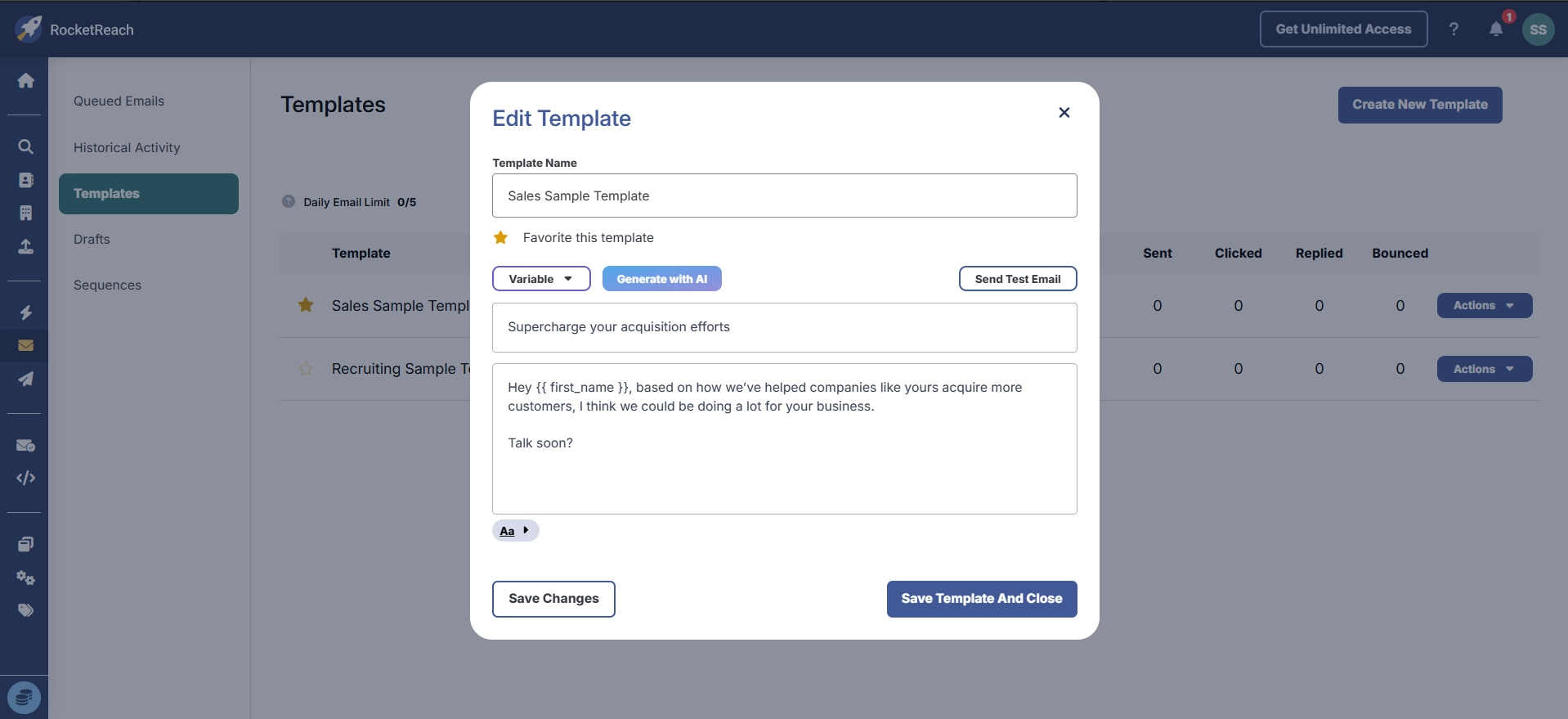
The 500/day sending cap also deserves a mention. It applies to every paid plan equally. Essentials buyers at $33/mo get 500/day. Ultimate buyers paying $142/mo get the same 500/day. For $109/mo more. (The math on this one is rough.)
My verdict: Messages is a basic email sender bolted onto a data product. Four merge variables is the lowest I’ve tested this year. And the sending cap doesn’t scale with the price. That’s a weird way to price an outreach tool.
Sequences
Sequences let you build multi-step email follow-ups. The feature launched in February 2026, according to RocketReach’s press release.
Honest disclosure: I documented the UI and tested the gating, but didn’t connect a mailbox to build a live sequence. The findings below are from the pre-connection experience.
Here’s what you need to know going in:
- Email-only. Just email, email, email. No LinkedIn step, no WhatsApp, no SMS, no phone task
- 500/day sending cap on all paid plans (same cap, no tier scaling)
- Mailbox connection required to even START building a sequence
- Two mailbox options: Gmail or Outlook
Email-only is a hard ceiling in 2026.
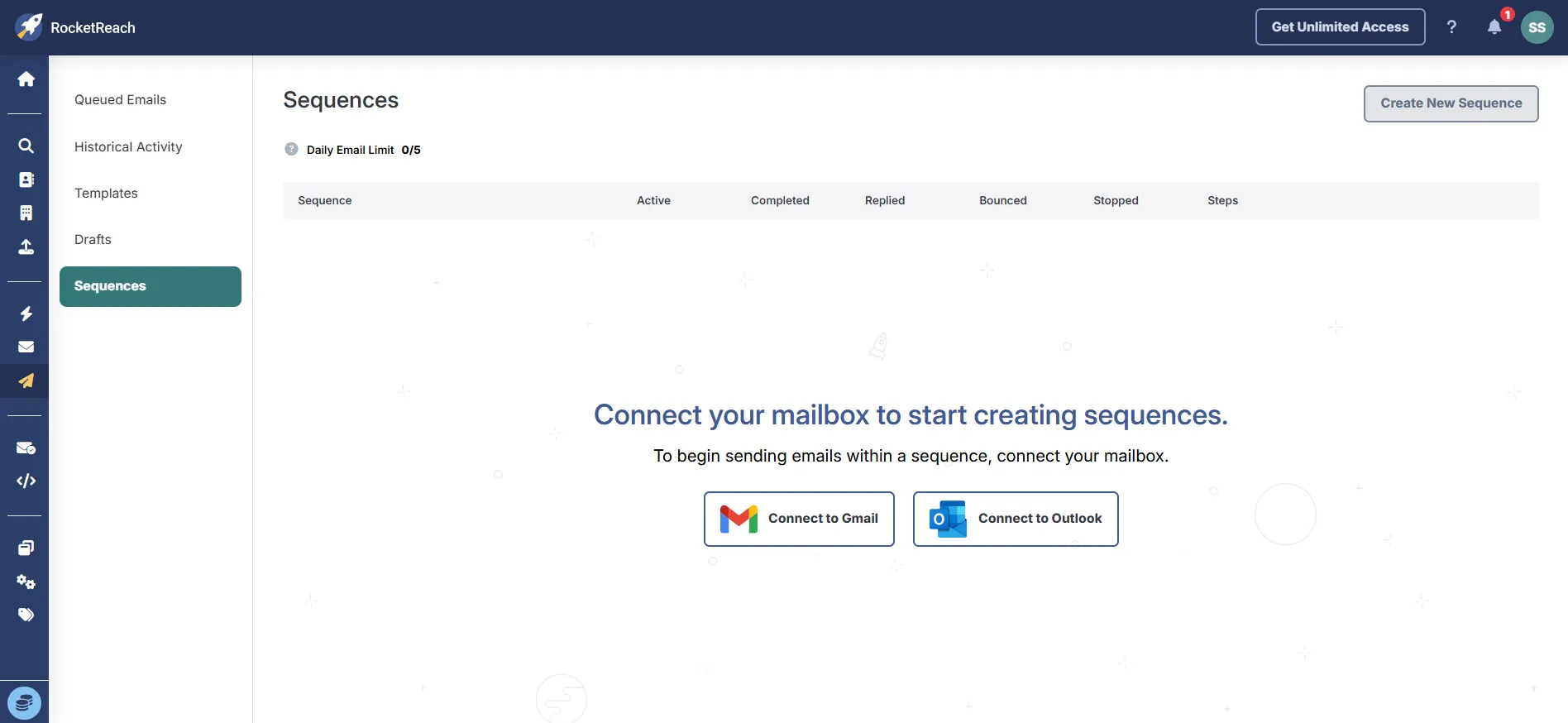
If your prospects respond better on LinkedIn, or your workflow includes WhatsApp follow-ups, or you want a phone task between emails, you’re going to need an entirely separate platform for all of that.
Which kind of defeats the point of paying $75 to $142/mo for an “outreach” tool!
My verdict: Email-only sequences in 2026 is thin. And the flat 500/day cap means a $142/mo Ultimate buyer gets the same sending volume as a $33/mo Essentials buyer. You’re paying for data access here, not for outreach power.
The catch? Saleshandy’s multichannel sequences run on email, LinkedIn, AND WhatsApp in one workflow. And no per-seat pricing.
6. AI Plugin (MCP)
The AI Plugin (MCP) page connects RocketReach to Claude, ChatGPT, and other AI tools via the MCP endpoint at https://mcp.rocketreach.co/mcp.
Two connect buttons, one for Claude and one for ChatGPT. The MCP is available on the Free plan with no gating.
This one is actually interesting. Most B2B data providers do not offer MCP yet. For teams building AI-powered prospecting workflows, having RocketReach queryable from inside Claude Desktop is a real differentiator. It’s the one place where RocketReach is ahead of the market.
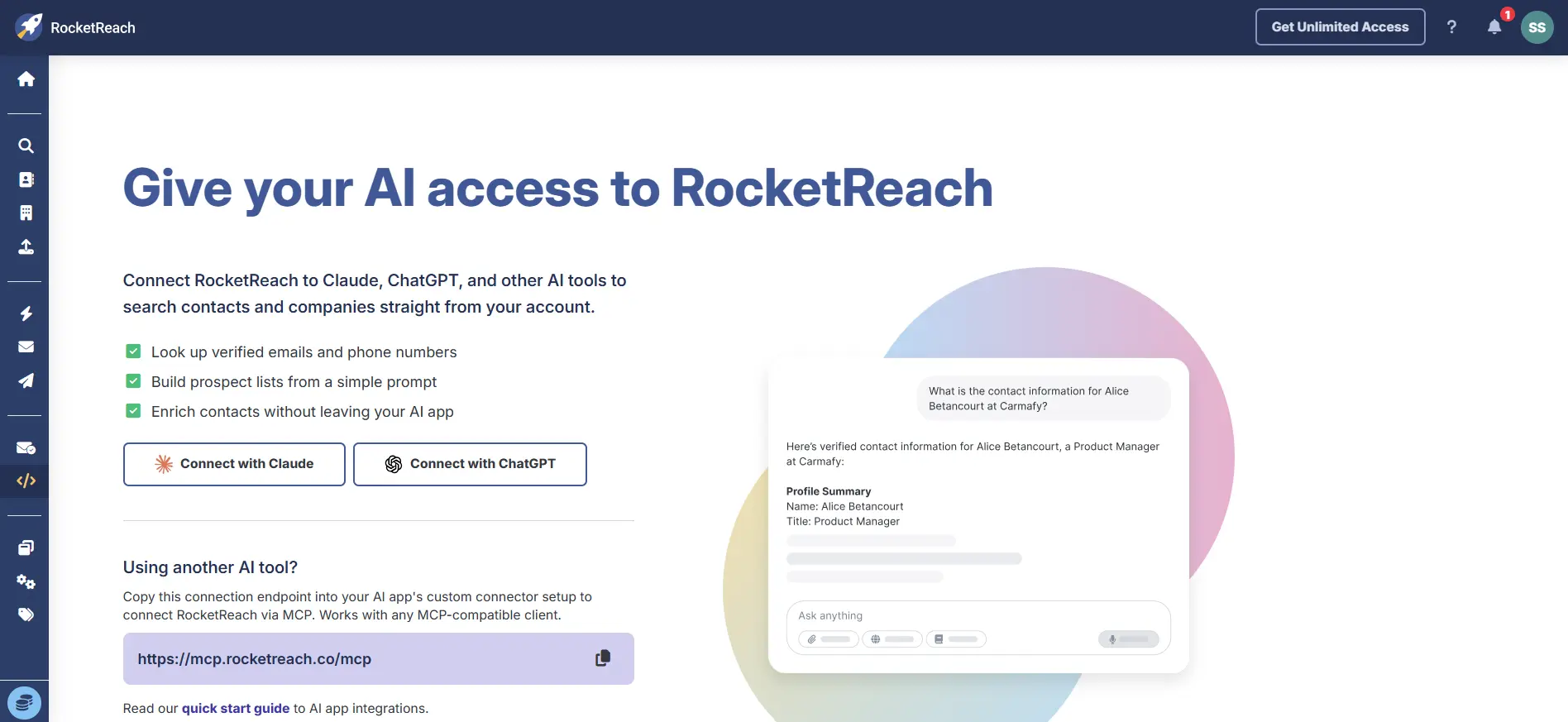
I didn’t run live queries during this test. If you do connect it, each query consumes Lookup Credits from the main pool. On Free’s 5 credits, you’d burn through them in one or two prompts.
My verdict: The MCP is a 2026 forward-looking play. RocketReach got there before most competitors. If you prospect from inside Claude or ChatGPT, this moves the needle. If you don’t, it won’t.
7. Integrations
Six integrations total: Salesforce, Outreach, HubSpot, Salesloft, Bullhorn, and Zapier.
Here’s the problem. Five of those six are gated to Pro or higher. Click any of them on Essentials and you get this exact modal text: “All native integrations are available to users with Pro, Ultimate, and Custom plans.”
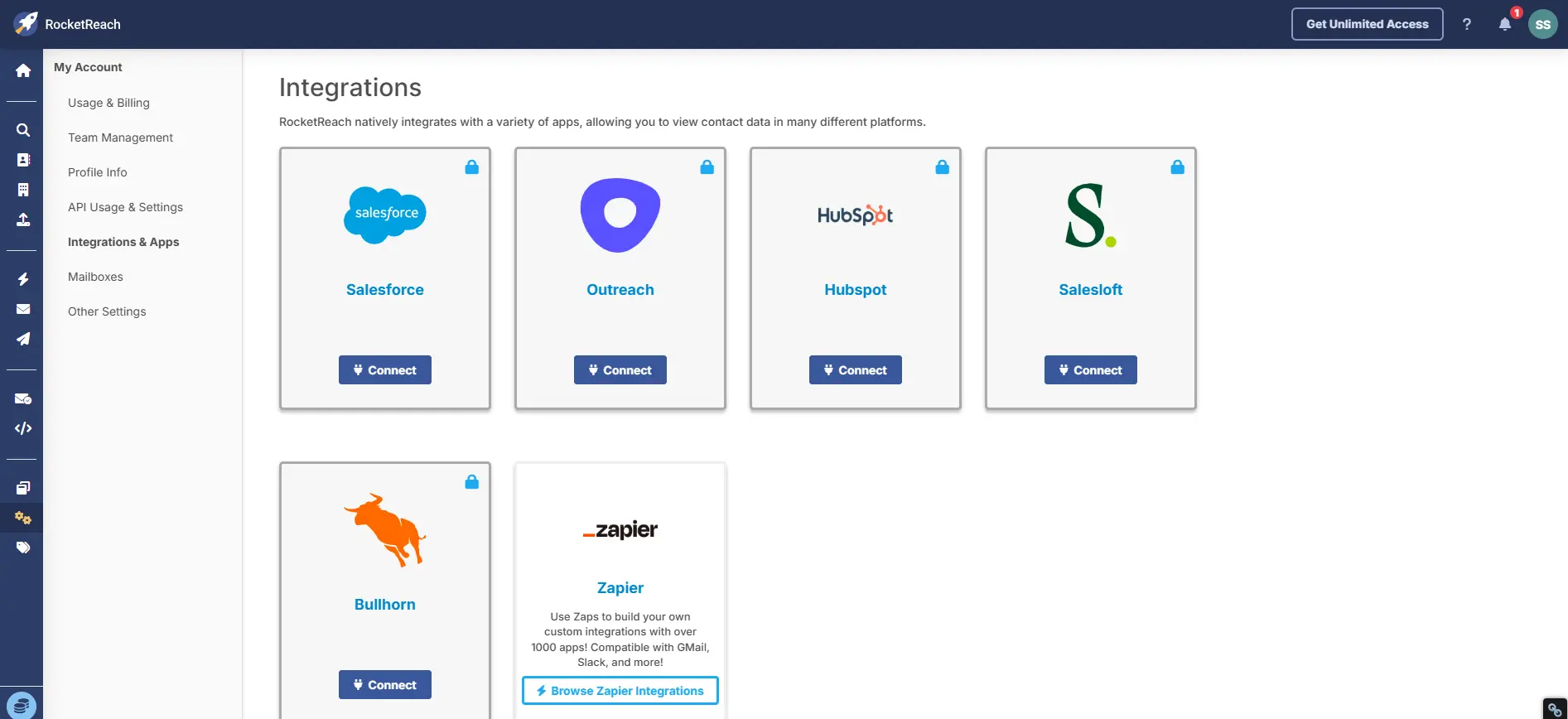
So an Essentials buyer paying $33/mo gets Zapier. That’s it. No Salesforce, no HubSpot, no Outreach, no Salesloft, no Bullhorn.
If you need any of those, your real entry price is Pro at $75/mo.
Psst: one small design thing bothered me. Each gated integration has a GREEN lock icon next to its Connect button. Green signals “available” in most UI patterns. A red or gray lock would correctly signal “restricted.” Green on a locked feature just looks confusing.
“I wish it would integrate directly with my CRM (Close.com) & Linkedin Sales Navigator.”
Barry S., Co-Founder, Biz Dev, Marketing and Advertising, ★4.0, May 2021. Read the full review on Capterra.
“Misrepresentation of ‘Unlimited’ Plan”
Tushar K., Marketing Manager, Information Technology, ★1.0, January 2025. Read the full review on Capterra.
My verdict: Essentials gives you Zapier. Pro gives you five CRMs. If you need Salesforce or HubSpot sync, your effective entry price is Pro, not Essentials.
RocketReach Pricing Explained In-depth
Here’s what RocketReach charges on annual billing:
| Plan | Monthly rate (annual billing) | Total annual | Lookup type | Exports/yr |
|---|---|---|---|---|
| Essentials | $33/mo | $399/yr | Email only | 1,200 |
| Pro | $75/mo | $899/yr | Email + Phone | 3,600 |
| Ultimate | $142/mo | $1,699/yr | Email + Phone | 20,000 |
Team plans start at $6,000 annually. 500 emails/day sending cap on all plans. MCP and API access available on all paid plans, including Essentials.
Three things worth knowing before you buy:
- Essentials has NO phone numbers. The plan name hides this. If you need direct dials, your real entry price is Pro at $75/mo. Not $33.
- “Unlimited lookups” is capped by exports. Annual plans say unlimited lookups, but exports are capped at 1,200 (Essentials), 3,600 (Pro), or 20,000 (Ultimate) per year. One SDR hits 1,200 in an afternoon.
- A/B pricing is a thing. Across 5 independent captures in 2026, Essentials monthly ranged from $33 to $69. Same plan, different buyers. A 109% spread.
“RocketReach is and was 10 times cheaper than the other platform that we were using”
Brendan C., Business Development Rep, IT and Services, ★4.0, January 2025. Read the full review on Capterra.
“I can’t oversee the fact they’re nick and diming our early stage startup. Use Apollo.”
Ryan D., Founder, Utilities, ★1.0, July 2025. Read the full review on Capterra.
The pricing deserves its own breakdown. For the full teardown including monthly rates, geo-based pricing differences, the subscriber terms, and the A/B testing evidence, read our dedicated RocketReach Pricing guide.
Pros and Cons of RocketReach Worth Considering
RocketReach shows the widest rating spread I’ve ever seen in B2B SaaS.
G2 scores it 4.4/5 across 1,363 reviews. Capterra scores it 4.1/5 across 140 reviews. Trustpilot scores it 1.2/5 across 1,083 reviews.
Three different numbers, three different user populations.
Here’s what each is actually measuring.
3 Things Reviewers Praise
Pro 1: The database is broad when it has what you need.
Reviewers who praise RocketReach consistently point to the sheer scale. When RocketReach has the record, the data is accurate. When it doesn’t, the empty result is honest.
“Rocketreach is the largest lead generation database I’ve found.”
Deanielle D., CEO and Founder, Outsourcing/Offshoring, ★5.0, March 2022. Read the full review on Capterra.
Pro 2: The Chrome extension is the standout feature.
Across every review platform, the Chrome extension is the single most praised piece of the product. If you install one thing, make it this.
“The best part of using RocketReach using their browser extension”
Morgan V., Marketing and Sales Assistant, Publishing, ★5.0, February 2022. Read the full review on Capterra.
Pro 3: Published pricing (even if A/B tested).
ZoomInfo, Cognism, and most enterprise data vendors hide pricing behind a sales call. RocketReach shows the number. A/B tested, yes. But visible.
“RocketReach is and was 10 times cheaper than the other platform that we were using”
Brendan C., Business Development Rep, IT and Services, ★4.0, January 2025. Read the full review on Capterra.
5 Things Reviewers Complain About
Con 1: Coverage drops outside North American tech.
50% find rate in my test. The CEO of Canva is not in the database. Non-US and non-tech executives are disproportionately missing.
“Their data is wildly incorrect – outdated or just plain wrong”
Jennie B, ★1.0, May 2026. Read the full review on Trustpilot.
Con 2: Catch-all verification fails.
The “proprietary catchall detection” claim does not hold against a simple test on common enterprise domains. “Valid” labels on catch-all addresses are not safe at scale.
“I’ve had quite a few bouncebacks from emails that score highly on RocketReach.”
Peter B., Managing Director, Financial Services, ★2.0, May 2021. Read the full review on Capterra.
Con 3: Auto-renewal is aggressive.
No clear reminder. Non-refundable. Non-cancelable mid-term. And a “pause” feature that reportedly restarts on its own.
“RocketReach’s ‘pause’ feature automatically restarted my subscription and charged me £79”
Mr M, ★1.0, July 2026. Read the full review on Trustpilot.
Con 4: Essentials has no phone numbers and no CRM integrations.
The real entry price for a working sales stack is Pro at $75/mo. Not Essentials at $33/mo.
“Yours don’t say up front you need to pay exorbitant to capture phone numbers.”
Verified User, HCM Sales Executive, ★2.0, July 2023. Read the full review on Capterra.
Con 5: Sequences is email-only.
No LinkedIn, no WhatsApp, no SMS. For 2026 multichannel outreach, that’s a hard ceiling. And the 500/day sending cap applies to every paid plan equally.
“Misrepresentation of ‘Unlimited’ Plan”
Tushar K., Marketing Manager, Information Technology, ★1.0, January 2025. Read the full review on Capterra.
The RocketReach Alternative I’d Actually Recommend: Saleshandy
I’m going to be transparent. I work at Saleshandy. That’s exactly why I kept this comparison to the end instead of forcing it into every section.
But if you’ve read this far, you’ve seen RocketReach’s biggest gaps: catch-all verification that fails, email-only sequences, no CRM integrations on the entry plan, per-seat pricing, and a sign-up that enrolls you in a perpetual data license. Here’s how Saleshandy addresses each of them.
Saleshandy Vs RocketReach: Head-to-Head Comparison
| Capability | RocketReach | Saleshandy |
|---|---|---|
| Database | 700M+ profiles claimed | 852M+ verified contacts |
| Real-time verification | Separate Verify tool, catch-all detection fails | Built into Lead Finder and uses waterfall enrichment |
| Email verification rate (customer-reported) | Bounce rates 20-30% reported | 92% verification on first try |
| Multichannel sequences | Email only | Email + LinkedIn + WhatsApp |
| Email accounts per plan | 1 per seat | Unlimited on every plan |
| Email warm-up | Not included | TrulyInbox included free |
| CRM integrations on entry plan | Zapier only (Essentials $33/mo) | Native Salesforce, HubSpot, Pipedrive, Zoho + Zapier |
| Per-seat pricing | Yes (every seat multiplies cost) | No per-seat fees |
| Pricing transparency | A/B tested, geo-based variance | Single published price |
| Starting plan price | $33/mo (Essentials, email only) | $25/mo (Starter, full platform access) |
| Free trial | Free plan with 5 lookups (not a trial) | 7-day free trial + 50 free credits |
| Agency portal | Not available | Unlimited clients, team members, white-label |
| Data license | Community Program (perpetual, irrevocable) | SOC 2 Type II, ISO 27001, GDPR compliant |
Why Saleshandy wins the practical comparison
- A 5-person RocketReach Pro team pays $4,500+ per year for data alone. The same team on Saleshandy pays $888/yr for data PLUS outreach PLUS warm-up PLUS native CRM sync.
- Saleshandy’s real-time verification runs on every reveal across 9 providers. You don’t have to run a separate verifier on top.
- Multichannel sequences mean you don’t need a separate LinkedIn automation tool stacked next to your email tool.
- TrulyInbox warm-up is on every plan. You don’t buy warm-up separately.
- Zero per-seat pricing. Add teammates without rebuying the product.
And if you want to see how we compare against other RocketReach competitors.
Final Verdict: Is RocketReach Worth It in 2026?
After two weeks of hands-on testing, 30+ reviews cross-checked, and a verifier test that broke RocketReach’s own marketing claim, here’s where I land.
RocketReach is a real product with real value for a specific user. It is not the universal B2B contact platform its marketing suggests. The right answer to “is RocketReach worth it” depends entirely on who’s asking.
Choose RocketReach if
- You’re a recruiter sourcing candidates one at a time
- You’re a founder or solo consultant doing low-volume prospecting in North American tech
- Your workflow lives on LinkedIn and the Chrome extension’s instant reveal is 90% of the job
- You can commit to buying monthly first and skipping the annual auto-renewal
- You already own a separate email verifier for catch-all detection
Don’t choose RocketReach if
- You run volume outbound and need more than 100-300 exports per month
- Your territory includes EMEA, LATAM, or APAC where coverage drops sharply
- You need multichannel sequences across email, LinkedIn, and WhatsApp
- You need native CRM integration on an entry-level plan
- You can’t absorb a surprise annual charge the following year
- Your legal team cares about auto-renewal compliance or GDPR posture
For most Saleshandy readers, RocketReach is the wrong starting point. You want prospecting and outreach in one platform, verification baked into the sending workflow, and transparent pricing you don’t have to screenshot to document.
Frequently Asked Questions
1. Is RocketReach legit?
Yes. RocketReach is a real company founded in 2015 with 700M+ profiles claimed. It holds 4.4/5 on G2 across 1,363 reviews, though many of those reviews are seller-invited. The 1.2/5 Trustpilot score reflects billing and auto-renewal complaints, not product fraud.
2. Is RocketReach safe to use?
Technically yes. But sign-up with Google or Microsoft auto-enrolls you in the Community Program, which grants RocketReach a perpetual data-sharing license over your contact data. GDPR is off by default. If company data policies apply, use a separate account to sign up.
3. How much does RocketReach cost?
As of October 2026, Essentials is 33/mo(399/yr), Pro is 75/mo(899/yr), Ultimate is 142/mo(1,699/yr) on annual billing. Monthly billing runs higher per plan. Team plans start at $6,000/yr. Pricing is A/B tested, so your checkout price may differ.
4. Does RocketReach have a free trial?
Not a true free trial. RocketReach has a Free plan with 5 Lookup Credits total, not 5 per month. If you want a real 7-day trial of a full-featured outreach platform, Saleshandy offers 50 free credits with no card required.
5. How accurate is RocketReach data?
A-grade confidence emails are highly accurate when RocketReach has the record. My find rate on named executives was 50% in testing, with Non-US and non-tech coverage dropping sharply. Catch-all detection fails on common enterprise domains.
6. What are the best RocketReach alternatives?
Saleshandy for multichannel outreach plus data in one platform. ZoomInfo for enterprise GTM. Apollo for budget-friendly bundled outreach. Lusha for phone-forward prospecting. Cognism for EMEA coverage.
7. How does RocketReach compare to ZoomInfo?
RocketReach is cheaper, self-serve, and faster to set up. ZoomInfo has deeper data, intent signals, and enterprise GTM tooling. Different buyers for different budgets.
8. How do I cancel RocketReach?
Cancel before your renewal date in Settings. All amounts paid are non-refundable per the subscriber agreement. Calendar your renewal the day you sign up.
9. How do I remove my data from RocketReach?
Submit a data removal request through rocketreach.co/privacy. If you enrolled in the Community Program via Google or Microsoft sign-up, revoke that access first in your Google or Microsoft account settings. Data already collected may stay with RocketReach even after opt-out.
10. Why does RocketReach have bad Trustpilot reviews?
The one-star reviews cluster around billing, not the product itself. Annual plans renewing without clear reminders, refund refusals on unused credits, and slow cancellation are the three recurring themes.

 Dhruv Patel