
Finding the right Salesforce users email list provider can determine whether your outreach reaches companies actively using Salesforce or gets wasted on outdated and inaccurate data.
Salesforce usage changes constantly as companies migrate platforms, adopt new tools, or restructure their technology stack. This makes accurate technographic data, verified contact details, and regularly updated records essential.
Many providers claim to offer Salesforce users email lists, but most rely on stale data that leads to poor targeting, high bounce rates, and wasted outreach.
I reviewed 10 leading providers to identify which Salesforce users’ email list solutions offer reliable company data, accurate Salesforce usage signals, and verified decision-maker contacts.
Ready? Let’s get started.
TOC – Salesforce Users Email List Providers
- TL;DR: Who’s The Best Salesforce Users Email List Provider in 2026?
- What Is a Salesforce Users Email List?
- 10 Best Salesforce Users Email List Providers in 2026 (Ranked by Data Accuracy)
- What Makes a Salesforce User’s Email List Actually Useful?
- Build Your Salesforce Users Email List in Minutes
- FAQs About Salesforce Users Email List
TL;DR: Who’s the Best Salesforce Users Email List Provider in 2026?
Here’s the quick answer if you don’t have time to read the full breakdown:
- Saleshandy: Best Overall with 218,000+ Salesforce Users and 98% Claimed Email Accuracy
- Cognism: For EMEA Salesforce Users
- BookYourData: For One-Time Purchase (No Subscription)
- LakeB2B: For Large-Scale Static Lists
Quick Comparison: Best Salesforce Users Email List Provider
| # | Provider | Total Database Size | Salesforce Users Database | Claimed Email Accuracy | Segmentation Filters | Data Freshness Cycle |
|---|---|---|---|---|---|---|
| 1 | Saleshandy | 852M+ contacts, 42M+ companies | 218,000+ | 98% (real-time verified via 9 trusted sources) | 75+ | Real-time |
| 2 | BookYourData | 250M+ contacts | 18M+ | 97% (guaranteed) | 100+ data fields | Refreshed weekly |
| 3 | DataCaptive | 200M+ contacts | 18M+ | 95% (claimed) | 40+ per record | Every 45 days |
| 4 | LakeB2B | 450M+ contacts | 1.4M+ | Triple-verified (SMTP + phone + postal) | Full firmographic + technographic | Quarterly |
| 5 | Cognism | 400M+ contacts | Not disclosed | 93% (claimed) | 50+ | Continuously refreshed |
| 6 | Lusha | 150M+ emails | Not disclosed | 98% (claimed) | 40+ | Regularly updated |
| 7 | UpLead | 160M+ contacts | Not disclosed | 95% | 50+ | Real-time |
| 8 | Lead411 | 450M+ contacts | Not disclosed | 95% | 40+ | Continuously updated |
| 9 | Data Maelumat | 100M+ contacts | 166,000+ | 99% (claimed, unverifiable) | Standard firmographic + technographic | Periodically updated |
| 10 | TargetNXT | 296M+ contacts | 145,000+ | 99% (claimed, unverifiable) | 80+ data fields | Periodically updated |
What Is a Salesforce Users Email List?
A Salesforce user’s email list is a database of verified email addresses belonging to people who work at companies using Salesforce. Most lists include the contact’s name, job title, work email, company, industry, and firmographic details like company size and revenue.
There are two kinds of providers in this space.
- Static providers sell you a pre-built CSV. You pay, download the file, and use the data as-is. The list is a snapshot of what was verified when the provider last updated the database.
- Dynamic providers give you access to a searchable database. You apply a technographic filter for Salesforce, narrow by job title and firmographics, and pull contacts in real time. The data gets verified at the point of reveal.
Who typically buys these lists?
- SaaS companies selling Salesforce integrations
- CRM consultants and implementation partners
- IT service providers supporting Salesforce deployments
- AppExchange developers promoting Salesforce apps
- Salesforce competitors targeting existing Salesforce customers
- Outbound sales teams prospecting companies that use Salesforce
10 Best Salesforce Users Email List Providers in 2026 (Ranked by Data Accuracy)
Here’s a breakdown of the 10 providers, ranked by data quality, database size, verification method, and overall credibility.
Saleshandy’s Lead Finder is the platform I use to build my own Salesforce user lists, and it’s the reason this blog exists.
Instead of buying a static CSV, I just open Lead Finder, apply the technology filter for Salesforce, and narrow the search by job title, seniority, department, and company size.
The list gets verified in real time using a 9-source waterfall enrichment engine, which is why my bounce rate on cold outreach stays under 3%.
The part I like most is that everything happens in one place.
I don’t need to export contacts, upload them into a separate cold email tool, and hope the emails hold up.
Once I’ve built the list, I push it directly into a sequence and start sending.
1. Saleshandy: Best Overall for Verified Salesforce Users’ Emails
Saleshandy is the best Salesforce users’ email list platform I’ve used in 2026. It gives you access to 852M+ real-time verified contacts with 98% email accuracy, phone numbers, and technographic filters that confirm Salesforce usage before you spend a single credit.
Here’s how I built a 98% verified Salesforce users email list in seconds
Step 1: Set the Salesforce technology filter.
Open Lead Finder, go to Search, and select Salesforce as the installed technology.
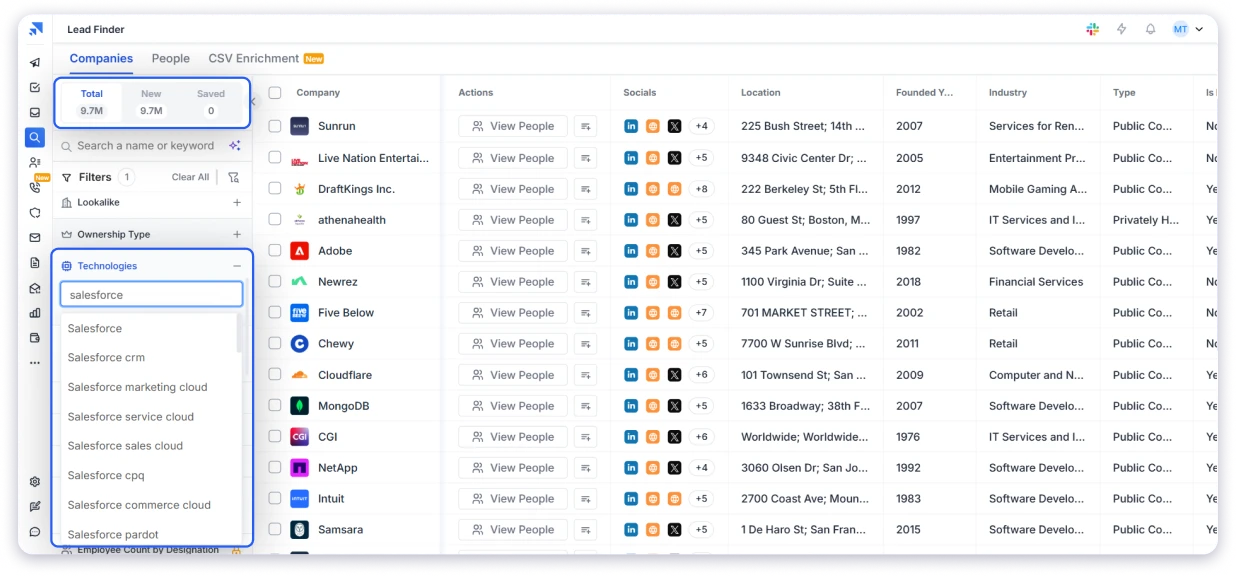
It let me narrow to specific products like Salesforce CRM, Sales Cloud, Pardot, or Commerce Cloud.
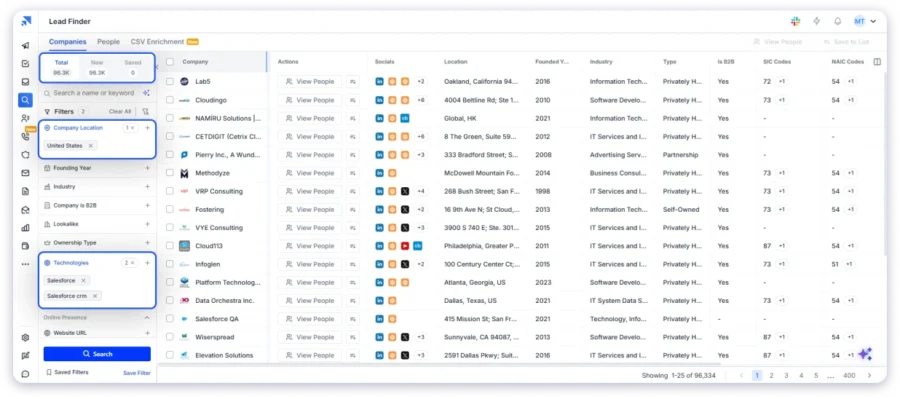
Step 2: Add job title and firmographic filters.
Then I filter by the roles you’re targeting (Salesforce Admin, CRM Manager, RevOps, Sales Ops) and narrow by company size, industry, revenue, and geography.
Step 3: Reveal verified contacts.
Each reveal runs a real-time verification through 9-source waterfall enrichment. Hence, I get verified emails and phone numbers at the point of reveal, not data that was checked months ago.
Step 4: Push to sequences or export.
Afterwards, I sent contacts directly into a cold email sequence from the same platform and also exported to CSV. It’s good that there is no need for a separate tool.
This is the same workflow I recommend when building a C-level executive email list or a VP email list.
Key Features:
- Technographic filter for Salesforce: Filter by Salesforce CRM, Sales Cloud, Service Cloud, Marketing Cloud, Pardot, and Commerce Cloud as installed technologies.
- 75+ search filters: Combine technographic filters with job title, seniority, department, industry, revenue, employee count, and geography.
- 852M+ contact database: One of the largest verified B2B databases, covering 42M+ companies and updated continuously.
- AI Prompt-to-List search: Describe your ideal Salesforce user in plain English, and Lead Finder builds the list for you.
- 9-source waterfall enrichment: Leads are verified in real time with waterfall enrichment across 9 providers for higher match rates.
- Buying signal filters: Spot companies actively hiring Salesforce talent, expanding their tech stack, switching technologies, or getting funded.
- CSV enrichment for existing lists: Upload your existing contact list and enrich missing emails, phone numbers, and Salesforce technographic data in bulk.
👍 Pros:
- Real-time verification keeps bounce rates low and protects sender reputation.
- Transparent, published pricing starting at $49/mo.
- Free trial with 50 credits, no credit card required.
- Buying signal filters help you prioritize companies actively investing in their Salesforce stack.
- Waterfall enrichment across 9 providers gives higher match rates than single-source databases.
👎 Cons:
- The free trial includes 50 credits, so testing at scale requires a paid plan.
What Real Users Say About Saleshandy:
What Users Like
-
Easy contact list uploads
-
Built-in email verification
-
All-in-one prospecting and outreach workflow
Common Complaints
-
Credit limits can be restrictive
G2 Rating: 4.6/5 (773 reviews) | Trustpilot: 4.7/5 (743 reviews)
2. BookYourData
BookYourData is the strongest static list provider I looked at.
Their Salesforce users pool sits at 18 million verified contacts, and they run a 97% deliverability guarantee backed by real-time verification at the point of export.
Credits never expire, which I like because it removes the “use it or lose it” pressure of most annual contracts.
Key Features:
- Real-time email verification at export.
- Pay-as-you-go pricing with no subscription.
- Credits never expire.
- 100+ data fields available, including LinkedIn and phone.
- GDPR and CCPA compliant.
👍 Pros:
- Best pay-as-you-go pricing model for teams that prospect in bursts.
- Real-time verification at export, not just at the time of database update.
- Independently verified low bounce rates in third-party tests.
- No subscription commitment.
👎 Cons:
- Data can go stale faster at higher volumes, based on Trustpilot user feedback.
- Phone number coverage is thinner than email.
What Real Users Say About BookYourData:
What Users Like
-
High email accuracy
-
Flexible pay-as-you-go pricing
-
Easy-to-use interface with advanced filters
-
Responsive customer support
Common Complaints
-
Limited data for some small businesses
-
Accuracy may dip on very large exports
-
Some direct dials route through receptionists
G2 Rating: 4.9/5 (385+ reviews) | Capterra Rating: 4.9/5 (94 reviews)
3. DataCaptive
DataCaptive sells a dedicated Salesforce CRM users list built around quote-based pricing.
They run a 7-tier verification process combining AI checks with manual review, and refresh the database every 45 days.
Their claimed 95% accuracy and 85% deliverability sit inside typical static-list ranges.
I like that they publish a full breakdown of data fields (40+ per record, including NAICS/SIC codes, revenue, and employee count) and offer a 100% replacement guarantee if hard bounces exceed 15%.
The downside is that pricing is quote-only, which means you can’t compare cost-per-record before speaking with sales.
Key Features:
- Pre-filtered Salesforce CRM Users Email List with sample records available.
- 40+ data fields including LinkedIn, phone, industry, and NAICS/SIC codes.
- 7-tier verification combining AI and human review.
- GDPR, CAN-SPAM, and CCPA compliant.
- Delivery in .xls or .csv within 3-5 business days.
- Replacement guarantee for high bounces.
👍 Pros:
- Detailed data fields per record.
- Regular 45-day refresh cycle.
- Replacement guarantee reduces buyer risk.
- Sample data available before purchase.
👎 Cons:
- Quote-based pricing means no upfront cost comparison.
- Trustpilot reviews are mixed on the delivered data quality.
- No self-service prospecting platform.
What Real Users Say About DataCaptive:
What Users Like
-
High-quality, targeted contact lists
-
Helpful and responsive support team
-
Custom database options for specific campaigns
Common Complaints
-
Some outdated contact records
-
Occasional data refresh delays
-
Isolated concerns about contract and delivery timelines
G2 Rating: 3.8/5 (16 reviews) | Capterra Rating: Not listed
4. LakeB2B
LakeB2B has one of the largest static Salesforce user lists on this list.
Their database includes 1,119,065 US Salesforce CRM records and 347,387 international records, last updated in mid-2026.
They also segment by Salesforce product (Force.com, Chatter, CPQ, DMP), which is useful if you’re targeting users of a specific module.
Founded in 2002, LakeB2B is one of the older names in this space.
Key Features:
- 1.4M+ Salesforce CRM users across the US and international markets.
- Permission-based email data.
- Regular SMTP verification and NCOA data cleansing.
- Delivered for multi-channel campaigns (email, telemarketing, direct mail).
- 15+ years in B2B data.
👍 Pros:
- Largest static Salesforce user pool.
- Segments by Salesforce product for niche targeting.
- Full-service approach with campaign support included.
👎 Cons:
- Quote-based pricing with no transparency.
What Real Users Say About LakeB2B:
What Users Like
-
High-quality niche industry lists
-
Helpful and responsive support team
-
Strong customization for targeted campaigns
Common Complaints
-
Mixed feedback on delivery times
-
Communication can be inconsistent
-
Better suited for enterprise buyers than self-serve users
G2 Rating: 4.7/5 (5 reviews) | Trustpilot: 4.5/5 (16 reviews)
5. Cognism
Cognism is the strongest choice for teams prospecting into EMEA.
Their Diamond Data pool includes phone-verified mobile numbers, which is rare in this category and specifically useful for reaching European Salesforce users where GDPR compliance matters most.
I built the list inside their Prospector tool using the technology-stack filter set to Salesforce, then refine by demographics and job titles.
Cognism integrates with Salesforce natively, so you can push records directly as Leads, Contacts, or Accounts.
Key Features:
- 400M+ contacts with strong EMEA coverage.
- Technographic filter for Salesforce and other CRM platforms.
- Two-way Salesforce integration with duplicate checking.
- GDPR-compliant with strict consent-based sourcing.
- Native intent data from the Bombora partnership.
👍 Pros:
- Best-in-class EMEA data quality.
- Strong compliance framework for European outbound.
- Native two-way Salesforce sync.
👎 Cons:
- Quote-only pricing with enterprise contracts.
- US data quality is poorer than that of Saleshandy or Apollo.
What Real Users Say About Cognism:
What Users Like
-
Accurate contact and mobile data
-
Strong UK and European coverage
-
Easy-to-use platform and Chrome extension
Common Complaints
-
Some outdated emails and missing direct dials
-
Premium pricing for smaller teams
-
Strongest coverage is outside North America
G2 Rating: 4.5/5 (1,350+ reviews) | Capterra Rating: 4.7/5 (260 reviews)
6. Lusha
Indeed, Lusha is built around simplicity & ease of use.
I used their Chrome extension to pull emails and phone numbers directly from LinkedIn profiles, which makes it a solid pick for solo reps and small teams doing quick lookups.
You can filter Salesforce account and contact views by title, seniority, and department without leaving your browser.
For building a bulk Salesforce user list, Lusha’s Prospector platform works well for small-to-medium volumes, but it lacks the depth of Saleshandy’s 75+ filters.
Their free plan gives you 40 credits per month, which is genuinely useful for testing.
Key Features:
- Chrome extension for prospecting directly from LinkedIn or Salesforce.
- 40+ search filters, including technographic.
- Bidirectional Salesforce CRM sync.
- Transparent, published subscription pricing.
- Intent signals from the Bombora partnership on higher plans.
👍 Pros:
- Easiest platform to get started with, no sales call needed.
- The free plan is actually useful for testing.
- Chrome extension is fast for individual lookups.
- Transparent pricing.
👎 Cons:
- Smaller database than most competitors on this list.
- Filter depth is thin compared to Saleshandy or Cognism.
- Data can go stale quickly at higher volumes.
What Real Users Say About Lusha:
What Users Like
-
Easy-to-use interface and browser extension
-
Accurate emails and direct phone numbers
-
Seamless LinkedIn and CRM integrations
Common Complaints
-
Monthly credits run out quickly
-
Weaker data coverage outside North America
-
Higher-tier plans can get expensive
G2 Rating: 4.3/5 (1,663 reviews) | Capterra Rating: 4.0/5 (398 reviews)
7. UpLead
UpLead is the accuracy-first pick on this list.
They claim a 95% email accuracy rate backed by real-time verification, and their technographic search covers 16,000+ technologies, including every Salesforce product.
Their Plus plan ($199/mo, 400 credits) unlocks technographics and advanced filters, which is what you need for serious Salesforce user targeting.
I’d recommend UpLead if data accuracy is your top priority and you’re running smaller, more targeted campaigns.
The credit costs stack up faster than pay-as-you-go providers like BookYourData for bulk work.
Key Features:
- Two-way Salesforce CRM integration.
- Chrome extension for LinkedIn prospecting.
- Buyer intent data on the Professional plan.
👍 Pros:
- Real-time verification on every export.
- Technographic depth is genuinely deep.
- Transparent published pricing.
👎 Cons:
- Credit costs stack quickly for bulk list building.
- Smaller total database than Saleshandy, Cognism, or Lead411.
- Intent data locked behind top-tier annual plans.
What Real Users Say About UpLead:
What Users Like
-
Real-time email verification
-
Accurate contact data
-
Easy-to-use interface
-
Good value for money
Common Complaints
-
Gaps in niche or older contact data
-
Some billing and auto-renewal concerns
G2 Rating: 4.7/5 (824 reviews) | Capterra Rating: 4.6/5 (76 reviews)
8. Lead411
Lead411 is the intent-first pick.
On top of their technographic filter (which handles Salesforce Users Email Database), they layer Bombora buyer intent data and growth triggers (funding, hiring, expansion).
This means you can find Salesforce users who are also actively researching CRM add-ons or scaling their teams.
Their triple-verified email process (SMTP + human + open validation) is the most rigorous verification method advertised on this list.
Every email gets re-verified every 3-6 months, which keeps freshness high.
Key Features:
- Triple-verified emails (SMTP, human, open validation).
- Technographic filter for Salesforce and 20,000+ technologies.
- Bombora buyer intent data on Pro plans.
- Growth triggers (funding, hiring, expansion signals).
- Chrome extension for LinkedIn prospecting.
- Salesforce integration with CRM Enhancer for auto-updates.
👍 Pros:
- Most rigorous email verification on this list.
- Intent signals genuinely differentiate the platform.
- Unlimited plan option for high-volume users.
- Direct dial coverage in North America is strong.
👎 Cons:
- Pricing details require a signup or sales call.
- Intent data locked to annual Pro plans.
- UI feels older compared to newer platforms.
What Real Users Say About Lead411:
What Users Like
-
Unlimited lead exports
-
Easy-to-use interface and search filters
-
Real-time intent and buying signals
-
Responsive customer support
Common Complaints
-
Some outdated contact details
-
Limited advanced analytics
-
Less suited for enterprise marketing workflows
G2 Rating: 4.5/5 (481 reviews) | Capterra Rating: 4.7/5 (78 reviews)
9. Data Maelumat
Data Maelumat sells pre-filtered Salesforce user lists across Salesforce CRM (166K+ contacts), Heroku (101K+), and Pardot.
They offer segmentation by industry, revenue, location, and Salesforce product used, delivered in .xls or .csv format.
Data Maelumat has the smallest independent review footprint of any provider on this list. No G2 or Capterra listing exists, so validation depends entirely on the sample data they provide. Treat their accuracy claims with the same caution you’d apply to any newer static provider.
Key Features:
- Focused Salesforce user database (166K+ contacts).
- Sub-segments for Heroku and Pardot users.
- Standard firmographic and technographic segmentation.
- Delivery in .xls/.csv format.
- GDPR, CAN-SPAM, and CCPA compliance claims.
- Data cleansing and appending services.
👍 Pros:
- Salesforce-specific focus with product-level segmentation.
- Includes multiple Salesforce product user lists.
- Compliance claims are aligned with major frameworks.
👎 Cons:
- No verifiable G2, Capterra, or Trustpilot presence.
- Quote-only pricing with no transparency.
- Smallest database of static providers on this list.
- Accuracy claims cannot be independently validated.
What Real Users Say About Data Maelumat:
What Users Like
-
Accurate contact data with low bounce rates
-
Responsive and helpful customer support
-
Useful for lead generation and outreach
Common Complaints
-
Very limited independent user reviews
-
Support experience varies by account and request type
G2 Rating: Not listed | Trustpilot Rating: 2.9/5
10. TargetNXT
TargetNXT sells a focused Salesforce users email list with 145,000+ verified contacts and a claimed 99% accuracy rate.
They segment specifically by Salesforce module and job role, which is useful if you’re targeting users of a specific Salesforce product like Heroku or Sales Cloud.
Key Features:
- 145,000+ pre-verified Salesforce user contacts.
- Segmentation by Salesforce module (Heroku, Sales Cloud, Marketing Cloud).
- 80+ data fields, including LinkedIn and direct dial.
- Claimed 99% accuracy and 98% deliverability.
- Multi-channel data (email, phone, direct mail).
- Compliance with GDPR and CAN-SPAM.
👍 Pros:
- Focused Salesforce-specific database.
- Segmentation by Salesforce product.
- 80+ data fields per record.
👎 Cons:
- Very small independent review footprint.
- Quote-only pricing with no transparency.
- Accuracy claims are higher than industry norms and are unverifiable externally.
What Real Users Say About TargetNXT:
What Users Like
-
Accurate contact data with low bounce rates
-
Fast delivery of custom contact lists
-
Strong niche targeting for outbound campaigns
Common Complaints
-
Limited public user reviews
-
Best suited for custom list purchases rather than self-serve prospecting
-
Turnaround times can vary for highly customized requests
G2 Rating: Not listed for core product | Trustpilot Rating: 3.7/5 (6 reviews)
What Makes a Salesforce User’s Email List Actually Useful?
Not every Salesforce user’s email list will help you book more meetings.
A provider you choose may have millions of contacts, but if the data is inaccurate, outdated, or poorly targeted, then your outreach won’t go very far.
Of all eight criteria I evaluated, these five have the biggest impact on your campaign performance.
- Verified Email Accuracy: An email address is only valuable if it reaches the right person, right? Higher email accuracy reduces bounce rates, protects your sender reputation, and improves inbox placement.
- Technographic Accuracy: A company should be included because it actually uses Salesforce, not because the provider guessed or relied on outdated public information.
- Job Title Relevance: The best providers help you reach the people responsible for Salesforce, such as Salesforce Admins, CRM Managers, RevOps leaders, or Sales Operations teams, instead of generic contacts.
- Data Freshness: People change jobs, companies switch software, and contact information becomes outdated. Providers that refresh their data more frequently help you avoid wasting credits on stale records.
- Segmentation Depth: The ability to filter by Salesforce products, company size, industry, geography, job title, seniority, and other attributes makes it much easier to build a highly targeted prospect list.
Key Takeaway: A provider that falls short in two or more of these areas will likely cost you more in bad data than it saves in prospecting.
Dynamic Search Platforms vs. Static Pre-Built Lists
The single biggest decision you’ll make is picking between a dynamic search platform and a static list provider.
Here’s how they compare:
Key Takeaway: Dynamic platforms are almost always the better choice if you’re running outbound consistently. Static lists work when you need a one-shot campaign and don’t want the subscription overhead.
Build Your Salesforce Users Email List in Minutes
The biggest advantage of a dynamic platform over a static list is that you’re not stuck with someone else’s snapshot. You set the criteria, filter for verified Salesforce users, and pull contacts the moment you need them.
I’ve done this for outbound campaigns targeting integration partners, CRM consultants, and RevOps buyers.
What used to take a week of manual LinkedIn research now takes less than 15 minutes in Saleshandy’s Lead Finder, and the bounce rate is less than 3%.
Here’s what makes the build fast:
- AI Prompt-to-List: Describe your ideal Salesforce user in plain English, get a filtered list in seconds.
- Technographic filter for Salesforce: Narrow by specific products like Sales Cloud, Service Cloud, and Pardot.
- 9-source waterfall enrichment: Real-time verification at the point of reveal, not months before.
- 75+ filters: Combine job title, seniority, revenue, and buying signals in a single search.
So, are you ready to build your own Salesforce users’ email list?
Get 50 Salesforce Users’ Emails for Free →
FAQs About Salesforce Users Email List
1. Is Buying a Salesforce Users Email List Legal in 2026?
Yes, provided you comply with applicable email marketing laws. In the US, the CAN-SPAM Act allows commercial email as long as you include an unsubscribe link, your business address, and accurate sender information. In the EU and UK, GDPR requires a lawful basis for processing personal data, such as legitimate interest for B2B outreach. Always choose a reputable provider and follow the regulations that apply to your audience.
2. How Can I Find a USA Salesforce Users Email List?
The easiest way is to use a provider with technographic filters. Simply filter for Salesforce as the technology, select United States as the location, and narrow your search by job title, industry, company size, or seniority. Dynamic search platforms generally provide fresher and more accurate data than static pre-built lists.
3. Can I Segment a Salesforce Users’ Email List in Saleshandy?
Yes. Saleshandy Lead Finder offers 75+ filters to help you build highly targeted Salesforce users’ lists. You can filter by Salesforce technology, job title, seniority, company size, industry, geography, revenue, and other firmographic attributes to match your ideal customer profile.
4. What Are the Benefits of a Verified Salesforce Users Email List?
A verified Salesforce users’ email list helps reduce bounce rates, protect your sender reputation, and improve inbox placement. It also ensures you’re reaching companies that actually use Salesforce and the right decision-makers, leading to more effective outreach and higher reply rates.
5. What Is the Difference Between a Static Email List and a Real-Time Database?
A static email list is a one-time snapshot of contact data that becomes outdated over time. A real-time database continuously verifies and updates records, giving you fresher contact information whenever you search. For ongoing outbound prospecting, real-time databases are generally the better choice.
6. How Many Companies Use Salesforce in 2026?
Salesforce has more than 150,000 customers worldwide, ranging from small businesses to Fortune 500 enterprises. Its large customer base makes it one of the most widely adopted CRM platforms for B2B sales and marketing.
7. Which Salesforce Products Can I Target With These Providers?
Most providers let you target companies using specific Salesforce products, including Sales Cloud, Service Cloud, Marketing Cloud, Pardot, Commerce Cloud, MuleSoft, Tableau, and CPQ. The available filtering options vary by provider, so it’s worth checking each platform’s technographic capabilities before you buy.