


“Is Mailshake still worth paying for in 2026, or are there better cold email outreach tools?”
Mailshake looks promising on paper, with automated sequences, built-in calling, and email warm-up. But how well does it deliver when you actually start using it?
I explored Mailshake’s features, tested its capabilities, and analyzed 100+ user reviews across G2, Capterra, and Trustpilot to understand what users actually think.
In this Mailshake review, I’ll share what works, what doesn’t, how much it costs, and whether it’s worth your money in 2026.
Let’s get into it!
Mailshake Review- TOC
TL;DR: Is Mailshake Worth It in 2026?
Mailshake is worth considering if you want simple cold email automation and built-in calling. But its per-user pricing and inbox limits can make scaling expensive.
Here’s what you should know before buying.
| Buying Criteria | My Take |
|---|---|
| Best for | Solo SDRs, founders, and small sales teams. |
| Starting price | $25/user/month, billed annually. |
| What works well | Easy campaign setup, automated follow-ups, built-in dialer, and email warm-up. |
| Biggest drawbacks | Per-user pricing, limited number of mailboxes, and restricted prospecting credits. |
| Lead generation | Data Finder included, but only 50 one-time credits on lower plans. |
| Free trial | No free trial. Payment required upfront. |
| My verdict | Good for simple cold email and calling workflows. Less cost-effective for growing teams needing more inboxes, prospecting data, and agency features. |
In-Depth Mailshake Features Breakdown
Mailshake offers features for finding prospects, automating outreach, managing replies, and tracking campaign performance.
I explored its key features to understand how they work and where you might face limitations.
Here’s what I found.
1. Data Finder for Prospecting
Data Finder lets you search by job title, company, industry, and location without leaving your outreach platform.
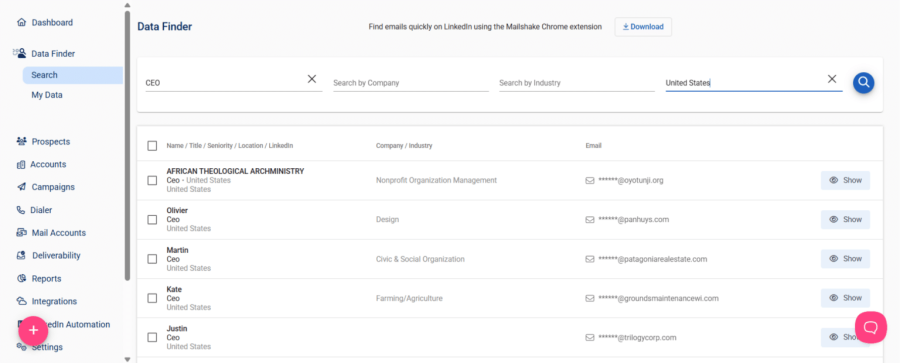
I searched for CEOs in the United States and found the interface straightforward, with results clearly organized.
The results showed names, titles, company categories, and masked email addresses, with a Show button beside each contact.
From there, you can export contacts or add them directly to campaigns, which keeps prospecting and outreach connected.
Data Finder is convenient, but I would not choose Mailshake for its prospecting features alone, based on my testing.
But the included prospecting credits are limited.
That convenience is valuable for small teams already using Mailshake and looking to keep prospecting within their existing workflow.
However, the filters I explored were basic, so I would compare targeting options before relying on it for niche prospecting.
I would check coverage against my prospect list before choosing it over a dedicated database for ongoing prospecting.
2. Email Outreach and Sequence Builder
You can create sequences from scratch, use templates, or reuse previous campaigns, then add prospects through your preferred import method.
The builder separates Sequence, Prospects, Settings, and Confirm, with options for CSV uploads, manual entry, and app syncing.
I liked having tracking and scheduling controls visible, along with a final overview of the sender, sequence, and prospects.
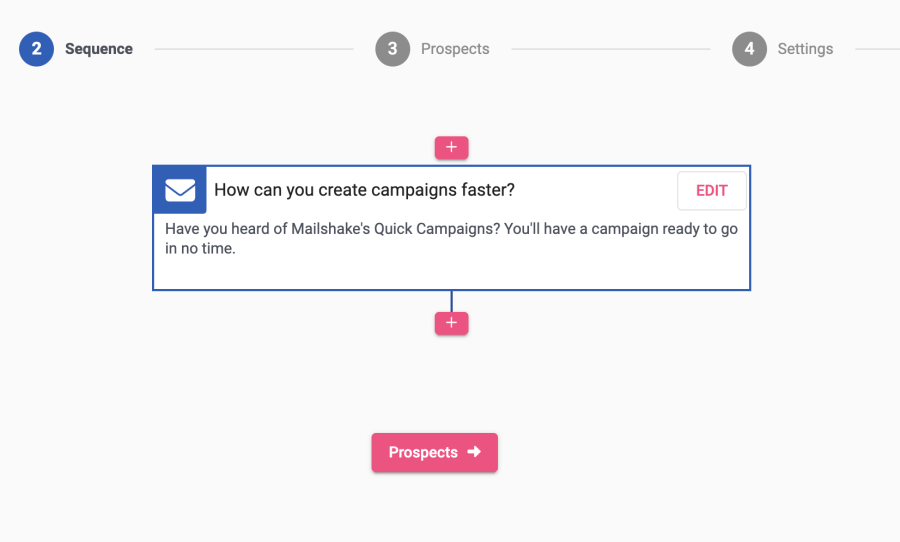
I consider the sequence builder one of Mailshake’s strongest features because it makes campaign setup easy to follow.
You can schedule follow-ups with custom delays, stop them after replies, and trigger messages when prospects click links. Separate drip emails and A/B testing with up to 10 variations give you more control over campaign structure.
Campaign reports also let you compare variation performance, which helps identify messages worth testing further in future outreach.
However, Starter’s mailbox and sending limits still matter when you need to reach more prospects or add sending accounts.
3. SHAKEspeare AI Email Writer
SHAKEspeare helps you draft cold emails, rewrite existing messages, and create follow-ups without writing every email from scratch.
The main generator sits under Tools, where you provide business details and success stories to build an email sequence.
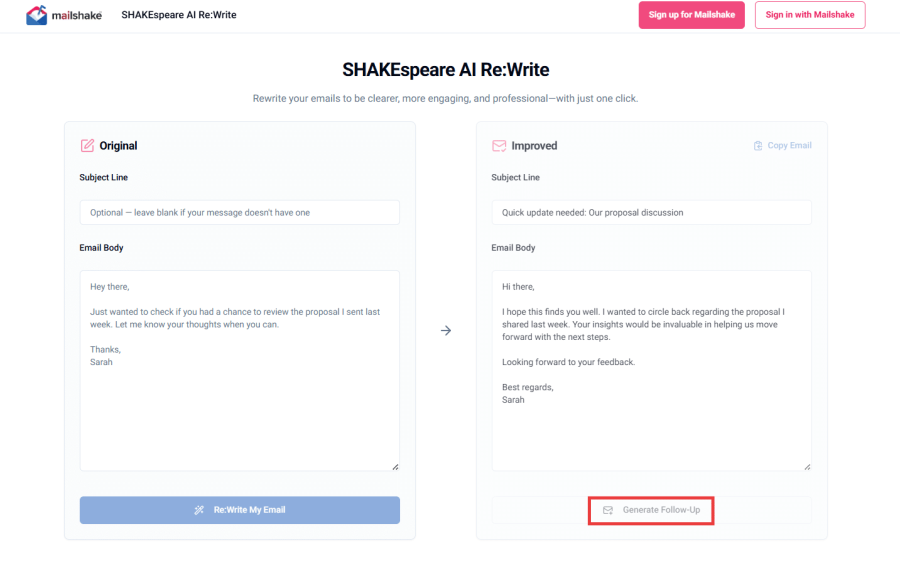
AI Re displays your original email beside its revision, with options to copy the rewrite or generate a follow-up.
I like having rewriting and follow-up options together because it keeps related writing tasks within a single workflow.
I’d use SHAKEspeare for first drafts and quick rewrites, but I would still edit every message before sending.
For testing, SHAKEspeare can also generate alternative campaign segments, so you have different versions to review and compare.
The quality of its drafts depends on the business context and supporting details you provide before generation. I’d check the offer, add prospect-specific details, and verify claims before treating any draft as ready to send.
4. LinkedIn Automation
Mailshake supports LinkedIn outreach through its Chrome extension.
You can add LinkedIn activities to your email sequences, including profile visits, connection requests, and messages.
For example, you could start with an introductory email, follow up with a LinkedIn connection request, and schedule another email.
I liked that these activities can be organized within the same outreach workflow.
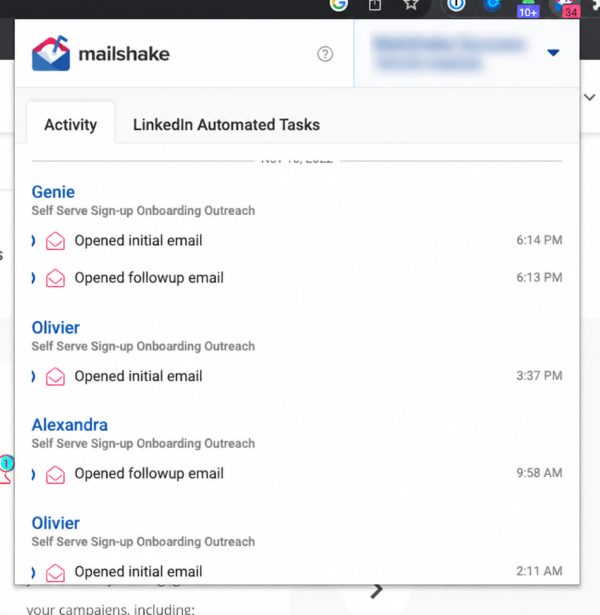
However, LinkedIn automation depends on the Chrome extension, adding a browser-based step to your campaigns.
The feature also has activity limits, so you can’t assume unlimited LinkedIn messages or connection requests.
If you occasionally use LinkedIn alongside email, this setup can work well.
But for teams heavily dependent on LinkedIn outreach, I’d compare platforms offering more advanced automation.
5. Mailshake Dialer for Cold Calling
Mailshake’s built-in dialer lets you make calls without switching to a separate calling platform.
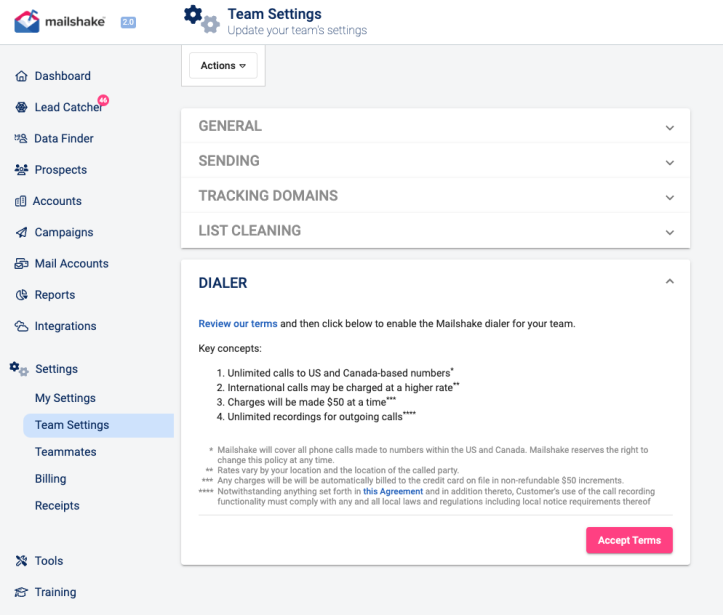
You can enable it from account settings, configure your calling number, and start contacting prospects.
The dialer includes:
- Unlimited VoIP calling minutes to US and Canadian numbers on eligible plans.
- Call recording and history.
- Phone scripts for sales conversations.
- Call outcomes and notes.
- Five phone numbers on Sales Engagement.
I liked how calling activities stay connected to prospect records.
For example, after emailing a prospect, you can call them and record the conversation outcome for your next follow-up.
The catch is pricing.
Mailshake’s dialer is available on Sales Engagement, starting at $85/user/month with annual billing.
For a three-person team, that’s $255/month or $3,060/year.
Mailshake’s dialer is a valuable addition if cold calling is central to your sales process.
But if you primarily run email campaigns, paying for the higher plan may not justify the cost.
6. Lead Catcher and Reply Management
Mailshake’s Lead Catcher helps you organize prospects who respond to or engage with your campaigns.
Instead of searching through campaign reports, you can manage interested prospects from one place.
You can review lead activity, assign follow-ups, and update statuses such as Open, Won, Lost, Ignored, and Forwarded.
Sales Engagement also offers lead temperature indicators to help identify hot, warm, and cold prospects.
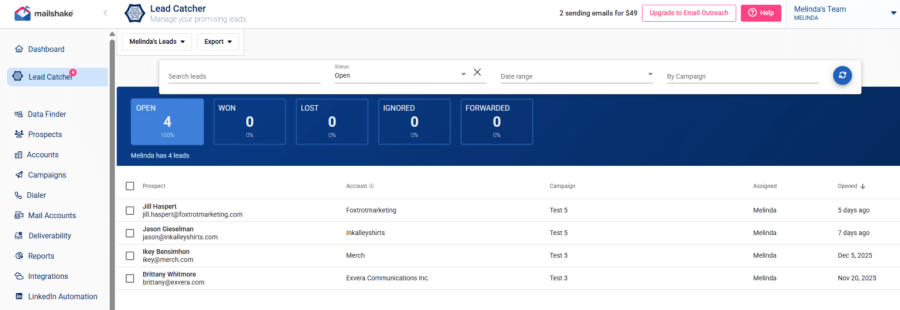
For example, when someone responds positively to an email, you can review their response, qualify the lead, and assign the next action.
However, Lead Catcher doesn’t automatically replace manual lead qualification.
You still need to decide whether an engaged prospect is a genuine sales opportunity.
I found Lead Catcher useful for managing follow-ups, but you’ll still need a CRM for deal stages and revenue tracking.
7. Analytical Capabilities and Reporting
Mailshake’s reporting dashboard helps you monitor email engagement and overall sales activity.
I liked how you can review campaign results across different reporting periods.
You can track:
- Email engagement: Opens, clicks, replies, bounces, and unsubscribes.
- A/B testing: Compare different email variations.
- Sequence performance: Identify which steps generate engagement.
- Team productivity: Monitor prospects contacted, leads won or lost, and completed tasks.
- Cold calling: Track calls, voicemails, dispositions, and outcomes.
For example, if you’re testing two email sequences, you can compare reply rates to see which messaging performs better.
The productivity reports are also useful when you’re managing multiple sales reps.
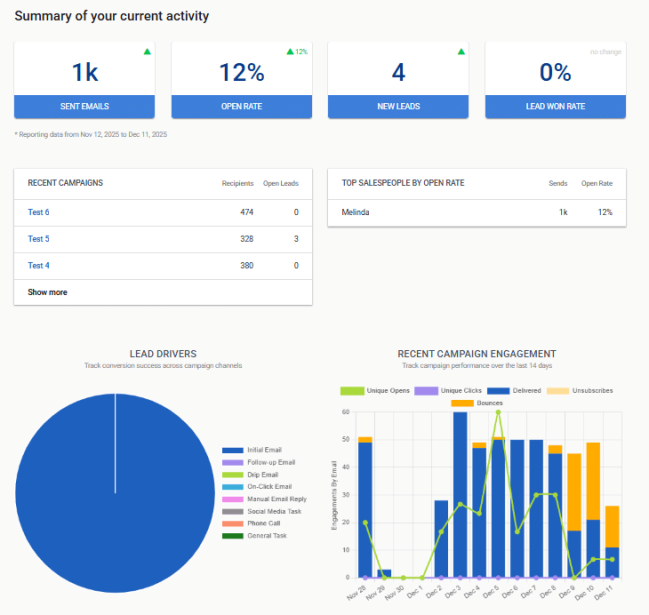
Where I found a gap was inbox placement visibility.
Campaign engagement reports don’t tell you whether your emails reach Primary, Promotions, or Spam.
Overall, Mailshake offers useful analytics for tracking outreach performance, particularly if your team combines emails and calls.
8. Email Deliverability Tools
One thing Mailshake does well is including email warm-up and verification across its paid plans.
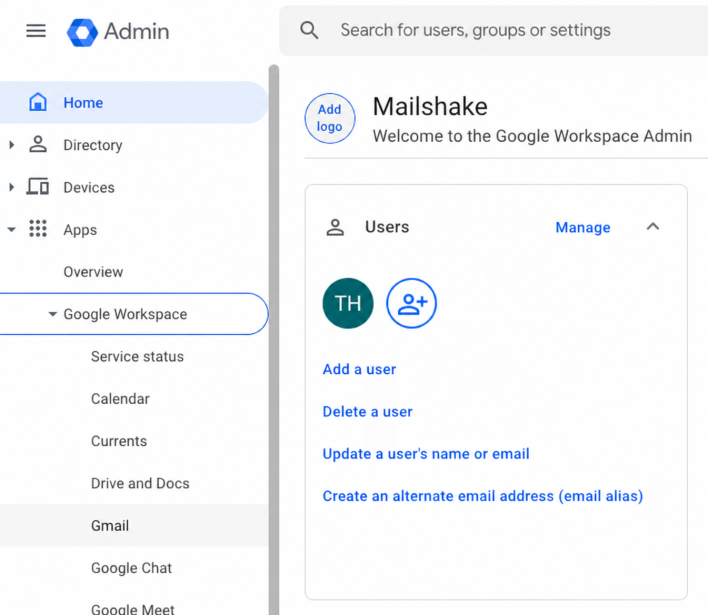
Even Starter includes unlimited warm-up and email verification without requiring separate subscriptions.
Its deliverability tools include:
- Email warm-up: Build sending activity gradually.
- Email verification: Identify potentially invalid addresses before outreach.
- DNS guidance: Review SPF, DKIM, and DMARC authentication.
- Bounce handling: Help prevent repeated sending to bounced addresses.
- Warm-up reporting: Monitor warm-up activity and spam-related statistics.
I liked having these tools available within the outreach platform.
However, warm-up doesn’t guarantee inbox placement.
Mailshake doesn’t advertise dedicated inbox placement testing comparable to Saleshandy’s Inbox Radar.
That means you won’t get the same direct visibility into whether test emails reach Primary, Promotions, or Spam.
For basic deliverability management, Mailshake offers good value. But I’d use dedicated inbox placement testing when scaling across multiple sending domains.
Mailshake Pricing: Is It Worth the Cost?
Mailshake’s pricing starts at $25/user/month with annual billing, making it a reasonable option for solo users and small sales teams.
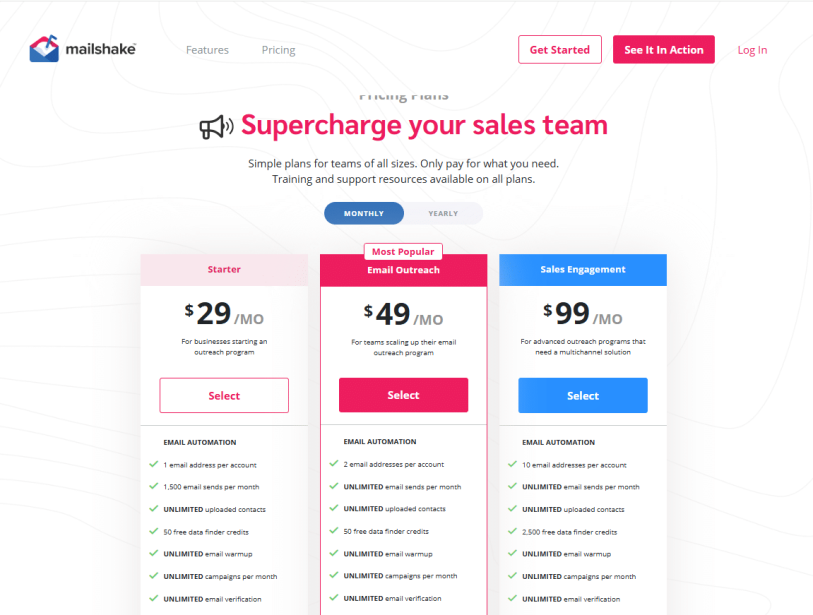
However, pricing becomes harder to justify as you add more team members, email accounts, or advanced outreach features.
Here’s how Mailshake’s plans compare:
- Starter ($29/user/month): 1 email account, 1,500 monthly sends, 50 Data Finder credits, unlimited warm-up, and email verification.
- Email Outreach ($49/user/month): 2 email accounts, unlimited sends, sender rotation, advanced scheduling, unified inbox, and CRM integrations.
- Sales Engagement ($99/user/month): 10 email accounts, unlimited sends, 2,500 Data Finder credits, LinkedIn outreach, and built-in phone dialer.
- Agency Plan (Custom Pricing): Separate client teams, combined billing, and agency management features.
These prices reflect monthly billing. Annual billing reduces rates to $25, $45, and $85/user/month, respectively.
The real question is whether Mailshake’s simplicity justifies its per-user pricing.
For a solo founder or small team, it might. But as your team grows, costs can add up quickly.
For example, five users on Sales Engagement would cost $5,100/year with annual billing.
If you’re planning to scale your outreach, I’d compare Mailshake with alternatives offering more flexible pricing and fewer account restrictions.
For a detailed breakdown of plans, credits, and hidden costs, read the full Mailshake Pricing Guide.
Mailshake Pros and Cons: What 100+ User Reviews Reveal (2026)
Pros of Mailshake
1. Campaign Builder Makes Outreach Easy to Launch
Mailshake keeps campaign setup straightforward. You can import prospects, build email sequences, add merge tags, and schedule follow-ups through a guided campaign wizard.
In my review, the four-step workflow made it easy to see what needed to happen before launching a campaign. Other users appreciate this simplicity too.
“Intuitive sequence builder” and automated follow-ups were among the features praised by a verified G2 reviewer in June 2026.
Read review on G22. Personalization and Automation Save Manual Work
Mailshake lets you personalize emails with merge tags and automate follow-ups instead of contacting every prospect individually. For founders and small sales teams, that can free up time for prospect research and conversations.
“A verified G2 reviewer described using automated campaigns to reach 30+ supplier contacts without spending hours emailing each one.”
Read review on G23. Customer Support Gets Positive Feedback
When campaign setup or technical issues slow you down, responsive support matters. That makes support a meaningful advantage if you need guidance while running campaigns.
“Lauren N., a G2 reviewer in March 2026, praised Mailshake’s friendly support team, quick responses, and help resolving technical problems.”
Read review on G24. Campaign Analytics Make Performance Easier to Track
Mailshake brings campaign engagement metrics into one dashboard, including opens, clicks, and replies. This helps you spot underperforming campaigns and decide what to improve next.
“Gary R., a G2 reviewer in April 2026, praised its intuitive campaign analytics. Lauren N. also highlighted how easy it was to check campaign health.”
Read review on G2Cons of Mailshake
1. Limited Email Accounts Can Slow Larger Campaigns
Mailshake restricts connected email accounts based on your plan. Email Outreach includes two accounts, which may not be enough when you’re sending across multiple inboxes. If you need more sending accounts, you’ll need to evaluate a higher plan and its added cost.
“Gary R. specifically noted that having only two accounts made larger campaigns slower.”
Read review on G22. Personalizing Large Contact Lists Can Take Time
Mail merge saves you from writing every email manually, but managing individual prospect details can still create extra work. If you’re preparing campaigns with hundreds of contacts, this extra step can slow down your workflow.
“A verified G2 reviewer in the furniture industry requested bulk field mapping instead of reviewing prospects one by one during personalization.”
Read review on G23. Some Users Report Bugs and Navigation Problems
Mailshake’s interface isn’t equally intuitive for everyone. A verified reviewer in information technology and services, writing in August 2026, described campaign creation as unintuitive and said learning the interface took longer than expected.
These reports don’t mean every user will experience the same issues, but they’re worth considering before committing.
“Other reviewers reported technical glitches, delays when switching teams, and list-cleaning errors.”
Read review on G2“Victoria G. reported pages failing to load and an error after waiting 20 minutes for list-cleaning results.”
Read review on G24. List Management and Reporting Exports Could Be Better
Some users want more flexibility when managing contact lists and analyzing campaign data. If you regularly analyze campaign performance outside Mailshake, these gaps could mean extra manual work.
“Gary R. requested reusable campaign lists and separate downloads for opens and clicks.”
Read review on G2Mailshake vs Saleshandy: Which is Better and Why
Most people researching Mailshake reviews land here for one reason. They want to know if there is a better tool for their cold outreach workflow before they commit.
Saleshandy covers both prospecting and outreach in one platform.
Here is how the two compare in 2026:
| Criteria | Mailshake | Saleshandy |
|---|---|---|
| Database size | Data Finder (50 one-time credits on lower plans) | 852M+ verified contacts, 42M+ companies |
| Starting price | $25/user/mo (annual) | $34/mo flat (no per-seat pricing) |
| 5-person team cost | $1,500 to $5,100/year | $300/year |
| Free credits included | 50 one-time | 50 FREE credits |
| Email accounts | Restricted on every plan | Unlimited on every plan |
| Email warm-up | Unlimited on all plans | Unlimited email warm-up on all plans |
| Inbox placement monitoring | Not available | Inbox Radar + sender reputation tracking |
| A/B testing | Subject lines only | A-Z testing (up to 26 variants) on subject lines and email bodies |
| Sender rotation | From Email Outreach only (2 accounts) | Every plan, unlimited accounts |
| Phone dialer | Unlimited VOIP US/Canada (Sales Engagement only) | Built-in dialer |
| Multichannel outreach | Email + Dialer + LinkedIn (Chrome extension) | Email + LinkedIn + Calls + WhatsApp |
| Agency infrastructure | Client pays own subscription, agency joins as user | One subscription, unlimited clients, white-label portal |
| CRM integrations | Salesforce, Pipedrive, HubSpot (from $45/mo tier) | Salesforce, HubSpot, Pipedrive, Zoho (all plans) |
| Free trial | No. Payment upfront | 7-day free trial + 50 free credits |
| G2 rating | 4.7/5 (264 reviews) | 4.6/5 (640+ reviews) |
| Compliance | GDPR, CCPA | SOC 2 Type II, ISO 27001, GDPR |
The pricing story that matters: Saleshandy’s $34 Starter plan includes 1,500 Lead Finder credits every month and the full outbound platform with unlimited email accounts.
Mailshake’s $25 Starter plan gives you one user, one inbox, 1,500 email sends, 50 one-time credits, and no CRM integrations.
For agencies, the gap widens. Saleshandy has unlimited email accounts and unlimited team members on every plan. The Agency Portal covers unlimited clients with white-label options. Mailshake does not have an agency portal at all.
That is a fair call for a solo SDR or a 2-person team. In 2026, with Saleshandy’s 852M+ database and included outbound stack at $25/mo with no per-seat pricing, the math changes.
If you want to look at the wider market, we have a full guide on the best Mailshake alternatives in 2026.
Final Verdict: Is Mailshake Worth It in 2026?
Mailshake is a solid choice if you’re a solo SDR or small team looking for simple cold email automation and built-in calling.
Its campaign builder is easy to use, and unlimited warm-up and email verification add value.
But Mailshake gets expensive as your team grows. Limited inboxes, basic prospecting, and Chrome-dependent LinkedIn automation can also restrict your workflow.
I’d recommend Saleshandy if you need more than email outreach. You get an 852M+ B2B contact database, multichannel outreach, unlimited email accounts, and no per-seat pricing on Scale.
You can start a 7-day free trial with 50 free credits and test it before committing.
Mailshake Review FAQs
1. What is Mailshake used for?
Mailshake is a sales engagement platform for cold email outreach, automated follow-ups, cold calling, and LinkedIn tasks. It also includes prospecting tools, email warm-up, verification, and campaign reporting, helping sales teams manage daily outbound activities without switching between separate tools.
2. Does Mailshake offer a free trial?
No. Mailshake doesn’t offer a free trial and requires payment upfront. It provides concierge onboarding and a 30-day money-back guarantee instead. Review the current guarantee terms before subscribing, since eligibility and refund conditions may apply to your specific purchase details.
3. How much does Mailshake cost per user?
Mailshake’s annual plans start at $25 per user monthly for Starter, $45 for Email Outreach, and $85 for Sales Engagement. Monthly billing costs $29, $49, and $99 per user, respectively. Five Sales Engagement users cost $5,100 annually, excluding optional add-ons.
4. Is Mailshake the same as Apollo.io?
No. Apollo.io acquired Mailshake in 2023, but Mailshake continues operating as a separate product with its own branding, website, and pricing. The acquisition doesn’t mean both platforms have identical features or plans, so compare each product separately before choosing.
5. How many emails can I send with Mailshake?
Starter allows 1,500 monthly email sends, including follow-ups. Email Outreach and Sales Engagement offer unlimited sends, subject to applicable sending restrictions. Check your selected plan’s connected-account limits and current sending policies before launching campaigns consistently at high volumes.
6. Does Mailshake work for agencies?
Yes. Mailshake offers an Agency Plan with custom pricing and client-management features. Its documentation describes a model where clients may create their own teams and add agencies as users. Confirm billing and account-management terms with Mailshake directly before signing up.
7. What are the best Mailshake alternatives in 2026?
The best alternative depends on your workflow. Saleshandy combines prospecting and multichannel outreach; Lemlist focuses on personalized multichannel campaigns; Instantly supports high-volume email outreach; and Apollo.io combines prospecting data with sales engagement. Compare pricing, inbox limits, and features before choosing.
8. Is Mailshake better than Saleshandy?
Mailshake may suit solo reps who want simple email sequences and built-in calling. Saleshandy offers a larger contact database, unlimited email accounts, inbox placement testing, and multichannel outreach. If you need prospecting and outreach together, try Saleshandy’s seven-day free trial before deciding.

 Pritesh


 Anil Salvi