

With a $33/mo entry price, does RocketReach deliver data your sales team can actually reach?
I start my research with this essential question.
And I found what its pricing page won’t tell you right away: that $33 tier gives you emails only.
Yep, and the moment you need phone numbers, team seats, or CRM syncs, you are forced onto higher tiers that cost upwards of $69 to $142+ per month. 😱
So, just like you, I wanted to know if the math actually adds up. So I dug deeper:
- Tested RocketReach’s lead-finding tools and exported data limits across plans.
- Investigated the wild score gap between G2 (4.4/5) and Trustpilot (1.2/5) to uncover what real buyers experience.
- Calculated the true cost per contact once phone credits and team add-ons enter the mix.
In this breakdown, I will map out what RocketReach really costs in 2026, where the hidden usage caps hide, and whether your prospecting budget is better spent here or elsewhere.
TOC – RocketReach Pricing (2026)
- TL;DR: 30-Second RocketReach vs. Saleshandy Feature-Pricing Comparison
- All 4 RocketReach Pricing Plans Explained in Depth
- RocketReach Credits Explained: Lookups, Exports, API, and MCP
- RocketReach Plan Cancellation and Refunds Policy You Need to Know
- What Users Are Saying About RocketReach and Its Pricing
- Is RocketReach Worth It in 2026?
- Frequently Asked Questions About RocketReach Pricing
TL;DR: 30-Second RocketReach vs. Saleshandy Feature-Pricing Comparison
You must be wondering, why am I showing you an alternative inside a RocketReach pricing breakdown?
Because RocketReach’s sticker price is not the price you actually pay; siloed credits, export caps, and a $6K floor for pooled credits mean the real cost shows up later.
Saleshandy sits in this table as a reference point so you can see what the same budget could get you (spoiler: roughly 10× cheaper per verified lead).
Here’s a side-by-side feature/pricing comparison that you must know:
That is the bird’s-eye view. Now let’s walk through what each of these numbers actually means for your bottom line.
All 4 RocketReach Pricing Plans Explained in Depth
RocketReach offers three individual plans and two team tiers.
I checked the prices on RocketReach’s official pricing page on October 15, 2026. All prices below are per seat.
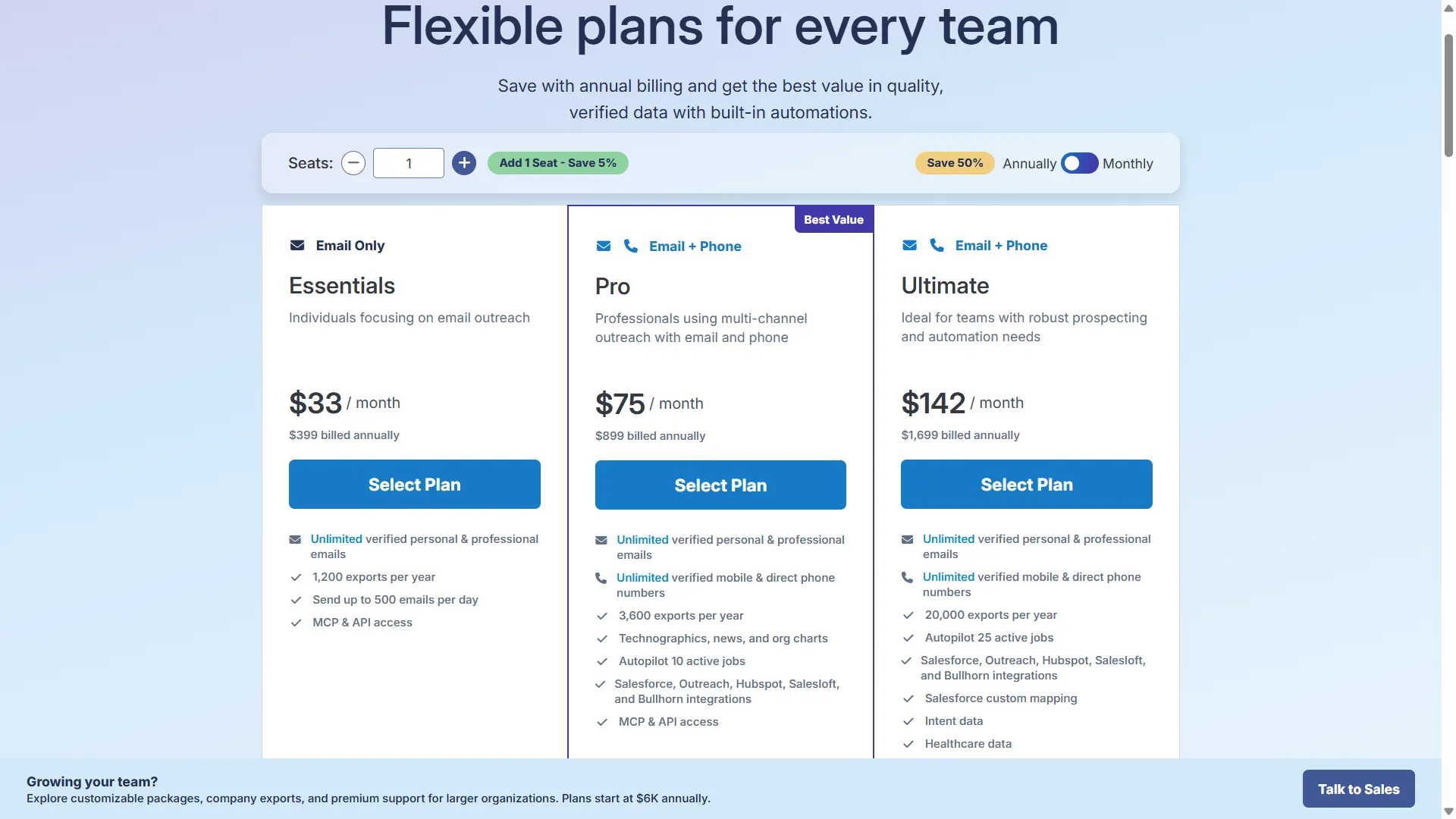
Monthly vs Annual Billing Breakdown: What You Save and What Changes
Here’s something worth knowing before you choose a plan.
Annual billing doesn’t just lower your price. It also changes how many contacts you can look up.
With monthly billing, you’re limited to 100, 250, or 1,000 lookups per month, depending on your plan.
Switch to annual billing, and those lookups become unlimited.
Sounds like a great deal, right?
But there’s a catch: Unlimited lookups don’t mean unlimited exports.
Even with annual billing, you can export only 1,200, 3,600, or 20,000 contacts per year, depending on your plan.
In simple terms, you can look up as many contacts as you want inside RocketReach. But there’s still a limit on how many you can take into your CRM or download as CSV files.
Think of it as unlimited window shopping, but with a fixed number of purchases.
And there’s another detail I noticed while comparing prices.
RocketReach displays a “Save 50%” badge on its pricing page. But that saving isn’t the same across all plans.
- Essentials: Save around 52%.
- Pro: Save around 37%.
- Ultimate: Save around 32%.
So, the higher your plan, the smaller your annual billing discount.
Note: RocketReach may show different prices to different visitors. Always take a screenshot of your quoted price before purchasing.
Essentials: Best for Email-Only Prospecting
Price: $69/month (monthly billing) or $33/month ($399/year, billed annually)
Okay, let’s start with the biggest limitation.
RocketReach Essentials gives you email addresses, but no phone numbers.
If you only run cold email campaigns, this might be enough. But if calling prospects is part of your strategy, you’ll need to upgrade.
Here’s what your subscription includes:
- Monthly billing: 100 lookups and 100 exports per month.
- Annual billing: Unlimited lookups, but only 1,200 exports per year.
At first glance, that seems reasonable for $33/month.
But here’s where the Essentials plan falls short:
- No HubSpot, Salesforce, Outreach, or Salesloft integrations.
- No bulk lookups.
- No technographics or organizational charts.
- Only 5 Autopilot jobs.
- Sending limit of 500 emails/day.
For me, the biggest drawback is the missing CRM integrations.
Imagine finding 100 prospects, only to export a CSV and manually upload it into your CRM.
You’re paying for prospecting data but still doing the manual work.
My take: Essentials works for occasional email research. But for sales teams managing regular outbound campaigns, its limitations can slow things down.
Pro: Is Paying More for Phone Numbers Worth It?
Price: $119/month (monthly billing) or $75/month ($899/year, billed annually)
Pro is where RocketReach starts making more sense for sales teams.
It’s also the plan RocketReach labels “Best Value.” And compared with Essentials, I can see why.
You finally get both email addresses and phone numbers, along with features that make prospecting easier.
Here’s what changes:
- Monthly billing: 250 exports per month.
- Annual billing: 3,600 exports per year.
- CRM integrations: HubSpot, Salesforce, Outreach, Salesloft, and Bullhorn.
- Additional data: Technographics, organizational charts, and company news.
- Autopilot jobs: 10, compared with 5 on Essentials.
Now, let’s look beyond the features.
How much are you actually paying per contact?
If you purchase Pro annually and use all 3,600 exports: $899 ÷ 3,600 = $0.25 per exported contact
That can be reasonable for email and phone prospecting, provided the data meets your needs.
But there’s a catch.
This is the lowest effective cost you get from your included exports. Use fewer contacts, and your cost per contact increases.
And the bigger concern? Team pricing.
RocketReach prices its individual plans per seat.
For example, at the listed annual rate:
- 1 sales rep: $899/year.
- 3 sales reps: $2,697/year.
- 5 sales reps: $4,495/year.
That’s before any applicable multi-seat discounts.
So, while Pro looks affordable for one rep, costs rise as your team grows.
My take: Pro is the practical starting point for sales teams that need email and phone data. Just calculate your team costs before committing.
Ultimate: More Exports, Lower Cost per Contact. But Is It Worth It?
Price: $209/month (monthly billing) or 142/month(1,699/year, billed annually)
Ultimate is RocketReach’s highest individual plan.
And two upgrades make it worth considering:
- 20,000 exports per year for higher-volume prospecting.
- Intent data to help you prioritize accounts showing buying signals.
Ultimate is also the only individual plan that includes intent data.
Beyond that, you get:
- Healthcare data.
- Salesforce custom field mapping.
- 25 Autopilot jobs.
- Suppression lists.
- Single Sign-On (SSO).
- Advanced team management.
These features can be useful, especially when several people rely on the same prospecting workflow.
But the real question is whether you’ll use enough contacts to justify the price.
Here’s where the math gets interesting…
If you use all 20,000 annual exports: $1,699 ÷ 20,000 = $0.085 per contact
That’s considerably lower than Pro’s $0.25 per contact at full usage.
But what if you only export 5,000 contacts?
$1,699 ÷ 5,000 = $0.34 per contact
Suddenly, your cost per contact is four times higher than Ultimate’s best-case rate.
It’s also higher than Pro’s $0.25 benchmark, although Pro only includes 3,600 annual exports.
So, when does Ultimate make sense?
If you consistently export 1,000+ contacts each month, its higher allowance can justify the price.
But if you only need a few hundred contacts monthly, paying for 20,000 exports may not make sense.
My take: Ultimate is built for heavy prospecting. For individual reps with modest contact needs, Pro is worth considering first.
Team and Custom Plans: What Changes When You Add More Reps?
Here’s something I noticed while reviewing RocketReach’s team pricing.
RocketReach has two different team options, not one.
And the difference goes beyond how many people can use the platform.
Team Plans: For 2–5 Users
RocketReach doesn’t publish fixed Team Plan prices.
According to its team pricing page, these plans focus on making small-team management easier.
Here’s what you get:
- Monthly or annual billing.
- One place to manage team billing and invoices.
- Team administrator access.
- Dashboard to track team usage.
- Standard support.
- Browser extension.
- Pro and Ultimate integrations.
These features make account management easier. But there are important limitations.
What you don’t get:
- No pooled export credits: Each user has their own export allowance.
- No company exports: You can’t export complete company employee lists.
- No dedicated account manager.
- Limited API access: Same limits as individual plans.
- No additional unlimited-lookup benefit: Lookup allowances depend on the underlying plan and billing terms.
Here’s why that matters.
Say one rep uses all their export credits while another barely touches theirs.
Without pooled credits, you can’t simply move the unused allowance between them.
My take: Team Plans make billing and administration easier. But they don’t solve the problem of separate credit limits for every rep.
Custom Team Plans: For 5+ Users
Starting price: $6,000/year (annual billing only)
This is where RocketReach offers more flexibility for teams.
Instead of keeping credits separate for every user, Custom Team Plans allow you to share them.
Here’s what you unlock:
- Pooled export credits: Share export allowances across your team.
- Company Exports: Export complete company employee lists.
- Unlimited lookups: Custom-plan access beyond standard individual limits.
- Custom export limits: Set allowances based on your needs.
- Dedicated account manager: Get a point of contact for account support.
- Priority support: Faster access to assistance.
- Custom API access: Higher limits for larger workflows.
- Single Sign-On (SSO): Included for team access management.
- Suppression Lists: Manage contacts you don’t want included in outreach.
This solves a real problem for growing sales teams.
Instead of managing separate credit allowances, your team can work from a shared pool.
But before requesting a quote, remember two things.
1. You’re committing for a year.
Custom Team Plans require annual billing and a 12-month commitment with automatic renewal.
2. $6,000/year is only the starting price.
Your final quote depends on how many users you need and which features and export limits you choose.
So, don’t treat $6,000 as a guaranteed price for your team.
My take: Custom Team Plans offer better operational control, especially when you have five or more reps sharing prospecting data.
The Hidden Cost of Buying Separate Individual Seats
Now, let’s say you have three sales reps.
You could buy three separate Ultimate subscriptions instead of requesting a Team Plan.
At the listed annual price, that would cost $5,097/year.
But there’s another cost you need to consider: managing those accounts.
With separate individual subscriptions, you don’t get the same centralized team administration.
That can mean:
- Managing billing and subscriptions separately.
- No shared dashboard to monitor everyone’s usage.
- No centralized team administrator controls.
- Separate export allowances for each rep.
So, while individual subscriptions may look cheaper, they can create extra work as your team grows.
RocketReach Team Pricing: What Would Your Team Actually Pay?
Here’s how RocketReach’s individual plans compare as your team grows.
Note: Individual-seat totals use listed annual prices before any team discounts. Individual subscriptions have separate credit allowances. Custom Team Plans support pooled credits.
See how quickly the numbers add up?
At 10 users, individual Pro subscriptions reach $8,990/year. Ultimate reaches $16,990/year.
And that’s for contact data access, before considering other tools your sales team may need.
Now, compare that with Saleshandy’s Scale plan.
At 149/month (1,788/year, billed annually), Saleshandy Scale includes unlimited users without per-seat charges.
You also get prospecting, multichannel outreach, and email deliverability tools in one platform.
Lead Finder still has credit allowances, so compare your contact volume alongside subscription costs.
But when your team grows from 3 to 5 to 10 reps, you don’t need to multiply the platform subscription price for each new person.
That’s an important difference if you’re trying to scale outbound without scaling software bills at the same rate.
RocketReach Credits Explained: Lookups, Exports, API, and MCP
I think this is a part you need to understand before paying for RocketReach.
Finding a contact and exporting that contact are two different things. And in RocketReach, both have separate limits.
It works on a credit system, even though you’ll barely see the word “credit” on its pricing page.
Let me break it down for you:
- Lookups: Used when RocketReach reveals a verified email or phone number. If no verified data is found, you aren’t charged a credit.
- Exports: Used when you download contacts as CSV files or push them into your CRM. These have separate limits.
- API calls: Every successful API call that returns verified contact data counts toward your export allowance.
- MCP access: Available on all plans, but still follows the same credit and export limits.
Now, here’s where things get confusing.
Annual plans offer unlimited lookups, but not unlimited exports. Monthly plans limit both.
Only Custom Team Plans provide truly unlimited lookups with custom export limits.
Think of it as two separate meters.
One tracks how many contacts you can look up. The other tracks how many you can actually take out of RocketReach.
So, you could spend hours finding the right prospects without using your export allowance.
But once you want those contacts in your CRM or CSV file, your export limit comes into play.
That’s the difference you need to understand before choosing a plan.
Hidden Costs and Limitations to Check Before You Buy
RocketReach’s subscription price doesn’t always tell you what you’ll end up paying.
Here are five things I’d check before entering my card details.
1. Going over your export limit costs extra
Once you exceed your export allowance, RocketReach charges 0.30–0.45 per additional lookup, according to its team pricing page.
You’ll find this detail on the team pricing page, not the main pricing page.
If your team regularly needs more contacts than your plan allows, those extra charges can add up.
2. You might see a different price than someone else
RocketReach runs A/B pricing tests, meaning different visitors may see different prices.
Earlier in 2026, some visitors saw Essentials priced at $49/month. The current listed monthly price is $69.
My advice? Take a screenshot of your quoted price before purchasing.
3. Your location can affect the displayed price
RocketReach shows prices in local currencies based on your location.
But USD and INR conversions don’t always match exactly.
Check the final amount in your billing currency before committing.
4. Every plan has the same 500 emails/day sending limit
This one surprised me.
Whether you pay for Essentials or Ultimate, RocketReach’s built-in email messaging is capped at 500 emails per day.
Upgrading to a more expensive plan doesn’t increase that limit.
For comparison, Saleshandy’s Scale plan supports up to 200,000 emails per month.
You can also use Sender Rotation across unlimited connected email accounts to distribute your sending volume.
So, if you’re planning high-volume outbound campaigns, compare sending limits before deciding.
5. API access is limited unless you choose Custom Team
Both Individual and Team Plans come with limited API access.
Only Custom Team Plans offer custom API limits.
If you rely on API integrations to automate prospecting at scale, this could mean moving to a more expensive plan.
What Affects Your Overall RocketReach Bill?
Before choosing a plan, I recommend checking these four costs:
- Number of seats: Each user pays the full individual plan price unless you move to a Team or Custom Team arrangement.
- Billing cycle: Monthly billing costs more, while annual billing offers plan-dependent discounts.
- Export overages: Expect 0.30–0.45 per additional lookup beyond your allowance.
- Feature restrictions: Phone numbers require Pro, intent data requires Ultimate, and pooled export credits require Custom Team.
My take: Don’t choose RocketReach based on its monthly subscription price alone.
Check how many contacts you can export, how many people need access, and which features you’ll actually use.
That’s how you find out what RocketReach will really cost your team.
RocketReach Plan Cancellation and Refunds Policy You Need to Know
RocketReach subscriptions run on auto-renew.
Their annual plans renew for another full year and monthly plans renew for another month.
Plus, cancellation takes effect at the end of your current billing period. You keep access until the term expires.
Here’s what catches people off guard.
Auto-renewal billing is the single most common complaint across G2, Trustpilot, and the Better Business Bureau. Multiple users report surprise annual charges because they forgot to cancel before the renewal date.
The fix is simple, but you have to be proactive:
- Set a calendar reminder 30 days before your renewal date.
- Cancel from your account settings page.
- Wait for the confirmation email. Do not assume it went through until you see it in writing.
For Custom Team Plans, cancellation requires emailing your account manager or reaching out to sales@rocketreach.co directly.
And your leftover credits? They stay active until your current term ends. They neither roll over nor get refunded.
Either you use them or lose them.
What Users Are Saying About RocketReach and Its Pricing
RocketReach holds a 4.4/5 on G2 from 1,385 reviews and 4.1/5 on Capterra from 140 reviews.
The praise is consistent. Their Chrome extension is fast, the interface is clean, and the database covers most industries.
But filter the reviews by what people dislike, and the pattern turns sharp. Three complaints keep surfacing, and they shape how buyers should approach a RocketReach subscription.
1. Credits burn through faster than the pricing suggests.
Even users who like the tool overall flag the credit math as a sore spot.
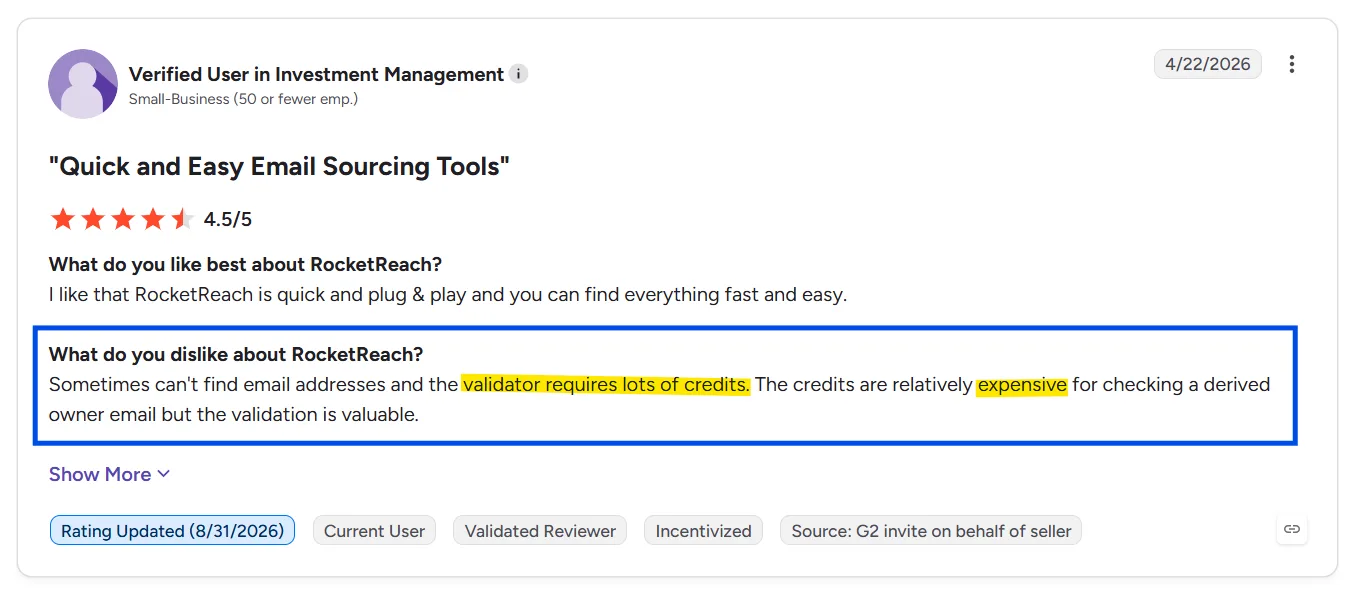
Email validation in particular eats through credits quickly, and the output does not always justify the spend. One Investment Management reviewer who rated RocketReach 4.5/5 still called the credits expensive for what they returned.
2. The subscription math feels unfair to monthly users.
A recurring complaint among monthly subscribers is paying for days they did not actually use. One Financial Services reviewer summed it up with a 3/5 rating under a headline that called the pricing unfair.
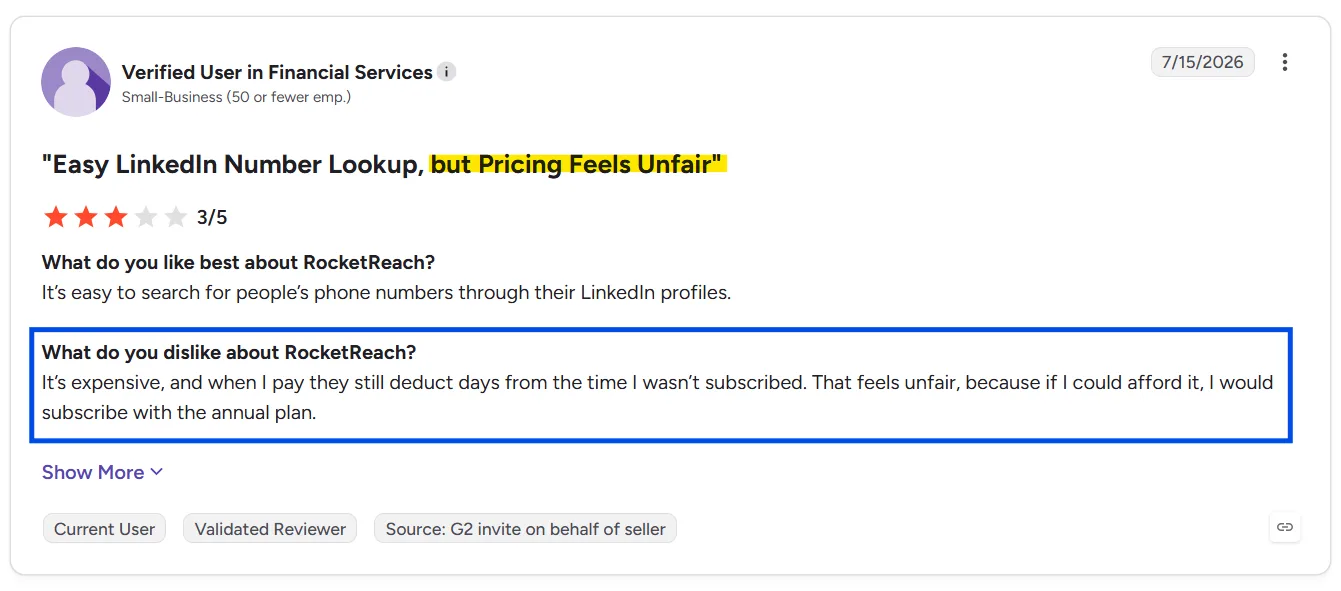
The issue isn’t just the price. It’s how the billing cycle treats partial months.
3. No refund window, even if you cancel within hours.
The most severe complaints come from users who tried to back out early. One Hospitality reviewer gave RocketReach 0.5/5 after signing up, deciding within two hours it was not the right fit, and being refused a refund. No trial window or 30-day guarantee.
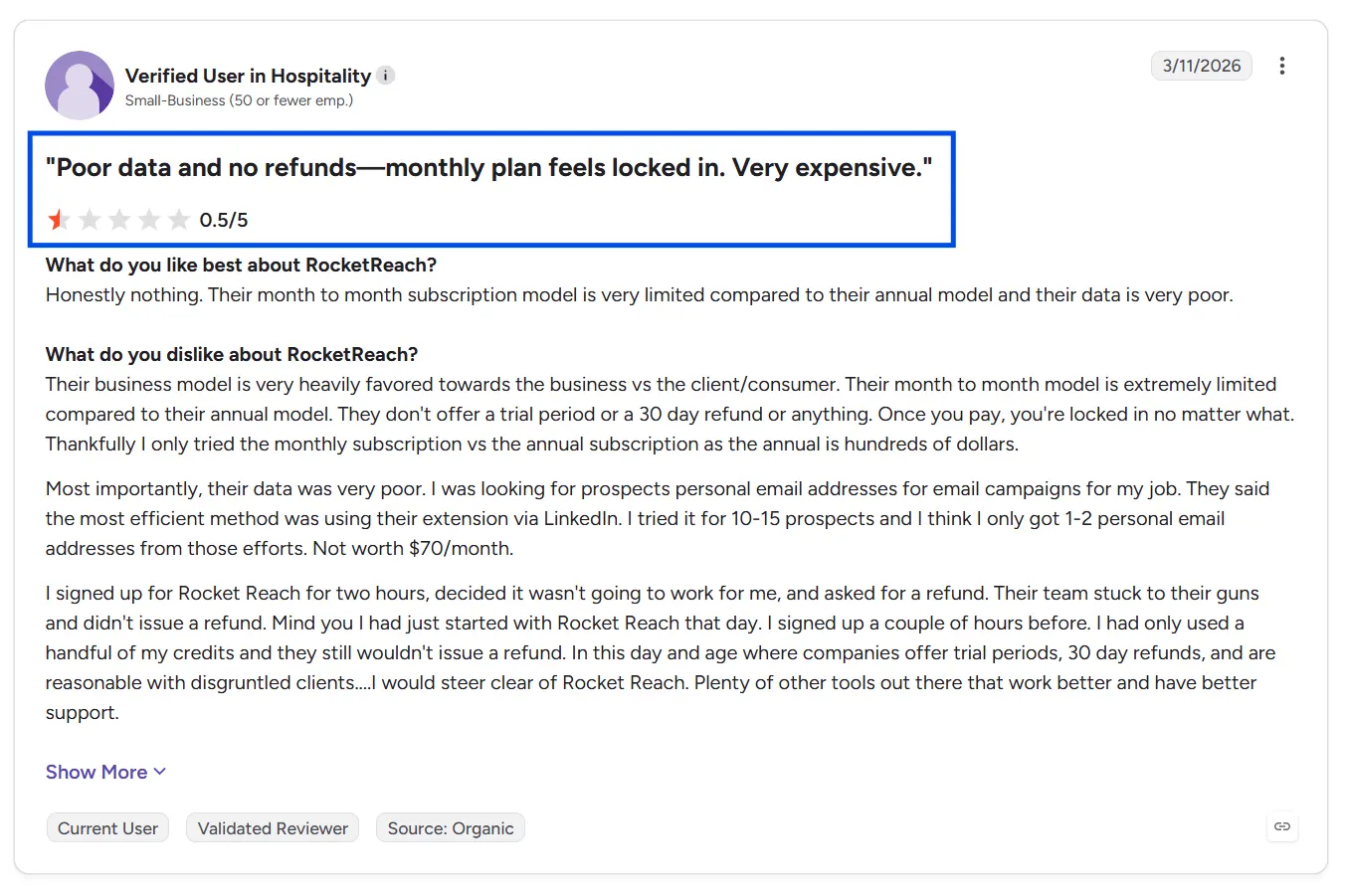
Once you pay, the money stays with RocketReach regardless of how little you used.
Fair Summary: RocketReach is a legitimate, widely used contact lookup tool that does one job reasonably well. But the recurring complaints, expensive credit burn, pricing that penalizes monthly users, and no refund safety net tell you something about the risk profile before you commit.
If you are evaluating RocketReach, go in with your eyes open:
- Monthly billing is the worst of both worlds. Lock in annual only if you are certain.
- Expect no refund window if data quality disappoints you.
- Budget for credits running out before you expect them to.
Is RocketReach Worth It in 2026?
Yep, RocketReach is worth considering if finding B2B contacts is your main priority.
It offers a large contact database, email and phone lookups, advanced search filters, and useful company insights.
But after breaking down its pricing, I think there’s a bigger question you should ask.
How many verified, usable contacts are you actually getting for your money?
RocketReach Essentials costs $399/year, but you’re limited to email addresses and 1,200 annual exports.
Need phone numbers? You’ll have to upgrade to Pro at $899/year. And as your team grows, per-seat pricing increases your costs further.
That’s where I’d recommend looking at Saleshandy’s Lead Finder.
For $408/year, Saleshandy Starter gives you 1,500 Lead Finder credits every month, with access to:
- 852M+ B2B contacts across 42M+ companies.
- Advanced prospecting filters to find decision-makers matching your ideal customer profile.
- AI Prompt-to-List to build targeted prospect lists using plain-English instructions.
- Waterfall Enrichment to find verified emails and phone numbers across multiple data providers.
- Real-time email verification, so you don’t spend credits on unverified email results.
One verified work email costs one credit, while a phone number reveal costs six credits.
So you’re not simply paying to access a database. You’re paying for verified contact details you can use.
My verdict: RocketReach is a capable lead-finding platform, especially if its database and export allowances match your needs.
But if you want verified B2B contacts, flexible list building, and more predictable prospecting costs, Saleshandy deserves a closer look before you commit.
Better yet, test its data against your actual prospect list before deciding.
Search 852M+ contacts, find decision-makers, and verify contact details with up to 50 FREE Lead Finder credits.
Find Your Next 50 B2B Verified Leads Without Paying Upfront!
Frequently Asked Questions About RocketReach Pricing
1. How much does RocketReach cost per month?
On annual billing, RocketReach costs $33/month for Essentials (email only), $75/month for Pro (email + phone), and $142/month for Ultimate. Monthly billing runs higher: $69, $119, and $209, respectively. All prices are per seat and were verified on rocketreach.co/pricing on October 15, 2026.
2. Does RocketReach have a free plan?
RocketReach offers a free account with 5 lookups. No credit card required. This is not an ongoing free tier. It is a one-time data quality check. Once the 5 lookups are used, you need a paid plan to continue.
3. What is the difference between lookups and exports?
A lookup reveals a contact’s verified email or phone number inside RocketReach. An export downloads that contact to a CSV or pushes it to your CRM. Both consume separate credit types. Annual plans offer unlimited lookups but cap exports at 1,200 (Essentials), 3,600 (Pro), or 20,000 (Ultimate) per year. Only Custom Team Plans unlock truly unlimited lookups with custom export caps.
4. What is the difference between Team Plans and Custom Team Plans?
Team Plans (2-5 users) give you unified billing, team admin access, and a usage dashboard but do NOT include pooled credits, company exports, or dedicated support. Each seat still has siloed credits. Custom Team Plans (5+ users, starts at $6,000/year, annual-only) unlock pooled export credits, unlimited lookups, custom API access, SSO, suppression lists, a dedicated account manager, and priority support.
5. Do RocketReach credits roll over?
No. Unused lookups and exports do not carry over to the next billing period. Monthly plan credits reset each month. Annual plan credits expire at the end of the subscription year.
6. Will I lose my credits if I cancel?
You keep access to your plan and remaining credits until the end of your current billing period. After that, credits expire. Cancellation takes effect at the next renewal, not immediately.
7. What happens if a lookup finds no verified email?
No credit is charged. RocketReach only consumes a lookup credit when the platform returns at least one verified email address or phone number. Empty results cost nothing.
8. How Does RocketReach API and MCP Credit Usage Work?
API calls follow the same export limits as manual exports. Every successful API call returning verified data counts against your export cap. MCP access is available on all plans and follows the same credit limits. API access itself is “Limited” on Individual and Team Plans. Only Custom Team Plans unlock custom API limits.
9. How do I cancel RocketReach?
For Individual and Team Plans, go to your account settings page and select “Cancel Subscription.” For Custom Team Plans, email your account manager or sales@rocketreach.co. Set a calendar reminder before your renewal date. RocketReach auto-renews by default, and surprise charges are among the most common complaints in user reviews.

 Dhruv Patel