


With $99 a month for 170 contacts, is UpLead really worth it?
And how much will UpLead actually cost once those credits run out?
If you’re here, chances are these same questions are on your mind about UpLead.
I spent 3 days studying UpLead’s pricing, digging into its T&Cs, running 5 test searches during the trial, and reading hundreds of G2 reviews.
But I wanted the full picture, so I dug deeper.
I compared UpLead with its competitors, looked for costs that aren’t obvious upfront, and found an alternative offering 4.7x the contact database for less than half the price.
Here’s what I’ll break down:
- UpLead’s pricing: What all four plans actually cost in 2026.
- Credit system: How credits work and where they get used up.
- Hidden costs: Extra charges and limitations you should know before buying.
- Final verdict: Is UpLead worth your money, or can you get more elsewhere?
By the end, you’ll know exactly what you’re paying for and whether UpLead deserves a place in your sales stack.
Let’s cut to the chase.
TOC – Uplead Pricing (2026)
- Quick Answer: So, What Does UpLead Really Cost in 2026?
- What’s Included In Each UpLead Pricing Plan? (Users, Credits, Features, Limits)
- How UpLead Credits Exactly Work
- What Users Say About UpLead’s Pricing Plans & Included Features
- How to Test UpLead Before You Buy
- Better UpLead Alternative: Saleshandy
- Is UpLead Truly Worth It in 2026?
- UpLead Pricing FAQ
Quick Answer: So, What Does UpLead Really Cost in 2026?
UpLead runs on four plans. One free trial, two self-serve, and one “contact us.”
Here’s a full picture at a glance:
One credit = one contact. A contact means an email address and a mobile direct dial, bundled together.
Annual billing shaves about 25% off monthly rates. The credit count stays the same.
Who UpLead Is Best For
- Solo reps or founders running low-volume outbound on a tight ICP
- One-person teams who want verified data without an enterprise contract
- Buyers who want a clean, published price list (no “schedule a demo” to see numbers)
- Teams that already have an outreach stack and just need the data layer
Who Should Look Elsewhere
- Teams of 2 or more – Essentials and Plus are single-user plans, full stop
- Cold email teams – UpLead sells data, not outreach (you’ll need a separate tool)
- High-volume senders – 170 or 400 credits a month run out faster than you’d think
- Anyone who wants intent data – gated behind the Professional plan (custom-priced, annual-only), and still partially marked “Coming soon” on UpLead’s own site
Keep reading. The devil is in the details, and that’s exactly what we are getting into next.
What’s Included In Each UpLead Pricing Plan? (Users, Credits, Features, Limits)
Now let’s break down what each plan actually delivers.
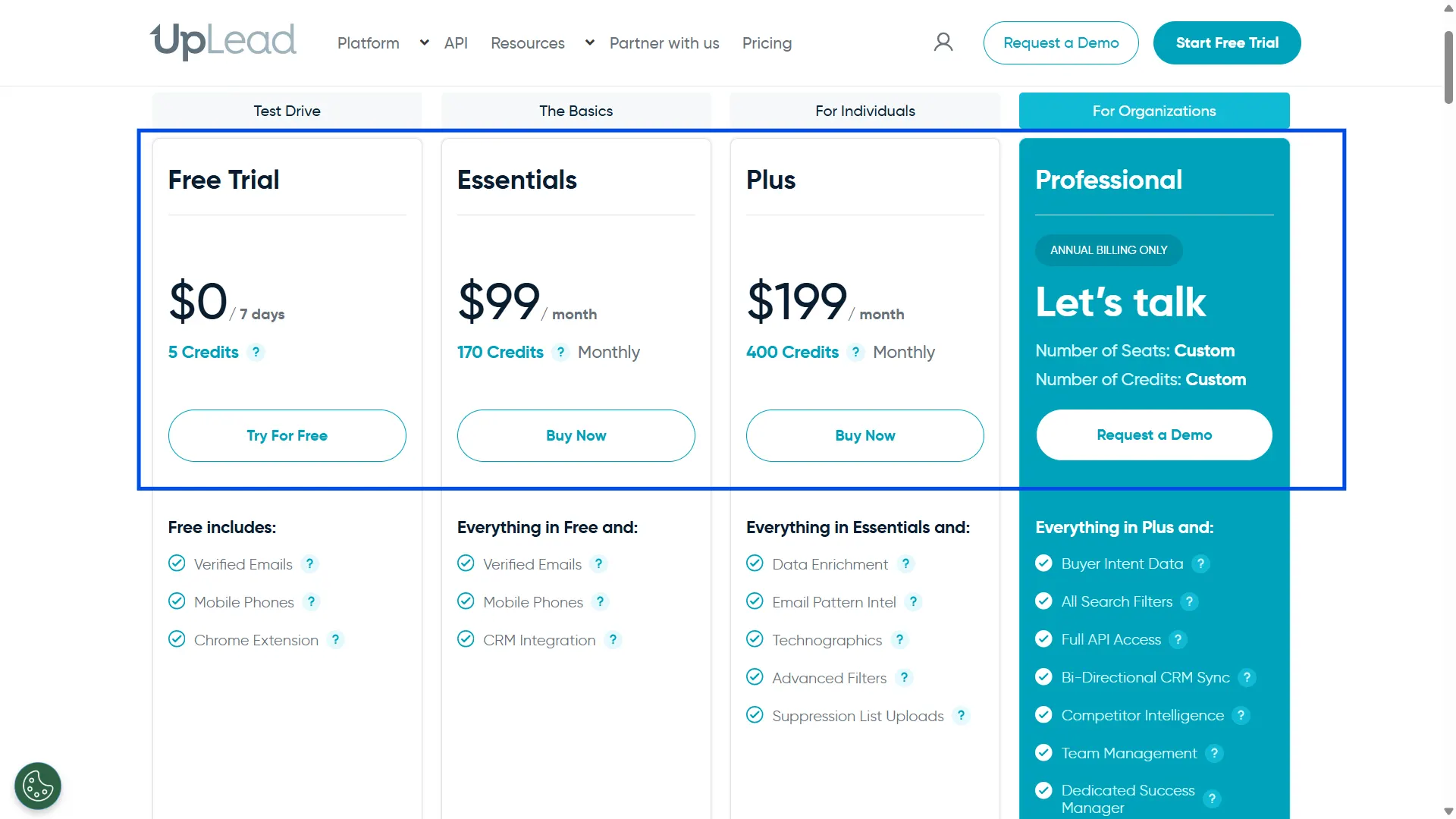
1. Free Trial ($0 for 7 Days)
The free trial is UpLead’s “try before you buy.” No credit card. 5 credits. 7 days.
That’s it.
What you get:
- Verified email addresses
- Mobile direct dials
- Chrome extension (works on LinkedIn and the web)
- Full access to the Prospector search
What you don’t get:
- CRM integration (zero connectors in the trial)
- Data enrichment
- Advanced filters
- Technographics
- Intent data
Here’s the part UpLead’s pricing page doesn’t flag loudly enough.
If you forget to cancel or pick a plan before day 7, your trial does not just expire. It automatically rolls into the Essentials Annual Plan – $888 billed for the year.
That’s straight from UpLead’s own help center. The gym “free week” that turns into a year-long membership, except it’s your data budget on the line.
The verdict: 5 credits are enough to test the search interface. It is not enough to judge data quality on your ICP. For that, you want 50+ test contacts, not 5.
2. Essentials ($99/Month) – The Starter
UpLead’s entry-level paid plan. $99 monthly, or 74/mobilledannually(888/year).
You get 170 credits a month. Roughly 8 contacts per working day across 250 working days.
What you get:
- 170 verified contacts a month (email + mobile direct dial)
- CRM integration (Salesforce, HubSpot, Zoho, Pipedrive, and 15+ more)
- Zapier for 1,500+ other apps
- Chrome extension
- 95% email accuracy claim with credit refunds for unmatched contacts
What’s locked:
- Data enrichment
- Technographics (16,000+ tech stacks you can filter by)
- Advanced search filters
- Suppression lists (useful for excluding existing customers)
- Email pattern intelligence
- Buyer intent data
- Team seats (single user only)
Overage credits cost $0.60 each.
The math gets interesting. If you blow through your 170 credits and buy 100 more at $0.60, your Essentials bill jumps to $159. That’s already $40 away from the Plus plan at $199, which gives you 400 credits built in.
Pay a little more, get a lot more. Or pay less and get stuck. That’s the trade.
Best for: Solo reps testing UpLead at low volume, with no need for enrichment or advanced filtering.
3. Plus ($199/Month) – The Sweet Spot (Sort Of)
Plus is where UpLead’s “real” product unlocks. $199 monthly, 149/mobilledannually(1,788/year).
You get 400 credits a month. About 19 contacts per working day.
What Plus unlocks over Essentials:
- Data enrichment (fill missing fields in your CRM)
- Email pattern intel (guess company email formats)
- Technographics (filter companies by the tech they use)
- Advanced search filters
- Suppression list uploads
- Lower overage rate ($0.50/credit)
What’s still locked on Plus:
- Buyer intent data
- Competitor intelligence
- Full API access
- Bi-directional CRM sync
- Team management, multiple seats
- Dedicated success manager
Still one user. Still no team collaboration.
Here’s the uncomfortable truth. If you’re a 3-person SDR team on Plus, you’re not paying $199/mo. You’re paying $597/mo across three separate accounts. No shared credit pool. No admin view. No way to move credits between reps.
The “single-user” clause quietly multiplies your bill by your headcount.
Best for: Solo reps or founders who need enrichment, technographics, and advanced filtering – not teams.
4. Professional (Custom, Annual Only) – The Enterprise Lane
Professional is UpLead’s enterprise tier. “Let’s talk” on the pricing page.
Capterra lists it at $299/month, but UpLead’s own page shows custom pricing. That tells you two things: $299 may be an anchor, and the real number depends on your team size and credit volume.
Annual billing only. No monthly option.
What Professional unlocks:
- Buyer intent data (partially marked “Coming soon” on UpLead’s own intent page)
- Competitor intelligence
- Full API access
- Bi-directional CRM sync
- Team management (multiple seats, admin controls)
- Dedicated success manager
- Onboarding specialist
- Priority phone support
- Lowest overage rate ($0.40/credit)
One thing to flag before you sign.
Best for: Teams of 3+ with the budget for enterprise annual contracts and a real need for intent data.
UpLead’s terms require a 60-day cancellation notice before auto-renewal on annual contracts. Miss that window, and you’re locked in for another year.
Not a dealbreaker. But the kind of clause you want to know before, not after.
Not convinced UpLead’s pricing and credit limits are worth it? Explore 10 Best UpLead Alternatives and Competitors in 2026 to find a better fit for your budget and prospecting needs.
How UpLead Credits Exactly Work
Credits are the only currency UpLead uses.
- One credit = one contact.
- One contact = email + mobile direct dial, bundled together.
That’s actually simpler than most competitors. Lusha charges 1 credit for an email and 5 for a phone. Apollo charges 1 for email and 8 for phone. UpLead’s “one coin, one sandwich” model is cleaner.
But cleaner doesn’t mean cheaper. And that’s where buyers trip.
Here’s what UpLead doesn’t spell out plainly on the pricing page:
1. Monthly credits do not roll over: Use them or lose them. If you buy Essentials for 170 credits and only burn 100, those 70 vanish on your renewal date. Gone with the wind.
2. Annual credits are issued monthly, not upfront: The 2,040 annual credits on Essentials come as 170 per month – not a lump sum you can front-load. Which means you cannot run a 500-credit campaign in month one and coast for the next six.
3. Bulk enrichment refunds unmatched credits: Run 1,000 contacts through enrichment, only 700 match? You get 300 credits back. Fair policy, documented in their help center.
4. Account closure wipes your credits instantly: No grace period. If you want to pause, use the Hibernation Plan ($2/month), which preserves your saved data and lists. Closing the account is final.
5. Overage is more expensive than upgrading: On Essentials, 100 overage credits at $0.60 = $60 extra, pushing your bill to $159. For $40 more, Plus gives you 230 extra credits. The math punishes customers who stay on the lower tier.
So the real question isn’t “how many credits do I get?”
It’s: how many credits do I actually use, and does my plan match that pattern?
Because the gap between what you pay for and what you consume is where UpLead quietly earns its margin.
What Users Say About UpLead’s Pricing Plans & Included Features
UpLead sits at 4.7/5 on G2 across 832 reviews.
The praise is consistent. Users love the clean credit model, the published plan structure, and the 95% accuracy claim with credit refunds. For solo reps tired of opaque enterprise pricing, UpLead feels refreshingly honest.
But dig into the lower-star reviews and the same complaints keep popping up.
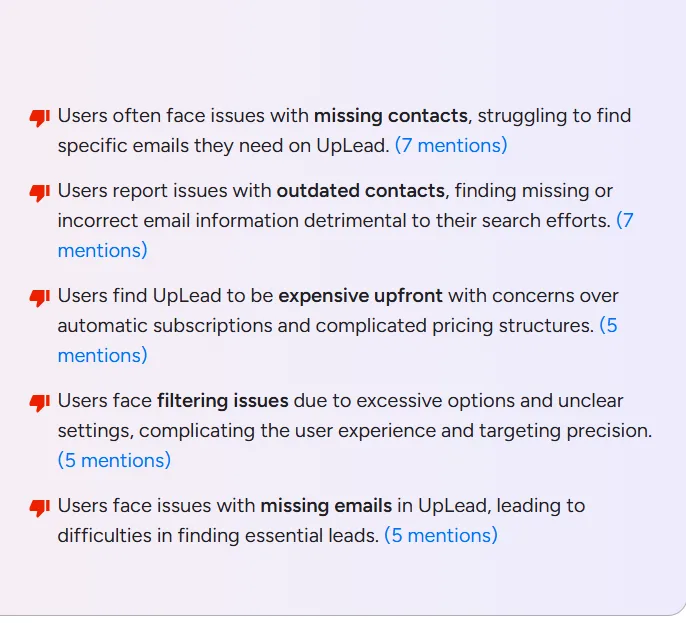
1. Missing and outdated contacts: Users flag missing emails and incomplete details for smaller and mid-market companies, mentioned 7 times across review themes.
2. Expensive upfront with sticky billing: Founders and solo users flag UpLead as expensive once overage kicks in (not shocking at 60 cents a pop on Essentials). The bigger issue: auto-renewal surprises, no refunds for unused credits, and cancellation friction; some users report having to schedule a Zoom meeting just to cancel.
3. Restrictive credits and filter clutter: 170 credits on Essentials runs out fast for growing teams, forcing a pricey upgrade or add-on credits. On the flip side, the 50+ search filters leave some users overwhelmed instead of empowered.
4. Phone data accuracy lags behind email: Direct-dial accuracy is reported around 55–65%, far below the 95% email accuracy UpLead advertises.
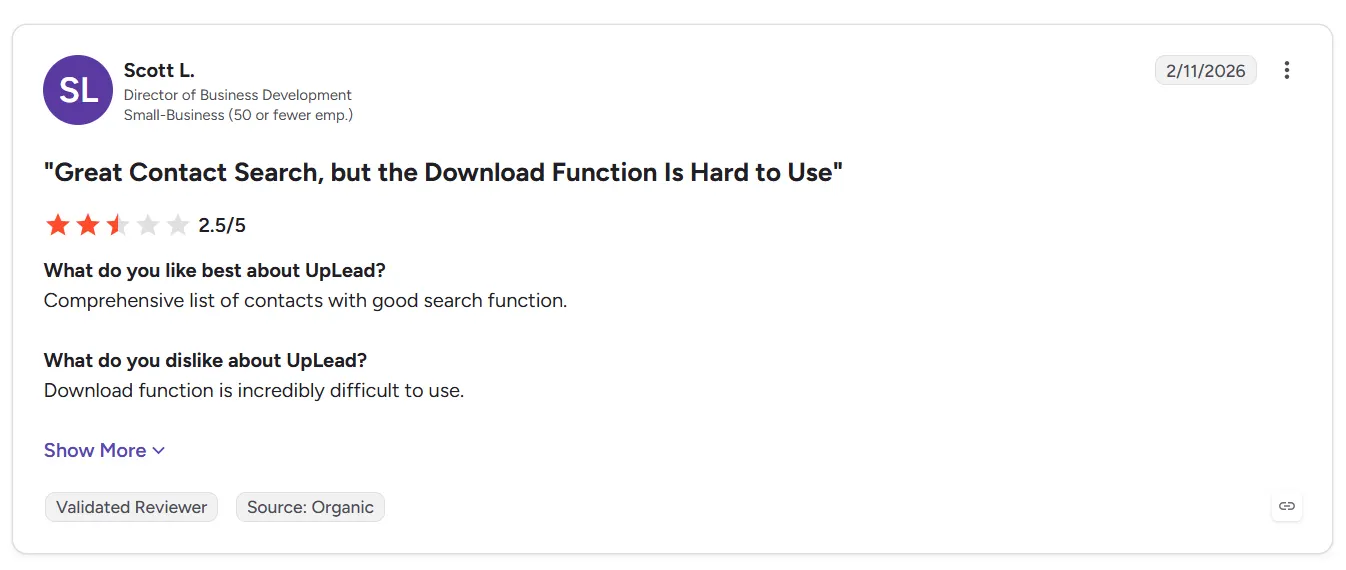
The reviews that stay positive share one thread. They come from users who:
- Prospect at low-to-moderate volume (fits inside 170 or 400 credits)
- Already have an outreach tool and just need data
- Found UpLead’s data quality acceptable for their ICP in domestic markets
If you’re in that bucket, UpLead delivers. If you’re not, if you need international coverage, SMB depth, or verified phone numbers, the cracks show fast.
How to Test UpLead Before You Buy
Here’s a quick playbook most buyers skip. It takes 15 minutes and saves you from locking into a year by mistake.
Step 1: Start the free trial, and set a calendar reminder for day 6.
The auto-conversion to Essentials Annual is real. Do not let day 7 slip by without a decision. Even if you plan to continue, switch to Essentials Monthly first – $99 with no annual lock-in – and upgrade to annual later once the data proves itself.
Step 2: Burn your 5 credits on your hardest contacts.
Not CEOs of Fortune 500s where every tool has data. Pull 5 contacts from your actual ICP – the mid-level buyers at mid-sized companies you struggle to reach.
Step 3: Verify the data against your source of truth.
Call the mobile number, send a test email, and check LinkedIn for job title accuracy. Remember, five contacts tested properly tell you more than 50 skimmed.
Step 4: Try the Chrome extension on LinkedIn.
This is where UpLead actually shines for day-to-day prospecting. Pull up a prospect’s profile and see if the extension surfaces usable contact info. If it doesn’t, the paid plans won’t either.
Step 5: Ask about enrichment match rates for your industry.
UpLead’s accuracy is a general claim. Your industry’s match rate may look very different. UpLead’s own bounce article is unusually honest about this: “Even when a provider claims 95% accuracy, that may refer to the state of verification at a point in time, but addresses can become invalid afterwards.”
Better UpLead Alternative: Saleshandy
Here’s where the UpLead story breaks for most teams I talk to.
UpLead gives you data. Just data. The emails, the phones, the exports.
What it does not give you is the thing you actually need to turn that data into a pipeline: cold email outreach. No sequences, no follow-ups, no warm-up, no inbox rotation, no deliverability tools.
Which means your real stack isn’t just UpLead. It’s UpLead (99–199/mo) + Mailshake or Instantly (59–97/mo) + a warm-up tool + a deliverability monitor.
You just stitched together a $200–400/month tool stack to do what one platform could.
That one platform is Saleshandy.
UpLead vs Saleshandy: Compare The Same Buying Criteria
Look at the entry plan math. For $34/month annual, Saleshandy Starter gives you 1,500 Lead Finder credits. For $74/month annual, UpLead Essentials gives you 170.
That’s roughly 9x the credits for less than half the price.
And that’s before you factor in that Saleshandy also runs the outreach. UpLead does not.
Summary Comparison
- Choose UpLead if: You need mobile direct dials bundled with every contact and already own an outreach platform you refuse to switch.
- Choose Saleshandy if: You need accurate B2B data, verified emails, and built-in cold email outreach in one platform – at a fraction of the cost.
Is UpLead Truly Worth It in 2026?
I’ll be super honest. UpLead is worth considering, but not for everyone.
With 200M+ contacts, real-time email verification, and a 95% accuracy guarantee, UpLead is a capable B2B prospecting tool.
If you need a few hundred contacts monthly and its database covers your target audience, UpLead can deliver good value.
But here’s where I’d think twice.
At $99/month, you get just 170 credits. Additional contacts cost $0.60 each on the Essentials plan.
And if you’re already struggling with missing contacts or limited coverage, paying more credits won’t necessarily solve that problem.
That’s where I’d recommend looking at Saleshandy Lead Finder.
Starting at $34/month (billed annually), Saleshandy gives you:
- 852M+ B2B contacts and 42M+ companies to find more potential buyers.
- 1,500 Lead Finder credits monthly on Starter, with larger allowances on higher plans.
- AI-powered prospect search to find ideal buyers using simple prompts instead of manually configuring filters.
- Waterfall enrichment that checks multiple data sources to find missing contact information.
- Real-time email verification, with credits charged only when verified emails are found.
One distinction matters: UpLead’s credits unlock contact data, including available phone numbers. Saleshandy charges separately for phone reveals.
So, should you choose UpLead or Saleshandy?
- Choose UpLead if its contact coverage, verification guarantee, and available phone data meet your prospecting needs.
- Choose Saleshandy if you want broader contact coverage, more verified email credits, and lower entry pricing.
Because finding leads shouldn’t become more expensive every time you want to grow your prospect list.
Find More Verified B2B Leads Without Stretching Your Budget
Explore 852M+ contacts, find decision-makers, and pay credits only for verified results.
UpLead Pricing FAQ
1. Does UpLead have a free plan?
No. UpLead offers a 7-day free trial with 5 credits and no credit card required, but there’s no permanent free tier. If you do not pick a plan before the trial ends, your account automatically converts to the Essentials Annual Plan ($888/year).
2. How much does UpLead charge for extra credits?
Overage credits cost $0.60 each on Essentials, $0.50 each on Plus, and $0.40 each on Professional. Buying overage is almost always more expensive per credit than upgrading to the next plan.
3. Do UpLead credits roll over?
No. Monthly credits do not roll over to the next billing cycle. Unused credits expire at renewal. Annual plans drip credits month by month, not as a lump sum. The only way to preserve credits during a pause is the Hibernation Plan at $2/month, which keeps your saved data but not unused credits.
4. Is UpLead worth it for cold email?
UpLead is a data tool, not a cold email tool. It gives you verified contacts, but it does not send sequences, warm up your inbox, or manage follow-ups. For cold email specifically, you’ll need UpLead plus a separate outreach platform – which doubles your tooling cost.
Platforms like Saleshandy bundle lead data (852M+ contacts) and cold email outreach into one subscription starting at $34/month annually. That’s typically a better fit for cold email teams than UpLead’s data-only model.


 Dhruv Patel