

B2B data enrichment is the process of improving existing business data by adding missing, updated, and relevant information about companies and contacts.
It helps sales and marketing teams enhance basic records with details such as job titles, verified contact information, company attributes, technologies used, and buying signals.
Most prospect databases become outdated over time. Contacts change roles, companies grow, and important details become incomplete. Data enrichment helps businesses maintain accurate prospect records by collecting and updating information from multiple data sources.
For sales teams, enriched data improves lead targeting, personalization, qualification, and outreach performance.
Instead of manually researching every prospect, enrichment platforms automatically add valuable context to CRM records and sales workflows.
In this guide, I will cover how B2B data enrichment works, its different types, benefits, examples, and how to choose the right enrichment tool.
B2B Data Enrichment Guide- TOC
- TL;DR: How Does B2B Data Enrichment Work?
- What Is B2B Data Enrichment?
- What Are the Different Types of Data Enrichment?
- How Does B2B Data Enrichment Work?
- What Data Can Actually Be Enriched?
- What Are the Benefits of B2B Data Enrichment?
- What Is Waterfall Enrichment?
- Which Are the Best B2B Data Enrichment Tools in 2026?
- How Do You Choose the Right B2B Data Enrichment Tool?
- Start With Verified Data, Not a Cleanup Job
- FAQs on B2B Data Enrichment
TL;DR: How Does B2B Data Enrichment Work?
B2B data enrichment works by improving existing prospect records with additional information from external data sources. It helps sales teams identify the right contacts, improve targeting, and maintain accurate customer data.
The enrichment process includes:
- Identify data gaps: Find missing, outdated, or incomplete contact and company information.
- Match records: Connect existing records with external databases using identifiers like emails, domains, and company names.
- Add relevant data: Append details such as job titles, contact information, firmographics, technologies, and intent signals.
- Verify accuracy: Validate data quality, remove duplicates, and confirm information is current.
- Sync enriched records: Export CVS or Push updated data into CRMs and sales tools for outreach and qualification.
The result is a more reliable prospect database that helps teams run targeted sales campaigns.
What Is B2B Data Enrichment?
B2B data enrichment is the process of adding missing, updated, and relevant business information to existing contact and company records.
It helps sales and marketing teams improve basic prospect data with details such as job titles, company size, industry, technology usage, and buying signals.
The concept is simple: take a limited contact record and add the business context needed to understand whether a prospect is worth pursuing.
For example, if you only have a person’s name and work email, enrichment can add information such as:
- Job title and seniority
- Company size and industry
- Technology stack
- Location
- Buying and intent signals
You may also hear B2B data enrichment called lead enrichment, contact enrichment, or data appending. While the terms are often used interchangeably, the goal remains the same: turning incomplete records into actionable prospect profiles.
The difference between B2B enrichment and general data enrichment comes down to the type of information added. Consumer enrichment focuses on personal attributes such as age or income, while B2B enrichment focuses on business-related signals that help teams identify ideal prospects and buying opportunities.
A consumer record tells you who someone is. A B2B record helps you understand whether that person and their company match your target customer profile.
One common confusion is the difference between data enrichment and data cleansing.
Data cleansing improves the quality of existing information by removing duplicates, correcting errors, and deleting outdated records.
Data enrichment adds new information that was not available before.
A better workflow is to clean your database first and enrich it afterward. This ensures you are not spending resources enriching records that should have been removed.
Bonus read: If you are deciding which process to run first, our guide on data enhancement vs data enrichment explains the difference.
What Is an Example of Data Enrichment?
A B2B data enrichment example shows how a basic contact record can become a complete sales profile.
Imagine Sarah Lee downloads your pricing guide. The information captured in your CRM looks like this:
Before Enrichment
This tells you who Sarah is and where she works, but you still do not know:
- Her role or seniority
- Whether she influences purchasing decisions
- Whether ABC Tech fits your ideal customer profile
- Which tools the company uses
- Whether there is a relevant reason to reach out now
Without additional context, Sarah enters the same workflow as hundreds of other leads.
After Enrichment
After matching the record against external data sources and verifying the information, the profile becomes:
Now the sales team knows:
- Sarah is a senior decision-maker
- ABC Tech matches the target company profile
- The company uses HubSpot, creating a relevant personalization angle
This changes Sarah from a basic contact into a qualified sales opportunity.
When applied across thousands of records, enrichment helps teams build targeted account lists instead of generic lead databases.
These additional fields come from different types of B2B data enrichment, which we will cover next.
What Are the Different Types of Data Enrichment?
There are six main types of B2B data enrichment, and each one solves a different problem in your outbound process. The data enrichment techniques below differ in what they add and when I would use them.
If you are building an outbound motion from scratch, I would not reach for all six on day one. Start with the data your team actually uses, then add more as the process matures.
1. Contact Data Enrichment
Contact enrichment fills in the details about a person, covering work email, phone number, job title, seniority, department, and LinkedIn profile. You will see it labelled prospect data enrichment or b2b contact enrichment depending on the vendor.
This is usually where I see teams start, because it saves your reps hours of manual research.
The one thing I would watch out for is phone data, since phone numbers cost far more credits than emails on almost every platform.
In Saleshandy a verified email costs 1 credit while a phone number costs 6. Phone enrichment is worth buying only if your team actually calls.
2. Email Enrichment
Email enrichment, sometimes written as email data enrichment, helps you find and verify work email addresses. It does two jobs rather than one.
It finds an email from a name, company domain, or LinkedIn profile, then checks whether that address will actually receive mail. LinkedIn data enrichment is just this process run from a profile URL.
I would treat this as the highest-stakes field on the record. A bad address quietly damages deliverability, and that damage carries into every campaign afterwards.
Rather than asking how large a provider’s database is, ask how often it finds an email for your type of lead. A huge database is useless if it cannot match your contacts.
3. Company Data Enrichment
Company enrichment, sometimes called firmographic enrichment, adds information about the business itself rather than the person inside it.
That includes industry, employee count, revenue, location, funding, and growth stage. Vendors sometimes sell this as b2b database enrichment.
I use this data to define an ICP and decide which accounts are worth pursuing, before spending anything on the individual.
A company that just raised funding and is hiring fast is a better prospect than one that has been flat for four years.
4. Technographic Enrichment
Technographic enrichment tells you which software and technologies a company runs day to day.
You might see their CRM, whether that is Salesforce, HubSpot, or Pipedrive, along with their marketing platform and analytics stack.
I find this most useful when you are competing against another product or selling an integration into an existing stack.
If a prospect already uses a competitor, you have a clear reason to reach out and a very different opening line.
5. Behavioral and Buying Signal Enrichment
This type answers a different question. Is the company showing signs that now might be a good time to reach out?
Buying signals come from outside your systems and include new funding, hiring activity, leadership changes, company news, or technology changes. Intent data providers sell this layer on its own.
Behavioral data comes from inside them, covering website visits, email engagement, and product activity.
The difference is simple. Buying signals tell you something is happening at the company, while behavioral data tells you they are paying attention to you.
Both help your team decide who to contact first, and hiring is the strongest signal I have seen for most B2B sellers.
A company posting three SDR roles is about to have an outbound problem. That is the week to email them, not six months later.
6. Customer Data Enrichment
The first five types help you find new prospects, while customer enrichment helps you keep the accounts you have already won.
It updates your CRM when people change roles, leave the company, or when the business grows and changes its technology. Some teams call this account enrichment, since you enrich customer data at the account level rather than the contact level.
I would run this for expansion and retention alike, because a promotion or a jump in headcount opens an upsell conversation you would otherwise miss.
If your champion leaves, you will want to build a new relationship well before renewal becomes a problem.
Quick Data Enrichment Types at a Glance
One final note from me on location data, which usually comes bundled into company enrichment rather than sold separately.
It matters most when you are managing territories, timing sends across time zones, or handling compliance requirements.
Bonus read: if stale records are your bigger problem, my guide to CRM data enrichment covers the refresh cycle.
How Does B2B Data Enrichment Work?
Now that you know what gets added, let me walk you through how it actually gets added.
I find the data enrichment process stops looking complicated once you see the sequence. The same five steps apply whether you are running ten records or fifty thousand.
1. Identify missing or outdated data
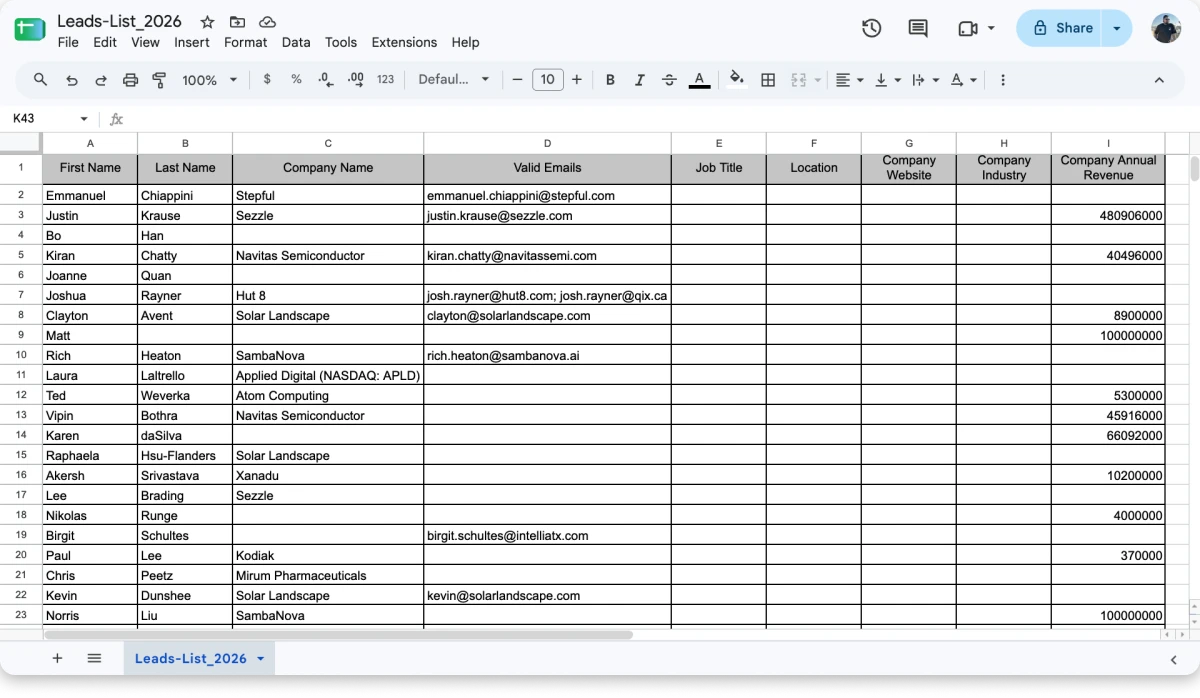
Start with what you already have. That means your CRM, a file upload from prospecting exports, or the spreadsheets on your reps’ desktops.
Then find the gaps, which usually means company names without employee counts, or emails without job titles.
2. Match records with external sources
The platform takes each incomplete record and finds the same person inside third-party databases.
First you tell it what you are matching. People enrichment returns emails, phone numbers, and profile details, while company enrichment returns size, industry, and social profiles.
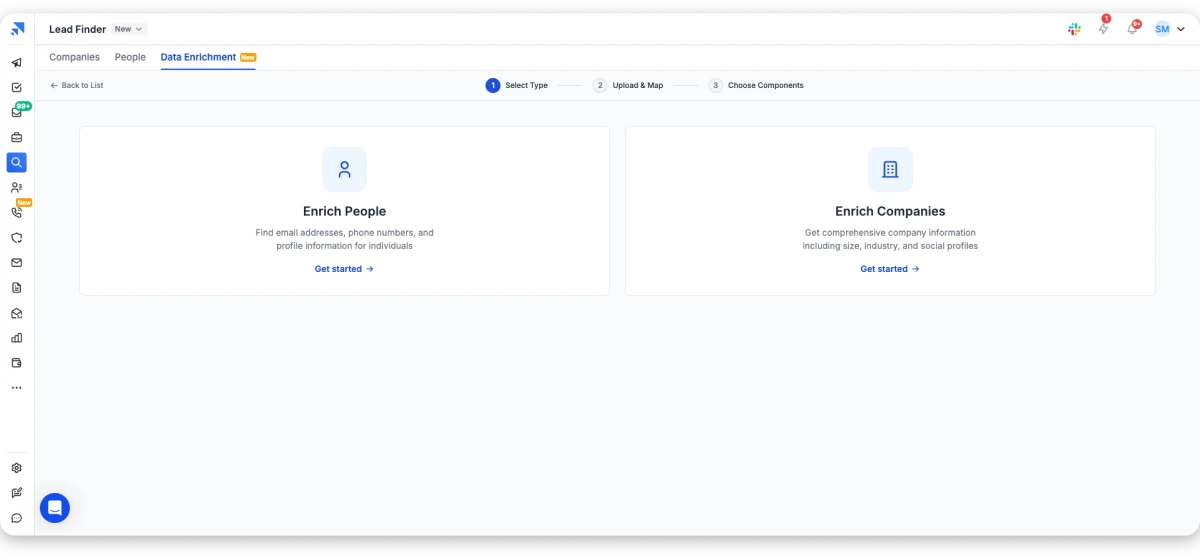
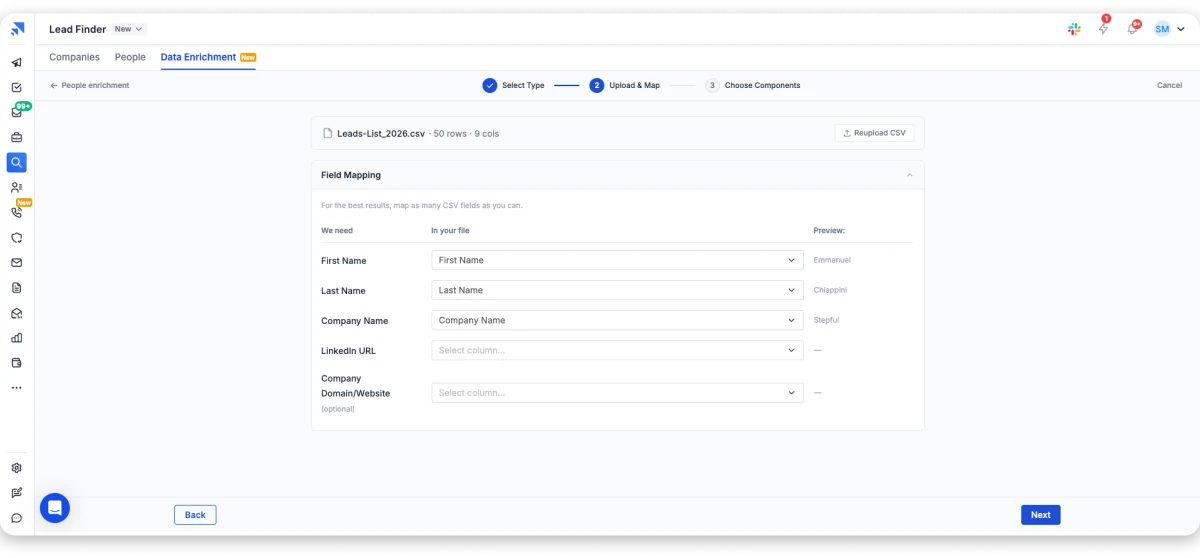
Then you upload the list. CSV only, up to 25MB and 10,000 records per run.
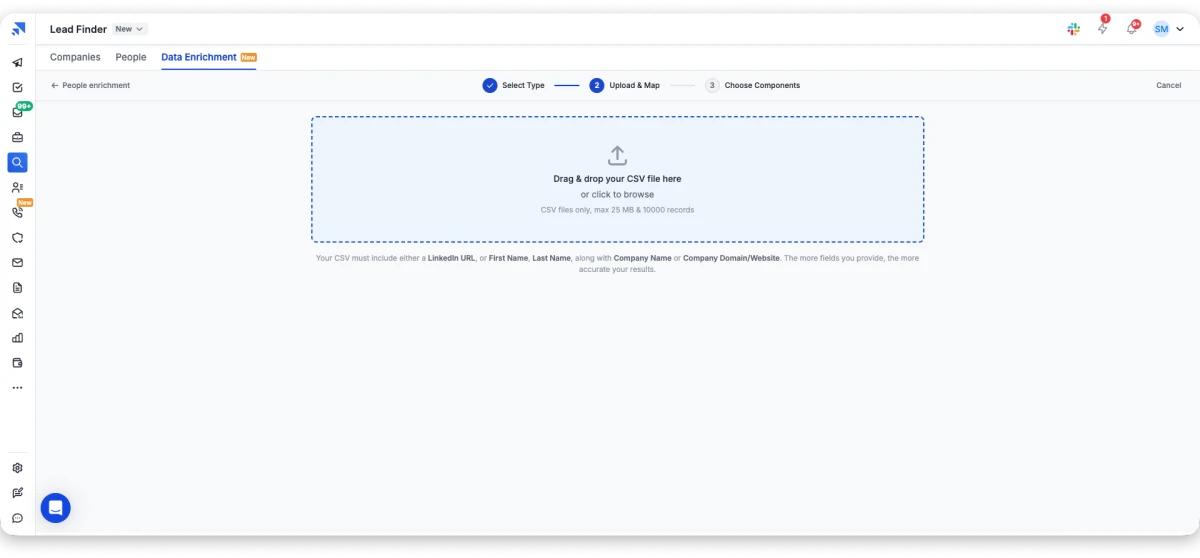
Now the mapping matters. I would look for matching that relies on identifiers which do not change easily, because an email domain or a LinkedIn URL beats a company name that gets rebranded.
That is why the upload screen asks for a LinkedIn URL, or a first and last name paired with a company. The more you map, the better your match rate.
3. Append additional information
Once identity is confirmed, the gaps get filled and you are layering on:
- Contact details like verified emails, direct dials, and current job titles
- Firmographic data like company size, LinkedIn, revenue, and industry
- Technographic insights covering the tools and platforms they run
- Intent signals such as funding rounds, hiring activity, and leadership changes
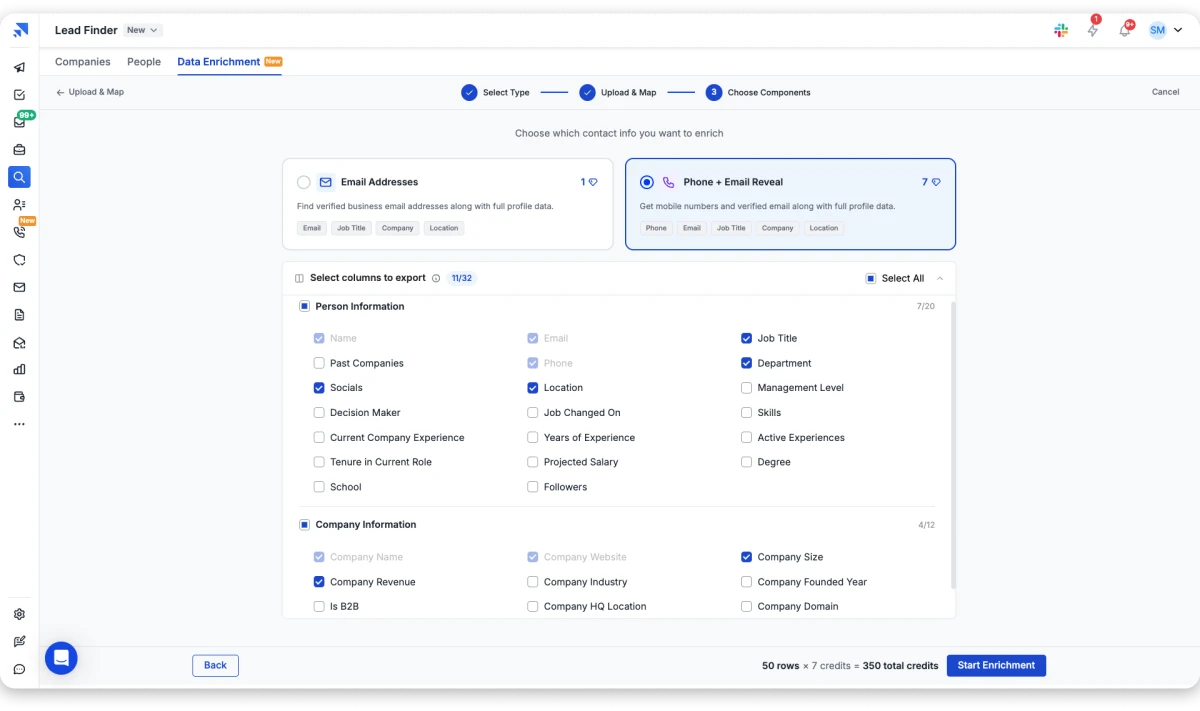
You choose from 32 available columns and see the cost upfront. Email addresses run 1 credit per record, while a phone plus email reveal costs 7.
4. Verify and improve data quality
This is the step I would never let a vendor skip. Good tools do not just add data, they clean it. Duplicates get merged and dead addresses get flagged before you send.
Formats get standardized too, which stops “Director of Sales” and “Sales Director” creating two records for one person.
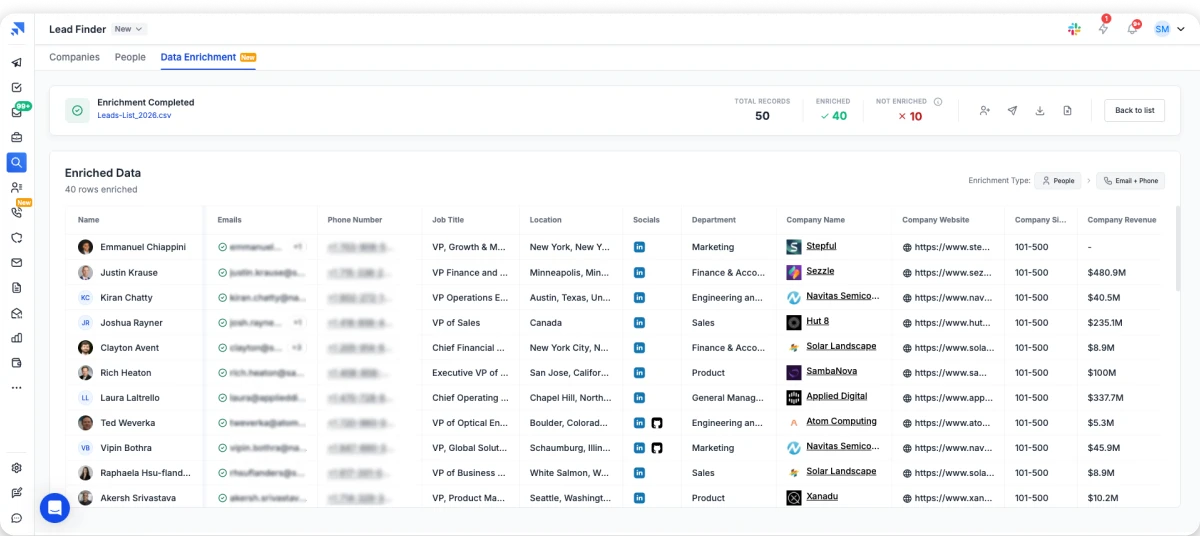
You also see what did not match. In this run, 40 of 50 records came back enriched and 10 did not. You are only charged for the 40.
That gap is the part vendors do not advertise, and it is exactly why waterfall enrichment exists.
5. Sync enriched data back into workflows
The completed profile gets pushed into your CRM, outreach platform, or data warehouse. The best version runs continuously, because contacts keep changing jobs after your project finishes.
Saleshandy handles steps two through four in a single pass. Each record runs through 9 data providers in a waterfall sequence. A miss from the first source gets picked up by the next.
Every email is verified in real time when it is revealed, rather than whenever the database was last indexed. You are charged only when a match comes back.
Step five is where most tools stop and hand you a CSV. Because enrichment and sending share one platform here, the contact moves straight into a sequence.
That covers the process, so the next question is how far it can go.
What Data Can Actually Be Enriched?
More than most teams realize, and here is the full picture in one place.
No provider covers every category well, so I usually see teams pair a primary provider for contact and company data with an intent specialist.
The categories matter less than what they change in practice, so here are three gaps I run into constantly.
- Technographic data for competitive displacement: A company name and an email tell you nothing about what they already pay for. Their installed stack tells you whether to pitch an integration or a switch.
- Intent data for timing: That cold account has been researching your category all month. You only find out if something is watching for it.
- Contact data for CRM hygiene: A bounced address costs you twice, once in the wasted send and again in sender reputation. Verified fields also route the contact to the right rep.
The record is the same in each case, and the only thing that changed is how much you knew before you hit send.
What Are the Benefits of B2B Data Enrichment?
The benefits of data enrichment show up wherever sales and marketing teams need accurate data, better targeting, and stronger prospect insights.
Instead of researching incomplete records, your team can focus on prospects that match your ideal customer profile. Here are the four gains I would expect.
1. Higher Lead Quality and Conversion Rates
Enriched records let you prioritize accounts that match your ICP. Lead data enrichment is what makes that possible, so any data enrichment strategy worth running starts with the fields your scoring model needs.
Scoring models only work when the fields they score on are populated. Fit scoring rewards whoever is likely to buy, while engagement scoring rewards whoever opens emails.
Conversion improves because your team stops working bad fits. I would rather chase fifty accounts that look like your best customers than every inbound lead.
2. Better Personalization and Targeting
Personalization requires context, and I have never seen anyone write a relevant email knowing only a name and a company.
Enriched data gives you the firmographics, technographics, and buying signals that make messaging land. Reps can reference a funding round or a competitor already in the stack.
Marketing gets the same benefit at segment level. You can split campaigns by industry, company size, or tech stack rather than sending one message to everyone.
3. Faster Sales Cycles
Complete records cut the time reps spend researching. When job titles, direct dials, and company details already sit in the CRM, they move straight to outreach.
Buying signals compress the cycle further, since reaching an account the week it raises funding is a different conversation from reaching it at random.
4. Improved Data Accuracy and Compliance
In my experience a database goes wrong quietly. A contact gets promoted and your email still opens with their old title, or someone leaves and the renewal note bounces.
Continuous enrichment catches those changes before you send rather than after the campaign fails.
That protects your sender reputation too, since every bounce tells mailbox providers you did not clean your list.
Compliance runs on the same accuracy, because opt-out and consent tracking only work when the record is current.
Bonus read: for the fuller picture on how fast records go stale, see my breakdown of B2B data decay.
Most of those benefits depend on match rate, which is where the enrichment method itself starts to matter.
What Is Waterfall Enrichment?
Waterfall enrichment queries several data providers in sequence instead of relying on one database.
The logic is straightforward once you accept that no single provider has everyone. Every database has gaps, and those gaps differ from the next one.
One is strong on North American enterprise, another on European SMB, a third on direct dials. A single-source tool can only return what it happens to hold.
Waterfall enrichment cascades through providers until one returns a confident match, which raises your match rate on exactly the same list.
How Waterfall Enrichment Works
The part I would make sure you understand is that the cascade runs per record, not per list.
If the first provider misses, the request moves to the second. When the second returns a match, the third verifies it rather than searching again.
The record only fails when every source comes back empty, and that is far rarer than a single-source miss.
The detail I would watch closest is when you get charged. Under a well-designed waterfall you pay only when a match comes back, not for each provider queried.
Under a badly designed one you pay per lookup, which means funding three failures for every success.
Bonus read: my full waterfall enrichment guide covers how the cascade is built and what to look for.
Why It Beats Single-Source Enrichment
The gap is widest exactly where you need it most, on SMB contacts and non-US regions. That is where single-source coverage thins first.
Knowing how enrichment works is one thing, and picking a platform that does it well is another.
Which Are the Best B2B Data Enrichment Tools in 2026?
I went through 20+ data enrichment tools, and these four are worth your time if you are running B2B cold outreach. Plenty of data enrichment companies sell data enrichment software that looks alike on paper, but these are the ones I would shortlist.
1. Saleshandy
Best For: B2B outbound teams who want verified contact data and cold email outreach in one platform.
Saleshandy gives you access to 852M+ verified B2B contacts across 42M+ companies with 75+ advanced search filters. Among lead enrichment tools it is one of the few that also sends the email.
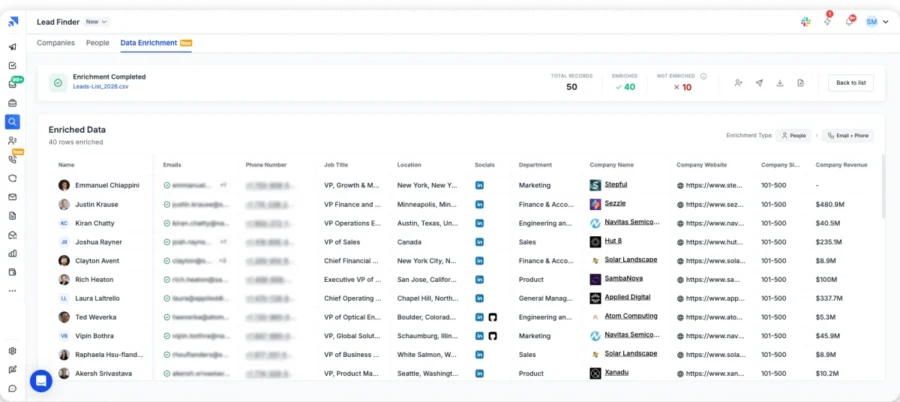
What separates it from most enrichment tools is the combination. You are not just pulling data, you are pulling data verified in real time through waterfall enrichment as you reveal it.
Key Features Worth Noting:
- Waterfall enrichment across 9 providers, with credits charged only on successful matches
- AI prospect enrichment that generates context rather than just filling fields
- 75+ advanced search filters, including tech stack, funding, and buying signals
- AI-powered plain-English ICP search
- Enrichment API that batches up to 100 records per request, with real-time status polling
- Credit top-ups available from 500 to 100,000, priced from $0.025 down to $0.016 each
- Built-in cold email sequencing with inbox warm-up and sender rotation
- Saleshandy CRM with Kanban pipeline and prospect activity timeline
- Real-time email verification on every contact reveal
Pros:
- Enrichment connects directly to outreach, so no file export is needed
- AI enrichment generates personalized context rather than just filled fields
- Top-up credits get cheaper at volume, from $0.025 down to $0.016 each [VERIFY rollover policy separately]
- 50 free credits to test data quality before upgrading
- One credit for a verified email, and nothing charged when no verified email is found
Cons:
- Free trial runs 7 days only, with a 50-credit cap
- Lead Finder and Outreach sit in separate plan categories
- No dialer on Lead Finder plans
- Phone reveals cost 6 credits against 1 for an email
Saleshandy Pricing:
- Free trial: 7 days, 50 credits
- Starter: $34/mo
- Pro: $76/mo
- Scale: $149/mo
- Enterprise: Custom pricing
2. Apollo.io
Best For: Teams that want a large contact database with built-in sequencing and CRM features.
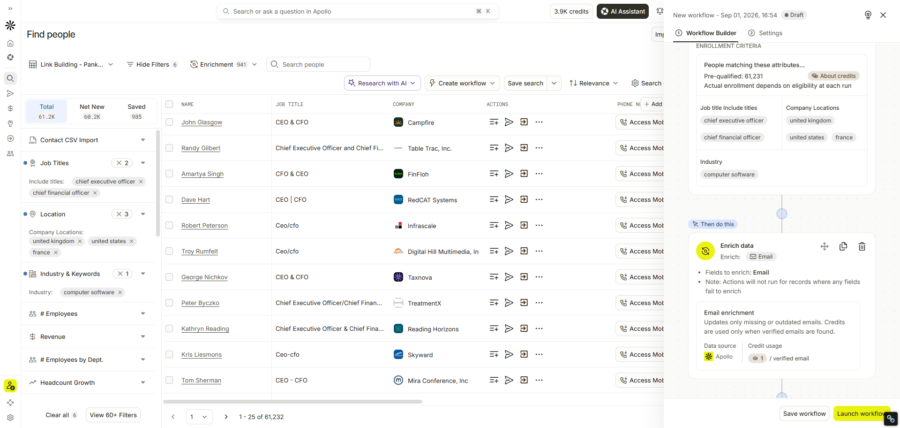
Apollo.io carries 240M+ contacts across 30M+ companies and includes multi-channel sequences, a dialer, and native CRM integrations.
For teams already inside the Apollo ecosystem I think it works well as an all-in-one. The Chrome extension is strong for pulling contacts while you browse LinkedIn.
Pros:
- 240M+ contacts across 30M+ companies, covering contact, firmographic, and technographic data
- Strong Chrome extension for capturing prospects during LinkedIn research
- CSV enrichment and CRM sync available on paid plans
- Free forever Starter plan to test data quality before committing
Cons:
- Per-seat pricing, so costs scale with every person you add
- Credits expire each billing cycle with no rollover
- Mobile number reveals cost more credits than email reveals
- Some features are gated behind the top tier, which carries a seat minimum
Apollo.io Pricing
- Free Starter: $0, limited monthly credits
- Basic: $49/user/mo
- Professional: $79/user/mo
- Organization: $119/user/mo, 3-seat minimum
- Enterprise: Custom pricing
Bonus read: if you are already looking around, my guide to Apollo.io alternatives goes deeper on the trade-offs.
3. ZoomInfo
Best For: Enterprise sales teams with large budgets targeting Fortune 500 accounts.
ZoomInfo is the market leader for enterprise-grade enrichment, covering deep firmographic data, org charts, and Bombora-powered intent signals.

If your average deal value runs into six figures and you sell into large organizations, I would say the data depth justifies the price.
Pros:
- Deep firmographic enrichment, including org charts and buying committee data
- Intent signals powered by Bombora for account-level enrichment
- Automatic CRM enrichment to keep records fresh
Cons:
- Too expensive for most SMB teams
- Annual contract minimums with limited flexibility
- Records last verified months ago may not reflect current job titles
- Assumes you already own the sales engagement layer it feeds
ZoomInfo Pricing
Custom, and you will need to contact their sales team for a quote.
4. Clay
Best For: RevOps and growth teams who want to build custom multi-source enrichment workflows.
Clay pulls from 150+ data providers and lets you build waterfall enrichment logic across them yourself.
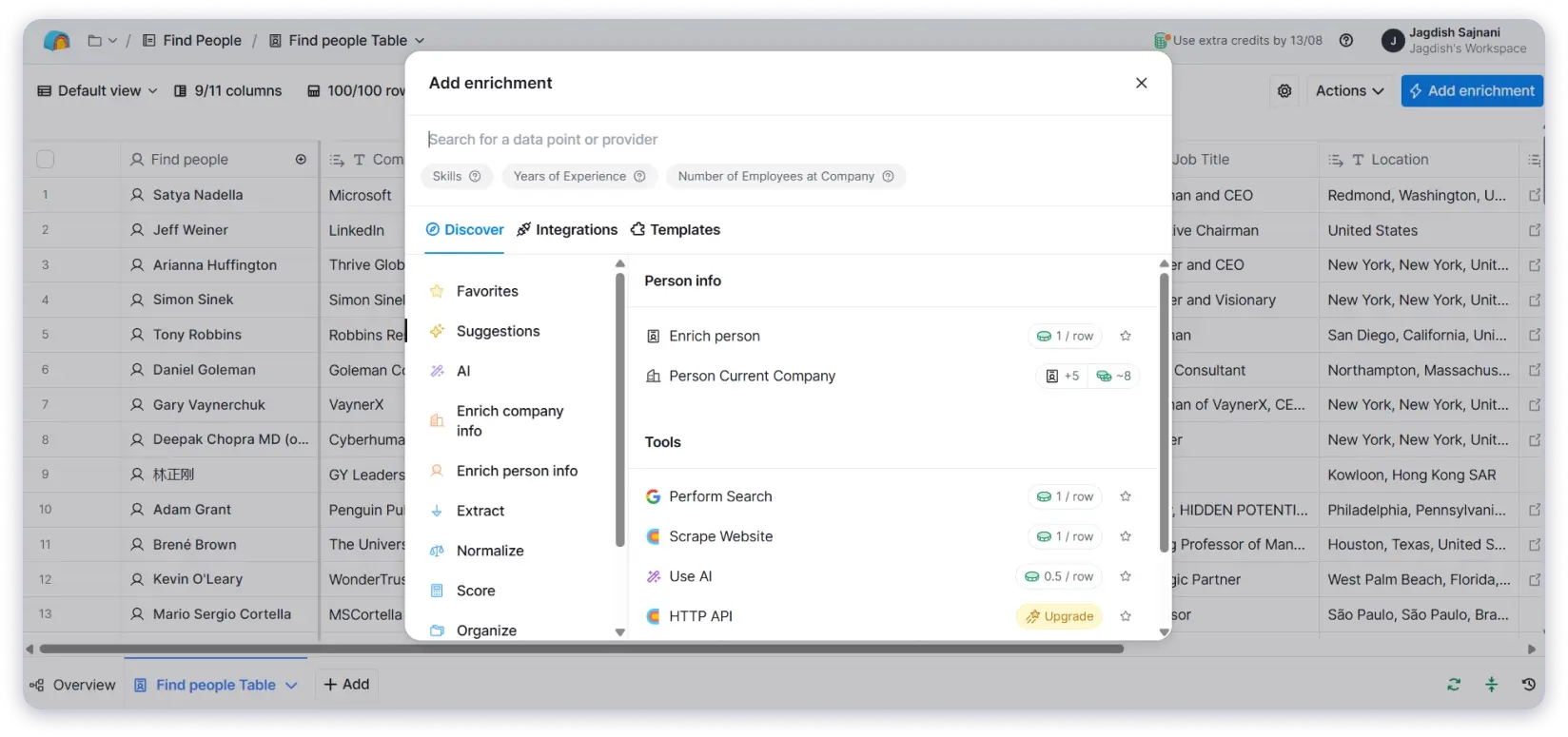
For teams with a technical user available who want maximum flexibility, I would call it the most powerful option on this list.
Pros:
- Waterfall enrichment across many providers for a high match rate
- Covers contact, firmographic, technographic, and intent data in one workflow
- An AI research agent can analyze company websites and surface buying signals
Cons:
- Steep learning curve and ongoing workflow maintenance
- Entry pricing sits well above dedicated enrichment tools
- CRM integrations and HTTP API access only start on the Growth plan
- Two separate currencies to track, since Actions and Data Credits are billed apart
- Actions reset each cycle and do not roll over, though Data Credits do
Clay Pricing
- Free: $0, unlimited seats
- Launch: $167/mo
- Growth: $446/mo
- Enterprise: Custom pricing
Those four cover most workflows, so the harder question is how you actually choose between them.
Bonus read: if you want the wider field, including Lusha, Clearbit, Cognism, and Hunter, my best data enrichment tools breakdown covers ten options.
How Do You Choose the Right B2B Data Enrichment Tool?
No two data enrichment platforms deliver the same results, and b2b data enrichment solutions vary more than their websites suggest. The right choice depends on coverage, accuracy, integration options, and how the provider validates what it returns.
Here are the seven criteria I would evaluate, roughly in the order they should matter.
1. Data Coverage
The first question I would ask is whether the platform holds the contacts, companies, and signals you actually need.
Coverage is segment-specific, and b2b data enrichment services strong on US enterprise are often thin on European SMB. Cognism is the usual pick for European data, while ZoomInfo runs deepest on large North American accounts.
Single-source platforms have gaps by definition, and every miss stays a gap. Waterfall enrichment fills them by querying providers in sequence until one returns a match.
Clay lets you build that cascade yourself, while Saleshandy runs it across 9 providers automatically and charges only when a match comes back.
2. Accuracy and Verification
I would ask how the data is validated and what the published benchmarks actually are.
The stronger signal is a vendor willing to share both the method and the numbers. Saleshandy publishes 98% verification accuracy, an average bounce rate under 3%, and lookups returning in under 15 seconds. A vendor that shares neither method nor numbers is telling you something.
4. Freshness
Next I would ask how often the data is updated and whether the platform catches a job change close to real time.
The question to put to any vendor is simple, which is whether verification happens when you reveal the contact or whenever they last crawled.
A record checked six months ago is not verified today, and stale data defeats the point of enriching at all.
5. CRM and Workflow Integration
Then I would check whether it connects to your CRM, your marketing automation platform, and the rest of your sales stack.
Without real integration, enrichment becomes a manual export and import job that nobody maintains past the first month.
Native HubSpot data enrichment or a Salesforce sync turns it into a background process rather than a project someone has to remember to run.
6. API Access and MCP Support
A data enrichment API determines whether enrichment reaches custom tools rather than just your CRM.
MCP support matters for the same reason, because it lets AI agents pull verified data instead of scraping whatever they can find.
Batch endpoints count here too, since enriching ten thousand records one at a time is not a workflow.
7. Pricing and Credit Model
Here I would look past the headline number at how credits are actually consumed.
Ask whether you are charged on lookups or matches, whether credits roll over, and what a phone reveal costs against an email.
Those details change your real cost far more than the list price does.
8. Compliance
GDPR coverage is not optional for European prospects, and CCPA matters for California contacts.
Ask how the provider sources its data and whether opt-out management and consent tracking are built in, because that liability transfers to you.
Of those seven, coverage matters most. A platform that cannot find your prospects fails the only job that counts, and no amount of integration polish fixes an empty result.
Integration comes second, because it decides whether enrichment actually gets used rather than sitting unopened after month one.
Start With Verified Data, Not a Cleanup Job
Data enrichment works best when you start with a reliable foundation.
A common mistake is trying to enrich a database that is already full of duplicates, outdated contacts, and inaccurate records. Adding more information to bad data does not fix the problem. It only creates a larger database with the same issues.
Before enriching your records, make sure your existing data is clean:
- Remove duplicate contacts
- Fix outdated or incorrect information
- Validate existing email addresses
- Standardize company and contact fields
Once your data is clean, enrichment can add the missing context your team actually needs, such as job changes, company details, technology usage, and buying signals.
The goal is not to collect more data. The goal is to build a database your sales team can trust.
Clean data gives enrichment a stronger starting point. It helps teams improve targeting, personalization, and outreach performance without wasting resources on inaccurate records.
Coverage decides whether you find your prospects. Integration decides whether that data survives the trip to your sequence. Saleshandy is my pick because it handles both.
Do not take my word on the match rate. Run 100 of your own records through it.
FAQs on B2B Data Enrichment
1. Can enrichment introduce bad data into my outreach?
Yes, and I see it happen whenever a provider doesn’t verify what it returns. An appended address can be perfectly formatted and completely dead. Sending to it damages your sender reputation, so run a deliverability check after enrichment and before any large send.
2. What is an example of data enrichment?
A thin record like “Sarah Lee, sarah@abctech.com, ABC Tech” becomes “Sarah Lee, VP Marketing, 250 employees, SaaS, HubSpot, Boston” once enriched. Three fields become seven, which is the difference between being able to send and knowing whether you should.
3. Can AI be used for data enrichment?
Yes, in two ways. AI improves matching by inferring attributes from similar records, and it generates research context like company summaries. The limit is that AI infers rather than verifies, so AI-generated contact data still needs checking before you send to it.
4. What is waterfall enrichment?
Waterfall enrichment queries multiple providers in sequence rather than relying on one. If provider A can’t match a record, it passes to B, then C, until a match returns. The result is a higher match rate than any single source achieves on the same list.
5. What is the difference between data enrichment and data cleansing?
Cleansing fixes what’s broken in the data you already hold, meaning duplicates, typos, and formatting errors. Enrichment adds information you don’t have from external sources. Cleanse first, then enrich, because enriching a broken list spends credits on records that were never usable. My data enhancement vs data enrichment guide covers the full comparison.
6. What is the best tool for data enrichment?
I judge on four things rather than database size. How recently records are verified, coverage in your segment, whether credits are charged on lookups or matches, and integration fit. Database size is the metric vendors lead with precisely because it’s the easiest one to win on.
7. How much does data enrichment cost?
Entry-level self-serve tools generally start around $30 to $50 a month. Mid-market platforms run $75 to $150. Enterprise providers price custom with annual minimums in five figures, though the number that actually matters is your cost per successful match.

 Anil Salvi
![9 Best Firmographic Data Providers for B2B Teams [2026]](https://www.saleshandy.com/blog/wp-content/uploads/2026/03/Firmographic-Data-Providers-for-B2B-Teams.webp)