
Your outreach is only as good as the data behind it.
Most teams get this. They collect contacts, names, emails, and job titles, and start reaching out. And at some point, they want to take that data a step further.
That’s when two terms keep coming up: data enhancement and data enrichment.
You see them on tool websites, vendor pages, LinkedIn posts, and sales blogs. Often used as if they mean the same thing.
But they don’t. They refer to two different processes that improve your data in different ways. And if you’re not clear on which one does what, it’s hard to know which one you actually need.
In this blog, I’ll explain what each one means, how they’re different, and how to decide which one fits where your data is right now.
Data Enhancement vs Data Enrichment – TOC
- TL;DR of Data Enhancement vs Data Enrichment
- What is Data Enhancement?
- What is Data Enrichment?
- Data Enhancement vs Data Enrichment: Key Differences
- Benefits of Data Enrichment
- Benefits of Data Enhancement
- When Should You Use Enhancement vs Enrichment?
- Best Tools for Data Enrichment and Enhancement
- How to Choose the Right Data Enrichment and Enhancement Tool
- Data Enrichment vs Data Enhancement: Which One Should You Choose?
- Data Enhancement vs Data Enrichment: FAQs
TL;DR of Data Enhancement vs Data Enrichment
- • Data enhancement improves the data you already have. It covers things like correcting invalid emails, removing duplicate records, standardizing formats, and updating contact details that have gone stale.
- • Data enrichment adds new data from external sources that your database doesn’t have yet. This includes company size, tech stack, phone numbers, funding details, and buying signals.
I’d recommend starting with enhancement if your existing data has accuracy issues. Go with enrichment if your data is accurate but too basic to personalize with. And if you’re running cold outreach at scale, you’ll likely need both.
What is Data Enhancement?
Data enhancement is the process of improving the accuracy and quality of data that’s already in your CRM or lead database.
It doesn’t bring in anything new from outside. It takes what you already have and makes it more accurate, consistent, and reliable.
In my experience, this is the step most outbound teams skip. And it ends up costing them in email deliverability and wasted effort down the line.
Here’s what data enhancement typically involves:
- ✓ Data cleansing: Removing duplicate contacts, fixing typos, and deleting invalid records.
- ✓ Data validation: Checking if email addresses and phone numbers are still active and deliverable.
- ✓ Data standardization: Making sure formats are consistent. For example, all phone numbers follow the same structure, and all job titles use the same labels.
- ✓ Data updating: Replacing outdated information. If a prospect changed jobs six months ago, your records should reflect that.
Example
Say your CRM has 10,000 contacts from the past year. You’re about to launch a cold email campaign.
But some of those contacts have changed companies. A few hundred emails are now invalid. Company names have typos. Job titles don’t follow a consistent format.
If you send without addressing this, you’re looking at high bounce rates, wasted sending volume, and damage to your sender reputation. I’ve seen teams lose domain credibility because they skipped this one step.
That’s data enhancement. It doesn’t make your list bigger or more detailed. It makes it accurate and ready to use.
The three most important use cases I’ve seen for data enhancement:
- Improving campaign performance by correcting invalid data before sending, so your emails and calls actually reach the right people.
- Getting accurate reporting with clean, consistent data that doesn’t have duplicates or conflicting information.
- Keeping your sales team efficient by making sure records are complete, current, and easy to work with.
What is Data Enrichment?
Data enrichment is the process of adding new information to your existing records from external sources. These sources can include third-party data providers, APIs, or public databases.
The goal is to take basic contact data and make it detailed enough to use for personalization, segmentation, and lead scoring.
Where data enhancement corrects what’s inaccurate, data enrichment adds what’s not there yet.
Enrichment typically adds six types of data:
- ✓ Contact information: Verified email addresses, direct phone numbers, and social profiles.
- ✓ Demographics: Education, skills, job experience, and current role of decision-makers.
- ✓ Firmographics: Company size, revenue, industry, location, and employee count.
- ✓ Technographics: Hardware, CRM, and the software stack your prospect’s company uses.
- ✓ Behavioral data: Website visits, content downloads, and engagement patterns.
- ✓ Intent data: Latest expansion or funding announcements, hiring activity, leadership changes, and company news.
In simple terms, enrichment helps you add three things to your dataset:
- Context: Who is the decision-maker?
- Depth: What signals indicate they’re ready to buy?
- New attributes: What tools do they use? What’s their company revenue?
You can enrich your data through manual research or automated tools. But from what I’ve seen, the best-performing sales teams rely on automated enrichment to do this at scale.
Example
Imagine you have a list of 500 leads. All you have is their name and email address.
You can send emails, but they’ll be generic. You don’t know their role, their company size, or what tools they use. There’s nothing to personalize with. And there’s no way to prioritize who’s worth reaching out to first.
Now, after enrichment, the same list has job titles, company revenue, tech stack, and recent funding data attached to each contact.
You can segment by company size. You can personalize emails or calls by referencing the tools they use. You can prioritize the ones who just raised funding because they’re more likely to invest in new solutions.
Same list, completely different level of outreach.
I’ve seen this shift move reply rates significantly for teams that were struggling with generic cold emails. With a fully enriched database, your team gets real insight into what prospects need. That directly helps your SDRs create relevant cold outreach that leads to faster conversions.
If you want to go deeper on this topic, I’d recommend reading this guide on data enrichment as well.
Data Enhancement vs Data Enrichment: Key Differences
Here’s a side-by-side comparison. If you only read one section of this blog, I’d say make it this one.
In short, enhancement improves the quality of what you have. Enrichment increases the depth of what you know about your prospects.
Benefits of Data Enrichment
Let’s understand each of the benefits of data enrichment in detail.
- Personalized Cold Outreach
- Improved Lead Scoring and Targeting
- Better Decision-Making With Wider Context
1. Personalized Cold Outreach
This is the most direct benefit I’ve noticed.
When your team has access to enriched data like demographics, recent company updates, and technographics, they can write cold email outreach that’s actually relevant to the prospect.
Instead of a generic pitch, your SDRs can reference the specific tools a company uses or a recent milestone. That level of relevance makes a real difference in reply rates.
2. Improved Lead Scoring and Targeting
When you have intent data and behavioral insights on your prospects, you can prioritize the ones who are already in the market for what you offer.
For example, if a company just raised a Series B and is actively hiring for sales roles, that’s a strong signal.
Enrichment gives you access to these signals. Your team spends time on leads that are more likely to convert, not just the ones at the top of the list.
3. Better Decision-Making With Wider Context
One thing I’ve noticed consistently is that sales teams who invest in data enrichment have a clearer understanding of their market.
Their teams are more confident in their approach because they’re backed by detailed, actionable data.
This gives them a much clearer picture of their prospects’ priorities. And that helps them adjust their sales strategy based on real information rather than assumptions.
Benefits of Data Enhancement
Now, let’s understand the benefits of the data enhancement.
- Improved Engagement and Deliverability
- Efficient Outreach and Sales Processes
- Stronger Compliance and Trust
1. Improved Engagement and Deliverability
The most immediate benefit of data enhancement is that it gives your sales reps accurate emails and phone numbers that actually work.
This directly improves your email deliverability. It also reduces the chances of wasted dials.
When your contact data is verified and current, your team can focus on writing better outreach instead of spending time trying to find a way to reach the prospect.
2. Efficient Outreach and Sales Processes
I’ve seen sales teams send cold emails with tailored proposals, only to get replies like “We were facing that problem, but we already found a solution a couple of weeks back.”
That means the team was working with outdated information. If this happens regularly, your team ends up spending time verifying account information in the middle of a sales cycle before relaunching their efforts.
Data enhancement helps you avoid this. It keeps your sales team’s records accurate through real-time or scheduled updates.
3. Stronger Compliance and Trust
Privacy is one of the biggest concerns in the current B2B market. This means making sure you don’t contact prospects whose numbers are on Do-Not-Call lists or whose data should have been removed.
That’s one of the most important benefits of data enhancement. It helps you maintain a database that complies with regulations like GDPR and CAN-SPAM.
By using a database that prioritizes privacy, you also build trust with your stakeholders and protect your business reputation.
In my view, data enhancement is key to building long-term relationships on the foundation of reliable B2B contact data.
When Should You Use Enhancement vs Enrichment?
This depends on where your data is right now. Here’s how I’d think about it.
- Go with data enhancement if you already have a B2B database, but the accuracy of the information in it is unreliable. Emails are bouncing. Job titles are outdated. Records are duplicated. Before you do anything else with that data, it needs to be corrected.
- Go with data enrichment if you want to build an actionable dataset that helps you personalize outreach and score leads. Your data is accurate, but it’s limited. You have names and emails, maybe job titles, but not enough to segment, prioritize, or write relevant emails.
Use both if you’re building an outbound pipeline from scratch or scaling your cold outreach.
The order matters here. Start with an enhancement to get your data into a reliable state. Then layer enrichment on top to add depth and context.
Most B2B teams I’ve worked with end up doing both. They start by correcting what they have, then bring in external data to make their outreach more targeted and more personal.
Best Tools for Data Enrichment and Enhancement
There are several platforms that handle one or both of these processes. Here are the ones I’ve found most useful for B2B outbound teams.
1. Saleshandy Lead Finder
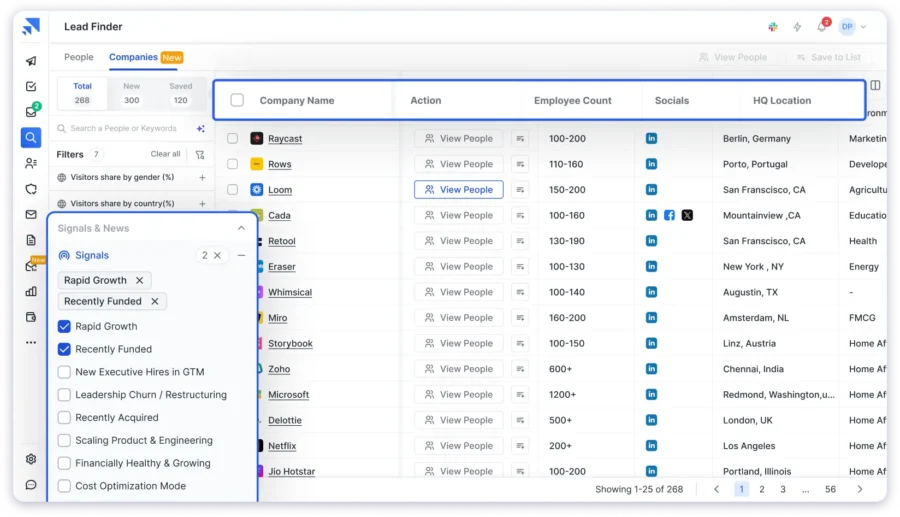
Saleshandy Lead Finder has a B2B lead database of 800M+ verified contacts across 60M+ companies.
It’s built for teams that want to find, enrich, and reach out to prospects from one platform instead of switching between multiple tools.
Key features:
- Waterfall enrichment from multiple verified data providers in sequence.
- 75+ advanced search filters for job title, company size, revenue, industry, technographics, and buying signals.
- Built-in cold email sequences with automated follow-ups.
- Saleshandy CRM to manage prospects and track deal progress in one place.
What I find most practical is that Saleshandy covers the full workflow: prospecting, enrichment, outreach, and deal tracking. You don’t need separate tools for each step.
Pricing for the Lead Finder starts at $49/month. There’s a 7-day free trial with 50 free credits, so you can test the data quality before you commit.
Sign up for free and get 50 credits to find verified B2B leads from Saleshandy’s 800M+ database.
2. ZoomInfo
ZoomInfo is an enterprise-grade B2B data platform designed for mid-market and enterprise sales teams that need deep data coverage and CRM integrations.

Key features:
- Deep contact and company data with firmographics, technographics, and org charts.
- Buyer intent signals to identify accounts actively researching your category.
- Native CRM integrations with Salesforce, HubSpot, and Microsoft Dynamics 365.
I’ve found the data quality to be strong, especially for larger accounts. The pricing is significantly higher, which makes it better suited for teams with dedicated RevOps resources and bigger budgets.
Do you want to find a better alternative to ZoomInfo that offers the same features at affordable pricing? Read this blog post on ZoomInfo competitors to find the best tool for your requirements.
3. Apollo.io
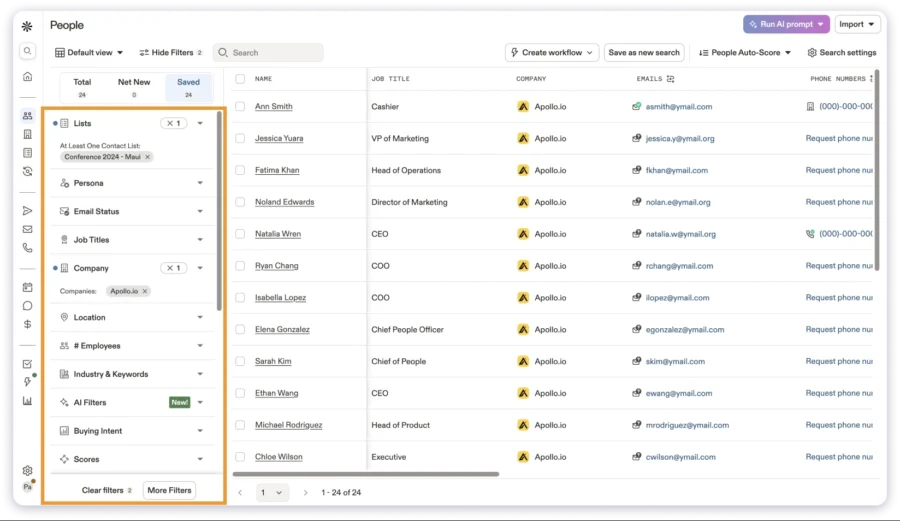
Apollo combines a contact database with built-in sales engagement tools. It’s a solid option for teams that want prospecting and outreach in one place without a high upfront cost.
Key features:
- AI-backed data enrichment with customizable rules.
- Free plan with access to the full contact database, basic search, and email sequences.
- Multi-channel outreach including email, calls, and LinkedIn tasks.
I’ve found email accuracy to be strong. Phone number coverage can vary by region. The free plan makes it accessible for smaller teams and founders who want to test before investing.
Not sure about this platform? You can read here Apollo.io alternatives that match your requirements.
4. Clay
Clay is a leading enrichment platform that aggregates data from 100+ providers instead of relying on a single source. It lets you build custom enrichment workflows tailored to your needs.
Key features:
- Multi-source enrichment from 100+ data providers through waterfall sequencing.
- Custom workflows to define enrichment logic, data fields, and sequencing.
- AI research agent (Claygent) to look up specific companies and contact details from the web.
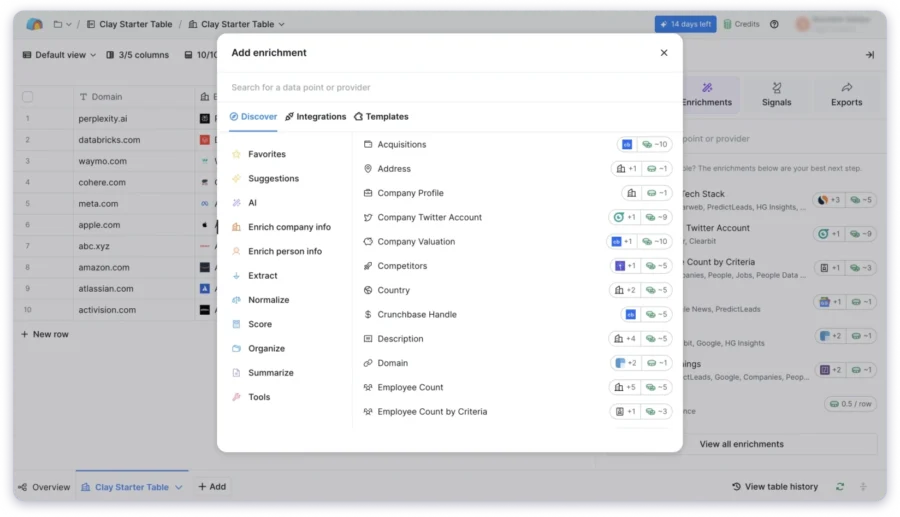
If your team is comfortable with the technical setup and wants flexibility in how enrichment runs, I’d say Clay is worth exploring. Pricing is credit-based and can scale up at higher volumes.
Read here for Clay alternatives to find an affordable option with better features and data enrichment.
How to Choose the Right Data Enrichment and Enhancement Tool
When it comes to choosing a data enrichment and enhancement tool, I’d suggest considering these five factors:
Data Enrichment vs Data Enhancement: Which One Should You Choose?
Data enhancement and enrichment have different areas of focus, benefits, and outcomes. But as I’ve covered in this blog, both processes can happen at the same time. Sometimes even through the same tools.
So which is the right fit for your situation?
- Choose data enrichment if you’re working with a dataset that lacks context. Or if you want to improve your team’s ability to personalize outreach based on new, actionable data.
- Choose data enhancement if you already have an extensive dataset, but it’s inaccurate or inconsistent. And you need a standardized, reliable version of it.
Sometimes, you’ll need to do both. For example, your sales ops team might first want to enrich a database with new contacts and emails. Then run an enhancement to make sure everything complies with GDPR.
To recap:
- Working with incomplete data? Go for data enrichment.
- Struggling with inaccurate data? Choose data enhancement.
My recommendation: if you want to maintain a clean, compliant, and context-rich database, include both data enrichment and enhancement in your sales workflow.
If you want one platform that covers lead discovery, waterfall enrichment, email verification, cold outreach, and prospect management, Saleshandy is a good place to start.
Start your 7-day free trial and find verified B2B leads from Saleshandy’s 800M+ database.
Data Enhancement vs Data Enrichment: FAQs
1. Is Data Enrichment the Same as Data Appending?
No. Data appending means adding missing information to existing records. For example, filling in email addresses wherever they’re absent. Data enrichment is broader. It involves adding entirely new fields of data, like intent signals, firmographics, and technographics, to give your dataset more depth and context.
2. Can Data Enhancement Include Enrichment?
Yes, but only when you’re using a platform that supports both. A basic CRM validation tool will correct existing records, but won’t add external data. A platform like Saleshandy or ZoomInfo can do both: correct your data and layer on new information in the same workflow.
3. How Do I Know if My Business Needs Enrichment or Enhancement?
I’d suggest looking at your current data and asking two questions.
First: Is the data I already have accurate and up to date? If not, you need data enhancement.
Second: Does my data have enough detail to personalize outreach and score leads effectively? If not, you need data enrichment.
If you want to improve the quality of your database, go with enhancement. If you want to expand it, go with enrichment.
4. Which Comes First, Enhancement or Enrichment?
This depends on your situation.
If you don’t have the email addresses of your prospects, you might want to first enrich your database with contact data. Then, enhance it to verify accuracy.
If you already have contact info, it might be better to first enhance it to confirm everything is current. Then enrich it with intent data or technographics.
5. What is Waterfall Enrichment?
Waterfall enrichment is a method where the system checks multiple data providers one after another to find verified contact information.
If the first source doesn’t return a valid result, it moves to the next provider automatically. This continues until a verified match is found.
Saleshandy uses this approach to achieve higher match rates for emails and phone numbers compared to relying on a single data source.
 Anil Salvi