
More than 50% of physician email list providers on the internet sell outdated data.
And you already know that.
Finding physicians is easy. You can get their names, specialties, and hospital affiliations from LinkedIn, hospital websites, or even the NPI Registry within minutes.
But the hard part is finding verified physician email addresses that are actually usable for outreach.
So instead of relying on random “doctor email databases,” read this blog.
I tested different methods to build a physician email list from scratch, and I’m going to share all of them with you.
Keep reading!
6 Ways to Build a Verified Physicians Email List (2026) – TOC
- TL;DR: Which Is the Best Way to Build a Physician’s Email List?
- How to Build a Verified Physician Email List Database Using Saleshandy
- 5 Other Ways to Build a Physician Mailing List
- Why Buying a Pre-Built Physicians Email List Is a Waste of Money
- Why I Recommend Saleshandy for Building Physician Email Lists?
- FAQs
TL;DR: Which Is the Best Way to Works Best Physician’s Email List?
During my testing phase, I found that there are multiple ways to build a physician email list.
With some methods, you can find physician data faster and get accurate email addresses.
While other methods do work, they either take a lot of time or give you outdated email addresses.
Here’s a quick side-by-side comparison of the most common methods, ranked by accuracy 👇🏼
| Physician Email Finding Method | Email Accuracy | Effort Required | Scalability | Best For |
|---|---|---|---|---|
| Saleshandy (Best Physician Email List Database) | ✅ Real-time verified | 🟢 Low | 🟢 High | Fast physician outreach |
| ❌ Not verified | 🔴 High | 🔴 Very Low | Small targeted lists | |
| Hospital Websites | ❌ Usually no emails | 🔴 High | 🔴 Very Low | Physician research |
| NPI Registry | ⚠️ Needs email lookup tools | 🟡 Medium | 🟡 Medium | Specialty-based physician lists |
| Medical Associations | ⚠️ Limited contact access | 🟡 Medium | 🟡 Medium | Niche specialties |
| Purchased Physician Databases | ⚠️ Often outdated | 🟢 Low | 🟢 High | Bulk physician data |
How to Build a Verified Physician Email List Database Using Saleshandy (The Most Recommended Method)
Now, let’s start with the most accurate way to build a physician email list.
After testing different methods, this is the one I would personally recommend if you want verified physician email addresses without wasting hours on manual research and verification.
The best part? You do not just get physician email addresses.
You also get phone numbers and detailed intelligence like their location, specialty, hospital affiliation, and more.
You can further narrow down your list using 75+ data points, apply geo-targeting, and create highly targeted physician segments based on your exact outreach needs.
Plus, with a database of 852M+ professional contacts, finding physicians across different specialties and locations becomes much easier.
Here’s the exact step-by-step process I used with Saleshandy
Step 1: Log in to Saleshandy Lead Finder
Step 2: Set Your Location
Step 3: Segment Your List by Specialty
Step 4: Reveal and Verify the Contact Details
Step 5: Download Your Physician Email List
Step 1: Log in to Saleshandy Lead Finder
Go to Saleshandy and sign up.
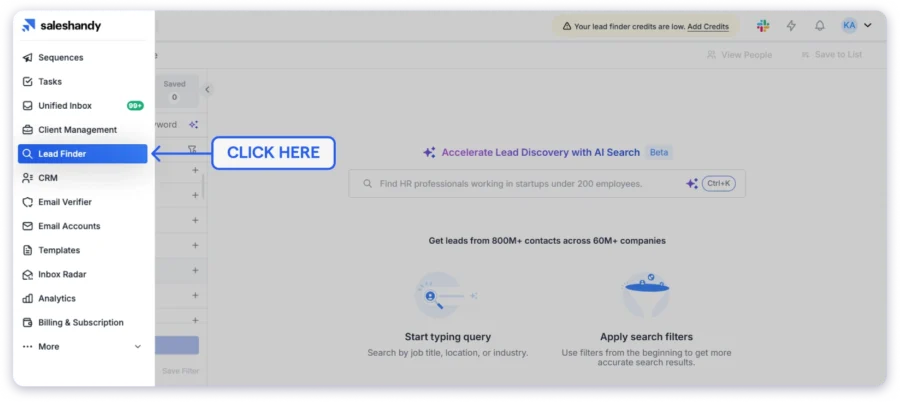
Once you are inside, open the Lead Finder tab and click on People Search.
This is where you will build your verified physician email list from a database of 852M+ professional contacts.
Now, let’s narrow those millions of contacts down to the exact physicians you want to reach.
Step 2: Set Your Location
Start by filtering your search by geography.
Why start here? Because the physicians you target in Houston, Texas, will be very different from the physicians you target in London or Sydney. Your location filter decides who ends up on your physician contact list.
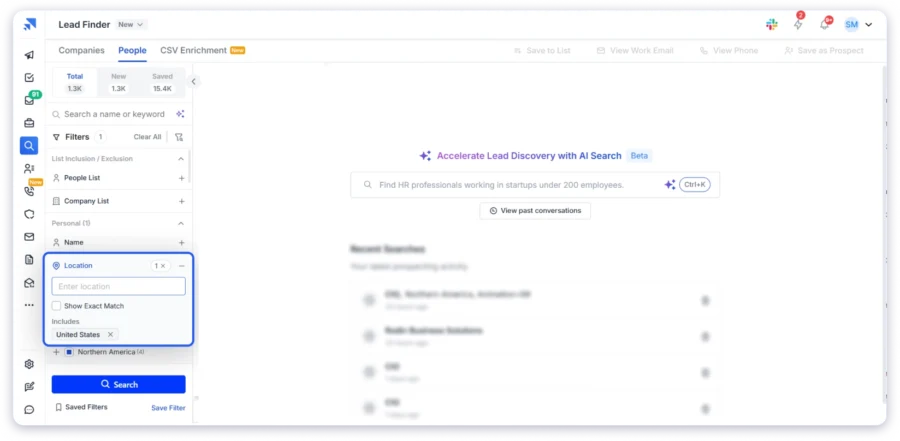
Click on Location in the filter panel and select your target area. If needed, you can narrow it further by state, city, or metro region.
For this example:
United States → Houston, Texas
Starting with location immediately reduces the database to a manageable size. If you filter only by specialty first, you will still end up with too many contacts.
💡 Pro Tip: Saleshandy makes it easy to build geo-targeted physician lists across the USA, UK, Germany, Canada, France, Australia, and more — all from one platform. So if you expand into new markets later, you do not need to buy separate physician databases for each country.
Step 3: Segment Your List by Specialty
Now it is time to narrow your search to the exact type of physicians you want to contact.
First, click on Industry in the filter panel and select:
- Healthcare
- Hospital & Health Care
- Outpatient Care Centers
This removes unrelated contacts from your search results.
For role-specific outreach, create a separate Physician Assistant Email List instead of adding physician assistants to a physician-only list.
Without this filter, you may end up pulling recruiters, consultants, or salespeople from the same location.
Next, click on Job Title. This is where the real segmentation happens.
Enter the physician specialty you want to target.
For this example:
Endocrinologist
Then turn on Show Exact Match so you only see actual endocrinologists instead of related roles like:
- Endocrinology Nurse
- Endocrine Research Associate
Here are some common physician specialties you can target:
| Specialty Filter | Who You Reach |
|---|---|
| Cardiologist | Heart and cardiovascular physicians |
| Orthopedic Surgeon | Bone and joint surgeons |
| Dermatologist | Skin care specialists |
| Primary Care Physician | General and family medicine doctors |
| Neurologist | Brain and nervous system specialists |
| Pediatrician | Child healthcare physicians |
| Oncologist | Cancer treatment specialists |
| Psychiatrist | Mental health physicians |
For example, if you want a primary care physician email list, simply filter by Primary Care Physician to avoid pulling unrelated specialists into your search.
Step 4: Reveal and Verify the Contact Details
This is where Saleshandy stands out from most physician email database providers.
When you click Reveal on a contact, the email address is not simply pulled from an old static database.
Saleshandy verifies the contact in real time using a waterfall enrichment process. It cross-checks the email across multiple data providers before showing it to you.
That means the email you get is verified at that exact moment — not from a database snapshot that may be months old.
This is how you build a physician email list with contacts that are actually usable for outreach.
Step 5: Download Your Physician Email List
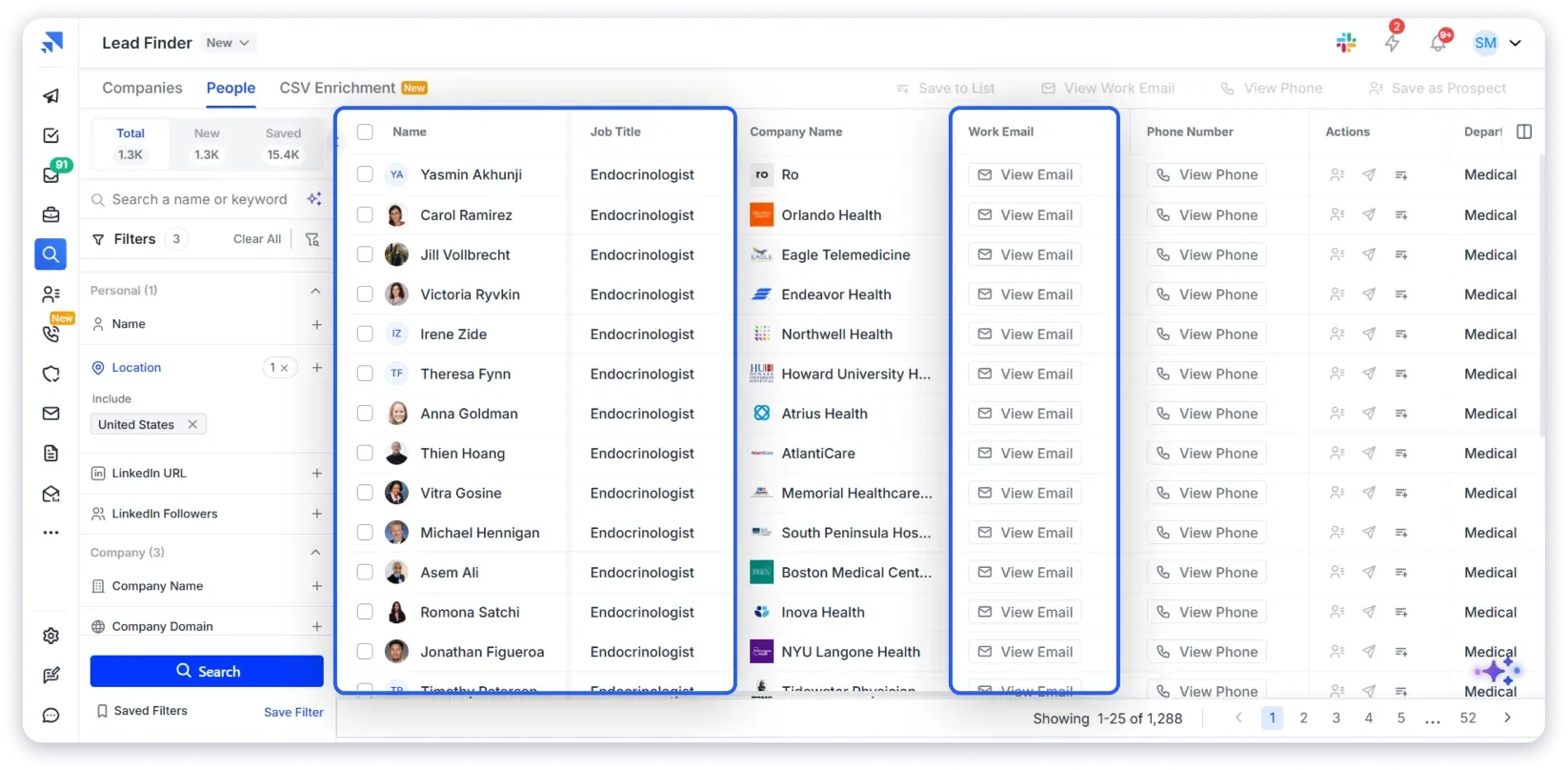
Once your contacts are revealed and verified, you can export your physician email list in a few clicks.
Here is how:
- Select the contacts you want to export
- Click Export at the top
- Download your list in CSV format
If you want to start outreach immediately, click Add to Sequence and push the contacts directly into a Saleshandy cold email sequence.
No exporting. No switching between tools.
5 Other Ways to Build a Physician Mailing List
Saleshandy Lead Finder is the method I would recommend first because it gives you verified physician email addresses along with phone numbers and other contact intelligence in one place.
However, it is not the only way to find physician contacts.
You can also build a physician mailing list using:
- Hospital websites
- The NPI Registry
- Medical associations
- Healthcare conferences
That said, most of these methods are manual, time-consuming, and usually do not provide verified email addresses.
Still, depending on your use case, budget, and the type of physician data you need, these methods can work well too.
1. Search by LinkedIn and Online Communities
LinkedIn is a powerful tool for finding professional contacts. You can search for the exact person you want to reach by specialty, location, and role.
It has a strong base of physicians in leadership and administrative roles, including Medical Directors, CMOs, and Department Heads. That makes it one of the best free platforms to pinpoint and connect with the exact person you want to reach.
How to do it:
- Use LinkedIn search filters (e.g., Cardiologist, Endocrinologist, Orthopedic Surgeon + location)
- Check the Contact Info section (emails are rarely public, but occasionally available)
- Send a personalized connection request. Keep it short and relevant to their specialty.
- Once connected, follow up via message or revisit their contact info.
That said, LinkedIn is not built for scale. It is a one-by-one process, but highly precise.
Here is a detailed walkthrough on how to find email addresses that covers the full process.
Beyond LinkedIn, online communities can also help. Platforms like Reddit (r/medicine), Facebook groups, and niche medical forums enable real knowledge exchange.
As you contribute and build rapport, requesting an email for collaboration or networking starts to feel natural and appropriate.
Limitations:
It is entirely manual. You are pulling contacts one by one. Coverage is inconsistent because most physicians have minimal LinkedIn profiles compared to other B2B professionals. If you need more than 50 contacts, this method gets painfully slow. And building relationships in online communities takes weeks before you can even ask for an email.
If LinkedIn feels too slow, another option is going straight to where physicians are already listed publicly.
2. Scrape Hospital and Clinic Websites
Most hospitals and health systems have a public physician directory on their website. Names, specialties, departments, and sometimes direct email addresses or mailing addresses are listed on their “Find a Doctor” or “Our Providers” page.
This works well when you are targeting physicians at specific hospital systems in your region.
How to do it:
- Go to the hospital or clinic website in your target geography.
- Navigate to their physician directory or “Find a Doctor” page.
- Filter by department or specialty.
- Copy the relevant contact details into a spreadsheet.
- Larger health systems like Mayo Clinic, Cleveland Clinic, or HCA Healthcare have directories with hundreds of physicians listed. Smaller regional hospitals may only have a few dozen.
That said, most hospital directories show names and specialties but do not include email addresses. You get visibility into who works where, but not a direct way to contact them.
Always run these contacts through a verifier before sending. A physician who left that hospital six months ago might still be listed on the website.
Limitations:
It is completely manual. Hospital directories go stale fast because most hospitals do not update them regularly. You also cannot scale this if you are targeting physicians across multiple states or health systems. It only works for a handful of facilities at a time.
If you want a more structured starting point, there is a free government database that gives you exactly that.
3. Use NPI Registry Data and Enrich It with Email Finder Tools
Every licensed physician in the US has an NPI number. That is a unique identifier assigned by the government.
Which means the NPI Registry gives you a clean, verified starting point. You know the physician is real, currently licensed, and actively practicing.
The catch? NPI data helps you identify physicians, not contact them.
You get names, practice locations, phone numbers, specialties, and taxonomy codes. But no email addresses.
So you need one extra step to turn it into a usable physicians email list.
How to do it:
- Go to npiregistry.cms.hhs.gov
- Search by specialty, state, or physician name
- Or download the full data file and filter by taxonomy code
- Take the physician details and run them through Saleshandy Lead Finder to find and verify email addresses tied to those profiles
That is it. You start with government-verified physician data and end up with a physician email database ready for outreach.
Where it falls short:
It is a two-step process. Takes more time than using a lead finder directly.
The NPPES data file is large and needs cleanup before you can use it.
And NPI data does not give you filters like company size or management level. So you cannot segment by practice type the way you can in a B2B lead database.
Still, if you want a verified foundation to build your physician contact list on, this is one of the most reliable ways to start.
Another route worth knowing about is going through professional medical associations. They maintain some of the most comprehensive physician directories available.
4. Search Medical Association Directories
Almost every medical specialty has a professional association. And most of them maintain a member directory that you can search.
The biggest one is the American Medical Association (AMA) Physician Masterfile. It covers 1.4M+ physicians across the US and is considered the gold standard for physician data.
But here is what most people do not realize. You cannot access the AMA Masterfile directly. It is licensed through authorized providers like MMS and HealthLink Dimensions.
That means you are paying for the data. Typically $0.15 to $0.50 per contact, depending on how specific your filters are.
How to do it:
- Contact an authorized AMA data provider like MMS or HealthLink Dimensions
- Specify your target specialty, geography, and practice type
- They will pull a custom physician mailing list based on your criteria
- Data is updated quarterly, not real-time, to maintain data compliance standards
Beyond the AMA, specialty associations have their own directories too:
- American College of Cardiology (ACC) for cardiologists
- American Academy of Dermatology (AAD) for dermatologists
- American Academy of Orthopedic Surgeons (AAOS) for orthopedic surgeons
- American Academy of Pediatrics (AAP) for pediatricians
Some of these directories include contact details. Most only show name, practice location, and board certification status.
They are useful for confirming that a physician is board-certified and actively practicing. But not great for building a physician email list at scale.
Where it falls short:
The AMA route is expensive. It is built for enterprise pharmaceutical companies and large medical device firms with big budgets.
Data is updated quarterly. That means a physician who switched practices two months ago still shows old information in their system.
And you do not get to search or filter the data yourself. You tell the provider what you need and wait for them to deliver it. No real-time access, no self-serve filtering.
For most outbound teams, the cost and process do not justify the output when faster and cheaper alternatives exist.
Our guide on buying email lists breaks down the trade-offs if you want to compare options.
If none of these digital methods appeal to you, there is one more approach worth considering. It is the slowest, but it gives you something no database can: warm contacts.
5. Healthcare Conferences and CME Events
Conferences are different from every other method on this list.
The physicians here are not cold contacts. They registered, showed up, and engaged. That already tells you they are active in their field and open to professional conversations.
How to do it:
- Identify conferences in your target specialty. Major ones include HIMSS (health IT), ACC Scientific Sessions (cardiology), AAD Annual Meeting (dermatology), and the AMA Annual Meeting (general medicine).
- Sponsor the event if your budget allows. Most conferences share attendee lists as part of the sponsorship package.
- If sponsorship is not an option, check the event website. Many conferences publish speaker lists and panelist bios publicly.
- If you are exhibiting, collect opt-in emails directly at your booth. These are physicians who gave you their contact details voluntarily.
Where it falls short:
Most major conferences happen once a year. You cannot time your list building around event schedules.
Attendee lists are small compared to what a database gives you.
And sponsorship packages can be expensive depending on the event size and specialty.
This is a long-term play. It works well for building brand awareness, trust, and credibility within a specific specialty. But it will not help you build a physicians email list when you need contacts this week.
Why Buying a Pre-Built Physicians Email List Is a Waste of Money
If you have read this far, you are probably serious about building a good physician list.
So let me save you from the one mistake I see teams make over and over. Buying a pre-built list.
It sounds like a shortcut. Pay $200 to $500, get a CSV with thousands of physician contacts, and start emailing today.
But here is what that shortcut actually looks like in practice:
- Physician email lists become outdated quickly because doctors change jobs, retire, or switch practices often.
- Most vendors claim high accuracy, but rarely show when the data was last verified.
- Stale emails lead to bounces, which can hurt your sender reputation and email deliverability.
- After removing bounces, duplicates, retired physicians, and generic emails, the usable list is often much smaller than expected.
- CAN-SPAM and GDPR still apply even if you purchased the data, making you responsible for spam complaints and compliance issues.
That is why building your own physicians email list from a real-time verified database is always the better move.
You can also check out this detailed breakdown of the best healthcare database providers you can actually trust for physician data.
Why I Recommend Saleshandy for Building Physician Email Lists?
Reaching physicians is getting harder every year. Their inboxes are crowded, their schedules are packed, and generic outreach rarely gets attention.
Without accurate contact data, you are left guessing:
- Is this email still valid?
- Does this physician still work at this hospital?
- Am I even reaching the right specialty?
That is exactly the problem Saleshandy Lead Finder solves.
1. You Do Not Need Separate Tools for Finding and Verifying Emails
With LinkedIn, hospital websites, or the NPI Registry, you first collect physician names and then spend hours trying to find and verify their emails.
With Saleshandy, the email address is already verified when you reveal the contact.
No manual verification process. No extra tools. No second workflow.
2. You Do Not Have To Guess If the Data Is Accurate
Every email goes through a waterfall enrichment process where multiple data providers cross-check the contact before it is shown to you.
And if the email cannot be verified, you do not pay for it.
That is very different from buying static physician email databases that may have been outdated for months.
3. You Can Build Highly Targeted Physician Lists Faster
Instead of manually applying dozens of filters, you can simply type something like:
“Find endocrinologists working at hospitals and clinics in the United States.”
Saleshandy’s AI Sage Search automatically sets up the filters for you.
It may not cover every complex edge case, but for most physician prospecting campaigns, it significantly reduces the time spent building targeted lists.
Here’s What Else You Get
- Access to 852M+ professional contacts across 42M+ companies.
- 75+ advanced filters including specialty, location, practice type, and management level.
- Real-time email verification on every revealed contact.
- Built-in cold email outreach with sequences and automated follow-ups.
- CRM integrations to manage your outreach workflow.
- 50 free credits to test data quality before.
FAQs
1. Is it legal to email physicians for B2B purposes?
Yes. You can send cold emails to physicians as long as you follow CAN-SPAM rules. That means including your real name, business address, and an unsubscribe link in every email. HIPAA does not apply here because you are contacting physicians at their work email, not handling patient data. If you are emailing physicians in the EU or UK, GDPR rules apply too. Our cold email masterclass covers the full compliance checklist.
2. How much does a physicians email list cost?
Pre-built lists from vendors cost anywhere from $500 to $5,000+ depending on how many contacts you need. Saleshandy Lead Finder starts at $49/month and gives you up to 50 free credits on signup. You only pay when a verified contact is found.
3. Can I target physicians by specialty?
Yes. You can filter by cardiology, dermatology, primary care, neurology, surgery, and more. Saleshandy has 75+ filters including location, practice size, and management level. You can also type what you need in plain English using AI Sage Search and it sets the filters for you.
4. How do I make sure physician emails do not bounce?
Use a tool that verifies emails before you send. Saleshandy checks every email through multiple data providers before charging a credit. That keeps your bounce rate low. Also, make sure to warm up your email before launching your first campaign.
5. What is the NPI Registry and can I use it to find physician emails?
The NPI Registry is a free government database where every licensed US physician is registered. You can search by name, specialty, or state. It gives you names, practice addresses, and NPI numbers. But it does not give you email addresses. It is best used to confirm that a physician is real and actively practicing.
6. Can I use a physicians email list for email marketing?
Yes. A physician email marketing list works for product launches, CME invitations, pharma updates, and multichannel campaigns. Just make sure every contact is verified and your emails follow CAN-SPAM and GDPR rules. If you need help writing your first outreach email, our guide on how to write cold emails is a good place to start.
7. What is the best way to build a physicians email list?
A B2B lead database like Saleshandy Lead Finder. You get 852M+ verified contacts, specialty filters, location targeting, and built-in outreach in one platform. No extra tools needed. Start with 50 free credits and test the data quality before committing to a plan.
 Dhruv Patel