
Finding the right pharmacists can make or break your healthcare outreach campaigns. But building a pharmacist email list is harder than it looks.
Most data providers give you broad healthcare contacts that include anyone in the industry, making it difficult to reach licensed pharmacists who actually influence purchasing decisions in pharmacies, hospitals, and healthcare organizations.
You need verified pharmacist email addresses with accurate contact details, so your outreach reaches the right professionals instead of outdated or irrelevant records.
We tested 7 different methods and tools to help you build a verified pharmacist email list for your outreach campaigns in 2026.
Ready? Let’s go!
Pharmacist Email List- TOC
- TL;DR: Which Is the Best Way to Build a Pharmacist Email List?
- 7 Ways to Build a Verified Pharmacist Email List
- Best Practices to Maintain Your Pharmacist Email List
- How to Use a Pharmacist Email List for Outreach That Gets Replies
- Start Finding Pharmacist Email Addresses Today
- Pharmacist Email List: FAQs
TL;DR: Which Is the Best Way to Build a Pharmacist Email List?
While testing, I found there’s more than one way to build a pharmacist email list, and the gap between them is bigger than you’d expect.
Here’s how all 7 compare, starting with the one I’d use first.
| Method | Email Accuracy | Time to Build a List | Cost | Best For |
|---|---|---|---|---|
| Saleshandy (Best Pick) | 98% guaranteed deliverable emails (verified in real time) | 5-6 minutes | $34/mo for 1,500 credits | Finding reliable pharmacist emails at scale |
| Custom-built list from a provider | Verified before delivery, quality varies | 1 to 2 days | Quote-based, no public pricing | One-off campaigns you'd rather outsource |
| Scraping directories and local maps | Pharmacy inboxes, no named contacts | Hours | Free to low, tool costs vary | Local lists at scale |
| Webinars and CE events | Pharmacists share it with you | Weeks | Event and CE partner costs | Building a warm, opt-in audience |
| Pharmacy and hospital websites | Mostly general inboxes | Hours | Free | Small local lists |
| Pharmacy journals | Author emails only | Hours | Free | Research and expert outreach |
| NPI Registry and state boards | No emails, names only | Hours, plus enrichment | Free | Confirming pharmacists are licensed |
7 Ways to Build a Verified Pharmacist Email List
Some of these methods can give you verified emails in minutes, while others take days and still require a second tool to complete the process.
“Pharmacist” is too broad as a search term.
It can pull in everyone from pharmacy students to hospital directors, and most of them may not have the authority to make decisions or approve your offer.
Before choosing a method, define which job titles you actually need:
| Job Title Filter | Who You Reach |
|---|---|
| Pharmacy Owner | Independent pharmacy decision-makers |
| Director of Pharmacy | Hospital and health system pharmacy leaders |
| Pharmacy Manager | Store-level pharmacy managers |
| District Pharmacy Manager | Decision-makers at retail pharmacy chains |
| Clinical Pharmacist | Pharmacists who work with care teams |
| Staff Pharmacist | Day-to-day community and retail pharmacists |
| Pharmacy Technician | Dispensing and operations support |
These titles work across every method in this guide, whether you’re filtering a B2B database, briefing a data provider, or researching hospital websites to find the right contacts.
I’ll show you each method now, starting with the one I’d use first.
1. Use a B2B Database Provider to Find Verified Pharmacist Email Addresses
The best way to find pharmacist emails is a B2B database with accurate healthcare contact data.
If I needed verified pharmacist contacts by Friday, this is the method I’d choose.
A B2B database works like a searchable contact directory. You can filter professionals by job title, location, industry, and company details instead of relying on generic lists.
Saleshandy lets you find and build targeted pharmacist contact lists in real time. Instead of purchasing static databases that may already contain outdated information, you can generate fresh prospect lists whenever you need them.
Search across 852M+ professional contacts and find pharmacists based on specific criteria like job title, location, industry, company size, and seniority.
Whether you’re looking for pharmacy owners, hospital pharmacy directors, or clinical pharmacists, you can instantly create a list of professionals matching your ideal customer profile.
Every contact is enriched with important details, including:
- Name and job title
- Company information
- Location
- Professional email address
- Phone numbers (where available)
Here are the steps you can follow to build a pharmacist email list in seconds 👇🏼
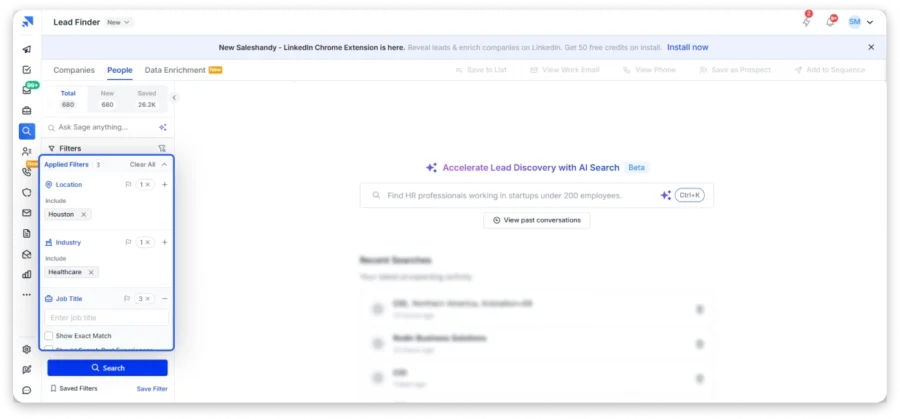
Step 1: Log In to Saleshandy
Open Saleshandy’s Lead Finder and log in. If you don’t have an account yet, you can sign up for free without a credit card.
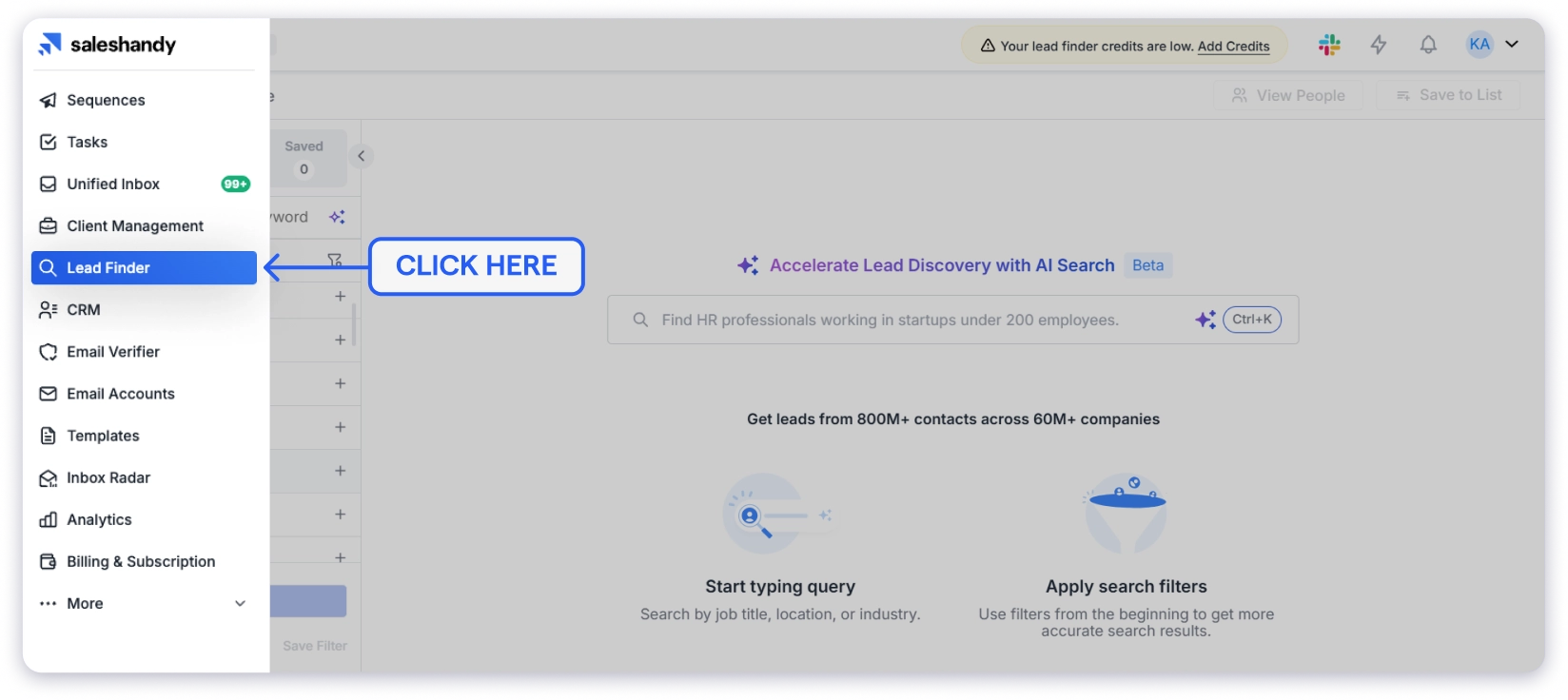
Once you’re inside, switch to the People tab instead of Companies, because that’s where you find individual pharmacists rather than pharmacy organizations.
Step 2: Set Your Filters
Start by selecting the location you want to target (country, state, or city).
For this example:
United States → Houston, Texas
Then choose an industry like “Hospital & Health Care” or “Pharmaceuticals.”
Next, enter the job titles from the table above, like “Director of Pharmacy” or “Pharmacy Owner,” and turn on exact match so you don’t pull in pharmacy students or sales reps.
Step 3: Reveal Emails and Launch Outreach
Review your results and reveal the emails you need. Each one is verified in real time, so you only pay for addresses that actually work.
Then add verified pharmacists to a cold email sequence right inside Saleshandy, with no need to export or switch tools.
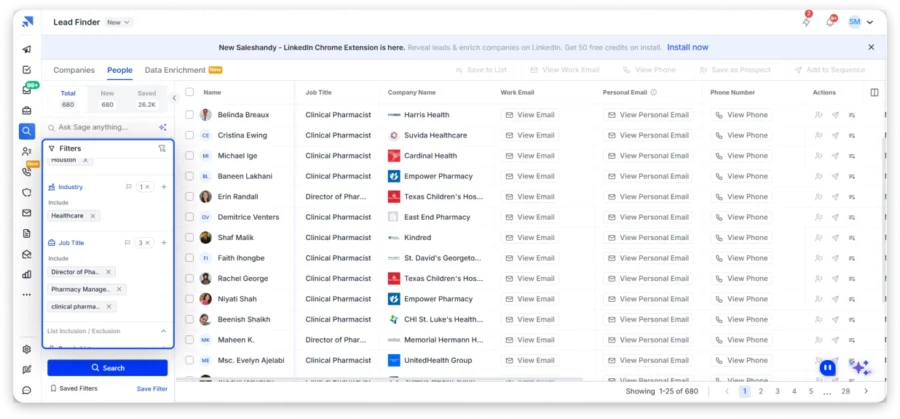
Or skip the filters entirely and type what you need in plain English, like “Find Directors of Pharmacy and Pharmacy Managers at hospitals and healthcare organizations in Houston, Texas.” and let AI search set everything for you.
2. Order a Custom-Built Pharmacist List From a Data Provider
Best for: One-off campaigns when you’d rather hand the list building to someone else.
Some providers build the list for you. You send them your criteria, they pull the records, and you get a file back in a day or two.
The good ones verify business and organization associations before delivery, so the pharmacist is still at the pharmacy the record says they are.
How to Do It:
- Write down your criteria first: job titles, pharmacy type, states, and list size.
- Ask two or three providers for a quote, since most don’t publish pricing.
- Request a free sample of 20 to 50 records before you pay for anything.
- Verify that sample yourself, then check whether the job titles match the roles you need.
- Ask how the data was sourced and when it was last refreshed.
💡 Pro Tip: Ask whether the list is exclusive to you. Many brokers sell the same file to several buyers, so your prospects may hear from three competitors the same week.
Limitations:
- Pricing is quote-based, so comparing providers takes time.
- You wait a day or two instead of exporting in minutes.
- The file is a snapshot. It starts going stale the day it lands.
- Quality swings widely between providers, which is why the sample matters.
If you’d rather not wait on a provider, the next option is free and public.
3. Scrape Pharmacy Directories and Local Maps
Best for: Building a local or regional list of pharmacies at scale.
Public pharmacy directories and map listings hold thousands of pharmacies with addresses, phone numbers, and websites. Scraping tools pull those into a spreadsheet in bulk.
This is the faster version of Way 5. Instead of visiting sites one by one, you export a whole city at once.
How to Do It:
- Pick your source: a public pharmacy directory, a local business map, or a state pharmacy association listing.
- Filter by ZIP code or city first, so you only pull the area you can actually serve.
- Run a scraping tool to export pharmacy names, addresses, phone numbers, and websites.
- Filter the results by job title where the source shows one, like owner or pharmacy manager.
- Take the owner or manager names and find their verified emails in a B2B database.
💡 Pro Tip: Sort your scraped list by review count or number of locations. A pharmacy with three branches has more budget than a single-store operation, and it takes the same effort to email either one.
Limitations:
- You get pharmacies, not pharmacists, so names often need a second lookup.
- Map data gives you store inboxes and front-desk numbers, not decision-makers.
- Check each site’s terms before scraping, since some directories don’t allow it.
- Listings go stale, so verify every email before you send.
4. Host Pharmacy Webinars and CE Events
Best for: Building an opt-in pharmacy mailing list of people who choose to hear from you.
These are not cold contacts because they actively signed up, attended, and shared their information. That makes them more engaged than a typical purchased list.
This works because many pharmacists need CE (continuing education) credits to maintain their licenses. A useful educational session gives them a reason to register and share their details.
I would use this method when building a long-term audience, not when I need hundreds of pharmacist contacts immediately.
How to Do It:
- Pick a topic pharmacists care about, like therapy updates, pharmacy operations, or reimbursement changes, instead of turning the webinar into a product demo.
- Partner with an ACPE-accredited CE provider if you want to offer CE credit, since you cannot award it yourself. You can also host a free educational webinar without offering credits.
- Collect name, email, job title, and pharmacy type on the registration form. Add a clear opt-in checkbox so you can organize contacts by role later.
- Follow up after the event with the recording and a useful resource related to the session.
💡 Pro Tip: If you’re exhibiting at a pharmacy conference, collect opt-in emails at your booth and check whether organizers publish speaker lists. This can help you identify relevant pharmacists in your niche.
Limitations:
- Each event takes weeks to plan and promote.
- One webinar usually brings a limited number of registrations.
- Accredited CE partnerships require additional time and cost.
- This is a long-term strategy, so it is not the best option if you need contacts immediately.
If you want to find pharmacy contacts that are already publicly available, the next method is using pharmacy websites.
5. Collect Contacts From Pharmacy and Hospital Websites
Best for: Hyper-local campaigns targeting a small number of independent pharmacies, hospitals, or specific healthcare systems.
This method works when you already know where you want to sell.
Independent pharmacies usually have websites and Google Business profiles. Hospitals often have pharmacy department pages that mention leadership teams. If your target is limited to a specific city, region, or healthcare network, these sources can help you identify the right people.
How to Do It:
- Search terms like “[your city] independent pharmacy” on Google Maps to find local pharmacies.
- Visit pharmacy websites and check pages like About, Our Team, or Meet Your Pharmacist. Independent pharmacies often mention owners or pharmacists by name.
- For hospitals, look for pharmacy department pages, residency program pages, or leadership sections where directors of pharmacy may be listed.
- Collect names, company details, and available contact information in a spreadsheet.
The challenge is that most pharmacy websites are built to serve customers, not sales teams.
You will often find general inboxes like:
- info@pharmacy.com
- contact@pharmacy.com
- rx@pharmacy.com
These addresses may reach the business, but they usually do not connect you directly with the person who makes decisions.
💡 Pro Tip: Don’t stop at the info@ address, because the real prize is the owner’s or director’s name on that page, which you can then use to look up their verified email in a B2B database.
Limitations:
- Researching each website takes time and does not scale well beyond a small number of locations.
- Many websites only provide general business contact details, not direct emails.
- Pharmacy websites can become outdated, so verify contacts before sending outreach.
If you want to reach pharmacists based on expertise rather than location, the next method is looking at pharmacy journals and publications.
6. Find Pharmacist Authors in Pharmacy Journals and Publications
Best for: Reaching pharmacist researchers and clinical experts one by one.
Pharmacists who publish research usually list a corresponding author email with their article, so readers can reach them about their work.
That makes this a good route if you offer research services, clinical products, or expert partnerships.
How to Do It:
- Search PubMed for topics tied to what you offer, like “pharmacy automation” or “medication adherence.”
- Check pharmacy journals like AJHP (health-system pharmacy), JAPhA (community pharmacy), and Pharmacotherapy (clinical pharmacy).
- Sort by most recent, so you reach pharmacists working on the topic right now.
- Note each author’s name, role, workplace, and article title.
- Write one personal email that mentions their specific work.
💡 Pro Tip: Lead with their research rather than your product, because “I read your recent piece on medication adherence in rural pharmacies” gets a very different response than a generic pitch.
Limitations:
- The numbers are very small.
- Many authors are academics or researchers rather than the people who sign purchase orders.
- It only works for one-to-one outreach, since nobody likes finding out their research landed them in a bulk email blast.
7. Use the NPI Registry and State Board of Pharmacy Directories
Best for: Finding licensed pharmacists and confirming pharmacist records by state.
An NPI (National Provider Identifier) is a unique 10-digit ID used to identify healthcare providers in the US. Many pharmacists have an NPI, which helps you confirm professional information before building your contact list.
You can search the NPI Registry online for free, or download the complete data file if you need records in bulk.
State boards of pharmacy also provide public license lookups that show whether a pharmacist is licensed in a specific state and whether their license is active.
I see this method as a starting point, not the final step. It helps you make sure you’re researching real pharmacists, but you still need contact enrichment before you can start outreach.
What You Get From NPI and State Board Data:
- Full names
- NPI or license numbers
- Practice addresses
- Phone numbers
- Taxonomy codes (categories used to identify healthcare provider types)
- License status
What You Don’t Get: Email addresses.
That’s the catch. This data helps you identify pharmacists, but it does not give you a direct way to reach them.
The workflow looks like this:
- Search the NPI Registry by state and filter the taxonomy to “Pharmacist,” or use your state board’s license lookup.
- Save the names and practice details, then enrich them with Saleshandy Lead Finder to find verified email addresses.
This turns a basic license list into a pharmacist contact list you can actually use for outreach.
💡 Pro Tip: Use the NPI Registry to verify contacts you already have. If a pharmacist’s practice information no longer matches your records, treat it as a signal that the contact may need verification before sending emails.
Limitations:
- The extra enrichment step adds time and cost.
- The full NPI data file requires cleanup before it becomes useful for outreach.
- Email accuracy depends heavily on the quality of the enrichment tool.
- License records do not show buying authority, so a staff pharmacist and a pharmacy owner may look similar in the database.
For anything beyond a few dozen contacts, a B2B database is the fastest way to build a pharmacist email list you can trust.
Best Practices to Maintain Your Pharmacist Email List for Outreach
Building the list is only half the job. Keeping it clean is what separates campaigns that land in inboxes from ones that land in spam.
1. Follow CAN-SPAM and GDPR Rules
Every email needs your real name, business address, and a working unsubscribe link. If you’re emailing pharmacists in the EU or UK, GDPR applies too.
HIPAA doesn’t come into play, since you’re reaching work emails rather than handling patient data. But staying compliant protects your domain and your brand.
2. Segment by Role, Not Just Title
Group contacts by what they actually do, like formulary management, store operations, or purchasing, rather than lumping every registered pharmacist under one label.
A director of pharmacy, an independent owner, and a pharmacy technician face completely different problems, so the same email shouldn’t go to all three. Splitting your pharmacist email database this way is what lifts reply rates.
3. Keep Professional Details Up to Date
A staff pharmacist last year might be a pharmacy manager now, and a hospital pharmacist might have moved to an independent store.
Track job title changes, facility types, and license status, so your messaging matches their current role. This matters most for a hospital pharmacy list, where directors and pharmacist clinicians move between health systems often.
4. Clean Your Data Regularly
Pharmacists change jobs and switch facilities, so a pharmacist mailing list that was accurate three months ago can already be full of dead addresses.
Remove hard bounces after every campaign, fix duplicates, and re-verify any contacts you haven’t emailed in 90 days.
5. Use a Verified Data Source
A pharmacist email list from a provider that verifies emails in real time holds up far longer than a static file you never checked.
Re-verify before every major campaign, and remove contacts that consistently don’t engage.
Do this consistently, and the same list will keep working month after month instead of decaying into bounces.
How to Use a Pharmacist Email List for Outreach That Gets Replies
A verified pharmacist email list gives you the right contacts. But contacts alone don’t close deals. What matters is how you use them.
Here are six ways teams turn their pharmacist list into pipeline and revenue.
| Channel | What You Do | Best For |
|---|---|---|
| Cold Emailing | Send short, personalized emails with automatic follow-ups to pharmacists who've never heard of you | Starting new conversations with pharmacy owners, directors, and managers |
| Email Marketing | Send newsletters, CE invitations, drug updates, and product education to opted-in pharmacists | Keeping your brand in front of pharmacists between buying cycles |
| Cold Calling | Use phone numbers from your list to follow up on opened emails or pitch directly | Turning email interest into live conversations with decision-makers |
| Direct Mail | Send brochures, product samples, or event invitations to pharmacist mailing addresses | Standing out when email inboxes are too crowded to break through |
| Social Media Targeting | Upload pharmacist emails to LinkedIn or Facebook to build custom audiences | Running targeted ads, promoting webinars, and retargeting site visitors |
| CRM Enrichment | Fill in missing job titles, phone numbers, and updated emails across your pharmacy records | Giving your sales team clean, complete data to work with |
Most teams start with cold emailing because it’s direct, scalable, and you can track every open and reply.
If that’s your goal, Saleshandy lets you go from list to live campaign in one platform, no exporting, no switching tools.
Here’s how to launch a pharmacist outreach campaign step by step from Saleshandy 👇🏼
1. Add Pharmacists to a Sequence
In Lead Finder, select the pharmacists you just verified and click Add to Sequence, which moves them straight into your outreach without a spreadsheet in the middle.
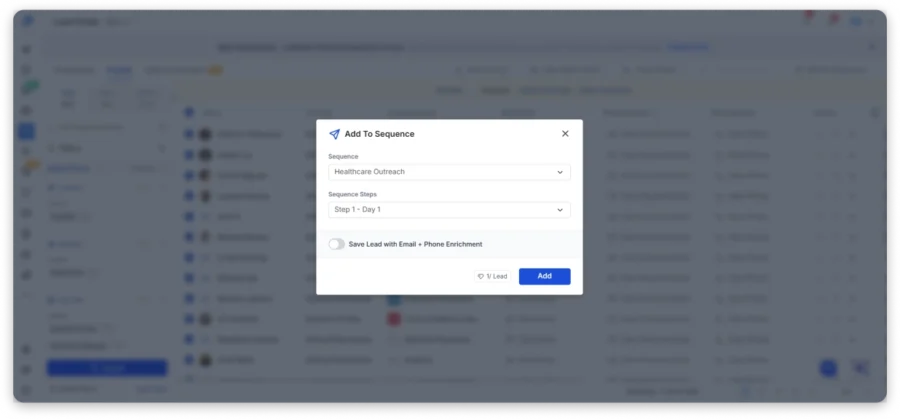
A sequence is simply a planned series of emails, where your first email goes out on schedule, and the follow-ups send themselves if a pharmacist doesn’t reply.
💡 Pro Tip: Create one sequence per pharmacist group, because a pharmacy owner worrying about stock levels and a hospital director managing a department budget shouldn’t get the same email.
2. Write a Short Email for Each Pharmacist Role
Pharmacists read emails between patients, so keep yours under 100 words and make every line earn its place.
The best first emails do three things: they say who you are, explain why you’re writing to that specific pharmacist, and end with one easy question.
Here are three openers you can adapt:
For an independent pharmacy owner:
Hi Maria, running two pharmacy locations usually means double the inventory headaches. We help independent owners track stock across stores from one screen. Worth a quick chat next week?
For a director of pharmacy:
Hi Dr. Patel, I work with hospital pharmacy teams on [specific problem]. Would it help to see how other directors in Ohio handle it?
For a recruiter reaching a clinical pharmacist:
Hi Jordan, I’m hiring a clinical pharmacist for a four-day-a-week role at a Denver hospital. Open to a quick look at the details?
Notice the first name and pharmacy name in each one? Saleshandy fills those in automatically for every pharmacist on your list, so each email reads as if you wrote it for that one person.
How to address a pharmacist in an email: Many pharmacists hold a PharmD, a Doctor of Pharmacy degree, so “Dr. [Last Name]” is a safe choice in a formal email when you know they have one. Otherwise, their first name works perfectly well for business outreach.
3. Set Up Automatic Follow-Ups
Pharmacists are busy, and most will miss your first email entirely, which is why a short follow-up matters more than a perfect opening line.
Add three or four automatic follow-ups to your sequence, spaced a few days apart, and make each one shorter than the last while adding something new, like a quick example or a useful resource.
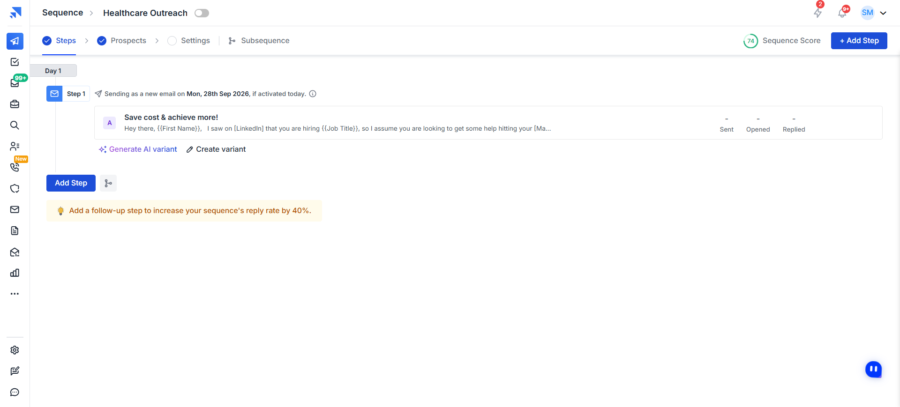
The moment a pharmacist replies, Saleshandy stops the rest so nobody gets a “just checking in” after they’ve already answered.
4. Protect Your Inbox Before You Hit Send
Even a verified pharmacist email list can land in spam if your sending address is brand new, because Gmail and Outlook don’t trust strangers.
So take care of three things before you launch:
- Warm up your email address, so Saleshandy sends and receives a small number of emails first and teaches Gmail and Outlook to trust you.
- Spread out your sending across several addresses, so no single one sends too much. Saleshandy includes unlimited email accounts and warm-up on every plan.
- Send only to verified emails, because every bounce signals that you might be a spammer, while a clean list keeps you in the inbox.
5. Launch and Track Every Reply in One Inbox
Activate your sequence and your campaign goes live. The dashboard shows you who opened, who replied, and which emails bounced.
Every reply lands in a unified inbox, even if you’re sending from five different addresses, so you never miss the pharmacist who writes back, “Sure, let’s talk.”
From there, move interested pharmacists into the built-in CRM and track each conversation until it turns into a meeting, a hire, or a deal.
Start Finding Pharmacist Email Addresses Today
Every method in this guide works. But they work differently depending on your situation.
Need one pharmacist’s email for a specific account? Start with the pharmacy website, the NPI Registry, or a state board license lookup.
Need a pharmacist email list at scale for outbound campaigns? A B2B database with real-time verification will save you days of manual work.
Your list’s accuracy directly affects your reply rates, deliverability, and revenue. So build it around verified contacts and the roles that can actually say yes.
Sign up for Saleshandy and get up to 50 free credits to build your first pharmacist list today.
FAQs About Pharmacist Email Lists
1. Is it legal to email pharmacists for B2B purposes?
Yes, you can send cold emails to pharmacists as long as you follow CAN-SPAM rules, which means including your real name, business address, and an unsubscribe link in every email. HIPAA doesn’t apply here because you’re contacting pharmacists at their work email rather than handling patient data, though GDPR rules do apply if you’re emailing pharmacists in the EU or UK. Our cold email masterclass covers the full compliance checklist.
2. Where can I buy a pharmacist’s email list?
List sellers, healthcare data brokers, and research platforms all sell pharmacist data, usually as a one-time file with quote-based pricing. Before you buy from any of them, ask when the emails were last verified, whether you get a replacement for bounces, and how job titles are sourced, then test a sample of 100 records yourself.
3. Do pharmacies have email addresses?
Yes, but most are general inboxes like info@ or rx@ that whoever’s on shift reads. A pharmacy’s email database gets you store inboxes, while a pharmacist email list gets you people, so to reach a decision-maker you need their own work email.
4. How do I find a pharmacist’s email address?
For one or two people, check their LinkedIn profile or pharmacy website and then use an email finder tool. For a larger list, search by job title and location in Saleshandy Lead Finder and reveal verified pharmacist email addresses in bulk, or type what you need in plain English using AI search, which sets the filters for you.
5. What email format do pharmacies use?
Common formats are firstname.lastname@, firstinitiallastname@, and firstname@ the pharmacy’s domain, while hospital pharmacists usually use their health system’s domain and chain pharmacists use the chain’s corporate domain. Guessing is risky, though, since one wrong guess becomes a bounce, so always verify an address before you send.
6. How do I stop pharmacist emails from bouncing?
Use a tool that verifies emails before you send, the way Saleshandy checks every address across multiple data sources before charging a credit. It also helps to re-check any list older than a few months, since pharmacists change jobs, and to warm up your sending address, which our guide to email deliverability walks through in detail.
7. What is the best way to build a pharmacist email list?
A B2B contact database like Saleshandy Lead Finder, which gives you 852M+ contacts, job title and location filters, real-time email verification, and built-in outreach in one platform. Start with 50 free credits and test the data quality before committing to a plan.

 Anil Salvi