
In wealth advisory, MONEY is the real lever.
And it comes from HNI (High Net Worth Individual) clients.
Which means your growth depends on your ability to connect with them.
But getting their accurate contact information isn’t easy.
When you search online, dozens of HNI database providers show up promising thousands of high-value contacts.
But honestly, most of them come with outdated data that ends up wasting your time and costing you MILLIONS of Dollars.
Well, that’s why this guide exists!
In this blog, I’ll show you 4 methods to find high-net-worth clients and build a real-time verified HNI database faster and more efficiently
In this blog, I’ll show you how to find verified HNI clients using real-time HNI database provider.
So that you can reach the right HNI customers quickly and focus on closing high-value deals.
Let’s get started!
TOC – 4 Proven Ways to Build an HNI Database
- TL;DR: How to Build an HNI Database With Verified Contact Data
- What Is an HNI Database?
- How to Define Your HNI Targeting Criteria Before Building a Database
- 4 Best Approaches to Identify and Reach High Net Worth Clients
- You’ve Got the Contact Info. Now Reach Out and Close Deals!
- FAQs About HNI Database
TL;DR: How to Build an HNI Database With Verified Contact Data
HNI (High Net Worth Individual) usually refers to individuals with significant investable assets.
There are 4 ways to build an HNI contact list:
- Use Saleshandy Lead Finder to search 852M+ contacts and build a verified high net worth individuals email list using filters like job title, salary range, company revenue, and buying signals.
- Utilize LinkedIn to manually find HNI prospects. It works for small, targeted lists of 20 to 50 contacts but doesn’t give you verified emails or phone numbers.
- Attend industry events, BFSI conferences, and networking summits to connect with HNI clients in person. High-quality contacts but expensive, slow, and limited to 10 to 20 per event.
- Use public wealth reports (Hurun, Forbes, MCA/SEC filings) to identify Ultra HNI and Super HNI individuals. Gives you names and net worth brackets but no direct contact data.
Fastest Approach: Use Saleshandy to apply your filters, find matching prospects, and access verified HNI contact data with 50 free credits.
What Is an HNI Database?
An HNI database is a collection of contact details and relevant information about High Net Worth Individuals (basically, people with significant investable wealth!).
9 Key Fields to Look for While Building an HNI Database:
- Full name
- Verified work email
- Direct phone number
- Job title and management level
- Company name and industry
- Company revenue
- Projected base salary
- Location (city, country)
- Buying signals (funding, hiring, job change)
These are exactly the kind of data points you need if you’re selling to affluent buyers, whether that’s wealth management, luxury real estate, high-value insurance, or premium B2B services.
Here is the standard classification of HNI clients:
- HNI: $1M+ in liquid investable assets
- Ultra HNI (UHNI): $30M+ in investable assets
- Super HNI: $100M+ in investable assets, typically family office principals and institutional investors
But here’s the catch.
Not all HNI databases work the same way.
You’ll find HNI database providers like TargetNXT, CampaignLake, and Avention Media that sell pre-built lists which are basically static files with thousands of contacts ready to download.
But, they often come with poor, outdated and recycled data.
On the other hand, there are real-time hni data providers like Saleshandy Lead Finder that give you direct access to a live, searchable database that you can access to filter and verify HNI prospects.
Here is the key difference between the two:
| Feature | Pre-built HNI Lists (Static Data) | Saleshandy Lead Finder |
|---|---|---|
| Data Type | One-time exported lists | Real-time searchable database |
| Data Freshness | Often outdated by months | Verified in real-time on reveal |
| Accuracy | Inconsistent, hard to verify | 98% high data accuracy with multi-source verification |
| Targeting | Limited filters (city, income range) | 75+ advanced filters (industry, role, salary, revenue, buying signals, tech stack, location, and more) |
| Updates | No updates after download | Continuously updated data |
| Compliance | Often unclear | GDPR compliant, SOC 2 Type II |
| Usability | Requires manual cleanup | Ready-to-use data for outreach |
| Outreach | Needs separate tools | Built-in outreach + CRM sync |
How to Define Your HNI Targeting Criteria Before Building a Database
Before you start building your HNI list using any method, get two things clear.
First, define who you are looking for:
- Wealth range: Rs. 10 crore+, Rs. 50 crore+, Rs. 100 crore+
- Geography: Ahmedabad, Mumbai, Delhi, Dubai, Singapore, or any specific market
- Profession: Founders, promoters, investors, CXOs, senior professionals
- Industry: Manufacturing, pharma, real estate, IT, finance
- Use case: Wealth management, luxury sales, B2B, philanthropy, events
For example: “London-based business owners with estimated net worth above $5M+, in manufacturing, pharma, and technology.”
The sharper your criteria, the less time you waste on irrelevant contacts, regardless of which method you use.
Second, set up a simple database structure before you start collecting contacts:
| Field | Example |
|---|---|
| Name | James Whitfield |
| Company | Whitfield Capital Group |
| Role | Founder / Managing Director |
| Industry | Financial Services |
| City | London |
| Estimated wealth band | £10-25 million |
| Company revenue | £50 million |
| Source | Companies House / Lead Finder |
| Business email | Public / verified |
| Status | Cold / Introduced / Client |
| Last contacted | 20 Aug 2026 |
This way, every contact you find from any method goes into one clean, trackable system instead of scattered spreadsheets and business card drawers.
4 Best Approaches to Identify and Reach High Net Worth Clients
I’m telling you from experience: not every method gives you a verified HNI email list or contact data.
So, here are 4 approaches I have tested, and they worked for my own sales and outbound teams at Saleshandy.
Let’s start with the one that gets you there fastest.
Method 1. How to Build an HNI Client List Using a Real-Time B2B Database (Highly Recommended)
I’ll break down the exact steps to find HNI clients with accurate emails and phone numbers using Saleshandy Lead Finder.
It gives you access to 852M+ verified B2B contacts across 42M+ companies, with 75+ advanced filters and real-time verification. That’s the scale and accuracy we are working with here.
Follow along and you’ll have your first verified list of high net worth contacts in under 5 minutes.
Step 1: Figure Out Who You Is Your Ideal HNI Client
Step 2: Login to Saleshandy Lead Finder
Step 3: Set Your Location
Step 4: Select Job Titles and Management Level
Step 5: Set the Projected Base Salary
Step 6: Narrow It Down with Industry and Buying Signals
Step 7: Search and Reveal Contact Details
Step 1: Figure Out Who You Is Your Ideal HNI Client
Before you start searching, get clear on who your ideal HNI client is.
This will help you pick the right filters and avoid wasting credits on irrelevant contacts.
For example: “I want to find C-level executives in the United States whose annual income is more than $250,000.”
That one sentence gives you everything you need to set up your search:
- the role (C-level)
- the location (USA)
- the income threshold ($250K+)
While setting your ICP for building an HNI list, think about your specific niche.
- Are you targeting tech founders who just had a liquidity event?
- Business owners in a specific city with $10M+ company revenue?
- High-income executives earning $250K+ annually?
The more specific your client profile, the better your search results will be.
If you already have a clear ICP in your head, you can skip manual filter setup entirely.
Saleshandy’s AI Search (Sage AI) lets you describe your ideal HNI prospect in plain English.
For example, type ‘Find C-level executives at companies with $100M+ revenue in Mumbai who recently received funding,’ and it builds the search for you. No clicking through dropdowns. No guessing which filters to combine.
Step 2: Login to Saleshandy Lead Finder
Go to Saleshandy and create a free account. You get 50 free credits to test everything.
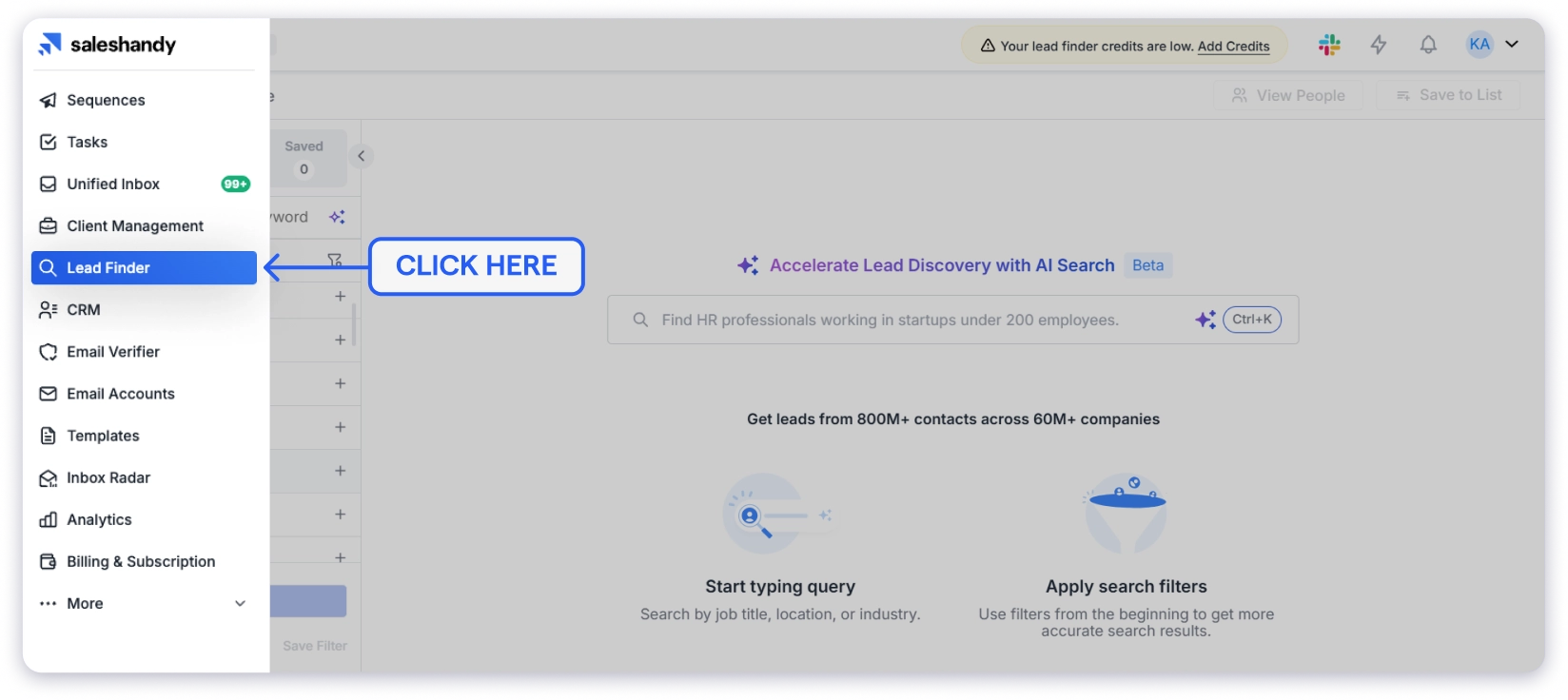
Once you’re in, click on Lead Finder in the left sidebar.
You’ll see two tabs at the top: People and Companies.
Select People since you’re looking for individual HNI contacts.
On the left side, you’ll see the filter panel with all the search options.
This is where you’ll set up your search based on the ideal client profile you defined in Step 1.
Step 3: Set Your Location
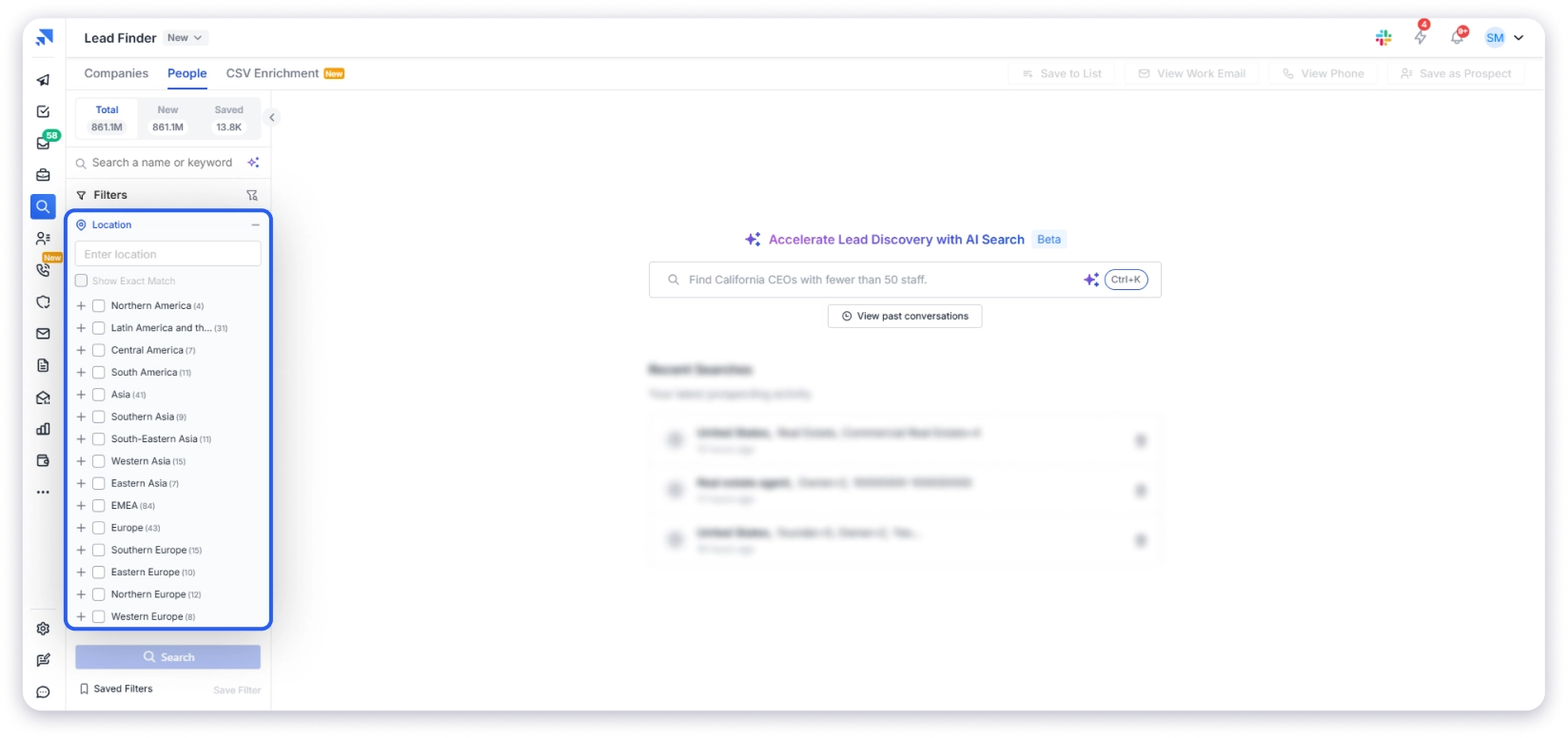
Click on Location in the filter panel.
A dropdown will appear with location options from all over the world, including regions that are difficult to find in most databases like African, Middle Eastern, and Asian countries.
You can select entire countries, specific states, or individual cities. For our example, select United States.
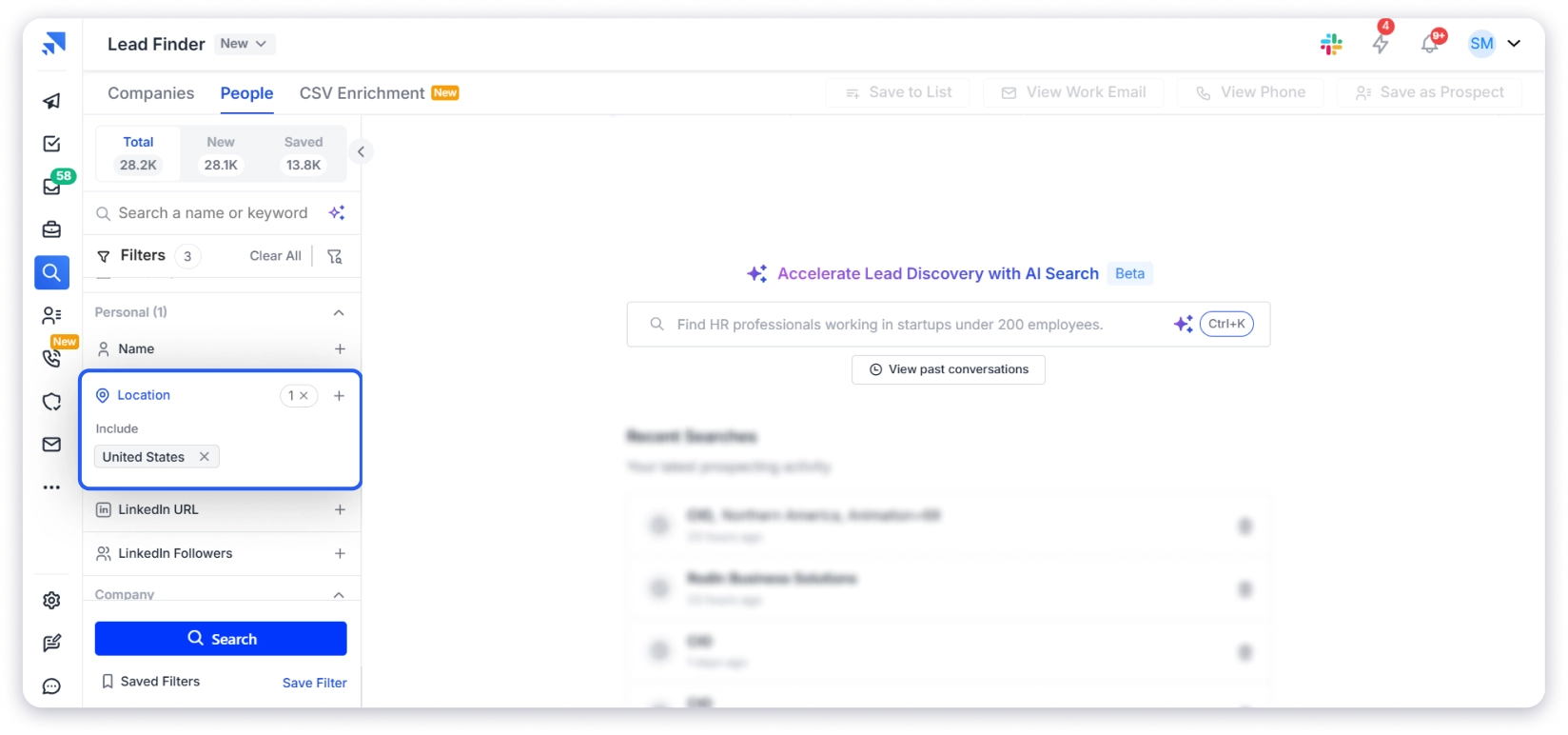
💡 Pro tip: If you serve clients in a specific city, narrow it down. Searching “San Francisco” instead of “United States” gives you more targeted results.
And if you’re looking for HNI clients in regions like the Gulf, Southeast Asia, or Africa, Saleshandy has coverage in those markets too, something most pre-built HNI lists completely miss.
Step 4: Select Job Titles and Management Level
Now click on Job Title in the filter panel.
When you click on it, a dropdown will show you a wide range of roles like CEO, Manager, Director, Founder, and more.
For HNI targeting, add titles like: CEO, Founder, Chairman, Managing Director, Partner, President
Next, open the Management Level.
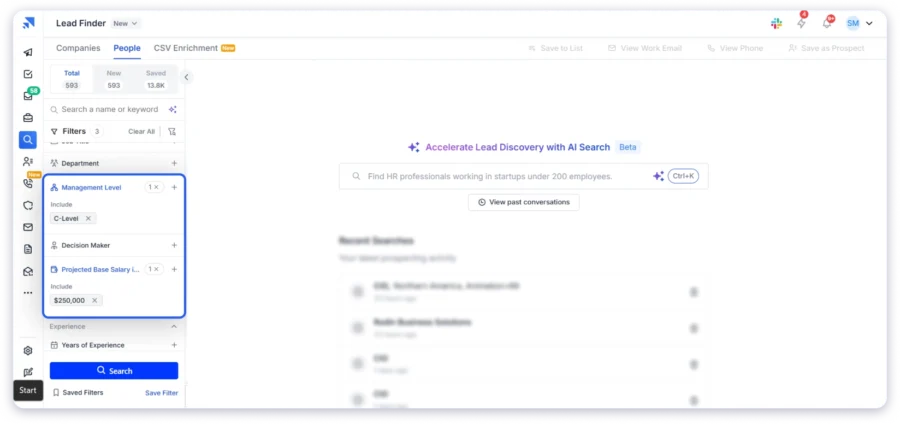
You’ll see options like Specialist, Manager, Senior, Director, Owner, C-Level, Head, President/Vice President, Founder, and Partner.
Select C-Level for our example.
But depending on your ideal client, you might also want to check Owner, Founder, or Partner since these are people who hold equity in their businesses and are most likely to have significant personal wealth.
Step 5: Set the Projected Base Salary
This is the filter that makes Saleshandy different from every other HNI database out there.
Click on Projected Base Salary in Dollars.
You’ll see preset ranges: under $50K, $50K-$100K, $100K-$150K, $150K-$250K, and $250K+.
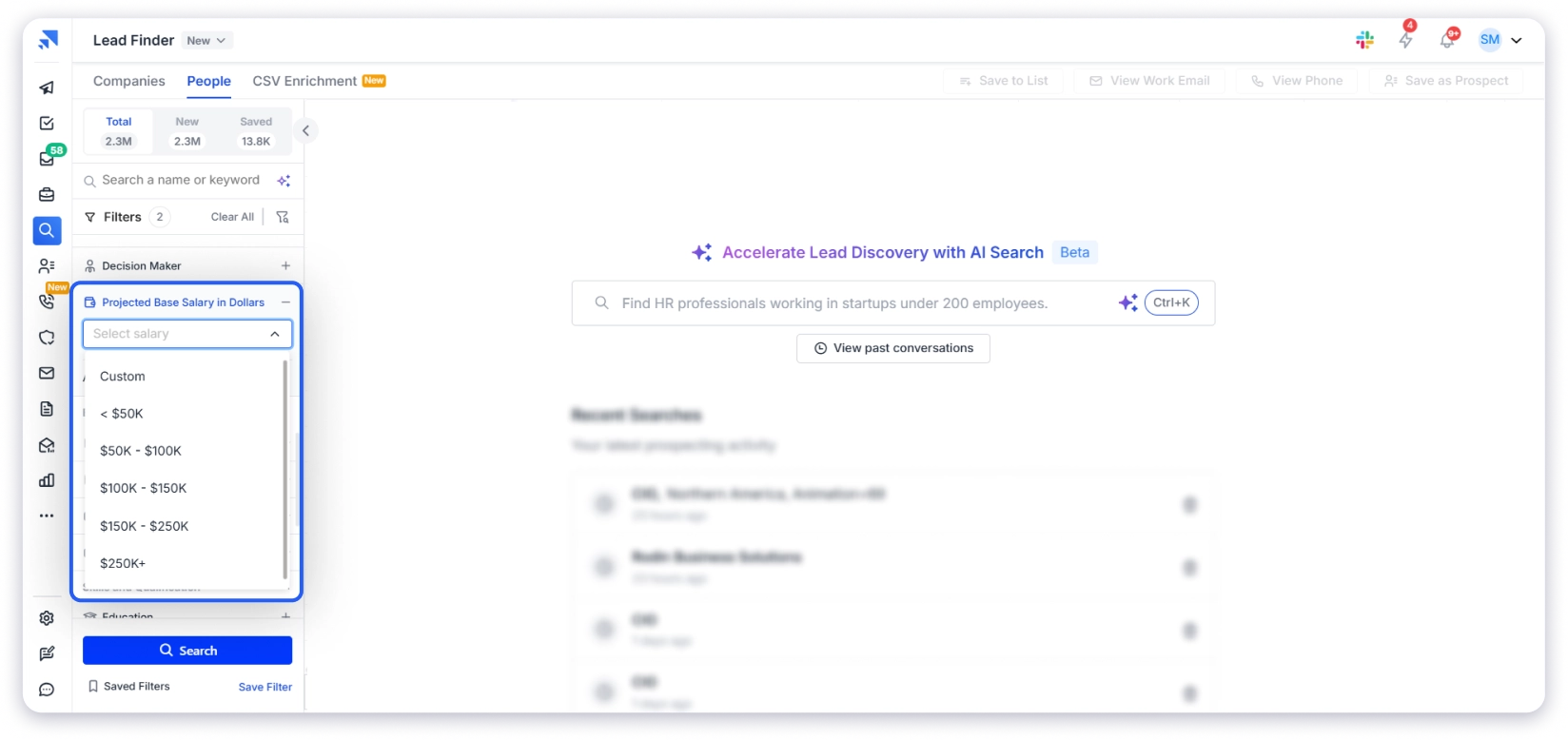
For HNI targeting, select $250K+.
This filters your results to only show individuals earning over $250,000 annually, which is a strong indicator of high net worth.
If you want even more control, select Custom to set your own salary range.
For example, if you only want Ultra HNI clients, you could set a custom range of $500K+ or higher.
This is a filter you will never find in a pre-built HNI Excel list. Those lists are segmented by city and rough income brackets. Saleshandy lets you filter by actual projected salary data.
No B2B database can filter by net worth directly. That data simply does not exist in any compliant business database.
But the Projected Base Salary filter is the strongest proxy available.
A C-level executive earning $250K+ at a company with $50M+ revenue is almost certainly a high net worth individual.
Combine salary with company revenue and management level, and you have a targeting combination that gets you closer to actual HNI profiles than any static list ever will.
Step 6: Narrow It Down with Industry and Buying Signals
You already have location, role, and salary set.
Now you can get even more specific.
Click on Industry and select the sectors where your ideal clients work.
For wealth advisory, industries like Technology, Financial Services, Real Estate, Healthcare, and Manufacturing tend to have the highest concentration of high net worth individuals.
Next, set Buying Signals.
This is where you catch people who are most likely to need your services right now. For example:
- Recently Funded: A company that just raised $10M+ in funding means the founders likely have new liquidity and need wealth management advice.
- Hiring: A company that’s actively hiring is growing, which means the leadership team’s net worth is increasing, too.
- Job Change: Someone who just moved into a C-level role at a bigger company likely has a new compensation package worth managing.
These timing signals are what separate a cold list from a warm prospect list. No static HNI database can give you this.
Step 7: Search and Reveal Contact Details
Once all your filters are set, click Search.
Saleshandy will show you the full list of matching contacts. You can see their names, job titles, companies, and departments right on the screen.
Now click View Email or View Phone on any contact to reveal their verified contact details.
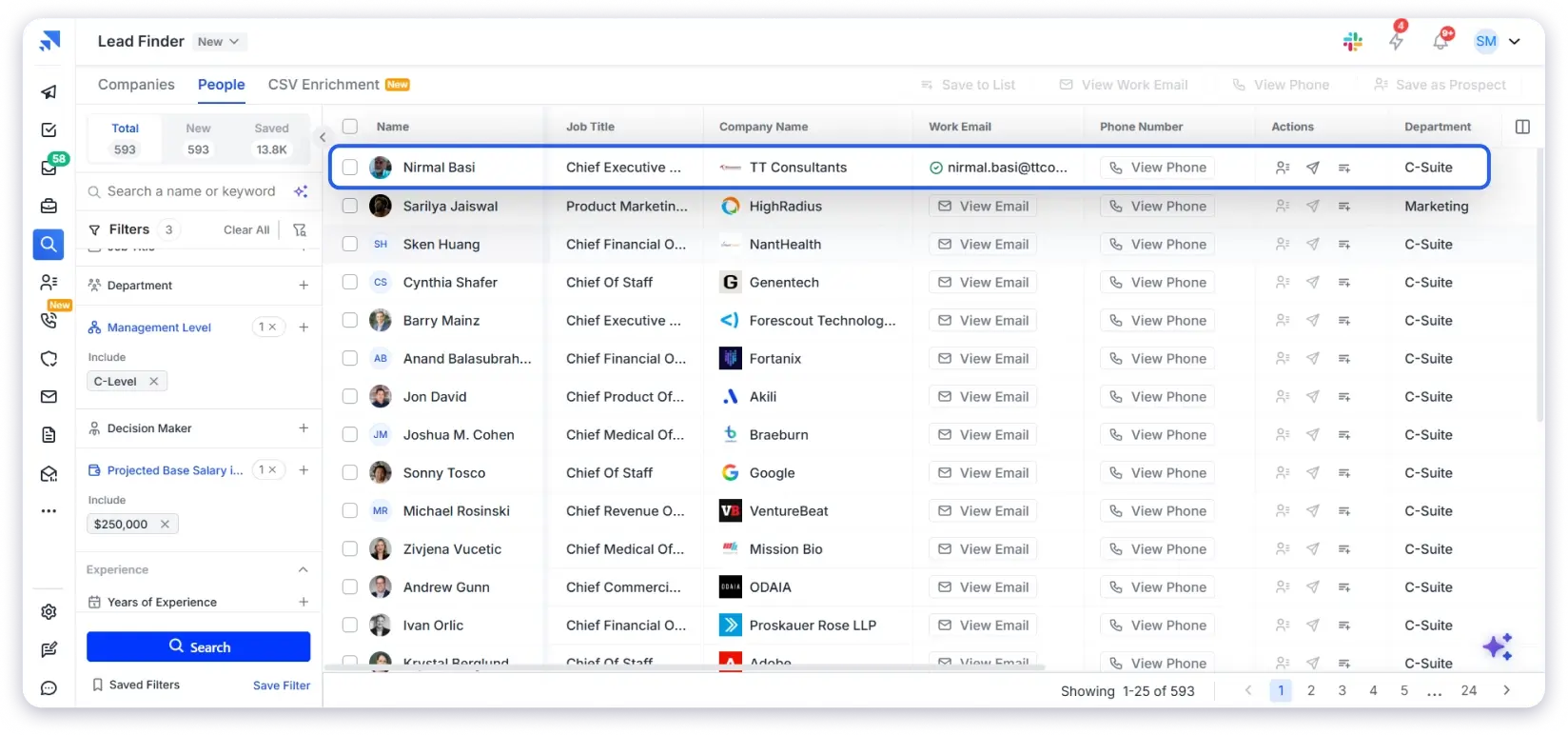
Saleshandy verifies every contact in real time at the point of reveal. You only pay credits for contacts that are successfully verified. If no verified email is found, you pay nothing.
You only pay credits for contacts that are successfully verified. If no verified email is found, you pay nothing. 🤩
The result: 98% verification accuracy and under 3% bounce rate.
That means the emails you send will actually land in inboxes, and the phone numbers will actually connect to the right person.
Now, before we move forward, here is a quick recap of what you get with Saleshandy Lead Finder to build an accurate HNI Database:
- 852M+ verified B2B contacts
- 42M+ companies
- 75+ search filters
- AI Search (Sage AI) – describe ICP in plain English
- Real-time verification at point of reveal
- Waterfall enrichment from 9+ premium data providers
- 98%+ email accuracy
- Projected Base Salary filter (key differentiator for HNI targeting)
- Buying signals (funding, hiring, job change)
- Company revenue filters
- CSV enrichment
- Export up to 10,000 prospects at once
- People and Company tabs with shared filters
- 50 FREE HNI Contacts on signup
- Pay only for verified contacts ($0 when unverified)
I noticed that LinkedIn is the most common starting point for people looking to find HNI clients on their own.
I have used this approach myself for small, focused lists, and it works well when you need 20 to 50 contacts in a specific niche or city.
How It Works:
- Step 1: Open LinkedIn and use the search bar or Sales Navigator filters.
- Step 2: Set the title to CEO, Founder, Managing Director, or Partner.
- Step 3: Filter by industry, company size, and location.
- Step 4: Go through profiles one by one, note down their details, and add them to a spreadsheet.
- Step 5: If you have Sales Navigator, filter by company revenue and headcount to get closer to HNI-probable contacts.
Where It Breaks Down:
LinkedIn gives you profiles, not verified contact data. Yes, you get names, titles, and company names. But you don’t get verified work emails or direct phone numbers.
To actually reach these people, you still need to find their emails separately, which adds another step and another tool.
The bigger problem is scale. LinkedIn caps search results, limits connection requests, and throttles activity if you move too fast. If you need 500 HNI contacts across 3 industries in 4 cities, manual LinkedIn prospecting will take you weeks.
It is a solid method for small, focused lists. For anything bigger, the time cost does not add up.
3. How Can You Find HNI Buyers at Conferences, Summits, and Industry Events
This is the oldest and most trusted method in wealth advisory, insurance, and financial services.
I have spoken with wealth advisors who built their entire client book from 3 to 4 industry events per year. For relationship-driven industries, nothing replaces a face-to-face conversation with a high-net-worth individual.
How It Works:
Attend BFSI conferences, CII and FICCI summits (India), wealth management roundtables, real estate expos, or private banking events.
Collect business cards, have conversations, and follow up within 48 hours. Over time, these events give you a warm network of HNI contacts who already know your face and name.
Where It Breaks Down:
Cost and time. A single industry event can cost Rs. 25,000 to Rs. 1,00,000+ between tickets, travel, and accommodation. You invest a full day (sometimes two) for 10 to 20 contacts.
There is no way to filter attendees by income, net worth, or company revenue before you go. You are making educated guesses based on job titles on name badges.
And the follow-up problem is real. Business cards sit in drawers. If you do not have a system to capture and organize those contacts immediately, the value decays within days.
Events are excellent for quality. They are poor for volume and consistency.
Method 4. How to Build an HNI Database From Public Records and Wealth Reports
For Ultra HNI and Super HNI targeting, public records and wealth reports are a legitimate source, especially when you are going after India’s top 500 families or listed company promoters.
I have seen financial advisors and family office consultants use this method to identify prospects before approaching them through warm introductions.
How It Works:
Start with published wealth lists: Hurun India Rich List, Forbes India Rich List, IIFL Wealth Report, or Knight Frank Wealth Report. These give you names, net worth estimates, industry, and city.
For company-level data, check MCA filings (Ministry of Corporate Affairs, India) or SEC filings (US). Annual reports of listed companies disclose director compensation, shareholding patterns, and promoter holdings, all of which are strong indicators of personal wealth.
Cross-reference names with LinkedIn or company websites to find their current role and company.
Where It Breaks Down:
You get names and net worth brackets. You do not get verified emails or direct phone numbers. The gap between “I know this person is worth Rs. 500 crore” and “I have their email and can reach them today” is enormous.
The data is also published annually. By the time you act on a Hurun list from January, it is 6 to 8 months old. Companies get acquired, founders exit, CXOs change roles. The names are right, but the context may be stale.
And this method only works for the very top tier. For the broader HNI segment (Rs. 5 crore to Rs. 25 crore), there are no public lists. These are successful professionals, doctors, lawyers, senior IT executives, and business owners who do not appear on any wealth ranking. To find them, you need a database with filters like salary, company revenue, and job title, not a published list.
You’ve Got the Contact Info. Now Reach Out and Close Deals!
You’ve got your verified HNI prospect list.
Now it’s time to turn those contacts into conversations and revenue.
The best part about Saleshandy is that you don’t need to export your contacts to another tool.
Once you have your verified HNI list, you can push up to 10,000 contacts directly into a cold email sequence with a single click. No exporting to CSV, no importing into another tool.
Prospecting, outreach, calling, and deal tracking all happen on the same platform.
1. Send Personalized Cold Emails
The contacts you reveal in Lead Finder go directly into cold email sequences.
Every data point you used to find the prospect, company name, revenue, role, funding stage, becomes a personalization variable in your email.
Write your first email, add 3 to 4 follow-ups, and let the sequence run. Saleshandy handles send timing, sender rotation, and reply detection.
Critical: Don’t mass-blast your HNI list. Batch outreach in groups of 50 to 100 and personalize every message. HNI prospects expect relevance.
2. Cold Call with Local Presence
Email opens the door. A phone call closes it.
Saleshandy’s built-in dialer lets you cold call US and Canada numbers directly from the platform.
Local presence dialing increases pickup rates by up to 4x because prospects answer local area codes far more often.
3. Track Deals in Saleshandy CRM
As replies come in, Saleshandy CRM gives you a Kanban pipeline view of every prospect. See who replied, who needs a follow-up, and which conversations are moving toward a close. No spreadsheet juggling. No switching between tools.
FAQs About HNI Database
1. What’s the HNI Full Form?
HNI stands for High Net Worth Individual. It refers to a person with $1 million or more in liquid investable assets, excluding primary residence. Ultra HNI (UHNI) means $30M+, and Super HNI means $100M+.
2. Can I get a free HNI clients database PDF?
Free HNI database PDFs are typically scraped, unverified contact lists with high bounce rates.
These files circulate widely, so every contact has already been approached by your competitors.
You can use Saleshandy Lead Finder to find verified email addresses and phone numbers of HNI-probable prospects instead. You get 50 free credits to test.
3. How accurate are HNI databases?
Unverified providers claim 90 to 95% accuracy, but it’s self-reported and unverifiable.
Bounce rates from static HNI lists regularly exceed 20 to 30%. Saleshandy’s waterfall enrichment checks 9+ providers and delivers under 3% bounce rate with 98% verification accuracy.
4. What is the difference between HNI and Ultra HNI?
HNIs have $1M+ in investable assets. Ultra HNIs have $30M+. In Lead Finder, target Ultra HNIs by setting company revenue to $100M+, selecting Chairman/Founder/President as job titles, and filtering for 500+ employees.
5. How do I find HNI clients in a specific city?
Set the Location filter to your target city (Mumbai, Dubai, London, San Francisco, or anywhere worldwide). Add Founder/CEO/Managing Director as job titles. Set Company Revenue to $10M+. You’ll get verified emails and phone numbers of HNI-probable decision-makers in that market.
6. Is it legal to buy an HNI database?
It depends on how the data was collected and how you use it. GDPR, CCPA, and India’s DPDP Act regulate personal data usage. Financial services outreach has additional regulatory layers. Using a compliant B2B data provider with SOC 2 certification is the safer alternative to unregulated lists.
7. Can Saleshandy help me find both B2B and B2C HNI prospects?
Yes. Saleshandy’s database covers business professionals and their company information.
The contacts it surfaces, founders, CEOs, partners, and business owners, are the same individuals who make personal investment decisions. A startup founder is both a B2B contact (business role) and a B2C prospect (personal wealth management client).
8. What Are HNI Clients?
HNI clients are individuals with $1 million or more in liquid investable assets. In India, the threshold is typically Rs. 5 crore or above. They are usually founders, C-suite executives, senior professionals, or business owners targeted by wealth advisors, insurance agents, real estate firms, and premium service providers.