
So, you want to learn how to build a 10,000 email address list.
Well, I can teach you exactly how to do that.
In this blog, I will be sharing the best method to build a email address that you can use for lead research, cold outreach, talent acquisition, PR and marketing campaigns, or running your own business.
And the list you’ll build with this method won’t include generic addresses like hello@ or outdated contacts that bounce.
Every email address will belong to a real person, verified and accurate, ready to start real conversations.
Let’s get into it.
How to Build a 10,000 Email Address List — TOC
- TL;DR: 5 Simple Steps to Build a 10,000 Email Address List
- Why Most Email Address Lists Are a Waste of Time
- How to Build a 10,000 Email Address List (Step-by-Step)
- How Much Does It Cost to Build a 10,000 Email Address List? (Honest Breakdown)
- What to Do Once Your Email Address List Is Ready
- 5 Mistakes That Will Ruin Your Email Address List
- Start Building Your Email Address List
- FAQs
TL;DR: 5 Simple Steps to Build a 10,000 Email Address List
- Decide who you want on your list: Pick the job title, industry, company size, and location of the people you want to reach. The more specific, the better your list.
- Log in to Saleshandy Lead Finder: You get access to 852M+ verified contacts across 42M+ companies.
- Apply filters based on your criteria: Set job title, industry, location, company size, tech stack, or just type what you’re looking for in plain English using AI search.
- Browse the results: Lead Finder shows you verified email addresses and phone numbers that match your filters.
- Click reveal to get the contact details: Each email is verified in real time the moment you reveal it. So the address you export is accurate and active, not pulled from a database snapshot taken months ago.
💡PS: Don’t waste time on free or downloadable email lists around the internet.
Because they’re recycled, unverified, and most have 40%+ bounce rates.
And if you use one, a single bad import and your email address’s sender reputation is gone.
Why Most Email Address Lists Are a Waste of Time
Before I show you the process, let me save you from a mistake I’ve seen too many people make.
If you search for an email addresses list free download or a free list of email addresses, you’ll find hundreds of results. Scribd PDFs. Random CSVs. Forum posts offering “10,000 free business email addresses.”
Here’s what actually happens when you use them:
- Bounce rates cross 40% before you finish your first batch
- Email providers flag your domain within days
- Sender reputation damage takes 2-3 months to recover
- In many cases, you have to start over with a fresh domain
And it’s not just the free lists. Even some paid vendors sell the same recycled data to hundreds of buyers.
So by the time you send your first email, your contacts have already been emailed by dozens of other people using the same list.
So what makes an email address list actually useful?
Three things:
1. Targeting
The contacts match the people you’re actually trying to reach, filtered by role, industry, company size, and location.
2. Verification
Every email is verified before you use it. Not checked once six months ago. Checked NOW.
3. Freshness
The data is current, not a snapshot from last year that nobody bothered to update.
That’s the bar.
And most lists you’ll find online don’t come close to clearing it.
How to Build a 10,000 Email Address List (Step-by-Step)
Now let me show you the exact process.
You can open Saleshandy Lead Finder in another tab and follow along.
Step 1: Decide Who You Want on Your List
Step 2: Sign Up on Saleshandy and Open Lead Finder
Step 3: Set Your Filters and Search
Step 4: Reveal and Verify the Contact Details
Step 1: Decide Who You Want on Your List
This is where most people go wrong.
They jump straight into a tool, type something broad like “marketing managers,” and export the first 10,000 results.
The problem? That’s too broad.
If you’re looking for business owners of small companies, that could mean a local bakery owner, a Shopify store founder, or a SaaS CEO.
Those are completely different people with completely different problems. Emailing all of them with the same message is why most email lists underperform.
Instead, get specific. Before you touch any tool, answer these four questions:
1. Job Title
What job title are you targeting? (e.g., Founder, CEO, VP of Sales, Marketing Director)
2. Industry
What industry? (e.g., SaaS, e-commerce, real estate, healthcare, finance)
3. Company Size
What company size? (e.g., 10-50 employees, 50-200, 200-1000)
4. Location
What location? (e.g., United States, California, New York City)
This applies whether you’re building a b2b email list for sales, a business email list for partnerships, or an email leads list for your marketing team. Specificity is what makes any of these work.
Pro Tip: Think about your last 5 best customers or clients. What did they have in common? That pattern is your starting point.
Step 2: Sign Up on Saleshandy and Open Lead Finder
The tool I use for this is Saleshandy Lead Finder.
And the reason is simple.
I have been using it from past 5 years and it has never disappointed me with the emails and phone numbers i got tested a few others over the years, but this is the one that stuck.
Here’s how to get started:
- Go to saleshandy.com and click “Sign up for free.“
- Enter your email address and create your account. (You get upto 50 free credits to test.)
- Once you’re in the dashboard, click on Lead Finder in the left sidebar.
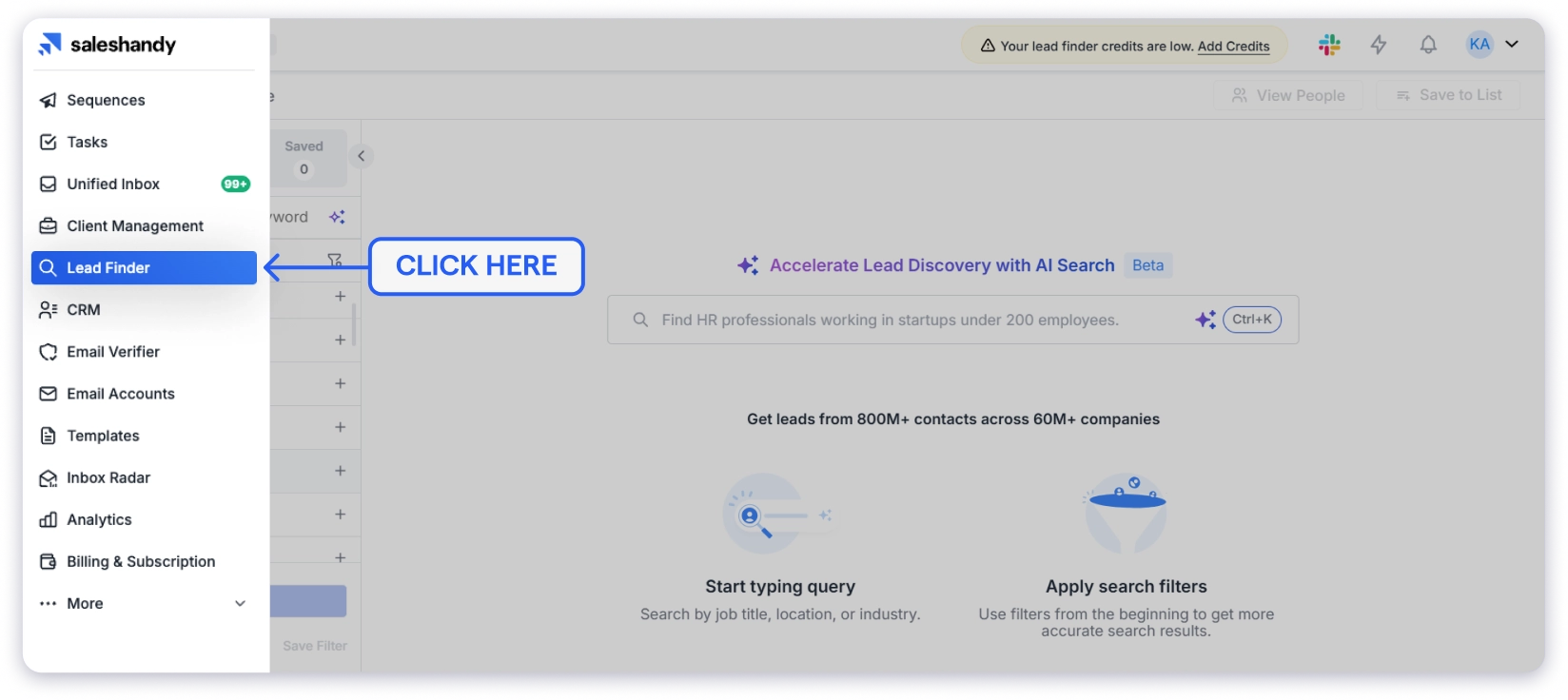
You’ll see two tabs at the top: People and Companies. For building an email address list, click on People.
This is where you access 852M+ verified contacts across 42M+ companies.
Step 3: Set Your Filters and Search
Now it’s time to find the exact contacts you need. This is where the filters do the heavy lifting.
Here’s how to set your filters:
- Click on Job Title and enter the titles you’re targeting. For example: “Founder,” “CEO,” “VP of Sales.”
- Click on Location and select your target geography. For example: “United States” or narrow it down to a specific state or city.
- Click on Company Size and select your range. For example: “11-50 employees” or “51-200 employees.”
- Click on Industry and select the industry you’re going after. For example: “SaaS,” “E-commerce,” “Financial Services.”
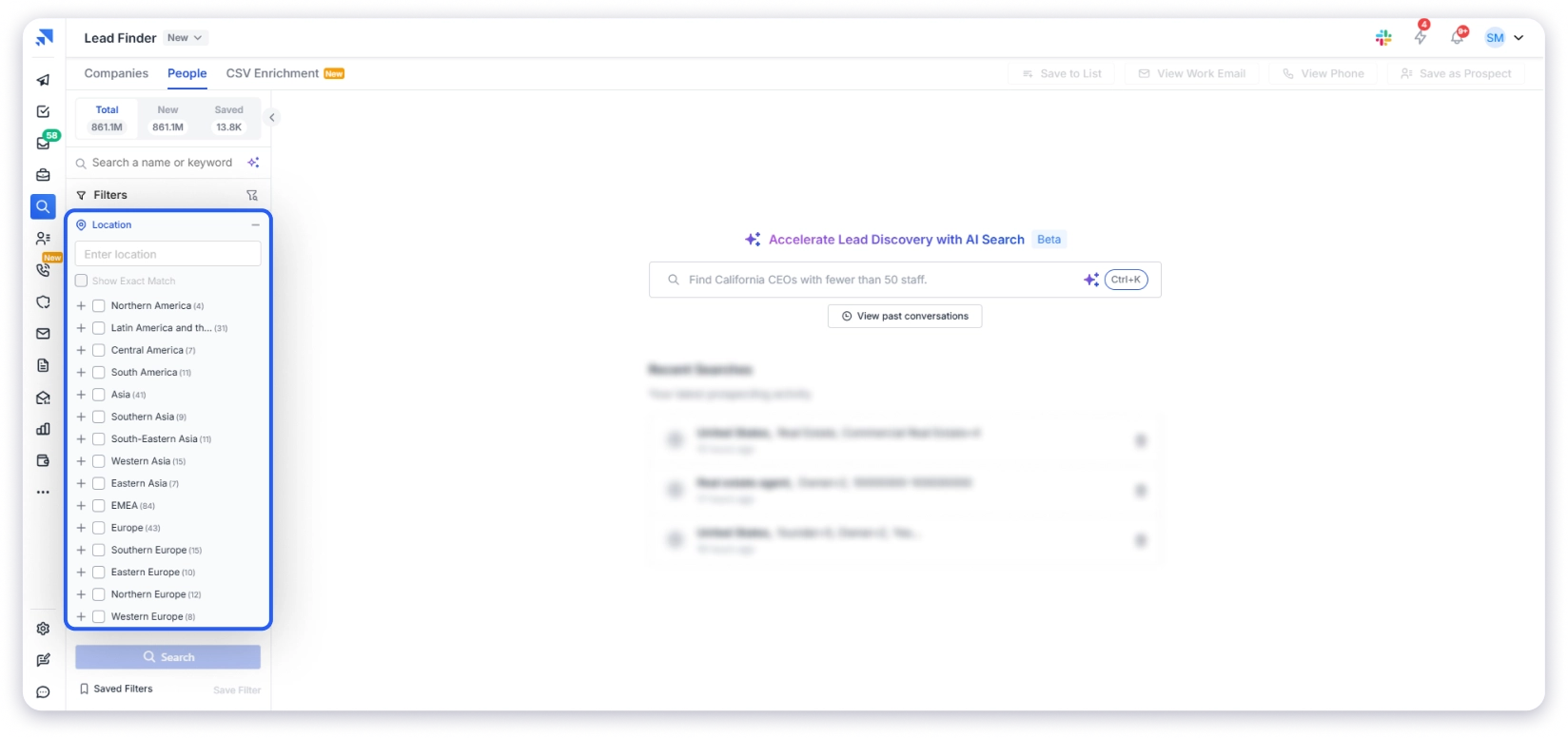
Once you apply your filters, Lead Finder shows you the total number of matching contacts at the top.
💡For example, when I searched for SaaS founders and sales leaders in the US with 10-200 employees, I got about 14,000 results. If I only needed a list of email addresses in USA, I could have exported right there. But you can go much deeper.
Additional filters you can use:
| Filter | What It Does | Example |
|---|---|---|
| Revenue & Funding | Target companies by revenue range or recent funding | Companies with $1M-$10M revenue |
| Tech Stack | Find companies using specific tools | Companies using HubSpot or Salesforce |
| Years of Experience | Target by career level | 5-10 years of experience |
| Buying Signals | Find companies with recent activity | Recently hired, just raised funding |
| Company Name | Search specific companies | Target a list of company email addresses |
These extra filters are what turn a generic company email addresses list into a real email addresses list that matches the people you actually want to reach.
Alternative: Use AI Search
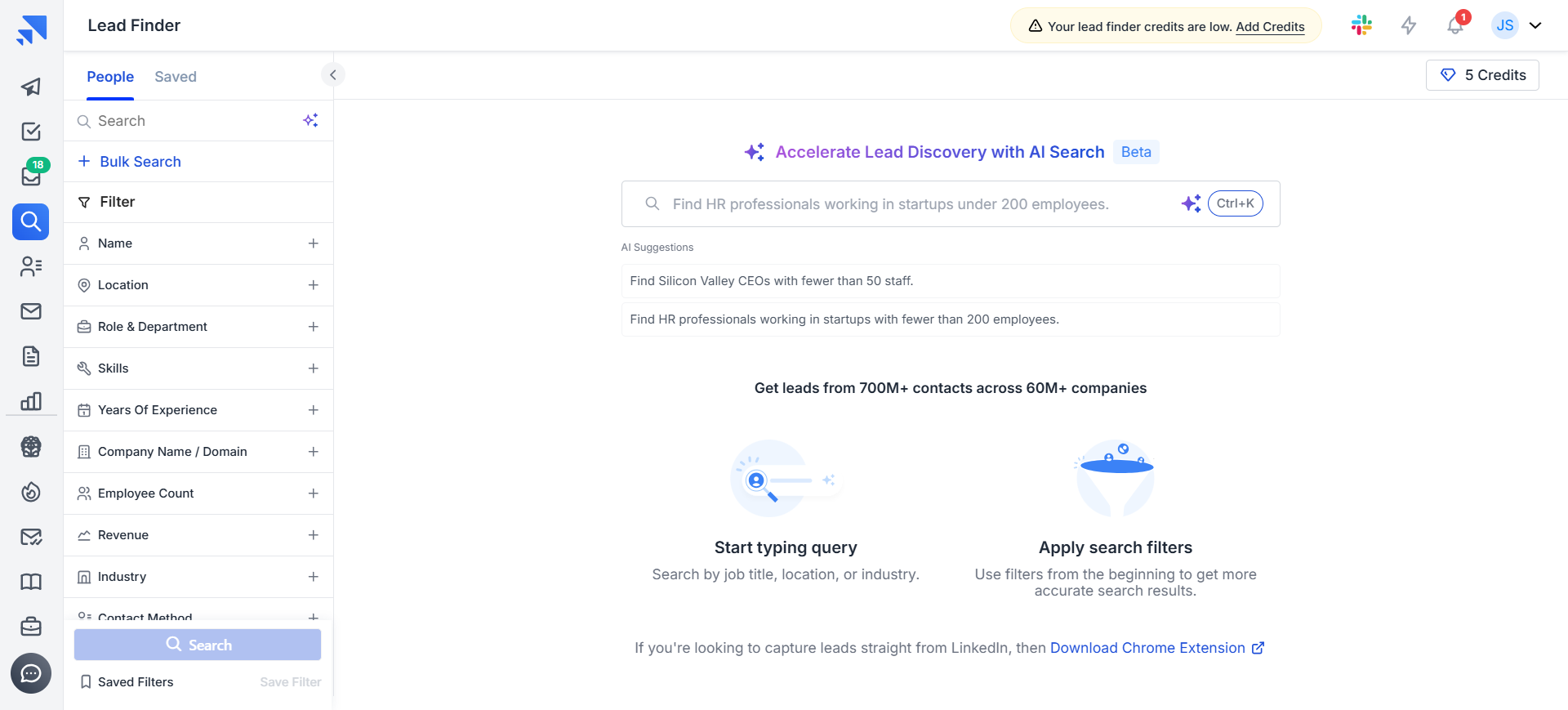
If you don’t want to click through dropdowns manually, use the AI Search bar at the top.
Type your criteria in plain English. For example:
- “Find marketing directors at e-commerce companies with 50-100 employees in New York”
- “CEOs of healthcare startups in California with less than 50 employees”
- “VP of Sales at B2B software companies in Texas”
Lead Finder builds the filters automatically and shows matching results.
Step 4: Reveal and Verify the Contact Details
This is where Lead Finder does something most other tools don’t.
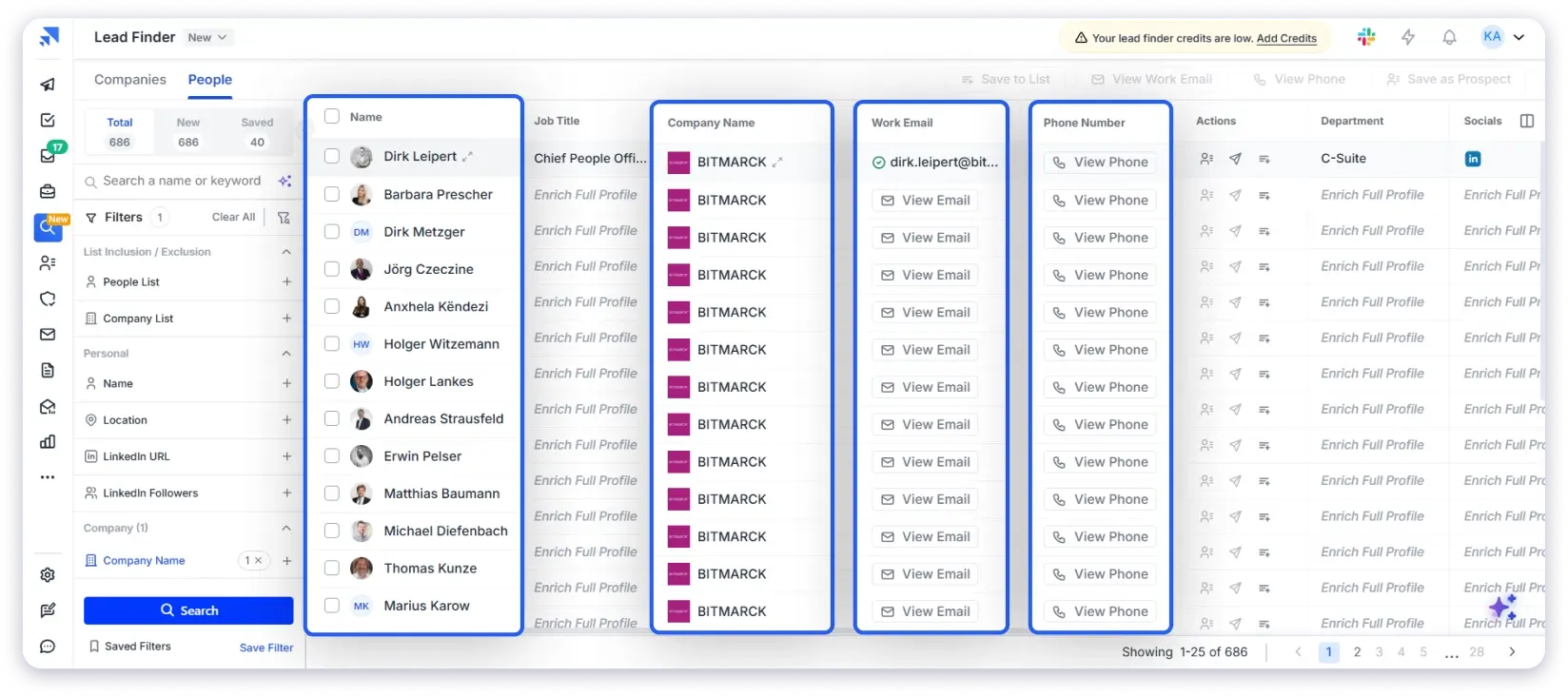
When you click “Reveal” on a contact, the email doesn’t just get pulled from a static database. It gets verified in real time at that moment.
Here’s how it works:
- Select the contacts you want to reveal (you can select individual contacts or use the checkbox at the top to select all on the page).
- Click “Reveal” or “Get Contact Info.”
- Lead Finder runs a waterfall enrichment process, which cross-checks the email across multiple data providers before showing it to you.
The result?
The email you see is verified at that exact moment.
Not from a snapshot that was accurate three months ago. That’s how you end up with a real email addresses list instead of a database full of dead contacts.
It’s basically a built-in email address list checker that runs before you ever see the contact.
Why this matters: I’ve used other B2B data providers where the emails looked fine in the database but bounced at 8-10% when I actually sent to them.
With Saleshandy Lead Finder’s real-time verification, my bounce rates have stayed consistently under 2%.
Step 5: Download Your 10,000 Email Addresses List Your Contacts
Once your contacts are revealed and verified, export them.
Here’s how:
- Select the contacts you want to export (individual or bulk select).
- Click “Export” at the top.
- Choose your format: CSV download or add directly to a Saleshandy Sequence for immediate outreach.
Every contact comes with the full picture: name, verified email address, phone number, company name, job title, industry, company size, and more.
Whether you’re exporting a business email addresses list or a list of email addresses of companies in a specific niche, the data structure is the same.
If you’re using Saleshandy for cold email outreach, you can add contacts directly to email sequences from Lead Finder without switching between tools.
How Much Does It Cost to Build a 10,000 Email Address List? (Honest Breakdown)
One of the most common questions I get is about cost of building a 10,000 email address list.
So let me give you a straightforward breakdown.
Option 1: Buy a List from a Traditional Vendor
Most traditional email list vendors charge between $0.10 and $5 per contact.
Here’s what that looks like for 10,000 contacts:
| Price Per Contact | Total Cost for 10,000 Emails | What You Get |
|---|---|---|
| $0.10 | $1,000 | Low-quality, minimal filtering, high bounce risk |
| $0.50 | $5,000 | Mid-range, some targeting, inconsistent verification |
| $1.00 | $10,000 | Better targeting, but still a static list |
| $5.00 | $50,000 | Enterprise-level, but often locked into annual contracts |
The problem? These are static lists.
They’re accurate on the day they’re compiled and start decaying immediately. No real-time verification. No ongoing updates.
Option 2: Use Saleshandy
| Plan | Monthly Cost | Credits Per Year | Cost Per Verified Contact |
|---|---|---|---|
| Starter | $34/month | 18,000/year | ~$0.02 per contact |
| Pro | $76/month | 48,000/year | ~$0.02 per contact |
| Scale | $149/month | 96,000/year | ~$0.02 per contact |
That’s $0.02 per verified contact vs. $0.10 to $5 from traditional vendors.
And unlike traditional vendors:
- Every email is verified in real time (not compiled months ago)
- You get 75+ filters to target exactly who you need
- Phone numbers are included alongside emails
- You can go directly from finding contacts to sending outreach in one platform
- Unused credits roll over
Bottom line: Building a 10,000-contact email address list with Lead Finder costs roughly $34/month. You can also test with 50 free credits before paying anything.
What to Do Once Your Email Address List Is Ready
You’ve got your 10,000 contacts exported. Now what?
Well, a few extra steps here make the difference between a list that performs and one that gets your sending email address getting flagged.
- Segment Your List (If You’re Doing Outreach or Running Campaigns)
- Warm Up Your Domain Before Sending at Volume
- Personalize Every Email Using Your Export Data
- Keep Your List Clean and Updated
1. Segment Your List (If You’re Doing Outreach or Running Campaigns)
If you’re planning to use your email address list for cold outreach or marketing campaigns, don’t send the same message to all 10,000 contacts.
I learned this early on.
I used to export one giant CSV and blast everyone with the same email.
Founders, directors, VPs, small companies, large companies, all getting identical messaging. Reply rates hovered around 1-2%.
Now I break my list into segments before sending:
| Segment | Example | Why Separate Messaging |
|---|---|---|
| By Role | Founders vs. Marketing Directors vs. VPs | Different pain points, different language |
| By Company Size | Startups (10-50) vs. Mid-market (200-1000) | Different budgets, different needs |
| By Industry | SaaS vs. E-commerce vs. Agencies | Different use cases, different value props |
The data for segmenting is already in your export. Job title, industry, company size. You just have to use it.
Result: My segmented campaigns consistently hit 5-8% reply rates compared to the 1-2% I got when treating everyone the same.
2. Warm Up Your Domain Before Sending at Volume
Important Note: Do NOT send 10,000 emails on day one. That’s the fastest way to get flagged as spam.
Here’s what to do instead:
- Start with 20-30 emails per day from your sending account.
- Gradually increase over 2-3 weeks.
- Use Saleshandy’s built-in email warm-up to automate this process.
- Once warmed up, scale to 50-200 emails per day per inbox.
- If you need more volume, add more sending accounts and use sender rotation to distribute sends across them.
Pro Tip: Maintain a deliverability rate above 95% for the first 15 days before you start scaling. Monitor your inbox placement rate using tools like GlockApps.
3. Personalize Every Email Using Your Export Data
Every contact you exported comes with company name, job title, industry, company size, and tech stack.
Use this data. Don’t just write “Hi {first_name}, I wanted to reach out.”
Reference something specific:
- Their company name
- Their role
- Their industry
- A recent funding round or hiring activity (if you used buying signal filters)
The data is already sitting in your export. Using it takes an extra 30 seconds per email, and it’s the difference between getting replies and getting ignored.
4. Keep Your List Clean and Updated
Contact data decays at roughly 30% per year. People change jobs. Companies get acquired. Email addresses stop working.
Here’s what I do to maintain list quality:
- Remove bounces after every campaign
- Honor unsubscribes immediately
- Re-verify contacts every 2-3 months using Saleshandy’s email verifier
- Remove non-engagers (contacts who haven’t opened or replied in 90 days)
If you skip this, your deliverability will quietly degrade over time. You won’t notice until your open rates suddenly drop.
5 Mistakes That Will Ruin Your Email Address List
I’ve made some of these myself and watched plenty of others make the rest.
If any of these sound familiar, you’re not alone.
- Using Free or Downloaded Email Lists
- Buying from Vendors Who Don’t Verify Their Data
- Sending from a Personal Gmail or Outlook Account
- Sending the Same Email to Everyone on Your List
- Never Re-Verifying Your List
1. Using Free or Downloaded Email Lists
This is the most common mistake and the most damaging.
Whether you search for an email addresses list free or a free email addresses list, you’ll find the same thing: recycled, unverified contacts shared with every person who downloads the same file. By the time you send your first email, your contacts have already been emailed by dozens of other senders.
Don’t do this. The domain reputation damage isn’t worth the “free” data.
2. Buying from Vendors Who Don’t Verify Their Data
If you decide to buy a list of email addresses, not every email list provider is the same.
Some use real-time verification and waterfall enrichment. Others sell static lists they compiled months ago and never refreshed.
How to tell the difference: Ask the vendor how they verify contacts and how often the data gets updated. If they can’t answer clearly, that’s all you need to know.
3. Sending from a Personal Gmail or Outlook Account
These accounts aren’t built for any kind of volume. Send more than a few hundred emails and you’ll hit rate limits or get the account suspended altogether.
What to do instead: Use a dedicated outreach platform with proper sending infrastructure. Your personal inbox is for conversations, not campaigns.
4. Sending the Same Email to Everyone on Your List
One giant list, one generic message, zero thought about who’s receiving it. That’s how you get reply rates below 1%.
If your email could be sent to literally anyone, it’s relevant to nobody. Different roles and industries need different messaging. This is exactly why segmenting your list matters.
5. Never Re-Verifying Your List
A list you built three months ago is already losing accuracy. Six months later and a meaningful chunk of those contacts have changed jobs or their email addresses have gone inactive.
Run a fresh verification pass every couple of months. It takes minutes and prevents silent deliverability damage.
Start Building Your Email Address List
You’ve got the process. Now the only thing left is actually building the list.
Open Saleshandy Lead Finder, set your filters, and pull your first batch of verified contacts. You’ll have your first 50 contacts in under five minutes with the free credits. Once you see the data quality, scaling to 10,000 is just a matter of running more targeted searches.
And if you’re building lists for a specific role or industry, Dhruv and I have written dedicated guides for
- realtor email list
- real estate investor email list
- financial advisor email list
- ceo email list
- cfo email list
- cto email list
- hospital ceo email list
- hni email addresses list
- import export companies contact details
- find wholesale buyers
- IT decision makers email list
Pick the one that matches your target and start there.
FAQs
1. How Much Does It Cost to Build a 10,000 Email Address List?
Traditional bulk list vendors charge anywhere from $0.10 to $5 per contact, putting a 10,000-contact list between $1,000 and $50,000.
With Saleshandy, the Starter plan starts at $34/month and gives you 18,000 credits per year. That’s roughly $0.02 per verified contact.
2. How to Get a List of Email Addresses for Free?
You can find free email list downloads all over the internet. But I’d strongly recommend not using them for any kind of outreach. These are recycled contact dumps with no verification.
The bounce rates are usually above 40%, and the contacts have been emailed by everyone else who downloaded the same file.
A single bad import can damage your sender reputation badly enough that even your legitimate emails start landing in spam. If you want a free email addresses list that’s actually usable, Saleshandy Lead Finder offers 50 free credits to test with verified contacts.
3. What Is the Best Tool to Build a Verified Email Address List?
For building targeted, verified email lists, Saleshandy Lead Finder gives you access to 852M+ contacts with 75+ filters, real-time verification through waterfall enrichment, and AI-powered search in plain English.
Other tools in this space include Apollo, ZoomInfo, and Hunter.io, though they differ in database size, pricing, and whether they include outreach features alongside the lead data.
4. How Do I Make Sure the Emails on My List Are Valid?
Run your list through an email verification tool before every campaign.
Saleshandy has a built-in email verifier that flags invalid addresses, catch-all domains, and role-based emails like info@ or support@.
The goal is keeping your bounce rate under 3%. Re-verify your list every two to three months since contact data goes stale faster than most people expect.
5. Is It Legal to Buy an Email Address List?
Buying a list of business email addresses is legal in most countries, but the rules around how you use it vary.
In the US, the CAN-SPAM Act requires an opt-out mechanism in every email and that you honor unsubscribe requests promptly.
In Europe, GDPR is stricter and generally requires explicit consent for marketing emails.
For B2B outreach, using a verified lead database with real-time verification and compliance checks is the safer path compared to buying static lists from unknown sources.
6. How Long Does It Take to Build a 10,000 Contact Email List?
With a B2B lead database like Saleshandy Lead Finder, you can build and export a targeted list of 10,000 verified contacts in a few hours.
The actual searching and filtering takes minutes. Most of the time goes into deciding your targeting criteria and exporting in segments.
Compare that to building an email list organically through website opt-ins and content, which typically takes 6 to 12 months to reach 10,000 subscribers.