

A realtor email list looks simple on paper, but finding a usable one is frustrating.
You want to reach active agents, brokers, or agencies with clear buying intent. Instead, you end up with random contacts that bounce or never respond.
A few limitations with random realtor email lists include:
- Emails linked to inactive, retired, or unlicensed realtors
- No reliable filters for location, brokerage, or professional role
- Lists mixed with homeowners, builders, or unrelated real estate profiles
- High pricing for data that fails during real outreach campaigns
If you work in real estate marketing, SaaS, lending, or proptech, this hurts badly. Campaigns fail not because of messaging, but because the underlying data is wrong.
I know how difficult it is to find a reliable realtor email list. That’s why I reviewed platforms focused on verified and updated real estate data.
After proper research and testing, I listed the 9 best platforms for getting realtor email lists.
Review them carefully and choose the one that fits your targeting and outreach needs.
Realtor Email List – TOC
TL;DR of the Top 3 Best Platforms to Get a Realtor Email List
1. Saleshandy — Best overall
Saleshandy is used for building realtor email lists. It provides access to 852M+ contacts across 42M+ companies, with 95–98% verified email addresses and built-in outreach, all in one platform.
2. ZoomInfo — Best for large teams
ZoomInfo is used to target real estate firms and brokerages at scale. It includes firmographic and intent data, but higher pricing and manual list cleanup make it more suitable for large teams.
3. Apollo.io — Best for beginners
Apollo.io is often used by teams starting realtor outreach or testing campaigns. Its free tier, filtering options, and real-time email verification support smaller-scale efforts.
9 Top Platforms to Get a Realtor Email List
Let’s understand each of these top platforms for finding the email addresses of real estate businesses.
1. Saleshandy
I have three reasons for keeping Saleshandy at the top of this list.
- First, it gives access to a large database of 852M+ professional contacts and 42M+ company profiles, which helps when targeting realtors at scale.
- Second, its email accuracy stays between 95 and 98 percent. Every contact goes through a double verification process.
- Third, it serves as an all-in-one outreach platform that scales affordably.
In short, Saleshandy is one of the most reliable platforms to build a realtor email list.
User Rating
- G2: 4.6⭐/5 based on 773+ reviews
- Capterra: 4.5⭐/5 based on 125+ reviews
Best for: Teams that want accurate realtor data and outreach in one platform.
How Saleshandy Helps You Build a Realtor Email List
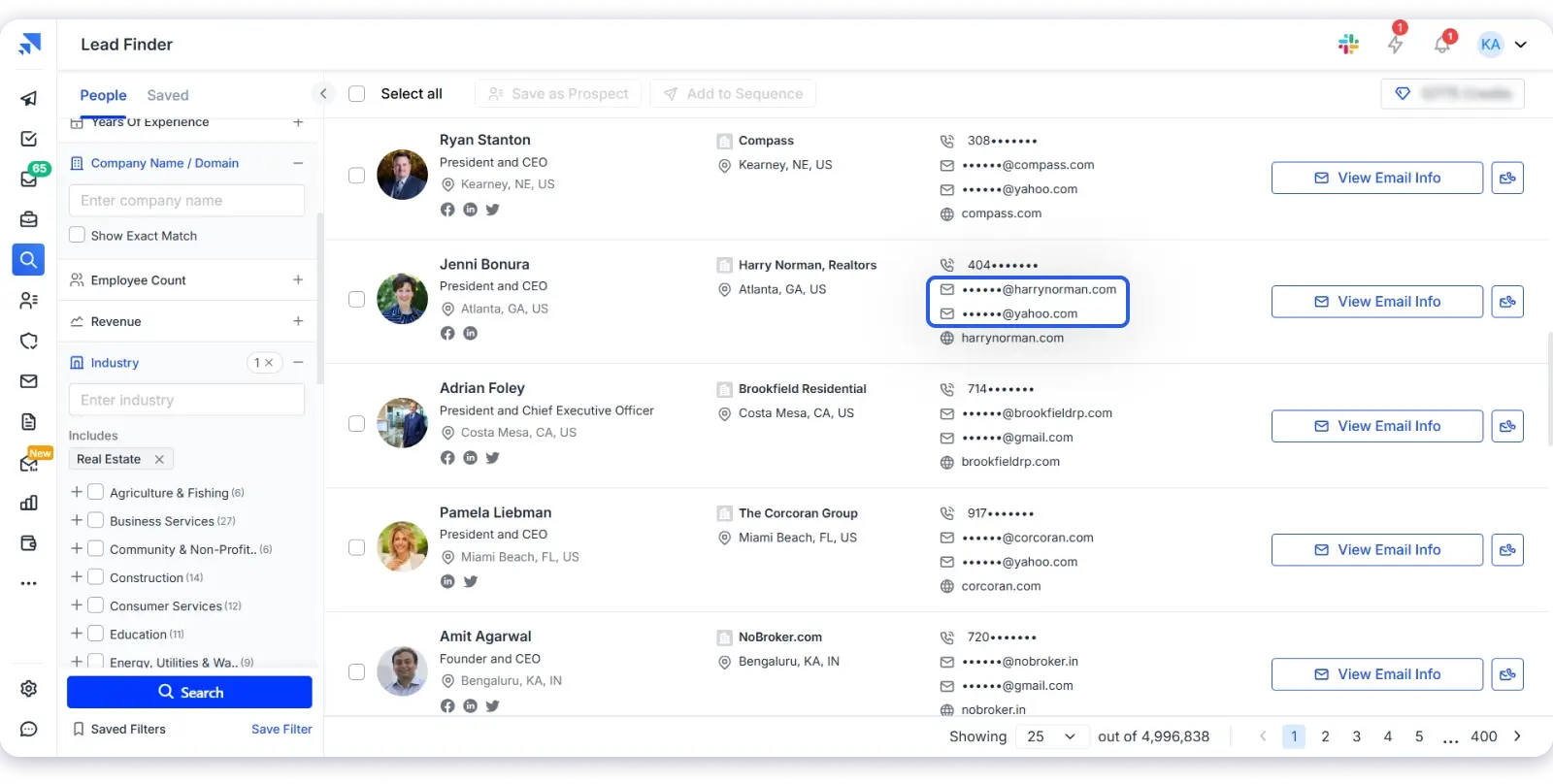
Most platforms only offers lead database. Saleshandy goes beyond by providing the complete process, from finding to reaching realtors.
You can find active realtors using AI Lead Search with one simple prompt. There is no need to set multiple filters manually.
If you want more control, you get 25+ advanced filters. These include location, keywords, and company-level targeting.
Once you find the right contacts, you can verify them instantly. Then, you can launch personalized cold email sequences from the same tool.
Saleshandy charges only two credits for email and phone data. Apart from that, you also get built-in deliverability features to protect inbox placement.
The interface is simple and easy to use. You can start prospecting and outreach without a long learning curve.
Key Features
- Advanced Filters: Find ICP leads using job title, location, industry, company size, and more.
- AI Lead Search: Find and export leads by title or domain, up to 10,000 at once.
- AI Prospect Enrichment: Create personalized icebreakers and email openers using AI.
- Chrome Extension: Get verified emails and phone numbers from LinkedIn instantly.
- Email Sequences: Build multi-step cold email campaigns with personalization.
- Trigger-Based Follow-ups: Automate follow-up emails based on opens, clicks, or replies.
- Integrations: Sync with Salesforce, HubSpot, Pipedrive, Zoho, and Zapier.
Pricing
Here are the four Lead Prospecting plans to help you choose based on your credit needs.
- Starter at $34/month (annual) with 18,000 credits/year.
- Pro at $76/month (annual) with 48,000 credits/year.
- Scale at $149/month (annual) with 96,000 credits/year.
- 7-day free trial, no credit card required.
2. ZoomInfo
ZoomInfo is one of the most established GTM intelligence platforms available today.
It is trusted by 35,000+ companies worldwide, which reflects its adoption among large B2B sales and revenue teams.
ZoomInfo provides access to 600M+ professional profiles, and 135M+ verified phone numbers, with 1.5B+ data points processed daily to keep contact and company records updated.
User Rating
- G2: 4.5⭐/5 based on 12,665+ reviews
- Capterra: 4.1⭐/5 based on 310+ reviews
Best for: Large teams that target real estate firms using account-level data and intent signals.
How ZoomInfo Helps You Build a Realtor Email List
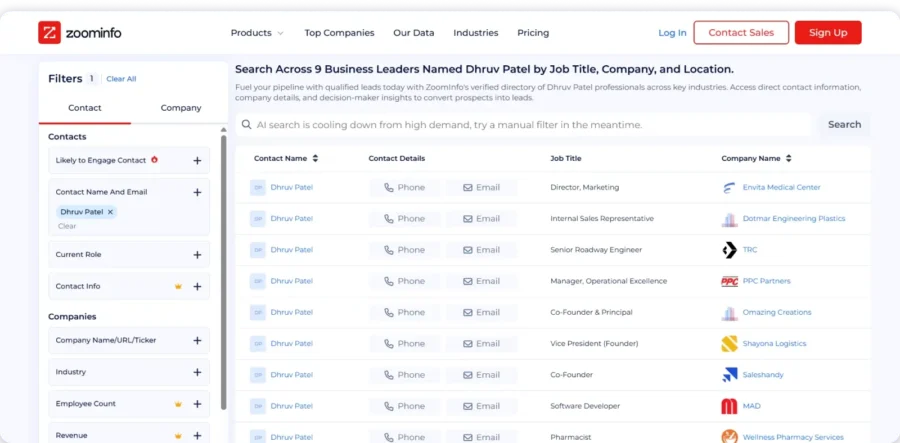
For building a realtor email list, ZoomInfo works at an account level. It helps target real estate brokerages, agencies, and firms using firmographics.
You can narrow searches using job titles, company hierarchy, and locations. This approach suits teams selling to real estate organizations.
ZoomInfo also includes intent data and buying signals. These signals help identify companies that may be evaluating new solutions.
There are some limitations when using ZoomInfo for realtor outreach.
Pricing is one of the factors to consider. ZoomInfo follows custom pricing and usually suits higher budgets.
Because of this, ZoomInfo fits teams with longer GTM cycles and structured outreach. It works best when account coverage matters more than outreach speed.
Key Features
- Advanced Filters: Find prospects by job title, company size, location, industry, and technographics.
- Intent Data: Track buying signals like job changes, funding, and tech adoption.
- AI Lead Scoring: Rank accounts and contacts based on fit and engagement.
- Workflow Automation: Route leads, sync CRM data, and trigger follow-ups.
- Chrome Extension: Find email addresses from LinkedIn, Gmail, and websites.
- Real-Time Enrichment: Add missing contact and company details instantly.
- Integrations: Connect with Salesforce, HubSpot, Pipedrive, Outreach, and APIs.
Pricing
ZoomInfo offers custom pricing for its different plans. You need to get in touch with their sales team.
3. Apollo.io
Apollo.io is a tool I often recommend when you want to start without spending upfront.
If you are building a realtor email list for the first time, the free tier helps. You get 50 email credits every month, which is enough for testing.
Apollo gives access to a large B2B database with 210M+ contacts and 35M+ company profiles, including real estate brokerages and agencies.
You also get 128M+ business and personal emails and 144M+ direct dials and mobile numbers across global markets.
User Rating
- G2: 4.7⭐/5 based on 9,270+ reviews
- Capterra: 4.5⭐/5 based on 380+ reviews
Best for: Teams that want to find realtor contacts and send emails from one tool.
How Apollo.io Helps You Build a Realtor Email List
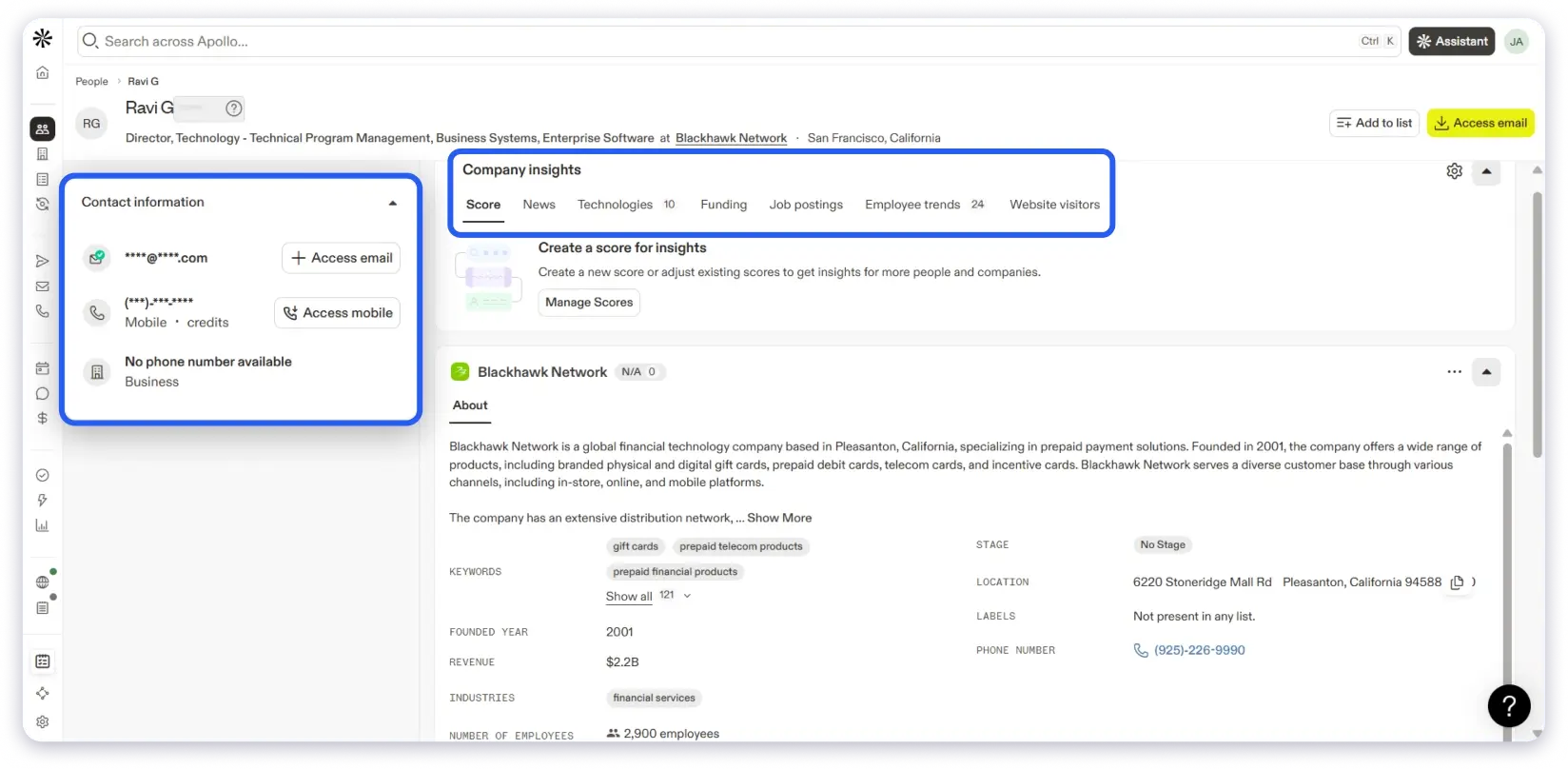
What I like is that you don’t need multiple tools. You can find realtor contacts, build lists, and send cold emails in one place.
Apollo verifies emails in real time and maintains a 91% email accuracy rate. This keeps bounce rates manageable when you are testing campaigns.
When you want more control, Apollo gives 65+ filters. You can filter by job title, location, company size, and intent signals.
It also offers buying intent data also helps you prioritize your cold outreach.
There are a few limits you should know about. Lower plans also have sending limits and faster credit usage. You may need to upgrade once you start scaling.
If you want to test realtor outreach before committing a budget, Apollo is a good place to start.
Key Features
- Advanced Filters: Build precise lists using 65+ filters like job title, industry, location, and technographics.
- AI Lead Scoring: Prioritize prospects based on fit, engagement, and buying signals.
- Data Enrichment: Add missing emails, phone numbers, and company details instantly.
- Chrome Extension: View and add Apollo data from LinkedIn, websites, and inboxes.
- Multichannel Sequences: Run outreach across email, calls, LinkedIn tasks, and manual steps.
- Email Verification: Verify emails and track delivery to protect sender reputation.
- Integrations: Sync with Salesforce, HubSpot, Pipedrive, Outreach, Zapier, and APIs.
Pricing
Here are the Apollo plans to help you choose based on credits and usage scale:
- Free – $0 (900 credits/year, granted monthly)
- Basic – $49/user/month (30,000 credits/year)
- Professional – $79/user/month (48,000 credits/year)
- Organization – $119/user/month (72,000 credits/year, minimum 3 users)
4. UpLead
Now, on my list is UpLead, a popular B2B contact data provider.
I am including UpLead on this list because of its accuracy-first approach, which guarantees 95% data accuracy.
It also provides access to 180M+ professional contacts across 200+ countries. So, you can search realtors using location, industry, company, and job title filters.
Not only that, each email address is verified in real time before export.
What do I like? If a valid email address is not found, no credits are deducted. This helps protect email deliverability during outreach.
User Rating
- G2: 4.7⭐/5 based on 800+ reviews
- Capterra: 4.6⭐/5 based on 75+ reviews
Best for: Teams that care more about email accuracy than running outreach from the same tool.

How UpLead Helps You Build a Realtor Email List
UpLead helps me build realtor email lists using its Prospector tool with 50+ search filters. I can narrow results by city, region, brokerage size, and job role without much effort.
As I adjust filters, the results refresh instantly. Emails are verified during the search itself, before I export anything. This helps avoid bounce issues when running outreach.
Each contact record shows the email address, phone number, and company details in one place. On higher plans, I can also see technographic and intent data for better context.
If I already have a realtor list, I can upload it to UpLead and fill in missing contact details. This saves time when working with partial or old data.
UpLead also connects with common CRMs and outreach tools, so moving contacts into campaigns does not require manual work.
Key Features
- Advanced Filters: Build targeted email lists using 50+ filters like job title, industry, location, and technographics.
- Real-Time Email Verification: Verify emails during search with a 95% accuracy guarantee.
- Intent Data: Identify companies showing buying signals to prioritize outreach.
- Technographics: Filter prospects based on the tools and software they use.
- Chrome Extension: Find verified emails and phone numbers from LinkedIn and websites.
- Data Enrichment: Add missing emails, phone numbers, and company details on demand.
- CRM Integrations: Sync data with Salesforce, HubSpot, Pipedrive, Zoho, Outreach, Zapier, and APIs.
Pricing
Here are the UpLead plans to help you choose based on credits and usage:
- Free Trial – $0 (7 days, 5 credits)
- Essentials – $99/month (170 credits/month)
- Plus – $199/month (400 credits/month)
- Professional – Custom pricing (custom seats and credits, annual billing only)
5. Lusha
Lusha is a go-to-market B2B data platform that you can use for quick B2B prospecting. It gives you access to 300M+ verified contacts and is trusted by 1M+ users worldwide.
You can search companies using details like revenue, headcount, and technology, which helps you find the right accounts and contacts during active outreach.
Lusha also keeps your data updated with verified emails, direct dials, and job details.
It includes signals like job changes, funding updates, and hiring activity, so timing your outreach becomes easier.
User Rating
- G2: 4.6⭐/5 based on 750+ reviews
- Capterra: 4.5⭐/5 based on 125+ reviews
Best for: Teams that need fast access to realtor contacts during active prospecting.

How Lusha Helps You Build a Realtor Email List
For realtor email lists, Lusha works best at the company level. It helps target brokerages, agencies, and real estate firms at scale.
Lusha also supports GTM automation. Tasks like list building, enrichment, de-duplication, and CRM updates run in the background.
The platform integrates with CRMs, email tools, and sales systems. This keeps data consistent across outreach and reporting tools.
Lusha maintains global coverage with strong compliance standards. It is GDPR compliant, CCPA compliant, and SOC 2 Type II certified.
That said, Lusha is built for speed and coverage. Teams that need strict email verification before export may need extra checks.
Key Features
- Advanced Filters: Find your ICPs using job title, company size, location, technographics, and intent topics.
- Intent Data: Reach prospects showing buying activity, tech adoption, or expansion signals.
- Chrome Extension: Reveal contacts from LinkedIn, websites, and Sales Navigator in bulk.
- Automated Sequences: Launch email campaigns directly from prospect lists.
- Email Personalization: Create tailored messages using account and buyer context.
- Real-Time Enrichment: Verify and enrich contacts during prospecting or bulk uploads.
- CRM Integrations: Sync data with Salesforce, HubSpot, and other tools using API or Zapier.
Pricing
Here are the Lusha plans to help you choose based on credits and team size:
- Free – $0/month (40 credits/month)
- Starter – $37.45/month billed yearly (4,800 credits/year)
- Pro – $52.45/month billed yearly (7,200 credits/year, 2 seats)
- Premium – $299.95/month billed yearly (40,800 credits/year, 5 seats)
- Scale – Custom pricing (custom credits and seats for large teams)
6. Lead411
Lead411 gives access to a large database with 450M+ contacts for real estate and construction companies.
Basically, it provides you with data for real estate and construction businesses. You can find brokers, developers, property managers, and investors.
Next, it includes project and expansion signals. This allows you to see companies starting new projects, hiring teams, or receiving funding before you reach out.
User Rating
- G2: 4.3⭐/5 based on 1,500+ reviews
- Capterra: 4.1⭐/5 based on 390+ reviews
Best for: Teams selling to real estate companies that are hiring or starting new projects.
How Lead411 Helps You Build a Realtor Email List
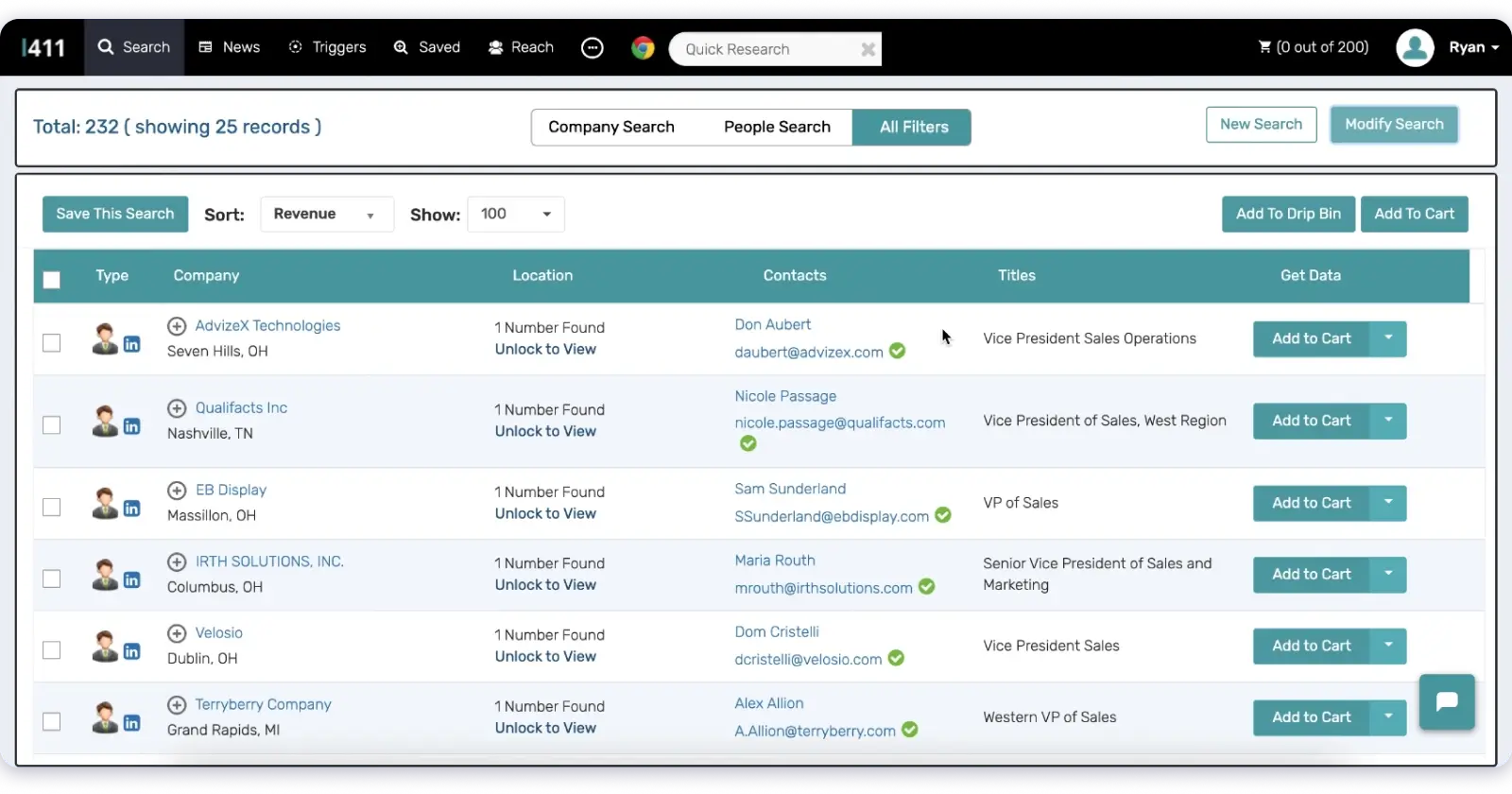
When I use Lead411, I start by selecting the company type and role I want to reach. This helps me look only at residential, commercial, or industrial real estate firms.
Each contact shows a verified email and a direct phone number. This reduces the risk of calling wrong numbers or emailing inactive contacts.
I can export the list as a CSV file or sync it with Salesforce or HubSpot. This way, it allows me to keep my contact list ready for outreach without extra manual work.
I also see signals like new projects or hiring updates. This helps me decide the right time to reach out instead of using old information.
Key Features
- Advanced Filters: Search by job title, industry, location, company size, revenue, and ICP criteria.
- Intent Data: Use Bombora signals to find prospects showing buying, hiring, or funding activity.
- Chrome Extension: View contact details and insights while browsing LinkedIn or company websites.
- Email Verification: Use triple-verified emails and double-verified phone numbers for reliable outreach.
- Data Enrichment: Add firmographics, mobile numbers, and technographics to existing records.
- CRM Integrations: Sync data with Salesforce, HubSpot, Outreach, and APIs for workflow automation.
Pricing
Here are the Lead411 plans to help you choose based on exports and usage:
- Pilot Light (Free Trial) – $0 for 7 days (50 exports)
- Spark – $49/month (1,000 exports per month)
- Ignite – Starts at $150/month (1,000+ exports per month, higher limits available)
Buyer intent data and unlimited access are available on annual plans, with custom pricing for larger teams.
7. ContactOut
ContactOut is another popular lead database platform that is used by many Fortune 500 companies.
It provides access to a large global database built from fresh data sources rather than recycled contact lists.
For building a realtor email list, ContactOut works well when you need direct emails and phone numbers fast.
There are three reasons ContactOut fits this use case.
- First, it gives access to 800M+ people profiles and 40M company profiles.
- Second, it offers strong email and phone coverage. This includes 200M work emails, 150M personal emails, and 100M direct dials.
- Third, contact data goes through triple verification. Emails and phone numbers are checked with 99% confidence and updated every hour.
User Rating
- G2: 4.5⭐/5 based on 100+ reviews
- Capterra: 4.5⭐/5 based on 11 reviews
Best for: Teams that need direct emails and phone numbers while browsing LinkedIn profiles.

How ContactOut Helps You Build a Realtor Email List
ContactOut lets you search people and companies using 20+ data points. You can filter by job title, company, location, industry, and skills.
It works well when prospecting on LinkedIn. The Chrome extension shows emails and phone numbers while browsing profiles.
You can also use the search portal to build lists outside LinkedIn. Contacts can be added to outreach tools in one click.
For teams that need automation, ContactOut offers an API. Contact records update hourly and sync with other systems.
ContactOut follows GDPR and CCPA rules. This helps teams stay compliant while running outreach.
Key Features
- Chrome Extension: Find verified emails and phone numbers directly from LinkedIn and Sales Navigator.
- Bulk Email Finder: Find emails in bulk from company domains or uploaded lists.
- Triple Verification: Verify emails using SMTP, human checks, and open validation.
- Email Campaigns: Run multi-step email sequences with one-click lead import.
- AI Personalization: Create personalized email content using profile-level data.
- CRM Integrations: Sync leads with Salesforce, HubSpot, and other tools via API.
- Lead Insights: View email patterns and enriched profile details for better outreach.
Pricing
Here are the pricing plans to help you choose based on data access and exports:
- Free – $0/month (5 emails, 5 phones, 5 exports per day)
- Email – $49/month (unlimited emails, 300 exports per month)
- Email + Phone – $99/month (unlimited emails and phones, 600 exports per month)
- Team / API – Custom pricing (API access, bulk licenses, integrations, team controls)
All plans include US and UK data, browser extension access, and portal-based searching, with higher tiers unlocking enrichment, automation, and team features.
You can also check ContacOut alternatives to find the right platform for your requirements.
8. LeadIQ
Next on the list is LeadIQ. It supports prospecting directly from LinkedIn and the web, making it useful during daily research.
Instead of creating bulk lists upfront, it helps you collect realtor contacts as you browse profiles.
As you capture leads, LeadIQ keeps the data updated inside tools like Salesforce and HubSpot.
When a realtor or decision-maker changes roles, you can track that update and reconnect at the right time.
User Rating
- G2: 4.2⭐/5 based on 1,145+ reviews
- Capterra: 4.4⭐/5 based on 20+ reviews
Best for: Teams that build realtor lists manually during daily LinkedIn prospecting.
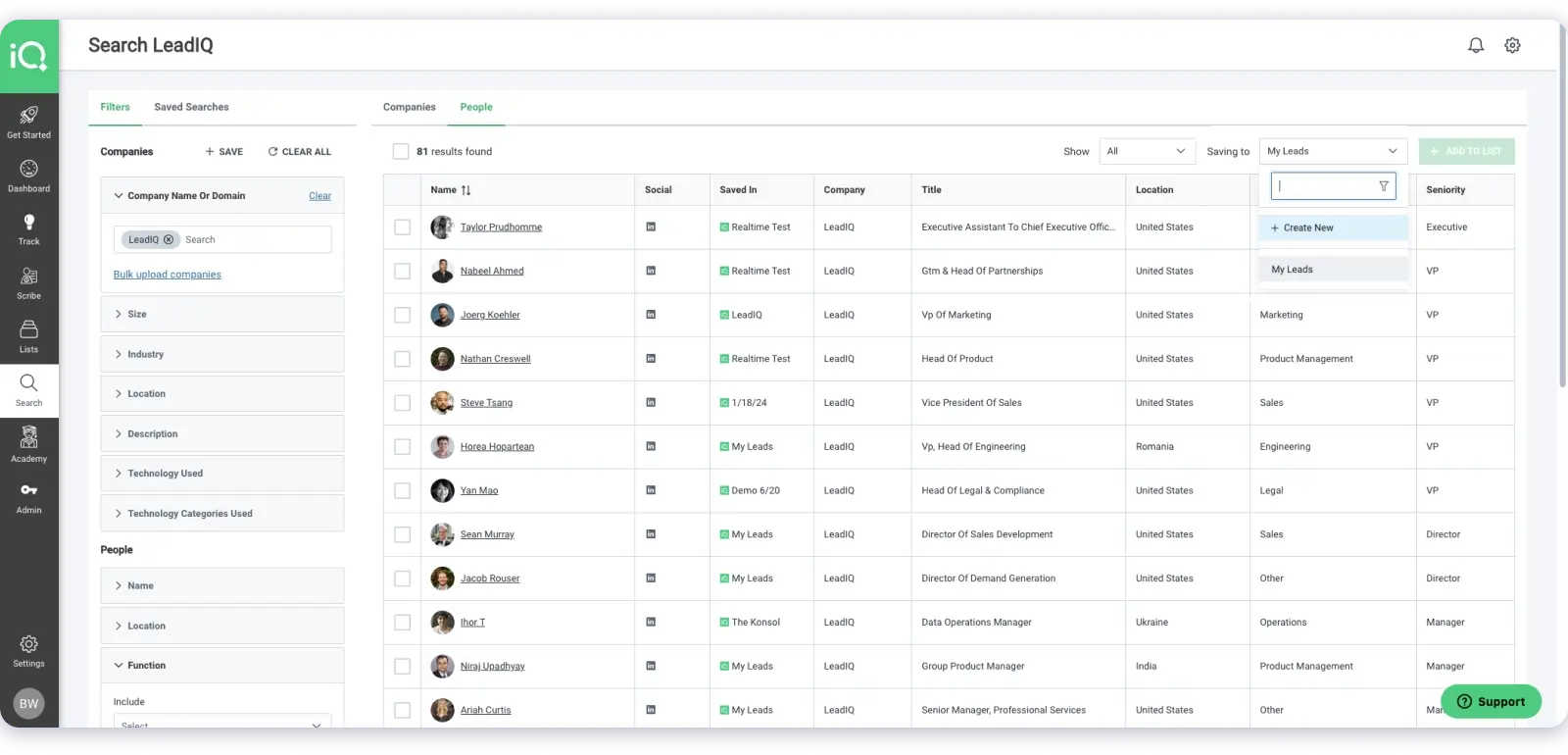
How LeadIQ Helps You Build a Realtor Email List
LeadIQ fits naturally into your daily prospecting flow. You open LinkedIn profiles and save contacts with a single click. Email addresses and phone numbers move straight into your CRM without manual copying.
Captured leads sync automatically with your sales tools, which helps avoid missing fields or outdated records. You can also write personalized emails using profile and company details while prospecting.
Job change tracking keeps you aware when contacts switch roles. This makes it easier to restart conversations when new opportunities appear.
Key Features
- Chrome Extension: Capture verified emails and phone numbers from LinkedIn or websites in one click.
- Advanced Filters: Build targeted lists using firmographics, technographics, intent data, and ICP criteria.
- AI Account Prospecting: Identify ideal accounts and key stakeholders using AI-based filters and buying signals.
- AI Personalization: Generate tailored emails and icebreakers using account and buyer context.
- Multichannel Sequences: Run outreach across email, calls, and LinkedIn with task tracking.
- CRM Enrichment: Update Salesforce and HubSpot records automatically with fresh contact data.
- Integrations: Connect with Salesloft, Outreach, Gong, and Zapier for workflow sync.
Pricing
Here are the LeadIQ plans to help you choose based on credits and team scale:
- Free: $0 (50 credits, 1 user)
- Pro: $15/month (up to 5 users, annual or monthly billing)
- Enterprise: Custom pricing (custom users, credits, and controls)
All plans support browser-based prospecting, job change tracking, CRM enrichment, and core integrations, while higher tiers unlock database search, automation, analytics, and admin-level controls.
9. BookYourData
BookYourData lets you buy targeted realtor email lists without subscriptions or long-term commitments. I simply search, apply filters, download the list, and pay only for what I use.
It gives access to 500M+ profiles and 250M+ contacts across 200+ countries, including 2M+ real estate agents and realtors.
What I like is how quickly I can move from search to export, with results updating instantly as I adjust filters.
Emails are verified at the time of export, not later. The platform provides a 97% accuracy guarantee, and I get credits back if an email is not valid.
Pricing stays simple and usage-based, with no monthly limits or contracts to manage.
User Rating
- G2: 4.9⭐/5 based on 378 reviews
- Capterra: 5.0⭐/5 based on 71 reviews
Best for: Teams that want to buy realtor email lists without subscriptions or long-term plans.
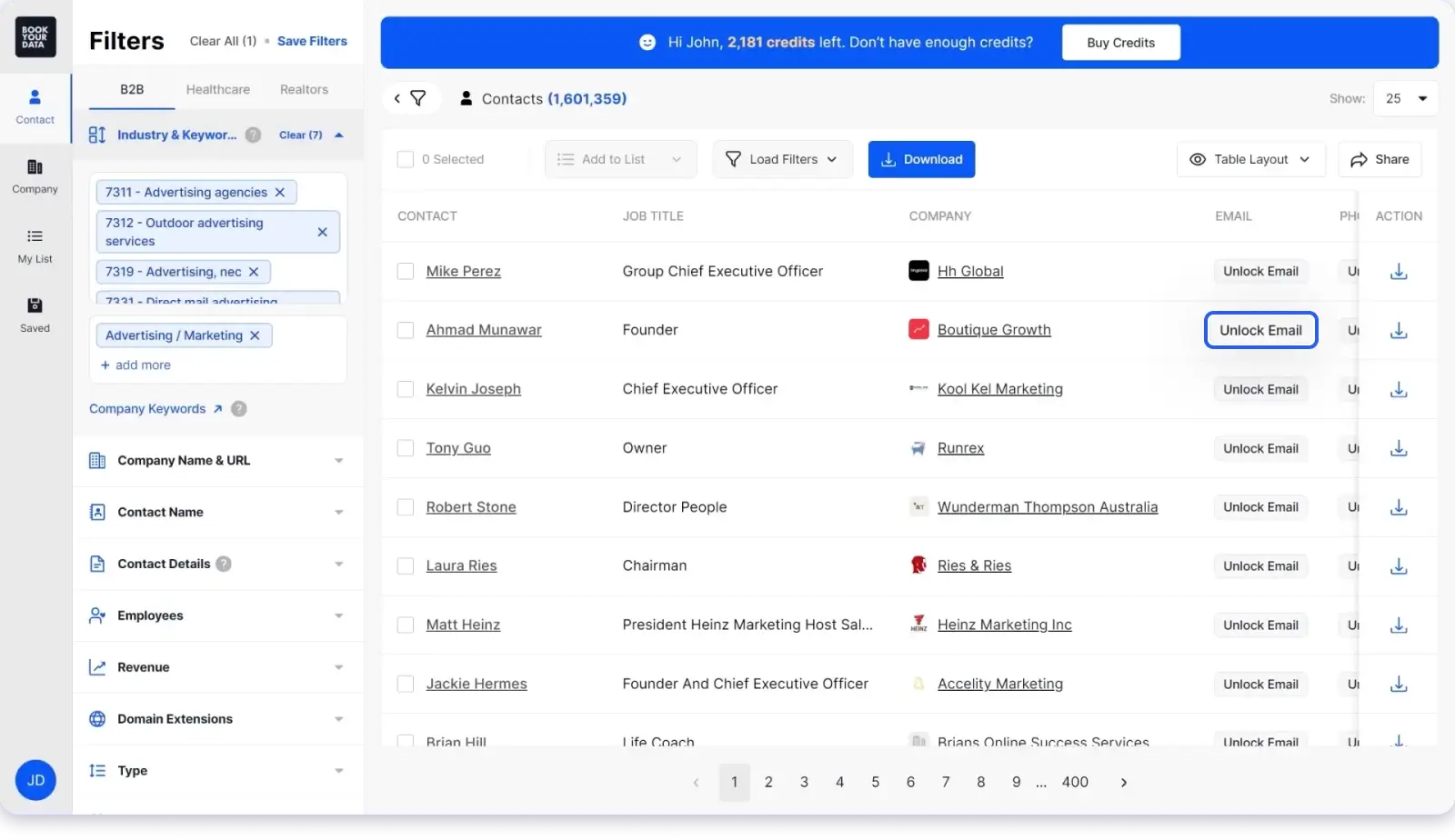
How BookYourData Helps You Build a Realtor Email List
BookYourData offers 100+ filters to build realtor lists by location, job role, company size, revenue, and more. As I refine the filters, search results refresh in real time, so there is no delay between searching and exporting.
Emails are checked during export, which helps reduce failed sends in campaigns. I can download large realtor lists in one step, without caps or waiting.
The platform follows GDPR and CCPA guidelines, which support compliant outreach.
From my experience, BookYourData fits best when I need verified realtor data quickly, without committing to a monthly plan.
Key Features
- Advanced Filters: Build targeted lists using 100+ fields like job title, industry, location, revenue, and technographics.
- Lead Builder: Create on-demand lists using ICP criteria, intent signals, and technographic data.
- Data Enrichment: Add missing mobile numbers, social profiles, funding data, and job postings.
- Predictive Lead Scoring: Prioritize prospects based on fit and engagement potential.
- Data Segmentation: Group leads by geography, behavior, or tech stack for targeted campaigns.
- CRM Integrations: Sync data with Salesforce, HubSpot, Pipedrive, Zapier, and APIs.
- Bulk Exports: Download unlimited lists in CSV format for immediate campaign use.
Pricing
Bookyourdata uses a pay-as-you-go pricing model, not subscriptions. You only pay for verified contacts when you need them, with no monthly commitment.
Choose the Best Realtor Email List Provider
You are at the final step now. You have seen why random realtor email lists fail and how these platforms give you more control over data quality and targeting.
If you are still reading, you are likely unsure which one to choose.
Then I had to suggest just one action,
➜ Try Saleshandy (you get free credits to test real realtor data)
You will quickly see why it stands apart from the rest.
Related Guide: How to Build a High-Quality Real Estate Broker Email List.
FAQs About Realtor Email List
1. Is it legal to buy a realtor email list?
Yes, buying a realtor email list is legal if the data is collected and used responsibly. Most platforms follow GDPR and CAN-SPAM rules. You still need to include opt-out options and follow email outreach best practices.
2. Why do most realtor email lists fail?
Most lists fail because they include inactive agents, outdated emails, or mixed profiles like homeowners and builders. Poor filtering and a lack of verification usually lead to bounces and low response rates.
3. What is the most reliable way to get a realtor email list?
The most reliable way is to use a B2B lead database with real-time verification. Tools like Saleshandy, ZoomInfo, and UpLead provide filtered and verified realtor contact data, unlike generic list sellers.
4. Can I filter realtor emails by location and brokerage?
Yes. Most professional platforms let you filter by city, state, country, brokerage size, job role, and company type. This helps you reach only relevant realtors instead of broad, unqualified lists.
5. How do I know if realtor emails are active?
You need to look for platforms that verify emails before export. Real-time verification ensures emails are active and usable, which reduces bounces during outreach campaigns.

 Anil Salvi