

Real estate brokers aren’t just agents with a fancier title.
They’re licensed professionals who can operate independently, manage their own firms, and oversee transactions that agents legally cannot handle alone.
That’s exactly why they’re the decision-makers that mortgage lenders, PropTech companies, title firms, and marketing agencies want to reach.
But finding their verified email addresses?
That’s where it falls apart.
This guide takes a different approach.
You’ll learn how to build your own real estate broker email list from a real-time verified database to save your time and effort.
Let’s dig into it!
Build a Real Estate Broker Email List – TOC
- TL;DR: Building a Real Estate Broker Email List That Converts
- Why Buying a Pre-Built Broker Email List Is a Waste of Money
- What a Good Real Estate Broker Email List Includes
- How to Build an Accurate Real Estate Broker Email List Using Saleshandy Lead Finder
- BONUS: How to Build a Broker Email List for Free
- Start Outreach After Building Your Broker Email List
- FAQs on Real Estate Broker Email List
TL;DR: Building a Real Estate Broker Email List That Converts
- You can find real estate broker email lists through specialized B2B database providers such as Saleshandy lead finder as they offer real-time verification and filtering by location, brokerage size, or job role.
- Avoid pre-built lists from public directories as they will give you outdated and generic contact information.
- Manual research takes too much time and doesn’t scale automation is the better approach.
Why Buying a Pre-Built Broker Email List Is a Waste of Money
You should avoid buying a pre-built email list!
Because at first, it sounds good with paying a few hundred dollars, downloading a CSV with thousands of broker contacts, and starting to email.
But here’s what actually happens.
- Brokers Change Firms Constantly
- Generic Lists Mix Agents with Brokers
- No Verification Means Sender Reputation Damage
- One-Time Purchase, Zero Refresh
1. Brokers Change Firms Constantly
Real estate brokers switch companies all the time.
That means their work email changes too.
In B2B, contact data becomes outdated by about 2.1% every month. In real estate, it’s even worse because brokers move frequently.
Example: A broker working at Coldwell Banker in January could move to Compass by April.
2. Generic Lists Mix Agents with Brokers
Most vendors lump every licensed real estate professional into one file.
Licensed sales agents, associate brokers, managing brokers, and broker-owners all end up in the same CSV.
If you’re a mortgage lender, a PropTech company, or a title company that needs to reach the actual decision-makers at brokerages.
You’ll waste hours filtering through irrelevant agent contacts.
3. No Verification Means Sender Reputation Damage
When you send to outdated addresses, your bounce rate spikes.
High bounce rates trigger spam filters. Your domain gets flagged. And it doesn’t just hurt your broker campaign.
It drags down the email deliverability of that domain.
4. One-Time Purchase, Zero Refresh
You buy a CSV, and it starts decaying the same day.
There’s no re-verification, no automatic updates and no way to filter the list further after purchase.
Hence, building your own list from a real-time verified database solves every one of these problems.
What a Good Real Estate Broker Email List Includes
Not all broker lists are created equal.
Here’s what separates usable data from a wasted download.
| Data Field | Why It Matters |
|---|---|
| Verified business email | Not a generic info@ or office@ address. You need the broker’s direct work email that actually reaches them. |
| Full name | First + last name for personalization. “Hi John” gets replies. “Dear Sir/Madam” gets deleted. |
| Direct phone number | A mobile or direct line, not the brokerage front desk. Critical if you’re combining email with cold calling. |
| Brokerage name | Needed for personalization. “I saw [Brokerage Name] is expanding in Dallas” hits differently than a generic pitch. |
| Job title | Broker, Managing Broker, Associate Broker, Principal Broker, or Broker-Owner. This is how you separate decision-makers from agents. |
| Location | State, city, or ZIP. A mortgage lender in Florida doesn’t need broker emails from Oregon. |
| Company size | Solo broker vs. 50-agent firm vs. 100+ agent brokerage. Your pitch changes based on who you’re selling to. |
| LinkedIn profile URL | For multi-channel outreach. Follow up on LinkedIn after the first email to stay visible. |
Quick Check: If any list you’re evaluating (built or bought) is missing verified emails, direct phone numbers, or title-level filtering, skip it. It won’t give you the targeting precision you need.
How to Build an Accurate Real Estate Broker Email List Using Saleshandy Lead Finder
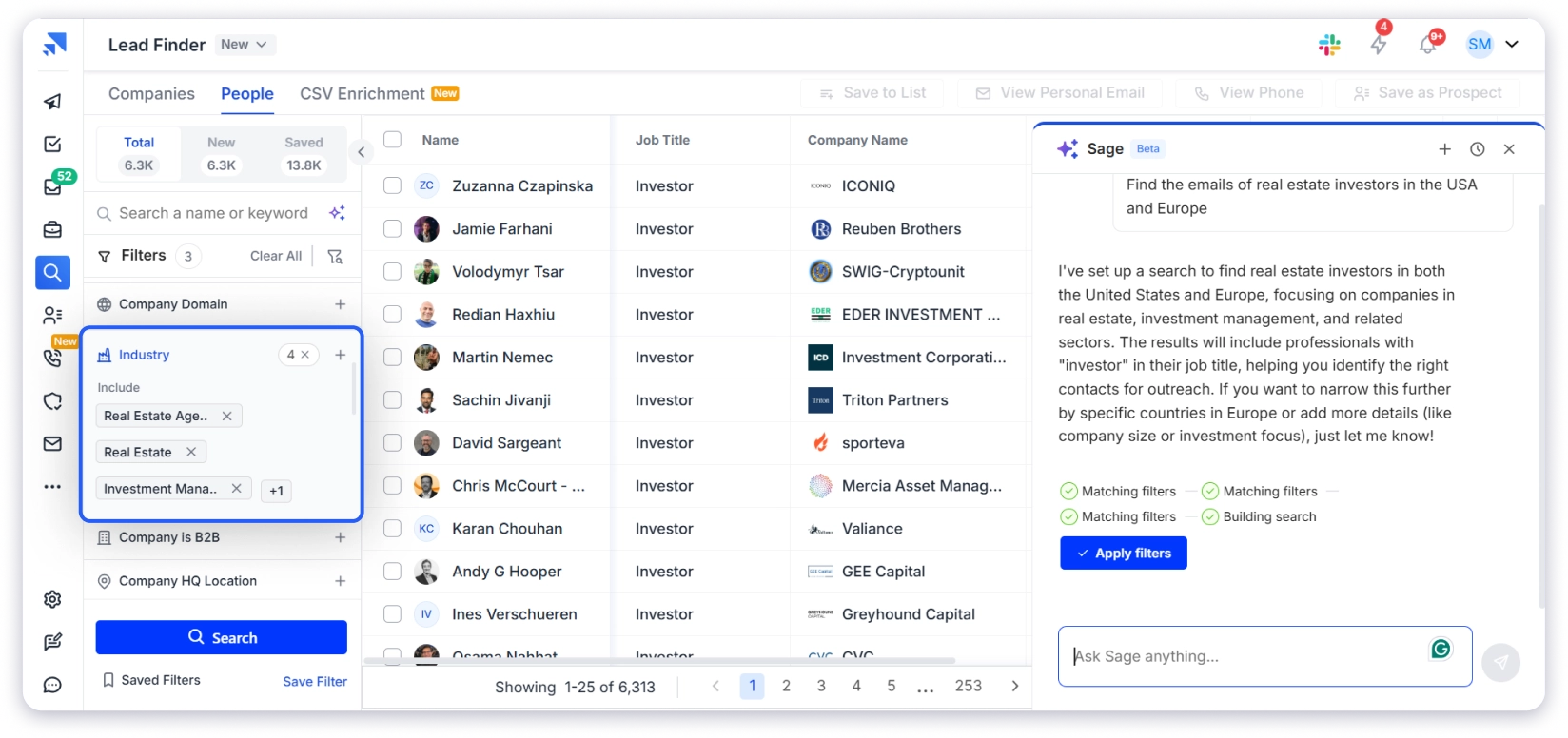
Here’s the exact step-by-step process using Saleshandy Lead Finder.
You don’t need a separate verification tool, and everything happens on one platform.
- Step 1: Open Saleshandy Lead Finder and Switch to the People Tab
- Step 2: Set the Industry Filter to Real Estate
- Step 3: Add Job Title Filters for Brokers
- Step 4: Set Your Location Filter
- Step 5: Narrow by Company Size
- Step 6: Reveal and Verify Contacts
- Step 7: Export and Directly Start Your Outreach
Step 1: Open Saleshandy Lead Finder and Switch to the People Tab
Log in to Saleshandy and click Lead Finder in the left sidebar
Make sure you’re on the People tab (not Companies).
This is where you’ll search the 852M+ contact database.
Step 2: Set the Industry Filter to Real Estate
In the left-hand filter panel, find the Industry filter
Type and select “Real Estate.”
This instantly narrows the database to only real estate professionals.
Step 3: Add Job Title Filters for Brokers
This is the most important filter. It’s what separates a broker list from a generic agent dump.
Go to the Job Title filter and add:
- Real Estate Broker
- Commercial Real Estate Broker
- Leasing Residential Broker
- Real Estate Agencies
Pro Tip: Check the “Show Exact Match” box to avoid pulling in unrelated titles like “Insurance Broker” or “Freight Broker.” This keeps your list clean from the start.
If your campaign targets loan or financing professionals, build a separate Mortgage Broker Email List instead of mixing them with real estate broker contacts.
Step 4: Set Your Location Filter
Go to the Location filter and select your target geography.
- USA: California, Texas, Florida, and New York have the highest broker populations. Use state-level filters if you’re a mortgage lender (state-regulated). Use city-level for metros like Miami, Dallas, or LA.
- Global: The database covers global markets, including the UAE, UK, Canada, Australia, and India. You can build a real estate broker email list for Dubai, London, Toronto, or any other market using the same workflow.
Step 5: Narrow by Company Size
Use the Company Size filter to segment by brokerage headcount:
- 1-10 employees: Solo brokers and small boutique firms
- 11-50 employees: Mid-size brokerages
- 51-200+ employees: Large firms
Match this to whoever your product or service actually fits.
Step 6: Reveal and Verify Contacts
Click “View Email Info” or “View Phone Info” next to any contact.
Saleshandy runs waterfall enrichment behind the scenes.
It checks 9 data providers in sequence (Findymail, Prospeo, RocketReach, Wiza, and others) until it finds a verified email and phone number.
- 95%+ email accuracy
- The credits are only charged when a verified contact is found.
- No need for a separate email verification tool.
Step 7: Export and Directly Start Your Outreach
You have two options:
- Export as CSV: Download up to 10,000 contacts at once for use in other tools
- Add to Sequence: Push contacts directly into a Saleshandy cold email sequence with one click. No CSV upload, no broken formatting, no data sitting in a spreadsheet.
Note: Use the Net New tab to automatically filter out contacts you’ve already saved. This way, you never waste credits on duplicates.
BONUS: How to Build a Broker Email List for Free
Yes, you can build a broker email list for free.
But it comes at a cost.
Instead of money, you will spend time and effort. And even then, the data may not always be reliable.
Here are the best free methods, along with their limitations.
- State Licensing Board Websites
- NAR and Local Association Directories
- LinkedIn Manual Search
- Individual Brokerage Websites
1. State Licensing Board Websites
Every US state publishes licensed broker directories.
California’s DRE, Texas TREC, New York DOS, and Florida DBPR all maintain searchable databases.
You’ll find broker names, license numbers, and sometimes office addresses.
These directories are mostly useful for verifying names and license status, not for building an outreach-ready list.
2. NAR and Local Association Directories
The National Association of Realtors’ “Find a Realtor” tool and local board directories list members publicly.
But they’re designed for consumers looking for an agent, not for B2B prospecting.
There’s no bulk export, no filtering by broker title vs. agent, and no email extraction.
3. LinkedIn Manual Search
Search “Real Estate Broker” + your target city on LinkedIn.
This works for 10-20 highly targeted contacts, not for building a list at scale.
4. Individual Brokerage Websites
Go to brokerage office pages for Keller Williams, RE/MAX, Coldwell Banker, or Compass.
Pull the broker/owner from the “About” or “Team” page. Extremely manual.
Good for hyper-targeted lists of 5-10 specific brokers you want to reach.
These methods work when you need a handful of contacts.
For anything beyond 50-100, a B2B lead finder tool saves hours and delivers verified data you can actually use.
Now the list is ready, but what if I tell you that you can send emails from the same tool?
You can start creating a sequence and sending it automatically, that too for free.
Let’s understand how to do that.
Start Outreach After Building Your Broker Email List
You have verified broker emails. Now turn them into conversations.
- Create a Sequence: Go to Sequences in Saleshandy, click “Create Sequence,” and name it something specific, like “Real Estate Brokers — California Q2.”
- Add Your Contacts: Contacts pushed from Lead Finder are already there. For CSV uploads, click “Add Prospects” and Saleshandy maps the fields automatically.
- Write Your First Email: Draft it yourself or use the AI Sequence Copilot. Saleshandy generates up to 26 unique variants per step so no two brokers get the same email.
- Set Follow-Ups: Add 3-5 steps over 2-3 weeks. Use Subsequences to trigger different follow-ups based on opens, clicks, or no engagement.
- Activate Sender Rotation: Connect multiple email accounts. Saleshandy rotates between them to protect your email deliverability.
- Track Replies: Unified Inbox shows every reply in one view, auto-tagged by interest level. Move warm brokers into Saleshandy CRM to manage next steps.
- Stay Compliant: Physical address + unsubscribe link (CAN-SPAM). CCPA for California. GDPR for EU/UK. Local laws for the UAE.
Related guide: How to Find Real Estate Investors & Their Verified Contact Information.
FAQs on Real Estate Broker Email List
1. How do I get a real estate broker email list?
Use Saleshandy Lead Finder. Set the industry to Real Estate, add job title filters for Broker or Managing Broker, filter by location, and reveal verified emails in real time.
2. Is it legal to email real estate brokers?
Yes. B2B cold email is legal under CAN-SPAM in the US. Include a physical address, an unsubscribe link, and honest subject lines. California brokers also follow CCPA. For international markets, follow GDPR or local data laws.
3. How much does a real estate broker email list cost?
Static lists from data vendors cost $69 to $30,000+, depending on size. Saleshandy Lead Finder starts at $49/month with 30,000 credits/year and real-time verification included.
4. What’s the difference between a broker email list and an agent email list?
Brokers hold a higher-level license and typically manage offices or own brokerages. Agents work under brokers. If you need decision-makers, filter for broker titles specifically.
5. Can I get a free real estate broker email list?
Partially. State licensing boards and NAR directories publish broker names and license numbers for free. But most don’t include email addresses. For verified emails at scale, you need a database tool.
6. How often should I update my broker email list?
Every 30 days at minimum. B2B emails go invalid at roughly 2.1% per month. With a real-time verified source like Lead Finder, this isn’t a concern since every email is checked the moment you reveal it.

 Anil Salvi