


Cold emails are dead!
But the reality is..
It’s halfway true.
Cold Emails are which are dead:
- Have AI-written scripts.
- Recycled templates.
- And the same 7-line “hope you’re well” messages that are sent to millions of inboxes every day.
By 2026, everyone will have access to powerful AI writers… which means every prospect’s inbox now looks the same.
- Perfect grammar.
- Zero relevance.
- And reply rates are hitting the floor.
But here’s the twist no one expected:
While generic outreach is collapsing, hyper-personalized cold emails are hitting 40–60% reply rates again.
Cold email is not dead, but it’s evolving.
And the teams winning in 2026 are not sending more emails…
They are sending relevant ones.
This guide is specifically curated to take a new approach to cold email personalization that is relevant in 2026.
Cold Email Personalization – TOC
- Cold Email Personalization TL;DR
- Why Generic and AI-Written Emails Fail in 2026?
- The Core Pillars of Effective Cold Email Personalization
- How to Personalize Each Part of a Cold Email?
- How Smart Teams Personalize Outreach in 2026?
- Real Examples of Good vs Bad Personalization
- Best Practices for Cold Email Personalization
- Conclusion: Personalization Is Not Rocket Science
- FAQs on Cold Email Personalization
Cold Email Personalization TL;DR
Personalization Is About Relevance: It’s not about {{FirstName}} — it’s about showing why your message matters to them right now.
Use the 4 Pillars: Relevance, Context, Intent, and Clarity. When these align, your email naturally feels 1:1.
Personalize the Essentials: A signal-based subject line, a specific intro, one workflow insight, and a low-effort CTA.
Avoid the Usual Traps: Outdated information, copied compliments, long emails, and CTAs that feel like work.
Measure Reply-Worthy Personalization: Focus on replies, meetings booked, and time saved — not just opens.
Scale Without Losing the Human Tone: Saleshandy enriches prospects, personalizes sequences, rotates inboxes, warms domains, and keeps replies organized.
Why Generic and AI-Written Emails Fail in 2026?
Generic and AI-generated cold emails are widely available and therefore have no impact.
And not only this, here are the most prominent reasons why these types of cold emails will fail in 2026:
- AI Uses a Similar Tone, Which Makes Emails Sound the Same
- AI Can Generate Text, but It Cannot Generate Context
- Generic Emails Don’t Respect the Reader’s Time
- AI-Written Emails Lack Micro-imperfections
1. AI Uses a Similar Tone, Which Makes Emails Sound the Same
If you have used AI tools, be it ChatGPT, Grok, or Gemini.
You’ll know the tone and structure of the email is very similar.
Some sentences and patterns are common in every result, such as:
- “Saw you’re doing great work at…”
- “Reaching out because we help companies like yours…”
- “Quick question about your strategy…”
Using such phrases gives readers the idea that it is AI-written and can be simply ignored.
2. AI Can Generate Text, but It Cannot Generate Context
The whole idea of personalization is to add details that make your recipients feel more familiar.
For Example:
- A recent post on LinkedIn
- Updates their website
- Hired/hiring for a new role
- Mentioned a pain point publicly
And this, you cannot rely on AI or just use generic sentences.
The effort you put into researching your prospects is essential for them to see the relevance of your email.
3. Generic Emails Don’t Respect the Reader’s Time
The timing of your cold email directly affects your open/reply rates.
If your emails are not perfectly scheduled, a simple message is delivered, which is:
“This is a general message written and sent to 500 other people.”
In 2026, it gets ignored faster than ever.
4. AI-Written Emails Lack Micro-imperfections
It is often heard that imperfections make things more human.
So it does in cold emails as well.
Real human messages with:
- Slightly uneven sentences
- Natural breaks
- Imperfect phrasing
- A conversational vibe
This attracts more to your prospects than a polished AI-written email.
If you’re curious about the best tools that actually help with cold email personalization, check this list of AI tools that can boost modern outreach.
The Core Pillars of Effective Cold Email Personalization
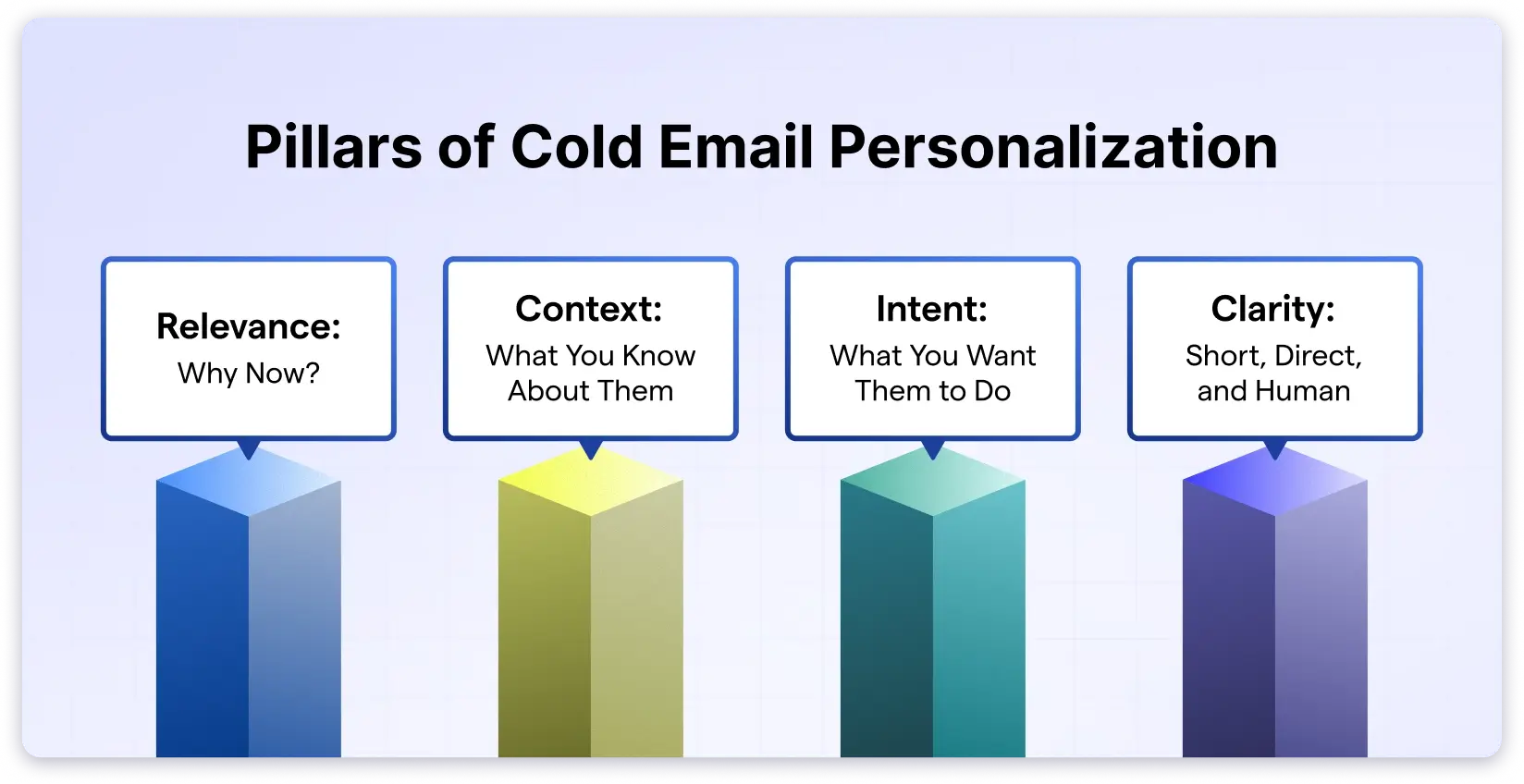
Not everything needs your extreme attention in your cold emails if you focus on these four pillars of cold email personalization, and they are:
- Relevance: Why Now?
- Context: What You Know About Them
- Intent: What You Want Them to Do
- Clarity: Short, Direct, and Human
1. Relevance: Why Now?
The first pillar for an effective personalization is Relevance.
It’s not about why you decided to send them a message, but why your message makes sense for them at this stage in their role, team, or company.
It shows you are reaching out to them, not because they are on your prospect list, but to understand the problem they are facing.
Some of the examples that speak to relevance are:
- “Noticed you recently switched your ICP focus to mid-market. This usually changes how teams run outbound.”
- “Looks like you’re actively hiring SDRs. Most teams hit follow-up fatigue during onboarding.”
- “Saw your team published a new case study last week, which usually means you’re doubling down on lead generation.”
2. Context: What You Know About Them
This is the second and most important foundation of cold email personalization.
Context establishes the connection between your email and the specific situation they are in.
A short research about your prospect before reaching out to them builds an instant trust.
It is simply acknowledging something true about their role, team, or challenges, showing you understand how their world works.
Some examples that showcase the context part of the email are:
- “As a Head of Sales, keeping the pipeline steady is probably your biggest headache right now.”
- “Your RevOps team is small, so I’m guessing you’re wearing multiple hats during the scaling phase.”
- “Since you handle onboarding, you’re likely managing both training and performance metrics.”
- “Given that you’re entering the mid-market space, outbound volume is probably becoming a priority.”
3. Intent: What You Want Them to Do
Now, when you have researched your prospect and know what issue they are currently dealing with, and have the right solution for it.
Intent should be pitched.
Not like a pushy salesy pitch, but more like a light offer that they cannot decline.
It should answer from a prospect’s perspective: “What’s the simplest next step you want from me?”
A few examples of less pushy intents in emails:
- “Want the snippet we used to increase reply rates by 18% in your segment?”
- “Should I send a sample sequence so you can compare it with yours?”
- “Want the 30-second breakdown we gave another team dealing with the same issue?”
4. Clarity: Short, Direct, and Human
The final pillar of cold email personalization is bringing clarity to your messages.
Clarity means removing everything that feels like a script or a pitch.
Using short sentences and simple words.
A tone that feels like a person wrote it, not an AI model or a template.
These examples will help you understand this more:
- “Saw your update and thought of sharing this”
- “Quick thought you might like.”
- “Not sure if this is useful, but here it is.”
- “Here’s something simple that might save time.”
How to Personalize Each Part of a Cold Email?
In this section, I’ll share how you can personalize each section of your cold email, which includes:
- How to Personalize Subject Lines That Get Opened?
- How to Write Opening Lines That Feel Specific, Not Scripted?
- How to Write Email Body Content That Shows You Understand Their Workflow?
- How to Write CTAs That Feel Relevant, Not Generic?
1. How to Personalize Subject Lines That Get Opened?
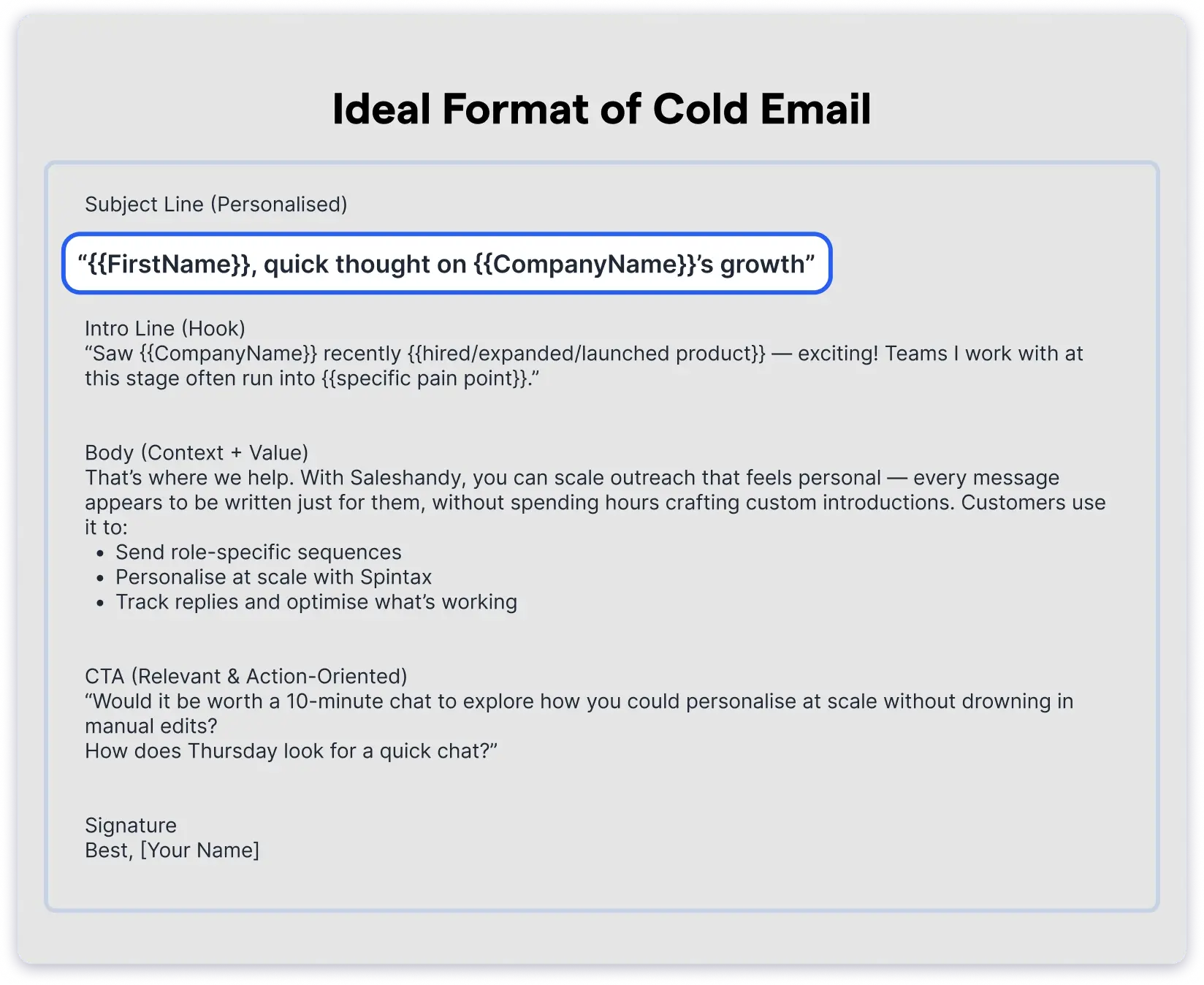
Subject lines are the first thing your recipients notice when your email lands.
If you fail to capture their attention within 2-5 seconds, your email is dead to them.
Always ensure your subject line is catchy and concise, consisting of no more than seven words.
Subject Line Examples:
- {{First Name}}, your work caught my eye— let’s chat!
- {{First Name}}, may I introduce myself briefly?
- Thought this might help with your campaign!
- Your post got me thinking…
2. How to Write Opening Lines That Feel Specific, Not Scripted?
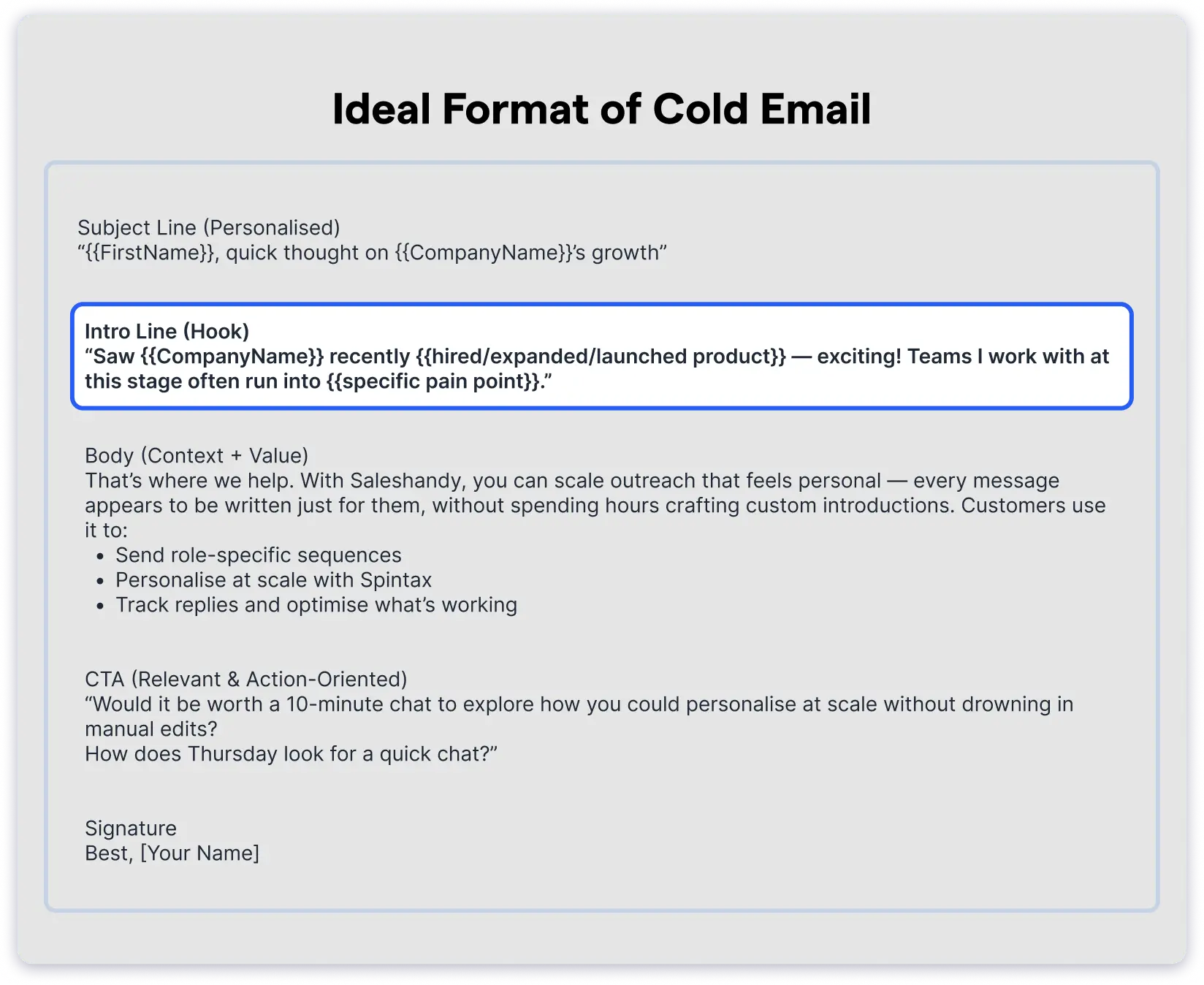
If your subject lines caught attention, then your intro should maintain the curiosity.
Email intros should be no longer than 20 words.
Take a moment to learn a bit about the person you’re emailing. It shows you’re intentional and not just blasting names from a list.
Intro Line Examples:
- I noticed you’re hiring new SDRs, an exciting but chaotic phase.
- Really loved your LinkedIn post about reply rates dropping — super relatable.
- Your new pricing page caught my eye, and I’m curious how it’s converting.
- In SaaS, most teams struggle to achieve reply rates above 5%. Wondering if you’re seeing the same?
3. How to Write Email Body Content That Shows You Understand Their Workflow?
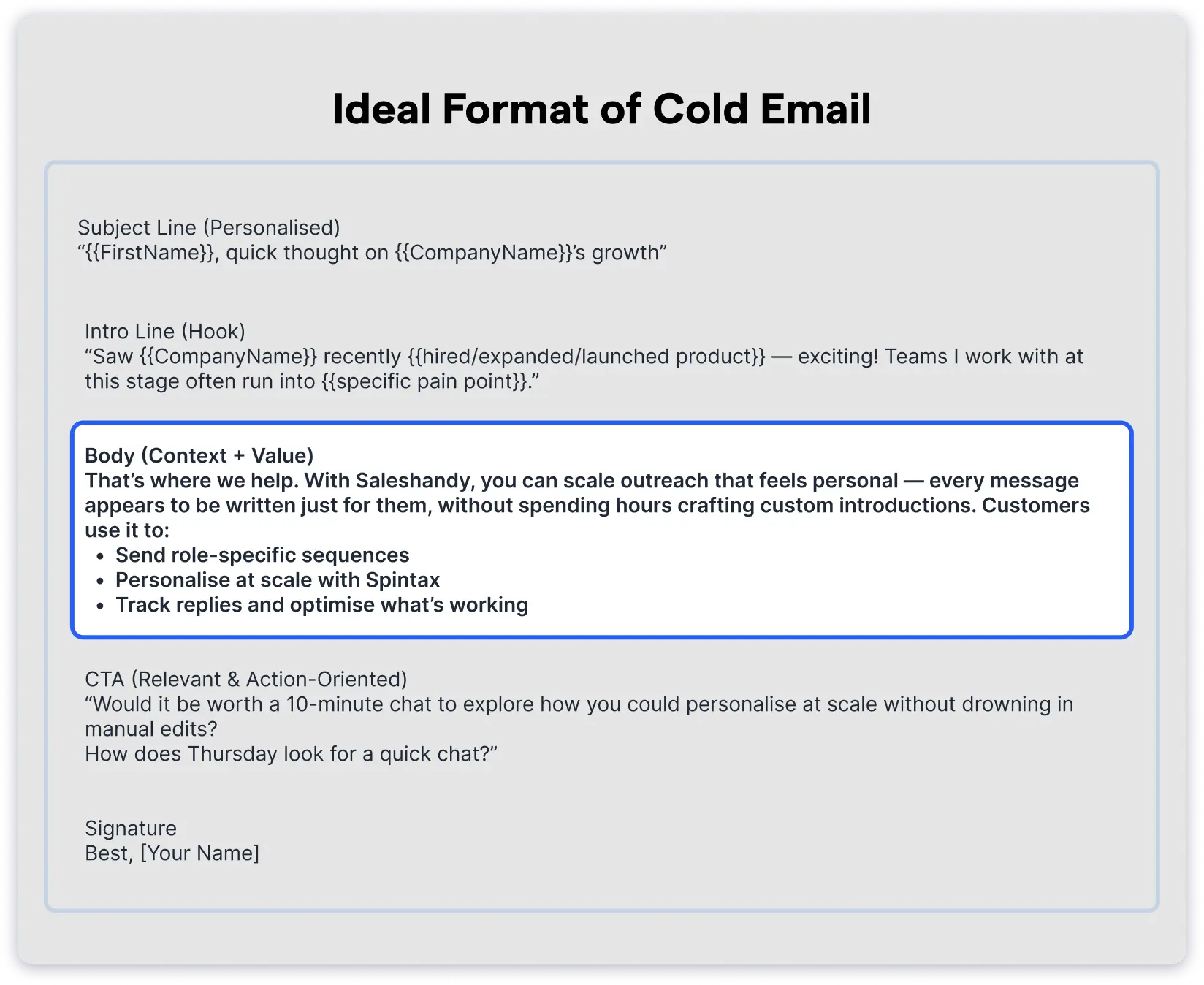
Once your intro hooks them, your body copy should make them feel that you understand the day-to-day realities of their workflow.
It should be concise and focused solely on understanding the problem they face.
Keep it tied to something already happening in their team that needs a solution.
You don’t need lengthy explanations, just a quick insight to keep the curiosity alive.
Body Copy Examples:
- Many teams have their follow-ups slip when they get busy — we have a simple reminder setup.
- Most SaaS teams deal with demo no-shows as the pipeline grows fast; a small pre-demo nudge helped us reduce them.
- As companies expand, inbox load becomes messy — a unified inbox and routing system helped us ensure every reply was handled quickly.
- Most SaaS teams hit a slump in reply rates during high-volume months. We used a small personalization sequence to make outreach feel 1:1 again.
4. How to Write CTAs That Feel Relevant, Not Generic?
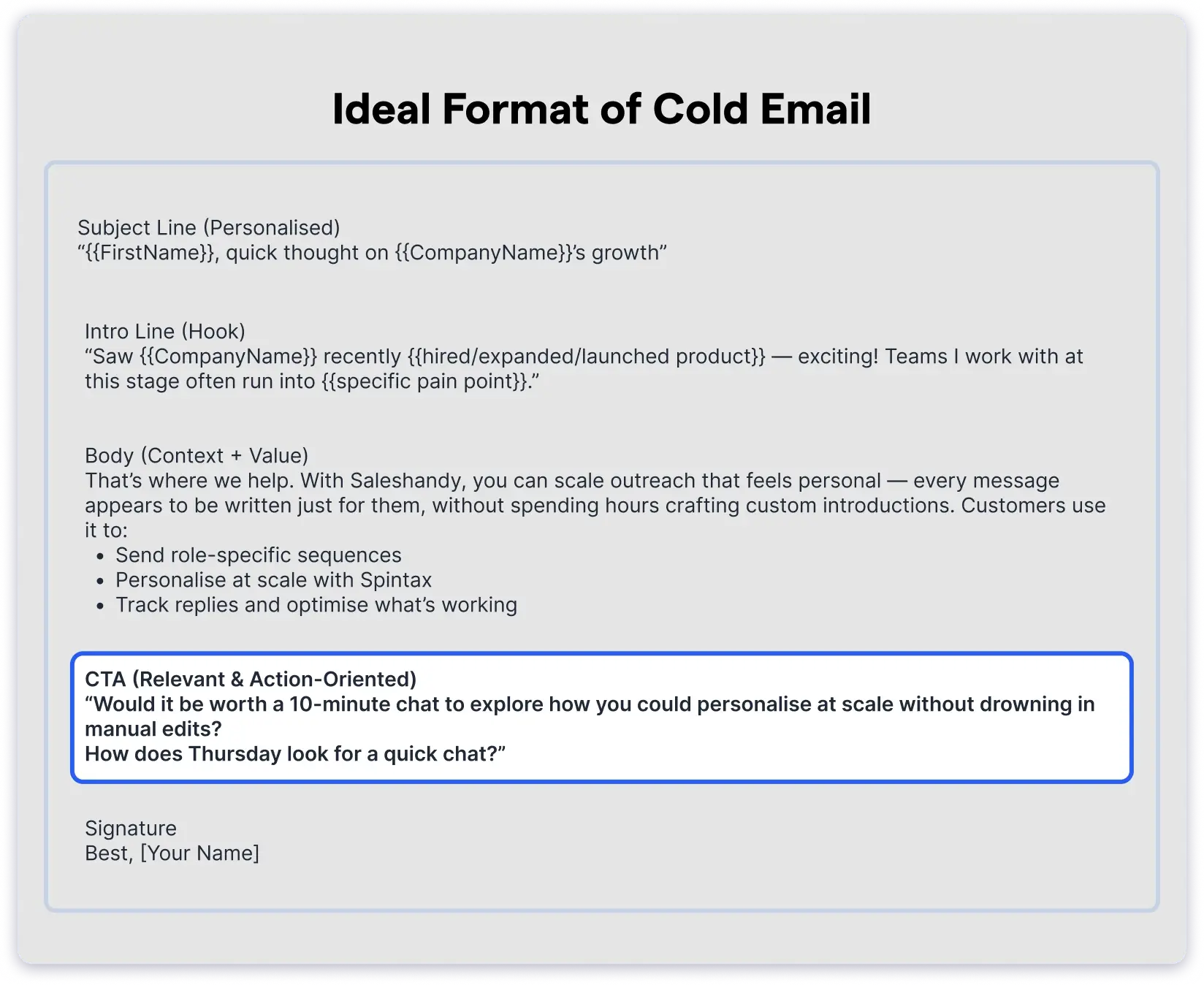
A soft nudge or CTA (call to action) at the end of your email ensures your prospects are not leaving empty-handed.
You should always use low-pressure CTAs that feel natural after a conversation. Don’t ask for a 30-minute call straight away.
Your aim should be to deliver value to recipients at the end of your cold email.
CTA Examples:
- Let’s hop on a quick chat to discuss this further.
- Would you like a short demo to help you achieve {{Goal}}?
- Would you like me to send a detailed report on this matter?
- Want a quick comparison to see how others achieved this?
This hyper-personalizes each section of your cold email to align with your prospect’s intent and drive higher response rates.
How Smart Teams Personalize Outreach in 2026?
Manual personalization makes sense only when you have a small list of targeted prospects.
When you are dealing with a large list of prospects, including high-end ones, you can rely on these tactics for hyper-personalization.
- Research Tools: Find Personalization Signals Fast
- Enrichment Tools: Understand the Prospect’s Business Better
- Writing Support Tools: Craft Personal Messages, Faster
- Sending Tools: Deliver Personalized Emails at Scale
1. Research Tools: Find Personalization Signals Fast
Researching about your prospects with accuracy is the hardest part of personalization.
It can be simplified with a reliable tool.
Research tools help you quickly spot signals like hiring updates, role changes, funding, product launches, or posts your prospect has recently published.
Tools You Can Rely on:
- Clay – It is an AI research platform that captures real-time data such as hiring, funding, and technology .
- LinkedIn & Sales Navigator – Most frequently visited and best place to find genuine personal and professional details about your prospects.
- Google Alerts – This is most effective for monitoring recent company news updates without constant checking.
- Wappalyzer – It is a technology profiler that helps you identify which websites and tools your prospects already use.
Why this Works:
Using these tools will produce high-quality research, setting your cold email apart from generic researched ones.
2. Enrichment Tools: Understand the Prospect’s Business Better
Even when the research is done, there are chances that the information is old or missing relevance.
Enrichment tools help fill in missing details and make your messages sound relevant rather than random.
Tools You Can Rely on:
- AI Prospect Enrichment – This feature automatically analyzes the prospect’s role, responsibilities, company stage, industry, and ICP fit. It also generates valuable insights you can instantly plug into your email.
- Apollo – It has a massive database to pull out accurate contact and role details.
- Crunchbase – A popular platform to know the company size, funding history, and growth stage of any organization.
Check this detailed guide to know more about how AI Prospect Enrichment works.
Why this Works:
Each of your emails sounds distinct and relates well to the intended recipient while remaining accurate.
3. Writing Support Tools: Craft Personal Messages, Faster
Personalization only makes sense when you are able to compose all that information into one perfect cold email.
And that is challenging when you have thousands of prospects, but specific tools can help.
Tools You Can Rely on:
- ChatGPT / Grok – AI platforms can create ideal messages when you give them solid information-backed prompts.
- Notion/Obsidian – A note-taking platform perfect for saving personalization snippets, hooks, and research notes.
Why this Works:
With these tools, you can send personalized messages, saving every extra minute you would have spent writing them manually.
4. Sending Tools: Deliver Personalized Emails at Scale
At this point, you cannot mess it up, so it is better to use a trusted tool for smooth sending.
Deliverability is a major issue when sending cold emails at scale, and this is where tools like Saleshandy come in.
Tools You Can Rely on:
Saleshandy helps you in:
- Advanced Sequence Personalization – It helps custom first lines and role-based variations using merge tags and spintax.
- Inbox rotation – Rotates the sending order, especially during high-volume, to protect the sender’s reputation.
- Email warmup – To help your domain land in primary inboxes, not elsewhere.
- Unified Inbox – To keep every conversation organized across emails so you don’t miss anything important.
- Analytics – A detailed analysis of your open rates, reply rates, and link clicks to know precisely which of your cold emails are working and which one needs improvement.
Why this Works:
Sending tools help improve deliverability and manage bulk email without compromising the personal touch in your messages.
These tools enhance your personalization while saving you time and effort, making it a win-win.
Real Examples of Good vs Bad Personalization
In theory, personalization sounds good, but let us take a few good and bad examples of cold emails to understand how much of a difference it actually makes.
Bad Example: 1
Subject: Quick question for you?
Hi {{First Name}},
I hope you are doing well.
I’m reaching out because we help companies like yours streamline sales processes and improve overall performance through our advanced sales engagement platform.
Our tool has helped many organizations automate their outreach, increase conversions, and simplify workflows.
I would love to schedule 30 minutes to walk you through our features and show you how we can support your team.
Let me know what time works best for you.
Thanks,
{{Name}}
What’s Wrong?
- Sounds generic
- Not mentioning something personal
- Long, vague, and feature-heavy
- No personalization beyond the name
- Asks for 30 minutes with no value given
Good Example: 1
Subject: Quick idea after your SDR hiring update!
Hi {{First Name}},
I saw you are onboarding two new SDRs, and that’s usually when follow-ups start slipping for a few weeks.
We went through the same phase last quarter, and tightening our workflow for new representatives kept our response times steady during that period.
Sharing this because your hiring post sounded way too familiar.
If you’d like, I can share the short follow-up flow we used—no pitch, just what worked for us.
Best,
{{First Name}}
(P.S. I added a quick note of the workflow we used in case it’s easier to skim.)
Bad Example: 2
Subject: Improve your reply rates.
Hi {{First Name}},
I was browsing your website and wanted to reach out. We offer a best-in-class outreach solution that helps teams boost reply rates and drive more revenue.
Our AI-powered platform is used by top companies worldwide and could be a great fit for your sales team.
I’d love to show you a full product demo. Are you available this week?
Regards,
{{First Name}}
What’s Wrong?
- Says nothing about the prospect
- “Browsing your website” is vague
- Filled with generic marketing phrases
- The immediate demo is too heavy
Good Example: 2
Subject: Noticed your post about reply rates.
Hi {{First Name}},
Your LinkedIn post about reply rates dipping in Q1 felt very relatable, and we hit the same wall last year.
What helped us was simplifying the first line of each email. Reps stopped overthinking intros, and replies picked up within two weeks.
Thought I’d send this because your post sounded exactly like where we were a few months ago.
I’ve attached the three introductory lines we used—feel free to use them.
Let me know if you want more examples.
Best,
{{First Name}}
Bad Example: 3
Subject: Boost your demo booked!
Hi {{First Name}},
I work with SaaS companies to improve the number of demos booked using our unique automation platform.
We have helped many teams like yours reach the highest number of demo bookings.
Our tool helps reduce no-shows, schedule faster, and streamline workflows.
I believe this could be highly beneficial to your business.
Do you have 20–30 minutes this week to discuss?
Best,
{{First Name}}
What’s Wrong?
- Template-style opener
- No relevance or context
- Too product-based
- Again, the cta is too heavy
Good Example: 3
Subject: Saw your demo push, here’s something we did that helped!
Hi {{First Name}},
I noticed your team has been promoting more live demos lately, and that phase usually brings a spike in no-shows (we learned the hard way).
When we reached that point, a simple two-touch reminder flow brought our attendance rate back up without changing the product or scheduling setup.
Sharing this because it looks like you’re driving more demo volume, and this might save you the same dip we experienced.
Want me to send the exact reminder flow we used?
Warmly,
{{First Name}}
P.S. I added a short example message below that you can use if it helps your reps.
The examples above will help you clearly distinguish between name-sake personalized and hyper-personalized emails.
Want even more real? Here are the proven B2B Cold Email Templates you can copy, customize, and send.
Best Practices for Cold Email Personalization
Let us understand in detail some of the best practices of cold email personalization in 2026, which you can adopt in your outreach to maximise your response rates.
- Keep It Short
- Use One Strong Signal
- Avoid Forced Praise
- Make Your CTA Low-Effort
- Test Your Data Sources Before Scaling
- Always Send From Clean Domains
1. Keep It Short
Most prospects read your email in the middle of something else between meetings, while switching tabs, or right before they close their laptop.
If your message feels long or heavy, they’ll simply save it for later, and that rarely happens.
A short email doesn’t look lazy, but considerate.
How to Apply it:
- Aim for 4–6 lines, not a whole story.
- Say one thing well instead of five things badly.
- If a sentence doesn’t move the conversation forward, remove it.
2. Use One Strong Signal
You don’t need to prove you researched them.
You just need one meaningful signal that makes your email feel intentional, like a recent post, a hiring change, a new feature, or something they said publicly.
Prospects can sense when you’re trying too hard and also when you’re being specific for a reason.
How to Apply it:
- Pick the strongest signal or relevant information and let it be your first line.
- Don’t stack information just to show effort because it feels unnatural.
- Always choose a piece of information that connects back to the problem you are mentioning.
3. Avoid Forced Praise
There’s nothing wrong with appreciation, but only when it sounds real.
Prospects receive dozens of emails that start with “loved your work” and “admire what you’re building,” even when it’s clearly copy-pasted.
Forced praise triggers the opposite reaction you want, which is losing authenticity.
How to Apply it:
- Don’t praise unless you can point to something specific.
- Replace flattery with a simple observation about their work.
- Keep the tone neutral, not overly enthusiastic.
4. Make Your CTA Low-Effort
A high-pressure CTA will kill the conversation before it even starts.
A low-friction ask, on the other hand, feels like a natural next step.
How to Apply it:
- Ask small, such as “Want me to send this?” or “Want a quick example?”
- Ensure your CTA aligns with the email’s context.
- Don’t push time commitments until they express interest.
5. Test Your Data Sources Before Scaling
Not all personalization is equal and gets the same response.
It is a continuous process of trying and testing what works and what doesn’t.
You only learn this through testing and scaling.
How to Apply it:
- Start by sending a small number of cold emails before scaling sequences.
- Track reply rate by personalization style.
- Keep using what works and drop what does not.
6. Always Send From Clean Domains
Even the best personalized email won’t work if it never reaches the inbox, and deliverability in 2026 is a whole challenge of its own.
Your sender reputation is now a big part of your personalization strategy.
How to Apply it:
- Warm up every new inbox.
- Use inbox rotation to avoid sudden spikes.
- Keep bounce rates and spam complaints low.
- Don’t send from domains with no established sender reputation, such as a completely new domain or account.
Keeping these best practices in mind when starting your personalization and cold email outreach will increase efficiency and ultimately maximize results.
Conclusion: Personalization Is Not Rocket Science
If your prospect reads your email and thinks, “Okay, this actually feels like it’s for me,” then you have already nailed personalization.
It really is that simple.
And when you need to keep that same level of personalization while reaching thousands of prospects, tools like Saleshandy help you do it smoothly without losing the human touch.
Start with accurate information, short messages, and a clear intent.
And keep doing that, and your cold emails will consistently start the right conversations.
FAQs on Cold Email Personalization
1. What is the best way to personalize a cold email?
The best approach is to combine basic details about your prospect (name, job role, company) with role-specific pain points. A short, relevant intro line plus a clear CTA makes personalization feel genuine, not forced.
2. How much personalization is enough in a cold email?
You should never overdo personalization. One or two personalized elements (such as a recent company milestone or a role-specific challenge) are enough to make your email stand out without making it bulky.
3. Can personalization be automated without sounding robotic?
Yes. Using tools like Saleshandy, you can automate with Spintax, role-based sequences, and merge tags while still keeping each email natural and human.
4. What are common mistakes in cold email personalization?
Some common mistakes include relying solely on first-name tags, using outdated information, writing lengthy introductions, or personalizing the opener while leaving the rest of the email generic.
5. How do you measure if personalization is working?
Track reply rates, meetings booked, and time saved compared to manual sendings. If personalization isn’t improving replies, refine your subject lines, intros, or CTAs.
 Anil Salvi
![Cold Email Subject Lines: 200+ Examples [2026 Benchmarks]](https://www.saleshandy.com/blog/wp-content/uploads/2025/10/Best-Cold-Email-Subject-Lines-to-Win-Replies-1.webp)