
Finding small business owners is easy.
But getting their real email address?
That is where it gets frustrating.
You end up with info@ inboxes nobody checks. Or you buy a “verified” list that gives you outdated data and damages your sender reputation.
After running hundreds of outbound campaigns, one thing became very clear to me.
The teams that book meetings do not search harder.
They use methods that give them verified email addresses without the guesswork.
In this guide, I have put together 5 methods to build a small business owner’s email list in 2026.
Let’s get into it.
Table of Contents
- TL;DR: Best Ways to Build a Small Business Owners Email List
- How to Build a Small Business Owner Email List Using a Lead Finder (Step-by-Step)
- 5 Other Ways to Build a Small Business Owners Email List
- Why You Should Only Use Verified Email Addresses
- Start Building Your Verified Small Business Owner Email List
- FAQs
TL;DR: Best Ways to Build a Small Business Owners Email List
You can find small business owner emails through LinkedIn, Google search operators, public directories, AI tools, or events and referrals. These methods are free but manual, and accuracy drops as you scale.
The most accurate method I have tested is using a B2B lead database like Saleshandy Lead Finder to quickly get a real-time, verified list of small business owner emails.
- Open & log in to Saleshandy Lead Finder.
- Set filters for job title (Owner, Founder, CEO), industry, and location.
- Get verified small business owner emails in seconds.
- Add them directly to your outreach sequence.
How to Build a Small Business Owner Email List Using a Lead Finder (Step-by-Step)
If you’re looking for someone’s business email, this is the method I’d start with.
This is the method I recommend if you need a verified small business owner email list you can send to today.
I have tested multiple approaches over the years, and a real-time B2B lead database consistently delivers the highest accuracy with the least effort.
Here is how it works with Saleshandy Lead Finder, step by step.
Step 1: Define the Small Business Owner You Want to Reach
Get clear on who you are looking for before you touch any filter.
Otherwise, you end up with a list full of contacts that do not match your target.
For this walkthrough, let us say you sell to HVAC companies. Your ideal prospect looks something like this:
- Who: Owner, Founder
- What: HVAC / Air Conditioning companies
- Where: Dallas, Texas
- Size: 1-50 employees
The more specific you get here, the less time you waste later.
📘 Quick Note: Lead Finder uses a credit-based system. 1 credit = 1 verified contact. You are only charged when verification passes through 9 data providers. Precision in filters = efficient credit usage.
Step 2: Log In to Saleshandy Lead Finder
Saleshandy gives you access to a database of 852M+ small business owners across 42M+ companies, with 75+ advanced filters. You get up to 50 free credits when you sign up, no credit card required.
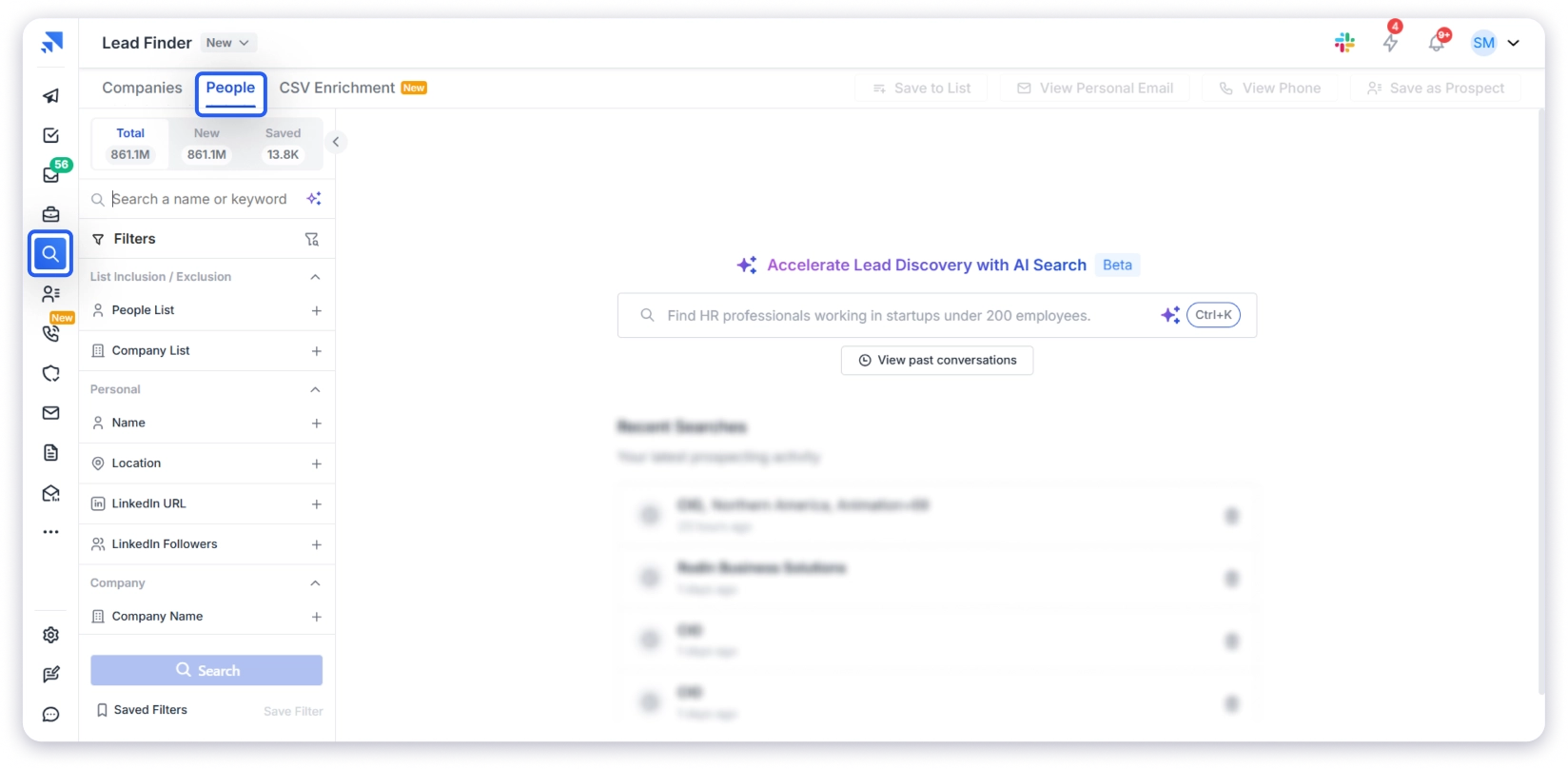
Once you are inside, head to the Lead Finder tab and click on People search.
This is where you build your verified small business owners’ email list.
Step 3: Set Your Location
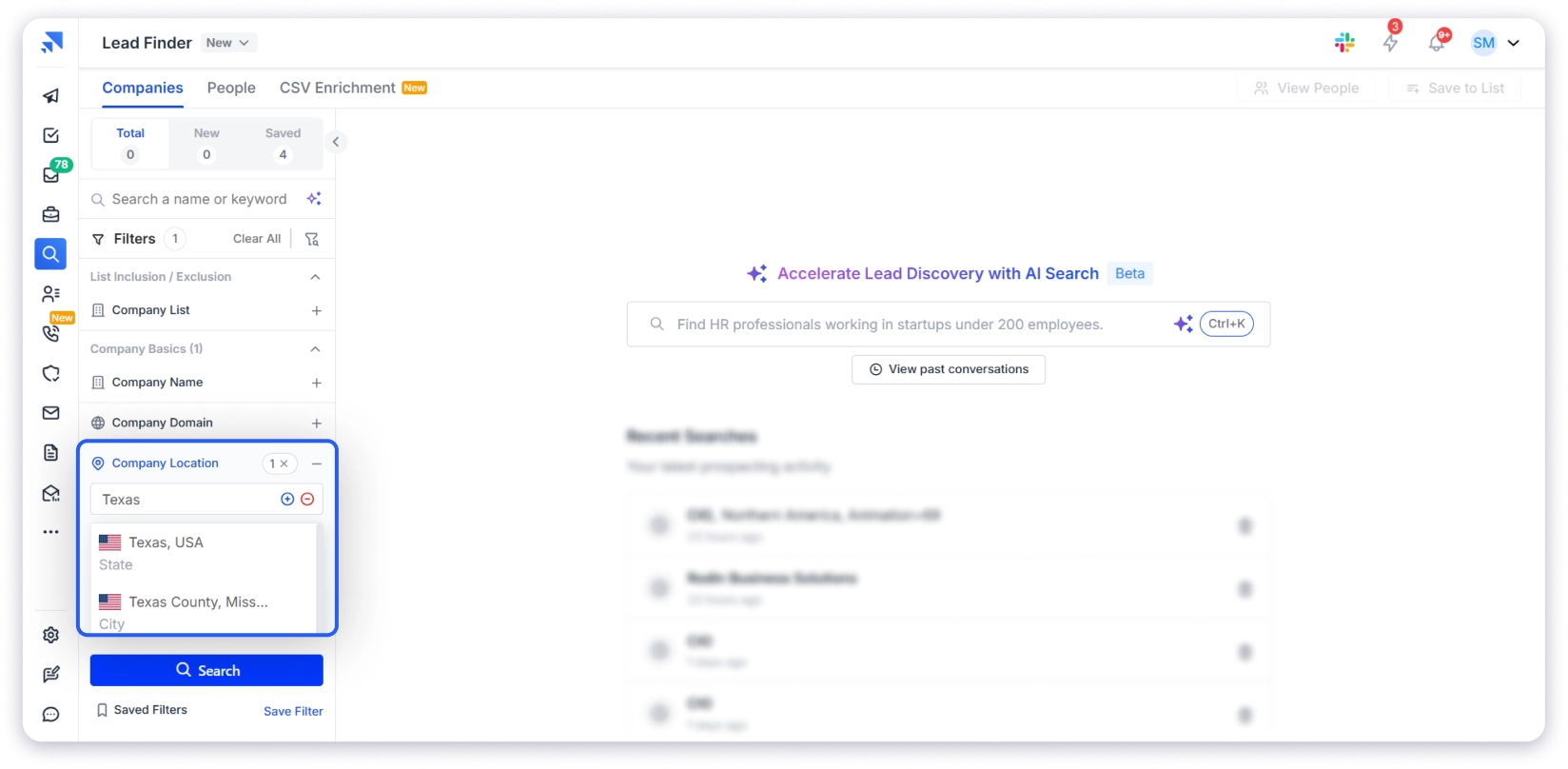
Click on Location in the filter panel.
A dropdown will appear with countries, states, and cities. Select the United States, then narrow to Dallas, Texas.
💡 Pro tip: Saleshandy covers markets globally, including the Middle East, Southeast Asia, Africa, and Latin America, which most B2B databases miss.
Step 4: Select Job Titles and Management Level
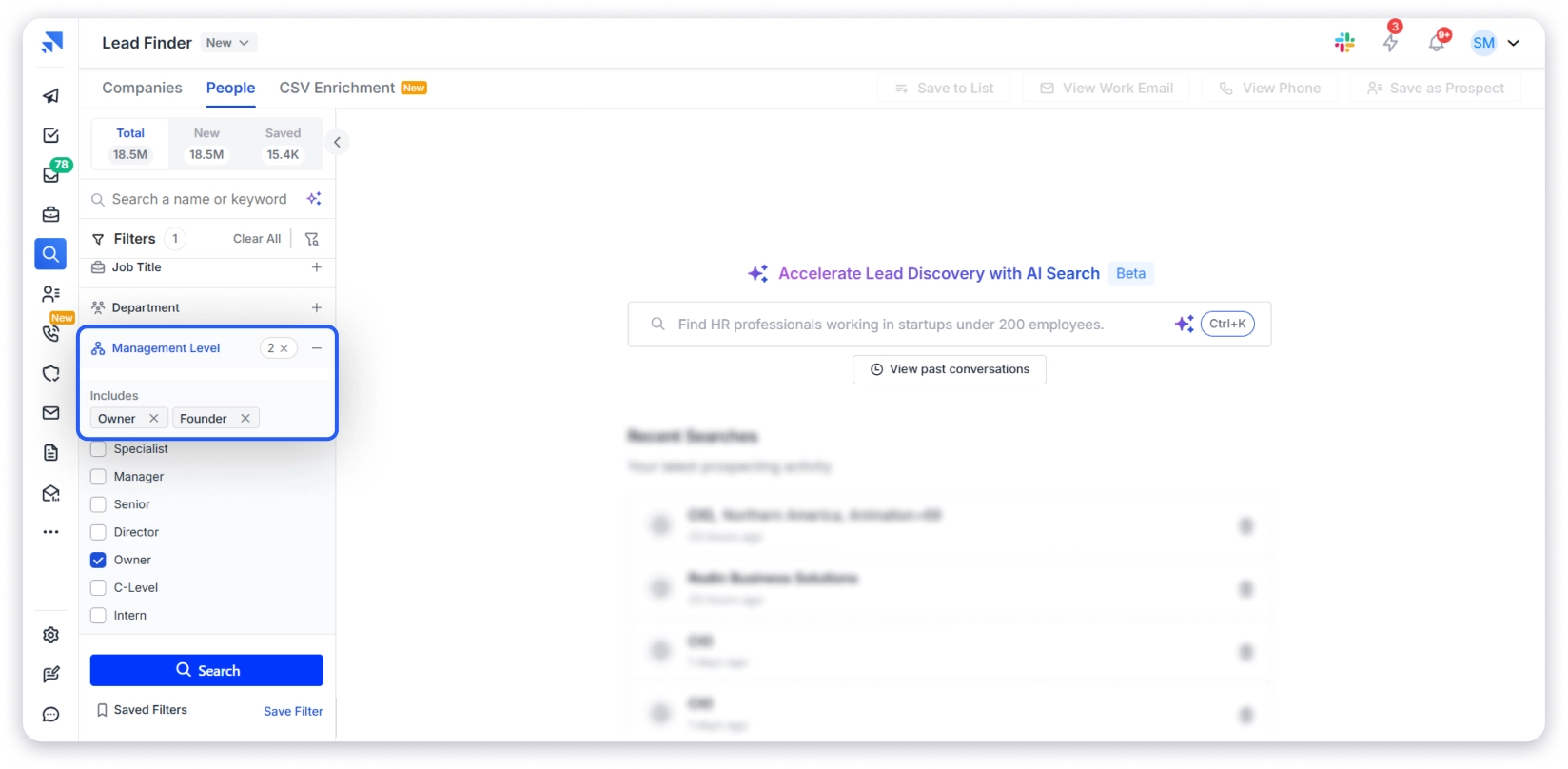
Click on Job Title in the filter panel.
For our HVAC example, add:
- Owner
- Founder
- Co-founder
- CEO
- President
Then go to the Management Level and select Owner, Founder, and C-Suite.
Turn on “Show Exact Match” so you only see people with these exact titles.
💡 Pro tip: HVAC company owners rarely call themselves “CEO.” Most go by Owner, Founder, or President. Add all variations to make sure you do not miss anyone.
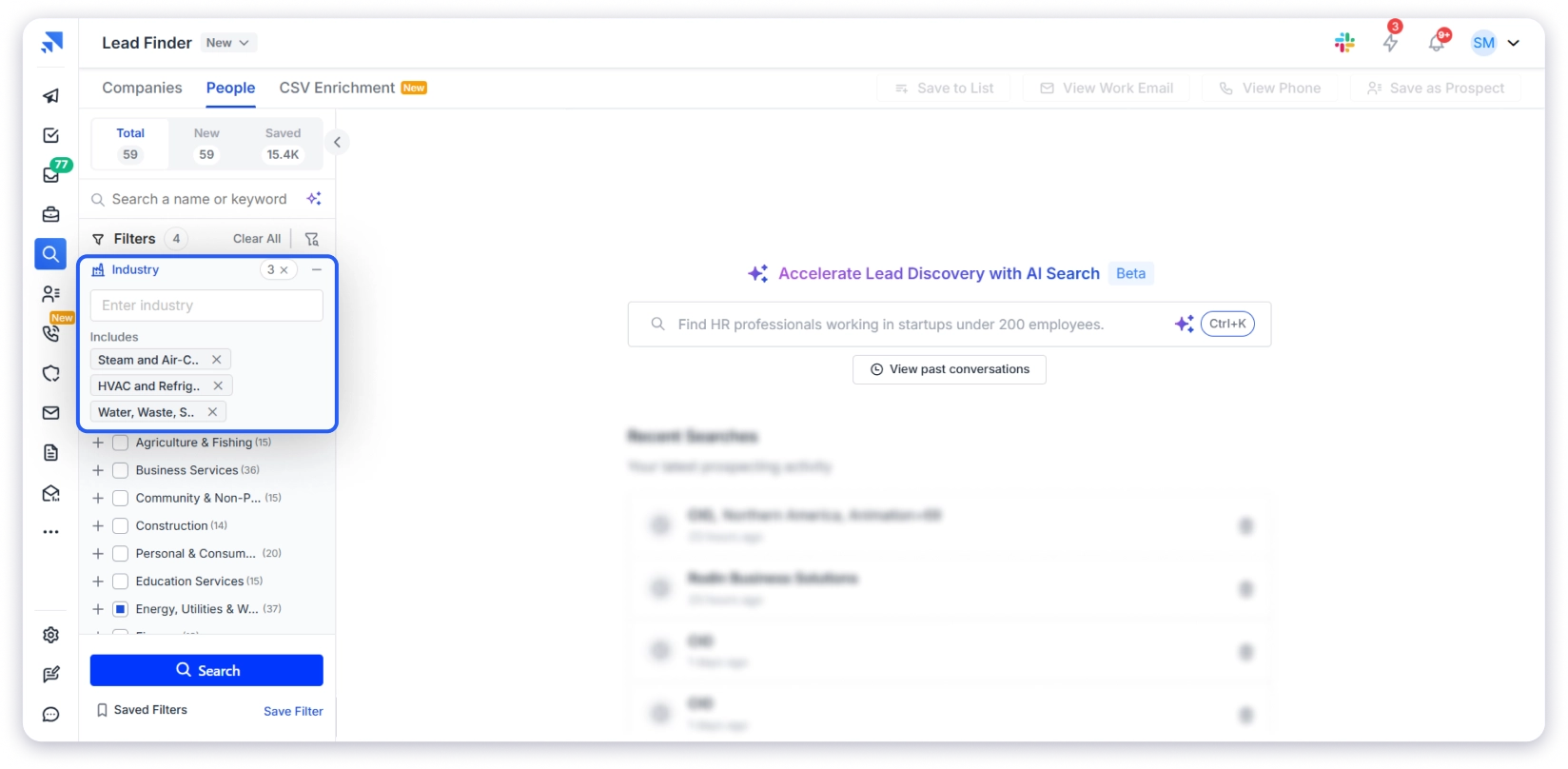
Step 5: Set Your Industry
Click Industry and search for terms related to your niche.
For our HVAC example, I selected three:
- Steam and Air Conditioning
- HVAC and Refrigeration
- Water and Supply.
This keeps your results focused on companies in the trades and contracting space instead of pulling in random businesses.
Step 6: Filter by Company Size
Click Employee Count and select 1 to 50.
This one filter removes enterprise companies and franchise chains from your results. What is left is the actual small business owners.
Most fall into these bands:
- 1 to 10: Solo operators, micro businesses
- 11 to 50: Small teams where the owner still makes the decisions
- 51 to 200: Larger small businesses with departments
Pick the band that matches who you are trying to reach.
Optional: Add Revenue and Buying Signals
If you want to go tighter, set a revenue range. For most small business owners, $1M to $10M is the sweet spot.
You can also add buying signals like recently funded, actively hiring, or job changes at the owner level.
These help you find owners who are not just a fit on paper but are probably ready to buy right now.
Not every search needs these. But when you use them, the quality of your list goes up fast.
Step 7: Search, Reveal, and Export
Once all your filters are set, click Search.
Saleshandy shows you the full list of matching contacts. You can see their name, job title, company, and location.
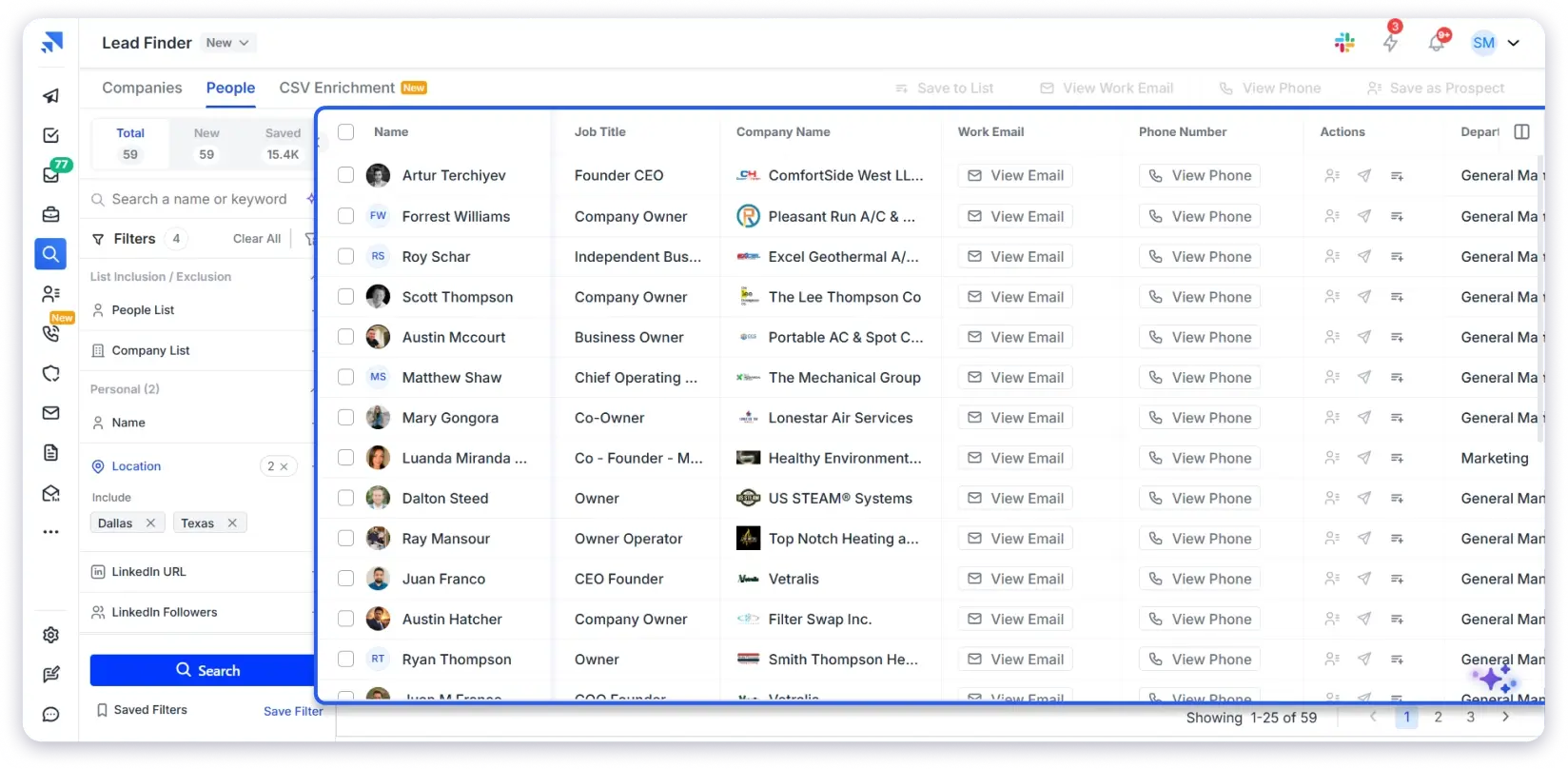
Click View Email or View Phone on any contact to reveal their verified details. Each reveal uses one credit. You can also bulk reveal to export the full list in one click.
Pricing:
- Lead Finder Pro: $49/mo (annual)
- Lead Finder Scale: $79/mo (annual)
- Full Saleshandy platform (sequences, dialer, CRM): starts at $25/mo
Use Sage (AI Search) to Skip Manual Filtering
If you already know the kind of small business owners you want to reach, you can skip adding filters one by one.
Use Sage at the top of the page. Just describe your ideal prospect in a simple prompt.
For example:
“Find owners and founders of air conditioning and HVAC companies in Dallas, Texas with 1-50 employees.“
Sage turns that into a targeted search and shows you matching contacts based on your criteria.
You can always refine the results further using filters if needed.
5 Other Ways to Build a Small Business Owner’s Email List
I’d personally go with Saleshandy Lead Finder.
But it is not the only way to do it. There are a few other methods that work depending on what you need.
⚡ Quick Note: None of these verify emails automatically. If you choose any of these small business owner email list-building methods, ensure you run your list through an email verifier before you hit send. It is a small step that saves a lot of headaches later.
1. Try LinkedIn and Social Media
⏱ Time per Contact: 3–5 min | 💰 Cost: Free
LinkedIn is the largest B2B professional network, and a lot of small business owners have their email sitting right on their profile. So it is always worth checking.
How to find small business owner emails on LinkedIn:
Step 1: Check Contact Info
Go to the owner’s profile and click Contact Info just below their headline. If their email is listed there, you are done. This is the quickest way to get a small business owner’s email.
Step 2: Check the About Section
If it is not in Contact Info, scroll down to their About section.
Many small business owners write their email in plain text here. They want people to reach out. Look for something like “email me at” or just an address sitting in the middle of their bio.
Step 3: Try the guess method
Still got nothing? Go to their company website, grab the domain, and try common email patterns like firstname@company.com or firstname.lastname@company.com.
Also check these platforms:
- Facebook → Open their business page. Check the About section. Local owners like restaurants and salons usually put their email here.
- Instagram → Tap the contact button or check the bio. Works well for service businesses like trainers and photographers.
- Twitter/X → Quick bio check. More common with tech founders than local businesses.
You will not find every owner on every platform. That is just how it is. These are quick checks, not your main strategy.
📘 Keep in mind: 10-20 high-value prospects are worth the manual effort. One email takes about 4 minutes. Now multiply that by 300 prospects and ask yourself if you still have the time.
2. Use Google Search Operators
⏱ Time per Contact: 5–10 min | 💰 Cost: Free
Google’s search operators help you find contact pages, staff directories, and email patterns directly from small business websites.
It takes more effort, but it is completely free.
Search queries you can try:
"small business" + "owner" + "contact us" + "@gmail.com" OR "@yahoo.com"
→ Finds smaller businesses where the owner uses a personal email
site:linkedin.com/in "owner" + "plumbing" + "Texas"
→ Pulls up LinkedIn profiles with listed emails
"plumbing company" + "owner" + "email" + "Dallas"
→ Narrows results to a specific city
"@abcplumbing.com" + "owner" OR "founder"
→ Once you know the domain, this finds specific emails indexed online
Once you find one email from a company, say john@smithplumbing.com, you know the pattern is firstname@domain.com. I apply that to the owner’s name and verify before reaching out.
📘 Keep in mind: Each contact takes 5-10 minutes. You need to be comfortable with search syntax. And many small business owners do not have their email indexed anywhere publicly. Not practical for lists bigger than 20-30 contacts.
3. Source from Google Maps, Yelp, and Crunchbase
⏱ Time per Contact: 5–8 min | 💰 Cost: Free
Public directories list small businesses by category and location. And many of them show the owner’s name right on the listing. I have used this method a lot for finding local US business owners.
Best directories for small business owners:
- Google Maps / Yelp → Local service businesses like plumbers, dentists, restaurants, and contractors
- Crunchbase → Funded startups and small companies
- Industry-specific directories → Houzz for home services, Avvo for legal, Healthgrades for medical practices
How to use them:
Step 1: Search for your target industry and city on any of these platforms.
Example: “plumbing companies in Dallas” on Google Maps.
Step 2: Open the listing. Look for the owner’s name.
On Google Maps and Yelp, check the business description and reviews. On Crunchbase, check the founders section.
Step 3: Visit the company website. Go to the About or Team page. Most small business websites list the owner’s name and sometimes their email directly.
Step 4: Got the name but no email address? Use an email finder tool or try the guess-and-verify method from Method 2. Always verify before sending.
📘 Keep in mind: Hyper-local service businesses where the owner is publicly named on the company website. Free, but slow. Not the right method if you need hundreds of contacts fast.
4. Use AI Tools to Find Owner Emails
⏱ Time per Contact: 1–2 min | 💰 Cost: Free
I did not expect this to work as well as it did.
AI tools like ChatGPT, Perplexity, and Claude can scan hundreds of web pages in seconds and pull out owner emails from company websites, press pages, speaker bios, and public directories all at once.
The accuracy is not as high as a B2B lead database because AI searches the open web, not a verified contact database.
But for emails that are publicly available somewhere online, I was surprised how often AI found them.
How to find small business owner emails with AI:
1. Open Gemini or ChatGPT (Agentic Mode works best), Perplexity, or Claude with web search enabled.
2. Type a specific prompt. The more detail, the better:
"Find the business email of [Full Name], owner of [Company Name] in [US City]"
"What is the email for the owner of [Company Name]?"
"Find contact information for [Full Name] who owns [domain.com]"
3. Check the results. Gemini works best here because it shows where the email came from. No guessing.
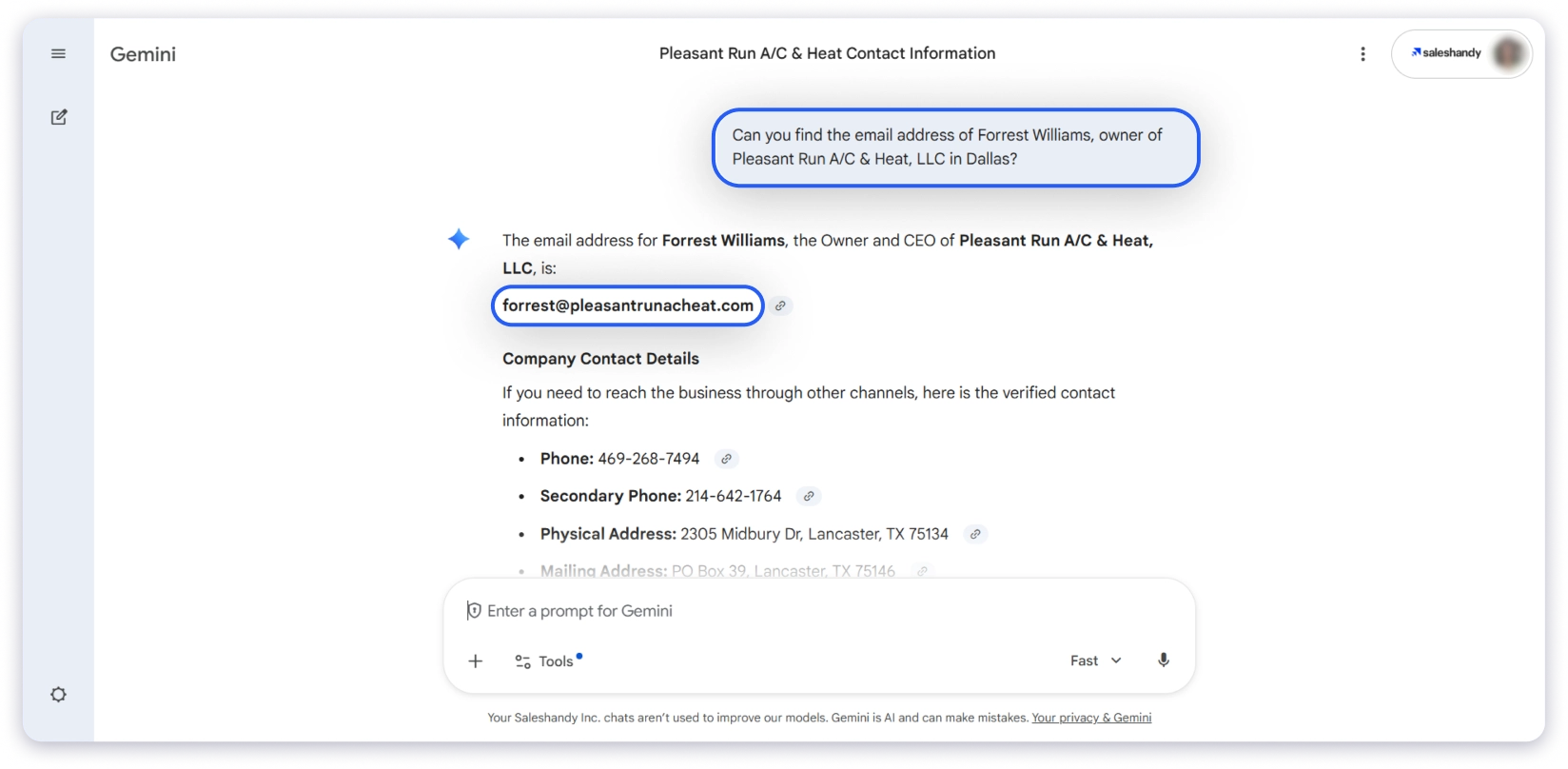
4. Verify with an email verifier before sending. No matter what the AI returns, the accuracy is not high enough to trust without a check.
📘 Keep in mind: Finding the emails of founders and agency owners who are active online. Fast and free, but unreliable for local small businesses with no media presence.
5. Build Through Events, Communities, and Referrals
⏱ Time per Contact: Varies | 💰 Cost: Free
This is the slowest method on this list. But the emails you get this way are the most trustworthy because a real person gave it to you.
How to do it:
- Attend industry events, trade shows, and local business meetups. Business cards still work. You walk away with a verified email and a face to go with it.
- Join online communities where US small business owners hang out. Slack groups, Facebook groups, Reddit communities like r/smallbusiness, and LinkedIn groups. Owners share their contact info in these spaces all the time.
- Ask for referrals. If you already work with a business owner, ask them to introduce you to others in their network. One good referral gives you a warm email that converts better than any cold list.
Why does this work? When someone hands you their email or introduces you to a contact, trust is already built. You are not a stranger in their inbox. That is why referral emails get replies that cold emails never will.
📘 Keep in mind: You cannot build a list of 200 contacts this way. It does not scale. You cannot automate it. And it takes weeks, not minutes. But for landing a few high-value US-based business owners, nothing beats a warm introduction.
Why You Should Only Use Verified Email Addresses
Every method in this guide can get you small business owner emails. But none of that matters if the emails are not verified before you hit send.
Here are two reasons, and both are expensive to learn the hard way.
1. Unverified emails kill your reply rate.
You put in the work to build a list and write a solid cold email, and you expect replies.
But when you send it out, nothing happens because a big part of the list is invalid or inactive.
Your reply rate drops, not because your email was bad, but because it never reached real people.
Well, verification takes minutes, and skipping it can cost you an entire quarter of your pipeline.
2. Hard bounces destroy your sender’s reputation.
This is the part most people do not realize until it is too late.
Gmail and Outlook track your bounce rate, and once it crosses 2 to 3%, they stop trusting your domain.
Your emails start landing in spam, not just the ones that bounced, but all of them.
And recovering from that takes weeks of warmup (Sometimes months).
I have seen teams lose 6 months of domain warm-up because they imported one bad list.
Here is a simple way to think about it:
- Under 3% bounce rate → you are safe
- Above 5% → something is wrong
- Above 8% → your domain is already getting throttled
No matter how you built your list, whether it was through LinkedIn, Google, AI, or referrals, you always need to verify the email before you send anything.
This is the one step you do not skip.
Start Building Your Verified Small Business Owner Email List
Let me be honest. The hard part is not finding small business owners. It’s getting their real email address.
If you are still guessing email patterns or buying outdated lists, you are making this harder than it needs to be.
A good B2B lead finder gives you verified, high-quality prospects every week. You don’t have to rely on referrals or manual work.
Out of every method I tested in this guide, Saleshandy Lead Finder is the clear winner for building a small business owners email list.
It gives you access to a verified database of 852M+ contacts.
And it handles prospecting, outreach, and CRM in one place, so you are not jumping between tools.
You do not need multiple tools to find, verify, and email small business owners. You just need one that does all things at one place.
Sign up, get up to 50 free credits, and check the data quality yourself.
FAQs
1. Is It Legal to Send Cold Emails to Small Business Owners?
Yes, in the US. B2B cold email is legal under CAN-SPAM as long as you include sender identity, physical address, and an unsubscribe link. GDPR (EU) and CASL (Canada) have stricter rules, so check local regulations before sending.
2. Can I Get a Free Small Business Owners Email List?
Free lists exist but they are usually scraped, outdated, and full of info@ addresses. Free methods like LinkedIn, Google search operators, and public directories give you better data. Just verify the emails before sending.
3. How Accurate Is the Data in a Real-Time SMB Owner Database?
Pre-built lists decay fast and often bounce 20 to 30 percent. Real-time databases like Saleshandy Lead Finder verify emails at the moment you reveal them, which keeps bounce rates under 3 percent.
4. What Bounce Rate Should I Expect From a Verified SMB List?
Under 3 percent from a real-time database. Above 5 percent means something is wrong. Above 8 percent, and your domain is getting throttled. Re-verify every 60 to 90 days.
5. How Do I Find Small Business Owners in a Specific City or State?
Use a B2B database with location filters. In Saleshandy Lead Finder, set your target city, add industry and owner-level title filters, and search.
6. What Is the Difference Between a Small Business Email List and a small business owners’ email list?
A small business email list gives you generic addresses like info@ or contact@ that go to a shared inbox. A small business owner’s email list gives you named decision-makers like founders, CEOs, and owners with their personal email. Different inboxes, different reply rates.
7. What Is a Small Business Owners Email List?
A collection of verified contact details of the people who actually run small businesses. It typically includes name, title, verified email, phone, company, industry, employee count, and location.