
![11 Best Phone Number Extractor Tools for B2B Outreach [2026]](https://www.saleshandy.com/blog/wp-content/uploads/2026/04/Extract-Phone-Numbers-in-Seconds.webp)

Okie, let’s cut to the chase.
You’re here because you need phone numbers, and that too, the ACCURATE ones… Numbers that actually pick up.
But here’s a brutal and bitter reality: The internet has no shortage of phone number extractors. Yet sadly, most of them hand you a list of numbers that are not reachable.
Eventually, this leaves you in despair, instead of finding the number of a person you wanted to.
So, to make it super easy for you, I tested and compared 11 phone number extractor tools.
And I promise you, by the end of this, you’ll know which tools are best for finding usable phone numbers, how they differ, and which one fits your needs.
Ready to find numbers people actually answer?
Let’s get into it.
TOC – Best Phone Number Extractor Tools
TL;DR – Best Phone Number Extractor Tools in 2026 at a Glance
11 Best Phone Number Extractor Tools in 2026
Here is the full breakdown across all three categories. Let’s start with 1st category, which is B2B Lead Finders with Phone Data.
1. Saleshandy
Best for: Sales teams and agencies that need single and bulk verified phone number lookups in under 30 seconds.
Do You Need A Phone Number Extractor That Finds Accurate Numbers, Not Outdated Data?
Saleshandy helps sales teams extract verified phone numbers of their ideal prospects from an 852M+ contact database. Find direct dials, mobile numbers, and business phone numbers using filters like job title, company, industry, location, and more.
Unlike traditional phone number extractors that scrape outdated sources and return incomplete data, Saleshandy uses real-time waterfall enrichment across 9 trusted providers to find the best available phone number for each contact.
If one provider does not have a number, Saleshandy automatically checks the next provider until a verified number is found. This means you get higher coverage without paying for inaccurate or unusable data.
Once extracted, your verified phone numbers are ready to reach.
With features like local presence dialing, number rotation, call recording, and AI-generated call summaries, Saleshandy helps teams go from finding prospects to starting conversations in one place.
Key Features
- 852M+ B2B Database: Search contacts by job title, company size, industry, revenue, location, tech stack, and hiring signals.
- 75+ Search Filters: Narrow your list with filters across people and company data, including buying signals and financials.
- Waterfall Enrichment (9 Providers): Automatically queries multiple data sources until it finds a verified phone number.
- Real-time Verification: Phone numbers are verified at the moment you reveal them – not from a static database snapshot.
- AI-Powered Search: Describe your ideal prospect in plain English. The AI applies the right filters for you.
- CSV and URL Enrichment: Upload your existing contact list via CSV, or paste up to 100 LinkedIn or website URLs to enrich contacts with verified phone numbers and emails.
- Built-in Dialer: Call prospects directly from the platform with local presence dialing, number rotation, call recording, transcripts, and AI call summaries.
- CRM and Sequence Integration: Push contacts to HubSpot, Salesforce, Pipedrive, or Zoho – or directly into cold email and dialer sequences.
How I Extracted a Phone Number Using Saleshandy
- Step 1: Create your free account
Sign up at my.saleshandy.com/signup and start finding verified phone numbers with a 7-day free trial, no credit card needed.
- Step 2: Find your ideal prospects
Use AI search or 75+ filters to find contacts by job title, company, industry, location, and more.
- Step 3: Extract verified phone numbers
Click “Reveal” to get phone numbers and emails. Saleshandy verifies data in real time using waterfall enrichment across 9 providers.
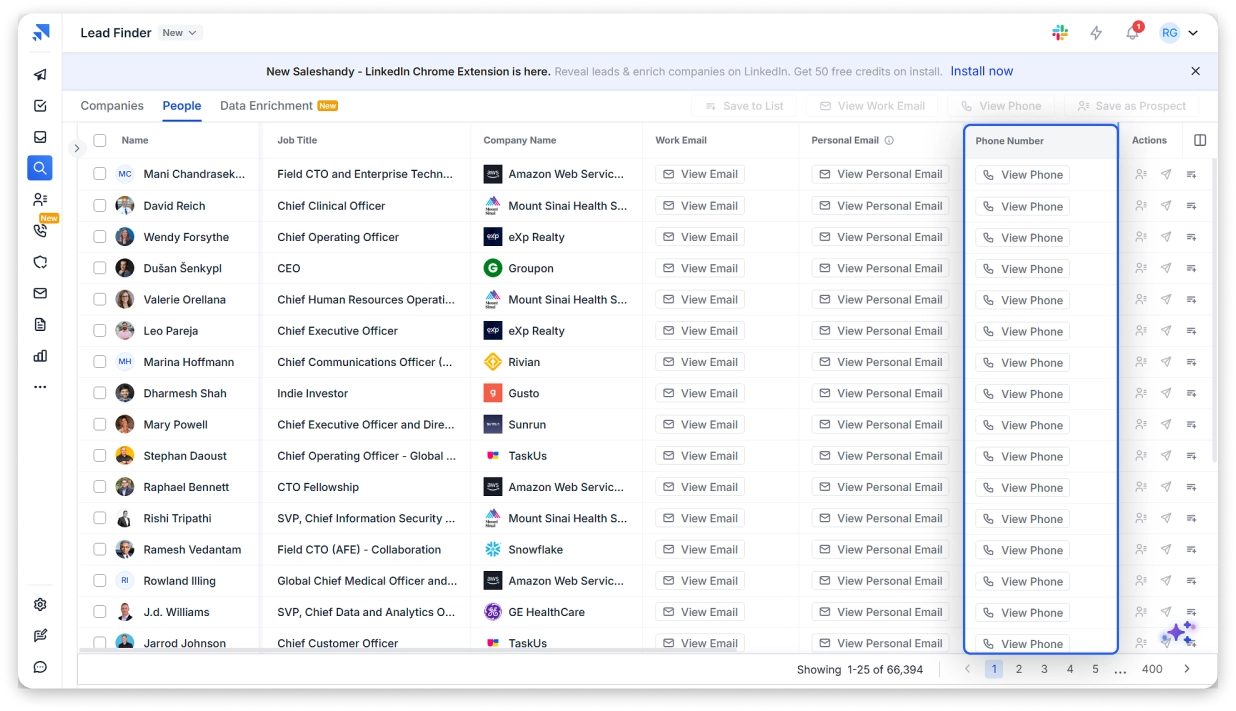
- Step 4: Start outreach instantly
Export contacts, sync with your CRM, or add them directly to email and dialer campaigns.
Pros:
- 98%+ phone accuracy – every number goes through format check, carrier validation, DNC scrubbing, and real-time ping before you pay.
- Waterfall enrichment across 9 providers – if one source misses the number, the next one picks it up. Higher fill rates than single-source tools.
- Pay only for verified results – 7 credits for a verified email + phone. $0 when no number is found. No wasted spend.
- Unused credits roll over to the next month. Most competitors expire credits at the end of the billing cycle.
- Built-in dialer with local presence – call revealed numbers directly from the platform. No exporting to a separate tool.
- 852M+ contacts with 75+ filters – largest B2B phone database on this list. Filter by title, industry, company size, tech stack, hiring signals, and more.
Cons:
- 50 credits and 7 days trial are efficient for testing, but it can be increased a bit more.
Saleshandy Pricing
2. Apollo.io
Best for: Sales and marketing teams that want a free-to-start B2B database with built-in outreach and CRM functionality.
The second phone extraction tool on my list is Apollo.io.
It’s a B2B contact database with 240M+ contacts that includes phone numbers, direct dials, and email addresses.
One thing I want you to know: phone number accuracy can vary depending on your plan tier. Mobile numbers tend to be more reliable on higher-tier plans, and mobile credits are capped even on paid plans (75-200/month based on the plan).
Key Features
- 240M+ Contact Database with 65+ Filters: Search contacts using filters for role, location, company size, industry, and intent signals.
- Direct Dials and Mobile Numbers: Access direct phone numbers, not just company switchboard lines.
- Built-in Sequences: Run multi-step outreach cadences combining email, phone calls, and tasks.
- Buying Intent Data: Identify accounts showing active buying behavior to time your outreach better.
- CRM Integration: Syncs with Salesforce, HubSpot, and other major CRMs.
How can You Extract Phone Numbers in Apollo
- Step 1: Sign up for free at apollo.io
- Step 2: Go to the People search tab.
- Step 3: Apply filters – job title, seniority, company size, industry, location.
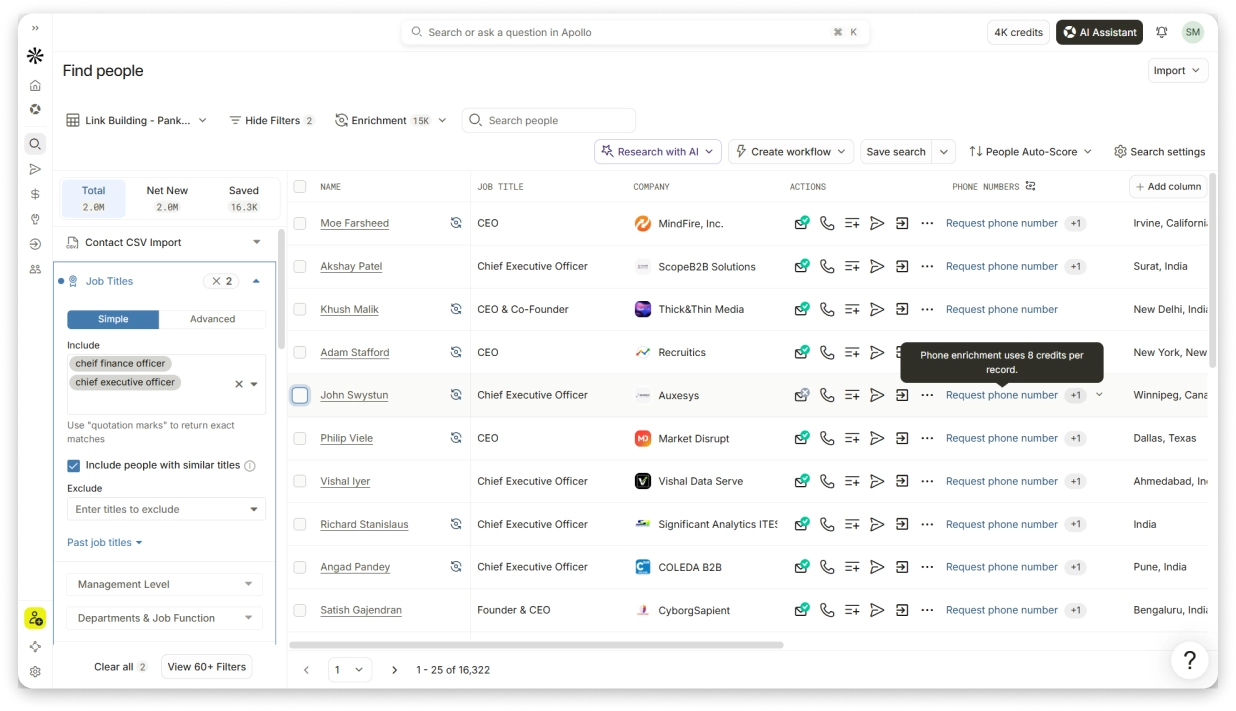
- Step 4: Click on a contact to reveal their phone number (uses 6 mobile credits).
- Step 5: Export contacts or save to a list for outreach sequences.
Pros:
- Generous free plan (5 mobile credits/month, 900 data credits/year).
- Big database with solid global coverage.
- All-in-one: prospecting + sequencing + dialer + CRM.
- No credit card required to start.
Cons:
- Mobile credits are limited even on paid plans (75-200/month).
- Credits do not roll over – they expire at the end of each billing cycle.
- Organization plan requires a 3-seat minimum ($357/mo minimum on annual billing).
- Phone number accuracy can drop outside the US.
Pricing
3. Lusha
Best for: Individual sales reps and small teams who need quick phone number lookups via a Chrome Extension.
The 3rd phone number extraction tool I’d pick is Lusha.
It’s a B2B prospecting tool with 290M+ verified contacts. Its Chrome Extension lets you pull direct dials and mobile numbers right from profile pages without leaving your browser.
It is a solid pick for reps who prospect on the web and need one-click reveals.
The free plan gives you 40 credits per month. But here is what tripped me up initially – each phone reveal costs 5 credits. So 40 credits means roughly 8 phone numbers per month on the free plan. Not a lot if phone data is your primary need.
Key Features
- Chrome Extension: Reveal phone numbers and emails directly on web profiles and company websites.
- Direct Dials: Pulls direct dial numbers, not switchboard lines.
- 290M+ Database: Verified contacts with 86% phone accuracy (official claim).
- Bulk Prospecting: Search and export contact lists filtered by job title, company, location, and seniority.
- CRM Sync: Push contacts to Salesforce, HubSpot, Pipedrive with one click.
How to Extract a Phone Number
- Step 1: Sign up for free.
- Step 2: Install the Lusha Chrome Extension.
- Step 3: Visit a prospect’s profile or company website.
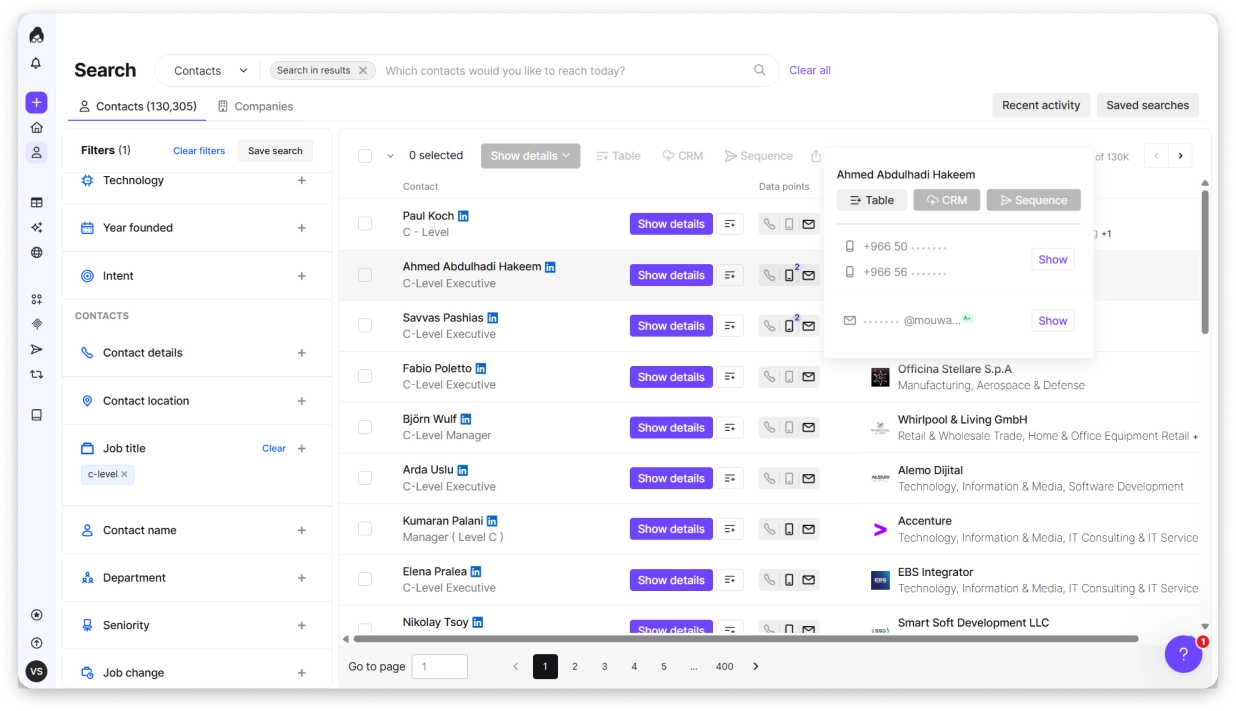
- Step 4: Click the Lusha extension icon – it reveals verified phone numbers and emails.
- Step 5: Save the contact to your Lusha workspace or export to your CRM.
Pros:
- Free plan with 40 credits/month (enough for ~8 phone reveals).
- High accuracy claims (98% email, 86% phone).
- Chrome Extension is fast and simple.
- GDPR and CCPA compliant.
Cons:
- Phone reveals are expensive in credits (5 credits per phone number).
- Free plan only covers about 8 phone numbers per month.
- Paid plan pricing jumps steeply (Premium is $399.90/user/mo).
- Smaller database compared to Saleshandy or Apollo.
Pricing
*Phone numbers take 5 credits.
Bonus read: Want a better Lusha Alternative? Read and explore the alternatives I compared for B2B prospecting.
4. Kaspr
Best for: Sales teams targeting European contacts who need accurate EU mobile numbers.
Yes, this fourth phone number provider has earned its place for strong European contact coverage.
Kaspr is a B2B data tool built with strong phone number coverage across the UK, France, Germany, and the broader EMEA region.
Its Chrome Extension surfaces phone numbers and emails on web profiles.
If your ICP sits in Europe and other tools are returning poor phone coverage for that region, Kaspr is worth testing. It is one of the few tools that consistently returned valid EU mobile numbers in my comparisons.
Key Features
- 500M+ Verified Contacts: Phone numbers and email addresses from 150+ data sources.
- European Data Coverage: Stronger mobile number coverage for EU markets than most US-centric tools.
- Chrome Extension: One-click phone number extraction from prospect profiles.
- Bulk Contact Export: Export contact lists to CSV or push directly to your CRM.
- Team Credit Sharing: Share credits across team members.
- CRM Integrations: HubSpot, Salesforce, Pipedrive, and workflow automation tools.
How to Extract a Phone Number From Kaspr
- Step 1: Sign up for free with a work email.
- Step 2: Install the Kaspr Chrome Extension.
- Step 3: Go to a prospect profile or search results page.
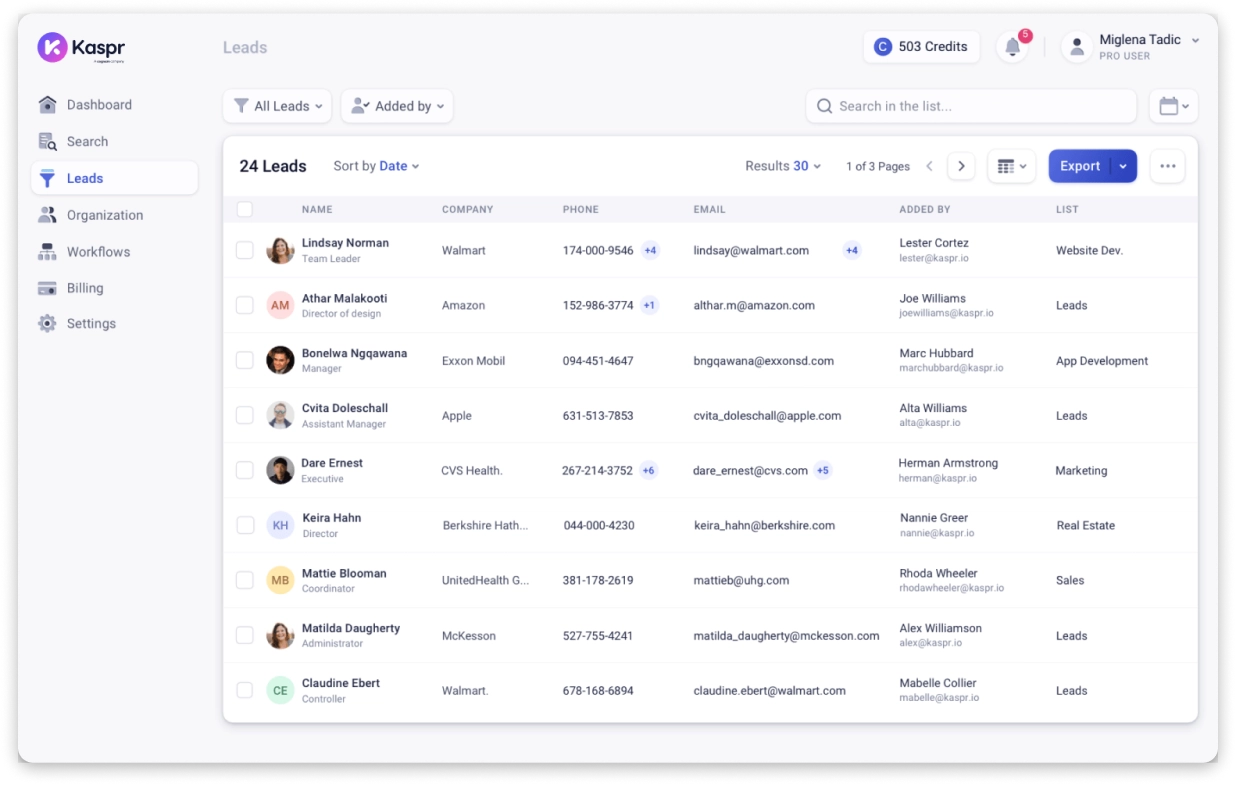
- Step 4: Click the Kaspr extension icon – verified phone numbers appear in one click.
- Step 5: Save contacts to your Kaspr dashboard, export, or push to your CRM.
Pros:
- Best-in-class European phone data.
- Free plan includes 5 phone credits/month.
- Simple one-click extraction.
- Unlimited B2B email credits on paid plans.
Cons:
- Coverage for US contacts is not as strong as Saleshandy or Apollo.
- Credit limits on lower plans can feel tight.
- Pricing is in EUR, which may be inconvenient for US-based teams.
Pricing
Web Scrapers & Automation Tools
These tools extract phone numbers from public websites, directories, and search results. They don’t maintain a database of verified contacts – they scrape what is publicly available.
Important Thing I Want You to Know: The numbers they return are not verified. You will need to validate them separately before using them for outreach.
5. BrowserAct
Best for: Non-technical users who need to scrape phone numbers from public directories and people-search sites without writing code.
BrowserAct is a no-code browser automation tool that scrapes phone numbers from websites, search results, and online directories.
It handles common scraping challenges like CAPTCHAs and IP blocks automatically, which most free tools cannot do.
For non-technical users who need more than a basic text extractor, it sits in a practical middle ground between free tools and full developer platforms.
Key Features
- No-Code Setup: Runs directly in your browser. No installation or technical knowledge required.
- AI-Powered Bot Builder: Describe your extraction goal in plain English and get a reusable scraper.
- CAPTCHA Handling: Built-in verification handling so your scraping does not get stuck.
- IP Rotation: Manages request rates to avoid getting blocked by websites.
- Automation Integration: Connects with Make and n8n for scheduled extraction runs.
- Multiple Export Formats: CSV, JSON, XML, or Markdown.
How Can You Extract a Phone Number Using BrowserAct
- Step 1: You give it the website + which numbers to pull.
- Step 2: It’ll inspect the live page to confirm where the numbers really appear.
- Step 3: It’ll build the Bot and test it on the real site, so results match what’s shown, which is an accuracy check.
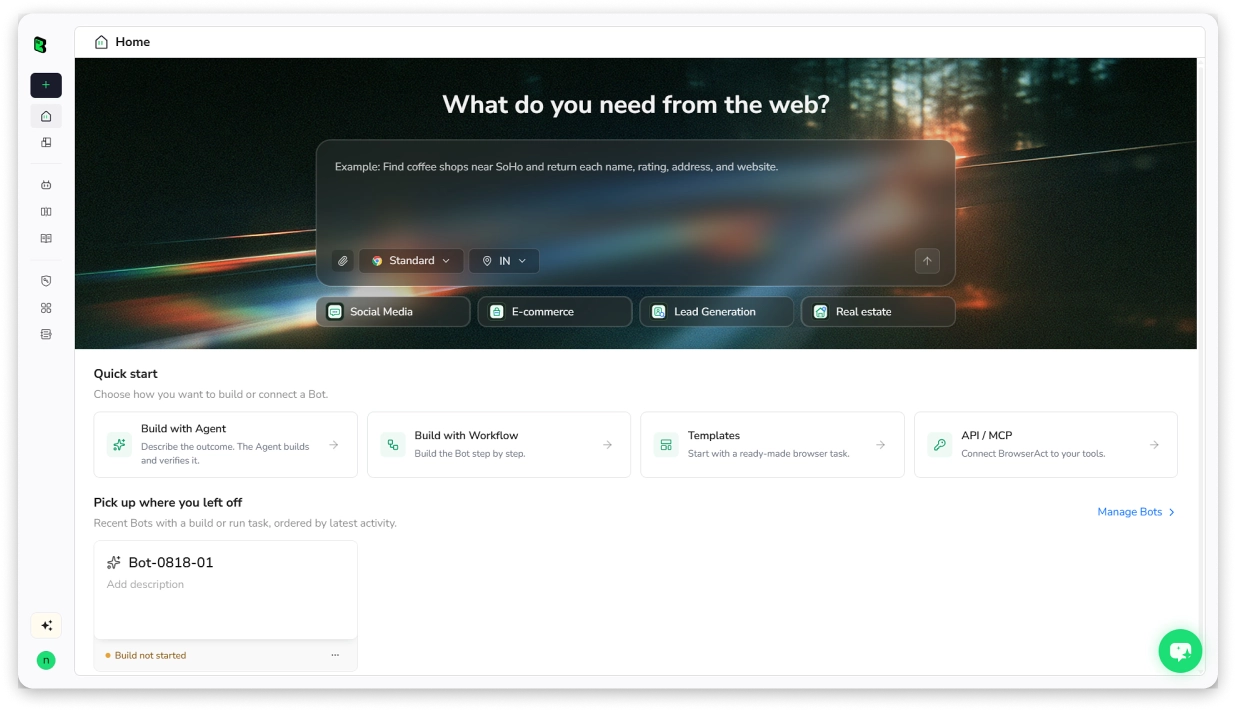
- Step 4: You run it anytime for clean, structured results.
- Step 5: Download results as CSV, JSON, XML, or Markdown.
Pros:
- No coding required – describe your goal in natural language.
- Handles CAPTCHAs and IP rotation automatically.
- Reusable bots – set up once, run multiple times.
- Multiple export formats.
Cons:
- Not a B2B database – scrapes public web pages, so data quality varies.
- Credit-based pricing can add up for large-scale scraping.
- Phone numbers are not verified.
Pricing
6. Apify
Best for: Developers and technical teams that need scalable web scraping infrastructure for phone number extraction.
Apify is a web scraping and automation platform with 60,000+ pre-built scrapers in its marketplace.
Non-technical users can use it for basic text or URL-based extraction, while teams with developers can build custom scrapers and automate complex workflows.
The free tier works for small tasks. Serious volume will push you toward a paid plan.
Key Features
- 60,000+ Pre-built Scrapers: Ready-to-use extractors for Google Maps, directories, social platforms, and more.
- Text and URL Extraction: Input a URL or paste text to extract phone numbers with format validation.
- Cloud Infrastructure: Runs scrapers in the cloud with automatic scaling.
- Anti-blocking Technology: IP rotation and browser fingerprinting to avoid detection.
- API and Webhooks: Automate workflows with Make, n8n, and Zapier integrations.
- SOC2 and GDPR Compliant.
How to Extract a Phone Number From Apify
- Step 1: Sign up
- Step 2: Go to the Apify Store and search for a phone number extractor or relevant scraper.
- Step 3: Select the Actor and configure inputs (target URL, search terms, location).
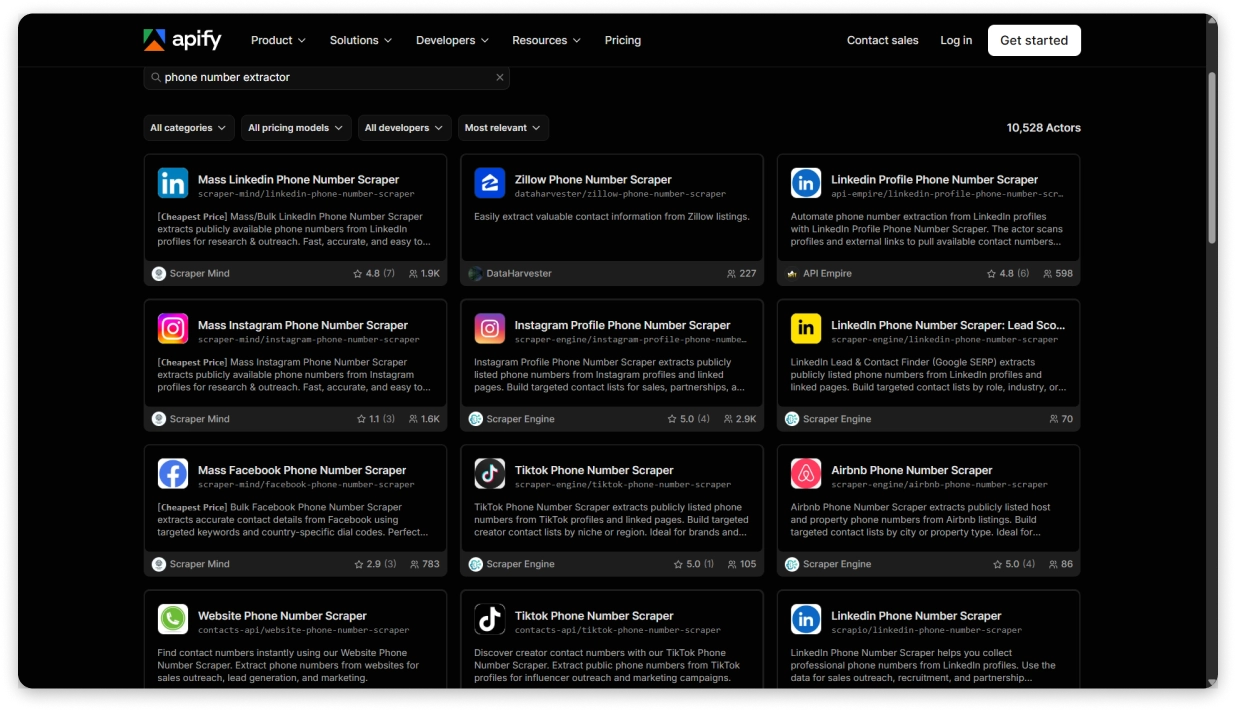
- Step 4: Click “Start” to run the Actor in the cloud.
- Step 5: Download results as CSV, JSON, or Excel.
Pros:
- Free plan includes $5/month in platform credits.
- Massive marketplace of pre-built scrapers.
- Highly scalable – handles millions of pages.
- Enterprise-grade infrastructure (SOC2, 99.95% uptime SLA).
Cons:
- Requires some technical understanding to configure Actors.
- Not a phone number database – only extracts from public sources.
- Can get expensive at scale (199-999+/mo for heavy use).
Pricing
7. Thunderbit
Best for: Non-technical users who want to extract phone numbers from websites, PDFs, or images using a simple Chrome Extension – with a free-forever phone extractor.
Thunderbit is an AI-powered web scraping Chrome Extension.
What makes it different from BrowserAct or Apify is how simple it is – you describe what data you need in plain English, and the AI (powered by ChatGPT, Claude, and DeepSeek) figures out what to scrape- no CSS selectors or need for scripts.
The phone number extractor feature is free forever. Along with phone numbers, the free tier also includes email extraction and image downloading at no cost.
It also works on PDFs and images, not just web pages. If you are dealing with scanned documents or screenshots of contact lists, that is a genuine edge over other scrapers.
Key Features
- AI-Powered Extraction: Describe what data you need in plain English. The AI detects the right fields and structures the output automatically.
- Works on Websites, PDFs, and Images: Not limited to web pages. OCR handles scanned documents and screenshots.
- Subpage Scraping: AI visits linked subpages and enriches your data table with additional details – useful for pulling contact info from company profile pages.
- Pagination and Infinite Scroll: Handles multi-page scraping automatically without manual clicking.
- Scheduled Scraping: Set up recurring extraction jobs to monitor changes on a schedule.
- Export Options: Excel, Google Sheets, Airtable, Notion, and CSV – all free.
How to Extract a Phone Number From Thunderbit
- Step 1: Install the Thunderbit Chrome Extension from the Chrome Web Store.
- Step 2: Navigate to the website, PDF, or image containing phone numbers.
- Step 3: Click the Thunderbit extension icon.
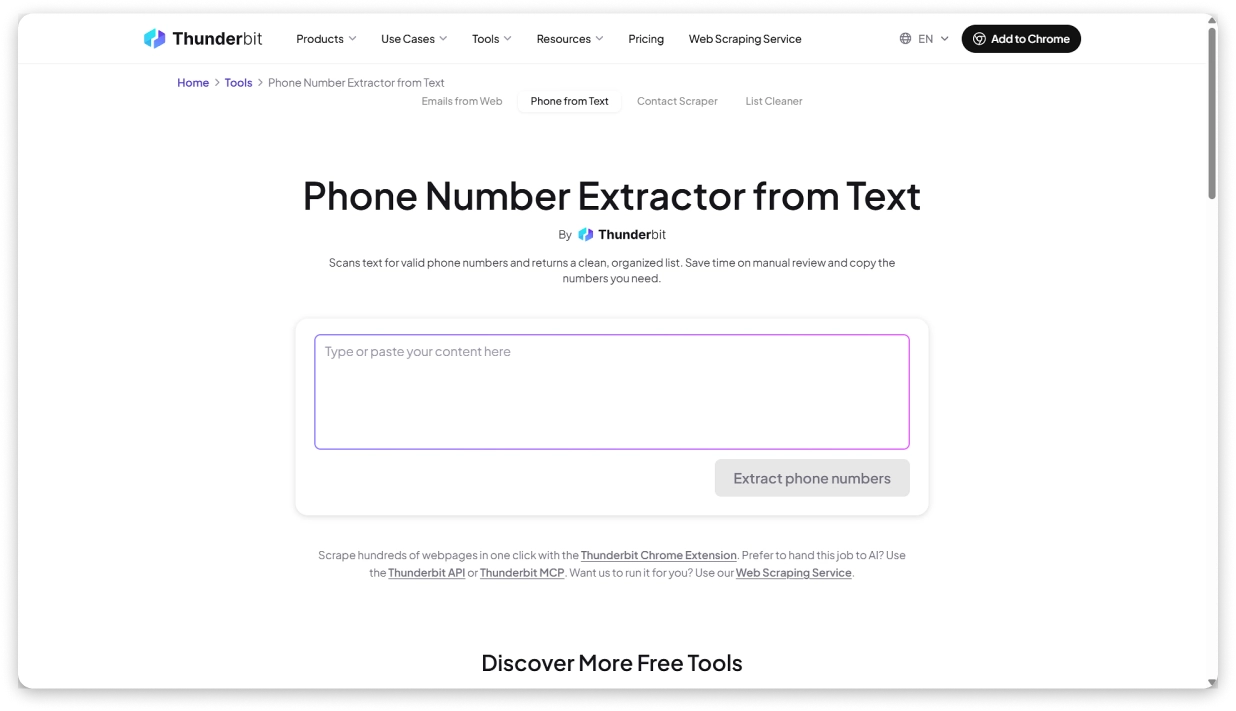
- Step 4: Click the start button – the AI agent handles everything automatically. Or describe what data you need for a custom extraction.
- Step 5: AI scrapes the page and compiles phone numbers into a structured list.
- Step 6: Export to Excel, Google Sheets, Airtable, or Notion.
Pros:
- Phone number extractor is free forever – no credit limits on this feature.
- Extremely easy to use – no coding, no CSS selectors, no setup.
- Works on PDFs and images, not just web pages.
- 200,000+ users with Product Hunt recognition (Product of the Week and Month).
- Free data export to Excel, Google Sheets, Airtable, and Notion.
- Subpage scraping enriches data automatically.
Cons:
- Premium scraping features (beyond phone/email extraction) require a paid plan.
- Data retention is limited (14 days on Starter, 60 days on Pro).
- Not a B2B database – scrapes what is publicly visible, no verification.
- Scheduled scraping only available on paid plans.
Pricing
8. Octoparse
Best for: Teams that need a visual no-code web scraper with cloud execution for large-scale, recurring phone number extraction.
Octoparse is a point-and-click web scraper with both a desktop app and cloud-based execution. It has 500+ pre-built scraping templates, and its AI Auto-Detect feature scans a page and suggests which data fields to extract.
If you need to run the same extraction job on a schedule – like pulling updated phone numbers from a directory every week – Octoparse is built for that. Cloud scraping runs 24/7 without your computer being on.
Key Features
- Visual Point-and-Click: No code needed. Click on the data fields you want to extract.
- AI Auto-Detect: Scans pages and suggests which fields to scrape.
- 500+ Pre-built Templates: Ready-to-use templates for Google Maps, directories, and more.
- Cloud Scraping: Runs 24/7 in the cloud with IP rotation and CAPTCHA solving.
- Scheduling: Set up recurring extraction tasks that run automatically.
- Multiple Export Formats: Excel, CSV, JSON, HTML, XML, and direct database exports.
- Desktop App: Available for local/private scraping when needed.
How to Extract a Phone Number From Octoparse
- Step 1: Sign up for free and download the desktop app (or use the cloud).
- Step 2: Enter the target website URL or choose a pre-built template.
- Step 3: Octoparse’s AI Auto-Detect scans the page and suggests data fields to extract.
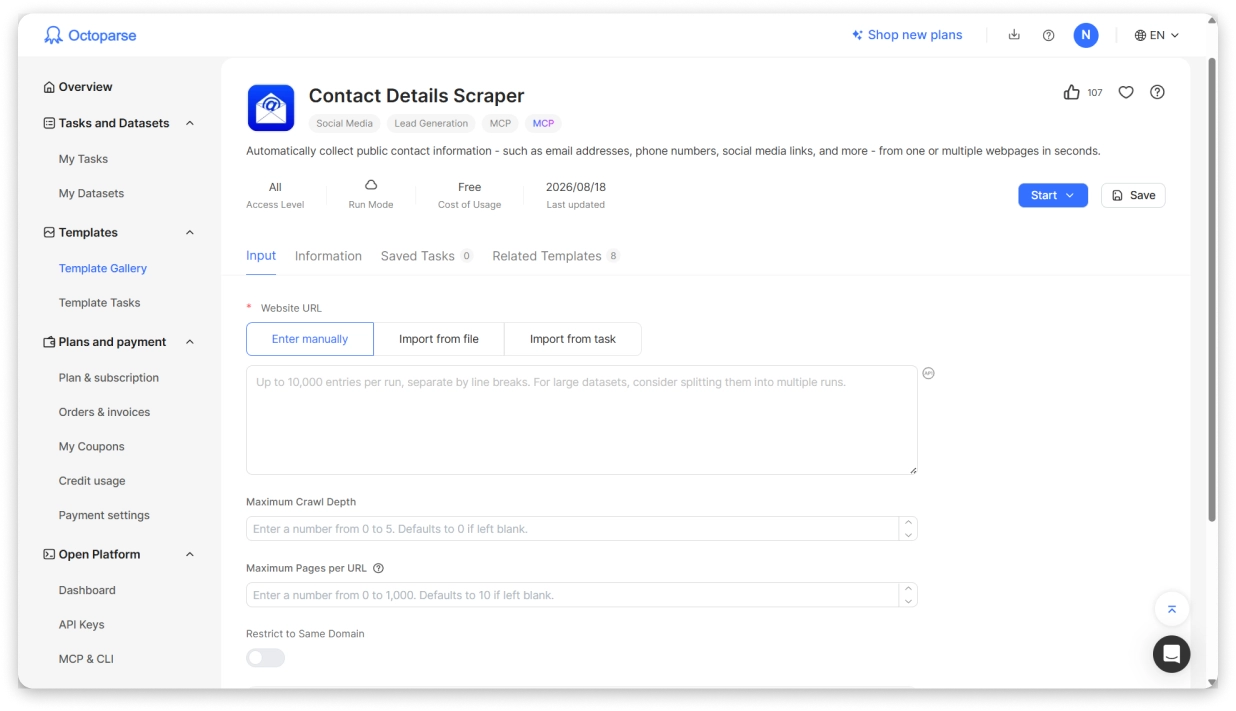
- Step 4: Adjust the selection if needed (point-and-click to select phone number fields).
- Step 5: Click “Run” – choose local or cloud extraction.
- Step 6: Download results as Excel, CSV, JSON, or push to a database.
Pros:
- Free plan available (10 tasks, 50,000 rows/month).
- Handles complex websites (dynamic content, logins, infinite scroll).
- 500+ pre-built templates save setup time.
- Cloud scraping with scheduling for recurring jobs.
Cons:
- Desktop app required for local extraction (no browser-only option on free plan).
- Free plan is local-only – no cloud scraping.
- Paid plans can be expensive (58-209/mo annual).
- Learning curve for complex scraping workflows.
Pricing
Free Phone Number Extractor Tools
These tools extract phone numbers from text, files, or web pages. They do not find new contacts – they process data you already have.
No signup, no credits, no cost. But also no verification. What you get is whatever matches a phone number pattern.
9. ConvertCSV
Best for: Anyone who needs to quickly extract phone numbers from raw text, files, or web page URLs – completely free.
ConvertCSV Phone Extractor does one job, and I think it does it well. Paste text, upload a file, or enter a URL. It pulls out every phone number it finds and gives you a clean CSV.
What I like is that it’s fast, free, and requires zero setup.
Key Features
- Three Input Methods: Paste text, upload files, or enter web page URLs.
- Custom Regex Patterns: Advanced users can define specific phone number formats to detect.
- Deduplication: Removes duplicate numbers automatically.
- Multi-page Scanning: Scan multiple web pages simultaneously.
- Configurable Output: Choose separator, columns per line, min/max digit requirements.
- CSV Download: Export results directly.
How to Extract a Phone Number From ConvertCSV
- Step 1: Go to convertcsv.com/phone-extractor.html (no signup needed).
- Step 2: Choose your input method: paste text, upload a file, or enter web page URL(s).
- Step 3: Configure output options (separator, deduplication, min/max digits).
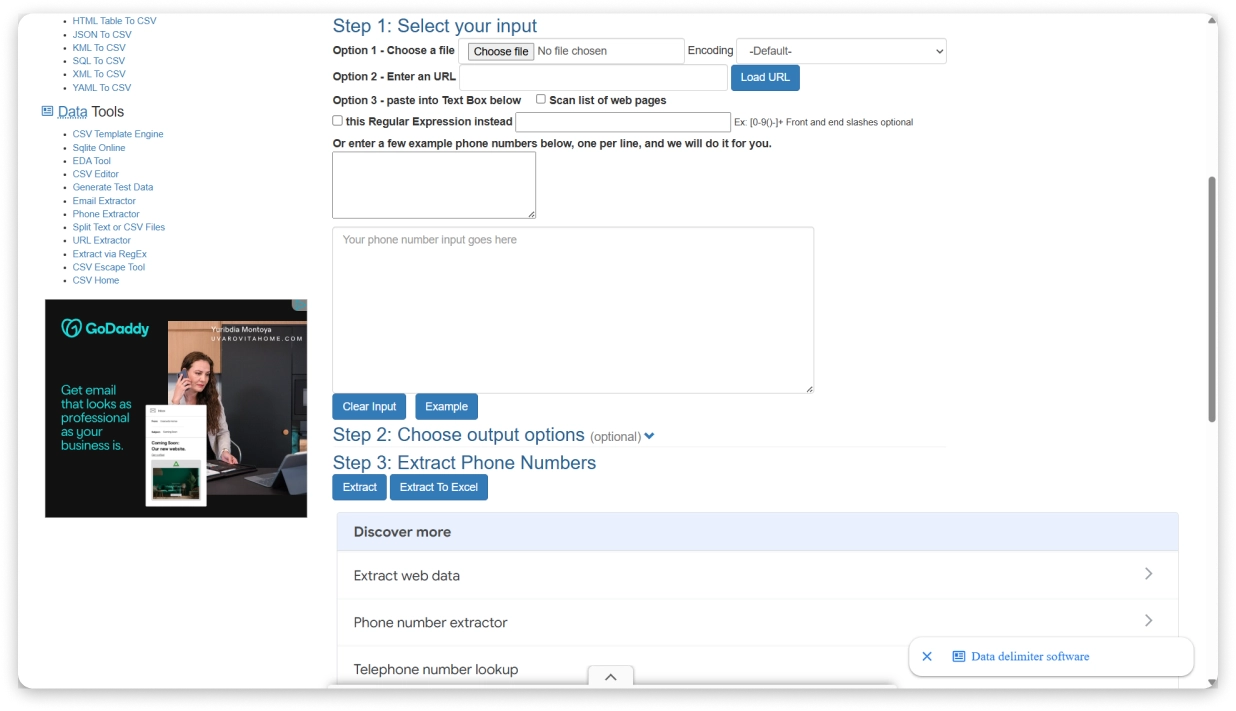
- Step 4: Click “Extract.”
- Step 5: View results and download as CSV.
Pros:
- Completely free – no signup, no account, no credit card.
- Works with text, files, and URLs.
- Can scan multiple web pages at once.
- Custom regex support for advanced users.
- Deduplication built in.
Cons:
- No phone number verification – extracts patterns, not validated numbers.
- No B2B data or contact enrichment.
- Plain interface with no modern UX.
- No API or automation capabilities.
Pricing
10. IPVoid Phone Number Extractor
Best for: Quick, one-off phone number extraction from a block of text – no setup, no signup.
IPVoid Phone Number Extractor is about as simple as it gets. Paste your text, click extract, get a list of phone numbers.
No file uploads, no URL scanning, no export options beyond copying the results. Just a text box and a button.
If you have a chunk of text with phone numbers mixed in and you need to pull them out fast, this works. For anything more complex, look at ConvertCSV or one of the scraper tools above.
Key Features
- Text-Based Extraction: Paste any text to extract phone numbers instantly.
- International Format Support: Handles different country codes and formats.
- No Installation: Works in any browser, no signup required.
- Part of IPVoid’s Free Tool Suite: Alongside network and security utilities.
How to Extract a Phone Number
- Step 1: Go to ipvoid.com/phone-number-extractor/.
- Step 2: Paste your text into the input box.
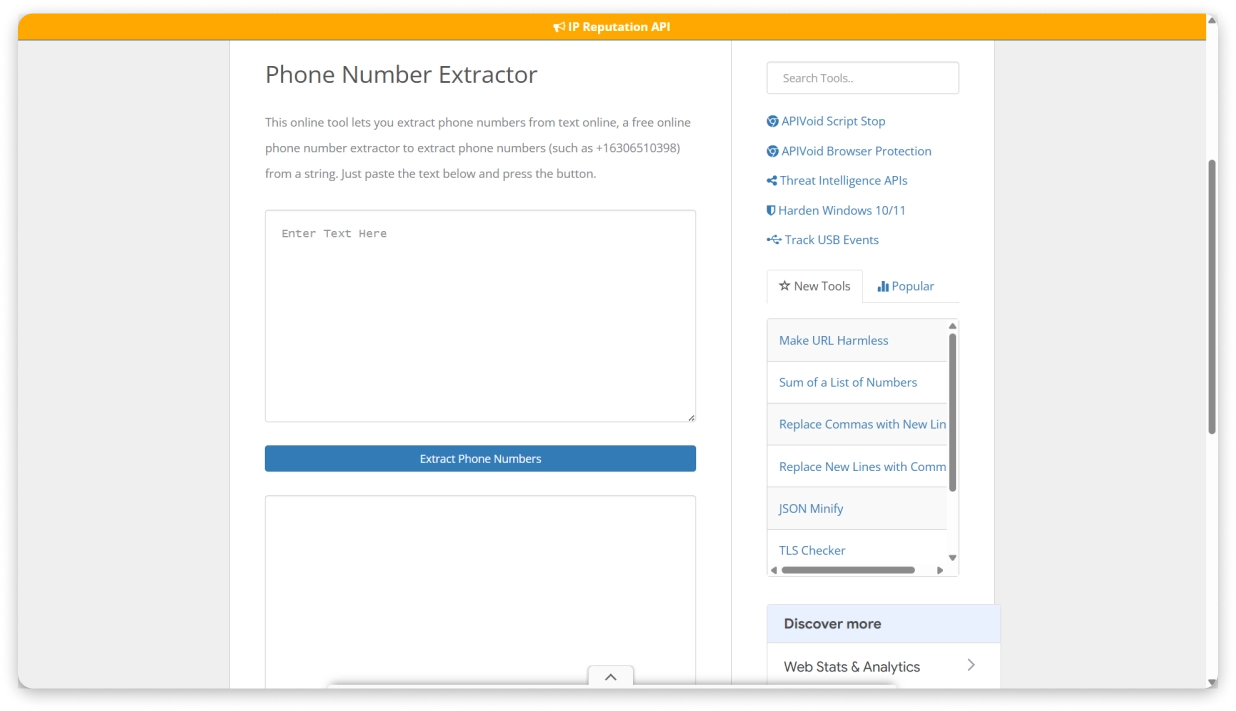
- Step 3: Click “Extract Phone Numbers.”
- Step 4: View the extracted numbers in the results.
Pros:
- 100% free with no limits mentioned.
- Instant results – paste and extract.
- Handles international number formats.
- No installation or signup needed.
Cons:
- Text input only – cannot scan URLs or upload files.
- No CSV or Excel export.
- No deduplication or filtering.
- No phone number verification or enrichment.
- Very basic – no customization options.
Pros
- 100% free with no limits mentioned.
- Instant results – paste and extract.
- Handles international number formats.
- No installation or signup needed.
Cons
- Text input only – cannot scan URLs or upload files.
- No CSV or Excel export.
- No deduplication or filtering.
- No phone number verification or enrichment.
- Very basic – no customization options.
Pricing
11. Phone Number Extractor (Chrome Extension)
Best for: Anyone who wants to scan and extract all phone numbers from any web page with one click – completely free, no limits.
This Phone Number Extractor Chrome Extension scans any web page I gave and pulled out all visible phone numbers it finds.
It was super simple. I installed it, visited a page (a business directory, a company website, a Google Maps listing, even an email thread), and clicked the extension icon. You get a clean list you can copy or export as CSV.
It has 20,000+ users and a 4.6/5 rating on the Chrome Web Store. It’s not built for scale, but for quick one-off lookups, it gets the job done fast.
Key Features
- One-Click Scanning: Automatically detects phone numbers embedded in any web page text – mobile, landline, and international formats.
- Export Options: Download as CSV or XLS (compatible with most CRM software for direct import), or copy to clipboard.
- Works Everywhere: Google Maps listings, business directories, company websites, email correspondence, and any page with visible numbers.
- No Setup Required: Install and start extracting. No account, no configuration, no technical knowledge needed.
How to Extract a Phone Number From
- Step 1: Install the Phone Number Extractor extension from the Chrome Web Store.
- Step 2: Navigate to any web page containing phone numbers.
- Step 3: Click the extension icon in your browser toolbar.
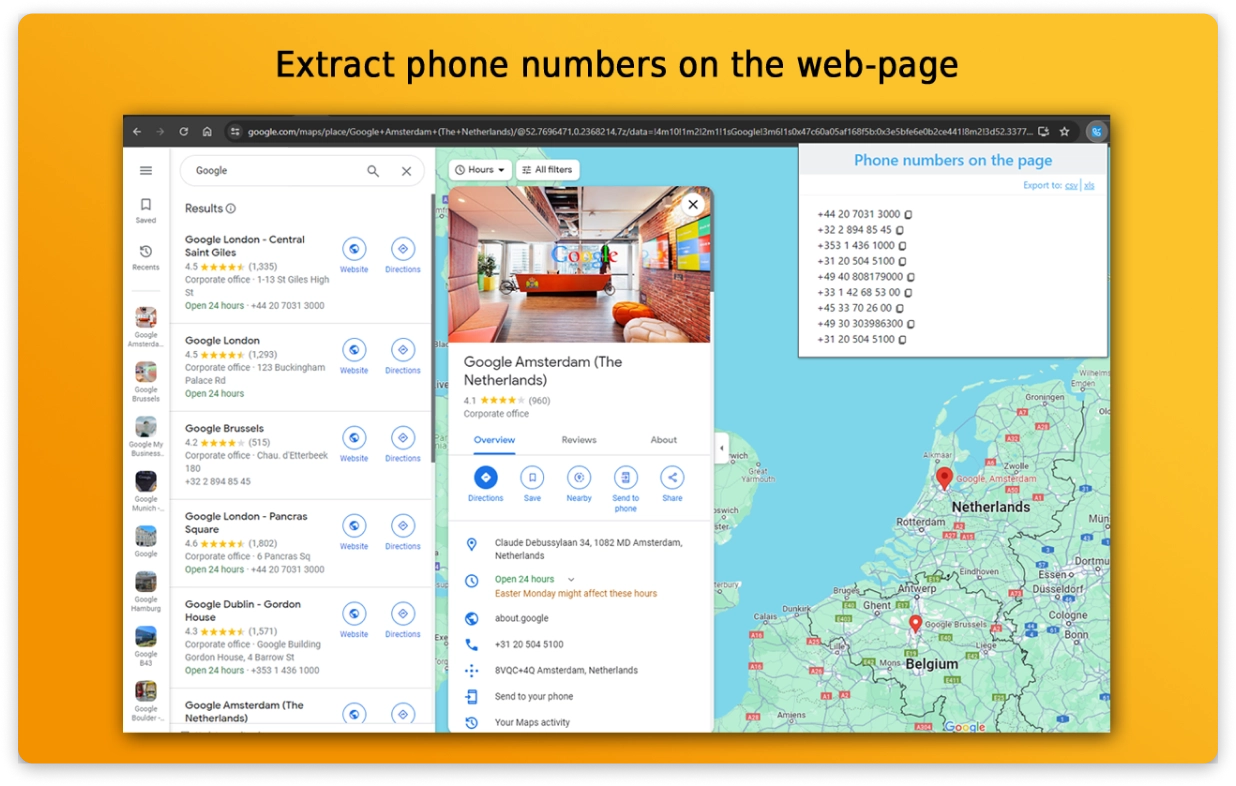
- Step 4: The extension scans the page and compiles all found numbers into an organized list.
- Step 5: Export as CSV or XLS, or copy to clipboard.
Pros:
- Completely free with no paid tiers, no credits, no limits.
- One-click extraction from any web page.
- CRM-compatible export formats (CSV, XLS) reduce manual data entry errors.
- Detects both mobile and landline numbers.
Cons:
- Single-page extraction only – no multi-page or bulk automation.
- No phone number verification or enrichment.
- Individual developer, not a company – support may be limited.
- Cannot extract numbers hidden behind logins or dynamically loaded content.
Pricing
Why Do You Need a Phone Number Extractor?
If you are doing B2B outbound, you already know that email alone does not get the response rates it used to.
Adding phone calls to your outreach makes a real difference. But the bottleneck is almost never the dialing – it is getting the right phone numbers in the first place.
Here is where a phone number extractor fits into the workflow:
- Prospects exist, but phone data doesn’t: Names, companies, and job titles sitting in a CRM or spreadsheet with no numbers attached. A B2B lead finder like Saleshandy fills in verified direct dials so the team can start calling.
- Existing data is messy: Phone numbers are buried inside text dumps, old spreadsheets, or exported files. A free text extractor like ConvertCSV pulls them out, deduplicates, and hands back a clean CSV in seconds.
- Numbers live on public directories: Business listings, Google Maps results, industry directories – all with contact info that would take hours to copy manually. A web scraper like BrowserAct or Octoparse automates the entire grab.
- Cold calling needs to scale: Looking up numbers one by one stops working past a certain volume. Hundreds or thousands of verified direct dials per week, pushed into a dialer automatically – that is where Saleshandy’s Lead Finder with its built-in dialer fits.
The right tool depends on where your phone numbers are coming from and what you plan to do with them.
How to Choose the Right Phone Number Extractor for Your Outreach Workflow
After testing all 11 tools, here is what I would pick based on common use cases:
- Saleshandy → Real-time verified B2B phone number extraction
- Kaspr → European phone data
- BrowserAct or Octoparse → Scraping directories and public websites
- Thunderbit → AI-powered scraping from websites/PDFs
Two questions cut through the noise fast.
Do the numbers already exist somewhere, or do you need to find them? If they are on a website or in a document, a scraper or free extractor works. If you need verified phone numbers for people you have never contacted, you need a B2B lead finder with real-time verification.
Will someone actually pick up? Scrapers return anything that matches a phone number pattern. Switchboards, fax lines, disconnected numbers. For cold calling, what matters is verified direct dials from trusted providers, not raw volume.
If you are building call lists for B2B outreach, Saleshandy handles both. It runs waterfall enrichment across 9 data providers in real time. You only pay when a verified result is returned. Plus, the cost per usable number is lower than most alternatives I compared.
Once you have the numbers, Saleshandy’s built-in dialer ($23/mo) lets you call directly from the platform with local presence dialing, voicemail drop, and AI call summaries. Extraction to conversation in one place.
So, why wait? Sign Up & Claim Your 50 FREE Verified Phone Numbers NOW→
FAQs on Contact Number Extractors
1. What Is the Best Phone Number Extractor for B2B Sales?
Saleshandy is the strongest option for B2B outbound teams. It gives you verified phone and email addresses from an 852M+ contact database. Waterfall enrichment across 9 providers helps fill gaps where single-source tools fall short.
2. What Is the Best Free Phone Number Extractor?
For quick text-based extraction, ConvertCSV Phone Extractor is the cleanest free option – paste text, upload a file, or enter a URL, and it gives you a deduplicated CSV. For one-click page scanning, the Phone Number Extractor Chrome Extension works well. Neither verifies numbers, so plan to validate separately if using for outreach. If you need verified phone numbers for free, Saleshandy gives you 50 free credits on signup – enough to test real-time verified direct dials before committing to a plan.
3. What Is Waterfall Enrichment and Why Does It Matter for Phone Data?
Waterfall enrichment is a process where a tool queries multiple data providers one after another until it finds a valid phone number. It matters because no single provider covers every contact. Waterfall enrichment improves fill rates significantly compared to tools that rely on just one data source. Saleshandy uses 9 providers in its waterfall process.
4. What Is the Difference Between a Phone Number Extractor and a Lead Finder?
A lead finder helps you discover new contacts from a database using filters like job title, industry, and company size. A phone number extractor pulls numbers from an existing source – a website, document, or pasted text. For B2B prospecting, you need a lead finder. For cleaning existing data, an extractor works fine. Some tools like Saleshandy do both – find new contacts and extract verified phone data.
5. Do These Tools Verify the Phone Numbers They Return?
The B2B lead finders (Saleshandy, Apollo, Lusha, Kaspr) verify data at the point of export or reveal. The web scrapers (BrowserAct, Apify, Thunderbit, Octoparse) and free text tools (ConvertCSV, IPVoid, Chrome Extension) do not verify. They extract whatever phone number patterns they detect, whether the number is valid or not.
6. What Is the Best Tool for Finding Contact Numbers?
It depends on your source. If you need to find phone numbers for B2B prospects you have not contacted yet, Saleshandy Lead Finder or Apollo.io are the strongest options. If you need to extract numbers from websites or directories, BrowserAct or Thunderbit work well. For pulling numbers from raw text or documents, ConvertCSV is the simplest free choice.
7. How Do Phone Number Scrapers Work?
Phone number scrapers scan web pages, documents, or text for patterns that match phone number formats (country codes, area codes, digit sequences). Basic scrapers use regex pattern matching – they find anything that looks like a phone number. Advanced scrapers use AI to understand page context and distinguish actual contact numbers from tracking codes, fax lines, or page numbers. None of the scraper tools verify whether the number is active or belongs to the right person.
![13 Best Email Scraping Tools in 2026 [Tested & Compared]](https://www.saleshandy.com/blog/wp-content/uploads/2025/07/Email-Scraping-Tools.webp)

 Dhruv Patel