

Hunter.io and Snov.io show up in the same B2B lead generation searches, sit at similar prices, and both start free. That’s usually where the confusion begins.
On the surface, both tools look like they do the same thing. But once you log in and start using them, you realize the core functionalities are quite different.
Hunter started as a B2B email finder and later added cold email sending. Snov.io started as an outbound platform and later built a lead database around it.
So the real question isn’t which is the best cold email tool overall. It’s whether you want the most accurate email data or the most tools in one subscription.
To answer that, I tested both tools and broke them down across:
- B2B database and data accuracy
- Email finding and verification
- Sequence automation and personalization
- Email warm-up and deliverability
And much more!
But that’s not all. You’ll also see a third alternative that covers what both Hunter and Snov.io leave on the table.
(Because… why pay for two tools when one does the job?)
Let’s find the right cold email outreach tool for you!
Hunter.io vs Snov.io – TOC
Snov.io Vs. Hunter.io? A Quick 30-Second Breakdown
Short on time? Here’s the quick version.
- Choose Hunter.io if you mainly need accurate email finding and verification with a simple, no-frills workflow. It’s a strong choice for teams that prioritize contact accuracy.
- Choose Snov.io if you want a broader outbound toolkit with prospecting, email sequences, LinkedIn automation, CRM features, and warm-up capabilities in one platform.
But neither gives you the complete outbound system. You may still need extra tools for advanced personalization, larger-scale prospecting, calling, and managing campaigns.
If you’re looking for a platform that combines lead finding, personalization, deliverability, and cold outreach in one place, Saleshandy is worth exploring.
Let’s get into it!
| Feature | Hunter.io | Snov.io | Saleshandy BEST VALUE |
|---|---|---|---|
| Paid Plans Starting At (billed annually) |
$34/mo | $29.25/mo | $34/mo |
| Unlimited Email Accounts | ❌ | ✅ | ✅ |
| B2B Database | 150M+ professional emails | 500M+ contacts | 852M+ contacts & 60M+ companies |
| Unlimited Clients | ❌ | ❌ | ✅ |
| CRM Integrations | HubSpot, Salesforce, Pipedrive, Zoho | HubSpot, Salesforce, Pipedrive | HubSpot, Salesforce, Pipedrive, Zoho |
| Unlimited Team Members | ✅ | ✅ | ✅ |
| Email Warm-Up | ✅ (paid add-on) |
✅ | ✅ Unlimited |
| MCP / CLI Integration | Native MCP | Native MCP — works with Claude, ChatGPT + n8n | Native MCP + CLI — 40+ commands, works with Claude, ChatGPT, Cursor, n8n |
| Personalization Features | ✅ | ✅ | ✅ |
| Unified Inbox | ❌ | ❌ | ✅ |
Hunter.io Vs. Snov.io In-Depth Feature Comparison
The table above gives you the shape of the comparison, but it doesn’t explain why each tool behaves the way it does in daily use.
So now it’s time to tear them down, feature by feature.
You’ll see them compared across the core capabilities that every serious cold outreach tool needs, including:
- B2B Lead Database
- Enrichment and Verification
- Sequence Automation
- Personalization
- Email Warm-Up and Deliverability
- Agency and Team Management
- CRM and Reply Management
- LinkedIn and Multichannel Outreach
- API, MCP, and Integrations
- Customer Support
P.S. You’ll also see where Saleshandy fits in along the way.
Keep reading!
1. Hunter.io vs Snov.io: Which Has the More Accurate B2B Lead Database?
The first thing I tested was the database, because in any cold outreach tool, data is where everything starts.
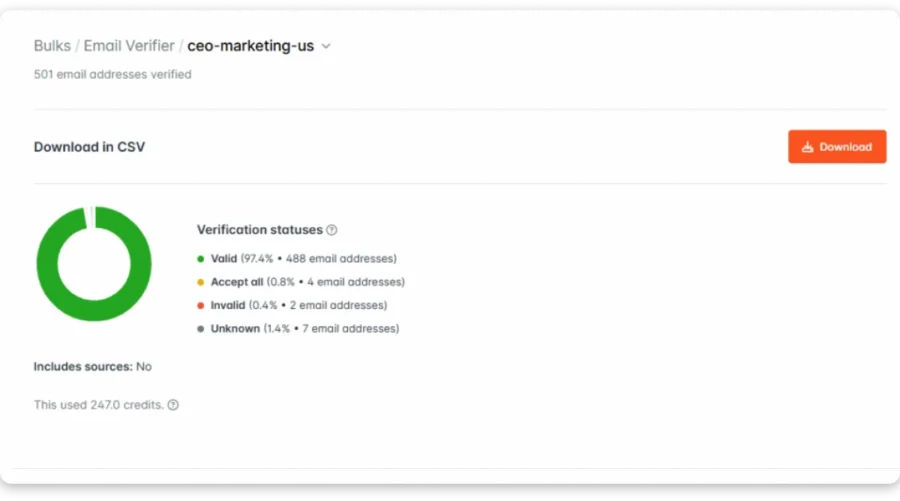
I ran 500 B2B contacts through both tools on the same day. I focused on SaaS companies in the US, with 50 to 500 employees and VP- or Director-level decision-makers.
Let’s see who comes out as a winner:
| Feature | Hunter.io | Snov.io | Saleshandy ⭐ |
|---|---|---|---|
| Database Size | 150M+ professional emails | 500M+ verified contacts, 60M+ companies | 852M+ contacts, 60M+ companies |
| Data Sourcing | Public web crawling (source URLs visible) | Proprietary database | Multi-source, waterfall enrichment |
| Source Transparency | ✅ Full (source URLs + dates) | Limited | Limited |
| Search Filters | Technology, size, industry, location | Job title, skills, management level, revenue, technographics | 75+ filters |
| Buying Signals | 3 categories | ❌ | ✅ 23 categories |
| Technology Filters | ✅ TechLookup | ✅ Technology Checker | ✅ |
| AI Search | ✅ AI Assistant | ✅ AI search (BETA) | ✅ AI Prompt-to-List |
| Credits (Entry Plan) | 2,000/mo | 1,000/mo | 1,500/mo |
| Entry Price | $49/mo ($34 annual) | $39/mo ($29.25 annual) | $34/mo (annual) |
Hunter.io
Among the two, Hunter is the more focused lead-finding tool.
With Hunter, you get these core features:
- Discover to find companies using filters like technology, size, industry, and location.
- Domain Search to find email addresses associated with a company, along with confidence scores.
- Signals to track funding rounds, job openings, and company changes.
- TechLookup to find companies using specific technologies.
Let’s see how it works.
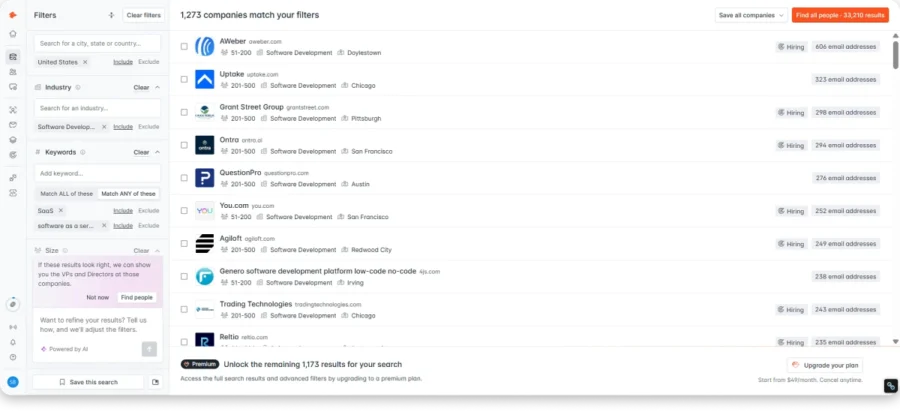
The Discover feature indexes roughly 1,273 companies. Once you open a company, Hunter shows the email addresses it has found for that domain.
If the company follows a pattern like first.last@company.com, Hunter can quickly identify the likely email address.
What makes Hunter different is its source transparency. Every contact shows where the email was found, including clickable source links and the date it was discovered.
That’s SUPER helpful if you need to explain where your contact information came from.
However, Hunter’s biggest limitation is coverage.
You won’t find phone numbers, LinkedIn profiles, revenue filters, or management-level filters. Hunter is built primarily around finding email addresses, and that’s where it stays.
In my testing, Hunter returned fewer contacts than Snov.io for the same audience. The emails it found bounced less, but the smaller coverage means you may miss prospects who fit your target audience.
Bonus read: If Hunter’s coverage gaps are a dealbreaker for your ICP, we compared 11 Hunter.io alternatives on database size, phone data, and cost per verified contact.
Snov.io
Snov.io takes a broader approach to lead generation.
With Snov.io, you get:
- B2B Leads Database with 500M+ contacts and detailed search filters.
- Email Finder with AI-powered search that understands plain-English prompts.
- Browse Companies for company-level searches using employee counts, revenue, and other data.
- Technology Checker to find companies using specific software.
The B2B database lets you filter prospects by job title, location, industry, company size, revenue, management level, skills, and technologies.
You can combine multiple filters and save searches, which is useful when you regularly build similar prospect lists.
The standout feature for me was the AI-powered search.
I used the AI-powered search (currently in BETA) and typed: “Find VP of Sales in SaaS companies in the United States.”
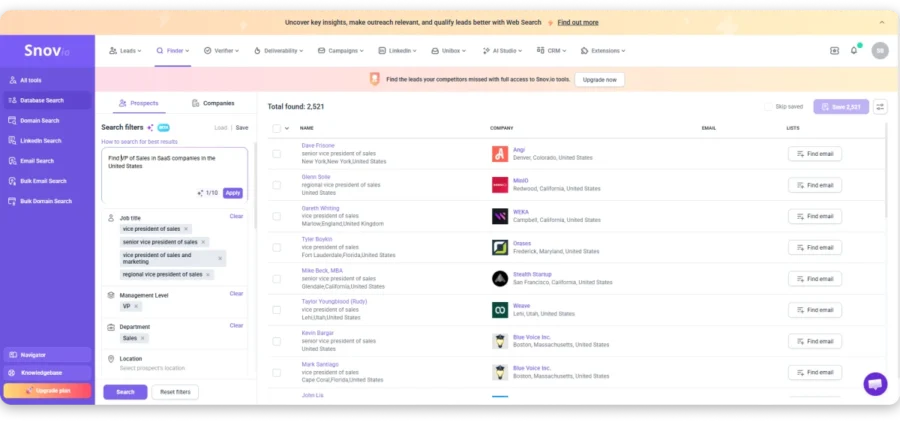
Snov returned 2,521 contacts directly. No company-level browsing first. Straight to people.
What impressed me was how the AI automatically expanded my search. It picked up four VP title variations (Vice President of Sales, Senior VP of Sales, VP of Sales and Marketing, Regional VP of Sales), set Management Level to VP, and added the Sales department filter.
No digging through multiple filter menus.
This is SUPER helpful when you know exactly who you want to target but don’t want to spend ten minutes setting up a search.
Snov worked well for small and mid-sized companies. However, I found the accuracy of individual email addresses slightly less reliable, particularly when searching for larger enterprise companies.
In my testing, Snov returned more contacts than Hunter for the same segment, but it also had a noticeably higher bounce rate.
More contacts found, but fewer were actually usable.
Bonus read: Our full Snov.io review covers what the credit system actually costs once you’re finding, verifying, and enriching from the same pool.
So, Who is the Winner?
Snov.io takes the win for B2B lead database capabilities.
It gives you AI search, deeper filters, and a larger contact pool that makes prospecting faster. But Hunter still leads on accuracy and source transparency.
Both tools have trade-offs though. Let me share what actual users are saying.
Hunter io vs snov io g2 reviews final · HTML“Limited data coverage especially for small and new companies in the market.”
— Karthick P., GTM Manager, Small-Business · Read on G2
“Some of the contacts are outdated, and some of the contacts in the categories are limited or not relevant.”
— Daniela A., Designer, Small-Business · Read on G2
With Snov, you get more results but less certainty about each one. Outdated records and unverified emails slip through, which costs you bounces and hurts your sender reputation over time.
How Does Saleshandy Stand Out as an Alternative to Hunter.io & Snov.io?
Both reviews point to the same problem.
Hunter misses smaller companies. Snov finds contacts that don’t work.
Either way, you pay before you know if the contact is usable.
Saleshandy’s Lead Finder has 852M+ contacts across 60M+ companies. That’s 1.7x Snov.io’s pool and 5.7x Hunter’s index.
But database size isn’t the main difference.
You only pay for verified contacts
Every contact is verified when you reveal it.
If an email can’t be verified, it doesn’t show up and you don’t spend a credit.
With Snov, you spend one credit to find a contact and another to verify it. A 1,000-credit plan can leave you with just 500 verified contacts.
With Saleshandy, the contacts you find are the contacts you can email.
Find smaller companies with waterfall enrichment
Hunter relies on public web data, so its coverage can drop for startups and smaller companies.
Saleshandy checks multiple data sources in sequence. If one source doesn’t have the contact, it checks the next.
That means better coverage where Hunter can fall short.
Find prospects who are ready to buy
Saleshandy also gives you 23 buying signals in the same search.
Filter by funding, new executives, hiring spikes, job title, company size, and more.
So you can find the right prospects and the right time to reach out in one place.
Build lists with AI
Just describe your ideal customer in plain English.
Saleshandy’s AI Prompt-to-List builds the prospect list for you.
Snov offers a similar AI search, but it’s still in beta and uses a smaller contact pool.
- Hunter gives you clean data, but less of it.
- Snov gives you more data, but more bad contacts.
- Saleshandy gives you verified contacts from a much larger pool.
2. Snov.io vs Hunter.io: Which Has Better Data Enrichment?
Finding contacts is step one. Enriching those contacts with enough data to personalize your outreach is step two.
The more you know about a prospect before writing that first email, the better it performs.
So, which tool gives you more useful data?
| Feature | Hunter.io | Snov.io | Saleshandy ⭐ |
|---|---|---|---|
| Enrichment Method | Auto-enrichment on CSV import | Data Enrichment API (50+ data points) | AI Prospect Enrichment |
| Data Points | Job title, social profiles | Email, phone, company size, revenue, industry, social profiles | Verified email, phone, job title, company details + AI personalization |
| Phone Numbers | ❌ | ✅ | ✅ |
| CSV Enrichment | ✅ On import, no credit cost | ✅ Via API | ✅ Up to 100K at once |
| CRM Enrichment | ❌ | ✅ HubSpot, Salesforce, Pipedrive | ✅ Bidirectional sync |
| AI Model Selection | ❌ | ❌ | ✅ GPT, Claude, Gemini, Perplexity, Grok |
| Credit Cost | Free (no credit cost) | Shared from main credit pool | AI credits (50 free on signup) |
Hunter.io
Hunter does offer enrichment, but it works differently than you might expect.
When you import leads into Hunter via CSV, it automatically fills in missing details like job titles, social media profiles, and other attributes from its database.
This happens during import, and it doesn’t cost you any credits.
You can also control which columns Hunter updates. So, if you already have job titles but need social profiles, you can choose to update only those fields.
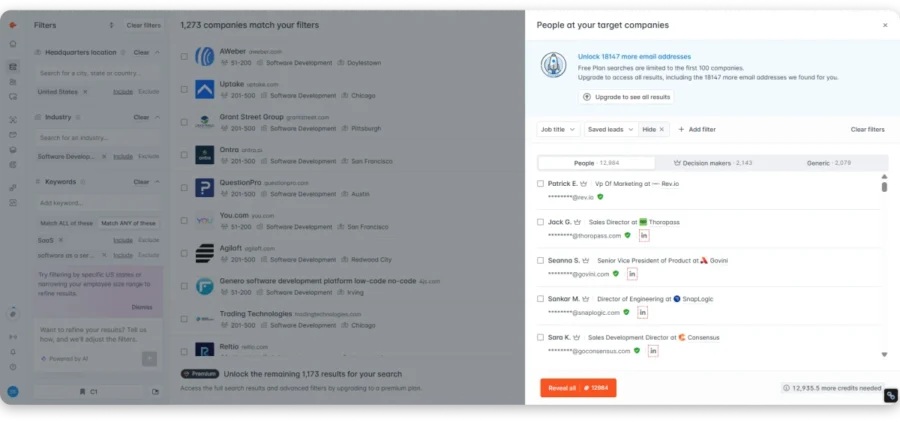
That’s useful when you already have partial data and just need to fill the gaps.
However, Hunter’s enrichment is limited to what’s available in its own database. The data it adds is useful but email-centric.
You won’t get phone numbers, company revenue data, or direct dials through enrichment.
One thing worth knowing: Hunter doesn’t charge you when it fails to find a result. You only pay for successful finds.
Snov.io
Snov.io’s enrichment goes well beyond email addresses.
Its Data Enrichment API returns 50+ B2B data points for each contact. That includes verified emails, phone numbers, job titles, company size, revenue, industry, location, and social media profiles.
You can start with almost any input. Give it a LinkedIn URL, a prospect’s name and company domain, or just an email address, and Snov fills in the rest in under 200 milliseconds.
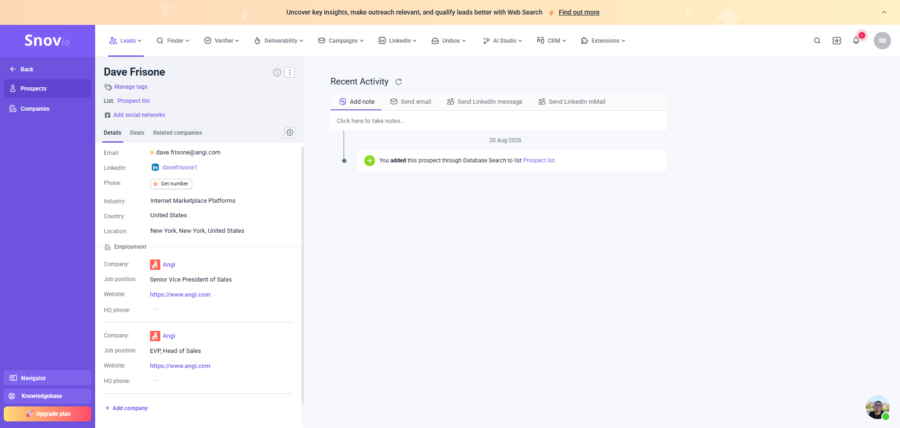
What makes it practical is the CRM integration. Snov works with HubSpot, Salesforce, Pipedrive, and 5,000+ other apps through Zapier.
So the enriched data doesn’t just sit in a spreadsheet. It shows up where your sales team already works.
Snov also updates records continuously. If a contact changes jobs or gets a new social profile, the data refreshes automatically.
One thing to watch: Snov uses a single credit pool for finding, verifying, and enriching. A 1,000-credit Starter plan sounds generous, but credits burn across multiple actions.
Winner?
Snov.io wins on enrichment.
Snov.io takes the lead because it gives you a deeper view of your prospects beyond basic contact details. While Hunter helps you find and verify emails with essential information like job titles and social profiles, Snov.io provides a more complete prospect profile with additional data points like phone numbers, company details, and social insights.
For sales teams that need more context before reaching out, Snov.io reduces manual research and gives you more information to create targeted outreach campaigns.
Let me share what users are saying.
“The credit system can feel limiting, especially when working on larger prospecting campaigns. It’s easy to go through credits quickly, and the pricing can become expensive as usage scales.”
— brandon H., Commercial Sales, Small-Business · Read on G2
“Sometimes even verified emails bounce, so accuracy can vary depending on the source.”
— Vikas K., Marketing Research, Mid-Market · Read on G2
More data points are useful, but they don’t help if the email address itself doesn’t work. That’s the trade-off with Snov’s enrichment.
How Does Saleshandy Stand Out As💪🏼 Alternative to Hunter.io & Snov.io?
Here’s the problem with both tools.
Hunter helps fill gaps in your data, while Snov gives you 50+ data points. But you’re still left with raw information that you have to turn into personalized messaging.
That’s where Saleshandy’s AI Prospect Enrichment changes the game.
Instead of handing you a spreadsheet full of fields and leaving you to figure out what to say, Saleshandy uses AI to research each prospect and generate ready-to-use personalization data.
Here’s how it works:
- Pick your AI model: Choose from GPT, Claude, Gemini, Perplexity, or Grok.
- Use pre-made templates or your own prompts: Create icebreakers, subject lines, company summaries, and market research, or build custom prompts with merge tags.
- Enrich at scale: Run enrichment on up to 100,000 prospects at once.
- Update anytime: Re-enrich the same list whenever you need fresh data or a different personalization angle.
The difference is simple. With Hunter or Snov, you get the data and then have to turn it into personalization.
With Saleshandy, get 50 free AI credits at signup and let AI research prospects to create personalized messaging faster.
3. Hunter.io vs Snov.io: Which Offers Better Outreach Sequences?
Next up is what happens after you’ve built the list, which is where most outbound programs stall.
I set up the same campaign in both tools to see how far each builder stretches.
| Feature | Hunter.io | Snov.io | Saleshandy ⭐ |
|---|---|---|---|
| Sequence Builder | Linear, email-only | Visual drag-and-drop with branching | Visual builder + AI Sequence Generator |
| Multi-Step Follow-Ups | ✅ | ✅ Trigger-based | ✅ Trigger-based |
| A/B Testing | ✅ Email content only | ✅ Multiple variants | ✅ A-Z testing (26 variants) |
| Spintax | ❌ | ✅ | ✅ |
| AI Email Writer | ✅ AI Writing Assistant | ✅ AI Email Writer | ✅ AI Sequence Copilot |
| Sending Accounts | 1-3 (plan-dependent) | ✅ Unlimited | ✅ Unlimited |
| Sending Limits (Entry) | 2,500 recipients | 5,000 recipients | 6,000 emails/mo |
| Phone Number Data | ❌ | ✅ Phone Finder ($0.02/token) | ✅ Included (6 credits/number) |
| Cold Calling / Dialer | ❌ | ❌ | ✅ AI Dialer (from $23/mo) |
| Channels in One Sequence | Email only | Email + LinkedIn | Email + LinkedIn + Calls + WhatsApp + SMS |
Hunter.io
Hunter’s outreach follows four steps: Audience, Content, Review, and Settings.
You add leads manually or import via CSV. Hunter auto-enriches with job titles and company details during import.
In Content, you write emails or use the AI Writing Assistant. Describe your goal and audience, and it generates a draft. The output is usable but needs editing.
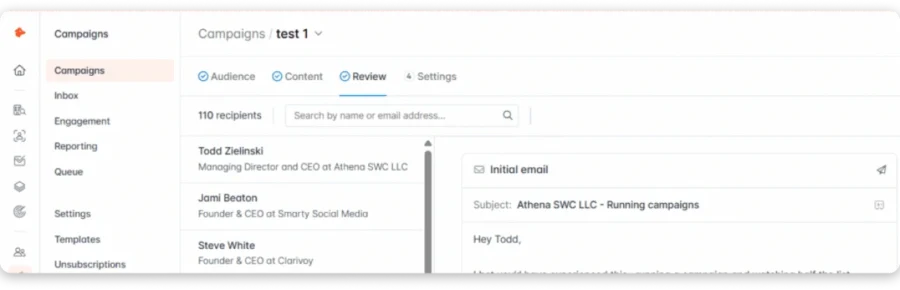
The Review step previews every email for every recipient, which helps catch personalization errors before sending.
Under Settings, you configure tracking, sending windows, and unsubscribe lines. Setup took me under five minutes.
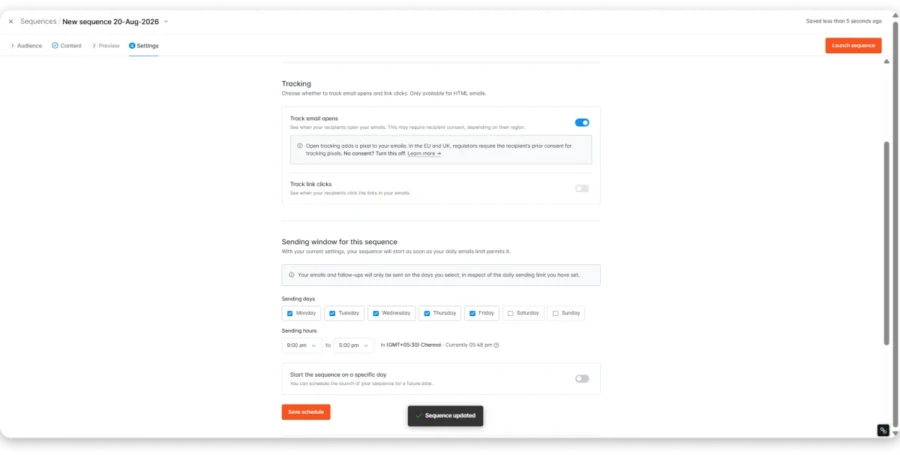
But here’s where it falls short. No branching, no conditional logic, no spintax, and no multichannel steps. No phone data and no dialer. Starter caps you at 3 email accounts and 2,500 recipients.
For basic cold email, Hunter works. Once you need more than a linear email sequence, you’ll hit walls.
Snov.io
Snov.io’s builder works completely differently.
You start from a blank canvas with a Start node. From there you add email steps, LinkedIn steps, delays, triggers, and goals. The whole campaign builds as a visual flowchart.
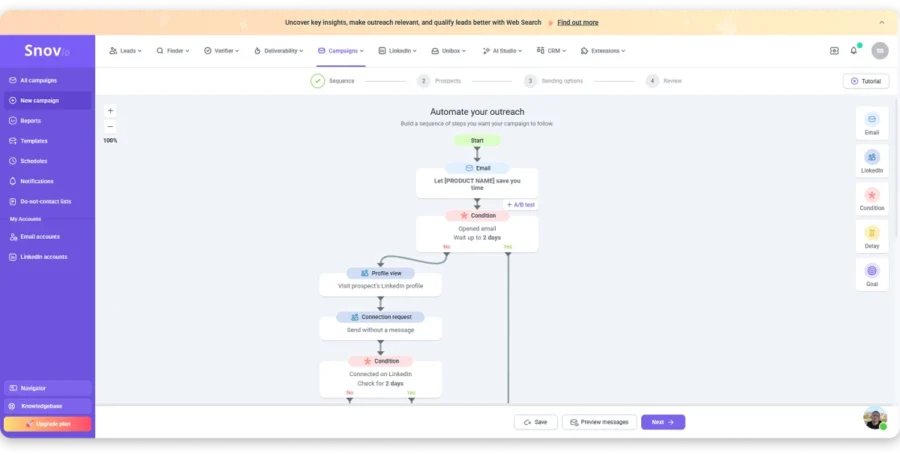
Conditional branching is the real advantage. Opened but didn’t reply? Different follow-up. Clicked a link? Warmer path. Accepted a LinkedIn request? Trigger a message.
Spintax rotates phrases, A/B testing compares variants, and sender rotation distributes volume across accounts.
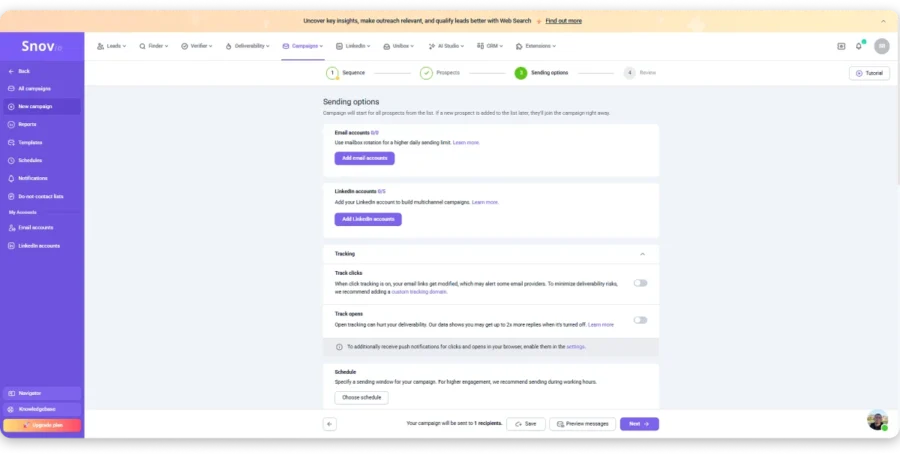
Snov also has a Phone Number Finder that looks up numbers from email addresses, names, domains, or LinkedIn URLs. You only pay for successful lookups at $0.02 per token. But there’s no dialer. The number lands in a CRM field, and you still need a separate tool to actually call.
I built a five-step email and LinkedIn sequence in about ten minutes. The builder stays intuitive as the flow gets complex.
One thing to note: spintax, A/B testing, and conditional logic are Pro-only at $74.25/mo.
Winner?
Snov.io wins this round clearly.
The visual multichannel builder with branching, triggers, spintax, and sender rotation is far more capable than Hunter’s linear sequences.
Hunter’s simplicity works for basic cold email, but it stops being competitive when your outreach needs more.
Let me share what users are saying.
“Frankly I don’t use the sequence sending functional and think that it is subpar compared to outreach-focused platforms (Instantly, Lemlist etc).”
— Dan G., Founder, Small-Business · Read on G2
“Email campaign setup is a little bit tricky. The initial setup of Snov.io was not so easy.”
— Hardik L., Client Relationship Director, Mid-Market · Read on G2
That’s the trade-off with Snov. You get more flexibility, but there’s more to learn.
How Does Saleshandy Stand Out As 💪🏼 Alternative to Hunter.io & Snov.io?
Saleshandy packs in the outreach features you’d expect, along with a few you wouldn’t:
- AI Sequence Copilot generates full sequences from a single prompt.
- Conditional-based sequences let you build branching campaigns based on prospect behavior.
- A-Z testing lets you test up to 26 variants, not just A/B.
- Spintax automatically creates text variations across your emails.
- Spam checker is built into the editor to help catch potential trigger words.
- Unlimited email accounts make sender rotation easier as you scale.
- Phone number data included in Lead Finder at 6 credits per number.
- Built-in AI Dialer with local presence, voicemail drop, number rotation, and AI call summaries. Starting at $23/mo.
- WhatsApp and SMS steps in the same sequence alongside email, LinkedIn, and calls.
Neither Hunter nor Snov can place a phone call. Snov finds numbers but has no dialer. With Saleshandy, the call is just another step in your sequence.
And the kicker? You get all of it on the $34/mo Starter plan, with no upsell tier required.
4. Snov.io vs Hunter.io: Which Tool Offers Better Personalization at Scale?
Personalizing a handful of emails is easy, but doing it for hundreds of prospects is a different story.
The real question isn’t which tool has more merge tags. It’s which one helps you personalize at scale.
Here’s what each tool actually gives you.
| Feature | Hunter.io | Snov.io | Saleshandy ⭐ |
|---|---|---|---|
| Merge Tags | ✅ | ✅ | ✅ |
| Custom Variables | ✅ | ✅ | ✅ |
| Conditional Personalization | ❌ | ✅ Pro only ($74.25/mo) | ✅ All plans |
| Spintax | ❌ | ✅ Pro only | ✅ All plans |
| AI Email Writer | ✅ | ✅ | ✅ |
| AI Model Choice | 3 GPT models | ❌ | ✅ 5 models (GPT, Claude, Gemini, Perplexity, Grok) |
| AI Prospect Enrichment | ❌ | ❌ | ✅ |
| Video Personalization | ❌ | ❌ | ✅ |
| Personalization Score | ❌ | ❌ | ✅ |
Hunter.io
Hunter keeps personalization simple with {{firstName}}, {{lastName}}, {{company}}, and custom attributes.
Its AI Writing Assistant adds more flexibility. You provide your audience, business, and outreach goal, and Hunter creates a personalized email draft.
You can choose from three GPT models, adjust the tone and style, and preview each email before sending.
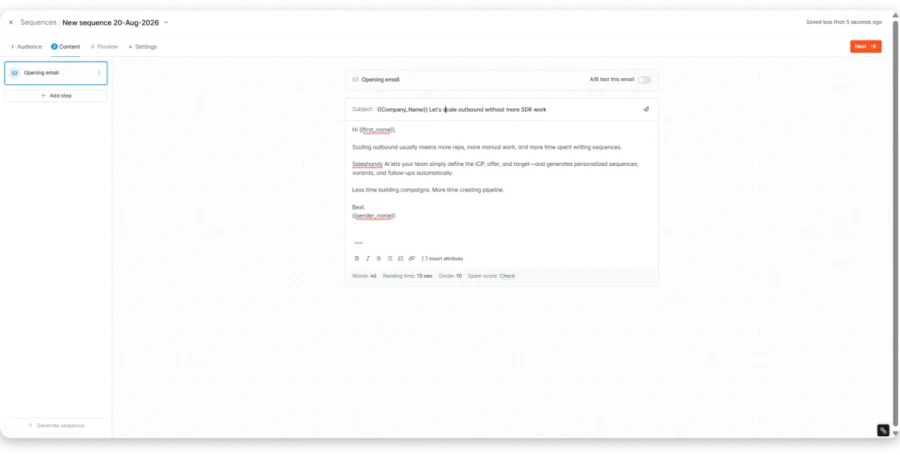
That preview also helps you catch personalization mistakes before they reach your prospects.
But this is where Hunter starts to fall short:
- No spintax for creating email variations
- No conditional personalization based on prospect behavior
- No prospect research for finding unique talking points at scale
Snov.io
Snov.io gives you more flexibility with variable tags, custom fields, and its AI Email Writer.
You can use standard variables like {{first_name}} and {{company}}, or create custom ones like {{icebreaker}} and {{common_ground}}.
You can also show different content based on prospect behavior, while spintax creates variations of the same message.
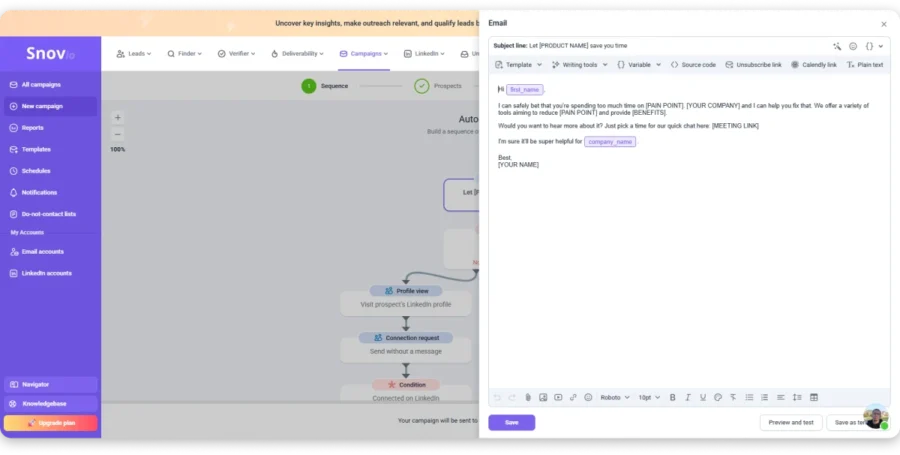
However, spintax, A/B testing, and conditional logic are available only on the Pro plan at $74.25/mo.
The Starter plan at $29.25/mo mainly covers basic variables, while AI Studio helps create emails and sequences for different audiences.
Winner?
This one is close to a tie.
Both tools handle basic personalization well, and both include AI writing features. Snov gives you more flexibility, but some features require Pro.
The bigger problem is the same with both tools: you still need to find the personalization data yourself.
That works for a smaller list, but manual research becomes difficult once you’re personalizing hundreds of prospects.
Let me share what users are saying.
“The bulk data export function lacks sufficient flexibility and personalized settings. It offers very few customizable data fields and lacks diversified formatted output modes.”
— Darcus B., Senior Marketing Manager, Mid-Market · Read on G2
“It has certain limitations around personalisation, especially when using it at scale.”
— Verified User in Computer Software, Small-Business · Read on G2
That’s the bigger issue. Personalization can work well at smaller volumes, but scaling it still takes manual effort.
Where Both Fall Short:
- Both find and enrich contacts, but neither writes personalized emails for you
- You still spend time creating unique opening lines manually
- No auto-generated icebreakers or talking points based on prospect data
- Hard to update personalization once it’s added
Where Saleshandy Gives You Better Personalization Without the Complexity
Hunter and Snov give you the fields and tools to personalize emails. Saleshandy takes care of the research behind those fields.
Here’s what you get:
- AI Prospect Enrichment using GPT, Claude, Gemini, Perplexity, or Grok to generate icebreakers, company summaries, and role-specific insights.
- Video Personalization to add personalized videos to your emails.
- Personalization Score to check how personalized your emails are before sending.
- Spintax available across plans.
- Update and overwrite enriched fields whenever you need fresh personalization.
So the difference comes down to the work behind personalization. Hunter and Snov help you add it, while Saleshandy helps you create it.
5. Hunter.io vs Snov.io: Which Is Better for Email Warm-Up and Deliverability?
The next thing I looked at was warm-up and deliverability, because getting into the inbox decides whether your outbound actually works.
Here’s what each tool offers.
| Feature | Hunter.io | Snov.io | Saleshandy ⭐ |
|---|---|---|---|
| Email Warm-Up | ✅ Inbox Protection (paid add-on) | ✅ 3 on Starter unlimited on Pro | ✅ Unlimited on all plans |
| Domain Setup (SPF/DKIM/DMARC) | ✅ Auto-config | ✅ Auto-config + checkers | ✅ Auto-config + monitoring |
| Inbox Placement Testing | ❌ | ✅ 25 credits per test | ✅ Inbox Radar (continuous) |
| Bounce Management | ❌ | Campaign tracking | ✅ AI Bounce Detection |
| Sender Rotation | 3-20 accounts by plan | ✅ Multiple accounts | ✅ Unlimited accounts |
| Email Ramp-Up | ✅ Progressive Sending (free) | ❌ | ✅ Gradual volume scaling |
| Unlimited Email Accounts | ❌ (3-20 per plan) | ✅ | ✅ |
Hunter.io
I want to correct something most comparison blogs get wrong: Hunter does have email warm-up.
It’s called Inbox Protection, and it’s available as a paid add-on on all paid plans. The system runs a 30-day warm-up period using real replies and positive engagement signals to build your sender reputation.
During warm-up, your account is locked from sending in Sequences. Once warm-up is complete, Inbox Protection switches to maintenance mode and keeps protecting your reputation in the background.
Hunter also offers Progressive Sending for free on all plans. This gradually increases your daily sending limits for new or inactive accounts. It’s not true warm-up, but it helps prevent sudden sending spikes that can hurt deliverability.
The Health Report checks SPF, DKIM, and DMARC configuration, blacklist status, domain age, and other trust signals.
Where Hunter falls short:
It lacks inbox placement testing and bounce detection. Sending accounts are capped by plan (3 on Starter, 20 on Scale), though you can buy extras at $10/month each. Ten mailboxes on Starter means $34 plus $70 in add-ons.
Snov.io
Snov.io takes deliverability more seriously, and I found real infrastructure here rather than just a checkbox.
Warm-up is available on all paid plans, with automated emails helping build sender reputation before campaigns go live.
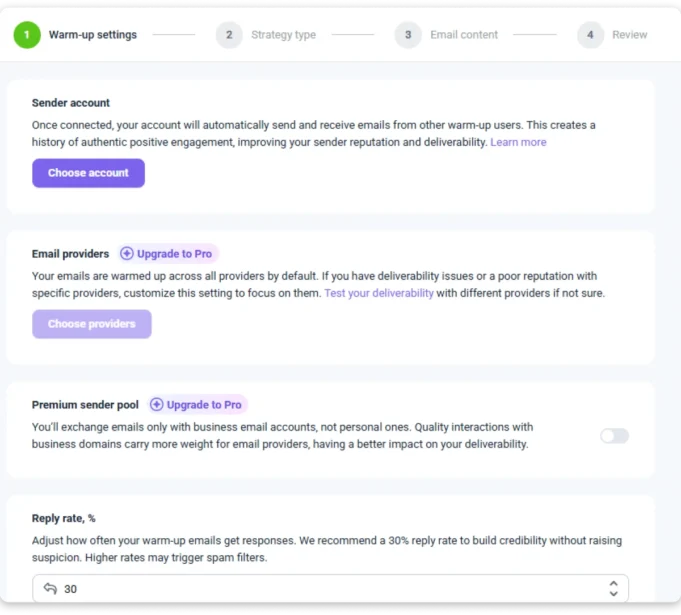
You can control daily volume, reply rate, and the providers you want to target.
However, Starter only supports warm-up for 3 mailboxes. If you need more sending accounts, you’ll need Pro at $74.25/mo for unlimited warm-up slots.
Snov also includes a Deliverability Check tool that tests where your emails land across Primary, Promotions, and Spam.
Each test costs 25 credits from your main pool, so frequent testing uses your credits quickly.
SPF, DKIM, and DMARC configuration is automated, while DNS checkers help you troubleshoot setup issues.
You also get unlimited sending accounts, health monitoring, and sender rotation.
Winner?
Snov.io still wins this round, but the gap is smaller than most comparisons suggest.
Hunter has real warm-up now through Inbox Protection. It’s a paid add-on, but it works. Snov includes warm-up in the base plan (with limits on Starter) and adds inbox placement testing that Hunter doesn’t have.
The bigger difference is scale. Snov gives you unlimited sending accounts on every paid plan. Hunter includes 3 to 20 depending on tier and charges $10/month for each one beyond that. For teams running outbound across multiple domains, that limit matters more than the warm-up feature itself.
Let me share what users are saying.
“I’ve noticed that some of the emails marked as verified still bounce from time to time.”
— Sebin M., BDE, Mid-Market · Read on G2
“Without any action from our side, Snov.io’s system resent the same email campaign to the same group of customers.”
— Peter D., CEO, Small-Business · Read on G2
Snov has stronger deliverability tools, but issues can still happen even with those safeguards.
How Does Saleshandy Stand Out As 💪🏼 Alternative to Hunter.io & Snov.io?
Hunter charges extra for warm-up as an add-on. Snov includes warm-up but caps it at 3 mailboxes on Starter.
Saleshandy includes the full deliverability stack on the Starter plan:
- Built-in Email Warm-up across all connected mailboxes. No add-on. No mailbox cap.
- Inbox Radar that monitors Primary, Promotions, and Spam placement continuously.
- Sender Rotation across unlimited email accounts.
- Email Ramp-Up for gradually increasing volume on new accounts.
- Sequence Score that checks your campaign for deliverability risks before launch.
- AI Bounce Detection that catches bounce patterns mid-campaign.
- ESP Matching for optimal sender-to-receiver pairing.
No extra cost for warm-up. No 3-mailbox cap. No per-test credit charges.
(Your choice! 😉)
6. Hunter.io vs Snov.io: Which Is Better for Agencies and Teams?
If you run outreach for clients, the question changes completely.
It’s no longer about which tool has more features. It’s about whether you can manage 5, 10, or 20 clients from one account without things falling apart.
| Feature | Hunter.io | Snov.io | Saleshandy ⭐ |
|---|---|---|---|
| Team Seats | ✅ | ✅ | ✅ |
| Client Workspaces | ❌ | ❌ (team workaround) | ✅ Unlimited |
| White-Labeling | ❌ | ❌ | ✅ Enterprise |
| Per-Client Reporting | ❌ | ❌ | ✅ |
| Dedicated Agency Plan | ❌ | Agency page, no separate plan | ✅ Agency Portal |
| Client Access Controls | ❌ | Basic team roles | ✅ Full role hierarchy |
Hunter.io
Hunter includes unlimited team members on every plan, including the free tier. Your team shares one credit pool with no extra charge per person.
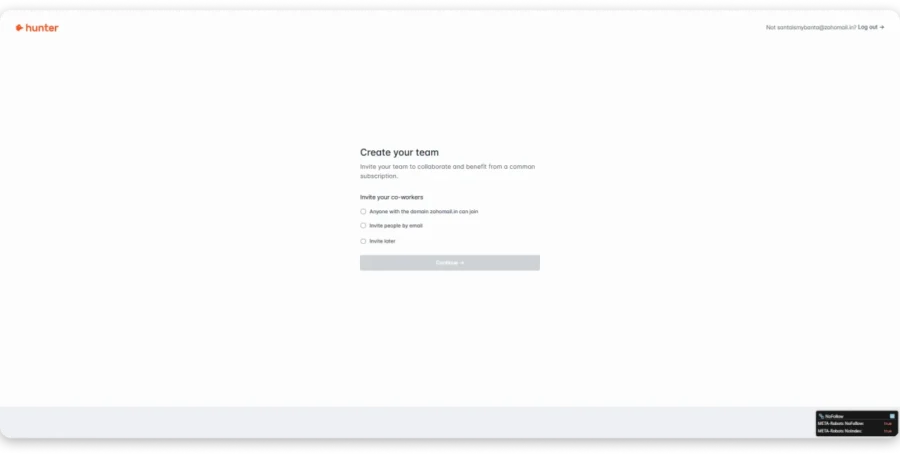
That works for internal teams. But there’s no way to separate client data, run client-specific campaigns, or generate reports for individual clients.
An agency using Hunter would need a separate account for each client. That gets impractical fast.
Snov.io
Snov.io also offers unlimited team seats on all paid plans, with flat-rate pricing that makes costs easier to forecast.
Teams can share prospect lists and campaigns, and role-based access helps assign permissions.
But like Hunter, there’s no client isolation. No agency portal, no white-labeling, and no way to keep one client’s data separate from another. You’d need workarounds, and those stop working past two or three clients.
Winner?
Neither tool is built for agency work.
Both include unlimited team seats, so per-seat pricing isn’t an issue with either one. Where they both fall short is client infrastructure: separate workspaces, isolated reporting, and white-labeled dashboards.
Snov edges ahead slightly with its dedicated agency page and flat-rate pricing. But “slightly better than limited” still isn’t agency-ready.
Why Lead Gen Agencies Choose Saleshandy Over Hunter.io & Snov.io
Saleshandy was built for agencies from the start:
- Unlimited client workspaces with no extra cost per client.
- White-labeling on Enterprise, so everything runs under your brand.
- Client-specific campaigns, mailboxes, and reporting that stay isolated.
- Unlimited email accounts, so one client can’t drain a shared pool.
- Full role hierarchy covering admin, manager, and team member access.
For an agency running 10 clients, Hunter needs 10 separate accounts and Snov needs workarounds. Saleshandy handles it from one dashboard.
7. Snov.io vs Hunter.io: Which Handles Reply Management Better?
The next thing I looked at was what happens after someone replies.
Because finding leads and sending emails is only useful if you can actually catch the warm replies and move them forward.
| Feature | Hunter.io | Snov.io | Saleshandy ⭐ |
|---|---|---|---|
| Reply Tracking | Inside Hunter only | Inside Snov.io | ✅ Unified Inbox (all accounts) |
| AI Reply Categorization | ❌ | ❌ | ✅ Interested, booked, not interested, OOO |
| Built-in CRM | Basic lead lists (no pipeline) | ✅ Deals, pipelines, tasks | ✅ Free CRM |
| Deal Pipelines | ❌ | ✅ Kanban view | ✅ |
| Task Management | ❌ | ✅ Assign tasks to deals | ✅ |
| Real-Time Alerts | ❌ | ❌ | ✅ Slack + mobile |
Hunter.io
Hunter has a Leads module that works as a basic contact list. You can save leads, organize them into lists, share with teammates, and push them into sequences.
But I wouldn’t call it a CRM. There’s no pipeline view, no deal stages, no task management, and no activity timeline.
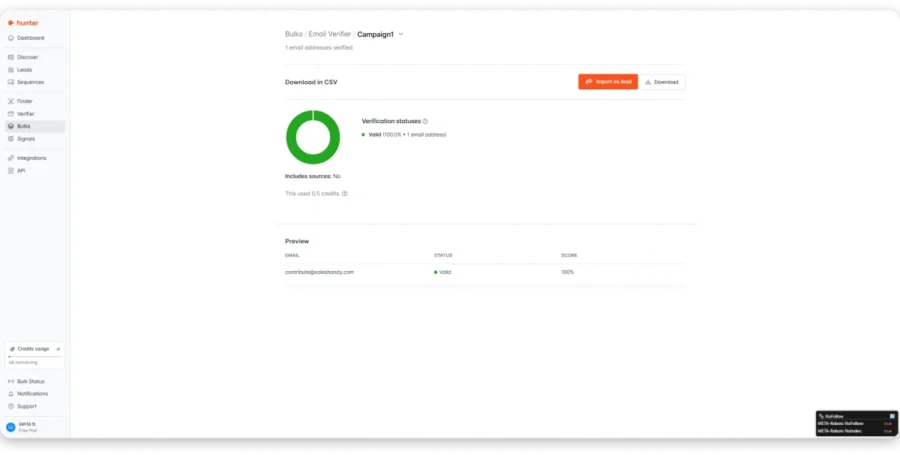
Replies show up inside Hunter, but only for the account that sent the email. If you’re sending from multiple accounts, you need to check each one separately.
Snov.io
Snov.io includes a real CRM with a Kanban-style pipeline.
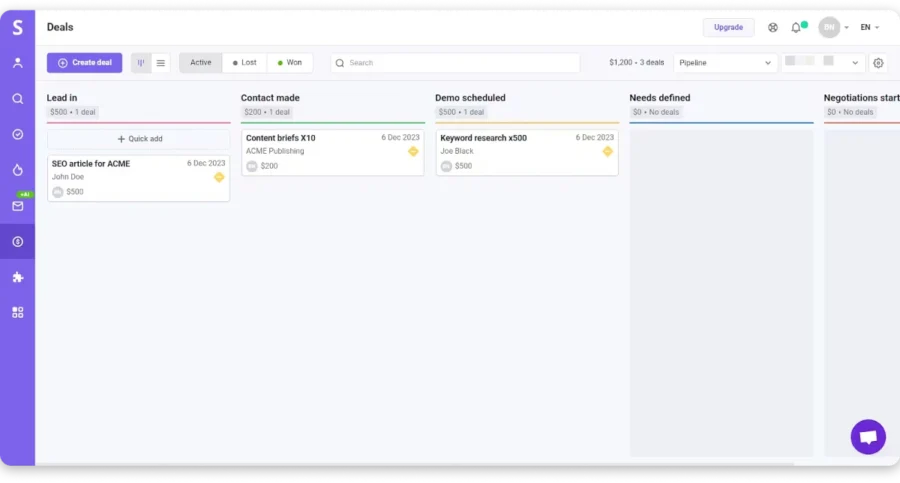
You can create deal cards with name, value, and contact info, then drag them between custom stages. Win/loss ratios and conversion rates are tracked automatically.
Task management is built in too. You can create tasks, assign them to teammates, set due dates, and link them to specific deals.
Replies are tracked inside Snov’s campaign view. It won’t replace Salesforce. But for teams that don’t want to pay for a separate CRM, I found it functional enough to run outbound workflows end to end.
Winner?
Snov.io wins this one comfortably. A real CRM with pipelines, deals, and tasks is a clear step up from Hunter’s basic contact list.
Let me share what users are saying.
“It lacks advanced engagement and some CRM style features.”
— Vishva T., Freelance Project Manager, Small-Business · Read on G2
“Sometimes this platform can be a bit limited for CRM functionalities compared to other larger CRMs in this competitive landscape. Their reporting and analytics could also be more complex, specifically for multi-touch kind of campaigns.”
— Verified User in Oil & Energy, Mid-Market · Read on G2
Snov’s CRM works well for basic outbound, but teams running multi-touch campaigns will eventually outgrow it.
How Does Saleshandy Stand Out As 💪🏼 Alternative to Hunter.io & Snov.io?
When you’re sending from 5 or 10 accounts, warm replies get buried across separate inboxes. By the time someone checks each one, the lead has gone cold.
Saleshandy’s Unified Inbox pulls every reply from every sending account into one view. AI Reply Categorization sorts them automatically into interested, meeting booked, not interested, and out of office.
Real-time Slack alerts and mobile notifications mean warm leads get worked when they land, not when someone next opens a tab.
8. Hunter.io vs Snov.io: Which Runs LinkedIn Automation Better?
LinkedIn is where your prospects spend their workday. If your outreach doesn’t include it, you’re missing touchpoints that email alone can’t cover.
I tested what each tool actually offers for LinkedIn automation.
| Feature | Hunter.io | Snov.io | Saleshandy ⭐ |
|---|---|---|---|
| LinkedIn Automation | ❌ | ✅ Native inside campaigns | ✅ In sequences |
| Profile Views | ❌ | ✅ | ✅ |
| Connection Requests | ❌ | ✅ With personalized note | ✅ |
| LinkedIn Messages | ❌ | ✅ | ✅ |
| LinkedIn Follow-Ups | ❌ | ✅ | ✅ |
| LinkedIn Cost | N/A | $69/slot/mo (separate purchase) | Via integration |
Hunter.io
Hunter has no LinkedIn automation at all. No connection requests, no messaging, no profile views.
The browser extension finds emails while you browse LinkedIn profiles, but that’s a passive lookup, not an automation layer. You can’t add LinkedIn steps to a sequence.
If LinkedIn outreach is part of your workflow, Hunter requires a completely separate tool.
Snov.io
Here’s something I want to correct, because several comparison blogs get this wrong.
Snov.io’s LinkedIn automation is native and runs inside campaigns. You can add LinkedIn steps alongside email steps in the same campaign: profile views, likes, connection requests with personalized notes, messages, and follow-ups.
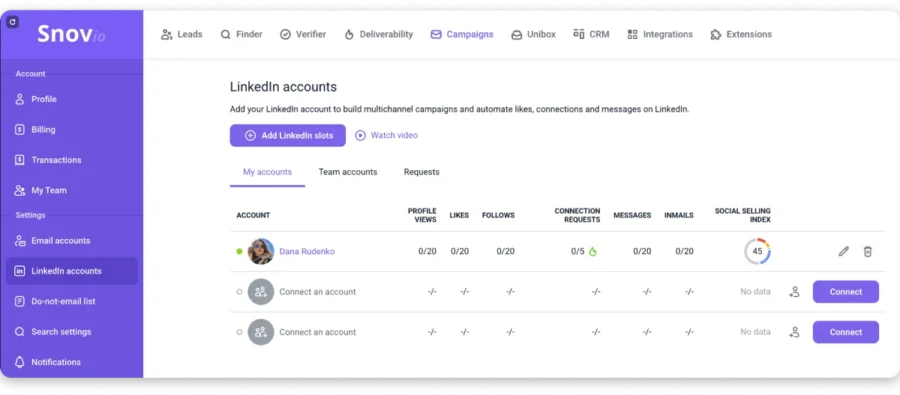
The automation works well for basic LinkedIn touchpoints. But it’s not as deep as dedicated LinkedIn tools like Expandi or Dripify.
One thing to know: LinkedIn automation costs $69/mo per account slot, purchased separately from any Snov plan. That cost adds up if your team runs multiple LinkedIn accounts.
Winner?
Snov.io wins this round. Hunter doesn’t compete here at all.
“Sometimes I dislike because its LinkedIn Automation feature is not so robust.”
— Pranav K., Data Analyst, Mid-Market · Read on G2
How Does Saleshandy Stand Out As 💪🏼 Alternative to Hunter.io & Snov.io?
Saleshandy lets you add LinkedIn steps directly inside your outreach sequences. Profile views, connection requests, and messages sit alongside email steps in the same workflow.
No separate tool. No switching between platforms. Your prospect sees a connection request and an email as part of one coordinated outreach, not two disconnected touches.
9. Snov.io vs Hunter.io: Which Has Better API, MCP, CRM Integrations, and Automation?
If your outbound runs on automations and custom workflows, the developer surface matters as much as the interface.
I looked at what each tool offers for teams that build rather than click.
| Feature | Hunter.io | Snov.io | Saleshandy ⭐ |
|---|---|---|---|
| REST API | ✅ Well-documented v2 | ✅ Comprehensive | ✅ Full API (all plans) |
| MCP Support | ✅ | ✅ Claude AI | ✅ 40+ commands (Claude, ChatGPT, Cursor, n8n) |
| CLI | ❌ | ❌ | ✅ Full CLI access |
| CRM Integrations | HubSpot, Salesforce, Pipedrive, Zoho | HubSpot, Salesforce, Pipedrive, Zoho, Close, Nutshell, Freshsales | HubSpot, Salesforce, Pipedrive, Zoho (bidirectional) |
| Zapier | ✅ 5,000+ destinations | ✅ 5,000+ apps | ✅ |
| n8n | ❌ | ✅ | ✅ |
| Google Sheets | ✅ Native add-on | ❌ | ❌ |
| Browser Extensions | Chrome, Firefox, Edge | 4 extensions | Chrome |
Hunter.io
Hunter’s REST API v2 covers all core functions: Domain Search, Email Finder, Email Verifier, Leads, and Campaigns. The documentation is clean and example-driven, which is why developers consistently rate it well.
Hunter also supports MCP, letting AI assistants work directly with its data. The Google Sheets add-on is useful for enriching spreadsheets without writing code.
Browser extensions work on Chrome, Firefox, and Edge, with MailTracker handling email open tracking. Zapier connects to 5,000+ destinations.
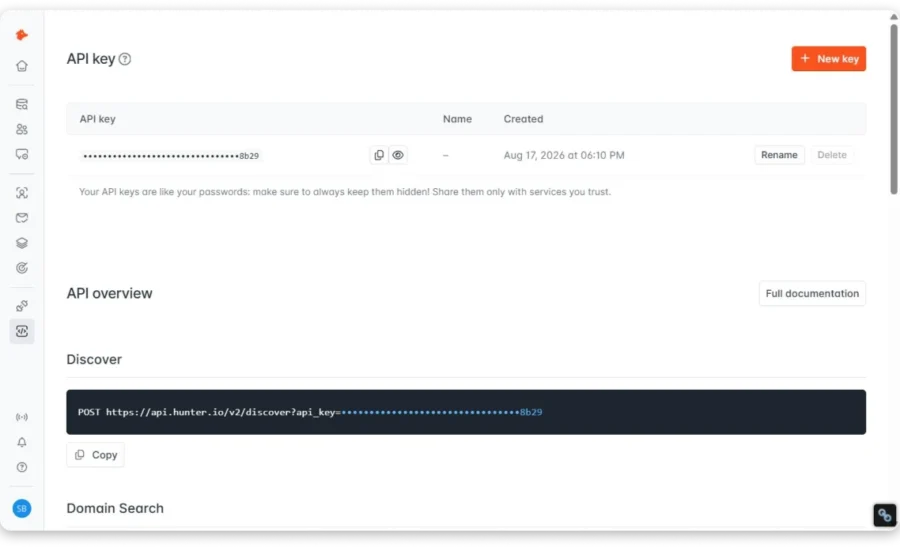
Where I found gaps: no CLI, no native n8n integration, and limited webhook support since events route through Zapier rather than native endpoints.
Snov.io
Snov.io’s integration ecosystem stretches wider.
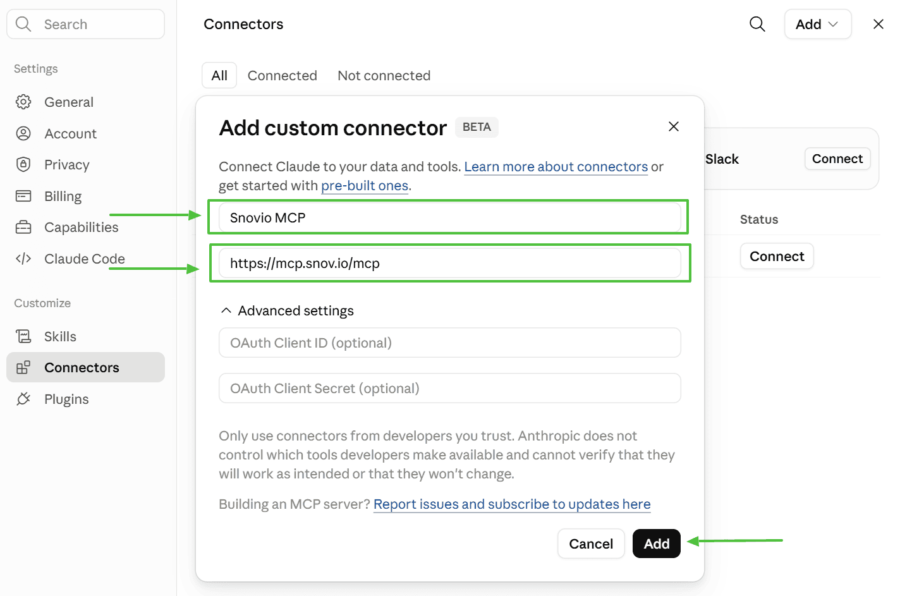
MCP works with Claude AI for managing leads and deals through an AI assistant. The REST API covers leads, verification, and campaigns. Zapier connects to 5,000+ apps, Make adds another 1,000+, n8n enables custom workflows, and Clay integration supports enrichment pipelines.
Four Chrome extensions cover browser-based prospecting: Email Finder, LI Prospect Finder, Email Verifier, and Gmail Email Tracker.
Native CRM integrations include Pipedrive, HubSpot, Salesforce, Zoho, Close, Nutshell, and Freshsales.
Winner?
I’d call this one a tie. Both have MCP and strong APIs.
Snov.io adds n8n, Clay, and Make. Hunter adds Google Sheets and wider browser extension coverage. The better fit depends on what’s already in your stack.
One thing to check before committing: whether API access is gated by plan tier. Some features sit behind higher plans on both platforms.
How Does Saleshandy Stand Out As 💪🏼 Alternative to Hunter.io & Snov.io?
If your team builds automated outbound workflows rather than running everything from the dashboard, this is where Saleshandy pulls ahead.
Full API, MCP, and CLI are all available on every plan. The MCP supports 40+ commands and works with Claude, ChatGPT, Cursor, and n8n. The CLI gives your team programmatic access to the entire workspace, and bulk imports handle up to 100,000 prospects at a time.
The practical difference: a RevOps team can build a pipeline that goes from CRM trigger to enriched list to live sequence without anyone logging into the dashboard manually.
10. Hunter.io vs Snov.io: Which Offers Better Customer Support?
When something breaks mid-campaign, how fast you get help matters more than any feature on the pricing page.
| Feature | Hunter.io | Snov.io | Saleshandy ⭐ |
|---|---|---|---|
| Live Chat | ✅ Intercom widget | ✅ Human agents | ✅ Human agents |
| Email Support | ✅ | ✅ | ✅ |
| Priority Support | Higher tiers | Higher tiers | ✅ All plans |
| Dedicated Manager | Enterprise only | Higher tiers | Scale and above |
| Knowledge Base | ✅ Well-organized | ✅ 200+ articles | ✅ 500+ articles + video |
| Onboarding | Self-serve | Self-serve + AI help | ✅ Guided onboarding |
| G2 Rating | 4.4/5 | 4.5/5 | 4.6/5 |
Hunter.io
Hunter offers in-app chat support through an Intercom widget, along with email support and a well-organized knowledge base covering setup, API docs, tutorials, and billing.
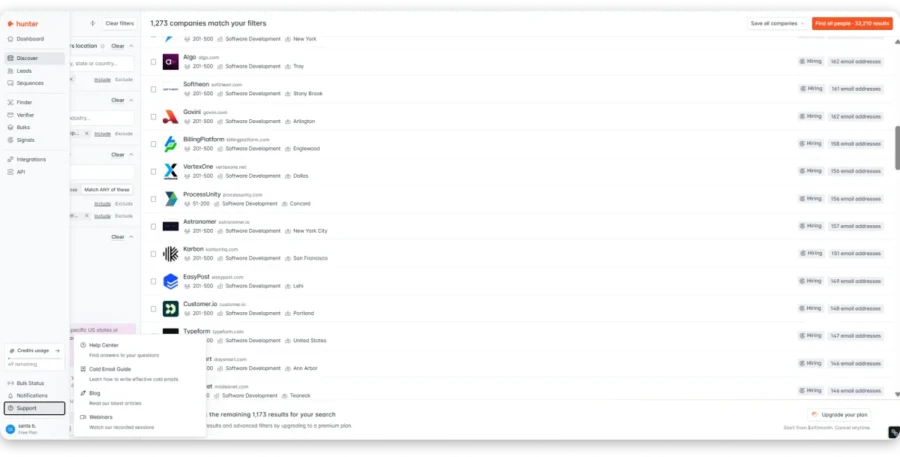
It rates 4.4/5 on G2 and 4.6/5 on Capterra, with 7M+ users globally and a Chrome extension rated 4.7 from over 12,000 reviews.
There’s no phone support and no community forum, so the experience is simple rather than comprehensive.
Snov.io
Snov.io goes deeper on support.
Live chat connects you to human agents rather than a bot, and the in-app knowledge base is searchable straight from the chat widget with AI-powered results.
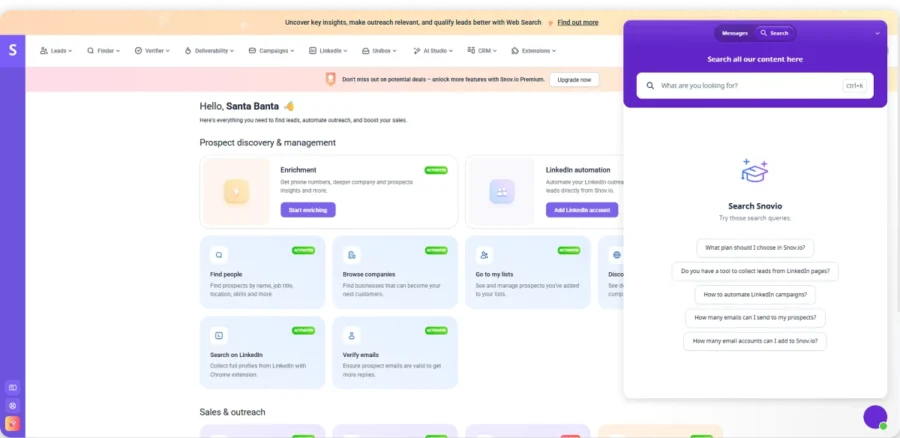
The knowledge base itself holds 200+ articles across 12+ categories, including 23 articles on integrations and APIs alone.
Ratings sit at 4.5/5 on G2, 4.5/5 on Capterra, and 4.8/5 on Trustpilot, across 300,000+ companies in 180+ countries, with a Chrome extension rated 4.9 from 5.8K ratings.
Winner?
Snov.io edges ahead on documentation depth and AI-powered self-service, while Hunter’s support stays functional but narrower.
This parameter carries the least weight of the ten, so the practical difference shouldn’t decide your purchase.
How Does Saleshandy Stand Out As 💪🏼 Alternative to Hunter.io & Snov.io?
Saleshandy includes AI and email support on Starter, adds live chat on Pro, and provides priority support on Scale. Personalized onboarding and a dedicated account manager come with Scale and above.
Snov.io vs. Hunter.io: Pricing Comparison (2026)
Now for the part everyone scrolls to.
Pricing matters, but $34 vs. $29.25 doesn’t tell the full story. Hunter and Snov.io use different credit systems, so your actual contact cost can vary.
Hunter also limits sending accounts, while Snov.io offers unlimited senders on paid plans.
Here’s what you’re actually paying for.
| Parameters | Hunter.io | Snov.io | Saleshandy |
|---|---|---|---|
| Cheapest plan (yearly / monthly) | $34 / $49 | $29.25 / $39 | $34 / $41 |
| Credits you get | 2,000 | 1,000 | 1,500 |
| What a credit buys | 1 to find an email, another half to check it | 1 to find, 1 more to check | 1 for an email that’s already checked |
| Do you pay for bad emails? | No | Yes | No |
| Inboxes you can send from | 3 to 20, then $10/mo each | Unlimited | Unlimited |
| People on the account | Unlimited | Unlimited | 1 on Starter, 10 on Pro, unlimited on Scale |
| Warm-up | Costs extra | Free for 3 inboxes | Free, no limit |
| LinkedIn messages | Not possible | $69/mo per account | Built into sequences |
| Phone numbers | Not available | 2 cents each | 6 credits each |
| Run it under your own brand | ❌ | ❌ | Enterprise plan |
Hunter.io
Hunter Starter gives you 2,000 credits for $34/month annually.
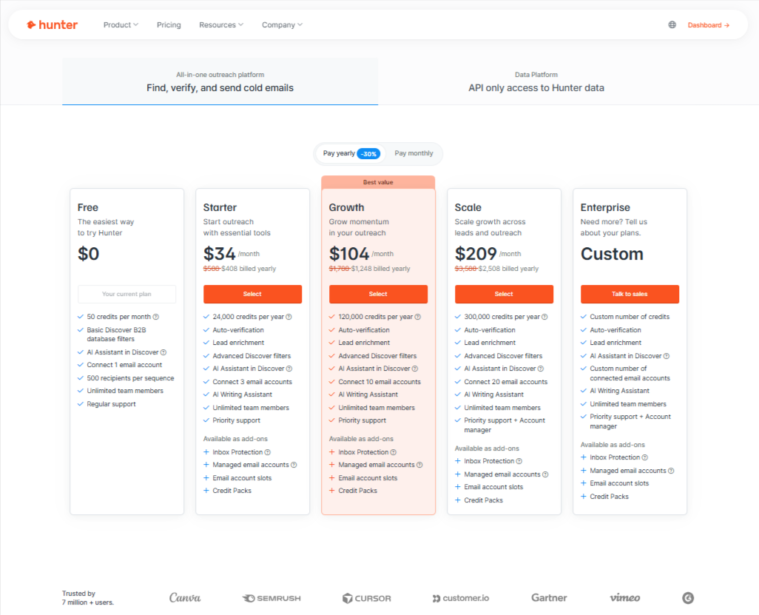
Finding costs 1 credit, while verification costs 0.5. So finding and verifying one contact uses 1.5 credits, giving you roughly 1,333 verified contacts.
The downside is that warm-up isn’t included, and email accounts are capped by plan.
Snov.io
Snov Starter costs $29.25/month annually and includes 1,000 credits.
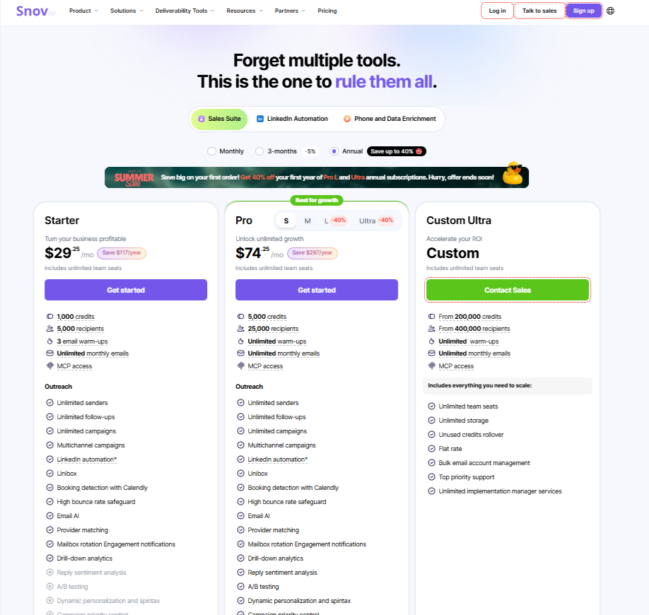
Worth knowing about Hunter:
Emails you pull from Hunter’s own database come pre-checked, so you skip the half-credit. Prospect only inside Hunter and 2,000 credits can stretch closer to 2,000 contacts. The 1.5-credit math kicks in when you upload your own list and run it through their verifier. Either way, warm-up is still an extra line on the bill.
Why Saleshandy’s credit stretches further:
One credit covers everything. Saleshandy checks eight different data sources until one finds the email, verifies it, and hands it over. Catch-all addresses are included. If nothing comes back, you’re not charged.
What this looks like in practice
- Solo founder: Snov is cheapest at $29.25 and throws in warm-up for 3 inboxes. Hunter looks similar at $34 until you add warm-up as a paid extra.
- Team of 5, running 10 inboxes: Hunter is $34 plus $70 for the extra inboxes. Snov and Saleshandy both include unlimited inboxes, though Saleshandy needs the $76 Pro plan to fit 5 people.
- Email and LinkedIn together: Hunter can’t do LinkedIn at all. Snov is $98.25 once you add a LinkedIn slot. Saleshandy puts LinkedIn steps in the same sequence.
- Agency with 10 clients: Neither Hunter nor Snov lets you separate client accounts or brand the tool as your own.
So which is worth the money?
Hunter is genuinely cheap per contact if you stay inside their database. Warm-up and extra inboxes are where the bill creeps up.
Snov packs the most into one subscription. But paying twice per contact and $69 for LinkedIn means most teams land well above the $29.25 they signed up for.
Saleshandy charges one credit for a contact that’s already verified, nothing for one that isn’t, and doesn’t limit inboxes or warm-up on any plan.
So don’t compare $34 to $29.25. Add up what you’ll actually spend once warm-up, LinkedIn, and re-checking bad emails are in there.
⚠️ Pricing note: Prices and limits can change, so check the live pricing pages before purchasing.
Hunter.io vs. Snov.io: And The Winner Is
Both tools are strong, but they solve slightly different problems. Hunter focuses on clean, reliable data, while Snov.io covers more of the outbound workflow.
The practical choice comes down to what you need from the platform:
If you want accurate email data with simple prospecting and verification, Hunter.io fits better.
If you want prospecting, verification, sequences, LinkedIn, CRM, and warm-up in one platform, Snov.io fits better.
Neither is perfect for every outbound workflow. If you need more advanced outreach, deliverability, or agency features, the alternatives above are worth considering.
FAQs: Hunter.io vs Snov.io
1. Which has more accurate email data, Hunter.io or Snov.io?
Hunter.io has higher email accuracy. Every contact comes with a confidence score and clickable source links showing where the email was found. Third-party tests show bounce rates under 3% on Hunter-verified lists. Snov.io claims 98% accuracy through its 7-tier verification, but user reviews report more inconsistency, especially on enterprise domains.
2. Does Hunter.io or Snov.io provide phone numbers?
Hunter does not provide phone numbers on any plan. Snov.io offers a Phone Number Finder covering 150+ countries with up to 40% match rate. Phone numbers are charged separately through tokens at $0.02 each, independent from your Sales Suite subscription. Neither tool includes a dialer to call those numbers.
3. Which is cheaper per verified contact, Hunter.io or Snov.io?
Hunter Starter costs $34/mo annually and yields roughly 1,333 verified contacts at ~$0.026 each. Snov Starter costs $29.25/mo and yields roughly 500 verified contacts at ~$0.059 each. Hunter is cheaper per contact because Snov’s shared credit pool charges separately for finding and verifying. However, Hunter doesn’t include warm-up, which adds $30-50/mo if you need it.
4. Can you do cold calling or LinkedIn outreach with Hunter.io or Snov.io?
Hunter is email-only. No LinkedIn automation, no phone data, no dialer. Snov.io runs LinkedIn automation natively inside campaigns (profile views, connections, messages) and finds phone numbers, but has no built-in dialer. LinkedIn automation on Snov costs $69/mo per account slot, purchased separately from any plan.
5. Is there a better alternative to Hunter.io and Snov.io?
If you need a larger database, cold calling, full deliverability infrastructure, or agency management in one platform, Saleshandy is worth considering. It combines 852M+ contacts, an AI Dialer, unlimited email accounts, warm-up, and an Agency Portal starting at $34/mo. For occasional email lookups with no outreach, Hunter’s free plan is still the simplest option.

![11 Best Phone Number Extractor Tools for B2B Outreach [2026]](https://www.saleshandy.com/blog/wp-content/uploads/2026/04/Extract-Phone-Numbers-in-Seconds.webp)
 Anil Salvi