

AI tools for B2B prospecting can save sales teams up to 50 hours of manual work.
But that only happens when you choose the right tool.
And that’s EXACTLY why you should read this blog!
I logged into 11 of the best AI prospecting tools and tested them in real-world workflows.
By the end, you’ll know which tool fits your workflow and budget—and which one can fix the part of your prospecting process that is slowing your team down.
AI Tools for B2B Prospecting- TOC
- TL;DR: 11 Best AI Tools for B2B Prospecting at a Glance
- How AI Fits Into the 5-Stage B2B Prospecting Workflow
- The 11 Best AI Prospecting Tools by Category
- 5 Must-Have Features in AI Tools for B2B Prospecting
- Final Verdict: Which AI Prospecting Tool Should You Actually Use?
- FAQs About AI Tools for B2B Prospecting
TL;DR: 11 Best AI Tools for B2B Prospecting at a Glance
These tools support four key parts of B2B prospecting: managing the entire workflow, finding leads, researching prospects, and running outreach.
The right option depends on which part of your prospecting process takes the most time and how much of it you want AI to automate.
| Category | Tool | Best For | Main AI Features | Starting Price |
|---|---|---|---|---|
| All-in-One AI Tools for B2B Prospecting | Saleshandy | Managing lead generation and outreach in one place |
|
From $25/month
Sign up free |
| Apollo | Small and midsize sales teams |
|
From $49/user/month | |
| Amplemarket | Automating manual prospecting tasks |
|
From $600/month | |
| Lead Finding | ZoomInfo | Enterprise lead generation and sales intelligence |
|
Custom pricing |
| LinkedIn Sales Navigator | Finding decision-makers on LinkedIn |
|
From $119.99/month | |
| Lusha | Finding business emails and phone numbers quickly |
|
From $37.45/user/month | |
| Lead Research and Data Enrichment | Cognism | International prospecting and verified phone data |
|
Custom pricing |
| Clay | Building custom research and enrichment workflows |
|
From $185/month | |
| Outreach | Outreach | Enterprise sales engagement |
|
Custom pricing |
| Instantly | High-volume cold email campaigns |
|
From $47/month | |
| Lemlist | Personalized email and LinkedIn outreach |
|
From $69/month |
How AI Fits Into the 5-Stage B2B Prospecting Workflow
B2B prospecting involves more than building a list of people to contact.
You need to identify suitable companies, find the right decision-makers, verify their contact information, understand why they may be interested, and reach them through the right channels.
Each stage affects the next. A large list is not valuable when the prospects do not match your ideal customer profile.
Strong personalization cannot help when the contact information is outdated. Even a well-written email will struggle to generate replies if it lands in spam.
The five stages below also explain the four tool categories covered in this guide.
Lead-finding tools support account and contact discovery, research tools handle enrichment and prioritization, outreach tools help engage prospects, and all-in-one platforms connect the complete workflow.
Here is how the B2B prospecting process works and where AI can help.
Stage 1: Identify Target Accounts and Decision-Makers
The first step is deciding which companies and people are worth contacting.
This normally involves filtering prospect data using criteria such as:
- Industry
- Company size
- Location
- Revenue
- Technologies used
- Department
- Job title
- Seniority
Some AI prospecting tools make this faster by converting a plain-language description of your ideal customer into a targeted search.
Instead of manually applying several filters, you could search for:
Heads of Sales at US-based SaaS companies with 50 to 200 employees.
The tool can then translate the request into the relevant company and contact filters.
However, AI cannot correct a poorly defined ideal customer profile. When your targeting criteria are unclear, it may simply help you build the wrong list faster.
Stage 2: Research, Enrich, and Verify Prospect Data
Finding the right person is only the beginning.
Before starting outreach, you need a verified business email, a usable phone number where relevant, and enough information to understand the person and their company.
This stage may involve:
- Finding missing contact details
- Verifying email addresses
- Confirming current job titles
- Researching company websites
- Reviewing hiring and funding activity
- Identifying technologies used by the company
- Updating incomplete CRM records
Enrichment and verification serve different purposes. Enrichment adds missing information, while verification checks whether the available information is still accurate and usable.
This matters because prospect data becomes outdated as people change roles, move companies, or stop using an email address.
AI-powered research tools can collect useful account information from different sources. Waterfall enrichment can also check multiple data providers in sequence until it finds an available result.
The goal is not to collect as much data as possible. It is to gather the information needed to decide whether the prospect is relevant and how to approach them.
Stage 3: Prioritise Prospects and Identify Buying Signals
Not every prospect who matches your ICP needs to be contacted immediately.
AI can help teams prioritize accounts by combining prospect fit with signals that may indicate changing priorities or possible buying readiness.
Common signals include:
- Recent funding
- New sales or go-to-market leadership
- Rapid hiring in relevant departments
- Mergers or restructuring
- Leadership changes
- New market expansion
- Changes in the company’s technology stack
These events may point to new budgets, operational changes, or a need for different tools and services.
However, a signal does not automatically create a sales opportunity. A company hiring new employees, for example, is not necessarily ready to purchase your product.
Prioritization becomes more useful when three factors align:
- The company matches your ICP
- The signal relates to the problem you solve
- You are contacting someone who is connected to that problem
AI can help organize and score these factors, but sales teams still need to judge whether the reason for reaching out is relevant.
Stage 4: Engage Prospects Across the Right Channels
Once a prospect has been identified, researched, and prioritized, the next step is starting a conversation.
B2B teams commonly use a combination of:
- Cold email
- Phone calls
- Automated follow-ups
- Manual sales tasks
AI can assist by creating first drafts, personalizing messages with account research, recommending follow-up actions, and categorizing replies.
However, AI cannot make an irrelevant message useful.
A generic email written by AI is still a generic email. The information collected during the earlier stages should shape:
- Why you are contacting the prospect
- Which problem you mention
- How you connect the problem to their role
- What action you ask them to take
AI should help turn relevant research into a clear message, not add artificial personalization for its own sake.
Stage 5: Coordinate the Workflow and Protect Deliverability
Workflow management and deliverability support every stage of prospecting.
Many teams find leads in one platform, enrich them in another, verify their emails with a separate tool, and then upload the final list into an outreach platform.
Every handoff creates additional work and increases the risk of:
- Duplicate records
- Missing information
- Outdated data
- Incorrect field mapping
- Prospects being contacted more than once
Cold email deliverability must also be managed throughout the outreach process.
Teams need to:
- Verify email addresses before sending
- Control daily sending volume
- Distribute emails across suitable mailboxes
- Monitor bounce and reply rates
- Track domain and inbox health
- Avoid repetitive or low-quality messages
- Stop follow-ups when a prospect replies
AI cannot replace proper email infrastructure or responsible sending practices.
However, a connected prospecting platform can reduce the manual work needed to move data, manage campaigns, and track conversations.
When lead finding, research, enrichment, outreach, reply management, and deliverability remain connected, sales representatives can spend less time transferring data between tools and more time speaking with interested prospects.
That is the main value of an AI prospecting tool. It should not automate tasks simply because they can be automated. It should make the complete prospecting workflow easier to manage while helping sales teams make better decisions.
The 11 Best AI Prospecting Tools by Category
I grouped these 11 AI tools for B2B prospecting into four categories based on their primary use cases:
- Best All-in-One AI Prospecting Tools
- Best AI Tools for Finding B2B Leads and Contacts
- Best AI Tools for B2B Lead Research and Data Enrichment
- Best AI Tools for Sales Engagement and Outreach
Each category solves a different part of the prospecting process. You can start with the section that matches the biggest gap in your current workflow.
Some teams use a specialised tool for each stage, while others prefer a connected platform that reduces the number of exports, integrations, and manual handoffs.
The important question is not which tool has the longest feature list. It is which combination covers the parts of the workflow your team actually needs.
Best All-in-One AI Prospecting Tools
All-in-one prospecting platforms connect several stages of the workflow, including lead discovery, enrichment, outreach, reply management, and sales tasks.
You can search for prospects using factors such as role, industry, location, company size, revenue, and technology stack. Depending on the platform, you can then reach them through email, calls, LinkedIn steps, or other sales tasks from the same workflow.
This reduces the need to repeatedly export contact data and upload it into separate tools.
1. Saleshandy
Saleshandy combines lead finding, enrichment, multichannel outreach, reply management, and deliverability in one connected workflow.
In my experience, the biggest advantage is how quickly you can move from defining your ICP to contacting suitable prospects.
I started by searching its database of 852M+ contacts across 42M+ companies. You can use 75+ filters for job title, seniority, industry, company size, revenue, location, technology, and buying signals.
Instead of applying every filter manually, I could describe the audience in plain language, such as:
“Heads of Sales at US-based SaaS companies with 50 to 200 employees using HubSpot.”
The AI converted the description into relevant filters and generated a more focused list. This was especially useful when the ICP involved several company and contact conditions.
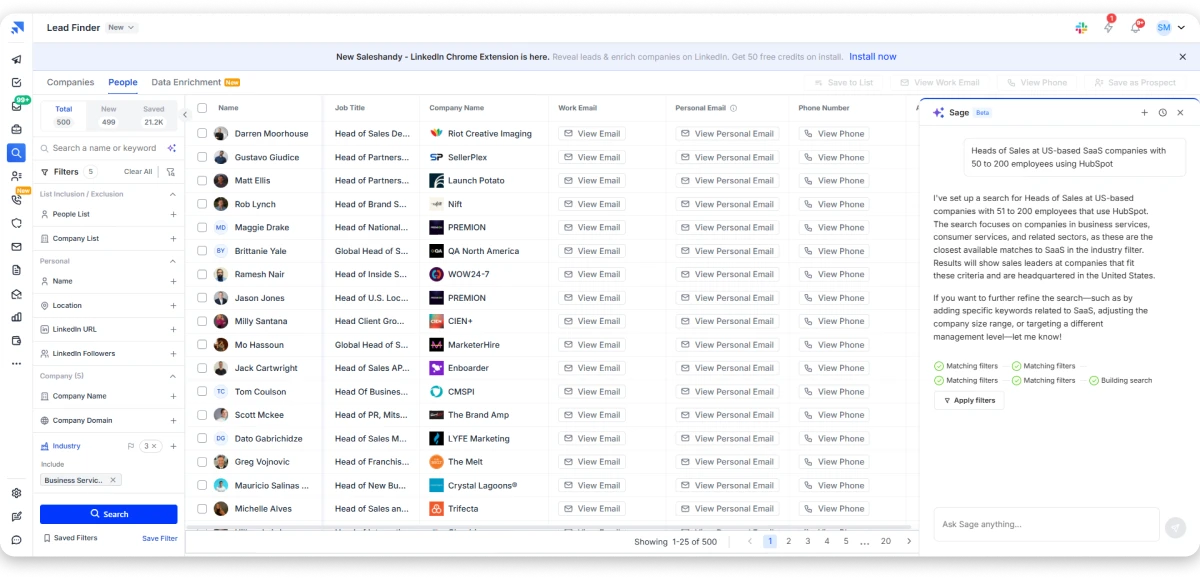
Once I selected a prospect, Saleshandy used waterfall enrichment across nine data providers to find and verify their contact information. Credits were charged only when it returned a verified result, which reduced the risk of paying for unusable data.
I could also filter accounts using buying signals such as recent funding, leadership changes, hiring activity, and business expansion. These signals do not guarantee buying intent, but they made it easier to prioritise companies going through relevant changes instead of contacting the full list randomly.
The strongest part of the experience was moving verified prospects directly into outreach without exporting a CSV.
From the same platform, I could:
- Create cold email sequences
- Generate AI-assisted email drafts
- Automate follow-ups
- Rotate emails across sender accounts
- Make calls using the built-in dialer
- Add LinkedIn and WhatsApp tasks
- Manage replies from a unified inbox
- Track prospects through the built-in CRM
LinkedIn and WhatsApp are not fully native automated channels. LinkedIn automation requires an integration with Aimfox or HeyReach, while WhatsApp is managed through manual tasks.
Overall, Saleshandy is most useful for teams that want to reduce the manual work between list building, enrichment, and outreach.
It may not suit enterprise account-based sales teams that require advanced predictive account scoring, complex buying-committee mapping, or deeper intent-data orchestration.
Key capabilities:
- Database: 852M+ verified contacts and 42M+ company profiles
- Filters: 70+ people, company, and buying-signal filters
- AI search: plain-language ICP descriptions converted into targeted lists
- Enrichment: waterfall enrichment across nine data providers
- Verification: real-time verification, with credits charged only on a verified result
- Multichannel outreach: cold email sequences, built-in dialer, LinkedIn, and WhatsApp
- Deliverability: sender rotation, email warm-up, and bounce monitoring
- Reply management: unified inbox with built-in CRM and Kanban pipeline
Who should use it:
SDRs, founders, lead-generation agencies, and small to midsize B2B sales teams that want to find, verify, and contact prospects through one platform.
Main use cases:
- Building targeted and verified prospect lists
- Searching for leads using plain-language ICP descriptions
- Prioritising accounts using buying signals
- Adding leads directly to outreach sequences
- Running cold email and calling campaigns
- Managing replies and follow-up tasks
Pricing
Prices below are based on annual billing:
- Starter: $34/month
- Pro: $76/month
Billed annually. An email costs 1 credit. An email plus phone costs 7 credits. See full Saleshandy pricing for current plans.
2. Apollo
Apollo.io is one of the most popular AI prospecting platforms on the market, and for good reason. It handles finding, enriching, and reaching prospects from a single login, which is rare at this price point.
The database covers 240M+ contacts, and you can filter by job title, seniority, industry, company size, location, revenue, and tech stack using 65+ search filters.
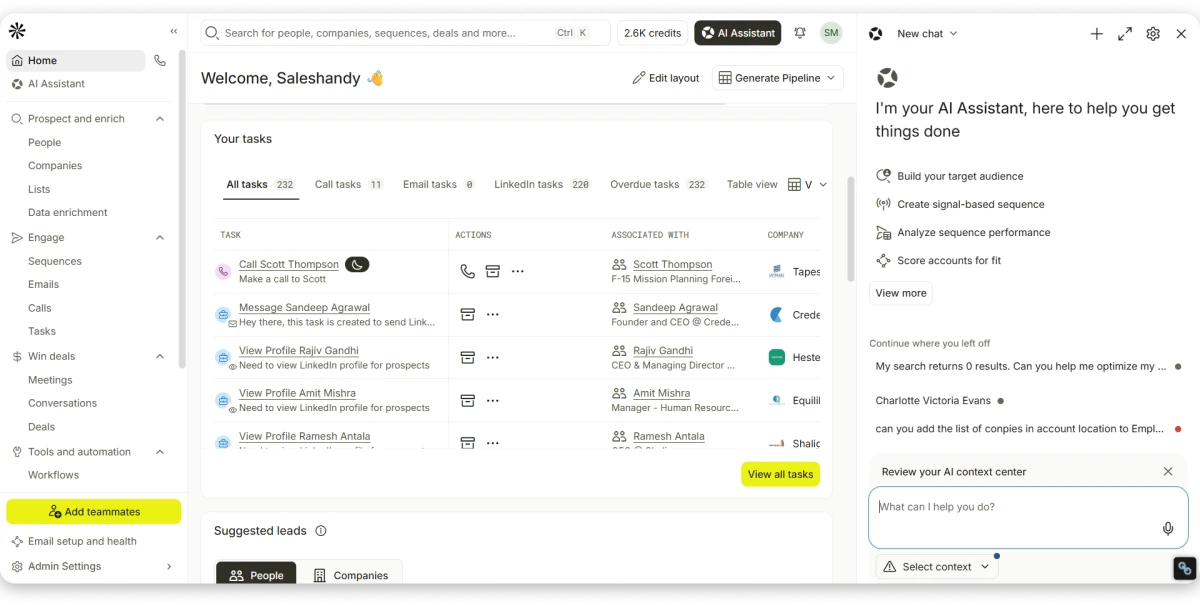
Intent topics also flag which accounts are already researching your category, so you know who to prioritize.
The AI layer helps with list building, email drafting, and lead scoring, and Apollo has added waterfall enrichment, so contact details get checked against more than one source before you send.
I looked at Apollo across the full prospecting workflow, and the filtering handles title and industry searches well.
The Chrome extension also makes it easy to pull individual contacts straight from LinkedIn while you research.
But two things limit it once you start to scale.
The first is the credit system. An email costs 1 credit, a phone number costs 8, and enrichment runs 1 to 8 credits per record.
Teams that do not watch their usage often pay far more than the seat price suggests.
The second is regional accuracy, where North American coverage is dependable.
But European and APAC results thinned out during my testing, and reviewers report the same pattern.
Apollo covers four of the five prospecting stages well if you are selling into North America.
The gap is deliverability, because complaints start to appear once volume grows past a few thousand emails a month, and most teams end up adding a separate tool to protect their domains.
Key capabilities:
- Database: 240M+ contacts and 35M+ companies
- Filters: 65+ search filters with intent topics
- Outreach: email sequences, A/B testing, built-in dialer
- AI: AI-assisted email writing and list building
- Integrations: Salesforce, HubSpot, and a Chrome extension
Who should use it:
SDR teams that want data and sending in one tool at a low entry price.
Use cases:
List building, running sequences, CRM enrichment, and identifying intent-flagged accounts.
Pricing:
- Free: $0
- Basic: $49/user/mo
- Professional: $79/user/mo
- Organization: $119/user/mo, three-seat minimum
Bonus read: Want deliverability built in rather than bolted on later? See our best Apollo alternatives compared.
3. Amplemarket
Amplemarket is built around one idea: outreach should be triggered by something that just happened, not by a list you exported last month.
The platform combines contact data, buying and hiring signals, and multichannel sequences, with an AI copilot called Duo that handles account research and AI prospect enrichment before a rep ever opens the record.
Instead of working through an alphabetical list, reps work a feed ordered by what recently changed at each account: funding news, a new VP of Sales, a hiring spike in a relevant team.
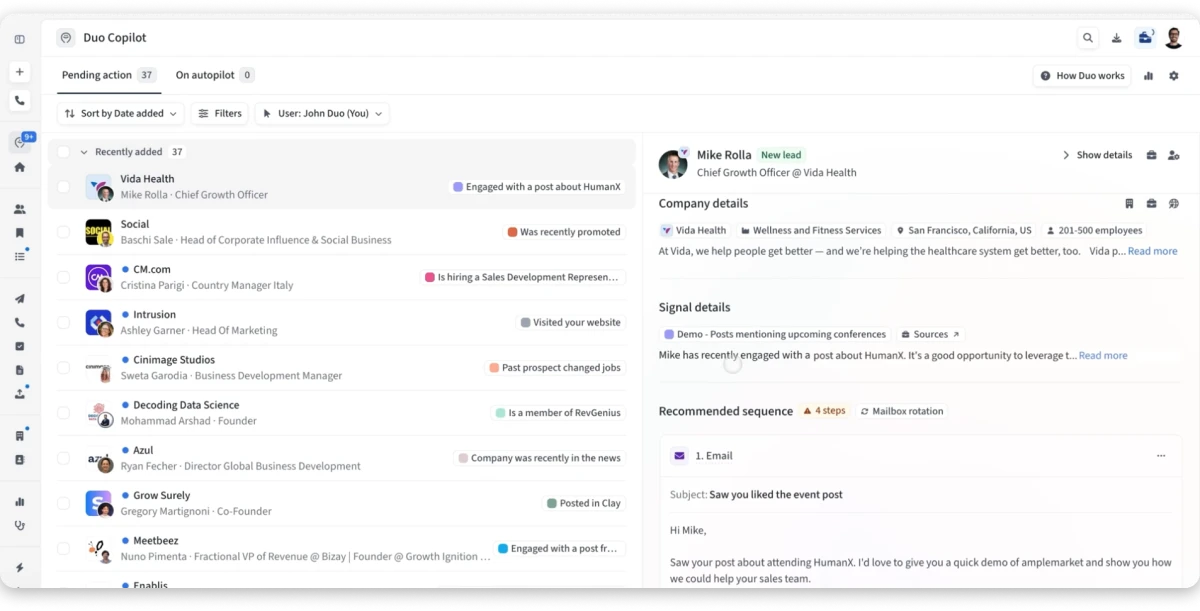
When I tested it, the shift in prioritization was noticeable. Working accounts by signal produced better connect rates than working the same accounts cold, which matches what teams running this motion at scale tend to report.
The limitations here are commercial rather than technical. Pricing starts around $600 a month for two users on an annual plan, a steep floor for a small team, and well above the self-serve tools on this list.
It also assumes a mid-market motion where reps check signals daily. Teams under five people usually find it heavier than they need, since the signal advantage only pays off when someone works that feed consistently.
Key capabilities:
- Signals: buying, hiring, and job change triggers
- AI: Duo Copilot for research and message drafting
- Outreach: multichannel sequences across email and LinkedIn
- Deliverability: built-in sending infrastructure and monitoring
- Integrations: Salesforce, HubSpot, and outbound tooling
Who should use it:
Mid-market sales teams committed to a signal-based outbound motion.
Use cases:
Prioritizing accounts by signal, automating pre-call research, and running multichannel sequences.
Pricing:
From $600/month on an annual plan covering two users. Larger teams are quoted individually.
Best AI Tools for Finding B2B Leads and Contacts
These tools do one stage well: finding the right people and their contact details.
You get verified emails, direct dials, job titles, and company data, with filters for industry, seniority, geography, and headcount. The better ones add intent or tech stack data.
What they do not do is send. You will need an outreach tool beside them, and that cost is worth pricing in before you buy.
Best for teams that already have a sequencing tool and need better data underneath it.
4. ZoomInfo
ZoomInfo is the AI prospecting platform most enterprise sales teams think of first when they need to understand an account before they contact it.
It is not really a contact database. It is a sales intelligence platform that happens to include one.
You get direct dials and verified emails, but you also get technographic data showing what software a prospect already runs, org charts showing who reports to whom, and intent signals showing which companies are actively researching your category.
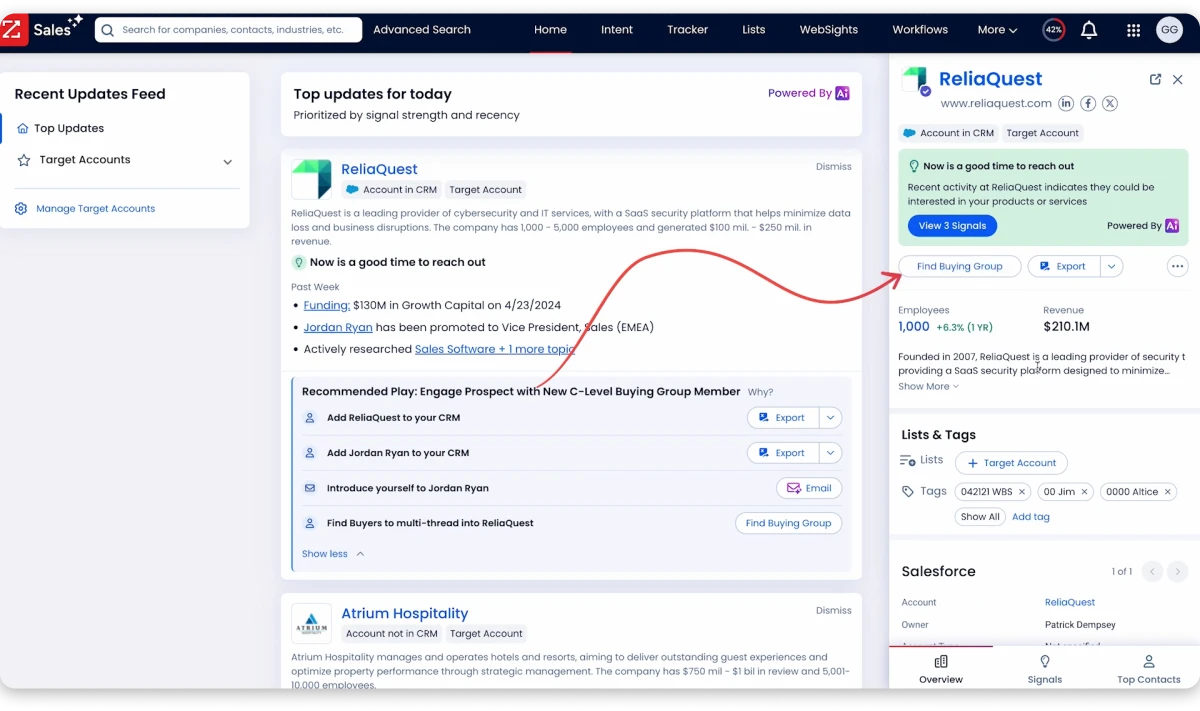
Copilot uses all of that to suggest which accounts and contacts are worth focusing on, while GTM Workspace pulls the main account details into a single view.
That depth is really the argument for it. You are not just building a list of names, you are building a picture of the whole account before anyone picks up the phone, which matters when a deal involves six different stakeholders.
However, ZoomInfo is built for enterprise buyers with enterprise budgets. Pricing is not published and requires a sales conversation, contracts run annually, and unused credits do not roll over.
If you have the budget, ZoomInfo is one of the strongest tools available for deep account intelligence. Smaller teams will find it hard to justify the cost when cheaper options on this list already cover finding, enriching, and reaching prospects.
Key capabilities:
- Database: large B2B contact and company database with direct dials
- Intelligence: org charts, technographics, and firmographic depth
- Intent: proprietary intent data and Scoops triggers
- AI: Copilot for next-best-action recommendations
- Compliance: GDPR, SOC 2 Type II, and ISO 27001
Who should use it:
Enterprise sales, RevOps, and ABM teams with budget and dedicated ops support.
Use cases:
Mapping buying committees, identifying in-market accounts, and enriching CRM records at scale.
Pricing:
Custom pricing only.
Bonus read: Want similar features at a lower price? See our best ZoomInfo alternatives compared.
LinkedIn Sales Navigator has one advantage no database can match. Your buyers update their own profiles.
Job changes and promotions appear the day they happen, not months later in a data refresh.
You get advanced search across title, seniority, company size, geography, and years in role. Saved searches surface new matches automatically.
Lead and account alerts flag job changes, funding news, and company updates. Those are usually the moments worth acting on.
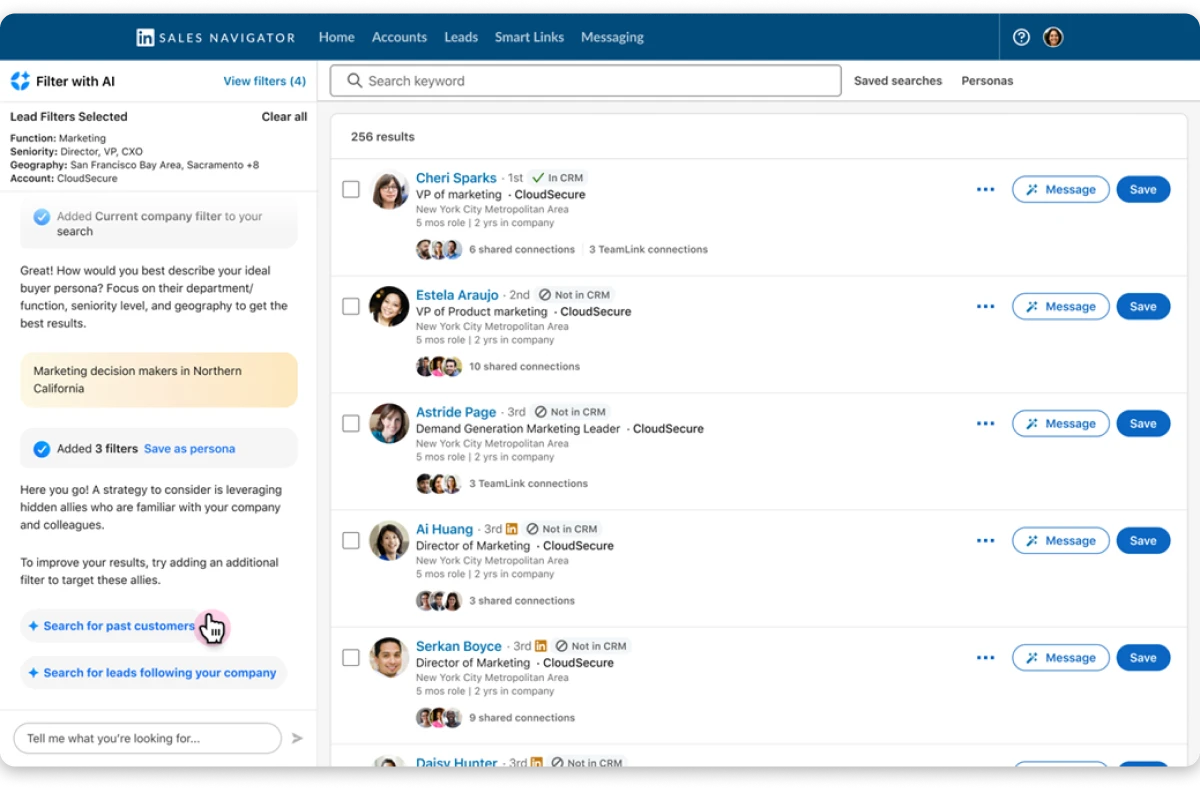
The AI here recommends rather than generates, so it suggests leads that resemble the ones you have already saved, surfaces accounts that match your search history, and flags the connections you share with a prospect.
Relationship Explorer takes that a step further by mapping who on your team already knows someone inside a target account, which is worth checking before you send anything cold.
It works best as your research layer, not your execution layer.
The limit is simple. There are no verified emails and no phone numbers.
You can find exactly the right person and still have no way to reach them outside InMail. Most teams pair it with a database or a workflow for getting phone numbers from LinkedIn.
Key capabilities:
- Search: advanced lead and account search with 40+ filters
- Alerts: job change, funding, and company news notifications
- Lists: saved searches and account list management
- Messaging: InMail credits by plan tier
- Integrations: CRM sync with Salesforce and HubSpot, plus TeamLink
Who should use it:
Reps and BDRs who prospect on LinkedIn daily.
Use cases:
Advanced lead search, tracking job changes, monitoring target accounts, and sending InMail.
Pricing:
- Core: $119.99/mo, or $89.99/mo billed annually
- Advanced: $159.99/mo
- Advanced Plus: Custom, typically $1,600+ per seat per year
6. Lusha
Lusha is one of the simplest tools on this list, and that’s exactly why people use it.
You’re looking at someone’s LinkedIn profile and need their work email or phone number.
Instead of opening a separate database and running a new search, Lusha’s Chrome extension surfaces the contact details in a few clicks, across LinkedIn, company websites, Gmail, and supported CRMs.
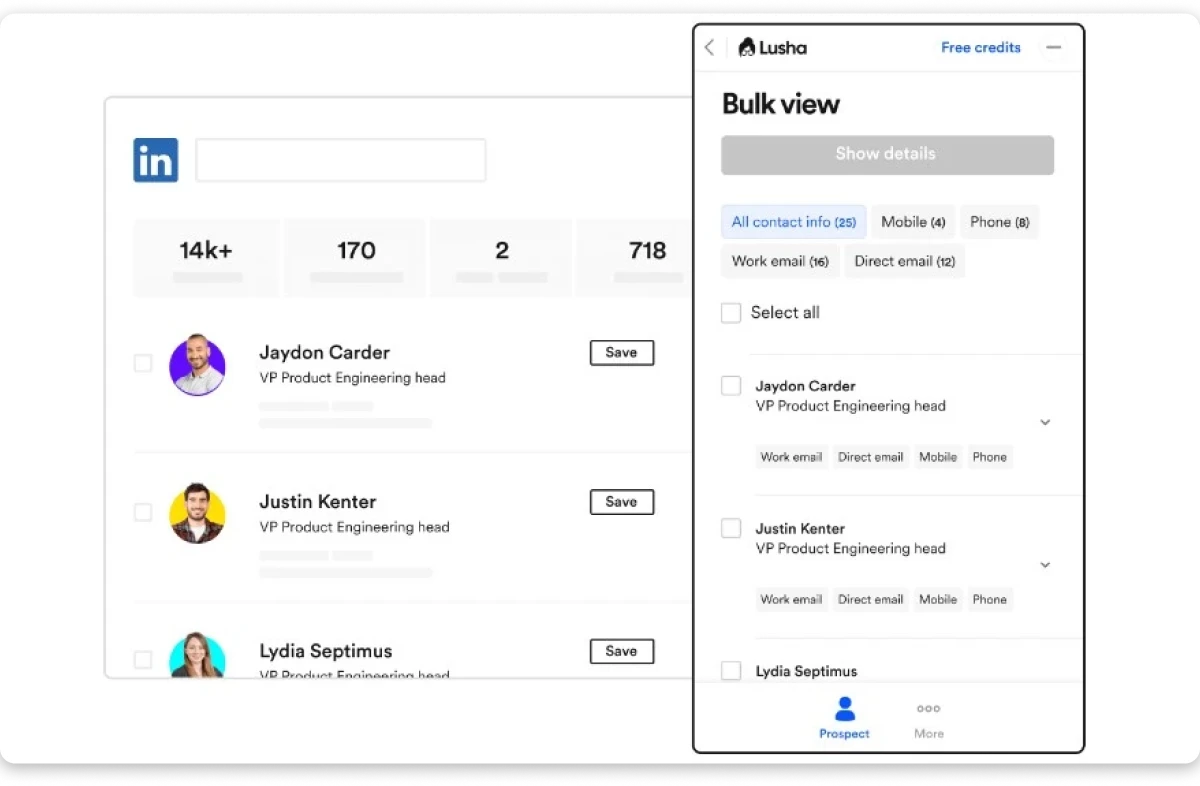
It’s especially strong for direct-dial and mobile numbers, with solid coverage across Europe and Israel. For a founder or an individual rep doing manual prospecting, it’s an easy place to start.
You’re not buying a full prospecting platform, you’re buying a lookup tool that does one job well.
Bulk AI prospect enrichment sits on the higher plans rather than the free or entry tier, so teams that want to enrich a whole list at once, not just one profile at a time, will need to budget for that.
The limitations show up once a larger team tries to use it at scale. The database is smaller than some dedicated data providers, and third-party tests have reported lower match rates than bigger platforms.
The credit system can be restrictive too. Credits expire monthly, unused credits don’t roll over, and you can’t always buy more when you run out. A busy week can leave your team waiting for the next billing cycle.
Overall, Lusha suits individual reps and small teams more than teams that need high-volume list building or a complete outbound workflow.
Key capabilities:
- Extension: Chrome extension for LinkedIn and website reveals
- Data: direct dial database with strong EMEA coverage
- Lists: basic list building and CSV export
- Enrichment: bulk enrichment on higher tiers
- Integrations: Salesforce and HubSpot on Premium and above
Who should use it:
Individual reps, recruiters, and small teams prospecting directly on LinkedIn.
Use cases:
Quick contact reveal, direct dial discovery, and small-batch list building.
Pricing:
- Free: $0, 40 credits/mo
- Starter: $37.45/user/mo
- Pro: from $52.45/user/mo
- Premium: from $299.95/mo
- Scale: Custom
Bonus read: Need bulk enrichment without the monthly credit ceiling? See our best Lusha alternatives compared.
Best AI Tools for B2B Lead Research and Data Enrichment
These tools sit between finding a contact and reaching them. They fill gaps, verify what you have, and add the context that makes outreach specific.
Credit models matter most here. Enrichment costs money per record, and multi-step workflows multiply that fast. Some tools charge even when a lookup returns nothing.
Best for teams with an ops function and a list that needs cleaning before it enters a sequence.
7. Clay
Clay is the most flexible tool on this list, and also the hardest to pick up. Both come from the same design choice.
Instead of a database with filters, Clay gives you a spreadsheet-style canvas and lets you build the AI prospect enrichment logic yourself.

You can run a waterfall across 100+ providers that checks each one in turn until something verifies, add research columns that read a company website and answer a question about it, then score and route records however you want.
For a RevOps team that knows what it’s doing, nothing else on this list gives you this much control, and the match rates from a well-built waterfall comfortably beat any single-source database.
The cost is real, and it shows up in two ways. The first is credits: Clay charges for every enrichment attempt, including the ones that come back empty, so a three-provider waterfall on a stale list means paying for all three misses.
The second is ownership. Clay needs someone to maintain it. Without that person, it quietly turns into a subscription nobody opens.
Claygent is the part most teams buy it for. You give it a question and a source, and it reads the page and returns an answer in a column, which replaces the manual research a rep would otherwise do account by account.
What Clay does not do is send. There is no email infrastructure, no warm-up, and no dialer, so it always sits alongside an outreach platform rather than replacing one.
Key capabilities:
- Enrichment: waterfall enrichment across 100+ providers
- AI: research agents that read sources and answer custom questions
- Builder: spreadsheet-style workflow canvas with unlimited seats
- Scoring: custom qualification and routing logic
- Integrations: CRM sync and HTTP API on higher tiers
Who should use it:
RevOps and growth teams with someone who can build and maintain workflows.
Use cases:
Multi-source enrichment, custom lead scoring, automated account research, and list qualification.
Pricing:
- Free: $0
- Launch: $185/mo
- Growth: $495/mo
- Enterprise: Custom
8. Cognism
If your buyers are in Europe, Cognism is the strongest option on this list, and the gap is not particularly close.
The database covers around 400 million business profiles, with its deepest coverage across the UK, DACH, France, and the Nordics.
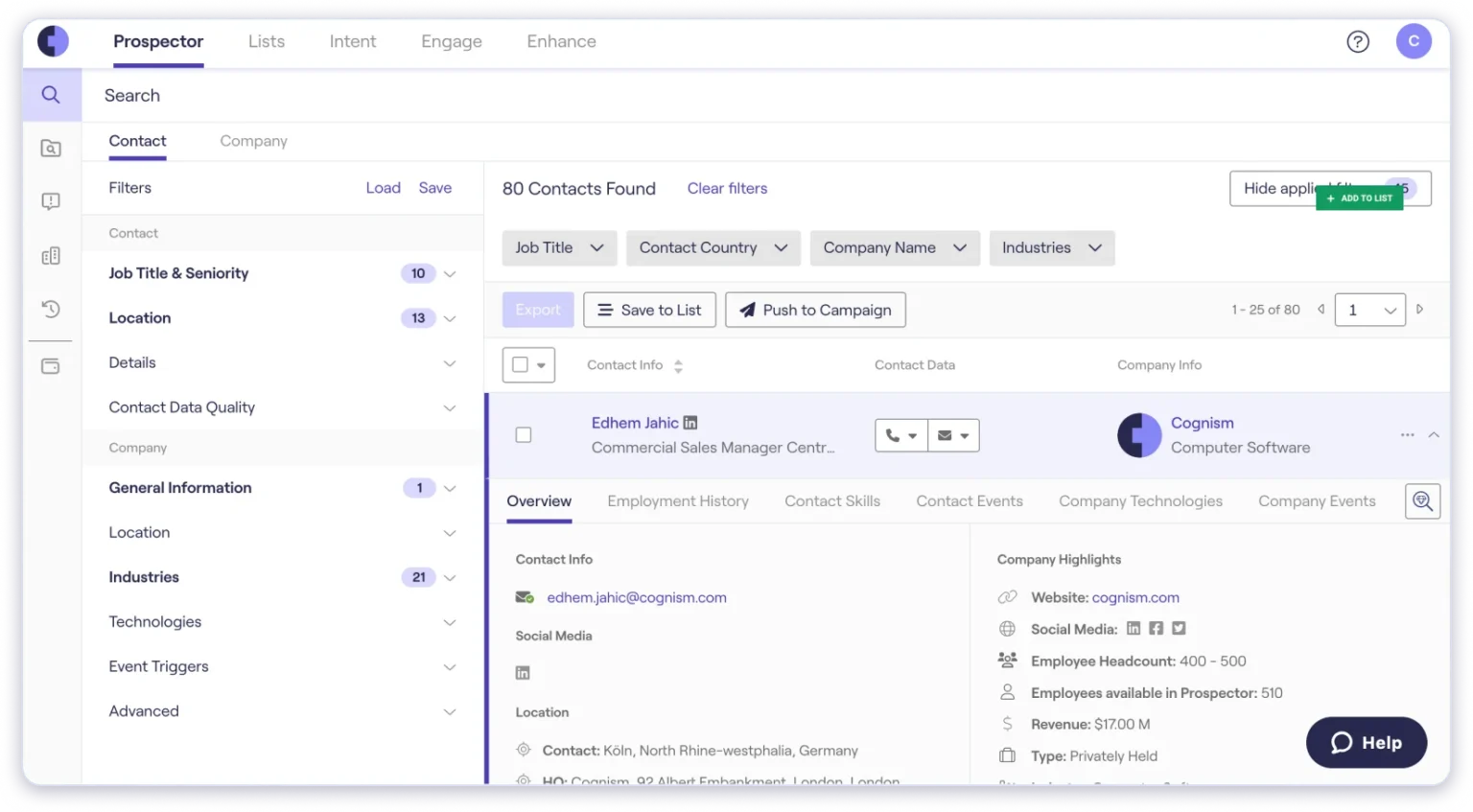
What sets it apart is Diamond Data, where phone numbers are verified by a person before they ever reach you, and for teams who live on the phone, that step makes a real difference to connect rates.
The AI is built around natural-language search, so you describe the accounts you are after, and Cognism assembles the filters for you.
It will also research the company in the background and suggest other people inside the same account who are worth contacting.
Compliance is built into the product rather than bolted on afterwards, which matters when your legal team asks how the data was sourced. GDPR and CCPA handling is part of the design, not just a page on the website.
The tradeoffs are both geographic and commercial. Coverage outside Europe is noticeably thinner, and US searches returned fewer results than the US-first providers during testing.
Pricing also sits at a premium and is quote-only, and Bombora intent data costs extra where some competitors bundle it in.
So if Europe is your market, Cognism earns the premium, but if you need global coverage from a single source, it is not the right tool on its own.
Key capabilities:
- Data: 400M+ business profiles with deep EMEA and DACH coverage
- Phones: Diamond Data human-verified mobile numbers
- Compliance: GDPR, CCPA, and SOC 2 Type II built in
- Intent: Bombora intent data on higher plans
- Integrations: Salesforce, HubSpot, Outreach, Salesloft, and a Chrome extension
Who should use it:
Cold calling teams selling into Europe and RevOps teams enriching EMEA records.
Use cases:
Phone-verified calling across the EU and UK, compliant prospect lists, and CRM enrichment.
Pricing:
Custom pricing only.
Bonus read: Need global coverage alongside European data? See our best Cognism alternatives compared.
Best AI Tools for Sales Engagement and Outreach
These tools handle the last stage: turning a finished list into conversations.
They run sequences, manage follow-ups, rotate sending accounts, protect deliverability, and route replies. Some add calling and LinkedIn steps.
All of them assume the list already exists. None find prospects at any real depth, which is why teams end up paying for a data tool and an engagement tool separately.
Best for teams with a reliable data source that need a stronger execution layer on top.
9. Outreach
Outreach is not just an email-sending tool. It is built to help large sales teams manage how reps work.
You can create sequences, track calls and meetings, review deals, forecast revenue, and coach reps from the same platform.
Managers also get a clear view of what the team is doing, which actions are working, and where deals are slowing down.
That is why Outreach works well for larger sales teams. It helps everyone follow the same process and gives managers more control over how outreach is handled.
The downside is that it takes more time and money to set up.
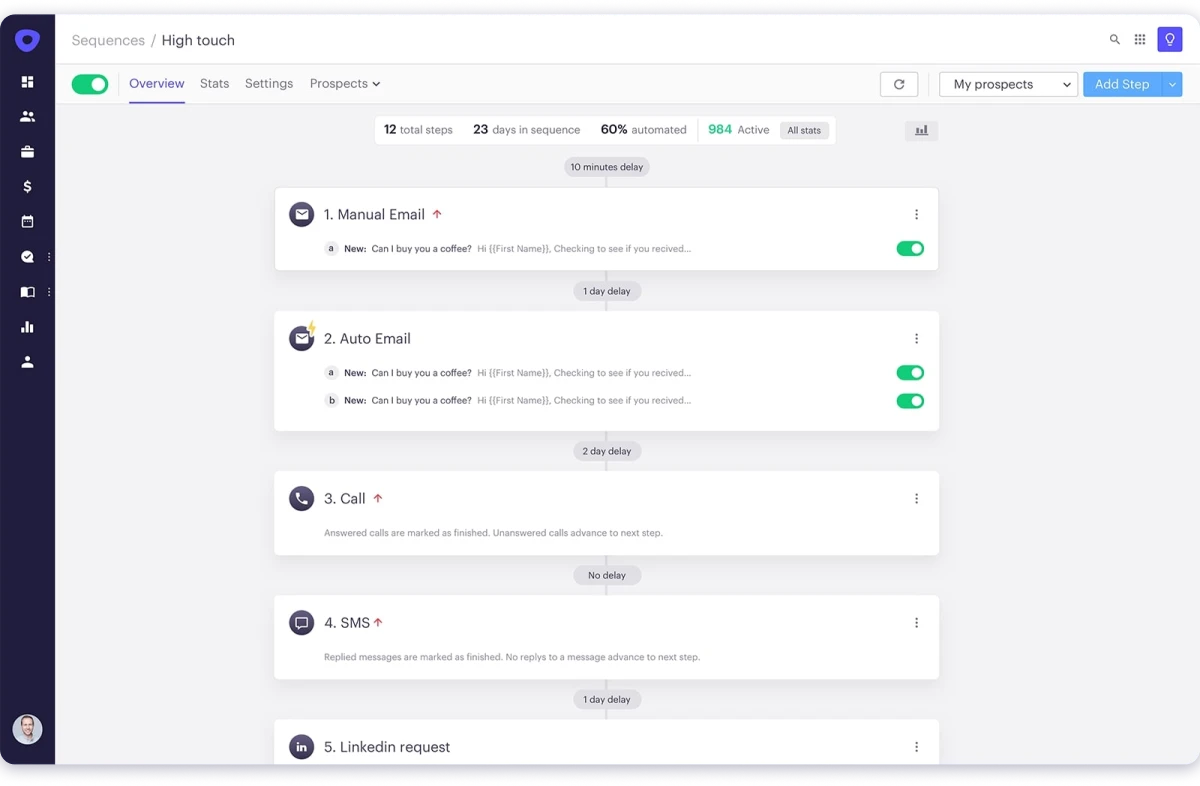
Outreach is made for enterprise teams, so implementation can take weeks. It is also more expensive and more complex than simpler outreach tools.
Another limitation is that it does not include its own contact database. You still need a separate tool to find and enrich leads before adding them to Outreach.
The AI layer is aimed at execution rather than discovery. Agents suggest which accounts a rep should work next, draft follow-ups, and flag deals that have gone quiet, using activity data the platform already holds.
That works well when your CRM is clean and your pipeline is large enough for the patterns to mean something. On a small pipeline, the recommendations tend to repeat what a manager would already know.
Pricing is seat-based and quoted directly, and AI usage is often billed as separate credits on top.
So, Outreach is a strong choice for managing outreach across a large team. But it mainly handles the sales engagement stage, while lead finding, research, and enrichment need other tools.
Key capabilities:
- Sequences: multi-step sequences with conditional logic
- Pipeline: deal and opportunity management
- Intelligence: conversation intelligence and call recording
- Forecasting: revenue forecasting and pipeline analytics
- Coaching: rep performance analytics and coaching workflows
Who should use it:
Enterprise and upper mid-market sales organizations with dedicated ops.
Use cases:
Standardizing rep workflow, managing deal stages, coaching from call data, and forecasting.
Pricing:
Custom pricing only.
10. Instantly
Instantly is built for cold email at scale, and its AI focuses on three things: writing emails faster, protecting deliverability, and automating what happens after you send.
The workflow starts with AI Copilot, which reads your website or uploaded files to create context-aware email copy, suggest replies, and recommend campaign improvements.
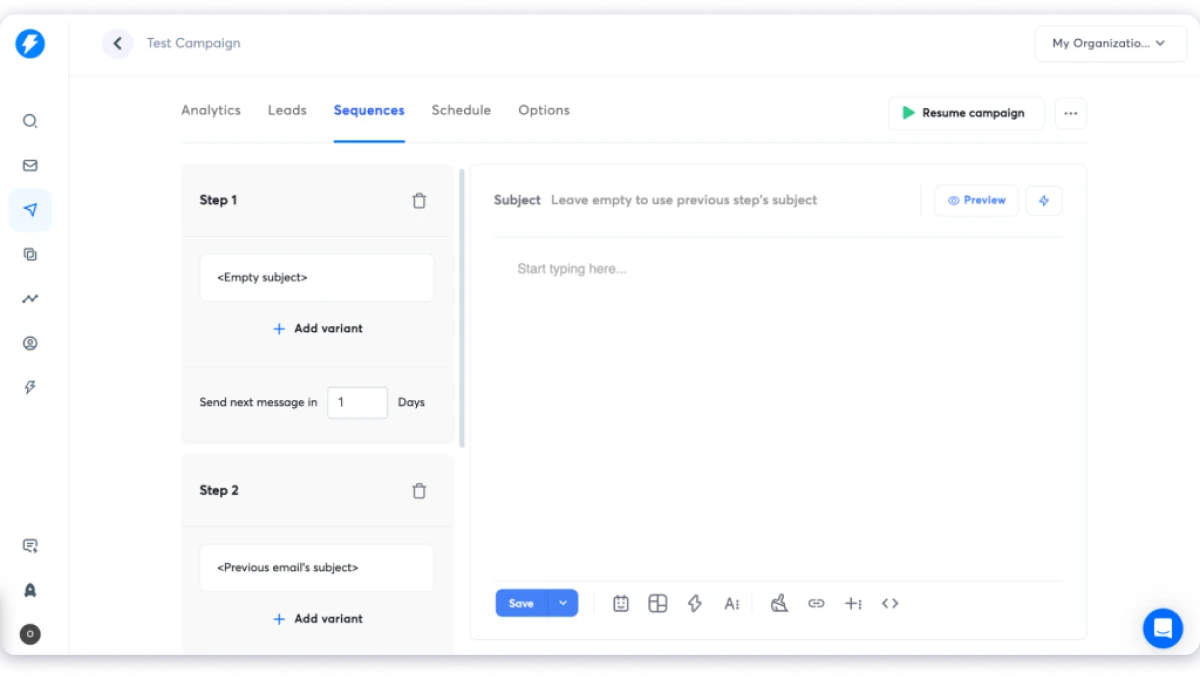
Once campaigns are running, AI Workflows route leads based on actions like opens, link clicks, or booked meetings, keeping people moving without extra manual work.
Where Instantly really stands out is deliverability, the stage most prospecting tools skip. Its deliverability AI protects inbox placement with unlimited email accounts, automated warm-up on every plan, dedicated IP rotation, and DNS setup help. For agencies running many domains across many clients, that unlimited inbox model is hard to beat on cost among cold email software.
The gap is at the front of the workflow. Instantly is built for sending volume, not finding the right people or running AI prospect enrichment.
Also, its lead database is a separate subscription with quality that trails the dedicated providers on this list.
So you get one prospecting stage handled very well, and you’ll need a proper data source sitting underneath it.
Key capabilities:
- Accounts: unlimited email accounts and unlimited warm-up
- Deliverability: sender rotation, ramp-up, and placement monitoring
- Inbox: unibox for managing replies across accounts
- Data: lead database available as a separate subscription
- AI: AI reply handling and campaign analytics
Who should use it:
Agencies and teams running high-volume cold email across many domains.
Use cases:
Scaling send volume safely, warming new domains, and managing replies across many inboxes.
Pricing:
- Growth: $47/mo
- Hypergrowth: $97/mo
- Light Speed: $358/mo
- Enterprise: Custom
Bonus read: Want the data layer included instead of billed separately? See our best Instantly alternatives compared.
11. Lemlist
Lemlist built its reputation on personalization that goes well past a merge tag, and it still does that better than most tools available today.
You can generate images with a prospect’s name or logo rendered inside them, record and insert video, and build a custom landing page for each person you reach out to.
The multichannel plan folds LinkedIn steps, a dialer, and SMS into the same sequence, so your email and LinkedIn touches live in one cadence instead of two separate tools. Lemwarm also handles warm-up on every paid plan.
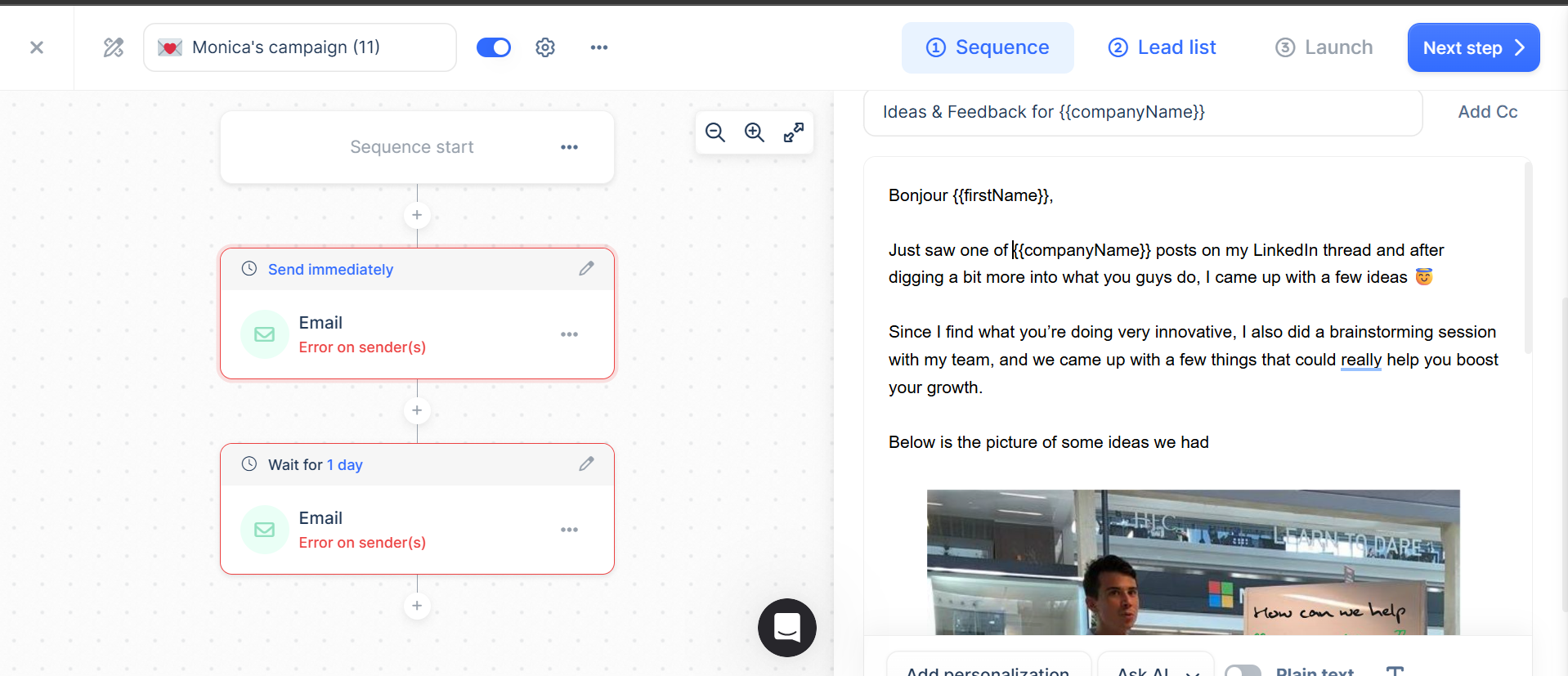
Where this really works is low-volume, high-touch outbound. A founder selling into a defined list of 200 accounts gets genuine value from personalization at this depth, though it stops working at scale because the effort per prospect never really compresses.
The pricing has shifted this year as well. Lemlist moved to a workspace-priced Email plan with unlimited users while keeping Multichannel per user, which makes email-only cheaper for teams and multichannel more expensive per head.
So run the numbers against your own seat count rather than the headline price.
The lead database is included but sits secondary to the outreach layer, and heavy prospecting burns through credits fairly quickly, which means most teams still pair it with a proper data source.
Key capabilities:
- Personalization: dynamic image and video personalization
- Pages: custom landing pages per prospect
- Channels: LinkedIn automation, dialer, and SMS on Multichannel
- Deliverability: lemwarm warm-up included on all paid plans
- Data: built-in lead database with credit-based enrichment
Who should use it:
Small to mid-size teams running low-volume, high-touch outbound.
Use cases:
Highly personalized sequences, combined LinkedIn and email cadences, and warming sender domains.
Pricing:
- Email: $69/mo per workspace, unlimited users
- Multichannel: $109/user/mo
- Enterprise: Custom, five-seat minimum
Bonus read: Comparing per-seat costs across a growing team? See our best Lemlist alternatives compared.
5 Must-Have Features in AI Tools for B2B Prospecting
Before comparing individual tools, it’s worth knowing what an AI prospecting tool should actually help you do.
The best platforms don’t just add AI to one part of the workflow. They help you find the right prospects, enrich their data, identify buying opportunities, execute outreach, and keep everything connected.
Here are the five features that matter most.
1. A B2B Lead Database With Verified Contact Data
Everything starts with the database.
A tool is only as good as the quality of the contacts it provides. Database size makes for a good marketing headline, but accuracy and coverage matter far more.
Ask yourself:
- Does it cover your target market?
- How often is the data verified?
- Can you filter prospects beyond basic criteria?
A database with fewer contacts but better targeting filters will usually outperform one with hundreds of millions of records and limited search capabilities. The goal isn’t to find more people. It’s to find the right ones.
2. Automated Lead Research and Data Enrichment
Finding a prospect is only the first step.
You also need verified emails, phone numbers, company details, job titles, and enough context to personalize your outreach.
The best AI prospecting tools automate this process through data enrichment. Many use a waterfall approach, checking multiple data providers until they find verified information, instead of relying on a single source.
That difference matters.
If one provider verifies only 45% of your contacts while another reaches 80%, that’s hundreds of additional prospects your team can actually contact instead of replacing manually.
3. Buying Signals and Lead Prioritization
Not every qualified prospect is ready to buy today.
That’s why timing matters just as much as targeting.
The best AI prospecting tools don’t just tell you who fits your ICP. They help you identify who’s most likely to engage based on recent buying signals.
Look for signals like:
- Recent funding rounds
- Executive hires
- Team expansion
- New technology adoption
- Product launches
- Website or intent activity
A static lead list tells you who to contact. Buying signals help you decide who to contact first.
4. Personalized Sales Outreach Across Channels
Finding qualified leads doesn’t create a pipeline.
Reaching them does.
Your prospecting tool should help you execute outreach across email, LinkedIn, calls, and other channels while automatically managing follow-ups based on how prospects respond.
Be careful with tools that promise personalization but only insert merge tags.
Adding someone’s first name isn’t personalization. Relevant messaging based on real prospect data is.
5. Workflow Automation, CRM Integration, and Deliverability
This is the least flashy feature, and often the most important.
Your prospecting workflow shouldn’t depend on exporting CSVs, updating spreadsheets, or moving data between multiple tools.
The best platforms connect every step of the process by:
- Syncing contacts with your CRM
- Keeping prospect data up to date
- Triggering outreach automatically
- Managing replies in one place
- Supporting deliverability with sender rotation and email warm-up
Without these capabilities, you’re simply moving leads between tools instead of building a repeatable prospecting system.
Final Verdict: Which AI Prospecting Tool Should You Actually Use?
Alright, that’s all 11 AI tools for B2B prospecting covered.
So the real question is, which one should you actually go with?
Honestly, it depends on what your workflow looks like. If you sell into Europe on the phone, Cognism is worth the premium. If you already have lists and just need volume, Instantly. If you have a RevOps function that wants to build enrichment logic, Clay.
But when you want to find verified buyers and reach them from one platform, Saleshandy is the strongest option.
With 852M+ contacts and 70+ filters, you can go from broad targeting to a focused prospect list in minutes. Then reach them by email, phone, or LinkedIn without leaving the tool.
No exporting a list into a second tool. No uploading it into a third. No finding out at send time that half the emails bounce.
You can start with 50 free credits, build a sample list, and test the data against your own ICP before scaling.
Start your free trial and find your first verified contacts today!
FAQs About AI Tools for B2B Prospecting
1. What are AI tools for B2B prospecting?
AI tools for B2B prospecting help sales teams find, verify, prioritize, and contact potential buyers using automation instead of manual research. They typically combine a contact database, enrichment, buying signals, and outreach into a workflow. The strongest ones reduce the number of separate tools a team needs rather than adding another.
2. What is the best AI tool for B2B prospecting?
It depends on your motion. Saleshandy is the strongest fit for teams that want to find verified contacts and reach them from one platform. Cognism is better for European phone-based outreach. ZoomInfo suits enterprise teams needing deep account intelligence. Clay is best for RevOps teams building custom enrichment logic.
3. Are there free AI prospecting tools?
Yes, though the free tiers are for testing rather than running. Apollo, Clay, Lusha, and Lemlist all offer free plans with tight credit limits. Saleshandy offers a 7-day free trial with up to 50 free credits and no credit card required. Use free tiers to check data quality against your own ICP before you pay.
4. How do I use AI to automate sales prospecting?
Define your ideal customer in plain language and let AI search build the list. Layer a buying signal so the timing is right, not just the targeting. Verify contacts before export rather than after bounces. Enrich only the accounts that clear the signal to protect credits. Then sequence across email, calls, and LinkedIn from the same record.
5. What AI prospecting tools automate lead research?
Clay and Amplemarket lead here. Clay runs AI research agents that read company sources and answer custom questions per record. Amplemarket’s Duo copilot handles pre-call research automatically. Saleshandy automates the research layer through waterfall enrichment and buying signal detection in the same search.
6. How do I choose the best AI prospecting software?
Start with the sales goal rather than the feature list. Ask five questions. How big is the team, and does anyone own ops? Where does the ICP sit geographically? How complex is the sale? How many tools sit between finding a buyer and reaching one? Can you forecast the cost against next quarter’s headcount?
7. Can AI replace SDRs?
Not in most B2B motions. AI removes research, list building, and data cleanup, which is where SDRs lose the majority of their day. It does not replace judgment about which account matters or how to handle a real objection. Teams that treat AI as capacity for reps see better results than teams that treat it as a replacement for them.
8. What is the difference between an AI prospecting tool and an AI SDR?
An AI prospecting tool assists a human. It finds contacts, enriches records, and drafts messages, but a rep decides and sends. An AI SDR agent runs the loop without a rep operating it, from account selection through reply handling. Agents work best when the ICP is broad, and the offer is simple. They struggle on complex, multi-stakeholder sales, and they inherit whatever data quality sits underneath them.

 Dhruv Patel
![6 Best Europe Email Database Providers for B2B Prospecting [2026]](https://www.saleshandy.com/blog/wp-content/uploads/2026/03/Best-Data-Enrichment-Tools-.webp)
