

If you are here, you are probably looking for the right email warm-up tool.
But choosing one is not as simple as it looks.
Some tools charge for every inbox you connect. Others offer unlimited accounts, include warm-up with their cold email platform, or focus more on deliverability monitoring and spam diagnostics.
And almost every tool claims it can improve your inbox placement.
So, which one is actually worth using?
To find out, I tested 11 email warm-up tools for four weeks and compared their inbox placement, features, ease of use, pricing, reporting, and limitations.
In this guide, I will share what I found and help you choose the right email warm-up tool for your needs.
Best Email Warm-Up Tools – TOC
TL;DR: Best Email Warm-Up Services at a Glance
If you are short on time, these are the three I would pick based on my testing.
- TrulyInbox → Best for high-volume outreach teams seeking reliable inbox placement and unlimited mailbox connections on every paid plan.
- Instantly → Best for teams that want to warm up multiple sender accounts and run cold email campaigns from one platform.
- Lemwarm → Best for teams seeking a simple warm-up solution powered by a global network of real inboxes.
A Quick Comparison of the Best Email Warm-Up Tools
I ran each tool for 4 weeks across multiple email accounts and tracked where the warm-up emails actually ended up.
Here are the results.
| Email Warm-Up Tool | Best For | Emails Landed in Primary (%) | Emails Went to Spam (%) | Number of Mailboxes | Warm-Up Network | Pricing |
|---|---|---|---|---|---|---|
| TrulyInbox | Deliverability at scale without paying per inbox | 98% | 2% | Unlimited on every paid plan | 40,000+ real inboxes | From $22/mo |
| Instantly | Bundled warm-up inside a cold email platform | 92% | 8% | Unlimited on every plan | 1,000,000+ accounts | From $37.60/mo |
| Lemwarm | Teams already using Lemlist | 96% | 4% | Per inbox | 20,000+ real inboxes | $24/mo per inbox (free with Lemlist) |
| Smartlead | Agencies with bundled warm-up | 91% | 9% | Unlimited on every plan | Curated private network | From $32.5/mo |
| Warmup Inbox | ESP-specific warming for Gmail | 93% | 7% | Per inbox | 30,000+ real inboxes | $15/mo per inbox |
| Warmy.io | AI-driven warm-up with deep customization | 95% | 5% | Per inbox | Not disclosed | Custom pricing |
| Mailwarm | Expert guidance alongside warm-up | 93% | 7% | Per inbox | 50,000+ aged inboxes | $69/mo per inbox |
| Folderly | Finding what triggers spam filters | 96% | 4% | Per mailbox | Not disclosed | $96/mo per mailbox |
| Snov.io | Warm-up bundled with lead finding | 93% | 7% | 1 free, 3 on Starter, unlimited on Pro | Premium business-domain pool | Free / $30/mo (Starter) |
| InboxAlly | Repairing damaged sender reputation | 91% | 9% | Per sender profile | Seed inbox network | $149/mo (monthly only) |
| Warmbox | Budget-friendly warm-up | 90% | 10% | 1 to 6 per plan | 35,000 inboxes | $15/mo |
How I Tested These Email Warm-Up Tools
I have been in the cold email and outbound space for over a decade.
I have built tools in this space, managed hundreds of sending accounts, and watched campaigns fail for reasons that had nothing to do with copy or targeting.
Most “best email warm-up tools” guides are written by people who have never managed more than a handful of inboxes, never seen a domain get blacklisted mid-campaign, and never had to explain to a client why their outreach tanked because of sender reputation.
I have dealt with all of that firsthand.
This guide is based on real warm-ups I ran, real email deliverability metrics I tracked, and real money I spent testing each email warming tool.
One Important Thing to Understand
No email warm-up tool will directly “give” you inbox placement. That is not how it works.
What these tools do is build your sender reputation with email service providers gradually. They send and receive emails on your behalf, generate real engagement signals like opens, replies, and marking as important, and teach Gmail, Outlook, and Yahoo that your account is trustworthy over time.
A good email warm-up service gets your accounts ready for cold email outreach in 2 to 4 weeks. A bad one wastes your time and can actually hurt your domain reputation.
What I Looked for in Each Tool
Here are the eight criteria I used to evaluate every email warmup tool on this list.
If you are comparing email warm-up services yourself, these are the things that actually matter.
1. How many email accounts can you connect?
This is the first thing you should check. Some email warmup tools let you connect unlimited inboxes on a single plan. Others charge separately for every account. If you are running outreach at any real scale, the number of accounts you can warm up without extra cost will directly impact your budget.
2. Daily warm-up email capacity
The more warm-up emails a tool can send per day, the faster your accounts build reputation. This is especially important if you are working with new domains that need domain warming from scratch. Look for tools that give you at least 100 warm-up emails per day per account.
3. Warm-up network quality
This one often gets overlooked, but it matters a lot. The best email warming tools use real B2B inboxes from Google Workspace and Microsoft 365. If a tool is warming up your accounts using synthetic SMTP inboxes, ESPs will not take those engagement signals seriously. Always check the network composition before committing.
4. Setup and ease of use
Some tools I tested were ready in under 2 minutes. Others needed 30+ minutes of configuration before a single warm-up email went out. If you are managing multiple accounts, setup time adds up fast. Prioritize email warmup software that supports OAuth or direct SMTP connection with minimal steps.
5. Ramp-up control
A good email warm-up tool lets you customize how fast your sending volume increases, what reply rate you want, and when emails go out. One-size-fits-all ramp-up is risky because every account has a different reputation starting point. The more control you have, the better you can match the warm-up to each account’s actual situation.
6. Monitoring and reporting
You want to see real-time data on whether your warm-up emails are landing in inbox or spam. Some tools show this broken down by ESP (Gmail vs. Outlook vs. Yahoo), which is genuinely useful for diagnosing provider-specific inbox placement issues. If a tool does not show you placement data, you are flying blind.
7. Authentication check
Before warm-up even begins, your SPF, DKIM, and DMARC records need to be configured correctly. The best email warm-up tools check this automatically and pause warm-up if something is wrong. This is a safety net that prevents you from warming up on a broken setup, which can actively damage your domain reputation.
8. Pricing at scale
What does the tool actually cost when you are running 5, 10, or 20+ inboxes? Per-inbox email warmup tools get expensive fast. If you are scaling outreach, look for flat-rate pricing where you pay one monthly fee regardless of how many accounts you connect. The difference in cost at 10+ inboxes can be hundreds of dollars per month.
My In-Depth Review of the 11 Best Email Warm-Up Tools
I’ve shared my test results above.
Now I’ll walk you through my experience with each tool so you know exactly what to expect.
1. TrulyInbox
Best for ⭐
High email deliverability at scale, without paying per inbox
TrulyInbox takes the #1 spot on my list of email warm-up tools.
It is purpose-built for email warm-up and continuous sender reputation management. Unlike most tools that charge separately for every account, TrulyInbox lets you connect unlimited mailboxes on every paid plan at a flat rate.
That makes it a strong fit for agencies and growing teams managing multiple sending accounts across different domains.
I connected 10 accounts for this test. Some were brand new domains. Others had reputation damage from a previous campaign.
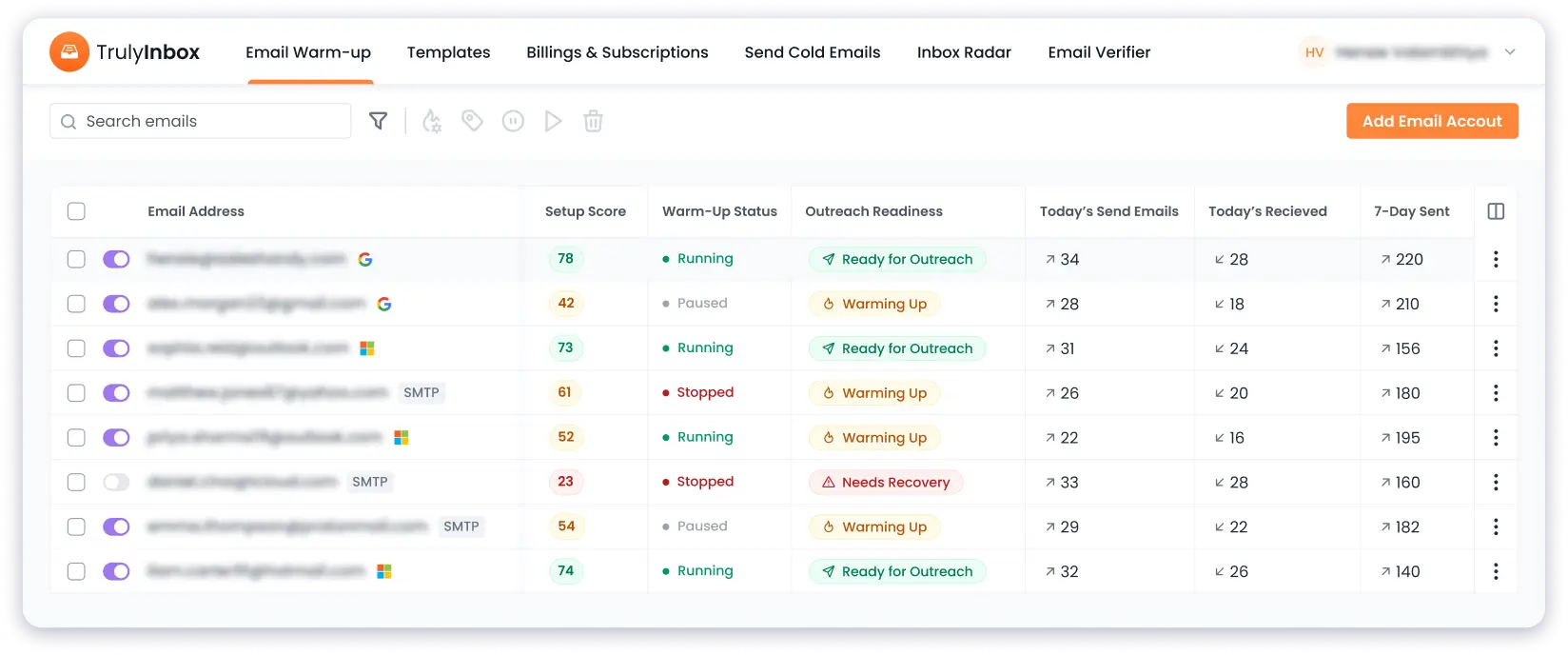
When I opened the warm-up settings, I found four strategies to choose from:
- AI Adaptive: Adjusts sending activity daily based on how email providers are responding to your account. Default on every plan, including free.
- Progressive: Slowly increases sending volume over weeks. Built for new accounts that need to build trust from scratch.
- Random: Changes sending times and volume day to day to avoid predictable patterns. Mimics how a real person sends emails.
- Flat: Maintains steady sending activity for accounts that already have reputation and just need maintenance.
I picked progressive for the new accounts and random for the older ones. This made a noticeable difference compared to tools where you just toggle warm-up on and every account gets the same generic approach.
New accounts hit 95%+ inbox placement by week 3 and climbed to 98% by week 4. Older accounts with reputation damage recovered to about 96% in just over 2 weeks.
The warm-up content is AI-generated across 50+ industries and 12 languages. You pick your industry and topic, and the emails read like actual business conversations rather than templates. Combined with varied send times and staggered replies, the warm-up felt organic.
The network consists of 40,000+ real email inboxes, and TrulyInbox auto-pauses warm-up if your SPF, DKIM, or DMARC is not configured correctly.
What stood out most was the Deliverability Intelligence dashboard. It tracks inbox placement over 90 days, broken down by Gmail, Microsoft, and Yahoo separately. Each account gets a score out of 100 and a clear status: “Ready,” “Warming Up,” or “Needs Recovery.”
I had one account landing fine in Gmail but getting flagged by Outlook, and a tool showing only aggregate numbers would have missed that completely.
TrulyInbox also monitors account health automatically by checking SPF, DKIM, DMARC, MX records, and blacklist status with click-to-fix guidance.
It supports 18+ email providers, one-click OAuth, REST API with webhooks, and is SOC 2 certified.
Pros
- 4 warm-up strategies including AI Adaptive that removes manual switching
- AI content across 50+ industries and 12 languages
- Network of 40,000+ real email inboxes with account-health monitoring
- Free SPF, DKIM, and DMARC tools, plus spam and email-header checks
- Unlimited accounts on every paid plan (no per-inbox charges)
- API, webhooks, SOC 2 certified
- Forever-free plan with trial
Cons
- Free plan limited to 1 account and 10 warm-up emails per day
Pricing (Billed Annually)
- Scale Plus: From $407/mo (5,000+ emails/day, 100+ mailboxes)
- Free Forever: $0/mo (1 account, 10 emails/day)
- Starter: $22/mo (200 emails/day, ~3 mailboxes)
- Growth (Most Popular): $84/mo (1,000 emails/day, ~15 mailboxes)
- Scale: $169/mo (3,000 emails/day, ~50 mailboxes)
- ✓4 warm-up strategies including AI Adaptive that removes manual switching
- ✓AI content across 50+ industries and 12 languages
- ✓Network of 40,000+ real email inboxes with account-health monitoring
- ✓Free SPF, DKIM, and DMARC tools, plus spam and email-header checks
- ✓Unlimited accounts on every paid plan (no per-inbox charges)
- ✓API, webhooks, SOC 2 certified
- ✓Forever-free plan with trial
- ✗Free plan limited to 1 account and 10 warm-up emails per day
Pricing (Billed Annually):
- Free Forever: $0/1 email account
- Starter: $22/mo/unlimited email accounts
- Growth: $59/mo/unlimited email accounts
- Scale: $142/mo/unlimited email accounts
- Business: 217/mo/unlimited email accounts
What do users have to say?
“It really helps me land my cold emails in inboxes instead of spam. Read the full review on G2”
PS: You can read my detailed TrulyInbox review to see how it performed over 2 months of testing
2. Instantly
Best for ⭐
Teams that need warm-up bundled inside a cold email sending platform
Instantly is not a standalone email warm-up tool. It is a cold email platform that includes warm-up as a built-in feature on every paid plan.
If you are already using Instantly for sending, the warm-up comes at no extra cost. You do not need a separate email warming tool.
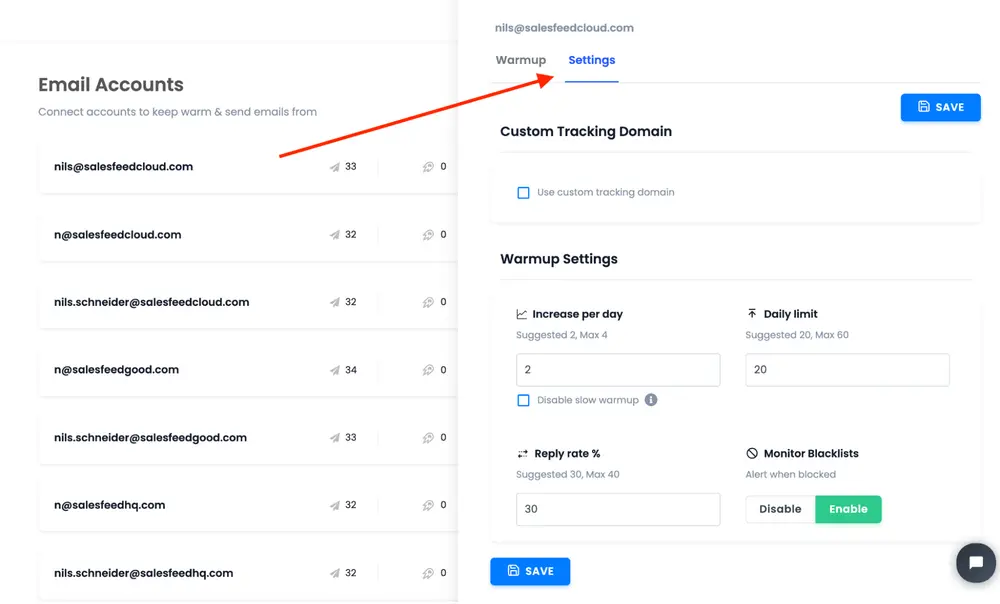
I tested the warm-up on 4 accounts over 4 weeks. Setup was one click. Connect your email account, toggle warm-up on, and it starts running. No setup needed.
The biggest advantage is network size. Instantly has over 1,000,000 real email accounts in its warm-up pool. That is the largest of any tool on this list. A bigger network means more varied engagement, which makes the inbox warmup harder for Gmail and Outlook to flag as fake.
The warm-up uses a “slow ramp” that grows daily volume step by step. It starts with 2 emails on day one, 4 on day two, and keeps going from there.
It also has a read feature that scrolls through warm-up emails to copy real reading behavior.
Inbox placement reached about 92% after 4 weeks. Not the highest on this list, but solid for an automated email warmup that runs with zero manual work. The dashboard shows your score and the split between inbox and spam, so you know when an account is ready.
That said is, you are paying for a full outreach platform, not just warm-up. If all you need is an email warmer, the Growth plan at $37.60/mo gives you more than you need.
But if you want both sending and warm-up in one place, Instantly is one of the best value options out there.
- ✓Largest warm-up network (1,000,000+ real accounts)
- ✓One-click setup with no manual work
- ✓Slow ramp for safe volume growth
- ✓Read feature copies real human behavior
- ✓Unlimited email accounts and warm-up on every plan
- ✓Dashboard shows inbox vs spam split
- ✗Not a standalone warm-up tool. You pay for the full platform.
- ✗Limited warm-up settings compared to dedicated email warm-up tools
- ✗No per-provider breakdown (Gmail vs Outlook) in warm-up reports
Pricing (billed annually):
- Growth: $37.60/mo (5,000 emails/mo, 1,000 contacts)
- Hypergrowth: $77.60/mo (125,000 emails/mo, 25,000 contacts)
- Light Speed: $286.30/mo (500,000 emails/mo, 100,000 contacts)
- Enterprise: Custom pricing
What do users have to say?
“Easy to set up, straightforward to learn, and lets me get campaigns live quickly.” Read the full review on G2
Bonus read: Want a deeper look? Read my full Instantly review. Looking for other options? Check out Instantly alternatives.
3. Lemwarm
Best for ⭐
Teams already using Lemlist for cold outreach
Lemwarm is the warm-up tool that comes bundled with Lemlist, and that context matters for how you evaluate it.
If you are on any paid Lemlist plan, Lemwarm Essential is included free.
That alone makes it worth using. Paying for a separate email warm-up service when one is already built into your outreach platform does not make financial sense.
I tested Lemwarm on 5 email accounts over the same 4-week period.
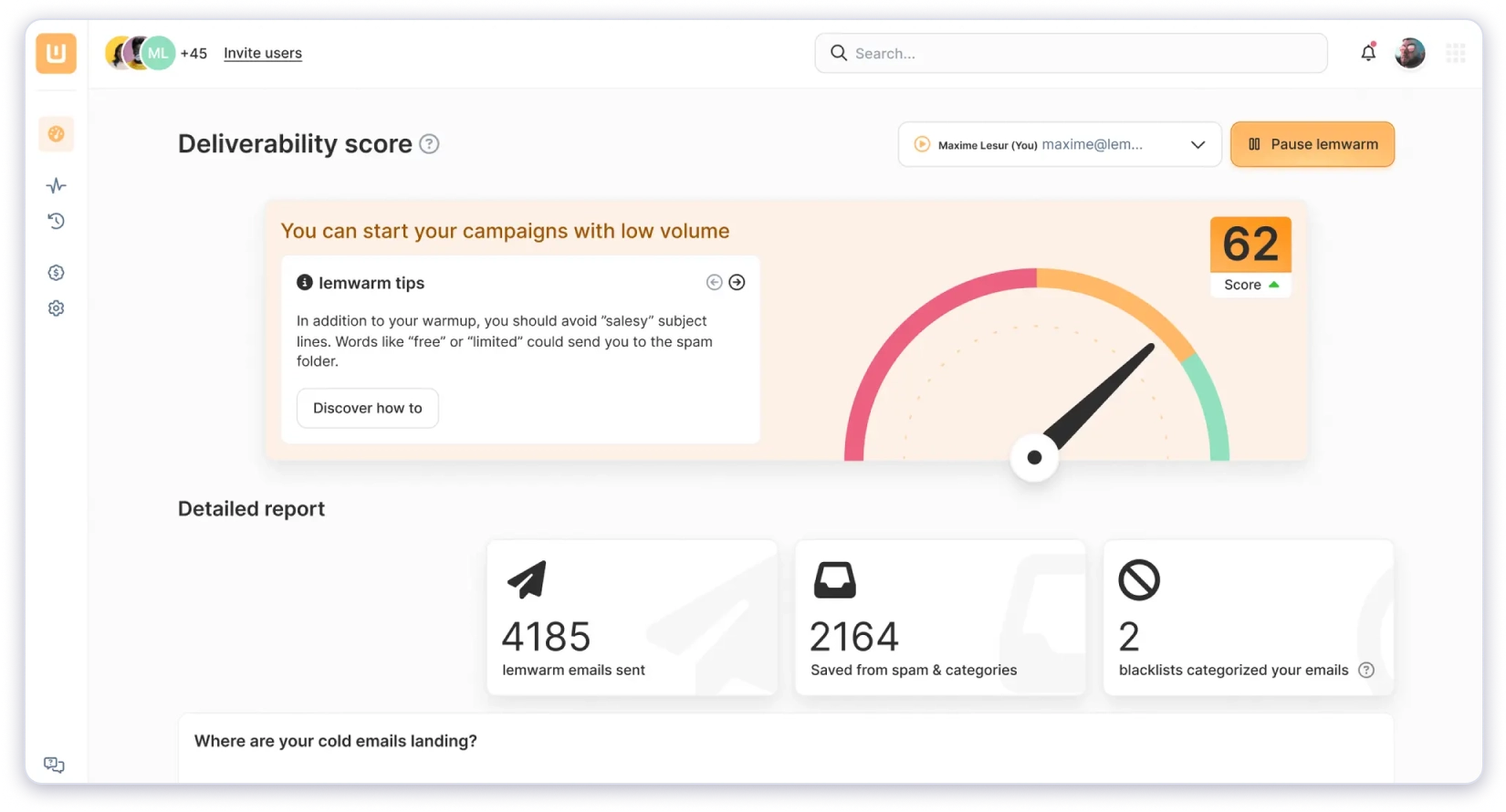
The warm-up emails are exchanged with a network of 20,000+ real inboxes across 100+ countries.
During setup, Lemwarm asks targeting questions about your industry, ICP, and whether you are B2B or B2C, then groups you into a cluster of similar senders so the warm-up interactions look natural.
Lemwarm now works across three layers. Warm-up handles the automated email warmup and engagement. Monitor tracks your deliverability and alerts you when something shifts. Boost gives you daily tips and reports on what to improve. Most email warming tools stop at the first layer.
The feature I found most useful was the deliverability test. Before launching a campaign, I could send a test email to Lemwarm’s inboxes and see exactly where it landed, broken down by ESP. It flagged a Gmail-specific issue on one of my accounts that I would have completely missed otherwise.
Bonus read: If you are tired of paying for every email account, check out Lemwarm alternatives to compare your options.
- ✓Included free with all paid Lemlist plans
- ✓20,000+ real inbox network across 100+ countries
- ✓Three-layer system: warm-up, monitoring, and daily optimization
- ✓Deliverability test shows inbox vs spam placement per ESP
- ✓DNS check for SPF, DKIM, DMARC, plus SpamAssassin score
- ✓Industry-specific warm-up clustering
- ✗Smart plan did not produce noticeably better results than Essential in my testing
- ✗Expensive as a standalone email warmup tool ($24/mo per inbox adds up fast)
- ✗Daily warm-up capacity capped at 40 emails
- ✗No unlimited inbox option
Pricing (billed annually)
- Free with any paid Lemlist plan
- Essential: $24/mo per inbox
- Smart: $40/mo per inbox
- Custom: Contact sales for 10+ users
What do users have to say?
“Their deliverability protection and warm-up process are top-tier.”
4. Smartlead
Best for ⭐
Agencies that need warm-up bundled with a scalable cold email platform
Smartlead is a cold email platform built for agencies managing multiple client accounts. Warm-up is not a separate product. It is included on every plan with unlimited mailboxes.
If you are already using Smartlead for sending, you do not need a separate email warm-up tool. The inbox warmup runs automatically the moment you connect a mailbox.
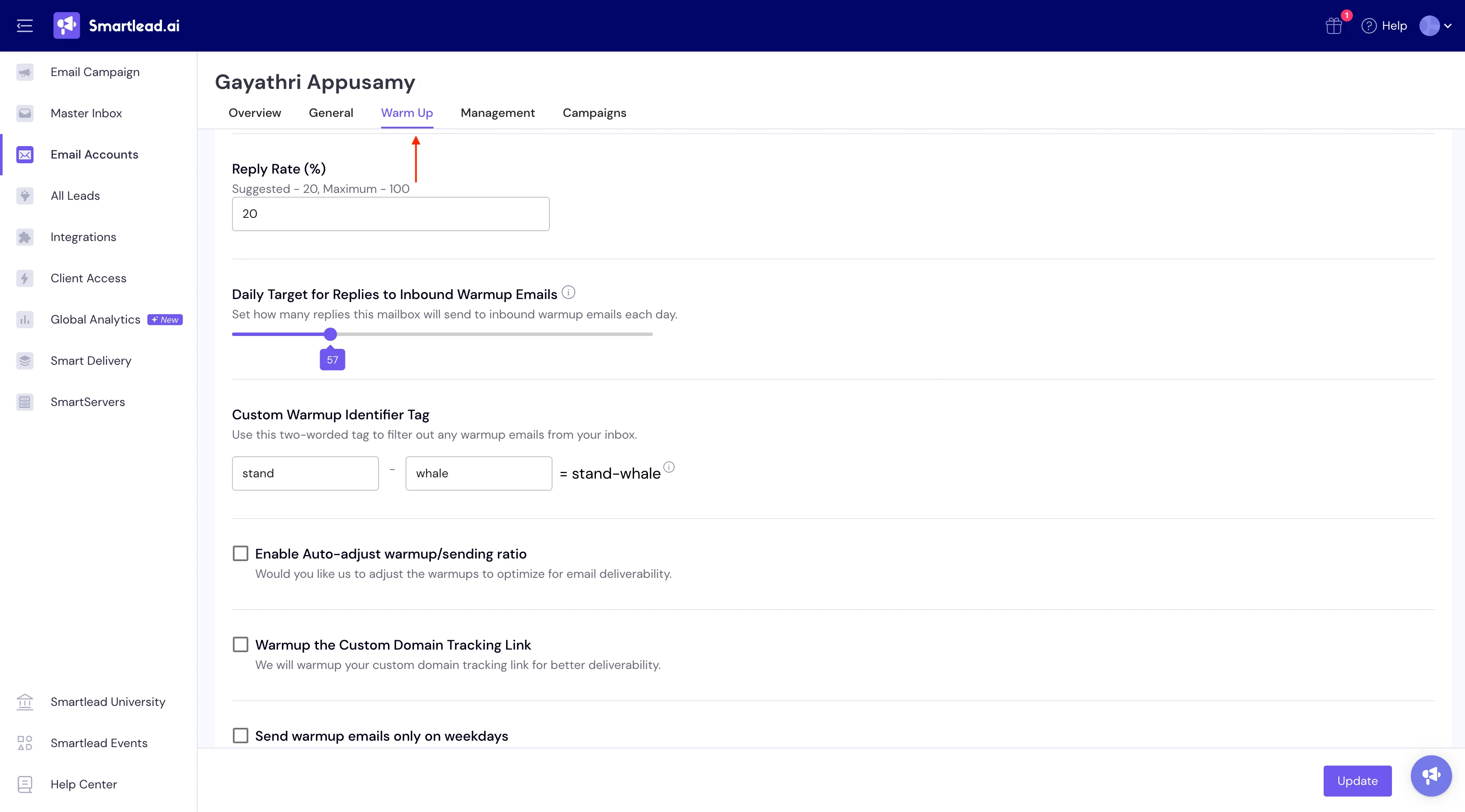
I tested the warm-up on 3 accounts over 4 weeks.
What makes Smartlead’s warm-up different is the curated private network. Unlike open warm-up pools where anyone can sign up, Smartlead vets the senders in its network. Only accounts that meet quality thresholds get access.
The idea is to keep the pool’s reputation clean so that engagement signals carry more weight with ESPs.
The AI handles sending, opening, and replying to warm-up emails. It also rescues emails from spam folders automatically. Subject lines, copy, and send times are shuffled to avoid predictable patterns that Gmail and Outlook could flag.
The safety guardrails stood out in my testing. Smartlead scales warm-up volume gradually, then auto-pauses if it detects a bounce spike or spam flag.
Each mailbox gets its own ramp-up schedule, which matters when you are warming up accounts with different reputation starting points.
Inbox placement reached about 91% after 4 weeks. Not the highest on this list, but solid for a bundled email warming feature that requires zero configuration.
Smartlead also offers an Ultra Premium Warm-up add-on at approximately $59/mo. It gives you access to a higher-quality account network for faster cold email warm up results.
- ✓Curated private warm-up network (vetted senders only)
- ✓AI-driven interactions with spam rescue and pattern shuffling
- ✓Auto-pause on bounce spikes and risk signals
- ✓Per-mailbox ramp-up schedules
- ✓Unlimited mailboxes and warm-up on every plan
- ✓White-label portal for agencies on higher tiers
- ✗Not a standalone email warm-up tool. You pay for the full outreach platform.
- ✗Warm-up network is smaller than Instantly (100,000+ vs 1,000,000+)
- ✗Interface has a steeper learning curve than dedicated email warmup tools
Pricing (billed annually)
- Base: $32.5/mo (2,000 active leads, 6,000 emails/mo)
- Pro: $78.3/mo (30,000 active leads, API access, white-label)
- Unlimited Smart: $144.5/mo (most popular, unlimited contacts)
- Unlimited Prime: $314.6/mo (dedicated manager, private Slack)
What do users have to say?
“The performance and deliverability features are especially valuable for us.”Read the full review on G2
Bonus read: See how Smartlead compares in my Smartlead vs Instantly breakdown. Want to explore other options? Check out Saleshandy as a Smartlead alternative.
5. MailReach
Best for ⭐
Figuring out why your emails hit spam, not just warming them up
MailReach does warm-up differently than most tools on this list. It is not just about sending and receiving emails. It is about finding out why your emails land in spam and helping you fix it.
I connected 4 accounts and ran the warm-up for 4 weeks. Inbox placement settled at around 92%, which is lower than some email warm-up tools on this list.
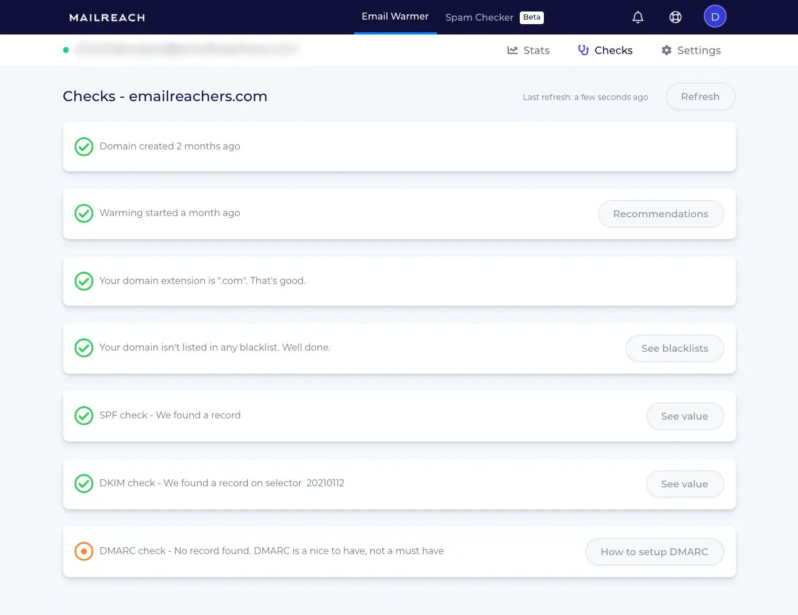
But MailReach earned its spot through the AI Deliverability Assistant.
The assistant checks your SPF, DKIM, and DMARC setup, looks at inbox placement patterns, and flags reputation issues before they get worse. It then gives clear steps to fix things: change your sending volume, warm up longer, or adjust your email content.
I found this useful when one of my accounts was stuck at 80% placement and I could not figure out why. MailReach found a DKIM alignment issue that every other email warmup tool in this test missed.
The warm-up network has 30,000+ real inboxes. The system ramps volume slowly and uses a mix of opens, replies, and spam-folder rescues to build sender reputation.
MailReach also has a spam tester that shows real inbox placement data by provider. You can run tests before sending real campaigns to see where your emails will land.
- ✓AI assistant finds SPF, DKIM, DMARC, and reputation problems
- ✓Spam testing with real placement data by provider
- ✓30,000+ real inbox warm-up network
- ✓Blacklist alerts via Slack or webhook
- ✓Clear, step-by-step fix recommendations
- ✗Per-inbox pricing adds up at scale
- ✗Inbox placement was lower than some competitors in my testing
- ✗Limited options to customize warm-up email content
Pricing (billed annually)
- Email Warmer (Annual): $19.5/mo per mailbox (includes 20 spam test credits)
- Email Warmer (Monthly): $25/mo per mailbox (includes 20 spam test credits)
- Spam Tester: Sold separately, starts at 50 credits
- Custom/Agency pricing available
What do users have to say?
“I find MailReach really easy to use, which is great.”- Read the full review on G2
6. Warmup Inbox
Best for ⭐
ESP-specific warming, especially for Gmail accounts
Warmup Inbox uses a network of over 30,000 real inboxes. That is one of the bigger networks I came across while testing these email warm-up tools.
I connected 3 Gmail accounts and ran the warm-up for 4 weeks. Inbox placement reached about 93%.
The feature that made the biggest difference was ESP-specific targeting. Instead of warming up across all providers the same way, you can tell Warmup Inbox to focus on Gmail, Outlook, or whichever provider is causing trouble.
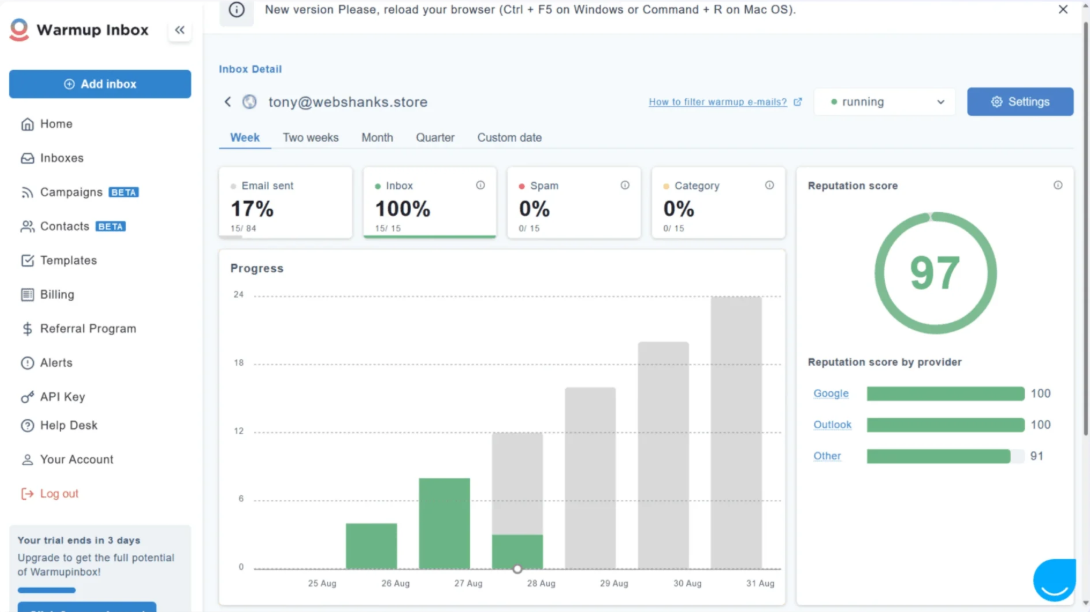
I used this on my Gmail accounts, and the change was clear. Emails that kept landing in promotions or spam started reaching primary within 2 weeks.
The platform also has free tools built into the dashboard: a DMARC record generator, SPF generator, and spam checker. Having these in one place saves time when you are setting up new domains.
Warmup Inbox also lets you pick the language for warm-up emails (English, French, Polish, Spanish, German). That is helpful for teams doing cold email warm up in different regions.
- ✓30,000+ real inbox warm-up network
- ✓ESP-specific targeting (focus on Gmail, Outlook, or Yahoo)
- ✓Built-in DMARC generator, SPF generator, and spam checker
- ✓Language options for warm-up emails (5 languages)
- ✓Cold email sequence builder included
- ✗Per-inbox pricing adds up at scale
- ✗Best features locked behind higher plans
- ✗Pricing is not fully clear upfront
Pricing (billed annually)
- Basic: $15/mo per inbox (75 msgs/day)
- Pro: $49/mo per inbox (250 msgs/day, up to 45% reply rate)
- Max: $79/mo per inbox (1,000 msgs/day, up to 50% reply rate)
PS: I’ve compared 8 Warmup Inbox alternatives that offer similar features at more scalable pricing
What do users have to say?
“The highly reliable automated warm-up network and phenomenal support.” Read the full review on G2
7. Warmy.io
Best for ⭐
AI-driven warm-up with deep customization for agencies
Warmy.io is one of the more feature-packed email warmup tools I tested. It runs on an AI engine called “Adeline” that controls your warm-up strategy.
It picks the volume, timing, and engagement patterns based on how your account is doing.
What stood out right away was the customization. You can pick your warm-up topic, language, and even use your actual email templates so the warm-up content matches your real outreach.
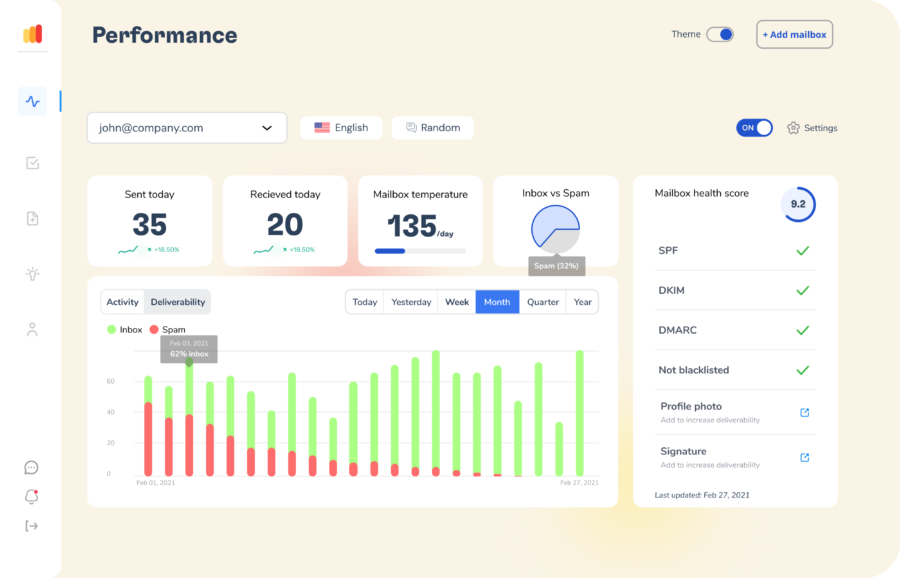
Most email warming tools use generic content that looks nothing like real outreach. Warmy takes a different path.
If inbox providers see warm-up emails that do not match your actual sending style, the trust signals may not carry over when you start real campaigns.
I tested Warmy on 3 accounts. Inbox placement reached about 95% after 4 weeks. The dashboard gave me a clear view of what was working and where things needed attention.
Warmy also supports 30+ languages and offers white-labeling for agencies handling warm-up across multiple client accounts.
The main downside is the price. Warmy does not list pricing on its website, so you need to request a quote. Review sites suggest the Starter plan costs around $49 per mailbox each month, which can get expensive with 10 accounts.
- ✓AI picks warm-up strategy based on your account data
- ✓Template warm-up lets you use your real email content
- ✓30+ language support with topic selection
- ✓White-labeling for agencies
- ✓Detailed deliverability dashboard
- ✗No public pricing. You have to ask for a quote.
- ✗Per-inbox pricing gets costly at scale
- ✗Support response times were slow in my experience
Pricing (billed annually)
- Custom pricing only. Contact Warmy.io for a quote.
What do users have to say?
“The only tool in this category that actually delivers consistent results.” Read the full review on G2
8. Folderly
Best for ⭐
Finding out exactly what is sending your emails to spam
Folderly is more of a diagnostics tool than a pure email warmer. That is where it adds the most value.
I tested Folderly on 2 accounts. The monitoring feature stood out. It tells you the specific reasons your emails land in spam. Content triggers, reputation problems, broken authentication. Then it gives you clear steps to fix each one.

Folderly can also tell whether your emails are going to promotions or spam. Most email warm-up tools do not make that distinction.
Inbox placement reached about 96% after 4 weeks, which is strong.
The catch is pricing. Folderly charges per mailbox and needs annual billing. At 1 to 9 mailboxes, you pay $96 per mailbox per month. Discounts start at 10+ and 25+ mailboxes, but even the lower rates are the highest on this list for an email warmup service.
I would suggest Folderly if you have a stubborn spam problem that standard warm-up has not fixed. For everyday warm-up needs, there are better value options.
- ✓Finds specific Gmail and Outlook spam triggers
- ✓Content analysis with fix steps
- ✓DNS records check and setup help
- ✓Tells you spam vs promotions (most tools do not)
- ✓Strong inbox placement in testing (96%)
- ✗Most expensive dedicated warm-up tool on this list
- ✗Annual billing required
- ✗No free trial
Pricing (billed annually)
- 1 to 9 mailboxes: $96/mailbox/mo
- 10 to 24 mailboxes: $72/mailbox/mo (most popular)
- 25 to 99 mailboxes: $56/mailbox/mo
- 100+ mailboxes: Custom pricing
What do users have to say?
“Folderly is very intuitive and well designed, which made implementation smooth.” Read the full review on G2
9. Snov.io
Best for ⭐
Teams that want a warm-up bundled with lead finding and outreach in one platform
Snov.io is not a dedicated email warm-up tool. It is an all-in-one outreach platform that includes warm-up as part of the package.
If you are already using Snov.io for lead finding, email verification, and campaigns, the built-in warm-up saves you from adding another tool.
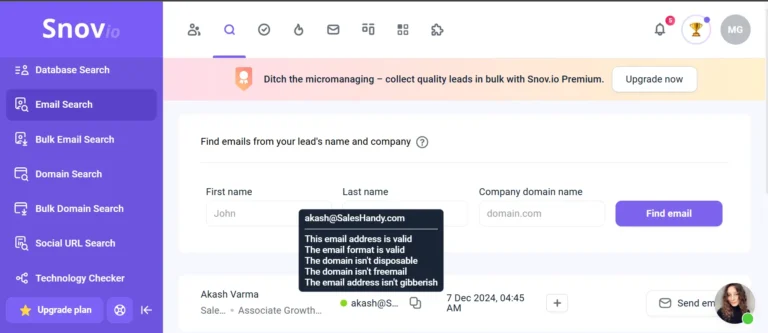
The free tier gives you 1 warm-up slot with 450 emails (one-time, not renewable). On the Starter plan, you get 3 slots. Unlimited warm-up is only on Pro plans.
I tested the warm-up on 2 accounts. Setup was simple. Connect your inbox, pick a strategy, set the reply rate to 30%, and let it run. Inbox placement reached about 93% after 4 weeks.
One feature worth noting is the Premium Warm-up Pool. You can choose to warm up only with corporate and business domains.
That gives your account a faster trust boost compared to a mixed network of personal and professional inboxes.
The warm-up emails are written using GPT-4o-mini. You can also use plain-text mode and spintax to keep content from getting repetitive.
- ✓Warm-up included with all paid plans
- ✓Premium pool with business domains only
- ✓Part of an all-in-one platform (lead finder, campaigns, CRM)
- ✓GPT-4o-mini content with spintax support
- ✓Free tier for testing
- ✗Only 3 warm-up slots on the Starter plan
- ✗Unlimited warm-up needs Pro plan or higher
- ✗Free tier emails are one-time only (450 total)
Pricing (billed annually)
- Trial: Free (1 warm-up slot, 450 emails one-time)
- Starter: $30/mo (3 warm-up slots)
- Pro S: $75/mo (unlimited warm-up)
- Pro M: $142/mo (unlimited warm-up)
- Pro L: $277/mo (unlimited warm-up)
Bonus read: Want to know what each Snov.io plan includes? Read our complete Snov.io pricing breakdown and also explore the best Snov.io alternatives to find a more cost-effective outreach solution.
What do users have to say?
“The warm-up feature kept my emails out of spam.” Read the full review on G2
10. InboxAlly
Best for ⭐
Repairing damaged sender reputation with deeper engagement signals
InboxAlly takes a different approach to warm-up. While most tools focus on opens, replies, and spam rescues, InboxAlly goes further.
The “Click Link” feature opens links inside your warm-up emails. That tells inbox providers that people are actually reading and clicking, not just opening. The “Auto-Scrolling” feature scrolls through longer emails to copy real reading behavior.
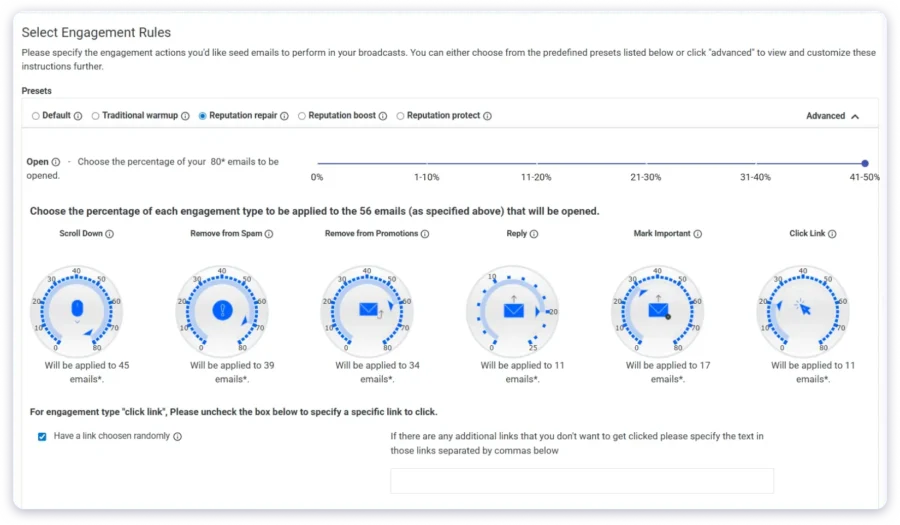
InboxAlly is built as a repair tool. It is meant for accounts that are already landing in spam or promotions, not for warming up new accounts from scratch.
I tested InboxAlly on 2 accounts. Inbox placement reached 91% after 4 weeks. The engagement depth is unique, but the results did not match the price in my testing.
At $149/mo per inbox on the Starter plan, InboxAlly is the most expensive email warm-up service on this list. For most cold email teams, that cost is hard to justify when tools like TrulyInbox give higher placement at a fraction of the price.
- ✓Link clicking and auto-scrolling signals
- ✓Built for reputation repair, not just warm-up
- ✓Works with all email providers
- ✓ML-based scoring (IA Score)
- ✓Multiple sender profiles
- ✗Most expensive tool on this list ($149/mo per inbox)
- ✗Placement did not match the premium price in my testing
- ✗Monthly billing only. No annual discount.
Pricing (Monthly Only)
- Starter: $149/mo (1 sender profile + 4 extras at $35 each)
- Plus: $645/mo
- Premium: $1,190/mo
- Enterprise: Custom pricing
What do users have to say?
“The InboxAlly team knows their stuff.” Read the full review on G2
11. Warmbox
Best for ⭐
Budget-friendly warm-up with decent customization
Warmbox is one of the cheapest email warm-up tools on this list, starting at $15/mo.
I tested Warmbox on 3 accounts. It uses a network of 35,000 inboxes across 100+ countries. The warm-up emails are written using GPT-4.
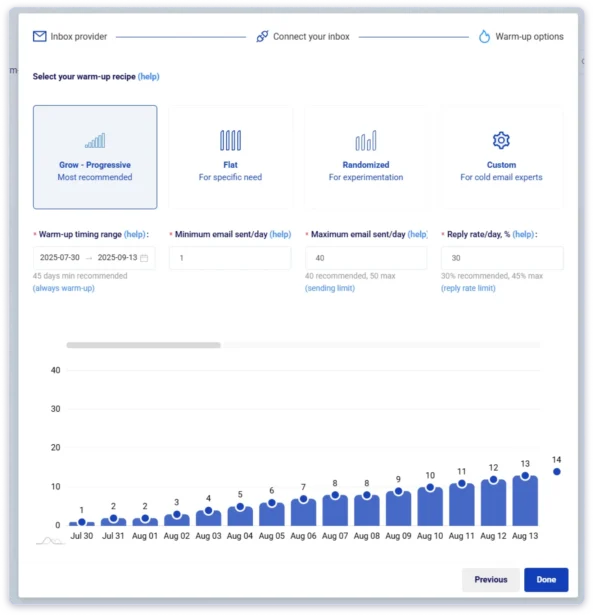
You can set the email volume, reply rate, reputation targets, and audience. One thing I liked was the plug-and-play strategies. You pick a preset with one click instead of setting up every detail by hand.
Inbox placement reached about 90% after 4 weeks. That is the lowest among the top tools in my test. But it was still a clear improvement from where the accounts started (around 72 to 76%).
The customization is good for the price. You can set warm-up schedules, turn on auto-remove from spam, and check your domain health with a live DNS and blacklist checker.
The 90% placement rate tells me the network quality may not match tools that use only Google Workspace and Microsoft 365 accounts.
But for teams on a tight budget that need a basic email warmer with some control, Warmbox does the job.
- ✓Starts at $15/mo
- ✓35,000 inbox network across 100+ countries
- ✓GPT-4 written warm-up content
- ✓Set your own volume, reply rate, and schedule
- ✓One-click preset strategies
- ✓Auto-remove from spam and live DNS checker
- ✗Lowest inbox placement in my test (90%)
- ✗Per-inbox pricing on higher plans
- ✗No G2 reviews for outside validation
Pricing (Billed Annually)
- Solo: $15/mo (1 inbox, 50 emails/day)
- Start-up: $69/mo (3 inboxes, 250 emails/day)
- Growth: $139/mo (6 inboxes, 500 emails/day)
- Team: Custom pricing
What do users have to say?
No reviews on G2.
Start Your Email Warm-Up Today
Well, it’s just email warm-ups.
It should run on AUTOPILOT!
If you are still reading this and are not sure which email warm-up tool to opt for, I suggest you go for TrulyInbox.
Why?
Because it is good at its job (i.e., warming up emails) and is natively integrated with Saleshandy.
All you have to do is connect your email account with Trulyinbox in Saleshandy and forget about it.
If you’re still deciding, here’s the simplest path to get started:
Step 1: Sign up for Saleshandy. 7-day free trial, no credit card required.
Step 2: Saleshandy connects natively with TrulyInbox. Your warm-up kicks in automatically when you connect your email accounts.
Step 3: After 2 to 4 weeks of warm-up, use inbox placement testing to check where your emails land across Gmail, Outlook, and Yahoo.
Step 4: Start sending. Your inboxes are ready. Once your accounts are warmed up, use Saleshandy’s inbox placement test to check where your emails land before you start real campaigns.
FAQs on Email Warm-Up Tools
1. What is email warm-up?
Email warm-up is the process of gradually buildin sender reputation for a new or inactive email account. Warm-up tools send and receive emails on your behalf through a network of real inboxes, generating opens, replies, and positive engagement signals. Over 2 to 6 weeks, this builds enough trust with Gmail, Outlook, and Yahoo that your real emails start landing in the primary inbox instead of spam.
2. How long does email warm-up take?
Most accounts need 2 to 4 weeks. Brand new domains take closer to 4 weeks. Older accounts with mild reputation damage can recover in 2 to 3 weeks. The exact timeline depends on your email provider, your starting reputation, and how aggressive your warm-up settings are. Keep warm-up running even after you start sending real campaigns.
3. Does email warm-up actually work?
Yes. Every tool I tested improved inbox placement from a starting range of 72 to 76% to at least 90% within 4 weeks. The best tool reached 98%. But warm-up only builds sender reputation. It will not fix broken SPF, DKIM, or DMARC records, poor list quality, or spammy email content. Think of it as the foundation, not the entire building.
4. Is email warm-up legal?
Yes. These tools operate within a network of real users who consent to receive and interact with warm-up emails. The process does not involve sending unsolicited emails to random people. That said, always check your email provider’s terms of service. Most major ESPs allow warm-up activity as long as it follows their usage policies.
5. Can I warm up my email for free?
Yes, with limits. TrulyInbox has a forever-free plan that sends 10 warm-up emails per day on 1 account. Snov.io gives you 1 free warm-up slot with 450 one-time emails. Warmforge gives you 1 free warm-up slot on signup. These are enough for testing but not enough for serious outreach at scale.
6. How many warm-up emails should I send per day?
A good starting point is 2 to 5 emails per day, gradually increasing to 40 to 100 over 2 to 4 weeks. The exact number depends on how new your account is and what your email provider allows. Most warm-up tools handle this automatically with a ramp-up feature. Jumping straight to high volume is the fastest way to get flagged.
7. Do I need a separate warm-up tool if my sending platform already includes one?
Usually no. Instantly, Smartlead, Lemlist, and Snov.io all include warm-up. If your placement stays above 90%, the bundled warm-up is doing its job. If it does not, a dedicated tool with diagnostics gives you more control.
8. What happens if I stop warm-up after starting campaigns?
Your sender reputation slowly drops, especially if engagement is low. Keep warm-up running at a reduced level in the background. It acts as a safety net for the trust you already built.
9. Why are my emails still in spam after warming up?
Warm-up builds reputation but cannot fix everything. Common causes: broken SPF, DKIM, or DMARC setup, unverified email lists, spam-trigger words, sending too fast after warm-up, or a blacklisted domain. If warm-up alone is not working, use a tool with diagnostics to find the root cause.
![13 Best Email Automation Tools & Software in 2026 [Tried & Tested]](https://www.saleshandy.com/blog/wp-content/uploads/2025/12/Best-Email-Automation-Tools.webp)

 Dhruv Patel