

If you’re comparing ContactOut because you need verified emails, phone numbers, or LinkedIn prospecting data, the headline price is only part of the story.
ContactOut’s paid plans look simple at first. You pay a monthly fee, choose whether you need US and UK data, and get access to the platform.
Then you look closer.
The cheaper pricing view excludes US and UK contacts. The paid plans are described as “unlimited,” but the terms include monthly fair-use limits. Self-serve plans are also designed around one user per company.
So the real question isn’t just “How much does ContactOut cost?”
It’s whether the plan you pay for actually gives you enough data, exports, users, and phone numbers to support the way you prospect.
In this guide, I’ll break down ContactOut pricing for 2026, what each plan includes, where each one falls short, how much a phone number really costs, what “unlimited” means, and which ContactOut alternatives are worth considering.
ContactOut Pricing – TOC
- TL;DR: ContactOut Pricing at a Glance
- ContactOut Pricing Plans: Full Breakdown
- How ContactOut Charges for Emails and Phone Numbers
- ContactOut vs. Saleshandy: 2026 Feature & Pricing Comparison
- Is ContactOut Worth the Price in 2026?
- Final Verdict: Is ContactOut the Right Fit for You?
- FAQs About ContactOut Pricing
TL;DR: ContactOut Pricing at a Glance
Here’s every ContactOut plan in one place. Paid plans are billed monthly, and each one has two prices: one with US and UK data and a cheaper one without it.
| Plan | With US/UK Data (Monthly) | Without US/UK Data (Monthly) | Emails | Phones | Exports | Users | Best For |
|---|---|---|---|---|---|---|---|
| Free | $0 | $0 | 5/day | 5/day | 5/day | 1 per company | Testing the extension |
| $49 (list price $99) | $25 (list price $99) | Unlimited, capped at 2,000 a month | None | 300/month | 1 per company | One person who only needs emails | |
| Email + Phone | $99 (list price $199) | $49 (list price $199) | Unlimited, capped at 2,000 a month | Unlimited, capped at 1,000 a month | 600/month | 1 per company | One recruiter or seller on LinkedIn |
| Team / API | Quote | Quote | Custom | Custom | Custom | Multiple, with team management | Teams needing Salesforce, ATS, or API |
ContactOut Pricing Plans Full Breakdown
ContactOut has a free plan, two paid plans, and a custom team plan, and the Chrome extension and search portal come with every one of them at no extra cost.
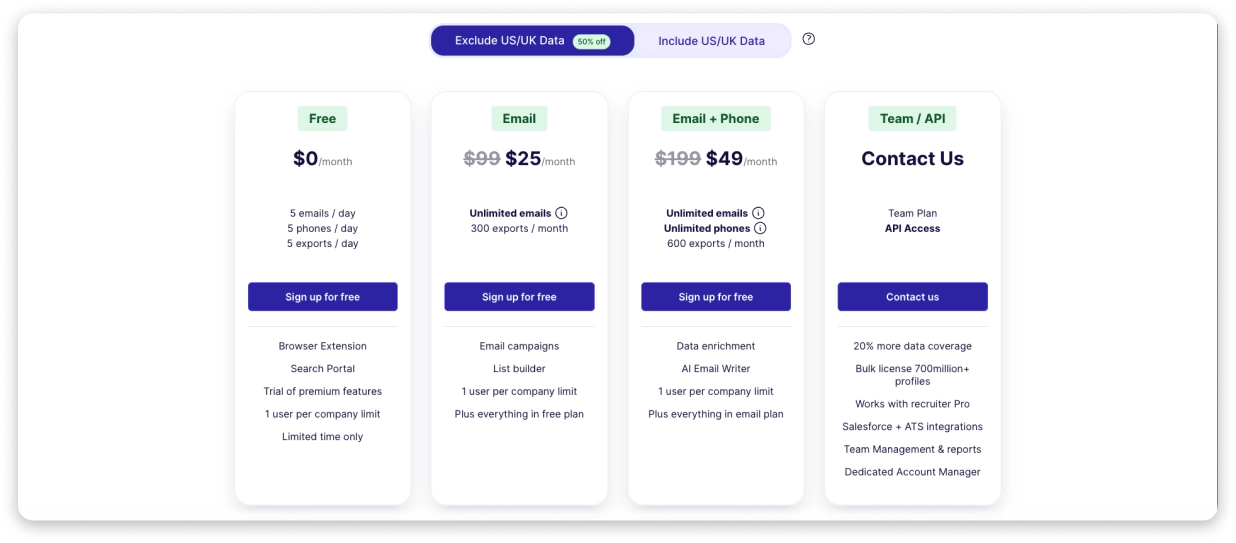
1. Free Plan ($0)
ContactOut’s free plan lets you try the extension and reveal a few contacts a day. It’s a fair way to judge the data before you pay, but it won’t carry real outreach.
✅ What You Get:
- 5 emails, 5 phone numbers, and 5 exports per day
- The Chrome extension and search portal, at no cost
- A trial of premium features (the length isn’t published)
- The same $0 price with or without US/UK data
- 1 user per company
❌ Where It Falls Short:
- Five reveals a day adds up to about 105 a month on weekdays, which is enough to test data quality and not much else
- ContactOut describes the free allowance differently: 5 credits a day on some, 40 free credits or 40 contacts a month on others, and “standard LinkedIn only” in one signup box
My Take: Use the free plan as a data test. Pick 20 people from your real target list, reveal 5 a day over four days, and run the emails through Saleshandy’s free email verifier. If the data holds up, you’ve learned more than any accuracy claim could tell you.
2. Email Plan ($49 a Month, or $25 Without US/UK Data)
The Email plan is for people who only need email addresses and don’t plan to call anyone. It’s the cheapest way to get past the free plan’s daily limit.
✅ What You Get:
- $49 a month with US/UK data (list price $99)
- $25 a month without US/UK data (list price $99)
- Billing: monthly only, with no yearly option on the plan card
- Unlimited emails, up to a fair-use cap of 2,000 a month
- 300 exports a month
- Email campaigns and a list builder, according to third-party listings
- Everything in the Free plan
- 1 user per company
At the full 2,000-email cap, that’s about $0.02 per email with US/UK data and about $0.01 without.
❌ Where It Falls Short:
- No phone numbers on this plan
- 300 exports a month works out to about $0.16 each with US/UK data and about $0.08 without
- “Unlimited” emails stop at 2,000, so a high-volume pace runs into the cap
- One user per company, so teams can’t share it
My Take: If you only email and you work alone, this is the sensible paid plan. Just don’t buy it expecting unlimited volume. At 300 exports a month, you’ll feel the export cap before the email cap.
3. Email + Phone Plan ($99 a Month, or $49 Without US/UK Data)
This is the plan most people actually want. You get emails and direct phone numbers, and the cost per number drops the more you use it.
✅ What You Get:
- $99 a month with US/UK data (list price $199)
- $49 a month without US/UK data (list price $199)
- Billing: monthly only, with no yearly option on the plan card
- Unlimited emails, up to 2,000 a month
- Unlimited phone numbers, up to 1,000 a month
- 600 exports a month
- 1 user per company
At the full 1,000-phone cap, that’s about $0.10 per number with US/UK data and about $0.05 without.
❌ Where It Falls Short:
- “Unlimited” phones means 1,000 a month, and the export cap is only 600
- If you reveal just 100 numbers a month, you’re paying close to $1 each with US/UK data
- ContactOut doesn’t say what happens to your credit when a phone lookup finds nothing
- One user per company, so a team needs a different route
My Take: For one recruiter or seller who calls a lot, this is genuinely good value per number. For anyone who reveals a few dozen numbers a month, it’s an expensive way to buy them.
4. Team and API Plan (Custom Pricing)
ContactOut routes teams to a custom plan, since the self-serve plans are built for a single person. Every self-serve card lists one user per company, so you can’t simply add seats.
✅ What You Get:
- Custom pricing from ContactOut sales, with no public price
- 20% more data coverage
- A bulk license of 700M+ profiles
- Works with Recruiter Pro
- Salesforce and ATS integrations
- Team management and reports
- A dedicated account manager
API access is offered at the Enterprise level only.
❌ Where It Falls Short:
- You can’t see the price without talking to sales
- The terms let ContactOut set different credit limits in a separate order form, so two customers can end up with different caps
My Take: If you have more than one seller, get the seat price, the credit rules, and the export definition in writing before you commit. The self-serve plans were not designed for you.
How ContactOut Charges for Emails and Phone Numbers
ContactOut doesn’t sell add-on packs on its self-serve plans, so most of what you pay comes down to the monthly plan and its fair-use limits. Here’s how credits and costs actually work.
1. Credits and Fair-Use Limits
ContactOut’s paid unlimited plans operate under a fair-use policy: 2,000 email credits and 1,000 phone credits per account per month.
There are three separate meters. Over a 22-day working month, they break down like this:
- Emails: 2,000 a month, about 91 a day
- Phone numbers: 1,000 a month on Email + Phone, about 45 a day
- Exports: 300 a month on Email and 600 on Email + Phone, about 14 or 27 a day
Based on what’s documented, revealing an email, revealing a phone number, and exporting contacts are what use up your allowance. Here’s how that plays out:
- A recruiter doing a few hundred lookups a month will never notice the caps
- An SDR revealing 100 emails every working day uses about 2,200 a month and runs past the 2,000 cap around day 20
2. Phone Number Cost by Monthly Volume
ContactOut doesn’t price numbers one by one. You pay a flat fee, so your cost per number depends on how many you reveal. Here’s the math if you spent every phone credit on phones:
| Phones Revealed per Month | With US/UK Data ($99 a Month) | Without US/UK Data ($49 a Month) |
|---|---|---|
| 1,000 (fair-use cap) | about $0.10 | about $0.05 |
| 600 (export cap) | about $0.17 | about $0.08 |
| 200 | about $0.50 | about $0.25 |
| 100 | about $0.99 | about $0.49 |
The pattern is simple:
- The more you use it, the cheaper each number gets. At the cap, it’s about a dime.
- Light users overpay. At 100 numbers a month, you’re paying about a dollar each.
- This assumes every lookup finds a number. ContactOut doesn’t say what happens to your credit on a miss.
If calling is a big part of your outreach, our cold calling guide and roundup of phone number lookup tools are worth a read.
3. Add-Ons, Extra Credits, and Hidden Costs
Here’s what ContactOut does and doesn’t publish about paying for more:
- No self-serve add-ons. The pricing page doesn’t offer extra credit packs or export top-ups on the Email and Email + Phone plans.
- Team credit pools. Buying extra credits and setting per-member limits. They date from June 2023, and they say invited members must be on a free plan, so confirm they still apply.
- Calling may cost extra. One third-party review says calls from ContactOut’s built-in cloud dialer are billed separately with pre-purchased credits, so ask for rates if you plan to call from inside the tool.
- Cancellation is simple. You can cancel any time before your next billing date and keep your remaining lookups until then.
ContactOut vs. Saleshandy: 2026 Feature & Pricing Comparison
While ContactOut excels at quickly revealing individual contact data directly from LinkedIn, Saleshandy delivers an end-to-end outreach engine equipped with AI copywriting, multi-channel sequences, and scalable team access.
Let’s see a detailed comparison.
| Feature | ContactOut | Saleshandy |
|---|---|---|
| Entry Price | $49/mo billed monthly, $39/mo billed yearly (Email plan); $99/mo monthly, $79/mo yearly (Email + Phone) | $34/mo billed yearly, $41/mo monthly (Starter, 1,500 credits/mo) |
| Free Option | Free plan (5 emails, 5 phones, and 5 exports per day) | 7-day trial with up to 50 free credits |
| Phone Numbers | Included in Email + Phone plan (capped at 1,000 phone lookups/mo) | 6 credits each; 1 credit per verified email |
| Users | 1 user limit on standard self-serve plans (Team/API plan required for additional seats) | 1 on Starter, 10 on Pro, no limit on Scale |
| Best Features |
|
|
If you want to compare more tools, check out our full ContactOut alternatives blog.
How to Pick Between Them:
- Choose ContactOut if you’re one person who reveals hundreds of phone numbers a month, since the flat fee wins at high use.
- Choose a credit-based tool if you reveal a few contacts a month, because you only pay for what you use.
- Choose a tool with seats built in if you have a team. Saleshandy Pro covers 10 users on one plan, and it also finds leads and sends the outreach.
Is ContactOut Worth the Price in 2026?
I have already broken down what ContactOut costs across every plan, usage limit, and pricing option, but the pricing table only tells part of the story.
To decide whether the price is actually worth paying, it’s useful to look at what users repeatedly mention in their reviews.
1. Users Like the Email Data, but Phone Accuracy Gets More Mixed Feedback
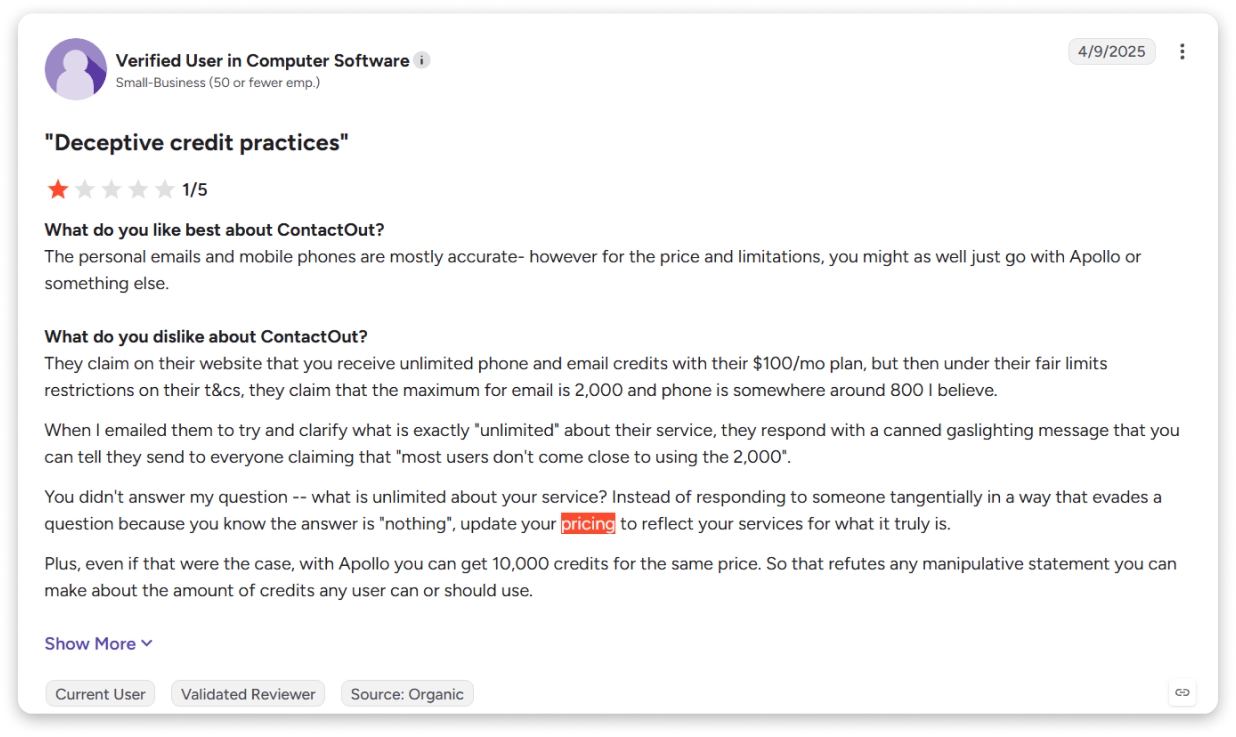
★ 1/5 | G2, April 9, 2025
A verified G2 user in Computer Software described the pricing and credit structure as misleading, while still saying the personal emails and mobile numbers were mostly accurate.
Source: G2
The reviewer specifically objected to the gap between the “unlimited” messaging and the limits described in the terms.
That distinction matters because a tool can have useful data while still frustrating users with its usage model.
2. The “Unlimited” Positioning Creates Confusion
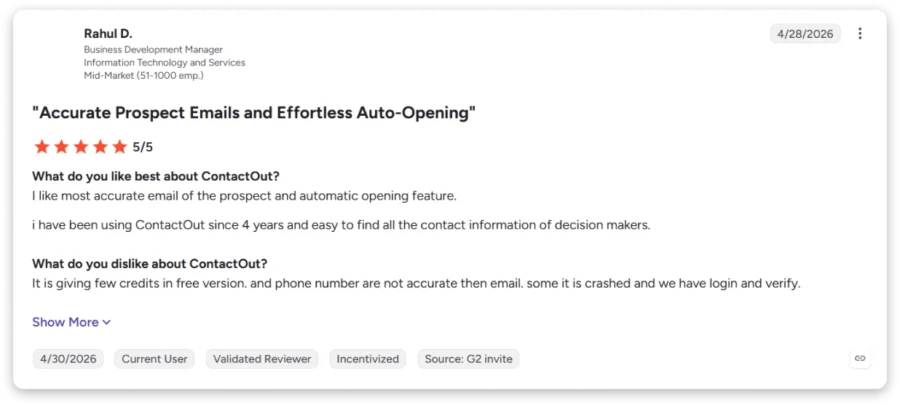
★ 5/5 | G2, April 28, 2026
A four-year user praised the accuracy of prospect emails and ContactOut’s auto-open feature.
The complaints were few credits on the free plan, phone numbers that were less accurate than emails, and occasional crashes or re-login prompts.
Source: G2
The review is marked as incentivized and sourced from a G2 invite.
Another G2 reviewer said users get only about 2,000 emails on a subscription and suggested Apollo or ZoomInfo instead.
Put together, the pattern is fairly consistent.
People like the email data, they’re wary of the word “unlimited,” and they notice that phone numbers can lag behind emails.
3. The One-User Structure Matters for Teams
The public self-serve pricing cards are built around one user per company, while ContactOut’s sales and help-center materials describe different team arrangements.
That doesn’t necessarily make ContactOut a poor team product.
It does mean you shouldn’t calculate your team budget by simply multiplying the individual plan price without first confirming how ContactOut will structure your account.
For a team, ask about:
- Seat limits
- Shared credit pools
- Per-user versus account-level limits
- Export limits
- Custom fair-use terms
- CRM and ATS integrations
4. ContactOut Works Best as a Prospecting Data Layer
ContactOut is strongest when the workflow looks something like this:
Find a prospect on LinkedIn → reveal contact details → export or sync the contact → run outreach elsewhere.
That is a useful workflow for recruiters, founders, consultants, and individual sellers.
It becomes less compelling when you want one platform to handle the entire outbound process, including prospecting, sequencing, multichannel outreach, inbox management, and larger team workflows.
5. The Best Value Depends on How Much You Use
The Email + Phone plan is where ContactOut’s economics become most attractive when you actually use the available allowance.
At 1,000 phone reveals, the $99 plan works out to about $0.10 per number with US/UK data.
At 100 phone reveals, it is about $0.99 per number.
The same subscription can therefore look either inexpensive or expensive depending on how much of the allowance you actually consume.
Final Verdict: Is ContactOut the Right Fit for You?
After going through every plan, limit, and review, here’s my honest take.
ContactOut is a good tool for one person who works from LinkedIn and wants personal emails and mobile numbers without a long setup.
The free plan lets you test before you pay, billing is month-to-month, and the Email + Phone plan is great value per number if you’ll use the allowance.
But it has real limits. “Unlimited” stops at 2,000 emails and 1,000 phone numbers, exports stop at 300 or 600, and the self-serve plans are built for one user.
Its own pages also describe the free plan, database size, and team pricing in different ways, so get answers in writing before you commit.
ContactOut makes sense if you:
- Work alone, mostly from LinkedIn
- Need personal emails or mobile numbers
- Will use most of the phone allowance each month
Look elsewhere if you:
- Run high-volume outbound
- Need several seats on one plan
- Want finding leads and sending outreach in one place
If you’re in that second group, Saleshandy is worth a look. Starter is $34 a month billed yearly, Pro covers 10 users, and you only pay for verified emails.
You can find leads, run email, calls, and LinkedIn steps, and warm up your inboxes from the same account.
There’s a 7-day free trial with up to 50 free credits, so you can run the same 20 contacts through both tools and compare.
FAQs About ContactOut Pricing
Here are quick answers to the questions people ask most about ContactOut pricing.
1. Does ContactOut Offer Monthly and Annual Billing?
Monthly only. The self-serve plans are billed month to month in both versions of the data, and I couldn’t find a yearly option on the plan cards. You can cancel any time before your next billing date and keep your remaining lookups until then. If you see “billed annually” prices on other sites, check them against the pricing page.
2. What Happens When I Reach My ContactOut Export Limit?
ContactOut doesn’t publish an export top-up for self-serve plans in its FAQ or help center. The terms allow a separate agreement with different limits, and the help center documents buying credits for team credit pools. The practical answer is to wait for next month or ask sales.
3. Do Unused ContactOut Credits or Exports Roll Over?
ContactOut’s FAQ and help center don’t document rollover. Treat monthly allowances as use-it-or-lose-it unless support tells you otherwise.
4. Can I Upgrade or Downgrade My ContactOut Plan?
ContactOut lets you manage your subscription from your account profile using the Manage Subscription button, which is also where cancellation lives. Ask support when a change takes effect and what happens to your remaining credits.
5. Does ContactOut Charge Extra for CRM or ATS Integrations?
The integrations page lists Salesforce, HubSpot, Lever, Bullhorn, Greenhouse, and Zapier without a separate price. The Team / API card lists Salesforce and ATS integrations as part of that custom plan, so confirm what your plan includes before you connect your CRM.
6. What Happens if ContactOut’s Fair-Use Limits Don’t Meet My Volume?
Don’t assume you can buy more self-serve capacity. Talk to ContactOut about custom limits through the Team / API plan, or compare tools built for volume. Credit-based platforms like Saleshandy let you size credits to your pipeline.
Not on the self-serve plans, since every card lists one user per company. Teams are routed to the custom Team / API plan, or the sales page’s under-$299 offer, so get the seat price and credit rules in writing first.
They do different jobs. Sales Navigator finds and messages people but doesn’t return emails or phone numbers, while ContactOut reveals them. If you only want contact details, ContactOut is the better buy. If you also want LinkedIn’s advanced search and InMail, you’ll probably use both. Our guide on how to find someone’s email address covers other routes.
9. Can ContactOut Be Used for B2B Sales Prospecting?
Yes, for LinkedIn-first prospecting at low to moderate volume. It includes a Chrome extension, a search portal, email campaigns, and CRM and ATS integrations, but high-volume outbound runs into the caps and the one-user limit. Our lead prospecting hub and guide to B2B data providers can help you plan a stack.
10. Does ContactOut Find Personal Emails?
Yes. ContactOut says it holds 150M personal emails, and reviewers rate them well. Check the rules where your prospects live before you use personal addresses for outreach, and consider a free email finder if you only need business emails.

 Anil Salvi