

GMass is a well-known tool for sending personalized mass emails directly from Gmail.
With mail merge, automated follow-ups, tracking, and MultiSend, it appeals to solo users, recruiters, founders, and small teams that want to run outreach without leaving Gmail.
But when you start evaluating GMass pricing, one question matters most:
What are you actually paying for?
The subscription price is only part of total cost.
Your final GMass bill can change depending on plan tier, sequences, MultiSend, team overages, and SMTP usage.
To understand what GMass really costs in practice, I reviewed its current pricing and support documentation alongside user feedback from G2, Capterra, and Trustpilot.
I looked at where users find value, where pricing starts to feel expensive, and which costs can appear as their outreach grows.
Here’s the full GMass pricing breakdown for 2026, including plans, limitations, and costs beyond the headline price.
GMass Pricing – TOC
- TL;DR: GMass Pricing at a Glance in 2026
- How Much Does GMass Cost in 2026?
- Does GMass Have a Free Plan?
- How Much Do GMass Team Plans Cost for Sales Teams?
- What Additional Costs Can Affect Your Final GMass Bill?
- What Do GMass Customers Say About Its Pricing?
- The Better Alternative to GMass: Saleshandy
- Final Verdict: Is GMass Worth the Price in 2026?
- Frequently Asked Questions
TL;DR: GMass Pricing at a Glance in 2026
| Plan | Cost if Paid Monthly | Cost if Paid Annually | Who It’s Best For |
|---|---|---|---|
| Standard | $29.95/month | $20/month | Solo users running basic Gmail mail merge campaigns |
| Premium | $39.95/month | $29/month | Users who need sequences, A/B testing, and automation |
| Professional | $59.95/month | $49/month | Users who need MultiSend, inbox rotation, and priority support |
| Team | Starts at $175/month for 5 users | Starts at $1,750/year for 5 users | Sales teams and businesses managing multiple users |
Note: GMass increased its Individual monthly prices in January 2026. Standard moved from $25 to $29.95/month, Premium from $35 to $39.95/month, and Professional from $55 to $59.95/month. If you see older prices in other GMass pricing guides, those figures are outdated.
How Much Does GMass Cost in 2026?
GMass keeps pricing fairly simple. You can choose between Individual and Team plans.
If you’re buying GMass for yourself, there are three Individual plans:
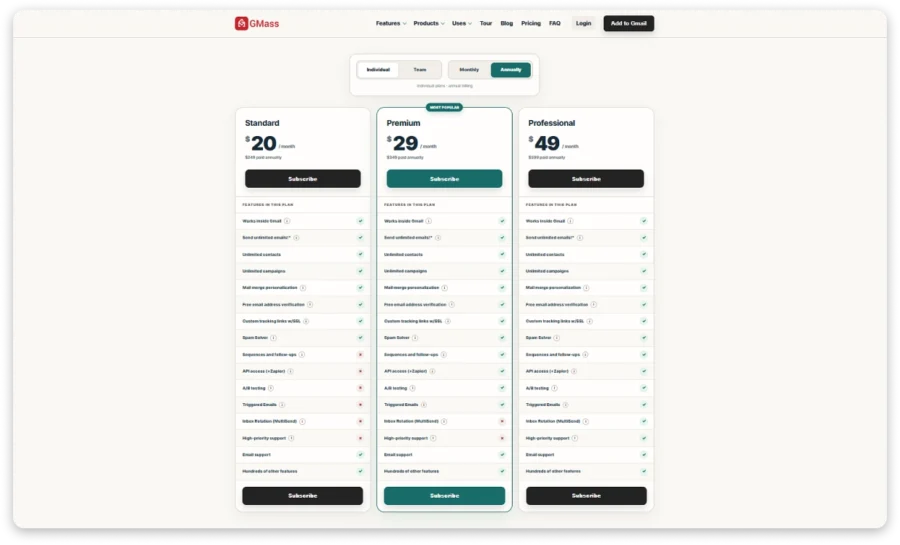
All three are available with monthly or annual billing. Team pricing works separately and depends on how many users you need.
Here’s how I’d look at each plan.
Standard Plan: $20/mo
The Standard plan is GMass’s entry-level option for sending personalized campaigns directly from Gmail.
It works well for basic mail merge and one-off campaigns. But this is where you need to look beyond the headline price.
Standard includes:
- Unlimited contacts
- Unlimited campaigns
- Mail merge personalization
- Email tracking and reporting
- Free email verification
- Custom tracking links with SSL
- Spam Solver
- Email support
It does not include sequences, A/B testing, API access, Zapier, Triggered Emails, MultiSend, or high-priority support.
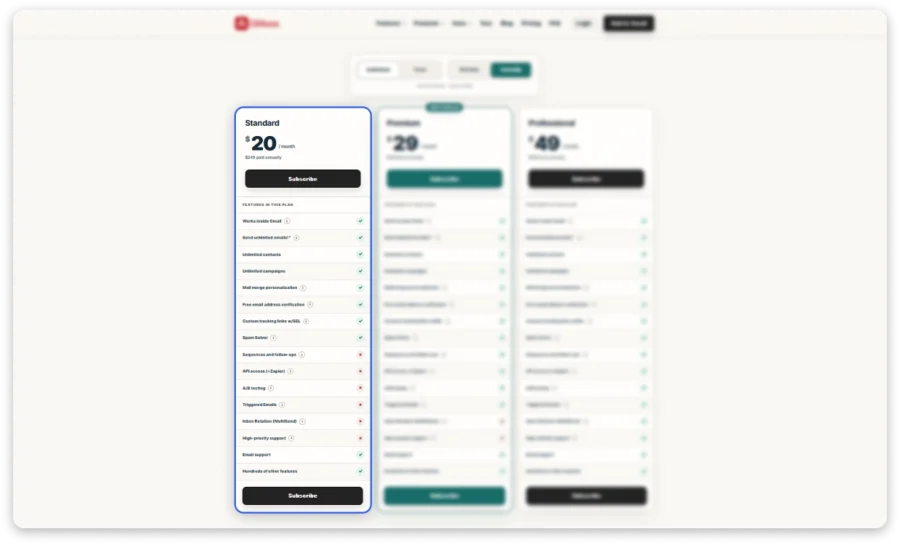
For simple Gmail mail merge, Standard does the job.
But if you’re using GMass for cold outreach, the lack of automated follow-ups is a meaningful limitation. In that case, I wouldn’t consider $29.95 your real starting price.
Pro Tip: If follow-ups are part of your normal outreach workflow, I’d start your comparison with Premium instead. Standard is cheaper, but saving $10/month does not help much if you have to manage follow-ups manually.
Also remember that upgrading to Standard does not increase Gmail or Google Workspace sending limits. Your actual capacity still depends on the sending account.
Premium Plan: $29/mo
The Premium plan is where GMass starts looking more practical for cold outreach.
It adds automation that Standard leaves out, including:
- Everything in Standard
- Automated sequences and follow-ups
- A/B testing
- API access
- Zapier integration
- Triggered Emails
- Unlimited contacts
- Unlimited campaigns
- Email tracking and reporting
- Free email verification
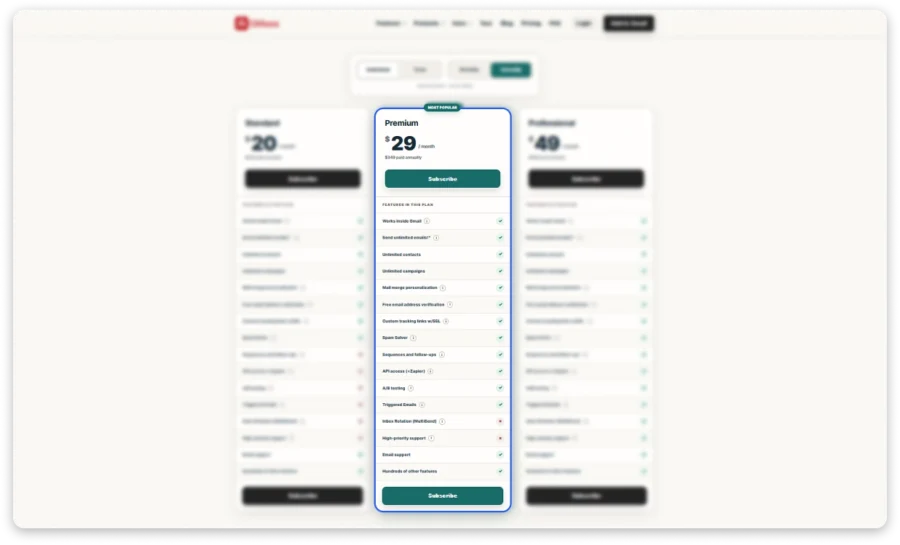
If you regularly run outbound campaigns, Premium is probably GMass’s more realistic starting point.
You get sequences and follow-ups, but MultiSend, inbox rotation, and high-priority support are still missing.
Pro Tip: This is the plan I’d compare first if your main requirement is automated cold email from Gmail. You get most of the automation without paying for Professional.
Just don’t assume Premium gives you more sending capacity. Gmail and Google Workspace limits still apply.
Professional Plan: $49/mo
The Professional plan is GMass’s highest Individual tier.
Its main reason to upgrade is MultiSend and inbox rotation. Those features let you distribute campaigns across multiple sending accounts instead of relying on one inbox.
Professional includes:
- Everything in Premium
- MultiSend
- Inbox rotation
- High-priority support
- Automated sequences and follow-ups
- A/B testing
- API access
- Zapier integration
- Triggered Emails
- Unlimited contacts
- Unlimited campaigns
- Email tracking and reporting
- Free email verification
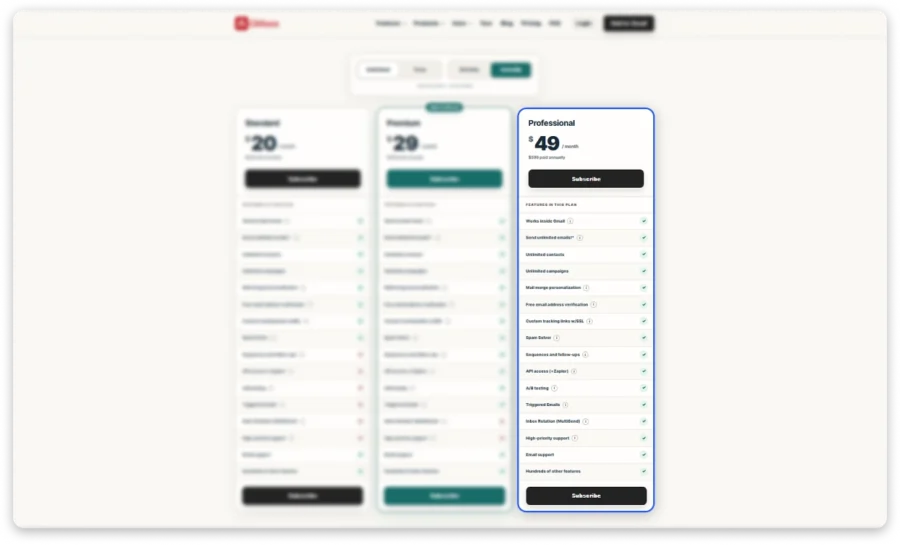
If you only need sequences and automation, Premium already covers most of what you need.
Professional becomes easier to justify when multiple sending accounts are part of your setup.
Quick Note: Separate Gmail accounts generally require separate GMass subscriptions. However, sending accounts used through MultiSend do not each need their own GMass subscription.
Pro Tip: I’d only pay for Professional if MultiSend or inbox rotation solves a real scaling problem for you. If you’re still sending comfortably from one account, Premium gives you most of the workflow at a lower price.
And even with MultiSend, each Gmail or Google Workspace account still follows its own sending limits.
Does GMass Have a Free Plan?
No. GMass does not offer a permanent free plan.
Instead, you get a 7-day free trial to test GMass before choosing a paid subscription. During the trial, you can send to up to 50 email addresses in a rolling 24-hour period.
You can test GMass features during trial, but the sending limit remains in place. GMass also does not let you connect an SMTP server during trial simply to bypass that 50-email limit.
Oncethe 7-day trial ends, you needa Standard, Premium, Professional, or Team plan to continue using GMass.
Pro Tip: Use the trial to test your workflow, not volume. Try one real sequence, follow-ups, personalization, and reporting. The 50-email daily limit is enough to judge fit, not scale.
How Much Do GMass Team Plans Cost for Sales Teams?
If you’re managing GMass for a team, Team Plan gives everyone Professional-level GMass features while putting user and campaign management under one account.
One person acts as team leader. From there, you can add other users, while each member continues using GMass through their own Gmail or Google Workspace account.
Team Plan Pricing
GMass offers Team Plans for 5, 10, 25, 50, and 100 users.
| Team Size | Monthly Total | Annual Total | Effective Cost/User/Month* |
|---|---|---|---|
| 5 users | $175/month | $1,750/year | $29.17 |
| 10 users | $295/month | $2,950/year | $24.58 |
| 25 users | $725/month | $7,250/year | $24.17 |
| 50 users | $1,350/month | $13,500/year | $22.50 |
| 100 users | $2,200/month | $22,000/year | $18.33 |
*Based on annual billing.
You can see GMass becomes cheaper per user as team size grows. For example, effective annual cost drops from $29.17 per user/month at 5 users to $18.33 at 100 users.
Note: GMass publicly lists Team Plans for up to 100 users. If you need more than 100 seats, contact GMass directly about available options.
What You Get With Team Plan
Every user gets GMass’s Professional-level features, including:
- Sequences and automated follow-ups
- A/B testing
- MultiSend
- API access
- Zapier
- High-priority support
You also get team-management features that make GMass easier to run across several users:
- Manage users from one place: The team leader can add or remove members from the GMass dashboard.
- Manage team campaigns: The team leader can view and manage campaigns created by team members.
- Share email templates: Team members can reuse templates instead of recreating the same emails.
- Share campaign reports: Reports can be shared without necessarily exposing recipient email addresses.
- Global unsubscribe and bounce protection: Shared suppression lists help prevent another team member from emailing someone who already unsubscribed or bounced.
- Control dashboard access: Give other users different levels of access based on what they need to view or manage.
One limitation I’d keep in mind: a team leader cannot send emails on behalf of another team member.
Each person still sends from their own Gmail account, so Team Plan gives you centralized management, not one centralized sending account.
A Few Things to Keep in Mind
Your Team Plan price can increase if you add more users than your package includes.
Current monthly overage charges are:
- 5-user plan: $38 per extra user/month
- 10-user plan: $35 per extra user/month
- 25-user plan: $30 per extra user/month
- 50-user plan: $27.50 per extra user/month
- 100-user plan: $24 per extra user/month
Annual plans have separate overage rates.
Pro Tip: Don’t assume paying overages is always cheaper than upgrading. On monthly billing, the 5-user plan stays cheaper through 8 users. At 9 users, moving to the 10-user plan costs less than keeping four extra users on overage pricing.
Eligible Google Workspace users with .org or .edu domains can also get a 15% GMass discount on published pricing.
And one last thing: adding more team members does not create one large shared sending allowance. Each user sends through their own Gmail or Google Workspace account, so Google’s sending limits still apply to each account individually.
What Additional Costs Can Affect Your Final GMass Bill?
GMass subscription price isn’t always your final cost. Depending on how you use it, your bill can also increase because of SMTP usage, extra team members, or features available only on higher plans.
1. SMTP Usage Beyond 10,000 Emails
If you send through GMass’s SMTP service, the first 10,000 SMTP emails are included with your subscription.
After that, GMass charges $0.40 per 1,000 additional SMTP emails. This mainly matters if you’re sending larger volumes through SMTP instead of directly through Gmail or Google Workspace.
GMass also offers ColdSMTP for $99/month for cold email use cases. That cost sits on top of your regular GMass subscription.
Pro Tip: If you expect to rely heavily on SMTP, calculate this separately from your GMass plan. Headline subscription price alone won’t show your full sending cost.
2. Extra Users on GMass Team Plans
GMass Team Plans come with fixed seat limits of 5, 10, 25, 50, or 100 users.
If you add users beyond your plan, GMass charges an overage fee for each additional user. The rate depends on the Team Plan and billing cycle.
If your team is growing, I’d compare overage cost with next Team tier before adding seats. At certain points, upgrading can cost less than continuing to pay per-user overages.
3. Higher Plan Cost for Sequences and Follow-Ups
Standard does not include sequences or automated follow-ups.
If follow-ups are part of your outreach workflow, you need Premium or higher.
This is not technically an add-on fee. But it means GMass’s $29.95/month Standard price may not be your real starting cost if automation is something you need.
4. Professional Plan Upgrade for MultiSend
If you need MultiSend and inbox rotation, you need the Professional or Team Plan. Neither feature is available on Standard or Premium.
That matters when you want to spread campaigns across multiple Gmail or Google Workspace accounts instead of relying on one sender.
So while Professional is not an “add-on,” MultiSend can push your practical GMass cost to a higher tier.
5. External SMTP Provider Costs
You can also use an external SMTP provider with GMass.
If you do, the provider’s fees are separate from your GMass subscription. They should be treated as external infrastructure costs, not GMass fees.
So your total sending cost may include both GMass subscription and whatever your SMTP provider charges.
6. Refund Policy
Before choosing annual billing, I’d also pay attention to GMass’s refund policy.
GMass says refunds can be requested, but they are uncommon and granted only in rare cases.
So if your subscription renews before you cancel, don’t assume you’ll automatically get that payment back.
What Do GMass Customers Say About Its Pricing?
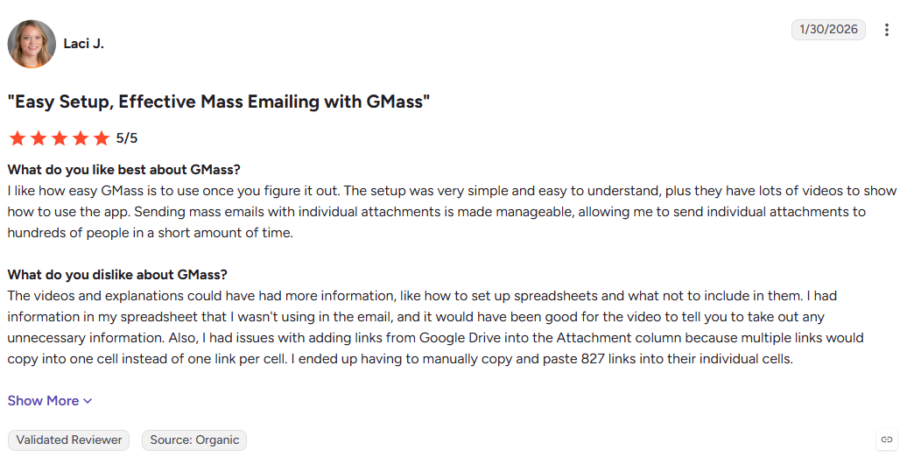
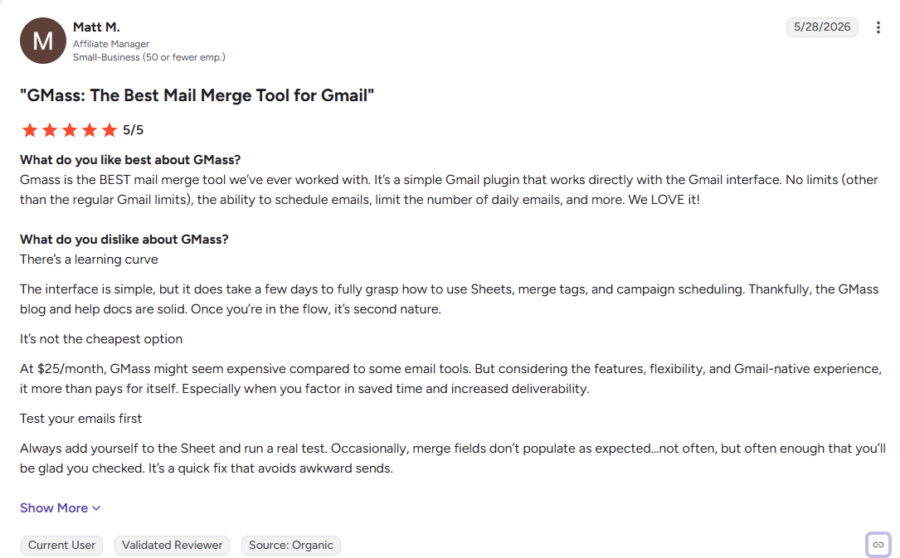
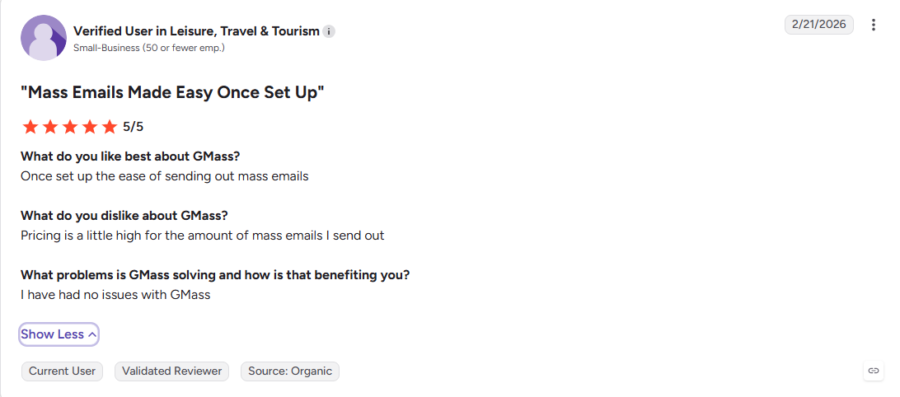
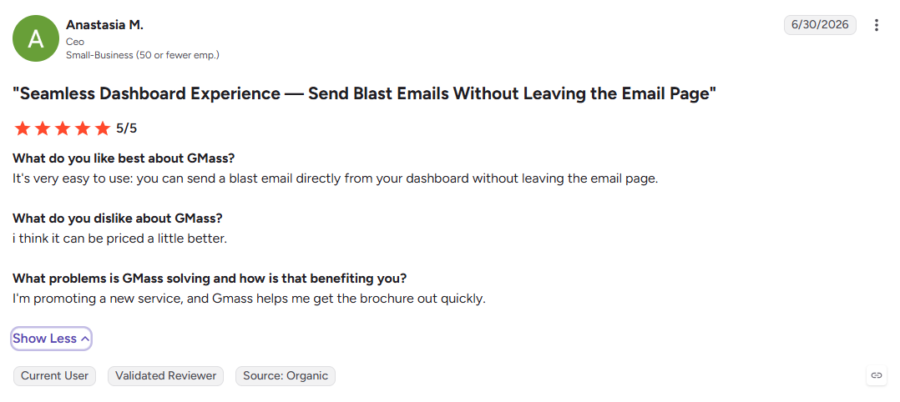
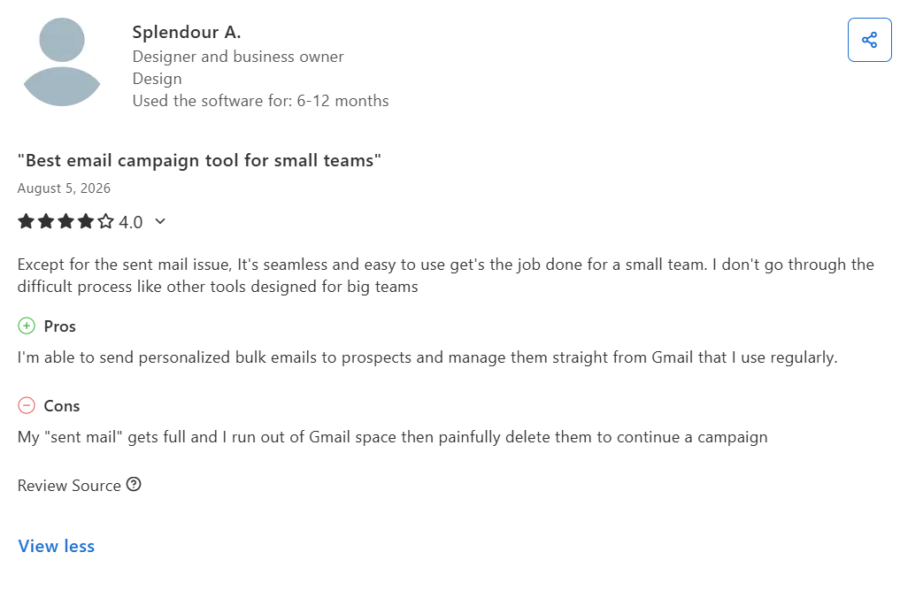
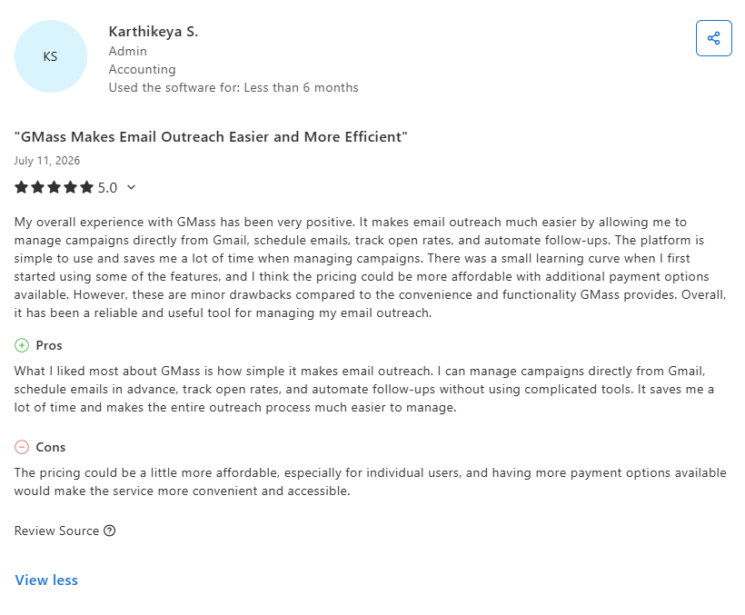
GMass gets high ratings overall (4.7/5 on G2 and 4.8/5 on Capterra), but reviews show a clear split when it comes to value:
After reading reviews, I found a clear pattern: users often like GMass itself, while still questioning what they pay.
GMass Pricing Feedback From G2 Users
GMass Pricing Feedback From Capterra Users
The Better Alternatives to GMass: Saleshandy
I put GMass and Saleshandy side by side to see how their outreach features, sending infrastructure, and pricing compare once you look past the initial plan price.
| Based On | GMass Standard: $20/mo (billed annually) | Saleshandy Starter: $34/mo (billed annually) |
|---|---|---|
| Pricing Model | Per-inbox / feature-gated subscription | Flat single platform pricing |
| Connected Email Accounts | Separate accounts generally require separate subscriptions | ✅ Unlimited connected accounts |
| Sending Platform | Gmail extension (bound to Gmail caps) | ✅ Independent cloud platform (all providers) |
| Automated Sequences | ❌ Not included on Standard (Requires Premium $29/mo) | ✅ Included on all plans |
| Sender Rotation | ❌ Requires Professional ($49/mo) | ✅ Up to 10 accounts per sequence |
| Mailbox Warm-Up | ❌ No native warm-up tool | ✅ Unlimited automated warm-up built in |
| Deliverability Testing | ❌ None (Third-party add-ons needed) | ✅ Built-in Inbox Radar testing |
| B2B Lead Database | ❌ Not included | ✅ 852M+ contacts, 42M+ companies |
| Monthly Prospect Credits | ❌ 0 credits | ✅ 1,500 Lead Finder credits/mo |
| Outreach Automation | Email only | ✅ Email + calls + WhatsApp + tasks |
| Team Seat Overages | Per-user fees on Team plans (24–38/user extra) | ✅ Unlimited team seats, no per-user fees |
As you can see, value structure changes once you look past headline price.
On GMass Standard ($20/mo annually), you get basic mail merge, but no automated follow-up sequences. To get sequences, you need Premium ($29/mo annually). For MultiSend and inbox rotation, you need Professional ($49/mo annually).
On Saleshandy Starter ($34/mo annually), you get multi-step sequences, sender rotation, built-in email warm-up, unlimited connected mailboxes, and 1,500 Lead Finder credits from first plan.
The difference becomes more noticeable as you scale. A 5-user GMass Team plan starts at $175/month, while Saleshandy Starter stays at $34/month annually with unlimited connected email accounts.
So, GMass is cheaper for simple Gmail mail merge. But if you need multiple senders, automation, warm-up, and prospecting in one platform, Saleshandy offers stronger overall value.
Final Verdict: Is GMass Worth the Price in 2026?
GMass is worth considering if your outreach mostly lives inside Gmail. You get mail merge, tracking, personalization, and a familiar Gmail-first workflow.
But the starting price is not always your final cost. Sequences require Premium, MultiSend requires Professional, Team plans can add overage charges, and higher SMTP usage can increase what you pay.
If you need multiple senders, deliverability tools, prospecting, and multichannel outreach under one platform, Saleshandy starts at $34/month billed annually.
But don’t take my word for it.
Try it free for 7 days and compare the cost against your own outreach setup.
Frequently Asked Questions
1. How much does GMass cost per month?
GMass costs $29.95/month for Standard, $39.95/month for Premium, and $59.95/month for Professional. Team plans start at $175/month for 5 users.
2. Is there a free alternative to GMass?
Yes. Several email outreach tools offer free plans or free trials. Compare sending limits, sequences, number of connected accounts, and deliverability features before choosing.
3. How many emails can I send per day with GMass?
GMass does not set one fixed daily limit for every paid user. Your actual sending volume depends on Gmail or Google Workspace limits, account setup, and whether you use MultiSend or SMTP.
4. How much does it cost to send 1,000 emails with GMass?
If you send through Gmail, GMass does not charge per 1,000 emails. For GMass SMTP, the first 10,000 emails are included; then it charges $0.40 per additional 1,000 emails.
5. How long is the GMass free trial?
GMass offers a 7-day free trial. During the trial, you can send up to 50 emails per rolling 24-hour period.
6. Is GMass worth paying for?
GMass can be worth it if you mainly want mail merge, tracking, and automated follow-ups inside Gmail. If you need multiple sender accounts, prospecting, deliverability tools, or multichannel outreach, compare total cost with broader outbound platforms.
7. Can I cancel my GMass subscription?
Yes, you can cancel your GMass subscription. But cancellation does not automatically mean you will get a refund. GMass says refunds are uncommon and usually approved only in limited cases, so it is better to cancel before renewal.

 Anil Salvi
 Dhruv Patel