
BIMI might sound fun new slang term by Gen Z, but it’s built for businesses that want to be taken seriously.
It lets you display a verified brand logo next to your emails in supported inboxes.
This helps recipients recognize your emails at a glance or trust their authenticity.
- But how is it different from just uploading a display picture?
- What is the process of implementing it?
- How can it benefit your business?
- How much does it cost?
Don’t worry, I have explained everything in the blog.
Wondering how a tiny logo can improve your email engagement and security?
Let’s find out.
What is BIMI: TOC
What is BIMI?
BIMI stands for Brand Indicators for Message Identification.
It’s an email specification that displays your brand’s verified logo next to your emails in supported inboxes.
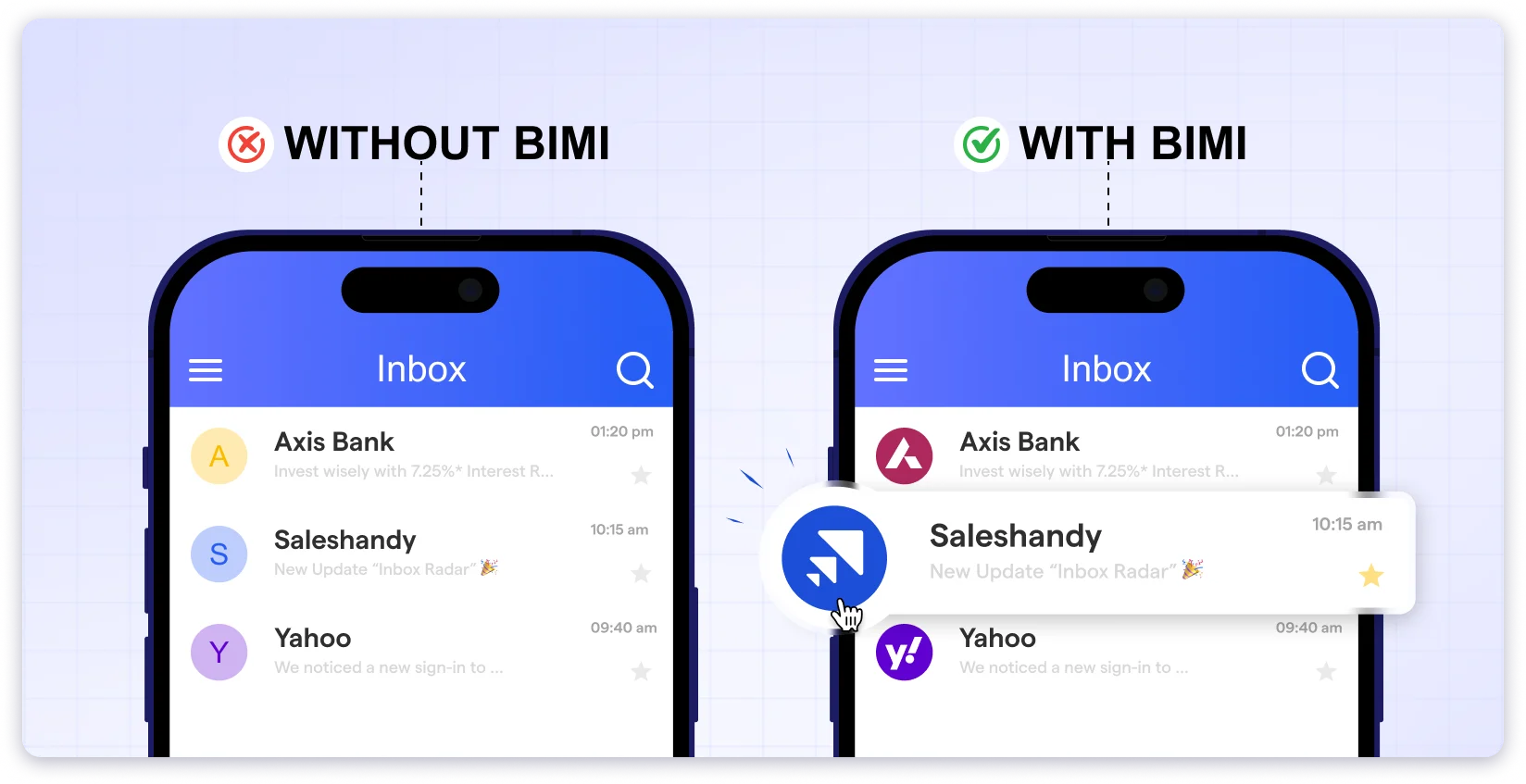
This helps receivers recognize your emails instantly, builds trust, and reduces the risk of phishing.
But why should you care about BIMI?
Let’s discuss in the next section.
What are The Benefits of Implementing BIMI In 2025?
You might be wondering:
“I already have SPF, DKIM, and DMARC set up. Why should I bother with BIMI?”
Fair question. BIMI requires effort, and it’s costly too.
But if you’re a growing business, facing phishing issues, or in a competitive space, it’s worth the investment.
Let’s break down how it can benefit your business…
1. Builds Trust Instantly
Your DNS records, such as DMARC, build trust in the backend, primarily with email service providers (ESPs).
BIMI goes a step further.
It also creates visible trust with your recipients.
Your verified logo shows up right in the inbox. This sends a clear message:
“This email is from a genuine business.”
Additionally, prospects are more likely to open, read, and respond when they see a brand they recognize or a logo that looks trustworthy.
P.S. BIMI can be a powerful tool while sending cold emails. It’s an instant trust signal.
2. Helps Prevent Phishing & Spoofing
Phishing often occurs when scammers impersonate a brand and send spam emails to its audience.
They may use a similar domain name or even use your logo as a profile picture.
But BIMI doesn’t work like a regular profile image.
To display a logo via BIMI, a domain must pass DMARC and be backed by a verified certificate. (explained below)
This means scammers can’t simply upload your logo and expect it to show up.
Unless they own the domain and the logo’s rights, their emails won’t display anything.
This stops logo abuse at scale and makes it easier for your customers to spot fake or phishing emails.
3. Improves Email Engagement
Some businesses don’t face security issues, but still struggle with low open rates.
In those cases, BIMI can be a subtle but powerful trust builder.
Did you know?Businesses in the US and the UK have noticed a 6% and 38% increase in open rates by simply adding a BIMI-verified logo to their emails.
When paired with a well-written subject line, BIMI helps build trust and increases the likelihood that recipients will open your email.
It’s a simple change that can improve results from the outreach you’re already doing.
Bonus Benefit for Gmail/Google Workspace Users
As of September 24, 2024, Gmail has begun accepting CMC certificates for BIMI.
This means you no longer need a VMC to display your logo, making BIMI faster and more affordable to set up.
How to Set Up BIMI?
To set up BIMI for your business, you must fulfill a few prerequisites and perform some technical setup tasks.
Let’s look at the complete process of setting up BIMI step by step.
- Set Up Email Authentication
- Create a BIMI Compliant Logo
- Obtain a Certificate
- Publish a BIMI Record
- Test and Monitor
1. Set Up Email Authentication
Before you can use BIMI, your domain must be properly authenticated.
This is a non-negotiable prerequisite.
To do that, you need to set up DMARC with a policy of either “quarantine” or “reject”.
You can read this guide to understand how to set up DMARC.
This prevents unauthorised senders from delivering fake emails using your domain.
Once this is done, you’ve cleared the biggest task.
You’re now ready to move to the next step.
2. Create a BIMI Compliant Logo
Now that your authentication is live, it’s time to create a BIMI logo.
Here are the specifications you must follow to prepare a BIMI-approved logo.
Logo Requirements
Once you have a perfect BIMI logo ready, it’s time to host it.
Follow these steps to host your logo:
Step 1: Name your file
Example filename: mybrand-bimi.svg
Step 2: Upload via HTTPS:
Example URL: https://www.mybrand.com/assets/mybrand-bimi.svg
Step 3: Save the URL for your BIMI selector
You will reference this link when publishing your DNS record. (Next stage)
Quick Tip: Some mailbox providers ask for a registered trademark logo. Check your provider’s rules before you publish.
3. Obtain a Certificate
There are two kinds of BIMI logo certifications, also referred to as mark certificates.
- Verified Mark Certificate (VMC): Use this if you have a registered trademark for your logo. A VMC shows both your logo and a verification badge in inboxes like Gmail.
- Common Mark Certificate (CMC): Use this if your logo has been in use on your site for at least 12 months. A CMC does not require a trademark.
You need to check with your ESP to determine the type of certifications they require for you to implement BIMI.
After deciding on the type of certificate, you can select where you can apply for the certificate.
As of July 2025, BIMI group suggests these 2 authorities to get VMC certifications.
- DigiCert
- Entrust Datacard
DigiCert also provides CMC certificates.
Obtaining a certificate comes with a cost. (Know that it’s not a one-time cost, it’s a recurring payment.)
Here is the estimated BIMI implementation cost for certification purposes.
DigiCert charges;
- VMC: $1,668/year
- CMC: $1,236/year

However, some private providers may charge less.
Once you apply for certification, expect to wait several weeks, as the process takes time.
After you receive your certificate, run your logo and DNS settings through a tool like the BIMI Inspector or MXToolbox.
These tools catch common errors in your BIMI selector record or certificate link.
AS BIMI certification is not compulsory for every ESP, I have created a table listing the top ESPs and indicating whether they require certification or not.
| Email Service Provider | Certificate Required | VMC Supported | CMC Supported |
|---|---|---|---|
| Gmail | Yes | ✅ | ❌ |
| Yahoo Mail | No | - | - |
| Apple Mail (Cloud+) | Yes | ✅ | ❌ |
| Fastmail | No | - | - |
| Zone Webmail | Yes | ✅ | ❌ |
| Microsft 365 | No | - | - |
With your certificate in hand, you’re ready to publish your BIMI record in DNS.
4. Publish a BIMI Record
Now that you have your logo and certificate, let’s tell email services where to find them.
For that, you will have to publish your BIMI record. (What we created in step 1)
Follow the steps to publishing.
1. Build Your Selector String.
- Start with v=BIMI1; to signal BIMI.
- Add l=https://…/your-logo.svg; to point at your BIMI logo.
- If you have a certificate, add a=https://…/your-cert.pem;
2. Choose The BIMI Selector Name.
Use default._bimi.yourdomain.com.
(“default” is the selector label. “_bimi” tells systems this is a BIMI record.)
3. Log In To Your DNS Host and Find Where You Add TXT Records.
4. Add a New TXT Record.
Your final TXT record will appear as follows.

- Name: default._bimi
- Type: TXT
- Value: your selector string (collected from step 1)
5. Hit Save or Publish.

After publishing, wait for propagation. DNS updates can take up to 48 hours.
Once done, you need to verify it.
To check, track, and solve those issues, you can use tools like a BIMI inspector or MXToolbox.
How?
Enter default._bimi.yourdomain.com.
If there are any issues, they will be flagged.
Fix it and continue to the last step.
If you still have any doubts, check out the FAQ page by Bimigroup.
5. Test and Monitor
Once your BIMI logo is live, it typically remains active without further effort.
Still, a few quick checks help you catch rare issues before they affect your brand.
Here’s what I recommend;
- Schedule Monthly Checks. (I do it once every month)
- Validate with a BIMI checker tool.
If you do this, you can be sure that your logo will always appear.
Here is a common list of issues that stop your BIMI logo from appearing.
- The certificate expires.
- SVG is moved or renamed.
- DMARC policy changes. (BIMI needs “quarantine” or “reject.”)
- Provider rule updates. (Keep checking ESP and Bimigroup for any updates.)
- DNS caching delays. (Clear cache)
Some tools also provide live notifications if they detect any issues with your BIMI record, allowing you to act on them promptly.
That’s it.
Build these simple steps into your routine, and you’ll keep your BIMI logo live and your brand front and centre in every inbox.
Which Email Service Providers support BIMI?

How to Improve BIMI Reputation
To improve BIMI’s reputation, you first need to have a good sender reputation.
That starts with having good email deliverability.
That includes,
- Fewer bounced emails
- Staying out of spam folders
- Not being blacklisted
- Using warmed-up email accounts
- Using secondary domains if you’re sending high volumes
- Setting up SPF, DKIM, and DMARC correctly
If you do all these, your sender reputation increases, and with that, your BIMI reputation also goes up.
Did you know?
BIMI validators continually assess your sender reputation, so if your sender reputation declines, your logo may also become less visible.
Why Does BIMI Have a Pivotal Year in 2025?
BIMI is useful, but not many businesses have used it before.
There were a few reasons for that.
- Getting a VMC certificate was expensive.
- You also needed a trademarked logo, which took a long time.
- The setup was too technical for many teams.
But that is changing.
Google now accepts CMC certificates for BIMI. (Other ESPs are joining soon.)
These are faster, cheaper, and easier to get.
Additionally, with the rise of phishing and fraudulent attacks, BIMI may not be optional.
It could become as common as DMARC, SPF, and DKIM for the safety of the users.
Hence, note that 2025 can be a pivotal year for BIMI.
FAQs
1. What is a BIMI record?
A BIMI record is a small line of text you add to your domain settings. It tells email providers where to find your brand’s logo and shows that your emails are safe and verified. This helps your logo show up next to your emails.
2. Why does BIMI have a low adoption rate?
BIMI is an additional specialization. And it’s an additional layer of security. As it takes time and involves a decent amount of money, many small and medium-sized businesses don’t adopt it.
3. How does BIMI impact email deliverability?
BIMI doesn’t directly improve deliverability, but it helps in other ways. It shows that your domain is secure, which email services like to see. And when people see your logo, they trust it and open your emails, instead of deleting or marking them as spam.
4. What is the BIMI authentication group?
The BIMI Authentication Group, formally known as the AuthIndicators Working Group, is a collaborative organization focused on developing and promoting the Brand Indicators for Message Identification (BIMI) standard. This group provides resources, tools, and guidelines on its website to help organizations implement BIMI.
5. Are the email logo or display pictures BIMI verified?
No, not all the logos are BIMI verified. People can simply upload their profile picture, but a BIMI-verified logo requires a verification process.

 Dhruv Patel