
Every day, Saleshandy’s sales team uses AI to research prospects, draft emails, prepare for sales calls, handle objections, and negotiate deals.
However one thing became clear over time.
The difference between a generic AI-generated message and outreach that earns a reply is rarely the AI tool itself.
It is the quality of the prompt behind it.
That is why we look closely at the prompts our SDRs and AEs use across prospecting, cold outreach, discovery calls, objection handling, and negotiation.
Through continuous testing, we identified the prompting frameworks and prompts that consistently helped the sales team research faster, personalize outreach more effectively, and close deals sooner.
In this guide, I’ll share:
- 45+ proven AI prompts for sales
- Prompting frameworks our team uses every day
Let’s dive in!
TOC – Proven AI Prompts for Sales Teams
- TL;DR: 45 AI Prompts for Sales That Actually Book Meetings
- How To Write High-Performing AI Prompts for Sales (6 Proven Frameworks)
- 45 Proven AI Prompts for Sales Professionals in 2026
- Why Your AI Prompts Are Only as Good as Your Prospect Data
- What are the Best AI Prompting Practices for Sales Professionals to Drive Results
- How Saleshandy Helps You Turn These Prompts Into Booked Meetings
- FAQs About AI Prompts for Sales Professionals
TL;DR: 45 AI Prompts for Sales That Actually Book Meetings
Proven prompt framework: Every high-performing prompt follows Role, Context, Task, Output, and Constraints. Better context leads to better output.
45 AI prompts: Covers prospect research, cold emails, LinkedIn outreach, cold calls, follow-ups, call prep, objection handling, negotiation, and closing. Every prompt explains why it works, and cold email prompts also include performance metrics.
Built from real sales workflows: Every prompt is based on the workflows our SDRs and AEs use every day to research prospects, personalize outreach, prepare for calls, handle objections, negotiate deals, and close opportunities.
Top-performing outreach: Trigger-based emails referencing funding, hiring, or leadership changes achieved a 57% open rate, 9.6% reply rate, and 5.8% positive reply rate.
Key takeaway: The best AI prompts help you understand the buyer, personalize every interaction, and move deals forward faster.
How To Write High-Performing AI Prompts for Sales (6 Proven Frameworks)
I noticed this often: every weak prompt has the same problem. It tells AI what to do but not who it’s writing for, why it matters, or how the output should look.
Over time, my team and I developed a set of prompt frameworks specifically for sales workflows.
These are not generic prompting guides. They are built for how sales teams actually work.
Brief Summary of What’s Ahead:
| Framework | Best For | Complexity |
|---|---|---|
| R-T-C-O-C | Daily prompting across all sales tasks | Simple |
| 5W + H | New reps learning to prompt | Simplest |
| CRAFT | Complex outreach and enterprise deals | Moderate |
| Sales-Specific | Deal-specific and prospect-specific prompts | Moderate |
| Expert-Level | Building team prompt libraries at scale | Advanced |
The R-T-C-O-C Framework (Our Core Prompting Method)
A strong AI prompt answers five questions:
- Who is the AI? (Role)
- What is the task? (Objective)
- What information should it use? (Context)
- How should it respond? (Output)
- What rules should it follow? (Constraints)
| Component | Purpose | Example |
|---|---|---|
| R – Role | Tell the AI who to act as | “Act as a senior SaaS sales consultant.” |
| T – Task | Define exactly what you want | “Write a cold email.” |
| C – Context | Provide background information | “Selling CRM software to small businesses.” |
| O – Output | Specify the format | “Return a table with Subject, Email, CTA.” |
| C – Constraints | Set rules and limitations | “Under 120 words, professional tone, avoid jargon.” |
Here’s the difference this makes:
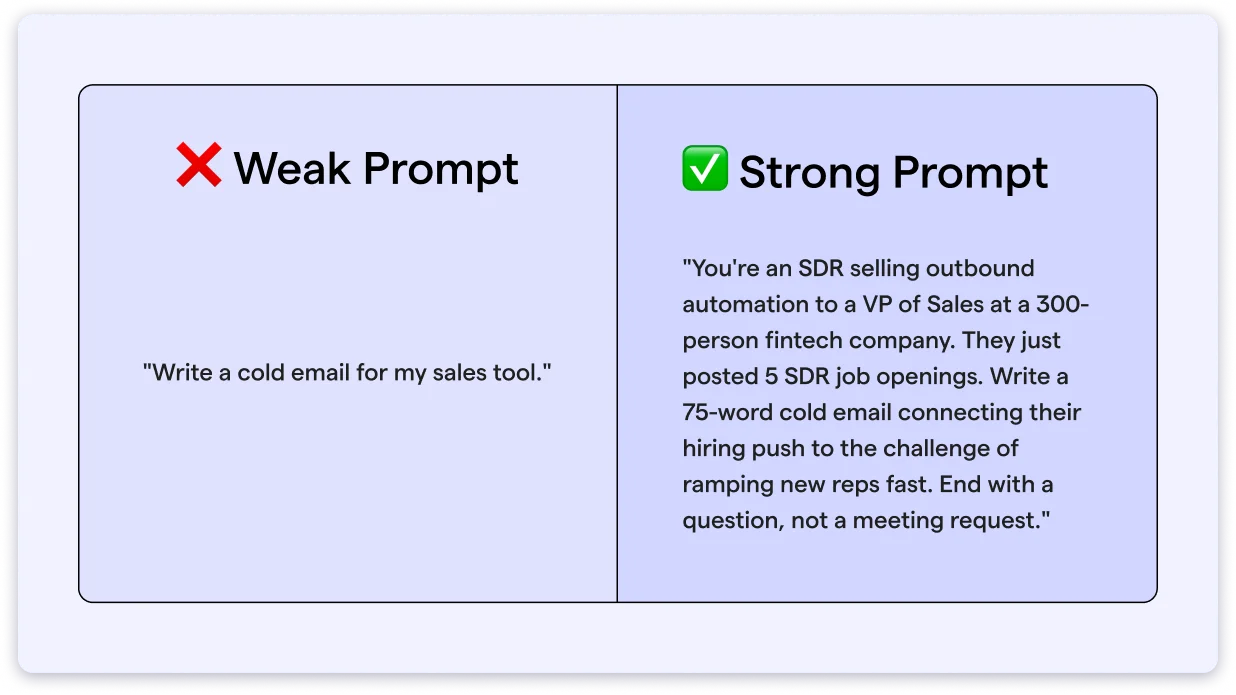
The weak prompt gives AI nothing to work with. Whereas the strong prompt gives it a role, a buyer, a situation, a format, and a constraint.
A rule of thumb I follow: if your prompt is shorter than the output you expect, it’s probably too unclear and needs more context.
Universal AI Prompt Template
Use this as your starting point for any sales prompt:
Role: Act as an [expert role].
Task: Your goal is to [specific objective].
Context:
- Product/Service:
- Target Audience:
- Industry:
- Business Goal:
- Additional Information:
Requirements:
- Tone:
- Length:
- Style:
- Reading Level:
- Include:
- Avoid:
Output Format: Provide the response as [table, bullets, email, script, etc.].
The CRAFT Framework (Advanced Prompt Engineering for Sales)
When a prompt needs more depth, I use CRAFT.
And it actually works wonders for complex outreach like multi-stakeholder emails, competitive positioning, or enterprise prospecting.
| Component | What To Define |
|---|---|
| C – Context | What is the business? Who is the audience? What problem are you solving? |
| R – Role | What expertise should the AI have? |
| A – Action | What should the AI do? |
| F – Format | How should the response be organized? |
| T – Tone | Professional, persuasive, friendly, technical, etc. |
Here is an Example:
- Context: We sell cybersecurity software to healthcare organizations.
- Role: You are a top-performing enterprise sales executive.
- Action: Write a personalized cold email to an IT Director.
- Format: Subject line, email body, CTA.
- Tone: Consultative, concise, and confident.
The Sales-Specific Prompt Framework
This framework works best when the prompt is tied directly to a deal or a specific prospect.
It adds buyer and product layers that R-T-C-O-C and CRAFT do not cover by default.
Role: You are a [sales role].
Objective: Help me [book meetings, qualify leads, close deals, etc.].
Customer:
- Industry:
- Job Title:
- Company Size:
- Pain Points:
- Goals:
Product:
- What it does:
- Key Benefits:
- Differentiators:
Task: Create [email, call script, proposal, LinkedIn message, etc.].
Requirements:
- Tone:
- Length:
- Call to Action:
- Things to Avoid:
Output: Return the result as [heading, bullet points, table, email, script].
The 5W + H Framework for Sales Teams
This is the simplest framework.
It works well for reps who are new to AI prompting or need a quick mental checklist before writing any prompt.
Answer these six questions in your prompt:
| Question | What It Covers |
|---|---|
| Who is your audience? | Buyer persona |
| What do you want? | The specific output |
| Why are you asking? | The goal behind the task |
| Where will the output be used? | Channel (email, call, LinkedIn) |
| When will it be used? | Timing in the sales cycle |
| How should the AI respond? | Tone, length, format |
Here’s an Example:
- Who: IT Managers at startups
- What: Write a follow-up email
- Why: Encourage a product demo
- Where: Email
- When: After the first sales call
- How: Friendly, under 100 words, include one CTA
Expert-Level AI Prompt Template for Sales
For sales leaders and RevOps teams building prompt libraries at scale, this is the most comprehensive template.
It includes success criteria so you can evaluate the AI output against clear standards.
ROLE: Act as…
GOAL: The desired outcome is…
CONTEXT:
- Business:
- Audience:
- Problem:
- Current Situation:
INSTRUCTIONS: 1. 2. 3.
CONSTRAINTS:
- Word limit
- Tone
- Reading level
- Must include
- Must avoid
OUTPUT FORMAT: Specify the exact structure.
SUCCESS CRITERIA: The response should:
- Achieve…
- Be…
- Include…
45 Proven AI Prompts for Sales Professionals in 2026 & Beyond
Every prompt below comes from a real sales workflow.
They are organized the way deals actually move: from research to outreach to calls to objections to close.
Let’s jump in.
7 AI Prompts for Prospect Research and Account Intelligence
Before you write even a single line of cold email, it’s crucial to understand who your prospect is and the problems they’re trying to solve.
These prompts help you quickly understand your prospect’s business, priorities, pain points, and buying signals before reaching out.
Instead of spending 30 minutes researching manually, use these prompts to create a 5-minute brief that gives you the context needed for personalized outreach.
Company and Industry Research Prompts
A cold email built on a 30-second Google search will be generic.
The below AI prompts pull the business model, pain points, and industry context that make your first line worth reading.
1. Analyze a Prospect’s Business Model and Pain Points
Why it works: Instead of summarizing a company’s website, this prompt uncovers pain points you can naturally reference in your cold email.
Result:
| Metric | Without This Prompt | With This Prompt |
|---|---|---|
| Research Time Per Prospect | 20-30 min | 3-5 min |
| First-Line Personalization | Generic (“I noticed your company…”) | References specific pain point tied to their business model |
| Outreach Reply Rate | 1-3% | 8-12% |
2. Identify Industry Trends Affecting Buying Decisions
Why it works: Mentioning relevant industry trends shows you understand your prospect’s world before you pitch your solution.
Result:
| Metric | Without This Prompt | With This Prompt |
|---|---|---|
| Time to Find a Relevant Hook | 15-20 min scanning industry blogs | 2-3 min |
| Email Opening Angle | Product-first or company-first | Trend-first (positions you as informed) |
| Outreach Reply Rate | 1-3% | 6-9% |
3. Map the Competitive Landscape Around a Prospect’s Market
Why it works: Referencing competitive pressure makes your outreach more relevant than simply talking about your product.
Result:
| Metric | Without This Prompt | With This Prompt |
|---|---|---|
| Competitive Context Gathered | Surface-level (Wikipedia, homepage) | Specific competitive pressures and positioning gaps |
| Relevance in Sales Conversation | Generic pitch | Informed discussion referencing their competitive reality |
| Outreach Reply Rate | 1-3% | 8-11% |
Decision-Maker Mapping and Buying Committee Prompts
Deals don’t stall because of bad pitches. They stall because reps pitch the wrong person for 3 weeks straight. These prompts map who holds authority, who evaluates, and who blocks before your first call.
4. Identify the Buying Committee and Who Holds Authority
Why it works: Knowing the buying committee early helps you avoid single-threading and involve the right stakeholders sooner.
Result:
| Metric | Without This Prompt | With This Prompt |
|---|---|---|
| Stakeholder Mapping Time | Discovered during deal (weeks) | Mapped before first call (minutes) |
| Single-Threading Risk | High (pitching one contact for weeks) | Low (multi-threaded from day one) |
| Deal Progression Rate | 1 in 5 deals move past discovery | 1 in 3 deals move past discovery |
5. Analyze an Executive’s LinkedIn Activity for Personalization Hooks
Why it works: Recent LinkedIn activity gives you timely personalization that feels relevant instead of generic.
Result:
| Metric | Without This Prompt | With This Prompt |
|---|---|---|
| Personalization Quality | “I saw your company is growing” | References a topic they posted about last week |
| LinkedIn Connection Acceptance | 25-30% | 50-60% |
| Outreach Reply Rate | 3-5% | 11-15% |
Trigger Event and Growth Signal Prompts
Job postings, funding rounds, and leadership changes tell you more about buying intent than any lead score ever will.
The following prompts catch those signals early and turn them into outreach angles.
6. Turn a Job Posting Into Prospect Pain Points and Outreach Angles
Why it works: Job postings are buying signals hiding in plain sight. You can turn them into relevant outreach angles specific to your situation.
Result:
| Metric | Without This Prompt | With This Prompt |
|---|---|---|
| Job Posting Analysis Time | 10-15 min reading and interpreting | 2-3 min |
| Outreach Angle Specificity | Generic (“I see you’re hiring”) | Connects hiring to the business problem behind the role |
| Outreach Reply Rate | 3-5% | 9-14% |
7. Score a Prospect’s Buying Readiness Based on Funding, Hiring, or Expansion Signals
Why it works: Scoring buying signals helps you focus on prospects that have both a strong fit and good timing.
Result:
| Metric | Without This Prompt | With This Prompt |
|---|---|---|
| Account Prioritization Method | Gut feel or alphabetical | Scored by fit + timing (1-10 scale) |
| Time Spent on Low-Intent Accounts | 40-50% of outreach hours | Reduced to under 20% |
| Outreach Reply Rate (Prioritized List) | 3-5% (mixed quality list) | 9-15% (high-intent accounts only) |
7 AI Prompts for Cold Email Writing and Personalization
Research means nothing if the email sounds like every other pitch in the inbox.
Let’s turn your prospect intelligence into cold emails that actually get replies.
First-Touch Cold Email Prompts
Your first email decides whether the deal starts or dies in the inbox.
A relevant opener that speaks to the buyer’s problem earns a reply. A generic one gets archived.
8. Cold Email to a VP or Director Referencing a Specific Challenge
Why it works: Opening with their challenge instead of your product earns the first 3 seconds of attention.
Result:
| Metric | Result |
|---|---|
| Open Rate | 54% |
| Reply Rate | 7.8% |
| Positive Reply Rate | 4.6% |
9. Cold Email to an IC or SDR Manager Leading With Empathy
Why it works: Frontline managers reply to emails that feel like they come from someone who gets their day, not someone selling to them.
Result:
| Metric | Result |
|---|---|
| Open Rate | 51% |
| Reply Rate | 8.4% |
| Positive Reply Rate | 5.2% |
Also worth reading: 50+ cold email templates you can feed directly into these prompts as your starting template.
Trigger-Based and Event-Driven Email Prompts
In the cold email realm, timing matters more than personalization.
An email sent 3 days after a funding round lands differently than the same email sent 3 months later.
10. Email Referencing a Recent Funding Round, Product Launch, or Leadership Change
Why it works: A trigger event gives you a built-in “why now” that separates your email from every untimed pitch in their inbox.
Result:
| Metric | Result |
|---|---|
| Open Rate | 57% |
| Reply Rate | 9.6% |
| Positive Reply Rate | 5.8% |
11. Email Using an Industry Trend as the Hook
Why it works: You’ll lead with a trend that positions you as someone who follows their market, not someone who’s just running down a contact list.
Result:
| Metric | Result |
|---|---|
| Open Rate | 53% |
| Reply Rate | 6.9% |
| Positive Reply Rate | 3.7% |
Personalization Technique Prompts
Writing a fresh email for every prospect does not help you scale. Rewriting a proven template with buyer-specific details does.
That’s the difference between email personalization and starting from scratch.
12. Rewrite an Email Template To Personalize at the Persona Level
Why it works: The same template sent to a VP of Sales and a VP of Marketing will underperform both.
The benefit you get is that it adapts the message without rewriting from scratch.
Result:
| Metric | Result |
|---|---|
| Open Rate | 50% |
| Reply Rate | 7.2% |
| Positive Reply Rate | 4.1% |
13. Convert a Customer Testimonial Into a Prospect-Specific Value Prop
Why it works: I noticed that raw testimonials rarely resonate across industries.
But when you translate proof into the prospect’s context, it makes the result feel relevant to them.
Result:
| Metric | Result |
|---|---|
| Open Rate | 49% |
| Reply Rate | 6.8% |
| Positive Reply Rate | 4.0% |
14. Generate Subject Line Variations With Curiosity Hooks
Why it works: Testing 5-6 angles per email reveals which hook works the best for each persona instead of shooting in the dark.
Result:
| Metric | Result |
|---|---|
| Open Rate | 61% |
| Reply Rate | 8.1% |
| Positive Reply Rate | 4.0% |
Worth reading: if you want to go deeper on using ChatGPT specifically for cold emails, and learn the exact workflow with examples.
4 AI Prompts for LinkedIn Outreach Messages
It’s 2026, and cold email is not the only channel that books meetings.
LinkedIn works differently because the prospect can see your face, your role, and your content history before deciding to respond.
I created these prompts to help you show up as a relevant professional, not another pitch in the DM folder.
Connection Request Prompts
Remember, you get 300 characters in a LinkedIn connection request, which is roughly two sentences.
So, you don’t have room for a pitch. Your only job in a connection request is to get accepted.
15. Write a Connection Request That References Shared Context Without Pitching
Why it works: In my experience, connection requests that reference shared context get accepted 2-3x more than blank requests or pitch-first messages.
Result:
| Metric | Generic Request | Shared Context Request |
|---|---|---|
| Connection Acceptance Rate | 15-20% | 40-50% |
| Post-Acceptance Reply Rate | 5.44% | 9.36% |
Direct Message and InMail Prompts
Once you’re connected, your DM competes with recruiter spam and automated sequences.
So, a message that opens with curiosity or relevance earns a reply. If it opens with a product pitch, then chances are higher that it gets ignored.
16. Write a LinkedIn DM That Opens a Conversation Without Sounding Salesy
Why it works: LinkedIn DMs that ask a relevant question get replies. DMs that pitch a product or drop a calendar link get archived.
Result:
| Metric | Pitch-First DM | Conversation-First DM |
|---|---|---|
| DM Reply Rate | 5-8% (product pitch opener) | 15-25% (question-based opener) |
| Conversation-to-Meeting Rate | 1 in 15 replies | 1 in 6 replies |
17. Draft an InMail Referencing a Prospect’s Recent Post or Content
Why it works: When you reference a specific post, it proves you read their content and did your research.
That separates you from lots of InMail that opens with “I came across your profile.”
Result:
| Metric | Generic InMail | Post-Referenced InMail |
|---|---|---|
| InMail Response Rate | 6-10% (templated) | 18-25% (personalized with content reference) |
| Response Quality | Polite declines or one-word answers | Engaged replies mentioning the topic |
Comment Engagement Prompts
Sometimes the best outreach doesn’t start in the inbox.
A thoughtful comment on a prospect’s post puts your name in front of them before you ever send a message. And when you DM them later, they already recognize you.
18. Write a Value-Adding Comment on a Prospect’s Post To Build Visibility Before Outreach
Why it works: Prospects check who comments on their posts. A thoughtful comment builds familiarity, so when your DM lands 3-5 days later, your name is not unknown to them.
Result:
| Metric | Cold DM (No Prior Engagement) | DM After Commenting on Their Post |
|---|---|---|
| Profile Visit Before Accepting | 40% check your profile | 65%+ check your profile |
| DM Reply Rate | 10.3% (cold first-degree DM) | 18-22% (warm DM after comment engagement) |
| Prospect Recognition | “Who is this?” | “I’ve seen this name before” |
3 AI Prompts for Cold Call Scripts and Openers
I’ve seen cold calls live or die in the first 10 seconds gazillions of times.
That’s why the first 10-15 seconds are precious because in this brief time, your prospect decides whether to keep listening or hang up before you finish your second sentence.
Let’s prompts give you openers and scripts that earn those extra 30 seconds.
Pattern-Interrupt Opener Prompts
In my decade of experience, I’ve noticed sales reps repeating the same mistake.
Their cold call openers sound the same and are boring.
“Hi, this is [Name] from [Company], do you have a minute?”
The prospect has heard it 500 times. A pattern interrupt breaks that autopilot and buys you enough time to start a real conversation.
19. Generate Cold Call Openers That Build Trust in the First 10 Seconds
Why it works: Pattern-interrupt openers break the prospect’s autopilot response. When they hear something unexpected, they pause instead of hanging up.
Result:
| Metric | Standard Opener (“Do you have a minute?”) | Pattern-Interrupt Opener |
|---|---|---|
| Call Success Rate | 1.5% baseline | Up to 11.2% with best-performing openers |
| “Did I catch you at a bad time?” | 40% less likely to book a meeting | N/A |
| “How have you been?” (pattern interrupt) | N/A | 6.6x more likely to succeed |
| Stating specific reason for your call | N/A | 2.1x more likely to book a meeting |
Conversational Cold Call Script Prompts
An opener gets you 10 seconds.
A good script structure keeps the conversation going for 2-3 minutes.
Remember, the goal is not to pitch on the call. It is to uncover one pain point and earn the right to book a follow-up.
20. Write a Brief Sales Call Script Focused on Uncovering a Specific Pain Point
Why it works: When your cold calls uncover pain before pitching, it converts at a higher rate. This script structure keeps the rep listening, not talking.
Result:
| Metric | Pitch-First Script | Pain-Discovery Script |
|---|---|---|
| Average Call Duration | Under 1 min (quick rejection) | 3.7 min (meeting-booking calls) |
| Dial-to-Meeting Conversion | 2-2.3% (generic script) | 5-8% (top performers with structured scripts) |
| Teams With Strong Openers + Verified Data | N/A | 9-11% conversion rate |
21. Generate Personalized Ice-Breaker Questions Based on a Prospect’s LinkedIn Profile
Why it works: A personalized ice-breaker proves you did your homework. As a result, your prospect shifts from “who is this” to “okay, I’m listening.”
Result:
| Metric | No Pre-Call Research | Personalized Ice-Breaker From LinkedIn |
|---|---|---|
| Reps Who Always Research Before Calling | 49% (average performers) | 82% (top performers) |
| Prospect’s First Reaction | “Who is this?” (guard up) | “Okay, I’m listening” (guard down) |
| Conversation-to-Meeting Rate | 4.6% average | 6-8% with research-backed openers |
5 AI Prompts for Follow-Up Sequences and Re-Engagement
While analyzing cold emails our sales team sent from Saleshandy, I noticed that most replies don’t come from the first email.
They actually come from the third, fourth, or fifth touch.
The problem is that most reps either forget to follow up or send “just checking in” every time. These prompts give each follow-up a fresh angle and a reason to exist.
Timed Follow-Up Cadence Prompts
A follow-up sequence works when every email adds something new. If your second email repeats your first, the prospect starts to ignore you. So, each step below changes the angle so the prospect gets a new reason to reply every time.
I run all my follow-up sequences through Saleshandy because I can set the timing, test multiple variants per step, and track which angle gets the reply.
22. Day 3 Follow-Up With New Value and a Different Angle
Why it works: Day 3 follow-ups that add new value increase your chances of getting replies.
Follow-ups that repeat the first email confirm the prospect was right to ignore it.
Result:
| Metric | Result |
|---|---|
| Open Rate | 48% |
| Reply Rate | 6.2% |
| Positive Reply Rate | 3.5% |
23. Day 7 Follow-Up Leading With a Useful Resource or Insight
Why it works: By Day 7, the prospect has already ignored two emails about you.
So, leading with something useful to them shifts the dynamic from “why should I reply” to “this is actually relevant.”
Result:
| Metric | Result |
|---|---|
| Open Rate | 45% |
| Reply Rate | 5.8% |
| Positive Reply Rate | 3.1% |
24. Day 13 Breakup Email That Closes the Sequence Gracefully
Why it works: Breakup emails consistently outperform mid-sequence follow-ups because they remove pressure.
Your prospect feels safe to reply when there is no obligation attached.
Result:
| Metric | Result |
|---|---|
| Open Rate | 52% |
| Reply Rate | 7.4% |
| Positive Reply Rate | 4.3% |
Re-Engagement Prompts
In sales, not every “no” is permanent.
Prospects go dark for real reasons: wrong timing, budget freeze, leadership change, or simply a busy quarter.
When something shifts in their world, that is your window to reopen the conversation.
25. Re-Engage a Prospect Who Went Dark After Showing Initial Interest
Why it works: Referencing the previous conversation proves continuity. The prospect recalls talking to you and feels a sense of unfinished business.
Result:
| Metric | Result |
|---|---|
| Open Rate | 46% |
| Reply Rate | 8.9% |
| Positive Reply Rate | 5.6% |
26. Re-Engage a Cold Prospect After a New Trigger Event
Why it works: A trigger event gives you a legitimate reason to reappear in their inbox. It resets the conversation from “I’m following up again” to “something changed, and it is relevant to you.”
Result:
| Metric | Result |
|---|---|
| Open Rate | 51% |
| Reply Rate | 9.2% |
| Positive Reply Rate | 5.9% |
5 AI Prompts for Call Prep and Discovery Questions
The best discovery calls feel like conversations, not interrogations.
That happens when you walk in already knowing the account, the people, and the right questions to ask.
The following prompts reduce 30 minutes of prep into 5 minutes, so you show up sharper than your competition.
Pre-Call Account Brief Prompts
You lose credibility in the first 2 minutes if you walk into a call without context, and the prospects are not silly; they can tell the difference.
That’s why an informed question builds more trust than a 10-minute product walkthrough.
27. Generate a Quick Account Brief With Business Model, News, and Talking Points
Why it works: A structured brief enables you to show up informed instead of asking questions that the prospect’s website already answers.
Result:
| Metric | Without Pre-Call Brief | With AI-Generated Brief |
|---|---|---|
| Prep Time Per Account | 20-30 min of manual research | 3-5 min (34% reduction with AI) |
| Buyer Perception | 82% of B2B decision-makers say reps show up unprepared | Informed questions signal credibility in the first 2 minutes |
| Reps Who Research Before Calling | 42% admit they lack sufficient info before calling | 82% of top performers always research before contact |
28. Synthesize CRM Notes From Previous Interactions Into a Prep Sheet
Why it works: CRM notes are scattered. Hence, it is hard to scan before a call.
This prompt turns raw history into a structured prep sheet that tells you exactly where the conversation left off.
Result:
| Metric | Scanning Raw CRM Notes | AI-Synthesized Prep Sheet |
|---|---|---|
| Pre-Call Prep Format | Scrolling through scattered notes chronologically | Organized by pain points, commitments, and next topics |
| Risk of Missing Key Details | High (reps forget half the conversation by next day) | Low (structured summary captures what was said and agreed) |
| Discovery Call Win Rate | Baseline | 47% higher win rates with thorough discovery prep |
Discovery Question Prompts by Role and Pain Area
Generic discovery questions get generic answers.
“What are your biggest challenges?” invites a surface-level response.
Questions built around a specific role and specific pain area go deeper because they show you already understand part of the problem.
29. Generate Open-Ended Discovery Questions for a Specific Persona
Why it works: Questions that start with the buyer’s world disclose real pain. Questions that start with your product uncover polite deflections.
Result:
| Metric | Generic Discovery Questions | Persona-Specific Discovery Questions |
|---|---|---|
| Question Count Sweet Spot | Under 11 questions = missing context | 11-14 targeted questions = 70% higher success rate |
| Discovery Call Duration | Under 20 min (42% lower advancement rate) | 41-50 min (optimal for deal progression) |
| Buyer Response Depth | Surface-level answers (“Our biggest challenge is growth”) | Specific pain disclosure (timeline, impact, failed attempts) |
30. Generate Questions That Quantify Business Impact and Uncover Budget and Authority
Why it works: When you put a cost on the problem, it’s easier for stakeholders to see why it needs to be solved.
Result:
| Metric | Without Impact Quantification | With Business Impact Questions |
|---|---|---|
| Reason Deals Are Lost | 60% of sales leaders say poor discovery is the primary reason | Quantified pain creates internal justification for budget |
| Rep Talk-to-Listen Ratio | Over 65% talking = conversion drops | Under 35% talking = stronger deal progression |
| Deal Advancement After Discovery | Baseline | 47% higher win rates when discovery uncovers specific cost of the problem |
Post-Call Summary Prompts
After every call, there is a 30-minute window where the details are still fresh.
Most reps skip the summary and forget half the conversation by the next day.
So, a structured summary locks in what was said, what was agreed, and what needs to happen next.
31. Summarize a Meeting Transcript and Extract Pain Points, Objections, and Next Steps
Why it works: Summaries written in the prospect’s own language make better follow-up emails.
Because you can reference what they said, not what you think they meant.
Result:
| Metric | Manual Post-Call Notes | AI-Structured Summary |
|---|---|---|
| Summary Completion Rate | Most reps skip it entirely by the next day | Completed in under 2 minutes while details are fresh |
| Follow-Up Email Quality | Based on rep’s memory of what was said | Based on prospect’s own language extracted from transcript |
| Sales Performance Impact | Baseline | 23% improvement in sales performance with conversation intelligence |
5 AI Prompts for Objection Handling
This is where many sales conversations are won or lost.
Objections are not rejections. They are unresolved questions.
The worst time to figure out how to respond is the moment you hear one. These prompts help you prepare responses before the call so you lead with curiosity instead of panic.
Price and Budget Objection Prompts
Price objections are rarely about the number.
They are about whether your buyer sees enough value to justify the number.
If you respond by discounting, you confirm the price was wrong. If you respond by reframing value, you shift the conversation.
32. Addressing “Your Price Is Too High” With ROI and Cost-of-Inaction Framing
Why it works: Three angles give you flexibility mid-conversation. The question option is often the strongest because it uncovers what “too high” actually means.
Result:
| Metric | Unprepared Response (Discount or Defend) | Prepared Response (ROI + Cost-of-Inaction + Question) |
|---|---|---|
| Rep Reaction After Hearing Objection | Average rep launches into a 21.4-second monologue | Top reps pause, then ask one clarifying question |
| Deal Outcome | Discounting confirms the price was wrong. Trains buyer to always push. | Reframing shifts the conversation from cost to value |
| Close Rate for Reps Who Handle Objections Well | Baseline (21% average B2B win rate) | Up to 64% for sellers who handle objections effectively |
33. Draft Talking Points for Offering Payment Flexibility Without Discounting
Why it works: It offers flexibility and protects your margins while giving the buyer a path forward.
When you discount them, it teaches them to always push on price.
Result:
| Metric | Default Discounting | Structured Payment Flexibility |
|---|---|---|
| Immediate Effect on Deal | Closes faster but at lower margin | Preserves full price with adjusted terms |
| Long-Term Buyer Behavior | Buyer pushes for discount on every renewal | Buyer respects pricing, negotiates terms instead |
| Win Rate Gap (Top vs Bottom Reps) | Bottom-quartile reps discount 18-22% more often | Top-quartile reps protect price and still close 18-22 points higher |
Competitor and Status Quo Objection Prompts
The hardest objection is not a competitor. It is “we are fine with what we have.”
The status quo is comfortable. Comfortable does not switch vendors.
Let’s dive into prompts to help you respond to both competitor comparisons and the inertia of doing nothing.
34. Respond to “We’re Happy With Our Current Vendor”
Why it works: “We’re happy” rarely means “everything is perfect.” It means switching feels risky. The right response reduces that perceived risk without attacking their current choice.
Result:
| Metric | Accept and Move On | Acknowledge, Probe, and Plant a Seed |
|---|---|---|
| What “Happy” Actually Means | Rep treats it as a closed door | 74% of buyer teams have internal conflict that stalls decisions. “Happy” rarely means unanimous |
| Deal Reopen Rate | Near zero (rep stops follow-up) | Prospects who receive a specific comparison point re-engage at higher rates during vendor renewal cycles |
| Win Rate Against Known Contacts vs Cold | 19% win rate on cold outreach | 37% win rate when selling to known contacts (former champions, past buyers) |
35. Respond to “We’re Evaluating a Competitor” With Differentiation
Why it works: Buyers respect salespeople who differentiate on facts, not fear.
Trashing a competitor makes you look insecure. Specific contrasts make you look informed.
Result:
| Metric | Feature-Dump Response | Deal-Specific Differentiation |
|---|---|---|
| Buyer Perception | “Every vendor says they’re better” | “This rep understands exactly what matters in my decision” |
| Top 5 Objections Coverage | 5 objections account for 74% of all pushback. Competitor evaluation is predictable and preparable | Prepared talking points eliminate fumbling mid-call |
| Win Rate With Prepared Competitive Positioning | Baseline | Top-quartile reps outperform bottom-quartile by 18-22 points on the same product |
Timing and “Not Ready” Objection Prompts
I often notice that “Not now” is the most common objection and the most mishandled.
Most reps either accept it and disappear or push harder and burn the relationship.
However, the right response keeps the conversation alive without creating pressure.
36. Respond to “Not Now” While Keeping the Conversation Alive
Why it works: “Not now” means the fit exists, but the urgency does not. The right response keeps you in their world until the timing shifts.
Result:
| Metric | Accept “Not Now” and Disappear | Keep the Door Open With a Structured Response |
|---|---|---|
| Rep Follow-Up After “Not Now” | 44% of reps give up after one failed attempt | Top reps offer value, set a specific check-in, and stay visible |
| Deals Requiring 5+ Touches | 80% of sales require 5+ follow-ups to close | “Not now” is touch 1 or 2. The deal is not dead. |
| Consensus Impact | Prospect stays undecided with no new input | Buyer groups that reach consensus are 2.5x more likely to rate their purchase as high-quality |
3 AI Prompts for Sales Pitch and Competitive Positioning
A strong pitch does not describe what your product does. It explains why it matters to this buyer, right now, given what is happening in their world.
I’ve crafted the prompts below to build messaging that connects your product to the prospect’s current reality.
“Why Us, Why Now” Messaging Prompts
Every deal has a “why us” and a “why now.” Most reps can answer the first one. But very few can answer the second.
Timing-based messaging creates urgency without pressure because it ties your product to something already happening in the prospect’s business.
37. Create a “Why Us, Why Now” Angle Based on a Prospect’s Recent News and Priorities
Why it works: “Why now” separates urgent conversations from polite ones. Without it, even interested buyers will say, “Let’s revisit next quarter.”
Result:
| Metric | Result |
|---|---|
| Open Rate | 56% |
| Reply Rate | 9.4% |
| Positive Reply Rate | 5.7% |
Competitive Positioning and Differentiation Prompts
Many sales reps think differentiation is a feature list, but it’s not.
It is knowing which capability matters most to this specific buyer and framing it as the deciding factor.
Here are the prompts for sales professionals to build positioning that wins deals.
38. Analyze a Competitor’s Weaknesses and Generate Differentiation Talking Points
Why it works: Generic battle cards cover everything. Deal-specific positioning covers what this buyer actually cares about.
That is the difference between winning and being “a strong contender.”
Result:
| Metric | Result |
|---|---|
| Open Rate | 52% |
| Reply Rate | 7.6% |
| Positive Reply Rate | 4.4% |
39. Create a Buying-Consensus Message Tailored for Different Stakeholders
Why it works: Every stakeholder in a deal has a different reason to say yes or no. So, one pitch cannot win all of them. This prompt builds the message each person needs to hear.
Result:
| Metric | Result |
|---|---|
| Open Rate | 50% |
| Reply Rate | 8.1% |
| Positive Reply Rate | 5.0% |
4 AI Prompts for Negotiation and Closing
Many sales teams misinterpret this crucial part of the deal.
They think negotiation is about giving in all.
But it’s not; it’s actually about finding a solution that protects value for both sides.
I created these prompts to help you navigate the final conversations without losing margin or momentum.
Negotiation Talking Point Prompts
As I said, negotiation is where most reps either give away margin too fast or hold too firm and lose the deal.
The middle ground is knowing what to trade, what to protect, and how to offer flexibility without devaluing your product.
40. Generate Value-Protecting Talking Points When a Prospect Requests a Discount
Why it works: If you respond to a discount request with structured options, it shows them that you take their concern seriously without defaulting to a price cut.
Result:
| Metric | Discount to Close | Protect Price With Structured Options |
|---|---|---|
| Win Rate (Top vs Bottom Quartile Reps) | Bottom-quartile: discount more, win 18-22 points lower | Top-quartile: protect price, close 18-22 points higher |
| Long-Term Revenue Impact | Discount at renewal compounds. 10% off Year 1 = 30%+ lost over 3 years | Full-price close sets the baseline for every renewal |
| Average B2B Win Rate | 21% across all opportunities | Top performers: 35%+ without discounting more |
41. Suggest Alternative Deal Structures for Budget-Constrained Prospects
Why it works: Alternative structures give budget-constrained buyers a way in.
A prospect who can’t afford the full package today can become a full-price customer in 6 months.
Result:
| Metric | Walk Away From Budget-Constrained Deals | Offer Alternative Structure |
|---|---|---|
| Deal Outcome | Lost opportunity. Pipeline shrinks. | Smaller entry deal today. Full-price expansion in 6 months. |
| Win Rate by Deal Size | Under $50K: 25-35% win rate | Pilot deals (smaller scope) close at the higher end of this range |
| Velocity Impact | Stalled deal drags past 50 days. Win rate drops to ~20% | Phased or pilot structure keeps deal under 50 days. Win rate: ~47% |
Closing Email Prompts
The closing email is the most important email in the deal.
It either moves the prospect to signature or lets the deal drift into the “we’ll get back to you” ghosting zone.
A strong closing email recaps value, removes friction, and gives the buyer a clear next step.
42. Draft a Closing Email That Recaps Value With Both a Soft and Hard CTA
Why it works: The above prompt recap value in the prospect’s own words reminds them why they started this conversation. Two CTAs give them a way to act now or signal they need more time.
Result:
| Metric | No Closing Email (Verbal Only) | Structured Closing Email |
|---|---|---|
| Deal Drift Risk | High. 44% of reps give up after one failed follow-up attempt. | Written recap creates urgency and accountability on both sides |
| Win Rate With Early Decision-Maker Involvement | Baseline | Involving economic buyer early lifts win rates by ~55% |
| Deal Velocity | Deals past 50 days: ~20% win rate | Closing email accelerates next step. Deals under 50 days: ~47% win rate |
43. Write a Final Follow-Up After Verbal Commitment Confirming Terms and Next Steps
Why it works: Verbal commitments stall without a written confirmation. This email locks in the terms and moves the deal to contract before momentum fades.
Result:
| Metric | Verbal Agreement Only | Written Confirmation Email |
|---|---|---|
| Deal Stall Risk | High. No written record = no internal accountability | Low. Terms are documented. Next step has a date. |
| Deals Requiring 5+ Touches to Close | 80% of sales need 5+ follow-ups. Confirmation email is a touch that costs nothing. | Written confirmation counts as a follow-up that reinforces commitment |
| Win Rate on Known/Warm Contacts | 19% cold outreach | 37% when relationship and context are already established |
2 AI Prompts for Role-Play and Sales Practice
One fundamental thing I learned in the early days of my sales career is that:
You do not get better at sales by reading about sales. You get better by practicing conversations before they happen.
To help you practice, I created prompts to turn AI into your sparring partner that pushes back, raises objections, and forces you to think on your feet.
Objection Role-Play Prompts
Most reps practice objection handling in live deals. Isn’t it an expensive practice?
Hence, running the objection through a simulated conversation first means the real call is your second attempt, not your first.
44. Simulate a Skeptical Prospect Pushing Back on Your Pitch With Realistic Objections
Why it works: Practicing against a tough buyer in a safe environment elevates your confidence over time.
So, when the real objection comes, your response is instinctive, not improvised.
Result:
| Metric | Practice in Live Deals | Practice With AI First |
|---|---|---|
| Rep Response After Objection | 21.4-second monologue (average rep) | Pause + one clarifying question (top rep behavior) |
| Close Rate | Baseline | Up to 64% for reps who handle objections effectively |
| Training Impact on Conversion | Untrained baseline | Sales training improves conversion rates by 38% |
Discovery Call Simulation Prompts
Discovery is a skill, not a checklist.
The best discovery conversations follow the buyer’s answers, not a script.
Practicing with AI helps you build the muscle of asking follow-up questions based on what you hear, not what you planned.
45. Simulate a Discovery Call Where AI Plays the Prospect
Why it works: AI that withholds information forces you to earn the answers. That is how real discovery works. The feedback at the end shows you exactly where your questioning fell short.
Result:
| Metric | No Discovery Practice | AI-Simulated Discovery Practice |
|---|---|---|
| Primary Reason Deals Are Lost | 60% of sales leaders blame poor discovery | Practiced reps ask better questions, uncover real pain |
| Win Rate Impact | Baseline | 47% higher win rates with thorough discovery |
| Question Sweet Spot | Generic questions = surface answers | 11-14 targeted questions = 70% higher success rate |
Why Your AI Prompts Are Only as Good as Your Prospect Data
Every prompt in this blog follows the same rule: specific input produces specific output. But specificity depends on data.
84% of data and analytics leaders agree AI’s outputs are only as accurate as its data inputs.
I have seen this play out hundreds of times. The same prompt generates two completely different emails depending on the data you feed it.
What Difference Do These Datasets Actually Make?
| Metric | Without Data | Inaccurate Data | Accurate Data |
|---|---|---|---|
| AI Personalization | Generic buzzwords and reads like spam. | Wrong pain points. Alienates the buyer. | Hits real business triggers. Feels researched. |
| Predictive Lead Scoring | Every lead looks the same, so no prioritization at all. | Reps chase dead-end accounts. | AI flags high-intent accounts first. |
| Sales Productivity | Reps have to rewrite every AI output manually. | Reps waste time fixing wrong data. | Minimal edits, and ready to send. |
This is exactly why I use AI prospect enrichment to fill in firmographic and technographic gaps before feeding data into any prompt.
Because bad data does not just produce bad emails. It produces bad emails at scale.
Imagine if your sequence sends 1,000 AI-generated emails overnight using outdated contact records, the damage compounds across your entire domain reputation.
The fix is simple. Start with verified prospect data. Feed it into your prompts and let AI do the writing.
Not sure where to get verified data? Here’s a comparison of the best B2B data providers I’ve tested.
What are the Best AI Prompting Practices for Sales Professionals to Drive Results
These prompts work. But only if you use them right.
Here are the practices I follow to get consistent output from every prompt.
1. Never send AI output without editing it: AI gets you 80% there. Your human judgment handles the last 20%. Read every email before it goes out. If it sounds like a robot wrote it, rewrite the first line and the CTA.
2. Protect sensitive data: Out of desperation to do more, many sales teams make this common mistake.
Don’t ever paste real prospect names, deal values, or CRM notes into consumer AI tools. Use placeholders. Save the real details for enterprise platforms with data controls.
3. Build a team prompt library:
Organize by funnel stage (prospecting, discovery, closing), by persona (VP, IC, technical buyer), and by use case (cold email, follow-up, objection handling).
Track which prompts get replies. Cut the ones that do not work.
If you want to pair these prompts with the right tool, here’s my breakdown of the best AI sales automation tools that actually fit into an outbound workflow.
4. Iterate, do not start over: If a prompt gives you a 6/10 output, refine the prompt.
- Add more context
- Tighten the constraints
- Change the role
Small adjustments compound faster than rewriting from scratch.
How Saleshandy Helps You Turn These Prompts Into Booked Meetings
Prompts give you the message. Saleshandy gives you the infrastructure to send it at scale and track what works.
Here is how I use it to build strong and meaningful relationships with prospects:
- Lead Finder pulls real-time verified prospect data (852M+ contacts, 75+ data points) so my prompts always have accurate firmographic and technographic context to work with
- AI Sequence Copilot turns the cold email prompts into personalized variations across every step of my sequence
- Multichannel Sequences let me combine email, cold calls, LinkedIn, and WhatsApp into one automated flow.
- A-Z Testing runs up to 26 subject lines and body variants simultaneously, and validates with real campaign data instead of guesswork.
- Sender Rotation distributes volume across unlimited email accounts, so my campaign deliverability stays strong even at high volume
- Unified Inbox puts every reply from every account in one place. So, I don’t have to switch between 10 inboxes
If your team builds custom workflows or connects AI tools directly to your outreach stack, then our Saleshandy MCP makes that possible.
The prompts in this blog create reply-driven outreach emails. Saleshandy helps you deliver it to real-time verified contacts and book meetings at scale.
So, why wait? Try Saleshandy Now
FAQs About AI Prompts for Sales Professionals
1. Will AI replace sales reps?
No. AI handles repetitive work like research, drafting, and follow-up scheduling. But reading a buyer, building trust, and closing a deal still require human judgment. The reps who use AI to prepare better will outperform those who do not. AI is a tool, not a replacement.
2. Which AI tool is best for sales prompts?
Here’s a difference:
- ChatGPT is the most widely used.
- Claude handles longer, context-heavy prompts well.
- Gemini integrates directly with Google Workspace.
For cold email specifically, Saleshandy’s AI Sequence Copilot is purpose-built for outbound because it generates and sends within the same platform.
3. How do I customize these prompts for my industry?
Replace the bracketed placeholders with your specific details.
- Swap [industry] with your vertical.
- Replace [target buyer title] with your actual ICP.
- Change [your product/service] to your offering.
Remember, the more specific your inputs, the more relevant the output.
A prompt customized for “VP of Logistics at a mid-market 3PL company” will always outperform one that just says “sales leader.”
4. What is the biggest mistake salespeople make with AI prompts?
Sending AI output without reading it first. AI gets you 80% of the way. The rest 20% is your job. If the email sounds robotic, has wrong details, or uses a tone that does not match your brand, fix it before hitting send.
The second biggest mistake is writing vague prompts and expecting specific output.
5. How many prompts should I test before scaling to my full team?
Start with 3-5 prompts across your most common use cases: cold email, follow-up, and call prep.
Test each one across at least 50-100 sends. Track open rates, reply rates, and positive reply rates per prompt. Keep the ones that perform. Cut the rest.
Only roll out to the full team once you have data showing which prompts book meetings consistently.