

Finding a CEO’s name takes about 10 seconds on LinkedIn.
Finding their actual email address?
That’s where most people get stuck.
I’ve spent years building outreach lists for cold email campaigns. And here’s what I’ve learned.
Most methods people suggest for finding CEO email addresses return outdated data or waste hours of your time.
Generic “info@” addresses don’t work.
Guessed emails bounce.
And bought lists? They’ll wreck your sender reputation before your first campaign goes out.
So I put together the 9 methods I actually use to find CEO email addresses, which are ranked by reliability.
Some are free, some are paid, and all of them work if you use them right.
Let’s get into it!
Find CEO Email Address – TOC
TL;DR: Fastest Way to Find a CEO’s Email Address
- B2B Email Finder Tool: Try Saleshandy with 852M+ verified contacts with real-time verification; best for building a CEO email list at scale.
- LinkedIn Contact Info: Check a CEO’s Contact Info section directly; best for a free, one-off lookup when it is public.
- Google Search Operators: site:, filetype:, and quote-based queries; best for digging up a specific CEO’s email published online.
- Company Website: About Us, Team, and Leadership pages; best for startups and smaller companies.
Quick Comparison: Best Ways to Find a CEO’s Email Address
| # | Method | Best For | Key Advantage | Cost | Reliability |
|---|---|---|---|---|---|
| 1 | B2B Email Finder Tool (Recommended) | Building a verified CEO email list at scale | 852M+ contacts, 60M+ companies, 75+ filters, real-time verification | Paid (free credits available) | High |
| 2 | LinkedIn Contact Info | One-off lookups when a CEO has made their email public | Added by the CEO themselves, so accuracy is high when available | Free | Medium |
| 3 | Google Search Operators | Digging up a specific CEO’s email published somewhere online | Surfaces emails hidden in press releases, bios, and PDFs | Free | Medium |
| 4 | Company Website | Startups and SMBs that list leadership emails directly | Fastest method when the company already publishes it | Free | Medium |
| 5 | Business Directories and CEO Email Databases | Quick lookups by company, industry, or region | Searchable by industry or company name in seconds | Free / Paid | Medium |
| 6 | Mutual Connections | High-value targets like enterprise or investor outreach | A warm introduction beats a cold email every time | Free | High, when available |
| 7 | Publicly Available Documents | Public companies, press releases, and filings | Comes from official sources, so accuracy tends to be high | Free | High |
| 8 | Guess the Email Format and Verify | When you know the domain and naming pattern | Works for any company once the pattern is confirmed | Free (paid verifier) | Medium |
| 9 | Ask AI Search Tools | Fast first-pass guess before falling back to other methods | Faster than a manual search, but always needs verification | Free | Low, always verify |
9 Proven Methods to Find CEO Email Addresses
I’ve used every one of these methods in real campaigns.
Each one has its place depending on whether you need one email or a thousand.
Here’s the breakdown.
- Use a B2B Email Finder Tool (Fastest Method)
- Find CEO Emails on LinkedIn (Free Method)
- Use Google Search Operators
- Check the Company Website
- Search Business Directories and CEO Email Databases
- Tap Into Mutual Connections
- Check Publicly Available Documents
- Guess the Email Format and Verify
- Ask AI Search Tools
1. Use a B2B Email Finder Tool (Fastest Method)
Best for: Finding CEO emails at scale with high accuracy. Works for both individual lookups and bulk list building.
This is the method I reach for first.
And the one I suggest to anyone doing CEO outreach at scale.
A B2B email finder tool scans verified databases, cross-checks multiple data sources, and gives you real-time verified CEO email addresses.
I use Saleshandy for this.
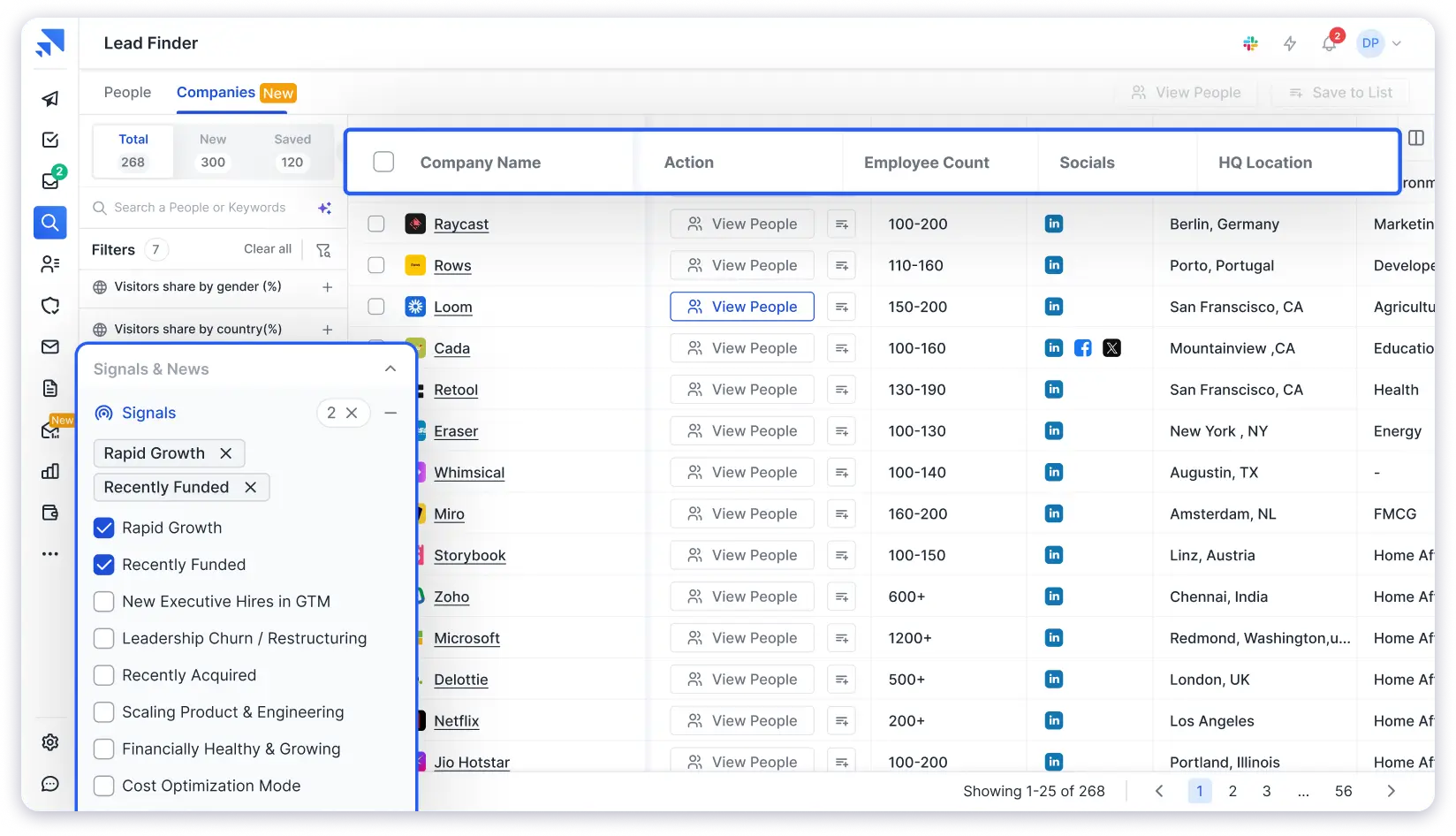
Here’s why it works well for CEO emails:
- 852M+ B2B contacts across 60M+ companies.
- 75+ search filters to narrow by job title (CEO, Founder, Co-founder), industry, company size, location, revenue, tech stack, and more.
- Real-time email verification on every contact.
- Credits used only for valid emails: There is no charge if the tool can’t find a verified address.
- Bulk reveal up to 10,000 CEO emails in one search.
- AI Lead Finder to type your prospect description in plain English (like “CEOs of SaaS companies in the US with 50-200 employees”) and the AI sets filters for you.
- SOC 2 Type II and ISO 27001 compliant.
How to Find CEO Emails with Saleshandy Lead Finder:
Step 1: Sign up for free and get up to 50 free credits to test the database.
Step 2: Open Lead Finder. Set the Job Title filter to “CEO,” “Founder,” or “Co-founder.”
Step 3: Add filters like location, industry, company size, and revenue to match your ideal customer profile.
Step 4: Review results and reveal the emails you need. Each one is verified in real time.
Step 5: Add verified CEOs to a cold email sequence right inside Saleshandy. No need to export or switch tools.
Or skip manual filters. Use the AI Lead Search.
Type something like “Find CEOs of IT services companies in the UK with 100-500 employees” and let the AI do the work.
Once you’ve built your CEO email list, you can launch outreach from Saleshandy itself.
2. Find CEO Emails on LinkedIn (Free Method)
Best for: Quick, free lookup of a specific CEO’s email. Works well when the CEO has made their contact info public.
LinkedIn is the best free method to find a CEO’s email address.
But you need to know where to look.
Many CEOs add their business email under the “Contact Info” section on their profile.
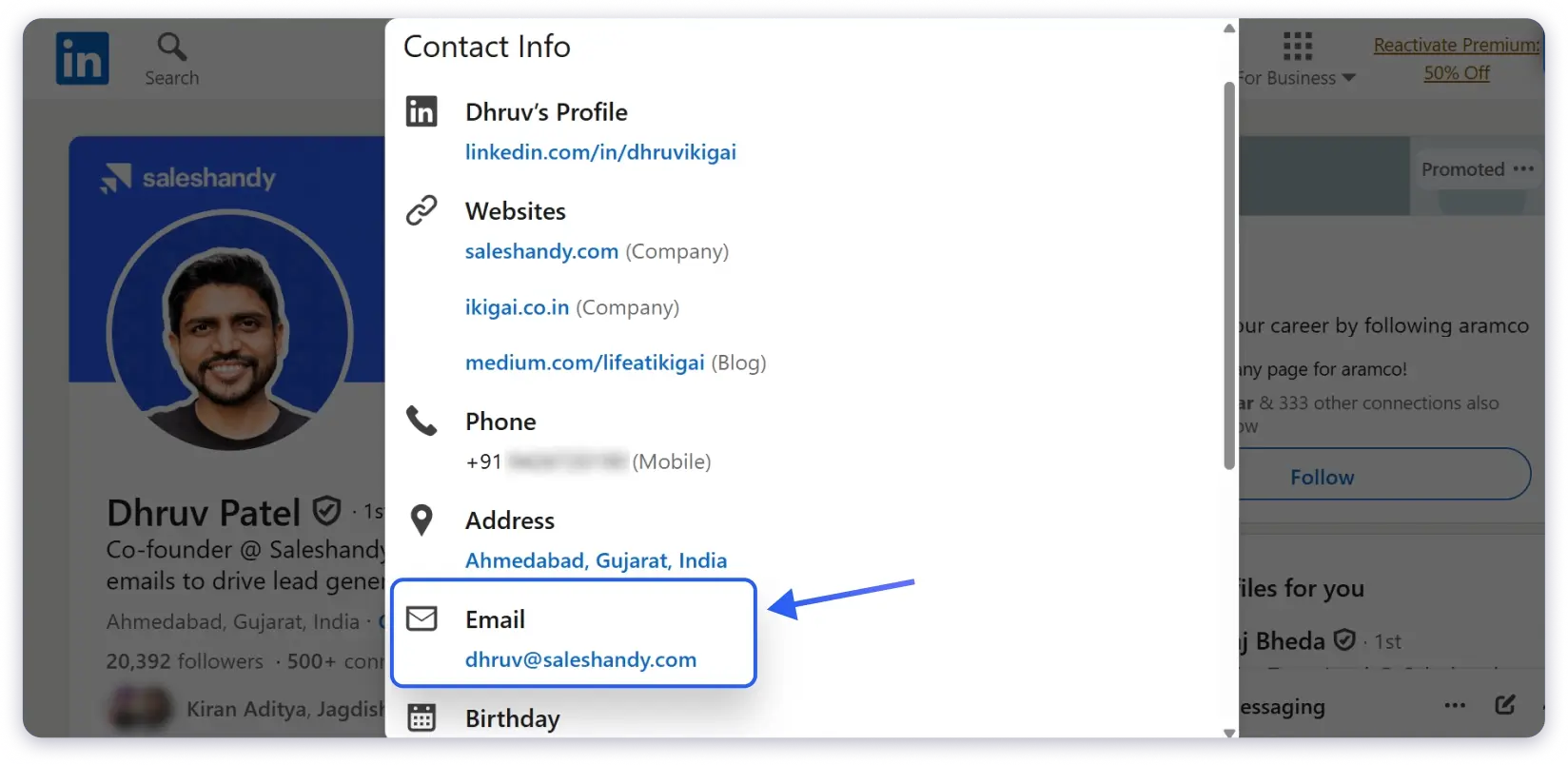
Since they add it themselves, the data is usually accurate.
Here’s How to Check:
- Go to the CEO’s LinkedIn profile.
- Click on “Contact Info” (below their headline).
- If they’ve added an email, it shows up here.
Not every CEO makes their email public. And checking profiles one by one gets slow fast.
If the email isn’t listed, try sending a connection request with a short, specific note about why you want to connect.
Some CEOs respond to well-written requests, especially from people in their industry.
You can also check the company’s LinkedIn page.
Go to the People tab and look for the CEO’s profile from there.
If you need 50+ CEO emails, this method gets too slow.
3. Use Google Search Operators
Best for: Finding a specific CEO’s email when the info is already public somewhere online.
This one surprises people that you can find CEO email addresses just by knowing how to search Google the right way.
Google Search Operators let you run very specific searches.
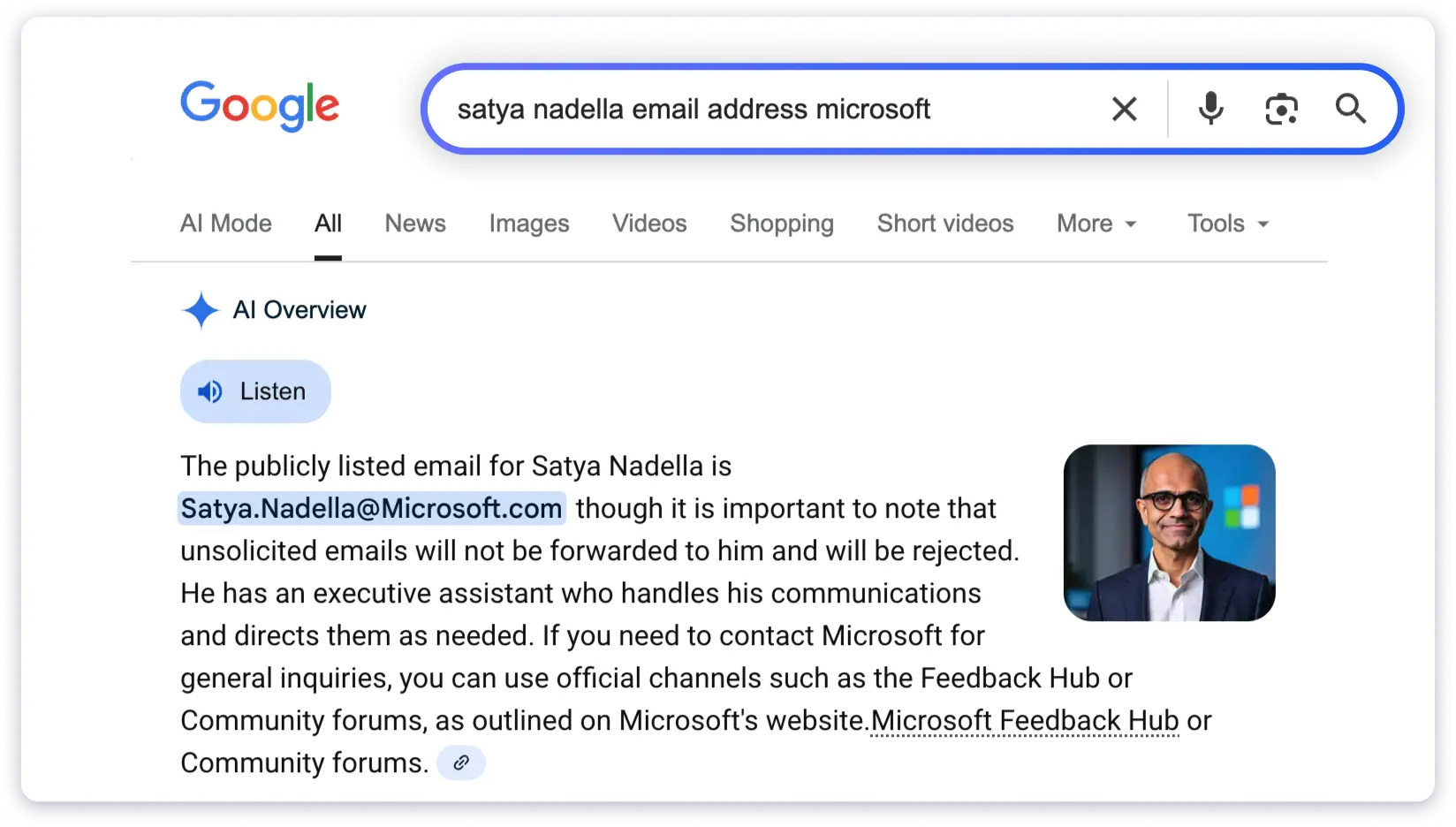
They surface contact details hidden in press releases, speaker bios, conference pages, and investor documents.
Search Queries That Work:
- “CEO name” + “email” + “@company.com” — Searches for the CEO’s email pattern across the web
- site:company.com + “CEO name” + “email” — Searches only the company’s own website
- filetype:pdf + “CEO name” + “email” + “company name” — Finds PDFs like annual reports or press kits
- “CEO name” + “@company.com” — Looks for the exact email string
- intitle: “contact” + “CEO name” + “company name” — Targets pages with “contact” in the title
Example: To find the email of a CEO named Rahul Sharma at Acme Corp, search:
“Rahul Sharma” + “@acmecorp.com”
or
site:acmecorp.com + “Rahul Sharma” + “email”
You can also try AI search tools like Google AI mode, Perplexity, or ChatGPT.
They sometimes pull CEO contact details from public sources faster than a regular search.
But keep in mind, AI tools can return outdated or guessed info.
Always verify the email before reaching out.
This method works great for well-known CEOs or public companies.
It’s less reliable for private or smaller firms.
4. Check the Company Website
Best for: Targeting CEOs of startups, SMBs, or companies that list their leadership team publicly.
Sometimes the simplest method works.
Small and mid-sized companies often list their CEO on their website. Check these pages first:
- About Us or Our Team page
- Leadership or Management page
- Contact Us page (look for department-specific emails)
If the CEO’s email isn’t listed, you might still find their name and the company’s email format.
You can also use an email extractor tool to scan the website and pull any published email addresses.
It is faster than clicking through every page yourself.
Larger companies rarely list CEO emails on their site.
You’ll usually find a generic “contact@” or PR email instead.
5. Search Business Directories and CEO Email Databases
Best for: Quick lookups for specific companies. Also useful for browsing CEO contacts by industry or region.
A CEO email database is a directory that lists contact info for chief executive officers.
They’re organized by company, industry, or location.
Directories Worth Checking:
- Ceoemail.com: Lists CEO email addresses for US and UK companies. Free to use.
- Crunchbase: Shows company leadership, funding details, and sometimes CEO contact info. Paid plans give deeper access.
- Manta: Useful for finding CEOs of small and mid-sized US companies.
- Industry-Specific Directories: Trade associations, chamber of commerce websites, and niche B2B directories often list company leaders with contact details.
The main issue with directories is data freshness CEOs change roles companies get acquired and emails go stale.
Always verify before sending.
If you want a CEO email database that stays updated, a B2B data provider like Saleshandy Lead Finder is a better long-term option.
You can filter for CEOs and get real-time verified data instead of relying on static lists.
6. Tap Into Mutual Connections
Best for: High-value targets like enterprise deals, partnership proposals, or investor outreach where a warm intro matters more than volume.
If you share a connection with the CEO, don’t overlook the simplest approach. Just ask.
A warm introduction beats a cold email every time.
Your mutual connection can share the CEO’s email or introduce you directly via email or LinkedIn.
Tips:
- Be specific about why you want to reach the CEO
- Keep your request short and respectful
- Offer to write a draft intro that your contact can forward
This method won’t scale. But for the right targets, it’s the most effective way to get a response.
7. Check Publicly Available Documents
Best for: Targeting CEOs of public companies or well-documented organizations. The emails found here tend to be highly reliable.
Companies publish documents that sometimes include the CEO’s email address.
Most people never think to check them.
Where to Look:
- Press Releases — Often include a media contact section with direct CEO or spokesperson emails
- Annual Reports and Investor Documents — Public companies file these regularly. They sometimes list executive contact details.
- SEC Filings (for US Companies) — Available through the SEC EDGAR database
- Government Registrations — State-level business filings sometimes include officer contact info
- CEO Letters or Public Statements — Some CEOs sign off with their direct email in shareholder letters
This method takes time.
Not every document will have useful contact details.
But what you find is usually accurate since it comes from official sources.
8. Guess the Email Format and Verify
Best for: When you know the CEO’s name and company domain but can’t find their email through other methods.
Most companies use a standard pattern for employee emails.
If you figure out that pattern, you can build the CEO’s email address yourself.
Common Email Formats:
- firstname.lastname@company.com
- firstname@company.com
- firstinitiallastname@company.com
- firstname_lastname@company.com
- lastname@company.com
- firstnamelastname@company.com
How to Find the Pattern:
- Look up any other employee’s email from the same company. Check their LinkedIn Contact Info, the company website, or a quick Google search.
- Spot the format they use.
- Apply the same format to the CEO’s name.
You can also use an email permutator to create all possible variations at once.
But here’s the step most people skip.
Verify the email before you send anything.
Sending to an unverified, guessed email can cause hard bounces.
That damages your sender reputation and hurts your email deliverability.
9. Ask AI Search Tools
Best for: A fast first-pass guess when you are short on time. Works best as a starting point, not a final answer.
AI search tools like ChatGPT, Perplexity, and Google AI Mode can surface CEO email addresses pulled from public sources faster than a manual search.
Ask something like:
“What is [CEO name]’s email address at [Company]?”
Sometimes the AI pulls a real, published email straight from a press release or company page.
But treat every result as a guess until proven otherwise.
AI tools can return outdated data, a former CEO’s email, or a plausible-looking address that was never real to begin with.
How to Use It Safely:
- Ask the AI tool for the CEO’s name and likely email format.
- Cross-check the name against LinkedIn or the company website.
- Run the email through a verifier before you use it anywhere.
Treat this method the same way you would treat a guessed email format.
Useful for narrowing down options, but never safe to send without verification first.
How to Verify CEO Email Addresses Before Outreach
Finding the email is only half the job. If you skip verification, you risk:
- High Bounce Rates: Invalid emails bounce back, and a bounce rate above 2% triggers spam filters and damages your sender reputation.
- Wasted Effort: A great cold email means nothing if it never reaches the inbox.
- Domain Blacklisting: Too many bounces can get your domain blacklisted by email providers.
How to Verify CEO Email Addresses:
- Built-in Verification: Saleshandy Lead Finder verifies every email in real time before you reveal it. No extra step needed. You only pay for valid emails.
- Standalone Verifier: Use Saleshandy Email Verifier to check individual emails. It runs MX record checks, SMTP validation, and catch-all detection.
- Bulk Verification: Built a list from multiple sources? Run it through a verification tool before launching any campaign.
Simple Rule: Never send outreach to an unverified CEO email. A 30-second check protects your deliverability and improves reply rates.
What to Do Once You Have the Email
Finding the email is half the job. What you send matters just as much.
A generic pitch gets ignored, even if it lands in the CEO’s primary inbox.
A few things that make CEOs actually read and reply:
- Personalize the opening line with something specific to their business, a recent launch, a funding round, or something they said publicly.
- Keep the subject line under 5-10 words and tied to a real business outcome, not a generic pitch.
- Lead with the outcome you are offering, not your product’s features.
- End with one clear, low-friction next step.
If you want the exact structure and language to use, how to write a cold email breaks the format down line by line, and cold email templates has ready-to-use openers for executive outreach specifically.
Here’s an Example:
Subject: {{Company}} + {{specific trigger: funding round, new market, product launch, leadership hire}}
{{Company}}’s {{trigger, e.g., expansion into APAC}} usually means the {{function, e.g., sales}} team absorbs the extra workload for a quarter or two before headcount catches up.
Teams in that spot get through it faster by automating the manual parts of outbound instead of pulling reps off calls to do research.
Worth a quick note back, or not the right time?
{{Your name}}
{{Your title}}, {{Company}}
Start Finding CEO Email Addresses Today
Every method in this guide works. But they work differently depending on your situation.
Need one CEO’s email for a specific deal? Start with LinkedIn, Google operators, or the company website.
Need CEO emails at scale for outbound campaigns?
A B2B lead finder with real-time verification will save you days of manual work.
Your email list’s accuracy directly impacts your reply rates, deliverability, and revenue.
FAQs on Find CEO Email Addresses
1. What is the best CEO email database?
For verified, filtered CEO contacts, a B2B lead finder like Saleshandy (800M+ contacts with real-time verification) is the most reliable option. Free directories like ceoemail.com work for quick lookups but may have stale data.
2. How to find CEO email addresses for free?
Check LinkedIn Contact Info, use Google Search Operators, browse company websites, or try business directories. You can also sign up for Saleshandy and get 50 free credits to find and verify CEO emails at no cost.
3. Can I buy a CEO email list?
You can, but pre-built lists go stale fast and unverified data hurts deliverability. A better approach is building your own list with a B2B data provider that verifies contacts in real time. You control the filters, and every email is checked before you send.
4. How accurate are CEO email finder tools?
The best tools achieve 90-98% deliverability using real-time verification and waterfall enrichment. Saleshandy Lead Finder verifies every email before charging credits.
5. How to find someone’s corporate email?
Use an email finder tool. Enter the person’s name and company domain. You’ll get a verified email in seconds. Other options: LinkedIn Contact Info, Google operators like “name” + “@company.com”, and company websites.
6. Is it legal to contact a CEO directly?
Yes. Cold emailing CEOs is legal in most countries if you follow compliance laws. In the US, CAN-SPAM requires a physical address, unsubscribe link, and honest subject lines. In the EU, GDPR requires legitimate business interest. Always use compliant data sources.
7. How do I verify a CEO’s email?
Use Saleshandy Email Verifier. It checks MX records, runs SMTP validation, and detects catch-all domains. If you’re using Lead Finder, verification happens automatically before you reveal any email.
8. How do I find out who the CEO of a company is?
Check the company website (About Us or Leadership page), search the People tab on their LinkedIn page, look them up on Crunchbase, or use a B2B lead finder and filter by company name + job title “CEO.”

 Dhruv Patel