

Hunter.io is the OG email finder tool.
Ask anyone who’s done cold outreach for more than six months and Hunter’s name comes up.
It’s the tool people start with, the tool people compare others against, and the tool most reviews still call the gold standard for finding business emails.
But is this OG tool actually worth it in 2026?
Well, I decided to find out.
I spent two weeks living inside Hunter.io, testing every feature, searching real prospects, running real verifications, and tracking what actually works vs. what the marketing promises.
Some of what I found impressed me. Some of it genuinely shocked me.
And some of it is going to change the way you think about Hunter’s “Valid” label (I’ll get to that).
Here’s what I’ll cover:
- A full scorecard with my honest verdict
- A hands-on walkthrough of every Hunter feature
- Real pricing math and credit depletion from my test
- Who should still use Hunter, and who should skip it
- The alternative I’d personally recommend instead
Let’s get into it.
Hunter.io Review – TOC
- TL;DR: Honest Hunter.io Review
- How I Tested Hunter.io
- The First 2 Minutes inside Hunter.io
- In-depth Hunter.io Features Breakdown
- Hunter.io Pricing: What You Actually Pay in 2026
- Hunter.io Pros & Cons
- Hunter.io Alternative I’d Actually Recommend: Saleshandy
- Final Verdict: Is Hunter.io Worth It?
- Hunter.io FAQs
TL;DR: Honest Hunter.io Review
Before I take you through my full review, here’s the short version.
I rated Hunter.io a 5.9/10 🌟
Hunter does a decent job of finding business emails, but here’s the problem: you can’t actually trust the emails it finds.
In my review, half of the addresses Hunter confidently labeled “Valid” turned out to be incorrect when I ran them through Hunter’s own Verifier.
So if you’re going to use Hunter, you have to verify every single email it gives you, which eats into your credits and defeats the point of having a confidence score in the first place.
Here’s how each feature performed in my review:
| Feature | Score | My Verdict |
|---|---|---|
| Email Finder | 6/10 ⭐ | Found 75% of my prospects, but half the “Valid” labels turned out to be incorrect |
| Email Verifier | 7/10 ⭐ | Accurate server-level checks at 0.5 credits each, and the real safety net Finder depends on |
| Discover | 4/10 ⭐ | AI-powered database search works, but the Free plan locks you out after about 5 contact results |
| Signals | 7/10 ⭐ | Genuinely useful hiring and intent signals, zero credits consumed |
| Sequences | 3/10 ⭐ | Basic cold email sequences with AI writing and connected email accounts locked behind the paid plan |
| Bulk Operations | 6/10 ⭐ | Clean interface, but Free plan caps make it suitable only for small test batches |
| Chrome Extension | 7/10 ⭐ | Solid one-click email lookup across Chrome, Firefox, and Edge |
| Integrations | 7/10 ⭐ | Native HubSpot, Salesforce, Pipedrive, Zoho CRM, plus an MCP server for Claude and ChatGPT |
| Best Hunter.io alternative | 10/10 ⭐ | Saleshandy: all-in-one AI cold outbound with 852M+ contacts, free warm-up, unlimited email accounts, and multichannel sequences starting at $34/month |
How I Tested Hunter.io
I signed up for Hunter’s Free plan and spent two weeks inside the platform.
The Free plan gives you 50 credits and 30 AI searches per month, which was enough to test every feature meaningfully.
To test the Email Finder, I built a 20-prospect list across four company-size buckets:
- 5 enterprise prospects at Microsoft, Salesforce, Oracle, Adobe, and SAP
- 5 mid-market prospects at Gong, Outreach, Clari, ChiliPiper, and 6sense
- 5 startup prospects at Attio, Default, Pylon, Clay, and Instantly
- 5 non-US prospects at Zoho, Freshworks, Pipedrive, Hotjar, and UiPath
For each prospect, I searched by name and company domain and recorded whether Hunter returned an email, the confidence label it attached, the role assigned, and whether that role matched reality on LinkedIn.
I then ran 10 of the found emails through Hunter’s Verifier to check whether the “Valid” badges held up (the result reshaped my opinion of the Finder, as you’ll see).
After that, I ran an AI-powered Discover search, built an SDR hiring Signal, walked through every tab of Sequences, tested the Bulk Operations tools, and reviewed every integration including the MCP server.
I tracked credits at each step so I could give you real pricing math, not estimates.
I also went through more than 1,500 user reviews across G2, Capterra, Trustpilot, Reddit, and Indie Hackers, and where customer feedback echoed what I was finding.
Let me walk you through what I found.
The First 2 Minutes inside Hunter.io
Hunter gets one thing right from the first click: onboarding is fast.
Signup took under a minute and asked only for name, work email, and password.
The dashboard loads with a short onboarding wizard that asks three questions (what you want to do, where to start, what data you have) and routes you to the matching view. The whole flow took me about 90 seconds.
The dashboard itself is clean.
Credits remaining sit top-right, the sidebar is well-labeled, and three widgets show credits used, recent searches, and campaign stats.
That said, two things stood out early that I want to flag honestly.
First, there’s no team activity feed on the dashboard, which is fine for solo users but limiting for collaborative prospecting.
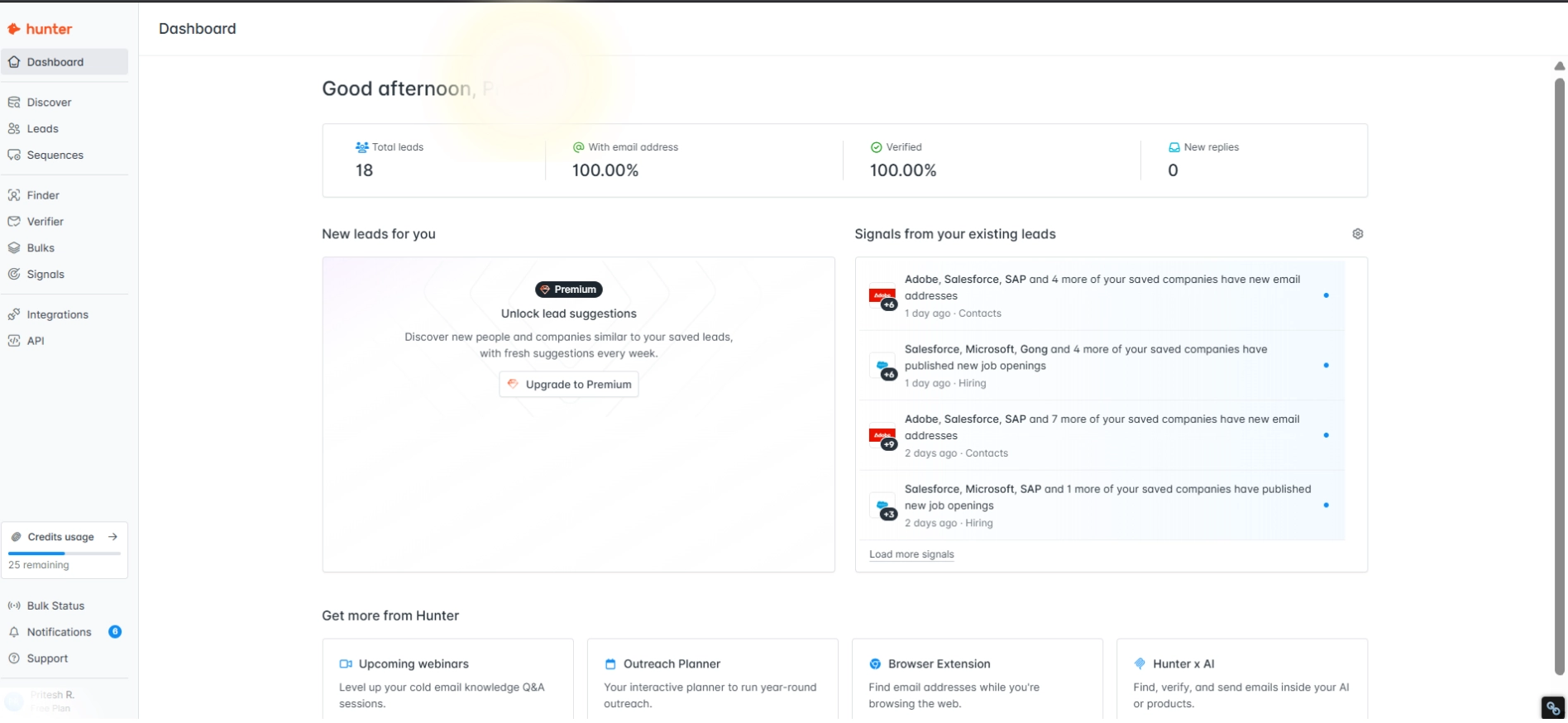
Second, several sidebar features (including Sequences and bulk Discover) aren’t usable on the Free plan, but Hunter only tells you after you click in. It’s a small UX friction, but it’s the kind of thing that leaves you feeling misled when the feature you were excited about turns out to be paywalled.
Onboarding aside, what actually matters is how each tool performs.
Let me take you through every feature I tested, starting with the one Hunter built its name on.
In-depth Review of Hunter.io’s Features
Hunter has 8 core tools you’ll actually use in your workflow (the Dashboard, as I mentioned earlier, is just the landing view).
I tested every single one, and some genuinely impressed me, some fell flat, and one made me rethink everything I thought I knew about Hunter’s accuracy.
Let me walk you through them:
1. Email Finder
The Email Finder is the feature Hunter built its entire reputation on. It’s the tool most people associate with the brand, and it’s the first thing you’ll likely use after signing up.
To test it properly, I ran my 20 prospects through the Finder using the “Find email by name” mode.
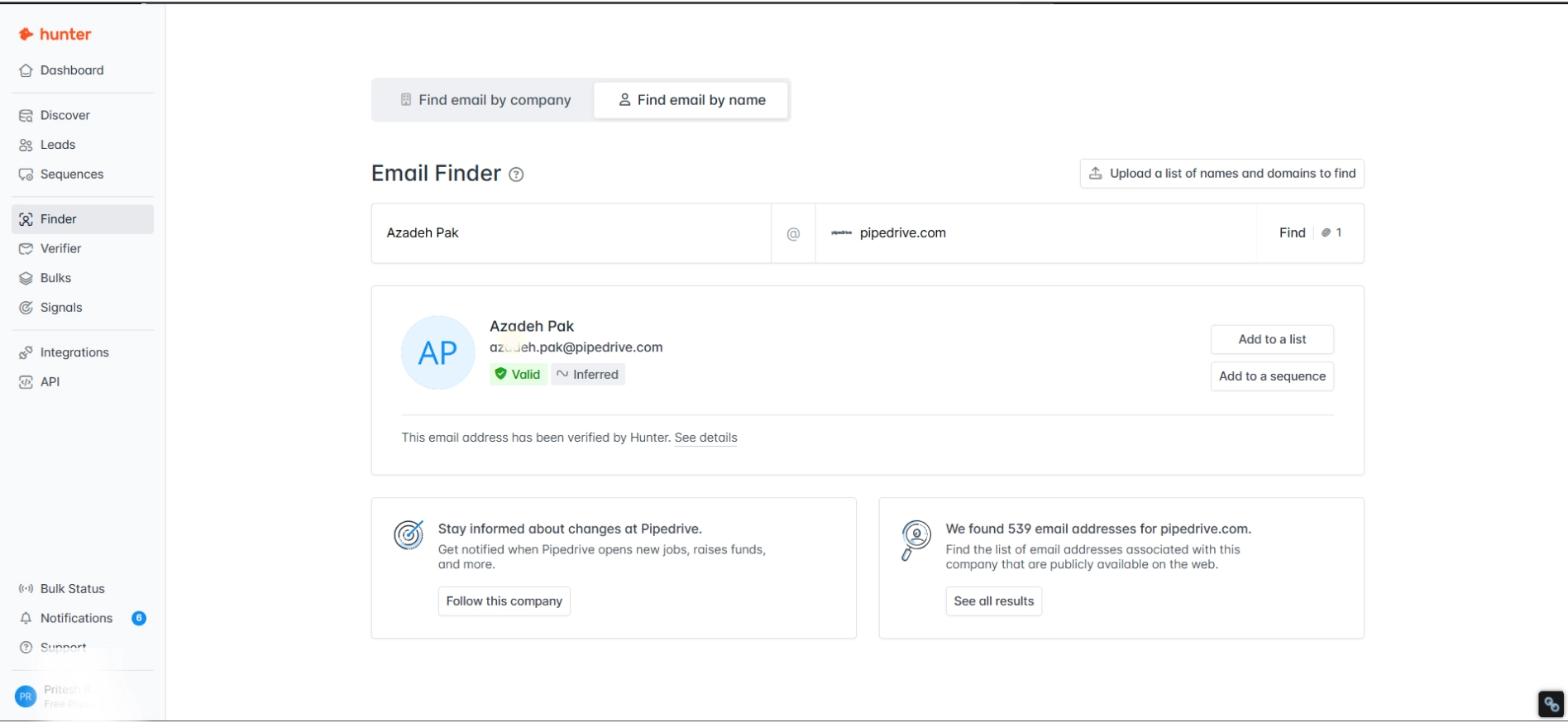
I entered each person’s full name and company domain, and I recorded the result, the confidence label Hunter attached, the role Hunter assigned to them, and whether that role actually matched reality on LinkedIn.
Hunter found an email for 15 out of 20 prospects, which comes out to a 75% find rate overall. That sounds solid on paper, but when I broke it down by company size, the picture changed completely.
Here’s what the bucket-by-bucket breakdown looked like:
| Company bucket | Find rate | Notes |
|---|---|---|
| Enterprise (Microsoft, Salesforce, Oracle, Adobe, SAP) | 3/5 (60%) | Missed Oracle entirely, and the role data was unreliable |
| Mid-market (Gong, Outreach, Clari, ChiliPiper, 6sense) | 3/5 (60%) | Missed both Clari and ChiliPiper |
| Startup (Attio, Default, Pylon, Clay, Instantly) | 5/5 (100%) | Perfect hit rate on every startup CEO |
| Non-US (Zoho, Freshworks, Pipedrive, Hotjar, UiPath) | 4/5 (80%) | Required a workaround for Zoho (more on this below) |
Here’s what surprised me most about this result.
Hunter is marketed as the enterprise email finder, with 76 million indexed websites and over 10 years of crawling behind it.
But in my review, enterprise and mid-market were the hardest buckets.
Startups won by a mile. Every single startup CEO I searched (Attio, Default, Pylon, Clay, Instantly) came back with an email. Oracle, Clari, and ChiliPiper returned absolutely nothing.
So if your ideal customer profile is early-stage SaaS, Hunter’s Finder delivers. If you’re prospecting into Fortune 500, expect gaps.
The second thing I want to flag is the role data problem.
Even when Hunter found the email, the job title it assigned was often wrong. Adobe’s CTO was tagged as “Administrative Assistant” in Hunter’s result. SAP’s board member was listed as “Author.”
The email itself might be correct, but the role is a coin flip, which matters when you’re trying to personalize cold outreach at the title level.
What I found lines up with what other paying customers are saying.
One verified G2 reviewer, Lisa N., ran into even worse accuracy issues than I did. In her full G2 review, she reported that “only about 7% of the results were actually usable.”
Hunter’s own support team acknowledged mismatched domains and improperly processed names on her account.
On Trustpilot, a user named itsnotbroken flagged a similar pattern, writing in their full Trustpilot review that “over 50% of the names & email addresses listed on Hunter.io NO LONGER WORK AT THE FIRM.”
That’s not a one-off complaint either. Across Reddit threads, the sentiment I kept running into was the same (read the full thread): “Hunter is pretty inaccurate.”
So the honest verdict on the Email Finder is this. It works, but it works unevenly.
You’ll have better luck finding startup contacts than enterprise ones; you cannot trust the role data at face value, and you absolutely cannot trust the “Valid” badge without a verification pass behind it. Which brings me to the next feature.
2. Email Verifier
If the Email Finder is where Hunter made its name, the Email Verifier is where the actual value lives.
Here’s what happened when I put it to the test.
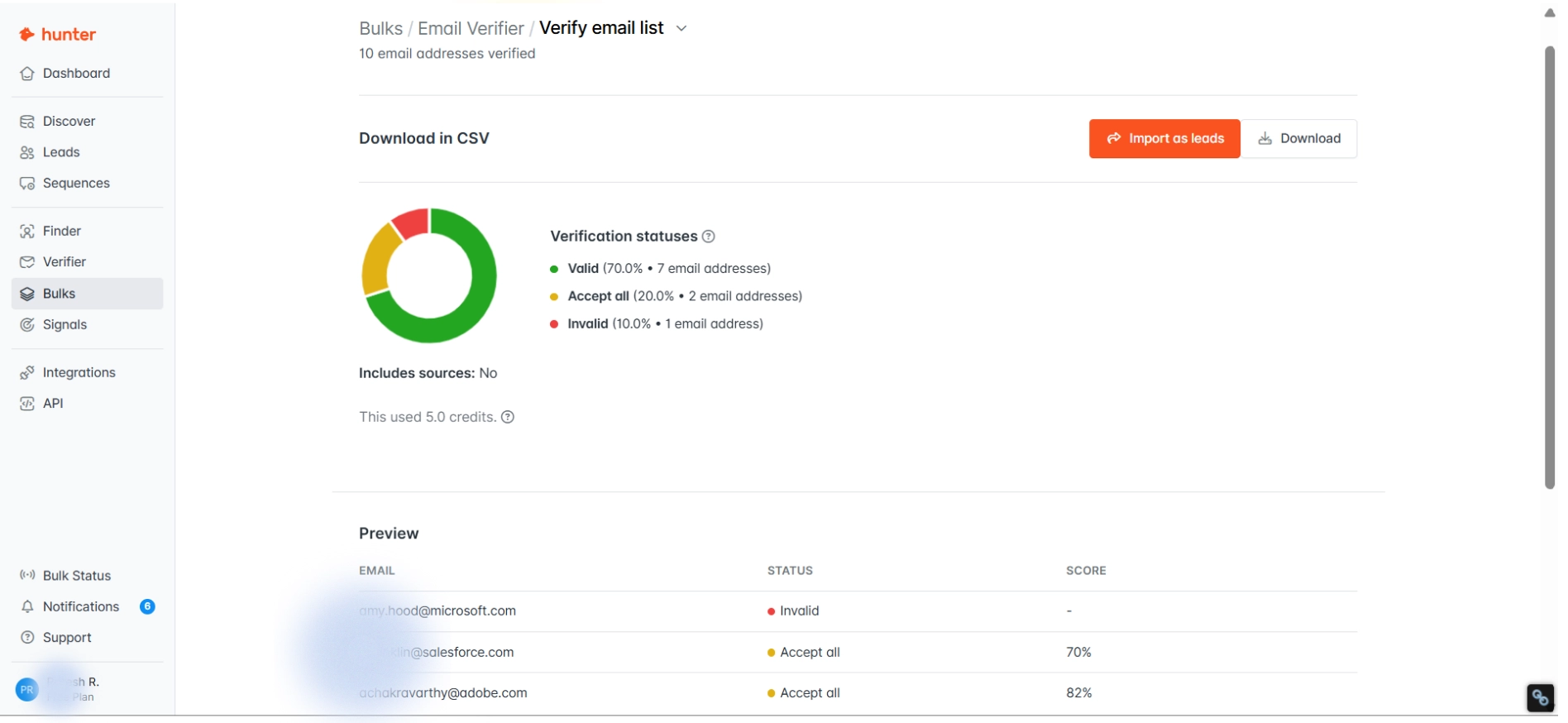
I took 10 of the emails Hunter’s Finder had returned (most of them labeled “Valid” or “Valid + Inferred”) and ran them through Hunter’s own Verifier.
The idea was simple: if Finder says these are valid, Verifier should agree. The reality was something else entirely.
Four out of the eight emails Hunter had confidently labeled “Valid” came back Invalid when I ran them through verification. That’s a 50% false-positive rate on Hunter’s own confidence badge, from a product review where the Finder and the Verifier are the same company’s tools.
Here’s what the pattern looked like when I dug into it.
Every email that came back Invalid passed the Format check and the Server check.
What failed was the final mailbox-level check, which means the domain’s mail server was running fine, but the specific mailbox either doesn’t exist or rejects connections.
In other words, Hunter’s Finder knew the domain was real, and the email pattern was plausible, but it hadn’t actually confirmed that the mailbox was alive.
The second thing I noticed was counterintuitive. Emails labeled “Valid + Inferred” (4 out of 6 truly valid) actually performed better than emails labeled just “Valid” (2 out of 4 truly valid).
I would have expected the plain “Valid” badge to be the more reliable one. It wasn’t.
The one “Accept All” result (Adobe) is inconclusive by design because the domain accepts incoming mail for any address, so verification can’t confirm whether the mailbox actually exists.
So what does this mean for how you should use Hunter?
If you’re going to send a cold email to an address Hunter found, you need to verify it first. Full stop.
The “Valid” badge on its own is not a guarantee of deliverability, and sending to those addresses without verification will tank your bounce rate and hurt your sender reputation.
The good news is that the Verifier itself is actually accurate at the server level, and at 0.5 credits per check, it’s cheap enough to run on every email. Which is lucky, because you’re going to have to.
What I found is backed up by what paying users have been reporting for years.
One verified G2 Mid-Market reviewer in insurance warned in their full G2 review: “Bounce rates of up to 35% might become common. Which ruins your domain reputation.”
More recently, a Trustpilot reviewer named Sean Key reported in his full Trustpilot review that he “got a 60%+ bounce rate from email addresses, which is unacceptable.”
Credit where it’s due: when the Verifier works, it works well. Another 5-star G2 reviewer, Brandon H., wrote in his full G2 review that “the email verification tool is also very reliable, helping reduce bounce rates.”
That matches my own experience. The Verifier is the strongest feature on the platform.
So the honest verdict is this. Hunter’s Verifier is accurate as a safety net. Hunter’s Finder is unreliable without it. Treat the “Valid” badge as a suggestion, not a guarantee, and budget verification credits for every email you plan to send.
3. B2B Database
Discover is Hunter’s AI-powered B2B database. The pitch is that you can type a natural-language prompt describing the companies you want to find, and Hunter will surface a matching list along with contact details.
On paper, it’s one of the most interesting features on the platform. In practice, the Free plan turns it into a demo rather than a usable tool.
Here’s what my Discover search looked like.
I typed in the prompt “B2B SaaS companies in the United States with 50 to 200 employees that sell sales or marketing tools” and let Hunter work.
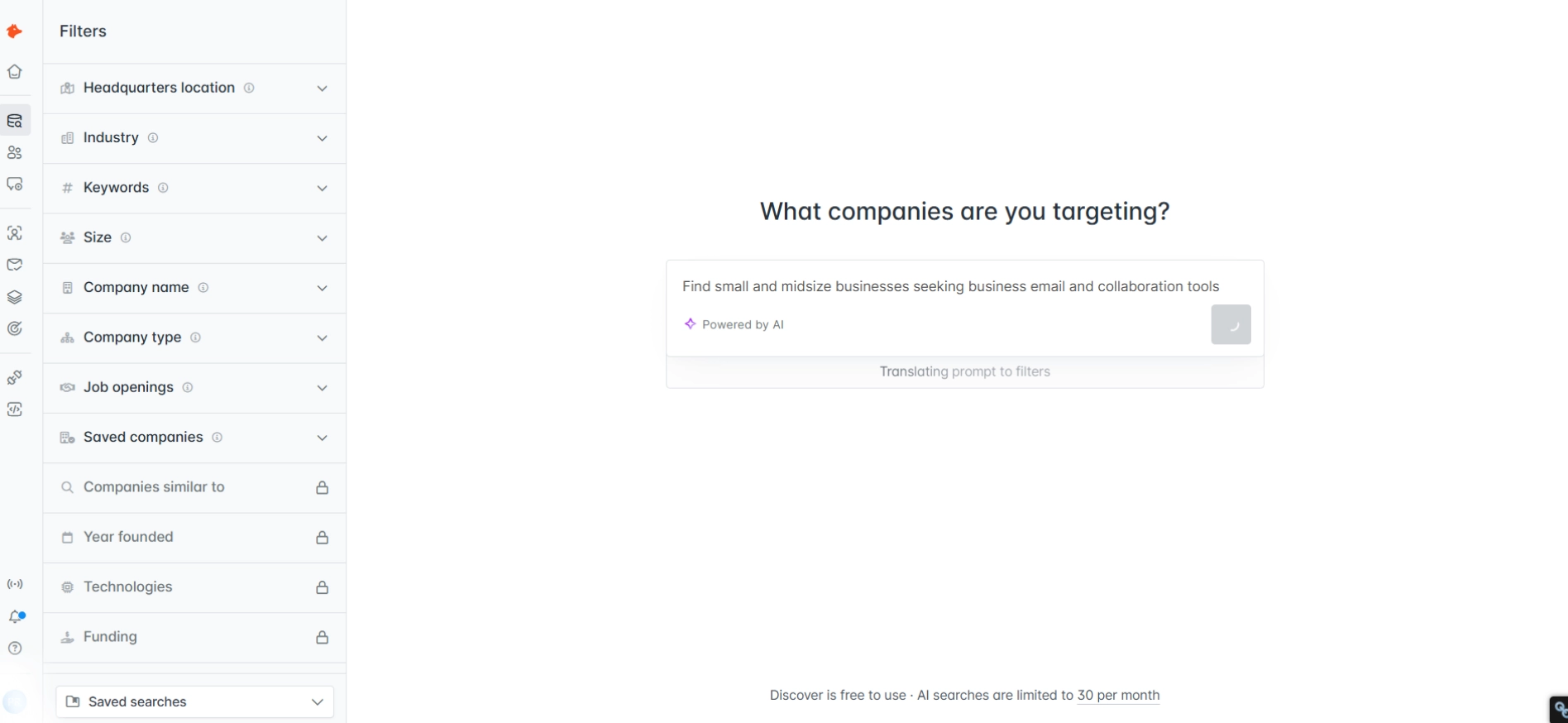
The search consumed 1 AI search credit (leaving me with 29 of my 30 monthly AI searches) and returned results in about 3 seconds, which is fast enough that it genuinely feels like AI is doing something useful under the hood.
The results page itself is well-built. Each matching company shows up with the company name, domain, employee count, industry, and the number of emails Hunter has indexed for that company.
A left sidebar gives you filters for location, industry, company size, technologies used, department, seniority, and email type. On the surface, it’s exactly what you’d want from an AI-powered database search.
Then the paywall hit.
After showing me roughly 5 contact results, Discover displayed a hard upgrade prompt: “Unlock the remaining X results, Upgrade to Premium” ($49/month).
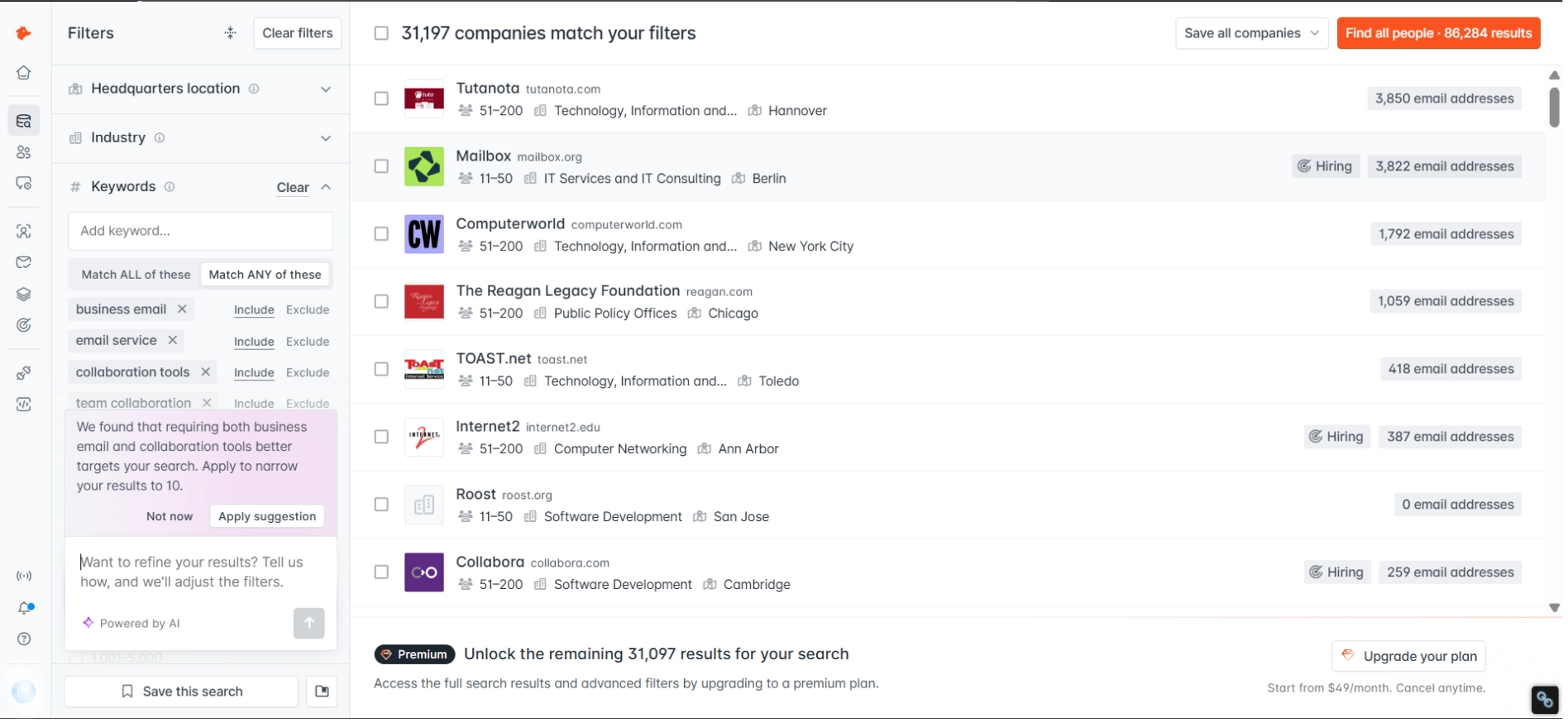
There’s no per-contact credit spend to see more. There’s no partial unlock. It’s a binary paywall.
You can see that matching companies exist, you can see the shape of what Discover would deliver if you paid, but you cannot actually access the data without upgrading.
The filters are especially frustrating in this state. All of them are visible and clickable on the Free plan, but they’re functionally useless because no matter how you filter, you’re still stuck behind the 5-result wall.
So the honest verdict on Discover is this.
The underlying search technology is genuinely good, and if you upgrade to Starter at $49/month, Discover becomes a legitimate reason to stay on Hunter.
But if you’re evaluating Hunter on the Free plan, don’t form your opinion of Discover based on what you can see. You’re seeing roughly 5% of what the feature actually does.
What I experienced is consistent with what other users have been reporting about Discover’s data quality more broadly.
One verified Trustpilot reviewer, Jessica Allen, wrote in her full Trustpilot review that “the tool no longer returned the volume or quality of contact data it once did, making it basically unusable for my needs.”
A G2 reviewer named Jessica A. (different person, same first name) summarized the trend even more bluntly in her full G2 review: “I was getting less data and paying more.”
Both of those quotes are worth sitting with before you upgrade. Discover might be good, but it’s also been noticeably less generous over the last year.
4. Leads
Leads is Hunter’s answer to the question of what to do with the emails you’ve found. Think of it as a lightweight contact list manager that sits inside the platform.
You can save the emails you find into named lists, add custom attributes to each contact, filter by status or country, and push the whole list into a cold email sequence when you’re ready.
I spent some time inside Leads to see how it compares to a real CRM, and the honest answer is that it isn’t trying to be one.
Here’s what Leads actually does well.
The interface is clean, the import flow is quick (you can bring in a CSV with mapped fields like name, title, company, and email), and the lists you create inside Leads flow directly into the Sequences builder with one click.
For solo prospectors who just want a place to park their contacts between discovery and outreach, Leads does the job.
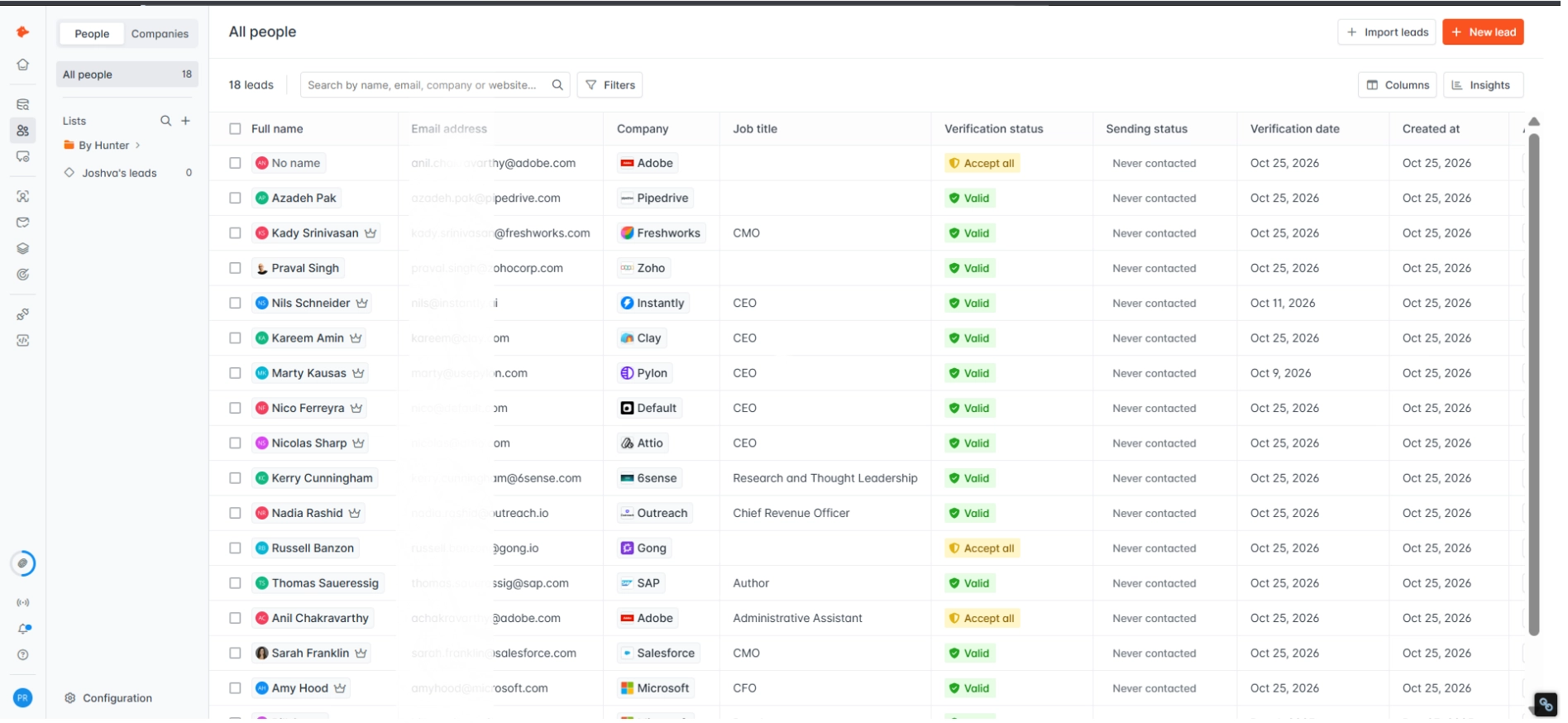
Here’s what Leads doesn’t do.
There are no deal stages, no pipeline view, no activity log tracking who opened what and when, no reminders, and no reporting. If you’re used to working inside HubSpot, Pipedrive, or Salesforce, Leads is going to feel limiting almost immediately.
So the honest verdict is simple. Treat Leads as a staging area for your prospects, not as a CRM replacement.
Hunter integrates natively with HubSpot, Pipedrive, Salesforce, and Zoho CRM, which is where your real pipeline work should happen. Leads is just the holding tank between search and send.
5. Sequences
Sequences is Hunter’s cold email campaign builder, and it’s the feature with the biggest gap between what the sidebar promises and what you can actually do with the tool, especially on the Free plan.
The editor itself is actually well-designed. Merge tags work the way you’d expect, you can add multiple follow-ups in the same sequence; there’s an A/B toggle on subject lines (which was a pleasant surprise), and the Settings tab gives you proper control over sending windows and sender configuration.
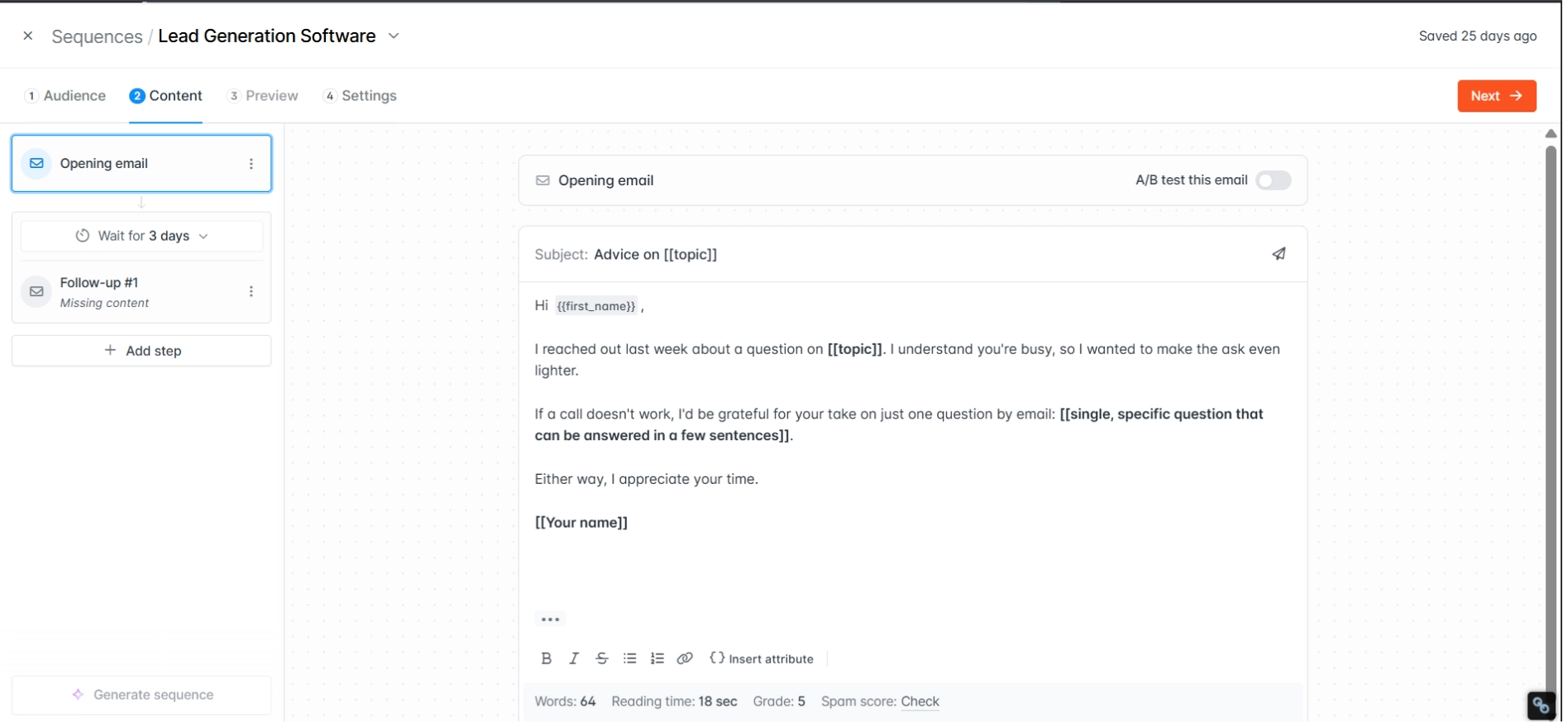
Then I ran into the two hard blockers on the Free plan.
The first blocker is that Hunter’s AI Writing Assistant (the “Generate sequence” feature) is completely locked behind the Starter plan at $49/month.
On Free, you can see the AI toggle at the top of the Content tab, but clicking it just tells you to upgrade. You get a manual editor and nothing else.
The second blocker is bigger. The Free plan allows you to connect zero of one email accounts. Not one. Zero.
Which means you can configure a sequence end-to-end, set up follow-ups, write perfect copy, and schedule it to launch, but you literally cannot send anything because Hunter won’t let you connect a sender address.
To actually launch a campaign, you have to pay the $49/month minimum.
So on the Free plan, Sequences is effectively a feature preview. You can tour the editor, you can see what the paid version looks like, and that’s it.
Even on the paid plans, Sequences has limitations that will matter if you’re running real outbound. There’s no multichannel support, so you can’t add LinkedIn touches or phone call tasks alongside the email steps.
The recipient caps per sequence scale with your plan (500 on Free, 2,500 on Starter, 5,000 on Growth, 15,000 on Scale), and there’s no built-in email warm-up, which means you’re handling deliverability with a separate tool. For small-scale outreach, these limits are fine.
For anyone sending more than a few thousand emails a month, you’ll outgrow Sequences fast.
This matches almost exactly what paying users have been saying about Sequences for years.
A verified G2 founder, Andrew D., wrote in his full G2 review that “the email sender feels bolted on to justify the high price.” A Capterra user, Anouar N., listed Hunter’s cons in his full Capterra review as simply “No A/B Testing. Automation Emails.”
Another Capterra reviewer, Andrew A., flagged a different pain point entirely in his full Capterra review, writing that “the cap limit on drips in a campaign causes me to put several hrs of work every 6 months to re setup things.”
So the honest verdict on Sequences is this. If you’re already using a dedicated cold email platform like Saleshandy, Lemlist, or Instantly for your sending, Hunter’s Sequences adds nothing you don’t already have in a better form elsewhere.
If you’re hoping Hunter can be your single all-in-one outbound tool, it genuinely can’t on the Free plan, and it struggles even on Starter.
If you want multichannel sequences across email and LinkedIn, built-in warm-up, unlimited email accounts, and A/B testing on both subject lines and email bodies, you’ll find all of that in Saleshandy, which starts at the same $34/month as Hunter but doesn’t paywall the features that actually matter for cold outreach.
6. Signals
Signals is the feature that surprised me most, and it’s the one I think most reviews completely overlook.
Signals tracks three types of buying-intent events: fundings and acquisitions, job openings, and company changes. You configure a trigger (for example, “SaaS companies hiring for SDR roles”) and Hunter surfaces matching companies with the job title, source link, and posting date.
I built an SDR hiring signal in under 2 minutes. The preview showed 773 matching results pointing to roughly 1,511 companies hiring per month. Each result came with a “Find email addresses” button that linked straight into Finder.
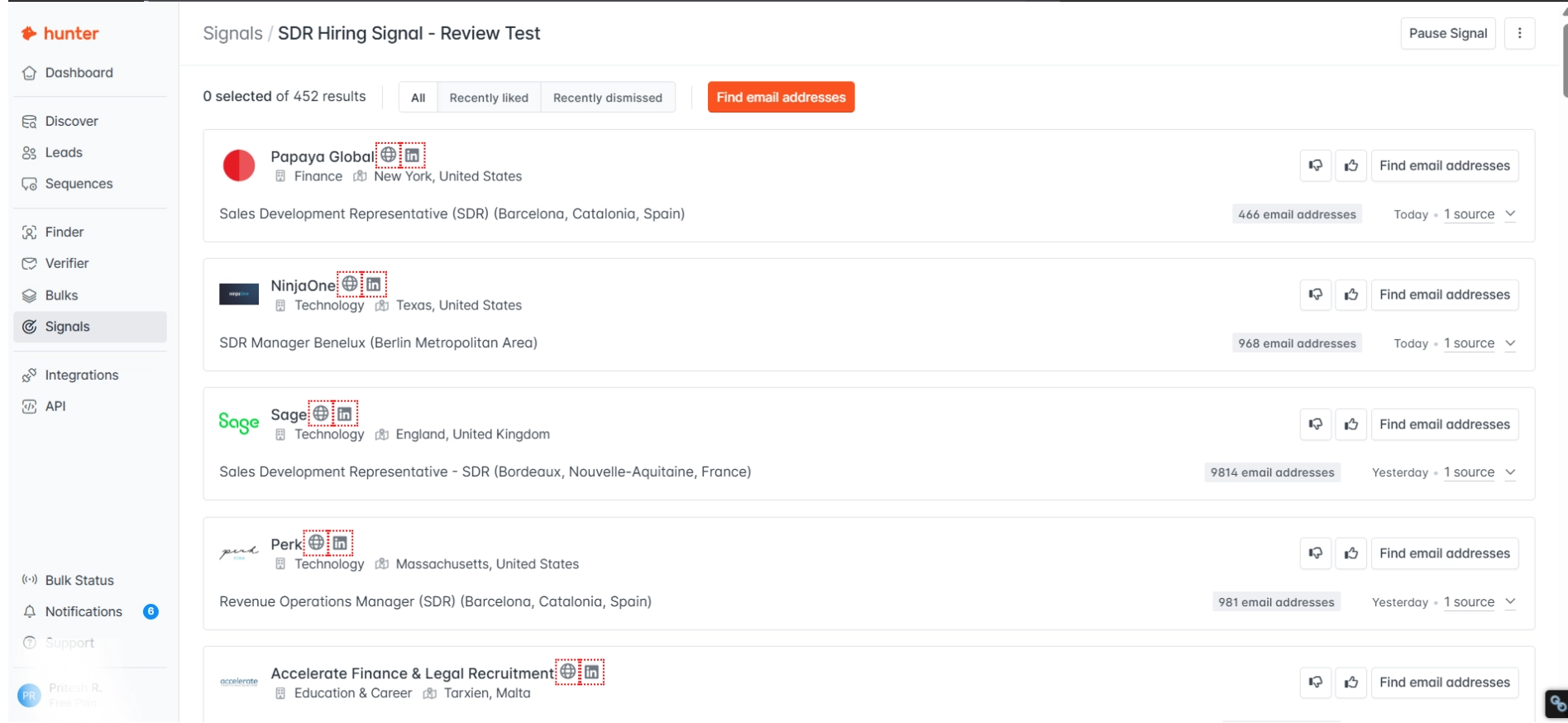
Here’s the kicker: Signals costs zero credits to browse. It uses the same AI search quota as Discover (30 per month on Free), but running configured signals is free.
So the honest verdict is this.
For sales teams tracking expansion signals like funding rounds and hiring surges, Signals alone is a good reason to create a free Hunter account. It’s genuinely one of the best features on the platform, and it’s completely free to use.
7. Chrome Extension & Integrations
The Chrome Extension and the broader Integrations tab round out Hunter’s platform, and both are solid without being spectacular.
The Chrome Extension gives you a one-click email lookup on any company website or LinkedIn profile. Click the Hunter icon, and the extension returns associated email addresses with confidence scores and source links.
It works across Chrome, Firefox, and Edge, and it uses the same credit pool as the web app. It carries a 4.6 rating on Capterra across 12,000+ reviews, which is probably the strongest reputation of any Hunter component.
The one thing worth knowing is that the extension does individual lookups only.
There’s no bulk enrichment from the extension itself, and it does occasionally fail to load on LinkedIn Sales Navigator profiles. Those edge cases aside, it’s the smoothest free Chrome extension in the email-finder category.
For Integrations, Hunter covers the essentials. Native CRM connections include HubSpot, Salesforce, Pipedrive, and Zoho CRM. Email sending integrates with Gmail, Outlook, and generic SMTP/IMAP.
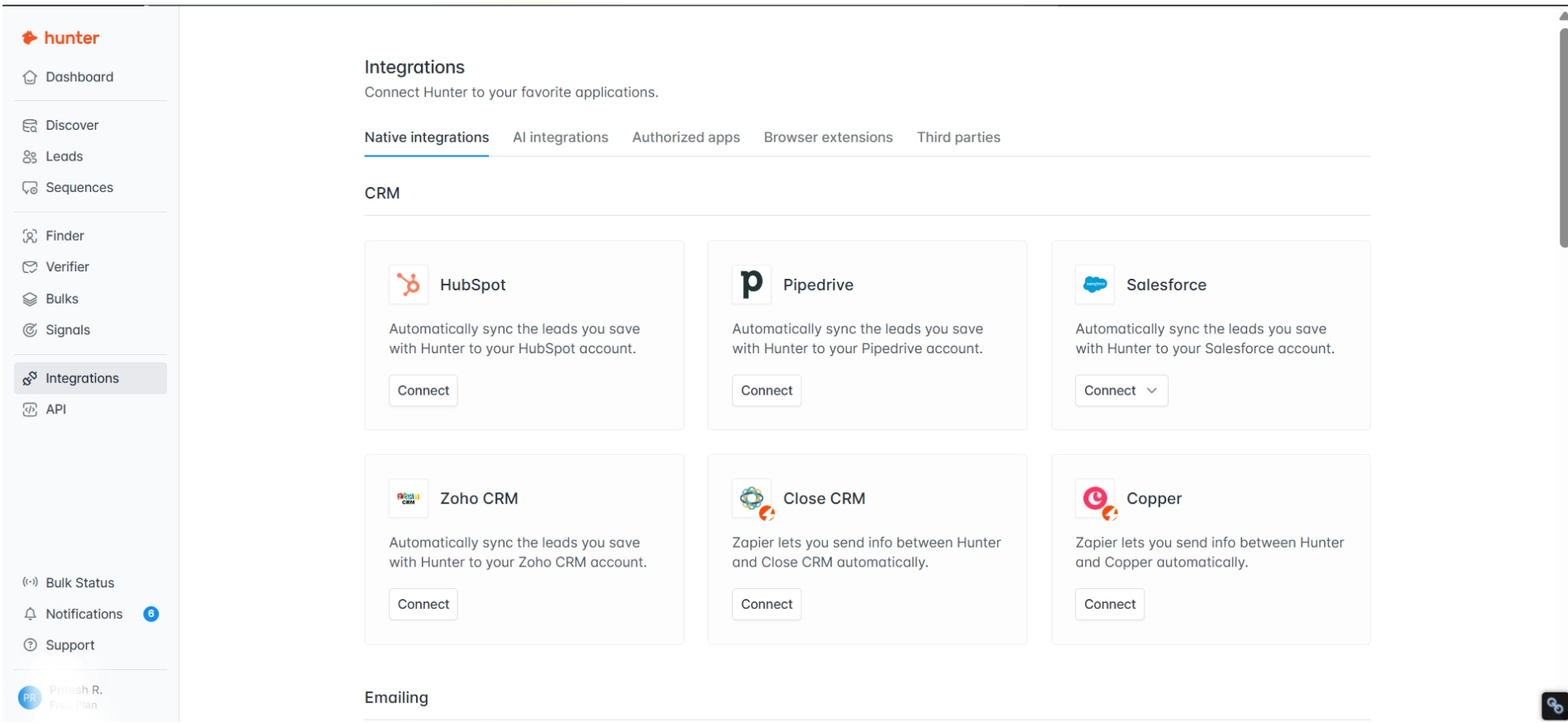
Google Sheets gets a dedicated add-on, and anything Hunter doesn’t integrate with natively (like Close CRM or Copper) is reachable through Zapier.
The one genuinely interesting 2026-era addition is Hunter’s MCP server, which lets you connect Hunter directly to AI tools like Claude, ChatGPT, Codex, Cursor, and Gemini.
The setup is a 3-step process, and it means you can prompt an AI assistant to run Hunter searches on your behalf. For teams building AI-assisted prospecting workflows, this is a meaningful feature.
The honest verdict on both: the Chrome Extension is the easiest way to use Hunter day-to-day, and the Integrations stack is strong enough that Hunter will fit cleanly into whatever CRM or AI workflow you’re already running.
Hunter.io Pricing: What You Actually Pay in 2026
Hunter runs on five pricing tiers in 2026: Free, Starter, Growth, Scale, and Enterprise.
Here’s the full breakdown at a glance.
| Plan | Monthly | Annual (per month) | Credits/month | Email accounts | Recipients/sequence |
|---|---|---|---|---|---|
| Free | $0 | $0 | 50 | 1 | 500 |
| Starter | $49 | $34 | 2,000 | 3 | 2,500 |
| Growth | $149 | $104 | 10,000 | 10 | 5,000 |
| Scale | $299 | $209 | 25,000 | 20 | 15,000 |
| Enterprise | Custom | Custom | Custom | Custom | Custom |
Now here’s where it gets interesting. Hunter charges 1 credit per email found and 0.5 credits per verification.
If you’re running a proper find-then-verify workflow (which, after what I showed you in the Verifier section, you should be), that’s 1.5 credits per fully processed contact.
Which means Starter’s 2,000 credits actually get you around 1,333 verified contacts per month, not 2,000. Growth gets you about 6,666. Scale lands around 16,666.
To give you real numbers, here’s exactly how fast I burned through credits in my 14-day review on the Free plan:
| Action | Credits used | Remaining |
|---|---|---|
| 20 Email Finder lookups (15 found, 5 not found) | 15 | 35 |
| 10 Email Verifications (× 0.5) | 5 | 30 |
| 1 Discover AI search | 0 (uses AI quota) | 30 |
| Signals, Sequences, Bulks, Integrations | 0 | 30 |
| Total | 20 | 30 |
So in two weeks of active testing, I used 40% of my monthly credits. If you’re doing serious prospecting (even just 20 lookups per day), the Free plan will run out in about 3 to 4 days.
Here’s my honest take on which plan actually makes sense:
- Free ($0) works if you’re doing light SMB prospecting (around 35 finds + 18 verifications per month). Good for testing, not for production.
- Starter at 34/monthannual(49 monthly) makes sense if you’re sending 200+ emails per month and want prospecting and basic outreach in one tab.
- Growth (149/month)andScale(299/month) are only worth it at real volume. At this tier, you should seriously compare Hunter against Apollo or ZoomInfo because they offer richer data (phone numbers, intent signals, firmographics) for similar per-contact costs.
For the full plan-by-plan deep dive, check out my Hunter.io pricing breakdown where I walk through what each tier actually unlocks and when it’s worth upgrading.
Hunter.io Pros & Cons
Here’s my honest aggregate after 14 days inside the platform, cross-checked against 1,500+ user reviews on
- G2 (4.4/5, 632 reviews)
- Capterra (4.6/5, 714 reviews)
- Trustpilot (4.3/5, 348 reviews)
- Reddit threads
The pattern is consistent across every platform. Users praise Hunter’s clean interface, Chrome extension speed, and Free plan generosity.
They complain about data accuracy, the gap between the “Valid” badge and actual deliverability, and basic campaign features that force you to outgrow the tool.
Here’s how it breaks down.
✅ Pros of Hunter.io
1. The Email Verifier is accurate and genuinely cheap
The Verifier is where Hunter earns its keep. At 0.5 credits per check, it’s half the cost most people assume, and in my review it reliably caught 4 bad emails that Hunter’s own Finder had labeled “Valid.”
For every email you plan to send, the Verifier is doing exactly what the Finder should have done upfront. Other paying customers back this up too.
“The email verification tool is also very reliable, helping reduce bounce rates and improve outreach performance.”
— brandon H., 5-star G2 reviewer, February 2026. Read the full review on G2.
2. 100% find rate on startup prospects
If your ideal customer profile is early-stage SaaS, Hunter delivers. Every single startup CEO I searched (Attio, Default, Pylon, Clay, Instantly) came back with an email on the first try.
Smaller companies with simpler email patterns are Hunter’s sweet spot, and that’s reflected in how other long-time users describe the experience.
“I can find emails and LinkedIn profiles quickly, often in just a second.”
— Nick S., 5-star G2 reviewer and 10-year Hunter user, May 2026. Read the full review on G2.
3. Signals is a free intent-data win most reviews completely overlook
Signals surfaces hiring events, funding rounds, and company changes as buying-intent triggers.
In under 2 minutes, I built an SDR hiring signal that returned 773 matching job postings pointing to roughly 1,511 companies. Browsing Signals costs zero credits, which makes it arguably the best free feature on the platform.
❌ Cons of Hunter.io
1. 50% false-positive rate on Hunter’s “Valid” label
This is the finding that reshaped my opinion of Hunter. Half the emails Finder labeled “Valid” came back Invalid when I ran them through Hunter’s own Verifier. Which means the confidence badge Hunter shows you cannot be trusted at face value. Verified reviewers across G2 and Trustpilot have been reporting the same deliverability pattern for years.
“I can find emails and LinkedIn profiles quickly, often in just a second.”
— Nick S., 5-star G2 reviewer and 10-year Hunter user, May 2026. Read the full review on G2.
“They have a lack of customer goodwill and inaccurate data.”
— Andrew Gabriel, 2-star Trustpilot reviewer, December 2025. Read the full review on Trustpilot.
2. Enterprise find rate drops to 60% and role data is unreliable
Hunter is marketed as the enterprise email finder, but in my review it only found 3 out of 5 enterprise prospects, and the role data it did return was wildly off. Adobe’s CTO was listed as “Administrative Assistant” and SAP’s board member as “Author.” Other paying customers have run into even worse accuracy than I did.
“Only about 7% of the results were actually usable.”
— Lisa N., 0-star G2 reviewer, May 2026. Read the full review on G2.
3. Sequences is effectively unusable on the Free plan
AI writing is paywalled behind the Starter plan, and the Free plan allows connecting zero of one email account, which means you can configure a sequence but you literally cannot send anything. Even on paid plans, Sequences lacks the basics modern outbound teams rely on. A G2 founder put it bluntly.
“The email sender feels bolted on to justify the high price.”
— Andrew D., 0-star G2 founder review, April 2023. Read the full review on G2.
4. Discover paywalls after about 5 results
The AI-powered database search works well in principle, but on the Free plan you’ll see roughly 5 contact results before hitting a hard upgrade wall.
There’s no partial unlock, no per-contact credit spend, just a $49/month block. Users have been reporting that Discover’s data quality itself has dropped alongside the paywall tightening.
“I was getting less data and paying more.”
— Jessica A., 0-star G2 reviewer, July 2025. Read the full review on G2.
5. No multichannel, no built-in warm-up, no A/B testing
You’ll stack 3+ tools alongside Hunter to run outbound at scale. There’s no LinkedIn or phone layer, no A/B testing on subject lines or email bodies, and warm-up requires a paid add-on that users have called out as a hidden cost.
“Just found that they have a hidden fee for email warmup.”
— Muhammad EG, 1-star Trustpilot reviewer, September 2026. Read the full review on Trustpilot.
Hunter.io Alternative I’d Actually Recommend: Saleshandy
If you’ve made it this far, you’ve seen the pattern. Hunter is good at two things (finding and verifying emails) but limited at everything else.
The moment outbound gets real (multichannel sequences, warm-up, A/B testing, a database that doesn’t paywall you after 5 results), you’ll feel the ceiling.
That’s where Saleshandy fits.
Here’s how the two compare side-by-side.
| Feature | Hunter.io | Saleshandy |
|---|---|---|
| Starting price (annual) | $34/month | $34/month |
| B2B database size | 76M indexed websites | 852M+ verified B2B contacts |
| Email verification | Separate step (0.5 credits each), 50% false-positive rate on “Valid” | Real-time email verification built into every search (no extra credit cost) |
| Data enrichment | Single source index | Waterfall enrichment across multiple data providers (higher accuracy, better coverage) |
| Database filters | Basic filters (industry, size, location) | 75+ advanced filters (role, seniority, tech stack, revenue, funding stage, intent signals) |
| Email accounts | 3 on Starter, 10 on Growth, 20 on Scale (capped per plan) | Unlimited on every plan |
| Email warm-up | Paid add-on (hidden fee flagged by users) | Free, unlimited warm-up on every plan |
| Multichannel outreach (email + LinkedIn) | ❌ Not available | ✅ Yes, native multichannel sequences |
| A/B testing | ❌ Not available | ✅ Yes, on both subject lines and email bodies |
| Sequence recipient caps | 500 (Free) → 15,000 (Scale) | Unlimited recipients per sequence |
| Deliverability monitoring | ❌ Not included | ✅ Built-in sender reputation and inbox placement tracking |
| Database access on free trial | Paywalled after ~5 results | Full database access during 7-day trial |
| AI writing assistant | Paid plans only (Starter+) | Available on all paid plans |
| CRM integrations | HubSpot, Salesforce, Pipedrive, Zoho (via upgrade) | Native CRM integrations across major platforms |
| Free trial | 50 credits/month, 1 email account (0 connectable) | 7-day trial + 50 free credits + unlimited email accounts |
| G2 rating | 4.4/5 (632 reviews) | 4.6/5 (640+ reviews) |
Here’s why Saleshandy wins on the fundamentals
For the same $34/month Hunter charges, you unlock a tool that’s purpose-built for the full outbound workflow instead of just the lookup. Specifically:
- Real-time email verification happens as you find contacts, not as a separate paid step
Every email surfaced through Saleshandy’s Lead Finder is verified at the moment of discovery. There’s no “Valid” badge that quietly deceives you (like the one that triggered 50% false positives in my Hunter review). You get verified contacts upfront, which protects your sender reputation from day one. - Waterfall enrichment pulls from multiple data providers instead of a single index
Hunter relies on its own 76M-website index, which is why coverage drops at enterprise and non-US companies. Saleshandy cross-references multiple verified data sources (hence the 852M+ contact database) to deliver accurate contact data across every company size and geography. Fewer “Not Found” results, fewer stale emails. - Unlimited email accounts on every plan, with no per-seat charges
Hunter caps you at 3 inboxes on Starter and 10 on Growth. Saleshandy lets you connect as many sender inboxes as you need from day one, which matters enormously if you’re scaling outbound beyond a single sender or running agency-style campaigns across multiple clients. - Free email warm-up built directly into the platform
Hunter users have flagged hidden warm-up fees in Trustpilot reviews. Saleshandy includes unlimited warm-up on every plan, so your sender reputation is protected without stacking a separate tool like Mailwarm or Lemwarm on top. - Multichannel sequences that combine email with LinkedIn touches
Hunter is email-only across every tier. Saleshandy supports native multichannel sequences so you can reach prospects on both email and LinkedIn in one coordinated flow, which is where modern outbound actually lives in 2026. - A/B testing on both subject lines and email bodies
Hunter doesn’t offer A/B testing at any price point. Saleshandy lets you test subject lines and full email bodies, with clean reporting on which variant actually converts. - Full database access during the 7-day trial, not a 5-result preview
Hunter’s Discover paywalls you almost immediately. Saleshandy’s trial gives you full access to the 852M+ database so you can actually evaluate it against your real ICP before paying.
Final Verdict: Is Hunter.io Worth It?
Hunter.io is a great tool for what it was originally built to do: finding business email addresses quickly and verifying them at the server level. The Verifier is accurate, the Chrome Extension is smooth, the Free plan is genuinely useful, and Signals is one of the best free features in the category.
But Hunter is no longer the best tool for the full outbound workflow in 2026. The Finder’s “Valid” labels can’t be trusted at face value, enterprise coverage is spotty, Sequences is too basic to run real campaigns on, Discover paywalls you after 5 results, and you’ll stack separate tools for warm-up, multichannel, and A/B testing on top of whatever plan you pay for.
So based on my hands-on review, here’s who should choose each path:
✅ Choose Hunter.io if:
- You’re a solo SDR, recruiter, or freelancer doing fewer than 2,000 lookups per month
- Your ICP is early-stage SaaS or SMBs (where Hunter’s find rate hits 100%)
- You already have a separate sending platform and just need an email lookup + verification service
- You’re OK verifying every “Valid” email because you understand the badge is a suggestion, not a guarantee
❌ Don’t choose Hunter.io if:
- Your ICP is enterprise or Fortune 1000 (expect 60% find rate and unreliable role data)
- You need multichannel outreach across email and LinkedIn
- You need built-in email warm-up and deliverability monitoring
- You need A/B testing on subject lines or email bodies
- You’re running outbound at scale (over 10,000 contacts per month)
- You want an all-in-one platform instead of stacking 3+ tools
If you’re in the second group, Saleshandy gives you the find + verify + send + warm-up stack in one platform for the same $34/month Hunter charges for just the lookup. Start your 7-day free trial here with 50 free credits and no credit card required.
Hunter.io FAQs
1. Is Hunter.io trustworthy?
Yes, Hunter is a legitimate tool. It’s been in market since 2015, is GDPR and CCPA compliant, and holds a 4.4/5 rating on G2 across 632 verified reviews. The trust issues reported by users are mostly around billing (some users report credits consumed on failed searches) and data accuracy (the 50% false-positive rate on “Valid” labels I covered above). The company itself is real and operational.
2. Is Hunter.io completely free?
No. Hunter has a permanent Free plan with 50 credits per month, 1 email account, and 500 recipients per sequence, but it’s not fully free. Paid plans start at 34/monthonannualbilling(49 monthly) for Starter, with higher tiers at Growth (104/149) and Scale (209/299).
3. Is Hunter a legit company?
Yes. Hunter is operated by Hunter.io SAS, headquartered in France, founded in 2015 by Antoine Finkelstein and François Grante. The company serves over 3 million users and indexes more than 76 million websites.
4. How much is Hunter.io per month?
Hunter costs $0 for Free, 49/month(34 annual) for Starter, 149/month(104 annual) for Growth, 299/month(209 annual) for Scale, and custom pricing for Enterprise.
5. Is Hunter.io accurate?
Partially. In my 14-day review, Hunter’s Email Finder had a 75% overall find rate, with 100% accuracy on startup prospects but only 60% on enterprise and mid-market. More importantly, 50% of the emails Hunter labeled “Valid” came back Invalid when verified through Hunter’s own Verifier. The Verifier itself is accurate; the Finder’s confidence badge is not reliable on its own.
6. Does Hunter.io charge credits for failed searches?
On paper, no. Hunter states that failed lookups don’t consume credits. In practice, multiple Trustpilot and G2 reviewers have disputed this, reporting credits consumed on queries that returned nothing usable.
7. Can I send cold emails from Hunter.io?
Yes, through the Sequences feature, but with real limitations. The Free plan allows connecting zero email accounts, so you can’t actually send on Free. Paid plans allow 3 to 20 email accounts depending on tier. There’s no multichannel (email only, no LinkedIn), no A/B testing, and no built-in warm-up.
8. What’s the best Hunter.io alternative?
For all-in-one outbound (find + verify + send + warm-up + multichannel), Saleshandy starting at $34/month. For email + warm-up specifically, Snov.io at $39/month. For email + phone + intent data, Apollo.io (free tier available).
9. Does Hunter.io use AI?
Yes. Hunter’s AI Writing Assistant inside Sequences generates first-touch email drafts and subject lines (paid plans only). Discover uses natural-language AI search. Hunter also offers an MCP server that connects to Claude, ChatGPT, Codex, Cursor, and Gemini for AI-assisted prospecting workflows.
10. Does Hunter.io integrate with HubSpot and Salesforce?
Yes. Hunter has native integrations with HubSpot, Salesforce, Pipedrive, and Zoho CRM. Email sending integrates with Gmail, Outlook, and generic SMTP/IMAP. For other tools (Close CRM, Copper, Airtable, Excel), Hunter connects through Zapier.
 Pritesh
 Dhruv Patel