


Icemail has become a popular cold email infrastructure platform, helping teams quickly set up Google Workspace, Microsoft 365, Azure, and SMTP mailboxes without complex technical configuration.
However, in my last 2–3 sales calls, I noticed a common pattern. Teams using Icemail mentioned that while getting started was easy, they were looking for more consistency as they scaled their outreach.
Their concerns were around mailbox stability, infrastructure visibility, SMTP setup flexibility, and maintaining long-term deliverability without constantly managing multiple moving parts.
That made me take a closer look at the market and compare the best Icemail alternatives available today.
I tested 7 Icemail.ai alternatives across pricing, mailbox options, setup experience, infrastructure control, and deliverability features to understand where each platform stands.
Here is what I found.
Best Icemail.ai Alternatives- TOC
TL;DR: Icemail Alternatives at a Glance
Let’s look at the best Icemail alternatives and compare their pricing, features, and ideal use cases at a glance.
| Icemail Alternatives | Main Advantage | Starting Price | ||
|---|---|---|---|---|
| Saleshandy | Cold email infrastructure with warm-up, placement testing, and sending built in | $14/domain/yr | ||
| Primeforge | Automated setup on US IPs (warm-up is a separate product) | $3.50/mailbox/mo (annual) | ||
| Maildoso | Bundles the placement tests and health scores Icemail hides | $75/mo for 30 mailboxes | ||
| InboxKit | Bundled monitoring at a genuinely cheap entry price | $39/mo for 10 mailboxes | ||
| Aerosend | Dedicated IPs per 10-domain pod, warm-up and burn alerts included | $120/mo for 30 mailboxes | ||
| Zapmail | Google and Microsoft mailboxes with pre-warmed options and placement credits | $39/mo for 10 mailboxes | ||
| Inframail | Flat-rate, unlimited inboxes on dedicated IPs | $147/mo, unlimited | ||
Why Do People Consider an Icemail.ai Alternative?
These are the reasons I kept hearing from cold email teams and confirmed through 14 Trustpilot reviews, 4 third-party teardowns, and my own Icemail dashboard testing.
Icemail has a 4.2/5 Trustpilot rating, but without G2 or Reddit coverage, those 14 reviews make up most of the available public feedback.
Some concerns mainly affect teams running hundreds of inboxes, while others impact smaller teams that need stable, reliable mailboxes.
1. Mailboxes Disconnect Frequently
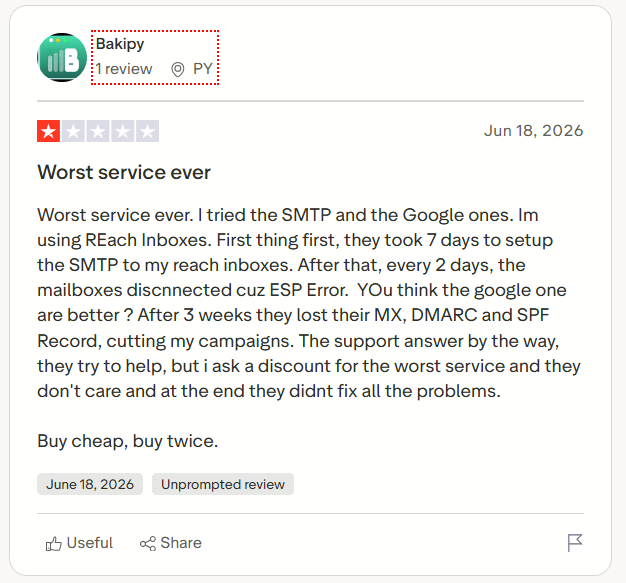
One 1-star reviewer (Bakipy, June 2026) reported mailboxes dropping on an ESP error every couple of days. A disconnected mailbox doesn’t stop your sequence; it just quietly stops sending from that account, so your volume drops without anything obvious breaking, and every fix is a manual reconnect.
2. DNS Records Can Vanish Mid-Campaign, With No Alert
When SPF, DKIM, and DMARC disappear, your emails don’t bounce; they land in spam, so you keep sending into the void. Icemail’s plan cards promise “Real-time monitoring & deliverability alerts” and the help center lists “Deliverability Tools,” but I couldn’t reach any monitoring UI on an empty account, and connecting a domain hands Icemail control of your DNS.
3. SMTP Setup Can Take Days
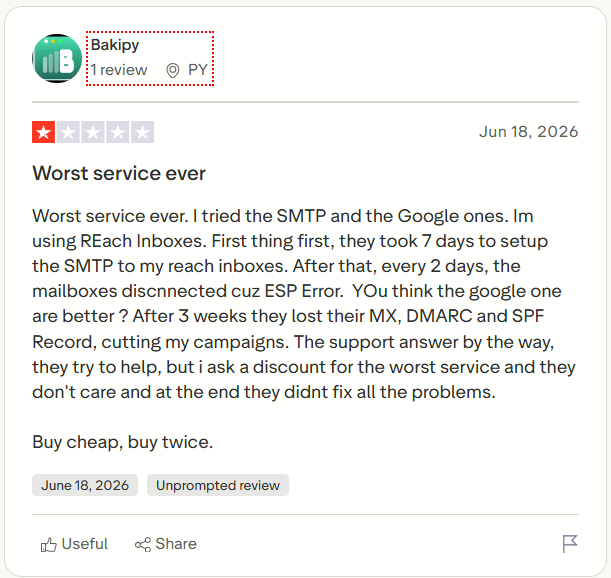
The same reviewer said their SMTP setup took seven days. Google and Microsoft mailboxes are created in bulk, and most agree that part is fast, but SMTP runs on private infrastructure that takes real work. The homepage says 30 minutes, Icemail’s refund policy says around 48 hours, and my IMAP/SMTP tab just showed “No custom plans available.”

4. Deliverability May Fade After 1 to 3 Months
Maildoso’s review cites a tester who ran IceMail SMTP accounts for 60 days and expected only one to three months of strong deliverability before decay set in. It’s second-hand, so treat it loosely, but if it holds, you’re rebuilding mailboxes about twice as often as the usual 3-to-6-month cycle, which adds real cost.
5. Pre-Made Accounts May Carry Reputation Issues
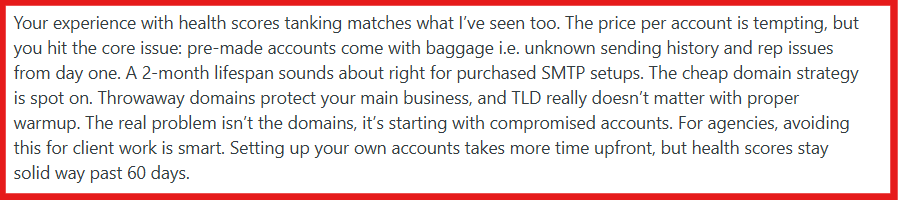
Primeforge’s review argues pre-built accounts can carry reputation baggage and may not last as long as infrastructure you control. A pre-made mailbox was created, warmed, and sometimes used before it reached you, so you can’t see what it sent or whether the domain has been flagged.
7 Best Icemail Alternatives for Cold Email Infrastructure
Here’s what each tool does, why it earned its spot, and who it fits best.
1. Saleshandy
⭐ Best For: Sales teams, agencies, and founders who need scalable cold email infrastructure with managed mailboxes, warm-up, and outreach in one place.
Saleshandy is the Icemail alternative I’d pick when the goal is not just getting inboxes, but actually running cold email campaigns.
Icemail gives you mailboxes. Saleshandy gives you the entire setup around those mailboxes.
You can create Google Workspace, Microsoft 365, and Azure inboxes, get DNS records configured, warm up accounts, check inbox placement, send campaigns, and manage replies without jumping between different tools.

That difference matters because cold email rarely fails. After all, someone couldn’t buy a mailbox. It fails because the mailbox was not prepared properly, deliverability was ignored, or the sending setup became too complicated to manage.
With Icemail, you still need separate tools for warm-up, sending, and monitoring. Saleshandy keeps those pieces together, which means fewer tools to maintain and fewer things that can go wrong.
Why Choose Saleshandy Over Icemail?
Icemail hands you mailboxes and stops there. Saleshandy gives you the mailboxes plus everything you need to actually send from them, which removes most of the problems that show up in Icemail reviews.
Here’s how that maps to the gaps above.
1. Warm-Up Is Included, Not Sold Separately
Every Saleshandy plan comes with unlimited email warm-up, so mailboxes on your own domains get warmed inside the same platform. With Icemail, warm-up only exists if you buy pre-warmed inboxes from their domain pool, and there’s no published method behind it.
2. You Can See Where Your Emails Land
Inbox placement testing is built in and has a free tier with 2 tests a month, so you catch a spam-folder problem and protect your sender reputation before your reply rate tells you. Icemail’s monitoring sits behind a paid per-domain add-on I couldn’t find in the dashboard.
3. Your Mailboxes and Your Sequences Live Together
There’s no exporting, no CSV import, and no second tool to reconnect when something drops. That also means no more disconnected mailboxes silently cutting your daily volume.
4. The Domain Setup Is Handled for You
The Email Infrastructure add-on configures SPF, DKIM, DMARC, and the rest automatically for Google Workspace, Microsoft 365, and Azure mailboxes, with up to 5 mailboxes per domain.
5. You’re Not Paying per Seat
Every plan includes unlimited email accounts, and Scale includes unlimited users and clients, so adding an SDR or a new client doesn’t change your bill. That matters for agencies, since Icemail has no team roles or client access at all.
6. Developer Access When You Need It
Manage mailboxes and outreach programmatically with API, MCP, and CLI access, so you can wire your infrastructure into your own tooling instead of clicking through a dashboard.
Saleshandy Pricing
- From $2.99 per mailbox/month (billed annually)
- $14 per domain/year
- Also available at $3.49/mailbox (Annual Flexi) or $3.99/mailbox (Quarterly)
Where It Falls Short
Two honest catches here. You can’t buy the mailboxes on their own; the Email Infrastructure add-on only comes with an Email Outreach plan. And if you’re just counting the price per mailbox, Saleshandy costs more than Icemail’s cheap headline rate.
My Take
This is the one I’d reach for when consolidation matters more than shaving a dollar off each inbox, because warm-up is already running, testing is a click away, and I’m sending from the same place I bought the mailboxes. You pay a little more per mailbox and a lot less across the four tools you stop renewing.
2. Primeforge
Best For: You, if you sell mostly to US prospects and want Google Workspace and Microsoft 365 mailboxes on US-based IPs.
If most of your prospects are in the US, Primeforge is one I’d point you to. It lets you create and manage Google Workspace and Microsoft 365 mailboxes without doing the setup by hand.
From mailbox provisioning to SPF, DKIM, and DMARC configuration, it covers the infrastructure work needed before launching campaigns.
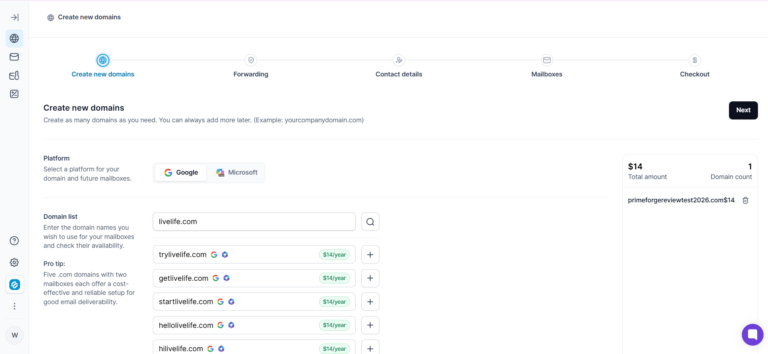
What stands out is its focus on control and customization. You get US-based IPs, ESP matching, plus developer tools like API, MCP, and CLI support, making it easier to build workflows around your sending infrastructure.
Compared to Icemail, which keeps mailbox setup simple, Primeforge fits better when you need more control over how your infrastructure is created, managed, and scaled.
Why Choose Primeforge Over Icemail?
Consider Primeforge if you want more visibility into your mailbox infrastructure and you’re mainly reaching US prospects.
- US-based IP infrastructure: You send from US IPs, which helps keep your setup relevant when your audience is in the US.
- Real Google Workspace and Microsoft 365 mailboxes: You get provider-native inboxes built for outbound, not shared SMTP infrastructure.
- Transparent pricing: You can see mailbox pricing publicly, so it’s easier to estimate your costs before you buy.
- Developer-friendly controls: If you’re technical, the API, MCP, and CLI make it easier to automate how you manage mailboxes.
- Automated DNS setup: SPF, DKIM, and DMARC are configured for you, cutting the manual work of prepping new domains.
Primeforge Pricing
- Mailbox: $4.50 / mailbox/month (annual billing = 2 months free)
- Domain: $14 / year for .com
- Minimum: 10 mailbox slots
Where It Falls Short
- Price scales badly: At roughly $3.50 to $4.50 per mailbox, you’re paying close to twice Icemail’s rate, and it climbs as you add inboxes.
- Setup can miss the 30-minute promise: One reviewer waited three days for mailboxes despite the “up to 30 minutes” claim, so don’t build a launch date around it.
- Missing purchases and slow support: Another buyer said pre-warmed domains never showed up, and separate reviews flag unresponsive support.
- No safety net after provisioning: There’s no burn detection, self-healing, or auto-replacement, so you have to catch failures yourself.
- No SMTP option: You’re limited to Google and Microsoft 365, with no SMTP route to diversify your IPs.
- Strict refunds, and slots billed regardless: You pay for all 10 minimum slots even if you create fewer, with no refund cushion for testing.
My Take
If you’re selling into the US, Primeforge is one of the closest infrastructure swaps for Icemail. Its real edge for you is the mix of US IPs, real Google Workspace and Microsoft 365 mailboxes, and developer access. Just know that once you add separate warm-up and monitoring, your total cost climbs, so I’d only steer you here if infrastructure control matters to you more than the lowest per-mailbox price.
3. Maildoso
Best For: You, if you’re scaling outbound to large mailbox volumes and want lower mailbox costs with built-in monitoring.
If you’re building a large sending setup, Maildoso is worth your attention. It helps teams set up and manage large email infrastructures by handling domain setup, DNS records, mailbox creation, and ongoing maintenance in one place.
Beyond provisioning, it adds tools like SMTP mailboxes, Google Workspace support, IP rotation, mailbox health tracking, and API and MCP access for teams that want more flexibility over their setup.
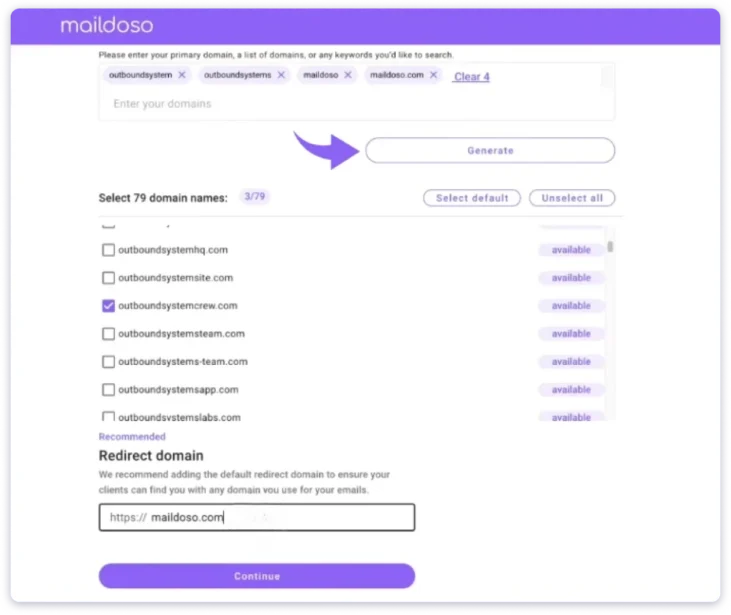
The biggest advantage shows when your infrastructure starts growing. Managing mailbox health, reputation, and configurations manually becomes difficult, while Maildoso gives you monitoring and automation to keep things organized.
Against Icemail, Maildoso feels more focused on scale-heavy operations. Both simplify email infrastructure, but Maildoso is better suited for teams managing larger volumes where automation and monitoring become critical.
Why Choose Maildoso Over Icemail?
Consider Maildoso if you want to scale mailbox infrastructure efficiently without piling on manual management.
- Better economics at scale: Your per-mailbox cost drops significantly as volume grows, which helps if you’re running a large operation.
- Built-in infrastructure monitoring: Health checks, placement testing, and reputation tracking help you catch mailbox issues earlier.
- Automation support: With API and MCP access, you can automate mailbox management and wire it into your workflows.
- Included domain protection: Features like CAPTCHA protection help you reduce unwanted domain exposure.
- Testing flexibility: A 30-day money-back guarantee gives you room to evaluate the setup before you commit.
Maildoso Pricing
- 30 mailboxes: $2.50 / mailbox/month ($75/mo)
- 300 mailboxes: $0.75 / mailbox/month ($225/mo)
- 1,000 mailboxes: $0.49 / mailbox/month ($499/mo)
- Domain: $12 / year (rising to $15 / year from Oct 1, 2026)
- Pricing is monthly per mailbox; no separate annual discount
Where It Falls Short
- Domain reputation concerns: Some users report receiving domains with existing blacklist issues, which can create problems for you before campaigns even begin.
- Support availability: Some reviewers mention slower responses and limited weekend support, so don’t expect fast help on urgent issues.
- Longer commitment: Some plans ask for a three-month minimum, which may not suit you if you’re testing smaller campaigns.
- Initial reputation building: Some users suggest giving mailbox reputation time to stabilize before you send at full volume.
- Dashboard experience: Some reviewers find the interface less polished and harder to navigate.
- Limited Trustpilot presence: There’s more feedback on G2 than Trustpilot, so you’ll find less to cross-check there.
My Take
If you need mailbox infrastructure at scale, Maildoso is one of the strongest cases against Icemail. Its edge for you is the combination of lower per-mailbox pricing, monitoring, and automation. But if you’re a smaller team, I’d weigh the commitment and the domain-reputation reports carefully before you move big campaigns onto it.
4. InboxKit
Best For: You, if you want affordable mailbox infrastructure with monitoring, integrations, and team management built in.
If you like Icemail’s price but wish it did more, InboxKit is worth a look. It gives you a way to create and manage Google Workspace, Microsoft 365, and Azure mailboxes without handling setup by hand, and on top of provisioning, it adds deliverability monitoring, US-based IPs, admin controls, 2FA, and integrations with the sales tools you already use.
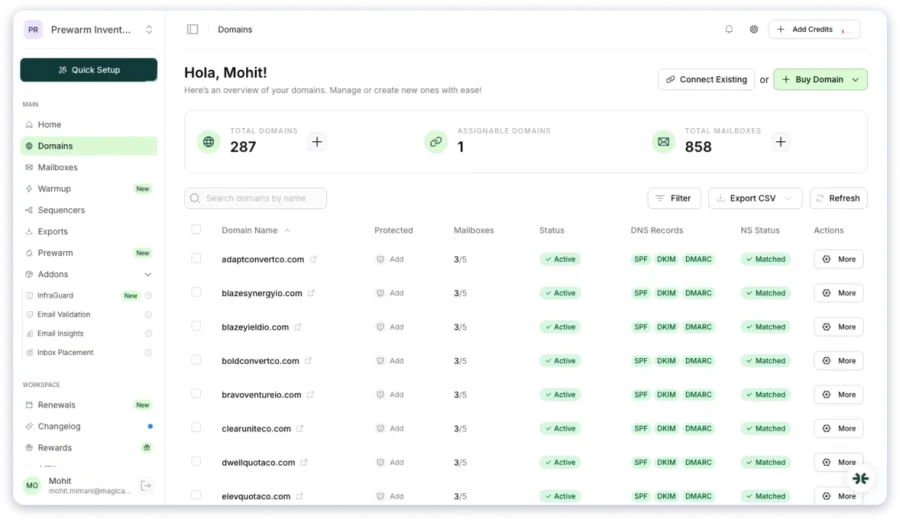
What makes it useful is the layer after mailbox creation. You get ongoing visibility into important signals like inbox placement, DNS health, and blacklist monitoring instead of relying on separate tools to track each part of your infrastructure.
While Icemail focuses on keeping mailbox setup simple, InboxKit gives you a broader management system around those inboxes. It fits better for teams that want affordable infrastructure with added monitoring, collaboration, and operational control.
Why Choose InboxKit Over Icemail?
Consider InboxKit if you want affordable infrastructure but don’t want to manage deliverability tracking separately.
- Monitoring included: You get blacklist, DNS, and placement monitoring, which helps you spot infrastructure issues earlier.
- More integrations: With 24+ native integrations, you can connect mailboxes straight into your existing outbound tools.
- Team-friendly management: Unlimited team members, admin controls, and 2FA make it easier for you to manage access across an agency or larger team.
- Multiple mailbox providers: You can pick Google Workspace, Microsoft 365, or Azure based on what you need.
- Competitive pricing: Annual plans keep your mailbox cost close to Icemail while giving you more built-in features.
InboxKit Pricing
- Google Workspace / Microsoft 365 (annual): $2.50 / mailbox/month (Enterprise tier)
- Professional tier (annual): $3.10 / mailbox/month
- Agency tier (annual): $2.70 / mailbox/month
- Azure tenant: $30 / tenant/month
- Warm-up add-on: $3 / mailbox/month
Where It Falls Short
- Warm-up costs extra: You pay separately for warm-up, which raises your overall cost versus platforms that include it.
- Limited warm-up transparency: The platform doesn’t clearly publish how warm-up works, so you can’t fully judge the method.
- Placement claims need more context: Its inbox-placement claims aren’t backed by publicly available testing, so take them with some caution.
- Short replacement window: The replacement period is shorter than some providers, so you get less coverage if a mailbox goes bad.
- Shared Microsoft infrastructure concerns: Some users have raised concerns about Microsoft mailbox stability.
- Limited public feedback: There’s less independent user feedback than the larger providers, so you have less to go on.
My Take
If you want Icemail’s pricing with more visibility, InboxKit is one of the closest alternatives for you. Its edge is having provisioning, monitoring, integrations, and team controls in one place. Just factor in the extra warm-up cost if you need a complete cold email setup rather than infrastructure alone.
5. Aerosend
Best For: You, if you run an agency or high volume and want managed deliverability with warm-up and monitoring included.
If you’d rather not manage deliverability yourself, Aerosend takes a more hands-off approach. Instead of just handing you mailboxes, it rolls dedicated IP infrastructure, warm-up, placement testing, and burn detection into one service.
You get aged and rotated IPs, managed warm-up before you send, regular placement checks, and monitoring meant to catch deliverability issues before they hit your campaigns.
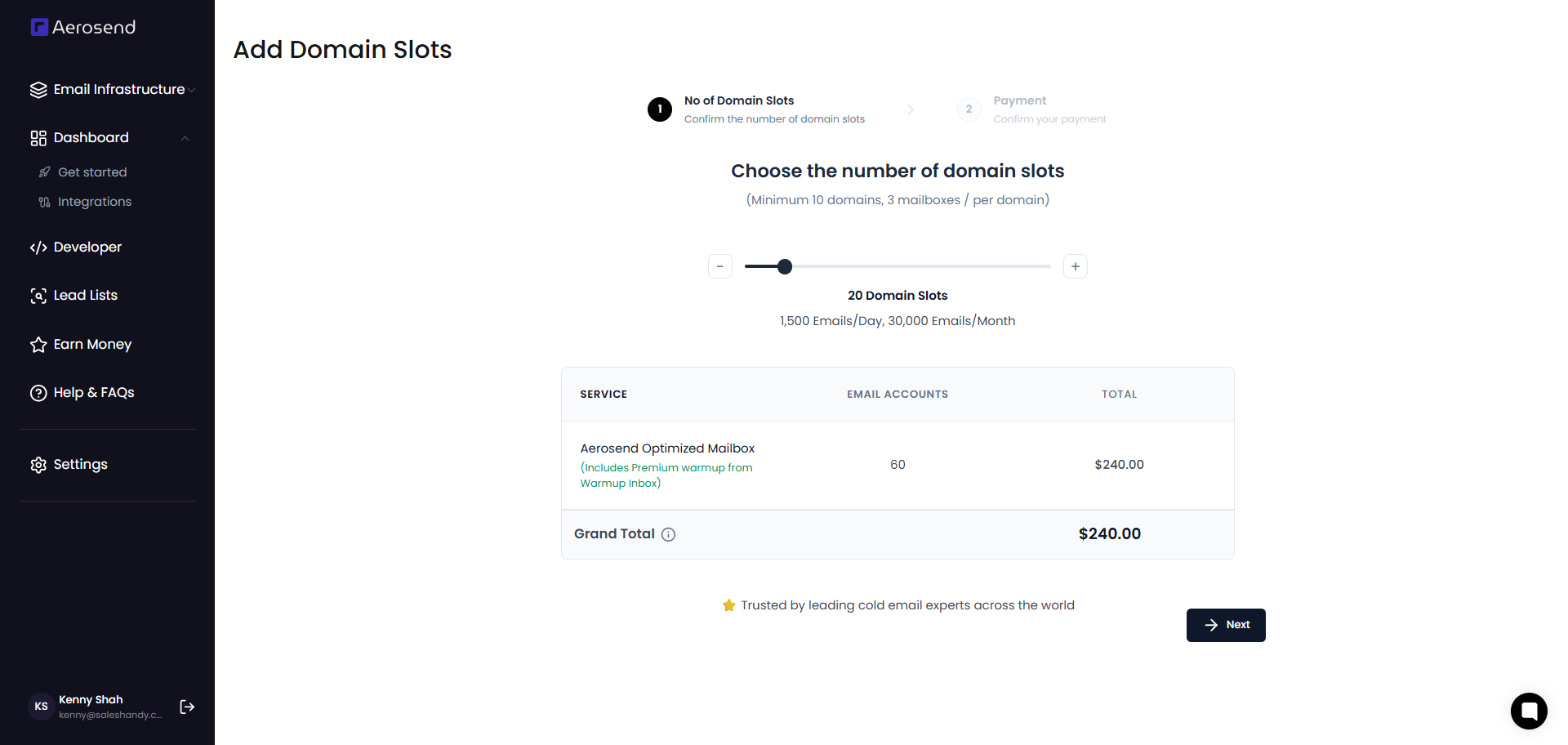
That’s a different deal from a simpler provider like Icemail. Where Icemail focuses on making setup easy, Aerosend is built around managing the ongoing deliverability side for you, which matters more the larger you scale.
Why Choose Aerosend Over Icemail?
Consider Aerosend if you want less manual deliverability work and prefer more of the process handled for you.
- Managed warm-up included: Your mailboxes go through warm-up before campaigns start, so you’re not juggling a separate warm-up tool.
- Deliverability monitoring: Regular placement tests and burn detection help you catch problems before they hurt performance.
- Dedicated infrastructure: Aged, rotated IPs give you a more controlled sending environment than a shared model.
- Domain replacement support: Burned domains can be replaced, so you face less downtime when infrastructure issues hit.
- Performance-focused setup: The platform builds in safeguards aimed at teams running larger operations like yours.
Aerosend Pricing
- Base: $4 / inbox/month
- After 150 inboxes: $2 / inbox/month
- Domain: $12 / year
- Minimum: 30 inboxes ($120/mo)
- Monthly billing only — no annual discount published
Where It Falls Short
- Limited public feedback: Aerosend has a smaller review footprint, so you have less independent feedback to weigh than with established providers.
- Higher starting cost: The 30-inbox minimum makes it harder for you to test the platform on a small scale.
- Longer setup period: The required warm-up means you can’t start sending right away.
- Newer provider: With a shorter history, there’s less long-term performance data for you to lean on.
- Less transparency: You may want more visibility into infrastructure details and monitoring data than it currently shows.
My Take
If you want a hands-off approach to deliverability, Aerosend is a strong pick for you. Its edge is bundling warm-up, monitoring, and infrastructure management into one package. The trade-off you accept is a higher entry cost and less public validation than the more established providers.
6. Zapmail
Best For: You, if you want affordable mailbox infrastructure with built-in warm-up options and more customer validation.
If you want a setup similar to Icemail but with more proof behind it, Zapmail is worth considering. It helps you set up and manage sending mailboxes without handling every part yourself, and gives you Google Workspace and Microsoft 365 mailboxes, pre-warmed options, and separate workspaces to keep your infrastructure organized.
I’d look at Zapmail if your priority is getting campaigns live quickly without dealing with technical setup work. It handles the repetitive tasks around mailbox preparation so you can focus on outreach instead of infrastructure.
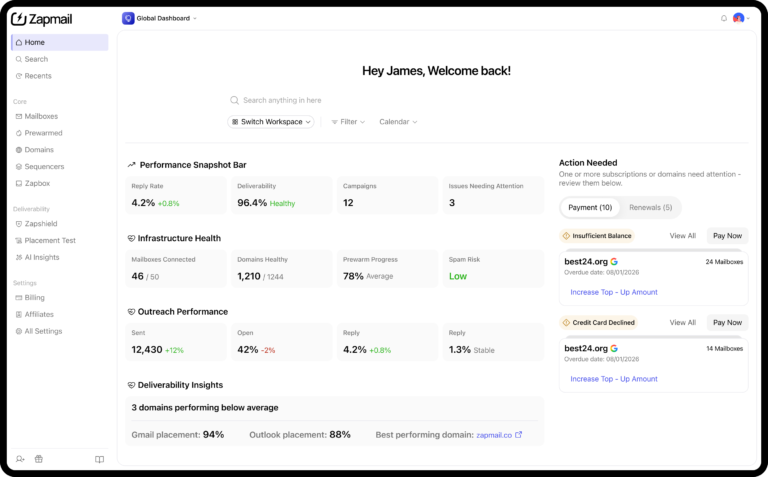
Like Icemail, Zapmail is built around making mailbox setup easier. Where it stands apart is the combination of warm-up options, customer feedback, and a more guided setup experience for teams that want to start sending faster.
Why Choose Zapmail Over Icemail?
Consider Zapmail if you want a similar setup experience but with more visibility and built-in warm-up.
- More customer validation: You get far more Trustpilot feedback than Icemail offers, so you have more to weigh before you commit.
- Built-in warm-up options: Pre-warmed mailbox options help you avoid starting from zero when you launch new campaigns.
- Competitive pricing: Annual plans bring your cost down to around $2.50/mailbox/month, which works if you’re managing multiple inboxes.
- Workspace isolation: Separate workspaces and admin controls per domain help you keep different sending setups organized.
- Quick provisioning: Faster mailbox creation helps you move from setup to sending with less manual work.
Zapmail Pricing
- Starter: $32.50/month (10 mailboxes = $3.25/mailbox on annual)
- Growth: $82.50/month (30 mailboxes = $2.75/mailbox on annual)
- Pro: $249/month (100 mailboxes = $2.49/mailbox on annual)
- Effective annual rate: $2.50 / mailbox/month at scale
- Annual = 2 months free vs. monthly
Where It Falls Short
- Domain management concerns: Some users report domain-related issues after setup, so keep an eye on this if you’re running a large outbound operation.
- IP quality questions: Zapmail’s site markets “US/EU IP accounts only,” but some Trustpilot users dispute that, and one review cited by Aerosend claims the IPs are India-based, so I’d test placement yourself before committing.
- API limits: API access is restricted to the top Pro plan, which may limit you if you’re on a smaller tier.
- No trial or refunds: There’s no free trial or refund, and one reviewer found releasing a Google Workspace difficult when leaving.
- Capped placement-test credits: Credits are limited by plan (3, 10, or 30 a month), which you can outgrow with a large fleet.
- Support and stability reports: Some reviewers mention mailboxes failing soon after setup, plus slow support and bugs.
My Take
Zapmail is one of Icemail’s closest alternatives, since both focus on making infrastructure easier for you to manage. The biggest reasons I’d point you here are the stronger customer validation, included warm-up, and similar pricing. That said, if you want deeper control over DNS, infrastructure, and deliverability monitoring, another provider may fit you better.
7. Inframail
Best For: You, if you run a high-volume Microsoft-based agency and want predictable infrastructure costs.
If you run Microsoft-heavy outbound at volume, Inframail takes a different angle. It gives you unlimited Microsoft 365 and Azure inboxes under a flat monthly fee, so instead of paying per mailbox, you get a fixed setup that includes dedicated IPs, DNS configuration, deliverability monitoring, and mailbox management.
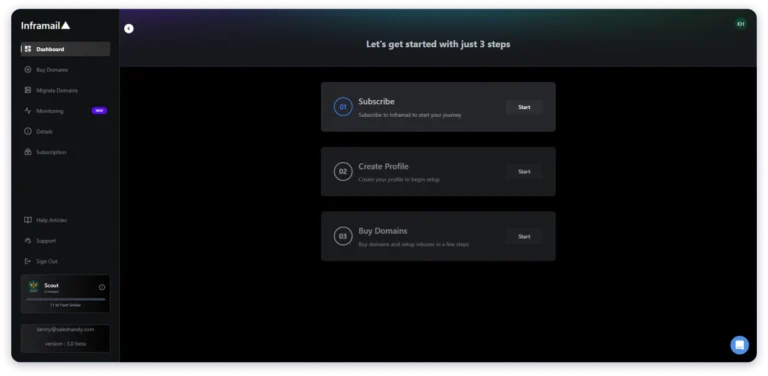
I’d frame it as built for you if you’re an agency or large team running hundreds of inboxes and you want your costs to stay predictable as you scale. Its Microsoft focus fits best if you’ve already standardized around Microsoft accounts.
Unlike Icemail’s per-mailbox pricing, Inframail is about volume economics. The more inboxes you manage, the more the flat fee works in your favor, especially if you don’t need Google Workspace.
Why Choose Inframail Over Icemail?
Consider Inframail if you run large Microsoft outbound campaigns and want your infrastructure costs to stay predictable.
- Unlimited inbox model: Instead of paying per mailbox, you can scale your inbox volume under one fixed monthly plan.
- Dedicated IP infrastructure: Your plan includes dedicated IPs, giving you more control over your sending environment.
- Built-in deliverability tools: A deliverability dashboard and blacklist recovery help you keep an eye on infrastructure health.
- Better economics at scale: If you’re managing large volumes, your per-inbox cost can drop well below traditional mailbox pricing.
- Export flexibility: You can connect your mailboxes to popular outbound tools through standard integrations.
Inframail Pricing
- Unlimited Plan: $147/month — unlimited MS365 inboxes, 1 dedicated IP, 10 domains, 80k emails/mo
- Agency Pack: $327/month — 3 dedicated IPs, 20 domains, 300k emails/mo
- Billed every 28 days (13 invoices/year, not standard monthly). No separate annual plan published.
Where It Falls Short
- Microsoft only: If you want Google Workspace alongside Microsoft and Azure, you’ll find the platform limiting.
- No built-in warm-up: You handle warm-up through external tools, which adds another layer to your setup.
- Infrastructure risk: Some users report account suspensions and deliverability issues when shared environments are affected.
- Support and billing concerns: Some reviews mention cancellation and billing frustrations, so read the terms before you commit.
- Longer ramp-up period: Your dedicated IPs start with no reputation history and need time to build sending trust.
My Take
Inframail is built for you if mailbox volume matters more to you than provider flexibility. The unlimited model can pay off for a large Microsoft-focused agency, but if you’re smaller, you may not see the same value. And if you need Google Workspace, built-in warm-up, or a more flexible setup, another alternative will likely fit you better.
Final Verdict: Which One Is the Best Alternative to Icemail?
After testing Icemail and comparing these 7 alternatives, I would pick Saleshandy for most teams moving away from Icemail.
The reason is simple: Icemail handles mailbox setup well, but challenges usually appear after you start scaling campaigns.
When inboxes disconnect, DNS issues appear, or deliverability drops, you need more than mailboxes. You need monitoring, visibility, and tools that help you fix problems quickly.
That is where Saleshandy stands out. You get mailbox infrastructure, unlimited warm-up, Inbox Radar for placement testing, and campaign sending in one platform.
Instead of managing separate tools for warm-up, monitoring, and outreach, you can handle your complete cold email workflow from one place.
However, the right choice depends on what matters most for your setup. If your priority is the lowest mailbox cost at scale, Maildoso or Inframail are worth considering.
But if you want a complete cold email system without connecting multiple tools together, Saleshandy is the alternative I would choose.
Start your 7-day free trial and build your complete cold email workflow in one place.
FAQs
1. Is Icemail a cold email tool or an infrastructure provider?
It’s infrastructure only. Icemail provisions mailboxes and domains but doesn’t send anything, so the sending happens in its sister product OutreachFox or in whatever sequencer you export to, which means you always need a separate sending tool sitting on top.
2. Does Icemail include email warm-up?
Not for the mailboxes you create yourself. There’s no in-app warm-up dashboard for your own inboxes, and the only warm-up on offer comes baked into the separate Pre-Warmed Up SKU, so for your own domains you’ll need an external warm-up tool.
3. Is Icemail billed monthly or one-time?
Monthly. The marketing reads like a near-one-time buy, but the dashboard runs on a prepaid wallet with monthly renewals, and if the wallet runs dry, the mailboxes get deleted, and reactivation fees apply, so it’s best to treat it as a subscription from the start.
4. Does Icemail offer deliverability monitoring?
Nothing you can access on a standard account. I found no burn alerts, placement testing, or blacklist monitoring in the dashboard, and Aerosend’s review reports the same, so you’ll either add a monitoring tool or pick a provider that bundles it.
5. What is the cheapest Icemail alternative?
On pure per-mailbox cost at volume, Maildoso wins, dropping toward roughly $0.49 at scale. Just remember that cheapest-per-mailbox and cheapest-per-reply aren’t the same thing, and tools that bundle warm-up and monitoring often win on 12-month cost because they head off the incidents that quietly kill pipeline.
6. Which Icemail alternative is best for agencies?
For isolation and alerts, Aerosend, and for consolidating mailboxes, warm-up, testing, and sending under one roof, Saleshandy. Icemail itself is a weak fit for agencies, with no team roles and white-labeling anywhere in the dashboard.
7. Can I export my Icemail mailboxes to Saleshandy?
Not in one click today. Icemail’s pricing page markets “Unlimited Mailbox Export to any Provider” and “30+ platform integrations,” but the actual Export History filter in the dashboard shows 10 destinations: CSV plus 9 named platforms, and Saleshandy isn’t one of them. The workaround is to export a CSV from Icemail and import it into Saleshandy.



 Piyush Patel