

Wait, why are you using 6-7 tools for different sales functions? 🤔
Won’t it be really GOOD to automate your sales workflow with just one tool?
Sounds imaginative?
Well, not anymore. With sales MCP servers, it’s possible! 🤩🤩
You can connect your AI assistant with your sales tools to find leads, update CRM records, build sequences, and even analyze campaigns through simple conversations.
But there’s a problem.
This MCP market is growing quickly, and every tool solves a different sales problem. Some help with prospecting, some manage outreach, while others only give AI access to your existing data.
So it does get overwhelming for you to choose “THE ONE.”
Hence, I tested the 10 best MCP servers for sales teams and broke down:
- What each MCP server can actually do
- Where it fits in your sales workflow
- Honest limitations you should know before connecting one
By the end, you’ll know exactly which MCP server is the match made in heaven for your sales process and automation goals.
So, ready to surf in the sales MCP world of automation?
Together, let’s dive in.
TOC – MCP Servers for Sales
- TL;DR: 10 Best MCP Servers Sales Teams Start Using TODAY
- First, What’s an MCP Server for Sales? (Simple Explanation for Sales Teams)
- So, How Is an MCP Server Different From an API?
- 10 Best MCP Servers for Sales in 2026 (Reviewed by Use Case)
- How to Choose the Right MCP Server for Your Sales Team
- 3 Mistakes You Must Avoid When Connecting MCP Servers to Your Sales Stack
- Moment of Truth: Which Sales MCP Server Should You Choose?
- FAQs About MCP Servers for Sales
TL;DR: 10 Best MCP Servers Sales Teams Start Using TODAY
- Saleshandy MCP: Best for full-stack cold outbound. Just by chatting, find prospects from an 852M+ B2B contact database, build sequences, manage outreach, monitor deliverability, and track campaign performance from one MCP connection. Starts at $34/month.
- Apollo MCP: Best for contact data and sequence enrollment.
- Clay MCP: Best for AI-powered lead enrichment.
- ZoomInfo MCP: Best for enterprise B2B intelligence.
- HubSpot MCP: Best for CRM automation.
- Salesforce MCP: Best for enterprise RevOps workflows.
- Instantly MCP: Best for cold email campaign management.
- Smartlead MCP: Best for email deliverability monitoring.
- Outreach MCP: Best for Outreach users.
- Lemlist MCP: Best for multichannel outreach.
First, What’s an MCP Server for Sales? (Simple Explanation for Sales Teams)
Think of an MCP like a USB, but for software.
It stands for Model Context Protocol. In simple terms, MCP is a universal connector between your AI assistant and business tools.
An MCP server acts as a bridge between AI assistants and your sales ecosystem (such as CRMs, enrichment data, and outreach platforms).
It allows AI tools like Claude or ChatGPT to search databases, run data enrichment, manage CRM pipelines, and trigger outbound campaigns directly through conversational prompts.
These sales MCP servers give the AI permission to read information and, in some cases, take action.
You → Tell AI what you need → AI → Calls MCP server → Your Sales Tool → Returns data or completes the action
For example:
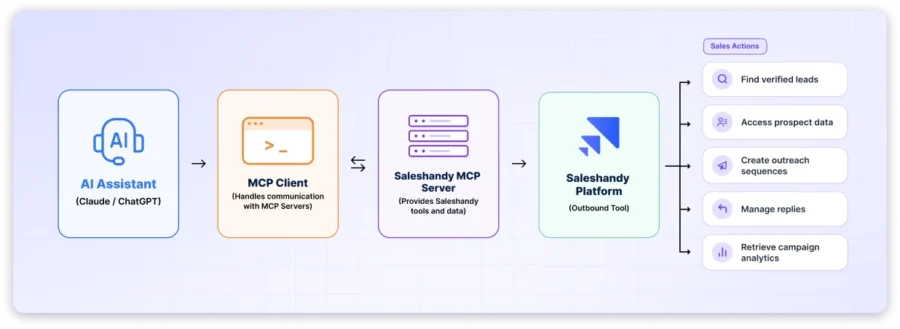
One important thing I want you to know: See, not every Sales MCP server can take action.
- Read-only MCP Servers: They let the AI pull data (pipeline status, contact details, analytics) but can’t create records, enroll prospects, or launch campaigns.
- Read-Write MCP Servers: The AI can both retrieve information and execute tasks like building sales sequences, adding prospects, or updating deal stages.
So, before you connect anything, check whether the server offers read access, write access, or both.
What Can a Sales MCP Server Actually Do?
Here’s how Sales MCP servers can help teams automate their tedious manual tasks, such as the following:
- Finding new prospects: Search contact databases by role, company size, industry, funding stage, and dozens of other filters. Pull verified emails and phone numbers.
- Enriching and researching leads: Add firmographic data, tech stack info, funding history, and buying signals to existing contacts.
- Updating CRM records: Create, read, update, or delete contacts, companies, deals, and activities in your CRM without opening it.
- Building and sending outreach: Create email sequences, enroll prospects, set sending schedules, and launch campaigns through conversational commands.
- Checking deliverability and email health: Monitor bounce rates, sender reputation, warm-up progress, and inbox placement across your sending accounts.
- Prepping for sales calls: Pull recent account activity, deal history, and touchpoint summaries so you’re ready before the call starts.
So, How Is an MCP Server Different From an API?
An API is how software talks to other software. It requires code, documentation, and maintenance. Developers use APIs to build integrations between two specific systems.
Whereas an MCP server is a standardized protocol invented by Anthropic in November 2024 specifically for AI assistants.
Instead of a developer writing custom code for each connection, the AI can discover available tools and use them through plain language.
With MCP, sales teams don’t need to build anything.
You connect to the MCP server, authenticate, and start talking to your AI in natural language. The AI handles the tool calls for you.
10 Best MCP Servers for Sales in 2026 (Reviewed by Use Case)
I tested the top MCP servers for sales teams based on what they actually help you do, from finding prospects and managing CRM data to running outreach and tracking campaign performance.
Here are the tools worth considering based on your sales workflow.
1. Saleshandy MCP: Best for Full-Stack Cold Outbound (Prospecting + Outreach + Deliverability)
Does your outbound workflow live across nine tabs and five tools?
If yes, then Saleshandy’s MCP is the solution you were waiting for. It’s an all-in-one, easy-to-use workflow for your end-to-end outbound activity.
Of the 10 tools, Saleshandy stood out because it’s the only option in this list where your AI can go from “find me 50 CTOs” to “show me which sequences are bouncing” without switching a single connection.
So, Exactly Why 25,000+ Chose Saleshandy MCP?
Most MCP servers on this list solve one piece of the outbound riddle.
Unfortunately, that means you have to spend on 3 to 4 separate MCP connections just to run a basic cold outbound workflow.
And it’s not just costly but also heavily time-consuming.
Saleshandy MCP exactly solves that problem by covering the entire outbound operation through one connection.
So, just with a simple and plain prompt, you can:
- Find prospects from 852M+ B2B contact database,
- Build and manage multichannel sequences,
- Import and segment prospects,
- Monitor sender health and warm-up progress,
- Check deliverability across all sending accounts
- Pull campaign performance
Empowering and super easy, isn’t it?
You won’t need any prior technical knowledge; just have absolute clarity on what you want, and your connected AI Assistant will do it through Saleshandy MCP.
But let’s get into the details of this magical power of MCP, shall we?
Here’s what you can do with Saleshandy’s Sales MCP:
- Finding prospects: Search 852M+ contacts and 42M+ company profiles using 70+ filters. Pull verified emails and phone numbers without leaving your AI conversation.
- Enriching leads: Use waterfall enrichment to verify and fill in contact data from multiple sources. You only pay for verified results.
- Building sequences: Create multi-step email sequences using the AI Sequence Copilot with custom intervals, sending windows, and daily limits through a single conversational prompt.
- Managing replies: Track which prospects opened, clicked, or replied. Move them between sequences, tag them, or remove bounced contacts without opening the app.
- Reviewing performance: Pull campaign analytics (opens, clicks, replies, bounces) and compare sequence performance side by side. Spot underperforming sequences and sender accounts before they hurt your results.
How to Connect Saleshandy MCP:
Connecting Saleshandy MCP with Claude is honestly a piece of cake.
The setup just takes under 5 minutes. No coding knowledge is required.
- Step 1: Sign in to your Saleshandy account at my.saleshandy.com
- Step 2: Go to Settings → API Key and click Create API Key
- Step 3: Copy your key and store it somewhere safe (it’s shown only once)
- Step 4: Open your AI client (Claude Desktop, ChatGPT, Cursor, VS Code, n8n, or any MCP-compatible client)
- Step 5: Add a new MCP server with the endpoint: https://mcp.saleshandy.com/mcp/YOUR_API_KEY
- Step 6: Test with a simple prompt: “List my active sequences in Saleshandy”
That’s it, hooray!! Your AI assistant now has full access to your Saleshandy workspace.
Want to explore the setup in detail? Then check this Full MCP setup guide.
Key Capabilities for Sales Teams:
- Sequence Automation
Build multi-step email sequences with custom intervals, sending windows, and daily limits through conversation. Clone high-performing sequences for A/B testing without manual setup. - Prospect Management
Import prospects from CSV or direct entry, tag and segment them, and enroll them into live sequences. Transfer prospects between sequences or remove bounced contacts in bulk. - Deliverability Monitoring
Monitor sender reputation, warm-up scores, inbox placement, bounce rates, and deliverability flags across every connected sending account. Catch infrastructure problems before they impact campaigns. - Campaign Analytics
Pull campaign analytics across all active sequences. Compare open rates, reply rates, and bounce rates side by side to find what is working.
Honest Limitations I Found in Saleshandy:
Saleshandy gives you 100 FREE AI credits on signup, which I felt was enough to build and test a few sequences and see how the AI Copilot fits into your workflow.
But a few users have asked for a bit more free AI credits in the free version and 14 days trial period.
Pricing:
Starts at $34/month (annual billing).
Note: MCP access is included on all plans, including the 7-day free trial. No credit card required to start.
2. Apollo MCP: Best for Contact Database + Sequence Enrollment
Why is Apollo MCP at #2?
It was actually Apollo’s fast setup, 240M+ database, and 40+ MCP actions that ranked it #2.
Plus, Apollo uses OAuth, so you sign in through your browser, and you’re connected. So, no API key, no JSON config, no developer needed.
With Apollo MCP, you can search prospects, enrich records, create contacts, build sequences, send one-off emails, and manage tasks.
How to Connect Apollo MCP:
- Step 1: Add this endpoint to your AI client: https://mcp.apollo.io/mcp
- Step 2: Complete the browser-based OAuth flow. That’s it.
Note: For headless setups (n8n, cron jobs, CI pipelines), use an API key in the X-Api-Key header instead. Important: It must be a master key. Scoped keys get rejected with a 403.
Key Capabilities for Sales Teams:
- Search 240M+ contacts by role, seniority, industry, company size, tech stack, and hiring signals
- Enrich records with verified emails and phone numbers (credits apply)
- Build and improve sequences, generate variants for different personas, and enroll prospects
- Send one-off emails with custom To, Cc, and Bcc directly from your AI client
Honest Limitations I Found:
Here’s a thing most guides won’t tell you:
People search and enrichment are two separate actions in Apollo MCP. Search finds prospects but doesn’t return emails or phone numbers. You need a separate enrichment call for that, and each one costs credits.
Also, AI clients cache Apollo’s tool list and don’t auto-refresh. If a tool stops showing up or a new action doesn’t appear, disconnect and reconnect the server. I ran into this twice during testing.
Free accounts registered with a personal email can’t use search or enrichment at all. You need a work email.
- No deliverability monitoring.
- No sender health checks.
- No warm-up visibility.
Apollo covers data and engagement; infrastructure is on you.
Pricing:
- Paid plans start at $59/user/month. MCP access included at no extra cost.
For high-volume teams or agencies, it’s worth comparing with Apollo.io alternatives that don’t charge per seat.
3. Clay MCP: Best for Complex Data Enrichment Workflows
Why Clay MCP is at #3?
What I loved most about Clay is its data layer, which I found simply the best.
The key difference from Apollo or ZoomInfo: Clay doesn’t just query one database. It checks across 200+ vendors until it finds a verified email or phone number.
I think that’s how it gives higher match rates.
But there was one aspect I didn’t like very much:
- Clay MCP is only as good as what your Ops team has already built inside Clay.
- If you don’t have pre-configured tables or Functions? The MCP returns very little.
How I Connected Clay MCP:
Seriously, it was way-way easy than I thought.
Clay uses OAuth. You just need to sign in and connect through ChatGPT, Claude, or Codex.
No API key or complicated JSON config.
Note You Need to know: People Search returns up to 1,000 results per query. Company search and advanced enrichment actions require higher-tier plans.
Key Capabilities for Sales Teams:
- Search Clay’s proprietary people and company database by ICP criteria in natural language
- Run multi-source waterfall enrichment across 200+ data providers.
- Trigger Ops-built Clay Functions (lead scoring, account research, personalization workflows) without opening Clay
- Push enriched, deduplicated contacts directly to your sequencer or CRM with Ops-defined write rules
Honest Limitations I Found in Clay’s MCP:
Yes, Clay MCP is a data enrichment powerhouse, but not an outbound execution tool like Saleshandy.
So, it can’t build email sequences, manage campaigns, or track deliverability. You need a separate tool for that.
And that’s the major limitation. That’s why many people pick Saleshandy over Clay
Plus, I wasn’t able to revoke an individual user’s MCP connection from the admin panel without dropping their credit limit or removing them entirely.
I realize that it’s a gap for teams serious about access control.
Pricing:
Paid plans start at $54/month (Launch, annual billing). (People search, phone enrichment, and buyer’s signal tracking unlock on paid plans.)
You Need to Know About Clay’s Pricing: It’s credit-based. Cost scales with which enrichment providers your workflows use.
4. ZoomInfo MCP: Best for Enterprise B2B Data Access
Let me be brutally honest with you first: If your team already pays for ZoomInfo, this MCP is worth connecting.
Why is ZoomInfo MCP at #4?
The data quality is genuinely impressive. Verified contacts, buyer intent signals, technographic data, AI-ranked contact recommendations, and even conversation intelligence from past calls and meetings.
I also liked how it surfaces Buying Signals like leadership changes, funding rounds, layoffs, product launches, and expansions, just like Saleshandy. That’s context most other MCP servers on this list simply don’t have.
But here’s the thing I couldn’t get past:
- It’s strictly read-only. 😢😢
- You can pull data all day, but you can’t push it anywhere. No CRM write-back, no sequence enrollment, no outbound actions. Once your AI builds a list, you’re still copy-pasting it into your pipeline manually.
How I Connected ZoomInfo MCP:
Three steps, and it took me under 7 minutes.
- Step 1: Open your AI client’s connector store (Claude, ChatGPT, Perplexity, or Replit)
- Step 2: Find ZoomInfo in the list and enable it
- Step 3: Sign in with your ZoomInfo credentials. OAuth handles the rest.
Key Capabilities for Sales Teams:
- Deep & accurate search by industry, headcount, revenue, tech stack, and growth signals
- Get AI-ranked contact recommendations and lookalike companies based on your best accounts
- Pull conversation intelligence from past calls, meetings, and emails to prep for outreach
Honest Limitations I Found in ZoomInfo’s MCP:
The read-only restriction is a dealbreaker for teams that want AI to actually do things, not just look things up.
What’s the point if you can find 50 perfect prospects, but can’t enroll them in a sequence, update your CRM, or trigger any outreach from the MCP?
I also noticed that in ChatGPT, you have to manually activate the ZoomInfo connector at the start of every new conversation. It doesn’t persist across sessions. Small thing, but it adds up fast.
The credit consumption risk is real too. If you prompt something broad like “enrich all mid-market SaaS companies you just found,” the AI can fire off multiple bulk enrichment calls simultaneously.
I’ve seen people burn through their credit package way faster than they expected.
And honestly, the pricing makes this practical only for teams already on a ZoomInfo enterprise contract. There’s no self-serve tier for this.
Pricing:
- Enterprise pricing only. No public self-serve plans. You need an active ZoomInfo subscription with bulk data credits.
5. HubSpot MCP: Best for CRM Read and Write Access
If your team lives in HubSpot, this is the most useful CRM MCP connection you can add. Period.
Why I Kept HubSpot at #5?
Let me start by breaking a common myth: HubSpot isn’t just a data lookup tool.
HubSpot’s MCP gave me full read and write access to CRM objects. I was able to pull live deal context, log calls, update pipeline stages, create records, and manage campaigns without opening HubSpot once.
But I found the setup a bit more complex than Saleshandy, Apollo, or Clay.
Here’s How I Connected HubSpot MCP:
- Step 1: Go to Development → MCP Connectors in your HubSpot account
- Step 2: Click Create MCP connector. Add your name, redirect URL, and description
- Step 3: HubSpot generates your client credentials (client ID and secret)
- Step 4: Connect your AI client to https://mcp.hubspot.com using those credentials
- Step 5: Complete the OAuth flow (PKCE required) and authorize your account
I want you to know this: The account admin needs to connect first before other users can. And if HubSpot adds new tools later, existing users need to reinstall the connector to get the updated permissions.
Key Capabilities for Sales Teams:
- Search, create, and update contacts, companies, deals, tickets, and custom objects through natural language
- Log calls, emails, meetings, and notes directly from your AI conversation
- Pull deal history, recent activity, and pipeline status for meeting prep
- Query CRM data using SQL-like syntax with filters, aggregation, and sorting
Honest Limitations I Found in HubSpot’s MCP:
Unlike Saleshandy and Apollo, HubSpot has no prospecting database, no contact enrichment, and no cold email sequences. You can manage what’s already in your pipeline, but you can’t fill it.
I also noticed that the SQL-style query tool doesn’t support joins, subqueries, or association traversal.
So if you want something like “show me all deals associated with contacts who opened my last campaign,” you’ll hit a wall. You’ll need to run multiple queries manually.
And some of the more advanced features (lead objects, AEO analytics, quote management) are gated behind Pro or Enterprise subscriptions. Smaller teams on free or Starter plans won’t get the full experience.
Pricing:
- HubSpot MCP is included with your HubSpot subscription at no extra cost. Free CRM tier available.
- Some MCP tools require Pro or Enterprise subscriptions (lead objects, AEO, quotes).
- The MCP server is open-source (MIT license) for developers building custom integrations.
6. Salesforce MCP: Best for Enterprise CRM and RevOps Workflows
Why Salesforce MCP is at #6?
I’ll be honest. This one isn’t built for your average SDR.
After using it, I’m sure it’s built for RevOps teams and admins who manage complex Salesforce orgs and want to give AI secure access to that data.
What I respected about it: the security model is rock solid.
Every MCP transaction runs as the authenticated user. Your existing CRUD permissions, field-level security, and sharing rules all apply automatically.
If a rep can’t see a field in Salesforce, the AI can’t see it either. I think that’s how enterprise governance should work 🔒
Plus, the capability set is also wider than most people realize. You’re not just reading records.
- You can create and update contacts, deals, and tickets.
- Run SQL-style queries.
- Trigger Flows and Apex actions.
- Even access Tableau analytics and prompt templates.
How I Connected Salesforce MCP
- Step 1: Go to Setup → API Catalog → MCP Servers and enable the server you need
- Step 2: Create an External Client App with mcp_api and refresh_token scopes
- Step 3: Connect your AI client (Claude, ChatGPT, Cursor) using OAuth with PKCE
- Step 4: Test with a read-only server like platform/subject-reads in a sandbox first
⏱️ Expect 15 to 30 minutes for the full setup, and Admin permissions are required.
Key Capabilities for Sales Teams:
- Pull account history, open opportunities, recent cases, and stakeholder maps into one AI conversation for meeting prep
- Create and update contacts, deals, tickets, and custom objects without opening Salesforce
- Run SQL-style queries against your CRM data using natural language
- Trigger custom Flows and Apex actions directly from your AI client
Honest Limitations I Found in Salesforce’s MCP:
Okay, let’s start with a major limitation.
Salesforce is a RevOps and admin tool first; frontline reps won’t set this up themselves.
If your team doesn’t have a Salesforce admin who can configure MCP servers, create client apps, and manage OAuth scopes, this won’t get off the ground.
I also noticed that the AI doesn’t understand your custom business logic by default. 🚩
If you have complex discounting rules, mandatory fields before stage advancement, or approval workflows, the raw MCP tools can bypass or misinterpret them unless your admin has specifically wrapped that logic in custom Apex tools.
High-volume use also concerned me. Every AI query hits your Salesforce API limits.
And there’s no prospecting database, no email sequences, no deliverability tools like Saleshandy.
My honest take after using it: Salesforce MCP is purely about working with data that’s already in your CRM.
Pricing:
- Requires Enterprise Edition or above; no additional cost for MCP access.
- Available on all Enterprise Edition orgs as of April 2026.
- No self-serve or free tier. You need an existing Salesforce Enterprise subscription.
7. Instantly MCP: Best for Cold Email Campaign Management
Why Instantly MCP is at #7?
See, if you already run cold email campaigns in Instantly, this MCP server turns your AI into a campaign operator.
I could create campaigns, manage leads, pull analytics, check sending account health, and pause underperforming sequences, all from Claude without opening the Instantly dashboard.
What I found most useful: the AI can scan replies across all your campaigns, flag “out of office” or “no longer with company” responses, and pause those leads automatically.
That hygiene step alone saves hours every week for teams running volume.
It exposes 38 tools across six categories. That’s a solid surface area for email-only workflows.
But here’s what held it back for me: it’s email-only. 😢
- No prospecting database
- No LinkedIn
- No calling.
How I Connected Instantly MCP:
This one requires more technical comfort than Saleshandy or Clay. You need Python 3.10+ and command-line access.
- Step 1: Generate your API key from Settings → Integrations → API in Instantly
- Step 2: Clone the MCP server from GitHub: git clone https://github.com/bcharleson/Instantly-MCP.git
- Step 3: Install with pip install -e .
- Step 4: Add the server config to your Claude Desktop JSON file with your API key
- Step 5: Restart Claude Desktop and test with: “What campaigns do I have running?”
⏱️ It took me about 12 minutes, but it was because I was comfortable with a terminal. It may take longer for you if you’re not.
Key Capabilities for Sales Teams:
- Create new campaigns with configured sequences, schedules, and daily sending limits through conversation
- Add leads to campaigns, update lead status (interested, meeting booked, out of office), and manage personalization variables
- Monitor sending account health, warm-up progress, and bounce rates across all connected inboxes
- Pull campaign analytics and compare performance across multiple workspaces in seconds
Honest Limitations I Found in Instantly’s MCP:
The biggest bitter gap: this MCP server is community-maintained 🛠️. It’s not Instantly’s official product.
That means no guaranteed updates, no SLA, and if the maintainer stops updating it, you’re on your own. For production use, that made me hesitant.
Its setup is more technical than most tools on this list.
And the API rate limits are shared across your entire workspace. If you’re already running other integrations that hit the Instantly API, the MCP server competes for the same quota.
Catch: During high-volume campaigns, I saw 429 errors when prompting too aggressively.
Pricing:
- Requires Growth plan or above. Starts at $30/month (annual billing).
- MCP access is included with API-enabled plans. No extra cost per API call.
- Free trial available, but API access is limited to paid plans.
If you’re evaluating email-only tools, see how Instantly compares in our Instantly alternatives breakdown.
8. Smartlead MCP: Best for Email Deliverability Diagnostics
Why Smartlead MCP is at #8?
Smartlead‘s MCP server impressed me with one thing: deliverability depth.
Other than Saleshandy, no other MCP server on this list goes as deep into email infrastructure diagnostics.
I could ask Claude to audit my sending accounts, surface MTA-level bounce reasons across campaigns, flag disconnected mailboxes, and check warm-up progress.
They also claim 116+ tools, which makes it the most tool-heavy outbound MCP server I tested.
But the setup tripped me up. This one requires Node.js and manual JSON configuration. It only supports SSE transport (Server-Sent Events), and right now it’s limited to Claude Desktop. No ChatGPT, no Cursor, no Perplexity.
How I Connected Smartlead MCP:
- Step 1: Go to your Smartlead Dashboard → Settings → API Keys
- Step 2: Generate and copy your API key
- Step 3: Install Node.js (LTS version) if you don’t have it
- Step 4: Open your Claude Desktop config file and add the Smartlead MCP JSON block with your API key
- Step 5: Restart Claude Desktop and test with: “Audit my sending account health”
⏱️ Under 5 minutes if you have Node.js. Longer if you don’t.
Key Capabilities for Sales Teams:
- Surface MTA-level bounce reasons across all campaigns. Find out exactly why emails are bouncing, not just that they are
- Audit sending account health and flag disconnected or underperforming mailboxes before they tank your campaigns
- Monitor warm-up progress across all connected inboxes in one prompt
- Pull campaign analytics and compare performance across multiple workspaces
Honest Limitations I Found in Smartlead’s MCP:
The Claude Desktop restriction is the biggest friction point 🖥️. If your team uses ChatGPT, Cursor, or any other AI client, Smartlead MCP isn’t an option right now.
It’s also email-only. No LinkedIn, no calling, no multichannel anything.
And the Node.js requirement adds a technical step. Apollo and Clay let you sign in through a browser. Smartlead needs you to install a runtime, edit a JSON file, and restart your client. Not hard for developers, but a blocker for most sales teams.
Pricing:
- Starts at $32.50/month on an annual billing plan.
- MCP access is included with paid plans, and an API key is required.
For a full comparison of deliverability-focused tools, check out Smartlead alternatives that offer broader AI client support.
9. Outreach MCP: Best for Existing Outreach Customers
Why is Outreach MCP at #9?
Outreach MCP let me search prospects, pull Kaia call transcripts, access email engagement history, and ask natural language questions about deal status.
I think it’s useful for meeting prep and pipeline visibility.
What stood out to me was the conversational intelligence tools.
I asked Claude, “What objections did Acme raise in our last three calls?” and it pulled the actual transcript data. That’s context no other outbound MCP on this list provides.
But the barrier to entry stopped me cold 🚧
You need the Amplify add-on package on top of your existing Outreach seat licenses. Without it, the MCP toggle is greyed out in your admin settings.
How I Connected Outreach MCP:
- Step 1: Your admin enables MCP Server in Administration → Org Info → MCP Server toggle
- Step 2: Connect through Claude, ChatGPT, Microsoft Copilot, or Gemini
- Step 3: Authenticate with your Outreach credentials through the browser-based OAuth flow
- Step 4: Test with: “Help me prepare for my next call with [account name]”
A Note You Need to know: Admin must enable MCP first. And the admin must have Amplify active with credits. No Amplify = no MCP access.
Key Capabilities for Sales Teams:
- Search prospects, accounts, and opportunities with natural language. Ask deal-level questions and get answers grounded in your CRM data
- Pull Kaia call transcripts, meeting summaries, and email engagement history for meeting prep
- Create new sequences, add prospects to them, and manage tasks from conversation
- Ask pipeline intelligence questions like “What are Contoso’s concerns and how should I handle them?”
Honest Limitations I Found in Outreach’s MCP:
The Amplify paywall is the elephant in the room.💰
You can’t use Outreach MCP without it. And since Outreach doesn’t publish Amplify pricing, I can’t even tell you what it costs. You’ll need to ask your AE. For most teams, that’s enterprise-level pricing on top of already expensive per-seat licenses.
The biggest surprise: you can’t update existing records through MCP.
Outreach deliberately disabled edit capabilities because LLMs can have unpredictable behavior when modifying records. You can create new records and delete them, but you can’t update a deal stage, change a prospect’s status, or edit account details.
Pricing:
- Requires an active Outreach subscription plus the Amplify add-on package. Enterprise-level pricing, not publicly listed.
- Contact your Outreach AE for Amplify pricing.
- Once enabled by an admin, MCP is available to all licensed users at no additional per-user cost.
If Outreach’s enterprise pricing is out of reach, explore Outreach alternatives that offer MCP access without add-on paywalls.
10. Lemlist MCP: Best for Multichannel Sequence Building
Why Lemlist MCP is at #10?
Lemlist‘s MCP is one of the more complete options I tested.
It gives 40+ actions covering lead search, enrichment, multichannel sequence building (email + LinkedIn + calls + SMS), campaign management, and analytics.
That’s, I think, a wider surface than Instantly or Smartlead.
What I liked most: it’s one of the few MCP servers that handles both prospecting and multichannel execution in one connection.
I could search Lemlist’s 650M+ lead database, enrich contacts with verified emails and phone numbers, build sequences with email and LinkedIn steps, and launch campaigns.
The setup was also refreshingly simple.
How I Connected Lemlist MCP:
- Step 1: Go to your Lemlist workspace settings and generate an API key
- Step 2: Open your AI client (Claude, Cursor, or Windsurf)
- Step 3: Add the Lemlist MCP server URL with your API key
- Step 4: Test with: “Find founders hiring SDRs in Germany”
⏱️ Under 5 minutes. Really faster setup on this list than Apollo.
Key Capabilities for Sales Teams:
- Search 650M+ leads by role, industry, company size, tech stack, hiring activity, and intent signals
- Enrich contacts with verified emails and phone numbers directly from conversation
- Build multichannel sequences covering email, LinkedIn (invites, messages, voice notes), calls, and SMS through a single prompt
- Pull campaign analytics, find underperforming steps, and optimize sequences while they’re running
Honest Limitations I Found in Lemlist’s MCP:
ChatGPT support is still limited. Most of my testing worked smoothly on Claude Desktop and Cursor, but ChatGPT integration had rough edges.
If your team lives in ChatGPT, this isn’t fully there yet.
And the per-user pricing adds up fast for teams. At $55/user/month (Email plan, annual), a 5-person team is already at $275/month before credits for enrichment, phone numbers, or intent signals.
Compare that to Saleshandy, where 5 users on Starter costs $34/month total with no per-seat charges.
For a side-by-side on pricing and features, see our Lemlist alternatives guide.
Pricing:
- Email plan: $55/user/month (annual). Unlimited users and email senders. MCP included.
- Multichannel plan: $87/user/month (annual). Adds LinkedIn, SMS, calling, and WhatsApp.
- 14-day free trial. No credit card required. MCP access included during trial.
How to Choose the Right MCP Server for Your Sales Team
With 10 options on the table, the last thing you need is analysis paralysis.
Here are five questions that cut through the noise.
1. Does It Connect to Your Existing Tools?
Start here. If your team runs HubSpot, get the HubSpot MCP server.
If you live in Salesforce, start there. The best MCP server is the one that plugs into the tools you already use, not the one with the longest feature list.
If you’re running cold outbound and want one connection that covers the full workflow (finding leads, building sequences, managing deliverability, tracking replies), Saleshandy’s MCP gives you that without needing 3 to 4 separate servers.
2. Can It Do What Your Team Actually Needs?
Capabilities vary wildly. Some servers are read-only (they pull data but can’t take action). Others are read-write (they can create records, build sequences, and enroll prospects).
Before connecting, ask: does my team need the AI to look up information, or does it need to execute tasks? If execution matters, confirm the server supports write access for the specific actions your workflow requires.
3. Is Your Data Safe?
This matters when the MCP server has write access to your CRM or outreach platform. Check three things:
- Does the server use OAuth or API key authentication?
- Can you control which permissions the AI has (read-only vs. full access)?
- Is the server maintained by the vendor (official) or by a third-party community?
Official, vendor-maintained servers are generally more trustworthy for production use. Scoped permissions (start with read-only, expand as needed) reduce risk.
4. Is It Reliable and Easy to Set Up?
Some servers take 2 minutes to connect. Others need Node.js, CLI tools, and manual JSON configuration. If your team doesn’t have a developer on hand, prioritize servers with OAuth-based setup that require nothing more than a browser sign-in.
Also consider: who maintains the server? Vendor-official servers get updates and bug fixes. Community-maintained servers may not.
5. Is the Business Value Worth It?
A fair question. MCP is useful, but it’s not magic. If your team sends 50 cold emails a week, the time savings from an MCP connection might not justify the setup. If your team runs 500+ prospects across multiple sequences and CRM systems, the productivity gain is significant.
The real ROI comes from eliminating the tab-switching, CSV exporting, and manual copy-pasting that eats up 2 to 3 hours of an SDR’s day.
3 Mistakes You Must Avoid When Connecting MCP Servers to Your Sales Stack
Most guides tell you how to set up MCP servers. Nobody tells you what goes wrong after.
Here’s what I learned the hard way so you don’t have to.
Mistake #1: Connecting Too Many Servers at Once
Every MCP server you connect adds tool descriptions to your AI assistant’s context window. The more servers you add, the more of that window gets consumed by tool definitions instead of your actual conversation.
Three servers is a practical limit for most setups. Beyond that, the AI starts losing context, making worse decisions about which tool to use, and producing weaker responses.
Start with one server that covers your primary workflow. Add more only when you hit a genuine gap.
Mistake #2: Assuming Every MCP Server Can Take Action
The most common disappointment: someone connects a data server expecting it to send outreach, and it can’t.
Read-only servers (like ZoomInfo MCP) pull information. They can’t create records, enroll prospects, or launch campaigns. If your team needs the AI to execute, not just research, confirm the server supports write access for the actions you care about.
Mistake #3: Skipping Permissions and Security Setup
When an MCP server has write access to your CRM, the AI can modify real data. That’s powerful, but it’s also risky if permissions aren’t scoped properly.
Start with read-only access. Test the connection, verify the outputs, and build trust. Then expand to write access for specific actions. Never give blanket write permission to a server you haven’t tested.
Moment of Truth: Which Sales MCP Server Should You Choose?
Here’s what it comes down to… 🎯
Every MCP server on this list does something well. But sadly none of them do the full outbound workflow the way Saleshandy does, and definitely not at $34/month. 🤩🤩
- Clay gives you great data, but it won’t build your sequences.
- Apollo finds contacts, but it won’t monitor your sender health.
- ZoomInfo has enterprise-grade intelligence, but it can’t send a single email.
- HubSpot and Salesforce manage your CRM, but they can’t fill your pipeline.
Saleshandy MCP is the only connection where your AI goes from “find me 50 CTOs at Series B SaaS companies” to “show me which sequences are bouncing” without touching a second server.
Also, you can leverage 852M+ contacts, sequence building, deliverability monitoring, and campaign analytics. So, in a single conversation, the whole workflow is managed. 🏆
So, why stitch together 4 servers to do what one connection (Saleshandy) handles?
👉 Automate Your Outreach Workflow & Book 3x More Meetings 🤩🤩
FAQs About MCP Servers for Sales
1. What is an MCP server in sales?
An MCP server is a connector that lets AI assistants (like Claude or ChatGPT) interact with your sales tools directly. Instead of manually switching between your CRM, prospecting platform, and outreach tool, you describe what you need in plain language, and the AI uses the MCP connection to retrieve data or take action in those systems.
2. Can MCP servers actually send cold emails?
Some can, some can’t. MCP servers like Saleshandy, Instantly, and Lemlist support write access, which means the AI can build sequences, enroll prospects, and launch campaigns. Others (like ZoomInfo or Smartlead) are read-only and focused on data retrieval or diagnostics. Always check whether the server supports write actions before expecting it to send outreach.
3. Do I need coding skills to set up an MCP server?
For most servers, no. Saleshandy, Apollo, HubSpot, and Clay use OAuth-based authentication. You add the endpoint URL, sign in through your browser, and you’re connected. Some servers (like Smartlead or Instantly) require API key configuration in a JSON file, which is slightly more technical but still doesn’t require programming.
4. Can I use multiple MCP servers at the same time?
Yes, but keep it practical. Every MCP server you add consumes part of your AI’s context window. Three servers is a reasonable limit. Beyond that, the AI’s ability to pick the right tool and maintain conversation quality starts to degrade. Start with one server that covers your main workflow, then add more only when needed.
5. Is it safe to connect my CRM to an MCP server?
It depends on how you set it up. Use vendor-official MCP servers (not third-party or community forks) for production CRM connections. Start with read-only permissions. Expand to write access only for specific actions you’ve tested. Check that the server uses OAuth or scoped API keys, and revoke access immediately if anything looks off.
6. Which MCP server works with both Claude and ChatGPT?
Saleshandy, Apollo, and Outreach MCP servers work with both Claude and ChatGPT. HubSpot MCP currently works best with Claude. ZoomInfo supports Claude and ChatGPT. Smartlead and Instantly are currently limited to Claude Desktop. Check each server’s documentation for the latest compatibility list, as support is expanding fast.

 Anil Salvi