
If you are reading this, something about your current prospecting setup is not working.
Maybe the tool you are using promised a database of millions, but half the emails bounce.
Maybe you have burned through your monthly credits, and it is only week two.
Or maybe you are paying for three separate tools just to find a contact, verify their email, and send them a message.
I have been there. And after testing more tools than I would like to admit, I realized the problem is not just picking the wrong tool.
It is not knowing which tool actually fits the way you prospect.
So I ran a proper test.
I took an ICP criterion and searched for it across 8 different sales prospecting tools.
Same industry, same company size, same job titles.
Then I measured what actually matters: how many contacts each tool found, how many of those emails were valid, and what it cost me per verified lead.
This is what I found.
Sales Prospecting Tools – TOC
- Quick Comparison: All 8 Sales Prospecting Tools at a Glance
- How I Tested These Tools
- Best Sales Prospecting Tools for Finding Leads + Sending Cold Emails
- Best Sales Prospecting Tools for Accurate B2B Contact Data
- Best Sales Prospecting Tools for Enterprise Sales Intelligence
- Best Sales Prospecting Tool for Enriching Existing Lead Lists
- Best Sales Prospecting Tool for Finding Decision-Makers on LinkedIn
- Which Tool Fits Your Workflow?
- What to Check Before You Commit
- Final Takeaway
- Frequently Asked Questions
Quick Comparison: All 8 Sales Prospecting Tools at a Glance
Here is a quick comparison of all 8 tools by features and pricing to help you choose.
| Tool | Database | Standout Features | Price (annual billing) | G2 |
|---|---|---|---|---|
|
Recommended Saleshandy Finding verified leads + multichannel outreach
|
852M+
contacts, 60M+ companies
|
|
$34/mo Starter plan |
★
4.6/5
|
|
Apollo.io
Multi-channel prospecting with built-in sequencing
|
240M+
contacts, 73M+ companies
|
|
$49/user/mo Basic plan |
★
4.7/5
|
|
Lusha
Quick contact lookup from LinkedIn profiles
|
290M+
contacts, 26M+ companies
|
|
$49.90/mo Starter plan |
★
4.3/5
|
|
Seamless.AI
AI-powered real-time lead discovery
|
1.9B+
records
|
|
Custom Contact sales |
★
4.4/5
|
|
ZoomInfo
Enterprise teams needing intent + technographic data
|
410M+
contacts, 203M+ companies
|
|
Custom Contact sales |
★
4.5/5
|
|
Cognism
Selling into Europe with GDPR-compliant data
|
Not disclosed |
|
Custom Contact sales |
★
4.5/5
|
|
Clay
Enriching and scoring existing lead lists
|
150+
data providers
|
|
$185/mo Launch plan |
★
4.7/5
|
|
LinkedIn Sales Navigator
Finding decision-makers directly on LinkedIn
|
1B+
member profiles
|
|
$99/mo Core plan (annual only) |
★
4.4/5
|
How I Tested These Tools
I kept this simple. I picked one ICP: VP or Director of Sales at SaaS companies with 50 to 200 employees, based in the US. Then I ran the same search across every tool that has a lead database.
I tracked three things:
- Contacts returned from the same search criteria
- Email accuracy by verifying a sample of emails from each tool
- Cost per verified lead based on each tool’s actual pricing at the plan I used
I did not test outreach features, CRM integrations, or customer support. This is strictly about who gives you the best prospecting data for your money.
Two tools on this list, Clay and LinkedIn Sales Navigator, do not work the same way. Clay enriches existing lists rather than generating new contacts.
Sales Navigator finds LinkedIn profiles but does not give you verified emails or phone numbers.
I have noted where the ICP test does not apply.
Best Sales Prospecting Tools for Finding Leads + Sending Cold Emails
If you want one tool that finds contacts and lets you email them without switching platforms, these two are what I would look at.
1. Saleshandy
The lead finder helps me find leads better than any other engine. The data accuracy is good, and the waterfall enrichment keeps bounce rates down before campaigns go out.
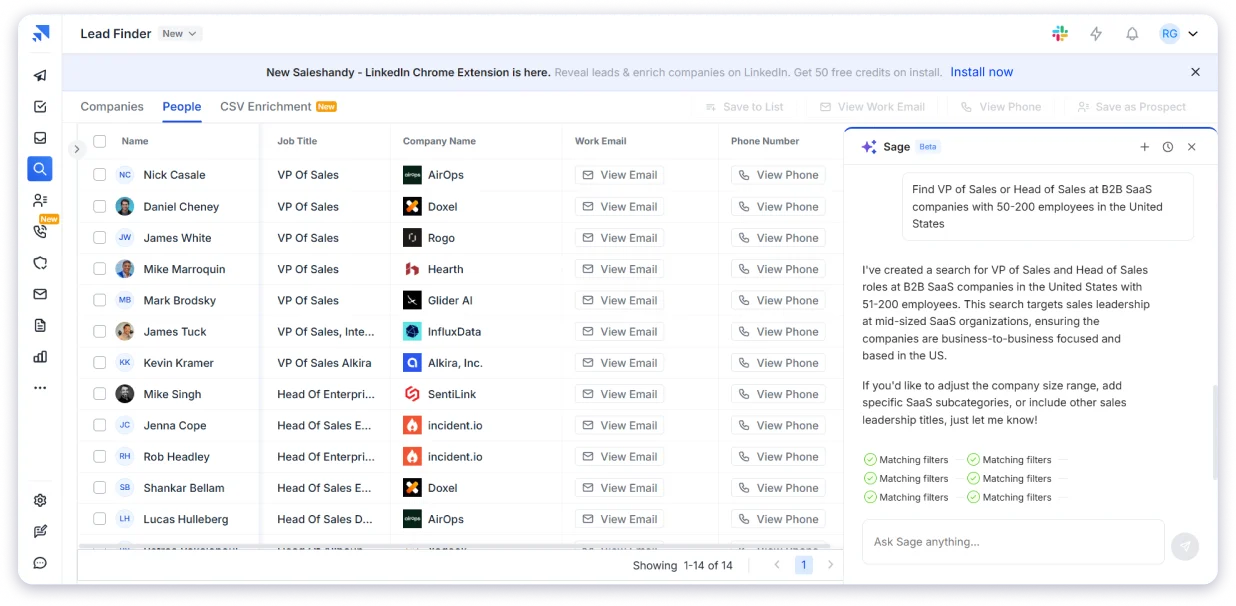
Saleshandy tops this list because it solves the biggest prospecting problem in one place: finding the right people and getting contact data you can actually use.
Its 852M+ contact database, 42M+ company profiles.
It has 75+ filters, AI Search, and real-time waterfall enrichment to help you get a 98% accurate verified prospect list.
The best part…
You only pay when Saleshandy delivers a verified result, and you can push those prospects straight into outreach instead of exporting them to another platform.
What makes this different from standalone data tools is that the outreach is built in.
Once I found my contacts, I could push them straight into a cold email sequence without exporting a CSV or logging into another platform.
And there is no cap on email accounts, which is not something most tools at this price point allow.
The pricing does not charge per seat either, which keeps costs predictable as teams grow.
Key Prospecting Features:
- Database: 852M+ contacts, 42M+ companies
- Accuracy: 98% verification rate via waterfall enrichment across 9 data providers
- Filters: 75+ search filters including AI Search (describe your ICP in plain English)
- Enrichment: Waterfall enrichment checks 9 premium data providers in sequence. 1 credit, 9 sources checked. $0 if no verified result
- Compliance: SOC 2 Type II, GDPR, and CCPA compliant across all tiers
- All-in-one: Find contacts, send cold emails, warm up domains, manage replies from one platform
Pricing:
- 7-day free trial, no credit card required
- Starter: $34/mo (annual)
- Pro: $76/mo (annual)
- Scale: $149/mo (annual)
Verdict: Best fit if you want prospecting data and cold email outreach in one platform without paying for separate tools.
2. Apollo.io
The filters are where Apollo really shines. I can narrow down prospects by industry, company size, job title, and tech stack. I built a verified, filtered prospect list in minutes.
Apollo is the most mentioned name in any “best prospecting tools” conversation, and for a reason.
It combines a 275M+ contact database with email sequencing, a built-in dialer, and LinkedIn integration in one platform.
The filters are detailed. I could narrow by revenue, tech stack, job changes, and even buying intent signals.
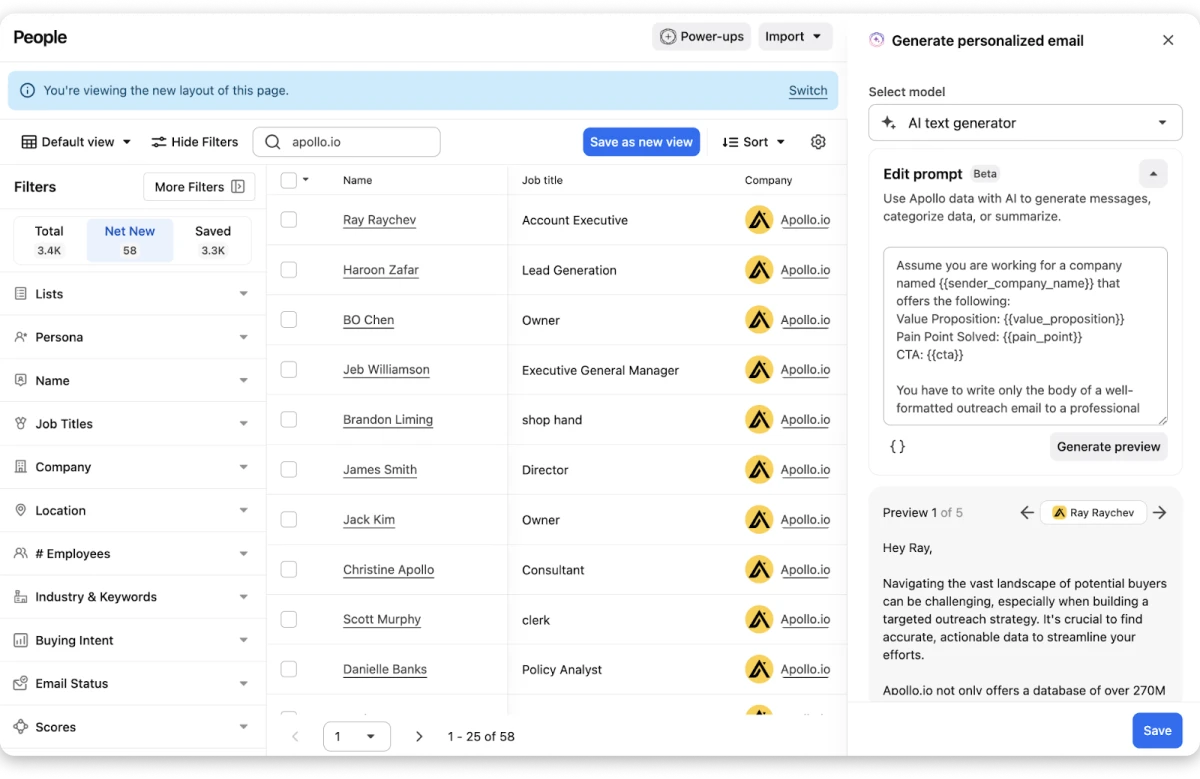
That level of targeting is useful when your ICP is specific, and you do not want to go through thousands of irrelevant results.
The multi-channel sequencing is where Apollo pulls ahead for teams that prospect across email, phone, and LinkedIn.
I could set up a sequence that starts with an email, follows up with a LinkedIn connection request, and queues a call task, all from the same workflow.
The built-in dialer is a solid addition for phone-heavy teams.
Key Prospecting Features:
- 275M+ contacts across 73M+ company accounts
- 65+ advanced search filters (industry, tech stack, seniority, hiring signals, buying intent)
- Built-in email sequencing, dialer, and LinkedIn integration
- AI lead scoring and buying signal alerts
- Chrome extension for LinkedIn prospecting
- Email and phone verification included
- Data enrichment and CRM cleansing
Pricing:
- Free plan with limited credits
- Basic: $49/user/mo (annual)
- Professional: $79/user/mo
- Organization: $119/user/mo
Verdict: Best for teams that want multi-channel sequences (email + phone + LinkedIn) with built-in data, and do not mind the per-user pricing model.
Best Sales Prospecting Tools for Accurate B2B Contact Data
Sometimes you do not need a full outreach platform. You just need reliable emails and phone numbers, fast.
3. Lusha
Lusha excels in providing accurate contact information, particularly phone numbers and email addresses. The Chrome extension integration with LinkedIn makes it incredibly fast to pull direct dials during prospecting sessions.
Lusha is built for salespeople who want to find decision-makers and quickly turn them into actionable prospects.
The Chrome extension is what most people know Lusha for.
When I am browsing LinkedIn and find a prospect worth reaching out to, I click the extension and get their verified email and phone number right there.
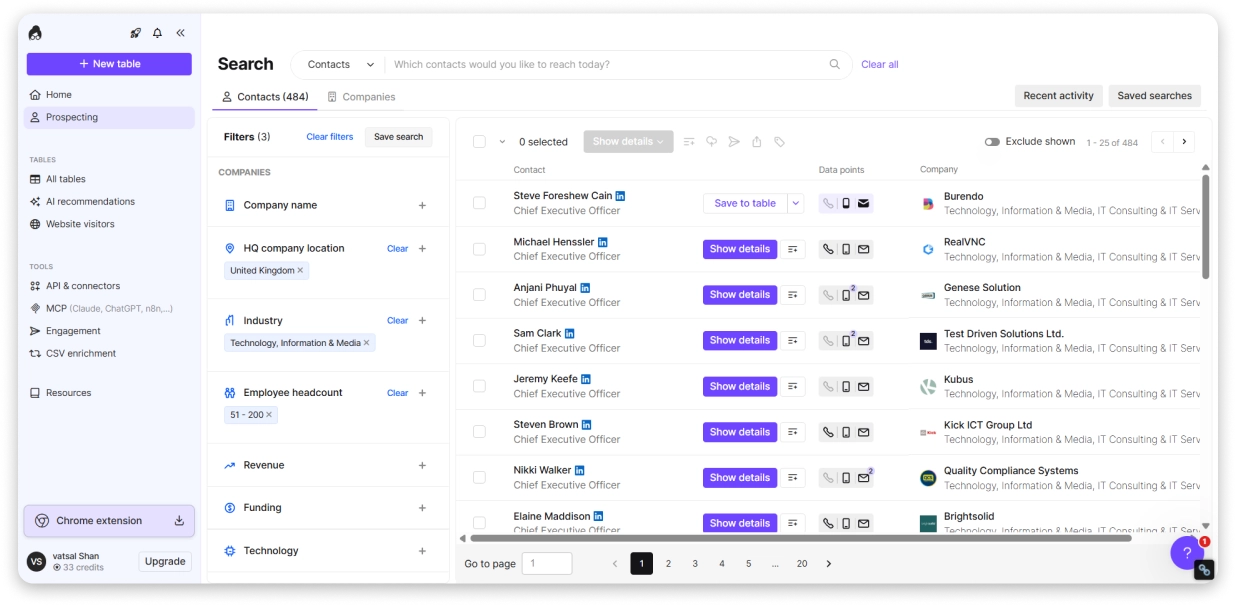
Phone number accuracy varied depending on the region, with US numbers being more reliable than international ones.
Lusha is also one of the few tools on this list that is GDPR and CCPA compliant out of the box, which matters if your prospects are in the EU.
Key Prospecting Features:
- 290M+ verified business contact profiles across 26M+ companies
- Chrome extension with 400K+ users (works on LinkedIn, Sales Navigator, and company websites)
- Direct phone numbers and verified emails revealed in one click
- GDPR, CCPA, and ISO 27701 compliant across all plans
- CRM integrations (Salesforce, HubSpot, Outreach)
- Lusha Engage for basic email sequences
- Credit rollover on monthly plans
Pricing:
- Free plan: 40 credits/mo
- Starter: $49.90/mo
- Pro: $69.90/mo
- Premium: $399.90/mo
- Scale: Custom
Verdict: Best for SDRs who need quick, affordable contact lookups from LinkedIn without committing to a full platform.
4. Seamless.AI
Extremely powerful for quickly finding contact data and building prospect lists.
Seamless.AI is worth considering when prospecting volume and fresh data matter most.
The platform claims 1.9B+ contact records, which is the largest number on this list.
Instead of pulling from a pre-built database that might be months old, Seamless.AI checks the data at the time of your search.
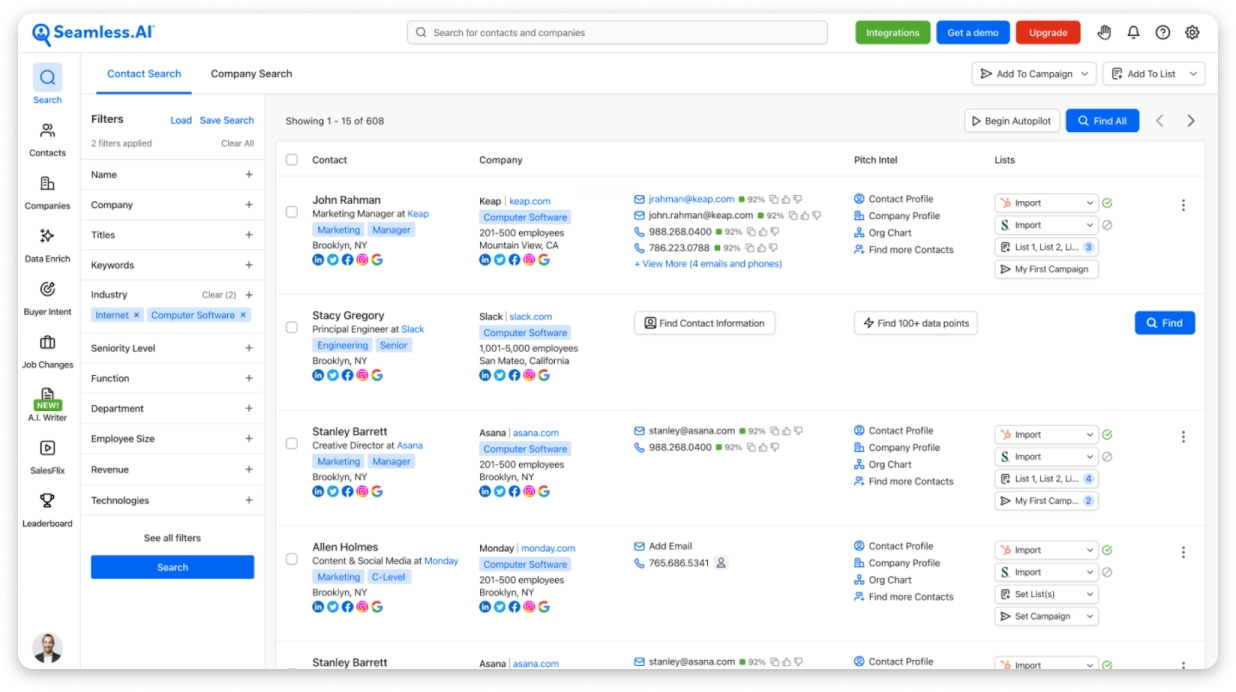
For high-volume teams that build large prospect lists regularly, the search speed matters. I could pull hundreds of contacts in a single session without the platform lagging.
That makes it especially useful for teams that need to keep generating new prospects instead of repeatedly working from the same static lists.
Key Prospecting Features:
- 1.9B+ contact records (largest claimed database on this list)
- Real-time 10-step verification at the time of search (not pre-stored data)
- AI-powered search engine for finding decision-makers by title, company size, and intent signals
- Autopilot for automated list building as new contacts match your criteria
- Credit Back Protection (refunds credits for invalid emails)
- LinkedIn Chrome extension for real-time profile enrichment
- Built-in email and calling engagement tools (Connect workspace)
Pricing:
- Free plan: 50 credits, 1 user
- Pro and Enterprise: contact sales for pricing
Verdict: Best for high-volume teams that need AI-powered list building at scale, and are comfortable with a sales-driven pricing model.
Best Sales Prospecting Tools for Enterprise Sales Intelligence
If your team needs more than contact info, these tools deliver intent data, org charts, technographics, and account-level intelligence that help you time your outreach.
5. ZoomInfo
Easy to use along with accurate data. I can say 90% of the data is approachable.
ZoomInfo is designed for teams that need more context than basic contact information before deciding who to prospect.
It combines sales intelligence, contact and company data, account-level information and buying intent to help identify accounts that fit your market and prioritize prospects showing relevant signals.
The platform sits on 500M+ contact profiles and gives you far more than just emails and phone numbers.
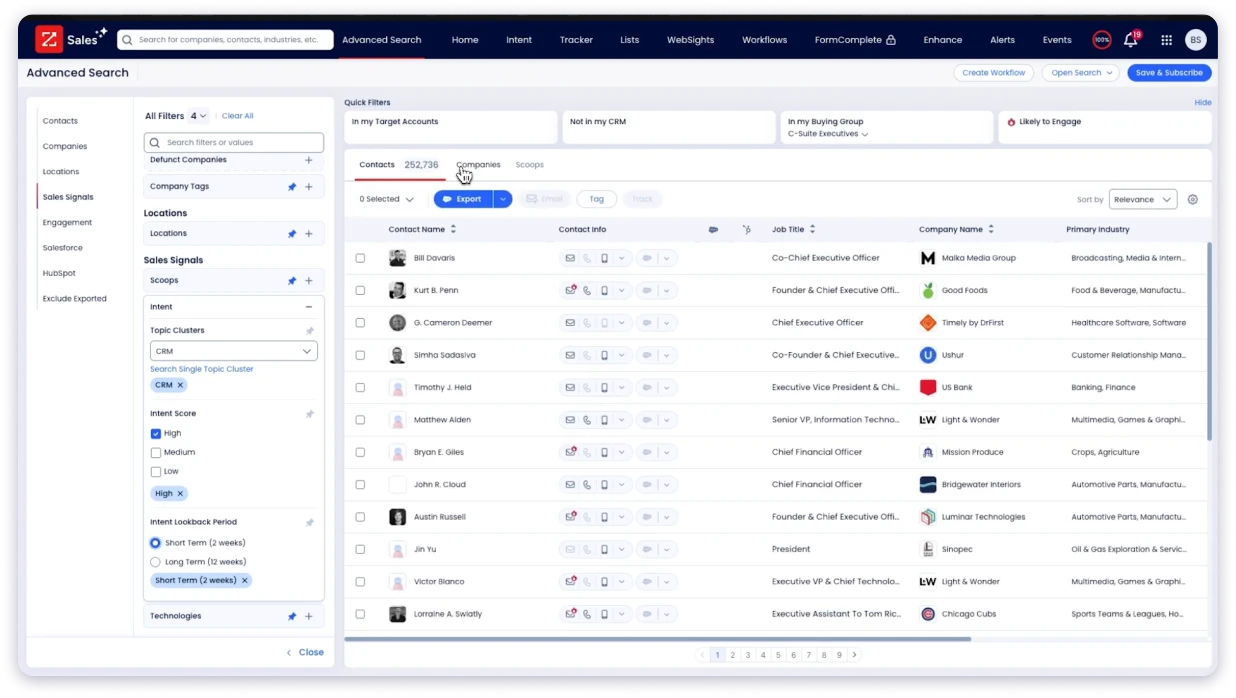
Intent data shows which companies are actively researching topics related to your product.
Technographic data tells you what software stack they are running.
Org charts help you map decision-making hierarchies before you even pick up the phone.
The depth of data per contact was noticeably richer.
It is the kind of intelligence that makes your first email feel like you have done your homework.
Key Prospecting Features:
- 500M+ intent-based database
- Technographic data showing prospects’ software stack
- Org charts with reporting hierarchies and decision-maker mapping
- 300+ targeting filters (industry, revenue, technology, intent signals)
- Real-time job change alerts and company news tracking
- Direct CRM integration with Salesforce and HubSpot
- Over 95% claimed data accuracy rate
Pricing:
- Custom pricing
- Three tiers: Professional, Copilot Advanced, Copilot Enterprise
Verdict: The enterprise standard for sales intelligence. If your team has the budget and needs deep account-level data, ZoomInfo delivers. If not, there are more affordable options on this list.
6. Cognism
The data quality, especially direct dials, is significantly better than other providers I have used.
Cognism occupies a specific niche that none of the other tools on this list fills as well: phone-verified European data with native GDPR compliance.
Their Diamond Data feature is what stands out.
These are phone numbers that have been manually verified by their research team, not just pulled from a database.
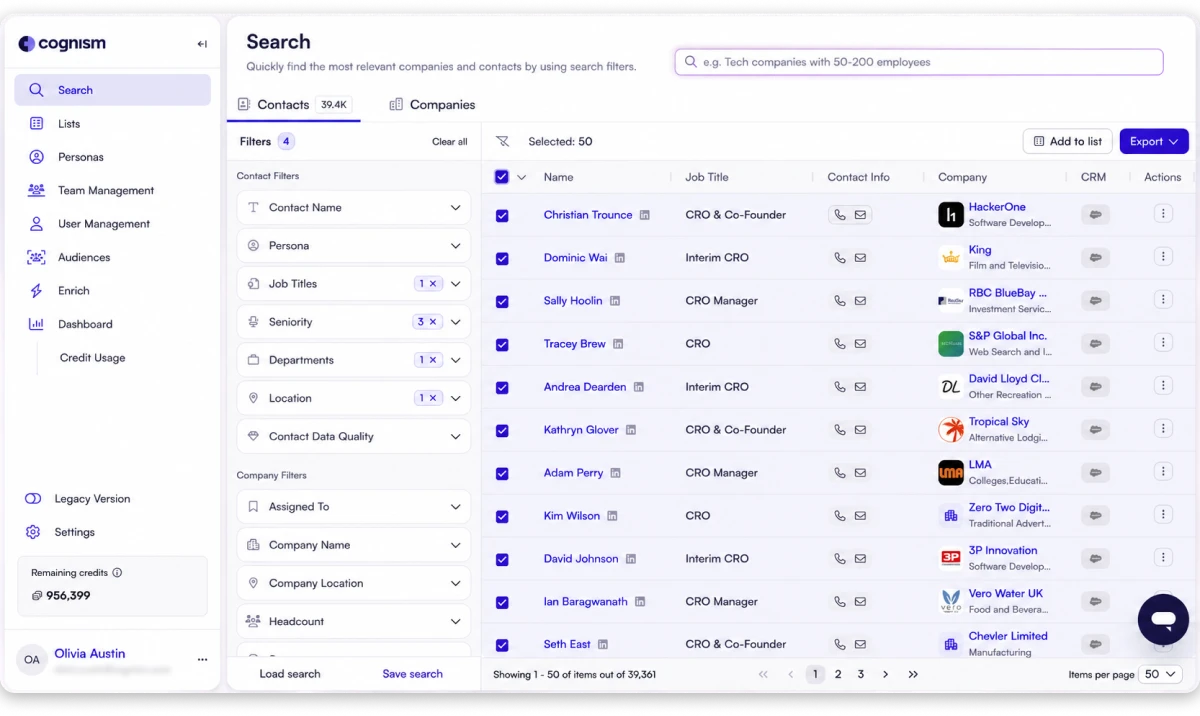
If cold calling is part of your workflow and your prospects are in Europe, this is significant.
For a US-based ICP, that is on the lower end. Where Cognism shines is European data, especially in the UK, DACH, and Nordic regions.
For US-focused teams, the data is solid but not dramatically different from ZoomInfo or Apollo.
Key Prospecting Features:
- 10M+ verified Diamond Data contacts (human-verified by calling each number)
- GDPR and CCPA compliant by design with DNC list checking across 15 countries
- Strong European data coverage, especially UK, DACH, and Nordic regions
- Diamonds-on-Demand concierge service for verifying specific mobile numbers on request
- 2-3x higher connect rates on Diamond-verified numbers vs. algorithm-only providers
- Salesforce and SalesLoft integrations for direct data transfer
- Intent data and buying signals included
Pricing:
- Custom pricing, contact sales
Verdict: The go-to choice if you sell into European markets and need GDPR-compliant, phone-verified contact data. For US-only prospecting, ZoomInfo or Apollo may give you more bang for the budget.
Best Sales Prospecting Tool for Enriching Existing Lead Lists
7. Clay
Clay has significantly reduced the amount of manual prospect research. The waterfall enrichment improved our email bounce rates by roughly 15%.
Clay takes a more customizable approach to prospecting.
Instead of relying on one data source, it lets teams combine multiple providers, enrich records, research companies and apply signals to build highly specific prospecting workflows.
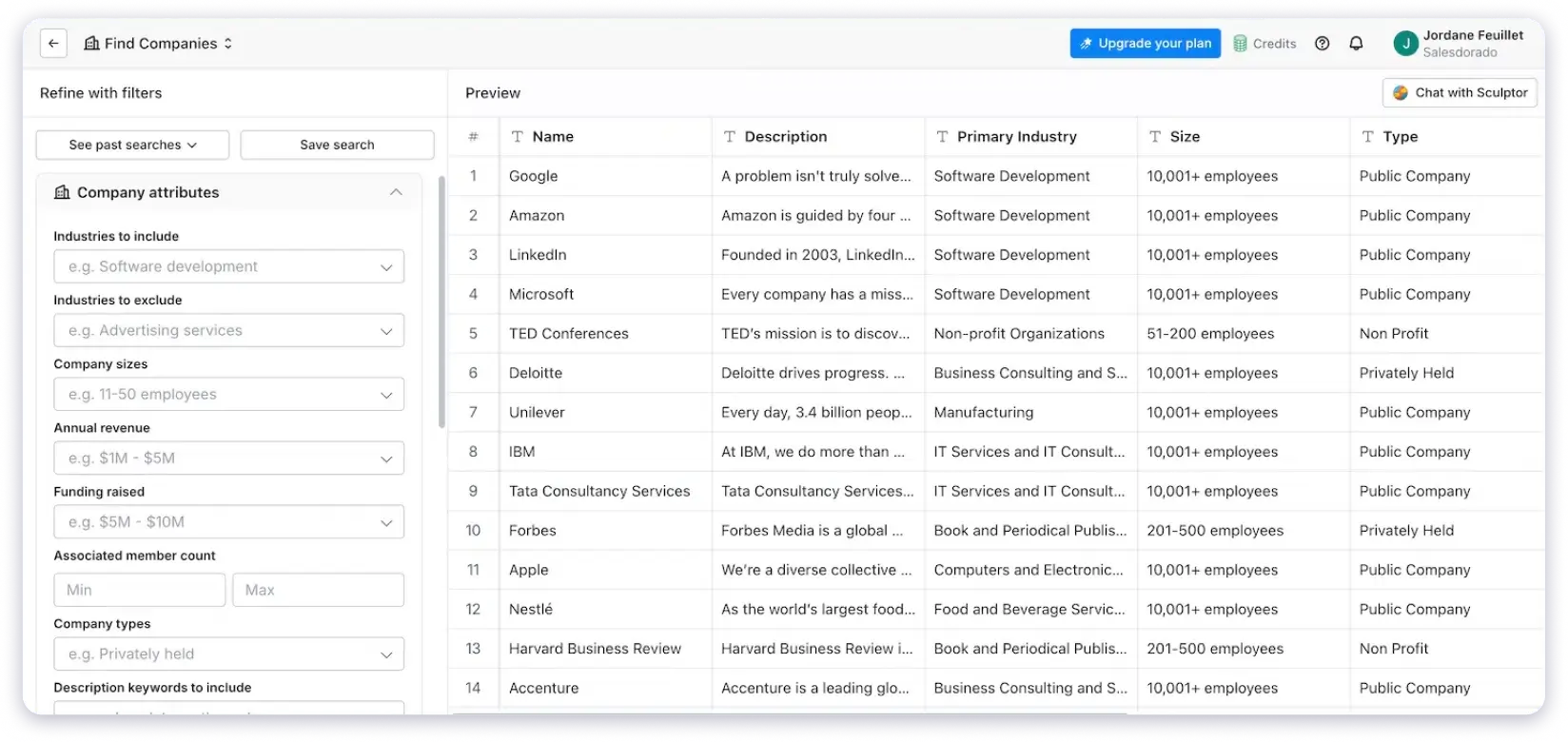
It does not have its own contact database. Instead, it connects to over 150 data providers and lets you enrich, score, and organize leads from multiple sources in one place.
Think of it this way: if you already have a list of leads but the data is incomplete or stale, Clay fills in the gaps.
It pulls enrichment from providers like Clearbit, Hunter, Apollo, and dozens of others through what they call waterfall enrichment.
If one provider does not have the email, Clay moves to the next one automatically.
The AI features are worth mentioning.
You can use Claygent (their AI agent) to do things like research company websites, summarize LinkedIn profiles, or score leads based on custom criteria.
Key Prospecting Features:
- Waterfall enrichment across 150+ data providers (checks sources sequentially until verified data is found)
- Claygent AI agent for automated web research, LinkedIn profile summaries, and custom scoring
- Spreadsheet-like interface for building custom data workflows
- AI-powered lead scoring based on custom criteria
- CRM enrichment and data cleansing integrations
- Signal-based prospecting (job changes, funding events, hiring activity)
- Programmable enrichment via API
Pricing:
- Free plan: 500 actions/mo, 100 data credits/mo
- Launch: $54/mo (annual)
- Growth: $185/mo (annual)
- Enterprise: custom
Verdict: Best for RevOps teams and data-savvy operators who already have lead lists and need better, cleaner data. Not a fit if you need to find leads from scratch.
Best Sales Prospecting Tool for Finding Decision-Makers on LinkedIn
The advanced search filters and real-time alerts make it the best tool for finding decision-makers on LinkedIn. I can filter by industry, company size, seniority, and recent activity to build a list of warm prospects in minutes.
Sales Navigator is the one tool on this list that almost every B2B sales rep has either used or considered using.
The advanced search is the core value.
Boolean filters let you narrow by job title, company size, industry, geography, seniority, years in role, and more.
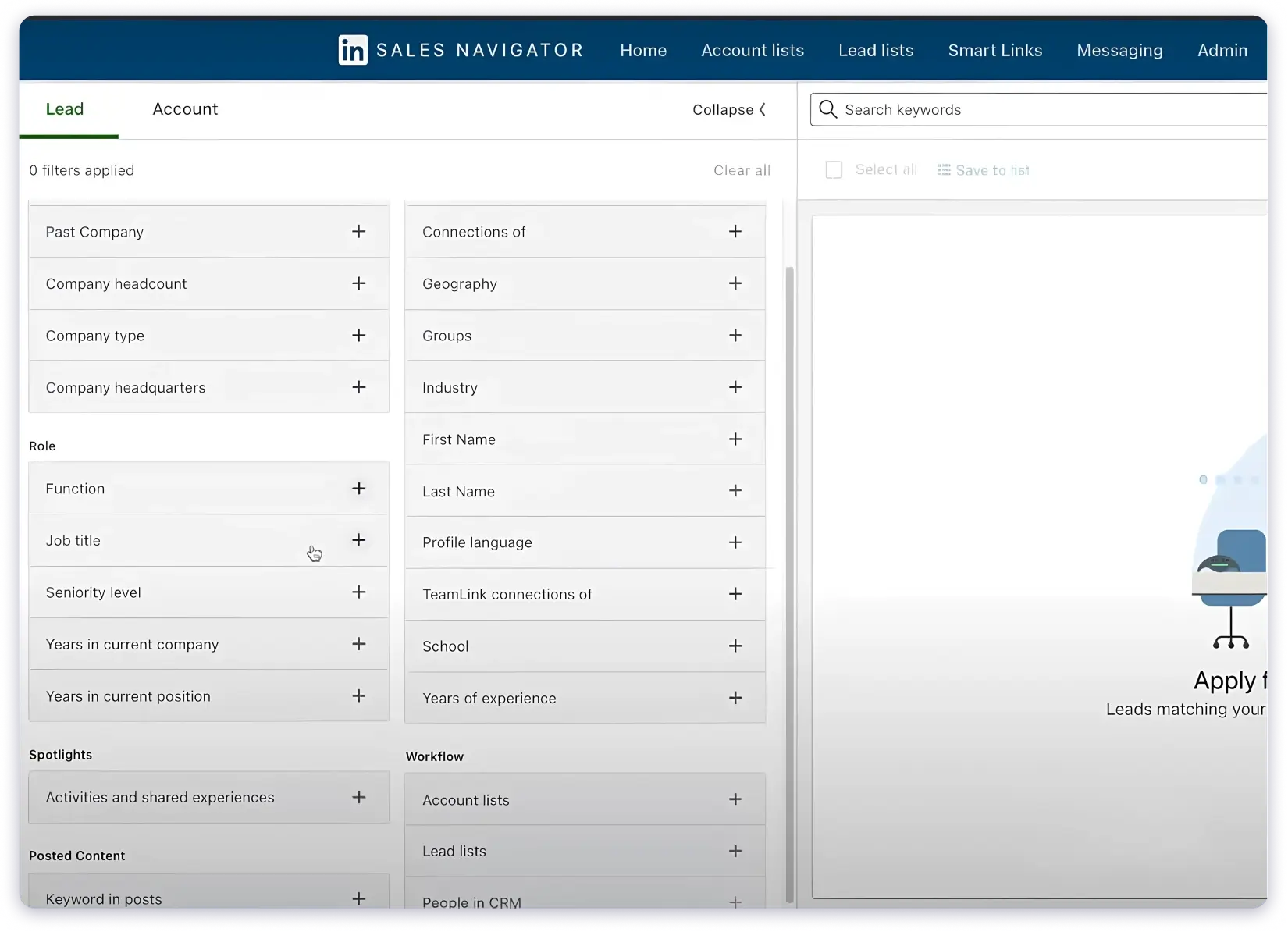
The real-time alerts are useful too.
I got notified when a prospect changed jobs, posted on LinkedIn, or when their company made news. For relationship-based selling where timing matters, that kind of signal is hard to get elsewhere.
InMail lets you message prospects even if you are not connected. I have found it works best when the message is short and actually relevant. Spray-and-pray InMails get ignored just as quickly as cold emails.
Key Prospecting Features:
- 1B+ LinkedIn member profiles with real-time updated data
- 50+ advanced search filters (firmographics, seniority, years in role, company growth rate)
- Boolean search with AND/OR/NOT operators in keyword and title fields
- 50 InMail credits per month (Core plan) for direct outreach
- Real-time alerts for job changes, LinkedIn posts, and company news
- Account IQ and Lead IQ AI-powered research summaries
- Lead and Account Lists with notes, tags, and team collaboration
Pricing:
- 30-day free trial
- Advanced and Advanced Plus: contact LinkedIn for pricing
Verdict: A must-have for LinkedIn-first prospecting, but you will need another tool alongside it for verified emails and phone numbers. Best paired with a data platform like Saleshandy, Lusha, or Apollo.
Which Tool Fits Your Workflow?
I have talked to enough sales reps to know that the “best” tool depends on how you actually prospect. Here is a quick guide:
| Your Situation | Go With | Why |
|---|---|---|
| Find leads and send cold emails in one tool | Both combine data and outreach. Saleshandy offers unlimited email accounts without per-seat pricing. Apollo has a free plan if you don’t want to pay. | |
| Need accurate emails and phone numbers fast | Lusha works well for quick LinkedIn lookups. Seamless.AI is better for large lists. | |
| Need enterprise intent data and account intelligence | ZoomInfo is strong in North America. Cognism is a good fit for European markets and GDPR-focused teams. | |
| Have lead lists and need to enrich them | Clay pulls data from 150+ providers. It is built for enrichment rather than lead generation. | |
| Build relationships through LinkedIn first | Sales Navigator helps find the right people. Pair it with Saleshandy or Lusha for verified contact details. |
What to Check Before You Commit
Before locking in on any sales prospecting tool, run this quick sanity check:
- Test the Data on Your Actual ICP: Every tool will show you impressive numbers on their website. What matters is how many verified contacts it returns for the exact titles, industries, and company sizes you sell into. Most tools on this list offer a free plan or trial. Use that window to run your real search, not a generic one.
- Calculate Cost per Verified Lead, not Cost per Credit: Credits sound cheap until you realize half the contacts come back unverified. If a tool charges $0.05 per credit but only 60% of emails are valid, your real cost per usable lead is much higher. I factored this into my test for every tool above.
- Check if Your Outreach Tool Plays Nice With It: If the prospecting tool does not include email sending (like Lusha, Cognism, or Sales Navigator), you will need to export data into a separate outreach platform. That extra step adds time and introduces data loss. Tools like Saleshandy and Apollo skip that problem because prospecting and outreach live in the same platform.
- Ask About Contracts Before You Pay: ZoomInfo and Cognism require annual contracts with minimum seats. Seamless.AI has a 60-day cancellation notice. If you are a small team testing tools, that kind of lock-in matters. Saleshandy, Apollo, and Lusha are more flexible with monthly or annual options.
Final Takeaway
After running the same ICP search across all 8 tools, the biggest differences showed up in cost per verified lead and email accuracy.
Saleshandy delivered the lowest cost per verified lead at $0.13 with 92% accuracy.
Seamless.AI found the most contacts (231) but had the lowest accuracy at 78%.
ZoomInfo and Cognism offered deep intelligence but at enterprise pricing that only makes sense for larger teams.
There is no single tool that works for everyone. But there is definitely one that fits your workflow better than the others.
If you want to test the data yourself before committing to anything, Saleshandy lets you search an 852M+ database and get verified contacts with a free trial.
Frequently Asked Questions
1. What are the best sales prospecting tools in 2026?
Based on my testing, the top sales prospecting tools in 2026 include Saleshandy (best for combined prospecting and cold email outreach), Apollo.io (best for multi-channel sequences), ZoomInfo (best for enterprise sales intelligence), LinkedIn Sales Navigator (best for LinkedIn-based prospecting), Cognism (best for European data), Lusha (best for quick contact lookups), Clay (best for data enrichment), and Seamless.AI (best for AI-powered list building). The right choice depends on your workflow, budget, and where your prospects are.
2. What is the 10-3-1 rule in sales prospecting?
The 10-3-1 rule is a conversion benchmark. For every 10 prospects you reach out to, roughly 3 will engage in a meaningful conversation, and 1 will convert into a customer or qualified opportunity. It is a useful mental model for setting realistic outreach expectations and planning how many prospects you need in your pipeline to hit your numbers.
3. What are the 5 P’s of prospecting?
The 5 P’s of prospecting are: Purpose (know why you are reaching out), Preparation (research your prospect before contact), Personalization (tailor your message to their situation), Perseverance (follow up consistently), and Practice (improve your approach through repetition). These are foundational principles that apply regardless of which sales prospecting tool you use.
6. Are there free sales prospecting tools?
Yes. Several tools on this list offer free plans or trials:
- Saleshandy: 7-day free trial with 50 free credits
- Apollo.io: Free plan with limited credits and email sending
- Lusha: 40 free credits per month
- Clay: 500 free actions and 100 data credits monthly
- Seamless.AI: 50 free credits
- LinkedIn Sales Navigator: 30-day free trial
For teams just starting out, these free tiers are enough to evaluate which tool fits before committing to a paid plan.
7. What is the difference between sales prospecting tools and CRMs?
Sales prospecting tools help you find new leads and their contact information. CRMs (like Salesforce, HubSpot, or Pipedrive) help you manage relationships with leads you have already found. Prospecting tools sit at the top of your sales funnel. CRMs sit in the middle and bottom. Some tools like Saleshandy and Apollo combine prospecting data with outreach capabilities, blurring the line. But a CRM alone will not help you find new contacts.
8. What is the 2 2 2 rule in sales?
The 2 2 2 rule is a prospecting discipline: spend 2 hours per day prospecting, aim for 2 meaningful conversations, and schedule 2 meetings per week. It is a practical framework that helps sales reps maintain consistent pipeline activity. The specific numbers can be adjusted based on your industry and sales cycle, but the principle of dedicated daily prospecting time holds.

 Dhruv Patel