

Salesloft is one of the leading sales engagement platforms, helping teams automate outreach, prioritize activities, coach reps, and manage revenue pipelines.
But more features don’t always mean a better fit for your sales team.
If you’re considering Salesloft, you’re likely weighing its capabilities against custom pricing, implementation effort, and the learning curve.
And user experiences tell a mixed story.
Some users praise its Cadence automation, CRM integrations, and sales workflows. Others report issues with Dialer reliability, reporting, and customer support.
In this Salesloft review, I’ll break down its core features, pricing structure, pros and cons, and real user experiences to show where it delivers value and where it falls short.
You’ll also learn which teams benefit most from Salesloft and when an alternative makes more sense, so you can decide whether it’s worth your investment.
Salesloft Review – TOC
TL;DR: Salesloft Review At a Glance
Before getting into the details, here’s what you should know about Salesloft.
| Quick Fact | Details |
|---|---|
| What It Is | Enterprise sales engagement and revenue orchestration platform |
| Best For | Mid-market and enterprise sales teams managing multichannel outreach, calls, and revenue pipelines |
| Pricing Model | Custom quotes based on team size, selected capabilities, and contract terms |
| Starting Price | Not publicly disclosed |
| Free Trial | No publicly advertised free trial; demo-led evaluation |
| Core Features | Cadence, Rhythm, Conversations, Deals, Forecast, Dialer |
| Multichannel Outreach | Email, calls, LinkedIn tasks, and SMS |
| CRM Integrations | Salesforce, HubSpot, and Microsoft Dynamics |
| Key Strengths | Structured sales engagement, AI prioritization, conversation intelligence, and forecasting |
| Key Limitations | Quote-only pricing, no comprehensive built-in B2B prospect database, and no dedicated native email warm-up |
| My Verdict | Strong for enterprise sales execution and forecasting. Less suitable for smaller teams focused on prospecting and high-volume cold outreach. |
What Is Salesloft and Who Is It For?
Salesloft is an enterprise sales engagement platform that brings multichannel outreach, call recording, pipeline management, and revenue forecasting into one workflow.
You can build structured cadences across email, phone, LinkedIn, and SMS.
Salesloft’s Rhythm AI then helps your reps prioritize prospects based on buyer engagement and pipeline signals.
Meanwhile, Conversations records and transcribes sales calls for coaching, while Deals and Forecast connect daily sales activities with pipeline performance and revenue predictions.
So, who is Salesloft actually built for?
- Mid-market and enterprise sales teams with 20+ reps: Cadence helps standardize outreach, while Rhythm and Conversations support task prioritization, coaching, and sales performance.
- RevOps leaders managing outreach and forecasting: Deals and Clari Forecast help connect sales activities with pipeline visibility and revenue predictions.
- Teams using Salesforce as their primary CRM: Bidirectional synchronization helps keep sales activities and CRM records aligned without constant manual updates.
Who is Salesloft NOT for?
- Solo founders, agencies, and teams under 10 reps: Quote-only pricing, annual commitments, and potential seat minimums make it less practical for smaller teams.
- Teams running high-volume cold outreach: Salesloft focuses on structured sales engagement rather than dedicated cold email infrastructure, such as warm-up and sender rotation.
- Buyers who want transparent pricing and a free trial: Salesloft doesn’t publish standard subscription prices or offer a publicly advertised free trial.
- Teams needing a built-in B2B contact database: Salesloft doesn’t provide a comprehensive prospect database, so you’ll need a separate tool to source leads.
In-depth Review of Salesloft’s Features
Salesloft has six core features covering everything from outreach automation to revenue forecasting.
I’ve broken them down by how they help your sales team and where they fall short, rather than listing features without context.
Here’s what matters before you invest.
1. Cadence (Multi-Channel Sequence Automation)
Salesloft Cadence is the backbone of its sales engagement platform.
You can build structured multichannel outreach sequences across email, calls, LinkedIn tasks, and SMS, with personalized messages, follow-up delays, and A/B testing.
Managers can standardize cadences and track which reps complete their assigned activities.
The real value is consistency. Your reps know exactly whom to contact and when, without manually tracking every follow-up.
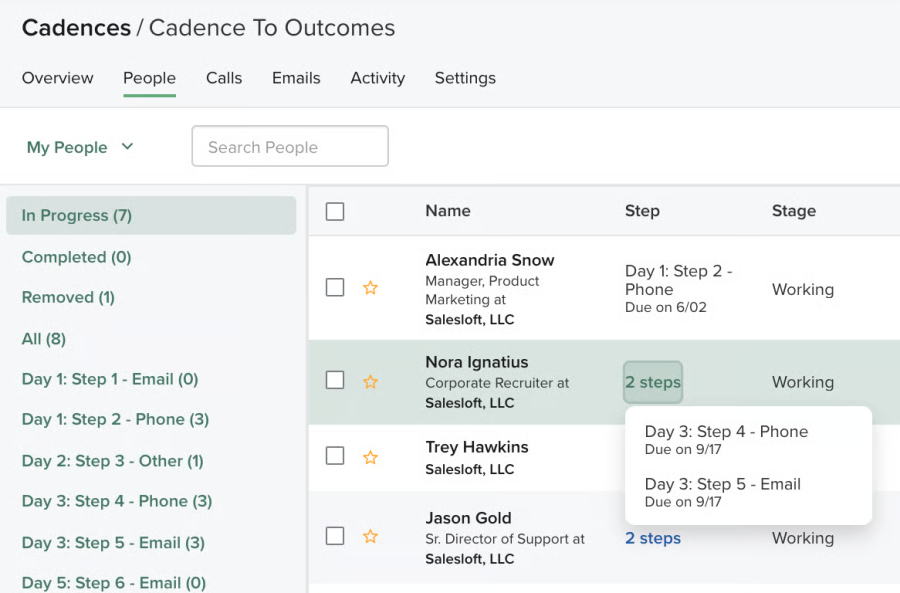
But Cadence focuses on structured sales execution rather than high-volume cold email infrastructure.
If you’re managing dozens of inboxes, you’ll still need to consider email warm-up, sender rotation, and deliverability separately.
2. Rhythm (AI-Driven Priority Engine)
Salesloft Rhythm uses AI to prioritize your reps’ daily sales activities.
It analyzes buyer engagement, CRM activity, pipeline signals, and conversation insights to recommend which prospects deserve attention.
For example, someone who recently replied to your email may rank higher than a prospect with no engagement.
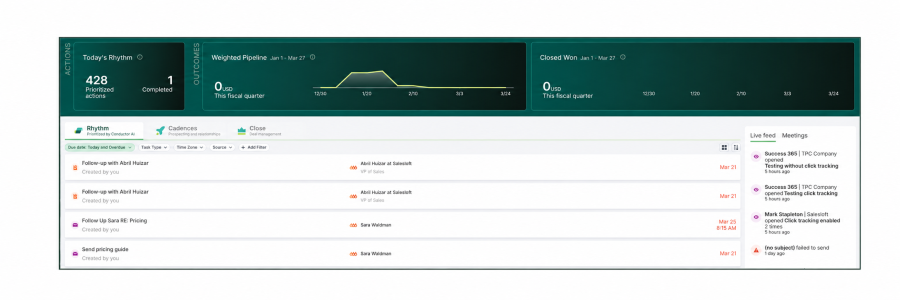
I see the biggest advantage for teams managing hundreds of active opportunities. Reps spend less time sorting tasks.
The limitation? Rhythm depends on available engagement data.
If you’re starting with a fresh cold prospect list, it has fewer signals to work with.
3. Conversations (Call Recording + Coaching)
Salesloft Conversations records, transcribes, and analyzes sales calls to help managers coach reps.
Smart Chapters organize recordings into sections, while Revenue Critical Moments highlight important discussion points.
Instead of reviewing entire calls, managers can focus on pricing objections, competitor mentions, and next steps.
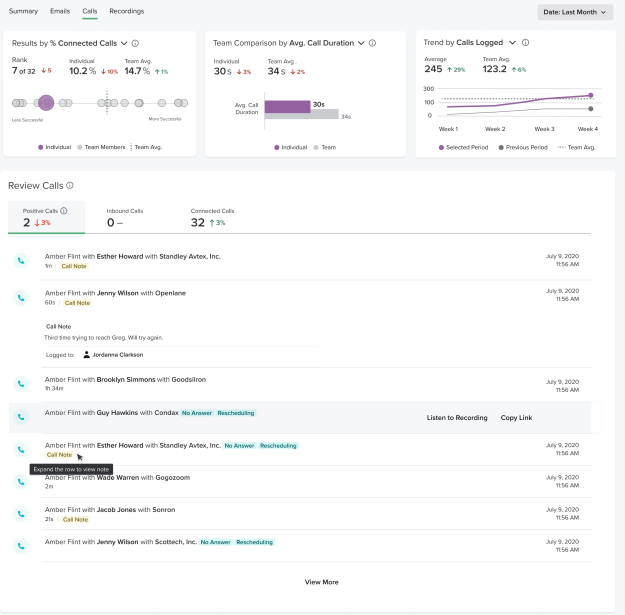
This is particularly useful for SDR onboarding and sales coaching.
But AI-generated transcripts aren’t always accurate, especially with poor audio quality or overlapping speakers.
I’d recommend manually checking important call summaries before using them for coaching or CRM updates.
4. Deals + Forecast (Pipeline Management and Revenue Forecasting)
This is where Salesloft’s merger with Clari becomes important.
Deals provides opportunity timelines, deal stages, and engagement history. Clari Forecast connects pipeline data with revenue predictions.
Together, they help sales leaders identify which opportunities are progressing, which are at risk, and what revenue to expect.
For RevOps teams managing complex pipelines, that’s more useful than tracking sales activities alone.
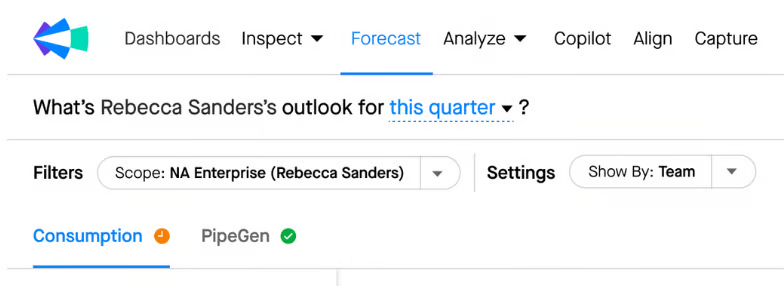
However, Clari Forecast may require separate licensing, depending on your contract.
I’d confirm the exact forecasting capabilities included before accepting a quote.
5. Dialer (Paid Add-On)
Salesloft Dialer brings calling into your sales engagement workflow.
It supports in-app calling, activity logging, call recording, and local presence capabilities.
Your reps can complete calling tasks and keep activity connected to prospect records without switching tools.
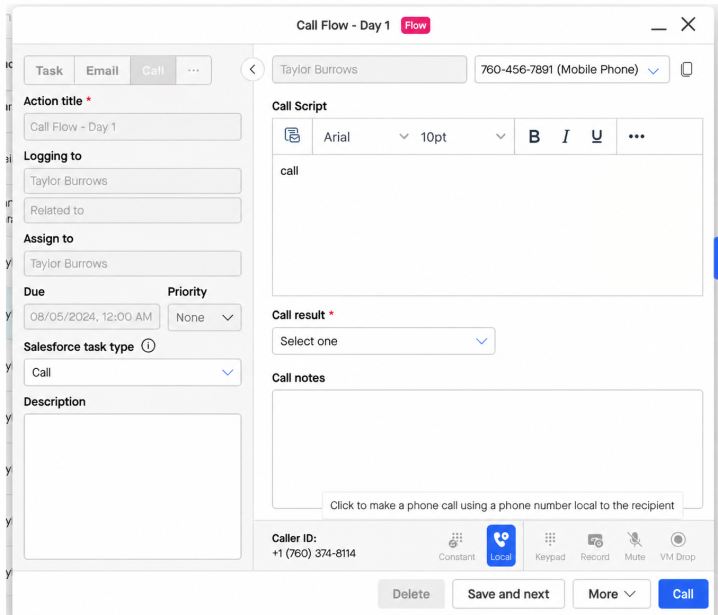
This is useful for teams combining email outreach with frequent calls.
The catch is the additional cost.
Dialer licensing and calling-related charges depend on your package.
If international calling matters, I’d verify supported regions, phone number costs, and calling rates before purchasing.
6. Salesforce + HubSpot Sync
CRM integration is one of Salesloft’s strongest capabilities, particularly for Salesforce users.
It supports bidirectional synchronization of sales activities and CRM data, reducing manual updates across systems.
Salesforce supports configurable mappings and custom objects. HubSpot and Microsoft Dynamics integrations are also available.
For RevOps teams, this means better visibility into outreach activity, customer interactions, and pipeline records.
However, integration depth varies by CRM and configuration.
If your team relies on complex workflows or custom objects, test those specific scenarios before committing.
Salesloft Pricing Plans Explained
Salesloft doesn’t publicly disclose its pricing in 2026.
Unlike sales engagement platforms with fixed monthly plans, Salesloft requires you to contact its sales team for a custom quote.
You share your team size, sales workflow, and required features. Salesloft then provides pricing based on your requirements.
There’s no public price calculator, self-service checkout, or standard free trial.
What Do Salesloft’s Plans Include?
Salesloft’s pricing depends on the products and capabilities your team needs. Since there are no confirmed public plan rates, here’s what you should evaluate.
| Product / Capability | Pricing | What It Covers |
|---|---|---|
| Cadence | Custom Quote | Multichannel outreach, automated follow-ups, and sales activity management |
| Rhythm | Custom Quote | AI-powered task prioritization and next-best-action recommendations |
| Conversations | Custom Quote | Call recording, transcription, conversation intelligence, and coaching |
| Deals + Forecast | Custom Quote | Opportunity management, pipeline visibility, and revenue forecasting |
| Dialer | Custom Quote | In-app calling, call logging, and related calling capabilities |
Three things worth knowing before you sign:
- Pricing depends on your contract. Your quote may vary based on team size, selected products, and contract terms.
- Additional capabilities may increase costs. Confirm whether Dialer, implementation, and advanced features require separate charges.
- Clari Forecast packaging needs confirmation. Verify which forecasting features are included in your agreement.
The bigger concern is your total software cost.
If your team needs a separate B2B contact database, email warm-up, or additional calling capabilities, those tools can increase your overall expenses.
Before committing, I’d request an itemized quote covering licenses, included modules, implementation fees, renewal terms, and additional costs.
See our Salesloft pricing breakdown for more context.
That way, you can evaluate the actual cost without relying on unverified market estimates.
Salesloft Pros and Cons
Salesloft has 4.5/5 on G2 from 9,900+ reviews. But high ratings don’t mean every feature works equally well.
Looking through individual user reviews, I found a clear pattern.
Users praise Salesloft’s multichannel cadences, AI prioritization, and conversation intelligence. But CRM sync issues, Dialer glitches, reporting limitations, and support concerns also come up.
Here’s how the pros and cons break down.
Pros of Salesloft
1. Cadence keeps multichannel outreach organized
Salesloft’s biggest strength is bringing emails, calls, and LinkedIn activities into one structured workflow.
Reps can follow automated cadences without manually tracking every interaction. For larger SDR teams, that means fewer missed follow-ups and more consistent outreach.
One enterprise SDR described the benefit:
“It brings email, calls, and LinkedIn outreach into one workflow, so I always knew who to contact next and how.”
— Almin R., 5-star G2 reviewer, October 2026. Read the full review on G2.
2. AI prioritization makes daily sales execution easier
Salesloft’s AI helps reps decide which prospects and activities deserve attention first.
Instead of working through a flat task list, reps receive recommendations based on buyer engagement, CRM activity, and sales signals.
A mid-market user found its AI recommendations useful for everyday selling.
“The AI-guided prioritization usually pointed me to the right next step. Overall, it was fairly easy to use and set up.”
— Dattatray C., 4.5-star G2 reviewer, October 2026. Read the full review on G2.
This supports Salesloft’s AI prioritization capabilities, although the reviewer doesn’t specifically name Rhythm.
3. Conversation insights help improve sales coaching
Salesloft Conversations goes beyond recording calls. It helps managers identify objections, review discussions, and improve sales messaging.
The real advantage is turning conversation data into coaching opportunities, rather than making managers listen to every recording.
One reviewer explained how these insights helped their team:
“Conversation insights helped us refine our core pitch and update our objection-handling playbook.”
— ARAVIND T., 4.5-star G2 reviewer, September 2026. Read the full review on G2.
4. Call transcription makes reviewing conversations easier
Salesloft automatically transcribes recorded conversations and generates summaries, helping managers revisit calls without listening to entire recordings.
This is useful when reviewing customer objections, identifying next steps, or onboarding new SDRs.
An enterprise user praised the transcription experience:
“It helped me get accurate transcripts from recordings.”
— Anushree M., 4.5-star G2 reviewer, October 2026. Read the full review on G2.
However, the same reviewer reported missing recordings. Transcription accuracy and recording availability are two things worth checking separately.
5. Clari integration adds deeper pipeline visibility
Following its merger with Clari, Salesloft’s broader offering connects sales engagement with pipeline analysis and revenue forecasting.
For RevOps teams, this means better visibility into pipeline changes, potential risks, and expected revenue.
One enterprise reviewer highlighted Clari’s forecasting capabilities:
“Clari helps with day-to-day analysis, tracking drops and peaks in our pipeline, and forecasting market trends based on activity.”
— Verified G2 reviewer, 4.5 stars, February 2026. Read the full review on G2.
The feedback concerns Clari’s capabilities specifically. Confirm which forecasting features your Salesloft contract includes.
Cons of Salesloft
1. Salesforce sync issues can create duplicate records
Salesloft offers bidirectional CRM synchronization, but incorrect field mappings can cause problems.
Instead of reducing administrative work, sync errors may create duplicate contacts or leave activities unrecorded.
One RevOps user described the issue:
“If a field mapping gets slightly messed up, it can create duplicate contacts or fail to log activities properly.”
— Rafał M., 4-star G2 reviewer, September 2026. Read the full review on G2.
For teams using Salesforce custom fields and complex workflows, synchronization needs careful testing before rollout.
2. Dialer glitches can interrupt outbound calling
Salesloft Dialer keeps phone outreach connected to your sales workflows.
But technical interruptions can slow down reps who depend on frequent calls.
A healthcare industry reviewer reported recurring problems with the browser extension:
“A lot of times the dialer extension glitches out and I have to restart my laptop.”
— Verified G2 reviewer, 5 stars, October 2026. Read the full review on G2.
Interestingly, the reviewer still gave Salesloft five stars. The complaint highlights a specific reliability issue rather than overall dissatisfaction.
3. Reporting and mobile dashboards lack flexibility
Salesloft provides analytics for tracking outreach activities and pipeline performance.
However, some users report limited reporting customization, filtering delays, and inconsistent mobile dashboard experiences.
One reviewer described the mobile reporting problem:
“Dashboards that look clean on desktop sometimes lose formatting or interactive detail on tablet or mobile”
— Verified G2 reviewer, 4.5 stars, September 2026. Read the full review on G2.
If your managers rely on custom reports or review pipeline data from mobile devices, these limitations matter.
4. Account-based workflows can feel restrictive
Salesloft’s cadences focus heavily on individual contacts.
That works for structured prospect outreach, but account-based sales teams may need more flexibility to manage multiple stakeholders.
One enterprise software user raised this concern:
“Managing by contact, rather than account was annoying.”
— Verified G2 reviewer, 1.5 stars, October 2026. Read the full review on G2.
Another reviewer reported limited customization when adapting Salesloft to more complex workflows.
For teams running account-based selling, it’s worth checking how contacts, opportunities, and account activities connect.
5. Customer support can be difficult outside US hours
Salesloft’s support experience isn’t consistent across every reviewer.
For international teams, getting assistance during local working hours can become a concern, especially when technical issues interrupt outreach.
One UK-based sales leader reported:
“Being based in the UK getting support is challenging as their support staff seem to be based in the USA”
— A.J. A., 2.5-star G2 reviewer, April 2026. Read the full review on G2.
This is one reviewer’s experience, not evidence of a platform-wide support problem. Still, buyers should confirm support coverage and response commitments.
6. Total software costs can add up quickly
Salesloft uses quote-based pricing, so your actual cost depends on licenses, selected modules, and contract terms.
You may also need separate prospecting, CRM, and deliverability tools to run your complete outbound workflow.
A revenue leader highlighted the cumulative expense:
“After investing in a CRM and sequencing tool, the expenses can really add up.”
— Gurpreet S., 3.5-star G2 reviewer, December 2025. Read the full review on G2.
The review highlights overall technology-stack costs, not hidden Salesloft charges.
When evaluating Salesloft, calculate your total outbound software costs, including additional tools, implementation, and potential calling expenses.
Salesloft vs Saleshandy: Which Is Better & Why?
Most buyers researching Salesloft land here for one reason. They want enterprise-grade outbound execution without enterprise pricing. For broader choices, compare sales outreach tools.
Saleshandy covers the complete outbound workflow, from finding verified prospects to running multichannel outreach and managing replies.
Here is how the two compare in 2026:
| Criteria | Salesloft | Saleshandy |
|---|---|---|
| Platform Type | Enterprise sales engagement and revenue intelligence | All-in-one multichannel outbound platform |
| B2B Contact Database | No built-in B2B prospect database | 852M+ contacts, 42M+ companies |
| Starting Price | Custom quote | $34/mo (billed annually) |
| Free Credits Included | No native prospecting credits | 1,500 Lead Finder credits/mo on Starter |
| Multichannel Outreach | Email, calls, LinkedIn tasks, SMS | Email, calls, LinkedIn, WhatsApp, automated follow-ups |
| Conversation & Reply Management | Conversations, call recording, AI analysis | Unified Inbox, AI reply categorization, AI CoPilot |
| AI Capabilities | Rhythm prioritization, conversation intelligence | AI Prompt-to-List, AI CoPilot, AI-assisted personalization |
| Email Warm-Up | No native warm-up | Built-in warm-up on outreach plans |
| Email Accounts / Seats | Per-user licensing | Unlimited connected email accounts; plan-based team limits |
| Dialer | Pricing depends on contract | Available separately |
| Agency Support | No dedicated multi-client agency portal | Unlimited clients; unlimited users on Scale |
| Billing Options | Custom contract terms | Monthly or annual |
| Revenue Forecasting | Clari Forecast | No equivalent native forecasting module |
The pricing story that matters: Saleshandy’s $34 Starter plan includes 1,500 Lead Finder credits every month, unlimited connected email accounts, and built-in email warm-up.
Salesloft’s reported subscription costs are considerably higher, and you still need separate prospecting data and dedicated warm-up tools.
For a five-person outbound team, Saleshandy Pro costs $76/month, billed annually, and supports up to 10 users.
At a reported 125–150 per user monthly, five Salesloft licenses would cost approximately 625–750/month, excluding additional modules.
For agencies, the gap widens.
Saleshandy supports unlimited connected email accounts and includes an Agency Portal for managing multiple clients. Pro covers up to 10 users, while Scale ($149/month annually) offers unlimited team members.
Salesloft is designed for enterprise sales organizations rather than multi-client cold outreach management.
That said, Salesloft remains stronger for enterprise conversation intelligence, complex sales execution, and Clari-powered forecasting.
Those capabilities justify consideration if your team actively depends on them.
But if your priority is finding leads, automating outreach, and managing deliverability, Saleshandy offers a more affordable workflow.
For more options, see our guide to the best Salesloft alternatives in 2026.
Final Verdict: Is Salesloft Worth It in 2026?
Salesloft is worth considering for enterprise sales teams that need structured outreach, AI-powered prioritization, call coaching, and revenue forecasting.
But custom pricing, no built-in B2B contact database, and limited cold email deliverability tools make it less practical for smaller teams and agencies.
If your priority is finding verified leads, running multichannel outreach, and booking more meetings, Saleshandy is a more affordable alternative.
You get 852M+ B2B contacts, AI-assisted outreach, built-in warm-up, and unlimited connected email accounts, starting at $34/month, billed annually.
Try it free for 7 days with 50 Lead Finder credits before committing to a paid plan.
FAQs on Salesloft Review
1. Is Salesloft legit?
Yes. Salesloft is an established enterprise sales engagement platform founded in 2011. It serves major organizations, including IBM and 3M, and holds a 4.5/5 rating on G2. Its features cover multichannel outreach, conversation intelligence, pipeline management, and revenue forecasting.
2. How much does Salesloft cost in 2026?
Salesloft uses quote-only pricing based on team size, modules, and contract terms. Third-party estimates suggest 75–150+ per user monthly, depending on the package. Dialer and forecasting capabilities may cost extra. Request an itemized quote before purchasing.
3. Did Salesloft merge with Clari?
Yes. Salesloft and Clari completed their merger on December 3, 2025, with Steve Cox leading the combined company. In April 2026, they introduced deeper connections between forecasting and sales execution. The combined platform is positioned as a Predictive Revenue System.
4. Does Salesloft have a free trial?
No standard self-service free trial is publicly advertised. Salesloft primarily offers demo-based evaluations through its sales team. If you prefer testing before buying, Saleshandy offers a 7-day free trial with 50 free credits, without requiring a credit card.
5. Is Salesloft better than Outreach.io?
It depends on your requirements. Salesloft is a strong choice for Cadence automation, conversation intelligence, and Clari-powered forecasting. Outreach also offers advanced sales sequencing, AI workflows, and revenue management. See our Outreach pricing breakdown for another enterprise buying comparison. Compare CRM compatibility, implementation requirements, and actual quotes before deciding.
6. Is Salesloft worth it for small teams?
Salesloft can be expensive for small teams focused primarily on cold outreach. Its strengths lie in enterprise sales execution and revenue intelligence. Saleshandy offers a more affordable alternative starting at $34/month annually, including 1,500 Lead Finder credits monthly, built-in warm-up, and unlimited connected email accounts.

 Anil Salvi
 Pritesh