


You’re evaluating Wiza, and most reviews you’ll find were written before August 2026.
And that’s a problem.
Because in August, Wiza removed its most popular feature: bulk Sales Navigator export. The Chrome extension now works one profile at a time. The product you’re reading about on Reddit and G2 isn’t the same product you’d sign up for today.
So I signed up, tested every core feature, and dug into what 1,281+ G2 reviewers actually say once you filter past the star ratings.
In this Wiza review guide, I’ll break down Wiza’s features, email and phone accuracy, all five pricing plans, the hidden costs their pricing page doesn’t surface, and where it genuinely falls short in 2026.
Whether Wiza fits your prospecting workflow or you’d be better off elsewhere, you’ll know by the end.
Let us get started now.
TOC – Wiza Review (2026)
- TL;DR: Quick Facts About Wiza That You Must Know
- So, What Changed With Wiza in August 2026?
- Wiza Features I Actually Tested So You Don’t Have To…
- Wiza Pricing Plans Breakdown [2026] – What It Actually Costs
- What 1,281+ G2 Reviews Actually Say About Wiza
- Honest Limitations I Found Exploring Wiza
- Who Should Use Wiza? (And Who Shouldn’t)
- Wiza vs Saleshandy – Full Feature and Pricing Comparison
- FAQs About Wiza Review
TL;DR: Quick Facts About Wiza That You Must Know
Here’s everything you need to know about Wiza before we get into the details.
Now, let me walk you through the full picture.
So, What Changed With Wiza in August 2026?
If you used Wiza before August 2026, log back in. The product you remember isn’t the product you’ll find today.
On August 19, 2026, Wiza published a help center update confirming that bulk export and multi-select from LinkedIn, Sales Navigator, and Recruiter were removed. All accounts, all plans, no exceptions.
This was, by many accounts, the single most valuable feature Wiza offered.
Here’s what Wiza can still do after the change:
- Chrome extension – Works on LinkedIn, Sales Navigator, and Recruiter. But only one profile at a time. No bulk selection.
- Wiza Prospect – Their own 850M+ contact database. This was not affected.
- CSV/CRM import enrichment – Upload a list and enrich it with verified data. Still works.
Why does this matter? Because if you’re evaluating Wiza based on what most reviews describe, you’re evaluating a product that doesn’t exist anymore.
I signed up and tested Wiza after this change. Every observation in this review reflects the post-August 2026 product.
Wiza Features I Actually Tested So You Don’t Have To…
I created a free Wiza account and went through every core feature. Here’s what I found.
1. Chrome Extension (One Profile at a Time)
The Wiza Chrome extension is how most users discover the tool.
I installed the Chrome extension, opened a LinkedIn profile, and the Wiza side panel appeared on the right.
One click on “Reveal Work Email & Phone,” and it pulled the contact’s verified email within seconds. No page redirect or separate dashboard; everything happened right there on LinkedIn.
Post-August 2026, this is strictly a one-at-a-time workflow. You open a full LinkedIn profile, the Wiza side panel appears, and you can reveal that person’s contact data. No bulk selection, multi-select, or batch processing from search results.
The extension still works on LinkedIn, Sales Navigator, and Recruiter. Wiza’s own onboarding confirms this. But if you’re used to the old workflow of exporting dozens of contacts from a Sales Navigator list in one go, that door is closed.
I like how fast and clean it was for individual lookups. But for any kind of volume prospecting, you’ll need to rely on Wiza Prospect instead.
2. Wiza Prospect (Its Own Database)
This is where Wiza has shifted its focus post-August 2026.
Wiza Prospect is a standalone B2B contact database claiming 850M+ contacts and 2.9M companies.
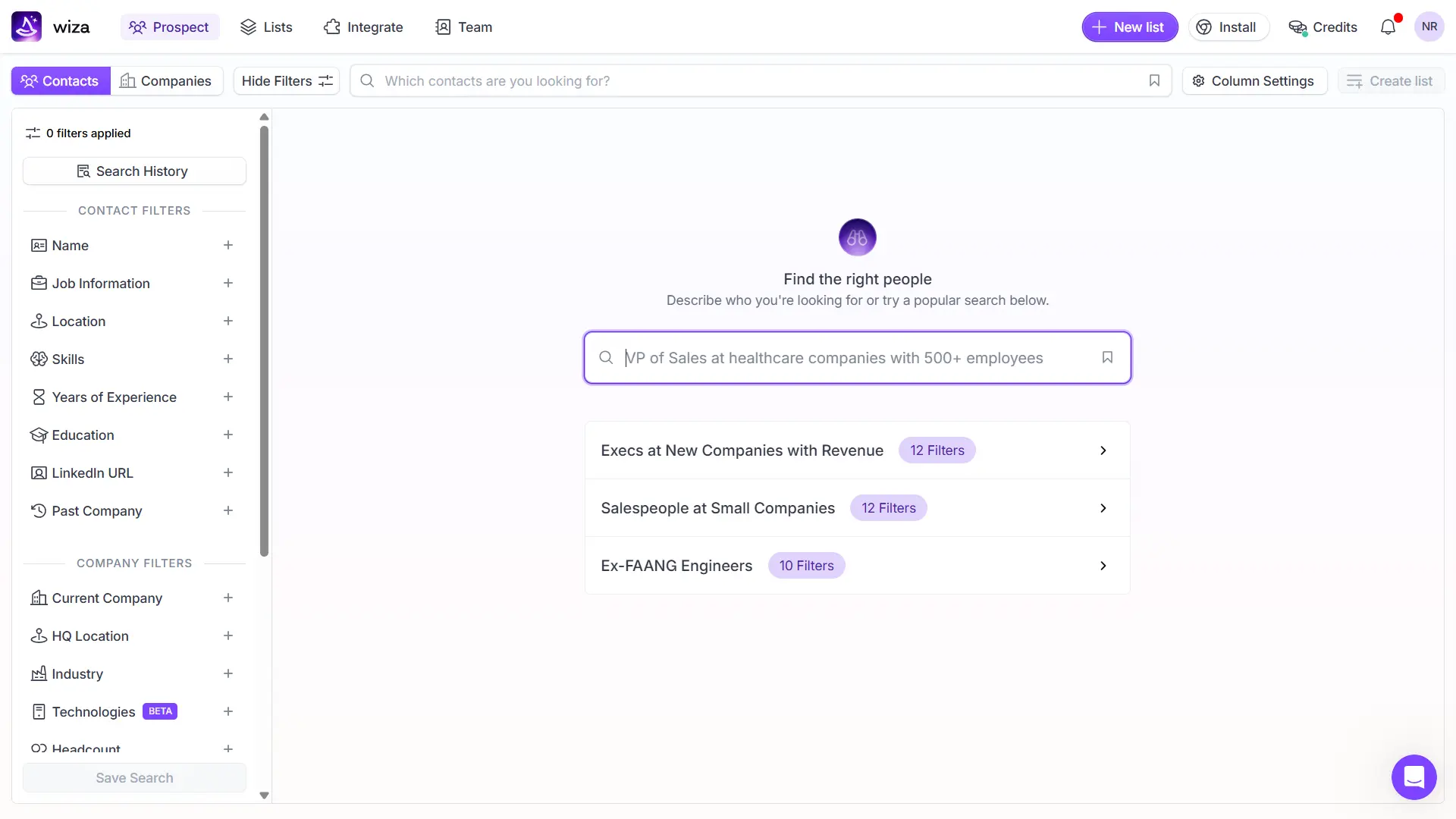
I saw the company count live in the platform. You can search by Contacts or Companies, with separate filter sets for each.
- Contact filters include: Name, Job Information, Location, Skills, Years of Experience, Education, LinkedIn URL, Past Company, Current Company, HQ Location, Industry, Technologies (still in Beta), Headcount, Revenue, Year Founded, and Funding.
- Company filters include: Company Name, HQ Location, Industry, Technologies (Beta), Headcount, Revenue, Year Founded, Funding, Company Category, and Summary Keywords.
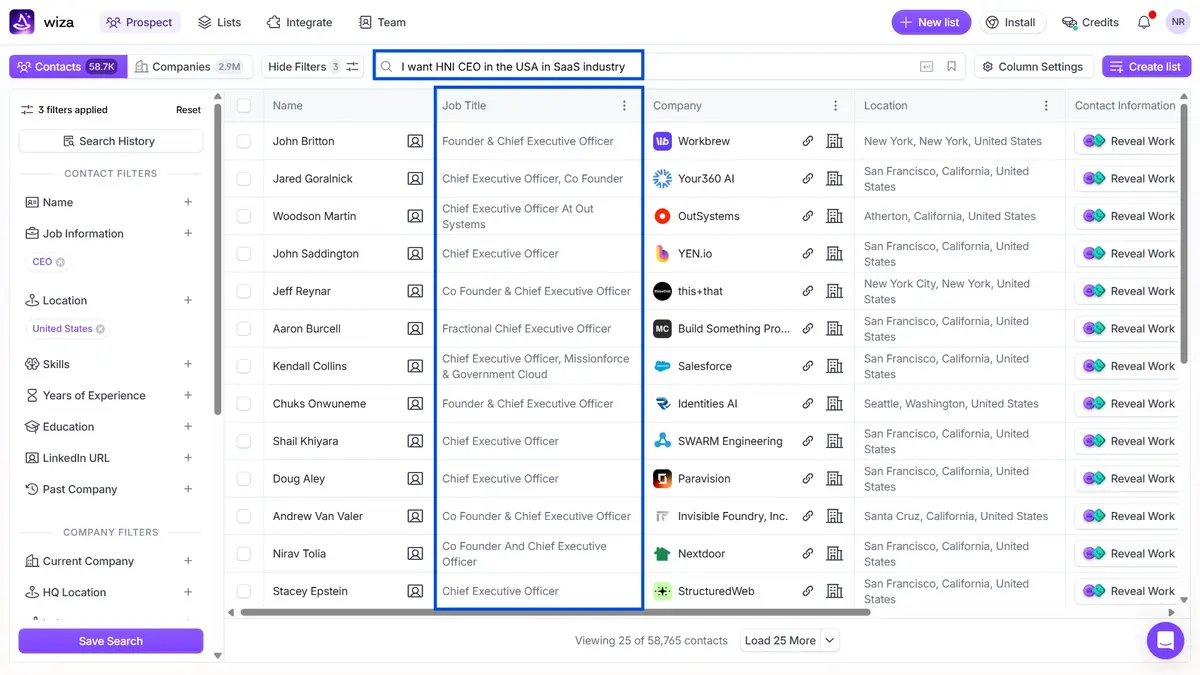
The natural language search is a nice touch. I typed “I want HNI CEO in the USA in SaaS industry,” and it correctly applied three filters (CEO, United States, SaaS). It returned 58,765 matching contacts.
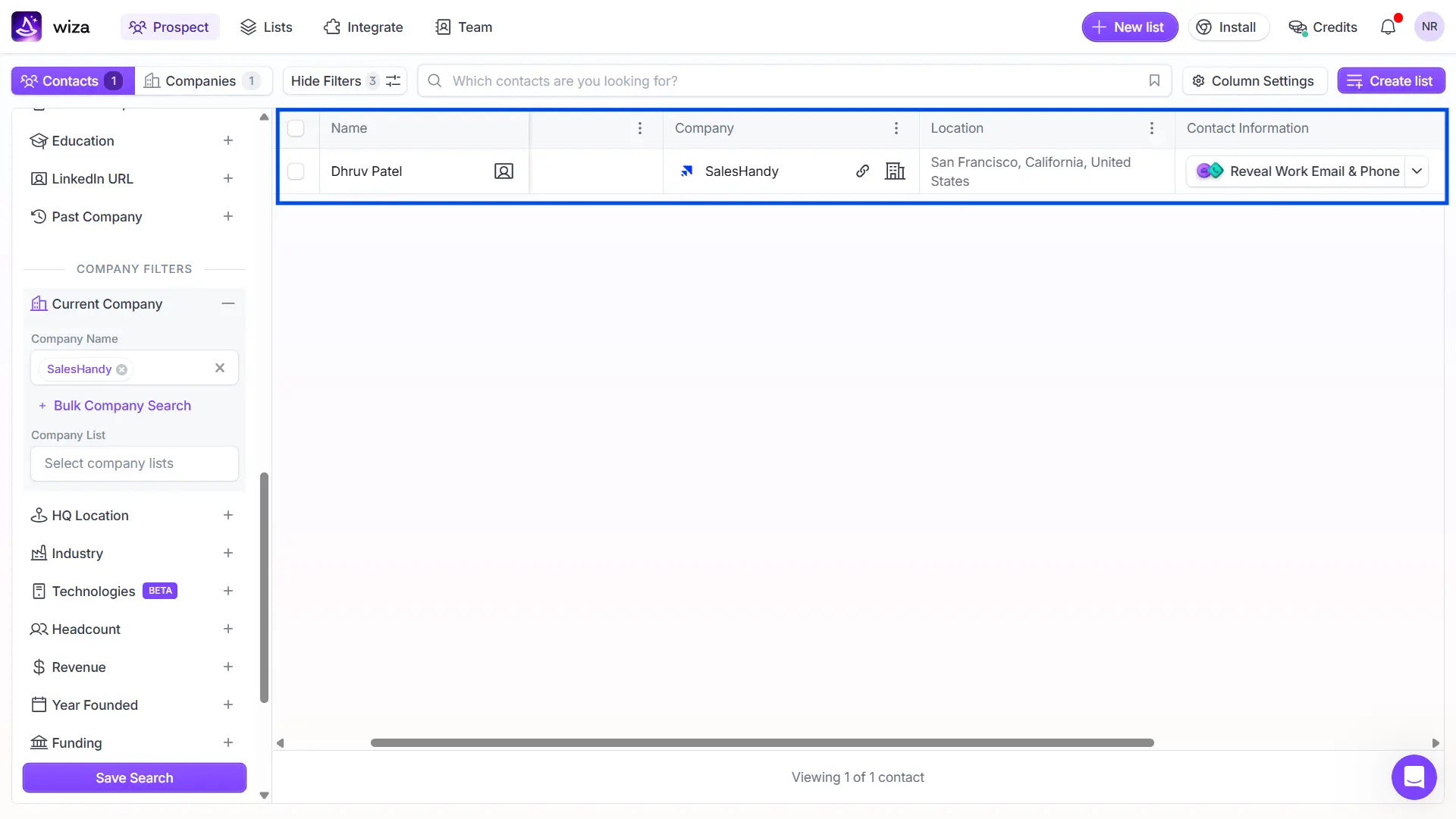
I also tested it by searching for SalesHandy’s co-founder, Dhruv Patel. Wiza found him immediately. Company listed as “SalesHandy,” location as “San Francisco, California.” The data was there, but no job title was displayed before the reveal.
Wiza also offers pre-built search templates like “Execs at New Companies with Revenue” and “Ex-FAANG Engineers” to get new users started quickly.
The database works. I like the search as it’s intuitive. But here’s the catch: you see names, titles, and companies for free. The moment you want an email or phone number, that’s a credit.
Email Verification and Accuracy
Wiza’s biggest marketing claim is real-time verification. Unlike tools that pre-load a database and hope nothing’s gone stale, Wiza says it verifies contact data live, the moment you request it.
They claim:
- 97% title accuracy
- 99% email accuracy
- Less than 1% bounce rates
G2 head-to-head scores support part of this claim. Wiza scores 8.3/10 for contact accuracy, ahead of ZoomInfo (7.7) and Lusha (7.6).
I found that, on G2, 126 reviewers specifically mentioned accuracy as a positive.
One reviewer called email verification “genuinely reliable” and noted their bounce rates dropped significantly.
But 41 reviewers flagged inaccurate data. One reviewer specifically noted that “the quality of data has drastically decreased.” Another said some emails “still need to be verified before reaching out.”
My Honest Take: Wiza’s email accuracy is legitimately strong for a tool in this category. But “99% accuracy” is a marketing-page number, not a guarantee. Real-world experience, based on G2 reviews, falls somewhere between very good and occasionally inconsistent.
One thing Wiza does right: you only pay for valid emails. If verification fails, no credit is charged. Risky emails are free. That’s a fair model.
Phone Number Accuracy
This is where Wiza stumbles.
I checked 10 phone numbers by actually calling them. Six connected to the right person. Four were either wrong numbers or outdated. That lines up with what independent research suggests: Wiza’s phone accuracy sits around 55-65%.
G2 reviewers back this up. A Verified User in Real Estate (September 2026) noted that “sometimes the phone numbers can be outdated or inaccurate.”
When I dug deeper, I found another verified User in Manufacturing saying that it’s hard to tell “if a number is a company phone number or cell phone.”
And the kicker? Phone numbers on the Email + Phone plan cost $1,990/year. 😱
That means you’re paying nearly $2,000 a year 😱for data that’s accurate barely two-thirds of the time.
Worth Exploring to Save More & Get Accurate Phone Numbers: Free Phone Number Finder
3. CRM Integrations
Wiza has 24 integrations; the noteworthy ones include:
Apollo.io, Attio, Claude Code, Clay, CROmetrics, GTM Workspace (ZoomInfo), GTM Studio (ZoomInfo), HubSpot Marketing Hub, HubSpot Sales Hub, and more.
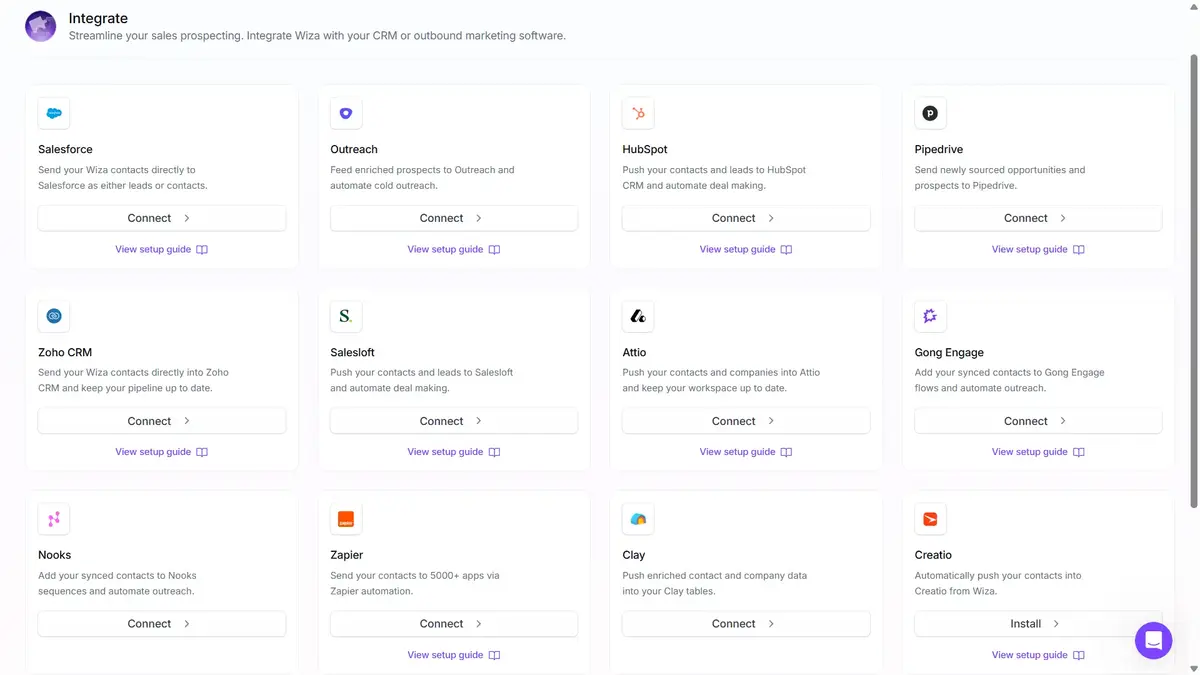
They recently added a direct Gong Engage integration, which lets you push enriched contacts straight into Gong workflows without routing through your CRM first.
The integrations work for what they are. But remember, they’re all one-directional. Wiza pushes data out. Your CRM, outreach tool, or sales engagement platform does the actual work of contacting prospects.
Wiza Pricing Plans Breakdown [2026] – What It Actually Costs
Wiza labels its pricing page “Transparent pricing.” Let’s test that claim.
*Pricing verified from wiza.co/pricing, October 2026.
Here’s a detail most reviews skip: Wiza’s pricing page defaults to the annual billing toggle. The Starter plan (49/mo) doesn’t appear on the annual view at all. You only see Free, Email (83), and Email + Phone ($166).
So if you land on their pricing page and never click the monthly toggle, you’d think the jump from free to paid is $83/month. That’s not the full picture.
Also, every paid plan now includes AI Research (what Wiza calls “Magic Fields”).
These are AI-generated enrichment columns that add extra context to prospect records; sounds useful!
But here’s what the pricing page doesn’t tell you: some of these AI columns consume additional credits beyond your standard reveal cost.
Wiza Pricing: The Hidden Costs
This is where the “transparent pricing” claim starts to crack.
Hidden Cost #1: The Sales Navigator Tax
Wiza’s Chrome extension needs LinkedIn Sales Navigator to deliver its full value. Sales Navigator costs $79 to $149/month depending on your plan.
So your “$83/month” Wiza plan actually costs $162 to $232/month before you reveal a single contact.
Hidden Cost #2: “Unlimited” Has Hard Caps
Wiza’s help center documents specific rate limits on “unlimited” plans:
- 500 reveals per 24 hours
- 50 reveals per 5 minutes
- 10 contacts processing simultaneously
- 2,500 list exports per month
A G2 reviewer (Kyle R., October 2026) confirmed hitting a “temporary rate limit” on the free plan. These limits exist across all plans.
Hidden Cost #3: Per-Seat Pricing Adds Up Fast
Every Wiza plan is priced per user, per month. Put 10 reps on the Email + Phone annual plan, and you’re looking at $19,900/year at list price.
Hidden Cost #4: No Sending = Another Tool on Top
Wiza finds contacts. It doesn’t send a single cold email. You’ll need a separate outreach tool like Outreach (100+/mo), Salesloft(75+/mo), or similar.
The real cost stack for a single rep: Wiza Email+Phone (166/mo)+SalesNavigator(99/mo) + Outreach tool (~$100/mo) = roughly $365/month per rep.
That’s $4,380 per year for one person. For a tool that only finds contact data.
Read: Wiza Pricing in 2026: Plans, Hidden Costs, and Full Breakdown
What 1,281+ G2 Reviews Actually Say About Wiza
Wiza has 1,281 reviews on G2 with a 4.5/5 overall rating.
I noticed that 94% of reviews are 4 stars or above.
Here’s a pros and cons summary that tells a more nuanced story.
What Users Love About Wiza
G2 tags the top positives with mention counts:
- Ease of Use (305 mentions) – Users consistently call the interface clean and the workflow simple.
- Contact Information (220 mentions) – Fast access to verified emails and phones.
- LinkedIn Integration (126 mentions) – The Chrome extension is a genuine time-saver for LinkedIn-heavy prospecting.
- Accuracy (126 mentions) – Multiple reviewers highlight strong email accuracy, especially for UK prospects.
What Users Complain About
Here’s where it gets real. Three of the five top complaints are credit-related:
- Expensive (110 mentions) – Particularly for startups and small businesses. One reviewer noted it feels “a bit more expensive compared to Apollo.”
- Limited Credits (97 mentions) – Users say credits run out mid-campaign and force extra purchases.
- Inaccurate Data (41 mentions) – Some users report needing alternative verification sources.
- Credit System Issues (41 mentions) – Credits deplete quickly, “necessitating additional purchases for larger lists.”
Honest Limitations I Found Exploring Wiza
I’ve covered the strengths fairly. Now let me lay out what Wiza cannot do.
1. Wiza Finds Emails But Can’t Send a Single One
This is the elephant in the room that no Wiza review talks about clearly enough.
Wiza’s own workflow description ends at step 4: “Push contacts into CRM systems.”
You can’t add them to sales sequences or outreach campaigns. That means handing data off to a separate tool.
These just upset me:
- Wiza doesn’t send cold emails.
- It doesn’t run sequences, warm up your inbox, track replies, or offer a unified inbox.
A G2 reviewer (Guy C., April 2026) put it perfectly. He praised the data quality but noted that Wiza “is still just one part of the outbound process” and wished for analytics around conversion to help teams prioritize leads.
If you want to find contacts AND reach them from one platform, you’d need a tool like Saleshandy that covers Lead Finder, email sequences, warm-up, reply tracking, and a unified inbox in a single subscription.
2. No Intent Data or Buying Signals
Wiza gives you contact data. That’s it.
It doesn’t tell you when to reach out.
- No job change alerts, funding signals, tech stack tracking or website visitor identification.
They recently launched a “Technologies” filter (still in Beta) that lets you target companies by the tools they use. It’s a step in the right direction, but it’s technographic data, not intent data.
Knowing a company uses Salesforce isn’t the same as knowing they’re actively evaluating alternatives, I think.
Who Should Use Wiza? (And Who Shouldn’t)
Wiza is a good fit if:
- You’re a solo prospector who lives inside LinkedIn Sales Navigator and just needs verified emails for individual profiles.
- You already pay for a separate outreach tool (Outreach, Salesloft, etc.) and only need a data source.
- Your prospecting is low-volume. Under 500 contacts a month and the Email plan works.
- You want real-time verified email data and can live with phone numbers being a coin flip.
Skip Wiza if:
- You need prospecting and cold email outreach in one place. Wiza can’t send emails, period.
- You’re scaling past 3 to 5 reps. Per-seat pricing makes Wiza expensive at team scale ($19,900/year for 10 seats on Email + Phone).
- You want intent data or buying signals; sadly, Wiza has none.
- You want to send cold emails without stitching together three or four different tools. The $365/month per-rep stack cost is hard to justify when all-in-one alternatives exist.
- Budget is tight. The jump from Free (25 total credits) to the first paid plan ($49/mo) is steep for individuals and startups.
Honest Summary: Wiza does one thing well, which is finding verified contact data. But in 2026, finding data is only half the battle. The other half is actually reaching those prospects. And that’s a problem Wiza doesn’t solve.
Wiza vs Saleshandy – Full Feature and Pricing Comparison
Throughout this review, you’ve seen Wiza’s biggest gap: it finds contacts but stops there. You still need a separate outreach tool, a separate warm-up solution, and LinkedIn Sales Navigator to get full value from the Chrome extension.
That’s three subscriptions before you send a single email.
Saleshandy is worth comparing here because it covers both sides of the workflow, finding verified B2B contacts and reaching them, from one platform. Same category of data (852M+ contacts), but without the tool-stacking.
Here’s how they compare side by side.
Now let’s talk about what it actually costs to run these tools.
Wiza all-in stack cost (per rep/month):
- Wiza Email+Phone (annual): $166/mo
- LinkedIn Sales Navigator: ~$99/mo
- Outreach/Salesloft: ~$100/mo
- Total: ~$365/month per rep
Saleshandy all-in cost:
- Saleshandy Starter: $34/month (annual). Includes 1,500 Lead Finder credits, 6,000 emails/month, unlimited email accounts, unlimited warm-up.
- Saleshandy Pro: $76/month (annual). 4,000 Lead Finder credits, 100,000 emails/month, 10 users, CRM integrations, A/Z testing.
With Saleshandy,
- you’re not paying for three separate tools.
- You don’t have to manage three separate logins.
- You won’t be exporting CSVs between platforms.
You find a real-time prospect in Lead Finder, push them into a sequence, warm up your sending accounts, track replies, and manage everything from one dashboard. That’s the workflow Wiza’s own product description stops short of.
Try Saleshandy free for 7 days
FAQs About Wiza Review
1. Is Wiza Legit?
Yes. Wiza is a legitimate company founded in 2019 with offices in New York and Toronto. They hold SOC 2 Type 2 certification, have a D-U-N-S number, and serve nearly 500,000 individuals and 50,000+ companies globally. They rate 4.5/5 on G2 from 1,281 verified reviews. However, their Trustpilot score sits at 1.9/5 with data privacy complaints worth noting.
2. How Accurate Is Wiza?
Wiza claims 99% email accuracy and less than 1% bounce rates. G2 head-to-head data gives Wiza an 8.3/10 accuracy score, ahead of ZoomInfo (7.7) and Lusha (7.6). Email accuracy is a genuine strength. Phone number accuracy, however, sits around 55-65% based on independent testing and user feedback.
No. As of August 19, 2026, Wiza removed bulk export and multi-select from LinkedIn, Sales Navigator, and Recruiter. All accounts, all plans. The Chrome extension now works one profile at a time only. You can still use Wiza Prospect (their standalone database) for bulk searching and exporting.
4. What Are the Best Wiza Alternatives?
The best Wiza alternative depends on what you need. If you want an all-in-one platform that handles prospecting, email sequences, warm-up, and reply management in one place, Saleshandy starts at $34/month with 852M+ contacts, unlimited email accounts, and no per-seat pricing. Other alternatives include Apollo.io (4.7/5 on G2, 9,847 reviews), ZoomInfo (4.5/5, 9,188 reviews), and Lusha (4.3/5, 1,670 reviews).
5. Is Wiza Worth It in 2026?
It depends on your workflow. If you prospect on LinkedIn one profile at a time and already have a separate outreach stack, Wiza’s real-time email verification is genuinely strong. But if you need to find contacts AND send cold emails from one platform, paying $365/month per rep for a Wiza-centered stack is hard to justify when all-in-one tools cover the entire workflow for a fraction of the cost.

 Pritesh
![Kaspr Pricing 2026: What It Actually Costs [Full Breakdown]](https://www.saleshandy.com/blog/wp-content/uploads/2026/10/Kaspr-Pricing-What-Credits-Really-Cost.webp)