
LeadIQ pricing starts at just $15/month. Sounds affordable, right?
But here’s what you need to know:
Those 200 monthly credits get you 200 emails, 20 phone numbers, or just 18 contacts.
And that’s before you split credits across your sales team.
So, is LeadIQ actually affordable, or does its credit system make prospecting more expensive than it looks?
Well, to get the answer, I dug into LeadIQ’s pricing plans, credit costs, and hidden limitations to find out.
In this LeadIQ pricing guide, I’ll show you what each plan gets you and whether it’s worth your money in 2026.
Let’s get started.
LeadIQ Pricing- TOC
- TL;DR: Quick Look at LeadIQ Pricing in 2026
- How LeadIQ Credits Work (And What They Actually Cost)
- LeadIQ Pricing Plans Explained: Which One Is Worth Paying For?
- LeadIQ Prospecting Hub vs. Data Hub: What Are You Actually Paying For?
- 6 LeadIQ Pricing Limitations You Should Know Before Buying in 2026
- What Real Users Say on G2 About LeadIQ Pricing
- LeadIQ vs. Saleshandy: Which Gives You More for Your Money?
- LeadIQ Pricing FAQs
TL;DR: Quick Look at LeadIQ Pricing in 2026
LeadIQ runs on a Universal Credits (UC) system. Three plans: Free, Pro, and Enterprise.
Credit costs per action:
- Email lookup: 1 credit
- Phone number lookup: 10 credits
- Email + Phone: 11 credits
- Account enrichment: 3 credits
- Scribe AI (3 emails): ~1 credit
LeadIQ Pricing Plans at a Glance:
| Plan | Monthly | Annual | Included Credits | Users | Key Features |
|---|---|---|---|---|---|
| Free | $0 | $0 | 50/month | 1 | Chrome extension, basic email/contact search, Scribe AI message writer |
| Pro | $20/month | $15/month | 200/month (2,400/year) | Up to 5 | Full database access, CRM & sequence sync, Salesforce duplicate detection, team analytics. |
| Enterprise | Custom | Custom (annual only) | Custom | 6+ | Everything in Pro, plus AI account prospecting, CSV enrichment uploads, SSO, and governance controls. |
Quick math that matters: On the entry Pro plan, 200 credits get you either 200 emails OR just 20 phone numbers. A combined email+phone lookup? Only 18 full contacts. Credits expire monthly with no rollover.
- Strict 5-User Cap on Pro: Teams with 6 or more reps are required to move to a custom annual Enterprise contract.
- LinkedIn Sales Navigator: While the extension works on standard LinkedIn, using advanced search filters requires a separate LinkedIn Sales Navigator subscription (starting at $119.99/month).
- Credit Expiration: Paid plan credits refresh monthly and generally do not roll over. Unused credits are forfeited upon cancellation.
How LeadIQ Credits Work (And What They Actually Cost)
LeadIQ calls its currency “Universal Credits.” Every action inside the platform, from pulling an email to enriching a company profile, draws from one shared pool.
Sounds simple? But as they say, the devil is in the details.
How Much Does LeadIQ Charge for Emails, Phone Numbers, and Enrichment?
Every contact lookup consumes credits from your monthly allocation. Here’s the breakdown:
| Action | Credits Used |
|---|---|
| Email lookup | 1 credit per address |
| Phone number lookup | 10 credits per number |
| Email + Phone | 11 credits per contact |
| Account enrichment | 3 credits per company |
| Scribe AI (3 emails) | ~1 credit per 3 generated emails |
The phone number ratio is the elephant in the room.
For every phone number you reveal, you could have unlocked 10 emails instead. If your outbound team relies on cold calling, that 10:1 ratio eats through your budget faster than you’d expect.
Another thing worth knowing: credits are deducted the moment you reveal a contact, not after verification. So if LeadIQ surfaces a bounced email or a disconnected number, you’ve still spent the credits.
On G2, 72 users have flagged inaccurate data as their top complaint. At 10 credits per phone lookup, even a small percentage of wrong numbers stings.
What Can You Actually Get With 200 LeadIQ Credits?
The entry Pro plan gives you 200 credits per month shared across up to 5 users. Here’s what that looks like in practice:
| Workflow | Credits Used | Contacts You Get |
|---|---|---|
| Email-only team | 200 | 200 emails |
| Phone-only team | 200 | 20 phone numbers |
| Full contact (email + phone) | 198 | 18 complete contacts |
| Mixed: 100 emails + 10 phones | 200 | 110 data points |
Now divide that across a team. With 5 users sharing 200 credits, each person gets 40 credits per month. That’s 40 emails or 4 phone numbers each.
For any active SDR, that runs out before the first Monday is over.
How Much Does Each LeadIQ Credit Cost at Different Pricing Tiers?
LeadIQ’s pricing page uses a slider (200 to 6,750 credits/month), but it only shows the price at the position you select. There’s no published table for every stop.
I toggled through and gathered estimates based on the published $15/month annual starting point and third-party pricing data:
| Monthly Credits | Est. Annual Billing | Est. Monthly Billing | Cost per Email | Cost per Phone |
|---|---|---|---|---|
| 200 | ~$15/mo | ~$20/mo | ~$0.075 | ~$0.75 |
| 500 | ~$22/mo | ~$30/mo | ~$0.05 | ~$0.50 |
| 1,000 | ~$40/mo | ~$50/mo | ~$0.04 | ~$0.40 |
| 2,000 | ~$75/mo | ~$94/mo | ~$0.04 | ~$0.38 |
| 6,750 | ~$218/mo | ~$290/mo | ~$0.03 | ~$0.32 |
The per-credit cost drops as you scale up.
But here’s the catch: the only way to discover this is by interacting with the slider yourself.
LeadIQ Pricing Plans Explained: Which One Is Worth Paying For?
LeadIQ has three tiers. No more Essential plan (it was quietly retired in 2026). Let me walk you through each.
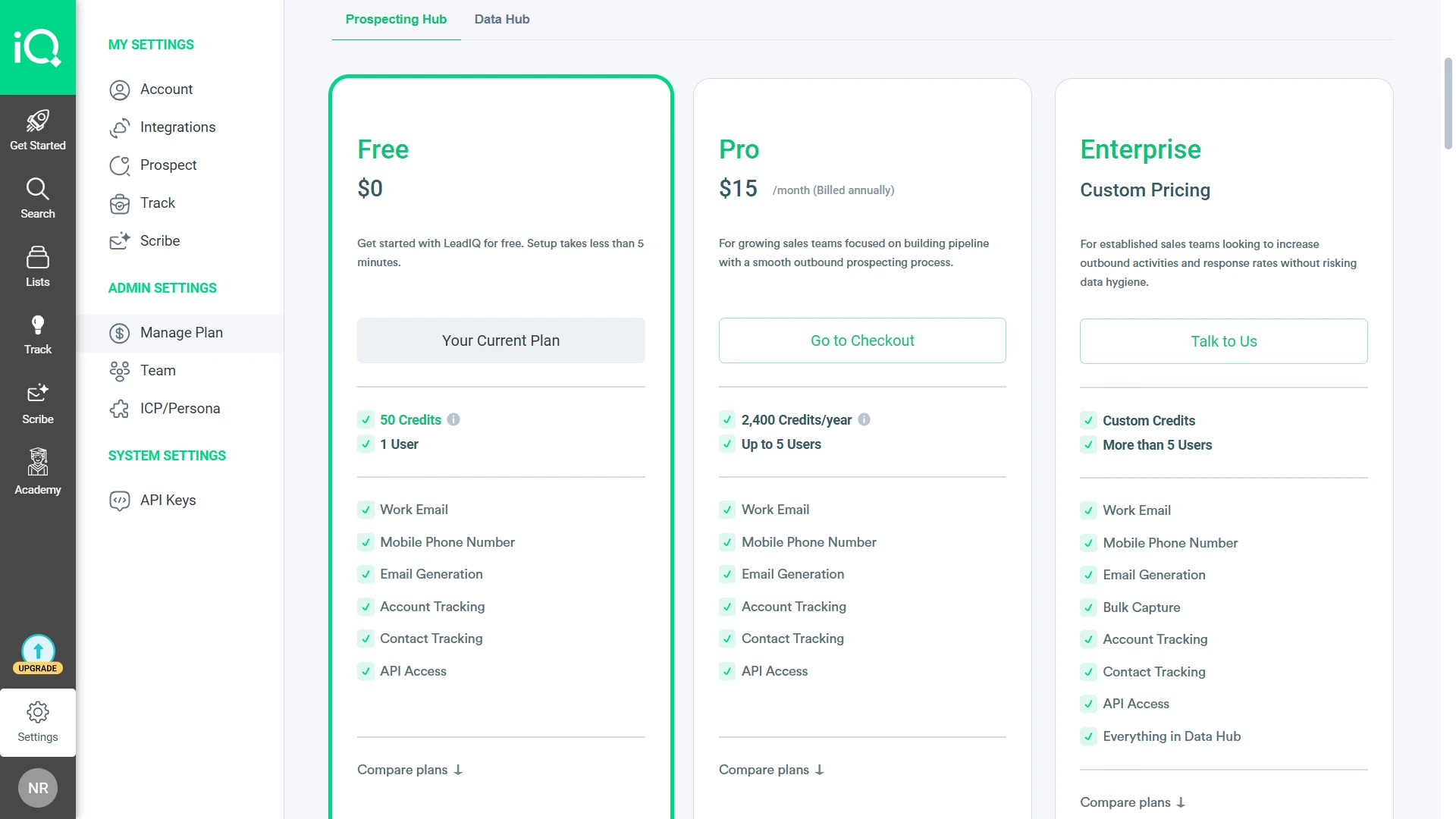
1. LeadIQ Free Plan ($0/Month): Is 50 Credits Enough?
The free plan is LeadIQ’s product-led growth play. And credit where it’s due: it’s one of the most feature-complete free tiers I’ve seen in B2B prospecting.
What’s included:
- 50 credits per month (50 emails OR 5 phone numbers)
- 1 user
- People Search (email + mobile numbers)
- Company Search (technographics + firmographics)
- Chrome Extension for LinkedIn prospecting
- CRM Enrichment and Webform Enrichment
- Champion Tracking (job changes, up to 10 accounts)
- Signals (10-K filings, podcast mentions, hiring activity)
- Integrations (Salesforce, HubSpot, Outreach, Salesloft)
- Scribe AI message writer
- API and MCP access
- Database search (Limited Access)
Where it shines:
You get almost every feature LeadIQ offers. The restriction is purely volume, not capability.
For a founder doing light LinkedIn prospecting, 50 credits per month is enough to test the workflow.
Where it falls short:
50 credits is thin. That’s 50 emails or just 5 phone numbers per month.
No Contact Tracking (account-level only). And “Limited Access” on database search is never defined anywhere by LeadIQ, so you won’t know exactly what’s restricted until you hit the wall.
2. LeadIQ Pro Plan (From $15/Month): Is It Worth Upgrading?
Pro is the only self-serve paid plan.
It uses a slider that scales from 200 to 6,750 credits per month, shared across up to 5 users.
What’s included (everything in Free, plus):
- 200 to 6,750 credits/month (slider-based)
- Up to 5 users sharing a single credit pool
- Lando AI Agent (AI-powered prospecting)
- Contact Tracking (no longer just Account Tracking)
- Full integrations and API/MCP access
- Database search (still “Limited Access”)
Where it shines:
The $15/month annual entry point is genuinely low. You get Lando Agent included (unlike competitors who gate AI features behind enterprise tiers).
The Chrome extension + Sales Navigator workflow is fast and intuitive.
For a 2-3 person team doing email-heavy US prospecting, the credit math works.
Where it falls short:
- 200 credits shared across 5 users is 40 per person.
- Phone-heavy teams will burn through credits in days.
- No bulk capture (CSV enrichment).
- No team analytics.
- Database search is still “Limited Access” even after you’ve upgraded. And the 5-user cap means a team of 6 is forced into Enterprise.
One G2 reviewer put it bluntly:
3. LeadIQ Enterprise Plan (Custom Pricing): When Do You Need It?
Enterprise is where the feature gates finally lift. But the price tag is behind a sales call, and the contract is annual-only.
What’s included (everything in Pro, plus):
- AI Account Prospecting
- Governance Controls
- File Enrichment CSV Upload (bulk enrichment)
- Custom Field Mappings for CRM and engagement tools
- Salesforce Duplicate Detection
- Team Analytics Dashboarding and Reporting
- Advanced Admin Settings
- SSO
- Full database search (no more “Limited Access”)
- Everything in Data Hub (separate product, covered below)
Where it shines:
If you need CSV enrichment, full database access, or team analytics, this is the only path. SSO and governance controls make it enterprise-ready.
Where it falls short:
- No published pricing.
- Annual contracts only, no month-to-month option.
LeadIQ’s G2 page lists separate per-user pricing: Starter at $75/user/month, Pro at $135/user/month.
These figures don’t match the website slider pricing, and the discrepancy is never explained.
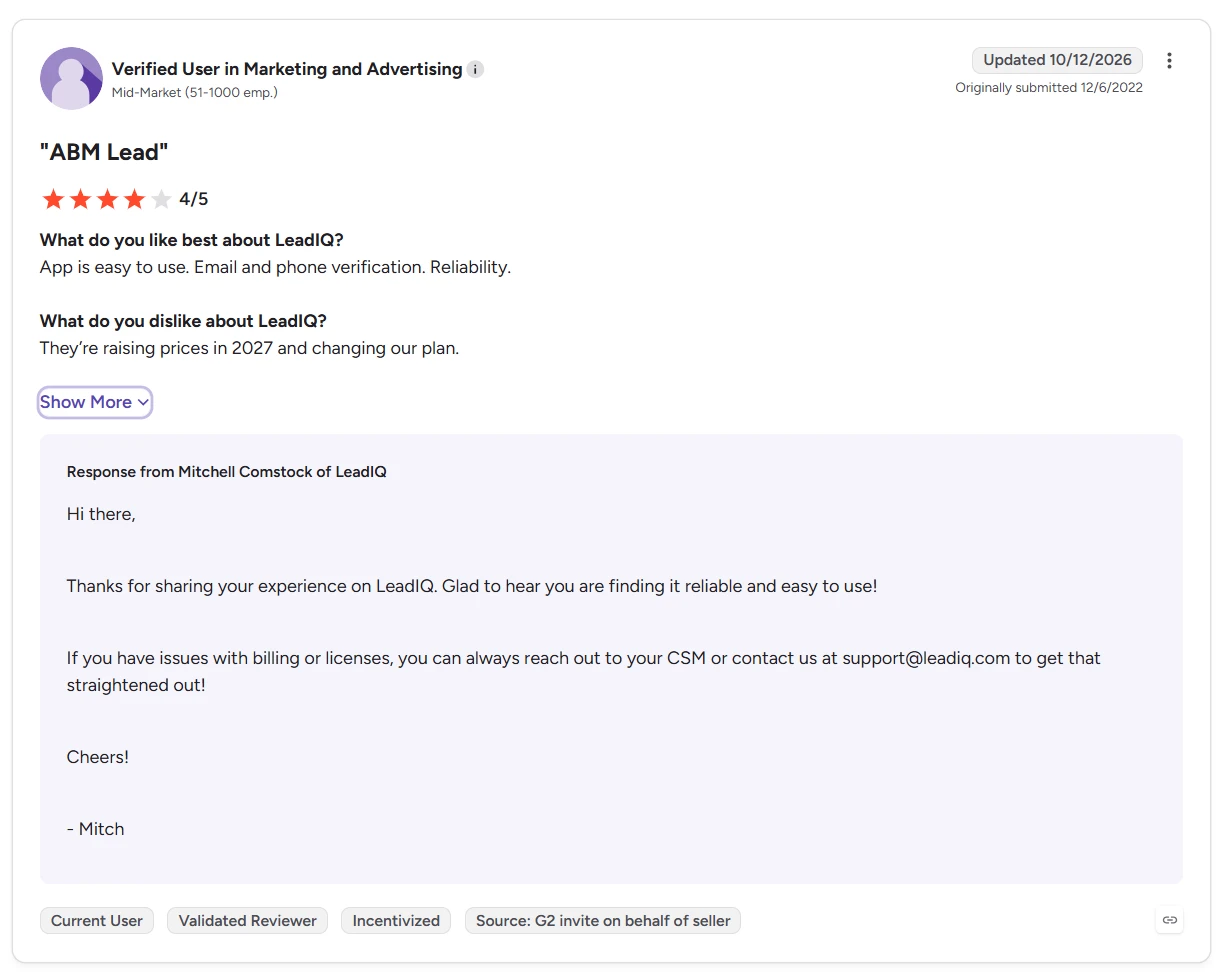
One current user (Verified User in Marketing, updated October 2026) flagged on G2:
They’re raising prices in 2026 and changing our plan.
LeadIQ’s support team didn’t deny it. If you’re signing an annual contract now, ask about renewal terms.
LeadIQ Prospecting Hub vs. Data Hub: What Are You Actually Paying For?
Here’s something I discovered inside LeadIQ’s dashboard that isn’t mentioned anywhere on the public pricing page.
LeadIQ isn’t one product. It’s two.
The dashboard has two separate tabs: Prospecting Hub and Data Hub. The pricing page you see at leadiq.com/pricing? That only covers Prospecting Hub.
Prospecting Hub: What’s Included in Standard LeadIQ Plans?
This is where the Free, Pro, and Enterprise tiers live. It covers the Chrome extension, People and Company Search, CRM enrichment, Webform enrichment, Scribe AI, Signals, job change tracking, and integrations.
If you’re using LeadIQ for LinkedIn-based prospecting and one-at-a-time contact capture, Prospecting Hub handles it.
Data Hub: Which Features Require Custom Pricing?
Data Hub is a separate product with its own custom pricing and a “Book a Demo” button.
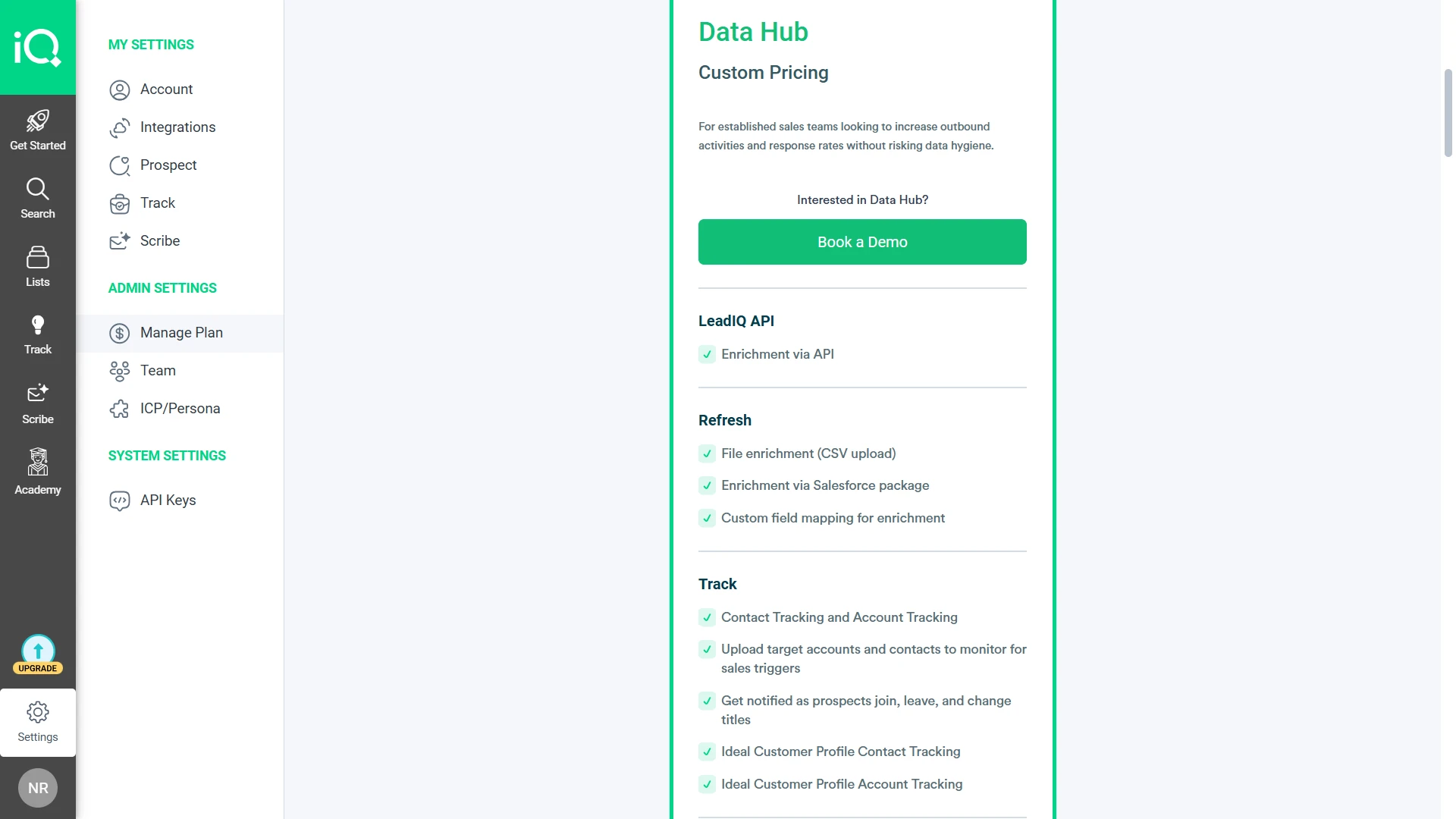
Features under Data Hub include:
- File enrichment (CSV upload for bulk contact enrichment)
- Enrichment via Salesforce package
- Custom field mapping for enrichment workflows
- Contact and Account Tracking with sales triggers
- Upload target accounts and contacts for daily monitoring
- ICP Contact Profile Tracking
- ICP Account Profile Tracking
These are not add-ons to your Pro plan. They’re a separate contract.
Will You Need to Pay Extra for Data Hub?
Here’s the kicker.
Several features that appear as “Enterprise features” on the public pricing page (like CSV enrichment and custom field mappings) actually live inside the Data Hub product.
A buyer comparing LeadIQ Enterprise to competitors like Apollo or Saleshandy would naturally assume CSV enrichment is included. But the dashboard tells a different story.
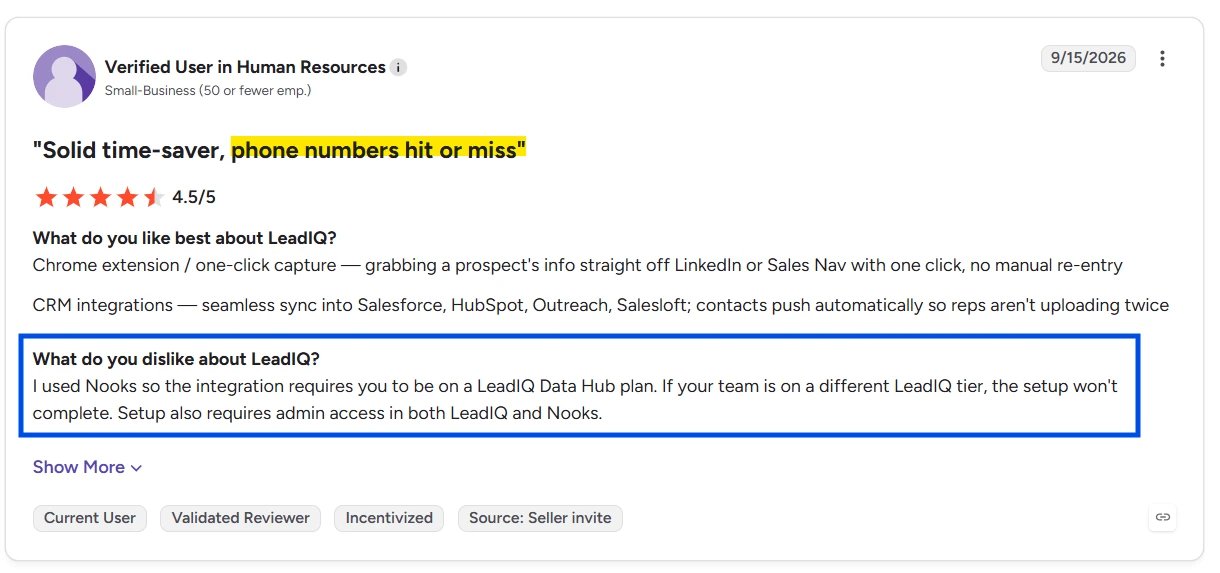
One G2 reviewer confirmed this gap firsthand:
I used Nooks so the integration requires you to be on a LeadIQ Data Hub plan. If your team is on a different LeadIQ tier, the setup won’t complete.
Before committing to Enterprise, ask LeadIQ directly: which features come with my plan, and which require a separate Data Hub contract?
6 LeadIQ Pricing Limitations You Should Know Before Buying in 2026
Every tool has fine print. LeadIQ’s pricing page keeps it minimal, so I’ll fill in the blanks.
1. Unused Credits Expire When Your Subscription Term Ends
LeadIQ’s pricing page doesn’t mention this. But credits expire at the end of every billing cycle on all plans, including paid ones. No rollover.
A team using 150 of 200 credits monthly loses 600 credits over a year. At the entry tier, that’s roughly $45 in unused value. At higher tiers, the waste scales.
2. Phone Numbers Consume 10 Times More Credits Than Emails
This is the single biggest cost trap. A 5-person SDR team doing 10 phone lookups per rep per day burns 500 credits daily. Even the 6,750-credit max Pro tier runs out in under 14 days.
And the accuracy isn’t guaranteed. On G2, 40 users specifically flagged incorrect phone numbers. At 10 credits per lookup, every bad number is money down the drain.
3. Teams With More Than 5 Users Need Enterprise
Pro supports up to 5 users. Period. A 6-person team has zero self-serve options. You’ll need a sales call, custom pricing, and an annual contract.
Competitors like Apollo offer unlimited users on their Basic plan, and Saleshandy’s Scale plan includes unlimited team members at a flat rate.
4. Database Search Remains Limited Even on Pro
Both Free and Pro plans show “Limited Access” for LeadIQ Database Search. Only Enterprise gets full access.
LeadIQ never defines what “limited” means. Are there search caps? Filter restrictions? Result limits? Nobody knows until they hit the wall. If database search is severely throttled, you’re essentially limited to Chrome extension prospecting on LinkedIn.
5. Email Outreach Requires Another Tool and Subscription
LeadIQ finds contacts. It does not send emails, run sequences, warm up inboxes, or manage replies. For that, you need a separate tool.
Outreach starts at $100+/user/month. Salesloft is similar. So the real minimum outreach stack cost isn’t $15/month. It’s $115+/month per user when you add the sequencing layer.
If you’re used to platforms where prospecting and cold emailing live under one roof, this is a significant gap.
6. Possible 2026 Price Changes Could Affect Renewals
One G2 reviewer (Verified User in Marketing, Mid-Market, October 2026) warned: “They’re raising prices in 2026 and changing our plan.”
LeadIQ’s official response directed users to their CSM but didn’t deny the change. If you’re locking in an annual contract, it’s worth asking what your renewal terms will look like.
What Real Users Say on G2 About LeadIQ Pricing
LeadIQ holds a 4.2/5 rating on G2 from 1,193 reviews. Most of the love goes to ease of use (129 mentions) and quick access to contact data (92 mentions). But when it comes to pricing specifically, the picture gets more complicated.
What Users Like About LeadIQ’s Pricing
The entry point is genuinely accessible. Compared to ZoomInfo or Cognism, LeadIQ feels approachable for small teams. The Chrome extension workflow saves enough manual time that many users feel the credits are justified, especially for email-heavy US prospecting.
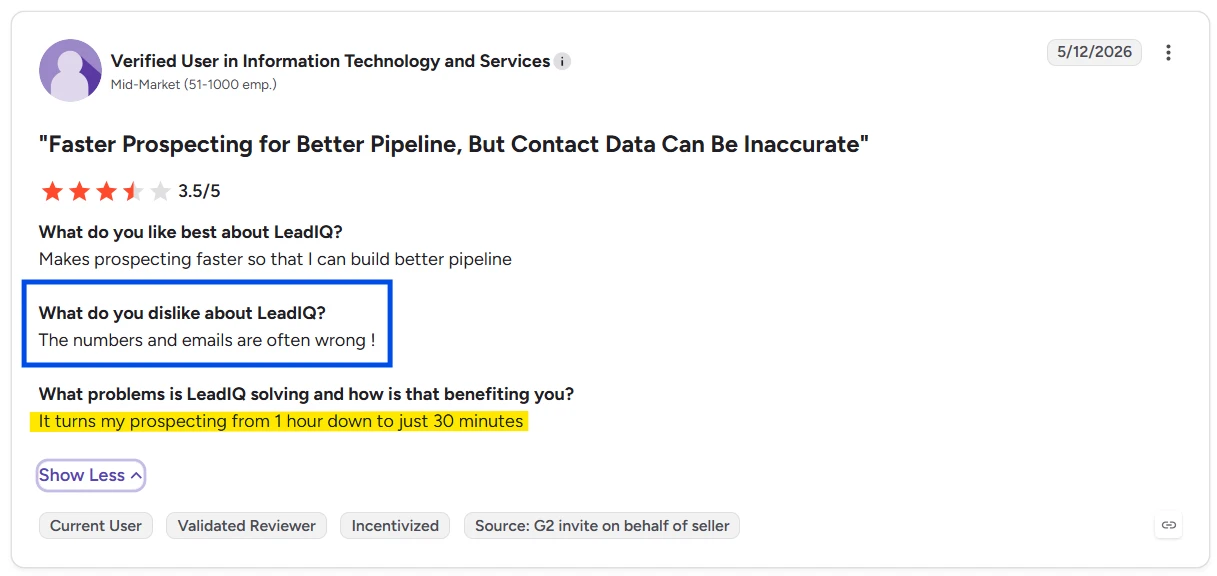
As one reviewer put it:
It turns my prospecting from 1 hour down to just 30 minutes.
The 5-user bundling on Pro also keeps per-seat costs low. And the free plan lets you test the full workflow before spending a dollar.
Where Users Feel LeadIQ Gets Expensive
The complaints cluster around three themes:
- Credits cost too much for what you get. Christopher K. (Small-Business, 4/5) titled his review “Accurate Prospecting Tool, but Pricey” and wrote: “Credits are way too expensive.” (Full Review)
- Price increases are coming. A Verified User in Marketing (Mid-Market, updated October 2026) warned: “They’re raising prices in 2026 and changing our plan.” (Full Review)
- Even satisfied users question ROI. Pratham S. (SDR, 5/5) gave LeadIQ full marks but added: “ROI could definitely improve. I mean the platform is great but still some room.” (Full Review)
How Data Accuracy Affects Cost per Usable Contact
This is the connection most pricing blogs miss.
On G2, 201 reviews mention data accuracy issues: 72 flag inaccurate data outright, 60 cite contact info inaccuracies, 40 call out incorrect phone numbers, and 29 report general data inaccuracy.
When you pair these complaints with LeadIQ’s credit system, the math tells a story.
If even 20% of phone lookups return wrong numbers (plausible, given 40 specific complaints), a team burning 100 phone credits per month wastes roughly 200 credits on bad data. That’s the equivalent of a full month’s entry Pro allocation, gone.
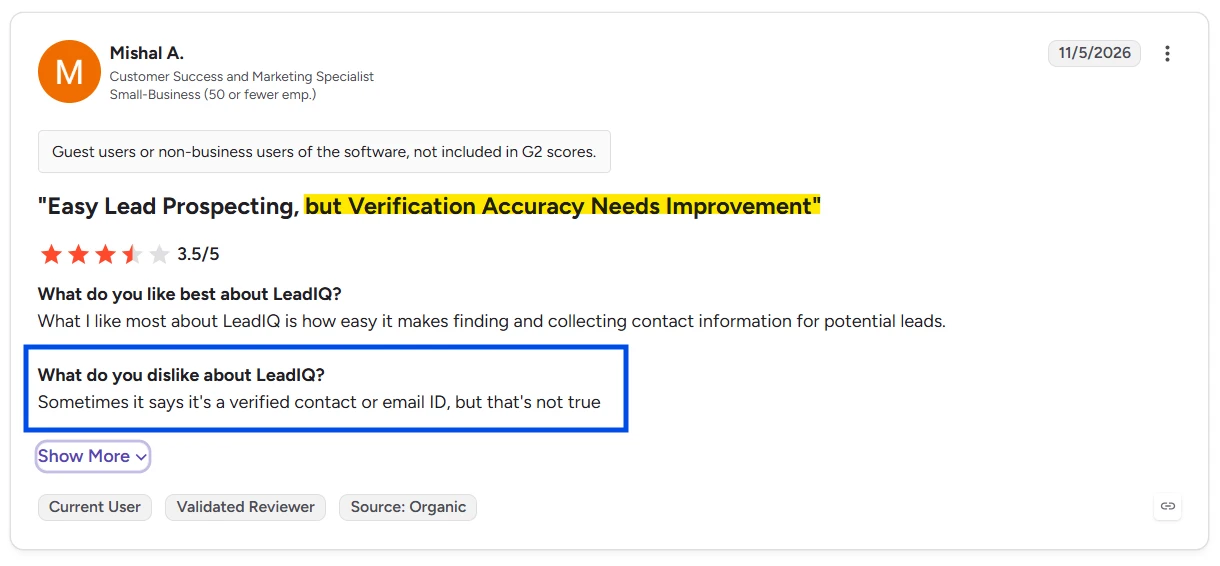
One user captured it perfectly:
Sometimes it says it’s a verified contact or email ID, but that’s not true.
The sticker price is $15/month. The effective cost per usable contact? Significantly higher.
LeadIQ vs. Saleshandy: Which Gives You More for Your Money?
LeadIQ finds contacts. But it can’t send a single email. For that, you need Outreach, Salesloft, or another cold email software bolted onto the side.
That’s where the total cost comparison matters more than the sticker price.
LeadIQ vs. Saleshandy: Pricing and Features Compared
| Feature | LeadIQ Pro | Saleshandy Starter |
|---|---|---|
| Starting price | $15/month (annual, 200 credits) | $34/month (annual) |
| B2B database | 750M+ profiles | 852M+ contacts, 42M+ companies |
| Lead Finder credits | 200/month (shared, 5 users) | 1,500/month |
| Email sending | Not included | Unlimited email accounts, unlimited sequences |
| Email warm-up | Not included | Free on all paid plans (TrulyInbox) |
| Phone numbers | 10 credits per phone | Included in Lead Finder credits |
| Inbox management | Not included | Unified inbox |
| Email verification | Credits deducted on reveal | 98%+ real-time verification |
| Users | Up to 5 | 1 on Starter, unlimited on Scale |
| Free trial | 30 days | 7 days + 50 free credits |
| Credit rollover | No rollover | Per plan terms |
Total Cost of Outreach: The Real Comparison
Here’s where the “$15 vs $34” comparison flips on its head.
| Stack | Monthly Cost (1 User) | What You Get |
|---|---|---|
| LeadIQ Pro + Outreach | $15 + $100+ = $115+/month | 200 credits + email sequences (separate tools) |
| LeadIQ Pro + Salesloft | $15 + $100+ = $115+/month | 200 credits + email sequences (separate tools) |
| Saleshandy Starter | $34/month | 1,500 Lead Finder credits + unlimited email + warm-up + unified inbox |
For the price of LeadIQ Pro alone, you could run Saleshandy’s Starter plan and get 7.5x more Lead Finder credits, plus the entire outreach stack included. No second subscription. No Frankenstein toolchain.
Five Reasons to Choose Saleshandy Over LeadIQ
1. Find More Prospects With a Larger B2B Database
Saleshandy’s Lead Finder sits on a database of 852M+ contacts across 42M+ companies. That’s 100M+ more than LeadIQ’s 750M+ claim. You also get 75+ search filters compared to LeadIQ’s filter panel, which doesn’t publish a filter count.
2. Find Leads and Run Outreach Without Switching Tools
With Saleshandy, I found leads, added them to a cold email sequence, warmed up my sending accounts, and tracked replies in a unified inbox. All from one dashboard. With LeadIQ, I’d need to export contacts to Outreach or Salesloft before sending a single email.
3. Spend Fewer Credits on Phone Numbers
LeadIQ charges 10 credits for a phone number. On Saleshandy, phone numbers are included in your Lead Finder credits without a separate 10x multiplier. For calling-heavy teams, this changes the economics entirely.
4. Get 7.5x More Email Lookups at Entry-Level Pricing
LeadIQ Pro starts with 200 credits/month for $15. Saleshandy Starter gives you 1,500 Lead Finder credits/month for $34. You pay $19 more but get 7.5x the data volume.
5. Add Unlimited Team Members on Scale Without Per-Seat Fees
LeadIQ caps Pro at 5 users. A 6th person triggers an Enterprise contract. Saleshandy’s Scale plan ($149/month) includes unlimited users. No per-seat pricing, no forced Enterprise negotiations.
Don’t just take my word for it.
Why not see the difference for yourself?
Start your 7-day FREE trial, get 50 FREE Lead Finder credits, and see how easy it is to find verified prospects and reach them from one platform.
Try Saleshandy FREE and See the Results Firsthand!
LeadIQ Pricing FAQs
1. How Much Does LeadIQ Cost?
LeadIQ has three plans. Free costs $0 for 1 user and 50 credits per month. Pro starts at $15/month (annual billing) or $20/month (monthly billing) for 200 credits shared across up to 5 users. Enterprise uses custom pricing with annual-only contracts. The Pro plan uses a slider that scales from 200 to 6,750 credits per month.
2. How Do LeadIQ Credits Work?
LeadIQ uses a Universal Credits system. Email lookups cost 1 credit. Phone number lookups cost 10 credits. A combined email + phone lookup costs 11 credits. Account enrichment costs 3 credits. All users on a plan share one credit pool, and credits are consumed the moment you reveal a contact.
3. Do LeadIQ Credits Roll Over?
No. Unused LeadIQ credits expire at the end of each billing cycle on all plans, including paid ones. There is no rollover or credit banking.
4. Is LeadIQ Free to Use?
Yes. LeadIQ offers a free plan with 1 user and 50 credits per month. There’s no time limit on the free plan. But 50 credits cover 50 emails or just 5 phone numbers per month, which won’t sustain active prospecting.
5. What Happens When I Run Out of LeadIQ Credits?
LeadIQ’s pricing page doesn’t disclose overage or top-up options for Pro plans. You either wait until the next billing cycle for credits to reset, or you move to a higher credit tier on the slider. There’s no published option to buy additional credits a la carte.
6. How Many Users Does LeadIQ Pro Include?
Up to 5 users, sharing a single credit pool. Teams of 6 or more must move to Enterprise, which requires custom pricing and annual contracts.
7. Does LeadIQ Include Email Outreach or Sequences?
No. LeadIQ is a prospecting data tool only. It finds contacts but does not include email sending, sequences, email warm-up, or inbox management. You’ll need a separate outreach tool like Outreach ($100+/user) or Salesloft.
8. What’s the Difference Between LeadIQ Prospecting Hub and Data Hub?
LeadIQ’s dashboard shows two separate products. Prospecting Hub covers the Free, Pro, and Enterprise plans for Chrome extension prospecting, People Search, and CRM enrichment. Data Hub is a separate product with custom pricing that includes CSV enrichment, Salesforce package enrichment, and advanced ICP tracking. Some features listed as “Enterprise” on the public pricing page actually require a Data Hub contract.

 Dhruv Patel