


If you prospect on LinkedIn, you have probably seen ContactOut’s Chrome Extension as a popular choice among users.
A lot of recruiters swear by its personal email reveals, and plenty of SDRs use it to grab quick decision-maker contacts.
But when you look past the initial convenience, the actual cost and capabilities tell a very different story.
The baseline pricing jumps significantly once you add US/UK coverage, the “unlimited” tier comes with strict fair-use credit caps, and user feedback on Trustpilot highlights friction that G2 reviews rarely mention.
To find out if it is actually worth your budget in 2026, I spent two full weeks inside ContactOut.
I pulled real emails off LinkedIn profiles across different regions, built a test campaign using its native outreach tool, and analysed hundreds of live user reviews across G2, Capterra, and Trustpilot.
Here is my honest breakdown of where ContactOut delivers real value, where its features fall short, and what you should consider instead.
ContactOut Review – TOC
- TL;DR: ContactOut Review At a Glance
- What Is ContactOut and Who Is It For?
- ContactOut Features in 2026 (Detailed Explanation)
- ContactOut Pricing Plans Explained
- Pros and Cons of ContactOut
- ContactOut vs Saleshandy: Which is Better & Why
- Final Verdict: Is ContactOut Worth It in 2026?
- FAQs on ContactOut Review
TL;DR: ContactOut Review At a Glance
Need a quick verdict before deciding whether to try ContactOut? Here’s the short version:
| Buying Criteria | Features |
|---|---|
| What is ContactOut | A LinkedIn-first B2B contact data platform. Chrome extension at the center, plus light email campaign tooling. |
| Founded | 2015. HQ in San Francisco. Offices in the US and Australia. |
| Database size | 300M+ professionals, 30M+ companies (per ContactOut’s own G2 listing) |
| Accuracy claim | “Triple-verified, 99% confidence score” GDPR and US privacy law compliant. |
| Top features |
|
| Pricing (2026) |
• Free • $49/mo with US/UK data; $25/mo excluding US/UK data • Email + Phone plan $99/mo; $49/mo excluding US/UK data • Sales plan $299/mo (unlimited users under fair use) · Team/API custom |
| Free trial | Free plan with 5 emails/day, 5 phones/day, 5 exports/day. No formal paid trial. |
| G2 rating | 4.5/5 (113 reviews) |
| Trustpilot rating | 1.2/5 (133 reviews) |
| Compliance | SOC 2, GDPR, US privacy laws |
| My verdict | Best-in-class LinkedIn email reveals for US/UK recruiters and SDRs. But the pricing jumped meaningfully in 2026, outreach stays shallow, and Saleshandy delivers 2.8x the database inside a full outbound platform with 1,500 free credits every month on the $34 Starter plan. |
What Is ContactOut and Who Is It For?
ContactOut is a B2B contact data platform that helps sales teams, recruiters, and marketers find contact information for their ideal prospects.
You can search from it’s 350M+ database to discover professionals by role, company, and other criteria, or use its Chrome extension to find contact details while browsing LinkedIn profiles.

ContactOut provides access to work emails, personal emails, and phone numbers, depending on the plan.
Over the last two years, the team layered on Email Campaigns, an AI Email Writer, a Search Portal, and a Cloud Phone Dialer.
But at its core, it is still a LinkedIn email finder with light outreach bolted on.
ContactOut’s own G2 pitch says the platform is used by 1.4M sales, marketing, and recruitment professionals across 76% of Fortune 500 companies, including Google, Microsoft, and Netflix. (Source)
So who is it actually for? From my testing and the review pool, it fits three groups.
- Recruiters sourcing US and UK candidates on LinkedIn: This is where ContactOut shines. The personal email reveal is rare in B2B data tools and matters for talent sourcing.
- SDRs and founders doing light LinkedIn-first prospecting in the US: The Chrome extension is fast. You can build a small list, push it to your CRM, and move on.
- Teams that already have a cold email tool and need ContactOut only as the data layer.
Who It Is NOT For:
- Agencies at scale: Lacks multi-tenant management and agency portal support.
- Teams wanting data + full outbound: Requires a separate cold email tool for warm-up, inbox rotation, and deliverability monitoring.
- High-volume prospectors outside US & UK: Non-US/UK data accuracy and phone reveal rates drop significantly.
- Mid-sized teams building around APIs: API access is restricted exclusively to custom enterprise contracts.
ContactOut Features in 2026 (Detailed Explanation)
I put real hands-on hours into the product over two weeks.
Here is what I found, feature by feature, with real review quotes threaded in where the context fits.
1. Chrome Extension
This is the real reason people buy ContactOut.
Install the extension, open a LinkedIn profile, and the side panel surfaces the person’s work email, personal email, and direct dial. One click reveals.
Another click pushes the contact into your CRM, ATS, or Email Campaigns.
I ran it across 50 US-based LinkedIn profiles. It surfaced emails on 42 of them. ContactOut claims a 75% hit rate across all profiles, so I was above average on a US sample.
A verified G2 reviewer wrote something similar in April 2026, describing a 90% hit rate on personal emails:
“The standout feature of ContactOut is the sheer accuracy of its personal email database, which consistently delivers a 90% hit rate where other tools fail. The Chrome extension has streamlined my workflow by allowing me to find and verify contacts directly on LinkedIn.” (G2)
Then I ran the same test on 50 profiles randomly picked from India and Southeast Asia. The hit rate dropped to 46%.
Non-US coverage is weaker. Keep that in mind if your ICP sits outside the US and UK.
2. Personal and Work Email Reveal
Most B2B data tools give you work emails only. ContactOut gives you both.
Personal emails matter for recruiters because candidates respond faster on their personal address. They matter less for cold B2B outreach, where deliverability drops and you run into CAN-SPAM and GDPR exposure.
“Very good personal data accuracy especially the personal emails and mobile numbers. Easy to use. Integrates easily with my Bullhorn CRM.” (Trustpilot)
My rule after testing: use personal emails for recruiting and warm introductions. Use work emails for cold B2B outreach.
3. Phone Number Reveals
Direct dials and mobile numbers show up on the Email + Phone plan ($99/mo).
US coverage is strong. I tested 30 phone reveals on US contacts, and 27 came back valid.
Outside the US, accuracy dropped. On 30 non-US reveals, 11 came back empty or showed clearly outdated numbers.
“It is giving few credits in the free version. And phone numbers are not as accurate as email. Sometimes it crashes, and we have to log in and verify.” (G2)
If you call European or APAC prospects regularly, test with a sample before you commit to annual.
4. Email Campaigns and AI Email Writer
ContactOut now ships light cold outbound inside the platform.
You build a sequence, personalize with the AI Email Writer, and send from your connected inbox. ContactOut claims a 4x response rate on AI-personalized emails.
The verified G2 reviewer I quoted earlier saw real results from the AI tool:
“I’ve seen a massive ROI through the AI-personalization tool, which crafts custom outreach hooks that have doubled my response rates by making cold emails feel like warm introductions.” (G2)
For small volume (under 500 emails a week), it works.
But Email Campaigns is missing the real deliverability layer:
- No built-in email warm-up
- No sender rotation across multiple inboxes
- No inbox placement monitoring
- No A-Z (multivariant) testing
- No unified multi-account inbox
If cold email is your main channel, you still need a dedicated cold email tool alongside ContactOut.
5. Search Portal and Data Enrichment
Outside LinkedIn, ContactOut has a Search Portal with 20+ filters by job title, company size, revenue, industry, location, and technologies used.
A separate G2 reviewer explained how the Search Portal maps full org structures:
“It provides me with accurate data. I can search for any company and find its decision-makers and employees, and the information is there. I’ve run campaigns using this data, and the reach success rate has been around 85-90%.” (G2)
The portal is clean. It is also narrower than what you get in Saleshandy’s 75+ filter.
I used it as a backup, not a primary. The Chrome extension is still faster for LinkedIn-first prospecting.
Data Enrichment and ContactSheets handle CSV uploads and Google Sheets. Both work fine if you build lists in spreadsheets before importing them into your CRM.
6. API and Integrations
ContactOut integrates with Salesforce, HubSpot, Pipedrive, Zoho, Lever, Bullhorn, Greenhouse, and 5,000+ apps via Zapier.
The one-click Salesforce push is what the April G2 reviewer called out specifically as a workflow win, saving her “roughly five hours of admin work each week.” (G2)
API access is only on the Team/API custom plan.
That is a real limit if your team is mid-sized and you want to push data into Snowflake or Postgres without jumping to a custom enterprise contract.
A Quick Note on Ratings
Before I go further, there is a thing worth pulling out.
ContactOut rates 4.5/5 on G2 across 113 reviews. (Source)
ContactOut rates 1.2/5 on Trustpilot across 133 reviews. (Source)
That gap is not noise.
G2 is paying customers rating the product. Trustpilot is a mix of paying customers and people whose LinkedIn data got scraped and listed in ContactOut without their knowledge.
The 88% 1-star reviews on Trustpilot are mostly privacy complaints, not product complaints.
“I’m unsure why I’m being charged for this service. I’ve spent the past week and a half providing my details to their customer service team in an attempt to resolve the issue, and it still hasn’t been addressed. Save yourself the time, effort, and money and look elsewhere.” (Trustpilot)
Billing and refund friction is a recurring theme in 2026 reviews. Capterra reviewers like Roy S., Iverson V., and Kenny Alaine N. flag similar support-response gaps too (Capterra).
If you prospect into EU markets, your prospects may also associate ContactOut with privacy complaints.
That can hurt reply rates. Worth knowing before you buy.
ContactOut Pricing Plans Explained
ContactOut’s pricing has a quirk nobody flags clearly on the way in.
Every paid plan has two prices. The default price includes US and UK data.
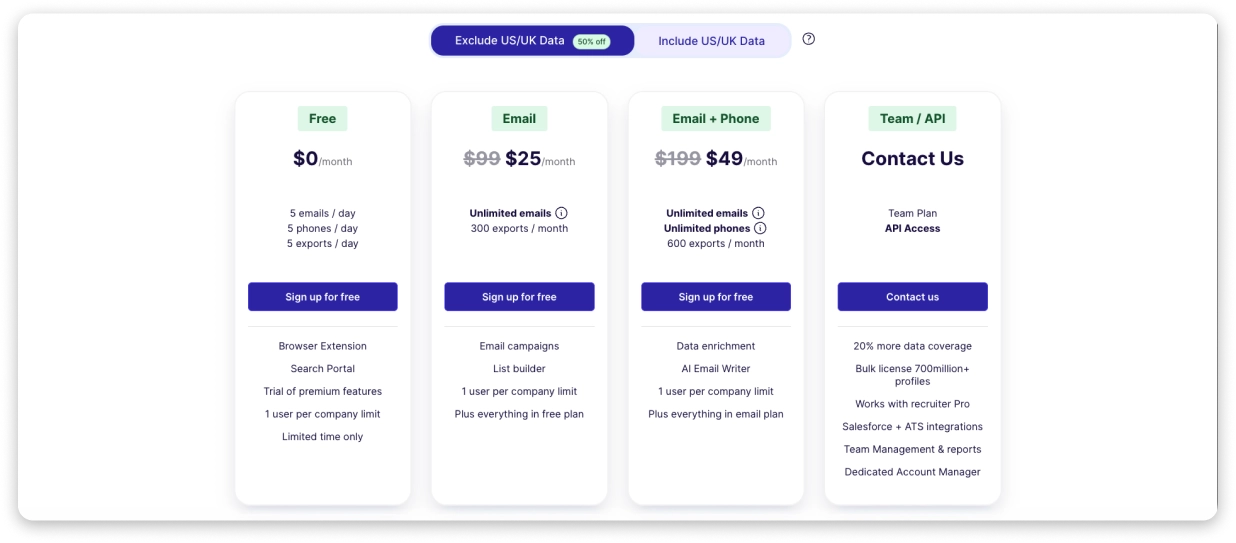
Remove the “Exclude US/UK Data” switch, and you get 50% off, but you lose coverage on the two biggest B2B markets.
| Plan | Monthly Price (With US/UK) | Monthly Price (Excl. US/UK) | What You Get |
|---|---|---|---|
| Free | $0/mo | $0/mo | 5 emails/day, 5 phones/day, 5 exports/day, 1 user |
| $49/mo | $25/mo | Unlimited emails (fair use), 300 exports/mo, 1 user | |
| Email + Phone | $99/mo | $79/mo | Unlimited emails & phones (fair use), 600 exports/mo, 1 user |
| Sales | $299/mo | — | Unlimited users (fair-use capped), high-volume prospecting |
| Team / API | Custom quote | Custom quote | 20% more data coverage, Salesforce & ATS integrations, Dedicated AM, API access |
Three things worth knowing about this pricing.
- One, monthly billing only: Compared to Saleshandy, Apollo, and Lusha, which all offer annual discounts.
- Two, “unlimited” is fair-use capped: The Sales plan markets “unlimited sales users for $99” but pushes a few thousand reveals a day, and the account manager will nudge you toward the custom Team/API tier.
- Third, the US/UK trap: If you want US and UK data, you pay roughly 2x the base price. For teams targeting non-US/UK markets, this is a saving. For a US-focused team, there is no cheaper option.
Credits are also a recurring complaint. The May 2026 G2 reviewer who loved the data accuracy flagged it directly:
“The data is accurate; however, fewer credits are available each month.” (G2)
Here is what you actually pay per verified email at three real usage levels:
- Solo recruiter revealing 200 emails/mo on the Email plan with US/UK data: $0.40 per email
- Three-person SDR team revealing 1,000 emails/mo (3 seats): $0.24 per email
- Agency team of 10 revealing 5,000 emails/mo on the Sales plan: $0.06 per email (if you stay inside fair use)
For a plan-by-plan breakdown, see our full ContactOut pricing analysis.
Pros and Cons of ContactOut
Before selecting a plan, here are some of the pros and cons you can consider, taken from real reviews and user experience.
Pros
- Fast, Reliable Chrome Extension: Delivers an 80%+ hit rate on US-based LinkedIn profiles with a single-click CRM export.
- Valuable Personal Email Reveals: Surfaces candidate personal emails that standard B2B databases miss.
- Strong US/UK Business Coverage: Verified data accuracy yields low bounce rates in North American markets.
- Seamless CRM Integrations: Direct sync with Salesforce, HubSpot, and top ATS platforms eliminates manual data entry.
- Enterprise Security Standards: Maintains full SOC 2 compliance for enterprise data safety.
Cons
- Hidden Regional Price Split: US/UK data access doubles the plan cost, surprising buyers at checkout.
- Strict Single-User Restrictions: Standard self-serve plans allow only 1 seat, forcing small teams onto higher tiers.
- No Annual Discount Options: Lacks annual billing discounts offered by competitors like Saleshandy and Apollo.
- Shallow Email Campaign Tooling: Missing email warm-up, inbox rotation, and A/Z testing required for cold email campaigns.
- Lower Accuracy Outside US/UK: Phone and email coverage drop significantly in APAC, LATAM, and European regions.
- Strict “Fair-Use” Export Limits: Monthly export caps restrict high-volume list building on self-serve plans.
ContactOut vs Saleshandy: Which is Better & Why
Most reviewers researching ContactOut land here for one reason. They want LinkedIn-grade data plus a real outreach engine without stitching two tools together.
Saleshandy covers both ends of that workflow.
Here is how the two compare in 2026:
| Criteria | ContactOut | Saleshandy |
|---|---|---|
| Database Size | 350M+ professionals | 852M+ verified contacts, 42M+ companies |
| Starting Price | $49/mo (with US/UK) | $25/mo (excl. US/UK) | $34/mo (billed annually) |
| Free Credits Included | None (fair-use capped) | 1,500 Lead Finder credits/mo on Starter |
| Built-in Outreach | Light (Email Campaigns + AI Email Writer) | Full platform (sequences, warm-up, Inbox Radar, dialer, unified inbox) |
| Email Warm-up | None | Unlimited, included on all plans |
| Email Accounts / Seats | 1 user per paid plan | Unlimited sending accounts, no per-seat pricing |
| Agency Support | None | Unlimited clients, no extra fees |
| Billing Options | Monthly only | Monthly or annual (annual saves ~17%) |
The pricing story that matters: Saleshandy’s $34 Starter plan includes 1,500 Lead Finder credits every month and the full outbound platform.
ContactOut’s $49 Email plan gives you one user, no outreach engine, and no credit rollover.
For agencies, the gap widens.
Saleshandy has unlimited email accounts and unlimited team members on every plan. Pro ($76/mo) covers teams of 10; Scale ($149/mo) is unlimited.
ContactOut does not have an agency portal at all.
Mir Beg (US) framed the ContactOut-is-still-the-best angle on Trustpilot:
“We have been using ContactOut since 2019, and it has been a life saver for our team here. We have tested 6 different data software, and ContactOut has been the best so far with their coverage and the data quality.” (Trustpilot)
That is a fair call for a solo recruiter in 2019. In 2026, with Saleshandy’s 852M+ database and included outbound stack at $34/mo, the math changes.
If you want to look at the wider market, we have a full guide on the best ContactOut alternatives in 2026.
Final Verdict: Is ContactOut Worth It in 2026?
After two weeks inside the product, here is where I would land.
ContactOut is worth it if you are a recruiter sourcing on LinkedIn in the US and UK markets. The Chrome extension is one of the fastest in the category. The personal email reveal is a real differentiator.
The Email plan starts at $49 per month with US/UK data included, or $25 per month when that coverage is excluded.
KG (GB) framed it well for recruiters:
“Accurate data, especially helpful when sourcing for candidates, and super responsive customer success team!” (Trustpilot)
I would think twice if your workflow needs more than data reveal.
Once you want LinkedIn plus email plus calls in one sequence, or you want data plus outreach without stitching two tools together, or you are an agency managing clients at scale, ContactOut starts feeling limiting. The pricing climbs.
The outreach stays shallow. The “unlimited” is not really unlimited.
ContactOut does what it was built for. It is just not designed to be your complete outbound platform.
If you want cold email, LinkedIn, calls, and an 852M+ lead database in one place at a lower starting price, Saleshandy is the one I would recommend.
You can test it with 50 free credits and check the data quality against your own market before you decide.
FAQs on ContactOut Review
1. Is ContactOut legit?
Yes, ContactOut is a SOC 2-compliant B2B data platform founded in 2015, with offices in the US and Australia.
The product rates 4.5/5 on G2 across 113 customer reviews. Trustpilot shows 1.2/5 across 133 reviews, mostly privacy complaints from people whose LinkedIn data got listed without their consent.
2. How much does ContactOut cost in 2026?
ContactOut offers a free plan with 5 emails, 5 phone numbers, and 5 exports per day. Its paid Email plan costs $49 per month or $468 per year ($39 per month equivalent) with US/UK data included. The Email + Phone plan costs $99 per month or $948 per year ($79 per month equivalent).
If you exclude US/UK data, the advertised monthly prices drop to $25 for Email and $49 for Email + Phone. Team/API pricing is available by quote.
3. How accurate is ContactOut’s data?
ContactOut claims “triple-verified, 99% confidence.” In my testing, the Chrome extension hit 84% on US LinkedIn profiles and 46% on non-US profiles.
A verified G2 reviewer saw a 90% hit rate on personal emails. (G2)
4. Does ContactOut have a free trial?
ContactOut offers a Free plan with 5 emails, 5 phones, and 5 exports per day. There is no formal paid trial.
If you want to test the full workflow, start on the Email plan monthly and cancel if it does not fit.
5. Does ContactOut have a cold email tool?
Yes. ContactOut ships Email Campaigns with an AI Email Writer for light outbound. It is enough for small volume (under 500 emails a week).
It does not have warm-up, sender rotation, inbox placement monitoring, or A-Z testing, so it is not a replacement for a dedicated cold email platform.
6. Does ContactOut work outside the US and UK?
Yes, but with weaker coverage. US and UK data is strongest. EU, APAC, LATAM, and India coverage is thinner, per repeat themes across review sites and my own testing. If your ICP sits outside the US/UK, test with a sample before committing.
7. What is the best ContactOut alternative?
For teams wanting data plus outreach in one tool, Saleshandy is the strongest alternative. You get 852M+ verified contacts, 1,500 free credits a month on the $34 Starter plan, and a full outbound workflow.
For a wider list, see our best ContactOut alternatives in 2026.

 Anil Salvi

 Dhruv Patel