


What if your emails are perfect, but nobody ever sees them?
Most cold email senders blame their copy when open rates drop. They rewrite subject lines, shorten paragraphs, and test new CTAs. But the actual problem is often invisible. Their emails never made it past the spam filter in the first place.
Validity’s 2025 Email Deliverability Benchmark Report found that 1 in 6 legitimate marketing emails fail to reach the inbox. Global spam placement rates nearly doubled between Q1 and Q4 of 2024. That is a massive chunk of pipeline disappearing before prospects even get a chance to read your message.
However, a spam checker can catch most of these problems before you hit send. The right tool will show you exactly where your emails land, what is triggering spam filters, and how to fix it.
But not all spam checkers are the same. Some only scan for trigger words. Others actually send your email to inboxes and tell you whether it landed in primary, promotions, or spam.
I tested 6 free email spam checkers by sending cold emails from live sending accounts. In this blog, I am sharing:
- Which tools give the most accurate results
- What each tool actually tests (and what it misses)
- How to pick the right one based on your use case
- A step-by-step workflow for testing before every campaign
Let’s get into it.
Email Spam Checkers – TOC
- TL;DR: Which Free Email Spam Checker Should You Use?
- What Is an Email Spam Checker?
- Why Spam Testing Matters More in 2026
- Three Types of Email Spam Checkers (Know This Before You Pick One)
- 6 Best Free Email Spam Checkers (Tested With Emails)
- Why Different Spam Checkers Give Different Results?
- How to Test Your Emails for Spam (Step by Step)
- How to Pick the Right Spam Checker for Your Use Case
- Mistakes to Avoid When Testing for Spam
- How to Improve Email Deliverability After Testing
- Start Testing Your Emails Before Your Next Campaign
- Frequently Asked Questions
TL;DR: Which Free Email Spam Checker Should You Use?
If you are short on time, here is a quick breakdown of my top picks:
| Tool | Type | Free Limit | Best For |
|---|---|---|---|
| Saleshandy | Inbox Placement Tester | 1 free test (+ 1 after signup) | Cold email teams needing inbox placement data |
| GlockApps | Inbox Placement Tester | 2 tests (total) | Marketers needing ISP-level placement breakdown |
| MailReach | Inbox Placement Tester | 3 free tests per 24 hours | Outreach teams already using email warmup |
| Mail-Tester | Basic Spam Scorer | Limited tests per day | Quick pre-send checks with zero setup |
| Unspam Email | Content + Deliverability | Free plan available | Newsletter senders wanting design + deliverability feedback |
| Mailmeteor | Content-Only Checker | Unlimited | Scanning email copy for spam trigger words |
If you only try one tool from this list, make it the Saleshandy Spam Checker Tool. It is one of the few free options that runs an actual inbox placement test across email accounts.
What Is an Email Spam Checker?
An email spam checker is a tool that evaluates whether your email will reach the recipient’s inbox or get caught by spam filters.
Depending on the type, these tools analyze different things. Some scan your email content for spam trigger words. Others send your email to inboxes and check where it lands across Gmail, Outlook, Yahoo, and other providers.
The better spam checkers go a step further. They verify your email authentication records (SPF, DKIM, DMARC), check if your domain or IP is blacklisted, and review your HTML structure for red flags.
In short, a spam checker tells you what email providers think of your message before it reaches your actual list.
Why Spam Testing Matters More in 2026
Spam filters are not static. They evolve every year with stricter rules and smarter algorithms.
If you are sending cold emails or running outbound campaigns, even a small drop in deliverability can cost you meetings, pipeline, and revenue. Testing before sending is not a nice-to-have anymore. It is a requirement.
Email Deliverability Statistics You Should Know
Here is why I run a spam test before every campaign:
- Validity’s 2025 Benchmark Report confirms that roughly 1 in 6 legitimate marketing emails never reach the inbox. The global average inbox placement rate sits at around 83.5%.
- Starting February 2024, Google and Yahoo made SPF, DKIM, and DMARC authentication mandatory for bulk senders. Emails that fail these checks now get rejected at the server level, not just filtered.
- Google enforces a 0.3% spam complaint threshold. Cross that line, and your domain risks SMTP-level rejection, no matter how clean your content is. The recommended rate is below 0.1%.
These are not edge cases. They affect every sender, whether you are doing cold outreach or sending newsletters.
Three Types of Email Spam Checkers (Know This Before You Pick One)
Not all spam checkers test the same things. Picking the wrong type is the number one reason people get confused by conflicting results. Here is how the three main categories work.
Content-Based Spam Checkers
These tools scan your email copy for words and patterns that trigger spam filters. You paste your text in, and the tool highlights risky phrases like “100% free,” “act now,” or “limited time.”
They are fast and easy to use. But they cannot tell you anything about your domain reputation, authentication setup, or the actual placement of your inbox.
Inbox Placement Testers
These are the most useful type for cold email senders. You send your email to a set of seed addresses, and the tool reports where it lands: inbox, spam, or promotions tab.
The best inbox placement testers also run authentication checks, blacklist monitoring, and content analysis alongside the placement test. These give you the most actionable data.
Ongoing Monitoring Tools
These are dashboards that track your domain reputation and email deliverability over time. They do not test individual emails. Instead, they show patterns in how email providers treat your domain.
Google Postmaster Tools is the standard for Gmail. Microsoft SNDS covers Outlook. Yahoo Sender Hub handles Yahoo and AOL. All three are free.
The key takeaway: A content checker cannot tell you about inbox placement. An inbox placement test cannot track long-term reputation. Match the tool to the question you are trying to answer.
6 Best Free Email Spam Checkers (Tested With Emails)
I tested each of these tools by sending cold emails from active sending accounts. Here is what I found.
1. Saleshandy Email Spam Checker
Saleshandy’s email spam checker is one of the few free tools that actually runs a full inbox placement test across email accounts. It does not just scan your content for trigger words.
It sends your email to seed inboxes across multiple ESPs and shows you exactly where it lands.
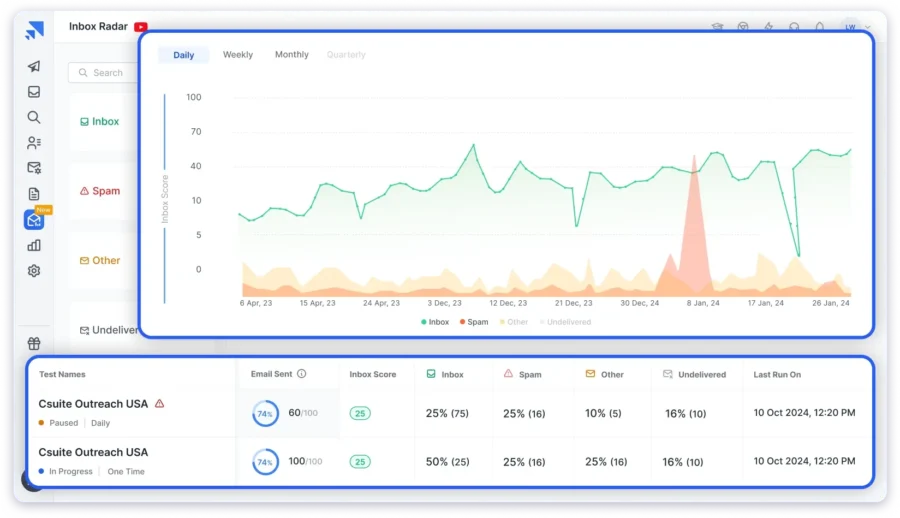
I placed it first on this list because it gave me the most complete picture in a single test.
The report covers inbox placement, authentication status, blacklist checks, and a SpamAssassin content analysis, all in one dashboard.
If you already use Saleshandy for cold email outreach, the spam checker connects directly to your sending workflow.
What It Tests
Inbox placement across accounts from Gmail, Outlook, Google Workspace, Yahoo, and other ESPs. It also verifies SPF, DKIM, and DMARC authentication, runs SpamAssassin-based content analysis, and monitors blacklist status.
Key Features
- Inbox placement report showing where emails land (inbox, spam, or promotions) across 6+ ESPs
- SpamAssassin content analysis to flag risky elements in your email
- SPF, DKIM, and DMARC authentication verification
- Domain and IP blacklist monitoring
- Shareable test reports you can send to your team
- One-time, scheduled, or external testing options
- Built into a full cold email platform with email warm-up, sender rotation, and a B2B lead finder with 800M+ contacts
Free Limits
One free spam test without signing up. After creating a free account, you get one additional test.
Best For
Cold email senders, SDRs, and outbound teams who need accurate inbox placement data before launching campaigns.
2. GlockApps
GlockApps is one of the most established email deliverability platforms in this space. It has been around for over 15 years and is known for its detailed, ISP-level spam test reports.
What sets GlockApps apart is the size of its seed list. When you run a test, it sends your email to roughly 100 seed mailboxes across major providers.
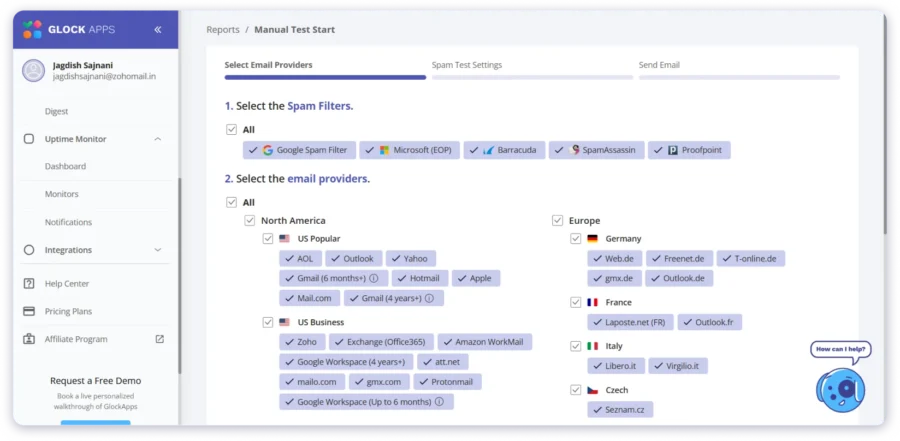
That gives you a much broader view of where your emails land compared to tools that test against just one or two inboxes.
What It Tests
Inbox vs. spam placement across ~100 seed mailboxes. It checks placement per ISP (Gmail, Outlook, Yahoo, etc.), runs spam filter testing against Google, Barracuda, and SpamAssassin, and validates SPF, DKIM, and DMARC. It also monitors 50+ blacklists.
Key Features
- Inbox placement breakdown by individual ISP
- Spam filter simulation across Google, Barracuda, and SpamAssassin
- SPF, DKIM, and DMARC validation
- Domain and IP blacklist monitoring across 50+ lists
- Content analysis for HTML errors, image-to-text ratio, and links
- Automated testing with Slack and email alerts
Free Limits
2 spam test credits total. Not per day or per month. Just 2 tests, ever. Paid plans start at $59/month.
Best For
Email marketers who need the most granular ISP-level placement data and are willing to plan their free tests carefully.
3. MailReach
MailReach is primarily an email warmup platform, but it bundles a solid spam testing feature that works well on its own.
If you are already warming up your sending accounts, MailReach lets you test and monitor deliverability from the same dashboard.
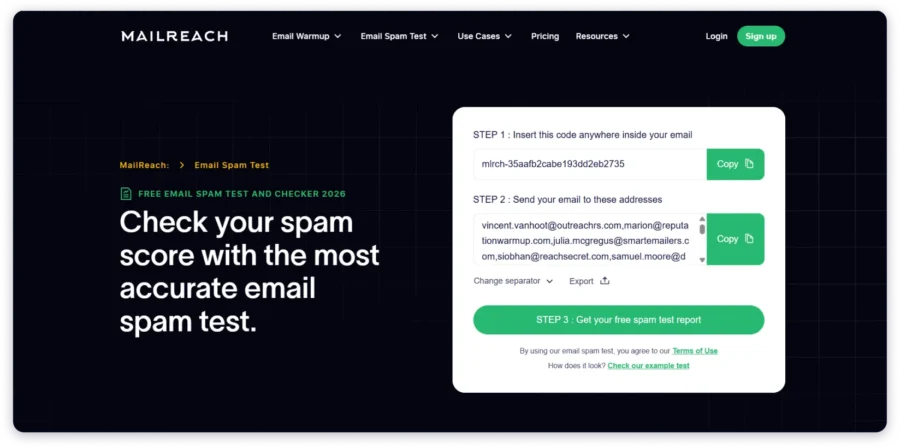
The testing methodology is more thorough than single-inbox tools. MailReach sends your email to 30+ mailboxes and uses a code snippet to locate your message across inboxes.
That multi-provider view gives you a clearer picture of where problems actually are.
What It Tests
Multi-inbox placement across 30+ mailboxes. It checks SPF, DKIM, and DMARC records, scans for blacklists, reviews links, analyzes HTML complexity, and flags spam words.
Key Features
- Inbox placement test across 30+ mailboxes
- SPF, DKIM, and DMARC checker
- Blacklist monitoring
- Link and HTML analysis
- Spam word detection
- Actionable recommendations to improve your score
Free Limits
3 free spam tests every 24 hours. Paid plans start at $19.50/month (bundled with email warmup credits).
Best For
Outreach teams already using email warm-up tools who want spam testing in the same workflow.
4. Mail-Tester
Mail-Tester is the simplest spam checker you will find. No signup, no account creation, no setup. You just go to the website, send your email to the address they provide, and get a score within seconds.
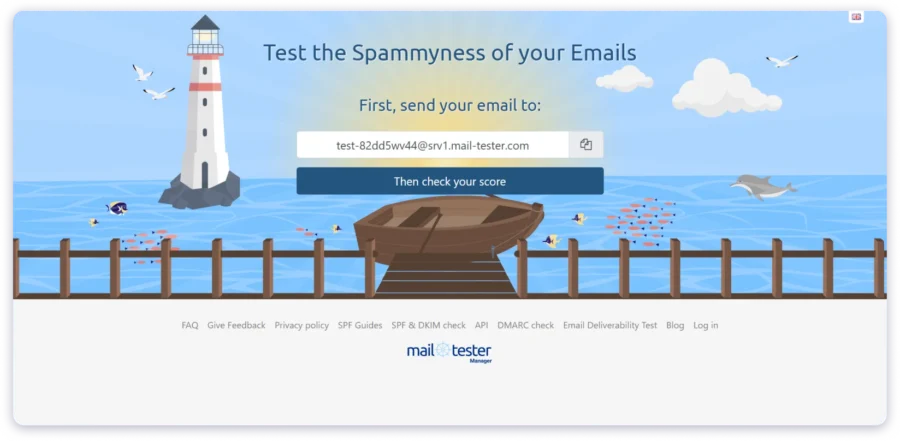
I use Mail-Tester when I need a quick gut check before a send. It is not thorough enough to replace a full inbox placement test, but for catching obvious authentication issues or content red flags, it gets the job done fast.
The interface is clean, and even non-technical team members can run a test without guidance.
What It Tests
Spam score from 0 to 10 based on SpamAssassin analysis. It also runs basic SPF, DKIM, and DMARC checks and flags missing or broken configurations. Blacklist status is included.
Key Features
- Instant spam score from 0 to 10
- SpamAssassin-based content analysis
- Authentication checks (SPF, DKIM, DMARC)
- Blacklist status check
- No account or signup required
Free Limits
Limited tests per day (typically 3). No paid plan needed for occasional testing.
Best For
Anyone who needs a 30-second spot check before hitting send. Not a replacement for full inbox placement testing.
5. Unspam Email
Unspam Email is a deliverability testing tool with a twist.
Along with the standard spam checks, it includes an AI-powered heatmap that predicts where readers will focus when they see your email.

That makes it a solid pick for newsletter senders who care about both placement and design.
The deliverability side covers authentication, blacklists, and inbox placement across multiple ESPs. It is not as deep as GlockApps or Saleshandy for cold email testing, but the combination of spam checking and design analysis makes it unique on this list.
What It Tests
Deliverability test across multiple ESPs. Authentication checks for SPF, DKIM, DMARC, and BIMI. Blacklist monitoring, broken link detection, and reverse DNS verification.
Key Features
- Inbox placement test across multiple ESPs
- SPF, DKIM, DMARC, and BIMI checks
- Domain and IP blacklist monitoring
- Broken link and short URL detection
- AI eye-tracking heatmap for email design feedback
- Email preview across devices and platforms
Free Limits
Free plan available for basic tests. Paid plans start at $90/year for the Basic tier.
Best For
Newsletter senders and email marketers who want deliverability testing and design feedback in one tool.
6. Mailmeteor Spam Checker
Mailmeteor is the lightest tool on this list. It is a content-only spam checker, meaning it does not send any emails or test inbox placement. You paste your text, and it scans for words and phrases that commonly trigger spam filters.
I use Mailmeteor as a first step before running a full inbox placement test.
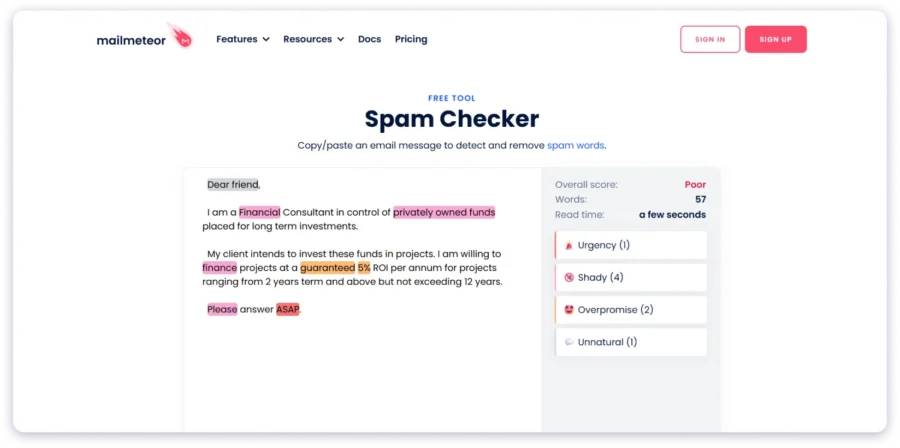
It catches obvious problems in seconds, like overused phrases such as “guaranteed,” “buy now,” or “click here.” It is not a replacement for a proper deliverability test, but it is a useful pre-send sanity check that takes less than a minute.
What It Tests
Email content only. It scans for spam trigger words and phrases, categorized by severity. No authentication checks. No inbox placement testing. No domain or blacklist monitoring.
Key Features
- Paste-and-scan interface (no email sending required)
- Highlights spam trigger words and phrases
- Categorizes triggers by severity
- Works for subject lines and email body
- Completely free with no usage limits
Free Limits
Unlimited. No signup, no credit limits, no restrictions.
Best For
A quick pre-send copy check when you want to catch obvious spam words before running a full test.
Why Different Spam Checkers Give Different Results?
If you have tested the same email in two tools and gotten different scores, you are not alone. There is a clear reason for it.
Seed list size varies dramatically. Mail-Tester tests against a single inbox. GlockApps sends to roughly 100. MailReach checks 30+. A larger sample gives more reliable data, but even 100 inboxes is a tiny fraction of the email ecosystem.
Scoring engines differ. Some tools focus on a rule-based SpamAssassin score. Others measure actual inbox placement. A high SpamAssassin score does not guarantee inbox placement. And a spam result on one seed test does not mean you will hit spam everywhere.
Seed tests behave like cold emails. Most testing tools send your email to addresses that never opted in. That means the test simulates cold email conditions. Your real deliverability to engaged subscribers may be different.
The takeaway is simple. Do not rely on one tool or one score. Use multiple tools, and look for patterns across results.
How to Test Your Emails for Spam (Step by Step)
Here is the workflow I follow before launching any cold email campaign.
Step 1 — Check Email Authentication (SPF, DKIM, DMARC)
Before testing content, make sure your sending domain has SPF, DKIM, and DMARC records configured correctly. Without these, most ESPs will reject or filter your emails regardless of what you write.
Saleshandy, GlockApps, and MailReach all include authentication checks in their reports.
Step 2 — Run a Content-Level Spam Check
Paste your email copy into a content checker like Mailmeteor. Look for flagged words and phrases. Replace anything that could trigger filters without changing your message. This takes less than a minute.
Step 3 — Run an Inbox Placement Test
Send your email through an inbox placement tool like Saleshandy’s spam checker. Check where your email lands across Gmail, Outlook, Yahoo, and other providers. If your email hits spam on specific ESPs, you will know exactly where the problem is.
Step 4 — Check Blacklist Status
Verify that your sending domain and IP are not listed on any major blacklists. Most inbox placement tools include this automatically. If you find a listing, follow the blacklist’s delisting process before sending campaigns.
Step 5 — Review and Fix Flagged Issues
Go through your test report. Fix authentication gaps first, then address content flags. Re-test after making changes to confirm the fix before sending to your actual list.
How to Pick the Right Spam Checker for Your Use Case
For Cold Email and Outbound Sales
You need an inbox placement tester, not a content-only checker. Tools like Saleshandy, GlockApps, or MailReach show you where your emails land before you start email sequences. Content checks help, but for outbound, inbox placement data is what matters.
For Newsletters and Marketing Emails
Start with an inbox placement test. Then add a content checker and a design tool. Unspam Email works well here because it combines deliverability testing with an AI heatmap. For ongoing monitoring, set up Google Postmaster Tools to track domain reputation over time.
For a Quick Pre-Send Check
If you just need a fast sanity check before a single send, Mail-Tester or Mailmeteor will do. They take less than a minute. But they cannot replace a full inbox placement test for campaign-level sending.
Mistakes to Avoid When Testing for Spam
I have made most of these mistakes myself. Here is what to watch out for:
- Testing only once. Deliverability changes over time. Test before every major campaign, not just during setup.
- Relying on a single tool. Different tools test different things. A perfect score on one does not mean your emails are safe across all providers.
- Ignoring authentication. SPF, DKIM, and DMARC issues cause more spam problems than content ever will. Fix these first.
- Skipping the re-test. After making changes, always run the test again. One fix can create new issues if records are misconfigured.
- Testing from the wrong account. Always test from the same domain and email address you plan to use for your real campaign. Results from a different account will not reflect your actual deliverability.
How to Improve Email Deliverability After Testing
Running a spam test is step one. Here is what to do after you get your results.
Fix Authentication Gaps First
If your SPF, DKIM, or DMARC records are missing or misconfigured, fix them before anything else. Authentication failures are the single biggest cause of emails landing in spam. Most email deliverability tools will flag these in their reports.
Clean Your Email List Before Every Campaign
Invalid and inactive email addresses push your bounce rate up. A high bounce rate damages your sender’s reputation faster than any spam word. Use an email verifier to remove bad addresses before sending.
Warm Up New Domains and Accounts
If you are using a new domain or email account, do not start with full-volume sending. Gradually increase your volume over 2 to 4 weeks using an email warm-up tool. This builds your sender reputation with ESPs before you scale cold email volume.
Monitor Sender Reputation Regularly
Set up Google Postmaster Tools for Gmail and Microsoft SNDS for Outlook. Track your domain reputation weekly. If you notice a dip, investigate and fix the issue before it tanks your next campaign.
Start Testing Your Emails Before Your Next Campaign
Most deliverability problems are fixable. You just need to catch them before you hit send.
Pick a spam checker based on what you actually need. If you send cold emails, start with an inbox placement test. If you just need a quick copy scan, a content checker works fine.
The tools in this blog are all free to start with. The one I recommend most for outbound teams is Saleshandy’s email spam checker, because it tests inbox placement across real accounts and connects to your entire cold email workflow.
Sign up free, get 5 free credits, and see where your emails actually land.
→ Run your free spam test with Saleshandy
Frequently Asked Questions
1. What Is the Most Accurate Free Email Spam Checker?
For inbox placement accuracy, Saleshandy and GlockApps give the most reliable results because they test across multiple real inboxes. Content-only checkers like Mailmeteor scan for spam words but cannot tell you where your email will actually land.
2. How Often Should I Run a Spam Test?
I run a test before every new campaign and whenever I change my email copy, sending domain, or ESP. At minimum, test once a month if you send regularly.
3. Can a Spam Checker Guarantee Inbox Placement?
No. Spam checkers identify potential problems, but they cannot guarantee placement. Email providers use proprietary algorithms that factor in domain reputation, engagement history, and user behavior, all of which are outside what a test can fully simulate.
4. What Is a Good Spam Score?
For SpamAssassin-based tools, a score below 5.0 is generally considered safe. The lower the better. For inbox placement tools, 80%+ inbox placement is a strong result. Anything below 70% signals a problem worth investigating.
5. Do Free Spam Checkers Work for Cold Email?
Yes, but only if you use inbox placement testers. Content-only checkers miss the factors that matter most for cold email, like domain reputation, authentication, and per-ESP placement. Saleshandy, GlockApps, and MailReach are the best free options for this.