
Saleshandy and ZoomInfo both help B2B teams find the right people to sell to, which is why they end up on the same shortlist.
But each has grown well beyond a basic contact database, but their approaches and feature sets differ.
- Saleshandy is a multichannel outbound platform that pairs a database of 852M+ verified contacts with automated outreach across email, calls and WhatsApp, a full deliverability stack, a unified inbox and a built-in CRM, so finding prospects and reaching them happen in one place.
- ZoomInfo is a B2B data and go-to-market intelligence platform that gives you contact and company records, buyer intent signals, org charts and technographic data, and it is built to push all of that into the CRM and sales engagement tool you already run.
I’ll compare both across 8 areas below, from the database through to pricing and support.
Saleshandy vs ZoomInfo – TOC
Saleshandy vs ZoomInfo at a Glance
| Saleshandy | ZoomInfo | |
|---|---|---|
| Contacts | 852M+ | 500M+ |
| Companies | 42M+ | 100M+ |
| Search filters | 75+ | 60+ |
| AI search | ✓ | ✓ |
| Waterfall enrichment | ✓ | X |
| Verification accuracy | 98%, under 3% bounce | X |
| Charged for unverified contacts | X | One credit per export |
| Technographics and buying signals | ✓ | ✓ |
| Third-party intent data | ✗ | ✓ |
| Multichannel sequences | ✓ Included on all plans | Not in base Sales plans |
| Deliverability stack | ✓ Free warm-up, sender rotation, pre-send checks | ✗ |
| Built-in CRM | ✓ Free on all plans | ✗ External CRM needed |
| Pricing | From $34/mo | Not published ($33,500 median contract, per Vendr) |
| Free trial | 7 days with 50 free credits, instant access | 7 days, routed to a specialist call |
Saleshandy vs ZoomInfo: Feature-by-Feature Comparison
In this section, I’ll share an in-depth comparison of Saleshandy and ZoomInfo across the nine areas that matter most when you’re choosing between them.
1. B2B Database and Search
Everything in outbound starts with the list, so this is where I spent the most time.
I looked at three things in both tools: how many contacts you get, how easily you can narrow them down to the right people, and what you’re charged when you reveal an email.
If a database falls short on any of these, you either reach fewer people or pay for contacts you can’t use.
Saleshandy
Saleshandy was the easy one to test (it’s the tool I use every day), so I put its database through a proper run with 200 contacts.
Saleshandy gives you 852M+ contacts across 42M+ companies (nearly 2x the contacts ZoomInfo lists), and more contacts simply means more people you can reach, especially if you’re targeting a narrow niche.
What won me over, though, were the 75+ filters.
You can search by job title, location, company size, industry, the tools a company uses, funding, hiring activity and recent company news, and the list narrows fast.
I looked for Heads of Sales at US-based software companies with 51 to 200 employees, and four filters took me from 169,445 people down to 520 (each search took about four to five seconds).
I also tried something more specific on the Companies side.
I searched for companies using HubSpot, added the ones that had recently raised funding and changed leadership, and 127,700 companies came down to 163, which is a list where you know exactly why you’re reaching out to each one.
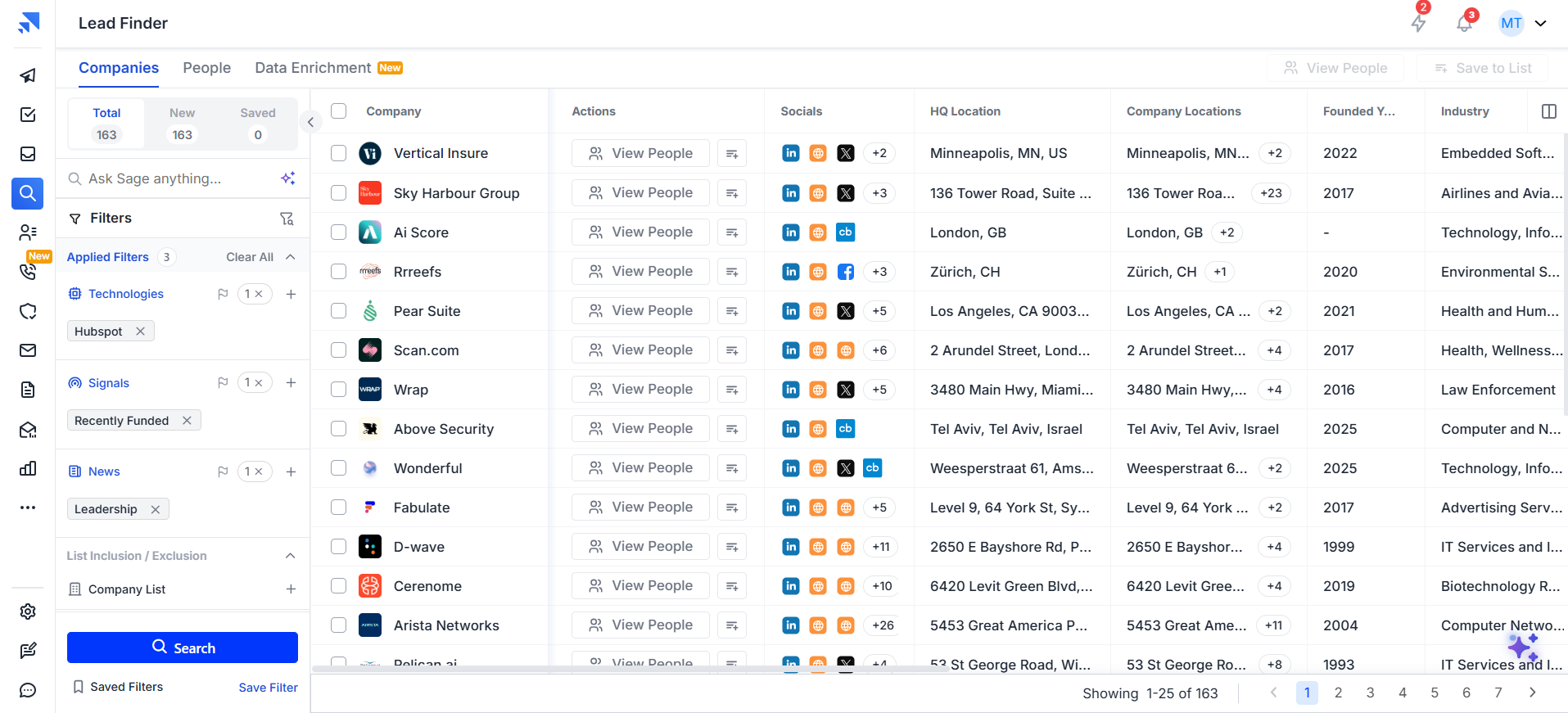
If you’d rather skip the filters altogether, you can just type what you want into the AI search.
I asked for “Heads of Sales and VPs of Sales at US-based B2B SaaS companies with 50 to 200 employees that raised funding in the last 12 months and are hiring SDRs,” and in under a minute it picked the filters for me and came back with 81 contacts.
It also told me what it had done (which I really appreciated). There weren’t enough exact matches for such a narrow brief, so it widened the company size, added related titles like Sales Directors, and offered to narrow it back down, a bit like asking a teammate to build the list for you.
When you reveal an email, Saleshandy runs waterfall enrichment in the background. It checks the contact across 9 data providers one by one (moving on whenever one doesn’t have a verified email), and you’re charged 1 credit only when a verified email comes back.
And the best part is that unverified or not-found contacts cost you nothing. I revealed 25 emails to see this for myself: 24 came back verified, I was charged 24 credits, and the one that couldn’t be verified was free (each email took about two seconds, and the whole batch was done in under 30 seconds).
If you’ve ever paid for a list where a chunk of the emails bounced, you’ll know why that matters.
ZoomInfo
I couldn’t test ZoomInfo the same way (their free trial books you a call with a specialist instead of giving you a login), so I went through what ZoomInfo publishes and read what their users say across 9,238 reviews on G2.
ZoomInfo lists 500M+ contacts and 100M+ companies, and users do rate the coverage.
Accurate business records is their most mentioned strength on G2 (187 mentions).
Nick S., a BDR, says it gives his team “a vast database of company and contact information, allowing us to easily identify and research potential customers.”
That coverage is strongest in the US, though. Andrea S., an enterprise account executive, says contact accuracy “drops noticeably in EMEA, APAC, and niche regional markets,”
Gerry T., who heads business development across EMEA and APAC, puts it simply: “Good for USA based contacts, not so good for EMEA.” If you sell outside North America, that’s worth checking before you sign.
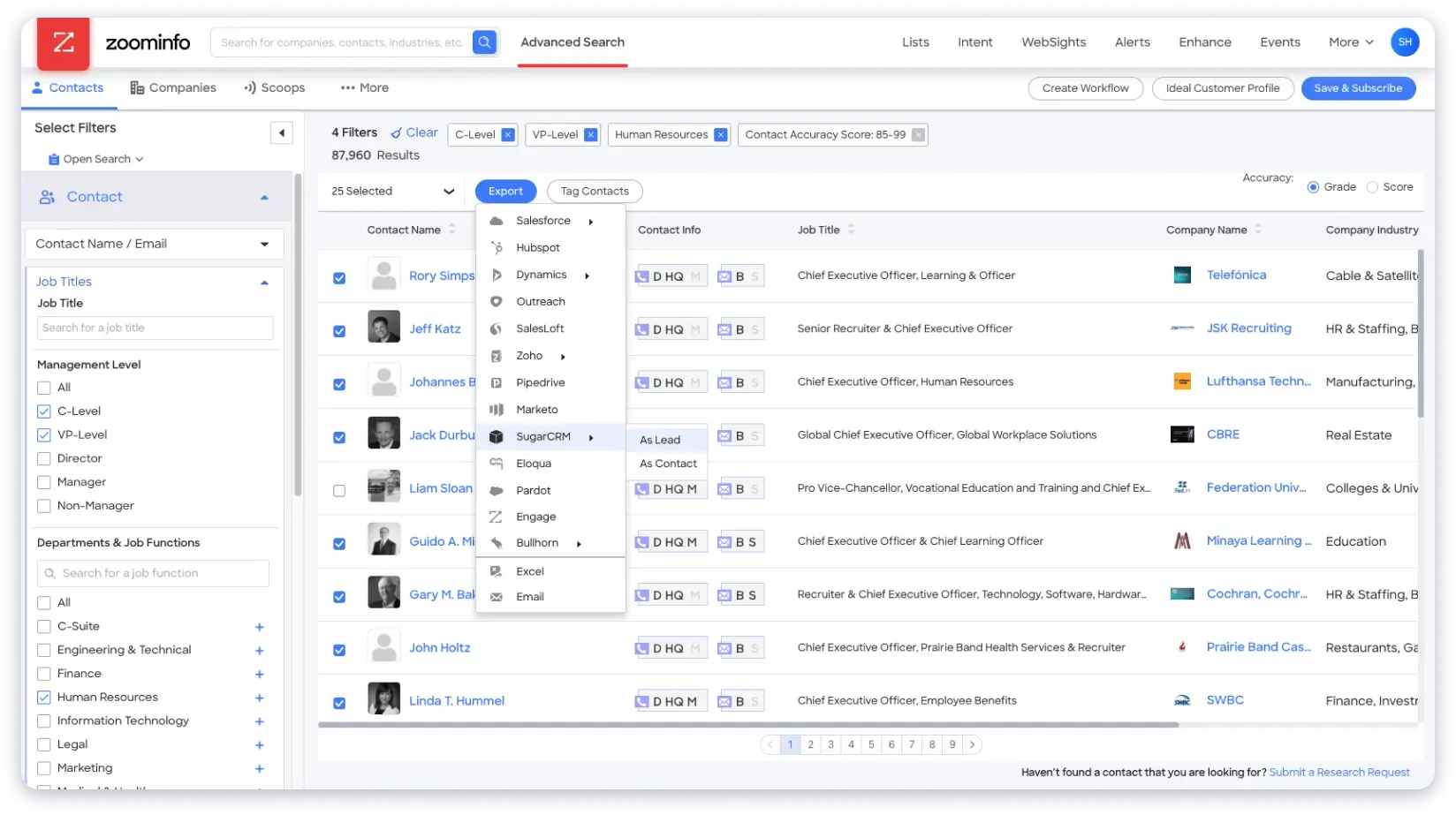
Searching the database is where users get frustrated. Filters come up as a complaint 34 times on G2 (and the interface another 60), and Kiet N., an SDR, says: “The search filters feel clunky and a bit limited; finding the exact filter I want takes more clicking than it should.”
Not everyone feels that way, and Gerald M. actually counts “the vast list of filters” as his favourite part.
ZoomInfo has its own AI copilot as well, but the reviews on it are mixed. Robert Mann was blunt in his Trustpilot review, saying the “AI copilot is 100% worthless.”
Then there’s what you’re paying for. ZoomInfo doesn’t publish a verification rate or run waterfall enrichment across other providers, and it charges one credit for every contact you export. Himanshu J., an implementation manager (who still rated ZoomInfo five stars), says his team sees “approximately 20-30% outdated or invalid leads,” and Carmine M. in marketing ops admits, “I’m somehow always managing to find a way to run out of credits.”
Who Has the Better Database?
Here, Saleshandy wins due to the following major points:
- Bigger contact database: Saleshandy gives you 852M+ contacts against ZoomInfo’s 500M+, which means roughly 350 million more people you can reach.
- Easier, faster filtering: The 75+ filters return results in seconds, while ZoomInfo’s own users describe its filters as clunky and its interface as cluttered.
- AI search that does the work for you: You can build a list from a single plain-English prompt, and it tells you exactly how it adjusted your search.
- Waterfall enrichment across 9 providers: Every email is checked across 9 data providers one by one, while ZoomInfo relies on its own database and its users report 20 to 30% outdated or invalid leads.
- You only pay for verified emails: Unverified and not-found contacts cost you nothing on Saleshandy, while ZoomInfo charges a credit for every contact you export.
- Searching is free: You can test as many ICP variations as you like and only spend credits when you reveal a contact.
That said, ZoomInfo does hold more company records (100M+ against 42M+), so if you build large enterprise account lists first, keep that in mind.
2. Data Verification and Accuracy
A big database doesn’t help much if the emails in it are out of date, because people change jobs and companies change domains all the time.
So in this section, I looked at when and how each tool checks an email before you get it, what it tells you about each contact, and what users say about bounce rates.
This is the part that decides whether your emails reach real inboxes or end up hurting your sender reputation.
Saleshandy
The thing that makes the biggest difference here is timing.
Saleshandy verifies every email in real time with waterfall enrichment, checking the contact across 9 data providers at the moment you reveal it, so if one provider doesn’t have a verified email, the next one gets a chance to find it.
That means a much better chance of ending up with a verified email, and you’re not getting an address that was checked months ago and has gone stale since (you’re getting one that was confirmed as working seconds before it reached you).
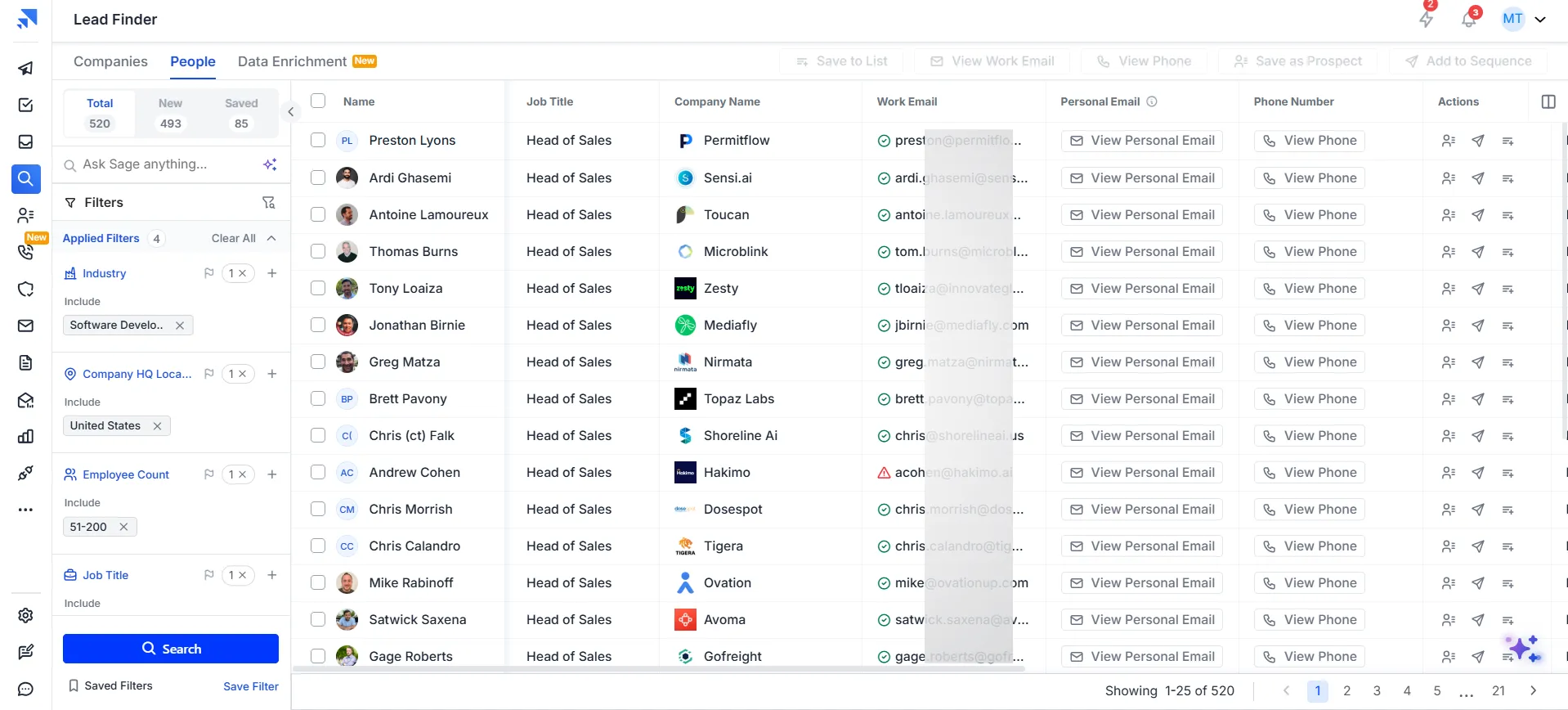
That check is quick, too.
When I revealed a single email, it came back verified in about two seconds, and each contact in my list was clearly marked as Valid (with a green check) or Bad (with a red warning), so I knew exactly which ones were safe to email before I did anything with them.
The verification status doesn’t stay inside Lead Finder, either. Every contact I revealed carried its Valid or Bad label into the CRM, and when I built a sequence, Sequence Score checked whether any unverified prospects were in it before I could send (you can also choose not to send to risky contacts at all).
And if you already have lists from other sources, every plan includes email verification credits (500 on Starter, 1,000 on Pro and 5,000 on Scale), so you can check those too before they go anywhere near a campaign.
ZoomInfo
ZoomInfo says it processes more than 1.5 billion data points every day to keep its records up to date, and it lists 200M+ verified business emails.
What it doesn’t do is check the data again at the moment you export it.
Some users are happy with the data, and Saloni M. says ZoomInfo’s “direct dials and verified email addresses” have “been extremely reliable for our sales outreach.”
But accuracy is also where ZoomInfo gets the most complaints. Outdated contact and company data is its most mentioned con on G2 (158 mentions), followed by inaccurate emails and phone numbers (84 mentions).
Arun P., a senior account manager, says the data “is not always completely accurate or up to date, especially for smaller organizations,”
Kyle H. finds “phone numbers are wildly inaccurate (around 50%).”
When it comes to emails specifically Frank Scotti wrote on Trustpilot that “most emails were non-deliverable.”
Who Verifies Data Better?
Saleshandy is the safer bet for clean data, and here’s why:
- Real-time verification with waterfall enrichment: Every email is checked across 9 providers the moment you reveal it, not pulled from a record that was verified weeks or months ago.
- Clear status on every contact: Each email is marked Valid or Bad, so you know what’s safe to send before you send it.
- Protection that carries into your campaigns: Verification status follows the contact into the CRM, and Sequence Score flags unverified prospects before you hit send.
- Verification credits included: Every plan comes with credits to verify lists you bring in from elsewhere.
- Published accuracy: Saleshandy reports 98% verification accuracy with under 3% bounce, while ZoomInfo doesn’t publish either number and its users’ top complaint is outdated data.
3. Advanced Filters like Signals, Technographics, and Account Intelligence
Knowing who to contact is useful, but knowing when to contact them is what gets replies.
In this section, I tested the buying signals, news triggers and technographic data in Saleshandy, and went through what ZoomInfo users say about its intent data, org charts and Scoops.
This is the area most people hand straight to ZoomInfo, so I wanted to see how close Saleshandy actually gets.
Saleshandy
I started with the signal filters inside Lead Finder, and there’s more here than most people expect.
The Signals filter gives you 10 signal types (Rapid Growth, Recently Funded, New Executive Hires in GTM, Freshly Funded & Hiring Fast, Leadership Churn, Recently Acquired and Cost Optimization Mode, among others).
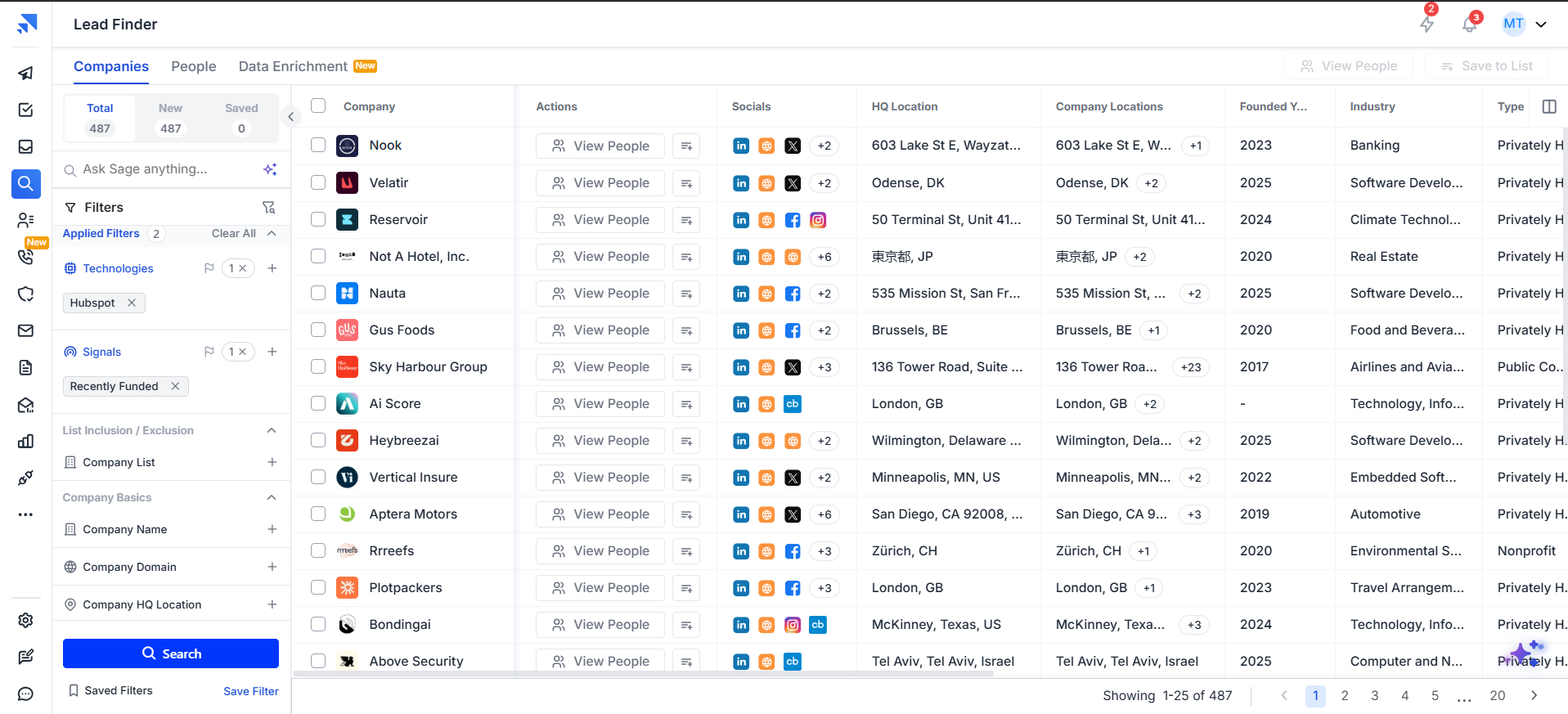
And the News filter adds 13 categories like Leadership, Acquisition, Expansion, Partnership, and New Offering. You can stack them right on top of your normal filters, so a signal turns into a list you can email instead of an alert you have to research.
The Technologies filter goes deeper than I expected, too. When I typed “HubSpot,” it didn’t just give me HubSpot; it gave me 11 separate products (HubSpot CRM, Sales Hub, Marketing Hub, and so on), so you can target companies by the exact tool they run.
I also enriched a real company to see how much comes back, and it’s a lot for 0.1 credit (you get up to 41 data points per company).
For one 51-person insurance startup, I got employees by department (21 of them in sales), its latest funding round with the exact date, 13 technologies it uses, and its monthly website traffic broken down by country.
On the people side, you can filter by department, management level, and decision-maker status, and see employee counts by department and designation, which tells you who holds the budget inside an account.
ZoomInfo
ZoomInfo’s intelligence layer is its strongest selling point, and users who rely on it speak well of it. Evan C., an account management associate, says “it provides insights into company intent and website activity, allowing users to identify potential leads and prioritize outreach efforts effectively.”
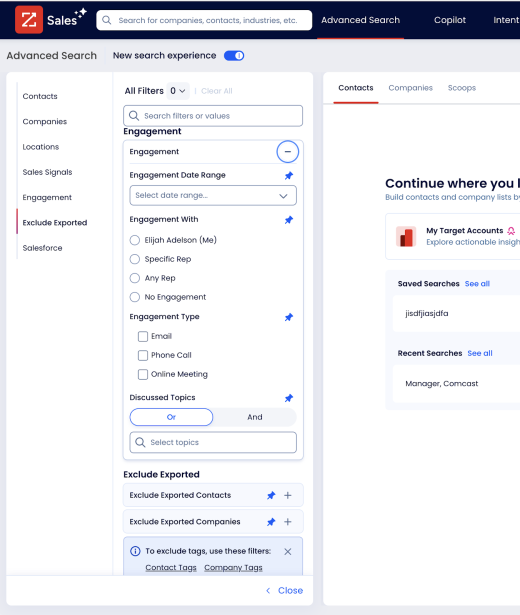
Source: ZoomInfo Knowledge Base
The catch is that intent data doesn’t always turn into pipeline. Ryan S. titled his review “Reliable Contact Search, but Intent Signals Not Always Effective,” and Grenvill G. says the “signals only sometimes produce useful opportunities, so I still need to do research before reaching out.”
Even happy users mention the noise, and Niraimozhi C. says “it takes time to clean up notifications so you aren’t overwhelmed by constant intent alerts on accounts you aren’t actively working.”
Org charts get mixed reviews as well.
The same reviewer finds that “identifying secondary decision-makers and champions is much easier with their updated organisational hierarchies,” while Chakrapani V., an associate director of sales, points out that “the org chart is NOT a typical tree type but just a list.”
Scoops (ZoomInfo’s trigger events) come out better, and Mason V. likes that they “allow you to see in real time what news/events are happening.”
Who Has Better Signals and Account Intelligence?
This one is a tie, since both tools give you buying signals and technographic data to work with.
That said, here’s where Saleshandy stands out:
- Signals you can act on straight away: The 10 signal types and 13 news categories sit inside your search, so you get a ready list of contacts, not a feed of alerts you have to research.
- Product-level technographics: You can target companies by the exact product they use (like HubSpot Sales Hub instead of just “HubSpot”).
- Deep company data for a fraction of a credit: Up to 41 data points per company for 0.1 credit, including department headcount, funding dates, technologies and website traffic.
ZoomInfo does offer third-party intent data and website visitor identification, which Saleshandy doesn’t, so if your outreach depends on knowing who’s researching your category this week, weigh that.
4. Multichannel Outreach and Sequences
Once you have the right contacts, you need a way to actually reach them, and this is where the two tools start to look very different.
I built sequences in Saleshandy by hand and with AI, checked how they scored before sending, and then went through ZoomInfo’s plans to see what it offers for outreach.
When your data and your outreach sit in separate tools, every campaign takes more time and more money to run.
Saleshandy
With Saleshandy, the outreach lives in the same place as your data, so you go from a list to a live sequence without switching tools.
I gave the AI Sequence Copilot our website, picked “Book a Demo” as the goal, and it read the site, suggested our key offerings and ICPs, and wrote a full sequence with personalization and spintax variations already built in.
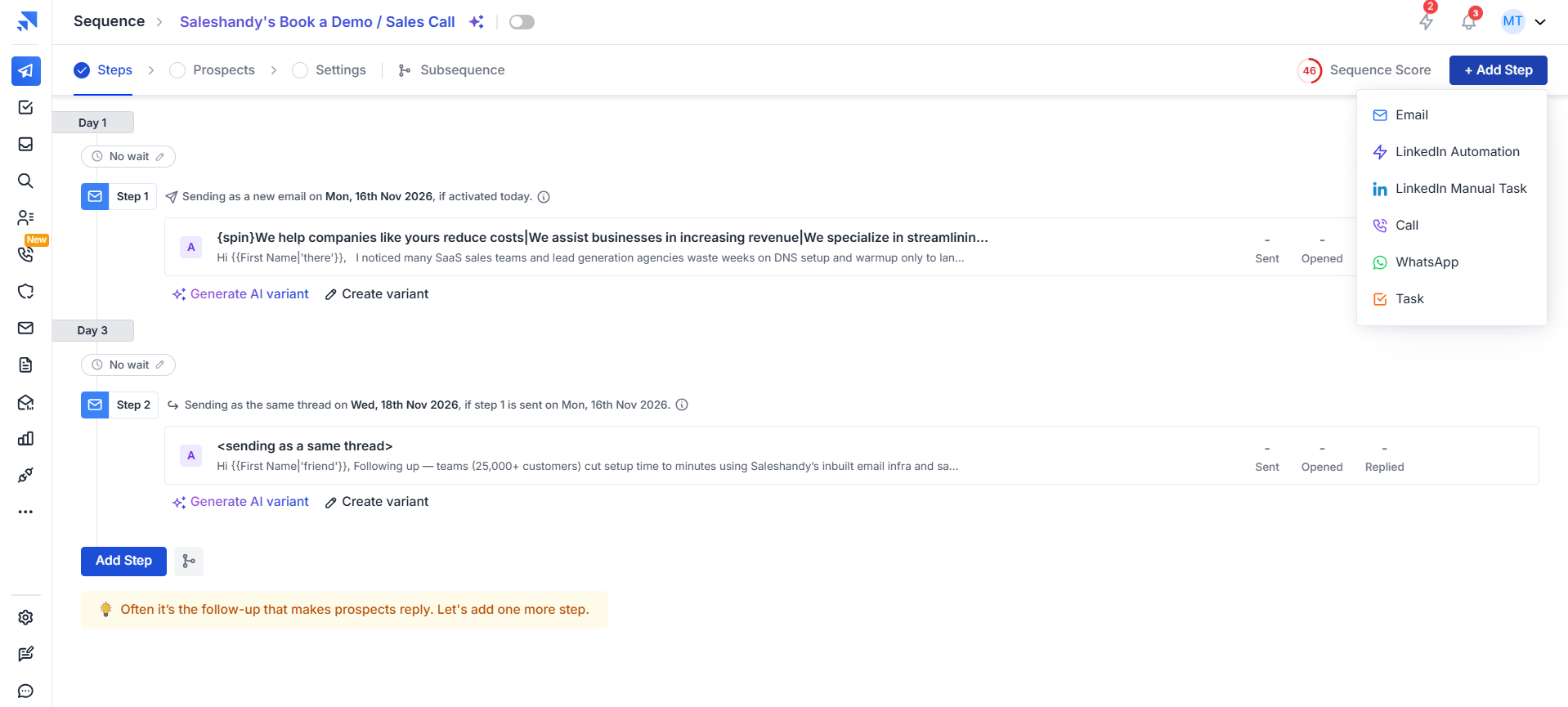
The whole thing took about five minutes (I spent longer than that writing two emails by hand).
Before you send anything, Sequence Score rates the sequence out of 100 and tells you exactly what to fix. My hand-written sequence scored 57 for writing, mostly because I’d skipped merge tags and spintax, while the AI-written one scored 87.
From there you can run steps across email, calls and WhatsApp in a single sequence, add subsequences that branch on opens, clicks and replies, and A-Z test up to 26 variants per step.
You also get control over the small things that matter once you’re sending at volume (stopping follow-ups on reply, prioritising follow-ups over new prospects, and limiting how many new people enter a sequence each day).
The built-in dialer is an add-on, at $23 per user a month on Starter and $55 on Pro, and it comes with local presence, voicemail drops, call recording and AI call summaries.
ZoomInfo
Outreach sits in a separate product called ZoomInfo Engage. And When I opened zoominfo.com/products/engage , it took me to a Salesloft partnership page rather than a ZoomInfo product page.
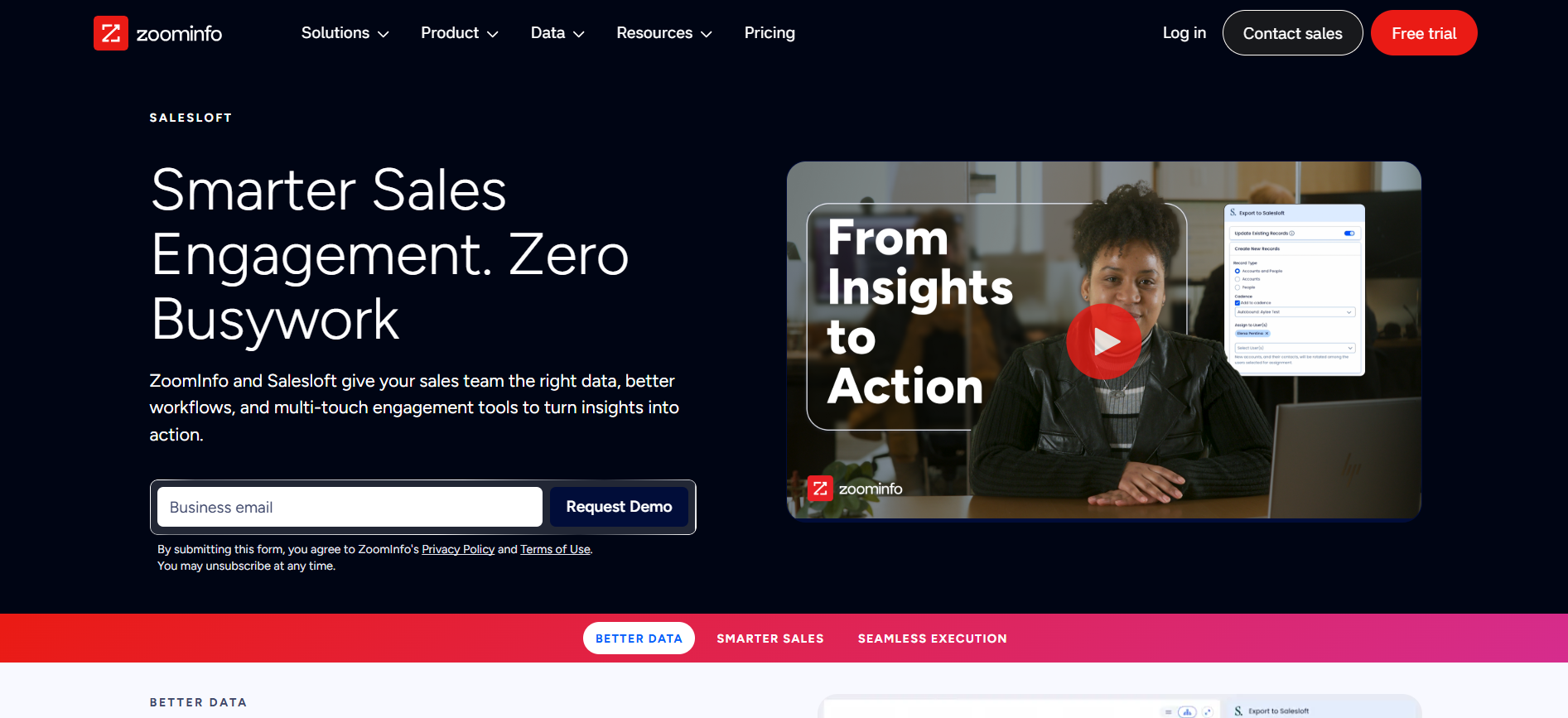
So in practice, ZoomInfo doesn’t send your outreach for you. You’ll need Salesloft, Outreach or another sending tool on top, with its own contract and its own bill.
Who Has Better Outreach?
Saleshandy takes this one easily, and these are the reasons:
- Outreach is included: Sequences come with every plan, while ZoomInfo’s Sales plans don’t include sequencing at all.
- AI writes your first sequence: The Sequence Copilot builds a complete, personalized sequence from your website in about five minutes.
- You know if it’s ready before you send: Sequence Score flags weak copy and setup issues and shows you how to fix them.
- Every channel in one sequence: Email, calls and WhatsApp run together, with subsequences and A-Z testing built in.
If you’re comparing sending tools on their own, take a look at our roundups of email outreach tools.
5. Email Deliverability
Finding the right people is only half the job (the other half is making sure your emails actually reach them).
I went through every deliverability setting in Saleshandy, from warm-up and sender rotation to the checks it runs before you send, and then looked for the same features in ZoomInfo.
If your emails land in spam, it doesn’t matter how good your list is.
Saleshandy
This is the part of Saleshandy I wouldn’t run outbound without.
Saleshandy provides free email warm-up on all paid plans via TrulyInbox once you connect your email accounts, so new mailboxes build a sending reputation before you start your campaigns.
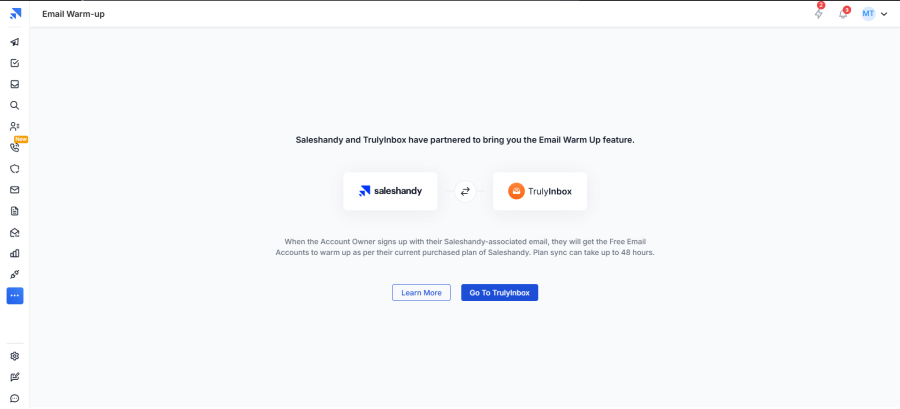
Sender rotation then spreads your sending across multiple accounts (up to 10, 100 or 1,000 depending on your plan), so no single inbox gets overloaded and burns your domain.
ESP matching takes it a step further by sending from Google accounts to Google inboxes and Microsoft accounts to Microsoft inboxes, which helps your emails land where they should.
Sequence Score also checks your email accounts before you hit send. It looks at SPF, DKIM, DMARC, custom domain, MX records, blacklists, email age and sending intervals, so you catch setup problems before they cost you replies.
And if you want to see exactly where your emails land, Inbox Radar tests your sequence against 51 seed inboxes across Google Workspace, Gmail, Microsoft, Outlook and Zoho (it’s available as an add-on, along with done-for-you email infrastructure from $2.99 per mailbox a month).
ZoomInfo
ZoomInfo has no native deliverability tooling. I checked their product pages and release notes before saying that, and I couldn’t find warm-up, sender rotation, inbox placement testing or pre-send checks anywhere.
That makes sense for a data company, but it does mean that if you run outbound on ZoomInfo, you’ll be paying for a deliverability tool on top of the data and the sending platform.
Who Has Better Deliverability?
There’s no real contest here, and this is what Saleshandy gives you that ZoomInfo doesn’t:
- Free warm-up on every paid plan: Connect your email accounts and they start warming up at no extra cost.
- Sender rotation and ESP matching: Sending is spread across accounts and matched to each prospect’s email provider.
- Pre-send health checks: SPF, DKIM, DMARC, blacklists and more are checked before a single email goes out.
- Inbox placement testing: Inbox Radar shows you whether your emails land in Primary, Promotions or Spam.
6. CRM, Pipeline, and Integrations
A good list and a good sequence still need somewhere to track the deals they create.
I checked what happens to contacts after you reveal them in Saleshandy, how the built-in CRM handles your pipeline and which tools it connects to, and then read what ZoomInfo users say about syncing with Salesforce and HubSpot.
The less time you spend moving data between tools, the more time you spend selling.
Saleshandy
Every contact I revealed in Lead Finder showed up in the CRM on its own (all 72 of them), with the verification status carried over and an activity log noting who added them and from where. There was nothing to export or import.
The CRM is free on every plan, and it comes with a Kanban board with stages like Interested, Meeting Booked, Not Now and Do Not Contact ready to go (you can add your own columns and categories too).
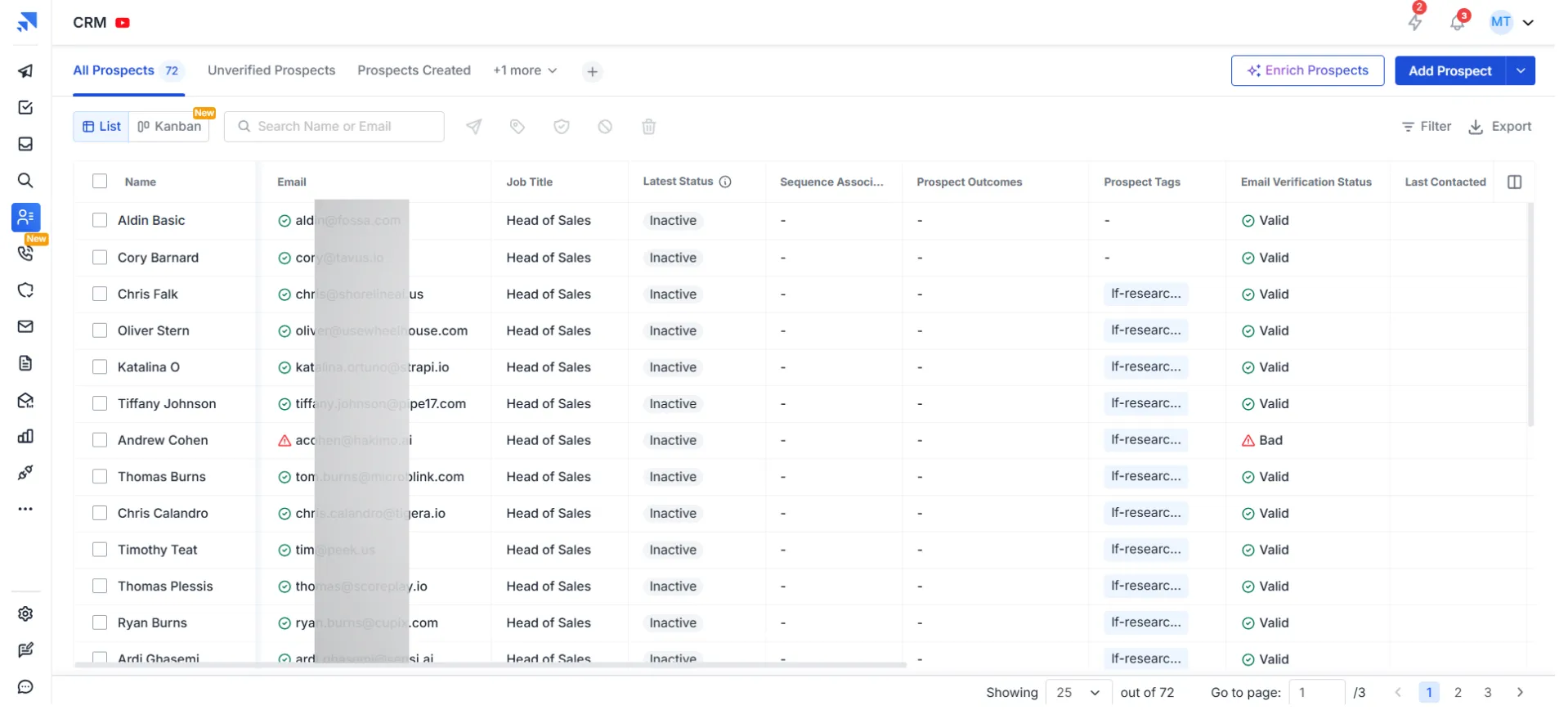
Each prospect has an activity hub where notes, calls, emails, tasks and sequences sit in one place, so you’re not jumping between tabs to see where a deal stands.
If you already use a CRM, Saleshandy connects with HubSpot, Salesforce, Pipedrive, Zoho and Zapier, and it also has an API, an MCP server for AI assistants and a command-line interface.
ZoomInfo
ZoomInfo doesn’t come with a CRM, because it’s built to feed the one you already use, and its integrations are well regarded.
Scott H., a product manager, says “its integration capabilities, particularly with HubSpot, are extremely smooth,” and Rishabh S., a RevOps analyst, says it helps “keep Salesforce data more complete and usable without excessive manual entry.”
The sync isn’t perfect, though. Emily G. found that records can become “duplicated in our Salesforce information,” Aditi P. mentions “occasional CRM sync lags,” and Bobby K. says “data cleansing turns into an ongoing manual effort.”
Who Has the Better CRM Setup?
For most teams, Saleshandy comes out ahead here, mainly because of these points:
- A CRM is included: You get a free Kanban CRM on every plan, while ZoomInfo needs one you’re already paying for.
- No manual syncing: Revealed contacts land in your CRM automatically, with their verification status and source logged.
- Everything about a prospect in one view: Notes, calls, emails, tasks and sequences sit together in the activity hub.
- Works with your existing stack: HubSpot, Salesforce, Pipedrive, Zoho, Zapier, API and MCP are all supported.
If you run a mature Salesforce setup and your main goal is keeping it enriched, ZoomInfo’s integration is worth a look.
7. Pricing and What It Takes to Buy
Pricing is where the gap between these two tools is widest, and also where it’s hardest to get a straight answer.
I compared Saleshandy’s published plans and credit costs against ZoomInfo’s sales quotes, real contract data from Vendr and what users say about renewals.
At the end of this section, you’ll also see what a three-person team would actually pay for a year on each.
Saleshandy
Saleshandy’s pricing is published on the website, so you can see exactly what you’ll pay before you talk to anyone.
| Plan | Monthly (billed annually) | Monthly (billed monthly) | Users | Lead Finder credits per month | Sender rotation |
|---|---|---|---|---|---|
| Starter | $34 | $41 | 1 | 1,500 | Up to 10 accounts |
| Pro | $76 | $99 | Up to 10 | 4,000 | Up to 100 accounts |
| Scale | $149 | $189 | Unlimited | 8,000 | Up to 1,000 accounts |
A verified email costs 1 credit and a phone number costs 6 (or 7 if you’re revealing both together), and unverified or not-found contacts are free.
Using the credits included in each plan, that works out to about $0.023 per verified email on Starter and $0.019 on Pro and Scale.
If you run out, top-up packs start at 500 credits for $13 and go down to $0.016 per credit at 100,000 credits.
ZoomInfo
ZoomInfo doesn’t publish its prices. I checked zoominfo.com/pricing in November 2026, and the page lists plan names and credit allotments, then sends you to a contact form.
G2 adds that ZoomInfo takes about a month to implement and 14 months on average to pay for itself, with buyers getting an average discount of 15%.
The contract terms are where users get most frustrated.
Scott H. says “the contract includes an automatic renewal clause that you must actively request to have removed,” and Shelby B. wrote, “My contract auto-renewed with a 20% increase.”
On Trustpilot, Bianca Tubolino says “they refuse to honor it and will not allow us to cancel,” and Jeff Gunn calls it “extremely difficult to cancel contracts.”
Some users do feel it’s worth it, and Russell T., a senior sales executive, says “it’s a little pricey, but quality comes with a cost, and it’s worth every penny.”
For the full breakdown of ZoomInfo’s plans and credits, see our guide to ZoomInfo pricing.
Who Gives You Better Value?
On value, Saleshandy is the clear winner, and here’s what makes the difference:
- Published pricing: You can see every plan and credit cost upfront, without a sales call.
- No per-seat billing on Pro: Up to 10 users share one plan, while ZoomInfo’s price rises with every seat.
- No long contracts: You can pay monthly, while ZoomInfo contracts run 1 to 3 years with automatic renewals.
- A fraction of the cost: A three-person team pays $912 a year on Saleshandy Pro, against a $10,000 quote and a $33,500 median contract on ZoomInfo.
If you’re comparing what cold outreach tools cost on their own, see our roundup of cold email service providers.
8. Free Trial and Free Plan
A free trial is the easiest way to check whether a tool’s data and features live up to its claims.
Both tools offer seven days, so instead of comparing length, I focused on what you actually get when you sign up.
I also looked at ZoomInfo Lite, its free tier, to see what it asks from you in return.
Saleshandy
Saleshandy gives you a 7-day free trial with 50 free credits, and you get into the product straight away.
You can run your first search and reveal your first verified emails within a couple of minutes, without a sales call or a credit card.
ZoomInfo
ZoomInfo’s trial page says no credit card is required and that you only need to verify a business email.
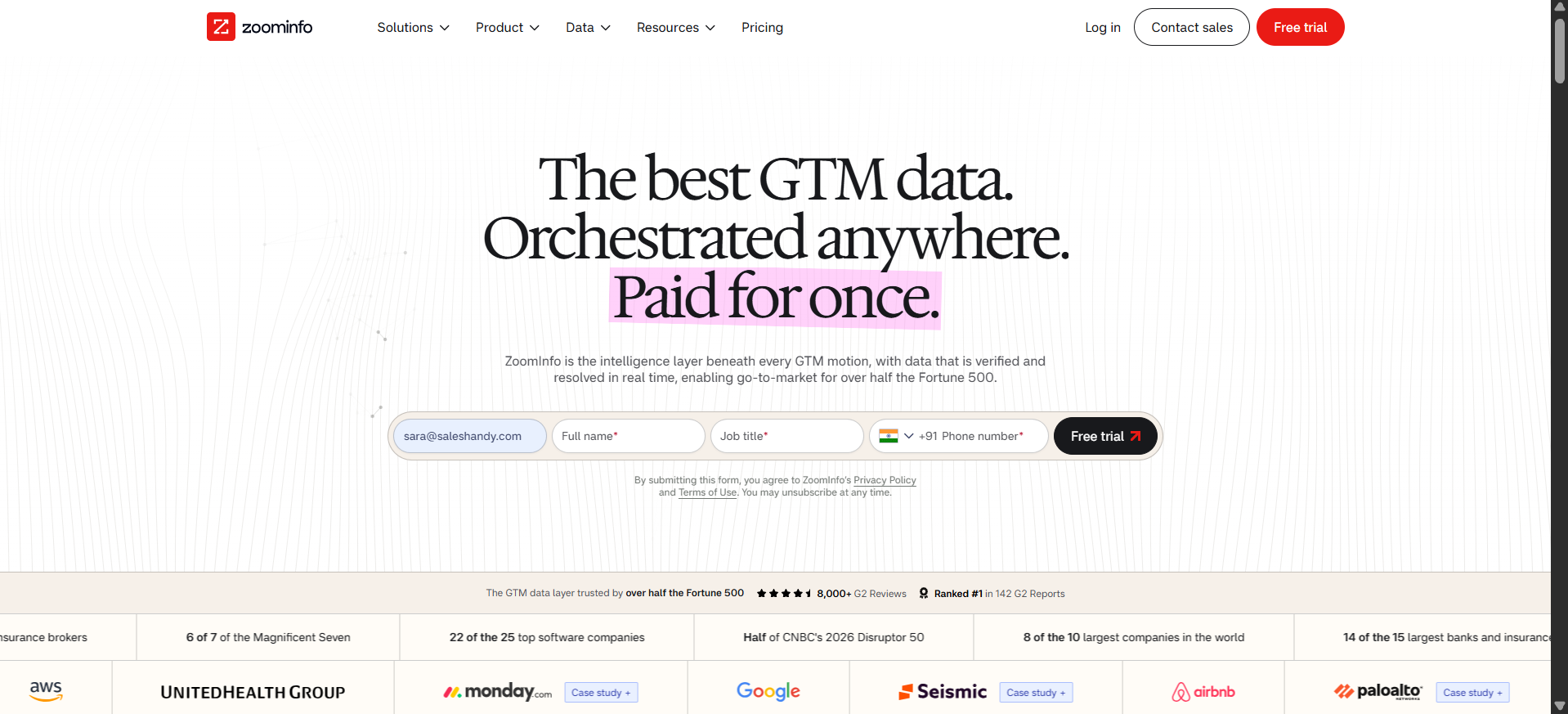
So I filled in the free trial form on their homepage with my business email, name, job title and phone number.
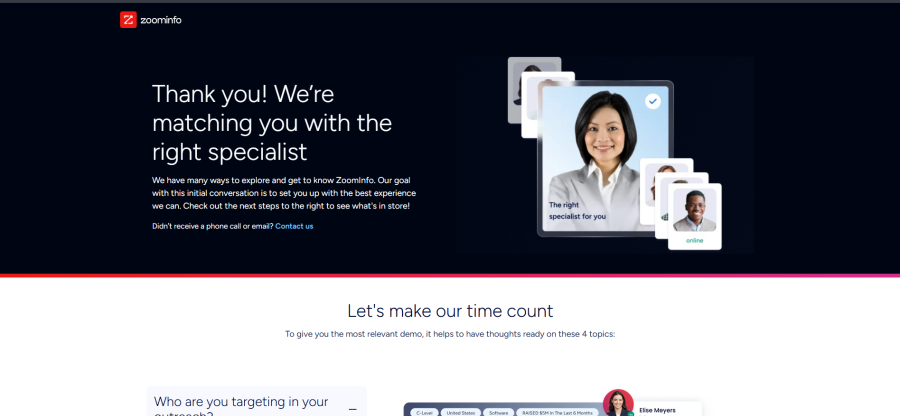
Instead of getting into the product, I landed on a page that said “Thank you! We’re matching you with the right specialist,” followed by four topics to prepare for a demo call.
ZoomInfo does have a free tier called ZoomInfo Lite (formerly Community Edition), with contact data, search, company insights and a HubSpot integration.
You earn credits by connecting your business email and calendar, which shares your contacts with ZoomInfo’s database, and the page doesn’t say how many credits you’ll get.
Who Has the Better Free Trial?
Saleshandy wins this round, and it comes down to three things:
- Instant access: You’re in the product the moment you sign up, while ZoomInfo’s trial form routes you to a specialist.
- Credits to test real data: 50 free credits let you reveal and check verified emails yourself.
- No data trade-off: You don’t have to share your own contacts to get credits.
When to Choose Saleshandy vs ZoomInfo
Choosing between Saleshandy and ZoomInfo comes down to what you need the tool to do once you have your list.
Here’s a quick guide:
- Want a verified database of 852M+ contacts with 75+ filters, real-time waterfall verification, multichannel sequences, free warm-up and a built-in CRM in one tool, with published pricing and 50 free credits to get you started? Go with Saleshandy.
- Need third-party intent data, website visitor identification and deep Salesforce enrichment for enterprise account-based selling, and have the budget for an annual contract? ZoomInfo is a solid choice
If you’d like to see how ZoomInfo compares with other tools too, we reviewed 14 options in our guide to ZoomInfo alternatives.
Frequently Asked Questions
1. What Is ZoomInfo?
ZoomInfo is a B2B data and go-to-market intelligence platform that gives sales and marketing teams contact and company data, buyer intent signals, org charts and technographics. Most teams use it to find and research prospects, then pass that data into their CRM and outreach tools.
2. Is ZoomInfo Legit?
Yes. ZoomInfo is an established B2B data company that says it’s used by over half the Fortune 500, and it holds a 4.5 rating on G2 from 9,238 reviews. Its Trustpilot rating is much lower at 1.6, with most complaints about contracts, cancellations and data accuracy.
3. How Much Does ZoomInfo Cost per Month?
ZoomInfo doesn’t publish its pricing, and it’s usually sold as an annual contract rather than a monthly plan.
Vendr data across 1,581 purchases puts the median contract at $33,500 a year (about $2,800 a month), and a sales rep quoted our team $5,000 a year for a single seat. For the full breakdown, see our guide to ZoomInfo pricing.
4. Is ZoomInfo Free?
Not fully. ZoomInfo offers a 7-day free trial and a free tier called ZoomInfo Lite, where you earn credits by connecting your business email and calendar (which shares your contacts with ZoomInfo’s database), but the number of credits isn’t published.
5. How Long Is the ZoomInfo Free Trial?
ZoomInfo’s free trial lasts 7 days and doesn’t need a credit card. When I submitted the trial form in November 2026, though, I was routed to a specialist for a demo call instead of getting straight into the product.
6. How Does ZoomInfo Get Its Data?
ZoomInfo says it processes more than 1.5 billion data points every day to keep its records current. Part of its data also comes from ZoomInfo Lite users, who get free credits in exchange for connecting their business email and calendar.
7. How Accurate Is ZoomInfo Data?
ZoomInfo doesn’t publish an accuracy rate or bounce rate. Outdated contact and company data is its most mentioned complaint on G2 (158 mentions), and one implementation manager reports seeing 20 to 30% outdated or invalid leads.
Saleshandy, by comparison, verifies every email in real time across 9 providers and reports 98% verification accuracy, and you can see how it performed in our test of 15 B2B contact databases.
8. What Is ZoomInfo Intent Data?
Intent data shows which companies are researching topics related to your product, based on the content they’re reading across the web. ZoomInfo users find it useful for prioritizing accounts, though several reviewers say the signals only sometimes lead to real opportunities.
9. What Is Scoops in ZoomInfo?
Scoops are ZoomInfo’s trigger events, such as leadership changes, funding rounds and company expansions, that can signal a good time to reach out.
Saleshandy offers similar triggers through its Signals and News filters, with 10 signal types and 13 news categories.
10. What Is ZoomInfo Engage?
ZoomInfo Engage is ZoomInfo’s sales engagement product for running email and calling sequences, and it’s sold separately from the main Sales plans.
As of November 2026, its product page leads to a Salesloft partnership page, so check what’s actually included before you buy.
11. What Is ZoomInfo Copilot?
ZoomInfo Copilot is the AI assistant included in ZoomInfo’s Copilot Advanced and Copilot Enterprise plans.
User reviews are mixed, with one Trustpilot reviewer calling it “100% worthless,” so it’s worth testing in a demo before it becomes a reason to buy.
12. Is ZoomInfo Worth It?
It can be for enterprise teams that rely on intent data and Salesforce enrichment, and some users say it’s “worth every penny.” For smaller teams it’s harder to justify, since pricing that’s too high for small teams is the second most cited complaint on G2 (88 mentions) and the average ROI payback is 14 months.
13. Who Are ZoomInfo’s Competitors?
Saleshandy, Apollo, Cognism, Lusha, Clay, RocketReach and Seamless.AI are the alternatives that come up most often. We’ve compared two of them directly in Apollo vs ZoomInfo and RocketReach vs ZoomInfo.
14. What Is Saleshandy?
Saleshandy is a multichannel outbound platform that combines a B2B database of 852M+ verified contacts with email, call and WhatsApp sequences, a deliverability stack and a built-in CRM. Plans start at $34 a month, and you can try it free for 7 days with 50 credits.
15. Is Saleshandy Safe?
Yes. Saleshandy is SOC 2 Type II and ISO 27001 certified and GDPR compliant, and it holds a 4.6 rating on G2 and 4.7 on Trustpilot.
16. Which Is Better, Saleshandy or ZoomInfo?
For most outbound teams, Saleshandy is the better choice, since you get more contacts, only pay for verified emails and run your outreach from the same platform.
ZoomInfo is the better fit if your strategy depends on third-party intent data or deep Salesforce enrichment.
 Dhruv Patel

 Rashmi