
PhantomBuster promises real-time lead sourcing from 15+ platforms.
But what it actually delivers is:
- Automations that crash mid-run and eat your execution hours anyway
- Enrichment credits that return inaccurate emails
- A LinkedIn account that is one aggressive scrape away from getting flagged
And you are paying $56 every month for this.
Honestly, you are compromising a lot if you are still using PhantomBuster in 2026.
In a world where finding verified leads is supposed to take minutes, this tool still needs babysitting.
The market has moved on.
There are tools now that do what PhantomBuster does, faster and cheaper.
And there are tools that skip scraping entirely and give you verified lead data from day one.
I have tested over 45 lead generation and data extraction tools over the past year.
These are the 9 Phantombuster alternatives that actually deliver results.
PhantomBuster Alternatives – TOC
TL;DR: Top Alternatives to PhantomBuster
Here is a quick overview of the best PhantomBuster alternatives before we get into the detailed reviews.
- Saleshandy Lead Finder: One of the best PhantomBuster alternatives for teams that want verified B2B leads without scraping. Search from 800M+ contacts, find their emails and phone numbers, and reach out to them from the same platform.
- Hunter: The simplest alternative to PhantomBuster when all you need is work emails. Enter a name and company domain, get a verified email back with 97% accuracy.
- Lusha: A solid PhantomBuster alternative for instant contact data from LinkedIn. One click on any profile gives you direct dials and business emails through a Chrome extension.
| Tool | Best For | Starting Price | B2B Database | Cold Email | LinkedIn Automation |
|---|---|---|---|---|---|
| Saleshandy | Verified leads + outreach + CRM | $49/mo | ✅ 800M+ | ✅ | ❌ |
| Lusha | Direct dials + email from LinkedIn | $22.45/mo | ✅ 100M+ | ❌ | ❌ |
| Hunter | Email finding by name + domain | $34/mo | ✅ 100M+ emails | ⚡ Basic sequences | ❌ |
| Kaspr | One-click LinkedIn contact data | $49/mo | ✅ 500M+ | ❌ | ❌ |
| Waalaxy | LinkedIn outreach automation | $19/mo | ❌ | ⚡ Limited | ✅ | Clay | AI-powered data enrichment | $149/mo | ⚡ Via 100+ sources | ❌ | ❌ |
| TexAu | Direct PhantomBuster replacement | $29/mo | ❌ | ❌ | ✅ |
| Evaboot | Sales Navigator export + cleaning | $39/mo | ❌ | ❌ | ⚡ Export only |
| Dripify | LinkedIn drip campaigns | $39/mo | ❌ | ❌ | ✅ |
Why Are People Switching from PhantomBuster?
I want to be fair here. PhantomBuster is not a bad tool.
It does what it says: scrape data from multiple platforms and let you build automation workflows without writing code.
The problem is everything around it.
1. You need 3-4 tools to do what one tool can
PhantomBuster scrapes data.
That is it. If you want to verify emails, you need their enrichment credits or a third-party tool.
If you want to send cold emails, you need a separate outreach platform.
If you want to track conversations, you need a CRM.
By the time your stack is ready, you are paying for and managing four different subscriptions.
2. PhantomBuster charges by execution hours
But execution time depends on how fast their servers run, how responsive the target platform is, and whether your automation hits an error.
I have seen the same scraping job take 15 minutes one day and 45 minutes the next. You are paying the same rate for both.
3. The data you get still needs work
Scraping gives you raw, public data. Job titles that are outdated, emails that are pattern-guessed, and company info that has not been updated since the last funding round.
Compare that to database tools that verify contacts in real-time before showing them to you.
4. Support does not match the price
At $56 to $352/month, you would expect responsive support.
What you get is email-only support with 24-72 hour response times and a community Slack channel.
When an automation breaks during a live campaign, that response time hurts.
5. And… there are better tools
In 2020, PhantomBuster was ahead of its time.
In 2026, there are tools with verified databases, AI-powered search, built-in outreach, and CRM included, often for less money.
The alternatives have not just caught up. They have moved past the scraping model altogether.
In-Depth Review of 9 Best PhantomBuster Alternatives in 2026
I have split the alternatives into two categories based on how they work.
The first group is database and enrichment tools. These skip scraping entirely and give you verified contact data directly from a built-in database.
If you are tired of the scraping workflow, start here.
The second group is scraping and automation tools.
These work more like PhantomBuster but with better pricing, simpler setup, or stronger reliability.
If you still want the scraping approach but need a better tool, that section is for you.
Database and Enrichment Tools
These PhantomBuster alternatives give you verified contact data directly. No scraping setup, no workflow configuration, no LinkedIn risk.
1. Saleshandy Lead Finder
Teams that want verified B2B leads without scraping or complex automation setups.
Saleshandy Lead Finder is the best alternative to PhantomBuster if what you are actually trying to do is find real-time verified contact data and start reaching out.
It has an 800M+ B2B database with 75+ filters, and unlike PhantomBuster, you do not need to scrape anything to get the data.
Why Saleshandy Lead Finder Is a Better Alternative to PhantomBuster
I will be straightforward about why I kept Saleshandy Lead Finder as #1 alternative to Phantombuster.
With PhantomBuster, I was spending 30-40 minutes per campaign just on setup: choosing the right automation, connecting my LinkedIn, setting daily limits, and hoping the enrichment credits would return usable emails.
And even after all that, the emails bounced more often than they landed.
With Saleshandy Lead Finder, I searched for “SDRs at SaaS companies in the US with 50-200 employees” and had a list of verified contacts with emails and phone numbers in under two minutes.
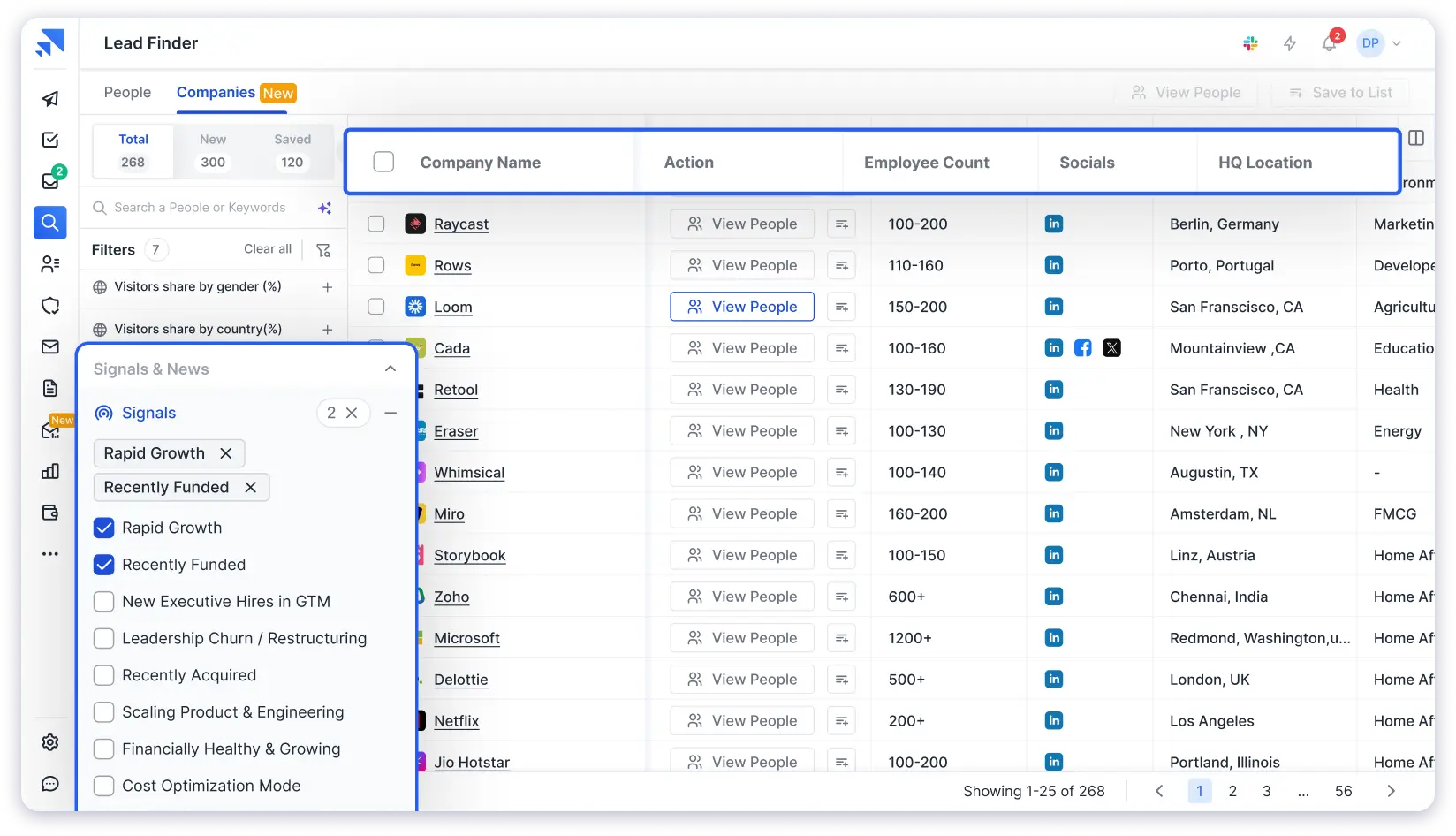
Here is the difference that matters most: Saleshandy verifies every contact through waterfall enrichment before showing it to you.
The data passes through multiple verification providers in real-time, so by the time you see a contact, it has already been checked.
And if a contact does not pass verification, you are not charged the credit. You only pay for data you can actually use.
PhantomBuster charges you the execution hours whether the output is usable or not. That alone changed my decision.
On top of the verified data, Saleshandy has AI Prospect Enrichment that uses your choice of LLM (GPT, Claude, Gemini, Perplexity, Grok) with web search to generate search through the internet and create icebreakers, company summaries, and personalized hooks for each prospect.
So you are not just getting contact details. You are getting the research done before you write a cold email.
The best part?
You do not need another tool to reach out. Push leads directly into cold email sequences with automated follow-ups and sender rotation.
Every outreach plan includes a free CRM with Kanban pipeline, prospect timeline, and tasks.
Pros
- 800M+ verified B2B database with 75+ filters and AI powered search
- Verifies email in real time
- AI Prospect Enrichment with LLM models and web search for contextual research
- Cold email sequences, automated follow ups, and free CRM included
- Flat rate pricing, not per user or execution time based
Cons
- No LinkedIn automation, this is a database and outreach tool, not a scraper
- Buying signals and tech stack filters are on higher tier Lead Finder plans
Pricing
Lead Finder starts at $49/month (annual billing).
- 30,000 credits/year of real-time verified data
- 75+ advanced search filters
- Waterfall enrichment and AI-powered lead search
- Credit rollover and credit protection on failed reveals
Outreach plans start at $25/month with unlimited email accounts. 7-day free trial with 5 free lead credits, no credit card required. Higher plans unlock buying signals, tech stack filters, and more credits.
Full details on the Saleshandy pricing page.
What Users Have to Say
“The all-in-one approach. Lead Finder and email outreach in one platform, with clear segmentation, time savings, and an intuitive interface that makes prospecting much more efficient.” — Read the full review on G2
2. Lusha
Sales teams that want quick contact data from LinkedIn profiles, especially direct dials and business emails.
Lusha is the PhantomBuster alternative you want if your workflow lives inside LinkedIn and you need phone numbers fast. No scraping jobs, no execution hours. You click a profile, you get the data.
Why Lusha Is a Better Alternative to PhantomBuster
The reason most people use PhantomBuster on LinkedIn is to get contact info they cannot see on the profile itself.
Lusha does that in one click without touching your LinkedIn account’s safety.
I tested it for a week on Sales Navigator.
The Chrome extension sits on top of LinkedIn and shows you the direct dial and business email the moment you open a profile.
For bulk prospecting, you can select up to 25 profiles at once and reveal all their data in a single action.
That is something that would take PhantomBuster multiple Phantom runs and a lot more execution hours.

The database covers 100M+ business profiles with 50M+ direct dials. Coverage is noticeably stronger in North America. For European contacts, the data is decent. For Asia and Latin America, expect gaps.
The credit model is the main thing to watch. Phone number reveals cost 10 credits each. Emails cost 1.
If your team cold calls, you will burn through credits 10x faster than an email-only team. At the Pro level (250 credits/month), that is only 25 phone numbers. A busy SDR can use that in a day.
Pros
- One click contact reveal directly from LinkedIn and Sales Navigator
- Strong direct dial coverage, especially in North America
- Chrome extension also works on company websites
- Bulk reveal saves time during prospecting
Cons
- Phone reveals cost far more credits than email reveals
- Data quality can drop outside North American markets
- Per user pricing gets expensive for growing teams
Pricing
Free plan with 70 credits/month, no credit card required.
- Pro: $22.45/user/month (annual) — 250 credits
- Premium: $52.45/user/month — 800 credits
- Scale: Custom pricing, unlimited credits under fair use
The free plan is good enough to test data quality for your market.
If you are an SDR who needs both emails and phone numbers daily, budget for at least the Premium plan.
What Users Have to Say
“I like Lusha for its ability to qualify outbound leads efficiently. The data is good enough, letting us save time, as we don’t need to use multiple tools or processes for verifying accuracy.” — Read the full review on G2
Bonus read: 8 Lusha Alternatives I Recommend for Outreach Teams
3. Hunter
Users who already know the person and company they want to contact and only need verified work emails.
Hunter is the tool you reach for when you already know who you want to contact and you just need their email or domain.
Why Hunter Is a Better Alternative to PhantomBuster
PhantomBuster asks you to build an automation just to find email addresses. Hunter asks you to type a name.
I kept coming back to Hunter during testing because of one thing no other tool does: source transparency.
When Hunter finds an email, it shows you the exact webpage where that email was publicly listed.
So you are not trusting a black-box algorithm. You can see for yourself where the data came from.

Hunter also includes basic cold email sequences on paid plans.
It is not a full outreach platform, but if your workflow is find email → send one cold email → follow up twice, Hunter handles that without needing another tool.
Where Hunter falls short: the email find rate is around 35-45%.
It works by crawling public web pages and matching email patterns, not by maintaining a massive contact database.
So for smaller companies or people who do not have a public-facing digital footprint, Hunter often comes back empty.
Credits also get consumed on both searching and verifying, which means high-volume teams outgrow the economics fast.
Pros
- Simple email finder using name and company domain
- Shows the exact public source where each email was found
- Reliable email verification before outreach
- Basic outreach features included on paid plans
Cons
- Email find rate can be limited for smaller companies
- Credits are used for both search and verification
- No phone numbers or broader enrichment data
Pricing
Free plan with 25 searches and 50 verifications per month.
- Starter: $34/month (annual) — 2,000 unified credits, 3 email accounts
- Growth: $104/month — 10,000 credits, 10 email accounts
- 30% discount on annual billing
The free plan works for testing.
If you are regularly prospecting, Starter is the entry point, but expect to land on Growth quickly once your team starts using it daily.
What Users Have to Say
“I really like how simple the Email Finder and Verifier are to use. It only takes a few clicks to find and confirm the right contact, and verifying is just as easy.” — Read the full review on G2
Bonus read: 11 Best Hunter.io Alternatives for Better Coverage
4. Kaspr
Users who want very fast one click contact data from LinkedIn without setting up scraping workflows.
Kaspr is the fastest way to go from “I am looking at this LinkedIn profile” to “I have their email and phone number.” If PhantomBuster felt like overkill for what you actually needed, Kaspr strips it down to one action.
Why Kaspr Is a Better Alternative to PhantomBuster
I tested Kaspr right after spending an afternoon configuring PhantomBuster for a LinkedIn scraping job.
The contrast was almost funny. With PhantomBuster, I was still setting up the Phantom. With Kaspr, I had already pulled contact data from 15 profiles.
The Chrome extension sits on LinkedIn, Sales Navigator, and Recruiter Lite. You click a profile, the data appears.
You can also bulk enrich from LinkedIn people searches, groups, and events, which is useful when you need a quick list without building an entire scraping workflow.
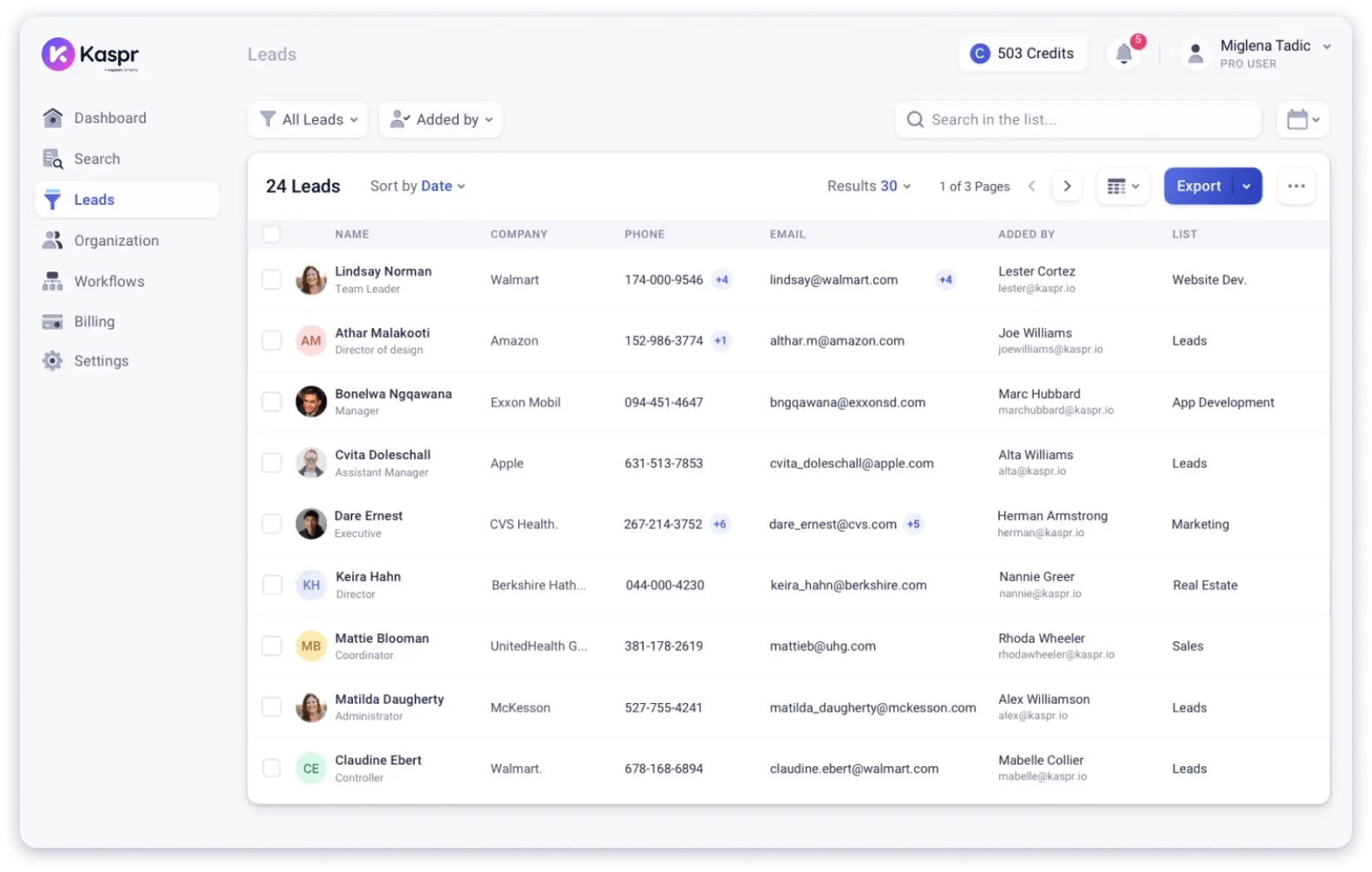
The database has 500M+ contacts and is GDPR and CCPA aligned. Kaspr recently added basic LinkedIn automation too, like connection requests and follow-ups.
But this is still fundamentally a data tool. For actual cold email campaigns, you will need something else.
The per-user pricing is what holds it back for teams. At $49/user/month, a five-person team is paying $245/month for contact data alone, with no outreach included.
Pros
- Fast contact reveal directly on LinkedIn
- Works on LinkedIn, Sales Navigator, and Recruiter Lite
- Bulk enrichment is useful for quick prospecting
- Free plan offers a low risk starting point
Cons
- No cold email or campaign management features
- Per user pricing adds up quickly for teams
- Best suited for data access, not full outreach execution
Pricing
Free plan with unlimited B2B emails (invite required), 5 phone credits, 5 direct email credits per month.
- Paid plans from $49/user/month
- Includes Chrome extension, CRM integrations, and bulk enrichment
For solo prospecting on LinkedIn, the free plan is a solid starting point. But once your team grows, the per-user costs will make you think about flat-rate alternatives like Saleshandy.
What Users Have to Say
“A couple of clicks and you get the info you need to reach out to your contacts. The LinkedIn extension is really well integrated.” — Read the full review on G2
Recommended Read: 5 Best Kaspr Alternatives
Scraping and Automation Tools (Like PhantomBuster, But Better)
These alternatives to PhantomBuster work in a similar way: scraping, automating, or enriching from multiple sources. They just do it with less friction.
5. Waalaxy
Beginners who want a simple LinkedIn first outreach tool without complicated workflow setup.
Waalaxy is the PhantomBuster alternative for anyone who tried LinkedIn automation, found PhantomBuster confusing, and wanted something that just works out of the box.
It is a Chrome extension with pre-built campaign templates that require almost no configuration.
Why Waalaxy Is a Better Alternative to PhantomBuster
The number that sold me on trying Waalaxy: 75% of its users had never done LinkedIn outreach before signing up. The tool is built for simplicity, and it shows.
You import prospects from a LinkedIn search, pick a sequence template (connect → message → follow up), and launch.
There are no Phantoms to chain together, no session cookies to configure manually.
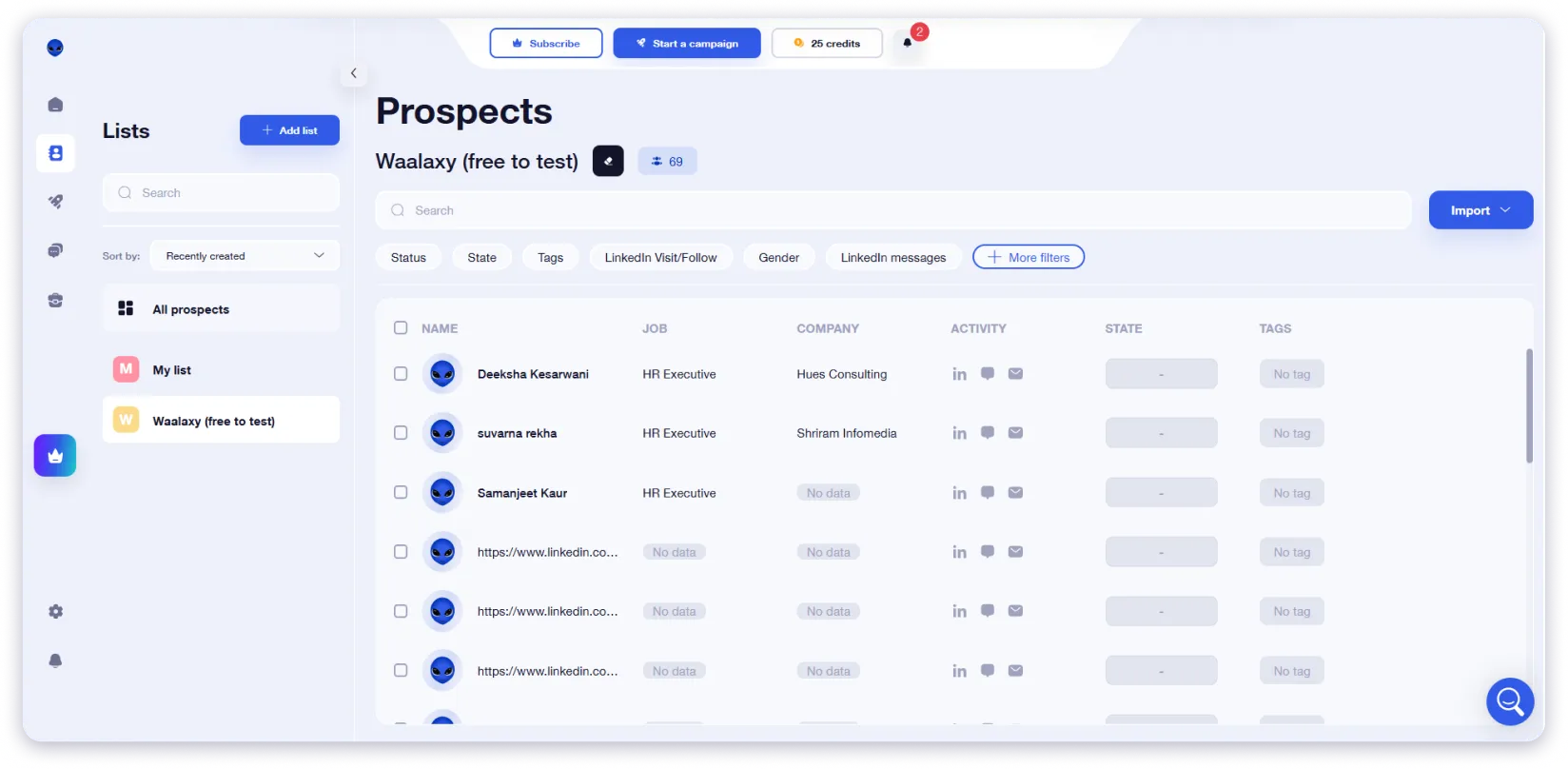
The Business plan adds email finding through Dropcontact, so you can combine LinkedIn and email outreach in one campaign.
That simplicity is both the strength and the boundary.
Waalaxy is purpose-built for LinkedIn and email outreach, which, for most B2B teams, covers the two highest-converting channels anyway.
If you need to automate Twitter DMs or WhatsApp in the same tool, it’s not the right fit.
The free plan was also cut down to just 80 invitations per month.
And because it runs as a Chrome extension, there is an inherent LinkedIn safety question, though users generally report it is safer than PhantomBuster.
Pros
- Very easy to launch LinkedIn campaigns
- Pre built sequences reduce setup time
- Email can be added on higher plans
- Free plan lets users test the workflow first
Cons
- Mainly limited to LinkedIn and email workflows
- Price increases have frustrated many users
- Browser dependency can be a limitation for some teams
Pricing
- Free plan available (trial)
- Pro: $19/month (or $16/month billed yearly)
- Advanced: $39/month (or $32/month billed yearly)
- Business: $69/month (or $55/month billed yearly, includes email outreach)
- Annual plans lower the effective monthly cost across all tiers.
Start with the free trial to validate your outreach.
If LinkedIn works for your audience, the Advanced plan is a solid step up for scaling safely, while Business unlocks a full multi-channel setup with email.
What Users Have to Say
“I really appreciate the automation for follow-up messages, because when you do it yourself, you tend to forget when to send them. With Waalaxy, I save a lot of thinking time and operational time.” — Read the full review on G2
6. Clay
Teams that need deep enrichment from many sources and want AI powered research inside their prospecting workflow.
Clay is the PhantomBuster alternative for people who felt limited by scraping one platform at a time. It does not scrape in the traditional sense.
It connects to over 100 data providers and uses AI to pull together a complete picture of any company or contact.
Why Clay Is a Better Alternative to PhantomBuster
The moment I realized Clay was different from PhantomBuster was when I asked its AI agent (called Claygent) to “find the most recent product launch from this company.”
It went out, searched, and came back with the answer. PhantomBuster cannot do that. It can only scrape what is already structured on a webpage.
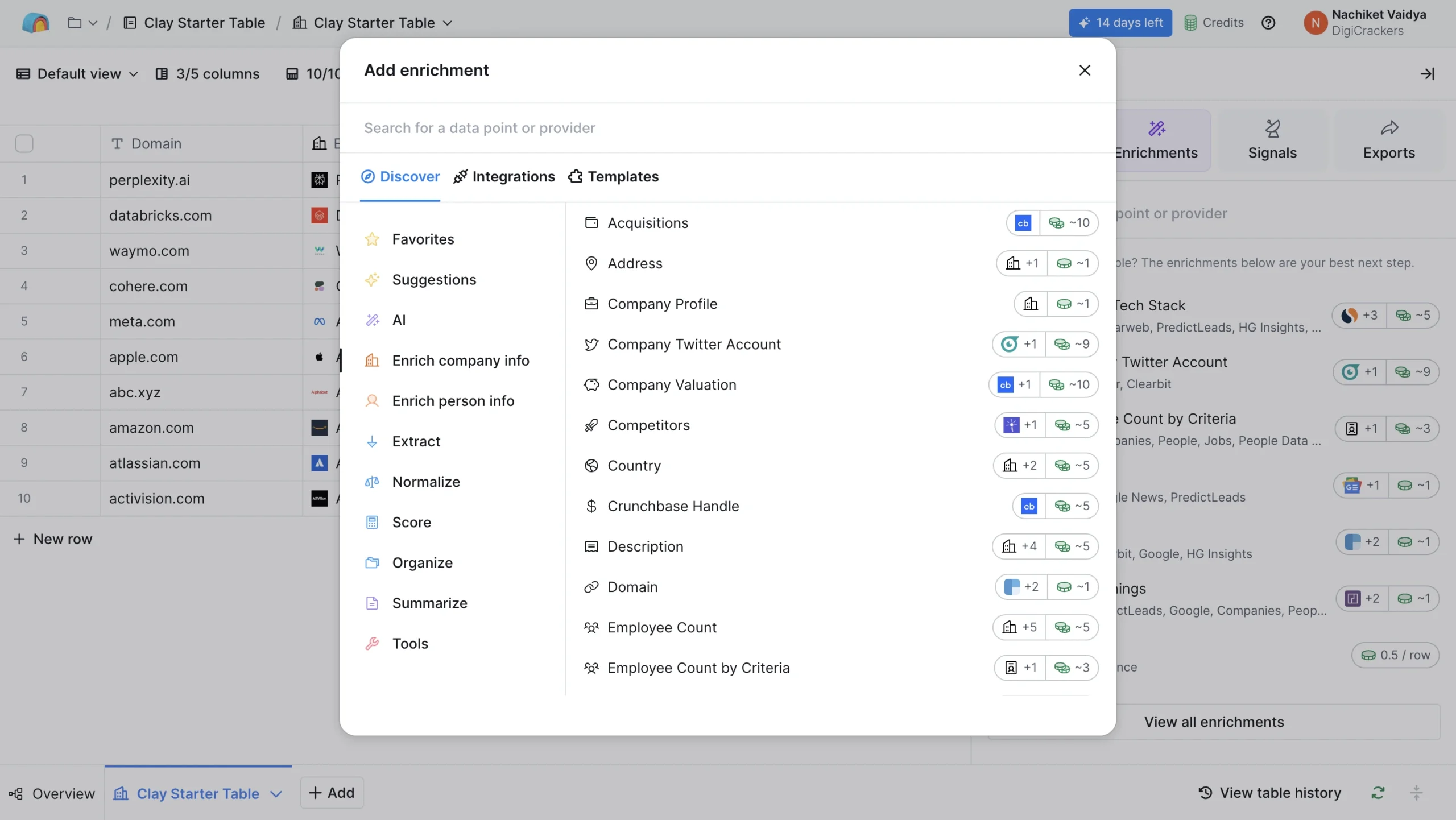
Clay pulls from 100+ data providers simultaneously.
In a single enrichment workflow, I could get tech stack, funding history, hiring signals, recent news, and social profiles merged into one lead record
With PhantomBuster, each of those would be a separate Phantom or an external API call.
The integrations are good too. Clay works with Saleshandy, Instantly, Smartlead, and most CRMs. So the enriched data flows directly into your outreach.
But Clay is not cheap and it is not simple.
The starter plan is $149/month, credits disappear faster than you expect, and building custom workflows takes time to learn. If you do not need 100+ data sources, this is probably more tool than you need.
Pros
- Pulls enrichment from many data providers in one workflow
- AI research helps gather context beyond structured fields
- Useful for advanced prospecting and list building
- Works well with outreach tools and CRMs
Cons
- No built in email sending or outreach execution
- Credits can get used up faster than expected
- Takes time to learn and set up properly
Pricing
Free plan with limited credits.
- Starter: $149/month (credits-based)
- Explorer: $314/month
- Pro: $720/month
Start with the free plan to see if Clay’s depth of enrichment is something your workflow actually needs.
Most teams either love it and go all-in, or find it overkill and switch to something simpler.
What Users Have to Say
“Clay brings data, enrichment, and workflows into one place. It’s especially useful for building targeted outreach lists quickly while keeping control over customization.” — Read the full review on G2
Also, find out the top competitors to Clay
7. TexAu
Users who want the closest replacement to PhantomBuster with similar automation style and multi platform workflows.
TexAu is what you try when you like how PhantomBuster works, but you are tired of its pricing, reliability, or support.
It is the most similar tool on this list. Same concept, same platforms, similar setup. Just fewer headaches for most users.
Why TexAu Is a Better Alternative to PhantomBuster
TexAu calls its automations “Spices” instead of “Phantoms.” Beyond the naming, the experience is close to identical: pick a platform, choose an automation, configure inputs, and run.
Where TexAu pulls ahead is the drag-and-drop workflow builder. Connecting multiple automations into a sequence felt more intuitive than PhantomBuster’s Phantom chaining.
And having both cloud and desktop execution is a flexibility PhantomBuster does not offer.
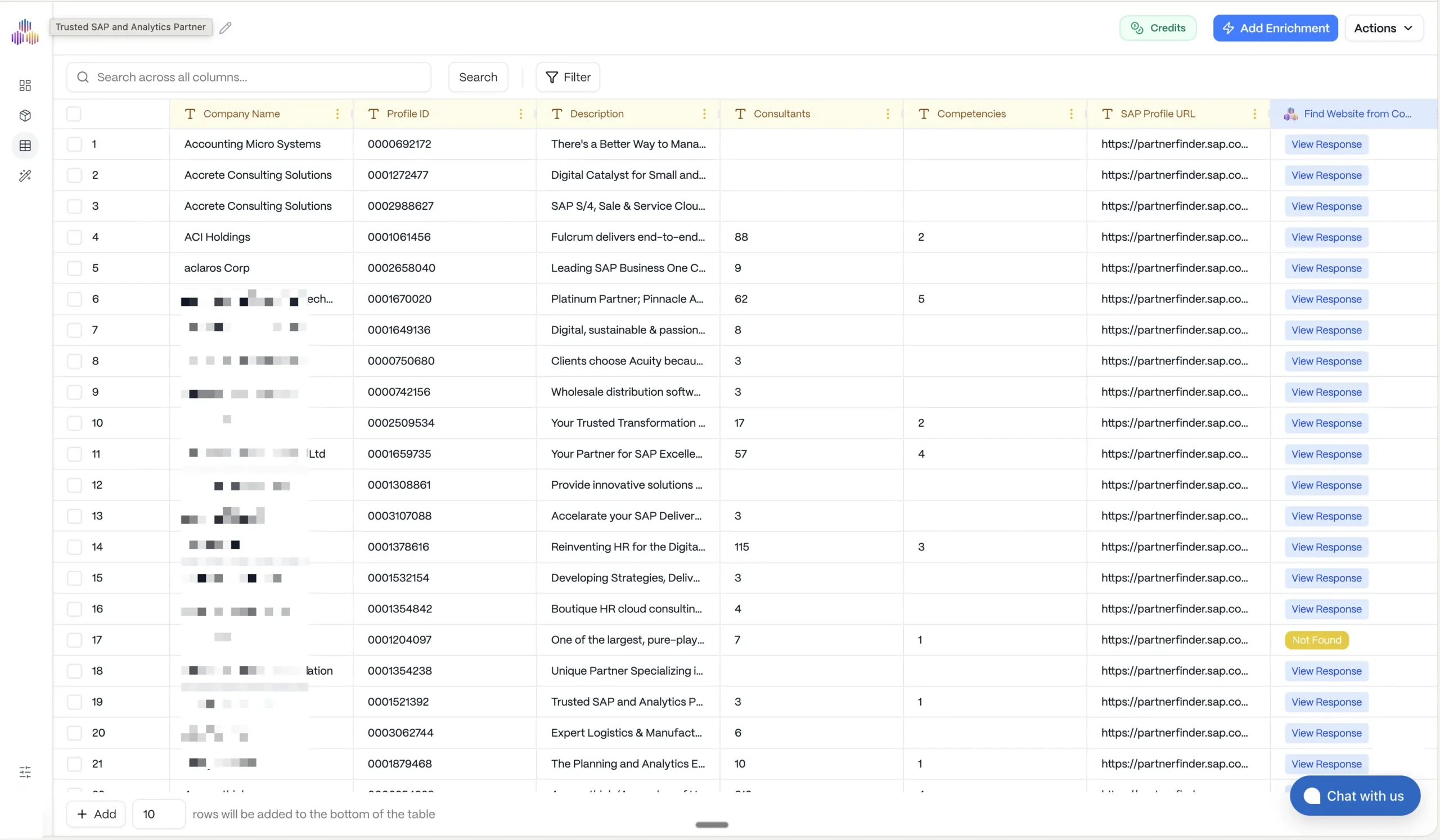
At $29/month for the Starter plan, it is also nearly half the price of PhantomBuster’s entry tier.
But I need to be upfront: TexAu inherits most of PhantomBuster’s structural problems.
The execution-hour billing model with no rollover is the same. LinkedIn scraping still uses session cookies.
And reliability is a real concern — I came across multiple G2 and Capterra reviews describing automations breaking down and support taking days to respond.
One Capterra review stood out: “None of my recipes worked in the last 2 years.”
Also important: TexAu recently retired its LinkedIn automations while preparing a V3 version.
If LinkedIn is your primary platform, confirm the current status before subscribing.
Pros
- Large automation library across multiple platforms
- Drag and drop workflow builder is easier for chaining tasks
- Cloud and desktop execution offer more flexibility
- Cheaper starting price than PhantomBuster
Cons
- Execution hour model still has the same core drawback
- Reliability issues are commonly reported by users
- LinkedIn related usage may not be stable for all workflows
Pricing
- Starter: $29/month (annual) — 20 automation hours
- Growth: $90/month — 60 hours
- Agency: $220/month — 200 hours
- 14-day free trial
Cheaper than PhantomBuster at every tier. But if you are consistently running automations, expect to graduate from Starter to Growth within a few weeks.
What Users Have to Say
“Setting up my first automation took about ten minutes. The drag-and-drop builder is straightforward. When it works, it saves a lot of time.” — Read the full review on G2
8. Evaboot
Sales Navigator users who only need fast lead export, cleaning, and email finding from LinkedIn lists.
Evaboot is not trying to replace PhantomBuster entirely.
It replaces one specific workflow: exporting leads from Sales Navigator. If that is what you used PhantomBuster for, Evaboot does it better and faster.
Why Evaboot Is a Better Alternative to PhantomBuster
I ran the same Sales Navigator search through both tools.
PhantomBuster took 20+ minutes, produced raw data with formatting issues, and required a separate step to find emails.
Evaboot exported the same list in under 5 minutes with clean data and emails attached.
The auto-cleaning is the feature that saves the most time.
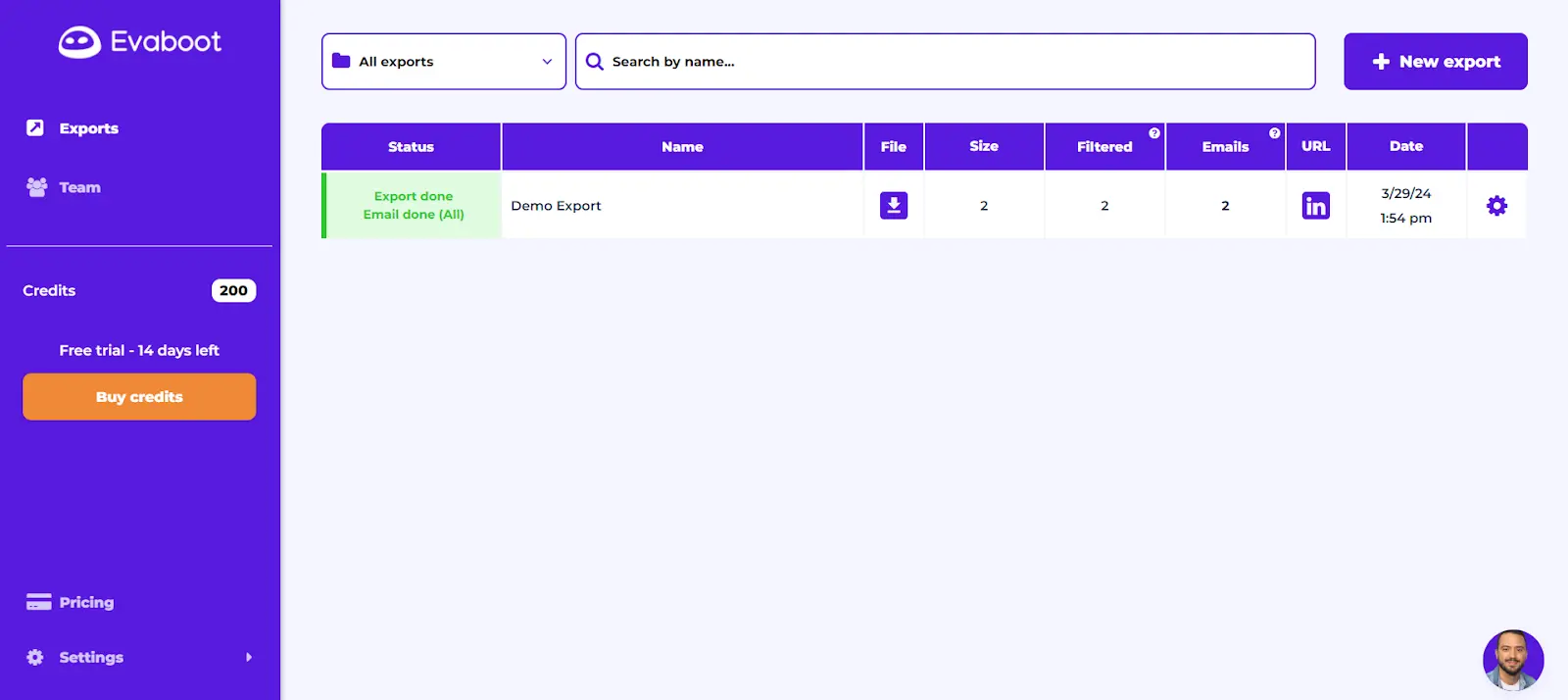
Evaboot removes emojis from names, fixes capitalization, strips out juridical mentions, and flags leads that do not actually match your search filters.
That last part is important because Sales Navigator’s own search results include false positives more often than you would expect.
Evaboot catches them and tells you exactly why each lead does not match.
Email verification is built in, and the data is extracted live from LinkedIn (not from a stored database), so it is GDPR-compliant.
The two things most people do not realize until after they subscribe:
- you need Sales Navigator ($100+/month) for Evaboot to work at all
- the 2-credit system (1 to scrape, 1 to find email) means your actual lead count is half the number on the plan page
Pros
- Fast export from Sales Navigator searches
- Built in data cleaning saves manual work
- Flags false positives inside search results
- Email extraction and verification are included
Cons
- Requires a separate Sales Navigator subscription
- Credit system reduces actual usable lead volume
- No phone numbers or multichannel outreach features
Pricing
- Starter: $39/month — 500 credits (= 250 complete leads)
- Growth: $79/month — 1,500 credits
- Pro: $139/month — 4,000 credits
- Sales Navigator required separately
Real monthly cost starts at $139+ once you add Sales Navigator.
The credit rollover is a genuine upside, but this is still one of the more expensive per-lead options when you factor in the Sales Nav dependency.
What Users Have to Say
“The product is incredibly easy to use, works every time, and makes it so easy to pull target contacts from LinkedIn Sales Navigator.” — Read the full review on G2
9. Dripify
Users who want LinkedIn outreach campaigns to run in the cloud without managing separate automations every day.
Dripify is the alternative to PhantomBuster for people who only care about LinkedIn and want a campaign builder that does not require a technical background.
You build one sequence, set conditions, and let it run in the cloud.
Why Dripify Is a Better Alternative to PhantomBuster
The difference I felt immediately: Dripify gives you one screen to build your entire LinkedIn campaign.
Connection requests, messages, profile views, endorsements, follow-ups, all in a single drag-and-drop sequence with conditions and delays.
PhantomBuster requires managing separate Phantoms for each of those actions and linking them together manually.
Dripify runs in the cloud. Your browser does not need to stay open.
It includes a built-in email finder and verification, which is handy for building multi-touch sequences that combine LinkedIn actions with email follow-ups.
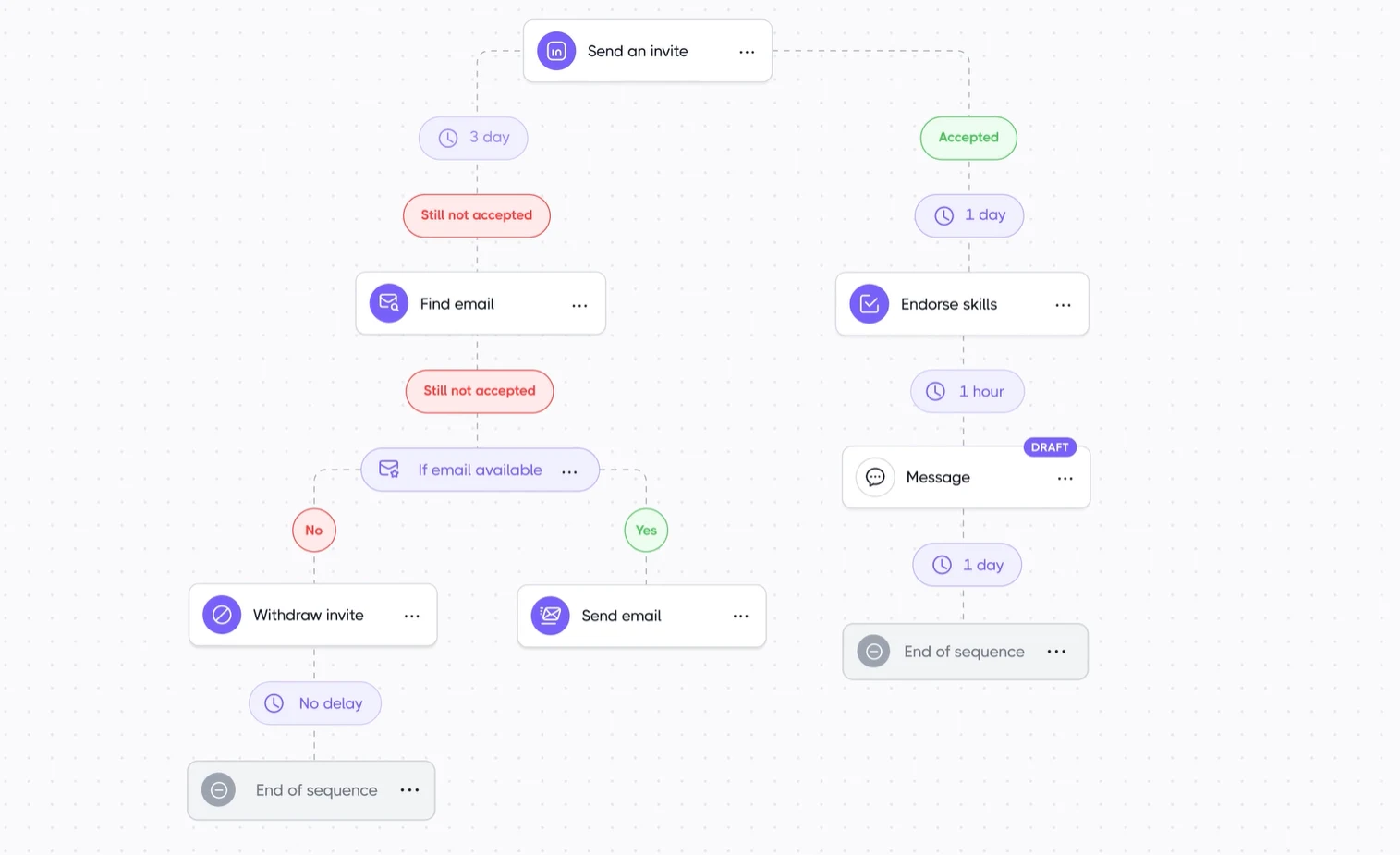
The team management dashboard makes it useful for agencies managing outreach across multiple client accounts.
Where I would be cautious: multiple G2 reviewers mention dashboard bugs and occasional glitches.
A few users have reported being charged after cancelling their subscription. And since Dripify is LinkedIn only, you cannot use it for any other platform.
Pros
- Single campaign builder for full LinkedIn sequences
- Cloud execution removes the need to keep a browser running
- Email finder and verification are built in
- Useful for teams managing several LinkedIn campaigns
Cons
- Focused only on LinkedIn based workflows
- Users report bugs and billing related issues
- Per seat pricing can rise fast for larger teams
Pricing
- Basic: $39/month per user
- 7-day free trial
- Higher tiers add analytics, team features, and more capacity
Fair entry price for a dedicated LinkedIn tool.
A team of five pays $195/month, which is reasonable for LinkedIn-only automation. Solo users and small teams will find this one of the more straightforward setups on the list.
What Users Have to Say
“Simple UI with powerful automation under the hood. Setting up campaigns is quick and the cloud execution means I do not have to keep my browser running.” — Read the full review on G2
Choose the Best PhantomBuster Alternative for Your Workflow
PhantomBuster works if you need raw multi-platform scraping and you are comfortable managing execution hours, automation breakdowns, and a stack of separate tools for outreach.
But if those are the exact reasons you are reading this blog, the alternatives here give you more for less.
The biggest shift I noticed across 45+ tools: the market has moved past scraping-first lead generation.
The tools that saved me the most time were the ones that gave me verified data upfront, instead of making me scrape, clean, enrich, and export before I could even start reaching out.
If that is what you are looking for, Saleshandy Lead Finder is worth a try. Search from 800M+ verified contacts, send cold emails, and track everything in a free CRM.
Frequently Asked Questions
1. Is there a free alternative to PhantomBuster?
Yes! Kaspr offers a generous free plan that you can use as a Phantombuster alternative.
You get unlimited B2B email reveals just by inviting 3 colleagues. If you want to test a verified database instead, Saleshandy gives you 50 free lead credits with a 7-day trial.
2. What is the best PhantomBuster alternative for LinkedIn?
If you are doing LinkedIn outreach (connection requests, messages, follow-ups), go with Waalaxy. It is the easiest to set up, and 75% of its users had never done LinkedIn outreach before.
That should tell you how beginner-friendly it is.
3. Can Saleshandy replace PhantomBuster?
Depends on what you were using PhantomBuster for. If you were scraping Instagram or Twitter, no.
But if your whole point was to find leads and email them, then honestly, yes.
Saleshandy does both from one platform and you do not have to worry about scraping, session cookies, or broken automations.
4. Is PhantomBuster safe for LinkedIn?
I would be careful. PhantomBuster runs on your LinkedIn session cookies, which means LinkedIn can detect the activity and flag your account.
It has happened to multiple users based on what I have seen on Reddit and G2.
If LinkedIn is important to your business, a database tool like Saleshandy or Hunter is the safer bet since they do not touch your LinkedIn account at all.
5. What is the cheapest PhantomBuster alternative?
Saleshandy outreach starts at $25/month. That is less than half of what PhantomBuster charges for its cheapest paid plan ($56/month).
And for that $25, you get unlimited email accounts, auto follow-ups, and sender rotation.
With PhantomBuster, you get 20 hours of execution time and hope for the best.