

If you have been researching B2B prospecting tools lately, you have probably seen Clay and Apollo recommended on Reddit threads, LinkedIn posts, and G2 comparisons. They keep showing up in the same conversations.
But here’s the thing most comparison articles won’t tell you: Clay and Apollo are not really the same type of tool.
Comparing them head to head is a bit like comparing a Swiss Army knife to a power drill. Both are useful, but neither replaces the other for every job.
I logged into both platforms, explored every major feature area, analyzed thousands of G2 reviews (9,858 for Apollo, 234 for Clay), and broke down pricing from inside each dashboard, not from marketing pages or third-party summaries.
In this guide, I will compare Clay and Apollo across the areas that matter most:
- Data enrichment and accuracy
- Outreach and email sequences
- AI features
- Integrations
- Automation and workflows
- Pricing and real cost
- What G2 users actually say
I’ll also show you where each tool wins, where it falls short, and which one makes more sense based on your outbound setup.
And if neither gives you the complete workflow you need, I will introduce a third option that fills the gaps both tools leave behind.
So, are you ready to dive in?
Let’s get us started.
Clay vs Apollo – TOC
- TL;DR: Clay vs Apollo at a Glance
- What Is Clay? (And Who Is It Built For?)
- What Is Apollo, and Who Is It Best For?
- Clay vs Apollo: Feature-by-Feature Comparison for 2027
- Clay vs Apollo Pricing (2027): What Will You Actually Pay?
- Clay or Apollo: Which Should You Choose?
- FAQs Users Ask Me About Clay vs. Apollo
TL;DR: Clay vs Apollo at a Glance
Here’s a gist before we dive into the details:
Clay is a data orchestration platform. Think of it as a spreadsheet on steroids where every column can pull, enrich, or transform data from dozens of providers. It’s built for teams that want deep enrichment control and custom data workflows.
Apollo is an all-in-one GTM platform. You search for contacts, enrich them, build sequences, make calls, and track deals from one dashboard. It is built for teams that want everything under one roof.
| Feature | Clay | Apollo |
|---|---|---|
| Best For | Data enrichment and workflow orchestration | All-in-one prospecting + outreach |
| Database Size | ~300M people results | 240M+ contacts |
| Enrichment Approach | 11-provider waterfall with full configuration | Single-source with waterfall advertised, but provider details hidden |
| Native Outreach | Email Sequencer only. No calling, no LinkedIn steps | Email sequences + calls + LinkedIn tasks + dialer |
| Pricing Starts At | $50/mo (Flex plan) | Free plan available. Paid from $49/seat/mo |
| Pricing Model | Workspace-based with dual currency (credits + actions) | Per-seat with single credit currency |
| G2 Rating | 4.6/5 (234+ reviews) | 4.7/5 (9,858+ reviews) |
| Biggest User Complaint | Steep learning curve (32 G2 mentions) | Data accuracy issues (961+ G2 mentions) |
Quick Verdict:
- Choose Clay if enrichment depth matters more than outreach convenience.
- Choose Apollo if you want prospecting and sending in one place.
- And if you need real-time verified contact data and scalable outreach without the complexity of either tool, Saleshandy is worth a look.
What Is Clay? (And Who Is It Built For?)
Clay isn’t a traditional sales tool. It’s a data orchestration platform built on spreadsheet-style tables where every column can pull, process, or enrich data from external providers.
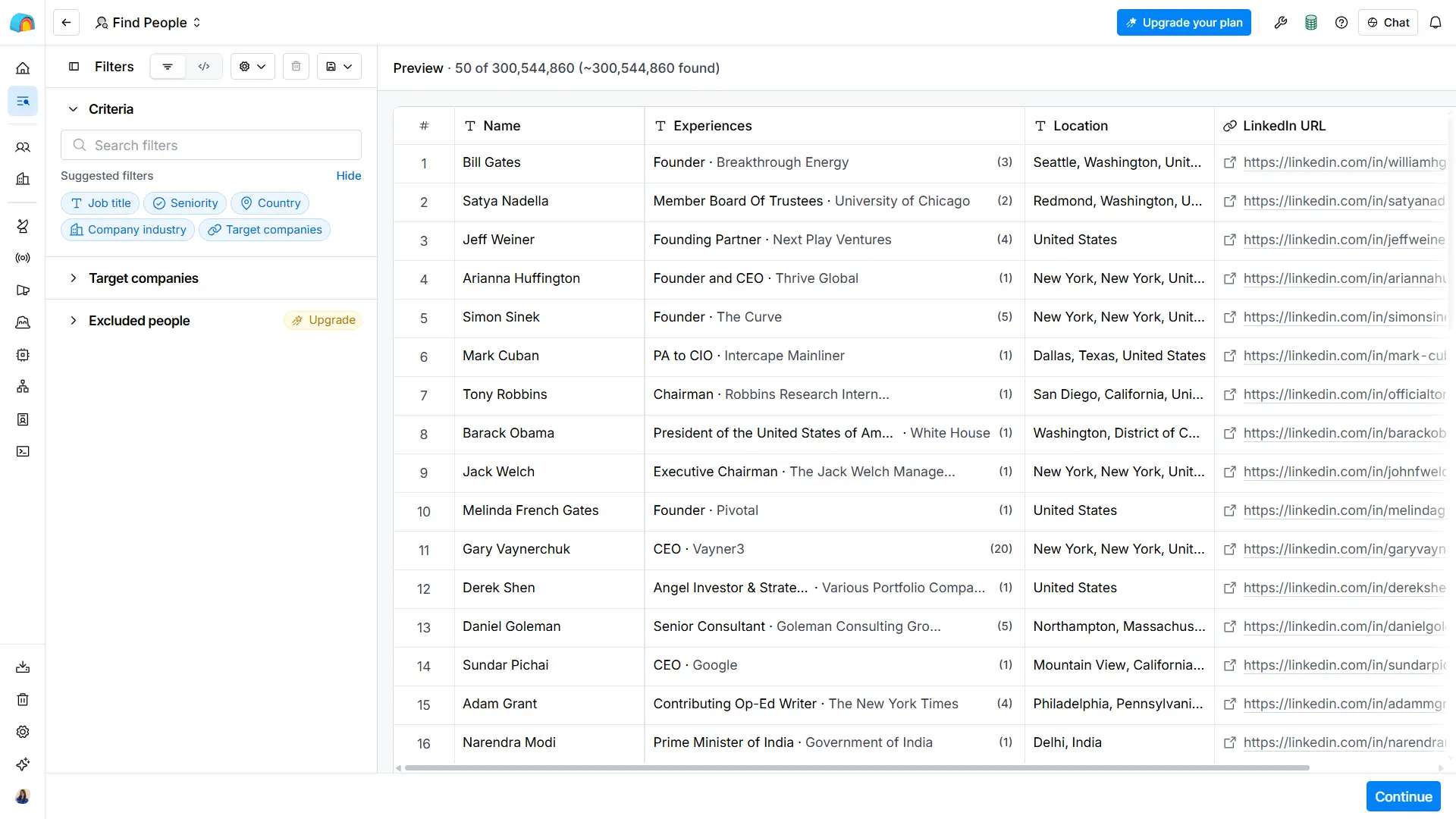
If you’ve ever wished you could wire up 11 email providers, run AI research on each row, and push clean records to your CRM without writing a single line of code, Clay is trying to be that layer.
The people who love Clay tend to be operations-minded: RevOps managers, growth engineers, marketing ops leads. People who think in workflows and want granular control over where their data comes from.
The people who struggle with Clay are the ones who just want to find contacts and start sending.
How Clay Works: Tables, Waterfall Enrichment, and AI Agents
When I opened Clay’s dashboard, the first thing I noticed was the table-based interface. It looks like a spreadsheet, but each column can do something a spreadsheet never could.
You start by pulling in records. People search, company search, CSV uploads, or even webhook triggers. The preview showed roughly 300 million people results. Not a small pond, I’d say.
The real power sits in the enrichment layer. Clay’s Work Email waterfall chains 11 different providers together. If the first provider comes up empty, the next one fires. You only spend a credit when a provider actually finds something.
I could configure the waterfall with regional presets too. (General, Enterprise, Europe, North America). There was even an EMEA Accuracy label.
If your team targets European prospects specifically, that level of regional optimization is hard to find elsewhere.
The estimated cost per enrichment was transparent in the catalog.
- Work email ran about 1.1 credits per row.
- Mobile phone was closer to 10 credits per row.
- Company revenue data sat around 3.5 credits per row.
Beyond enrichment, Clay offers Claygents. These are reusable AI agents you can build, test, and deploy for tasks like account scoring, contact scoring, and copywriting. The agent builder has Prompt, Chat, Test, Save, and Deploy steps. It’s powerful, but it’s not plug-and-play.
Clay also has a Signals section for monitoring prospect events: Topic intent, job changes, new hires, promotions, news, fundraising, web intent, and custom signals.
None were configured in the workspace I explored, so I can’t speak to refresh speed or accuracy. But the categories are broader than what I saw in Apollo’s intent filters.
Where Clay Falls Short (What Users Actually Say)
Clay’s G2 reviews tell a consistent story. The people who love it, genuinely love it. But the complaints keep circling back to the same pain points.
The learning curve is real: Across 234 G2 reviews, 32 mentions flag the learning curve or setup difficulty. That is roughly 1 in 7 reviewers.
As one digital marketing executive on G2 put it: “The learning curve is steeper than expected; the table formula logic takes time to get comfortable with, especially for non-technical team members.”
A site reliability analyst who gave Clay 5 stars still admitted: “In practice, one or two people on the team actually build and maintain the tables, while everyone else just files requests with them. That’s basically the opposite of what you buy it for.” [Read Full Review]
Credits can spiral fast: The dual currency model (credits for enrichment, actions for processing) adds a layer of complexity.
One user reported losing $1,000 in credits when a dedupe setting change accidentally re-ran an entire workbook. Even with autorun turned off. Clay refunded only a fraction.
A co-founder noted on G2 that Clay “operates on a usage-based credit model where every data lookup, AI query, and automation step drains credits.”
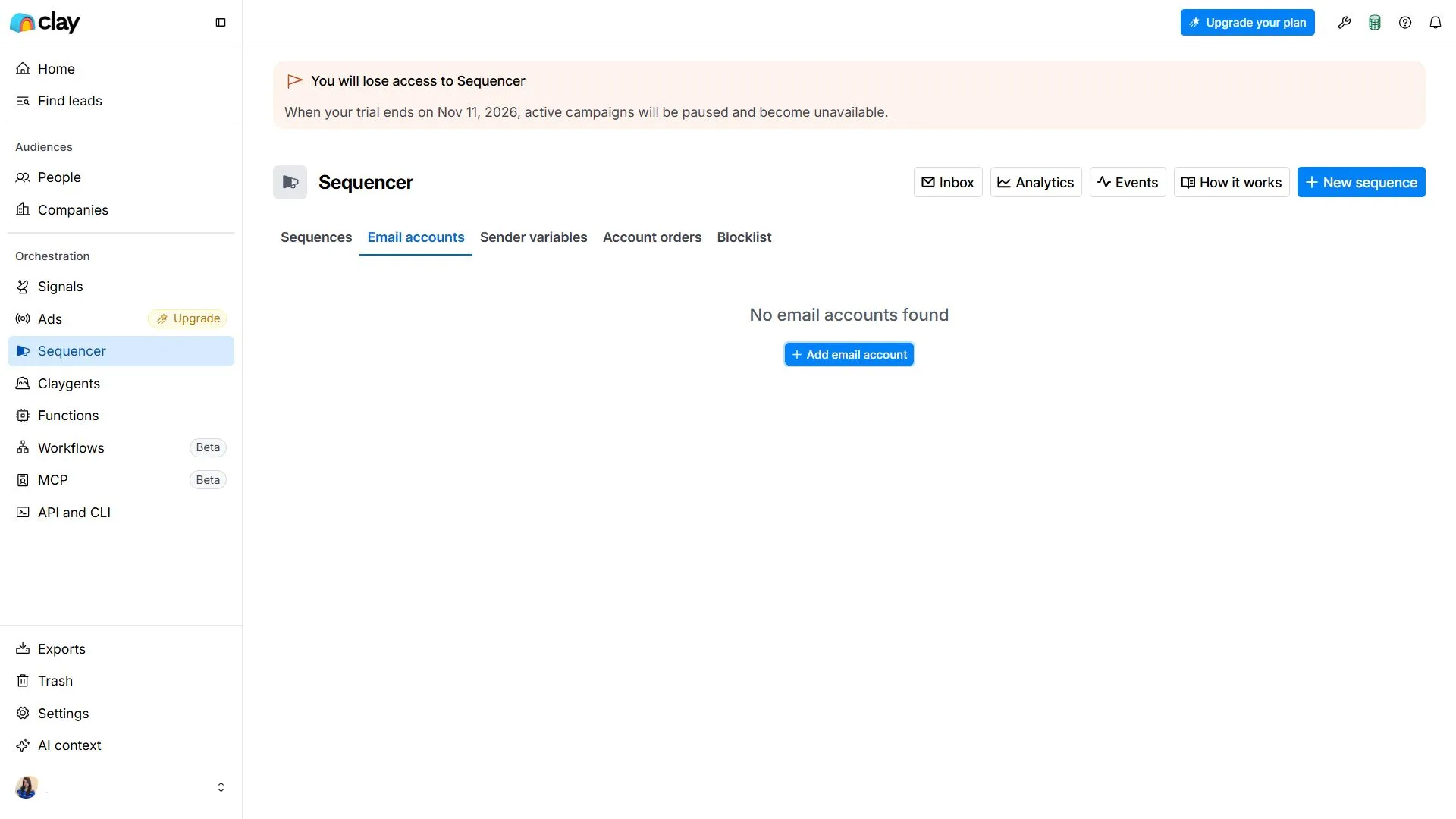
Outreach is limited. When I explored Clay’s Sequencer, I found email-only capabilities. No native calling. No LinkedIn automation steps. The Sequencer was also trial-limited, with a banner warning that campaigns would pause after the trial ends.
If your team needs multichannel outreach, Clay alone will not get you there. You will need a separate sending tool alongside it.
Worth Exploring If you’re not happy with Clay: 10 Best Clay Alternatives and Competitors in 2027
What Is Apollo, and Who Is It Best For?
Apollo.io takes the opposite approach from Clay. Instead of giving you a data workbench and letting you build, Apollo puts everything in one place.
- Search for contacts.
- Enrich them.
- Build email sequences.
- Add call tasks and LinkedIn steps.
- Track deals.
- Run workflow automations.
All from a single dashboard.
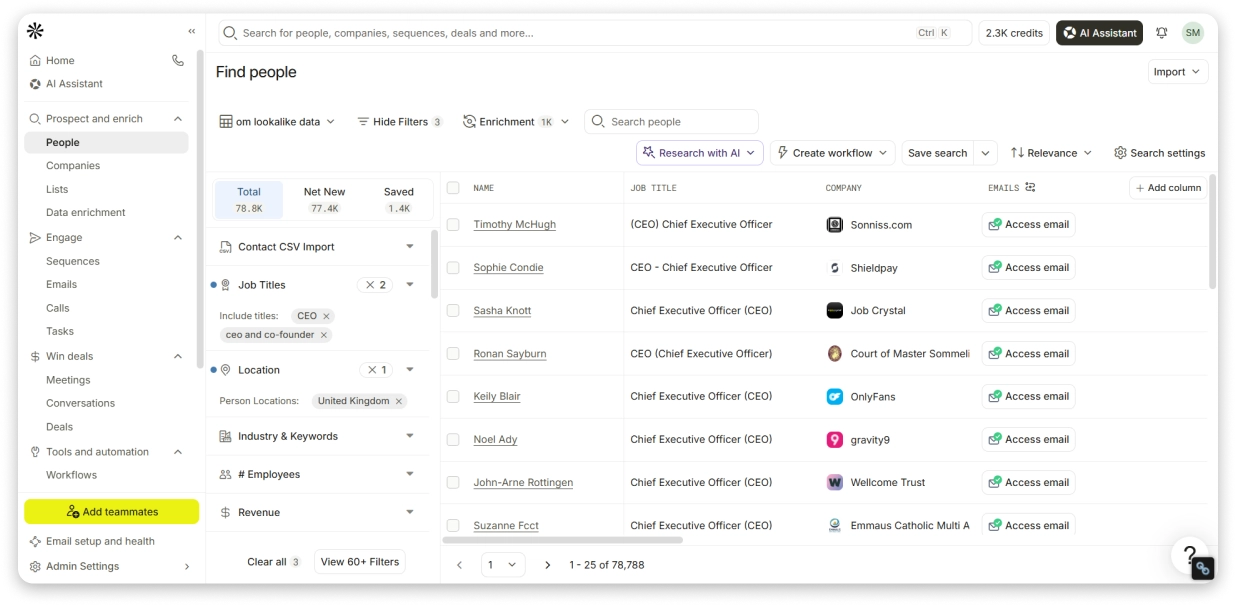
It’s a solution for “I don’t want to manage five different tools” people.
The people who thrive on Apollo are SDRs, BDRs, and small sales teams that need to move fast. Search, enrich, sequence, send. No configuration rabbit holes. No formula logic.
The people who outgrow Apollo are usually the ones whose data needs get more specific than Apollo’s single-source enrichment can handle.
How Apollo Works: Database, Sequences, and Multichannel Outreach
The first thing you notice inside Apollo is the search feature.
(50+ people filters, 30+ company filters, titles, industries, company size, revenue, technologies, funding rounds, job changes, engagement history.) You can slice and dice a prospect list quickly.
Apollo’s enrichment works at the record level. You select contacts and enrich emails or job changes. Phone numbers are requested per row. There’s CSV enrichment too (up to 100K rows), but that is upgrade-gated on the Free plan.
Apollo claims 97% email accuracy on its CSV page.
Where Apollo really separates itself from Clay is outreach.
- Email sequences with automatic steps, delays, and previews.
- Multichannel task management covering calls, LinkedIn profile views, LinkedIn messages, and custom tasks.
- A built-in dialer (upgrade-gated but functional).
- A centralized inbox that supports up to 30 connected mailboxes with sentiment tracking.
The AI features are solid too.
- An AI Assistant with chat-based presets for Prospecting, Research, Sequencing, and Analytics.
- AI writing inside the sequence editor with options for AI openers, personalization, and P.S. lines.
- The Free plan limits you to 5 AI chats, but it is still more accessible than Clay’s agent builder.
Apollo also has a visual workflow builder.
- Drag and drop blocks.
- True/false branching, multi-split paths, delays, exit conditions.
- Actions cover sequences, lists, deals, enrichment, CRM updates, notifications, and webhooks.
- Plus AI blocks for research (1 credit per run) and record qualification.
So, Where Apollo Falls Short: What Real Users Complain About
Apollo’s G2 profile looks strong at 4.7 out of 5 from nearly 10,000 reviews. But dig into the complaints, and a clear pattern emerges.
1. Data accuracy is the elephant in the room:
G2 flags data-related complaints in 961+ mentions across two separate categories. That makes it Apollo’s single biggest pain point by volume. Even users who gave 5-star ratings noted the issue.
A verified user in building materials wrote: “Sometimes the contact information isn’t completely up to date, so I still need to double-check emails, phone numbers, and job titles before reaching out.” A 5-star review. Still flagging accuracy.
A CEO giving 5 stars admitted: “The pricing and credit system can be frustrating and confusing when you’re doing a lot of searches and exports.”
If you want the full picture before deciding: Apollo.io Review: Features, Pricing, Pros, Cons, and Honest Verdict
More Reviews on Apollo’s Contact Quality:
- User reports inaccurate contact details and invalid emails
- User highlights need to verify emails and phone numbers
- User flags outdated data and additional manual verification
2. The interface can feel overwhelming:
474 G2 mentions flag the learning curve. Apollo packs a lot of features into one dashboard, and new users sometimes feel like they have been dropped into a cockpit with no flight manual.
A founder on G2 noted: “I have googled and found information that Apollo cannot find. The interface can be unnecessarily complicated.”
3. Support gets mixed reviews:
One user described being ghosted on a pre-scheduled Zoom call and receiving no callbacks. An SDR called support “okayish” and account executives “not so great.”
Sadly, no reviewer in the data I analyzed praised Apollo support as a standout positive.
4. The credit system has surprises:
Yep, phone numbers cost 8 credits each.
Enrichment ranges from 1 to 8 credits depending on the action.
The Free plan gives you 100 credits per seat per month, 2 sequences, and 1 intent topic. Those limits push you toward paid plans quickly.
One G2 reviewer who gave 0 out of 5 wrote: “After being told exactly what I wanted to hear by a salesperson and signing up, I found out during the onboarding session that half of their promises couldn’t actually be fulfilled.”
If Apollo’s per-seat pricing or data accuracy concerns are a dealbreaker, I have tested the best Apollo alternatives with stronger verification and more flexible pricing.
Clay vs Apollo: Feature-by-Feature Comparison for 2027
This is where the rubber meets the road. Instead of vague claims, I am comparing what I actually saw inside each platform.
1. Data Enrichment: Who Finds More Accurate Contact Data?
This is the category where Clay and Apollo differ the most.
Clay lets you configure an 11-provider waterfall for work email alone.
If one provider misses, the next one fires.
You can choose regional optimization presets (Europe, North America, Enterprise) and even control which providers to reuse saved data from.
The cost is visible upfront: roughly 1.1 credits per row for work email. You know what you are paying before you run anything.
Apollo handles enrichment differently.
You select records and enrich emails or job changes. Phone numbers are requested individually.
Apollo offers CSV enrichment for up to 100K rows, but that’s locked behind a paid plan.
Waterfall enrichment is advertised, but I couldn’t see provider names, priority order, or coverage details anywhere in the dashboard.
Apollo claims 97% email accuracy, but G2 reviewers consistently flag outdated contacts (961+ data accuracy mentions).
Bottom line:
- If enrichment depth and provider transparency matter to your workflow, Clay is the stronger choice.
- If you want basic enrichment bundled into a broader platform and do not need provider-level control, Apollo gets the job done.
2. Outreach and Email Sequences: Which Is Better for Sales Engagement?
After testing, I must say Apollo wins in this feature. And it’s not even close.
Apollo gives you full multichannel outreach inside the platform.
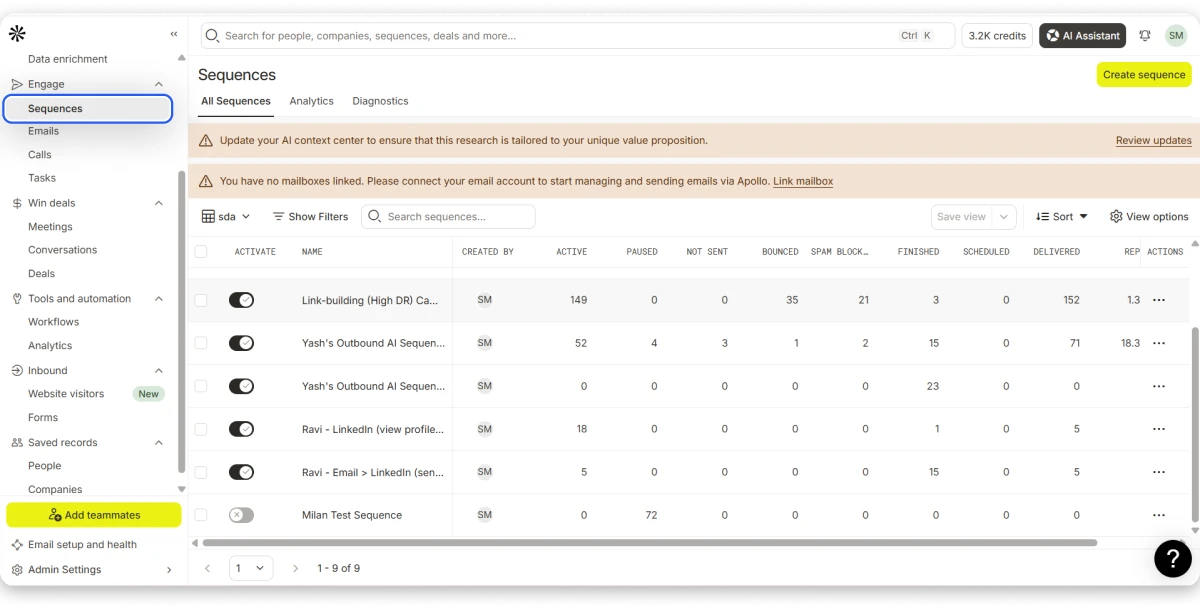
- Email sequences with automatic steps, delays, and A/B testing.
- Call tasks.
- LinkedIn profile views and message tasks.
- A built-in dialer (upgrade-gated to Basic and above).
- A centralized inbox supporting up to 30 connected mailboxes with sentiment views and deal tracking.
- Sending protection includes catch-all filtering, domain allowlists, and Bounce Guard.
Clay has a native email Sequencer, but it is newer and more limited.
I saw subject/body fields, sender account management, A/B test buttons, cooldown controls, and spam checks.
But no native calling steps, LinkedIn automation, or centralized inbox view. The Sequencer was trial-limited in my workspace, with a banner warning it would pause after the trial ended.
Clay does offer handoff to external sequencers. You can export enriched records to tools like Saleshandy, Outreach, or Salesloft. In practice, many Clay users treat it as the data layer and pair it with a dedicated cold email outreach tool.
Bottom line: If outreach is the core of your daily workflow, Apollo covers more ground natively. If you use Clay, plan on pairing it with a separate outreach platform for anything beyond basic email sequences.
3. AI Features: Which Tool Saves More Manual Work?
Both tools have leaned into AI, but they use it differently.
Clay bakes AI directly into the table workflow.
Claygents lets you build reusable AI agents for scoring, research, and copywriting. The Sculptor (Beta) assists inside the Sequencer with copy improvements and troubleshooting.
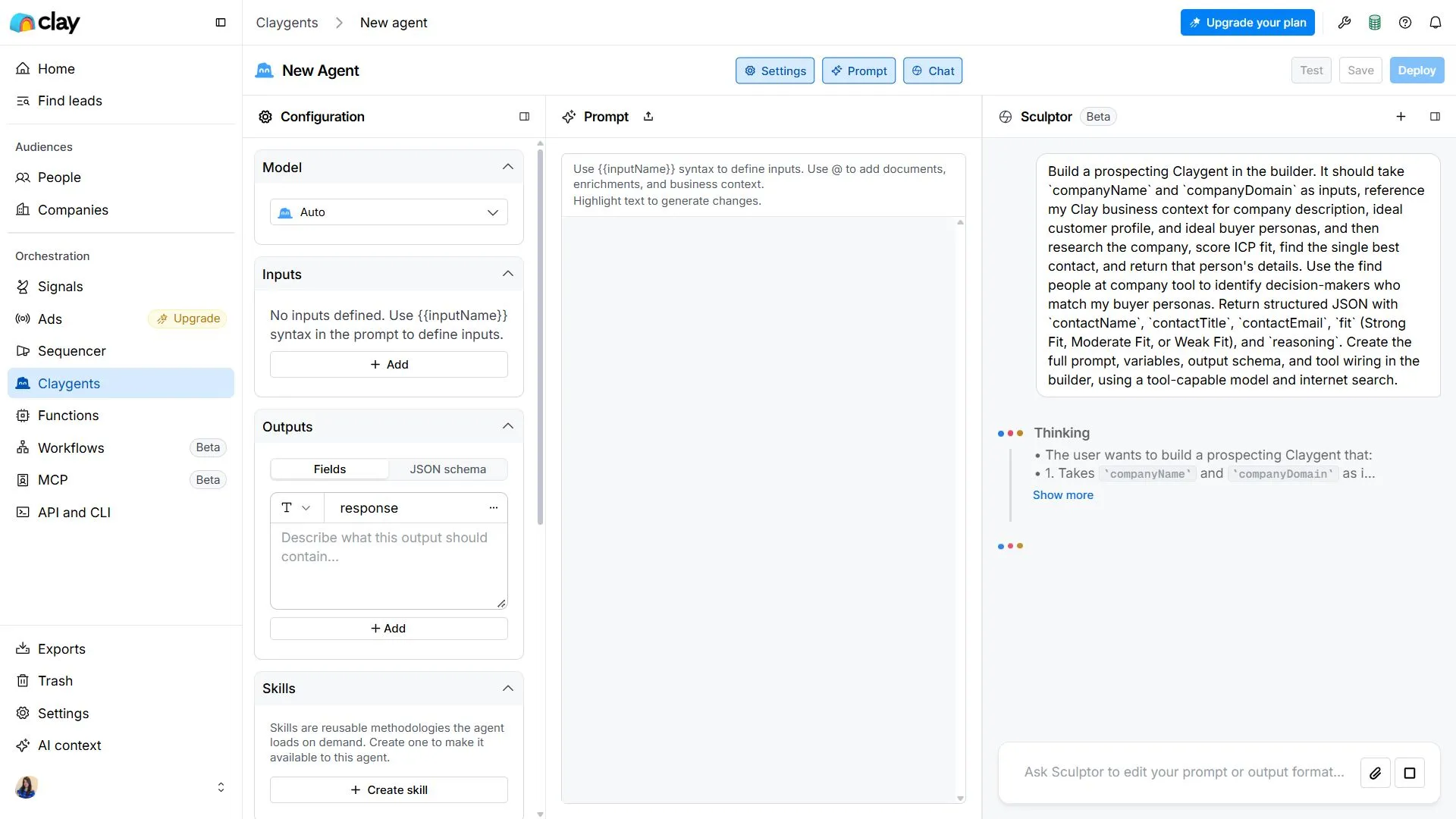
You can use AI enrichment as a column action in any table. And workspace-level AI context stores your company description, ICP, and buyer personas so every AI action has the same foundation.
Clay’s AI is composable. You build it into workflows. But that composability comes with the same learning curve that everything else in Clay carries.
Apollo takes a more accessible approach when it comes to AI features.
The AI Assistant is a chat interface with preset modes for Prospecting, Research, Sequencing, and Analytics. Inside the sequence editor, you get Write with AI, Personalize with AI, AI openers, and P.S. line generation.
Workflow blocks include Research with AI (1 credit per run) and Qualify records.
Apollo’s AI is easier to pick up. But it’s shallower. You use it inside existing workflows rather than building custom AI agents from scratch.
If you want AI to handle the heavy lifting of building AI-powered email sequences, Saleshandy’s AI CoPilot generates full sequences in under 5 minutes with up to 26 variants per step.
Bottom line: Clay wins on AI depth and flexibility. Apollo wins on AI accessibility. If your team has the technical chops to build AI agents, Clay pays off. If you just want AI to speed up writing and research within a familiar interface, Apollo does enough.
4. Integrations: Which Fits Better Into Your Sales Stack?
Clay lists 9 CRM connectors: Salesforce, HubSpot, Pipedrive, Dynamics 365, Attio, Close, Loxo, Marketo, and Crossbeam.
I saw 132 connection entries in the workspace, though many were Clay-provided accounts rather than user-connected integrations.
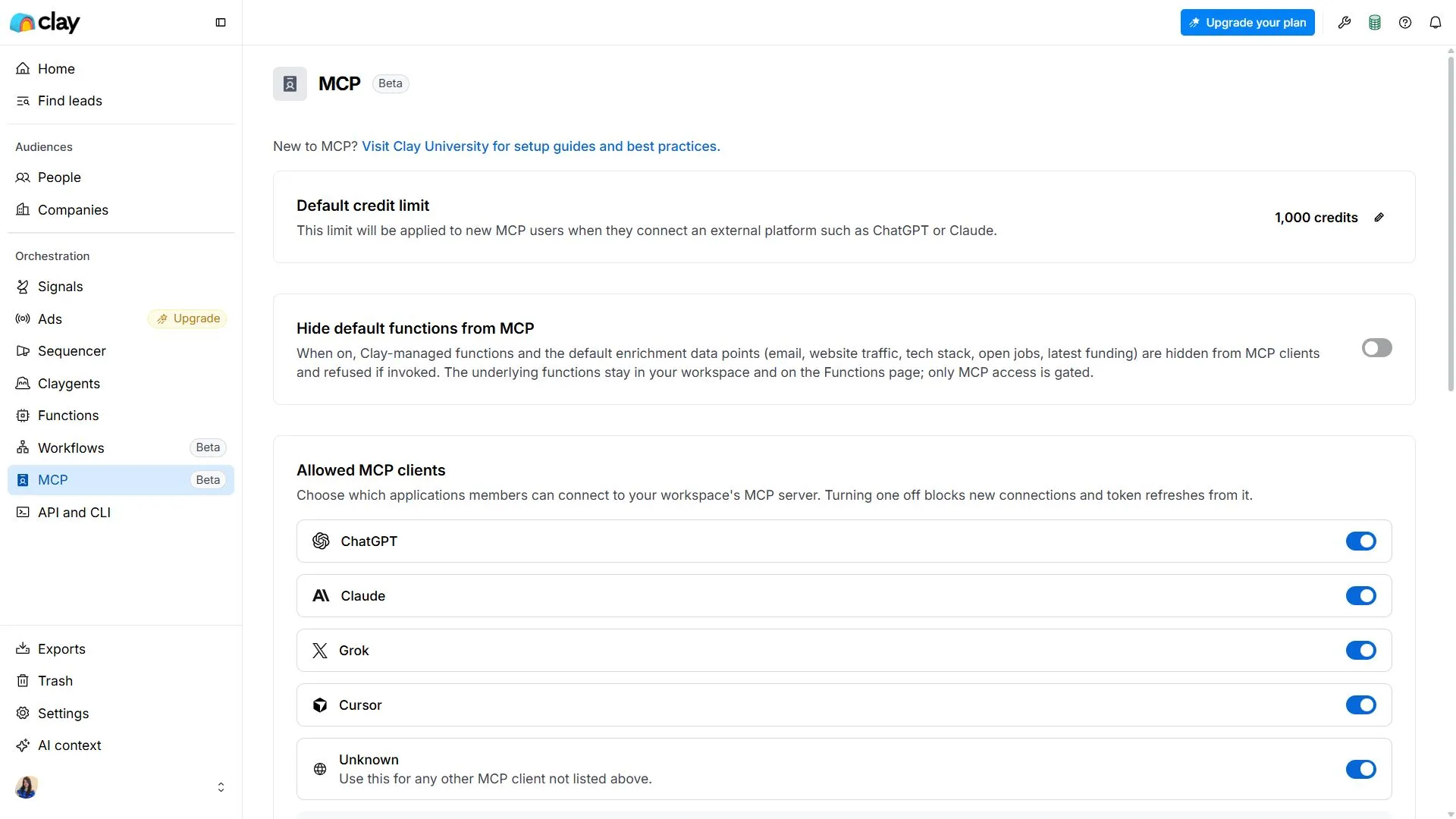
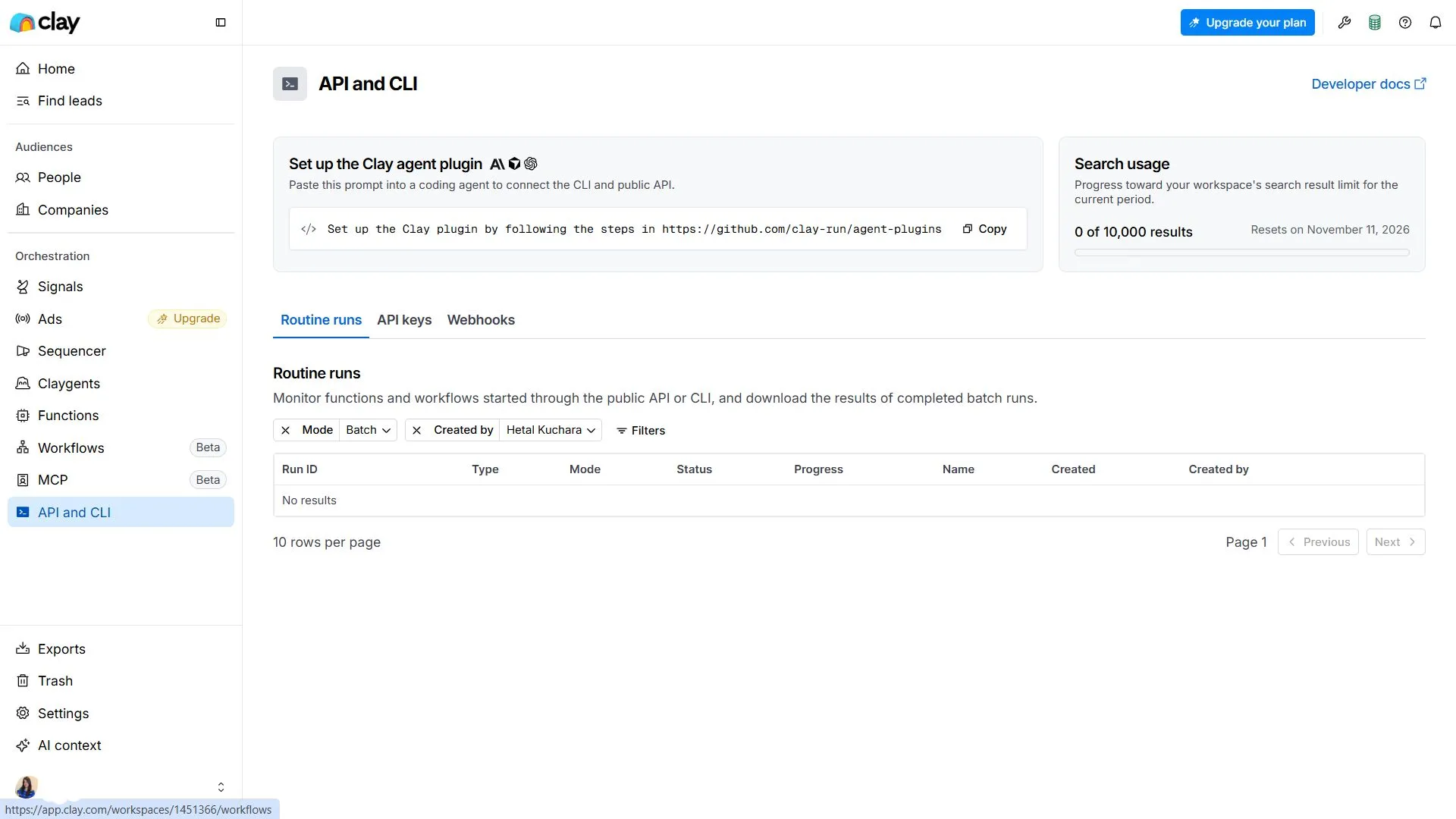
Clay also offers API/CLI access, webhook imports, and MCP connections that let external AI clients (ChatGPT, Claude, Slack) interact with Clay data.
One G2 reviewer flagged that CRM sync with HubSpot works but field mapping is largely manual. “If I want to update a custom property or avoid duplicate records, I have to build workarounds.” [Read Full G2 Review]
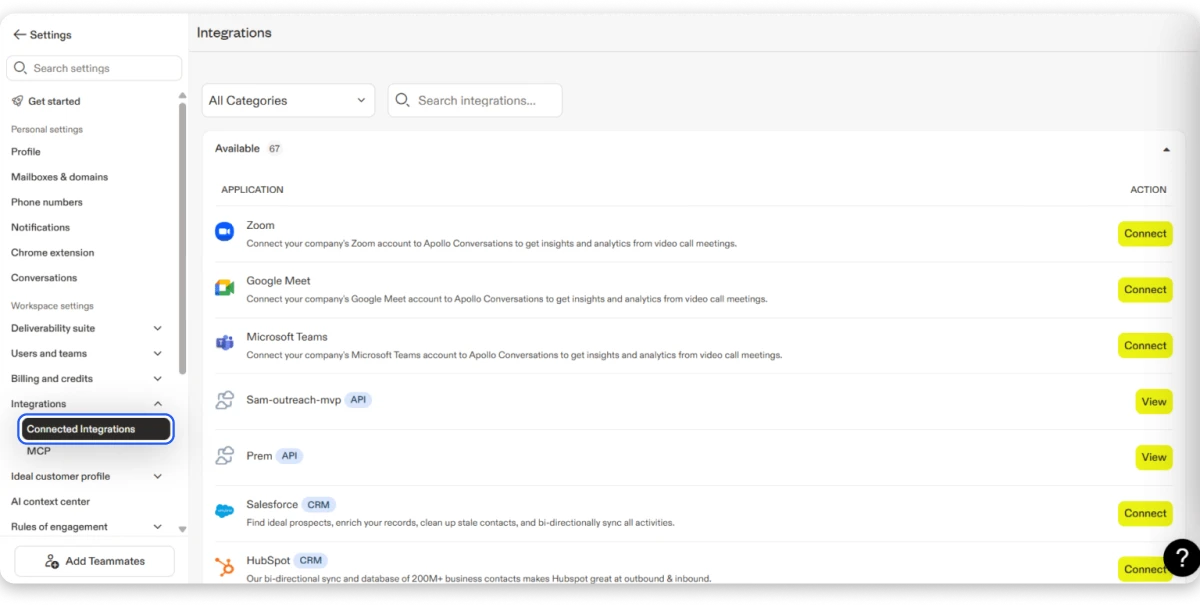
Apollo has 5 CRM connectors: Salesforce, HubSpot, Pipedrive, Zoho, and Microsoft Dynamics.
Salesforce sandbox is available. Apollo also connects to Zapier (2,000+ apps), Slack, Zoom, Meet, Teams, Gong, Sheets, Airtable, Notion, and Asana. Some connectors like SendGrid, Mailgun, Outreach, and Salesloft are upgrade-gated.
Saleshandy offers native integrations with HubSpot, Salesforce, Zoho, and Pipedrive, plus Zapier, MCP, and CLI for teams building custom outbound infrastructure.
Bottom line: Clay has broader CRM coverage and deeper API/developer tools. Apollo has a wider catalog of workflow and collaboration connectors plus verified Zapier support. Your choice depends on whether you need CRM depth (Clay) or workflow breadth (Apollo).
5. Automation and Workflows: Which Gives You More Control?
This is where the philosophical difference between these two tools shows up most clearly.
Clay processes data row by row through table columns. Each column can run an enrichment, apply a formula, trigger an AI agent, or push data somewhere.
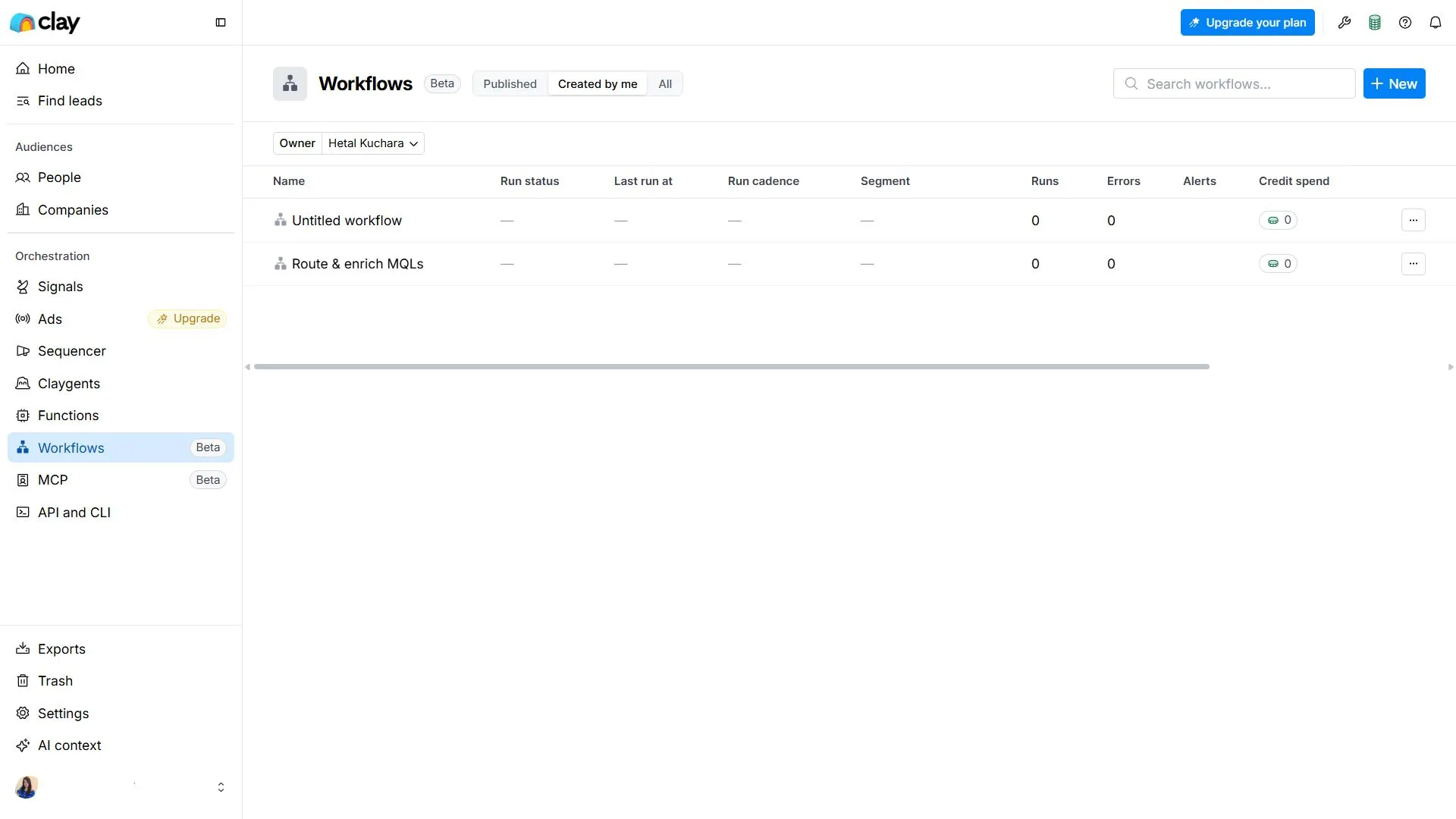
Add Auto-run and the table processes new records automatically. Sandbox Mode lets you test without spending credits on live data.
Clay also has a separate Workflow builder (Beta) that offers visual or AI-assisted flows, plus Functions for reusable processing logic. It’s powerful, but it’s still being built out.
Apollo uses a visual drag-and-drop workflow builder: True/false branches, multi-split paths, traffic splits, delays, and exit conditions. Actions cover sequences, lists, deals, enrichment, CRM updates, tasks, notifications, and webhooks.
Apollo’s approach is more intuitive for sales workflows. “If a lead matches these criteria, add to this sequence and update this CRM field.” You don’t need to think in rows and columns.
Bottom line: Clay gives you more raw processing power for data transformation. Apollo gives you more structured automation for sales pipeline actions. If you think like a data engineer, Clay fits. If you think like a sales manager, Apollo fits.
Clay vs Apollo Pricing (2027): What Will You Actually Pay?
Pricing is where a lot of comparison articles get lazy. They list plan names and monthly costs and call it a day. But with both Clay and Apollo running on credit-based models, the sticker price is only half the story.
Clay Pricing: Plans, Credits, and Hidden Costs
Clay uses a dual currency system.
- Credits cover data enrichment.
- Actions cover processing steps.
You need to track both.
| Plan | Monthly Price | Credits/Month | Actions/Month | Notes |
|---|---|---|---|---|
| Flex | $50 | 500 | 3,000 | Limited-time offer. 50K company/people results |
| Launch | $185 | 2,500 | 15,000 | Configurable quantities |
| Growth | $495 | 6,000 | 40,000 | Up to 250K synced records. CRM sync included |
| Enterprise | Custom | Custom | Custom | Annual toggle saves 10% |
Pricing Source: from Clay’s dashboard, November 2026.
The dual currency model adds real complexity. Every data lookup, every AI query, every automation step eats into your balance. One G2 reviewer reported $1,000 in credits vanishing from a single configuration change. That’s not a rounding error.
There is no free plan. The lowest entry point is $50 per month (Flex), and that is a limited-time offer for select customers. For most teams, realistic spending starts at the Launch tier ($185/month).
For a full walkthrough of Clay’s credit system, action costs, and what each plan actually unlocks: Clay Pricing Breakdown: Plans, Credits, and Real Costs in 2027
Apollo Pricing: Plans, Credits, and Add-On Costs
Apollo uses per-seat pricing with a single credit currency. Simpler to understand, but costs multiply as your team grows.
| Plan | Price (Annual) | Price (Monthly) | Credits/Seat/Mo | Key Limits |
|---|---|---|---|---|
| Free | $0 | $0 | 100 | 2 sequences, 1 intent topic, 2 lead scores |
| Basic | $49/seat/mo | — | Included | CSV enrichment, job-change alerts unlocked |
| Professional | $79/seat/mo | $99/seat/mo | Included | Unlimited A/Z testing, AI lead scoring, dialer |
| Organization | $119/seat/mo | — | Included | Min. 3 seats ($357/mo min). Advanced permissions |
Pricing Source: from Apollo’s dashboard, November 2026.
Credit costs for specific actions: email enrichment is 1 credit, phone is 8, general enrichment ranges from 1 to 8, AI research is 1 per run, and the dialer uses 1 credit per 30 seconds of calling.
The Free plan exists, and it’s genuinely useful for solo prospectors getting started.
But 100 credits and 2 sequences don’t last long if you are running real outbound campaigns. Most active teams will land on Professional ($79/seat/month) within a few weeks.
For a deeper breakdown of what each Apollo plan actually includes and where the hidden costs sit: Apollo.io Pricing Explained: Plans, Credits, and What You Actually Pay in 2027.
Real Cost Comparison: Which Offers Better Value for Your Team?
Let me walk through what a 5-person sales team would actually pay on each platform.
Clay Growth:
$495 per month for the workspace. Your team gets 6,000 credits and 40,000 actions.
But Clay doesn’t have full outreach capabilities built in. You will need a separate tool for email sequences at scale, warm-up, and sending. That is an additional monthly cost on top of $495.
Apollo Professional:
$79 per seat, per month, billed annually. For 5 people, that is $395 per month.
You get prospecting, enrichment, sequences, calling, and CRM in one.
No additional outreach tool needed. But every new team member adds $79 to the bill.
Saleshandy Pro: $76 per month. No per-seat pricing…
Your entire team of 5 uses the same plan. You get 852M+ contacts in Lead Finder, 4,000 credits per month, unlimited email accounts, unlimited sequences, built-in warm-up, real-time email verification, and Inbox Radar to check where your emails actually land.
See Saleshandy pricing plans for the full breakdown.
And here’s a quick comparison:
| Scenario (5-person team) | Clay Growth | Apollo Professional | Saleshandy Pro |
|---|---|---|---|
| Monthly cost | $495 + outreach tool | $395 ($79 x 5 seats) | $76 (flat) |
| Outreach included | Email only (limited) | Full multichannel | Full email outreach |
| Email accounts | Not applicable (needs separate tool) | Up to 30 | Unlimited |
| Built-in warm-up | Not observed | Not observed | Yes |
| Per-seat pricing | No (workspace) | Yes ($79/seat) | No |
The math speaks for itself. If your primary need is finding verified contacts and sending cold email at scale, Saleshandy gives you the most complete workflow at the lowest total cost.
Clay or Apollo: Which Should You Choose for Your Sales Team?
After spending hours inside both dashboards and reading thousands of reviews, here is what I would tell a friend who asked me which one to buy.
Choose Clay If…
- Your team has a technical operator (RevOps, growth engineer, or data-savvy marketer) who can build and maintain enrichment workflows.
- You need deep multi-provider enrichment with regional control across Europe, North America, or Enterprise targets.
- You already use a dedicated outreach tool and want Clay as the data enrichment layer feeding into it.
- You are comfortable managing a dual credit system and can monitor spend carefully to avoid runaway costs.
Clay isn’t for everyone. But for the teams that fit, it is hard to beat on enrichment flexibility.
Want the full breakdown before writing Clay off? Complete Clay Review: Features, Pricing, Pros, Cons, and Honest Verdict
Choose Apollo If…
- You want prospecting, outreach, calling, LinkedIn tasks, and CRM in one login.
- Your team is SDR-heavy and needs multichannel sequences without stitching multiple tools together.
- You want a free plan to start testing before committing budget.
- You value a visual workflow builder over spreadsheet-style data processing.
Apollo works best for teams that want a single platform for the entire prospecting-to-meeting pipeline. Just go in knowing that data accuracy will need spot-checking.
Already leaning toward Apollo but curious how it compares to Saleshandy directly? Saleshandy vs Apollo: Head-to-Head Comparison for 2027
Consider Saleshandy If…
If you have read this far and feel like neither tool fully fits, that is not unusual.
Clay’s strength is enrichment, but it lacks outreach at scale. Apollo’s strength is all-in-one convenience, but users keep flagging data accuracy.
Saleshandy sits in the middle for teams whose primary workflow is: find verified contacts, then send cold email at scale.
- Verified B2B data: Lead Finder gives you access to 852M+ contacts and 42M+ companies with 75+ filters. Real-time email verification at the point of reveal, not after the fact.
- No per-seat pricing: A 5-person team on the Pro plan pays $76 per month total. Not $76 times 5. That is a meaningful cost difference from Apollo’s $395 for the same team size.
- Unlimited email accounts: No cap. No per-inbox charges. Scale your sending volume without scaling your bill.
- Built-in warm-up: It handles email warm-up inside the platform. Neither Clay nor Apollo showed this in their dashboards. If you are doing cold outreach, warm-up is not optional.
- Inbox Radar: See exactly where your emails land: Primary, Promotions, or Spam. I did not find an equivalent in either Clay or Apollo.
- Waterfall enrichment: Saleshandy runs multi-source enrichment on its own. You do not need to configure 11 providers manually the way Clay requires.
You can start with a 7-day free trial and 50 free credits, no credit card required.
FAQs Users Ask Me About Clay vs. Apollo
1. Is Clay Better Than Apollo for Sales Prospecting?
Clay is better for data enrichment, with an 11-provider waterfall and regional optimization. Apollo is better for finding contacts and running outreach from one platform. Choose Clay for enrichment depth and Apollo for end-to-end prospecting and outreach.
2. Which Is Cheaper: Clay or Apollo?
Apollo offers a free plan, with paid plans starting at $49/seat/month. Clay starts at $50/month but charges for credits and actions. Saleshandy starts at $34/month, combining prospecting, outreach, warm-up, and verification without per-seat pricing.
3. Does Clay or Apollo Have Better Data Accuracy?
Clay’s 11-provider waterfall improves coverage, though users report occasional inaccurate AI-generated research. Apollo claims 97% email accuracy, but G2 records 961+ data-related complaints. Neither accuracy claim is independently verified. Saleshandy offers real-time verification when revealing contacts to reduce outdated data risks.
4. Can Clay Replace Apollo?
Partially. Clay can replace Apollo’s prospecting and enrichment capabilities, but not its complete multichannel outreach, dialer, or visual workflow automation. You’ll still need separate tools for email sequences, calling, and LinkedIn tasks.
5. Is There a Better Alternative to Both Clay and Apollo?
Yes, if you need prospecting and cold outreach together. Saleshandy combines 852M+ contacts, automated sequences, built-in warm-up, and reply management, starting at $34/month. You also get 50 free credits and a 7-day trial without a credit card.
6. Which Tool Is Best for a Series A Sales Team?
Apollo’s free plan and Saleshandy’s $34/month Starter plan suit budget-conscious teams. Clay Launch costs $185/month and makes more sense with dedicated operations support. Prioritize faster pipeline generation over complex data workflows.

 Pritesh