


If you’re looking into Clay pricing, you’re usually trying to figure out three things:
- Is the data quality worth what you end up paying in credits?
- Does Clay actually save meaningful time in your workflow?
- Or is there a simpler alternative in 2026 that gets the same job done?
Clay is a powerful, AI-driven data enrichment and sales automation platform. That part is clear.
But its pricing is not as straightforward as it first appears.
Between Data Credits, Actions, top-ups, rollover limits, and plan-specific features, the real monthly cost can be quite different from the advertised starting price.
So I broke down every Clay plan, looked at how credits actually get used in real workflows, and analyzed 200+ reviews across G2 and Reddit to understand what users are experiencing in practice.
By the end, you’ll have a clear picture of what Clay pricing really looks like in 2026 and whether it fits your workflow or if a simpler all-in-one tool gives you better value.
Keep reading to find out if Clay pricing is actually worth adding to your stack in 2026.
Clay Pricing 2026 – TOC
- TL;DR: Is Clay Worth It in 2026?
- Clay Pricing Breakdown: What You’ll Pay
- Clay Key Features
- How Clay Credits Work: Data Credits vs. Actions
- Hidden Costs to Budget For Before You Commit
- Who Does Clay Pricing Suit Best
- Pros and Cons of Clay
- What Real Users Say About Clay Pricing
- Why Saleshandy Is a Strong Alternative to Clay
- Frequently Asked Questions About Clay Pricing
TL;DR: Is Clay Worth It in 2026?
Need a quick verdict before you try Clay? Here’s the short version:
⚠️ One thing worth noting: With Clay, the price you see is rarely the price you pay. Your real bill depends on how deeply you enrich each contact, so run your numbers on the calculator before you pick a plan.
Clay Pricing Breakdown: What You’ll Pay (And What You Actually Get)
If you choose annual billing, Clay pricing drops by about 10% across all paid plans. These plans are marked with a “Save 10%” tag.
However, things get more complex once you start actually using the platform. Clay charges through two separate systems: Actions (for platform usage) and Data Credits (for enrichment).
This means your real cost depends heavily on how deep your workflows go.
So instead of a simple pricing table, Clay is really selling a full GTM engine. It is designed for scale and automation rather than basic lead generation.
Before diving deeper, here’s a quick comparison of all Clay pricing plans side by side.
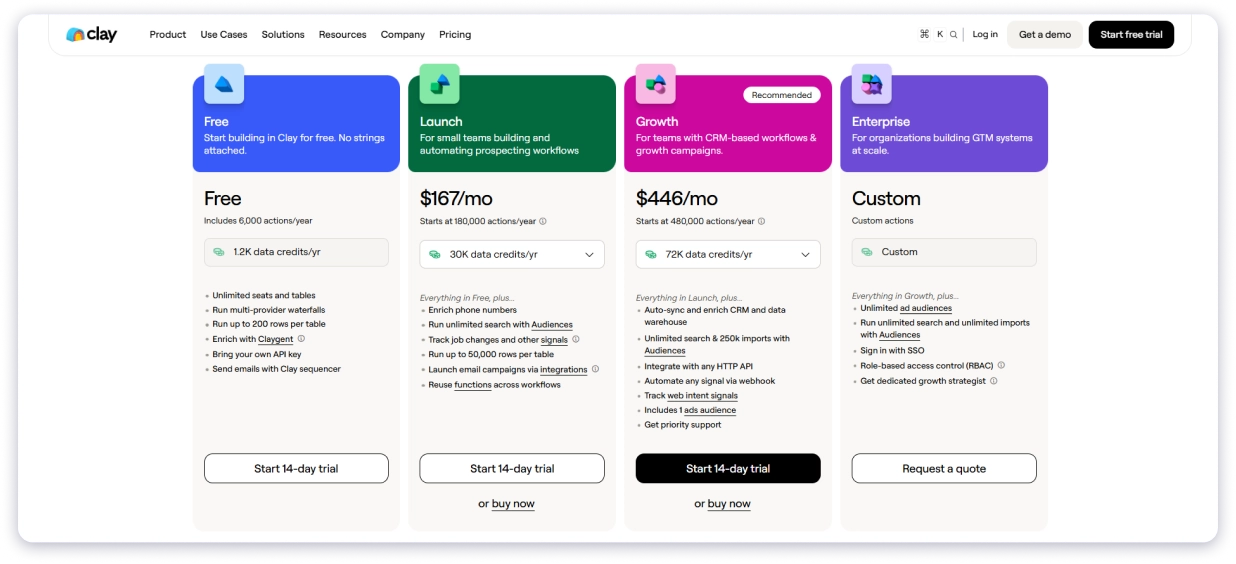
So how much does Clay cost in practice?
Let me break down what each plan actually gives you and where the trade-offs show up.
Clay’s Free Plan
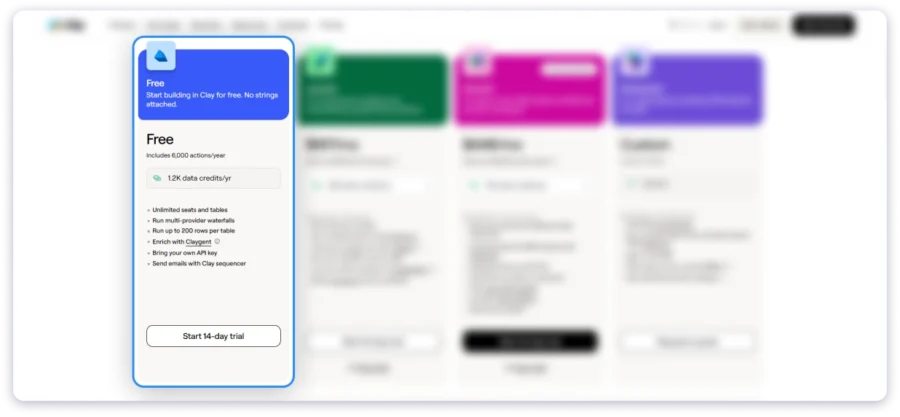
- Cost: $0, free forever, no credit card required.
- Best for: Individuals who want a low-risk way to learn, experiment, and build their first workflows in Clay before committing to a paid tier.
- Credits: 100 Data Credits and 500 Actions per month.
- What’s included:
- Unlimited seats and tables
- Multi-provider waterfalls
- Claygent (AI agent) enrichment
- Clay Sequencer for email
- Bring your own API keys
- Up to 200 rows per table
- Drawbacks:
- Capped at 200 rows per table
- Small credit and action allotment, fit for testing only
- No phone enrichment
- No signal tracking
- No CRM sync
Clay’s Launch Plan
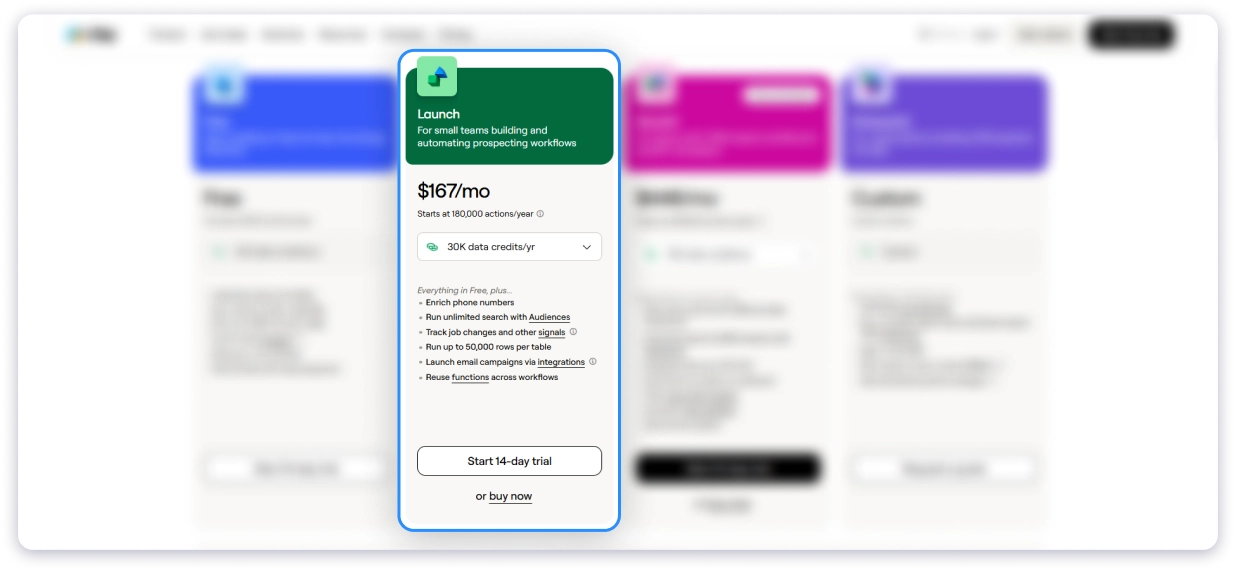
- Cost: $185/mo billed monthly, or $167/mo billed annually (starting price).
- Best for: Individuals and small teams automating their first prospecting workflows.
- Credits: 2,500 Data Credits and 15,000 Actions per month.
- What’s included:
- Everything in Free
- Phone number enrichment
- Job change and signal tracking
- Email campaign integrations
- Unlimited search with Audiences
- Up to 50,000 rows per table
- Drawbacks:
- No CRM auto-sync
- No HTTP API or webhook automation
- No web intent signals or ad-platform audience pushes (those require Growth)
- Heavy enrichment like phone or AI can push your credit tier, and your bill, above the $167 base
Clay’s Growth Plan
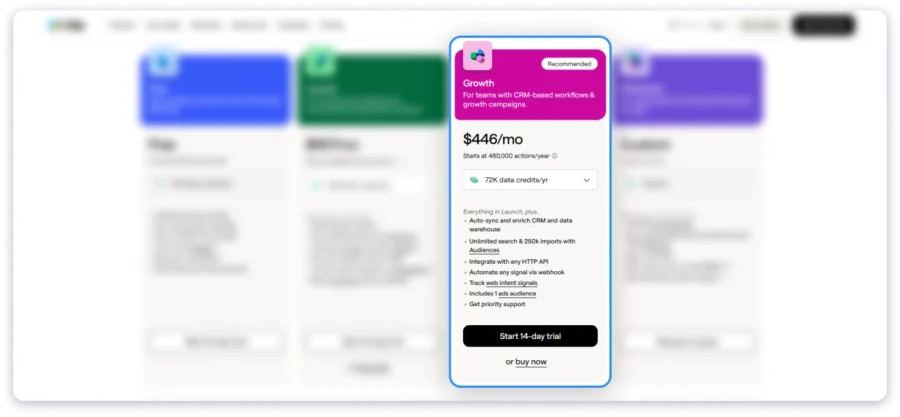
- Cost: $495/mo billed monthly, or $446/mo billed annually (starting price). Marked as the Recommended plan on Clay’s pricing page.
- Best for: Teams scaling their GTM motion with CRM-based workflows and growth campaigns.
- Credits: 6,000 Data Credits and 40,000 Actions per month.
- What’s included:
- Everything in Launch
- CRM auto-sync and enrichment
- Data warehouse imports
- HTTP API integrations and webhook automation
- Web intent signal tracking
- Audience pushes to ad platforms
- 250k imports with Audiences
- Priority support
- Drawbacks:
- Still bound by fixed credit and action tiers (top-ups available)
- SSO, RBAC permissions, Clay API access, unlimited bulk enrichment, and a dedicated strategist are reserved for Enterprise
Clay’s Enterprise Plan
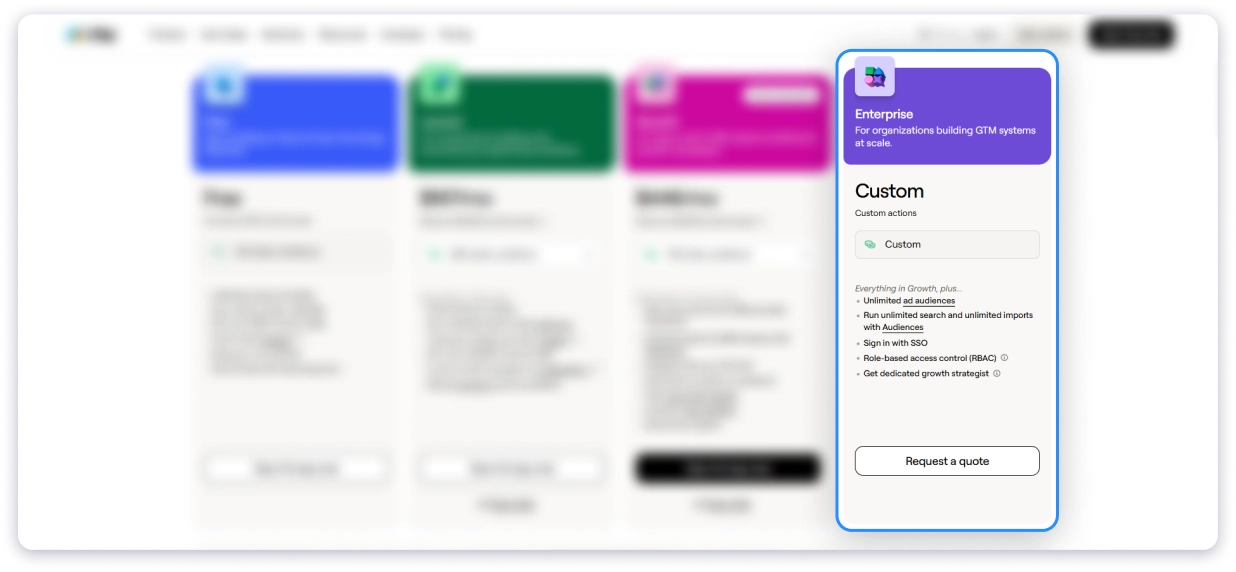
- Cost: Custom pricing, requires an annual commitment. Plans are built with a Clay GTM Engineer (GTME). Vendor reports a median of about $30,400 a year, with deals from roughly $12,000 to $154,000.
- Best for: Large GTM teams running at scale that need enterprise-grade security, support, and infrastructure.
- Credits: 100,000+ Data Credits and 200,000+ Actions per month (customized).
- What’s included:
- Everything in Growth
- Unlimited Audiences across sources
- Unlimited-row bulk enrichment
- Clay API access
- Data warehouse syncs
- SSO and RBAC permissions management
- Additional ad audiences
- Dedicated Growth Strategist
- Drawbacks:
- No transparent public pricing
- Annual commitment required
- Custom-scoping process raises the barrier to entry
- Generally overkill for smaller teams
💡 Rule of thumb: if you only need verified contact data, none of these plans is your cheapest path. Launch and Growth pay for a workflow engine you may never fully use.
Clay Key Features
Clay is not just a contact database. It is a single workspace where you can find people, enrich their data, and take action without juggling multiple tools.
Here are the most important features explained in simple terms.
1. Waterfall Enrichment
This is the feature Clay is best known for.
Instead of relying on one data provider, Clay checks multiple providers one after another to find the right data.
If the first provider does not have the email or phone number, it automatically moves to the next until it finds a match.
For emails, it may use tools like Prospeo, Hunter, Apollo, and Lusha. For phone numbers, it can use ContactOut, Selligence, and others.
You only get charged when data is successfully found. Failed lookups do not cost anything.
2. Claygent (AI Research Agents)
Claygent is Clay’s built-in AI research assistant. It works like a junior SDR that can browse and analyze the web for you.
You can give it a company or person, and it can pull insights that are not available in standard databases.
With Navigator mode, it can even explore websites, click through pages, and extract structured data.
It supports major AI models, and you can use Clay’s API or your own.
3. Sculptor (Natural-Language Builder)
Sculptor makes workflow building much easier. Instead of using technical steps, you describe what you want in plain English.
It then builds the workflow automatically for you.
You can refine it through chat, save versions, and undo changes anytime. Once set up, updates apply across your workflow.
4. Signals and Intent
Timing is critical in outbound. Reaching someone at the right moment can significantly improve response rates.
Clay tracks signals like job changes, promotions, hiring activity, funding announcements, and buying intent signals.
You can trigger outreach when these events happen so you contact prospects when they are most likely to respond.
5. Data Marketplace
Instead of managing multiple data providers, Clay brings 150+ sources into one platform.
You pay using Data Credits and only for what you actually use.
Since Clay aggregates providers at scale, common enrichment data is often more cost-efficient, especially at higher volumes.
6. Audiences
Audiences lets you store and organize all your data in one place.
You can combine imported lists with enriched data and segment them based on your targeting needs.
Teams use it for market mapping, account targeting, and building structured prospect lists.
7. Ads Sync
Once your audience is ready, you can push it directly to ad platforms.
Clay integrates with LinkedIn, Meta, and Google Ads so you can run targeted campaigns without manual exports.
This helps align outbound outreach with paid advertising.
8. Sequencer and Messaging
Finding leads is only the first step. You still need to reach them.
Clay allows you to send emails directly or connect with external sequencing tools.
This lets your enriched data flow directly into outreach campaigns.
9. Integrations, Functions, and API
Clay connects with tools like Salesforce and other CRMs through APIs and webhooks.
It also helps clean, transform, and structure data inside the platform without spreadsheets.
Higher plans unlock full API access and advanced integrations for AI workflows.
10. Enterprise-Grade Security and Scale
Clay is built for larger teams and meets standards like SOC 2 Type II, GDPR, CCPA, ISO 27001, and ISO 42001.
It also supports features like SSO and role-based access control for enterprise users.
The platform is used by over 500,000 go-to-market teams globally.
Which Features Are Gated Behind Which Plan
Many key features are only available on higher-tier plans.
Phone enrichment starts on Launch. CRM sync, Ads Sync, API access, and web intent start on Growth.
Enterprise plans unlock SSO, advanced permissions, and full API capabilities.
In many cases, upgrading is not about getting more credits. It is about unlocking the specific feature your workflow depends on.
How Clay Credits Work: Data Credits vs. Actions
This is the part of Clay pricing that confuses most people. Let’s make it simple.
Clay charges you in two ways, not one:
- Actions = the work. Every time Clay does something (find data, run AI, send to your CRM), that’s 1 Action.
- Data Credits = the data. The email, phone number, or company info Clay buys for you. The cost changes with what you ask for.
Most of the time, one contact uses a little of both.
| Actions | Data Credits | |
|---|---|---|
| Pays for | The work Clay does | The data you buy |
| Cost each | Always 1 (under $0.01) | 0.5 to 10+ (about $0.05 each) |
| Rolls over? | No | Yes (up to 2x) |
| Buy more mid-month? | No, upgrade your plan | Yes (costs 30% more) |
Why This Matters
Your monthly bill depends more on how much data you consume than on the plan you choose.
For example, enriching a large list with email addresses is relatively inexpensive. Adding phone numbers or AI research can increase your costs quickly, even if you stay on the same plan.
What’s Free
- Searching and building lists from Clay’s database
- Bringing in your own data (CSV, CRM, webhook)
- Formulas, filters, and moving data around
You only start paying when you enrich a record or take action on it.
What Data Costs
The number of Data Credits depends on the provider and the type of enrichment. In general, you can expect:
- Email enrichment: About 0.5 credits
- Basic company data: Low credit usage
- Phone numbers: Several credits per lookup
- AI research: Varies by AI model
Use Clay’s Pricing Calculator
Clay offers a pricing calculator to help estimate your monthly usage and costs.
Simply enter:
- The number of accounts
- The number of contacts
- The data you want to enrich
- The workflows you plan to run
I ran four common outbound use cases through Clay’s pricing calculator. Every recommendation below comes directly from Clay, not from my own estimates.
Here’s what stood out. Your monthly cost depends more on the data you enrich than the number of contacts you upload.
The same 2,000 accounts and 5,000 contacts ranged from $0 to $2,185 per month, simply by changing the enrichment options.
Prices below use monthly billing. Annual billing saves about 10%.
Scenario 1: Solo Founder or First SDR
Who it’s for: Building your first outbound workflow with basic contact enrichment.
Input: 2000 accounts, 5000 contacts.
Data: Find people and work email.
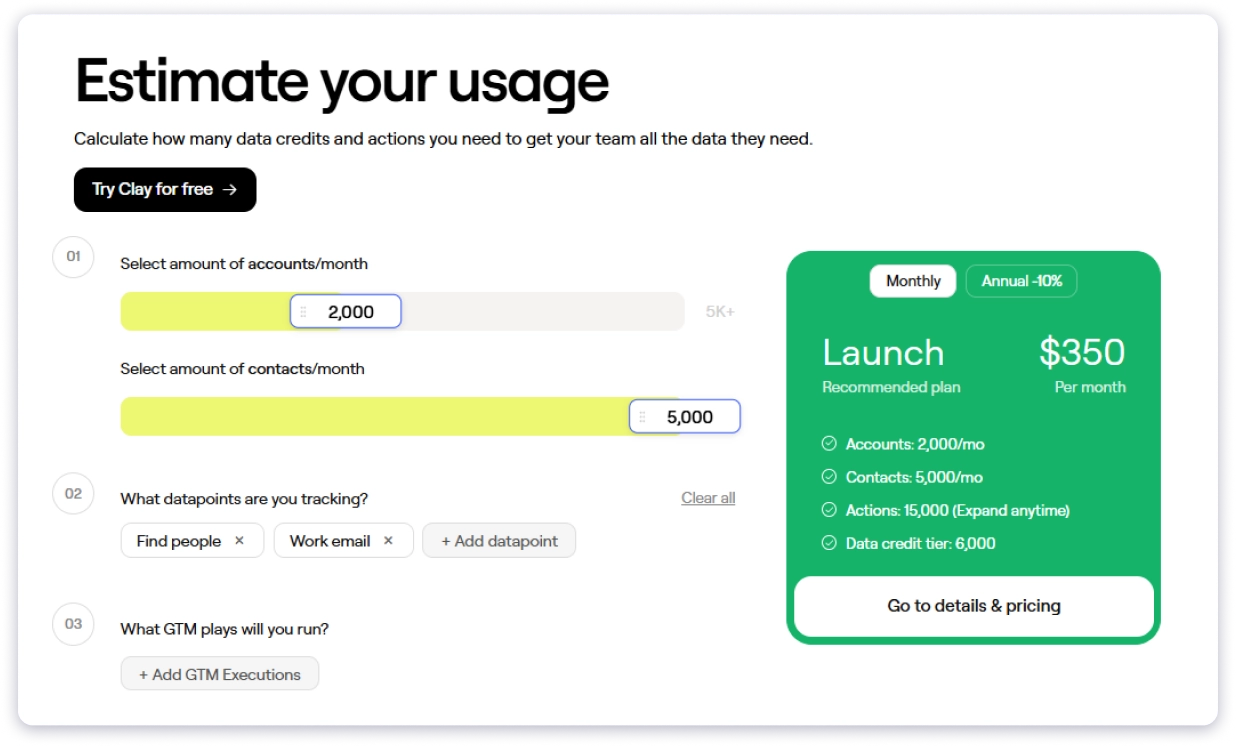
Clay recommends: Launch at $350/month with 15,000 Actions and 6000 Data Credits.
What I learned: At this stage, you’re mainly paying for access to the platform rather than the amount of data you use. The Free plan is enough to test, but Launch becomes the practical starting point once you enrich a few hundred contacts each month.
Scenario 2: RevOps or GTM Team
Who it’s for: Teams running deeper research with AI, hiring signals, and tech stack enrichment.
Input: 1,000 accounts, 2,000 contacts.
Data: person profile, company profile, AI research, tech stack, and hiring signals.
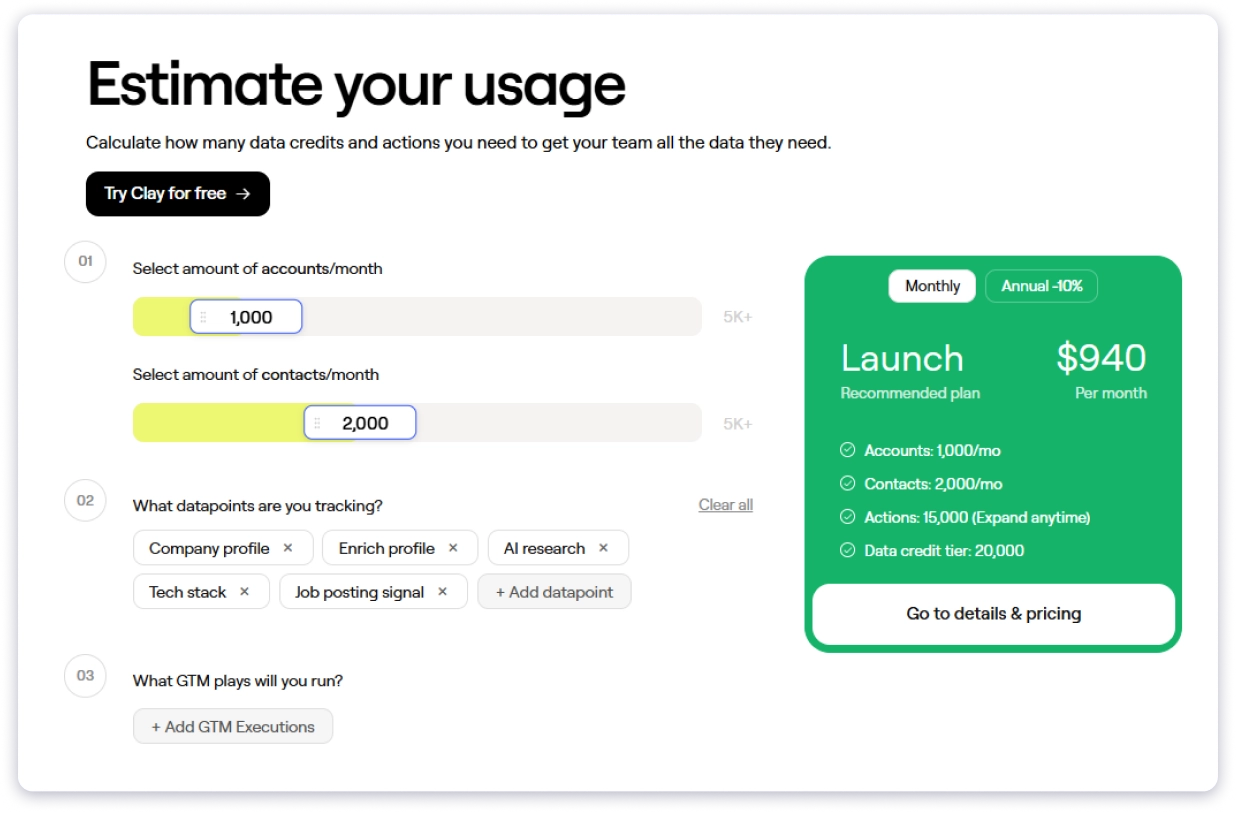
Clay recommends: Launch at $940/month with 15,000 Actions and 20,000 Data Credits.
What I learned: The plan stayed the same, but the monthly cost increased from $185 to $940. AI research and premium enrichment used far more Data Credits. The deeper your enrichment, the higher your bill.
Scenario 3: Cold Email Agency (Email Only)
Who it’s for: Agencies running high-volume outreach with lightweight enrichment.
Input: 1,000 accounts, 2,000 contacts.
Data: company profile and enrich.
GTM: Send to CRM.
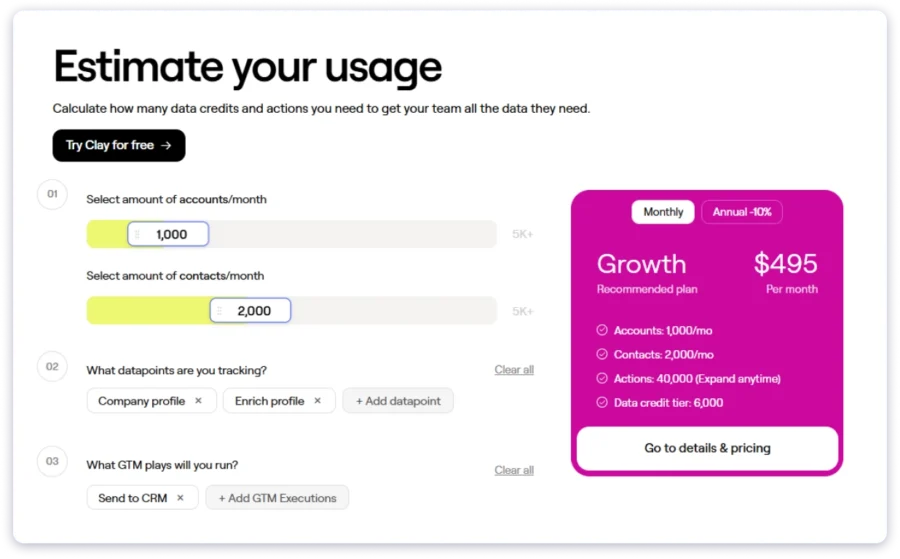
Clay recommends: Growth at $495/month with 40,000 Actions and 6,000 Data Credits.
What I learned: Interestingly, this same volume stays on the Free plan if you skip enrichment entirely. In Clay, data drives the cost, not contact volume.
Scenario 4: Same Agency With Phone Numbers
Who it’s for: Agencies adding phone numbers alongside email data.
Input: 2,000 accounts, 5,000 contacts.
Data: people search, work email, profile enrichment, and phone numbers.
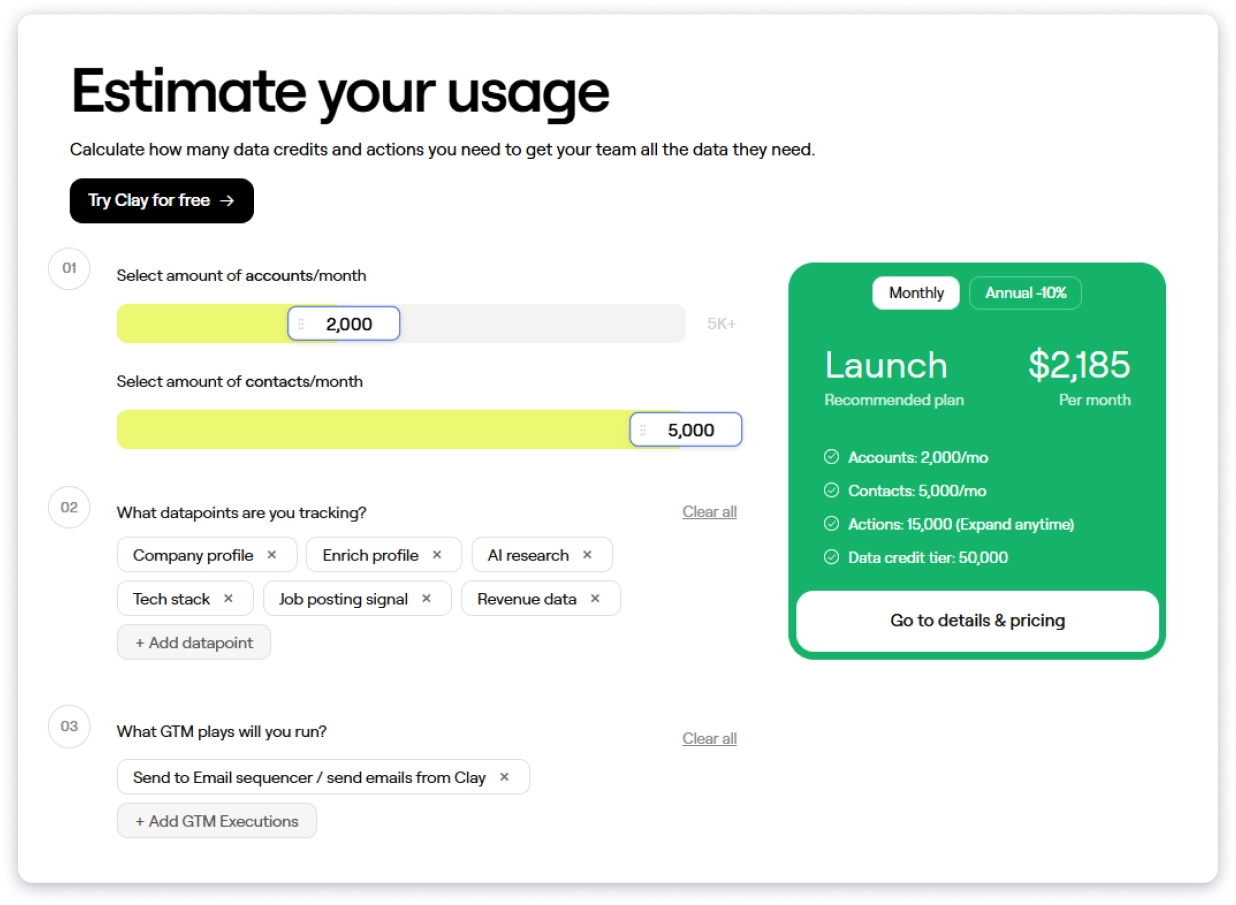
Clay recommends: Launch at $2,185/month with 15,000 Actions and 50,000 Data Credits.
What I learned: Adding phone numbers increased the monthly cost from $350 to $2,185. That’s about $0.44 per contact, or roughly six times higher than the email-only setup. Phone enrichment is one of the biggest cost drivers in Clay.
Things Worth Remembering
- Data determines your bill, not contact volume: The same list ranged from $0 to $2,185 by changing only the enrichment fields.
- The plan often stays the same: Every scenario uses the Launch plan. The Data Credit tier determined the actual monthly cost.
- Phone numbers and AI research cost the most: Use them only where they deliver enough value to justify the extra spend.
Hidden Costs to Budget For Before You Commit
Clay pricing looks simple on the surface, but real costs increase when workflows run at scale.
1. Data-Credit Top-Ups Can Multiply Spend
Each plan includes fixed credits that only support baseline enrichment and small prospecting workflows.
However, heavier enrichment, larger lists, and AI or phone workflows burn credits quickly.
So top-ups can significantly increase monthly spend beyond initial expectations during active usage periods.
2. Variable-Priced AI Models Add Uncertainty
Most AI actions use fixed credit pricing for predictable enrichment and workflow execution costs.
However, GPT and Claude models use token billing, which introduces variable final costs.
Even when estimates are shown, actual spend can change after workflow execution completes.
3. Actions Do Not Roll Over
Actions reset each billing cycle and do not carry forward into the next month.
Therefore, unused capacity is lost and cannot be recovered or banked across periods.
This can matter for teams with uneven automation usage across different campaign cycles.
4. Feature-Gated Plan Upgrades
Some key features are locked behind higher tiers regardless of credit usage or team size.
For example, CRM sync, ad platforms, and API exports require Growth or Enterprise plans.
In some cases, a single workflow requirement can force a full plan upgrade.
5. Enterprise Requires Annual Commitment
Enterprise pricing is not public and requires a direct annual contract with Clay sales team.
As a result, teams cannot easily test or scale gradually before committing long-term.
This makes Enterprise less flexible for early-stage experimentation or short-term use cases.
6. Learning Curve as an Indirect Cost
Clay has a steep learning curve because workflows combine enrichment, AI, and automation layers.
Therefore, teams often invest setup time or hire specialists to maintain performance effectively.
This indirect cost can be significant beyond the actual subscription pricing itself.
Who Does Clay Pricing Suit Best
The right plan has little to do with which tier looks popular. With Clay pricing, it comes down to how many records you enrich a month, how deep you go per record, and whether you have the technical resources to build workflows.
| If you are… | Best Clay plan | Why |
|---|---|---|
| An individual learning Clay or testing data quality | Free | No card, enough credits to test a small workflow before paying |
| A solo user or small team running your first workflows | Launch ($185/mo) | Phone enrichment and signal tracking, suited to under 1,000 records a month |
| A scaling team running CRM-based outbound | Growth ($495/mo) | CRM sync, API, and web intent live here, built for 1,000 to 10,000 records a month |
| A large GTM team enriching 10,000+ records a month | Enterprise (custom) | Bespoke credits, SSO, RBAC, and a dedicated strategist |
Here’s the catch. If your primary goal is simply finding verified contact data, Clay may not be the most cost-effective option.
Much of its value comes from workflow automation and enrichment.
So teams that only need contacts may get better value from a simpler platform with predictable pricing.
Pros and Cons of Clay
After mapping the Clay pricing and the workflow, here’s where Clay genuinely performs and where it strains.
Pros
- Waterfall enrichment searches 150+ data providers to deliver some of the highest contact match rates.
- You only pay for successful lookups, so failed searches don’t use your credits.
- Clay combines data enrichment, AI research, CRM sync, signals, ads, and sequencing in one platform.
- Claygent and Sculptor help automate research and build workflows with AI.
- Data Credits roll over on Launch and Growth plans, letting you bank up to twice your monthly allocation.
- Enterprise-grade security with SOC 2, GDPR, CCPA, ISO 27001, and ISO 42001 compliance.
- You can use your own API keys, choose your AI pricing model, and buy extra credits when needed.
Cons
- Usage-based pricing makes monthly costs hard to predict.
- Some key features, like CRM sync, require upgrading to a higher plan.
- The platform has a steep learning curve and takes time to master.
- Unused Actions expire at the end of each billing cycle.
- Variable AI pricing can make your AI costs unpredictable.
- Clay can be more powerful and expensive than basic lead generation needs.
- Enterprise plans require custom pricing and an annual commitment.
What Real Users Say About Clay Pricing
I went through verified reviews on G2, where Clay holds a strong 4.7 out of 5 across about 224 reviews, plus discussions in GTM communities on Reddit. Here’s the honest pattern on Clay pricing, beyond the marketing.
✅ What Users Like
It’s a full research and enrichment engine, not just a database. Bibhu P. (Founder’s Office, 5/5) says the standout is how flexible and powerful it gets once you learn the workflows. He recalls pulling a 1,000-prospect sheet “in a few minutes.”
🔗 Bibhu P. on G2, 5/20/2026
Waterfall enrichment is the most-praised feature. Manzar I. (Sales Manager, 4.5/5) likes that it pulls from several sources at once, so if one provider lacks an email, Clay finds it through another. He says the UI “feels like a smart spreadsheet.”
🔗 Manzar I. on G2, 4/1/2026
Claygent handles live, messy websites. Koedun P. (Senior Digital Marketing Manager, 4/5) highlights that Claygent scrolls, clicks, and waits for dynamic content, scraping JavaScript-heavy career pages and funding announcements other tools miss.
🔗 Koedun P. on G2, 6/8/2026
No-code, natural-language workflows. Koedun P. adds that campaign managers who don’t write Python build their own workflows just by describing what they want, which removes the data-team bottleneck.
🔗 Koedun P. on G2, 6/8/2026
Real, measurable results. Reviewers cite concrete wins, like campaign prep dropping from two days to about four hours, a roughly 15% lower email bounce rate from waterfall verification, and clean GDPR documentation of every data source.
🔗 Koedun P. on G2
Worth it at the right scale. On Reddit, the recurring verdict is that Clay pricing pays off for serious outbound volume, and complaints cluster among low-volume users.
🔗 r/gtmengineering, “Any startup here using Clay, worth the price?”
It can be made dramatically cheaper. Power users say bringing your own GPT and data API keys slashes the cost.
🔗 r/sales, “Clay’s too expensive”
❌ Common Complaints
The learning curve is the number-one gripe. It shows up in nearly every G2 review. One reviewer calls it the biggest drawback, and both Bibhu P. and Manzar I. note it’s a steep curve for advanced workflows.
🔗 Bibhu P. on G2, Manzar I. on G2
Expensive, and you burn through credits fast. This is the single most-repeated G2 dislike about Clay pricing, echoed in G2’s summary that credits deplete quickly without proper guidance.
🔗 Clay reviews on G2
Credit-based Clay pricing is hard to predict. A G2 reviewer says credits can disappear quickly on large lists with many enrichment steps, so you have to plan tasks carefully and watch usage constantly.
🔗 Clay reviews on G2
Performance can lag at scale. Processing thousands of rows at once can feel slow and takes some patience.
🔗 Clay reviews on G2
Weak error messages. Koedun P.’s sharpest critique is that when scraping fails on bot-protected pages, the vague “could not extract data” message tells you nothing, costing hours of debugging.
🔗 Koedun P. on G2
CRM sync is only half-baked. Koedun P. notes that pushing to HubSpot works, but field mapping is largely manual, with workarounds needed to avoid duplicates.
🔗 Koedun P. on G2
Thin template library. Koedun P. wishes for pre-built templates, like Sales Navigator list enrichment, so junior team members could contribute faster.
🔗 Koedun P. on G2
AI is the silent budget-killer. A widely shared cautionary tale describes burning about $3,000 in credits in month one, because Claygent can cost 15 to 30 credits per row.
🔗 r/gtmengineering, “Is Clay still worth it after the new pricing changes?”
The March 2026 Clay pricing overhaul frustrated builders. Clay split billing into Data Credits and Actions, retired the old Explorer tier, and moved HTTP API access to about $495/mo, now metering every API call as an Action.
🔗 r/gtmengineering, threads on the pricing change
API throttling makes some plans feel unworkable. One user paid for a 10,000-credit plan they couldn’t fully use because the API was throttled to about 400 records an hour.
🔗 r/gtmengineering, “Clay pricing unworkable with the API throttle”
Why Saleshandy Is a Strong Alternative to Clay
Clay is built for teams that want to build complex enrichment workflows.
However, if you mainly need accurate contact data with predictable pricing, Saleshandy offers a much simpler approach.
Instead of asking you to connect multiple data sources, Saleshandy gives you access to a built-in database of 852M+ verified contacts across 42M+ companies.
You can narrow results using 25+ people filters, 35+ company filters, or simply describe your ideal prospect with AI search.
Saleshandy also combines prospecting and outreach in one platform.
Along with contact data, you get cold email campaigns, email warm-up, sender rotation, a shared inbox, a built-in dialer, and CRM features.
That means you can find prospects and start outreach without paying for multiple tools.
Here’s how the two compare for teams focused on finding and reaching prospects:
| Feature | Clay | Saleshandy ⭐ Best Pick |
|---|---|---|
| Starting price | $185/mo | $49/mo |
| Contact database | Bring your own | 852M+ contacts, 42M+ companies |
| Verification | Provider marketplace | Waterfall enrichment across 9 sources |
| Credit system | Data Credits + Actions | Single credit system |
| Free trial | 14-day trial | 50 free credits, no credit card |
| Entry plan credits | 2,500 Data Credits | 2,500 credits |
| Phone numbers | Extra Data Credits | Included (email + phone = 7 credits) |
| Built-in outreach | No | Cold email, warm-up, dialer, CRM |
| Credit rollover | Up to 2x Data Credits | 50% rollover |
| Learning curve | Steep | Easy to learn |
| Commitment | Annual on Enterprise | Cancel anytime |
Clay delivers excellent value if your team builds advanced enrichment and automation workflows.
However, costs can rise quickly once you add phone enrichment, AI research, or purchase extra credits.
If your priority is finding verified contacts and launching outreach with predictable pricing, Saleshandy offers a simpler experience.
You get a larger built-in database, a single credit system, integrated outreach tools, and a much lower starting price.
Plus, you can try it with 50 free credits and no credit card required.
Frequently Asked Questions About Clay Pricing
1. Does Clay offer a free trial?
Yes. Clay offers a 14-day free trial with 1,000 Data Credits and access to Pro-level features. No credit card is required. During the trial, tables are limited to 50 rows, and phone number enrichment is unavailable.
2. How much does Clay cost per month in 2026?
Clay offers four pricing tiers, ranging from a free plan to custom Enterprise pricing. The Launch plan starts at $185/month ($167/month annually) and includes 2,500 Data Credits and 15,000 Actions. The Growth plan starts at $495/month ($446/month annually) and includes 6,000 Data Credits and 40,000 Actions.
3. What changed in Clay’s March 2026 pricing update?
Clay’s March 2026 pricing update replaced the Starter, Explorer, and Pro plans with Launch and Growth. It also reduced enrichment costs by 50–90%, introduced the Data Credits + Actions billing system, removed charges for failed lookups, moved Pro features into the Growth plan, and lowered top-up premiums from 50% to 30%.
4. What are Clay Actions?
Actions is Clay’s second usage-based credit system, introduced in March 2026. They are consumed whenever workflows run automation steps, process requests, or return results. Most Actions cost less than $0.01 each, and Clay says about 90% of customers stay within their monthly allocation. Unlike Data Credits, unused Actions do not roll over.
5. What are Clay Data Credits?
Data Credits are used to purchase enrichment data from Clay’s marketplace. The number of credits required depends on the provider and the type of data requested. A fully enriched contact typically uses 6 to 20 Data Credits, including company details, email, phone number, and AI enrichments. On Launch and Growth plans, unused Data Credits roll over each month, up to 2× your monthly allocation.
6. How do Clay credits roll over?
Unused Data Credits roll over each month on Launch and Growth plans, but your balance cannot exceed twice your monthly allocation. Any credits above that limit expire at the start of the next billing cycle. Actions never roll over, while Enterprise rollover rules depend on your contract.


 Dhruv Patel