Most web developers are not short on skill.
They can build good websites, fix broken user experiences, improve speed, and create pages that look far better than what most businesses have today.
But getting clients is a different problem.
In 2026, business owners have more options than ever. They can try AI website builders, hire low-cost freelancers, ask someone in-house to put a site together, or delay the project completely.
So being good at web development is important, but it does not automatically create demand.
You need to know where to find the right businesses, how to start a conversation, and how to show them that improving their website is worth paying for.
That is what this guide will help you with.
I’ll walk you through 11 practical ways to get web development clients in 2026. Some methods are better when you are just starting. Others are better when you want to grow an agency or build a steady pipeline.
By the end, you will know which method to start with, how to use it, and what to do next.
How to Get Clients for Web Development – TOC
TL;DR: 11 Proven Methods to Get Web Development Clients
If you want the fastest and most repeatable way to get web development clients, start with cold outreach.
Most other methods depend on people finding you, referring you, or engaging with your content. Cold outreach puts you in control because you can directly reach businesses that need better websites, landing pages, redesigns, speed fixes, or conversion improvements.
Here’s a quick comparison of all 11 methods:
| # | Method | Best For | Speed | Cost |
|---|---|---|---|---|
| 1 | Cold Outreach MOST RECOMMENDED |
Freelancers and agencies that want a predictable client pipeline | 2–4 weeks | Low |
| 2 | Job Boards & Platforms | Beginners building their first portfolio | 1–4 weeks | Platform fees |
| 3 | Strategic Partnerships | Developers who can work with marketers, designers, or consultants | 2–6 weeks | Free |
| 4 | Agency Partnerships | Developers who want steady outsourced project work | 2–4 weeks | Free |
| 5 | Referral System | Developers with happy past clients | 1–2 weeks | Free |
| 6 | Niche Vertical Targeting | Specialists targeting one industry or high-ticket projects | 2–6 weeks | Free–Low |
| 7 | Networking & Social Media | Local businesses and authority building | 2–4 months | Free |
| 8 | Online Communities | Developers focused on a specific niche | 1–3 months | Free |
| 9 | Inbound Engine | Freelancers and consultants building long-term trust | 2–4 months | Free |
| 10 | Content Marketing & SEO | Long-term authority and organic leads | 3–6 months | Free–Low |
| 11 | Paid Ads | Agencies with a budget and a tested offer | 1–2 weeks | $500+/mo |
11 Proven Ways to Get Web Development Clients in 2026
Most developers are great at building websites but terrible at finding the people who need them.
Here are 11 strategies to fix that, whether you want clients this week or a pipeline that fills itself over time.
1. Cold Outreach
Cold outreach is the method I would recommend first if you want web development clients without waiting for referrals, SEO, or social media to work.
The reason is simple!
Most businesses already have website problems. Their site is slow. Their mobile experience is poor. Their design looks outdated. Their landing pages are not converting. Or their website no longer matches where the company is today.
As a web developer, you can spot many of these problems in a few minutes.
That makes cold outreach a strong channel because you are not sending a random pitch. You are reaching out with a specific observation and a clear reason for the conversation.
For example:
That kind of outreach feels relevant because it is based on something real.
And this is exactly where Saleshandy helps.
Saleshandy is an all-in-one cold outreach tool that helps you find prospects, reveal verified contact details, create email sequences, add follow-ups, manage LinkedIn and call tasks, and track replies from one place.
So instead of using one tool for lead data, another for verification, another for email outreach, and another for follow-ups, you can run the complete outreach workflow inside Saleshandy.
How to Build a Web Development Prospect List in Saleshandy
Here is a simple workflow you can follow.
Step 1: Choose the Type of Web Development Client You Want
Before you build a list, get clear on the service you want to sell.
Do you want to offer full website builds, redesigns, landing pages, Shopify development, WordPress development, or ongoing website maintenance?
This matters because each service has a different buyer.
| Your Web Development Service | Who to Target |
|---|---|
| Full website build | Founder, CEO, Owner |
| Website redesign | Marketing Director, CMO, Head of Digital |
| Landing page design | VP of Marketing, Growth Manager |
| eCommerce website | eCommerce Manager, Director of Operations |
| WordPress or Shopify development | Founder, CTO, Director of Technology |
| Website maintenance | Operations Manager, Office Manager |
Do not target everyone.
Pick one service and two or three decision-maker titles. A smaller, sharper list will usually perform better than a large generic list.
Step 2: Set Your Target Location
Open Saleshandy and go to Lead Finder.
Then choose the location you want to target.
You can select a full country, state, city, or region.
For example, if you are based in India and want US clients, select the United States.
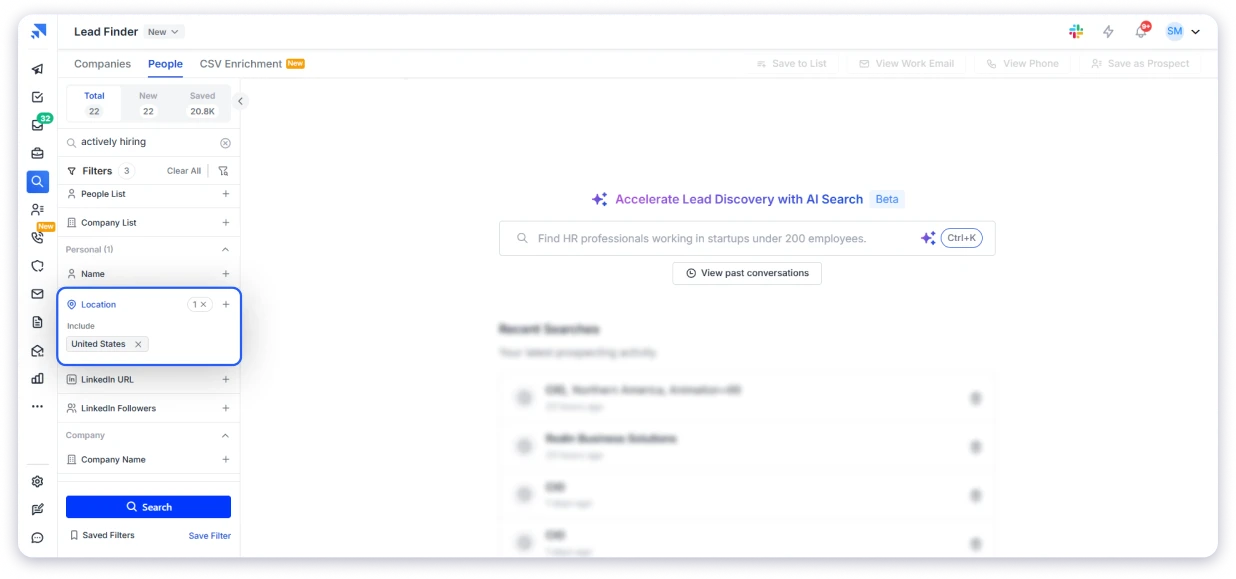
If you want local web development clients, select your own city or state.
Or if you want to work with businesses in the UK, Europe, Australia, the Middle East, or Southeast Asia, you can set those locations too.
This helps you build a list based on the market you actually want to serve.
Step 3: Add the Right Job Titles
Next, add the job titles that match your service.
For example, if you offer website redesigns, you may want to target Marketing Directors, Heads of Digital, CMOs, or Founders.
If you offer Shopify development, you may want to target eCommerce Managers, Founders, or Operations Directors.
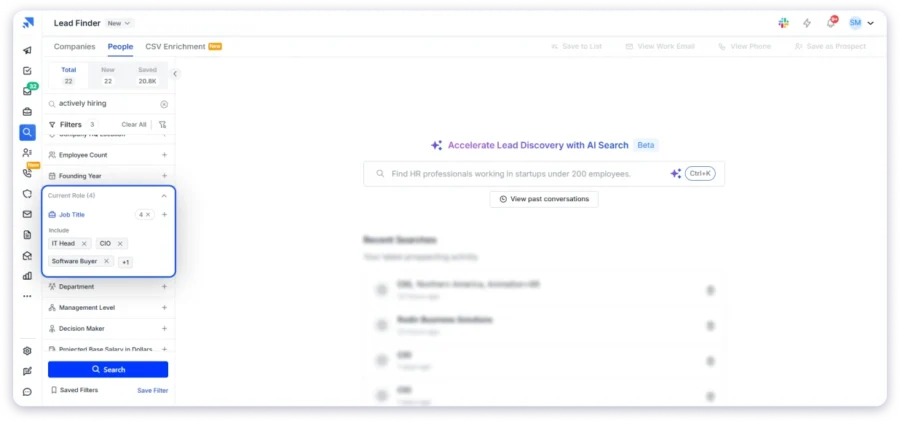
The goal is not to find the maximum number of leads. The goal is to find people who can actually make or influence the website decision.
Step 4: Use Buying Signals to Find Better Prospects
Once you have a basic list, narrow it down using signals that show a company may need outside web development help.
For example, you can look for companies that are:
- Actively hiring for marketing, design, or web development roles
- Growing quickly
- Recently funded
- Expanding their team
- Hiring for roles connected to website, growth, or digital marketing
These signals matter because they show movement.
A company hiring for marketing roles may need new landing pages. A funded startup may need a stronger website. A growing eCommerce company may need better product pages, checkout flows, or site performance.
This makes your outreach more relevant.
Instead of saying:
“Do you need web development services?”
You can say:
“I noticed you are hiring for a Growth Manager. Usually, when companies start scaling growth, the website and landing pages need to keep up too. I had a few ideas after looking at your site.”
That is a much stronger opening.
Step 5: Reveal Verified Contact Details
After applying your filters, click Search.
You will see relevant contacts with their names, job titles, companies, and departments.
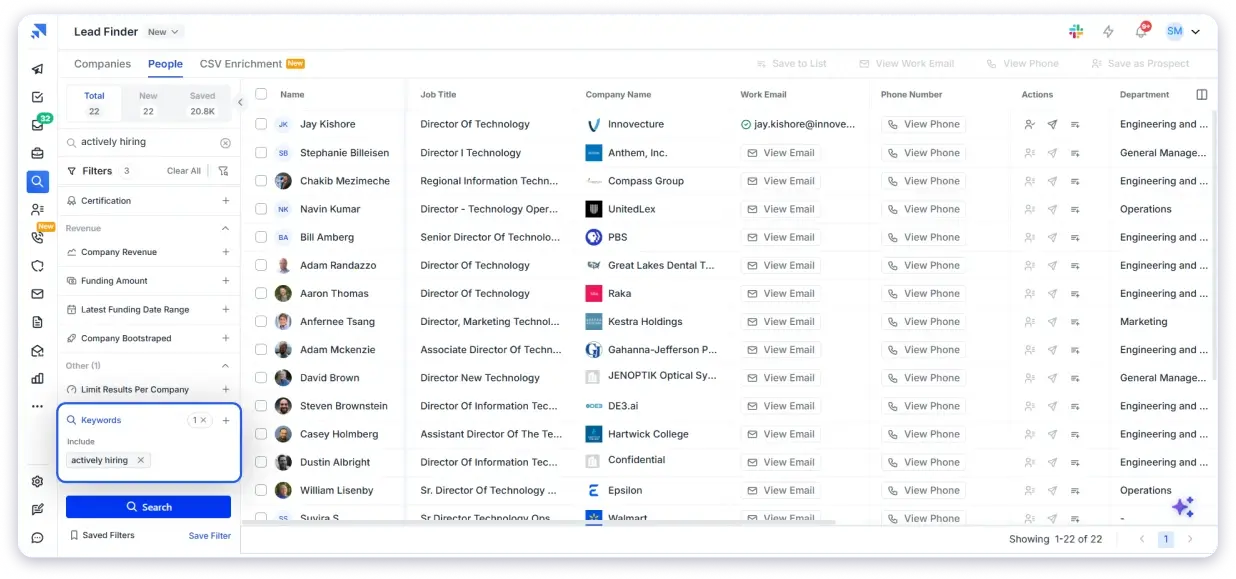
From there, you can reveal verified emails or phone numbers and add the right people to your outreach list.
Saleshandy gives you access to a B2B database of 852M+ contacts and uses waterfall enrichment across multiple data providers to help find accurate contact details.
That means you do not have to depend on one data source only.
Once the contacts are ready, you can push them directly into an outreach sequence from the same platform.
Step 6: Reach Out to Web Development Prospects Across Channels
Once your email and phone number list is ready, the next step is outreach.
This is where Saleshandy becomes more than a lead finder.
You can use Saleshandy as an all-in-one cold outreach tool to reach prospects through cold email, calls, and LinkedIn tasks from one place.
That matters because web development deals rarely close from one touchpoint.
A founder may miss your first email. A marketing head may check your LinkedIn profile before replying. An operations manager may respond faster after a call.
So instead of depending only on email, you can create a simple multichannel workflow where the same prospect sees you across different channels.
Here is how that can look:
1. Cold Email
Start with a personalized cold email based on a real website observation.
You can build automated email sequences in Saleshandy, add personalized first lines, schedule follow-ups, and track replies from the same platform.
The goal is not to send a generic pitch like:
“Do you need web development services?”
The goal is to show that you looked at their website and found something worth fixing.
Cold Email Template for Web Development Outreach:
If you want to make this stronger, keep the first line very specific. Mention the exact page, issue, or improvement opportunity you found.
Want to write cold emails that actually get replies? Here is a step-by-step cold email guide with more templates and examples.
2. Cold Calling
Cold calling works well when you already have a strong reason to reach out.
With Saleshandy, you can call prospects from your list, log call outcomes, add notes, and keep everything inside the contact timeline.
This makes your follow-up easier because you know exactly what happened with each prospect.
Cold Call Script for Web Development Prospects
📞 Cold Call Script for Web Development Prospects:
Keep the call under 30 seconds in the beginning.
The goal is not to close the deal on the first call. The goal is to start a real conversation.
New to cold calling? This cold calling guide covers everything from opening lines to handling objections.
3. LinkedIn Outreach
LinkedIn adds another layer of familiarity.
You can add LinkedIn tasks inside your Saleshandy sequence so you remember when to view a profile, send a connection request, or follow up with a short message.
Following a structured LinkedIn outreach strategy helps you stay consistent and increases your chances of getting a response.
Even if a prospect doesn’t reply to your first email, seeing your name on LinkedIn can make you more familiar and improve the likelihood that they’ll engage with your future emails or messages.
LinkedIn Connection Message:
LinkedIn Follow-Up Message:
Example Multichannel Outreach Flow:
| Day | Channel | What to Do |
|---|---|---|
| Day 1 | Send a personalized website observation | |
| Day 2 | View their profile or send a connection request | |
| Day 4 | Follow up with one specific improvement idea | |
| Day 6 | Call | Call the prospect or leave a short voicemail |
| Day 8 | Share a simple audit or example of what you would fix | |
| Day 12 | Send a short follow-up message |
This makes your outreach feel more natural because you are not just sending repeated emails.
You are creating useful touchpoints across the channels your prospects already use.
And when your message is based on a visible website issue or a real buying signal, it does not feel random. It gives the prospect immediate context for why you are reaching out.
2. Job Boards and Freelance Platforms
If you need web development clients quickly and you are still building your portfolio, job boards and freelance platforms are a good place to start.
The biggest advantage is intent.
People on these platforms are already looking for help. They need a website built, a landing page designed, a Shopify store fixed, a WordPress site updated, or a developer to support an ongoing project.
So you are not creating demand from scratch. You are applying to opportunities that already exist.
The key is choosing the right platform based on your experience level.
| Platform Type | Best For | How to Use It |
|---|---|---|
| Upwork and Fiverr | Beginners building their first portfolio | Start with smaller, focused projects like landing pages, website fixes, or WordPress updates |
| We Work Remotely, Remote.co, Remotive | Mid-level developers looking for better remote projects | Apply for higher-quality contract or remote web development roles |
| Toptal and Lemon.io | Experienced developers with strong technical skills | Use it if you can pass the screening and want access to premium clients |
| Clutch and DesignRush | Web development agencies | Build a strong profile, collect reviews, and use these directories to attract inbound project inquiries |
For beginners, Upwork and Fiverr usually have the highest volume of web development projects.
The competition is high, but clients are actively hiring. Start with a focused service, price it fairly, deliver great work, and use reviews to build momentum.
For mid-level developers, platforms like We Work Remotely, Remote.co, and Remotive can help you find better-quality remote opportunities. These are often more professional than low-budget freelance gigs.
For experienced developers, and Lemon.io can be useful if you have strong technical skills and can pass their screening process. The barrier is higher, but the client quality is usually better.
For agencies, directories like Clutch and DesignRush work differently. You are not applying to small tasks every day. You are building a public profile that businesses can discover when they are searching for a web development agency.
📄 Simple Proposal Template:
How to Stand Out on Freelance Platforms
The mistake most developers make is writing a generic profile.
Something like:
“I build modern, responsive websites.”
That does not say much because almost every web developer says the same thing.
Instead, make your offer specific.
For example:
“I help local service businesses build websites that bring more calls and bookings.”
Or:
“I build fast Shopify pages for eCommerce brands that want better product conversions.”
Or:
“I redesign outdated WordPress websites for small businesses that want a cleaner and more professional online presence.”
A specific offer is easier to trust because the client can quickly understand who you help and what problem you solve.
3. Strategic Partnership Ecosystems
Some web development clients will not come from job boards, ads, or direct outreach.
They will come from people who already work with the same clients you want to serve.
Think about marketing agencies, SEO consultants, branding studios, copywriters, paid ad specialists, and business consultants.
Their clients often need a new website, a landing page, a redesign, a faster site, or ongoing website support. But these service providers may not want to handle the development work themselves.
That is where you can become their go-to web development partner.
If you build trust with the right partners, they can refer clients to you whenever a website-related need comes up. These leads are usually warmer because the client already trusts the person introducing you.
How to Build Strategic Partnerships
1. Identify Complementary Service Providers
Make a list of marketing agencies, SEO freelancers, branding studios, copywriters, paid ad consultants, and business coaches who serve the same type of clients you want.
2. Lead With Value, Not A Pitch
Do not start by asking them to send you referrals. Offer something useful first. For example, you can do a quick website audit for one of their clients or show how your work can support their existing service.
3. Make The Relationship Easy For Them
Explain clearly what kind of clients you are best at helping. For example, “I help local service businesses redesign websites that bring more calls and bookings.” This makes it easier for partners to remember when to refer you.
4. Formalize The Relationship
Once there is interest, agree on how the partnership will work. You can offer a referral fee, usually around 10-15% of the project value, or create a reciprocal referral agreement.
5. Stay Top Of Mind
Send a short monthly update with your availability, recent work, and the type of projects you are currently taking. Partners may like your work, but they still need reminders.
4. Networking and Social Media
Networking and social media work because people hire developers they trust.
This method has two sides.
One is building authority online, so potential clients start seeing you as someone who understands websites, conversions, speed, user experience, and business outcomes.
The other is building real relationships with business owners, founders, marketers, and agency owners who may need web development help now or later.
It is not the fastest method on this list, but it can become a strong source of clients if you stay consistent.
A. LinkedIn Authority Building
LinkedIn is not just for posting motivational content or sharing random updates.
If you use it well, it can help you become the obvious choice when someone in your network needs a website, landing page, redesign, or ongoing development support.
Here is how to approach it.
1. Optimize Your Profile
Your profile should make it clear who you help and what outcome you create.
Instead of writing:
“Freelance Web Developer | Creative Problem Solver”
Write something more specific:
“I help small businesses turn outdated websites into lead generation assets.”
Or:
“I build fast, conversion-focused websites for B2B service companies.”
Your headline should tell people what you do without making them think too hard.
Also, use the Featured section to add your best work. This can include case studies, before-and-after redesigns, portfolio links, landing pages, or client results.
2. Post 2-3 Times a Week
You do not need to post every day.
Start with 2-3 useful posts a week.
Share things like:
- Before-and-after website redesigns
- Common mistakes you see on business websites
- Lessons from real web development projects
- Simple website fixes that improve conversions
- Page speed, mobile experience, or landing page breakdowns
- Short case studies from client projects
The goal is not to go viral.
The goal is to make the right people repeatedly think:
“This person understands websites better than most developers I see online.”
3. Comment on Decision-Maker Posts
Follow 15-20 people your ideal clients already pay attention to.
This can include agency owners, marketing directors, founders, startup operators, consultants, and business owners in your niche.
Then leave thoughtful comments on their posts.
Do not write comments like:
“Great post.”
That does not create any real visibility.
Instead, add a useful point, share an example, or ask a thoughtful question. Good comments help you get noticed by the author and by their audience.
4. Build Relationships Through DMs
Do not send a blank connection request and pitch immediately after they accept.
That is what most people do, and it usually gets ignored.
A better approach is to start with something useful.
For example, if you noticed three issues on their website, you can send a short message like:
“Hey [First Name], I came across your website after your post on [topic]. Noticed a few quick things that could make the mobile experience smoother. Happy to send a short Loom if useful.”
This feels helpful because you are offering value before asking for anything.
A simple Loom audit can open more doors than a generic sales pitch.
B. In-Person Networking
For local web development clients, in-person networking still works.
Many small business owners need a better website, but they do not know who to trust or where to start.
You can meet them through:
- BNI groups
- Chamber of Commerce meetings
- Local startup meetups
- Business owner communities
- Industry events
- Local entrepreneur groups
The key is not to walk into the room and pitch everyone.
Instead, have simple conversations.
Ask what they do, how they get customers, and whether their website plays a role in that process.
If the conversation naturally moves toward their website, show examples of your work. A tablet or laptop can help here because showing a live website is more powerful than just explaining what you do.
Also, follow up within 24 hours.
A networking conversation does not mean much if you do not continue it after the event.
C. Social Media Branding
You do not need to be active on every platform.
Pick one platform where your ideal clients spend time and show up consistently.
For most web developers, LinkedIn is usually the best starting point. But depending on your niche, Instagram, X, YouTube, or local Facebook groups can also work.
Share content that proves your thinking and your work.
For example:
- Website redesign breakdowns
- Short audits of common website mistakes
- Before-and-after project examples
- Client results
- Website tips for one specific industry
- Lessons from building landing pages, Shopify stores, or service business websites
You do not need thousands of followers.
A small audience of the right 300-500 people can bring more opportunities than a large audience that has no buying intent.
5. Referral System
If you have ever delivered a website project, you are sitting on a potential referral source. The problem is that most web developers wait passively for referrals instead of building a system that generates them.
How to Get More Referrals
- Ask for referrals right after delivering a website, when the client is happiest with the result.
- Be specific with your request. For example, ask, “Do you know any business owners who are thinking about updating their website?” instead of “Do you know anyone who needs a website?”
- Offer a referral incentive, such as a free month of website maintenance, a discount on future work, or a gift card.
- Stay in touch with past clients through occasional check-ins or updates.
Referral Ask Template:
6. Agency Partnerships
If you want steady web development work without managing every client relationship yourself, agency partnerships can be a strong option.
Many marketing agencies, SEO firms, paid ad agencies, and branding studios sell website-related work to their clients but do not always have enough in-house development capacity.
That is where you can support them as a white-label web development partner.
The agency manages the client, strategy, meetings, and communication. You handle the development work behind the scenes.
This works well if you are good at delivery and want consistent projects without spending all your time on sales calls, proposals, and client management.
How to Find Agency Partners
Start by making a list of agencies that already serve the kind of clients you want to work with.
You can look for:
- Marketing agencies
- SEO agencies
- Paid ad agencies
- Branding studios
- Design agencies
- Content marketing agencies
- Web design agencies that need development support
You can find them on LinkedIn, Clutch, Google, local business directories, or agency listing sites.
Once you have a list, reach out to the agency owner, founder, operations manager, or account manager with a simple message.
Keep the message short and clear.
You are not asking them to become your partner immediately. You are starting a conversation.
Agency Partnership Outreach Template:
How to Make the Partnership Work
Once an agency shows interest, start small.
Do not try to push for a large project immediately. Offer to help with one landing page, one website fix, one redesign task, or one small client project.
This gives the agency a low-risk way to test your work.
To make the relationship smoother:
- Be clear about your turnaround time.
- Share what services you can and cannot handle.
- Agree on pricing before the work starts.
- Be open to signing an NDA if needed.
- Keep communication simple and reliable.
- Deliver on time.
- Avoid contacting the agency’s client directly unless they ask you to.
If the first project goes well, agencies are more likely to bring you into more client work.
7. Online Communities (Reddit, Facebook Groups, Discord)
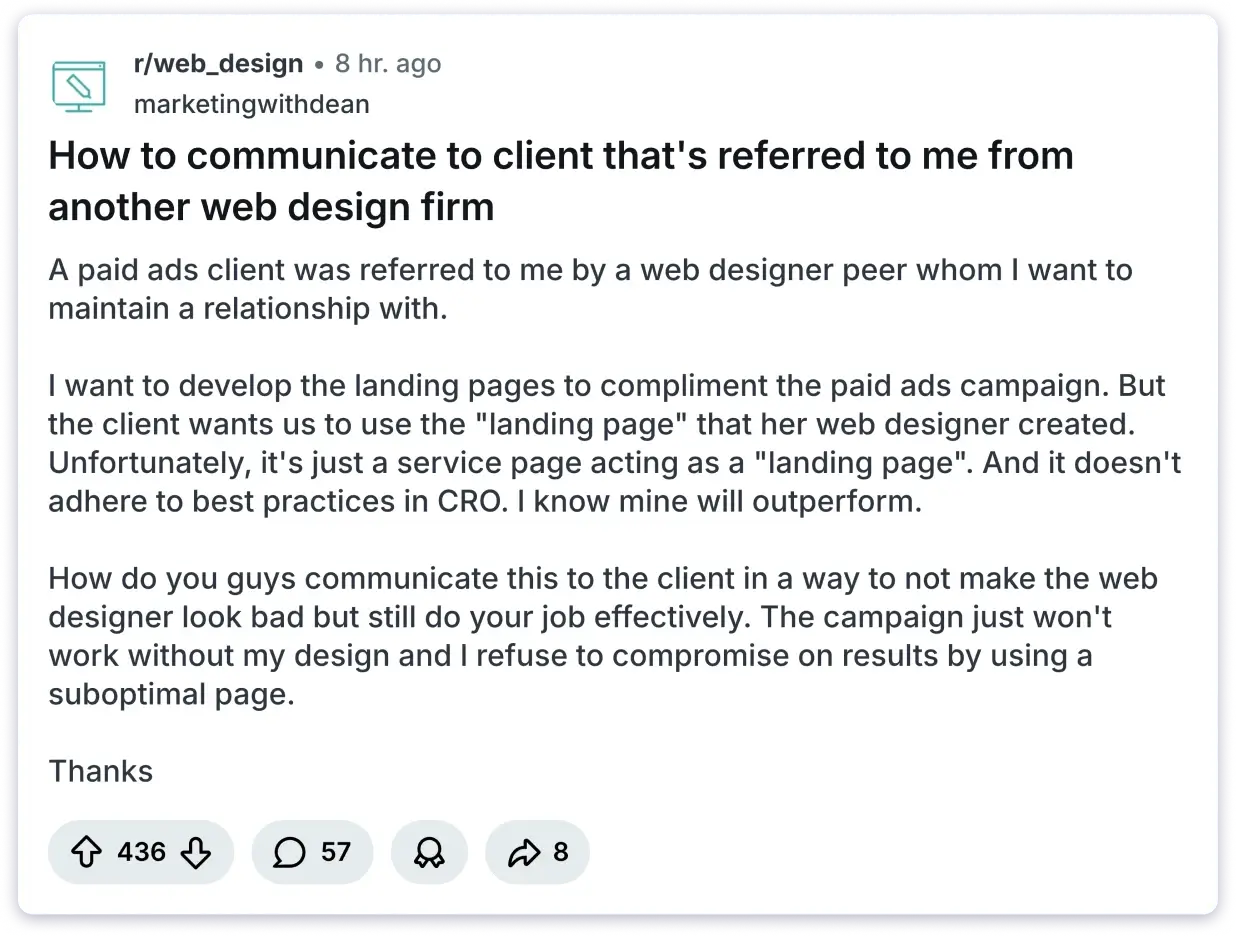
Every day, business owners post questions like “Can anyone recommend a good web developer?” or “I need someone to redesign my website” in online communities.
If you’re already active in those communities, you have a chance to be the person they contact.
The key is to participate, not promote. People can quickly spot a sales pitch. The developers who get clients from communities are the ones who answer questions, share helpful advice, and build trust over time.
Where to Start
- Reddit: Communities like r/smallbusiness, r/Entrepreneur, r/web_design, r/webdev, and r/freelance. Look for posts from people asking for website help.
- Facebook Groups: Local business groups, industry-specific communities, and freelancer groups.
- Discord: Web development communities such as Reactiflux, The Coding Den, and other tech-focused servers with freelance channels.
8. Content Marketing and SEO
Content marketing helps potential clients find you through search engines.
For example, if someone searches for “how much does a website cost” or “do I need a website redesign” and finds your content, they can become a potential client.
It takes time to see results, but unlike outreach, content can continue bringing leads for months or even years after it’s published.
If you want to attract web design and development clients without relying on ads, content marketing and SEO are worth investing in.
What To Write About:
- Questions your clients actually ask:
“How much does a website cost in 2026?” OR “How long does it take to build a website?” - Case studies:
Show real before-and-after results from your web design projects. - Industry-specific guides:
“Why every dental clinic needs a website” or “How restaurants lose customers with bad websites.”
How To Make It Work:
- Keep each post focused on one topic
- Use real examples whenever possible
- Add a call-to-action to every post
- Link to your portfolio or services
- Repurpose content for LinkedIn, email, and social media
9. Paid Ads
Paid ads are the fastest way to generate web design leads by putting your web development services in front of business owners who are actively searching for help. Google Ads for search terms like “web designer near me” or “website development services” can generate leads within days.
But fast does not mean easy, and it definitely does not mean cheap.
Where To Run Ads:
- Google Ads: Target search queries like “web designer [city],” “website development company,” and “website redesign.” These are high-intent searches from people ready to hire.
- Facebook/Instagram Ads: Better for brand awareness and retargeting. Run ads showing before-and-after website redesigns to a local business owner audience.
- LinkedIn Ads: Expensive but effective for targeting specific decision-maker titles at companies of a certain size.
10. Niche Vertical Targeting (Pick One Industry, Own It)
Here is a pattern I have seen repeatedly: generalist web developers struggle to find clients for web development, while specialists get booked months in advance.
When you pick one niche and go deep, everything gets easier. Your portfolio speaks directly to prospects. Your copy answers the question of how to sell web development services without sounding like a generic pitch. Your case studies prove you understand their specific problems.
How To Choose Your Niche:
- Start with industries you have already worked in. If you have built a restaurant website, you already know the pain points.
- Look for industries where websites directly impact revenue: restaurants (online orders), real estate (listings), dental clinics (bookings), fitness studios (class registrations), eCommerce (sales).
- Validate demand. Search LinkedIn or Saleshandy’s Lead Finder for businesses in that industry and see how many potential clients exist.
How To Own Your Niche:
- Rewrite your website copy to speak only to that industry. “I build websites for dental clinics that bring in more patients” is 10x more compelling than “I build websites for businesses.”
- Create industry-specific case studies. Show the before, the after, and the measurable results.
- Join industry-specific communities and events. Dental conferences, restaurant owner groups, real estate meetups.
- Price higher. Specialists command higher rates because clients perceive them as less risky.
11. Build an Inbound Engine
Every method on this list brings in web development clients.
But the ultimate goal is building a system where clients come to you, not the other way around.
Whether you find clients for web development through cold outreach or inbound marketing, the endgame is the same: a pipeline that fills itself.
An inbound engine combines multiple channels into one flywheel that generates leads on autopilot.
Here is how to build one:
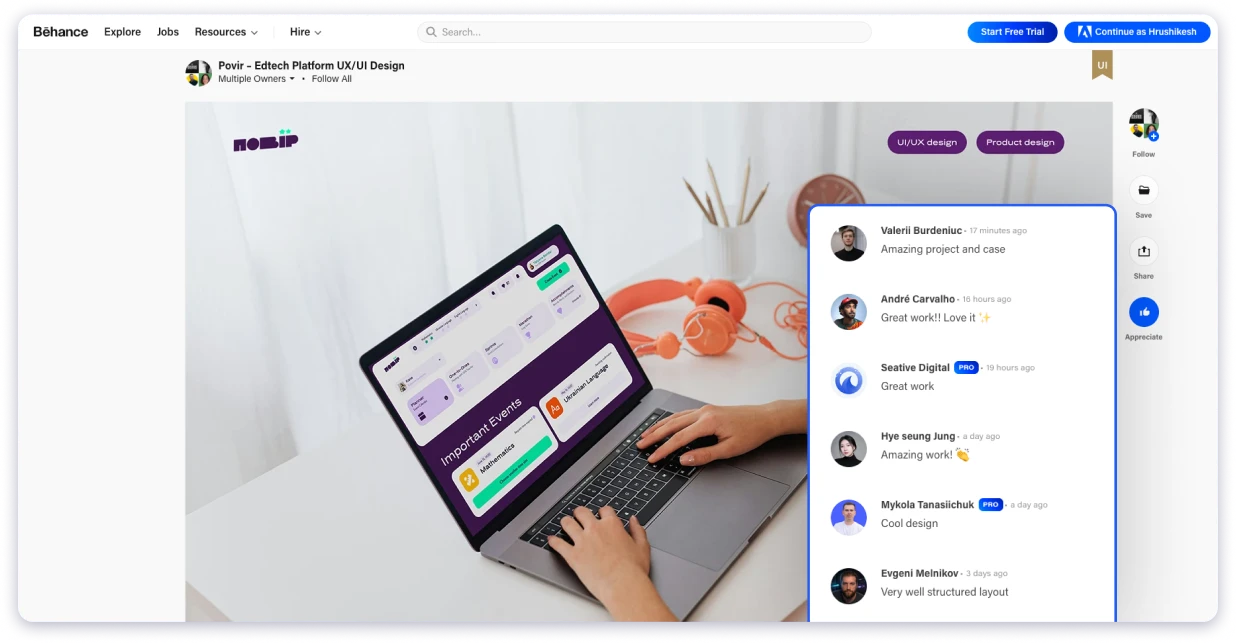
1. Showcase Your Work: Consistently post your web design projects on visual portfolio platforms like Behance and Dribbble. Include detailed case studies that explain the problem, your approach, and the results. These platforms rank well in Google and attract clients searching for web designers.
2. Create Content: Share your process, coding tips, web design trends, and project breakdowns on platforms like LinkedIn and Twitter/X. Clients hire people they know, like, and trust. Regular content builds all three.
3. Capture Leads: Every piece of content should point back to a clear next step. A free website audit, a consultation booking page, or a lead magnet (like a “10-Point Website Checklist” PDF). Do not post into the void. Direct attention toward a conversion point.
Start Finding Web Development Clients for Your Business
You now have 11 methods to get clients for web development. The best thing you can do is bookmark this blog and come back to it later.
A successful client acquisition strategy begins with recognizing businesses that are already showing a need for your services.
Instead of a scattergun approach, focus on those needing your expertise, engage with the right decision-maker, and tailor your outreach to their specific circumstances.
If you want to build an ongoing flow of web design clients, consider tools like Saleshandy to automate and manage your efforts effectively.
From finding businesses by hiring signals, pulling verified decision-maker contacts, and running multichannel outreach from one place.
Start with a 7-day free trial and 50 free credits. Pull a real list of targets in your niche and see the data quality before you commit to anything.
Frequently Asked Questions
1. How Do Web Developers Get Clients?
Web developers get clients through a mix of outbound outreach (cold email, cold calling, LinkedIn), freelance platforms (Upwork, Toptal, Fiverr), referrals from past clients, content marketing, networking events, and strategic partnerships with agencies and complementary service providers. The most effective method depends on your experience level and target market. Cold email outreach tends to produce the fastest results for developers at any stage.
2. How Do I Get My First Client as a Web Developer?
Start with the three fastest methods: cold email outreach to local businesses with outdated websites, freelance platforms like Upwork where clients are actively hiring, and your personal network (friends, family, past colleagues). Offer a competitive rate for your first 2-3 projects to build a portfolio and collect testimonials. Those testimonials become the foundation for landing higher-paying web design clients.
3. How Do I Get International Clients for Web Development?
Cold email is one of the most effective ways to reach clients in the US, UK, and Europe. Use a B2B database like Saleshandy’s Lead Finder to filter prospects by country, industry, and company size. Target decision-makers and send personalized emails during their business hours for better response rates. Price your services in the local currency and tailor your portfolio to their market.
4. How Do I Get Web Development Clients Online Without Referrals?
Cold email outreach and freelance platforms are the two most effective methods that do not rely on existing connections. With cold email, you build a targeted prospect list using a tool like Saleshandy, write personalized pitches, and reach decision-makers directly. With freelance platforms, you apply to posted projects and compete on quality and reviews. LinkedIn authority building is a third option that works over a longer timeline.
5. How Do I Find Web Development Clients on LinkedIn?
There are two effective strategies on LinkedIn. First, connect with business owners, engage with their content, and send personalized messages offering value. Second, build authority by regularly posting web development tips, project case studies, and insights. Combining outreach with content helps generate both outbound and inbound leads.
6. Is It Hard to Get Clients as a Freelance Web Developer?
Getting your first few clients is usually the biggest challenge. Once you have a solid portfolio, positive reviews, and repeat clients, it becomes much easier. Instead of relying on one source like Upwork, use multiple channels such as cold outreach, LinkedIn, referrals, and networking to keep a steady flow of projects.
7. How Do I Get Web Development Clients in India?
If you’re based in India, targeting businesses in the US, UK, and Europe can help you access higher-paying opportunities. Use Saleshandy’s Lead Finder to build targeted lists of small businesses in these markets, filtered by industry, company size, and decision-maker title. Also, build a portfolio that appeals to international clients, offer competitive pricing in USD or GBP, and use personalized cold email outreach during your prospects’ business hours to improve your response rates.

 Anil Salvi