

If you’re running outbound with just one channel, you’re leaving replies on the table.
I’ve tested dozens of multichannel outreach tools over the past few years. Some are great at email but weak on LinkedIn. Others automate everything, but cost a fortune per seat.
So I put together this list of the 9 best multichannel outreach tools that actually work for B2B sales teams in 2026.
Each tool was evaluated on the channels it supports, pricing, AI features, and how well it fits into a real outreach workflow.
Whether you need email outreach tools with LinkedIn steps, AI-powered sales outreach tools, or a full multichannel sales platform, this list will help you pick the right fit.
Let’s get into it.
Multichannel Outreach Tools – TOC
- TL;DR — Best Multichannel Outreach Tools (2026)
- Top 9 Multichannel Outreach Tools at a Glance
- How I Picked These 9 Multichannel Outreach Tools
- 9 Best Multichannel Outreach Tools (Detailed Breakdown)
- How to Build a Multichannel Outreach Strategy That Actually Works
- How to Choose the Right Multichannel Outreach Tool
- Final Verdict
- FAQs
TL;DR — Best Multichannel Outreach Tools (2026)
1. Saleshandy — Best for email-first multichannel outreach at a flat rate (no per-user pricing)
2. Reply.io — Best for fully automated multichannel sequences across all channels
3. Lemlist — Best for creative, visually personalized outreach across channels
4. La Growth Machine — Best for LinkedIn-first multichannel workflows
5. Klenty — Best for sales teams that cold call heavily alongside email
6. Apollo.io — Best all-in-one prospecting and outreach platform
7. Outreach.io — Best enterprise-grade sales engagement platform
8. Salesrobot — Best for LinkedIn-primary outreach with email as backup
9. Snov.io — Best for lead generation combined with email outreach
Top 9 Multichannel Outreach Tools at a Glance
Here’s a side-by-side comparison of channels, features, and pricing across all 9 tools.
| Tool | Calls | SMS/WhatsApp | B2B Database | Built-in CRM | AI Features | Price | |
|---|---|---|---|---|---|---|---|
| Saleshandy | ✅ | ⚡ | ⚡ | ✅ 852M+ | ✅ | ✅ | $25/mo |
| Reply.io | ✅ | ✅ | ✅ | ✅ | ❌ | ✅ | $49/user/mo |
| Lemlist | ✅ | ✅ | ⚡ | ✅ 450M+ | ❌ | ✅ | $69/user/mo |
| La Growth Machine | ✅ | ❌ | ❌ | ⚡ | ❌ | ⚡ | ~$50/user/mo |
| Klenty | ✅ | ✅ | ❌ | ❌ | ❌ | ✅ | ~$50/user/mo |
| Apollo.io | ✅ | ✅ | ❌ | ✅ 275M+ | ✅ | ✅ | $49/user/mo |
| Outreach.io | ✅ | ✅ | ✅ | ❌ | ❌ | ✅ | $100+/user |
| Salesrobot | ✅ | ❌ | ❌ | ❌ | ❌ | ✅ | $59/acct/mo |
| Snov.io | ✅ | ✅ | ❌ | ✅ | ✅ | ✅ | $30/mo |
How I Picked These 9 Multichannel Outreach Tools
I started with 20+ tools. Here’s what narrowed the list:
- Channel test: Must support at least two channels natively — email plus LinkedIn, calls, or SMS. Pure email tools didn’t qualify.
- Real pricing check: I looked beyond the landing page number. Per-user fees, add-on costs, and credit limits all factor into what you actually pay.
- Workflow test: I ran each tool through a real use case — build a list, create a multichannel sequence, track replies. If it felt stitched together, it got dropped.
9 tools made the cut. Here’s the detailed breakdown of each.
9 Best Multichannel Outreach Tools (Detailed Breakdown)
1. Saleshandy
Saleshandy is an AI-powered cold email platform that lets you find prospects, write sequences, and manage your outreach pipeline, all from one place.
You can use its 852M+ B2B database to find verified email addresses and phone numbers, then use the built-in AI to create full multichannel sequences in minutes.
It also comes with an outbound CRM, so you can track every conversation without switching to a separate tool.
And the biggest difference from most tools on this list? No per-user pricing. Your whole team gets access for one flat monthly fee.
Key features I found most useful:
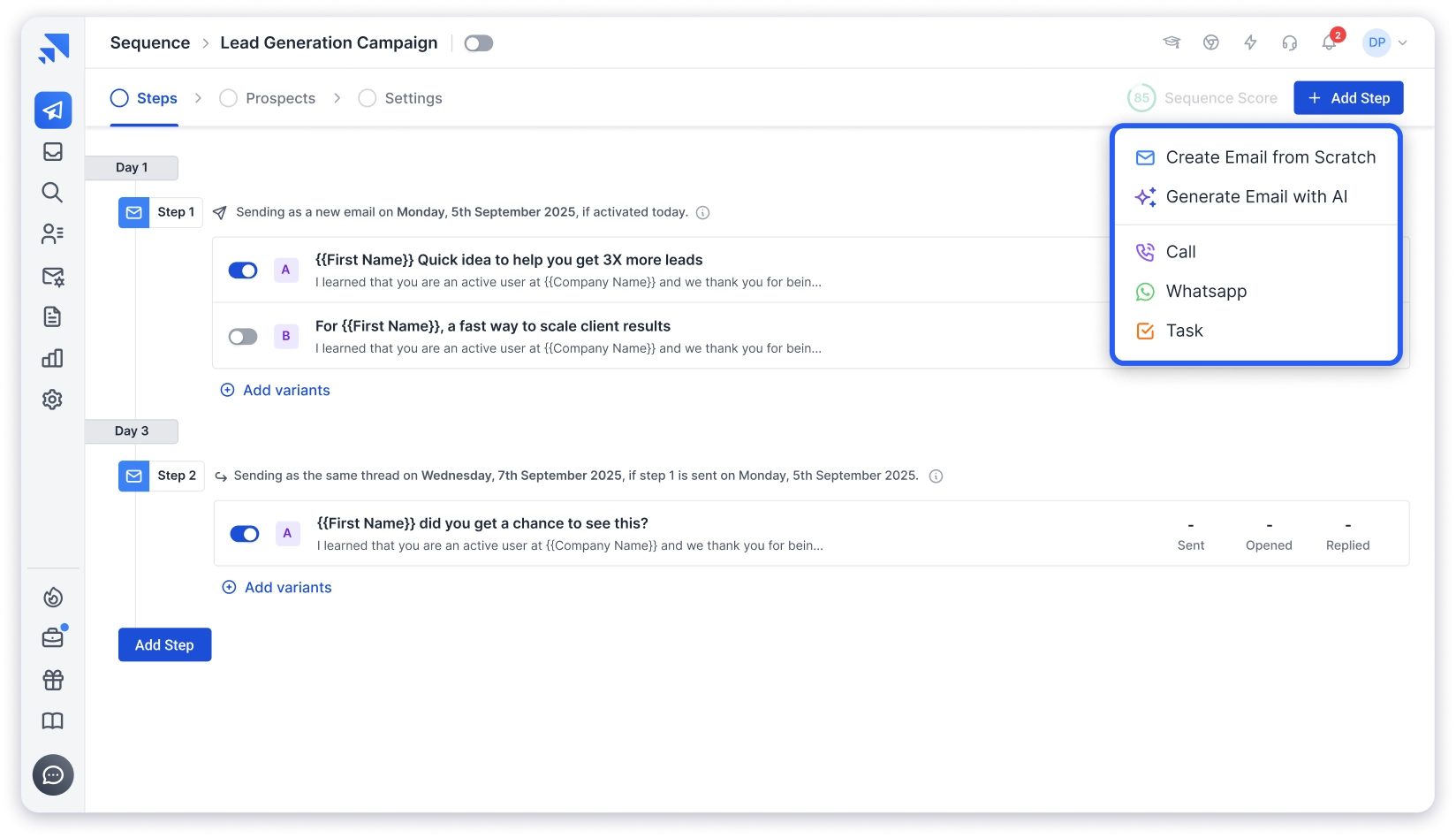
- AI Copilot for multichannel sequences — This is where Saleshandy gets interesting for multichannel. The AI Copilot pulls insights from your website, offer, and ICP to generate full sequences with email, call, and WhatsApp steps. I didn’t have to build each step manually. It drafted the entire flow, and I just edited the parts that needed adjusting.
- 852M+ B2B lead database (Lead Finder) — Search by job title, industry, company size, location, revenue, and technology stack. You get 50 free credits on signup to test it. The filters are detailed enough that I could build targeted lists without needing a separate data tool.
- Email automation at scale — Unlimited email accounts, sender rotation, A/B-to-Z testing (up to 26 variants), automated follow-ups, and spintax. The sending infrastructure is solid for high-volume outbound.
- Built-in deliverability toolkit — Email warmup (via TrulyInbox), email verification, sequence scoring, and inbox placement testing. Deliverability is not an afterthought here.
- Outbound CRM (Kanban pipeline) — The recently launched CRM replaces the old static prospect list.
You get a Kanban board with custom stages, a unified activity timeline for every prospect (emails sent, replies, opens, clicks, notes, tasks), and the ability to send 1:1 emails, add notes, and create tasks — all from one view. It’s not a full sales CRM like HubSpot. It’s a working space designed around daily outreach execution. - Unified inbox — All replies from all connected email accounts land in one place. No switching between inboxes.
- Agency-ready — Unlimited clients, white-labeling, and client management from a single dashboard.
Honest take on multichannel:
Calls and WhatsApp steps in Saleshandy are task-based, not automated. The AI Copilot generates the full multichannel sequence, but when the sequence reaches a call step, it creates a task reminder for you to execute manually.
But if your team follows a structured process and email carries 80% of your outreach, the task-based approach works fine in practice.
Pricing:
- Starter – $34/mo (1 user, 6,000 emails/mo, 1,500 lead credits/mo)
- Pro – $76/mo (10 users, 100,000 emails/mo, 4,000 credits/mo)
- Scale – $149/mo (unlimited users, 200,000 emails/mo, 8,000 credits/mo)
- Enterprise – Custom
All plans include unlimited email accounts, unlimited warm-up, and CRM access. Users are bundled by plan (1 on Starter, 10 on Pro, unlimited on Scale), so you are never charged per seat. Lead data is included in every plan (not sold separately).
Who should pick this: Teams that send high volumes of cold email and want a database, outreach automation, and CRM bundled together — without the per-user pricing that makes other tools expensive at scale.
2. Reply.io
Reply.io is a multichannel sales engagement platform with a strong AI layer. Their AI SDR agent, Jason, can find prospects, write personalized emails, and handle initial responses automatically.
What makes Reply different from most tools on this list is native automation across every channel. LinkedIn steps actually run automatically (connection requests, messages, profile views).
Calls and SMS are built into the sequence flow, not just task reminders.

Key features I found most useful:
- Multichannel sequences with email, LinkedIn, calls, SMS, and WhatsApp
- Jason AI SDR — automates prospecting and initial conversations
- Built-in B2B database with email and phone data
- Email warmup and deliverability tools
- CRM integrations (Salesforce, HubSpot, Pipedrive)
- 14-day free trial
Honest take:
The multichannel automation is the best on this list. But the pricing adds up fast. LinkedIn automation is a $69/account add-on. Calls and SMS are another $29/account. A solo rep wanting full multichannel can easily hit $150+/month.
The interface has a learning curve too. Compared to simpler tools, it takes a few days to get comfortable with all the options.
Pricing:
- Email Volume: $49/user/mo (email only, 1,000 active contacts)
- Multichannel: $89/user/mo (all channels, add-ons extra)
- AI SDR (Jason): $259/mo
- Agency plans available
Who should pick this: Teams that want maximum automation across all channels and are willing to pay per user plus add-ons for it.
3. Lemlist
Lemlist started as a cold email tool focused on personalization and has grown into a full multichannel platform.
Its biggest strength is still personalization. Dynamic images, custom landing pages, and personalized video embeds are things most other tools on this list can’t match.
Key features I found most useful:
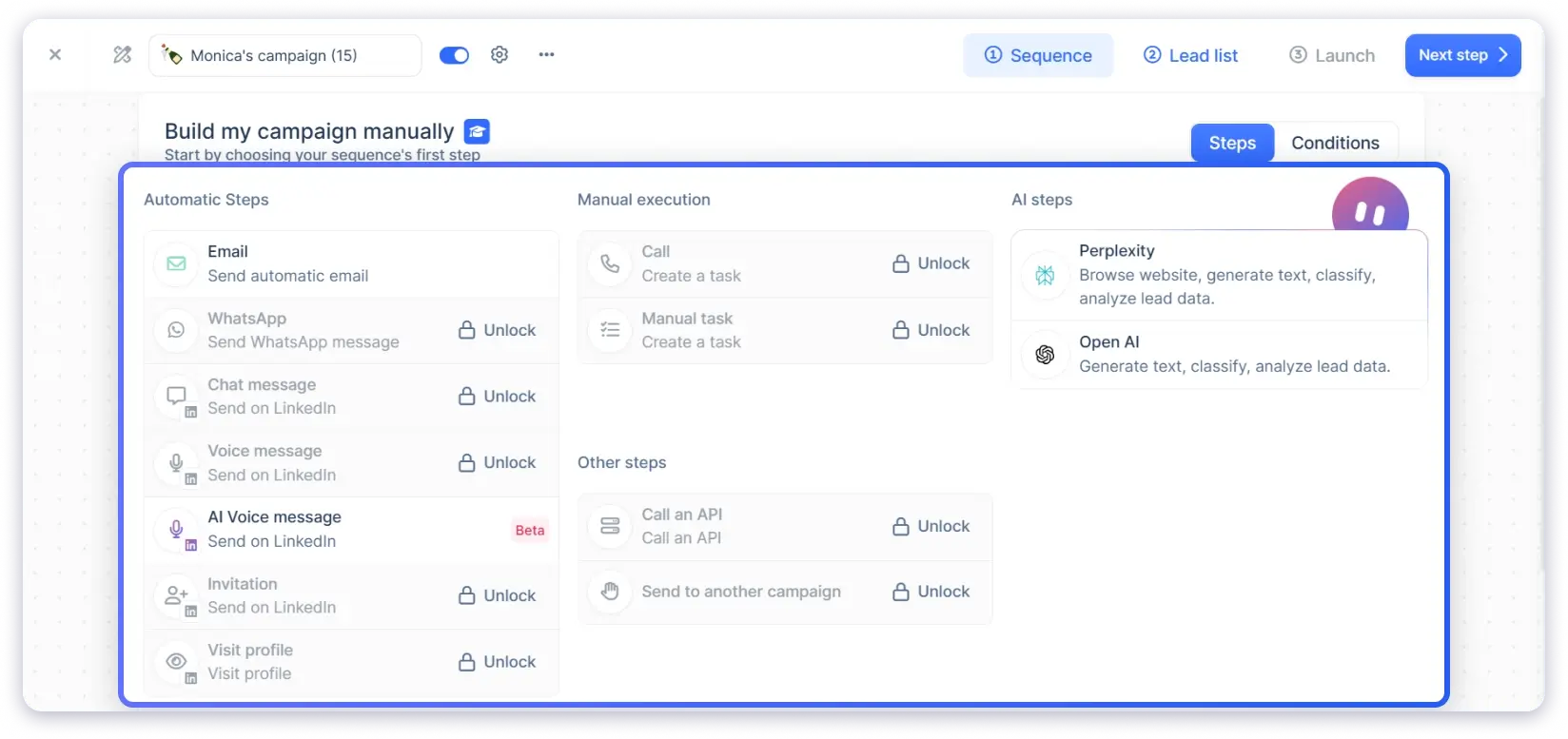
- Multichannel sequences with email, LinkedIn automation, and cold calls
- 450M+ lead database
- Dynamic images and personalized landing pages
- Lemwarm for email deliverability
- AI-powered email writing
- CRM integrations
- 14-day free trial
Honest take:
The creative personalization features are genuinely unique. If you’re in a competitive space where plain-text cold emails don’t cut it, Lemlist gives you tools to stand out.
But the pricing is per seat and credits expire monthly. For a team of 3 on the Multichannel Expert plan, you’re looking at $297/mo before add-ons. WhatsApp is another $20/seat/mo. It adds up.
Pricing:
- Email Pro: $69/user/mo (email only)
- Multichannel Expert: $99/user/mo (email + LinkedIn + calls)
- Enterprise: Custom (min 5 seats)
Who should pick this: Teams that want to differentiate through creative, visually personalized outreach and are willing to invest in per-seat pricing.
4. La Growth Machine
La Growth Machine is a multichannel outreach tool built with LinkedIn at its core.
While most tools on this list start with email and add LinkedIn steps, LGM does the opposite. LinkedIn sequences are first-class citizens here.
Key features I found most useful:
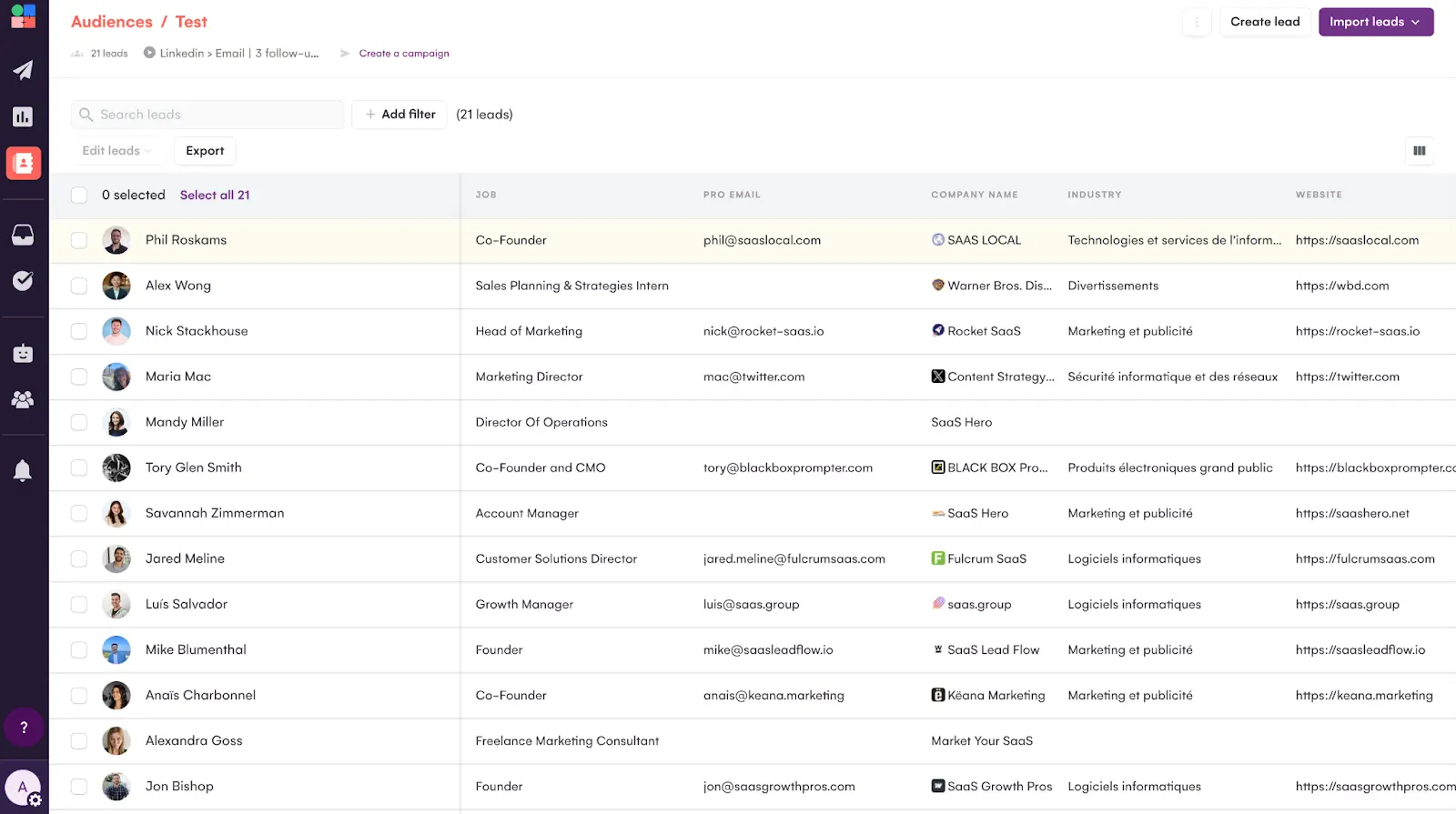
- Automated LinkedIn sequences (connection requests, messages, profile views, post interactions)
- Email outreach integrated into LinkedIn-first workflows
- Lead enrichment from LinkedIn profiles
- Multi-identity management (run multiple LinkedIn accounts)
- CRM integrations (HubSpot, Pipedrive, Salesforce)
- Visual workflow builder with conditional branching
Honest take:
If your ICP lives on LinkedIn and email is your backup channel, LGM is hard to beat. The LinkedIn automation is deeper than Reply.io or Lemlist. You can build branching workflows based on whether a connection request was accepted or not.
The downside: no built-in calling, no SMS, no B2B database. You need separate tools for those. And the interface takes some getting used to.
Pricing:
- Starts at ~$50/user/mo (annual)
- Higher tiers for team features and advanced automation
- 14-day free trial
Who should pick this: Teams whose primary channel is LinkedIn, with email as a secondary touchpoint.
5. Klenty
Klenty is a sales engagement platform that combines email, LinkedIn, and calling into one workflow.
What stood out to me is the built-in parallel dialer. Most tools treat calls as a task reminder. Klenty actually lets you dial from within the platform.

Key features I found most useful:
- Multichannel cadences with email, LinkedIn, and phone
- Built-in parallel dialer for cold calling
- AI-powered cadence creation
- LinkedIn automation (connection requests, messages)
- CRM integrations (Salesforce, HubSpot, Pipedrive, Zoho)
- Intent-based sequence triggers
- Call recording and analytics
Honest take:
If calling is a major part of your outreach, Klenty’s dialer is a real advantage.
You can call prospects directly from the cadence without switching to a separate tool. The call recording and analytics are also useful for coaching.
The B2B database is missing though. You’ll need a separate prospecting tool to build lists. And the pricing is per user, which makes it expensive for larger teams.
Pricing:
- Starts at ~$50/user/mo (annual)
- Higher tiers include advanced calling and AI features
- 14-day free trial
Who should pick this: SDR teams that make 50+ calls per day and want calling integrated directly into their multichannel cadences.
6. Apollo.io
Apollo.io combines a 275M+ contact database with email sequences, LinkedIn steps, a built-in dialer, and a basic CRM. It’s probably the most “all-in-one” tool on this list after Saleshandy.
The database is Apollo’s biggest draw. The volume of contacts and the filtering options (technographics, intent signals, funding data) are strong for building targeted lists.

Key features I found most useful:
- 275M+ B2B contact database with email and phone data
- Email sequences with LinkedIn and calling steps
- Built-in dialer
- Basic CRM with deal tracking
- AI-powered lead scoring and email writing
- Buying intent signals
- Free plan available (limited)
Honest take:
Apollo is excellent for prospecting. The database and filters are among the best in the market. Where it gets tricky is the outreach side. The sequencing tool works but feels secondary to the data product. Email deliverability is not as strong as dedicated cold email tools.
The CRM is basic — functional for tracking deals, but not designed around daily outbound execution the way Saleshandy’s Kanban CRM is.
Per-user pricing also makes it expensive at scale. A team of 5 on the Professional plan is $250/mo.
Pricing:
- Free: Limited features, 10,000 credits/yr
- Basic: $49/user/mo
- Professional: $79/user/mo
- Organization: $119/user/mo
Who should pick this: Teams that prioritize having prospecting data and outreach in one platform and don’t need deep email deliverability features.
7. Outreach.io
Outreach.io is the enterprise standard in sales engagement. It supports email, LinkedIn, calling, and SMS within structured sequences. But the real value is in the reporting, forecasting, and deal intelligence layer on top.

Key features I found most useful:
- Multichannel sequences with email, LinkedIn, calls, and SMS
- AI-powered deal insights and forecasting
- Advanced analytics and rep performance dashboards
- Conversation intelligence (call recording + analysis)
- Deep CRM integration (Salesforce, Microsoft Dynamics)
- Multi-team management with role-based access
- Compliance and security features (SOC2, GDPR)
Honest take:
If you’re a startup or small team, Outreach is overkill. The pricing is not public, but expect $100-150/user/mo with annual contracts. Implementation takes weeks, not hours.
But for organizations that need visibility across hundreds of reps, deal forecasting, and enterprise security, nothing on this list comes close.
No built-in B2B database. You’ll need a separate data provider.
Pricing:
- Custom pricing (contact sales)
- Typically $100-150/user/mo
- Annual contracts required
- No free trial (demo only)
Who should pick this: Sales orgs with 10+ reps, dedicated RevOps, and the budget for an enterprise platform.
8. Salesrobot
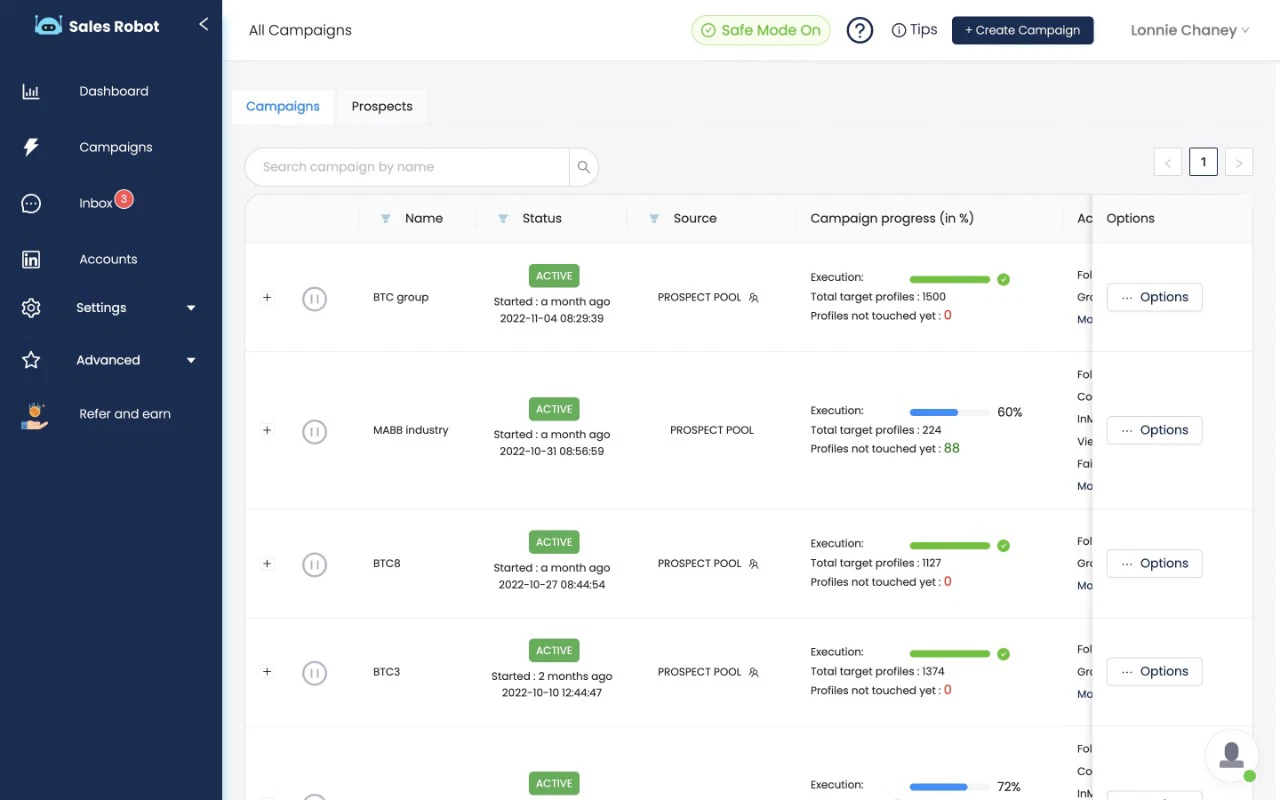
Salesrobot focuses on safe LinkedIn automation. It uses a dedicated IP and mimics human behavior patterns to reduce the risk of LinkedIn account restrictions. Email outreach is included, but it’s clearly the secondary channel here.
Key features I found most useful:
- Safe LinkedIn automation (connection requests, messages, InMail, profile views)
- Email outreach integrated into LinkedIn sequences
- AI-powered message writing
- Smart inbox for managing LinkedIn + email replies
- Dedicated IP for LinkedIn safety
- Team management features
Honest take:
For pure LinkedIn outreach, Salesrobot’s safety features stand out. The dedicated IP approach is more cautious than tools that just use browser extensions. I’ve seen fewer account restriction reports from Salesrobot users than from other LinkedIn automation tools.
The limitations: no calling, no SMS, no B2B database, and no CRM. It’s a focused tool, not an all-in-one platform.
Pricing:
- Starter: $59/account/mo
- Pro: $79/account/mo
- Pro+: $99/account/mo
- 14-day free trial
Who should pick this: Solopreneurs and consultants where LinkedIn outreach is the primary sales motion and email supplements it.
9. Snov.io
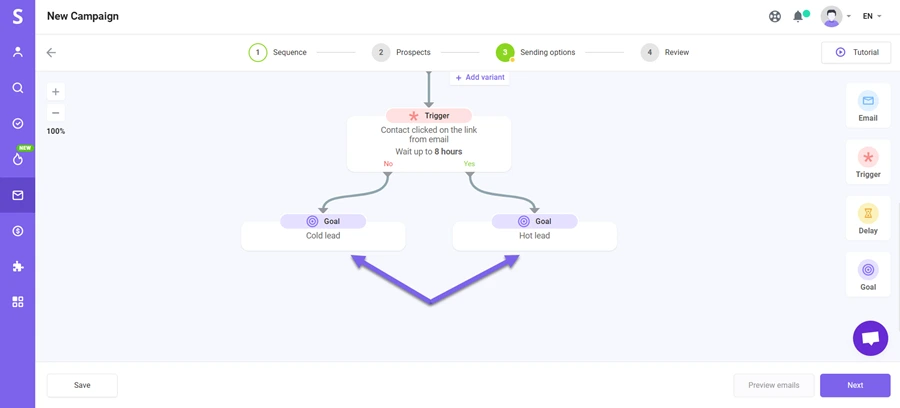
Snov.io started as an email finder and has grown into a broader outreach platform. The prospecting tools — email finder, domain search, LinkedIn email scraping, email verifier — are still its core strength.
The outreach automation is solid for email, with basic LinkedIn and calling features added.
Key features I found most useful:
- Email finder with domain search and LinkedIn scraping
- Email verification tool
- Email drip campaigns with automated follow-ups
- Built-in calling (via integration)
- LinkedIn outreach via Chrome extension
- Basic CRM with deal pipelines
- API access for custom workflows
Honest take:
Snov.io’s email finding and verification are genuinely good. If your main bottleneck is finding verified email addresses, this is a strong pick.
The outreach automation is more basic than dedicated tools like Saleshandy or Reply.io. LinkedIn features work through a browser extension, not native automation. The CRM exists but it’s minimal.
Pricing:
- Trial: Free (50 credits)
- Starter: $30/mo (1,000 credits)
- Pro: $75/mo (5,000 credits)
- Managed: $3,999/mo (done-for-you)
Credits are shared across email finding, verification, and sending.
Who should pick this: Teams that need a lead generation tool with cold email outreach built in, especially if email data quality is the primary concern.
How to Build a Multichannel Outreach Strategy That Actually Works
Having the right tool is half the equation. The other half is how you use it. Here’s the approach I follow when setting up multichannel outreach for B2B sales teams.
In this section:
- Define Your ICP and Build Your Prospect List
- Pick Your Primary and Secondary Channels
- Set Up Your Email Infrastructure First
- Build Your Multichannel Sequence
- Personalize at Scale
- Track Everything in One Place
Step 1: Define Your ICP and Build Your Prospect List
Start with who you’re targeting. Job title, company size, industry, location, and technology stack. The more specific your ICP, the better your response rates.
If your tool includes a B2B database (like Saleshandy’s Lead Finder with 852M+ contacts or Apollo’s 275M+ database), build your list directly inside the platform. Skip the spreadsheet step.
Step 2: Pick Your Primary and Secondary Channels
For most B2B teams, email is the primary channel. It’s scalable, trackable, and doesn’t have the platform restrictions that LinkedIn does.
Your secondary channel depends on your audience. If your ICP is active on LinkedIn, add LinkedIn steps. If they pick up the phone, add call steps. Don’t use every channel just because you can.
Step 3: Set Up Your Email Infrastructure First
Before sending anything, get the foundation right. Dedicated sending domains, SPF/DKIM/DMARC authentication, email warmup, and sender rotation. This isn’t optional. Skip this and your emails go to spam.
Step 4: Build Your Multichannel Sequence
A practical sequence structure that works well:
- Day 1: Cold email #1 (personalized first line + clear value prop)
- Day 2: LinkedIn connection request (short note referencing the email)
- Day 4: Follow-up email #2 (different angle, same thread)
- Day 6: LinkedIn message (if connection accepted) or profile view
- Day 8: Call attempt (if phone number available)
- Day 10: Final email #3 (breakup email with clear CTA)
Tools like Saleshandy’s AI Copilot can generate this entire flow based on your website and ICP. You edit and refine rather than building from scratch.
Step 5: Personalize at Scale
Generic templates don’t work anymore. Use dynamic variables (first name, company, industry), AI-generated first lines, and spintax to create variations.
The goal: every email should read like you wrote it for that specific person, even if you’re sending 500 per day.
Step 6: Track Everything in One Place
The biggest reason multichannel outreach fails isn’t the channels — it’s losing track of who you contacted, what they said, and what to do next.
This is where a built-in CRM matters. If your tool shows every email, reply, LinkedIn interaction, and call note in one prospect timeline, you can follow up with context instead of guessing.
How to Choose the Right Multichannel Outreach Tool
There’s no single “best” tool. The right choice depends on your workflow, team size, and where your prospects actually respond. Here’s how I’d break down the decision.
In this section:
- Identify Your Primary Outreach Channel
- Match the Tool to Your Team Size and Budget
- Check What’s Included Beyond Email Automation
- Know the Difference Between Native Automation and Task-Based Reminders
- Run a Pricing Reality Check for Your Actual Team Size
1. Identify Your Primary Outreach Channel
Start here. Every tool leans toward one channel — even the “multichannel” ones.
If you pick a tool that’s weak on your primary channel, no amount of secondary features will make up for it.
- Email-first teams → Saleshandy, Reply.io, or Snov.io
- LinkedIn-first teams → La Growth Machine or Salesrobot
- Call-heavy teams → Klenty or Apollo.io
- All channels equally → Reply.io or Lemlist
Ask yourself: Where do 70%+ of my replies come from? That’s your primary channel. Pick a tool that’s strongest there.
2. Match the Tool to Your Team Size and Budget
A solo founder doesn’t need Outreach.io. A 15-person SDR team shouldn’t rely on a free plan.
Your team size changes which tools make financial sense — especially when per-user pricing adds up fast.
- Solo founders or 1–2 person teams → Saleshandy ($34/mo flat), Snov.io ($30/mo), or Apollo free plan
- Growing teams (3–10 reps) → Saleshandy (flat rate stays the same), Reply.io, or Klenty
- Enterprise (10+ reps) → Outreach.io or Apollo Organization plan
The biggest mistake I see? Teams picking a tool for today’s headcount and getting hit with surprise costs as they grow.
3. Check What’s Included Beyond Email Automation
Most tools send emails. The difference is what else comes bundled in — and what costs extra.
A built-in B2B database saves you a separate subscription. A built-in CRM means one less tool to manage. Native LinkedIn automation means fewer third-party add-ons.
- Need a B2B database included → Saleshandy (852M+), Apollo (275M+), Lemlist (450M+), or Snov.io
- Need a built-in CRM → Saleshandy (Kanban CRM) or Apollo (basic CRM)
- Need native LinkedIn automation → Reply.io, Lemlist, LGM, or Salesrobot
- Need a built-in dialer → Klenty or Apollo
Before you compare pricing, compare what’s actually included. A “cheaper” tool that needs 3 add-ons often costs more in the end.
4. Know the Difference Between Native Automation and Task-Based Reminders
This catches a lot of people off guard.
Some tools fully automate LinkedIn steps — they send connection requests and messages without you touching anything. Others create task reminders that tell you to do it manually.
Both work. But they’re very different experiences.
Fully automated LinkedIn: Reply.io, Lemlist, La Growth Machine, Salesrobot — these tools connect to LinkedIn and execute steps automatically.
Task-based reminders: Saleshandy, Klenty, Apollo — these tools remind you when it’s time for a LinkedIn step, call, or WhatsApp message, but you take the action yourself.
If saving time on LinkedIn is critical, go with native automation. If you prefer personal control over non-email touchpoints, task-based works fine.
5. Run a Pricing Reality Check for Your Actual Team Size
Per-user pricing looks affordable at $49/month — until you multiply it by your team.
Here’s what a team of 5 actually pays per month on annual plans:
| Tool | Team of 5 (Monthly Cost) | What’s Included at This Price |
|---|---|---|
| Saleshandy (Pro) | $76/mo (flat, not per user) | Unlimited email accounts, 10 users included, 100K emails/mo, B2B database (852M+), 4,000 lead credits/mo, built-in CRM, AI Copilot, email warmup, sender rotation |
| Reply.io (Multichannel) | $445/mo ($89 × 5 users) | Multichannel sequences, native LinkedIn automation ($69/mo add-on per user extra), Jason AI SDR, 1,000 data credits/mo per user |
| Lemlist (Multichannel Expert) | $495/mo ($99 × 5 users) | Email + LinkedIn + calls native, AI personalization, 450M+ database, custom landing pages, A/B testing |
| Klenty | ~$250/mo ($50 × 5 users) | Multichannel cadences, built-in parallel dialer, call recording, CRM sync, no database or LinkedIn automation |
| Apollo.io (Professional) | $395/mo ($79 × 5 users) | 275M+ database, email + LinkedIn + calls, basic CRM, AI scoring, 120K credits/yr per user |
| Outreach.io | ~$625/mo ($125 × 5 users) | Enterprise sequences, native multichannel, AI deal intelligence, forecasting, no database included |
The flat-rate pricing gap becomes very clear at scale. If budget matters, always calculate the real team cost — not just the sticker price.
Final Verdict
Multichannel outreach isn’t about using every channel. It’s about picking the right channels for your audience and having a tool that keeps everything organized.
After testing all 9 tools, here’s my honest take:
If email is your primary channel and you want database, outreach automation, and CRM bundled together at a flat rate — Saleshandy gives you the most for the money.
The AI Copilot for generating multichannel sequences is a real time-saver, and the new Kanban CRM keeps your follow-ups from falling through the cracks.
Whatever you pick, the fundamentals stay the same: target the right people, personalize every message, follow up consistently, and track everything in one place.
FAQs
1. What Is Multichannel Outreach?
Multichannel outreach is the practice of reaching prospects through more than one communication channel — typically a combination of email, LinkedIn, phone calls, and SMS. The goal is to increase your chances of getting a response by meeting prospects where they’re most active.
2. What Are the Best Multichannel Outreach Tools in 2026?
Based on my testing, the top multichannel outreach tools in 2026 are Saleshandy (best flat-rate value), Reply.io (best full automation), Lemlist (best creative personalization), La Growth Machine (best for LinkedIn-first), Klenty (best for cold calling), Apollo.io (best all-in-one), Outreach.io (best for enterprise), Salesrobot (best for LinkedIn safety), and Snov.io (best for lead data).
3. How Do I Build a Multichannel Outreach Strategy?
Start by defining your ICP and building a prospect list. Pick your primary channel (usually email for B2B). Set up email infrastructure (domains, authentication, warmup). Build a sequence that layers in secondary channels (LinkedIn, calls) at the right intervals. Personalize at scale, and track everything in one CRM.
4. What’s the Difference Between Multichannel and Omnichannel Outreach?
Multichannel means using multiple separate channels to reach prospects. Omnichannel means those channels are connected with a unified experience — the prospect sees consistent messaging regardless of where they interact with you. For outbound sales, multichannel is the standard approach.
5. Can I Do Multichannel Outreach With Just Email and LinkedIn?
Yes. Email plus LinkedIn is the most common multichannel combo for B2B outbound. Email handles the volume and scalability. LinkedIn adds a personal touchpoint that increases response rates. Most tools on this list support this exact combination.
6. What Is the Best Free Multichannel Outreach Tool?
Apollo.io offers the best free plan for multichannel outreach, with limited email sequences and 10,000 data credits per year. For a paid tool that feels close to free, Saleshandy starts at $34/mo with a 7-day free trial and 50 free lead credits on signup.
7. How Many Channels Should a Multichannel Outreach Sequence Include?
Two to three channels is the sweet spot for most B2B teams. Email as the primary, LinkedIn as the secondary, and optionally calls or SMS as a third. Using more than three channels in a single sequence often creates noise without improving response rates.
 Dhruv Patel