 Anil Salvi
 Contents
- 1 SaaS Cold Email – TOC
- 2 TL;DR: The 10-Step Cold Email System That Drives SaaS Customers
- 3 A 10-Step Guide to SaaS Cold Email That Converts
- 4 1. Understand Why Cold Email Works for SaaS
- 5 2. Define Your Target (ICP) Before You Start
- 6 3. Build a Clean, High-Quality Prospect List
- 7 4. Protect Deliverability with Technical Setup
- 8 5. Craft Cold Emails That Convert
- 9 6. Follow-Up Sequence That Converts
- 10 7. Personalization Beyond the Name
- 11 8. Track & Optimize Your Campaigns
- 12 9. Use Proven SaaS Cold Email Templates
- 13 10. Avoid Common Mistakes That Kill SaaS Cold Email Results
- 14 Final Thoughts
- 15 FAQs on SaaS Cold Emails
You are sending cold emails for your SaaS.
But customer growth still feels slow.
Open rates are not the problem.
Replies are not either.
What’s missing is consistent demos and sign-ups.
That usually means one thing.
Your cold emails are creating conversations, not conversions.
Most SaaS cold email campaigns break down before they drive real revenue.
The reason?
- Targeting is too broad.
- Messages are written for everyone.
- Follow-ups fail to move the conversation forward.
The result is polite replies, vague interest, and no real pipeline.
This guide shows how SaaS teams use cold email to reliably turn outreach into customers by fixing the problems that are impacting conversions.
SaaS Cold Email – TOC
TL;DR: The 10-Step Cold Email System That Drives SaaS Customers
If your cold emails get replies but not customers, the issue is rarely the copy alone. It is usually a breakdown somewhere in the system.
1. Control and intent drive results: Cold email works when relevance matters more than volume.
2. ICP clarity defines relevance: Vague targeting leads to polite replies and stalled conversations.
3. List quality decides outcomes early: Clean, verified lists outperform larger unfiltered ones.
4. Deliverability controls visibility: Warm-up and steady sending protect inbox placement.
5. Cold emails should start conversations: Interest and context come before demos.
6. Follow-ups drive conversions: Timed follow-ups outperform single sends.
7. Personalization works with timing: Triggers outperform surface-level details.
8. Tracking should connect to pipeline: Activity without outcomes leads to false confidence.
9. Templates provide structure, not shortcuts: They work best when adapted per role and segment.
10. Scale only after proof: Volume amplifies what already works or what is broken.
The sections below break down each step so you can identify where your system is leaking and fix it without starting from scratch.
A 10-Step Guide to SaaS Cold Email That Converts
Cold email works when each step is carefully crafted and looked at with detail.
This 10-step framework breaks down how SaaS teams move from outreach to customers, starting with why it is needed and ending with an optimized campaign.
Miss a step, and results suffer.
- Understand Why Cold Email Works for SaaS
- Define Your Target (ICP) Before You Start
- Build a Clean, High-Quality Prospect List
- Protect Deliverability with Technical Setup
- Craft Cold Emails That Convert
- Follow-Up Sequence That Converts
- Personalization Beyond the Name
- Track & Optimize Your Campaigns
- Use Proven SaaS Cold Email Templates
- Avoid Common Mistakes That Kill SaaS Cold Email Results
1. Understand Why Cold Email Works for SaaS
Cold email works for SaaS because it removes guesswork from customer acquisition.
You do not wait for your prospects to find you. You reach out to them directly.
Unlike ads or SEO, cold email gives you control over who you contact, what they see, and when the conversation starts.
That control is what makes it predictable.
Cold email works consistently only when the message fits the recipient. If it sounds generic, it gets ignored.
SaaS teams use cold email to:
- Generate Demos and Sign-Ups Quickly
Outreach lets you start conversations immediately instead of waiting weeks or months for inbound traffic to convert.
- Build a Pipeline Without Relying on Paid Ads
Cold email creates a pipeline without rising CPCs or budget pressure. It is especially effective for early-stage and mid-market SaaS.
- Reach Specific Segments That Don’t Know You Yet
You can target by role, company size, industry, or tech stack and speak directly to their problems.
- Start Conversations That Warm Up Into Customers
Cold email is rarely about an instant sale. It is about opening a conversation that leads to trust, demos, and long-term customers.
For SaaS teams that stay focused on relevance and intent, cold email remains a reliable way to turn outreach into real customers.
2. Define Your Target (ICP) Before You Start
Most of the times SaaS Cold emails fail because the sender never decided who the email is really for.
If you’ve ever written a cold email thinking, “This should work for most teams,” that’s usually the problem.
Cold email works when the person reading it feels like you had them in mind.
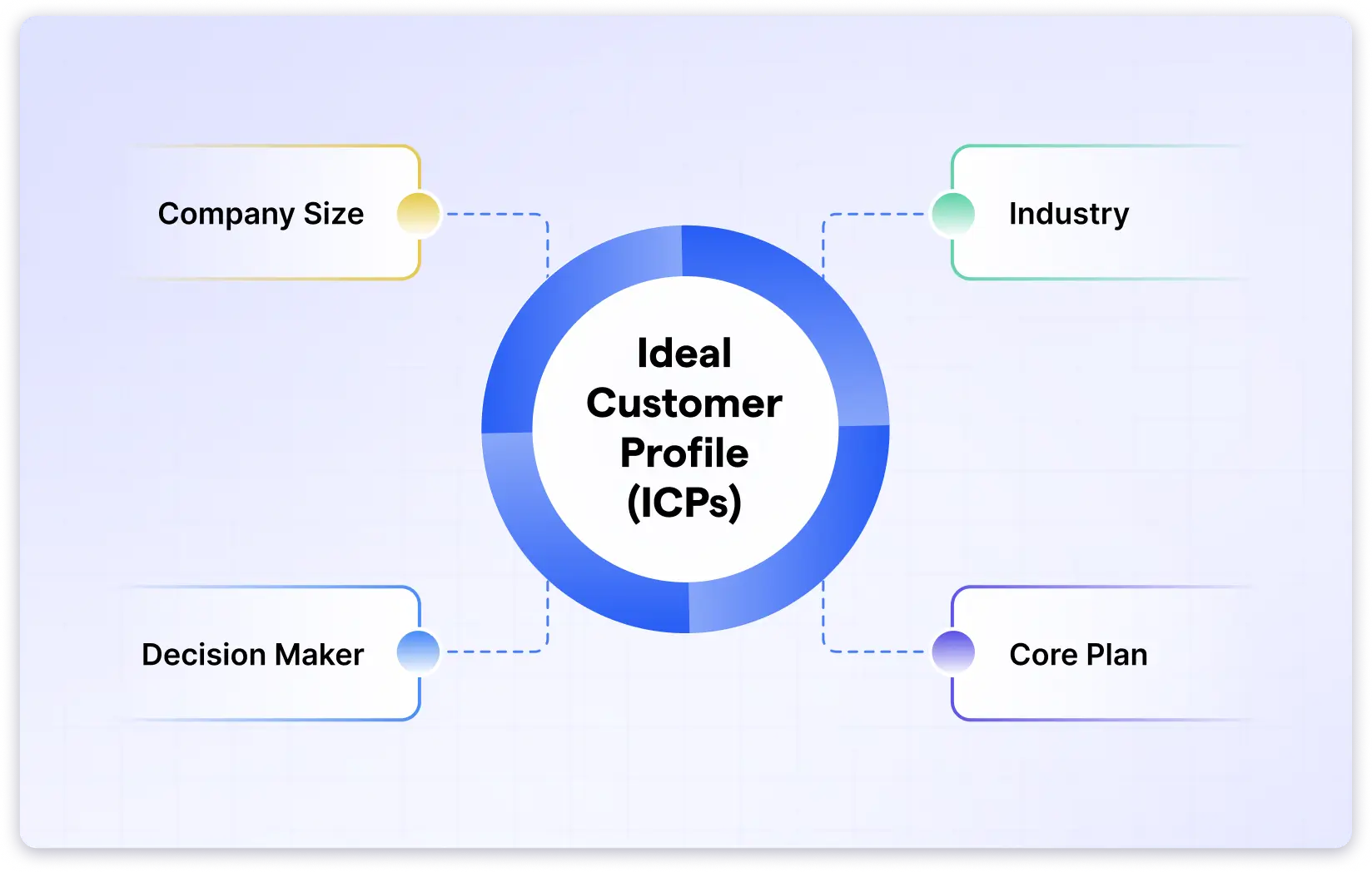
That clarity comes from defining your ICPs (Ideal Customer Profile) before you send anything.
Here are a few criteria to select ideal ICPs from:
1. Company Size
Target companies that clearly feel the problem and can act on it.
Example:
A workflow SaaS performs best with 50–200 employee teams. Smaller teams don’t need it yet. Larger ones move slowly.
2. Industry
Focus on industries where the problem already exists.
Example:
A sales engagement tool fits B2B SaaS and agencies. Outside of that, the context often breaks.
3. Job Title or Role
Send emails to people who can move things forward.
Example:
A Sales Manager may agree with you. A Head of Sales or RevOps can actually do something about it.
4. Pain Points Your SaaS Solves
Write about problems they already recognize.
Example:
Onboarding tools resonate with teams seeing activation drop-offs. Deliverability tools resonate with teams sending outbound at scale.
If you have to explain the pain, you’re already losing them.
5. Budget Authority
Interest is not the same as buying power.
Example:
Someone may say, “Looks interesting.” That matters only if they can approve or influence the spend.
When your ICP is clear, your email lands as relevant outreach, not an interruption.
3. Build a Clean, High-Quality Prospect List
Cold email results are decided before the first email is ever sent.
They are decided by the list of prospects you have made.
You can write a great message and still see nothing happen if it lands in the wrong inbox or never gets delivered.
That’s why accurate contacts and verified email addresses matter more than sending emails.
Here’s how you can build a prospect list for your campaign:
1. Source Prospects From the Right Places
You can get the right prospects by using search platforms where professional information is reliable.
Such as:
- LinkedIn:
Use it to identify decision-makers by job title, seniority, and current company activity. - LinkedIn Sales Navigator:
Helps narrow prospects using filters like company size, industry, geography, and recent role changes. - Company websites:
Leadership, team, or “About” pages are useful for confirming who owns specific functions. - Industry directories and communities:
Useful when targeting niche markets where LinkedIn data alone isn’t enough.
If a contact feels outdated, incomplete, or hard to validate, skip it. A weak lead creates more problems than it solves.
2. Filter by Role and Relevance
Next, when you get your prospect list, start by filtering it out based on their roles and their relevance to your pitch.
Actively Avoid:
- Generic inboxes (info@, support@, sales@):
These inboxes are rarely monitored by decision-makers and rarely convert. - Roles disconnected from the problem:
If the role does not feel the pain your SaaS solves, the email stalls quickly. - Titles without influence or ownership:
Interest alone doesn’t move deals forward without decision power.
Focus on people who are close to the problem and close to the decision. Relevance matters more than reach.
3. Verify Emails Before Sending
Unverified emails quietly kill campaigns.
Even a small number of bounces can damage the sender’s reputation and reduce inbox placement over time.
Email verification removes invalid or risky addresses before they cause problems for your campaigns.
To simplify this process, tools like Saleshandy help.
It lets you find prospects that match your ICP, filter by role and relevance, and verify email addresses before sending, so your outreach starts with a clean, reliable list.
Now that the list is attained and verified, the next thing that matters is where those emails land.
That’s where deliverability comes in.
4. Protect Deliverability with Technical Setup
Before you start writing cold emails, one thing has to be right.
Your emails must land in inboxes.
And for that, deliverability has to be top-notch.
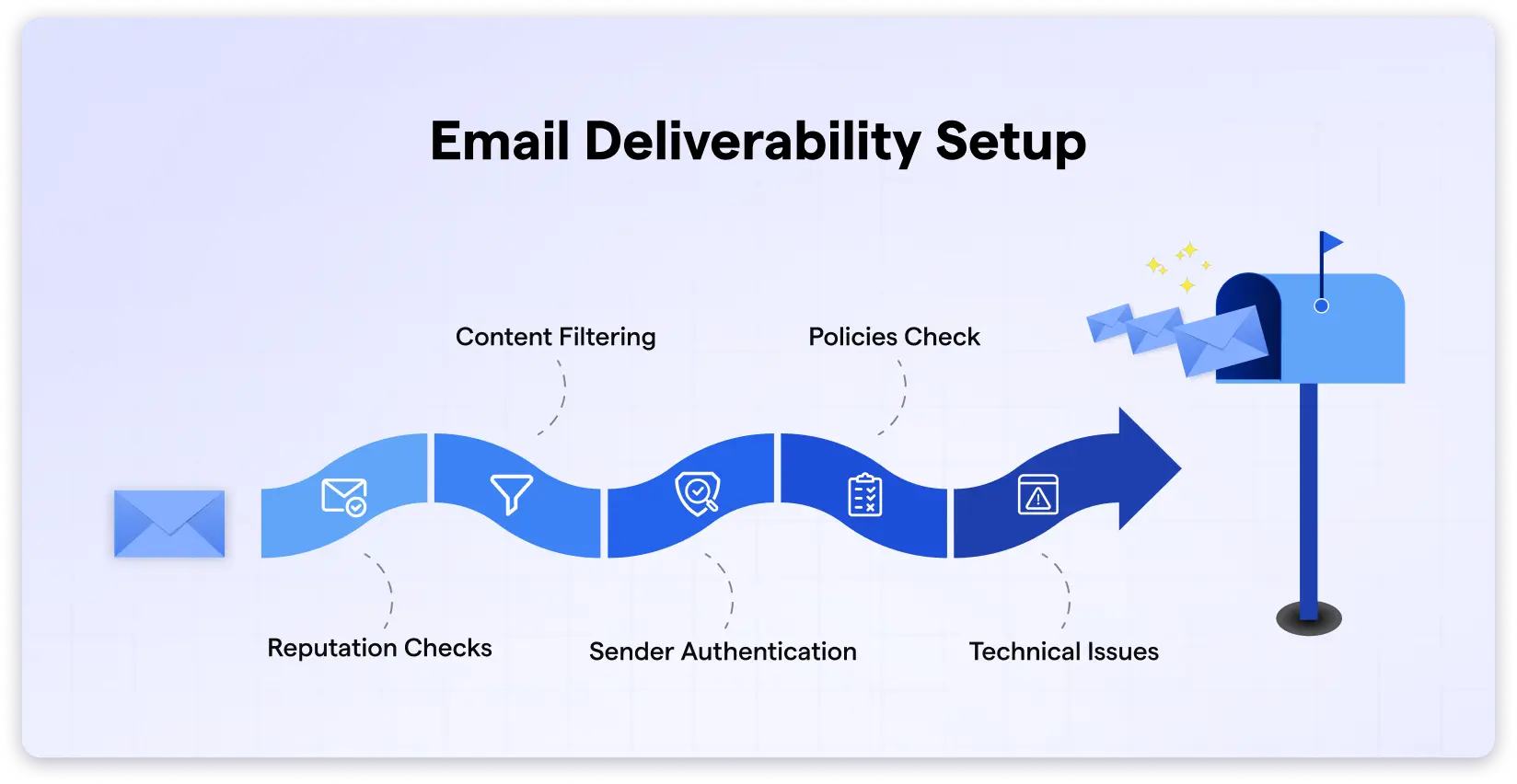
Here’s the minimum setup SaaS teams should do to protect deliverability.
- Warm Up Your Domain and Inbox
- Set up SPF, DKIM, and DMARC
- Use a Separate Domain or Subdomain
- Start Small and Scale Gradually
1. Warm Up Your Domain and Inbox
New domains and inboxes start with zero trust.
Sending too many emails too quickly is one of the fastest ways to get flagged.
What Works:
- Start with a small number of emails per day
- Increase volume gradually
- Keep sending patterns consistent
Skipping this step creates problems that are hard to undo later.
2. Set up SPF, DKIM, and DMARC
These records verify that your emails are legitimate.
If they are missing or misconfigured, inbox providers can’t authenticate your domain, and emails are more likely to land in spam.
3. Use a Separate Domain or Subdomain
Never send cold emails from your main product domain.
Using a separate outreach domain or subdomain because:
- Protects your primary brand
- Limits risk if deliverability drops
- Gives you flexibility to test and scale
This is standard practice for SaaS teams running outbound.
4. Start Small and Scale Gradually
Even though you have warmed up your account, good deliverability cannot be achieved instantly.
The best practice is to start sending emails in small numbers and slowly scale.
Things to Avoid:
- Sudden spikes in daily volume
- Sending high volumes from new inboxes
- Scaling before delivery is stable
Inbox providers reward predictability and not speed.
How Saleshandy Fits in Here
If you are also tired of doing everything manually, rely on a tool that eases your workload without hurting performance.
And I feel Saleshandy is the right tool for it.
It can help SaaS teams:
- Warm up inboxes automatically
- Manage multiple domains and inboxes
- Control sending volume safely
- Scale cold email without hurting deliverability
This way, deliverability runs quietly in the background while you focus on emails and conversions.
5. Craft Cold Emails That Convert
A cold email that converts is not a pitch. It is a way to start a conversation.
You get replies when the reader feels you understand their situation, bring value early, and respect their time.
Below is a simple structure for writing SaaS cold emails that move prospects toward demos and sign-ups without sounding forced.
- Subject Line (The Gatekeeper)
- Opening Line (The Hook)
- Middle (The Bridge)
- Call to Action (The Soft Ask)
- Length and Format
1. Subject Line (The Gatekeeper)
- Keep it short, around 5–7 words, so it fits mobile previews
- Tie it to a pain, goal, or change they care about now
- Avoid offer words, urgency, or marketing terms
- Write the subject after the email so it matches the message
Example: “Question about onboarding at [Company]”
The subject line does one job, which is to get it opened.
2. Opening Line (The Hook)
- Point to something recent, visible, or role-related
- Choose signals linked to business work, not small talk
- Use one sentence so the reader keeps going
Example: “Saw your team rolled out a new onboarding flow last month.”
This line answers why you reached out and why now.
3. Middle (The Bridge)
- Connect your observation to one problem teams like theirs face
- Focus on outcomes, not product details
- Frame the problem as a common pattern
- Add one short proof point to lower doubt
Example: “Teams at this stage often see a drop after signup. We helped a similar SaaS fix that within one quarter.”
If the problem feels familiar, attention stays.
4. Call to Action (The Soft Ask)
- Keep the ask easy to answer
- Ask for interest or permission, not time upfront
- Offer a small next step
Example: “Worth a quick look?” or “Want me to share a short video?”
The first email opens the door. It does not push the deal.
5. Length and Format
- Keep the email between 50 and 125 words
- Use plain text so it reads like a personal note
- Break lines for phone screens
- One email, one idea, one ask
Always remember that if it looks long, it will get skipped.
6. Follow-Up Sequence That Converts
SaaS cold email replies do not come from the first email itself.
They come from continuous follow-ups with intent.
In 2026, inboxes are crowded, and attention is fragmented.

Prospects often see your email but do not act on it immediately.
Follow-ups exist to reintroduce your message with a new context, not to remind someone you are waiting.
What the Data Shows
- Most replies come after the 3rd or 4th touchpoint
- Effective SaaS sequences use 4–7 touchpoints
- The full sequence usually spans 2–3 weeks
How to Structure a Follow-up Sequence
- Email 1 (Day 0): Introduce context and why you reached out
- Email 2 (Day 2–3): Add value tied to their role or stage
- Email 3 (Day 7): Reframe the problem or share a short outcome from a similar SaaS
- Email 4 (Day 14): Introduce a new angle or ask a direct, easy question
- Email 5 (Day 30): Break-up email that closes the loop politely
Each follow-up should answer one question for the reader: Why is this worth my attention now?
What to Include in Follow-ups
- A short case or a result from a similar company
- A recent company update or industry shift
- A useful resource that helps them think about the problem
Avoid follow-ups that add nothing new.
7. Personalization Beyond the Name
Using a first name now is the least expected.
It no longer creates relevance.
In 2026, cold email personalization works when it is tied to timing and pressure, not surface details.
Why Basic Personalization Fails
- It mentions facts without explaining why they matter
- It focuses on profiles instead of priorities
- It shows effort, but not relevance
How Personalization Drives Replies
Personalization should be based on professional triggers, moments when priorities shift.
Common high-intent triggers include:
- Funding rounds
- New leadership hires
- Product launches or major updates
- Rapid hiring or expansion
How to Personalize without Overdoing It
- Reference one trigger only
- Connect it to one problem you help solve
- Tie the message to the role-specific pressure
For high-value accounts, using short Loom or Vidyard videos can help.
Personalized visuals often see 3-5X higher reply rates because they reduce reading effort.
Personalization works when the message feels timely, not tailored for the sake of it.
8. Track & Optimize Your Campaigns
Cold email feels broken when you do not know what is failing.
Tracking exists to help you make decisions and not just to collect numbers.
What Most SaaS Teams Track Incorrectly
- Opens rates without replies
- Activity without outcomes
- Volume without deliverability health
This leads to sending more emails instead of improving results.
Metrics That Matter in 2026
- Open Rate (50–70%): Indicates subject line relevance and inbox placement.
- Response Rate (~10% for B2B SaaS): Shows whether the message feels worth replying to.
- Qualified Pipeline Created: Replies only matter if they turn into real conversations.
- CAC Payback from Outbound: Measures whether cold email is sustainable.
- Bounce Rate and Sender Health: High bounces damage future inbox placement.
How to Optimize without Breaking Campaigns
- Change one variable at a time
- Test subject lines separately from body copy
- Adjust CTAs before rewriting the entire email
- Monitor deliverability before scaling volume
Tracking works when it helps you identify where the system is leaking, not when it just collects numbers.
9. Use Proven SaaS Cold Email Templates
Templates are meant to reduce manual work, not replace thinking.
Most SaaS teams struggle with templates because they treat them as copy instead of structure.
When templates are sent without adapting context, they look polished but fail to connect.
What the Data Shows
- High-performing teams use templates for consistency, not automation
- Reply rates drop when the same template is reused across roles or industries
- Templates perform best when 20–30% of the content is adjusted per segment.
Below are proven SaaS cold email templates, not to copy and paste, but to be adapted as per your outreach.
- Template 1: Problem–Solution (General SaaS)
- Template 2: Trigger-Based (High-Intent Outreach)
- Template 3: Value-First (For High-Value Accounts)
Template 1: Problem–Solution (General SaaS)
Subject: Question about [Company] growth
Hi [Name],
I noticed your team is [relevant context like hiring, scaling, or launching].
At this stage, many teams struggle with [specific problem tied to their role].
We helped a similar SaaS improve [outcome] without adding more tools or processes.
Worth exploring if this is relevant for [Company]?
Best regards,
[Your Name]
Why this Works
- Connects context to a known SaaS problem
- Uses light-proof instead of product detail
- Ends with a low-effort CTA
Template 2: Trigger-Based (High-Intent Outreach)
Subject: Quick note on [trigger event]
Hi [Name],
I saw the recent [funding, launch, or hire] at [Company].
When teams hit this phase, [specific challenge] often shows up fast.
We’ve helped teams in similar situations handle this without slowing momentum.
Should I send a short breakdown?
Thank you for your attention.
Best,
[Your Name]
Why this Works
- Timing creates relevance
- Trigger explains why now
- CTA asks for interest, not time
Template 3: Value-First (For High-Value Accounts)
Subject: Useful resource for [Company]
Hi [Name],
I was reviewing [Company]’s setup and thought this might help.
We put together a short [resource] on improving [metric] without [common blocker].
No pitch here, just sharing in case you find it useful.
Want me to send it over?
Best,
[Your Name]
Why this Works
- Leads with value, not intent
- Builds trust before asking
- Works well for senior or busy buyers
Templates work in providing structure and speed, but relevance comes from how you adapt them in your campaigns.
10. Avoid Common Mistakes That Kill SaaS Cold Email Results
Most SaaS cold email campaigns don’t fail loudly.
They fail slowly because of small mistakes that compound over time.
- Mistake 1: Writing Emails That Try to Do Too Much
- Mistake 2: Using the Same Message for Every Role
- Mistake 3: Asking for Too Much Too Early
- Mistake 4: Ignoring Deliverability Signals
- Mistake 5: Stopping Follow-Ups Too Early
- Mistake 6: Scaling Before the System Works
Mistake 1: Writing Emails That Try to Do Too Much
This usually happens when teams try to justify the outreach in one email.
- Multiple problems mentioned
- Product context added too early
- Proof stacked before interest exists
The reader does not know what to respond to, so they don’t.
How to Avoid it:
- Write the email with one decision point only
- Remove product names and features from the first email
- End every draft by answering: what single question am I inviting them to respond to?
Mistake 2: Using the Same Message for Every Role
This mistake often comes from list building, not copy.
Teams pull mixed roles into one campaign and try to make the message “broad enough.”
- Founders, managers, and operators get the same email
- The problem described does not fully belong to any of them
How to Avoid it:
- Build separate campaigns per role, even if the product is the same
- Change the problem framing, not just the wording
- Validate role relevance by asking: Would this person lose sleep over this issue?
Mistake 3: Asking for Too Much Too Early
This happens when teams design emails around their sales process, not buyer readiness.
A demo request in the first touch forces a commitment before curiosity exists.
How to Avoid it:
- Delay meeting requests until after the first reply
- Use first replies to qualify interest before scheduling
- Treat the first email as a conversation filter, not a booking tool
This reduces friction and increases reply volume.
Mistake 4: Ignoring Deliverability Signals
Deliverability problems usually start with list quality and sending behavior.
- Old or scraped emails increase bounce rates
- Too many emails from one inbox trigger filtering
- Sudden volume spikes flag domains
By the time results drop, the damage is already done.
How to Avoid it:
- Verify your email list before every campaign, not once
- Limit daily sends per inbox and rotate senders
- Monitor bounce and spam signals weekly, not after campaigns end
Inbox placement decides whether copy even matters.
Mistake 5: Stopping Follow-Ups Too Early
Most teams stop because they run out of ideas, not patience.
Follow-ups fail when they repeat the same message instead of advancing it.
How to Avoid it:
- Plan the full follow-up sequence before launching
- Assign a purpose to each follow-up (new insight, new angle, new signal)
- Stop sending follow-ups that do not introduce new information
Replies come when the message finally aligns with timing and context.
Mistake 6: Scaling Before the System Works
This is one of the most expensive mistakes in SaaS cold email.
Teams increase volume, hoping numbers will compensate for weak results.
- Poor messaging gets amplified
- Deliverability suffers faster
- Learnings become harder to isolate
How to Avoid it:
- Lock messaging on a small, controlled list first
- Scale only after reply patterns stabilize
- Increase volume in steps, not jumps
Scale should reward what works, not hide what doesn’t.
This concludes possible mistakes that you can fix while setting up your SaaS cold email campaigns to increase replies and conversions.
Final Thoughts
Cold email works for SaaS when it is approached as a system, not a shortcut.
Results come from a combination of clear targeting, strong deliverability, relevant messaging, and follow-ups that add value.
When these pieces work together, cold email becomes predictable.
When one breaks, everything downstream suffers.
The SaaS teams that succeed are not chasing volume or clever copy.
Rather, they are focusing on timing, context, and steady improvement based on real-time insights.
Get those right, and trust me, cold emails will stop feeling random and become a reliable way to start conversations and acquire customers.
FAQs on SaaS Cold Emails
1. Does cold email still work for SaaS in 2026?
Yes. Cold email still works for SaaS in 2026, but only when it is done with proper targeting, personalization, and deliverability setup. Generic, high-volume outreach no longer performs.
SaaS teams that focus on relevance, follow-ups, and timing continue to generate demos and pipeline through cold email.
2. What is the Average Open Rate for SaaS Cold Emails?
On average, 30-50% of people open SaaS cold emails. A good subject line, a trusted sender name, and a proper email warm-up can boost your chances. If your emails aren’t getting opened, it’s time to tweak your approach.
3. What is the Average Reply Rate for Cold Emails in SaaS?
Typically, 5-15% of recipients reply, but that depends on how well you personalize your emails and whether you follow up. People are busy, so sending 3-5 follow-ups (without being annoying) can make a huge difference.
4. What’s the Difference Between SaaS Cold Emailing and SaaS Cold Email Marketing?
Cold emailing is one-on-one outreach to potential customers who haven’t heard from you before, aiming to start a conversation. Cold email marketing is more like newsletters or automated sequences sent to a list of people who already shown interest.