

QucikMail has built a solid reputation as a deliverability-focused cold email and multichannel outreach tool.
With inbox rotation, automated warm-up, sender rotation, and sequence automation, it gives teams a strong setup for scaling outbound while protecting deliverability.
But your needs can change as outreach grows.
You may need higher sending volume, lower costs, stronger personalization, deeper AI automation, or more channels beyond email and LinkedIn.
You may also want stronger email-first prospecting, clearer reporting, easier campaign management, or better workflows for larger teams and agencies.
That is why more teams are comparing QuickMail with tools like Saleshandy, Instantly, Smartlead, Lemlist, Reply.io, Apollo, and others.
Some are better for high-volume cold email. Others go deeper into prospecting, deliverability, personalization, multichannel outreach, AI, or team management.
In this guide, I compare 10 QuickMail alternatives in 2026 across their strengths, pricing, key features, and ideal use cases.
I also looked at recent G2 feedback to understand where QuickMail still works well and where another tool may fit better.
By the end, you will know which QuickMail alternative fits your outbound strategy, budget, and workflow best.
So, let’s get started.
Best QuickMail Alternatives – TOC
Top 10 QuickMail Alternatives at a Glance
Not every QuickMail alternative solves the same problem.
Some focus on high-volume sending, while others excel at prospecting, deliverability, multichannel outreach, AI, or sales intelligence.
Here is a quick comparison of 10 tools so you can see where each one fits before diving into the details.
| Tool | Channels | Built-in Lead Database | Deliverability Toolkit | AI Features | Free Trial | Starter Annual Price |
|---|---|---|---|---|---|---|
| Saleshandy | Email, LinkedIn, Calls, WhatsApp | Yes, 852M+ contacts | TrulyInbox warm-up, Inbox Radar, sender rotation, ramp-up | AI CoPilot, AI Prompt-to-List, AI reply categorization | 7 days | $34/mo |
| Instantly | Yes, 450M+ B2B leads | Unlimited warm-up, reputation protection, bounce detection, inbox placement | AI Email Writer, Web Researcher Agent, AI Reply Agent | 14 days | $37.60/mo | |
| Smartlead | SmartProspect available | Warm-up, SmartDelivery, SmartSenders, SmartServers | SmartAgents, AI reply handling | 14 days | $32/mo | |
| lemlist | Email, LinkedIn, Calls, SMS, WhatsApp | Yes, 650M+ leads | lemwarm, Deliverability Hub | lemAgent, Signal Agents, Enrichment Agents | 14 days | $55/mo |
| Reply.io | Email, LinkedIn, Calls, SMS, WhatsApp | Yes | MailToaster warm-up, ESP matching, email health checks | Jason AI SDR, AI ICP generation, AI sequence builder | 14 days | $59/mo |
| Apollo | Email, Calls, LinkedIn workflows | Yes | Deliverability Suite, email warm-up, verification | AI Assistant, AI Research, AI Lead Scoring | 14 days | $49/user/mo |
| Woodpecker | Email, LinkedIn, Calls, SMS tasks | Lead Finder available | Adaptive Sending, Bounce Shield, inbox rotation, verification | AI reply classification | 14 days or 100 cold emails | $24/mo |
| Snov.io | Email, LinkedIn | Yes | Warm-up, verification, bounce safeguards | AI writing, campaign assistance | Free plan | $29.25/mo |
| Mailshake | Email, Calls, Social tasks | Data Finder available | Warm-up, verification, email rotation, throttling | SHAKEspeare AI writer | No free trial | $25/mo |
| Outreach.io | Email, LinkedIn, Calls, SMS | No native lead database | Enterprise sending controls, reporting, CRM-linked monitoring | Kaia AI, AI Agents, conversation intelligence | No public free trial | Custom |
How I Choose My List of QuickMail Alternatives
I did not rank these tools by feature count.
I started with one question:
Where does QuickMail stop being the best fit once your outbound setup gets more complex?
QuickMail already handles email, LinkedIn, follow-ups, warm-up, sender rotation, and agency workflows well.
So an alternative only made this list if it offered a clear advantage in an area that matters to real outbound teams.
Recent G2 feedback helped shape those areas too. Users mention technical setup, weaker email-first prospecting, reporting gaps, and occasional campaign automation issues.
Here is what I compared.
1. Lead Database & Verification
QuickMail has prospecting, but its database is stronger for LinkedIn-led workflows than for verified email discovery.
So I looked at whether each alternative can find, enrich, verify, and move prospects directly into outreach. For email-first workflows, that also means using a reliable email verifier before prospects enter a sequence.
The fewer tools needed between finding a lead and contacting them, the better.
2. Email Accounts & Sending Scale
QuickMail already supports unlimited senders.
That means another tool does not win simply because it lets you connect more inboxes.
I looked at sender rotation, sending limits, mailbox management, infrastructure, and what happens as you add 10, 50, or 100 inboxes.
3. Deliverability & Warm-up
QuickMail is already strong here, so I set a higher bar.
I compared warm-up, inbox placement, bounce protection, sender health, ramp-up, domain monitoring, and reporting depth.
One recent reviewer specifically wanted clearer delivered-versus-bounced visibility by ESP.
4. Personalization & Sequence Flexibility
Basic personalization is not enough once outreach starts scaling.
I compared custom variables, spintax, dynamic content, conditional steps, branching, A/B testing, and how much control each tool gives you over the sequence.
This also helped separate tools built for simple cold email from platforms designed for more complex outreach.
5. Multichannel Outreach
QuickMail already covers email and LinkedIn.
I gave more weight to tools that add native calls, SMS, WhatsApp, or deeper multichannel outreach sequences.
That matters once your outbound motion stops being mostly email-led.
6. AI & Automation
Basic AI writing did not impress me.
QuickMail already offers AI reply drafting, categorization, and AI-assisted rewriting.
I looked for tools that go further with prospect research, intent signals, personalization, enrichment, sequence creation, reply handling, and campaign automation.
7. Users & Agency Management
QuickMail already works well for agencies and includes unlimited users.
So I looked for real advantages such as better client workspaces, white-labeling, centralized controls, permissions, reporting, or stronger agency economics.
8. Pricing at Scale
The starting price can be misleading.
I compared what you actually pay once you add users, inboxes, lead data, credits, client workspaces, AI features, and sending volume.
This is where some tools that look cheaper upfront become expensive.
A cold email ROI calculator can help estimate the mailbox, domain, sending, and software costs behind the headline subscription price.
9. Ease of Use
Several recent QuickMail reviews mention setup or interface friction.
So I compared onboarding, mailbox connection, campaign creation, migration, and day-to-day management.
A tool only scored higher here if it reduced real work, not because its website called it “easy.”
The goal was not to find ten tools with more features than QuickMail.
It was to find ten tools that make more sense for a specific QuickMail user, whether the problem is prospecting, scale, deliverability, personalization, channels, AI, agency management, cost, or ease of use.
10 Best QuickMail Alternatives in 2026
Each tool on this list is stronger in a different part of outbound.
Some are better for prospecting, some for high-volume sending, and others for multichannel outreach, AI, or agency workflows.
You may use one alongside QuickMail or replace QuickMail entirely. It depends on where your current setup is starting to hold you back.
I focused on where each platform has a clear advantage, what that difference means in practice, and what it costs.
1. Saleshandy
Best for: Fast-scaling outbound teams that want verified prospecting, multichannel outreach, and deliverability in one workflow.
Saleshandy makes the most sense as a QuickMail alternative when email and LinkedIn outreach already work, but finding verified prospects still adds extra steps.
QuickMail does include prospecting, letting you search and filter leads directly inside the platform and add them to campaigns. However, QuickMail notes that most prospects in its database currently contain LinkedIn profile IDs rather than email addresses.
You also need its LinkedIn Browser Extension to retrieve prospect information from LinkedIn. That makes QuickMail’s prospecting database better suited to LinkedIn-led outreach than email-first prospecting.
Saleshandy takes a different approach. Its B2B lead database gives you 852M+ contacts across 42M+ companies, plus real-time email verification and waterfall enrichment.
Your SDR can find a prospect, enrich and verify the work email, add them to a sequence, and manage replies without moving lists between separate tools.
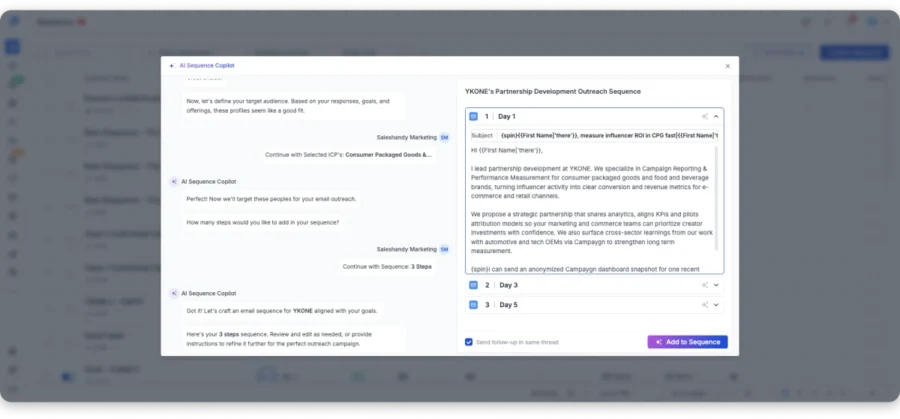
Saleshandy also supports unlimited email accounts across paid plans, so adding more sending inboxes does not create another mailbox charge.
Then there is channel depth. QuickMail already handles email and LinkedIn well.
Saleshandy adds calls, WhatsApp, LinkedIn steps, and manual tasks through its multichannel outreach workflow when your outbound motion needs more channels.
Deliverability also sits inside the workflow, with email warm-up, sender rotation, and ramp-up controls.
You can also use Inbox Radar for inbox placement testing.
If your bottleneck has shifted from sending emails to finding verified prospects, managing more channels, and keeping deliverability in one workflow, Saleshandy is the stronger fit.
Saleshandy vs QuickMail: Quick Comparison
| Feature | Saleshandy | QuickMail |
|---|---|---|
| Database size | 852M+ contacts, 42M+ companies | Free prospecting database, mostly LinkedIn-led |
| Prospecting model | Find, enrich, verify, and outreach in one workflow | Search prospects and add them directly to campaigns |
| Email verification | Real-time verification with waterfall enrichment | Prospecting is less focused on verified email discovery |
| Email accounts | Unlimited on every paid plan | Unlimited senders on every plan |
| Warm-up | Unlimited via TrulyInbox, included | MailFlow AutoWarmer included |
| Sequence channels | Email, calls, WhatsApp, LinkedIn, manual tasks | Email and LinkedIn |
| Unified inbox | Centralized reply management with AI categorization | Email and LinkedIn replies in one inbox |
| AI workflow | AI CoPilot, Prompt-to-List, enrichment, reply categorization | AI reply drafting, Reword, categorization, sub-campaigns |
| Built-in CRM | Native outbound CRM included | Focused mainly on campaigns and reply management |
| Agency-scale pricing | Unlimited clients on every plan, from $34/mo | 1 workspace on Starter/Growth; Agency starts at $299/mo |
Worth Reading: Want a deeper look before switching? Read Saleshandy review for features, use cases, and limitations.
Saleshandy Pricing
Here’s what each Saleshandy plan includes when billed annually.
| Plan | Annual Pricing | Includes |
|---|---|---|
| Starter | $34/month | 1,500 Lead Finder credits/month, 6,000 emails/month, unlimited email accounts, 1 user |
| Pro | $76/month | 4,000 Lead Finder credits/month, 100,000 emails/month, up to 10 users |
| Scale | $149/month | 8,000 Lead Finder credits/month, 200,000 emails/month, unlimited users and teams |
| Enterprise | Custom | Custom limits and enterprise requirements |
| Free trial | 7 days, 50 free credits | No credit card required |
For a deeper breakdown of plan limits, credits, and costs, see Saleshandy pricing guide.
2. Instantly
Best for: High-volume cold email teams that want to manage more inboxes and send more emails.
Where QuickMail balances email, LinkedIn, and deliverability, Instantly focuses more on cold email at scale.
If your goal is to build bigger lead lists, connect more inboxes, and send more emails, Instantly can be a better fit.
The first difference is prospecting.
QuickMail includes free prospecting, but most leads in its database are more useful for LinkedIn outreach than email-first campaigns.
Instantly’s SuperSearch gives you access to a 450M+ B2B database with email finding, verification, enrichment, and AI research.
So your team can find a prospect, verify the email, and add the contact to a campaign without switching tools.
Sending scale is another strong point.
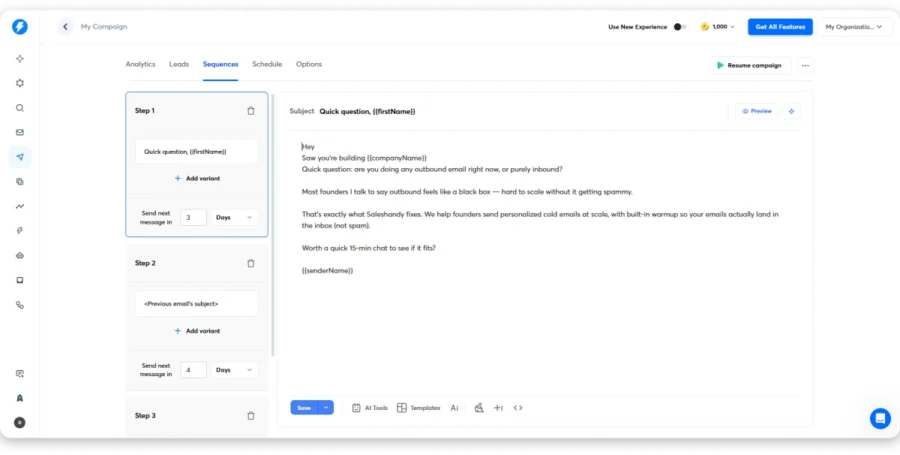
You get unlimited email accounts and unlimited warm-up. Higher plans also give you more contacts and higher sending limits.
QuickMail also gives you unlimited senders, so inbox count alone is not a reason to switch.
The bigger difference is that Instantly is built more around high-volume email campaigns across many sending accounts.
QuickMail is still better if LinkedIn is an important part of your outreach. It supports connection requests, messages, InMail, and other native LinkedIn actions.
Instantly stays much more focused on email.
If you want to compare Instantly with a tool that also covers prospecting and multichannel outreach, see Saleshandy vs Instantly comparison.
Price also needs context, as Instantly starts at $37.60/month annually, below QuickMail’s $49 entry price. But lead credits, inbox placement, and other products can increase your total monthly spend.
Instantly vs. QuickMail: Quick Comparison
| Feature | Instantly | QuickMail |
|---|---|---|
| Personalization | Variables, AI writing, AI lead research | Variables, Reword, AI-assisted writing |
| Lead Database & Verification | 450M+ contacts, verification, enrichment | Prospecting database, mostly LinkedIn-led |
| Email Accounts | Unlimited on Outreach plans | Unlimited senders on every plan |
| Deliverability & Warm-up | Unlimited warm-up, inbox placement, bounce protection | MailFlow AutoWarmer, Deliverability Report |
| Multichannel Outreach | Native email only | Email and LinkedIn |
| AI & Automation | AI Writer, Researcher Agent, Reply Agent | AI replies, Reword, categorization, sub-campaigns |
| Users / Agency | Built for high-volume email operations | Unlimited users, agency workspaces |
Worth Reading: Still comparing options? See guide to the best Instantly alternatives.
Instantly Pricing
Here’s how Instantly’s annual plans compare as your sending volume grows.
| Plan | Annual Pricing | Best for |
|---|---|---|
| Growth | $37.60/month | Smaller cold email teams |
| Hypergrowth | $77.60/month | Teams running larger campaigns |
| Light Speed | $286.30/month | High-volume email operations |
| Enterprise | Custom | Custom sending requirements |
| Free trial | 14 days | Test instantly before upgrading |
For the full breakdown of plans, credits, and additional costs, see Instantly pricing guide.
3. Smartlead
Best for: Agencies and outbound teams that need more control over inboxes, sending volume, and deliverability.
Smartlead becomes more useful than QuickMail when your outbound setup starts getting harder to manage across many inboxes or client accounts.
QuickMail already handles email sequencing, LinkedIn outreach, sender rotation, warm-up, and deliverability well.
Smartlead puts more focus on the sending infrastructure behind those campaigns. If infrastructure is the main buying criterion, Saleshandy also has a dedicated email infrastructure option for provisioning and managing sending accounts.
That shows up in how it handles mailbox scale.
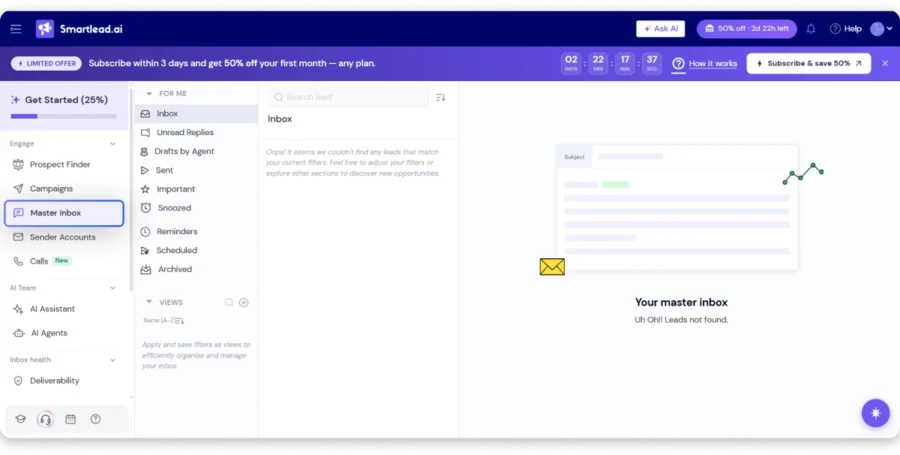
You get unlimited mailboxes, warm-up, automatic rotation, and more control over how sending is spread across accounts.
QuickMail also supports unlimited senders, so account count alone is not the reason to switch.
The bigger difference is what Smartlead builds around those inboxes.
SmartDelivery adds inbox placement testing and campaign-level deliverability checks, while SmartServers gives larger teams more control over sending infrastructure.
For agencies, Smartlead also leans harder into client management.
You get workspaces, white-label options, API access, and centralized controls for campaigns across several accounts.
SmartAgents adds another layer by helping with reply handling, lead categorization, and campaign automation.
So Smartlead starts to make more sense when your daily work is less about building a sequence and more about keeping a large sending setup under control.
The downside is that you get more settings to manage.
DNS setup, mailbox connections, infrastructure options, and client configuration can take more time than a simpler QuickMail setup.
Smartlead vs QuickMail: Quick Comparison
| Feature | Smartlead | QuickMail |
|---|---|---|
| Personalization | Variables, spintax, personalized campaign fields | Variables, Reword, AI-assisted writing |
| Lead Database & Verification | SmartProspect with verified prospect data | Prospecting database, mostly LinkedIn-led |
| Email Accounts | Unlimited mailboxes | Unlimited senders on every plan |
| Deliverability & Warm-up | SmartDelivery, warm-up, rotation, SmartServers | MailFlow AutoWarmer, Deliverability Report |
| Multichannel Outreach | Primarily email | Email and LinkedIn |
| AI & Automation | SmartAgents for replies and campaign actions | AI replies, categorization, sub-campaigns |
| Users / Agency | Client workspaces, white-labeling, API | Unlimited users, agency workspaces |
Worth Reading: Want a deeper look at SmartDelivery, SmartServers, agency features, and usability? Read Smartlead review.
Smartlead Pricing
Smartlead’s annual plans scale mainly by active leads, email volume, and infrastructure depth.
| Plan | Annual Pricing | Includes |
|---|---|---|
| Base | $32.50/month | 2,000 active leads, 6,000 emails/month, unlimited email accounts, warm-up |
| Pro | $78.30/month | 30,000 active leads, 90,000 emails/month, higher campaign limits, CRM access |
| Unlimited Smart | $144.50/month | Unlimited contact storage, 150,000 emails/month, agency features, 50,000 verified prospect emails |
| Unlimited Prime | $314.60/month | 500,000 emails/month, private infrastructure, higher prospect limits, 170,000 verified prospect emails |
| Free trial | 14 days | 2,500 emails, 1,250 contacts, unlimited mailbox connections |
For a full breakdown of plan limits and infrastructure costs, see my Smartlead pricing guide.
4. Lemlist
Best for: Teams moving beyond email-first outreach into deeper personalization and multichannel sequences.
Lemlist is where QuickMail starts to feel narrow if your sales process depends on more than email and LinkedIn.
The biggest difference is personalization.
QuickMail gives you strong email and LinkedIn automation, but Lemlist puts more weight on how each touch feels to the prospect.
You can personalize emails with dynamic images, custom video thumbnails, landing pages, and lead-specific content. That gives teams more room to stand out when plain-text sequences start looking the same.
The channel mix is broader too.
Lemlist can combine email, LinkedIn, calls, SMS, and WhatsApp inside one sequence. QuickMail already handles email and LinkedIn well, but Lemlist makes more sense when reps need several channels working together.
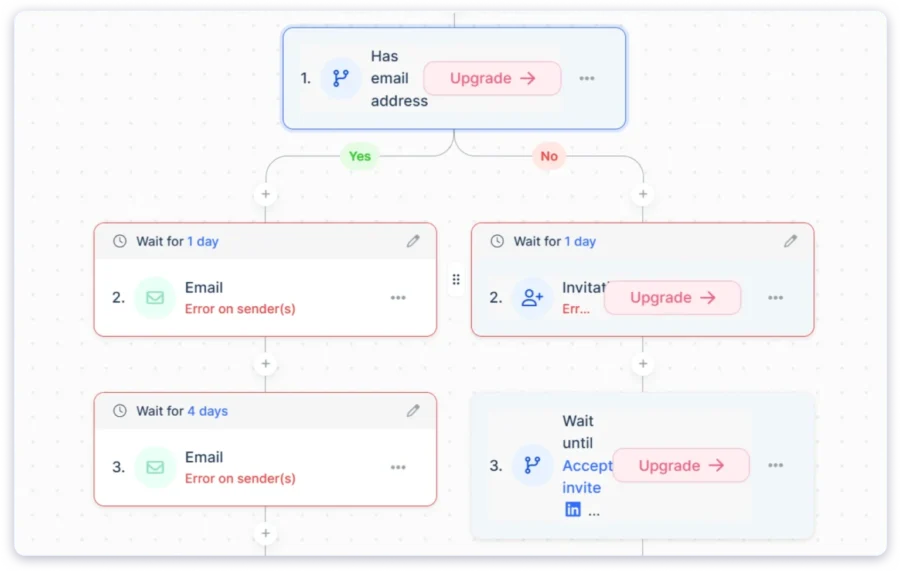
That matters because some outbound teams do not want five separate tools for one campaign.
Prospecting is also stronger for email-first workflows.
Lemlist includes access to a 650M+ lead database, along with enrichment and LinkedIn sourcing. You can move prospects from search into a sequence without relying only on LinkedIn profile data.
Deliverability stays inside the same setup through Lemwarm and its Deliverability Hub.
QuickMail already offers warm-up and deliverability reporting, so this is not a simple “Lemlist is better” point.
The stronger reason to switch is that Lemlist combines deliverability with deeper personalization and more channels.
Price is where the decision gets harder. The Email plan starts at $55/month annually, while Multichannel costs $87/month annually.
That is higher than QuickMail’s $49 starting price, and costs can rise as your team needs more senders or paid data features.
If you are weighing Lemlist against a platform with unlimited sending accounts and a broader outbound workflow, Saleshandy vs Lemlist comparison goes deeper on deliverability, personalization, prospecting, agency features, and total cost.
So Lemlist makes the most sense when you will actually use the extra channels and personalization.
Lemlist vs. QuickMail: Quick Comparison
| Feature | lemlist | QuickMail |
|---|---|---|
| Personalization | Dynamic images, videos, landing pages | Variables, Reword, AI-assisted writing |
| Lead Database & Verification | 650M+ leads with enrichment | Prospecting database, mostly LinkedIn-led |
| Email Accounts | Sender limits vary by plan | Unlimited senders on every plan |
| Deliverability & Warm-up | Lemwarm and Deliverability Hub | MailFlow AutoWarmer, Deliverability Report |
| Multichannel Outreach | Email, LinkedIn, calls, SMS, WhatsApp | Email and LinkedIn |
| AI & Automation | lemAgent, Signal Agents, Enrichment Agents | AI replies, categorization, sub-campaigns |
| Users / Agency | Unlimited users on Email plan | Unlimited users, agency workspaces |
Worth Reading: Want the complete product breakdown first? Read my Lemlist review.
Lemlist Pricing
Here’s how Lemlist pricing changes depending on whether you need email-only or multichannel outreach.
| Plan | Annual Pricing | Includes |
|---|---|---|
| $55/month | Email outreach, unlimited users, 650M+ lead database, Lemwarm | |
| Multichannel | $87/month | Email, LinkedIn, calls, SMS, WhatsApp, 5 senders per user |
| Enterprise | Custom | Advanced roles, permissions, SSO/SAML, dedicated support |
| Free trial | 14 days | 200 credits |
For current plans, sender limits, and multichannel costs, see lemlist pricing guide.
5. Reply.io
Best for: Sales teams that want broader multichannel outreach and more AI automation than QuickMail provides.
Reply.io is a QuickMail alternative when you want more than email and LinkedIn sequences. If your outbound process also includes SMS, calls, deeper automation, and AI, Reply.io gives you a broader workflow in one platform.
QuickMail already handles email sequencing, LinkedIn outreach, warm-up, sender rotation, and deliverability well.
But the two tools are built for different workflows.
QuickMail keeps things focused on email and LinkedIn. Reply.io is built to coordinate a wider sales process across email, LinkedIn, SMS, calls, and WhatsApp.
That difference matters once your reps start moving prospects across several touchpoints instead of relying on two channels.
Reply.io also goes further with automation.
Jason AI can help with prospecting, writing messages, personalizing sequences, handling replies, and booking meetings.
Reply.io also includes a built-in B2B data layer, email validation, warm-up, deliverability tools, and CRM integrations with HubSpot, Salesforce, and Pipedrive.

So you can move from lead discovery to outreach without stitching together as many separate tools.
The other thing to watch is pricing.
Reply.io’s Multichannel plan starts at $99/user/month, while its email-focused plan starts higher depending on volume. Jason AI SDR starts at $500/month.
That makes Reply.io better suited to teams that will use the wider channel mix and deeper automation.
If your outreach mostly stays inside email and LinkedIn, QuickMail is easier to justify.
Reply.io vs QuickMail: Quick Comparison
| Feature | Reply.io | QuickMail |
|---|---|---|
| Personalization | Variables, conditional steps, AI personalization | Variables, Reword, AI-assisted writing |
| Lead Database & Verification | Built-in B2B data and verification | Prospecting database, mostly LinkedIn-led |
| Email Accounts | Multiple mailboxes, plan dependent | Unlimited senders on every plan |
| Deliverability & Warm-up | Warm-up, ESP matching, email health checks | MailFlow AutoWarmer, Deliverability Report |
| Multichannel Outreach | Email, LinkedIn, calls, SMS, WhatsApp | Email and LinkedIn |
| AI & Automation | Jason AI for outreach and replies | AI replies, categorization, sub-campaigns |
| Users / Agency | Agency workflows and CRM integrations | Unlimited users, agency workspaces |
Worth Reading: If Reply.io feels broader or more expensive than you need, compare the best Reply.io alternatives.
Reply.io Pricing
Reply.io pricing varies by email volume, channels, and whether you add its AI SDR.
| Plan | Pricing | Includes |
|---|---|---|
| Email Volume | From $59/month | Email outreach, multiple mailboxes, warm-up |
| Multichannel | From $99/user/month | Email, LinkedIn, SMS, calls, WhatsApp |
| AI SDR | From $500/month | AI-led prospecting, replies, meeting booking |
| Agency | From $166/month | Multi-client outreach workflows |
| Free trial | 14 days | Product testing before upgrading |
6. Apollo
Best for:B2B sales teams that want prospecting, enrichment, and outreach in one platform.
Apollo sits in a different corner of the market, and it’s the tool teams reach for when they need prospecting, contact data, and outreach in one place without stitching together separate tools.
Where QuickMail focuses on running outbound campaigns, Apollo combines the lead database and outreach workflow inside one platform.
QuickMail does offer prospecting, but most current records contain LinkedIn profile IDs rather than email addresses. This makes it more useful for LinkedIn-led prospecting than building verified email lists.
Apollo gives you 275M+ contacts, company data, enrichment, advanced search filters, and a Chrome extension for LinkedIn prospecting.
That matters because your team can find a prospect, enrich the contact, build a list, and move them into a sequence without switching platforms. If verified prospect data is the priority, compare that workflow with Saleshandy’s B2B Lead Finder.
Apollo also gives you email sequences, LinkedIn prospecting, calls, CRM integrations, and AI research tools.
The other thing to watch is pricing.
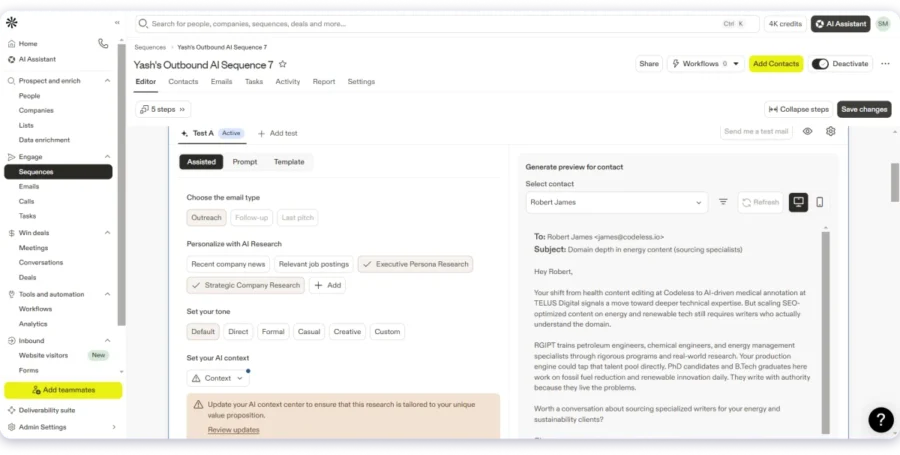
Apollo Basic starts at $49/user/month annually, while Professional costs $79/user/month. There is also a free plan with limited access.
This pricing works well for smaller teams that want every rep to have prospecting and outreach tools in one workspace.
But costs increase with every added user, while QuickMail includes unlimited users across its plans.
If that per-seat model is a concern, Saleshandy vs Apollo comparison compares the two on B2B data, deliverability, CRM, outreach features, and pricing as your team scales.
Apollo’s main strength is still the connection between data and outreach.
If your team already has reliable prospect lists, QuickMail can remain the more focused choice. If finding those prospects is the bigger problem, Apollo gives you more of the workflow in one place.
Apollo vs QuickMail: Quick Comparison
| Feature | Apollo | QuickMail |
|---|---|---|
| Personalization | Data-driven personalization and custom fields | Variables, Reword, AI-assisted writing |
| Lead Database & Verification | 275M+ contacts, enrichment, verification | Prospecting database, mostly LinkedIn-led |
| Email Accounts | Inbox limits depend on plan | Unlimited senders on every plan |
| Deliverability & Warm-up | Deliverability Suite, verification, warm-up | MailFlow AutoWarmer, Deliverability Report |
| Multichannel Outreach | Email, LinkedIn workflows, calls | Email and LinkedIn |
| AI & Automation | AI research, scoring, prospecting assistance | AI replies, categorization, sub-campaigns |
| Users / Agency | Per-seat users with team controls | Unlimited users, agency workspaces |
Worth Reading: If you are still evaluating other data-first platforms, compare the best Apollo.io alternatives.
Apollo Pricing
Here’s what Apollo charges per user across its annual plans.
| Plan | Annual Pricing | Includes |
|---|---|---|
| Free | $0 | Limited credits and basic sequences |
| Basic | $49/user/month | Prospecting, sequencing, enrichment, and core sales tools |
| Professional | $79/user/month | Higher limits, advanced automation, dialer, and reporting |
| Organization | $119/user/month | Advanced controls, security, and team features |
| Free trial | 14 days | Access to Basic or Professional features |
For the complete plan and credit breakdown, see Apollo.io pricing guide.
7. Woodpecker
Best for: Small teams that want simple cold email outreach with strong sending controls.
Woodpecker is built for small teams that want simple cold email outreach without a lot of extra features getting in the way.
Where QuickMail gives you a broader mix of email, LinkedIn, and outbound automation, Woodpecker keeps the focus on running personalized cold email campaigns.
That difference shows up in the setup.
Woodpecker has a clean interface, simple campaign creation, and condition-based follow-ups that change based on how a prospect interacts with your emails.
It is a good fit for teams that want to get campaigns running without spending much time learning the platform.
Woodpecker also puts a lot of attention on deliverability. If deliverability is your deciding factor, you can also compare dedicated email deliverability tools before choosing a platform.
It includes Bounce Shield, email verification, inbox rotation, and deliverability monitoring to help protect sender reputation while campaigns are running.
That matters because for smaller teams, deliverability problems can quickly affect the whole outreach operation.
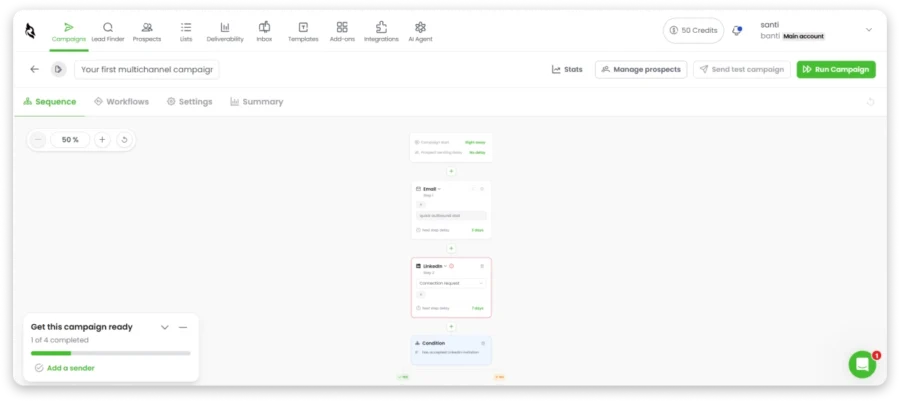
The other thing to watch is the usage-based pricing.
Woodpecker starts at $20/month when billed annually, but that plan covers only 500 contacted prospects per month and up to six warm-up accounts. Google accounts are also not supported for warm-up.
As your prospect list grows, the monthly cost increases with usage.
Woodpecker also includes CRM integrations with tools such as HubSpot and Pipedrive, plus an agency panel for managing client campaigns from one place.
If you are deciding between Woodpecker and Saleshandy specifically, Woodpecker vs Saleshandy comparison looks at pricing, campaign management, deliverability, prospecting, agency features, and reply management side by side.
Woodpecker vs QuickMail: Quick Comparison
| Feature | Woodpecker | QuickMail |
|---|---|---|
| Personalization | Custom fields, conditional follow-ups | Variables, Reword, AI-assisted writing |
| Lead Database & Verification | Lead Finder plus email verification | Prospecting database, mostly LinkedIn-led |
| Email Accounts | Unlimited | Unlimited senders on every plan |
| Deliverability & Warm-up | Adaptive Sending, Bounce Shield, warm-up | MailFlow AutoWarmer, Deliverability Report |
| Multichannel Outreach | Email, LinkedIn add-on, manual tasks | Email and LinkedIn |
| AI & Automation | AI reply classification, campaign conditions | AI replies, categorization, sub-campaigns |
| Users / Agency | Unlimited users, Agency Panel, white-labeling | Unlimited users, agency workspaces |
Worth Reading: Still considering similar email-first tools? Compare the best Woodpecker alternatives.
Woodpecker Pricing
Woodpecker pricing changes based on prospect volume and the add-ons you need.
| Plan / Add-on | Pricing | Includes |
|---|---|---|
| Base | $35/month | 500 contacted prospects, unlimited email accounts, unlimited users, 8,000 emails/month, 2 warm-up slots, 100 Lead Finder credits |
| LinkedIn Outreach | $29/month per account | LinkedIn automation |
| Extra warm-up | $5/month per mailbox | Additional warm-up slots |
| Agency client | $27/month per active client | Agency Panel access |
| White Label | $5/month per client | White-label reporting |
| Free trial | 14 days | Test platform before upgrading |
For contact-prospect limits, add-ons, and agency costs, see Woodpecker pricing guide.
8. Snov.io
Best for: Small teams that want lead finding, email verification, and outreach in one place.
Snov.io is built for small teams that want lead finding, email verification, and outreach in one place.
The difference shows up before a campaign even starts.
QuickMail is stronger as a focused outreach tool. Snov.io gives you more help with finding and verifying prospects before they enter a sequence.
You can search for leads, find work emails, verify them, build campaigns, warm up inboxes, and manage prospects from the same platform.
That matters because a small team can move from finding a lead to verifying the email and adding that prospect to outreach without adding another data tool.
Snov.io also supports email and LinkedIn outreach, along with unlimited senders and follow-ups on paid plans.
Its built-in warm-up and deliverability tools keep more of the sending workflow inside the same account.
For list hygiene, Saleshandy also offers a free email finder and email verifier you can use before outreach.
The other thing to watch is how credits work.
Snov.io Starter costs $29.25/month when billed annually and includes 1,000 credits. Those credits are used across prospecting, email finding, and verification.
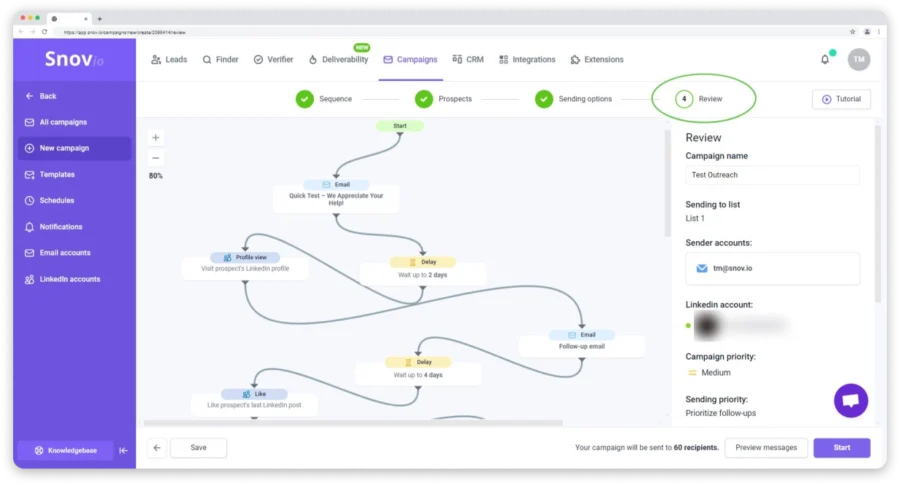
You also get 5,000 recipients and unlimited email sending on Starter.
As your prospecting volume grows, though, you need more credits and a higher plan. Unlimited warm-up also starts on Pro S rather than Starter.
That means Snov.io works best when your team values having prospecting and outreach together more than running very large campaigns.
Snov.io vs QuickMail: Quick Comparison
| Feature | Snov.io | QuickMail |
|---|---|---|
| Personalization | Variables, personalization, AI writing | Variables, Reword, AI-assisted writing |
| Lead Database & Verification | Email Finder, Domain Search, verification | Prospecting database, mostly LinkedIn-led |
| Email Accounts | Unlimited on paid plans | Unlimited senders on every plan |
| Deliverability & Warm-up | Warm-up, verification, bounce safeguards | MailFlow AutoWarmer, Deliverability Report |
| Multichannel Outreach | Email and LinkedIn | Email and LinkedIn |
| AI & Automation | AI writing and campaign assistance | AI replies, categorization, sub-campaigns |
| Users / Agency | Built-in CRM and team workflows | Unlimited users, agency workspaces |
Worth Reading: Want a deeper look at its prospecting, credits, and outreach workflow? Read Snov.io review.
Snov.io Pricing
Here’s how Snov.io plans scale by credits, recipients, and warm-up capacity.
| Plan | Annual Pricing | Includes |
|---|---|---|
| Starter | $29.25/month | 1,000 credits, 5,000 recipients, 3 warm-up accounts, unlimited emails |
| Pro S | $74.25/month | 5,000 credits, 25,000 recipients, unlimited warm-up |
| Pro M | $141.75/month | 20,000 credits, 50,000 recipients |
| Pro L | $276.75/month | 50,000 credits, 100,000 recipients |
| Ultra | $553.50/month | 100,000 credits, 200,000 recipients |
| Free plan | $0 | Limited credits and recipients |
For a complete breakdown of credits, recipients, and plan limits, see Snov.io pricing guide.
9. Mailshake
Best for: Small sales teams that want simple cold email, calling, and social outreach without a steep learning curve.
Mailshake is built for teams that want outreach to stay simple.
Where QuickMail gives you email, LinkedIn, deliverability, and deeper campaign controls, Mailshake puts more focus on easy campaign setup and sales rep workflows.
That difference shows up in how quickly a smaller team can get moving.
You can build cold email sequences, add social steps, make calls from the built-in dialer, and track opens, clicks, replies, and campaign performance from one place.
Mailshake also includes Shakespeare AI for writing email copy and creating variations.
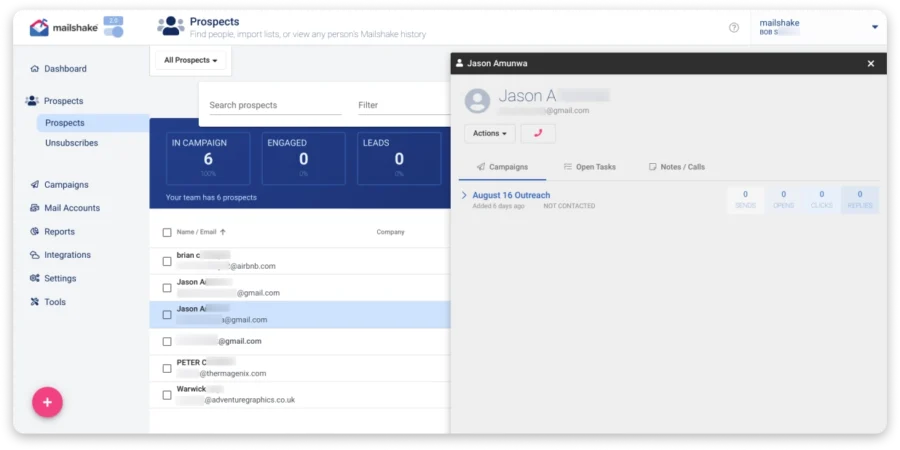
That matters for teams that do not want to spend much time learning a more technical campaign builder before sending.
Calling is another area where Mailshake has a clearer advantage.
Its Sales Engagement plan includes a built-in phone dialer, so reps can move from email to calls without adding another calling tool.
QuickMail already handles email and LinkedIn well, but it does not cover calling in the same way.
Mailshake also includes warm-up, email verification, rotation, throttling, and other deliverability controls.
The other thing to watch is how pricing changes with users and email accounts.
Mailshake Starter costs $25/month annually, but it includes only one user and one email account.
Higher plans add more email accounts, A/B testing, integrations, and calling.
That works well for smaller teams.
But the cost can rise quickly when several reps need their own seats and connected mailboxes, while QuickMail includes unlimited users and senders across its plans.
Mailshake also does not offer a free trial, so you need to pay before testing the full product.
Mailshake vs QuickMail: Quick Comparison
| Feature | Mailshake | QuickMail |
|---|---|---|
| Personalization | Merge fields, A/B tests, SHAKEspeare AI | Variables, Reword, AI-assisted writing |
| Lead Database & Verification | Data Finder and email verification | Prospecting database, mostly LinkedIn-led |
| Email Accounts | Limited by plan | Unlimited senders on every plan |
| Deliverability & Warm-up | Warm-up, verification, rotation, throttling | MailFlow AutoWarmer, Deliverability Report |
| Multichannel Outreach | Email, calls, social selling tasks | Email and LinkedIn |
| AI & Automation | SHAKEspeare AI for writing and variations | AI replies, categorization, sub-campaigns |
| Users / Agency | Users and accounts vary by plan | Unlimited users, agency workspaces |
Worth Reading: If Mailshake’s seat or mailbox limits are a concern, compare the best Mailshake alternatives.
Mailshake Pricing
Mailshake’s annual plans increase as you add more email accounts, users, and calling features.
| Plan | Annual Pricing | Includes |
|---|---|---|
| Starter | $25/month | 1 user, 1 email account, 1,500 sends/month, warm-up, AI writing |
| Email Outreach | $45/month | 2 email accounts, A/B testing, integrations, higher sending limits |
| Sales Engagement | $85/month | Up to 10 email accounts, phone dialer, social selling |
| Free trial | No free trial | Paid signup required |
10. Outreach.io
Best for: Larger sales teams that need forecasting, rep coaching, pipeline visibility, and tighter sales process control.
Outreach.io is where QuickMail starts feeling too small for enterprise sales teams.
If your team has managers tracking pipeline, reviewing calls, coaching reps, and forecasting deals, QuickMail’s campaign-level workflow will not cover enough.
Outreach is built for that layer.
QuickMail is strong for email, LinkedIn, deliverability, and day-to-day outreach execution.
Outreach is a full sales execution platform with sequences, built-in calling, LinkedIn steps, rep coaching through Kaia, and pipeline forecasting tied closely to CRM data.
That matters because once you have a larger SDR or AE team, the problem is no longer only sending more messages.
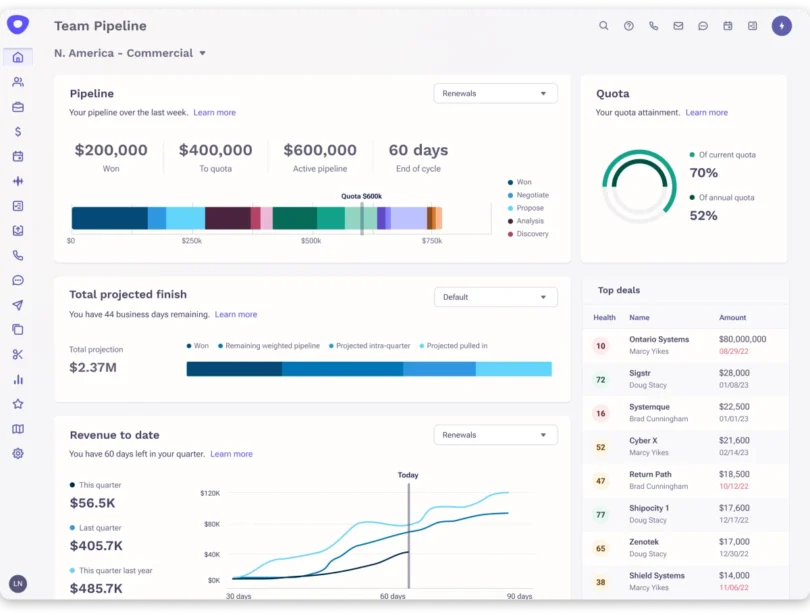
Managers need to know which reps are performing, which sequences create pipeline, where deals are slowing down, and what activity is moving opportunities forward.
Outreach gives them that wider view.
It also goes deeper on CRM and team management.
Salesforce is central to how many Outreach teams work, and the platform is built around syncing activity, account data, and opportunity movement back into the CRM.
That makes it easier for sales leaders to connect rep activity with actual pipeline, instead of treating outreach as a separate reporting layer.
The other thing to watch is the buying process.
Outreach does not publish simple self-serve pricing like QuickMail. Pricing is custom, and the product is designed for larger teams with more formal onboarding and setup.
That makes it harder to justify for founders or small SDR teams.
If your main job is still email, LinkedIn, warm-up, and sender management, QuickMail is much simpler.
Outreach.io vs QuickMail: Quick Comparison
| Feature | Outreach.io | QuickMail |
|---|---|---|
| Personalization | CRM-driven personalization, advanced sequences | Variables, Reword, AI-assisted writing |
| Lead Database & Verification | No native B2B lead database | Built-in prospecting database |
| Email Accounts | Built around enterprise rep workflows | Unlimited senders on every plan |
| Deliverability & Warm-up | Enterprise sending controls and monitoring | MailFlow AutoWarmer, Deliverability Report |
| Multichannel Outreach | Email, LinkedIn, calls, SMS | Email and LinkedIn |
| AI & Automation | Kaia, AI Agents, conversation intelligence | AI replies, categorization, sub-campaigns |
| Users / Agency | Enterprise roles, coaching, governance, reporting | Unlimited users, agency workspaces |
Worth Reading: If you are comparing broader sales engagement platforms, read the guide to the best sales outreach tools.
Outreach.io Pricing
Outreach does not publish standard plan prices, so most packages require a custom quote.
| Plan / Product | Pricing | Includes |
|---|---|---|
| Sales Engagement | Custom | Sequences, tasks, reporting, sales workflows |
| Voice | Custom / usage-based | Calling, phone numbers, dialer |
| AI features | Custom/add-on | Kaia, AI Agents, advanced automation |
| Enterprise | Custom | Governance, security, CRM integrations, support |
| Free trial | No public free trial | Sales-led evaluation |
Final Verdict: Which QuickMail Alternative Should You Choose?
QuickMail still works well if you mainly need email and LinkedIn outreach with solid deliverability controls.
But if you are running into gaps around prospecting, sending scale, or multichannel outreach, I would shortlist these three:
- Saleshandy for verified prospecting, multichannel outreach, deliverability, and reply management in one workflow.
- Instantly for high-volume cold email and teams scaling across many sending accounts.
- Reply.io for broader sales engagement across email, LinkedIn, calls, SMS, and WhatsApp.
If you want one platform that brings prospecting, verification, sending, warming, tracking, and reply management together, Saleshandy is the strongest all-in-one QuickMail alternative here.
It is a practical fit for teams that want to scale outbound without stitching together separate tools for data, outreach, and deliverability.
QuickMail Alternatives FAQs
1. What is the best free QuickMail alternative?
Snov.io and Apollo are two practical free QuickMail alternatives because both offer free plans. Snov.io suits small teams that want email finding, verification, and outreach together, while Apollo is better if prospect data and sales intelligence matter more. Saleshandy does not have a permanent free plan, but it offers a 7-day free trial with 50 free credits.
2. Which QuickMail alternative is best for agencies?
Saleshandy and Smartlead are two strong QuickMail alternatives for agencies. Saleshandy is better if you want prospecting, unlimited email accounts, outreach, deliverability, and client management in one platform. Smartlead is a better fit if your agency mainly needs large-scale mailbox management, sending infrastructure, white-labeling, and client workspaces.
3. Which QuickMail alternative has a built-in lead database?
Several QuickMail alternatives with a lead database include Saleshandy, Instantly, lemlist, Apollo, Snov.io, and Reply.io. Saleshandy stands out with a database of 852M+ contacts across 42M+ companies, plus real-time email verification and waterfall enrichment, which makes it useful for teams that want prospecting and outreach inside one workflow.
4. Which QuickMail alternative is best for high-volume cold email?
Instantly and Smartlead are strong QuickMail alternatives for high-volume cold email. Instantly is better for teams focused on scaling cold email across many sending accounts, while Smartlead fits better when you also need deeper infrastructure controls, inbox placement testing, or agency-level mailbox management.
5. Is QuickMail better than Instantly?
It depends on your workflow. In a QuickMail vs Instantly comparison, QuickMail is better if you want email and native LinkedIn outreach together with unlimited users and senders. Instantly is better if your priority is high-volume cold email, email-first prospecting, and scaling across multiple inboxes.
6. Is Saleshandy better than QuickMail?
Saleshandy is a better fit if you want prospecting, verified email data, multichannel outreach, deliverability, and reply management in one platform. In a QuickMail vs Saleshandy comparison, Saleshandy offers broader prospecting and outbound capabilities, while QuickMail stays more focused on email and LinkedIn campaign execution.
7. Does QuickMail have a lead database?
Yes. QuickMail has a built-in prospecting database, but it states that most current records contain LinkedIn profile IDs rather than email addresses. That makes it more useful for LinkedIn-led prospecting than email-first list building, so QuickMail alternatives for prospecting like Saleshandy, Apollo, Instantly, or Snov.io may fit better if verified work emails matter more.


 Hemanshu Mistry