 Anil Salvi
 Contents
- 1 CRM Lead Management – TOC
- 2 What is CRM Lead Management?
- 3 10 Best CRMs for Lead Management in 2026
- 4 5 Common CRM Lead Management Mistakes to Avoid
- 5 Pick the Best CRM for Your Lead Management Workflow
- 6 Frequently Asked Questions
- 6.1 1. What is lead management in CRM?
- 6.2 2. How does a CRM improve lead management?
- 6.3 3. What is the best CRM for lead management?
- 6.4 4. What is the difference between lead management and pipeline management?
- 6.5 5. How do I set up lead management in a CRM?
- 6.6 6. Can a CRM help with cold email lead management?
- 6.7 7. What are the stages of CRM lead management?
- 6.8 8. Is CRM lead management suitable for small businesses?
CRM lead management can make or break your sales pipeline.
According to recent data, 80% of leads never convert into customers. And in most cases, the issue is not the quality of the lead. It is a poor follow-up execution.
Your team could be generating hundreds of leads every month. But if there is no system to track, prioritize, and follow up on time, most of those leads will go cold before anyone takes action.
The worst part? Your pipeline will still look full. Reps will still appear busy. But activity does not equal progress. Without the right CRM, deals slip quietly while everyone assumes things are moving forward.
I have reviewed the 10 best CRMs for lead management across pipeline tracking, follow-up management, prospect context, cold email fit, ease of setup, and pricing.
I compared their features, tested their workflows, and matched each one to a specific use case so you can pick the right tool without wasting time on the wrong one.
Let’s get into it.
CRM Lead Management – TOC
If you’re short on time, here’s the quick verdict:
If you run outbound → Saleshandy CRM is built specifically for cold email teams, with Kanban pipelines and prospect activity timelines.
If your leads come from inbound → HubSpot CRM offers a free tier with strong marketing integration.
If you need a budget-friendly CRM → Zoho CRM offers a free plan for 3 users with lead scoring, automation, and multi-channel support.
What is CRM Lead Management?
CRM Lead Management is the process of capturing, tracking, qualifying, and nurturing leads inside a CRM tool, from the first point of contact through to a closed deal.
Instead of managing leads across disconnected spreadsheets, email inboxes, and note-taking apps, a CRM brings everything into one place.
Your team gets a single view of every lead, every interaction, and every next step, so nothing slips through the cracks.
When this process works well, reps don’t waste time figuring out who to contact each morning. They open their CRM, see exactly who needs attention, and get to work.
Why CRM Lead Management Matters
The numbers tell the story clearly:
- 80% of leads never convert, and in most cases, the root cause is poor follow-up execution rather than low lead quality.
- Responding to a lead within five minutes makes you 9x more likely to convert them compared to waiting even 30 minutes.
- 41% of businesses admit they don’t have an efficient process for nurturing their leads after the first interaction.
- 44% of sales reps say they’re simply too busy to follow up with every lead on time.
- Companies that automate their lead management process see a 10%+ increase in revenue within just 6 to 9 months.
Every follow-up that gets delayed is a deal that could have closed. Every prospect that falls off your radar is revenue walking out the door.
A CRM prevents this by giving your team a structured system that replaces guesswork with clarity.
Lead Management vs Pipeline Management
These two terms come up together often, but they cover different parts of the sales process.
Lead Management: Lead management handles the early stages, capturing new leads, qualifying whether they are worth pursuing, assigning them to the right rep, and nurturing them with timely follow-ups until they become genuine opportunities.
Pipeline Management: Pipeline management takes over from there. It focuses on moving qualified deals through defined stages until they reach a closed-won outcome.
Most CRMs handle both, but lead management is where the biggest revenue leaks tend to happen. Fixing this part of the process usually delivers the highest return.
What to Look for in a CRM for Lead Management
Before I walk through the tools, here’s the evaluation framework I used to compare each one.
| Criteria | What to check |
|---|---|
| Lead & pipeline tracking | Kanban view, custom stages, visual pipeline, list views |
| Follow-up management | Tasks, reminders, auto follow-ups, and next action visibility |
| Prospect context | Activity timeline, email history, notes, engagement signals |
| Cold email / outbound fit | Native email tracking, sequence integration, outbound workflows |
| Ease of setup | Time to first pipeline, learning curve, and onboarding complexity |
| Pricing & value | Starting price, free tier, trial period, per-user vs flat pricing |
These six criteria shaped how I evaluated every CRM below.
The right tool ultimately depends on how your team sells, whether that’s through cold email, outbound, inbound marketing, phone-based sales, or a mix of all three.
10 Best CRMs for Lead Management in 2026
Here are the 10 CRM tools I evaluated, ranked by how well they help teams track, prioritize, and convert leads into real revenue.
1. Saleshandy CRM
G2 Rating: 4.6/5 ⭐ (770+ reviews)
Capterra Rating: 4.5/5 ⭐ (120+ reviews)
Best for:
Outbound sales teams, SDRs, cold email agencies, and founders running outbound prospecting.
Saleshandy CRM is an action-first outbound CRM built for B2B teams that rely on cold email and follow-ups to drive revenue.
It replaces static prospect lists with a Kanban-based visual pipeline and a unified prospect timeline that shows every interaction in one place.
What makes it different from traditional CRMs is its focus on daily execution. Most CRMs are built to store data. Saleshandy CRM is built to tell reps what to do next.
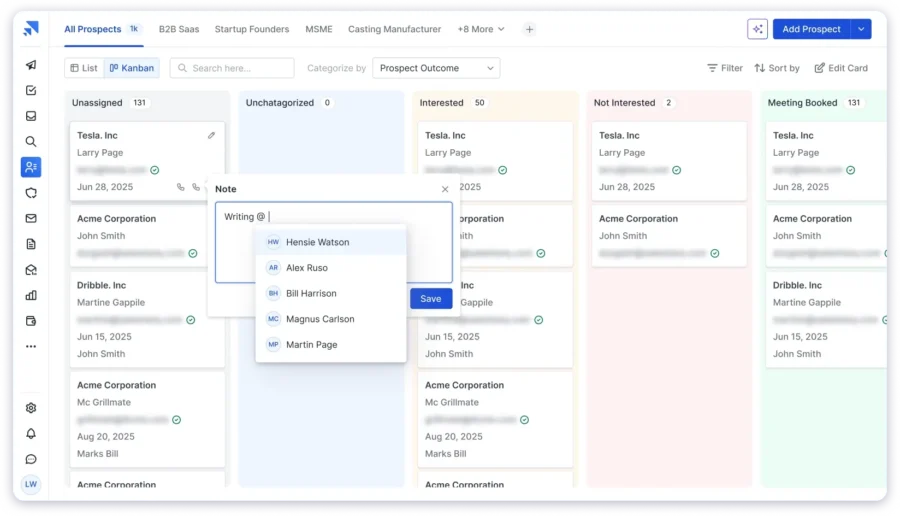
You can see which prospects are waiting for a follow-up, which conversations are heating up, and which deals are at risk, without digging through filters or switching between tabs.
When you open any prospect, their entire history appears in a single chronological timeline, every email sent, every reply received, every open, click, note, and task. This means your team always has full context before taking any action, which makes every follow-up more relevant and better timed.
Saleshandy also comes with a built-in Lead Finder that gives you access to 800M+ verified B2B contacts with 75+ advanced search filters. So you can go from finding a prospect to managing them in the same platform, without juggling multiple tools.
Key Features
- Kanban-based visual pipeline with custom stages (Not Contacted, Replied, Interested, Closed, and more)
- Unified prospect activity timeline showing every email, reply, open, click, note, and task in chronological order
- Send 1:1 emails, create tasks, and add notes directly from the CRM
- Custom fields and multiple views for different roles, including SDR view, manager view, and agency client view
- Native integration with cold email sequences, so leads from outreach auto-populate in the CRM
- Built-in Lead Finder with 800M+ B2B database and 75+ search filters
- Drag and drop prospects between stages as conversations move forward
- Manage prospects and accounts directly within Saleshandy CRM
Pricing
Saleshandy CRM is currently free to use. It includes unlimited prospects, Kanban and list views, and custom pipelines. The outreach platform offers a 7-day free trial with 5 free credits to test the Lead Finder.
For cold email outreach plans:
- Outreach Starter – $25/month (billed annually) – 2,000 active prospects, 6,000 emails/month
- Outreach Pro – $69/month (billed annually) – 30,000 active prospects, 150,000 emails/month
- Outreach Scale – $139/month (billed annually) – 60,000 active prospects, 240,000 emails/month
For the Lead Finder:
- Lead Starter – $49/month (billed annually) – 30,000 credits/year
- Lead Pro – $79/month (billed annually) – 48,000 credits/year
- Custom – For enterprise-scale outreach, contact the team
You can also purchase one-time credits starting at $13 for 500 credits if you need a quick burst of leads without upgrading. Unused credits roll over to the next month.
2. HubSpot CRM
G2 Rating: 4.4/5 ⭐ (12,000+ reviews)
Capterra Rating: 4.5/5 ⭐ (4,200+ reviews)
Best for:
Inbound-first teams, startups building their marketing engine, and companies running content and paid ad campaigns.
HubSpot CRM is a full marketing and sales ecosystem that offers one of the most generous free CRM tiers available today.
The platform gives you a complete view of every contact, including their interaction history, website visits, form submissions, and email engagement.
This makes it easy for reps to understand exactly where a lead stands before picking up the phone or sending a reply.
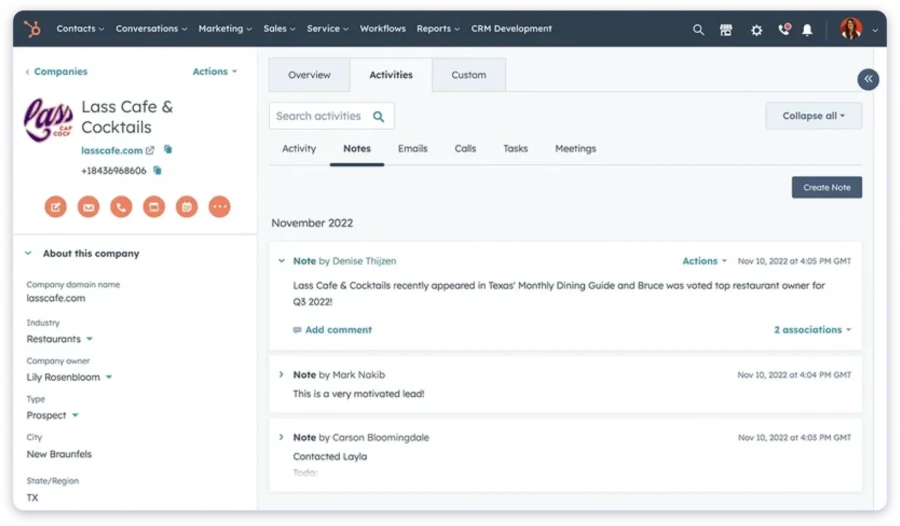
HubSpot also connects its CRM to dedicated “Hubs” for marketing, sales, service, and content management.
This means your marketing team can capture leads, run nurture campaigns, and hand off qualified prospects to sales, all within one ecosystem. Core features like the meeting scheduler and email tracking come included in the free plan.
The main downside is that advanced capabilities like lead scoring, email sequences, and custom reporting are locked behind paid tiers. Once you start stacking Hubs, costs can scale quickly, which catches some growing teams off guard.
Key Features
- Contact management with a full interaction timeline for every lead
- Deal pipeline with customizable stages and drag-and-drop functionality
- Email tracking with real-time open and click notifications
- Built-in meeting scheduler available on the free plan
- Lead scoring and marketing automation through paid Sales Hub and Marketing Hub
- Form builder and landing page tools for lead capture
- Reporting dashboards that provide visibility into pipeline health
Pricing
- Free CRM – $0 (unlimited users, core CRM features included)
- Sales Hub Professional – $45/seat/mo (annually)
- Sales Hub Enterprise – $75/seat/mo (annually)
The free plan has no time limit. Paid plans unlock sequences, scoring, advanced reporting, and more. Note that Professional and Enterprise plans require a one-time onboarding fee.
3. Pipedrive
G2 Rating: 4.3/5 ⭐ (2,100+ reviews)
Capterra Rating: 4.5/5 ⭐ (3,000+ reviews)
Best for:
Small sales teams of 5 to 20 reps, teams that sell through calls and demos, and SMBs that want a simple CRM without enterprise complexity.
Pipedrive is a sales-first CRM designed around a clean, drag-and-drop visual pipeline.
It’s especially popular with small sales teams that value simplicity and want to get running quickly without a complicated setup process.
The platform is built around the concept of activity-based selling. Instead of just tracking deals passively, Pipedrive reminds reps to schedule the next call, email, or meeting for every deal in the pipeline.
This keeps leads moving forward and reduces the chances of conversations going cold because someone forgot to follow up.
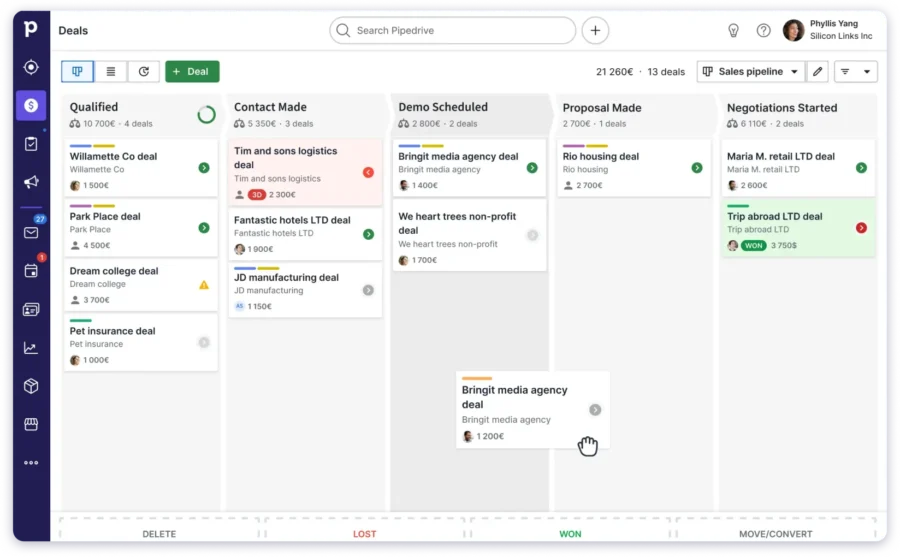
Getting started is fast. You can set up your first pipeline in minutes and begin tracking leads on the same day.
The interface is one of the cleanest in the CRM category, which means even non-technical team members can pick it up without training.
The main limitation is that Pipedrive doesn’t include native cold email sequencing.
Key Features
- Drag-and-drop deal pipeline with one of the cleanest interfaces in the CRM space
- Activity-based selling reminders that prompt reps to schedule the next action
- Custom fields, filters, and color-coded deal labels for easy organization
- Email integration and tracking with open and click notifications
- Reporting dashboards with revenue forecasting and deal insights
- Workflow automations for routine tasks like deal movement and notifications
- Mobile CRM app for managing your pipeline on the go
Pricing
- Lite – $14/user/mo (billed annually)
- Growth – $39/user/mo
- Premium – $59/user/mo
- Ultimate – $79/user/mo
A 14-day free trial is available with no credit card required.
4. Zoho CRM
G2 Rating: 4.1/5 ⭐ (2,700+ reviews)
Capterra Rating: 4.3/5 ⭐ (6,900+ reviews)
Best for:
Budget-conscious teams, growing businesses that need a full-featured CRM without enterprise pricing, and teams already using other Zoho applications.
Zoho CRM is an affordable, feature-rich platform that covers sales, marketing, and customer support under one roof. It’s part of the broader Zoho ecosystem, which includes more than 40 integrated business applications.
Even on its free tier, Zoho provides lead capture, basic automation, and contact management for up to three users at no cost.
Paid plans add lead scoring, workflow automation, and an AI assistant called Zia that provides smart predictions and deal recommendations based on your data.
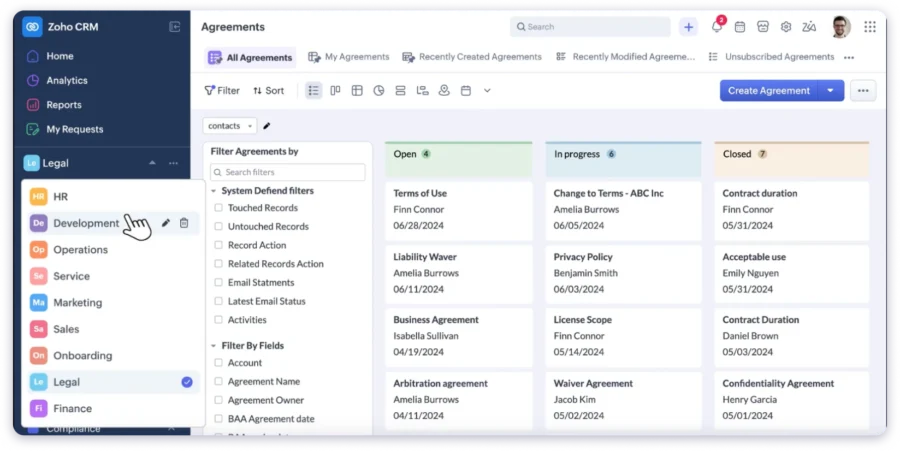
The platform supports multiple pipeline views, including Kanban, list, and table formats, so you can organize your leads in whatever way makes sense for your team’s workflow.
Multi-channel support is also built in, allowing you to manage leads coming from email, phone, social media, and live chat in one unified view.
The trade-off is that Zoho’s interface feels older compared to newer tools like Pipedrive or Saleshandy.
Key Features
- Lead scoring with automated lead assignment rules based on criteria you define
- Pipeline management with Kanban, list, and table views
- Workflow automation and macros that handle routine tasks automatically
- AI assistant (Zia) that provides deal predictions, lead suggestions, and smart alerts
- Multi-channel lead tracking across email, phone, social media, and live chat
- Custom modules, fields, and page layouts for tailored workflows
- Native integration with the full Zoho ecosystem of 40+ business apps
Pricing
- Free – $0 for up to 3 users
- Standard – $14/user/mo (billed annually)
- Professional – $23/user/mo
- Enterprise – $40/user/mo
- Ultimate – $52/user/mo
A 15-day free trial is available on all paid plans.
5. Salesforce Sales Cloud
G2 Rating: 4.4/5 ⭐ (23,000+ reviews)
Capterra Rating: 4.4/5 ⭐ (18,500+ reviews)
Best for:
Enterprise sales teams with 50+ reps, complex organizations with multi-department workflows, and companies with dedicated CRM administrators.
Salesforce is the industry standard for large organizations that need deep customization, advanced reporting, and a massive integration ecosystem.
The platform includes advanced lead scoring rules, multi-step approval processes, territory-based lead routing, and AI-powered insights through its Einstein engine.
You can build virtually any workflow you need, from simple round-robin lead assignment to complex multi-department handoff processes with conditional logic.
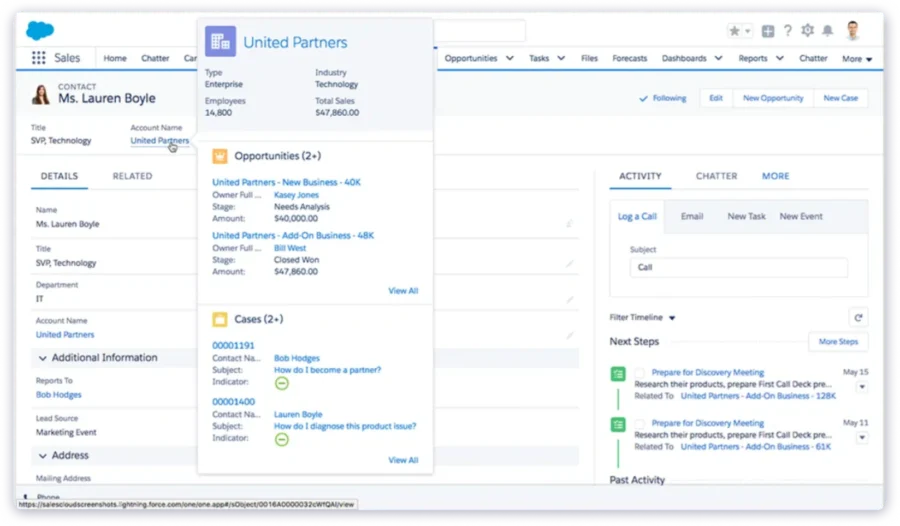
Salesforce also provides enterprise-grade reporting and analytics.
You can track lead sources, conversion rates, rep performance, and pipeline health through fully customizable dashboards. For organizations that need visibility across departments, regions, and teams, it remains the gold standard.
The downside is that Salesforce isn’t something you set up over a weekend. Implementation typically takes weeks or months, and most organizations need a dedicated admin or external consultant to manage it properly.
Key Features
- Advanced lead scoring and qualification rules with custom criteria
- Custom objects, fields, page layouts, and record types for any workflow
- Workflow automation, process builder, and multi-step approval flows
- AI-powered insights, predictions, and next-best-action recommendations through Einstein
- AppExchange marketplace with thousands of third-party integrations
- Territory management and team-based lead routing for complex org structures
- Advanced reporting with fully customizable dashboards and scheduled reports
- Enterprise-grade security with role-based access control
Pricing
- Free Suite – $0/user/mo
- Starter – $25/user/mo (billed annually)
- Pro Suite – $100/user/mo
- Enterprise – $175/user/mo
- Unlimited – $350/user/mo
A 30-day free trial is available.
6. Apollo.io
G2 Rating: 4.7/5 ⭐ (8,400+ reviews)
Capterra Rating: 4.6/5 ⭐ (350+ reviews)
Best for:
Teams that need prospecting, outreach, and basic lead management combined in a single platform without managing multiple tool subscriptions.
Apollo.io brings together a B2B contact database, outreach tools, and basic CRM functionality into a single platform.
It’s designed for teams that want to find new prospects, reach out to them, and manage the resulting conversations, all without switching between multiple subscriptions.
The platform gives you access to over 275 million contacts with intent data and buying signals.
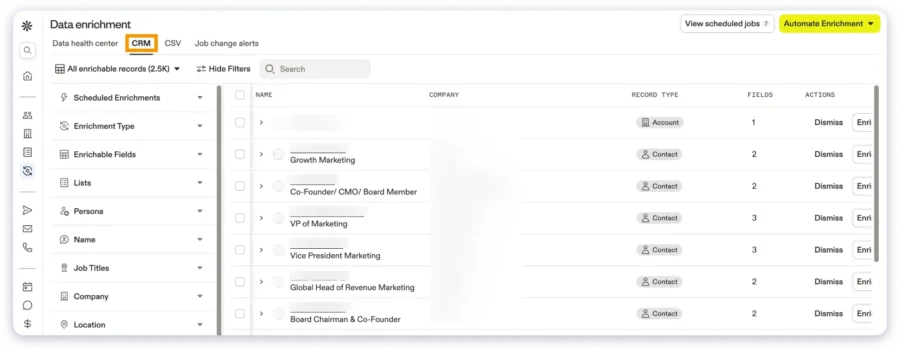
You can filter by industry, company size, job title, technology stack, funding stage, and more to build highly targeted prospect lists.
Once you find the right contacts, you can add them directly to multi-channel sequences that include email, LinkedIn steps, and phone calls.
Apollo also includes deal management with a pipeline view, lead scoring based on engagement and fit, and native CRM sync with both Salesforce and HubSpot.
This makes it a practical option for teams that want prospecting and lead management under one roof.
The limitation is that the CRM component is still basic compared to dedicated platforms.
Key Features
- Multi-channel sequences covering email, LinkedIn, and phone outreach
- Deal management with visual pipeline tracking
- Lead scoring based on engagement level and prospect-to-ICP fit
- Data enrichment and real-time contact verification
- Native CRM sync with Salesforce and HubSpot
- Chrome extension for prospecting directly from LinkedIn profiles
Pricing
- Free – $0 with limited credits and core features
- Basic – $49/user/mo (billed annually)
- Professional – $79/user/mo
- Organization – $119/user/mo
A free tier is available with limited monthly credits.
7. Close CRM
G2 Rating: 4.7/5 ⭐ (1,200+ reviews)
Capterra Rating: 4.7/5 ⭐ (160+ reviews)
Best for:
Inside sales teams that sell over the phone, SDR teams running high-volume calling campaigns, and organizations with call-based sales processes.
Close is a sales-focused CRM with calling, SMS, and email built directly into the platform.
It’s designed for teams that sell primarily over the phone and want their communication tools living inside the CRM rather than in separate applications.
The standout feature is the built-in VoIP dialer. Reps can make and receive calls directly from Close, and every conversation gets logged automatically to the lead record.
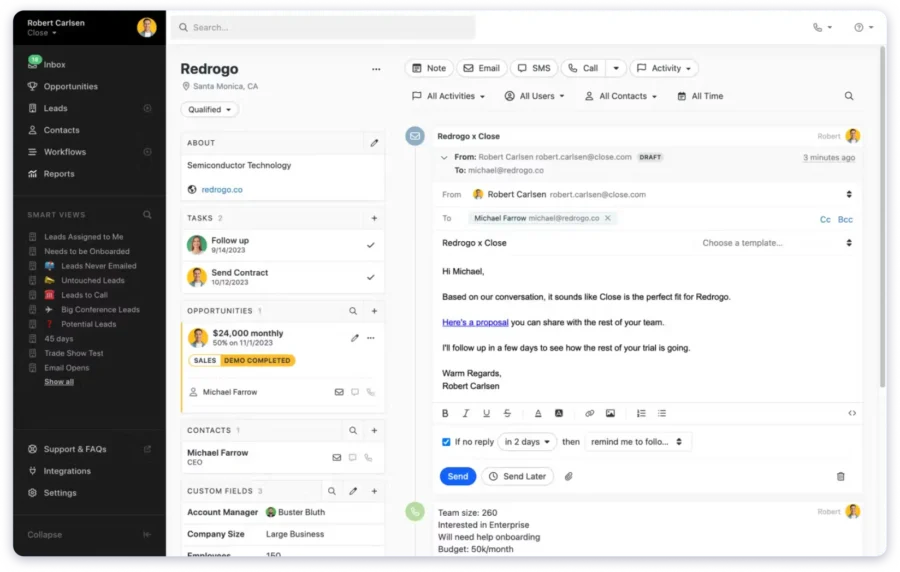
The Power Dialer lets reps work through call lists automatically, while the Predictive Dialer on higher plans dials multiple numbers simultaneously to minimize idle time between conversations.
Close also offers Smart Views, dynamically filtered lead lists that update in real time based on activity, deal status, or custom criteria you define. This helps reps start each day knowing exactly which leads need attention, without manually sorting or filtering their pipeline.
The trade-off is that Close is built phone-first. While it does include email sequences and tracking, these features aren’t as deep as what you’d get from a dedicated cold email platform.
Key Features
- Built-in VoIP dialer with Power Dialer and Predictive Dialer on higher-tier plans
- Automatic call recording with AI-powered call summaries for quick context
- SMS messaging sent and received directly from lead records in the CRM
- Email sequences with templates, tracking, and engagement analytics
- Smart Views that create dynamic lead lists based on real-time activity and criteria
- Pipeline management with opportunity tracking and deal value forecasting
- Mobile CRM app available for both iOS and Android
Pricing
- Solo – $9/user/mo (billed annually, limited to 1 user)
- Essentials – $35/user/mo (billed annually)
- Growth – $99/user/mo (includes Power Dialer and workflow automation)
- Scale – $139/user/mo (includes Predictive Dialer and call coaching tools)
A 14-day free trial is available with no credit card required.
8. Monday.com CRM
G2 Rating: 4.6/5 ⭐ (900+ reviews)
Capterra Rating: 4.7/5 ⭐ (400+ reviews)
Best for:
Teams that already use Monday.com for project management and want their CRM in the same platform, and teams with project-led sales workflows.
Monday.com CRM is a CRM module built on top of the Monday.com work management platform.
If your team is already using Monday for project management or operations, adding the CRM module is a natural extension that doesn’t require adopting an entirely new tool.
The platform offers multiple ways to view your pipeline, including Kanban boards, table views, timeline views, and chart views, so you can visualize lead progress in whatever format works best for your workflow.
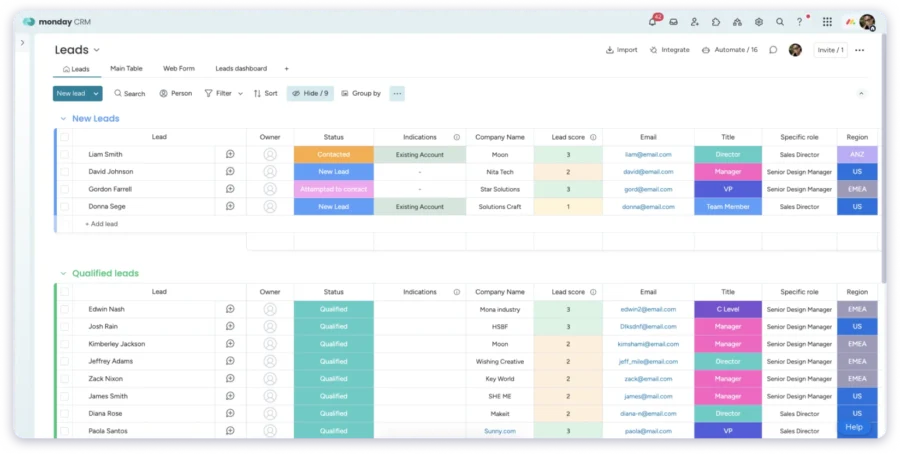
The automation builder is flexible and entirely no-code, allowing you to set up lead assignment rules, status change triggers, follow-up reminders, and notification workflows without any technical skills.
Monday.com CRM also includes email sync, activity tracking, and customizable dashboards for pipeline reporting.
The collaboration features are strong; team members can leave comments, tag colleagues, and update lead records in real time, which keeps everyone aligned.
The key limitation is that Monday.com CRM isn’t built for email-driven sales. There’s no native cold email tracking or sequencing functionality.
Key Features
- Visual pipeline with Kanban, table, timeline, and chart view options
- Flexible no-code automation builder for lead routing, notifications, and status changes
- Customizable dashboards and reporting for pipeline visibility at a glance
- Email sync and activity tracking tied to individual lead records
- Real-time team collaboration with comments, mentions, and updates
- 200+ integrations with popular business tools
- Mobile app for accessing your pipeline from anywhere
Pricing
- Basic CRM – $12/seat/mo (billed annually)
- Standard CRM – $17/seat/mo
- Pro CRM – $28/seat/mo
- Enterprise CRM – Custom pricing
9. Instantly
G2 Rating: 4.8/5 ⭐ (3,500+ reviews)
Capterra Rating: 4.5/5 ⭐ (10+ reviews)
Best for:
High-volume cold email senders who need a basic deal tracking layer alongside their outreach campaigns, rather than a full standalone CRM.
Instantly is primarily a cold email outreach platform rather than a standalone CRM.
Its core strength lies in sending cold emails at scale, with unlimited email accounts and a built-in email warmup included on every outreach plan.
The CRM is available as a separate paid module and provides basic functionality for managing replies and tracking deals. It includes a unified inbox called Unibox that centralizes replies from all your connected sending accounts into one view.
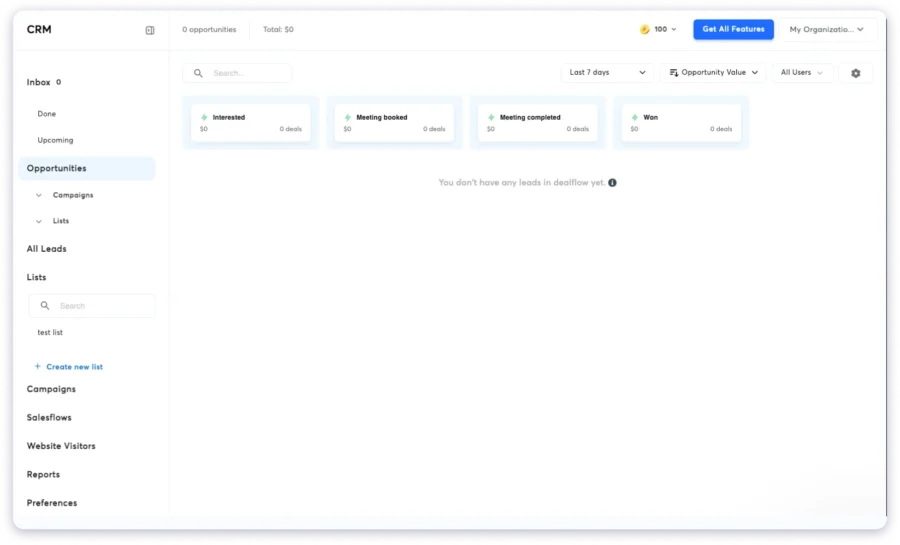
If you’re running campaigns across 10 or 20 email accounts, this is genuinely helpful for staying on top of incoming responses.
Instantly also offers a lead database module called SuperSearch, which is billed separately from both the outreach and CRM modules.
You can find contacts, send outreach, and manage replies, but each component carries its own subscription cost. The total expense adds up noticeably once you combine all three.
The CRM itself is still maturing as a product. Several features are listed as “coming soon,” and the overall functionality is lighter than what you’d get from a dedicated CRM.
Key Features
- Unlimited email accounts and email warmup are included on all outreach plans
- Unified inbox (Unibox) that consolidates replies from all connected sending accounts
- Basic lead tracking and deal stage management through the CRM module
- Campaign management with A/B testing and A/Z testing for subject lines and copy
- Lead database with contact search and enrichment through SuperSearch (separate module)
- Integrations with Salesforce, HubSpot, and Pipedrive for CRM sync
Pricing
Instantly prices each module separately:
- CRM Growth – $37.9/mo (billed separately from outreach)
- CRM Hyper – $77.6/mo
Realistic full-stack cost when combining modules: $150–400/mo depending on your selected combination. A 14-day free trial is available.
10. LeadSquared
G2 Rating: 4.6/5 ⭐ (230+ reviews)
Capterra Rating: 4.3/5 ⭐ (170+ reviews)
Best for:
B2C businesses handling high lead volumes, education institutions, healthcare organizations, real estate companies, and India-based teams with large inbound lead flows.
LeadSquared is a lead management and sales execution CRM that has strong adoption in India, as well as in the education, healthcare, and real estate sectors.
The platform automatically captures leads from web forms, paid ads, social media, phone calls, and third-party lead sources.
Once a lead enters the system, it gets scored based on criteria you define and then distributed automatically to the right sales rep, based on geography, product interest, lead source, or any other rule you configure.
LeadSquared also includes a mobile CRM with offline capability, which is particularly valuable for field sales teams that need to access and update lead data while working outside the office.
The workflow automation engine is strong, letting you build multi-step sales processes with conditional branching and automatic task creation.
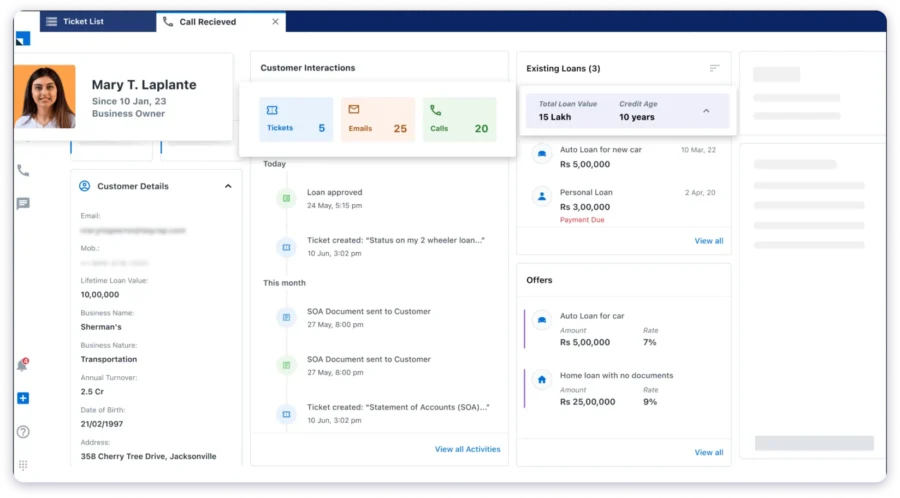
The main limitation for outbound teams is that LeadSquared isn’t designed for cold email workflows. It’s built for inbound-heavy and high-volume B2C scenarios where leads come to you through forms, calls, and ad campaigns.
The interface also feels dated compared to newer CRM tools, and its ecosystem of integrations and community resources is smaller outside of India and specific industry verticals.
Key Features
- Automated lead capture from web forms, paid ads, social media, phone calls, and third-party sources
- Lead scoring and rule-based automated lead distribution to the right sales reps
- Workflow automation with a multi-step sales process builder and conditional branching
- Mobile CRM with offline access for field sales teams working outside the office
- Multichannel engagement capabilities, including email, SMS, WhatsApp, and phone calls
- Field force management with route planning, geo-tracking, and attendance management
- Industry-specific templates and workflows for the education and healthcare sectors
Pricing
- Sales Pro – $60/user/mo
- Sales Super – $100/user/mo
- Custom – Contact the sales team for enterprise pricing
A free trial is available upon request.
5 Common CRM Lead Management Mistakes to Avoid
After working with multiple sales teams on their lead management processes, I’ve seen the same mistakes come up again and again.
1. Overcomplicating pipeline stages: If half your stages sit empty most of the time, you’ve built too many. Start with 5 to 7 stages that reflect your actual sales process. You can always add more later as your workflow evolves.
2. Ignoring lead source tracking: If you don’t know which channels produce your best leads, you’re making investment decisions blindly. Tag every lead with its source from day one so you can double down on what’s actually working.
3. Treating the CRM as a data storage tool: A CRM that just holds names and email addresses isn’t doing its job. The point of a CRM is to guide daily actions. to show reps who they should contact today, what the context is, and what the next step should be.
4. Skipping follow-up workflows: Every stage in your pipeline should have a clear next action attached to it. Without defined follow-up workflows, leads sit idle and go cold while your team focuses on whatever feels most urgent rather than what’s actually most important.
5. Not reviewing the pipeline regularly: Leads go stale faster than most people think. If you’re running outbound, review your pipeline daily. For inbound, weekly at a minimum. The teams that consistently review and clean their pipelines are the ones that convert more.
Pick the Best CRM for Your Lead Management Workflow
Now that you have read the complete blog, you have a clear picture of all 10 tools (I believe so).
If not, or if you are still confused, pick a CRM that helps you:
- Track every lead visually with Kanban pipelines and custom stages
- See the full context of every prospect before you follow up
- Automate follow-ups so no deal slips through the cracks
- Find new leads and manage outreach from one platform
When all of this sits inside a single CRM, your team stops guessing and starts closing.
👉 Try Saleshandy CRM and see how much faster your pipeline moves.
Frequently Asked Questions
1. What is lead management in CRM?
Lead management in CRM is the process of capturing, organizing, tracking, and nurturing potential customers using a CRM tool. It covers everything from the first interaction all the way to conversion, helping sales teams prioritize their follow-ups and close more deals consistently.
2. How does a CRM improve lead management?
A CRM centralizes all of your lead data, interaction history, notes, and tasks into one place. This eliminates the need for scattered spreadsheets, reduces missed follow-ups, and gives every rep full context before they pick up the phone or send an email. The result is faster response times, better conversations, and higher conversion rates.
3. What is the best CRM for lead management?
It depends on how your team sells. For cold email and outbound teams, Saleshandy CRM is purpose-built with Kanban pipelines, prospect activity timelines, and native cold email integration. For inbound-focused teams, HubSpot’s free CRM is a strong starting point. For enterprise-scale organizations, Salesforce remains the industry standard.
4. What is the difference between lead management and pipeline management?
Lead management covers the earlier stages of the sales process, capturing leads, qualifying them, and nurturing them until they become genuine opportunities. Pipeline management takes over from there, focusing on moving qualified deals through defined stages until they close. Lead management is typically where the biggest revenue leaks happen, making it the higher-impact area to fix first.
5. How do I set up lead management in a CRM?
Start by defining 5 to 7 lead stages that reflect your actual sales process. Then set up custom fields to track the information that matters most, company name, job title, lead source, and next action due date. Build a visual pipeline, assign clear ownership for each lead, and define what should happen at every stage so your reps never have to guess the next step.
6. Can a CRM help with cold email lead management?
Yes, but only if the CRM is designed for cold email workflows. Traditional CRMs are built around deal tracking and marketing automation, which doesn’t map well to outbound outreach. A cold email CRM like Saleshandy tracks email sends, opens, replies, and sequence activity directly inside the pipeline, so reps can manage their outbound conversations without switching between multiple tools.
7. What are the stages of CRM lead management?
The typical stages follow this progression: Lead Capture → Qualification → Assignment → Nurturing and Follow-Up → Pipeline Tracking → Conversion → Analysis. For outbound sales teams specifically, the stages often look like: Not Contacted → Contacted → Replied → Interested → Meeting Booked → Closed.
8. Is CRM lead management suitable for small businesses?
Absolutely. Small businesses actually benefit the most from structured lead management because they have less room to absorb losses. When your total active pipeline is 50 to 100 leads, losing even 5 of them to poor follow-up execution can have a meaningful impact on revenue. A CRM keeps every lead visible, every follow-up scheduled, and every opportunity accounted for.