



 Anil Salvi
 Contents
- 1 Guest Posting Email Templates
- 2 TL;DR- How to Write a Guest Post Email
- 3 The 5 Elements Every Successful Guest Post Email Needs
- 4 9 Guest Post Outreach Email Templates for Every Scenario
- 4.1 Template #1: Cold Pitch to a Blog That Accepts Guest Posts
- 4.2 Template #2: Cold Pitch to a Blog with No Guest Post Page
- 4.3 Template #3: Warm Pitch (You’ve Already Engaged with Their Content)
- 4.4 Template #4: The Content Gap Pitch
- 4.5 Template #5: The Broken Link Pitch
- 4.6 Template #6: Pitching to High-Authority Blogs
- 4.7 Template #7: The “Draft Is Ready” Pitch
- 4.8 Template #8: Paid/Sponsored Guest Post Email
- 4.9 Template #9: Re-Pitch After Rejection or Silence
- 5 Guest Post Follow-Up Email Sequence (with Templates)
- 6 Guest Post Email Subject Lines That Get Opened
- 7 How to Find the Right Person to Email
- 8 How to Send Guest Post Outreach at Scale
- 9 7 Common Mistakes That Get Your Guest Post Email Rejected
- 9.1 1. Sending the Same Template to 100 Blogs Without Changing Anything
- 9.2 2. Leading with Yourself Instead of Their Audience
- 9.3 3. Pitching Topics That Already Exist on Their Blog
- 9.4 4. Listing “100% Original, SEO-Friendly” as Selling Points
- 9.5 5. Writing a 500-Word Pitch Email
- 9.6 6. Including the Wrong Writing Samples
- 9.7 7. Following Up Too Aggressively
- 10 After Your Guest Post Gets Published: The Email That Keeps the Door Open
- 11 Key Takeaways
- 12 Frequently Asked Questions
- 12.1 1. How Long Should a Guest Posting Email Template Be?
- 12.2 2. How Many Topic Ideas Should I Include in a Guest Post Pitch Email?
- 12.3 3. Should I Attach a Full Draft or Just Pitch Topic Ideas?
- 12.4 4. When Should I Follow Up on a Guest Post Email?
- 12.5 5. What Is the Best Subject Line for a Guest Post Outreach Email?
- 12.6 6. Can I Use the Same Guest Posting Email Template for Every Blog?
- 12.7 7. How Do I Find a Blog Editor’s Email Address?
- 12.8 8. Is Guest Posting Still Effective for SEO in 2026?
Guest posting is still one of the most effective SEO strategies for building high-quality backlinks, increasing your domain authority, and getting your brand in front of a completely new audience.
In fact, our in-house SEO team runs guest post outreach campaigns every single month.
And in some months, we send over 200 personalized pitches across different niches and website authority levels.
Despite how crowded inboxes are today, around 20–30% of our pitches still get accepted.
And you don’t have to just take my word for it either.
One of our recent guest post outreach campaigns achieved a 20% reply rate using variations of these templates, personalized and sent at scale through Saleshandy.
So in this guide, I’m going to share:
- the guest post email templates that have consistently worked for us,
- The anatomy of a high-conversion guest post outreach email,
- outreach tips and personalization tactics that improve reply rates,
- follow-up strategies that help us land more guest posting opportunities, and
- The common guest posting mistakes you should avoid if you don’t want your pitches ignored.
Let’s get started!
Guest Posting Email Templates
- The 5 Elements Every Successful Guest Post Email Needs
- 9 Guest Post Outreach Email Templates for Every Scenario
- Guest Post Follow-Up Email Templates
- Guest Post Email Subject Lines That Get Opened
- How to Find the Right Person to Email
- How to Send Guest Post Outreach at Scale
- 7 Common Mistakes That Get Your Guest Post Email Rejected
- After Your Guest Post Gets Published: The Email That Keeps the Door Open
- Key Takeaways
- Frequently Asked Questions
TL;DR- How to Write a Guest Post Email
- Every guest post pitch needs 5 things: a specific content reference, topics framed as content gaps, published samples from comparable sites, value to their audience (not yours), and a short close.
- Subject lines under 50 characters with the blog name and topic get the highest open rates. Never use “Guest Post Request.”
- 40-50% of acceptances come from follow-ups, not the first email. Send 2-3 follow-ups spaced 3-5 days apart.
- Personalize at least 3 elements per email: the content reference, topic ideas, and writing samples. Same template sent to 100 blogs gets you blacklisted.
- Find the actual editor’s email, not a generic contact form. A perfect pitch sent to [email protected] gets buried.
- Our team’s last guest post campaign using these templates hit a 20% reply rate.
The 5 Elements Every Successful Guest Post Email Needs
Before you copy any guest posting email template from this page, understand the five things every successful pitch has in common.
These aren’t rules we invented.
They’re patterns we’ve noticed across hundreds of guest post outreach emails that actually got responses.
- A Specific Reference to Their Content
- Topic Ideas Framed as Content Gaps
- Relevant Published Writing Samples
- Value to Their Audience, Not to You
- A Short, Clean Close
Let’s get into it!
1. A Specific Reference to Their Content
Not “I love your blog.”
That’s what every mass email says. Reference a particular article, a specific point they made, or a gap you noticed in their recent coverage.
This takes 3 minutes of research and is the single biggest differentiator between pitches that get read and pitches that get deleted.
2. Topic Ideas Framed as Content Gaps
Don’t pitch topics that already exist on their blog. Search their site first. Pitch angles their audience hasn’t seen yet, framed around what their readers are missing.
3. Relevant Published Writing Samples
Published guest posts on comparable or higher-authority sites carry weight. Your personal blog does not. Editors want proof you can write for their audience, not yours.
4. Value to Their Audience, Not to You
“This would help me build backlinks” is your motivation. “Your readers are asking about X and this post would answer that” is theirs. Lead with theirs.
5. A Short, Clean Close
No essay-length bios. No “I look forward to hearing from you at your earliest convenience.” State the ask, make it easy to say yes, and stop writing.
With that framework in place, here are the templates for every guest post outreach scenario.
9 Guest Post Outreach Email Templates for Every Scenario
Each guest posting email template below is designed for a specific situation.
Pick the one that matches where you are in the outreach process, personalize the bracketed fields, and send.
- Cold Pitch to a Blog That Accepts Guest Posts
- Cold Pitch to a Blog with No Guest Post Page
- Warm Pitch (You’ve Already Engaged with Their Content)
- The Content Gap Pitch
- The Broken Link Pitch
- Pitching to High-Authority Blogs
- The “Draft Is Ready” Pitch
- Paid/Sponsored Guest Post Email
- Re-Pitch After Rejection or Silence
Copy, Edit and Paste it!
Template #1: Cold Pitch to a Blog That Accepts Guest Posts
When to use: The blog has a “Write for Us” or “Contribute” page. You have no prior relationship with the editor. This is the most commonly needed guest post request email template.
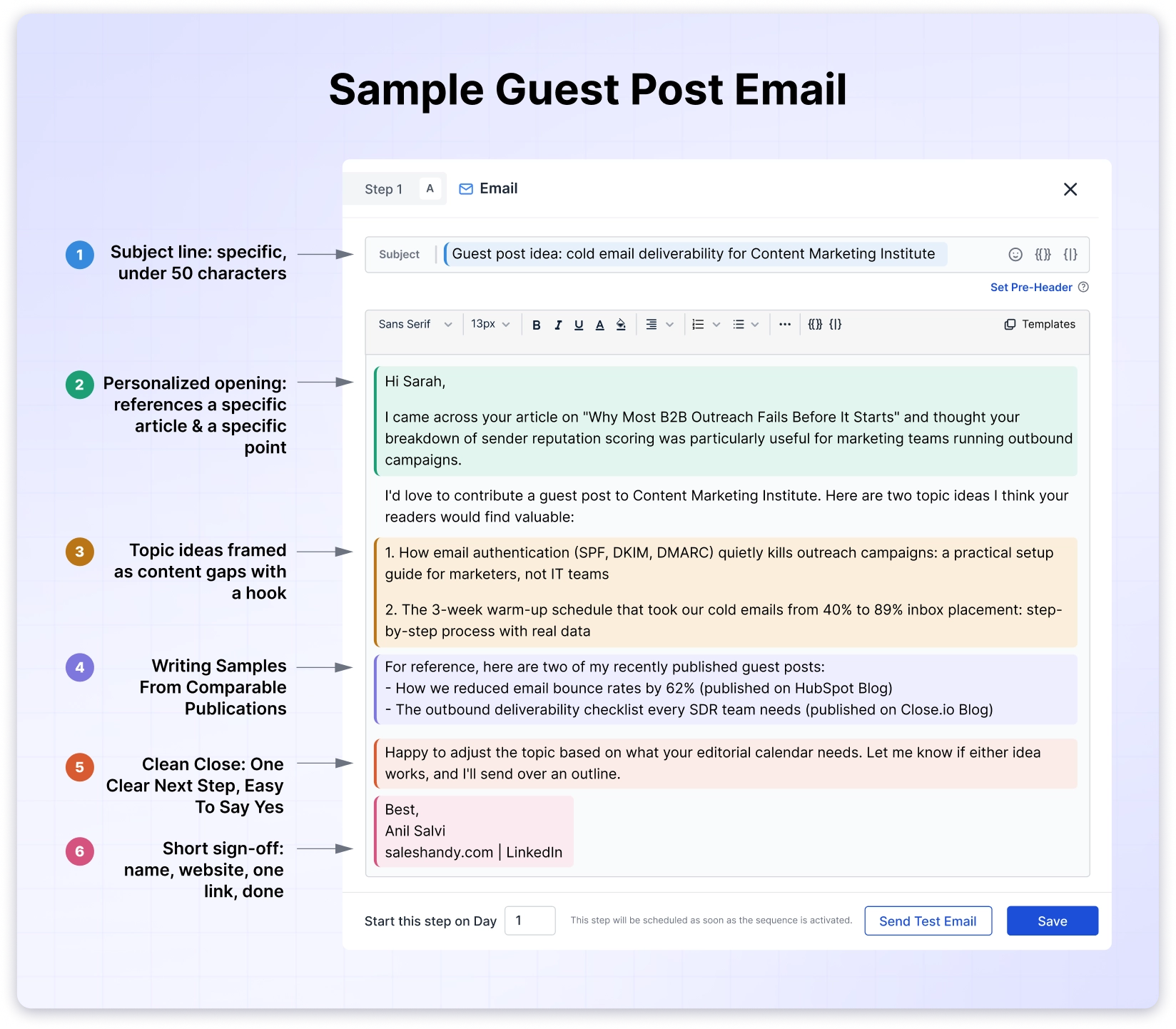
Subject: Guest Post Idea: [Specific Topic] for [Blog Name]
Hi [First Name],
I came across your article on [specific article title] and thought your breakdown of [specific point from the article] was particularly useful for [their audience type].
I’d love to contribute a guest post to [Blog Name]. Here are two topic ideas I think your readers would find valuable:
1. [Topic idea #1: framed as a content gap, not a generic topic]
2. [Topic idea #2: different angle, still relevant to their niche]
For reference, here are two of my recently published guest posts:
– [Published post title + link on comparable site]
– [Published post title + link on comparable site]
Happy to adjust the topic based on what your editorial calendar needs. Let me know if either idea works, and I’ll send over an outline.
Best,
[Your Name]
[Your Website or LinkedIn]
Why this works: The email opens with a specific article reference, not a generic compliment. Topic ideas are positioned as gaps, not random suggestions.
Writing samples are from external publications, not a personal blog. The close makes the next step easy for the editor (just say yes, and you’ll handle the rest).
💡Personalization tip: Before pitching, search the blog for your proposed topics. If they’ve already covered them, pivot to a different angle or subtopic they haven’t addressed.
Template #2: Cold Pitch to a Blog with No Guest Post Page
When to use: The blog doesn’t have submission guidelines, but it publishes content from external contributors (check recent bylines for non-staff authors).
Subject: Content Idea for [Blog Name]: [Specific Topic]
Hi [First Name],
I’ve been reading [Blog Name] for a while, and your recent piece on [specific article] caught my attention, especially the section on [specific detail].
I noticed you haven’t covered [specific topic or angle] yet, and I think it would be a strong fit for your [content category, e.g., “SEO strategy” or “email marketing”] readers. It’s a topic I’ve written about extensively, and I’d love to put together a guest article for your site.
Here’s what I had in mind:
[Proposed title]: [One-line description of the angle, what the reader would learn, and why it matters now]
A few examples of my published work:
– [Link to guest post on relevant site]
– [Link to guest post on relevant site]
Would this be something you’d be open to? Happy to send an outline or a full draft, whichever works better for your process.
[Your Name]
[Your Website or LinkedIn]
Why this works: It doesn’t ask “do you accept guest posts?” That framing puts the editor in gatekeeper mode.
Instead, this guest post email template proposes a specific article as if contributing is a natural fit. The content gap observation proves research without bragging about it.
💡Personalization tip: Check their recent bylines. If you see guest contributors, reference that in your pitch (“I noticed you’ve published pieces from [contributor name] on similar topics”).
Template #3: Warm Pitch (You’ve Already Engaged with Their Content)
When to use: You’ve commented on their posts, shared their articles, replied to their newsletter, or connected on LinkedIn before reaching out.
Subject: Following Up on Our [Platform] Connection + Guest Post Idea
Hi [First Name],
We connected on [LinkedIn/Twitter] a few weeks ago, and I’ve been enjoying your content since then, particularly your piece on [specific article]. I actually shared it with our team because [specific reason it was useful].
I wanted to take that conversation a step further. I’d love to contribute a guest post to [Blog Name] on a topic I think your audience would appreciate:
[Proposed title]: [One-line hook explaining the angle]
I’ve written for [Site 1] and [Site 2] on similar subjects, so the quality and depth would match what [Blog Name] readers expect.
Would you be open to it? I can send a detailed outline whenever works for you.
[Your Name]
Why this works: The prior engagement isn’t invented; it’s verifiable. The editor may vaguely recognize your name from a comment or share.
That small signal of familiarity moves your email from the “cold pitch” pile to the “someone I sort of know” pile, which gets read more carefully.
💡Personalization tip: If your comment or share is still visible online, include a link to it. Proof of engagement beats claims of engagement.
Template #4: The Content Gap Pitch
When to use: You’ve identified a topic the blog hasn’t covered but clearly should, based on competitor coverage, audience questions in their comment section, or keyword gaps.
Subject: A Topic [Blog Name] Hasn’t Covered Yet
Hi [First Name],
I’ve been going through [Blog Name]’s content library on [content category], and your coverage on [topic cluster] is some of the best out there. However, I noticed you haven’t published anything on [specific gap topic] yet.
I think this is a missed opportunity because:
– [Reason 1: competitor blogs are covering it, or audience is searching for it]
– [Reason 2: it complements existing content on their site]
I’d love to write this piece for [Blog Name]. Here’s the angle I’d take:
[Proposed title]: [One-line description of the article’s value to their readers]
For context, here’s a similar piece I wrote for [Site Name]: [Link]
Let me know if this is something worth exploring.
[Your Name]
Why this works: You’re doing the editor’s content planning for them. Identifying a real gap (with evidence) signals that you understand their audience’s needs, not just your own backlink agenda.
The “missed opportunity” framing creates subtle urgency without being pushy. This guest post pitch email format consistently outperforms generic topic suggestion templates.
💡Personalization tip: Use their blog’s search function to confirm the topic genuinely hasn’t been covered. Pitching a topic they published 3 months ago instantly kills your credibility.
Template #5: The Broken Link Pitch
When to use: You found a dead link on their blog and can offer replacement content along with a guest post.
Subject: Found a Broken Link on [Blog Name] + a Content Idea
Hi [First Name],
I was reading your article on [article title] and noticed that the link to [description of the linked resource] in the [section name] section is broken (returning a 404).
I actually have a published piece on a similar topic that could work as a replacement: [Your relevant article link]
While I’m here, I also wanted to ask: would you be open to a guest post on [related topic]? I think it would pair well with your existing content on [content category].
Happy to send topic ideas or a full outline, whichever you prefer.
[Your Name]
Why this works: You’re providing immediate value (broken link notification) before making any ask. The editor feels helped, not pitched. The guest post offer comes second and feels like a natural extension of the conversation, not the real reason you emailed.
💡Personalization tip: Use a tool like Check My Links (Chrome extension) or Ahrefs’ broken link report to find dead outbound links on their top-performing pages.
Fixing links on high-traffic pages gives editors more motivation to respond.
Template #6: Pitching to High-Authority Blogs
When to use: You want placement on well-known publications, industry-leading blogs, or sites with DR 60+. The editorial bar is higher, and the pitch needs to reflect that.
Subject: [Your Name], Published in [Publication 1] and [Publication 2]
Hi [First Name],
I’m [Your Name], [Your Role] at [Your Company]. I’ve contributed to [Publication 1], [Publication 2], and [Publication 3] on topics around [your expertise area].
I’d like to pitch a guest article for [Blog Name]:
[Proposed title]: [One-line hook with a specific data point, trend, or insight that makes the angle compelling]
The article would include [original data/research/expert insight] and target an audience of [their specific reader profile].
Here are my most relevant published pieces:
– [Title + link on high-authority site]
– [Title + link on high-authority site]
I’m happy to follow your editorial guidelines and submit a draft for review. Let me know if this angle interests you.
[Your Name]
[LinkedIn Profile]
Why this works: High-authority editors have less patience for long emails and more skepticism about unknown contributors.
This template leads with credentials (publications, not self-descriptions) and keeps the pitch tight. The data or research angle signals original value, not rehashed content they could assign to a staff writer.
💡Personalization tip: If you don’t have big-name publications yet, lead with a specific data point or original research instead. Editors at top-tier sites care about unique insights more than a long list of mid-tier placements.
Template #7: The “Draft Is Ready” Pitch
When to use: You already have a finished or near-finished article and want to remove the editor’s biggest hesitation: the coordination effort.
Subject: Draft Ready: [Article Title] for [Blog Name]
Hi [First Name],
I’ve written a [word count]-word article on [topic] that I think would be a strong addition to [Blog Name]’s [content category] section.
Title: [Proposed title]
Summary: [2-3 sentences describing what the article covers, who it’s for, and what the reader walks away with]
The draft is ready for review. I can share it as a Google Doc or send it in whatever format you prefer.
For reference, I’ve published similar pieces on:
– [Site name + link]
– [Site name + link]
Let me know if you’d like to take a look.
[Your Name]
Why this works: Many editors reject pitches not because the topic is bad, but because managing the back-and-forth takes too much time.
A ready draft eliminates that friction entirely. The editor can review the actual article instead of evaluating a hypothetical pitch.
💡Personalization tip: Format the draft to match the blog’s style before sending. Match their heading structure, tone, paragraph length, and internal linking patterns.
Editors notice when a draft already looks like it belongs on their site, and it significantly speeds up their approval process.
Template #8: Paid/Sponsored Guest Post Email
When to use: The blog accepts paid placements, or you want to propose a sponsored guest post on a high-value site.
Some niche blogs and industry publications have paid contributor programs.
Subject: Sponsored Content Inquiry for [Blog Name]
Hi [First Name],
I’m [Your Name] from [Your Company]. We’re interested in publishing a sponsored guest article on [Blog Name].
Here’s what we have in mind:
Topic: [Proposed topic, relevant to their audience]
Format: [Article length, e.g., “2,000-word how-to guide”]
Our commitment: We’ll write the article to match your editorial standards, include original insights, and promote the published piece through our channels ([newsletter size], [social following], etc.)
Could you share your rates and editorial requirements for sponsored content? We’re happy to work within your existing framework.
[Your Name]
[Company Website]
Why this works: It’s professional and direct without being transactional.
It acknowledges their editorial standards (not just buying a link) and frames the sponsored post as a collaboration, not a link purchase. Offering to promote the piece adds value beyond the payment itself.
💡Personalization tip: Research whether the blog has published sponsored content before.
If you can find examples, reference them (“I saw your sponsored guide with [Brand], and that’s the type of quality we’d want to match”).
Template #9: Re-Pitch After Rejection or Silence
When to use: Your original pitch was declined, or it went unanswered for 2+ weeks after follow-ups.
Subject: Different Angle for [Blog Name]: [New Topic]
Hi [First Name],
I reached out a few weeks ago about a guest post on [original topic], and I completely understand if the timing or topic wasn’t right.
I wanted to try a different angle that might be a better fit for what [Blog Name] is covering right now:
[New proposed title]: [One-line description of the new angle, focused on their audience’s current interests]
This topic ties directly into your recent coverage of [their recent article or theme], and I think it would complement what’s already there.
Happy to send an outline or discuss further. No pressure either way.
[Your Name]
Why this works: It acknowledges the previous attempt without guilt-tripping. The new topic is genuinely different (not a rephrasing of the old one) and tied to their recent content, which shows ongoing attention.
The “no pressure” close gives the editor an easy out while keeping the relationship intact.
💡Personalization tip: Some of our best placements came from second or third pitches. The key is offering a completely different topic, not “bumping” the original email with the same ask.
Guest Post Follow-Up Email Sequence (with Templates)
Most guest post acceptances don’t come from the first email.
From our team’s campaigns, roughly 40-50% of positive responses came from the second or third message.
If you send one guest posting email template and stop there, you’re leaving placements on the table.
The difference between a good follow-up and a bad one comes down to value. “Just bumping this” adds nothing.
A guest post follow-up email that references their recent content, introduces a new angle, or shares something useful gives the editor a reason to respond this time.
Here are the three follow-up templates we use, spaced across a 14-day window.
- The Gentle Nudge (3-5 Days After First Email)
- The Value-Add (7-10 Days After First Email)
- The Clean Exit (14+ Days
You can copy them!
Follow-Up #1: The Gentle Nudge (3-5 Days After First Email)
Subject: Re: [Original Subject Line]
Hi [First Name],
I wanted to circle back on my guest post pitch from [day]. I know editorial inboxes fill up fast, so I wanted to make sure this didn’t get buried.
Since I last emailed, I also had another topic idea that might be a better fit:
[New topic idea]: [One-line hook]
Let me know if either topic works, or if there’s a different angle [Blog Name] is looking for right now.
[Your Name]
Why this works: It’s short, acknowledges they’re busy (without being sycophantic about it), and adds a new topic idea so the follow-up has standalone value.
Follow-Up #2: The Value-Add (7-10 Days After First Email)
Subject: Re: [Original Subject Line]
Hi [First Name],
I saw your recent post on [their latest article], and it reminded me of the guest post idea I pitched last week. My proposed piece on [your topic] would actually complement that article well, especially the section on [specific point].
Still happy to send over an outline or a full draft if the topic fits your editorial plans.
[Your Name]
Why this works: It connects your pitch to their most recent content. The editor sees that you’re paying attention to what they publish, not just running an automated sequence.
This follow-up has the highest conversion rate in our campaigns because it’s timely and relevant.
Follow-Up #3: The Clean Exit (14+ Days)
Subject: Re: [Original Subject Line]
Hi [First Name],
I sent a couple of messages about a guest post idea for [Blog Name], and I don’t want to clutter your inbox if the timing isn’t right.
If guest contributions aren’t a priority right now, completely understood. I’ll keep following your content and can reach out again in a few months if that’s better.
Either way, appreciate your time.
[Your Name]
Why this works: It gives the editor an easy out without burning the relationship.
Some editors respond specifically because the exit is graceful, and they feel obligated (in a positive way) to at least acknowledge the effort.
Others circle back months later when they need content. Either way, a clean exit is better than an aggressive fourth email.
When our team runs these follow-up sequences, the timing is automated through Saleshandy.
Each follow-up triggers only if the previous email didn’t get a reply. This keeps the cadence consistent without any manual tracking or the risk of accidentally emailing someone who already responded.
Guest Post Email Subject Lines That Get Opened
The subject line decides whether your guest posting email template gets read or deleted.
A vague or generic guest post email subject line means the editor never opens the email, regardless of how strong the pitch inside is.
Based on what’s worked across our campaigns, here are subject line formats organized by approach.
Subject Lines That Work
Direct approach:
- Guest Post Idea: [Specific Topic] for [Blog Name]
- [Topic] Article for [Blog Name]
Content gap angle:
- A Topic [Blog Name] Hasn’t Covered Yet
- Content Idea Your Readers Are Asking About
Value-first:
- 3 Article Ideas for [Blog Name], Ready to Write
- Draft Ready: [Topic] for [Blog Name]
Social proof:
- [Your Name], Published in [Publication 1] and [Publication 2]
- Guest Post from a [Known Publication] Contributor
Collaboration framing:
- Content Collaboration: [Your Niche] × [Blog Name]
- Quick Idea for Your [Content Category] Section
Subject Lines That Get Your Guest Post Emails Ignored
- “Guest Post Request” is the most overused subject line in guest post outreach. It tells the editor nothing specific and screams mass outreach. Avoid it entirely.
- “Collaboration Opportunity!!!” with excessive punctuation triggers spam filters and looks unprofessional. One exclamation mark is already too many for a cold outreach subject line.
- ALL CAPS subjects get ignored or filtered automatically. The same applies to emoji-heavy subject lines in professional outreach.
- Subject lines over 50 characters get truncated on mobile. Since most editors check email on their phones throughout the day, keep it tight.
- “RE:” tricks (pretending your cold email is a reply to an existing thread) might boost open rates temporarily, but editors catch this instantly. It destroys trust before the conversation even starts.
Generate High-Performing Subject Lines for Free
Generate Subject Lines FreeHow to Find the Right Person to Email
A perfect guest post pitch sent to a generic contact form or the wrong team member gets buried.
The template doesn’t matter if it reaches the wrong inbox.
Before you send any guest posting email template, spend a few minutes finding the actual decision-maker.
The best guest post outreach template in the world is useless if it lands in the wrong inbox.
- Check the Blog’s “Write for Us” or “Contribute” Page
- Look at Author Bios on Recent Posts
- Search LinkedIn
- Check the About Page or Team Page
- When the Email Isn’t Publicly Available
Check them out!
1. Check the Blog’s “Write for Us” or “Contribute” Page
Many blogs list the editor’s name, submission email, and guidelines directly. If this page exists, use Template #1 and follow their stated process exactly.
2. Look at Author Bios on Recent Posts
The managing editor or content lead often has a byline on editorial roundups, announcements, or contributor guidelines. Their bio usually includes an email address or a link to their LinkedIn.
3. Search LinkedIn
Look for “[Blog Name] + Editor,” “Content Manager,” or “Head of Content.” You’ll typically find the right person within the first few results.
4. Check the About Page or Team Page
Smaller blogs and company blogs often list team members with their roles and contact information.
But What to Do When the Email Isn’t Publicly Available?
This is where most guest blog outreach campaigns lose momentum. You’ve done the research. You know the editor’s name from a byline or LinkedIn profile.
You know they’re the right person to pitch. But there’s no email address listed anywhere on the site, their social profiles, or their bio.
Most people resort to guessing email formats at this point: firstname@domain, f.lastname@domain, firstname.lastname@domain.
Sometimes it works. Often it doesn’t. And every bounced email quietly damages your sender reputation, which affects deliverability on every campaign after that, not just the current one.
Our team uses Saleshandy’s Lead Finder to skip the guesswork entirely. Enter the editor’s name and company domain, and it returns a verified email address.

When you’re pitching 50+ blogs per campaign, verified contacts are the difference between a clean sender reputation and one that slowly degrades with every bounce.
One more thing before you send: check whether the blog explicitly accepts guest posts.
If they have a “Write for Us” page, use Template #1 and follow their stated process.
If there’s no submission page but they publish content from external contributors, use Template #2. The framing of your pitch changes based on this.
How to Send Guest Post Outreach at Scale
The templates above are designed to be personalized for each blog. But personalization at volume is where manual guest post outreach breaks down.
When you’re customizing your 30th guest posting email template of the week, the personalization quality starts to drop. The article references get lazier.
The topic ideas get more generic. Follow-up timing becomes inconsistent because you’re tracking everything in a spreadsheet that stopped being accurate three campaigns ago.
We’ve seen this pattern repeatedly:
- teams launch a guest post campaign with strong initial emails
- then the quality degrades by email 15 or 20 because the manual work becomes overwhelming.
- Follow-ups get forgotten.
- Replies get missed.
- And the emails that do go out start sounding like every other mass pitch the editor has already ignored.
The result is that your first 10 pitches perform well, and the remaining 40 look like you stopped trying.
What a Guest Blog Outreach Workflow Looks Like at Scale
If you’re planning to send more than 20 guest post outreach emails per campaign, look for a email automation tool that handles:
- Custom Merge Fields per Email
- Automated Follow-Up Sequences
- Open and Reply Tracking
- Built-In Email Verification
- Multiple Sending Accounts
Start automating emails!
1. Custom Merge Fields per Email
Each message should reference the specific blog name, editor name, article title, and topic ideas. Manual copy-paste breaks at volume; merge tags don’t.
2. Automated Follow-Up Sequences
Follow-ups should trigger only when the previous email didn’t get a reply. This prevents the embarrassing scenario of sending “just checking in” to someone who already responded.
3. Open and Reply Tracking
Knowing who opened your email but didn’t reply is different from knowing who never saw it. These are different follow-up strategies.
4. Built-In Email Verification
Bounced emails hurt your sender reputation across every campaign, not just the current one. Verifying addresses before sending protects your long-term deliverability.
5. Multiple Sending Accounts
High-volume outreach from a single email address triggers spam filters. Distributing sends across accounts through sender rotation keeps your deliverability healthy.
Our team runs guest post outreach through Saleshandy.
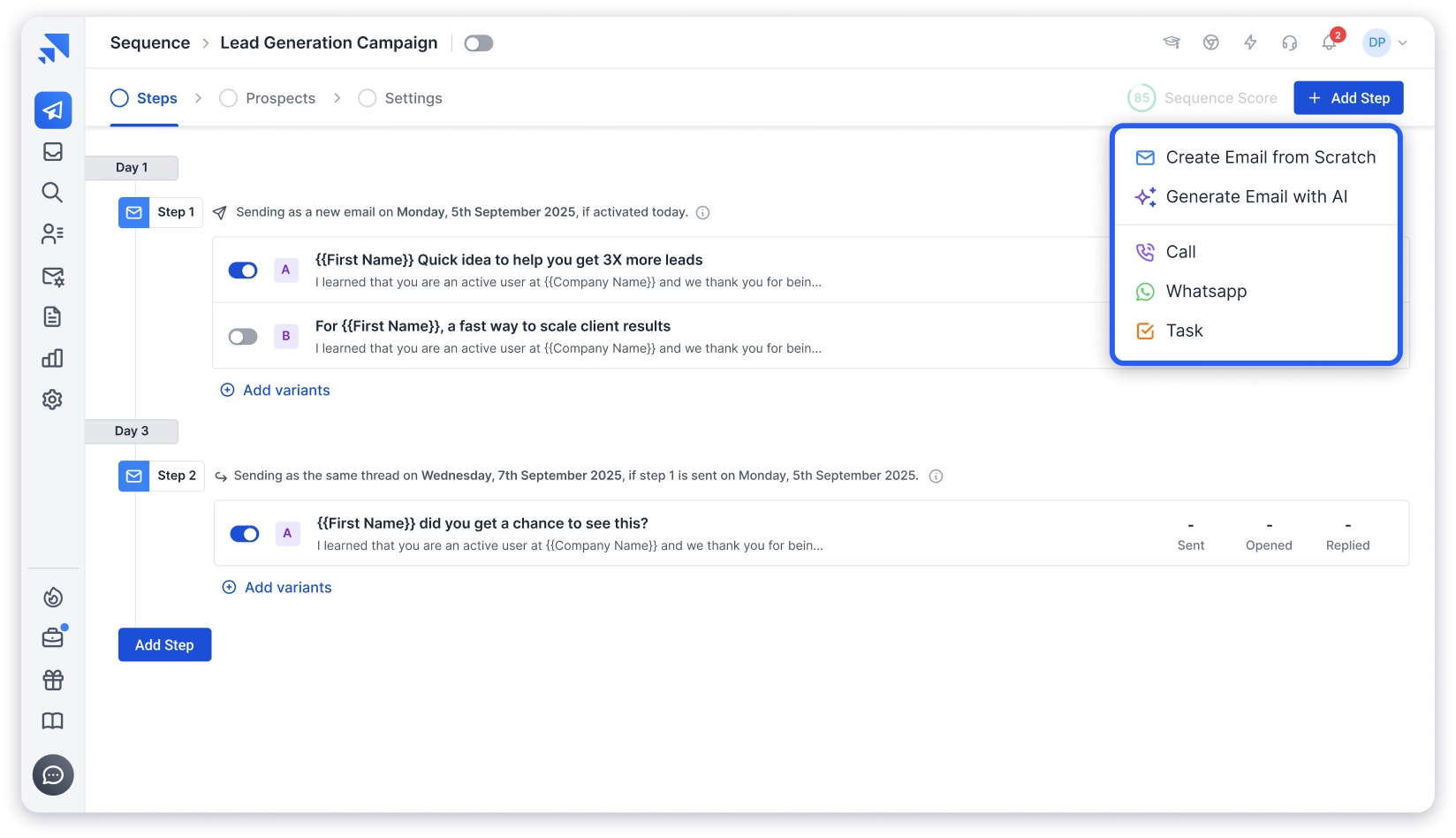
The sequence builder handles personalization through merge tags, so each email references the specific blog and editor by name.
And the Follow-ups trigger automatically based on reply detection. The unified inbox pulls all responses into one view so nothing gets missed across campaigns.
Plus, for finding editor emails, Lead Finder pulls verified contacts using name and company domain.
The 20% reply rate from our last campaign wasn’t because we wrote better templates than everyone else. It’s because every email was personalized, every follow-up landed on time, and nothing fell through the cracks.
Before scaling your outreach, make sure your sending infrastructure is ready. Email warm-up and proper domain setup prevent your carefully crafted pitches from landing in spam before the editor even sees them.
7 Common Mistakes That Get Your Guest Post Email Rejected
Even with a proven guest posting email template, certain patterns consistently kill your chances.
These are the mistakes we see most often, both in our own early guest post outreach campaigns and in the pitches we receive on the Saleshandy blog.
- Sending the Same Template to 100 Blogs Without Changing Anything
- Leading with Yourself Instead of Their Audience
- Pitching Topics That Already Exist on Their Blog
- Listing “100% Original, SEO-Friendly” as Selling Points
- Writing a 500-Word Pitch Email
- Including the Wrong Writing Samples
- Following Up Too Aggressively
Let’s dig in!
1. Sending the Same Template to 100 Blogs Without Changing Anything
Editors at similar publications sometimes compare notes. Identical pitches get flagged, and you lose credibility across an entire niche.
Each email needs at least three personalized elements: the content reference, the topic ideas, and the writing samples.
2. Leading with Yourself Instead of Their Audience
“I’m a thought leader in X” is about you. “Your readers would benefit from a guide on Y” is about them. Editors care about what their audience gets, not what you want from the placement.
3. Pitching Topics That Already Exist on Their Blog
A 2-minute search on their site prevents this. Not doing it tells the editor you didn’t bother researching their content before reaching out, which immediately disqualifies your pitch.
4. Listing “100% Original, SEO-Friendly” as Selling Points
These are baseline expectations for any guest post, not differentiators. Including them in your pitch actually signals inexperience because experienced guest posters don’t need to state the obvious.
5. Writing a 500-Word Pitch Email
The pitch should be 150-200 words max. Long emails signal that working with you will be high-maintenance. Save the detail for the actual article draft.
6. Including the Wrong Writing Samples
Your personal blog or company blog doesn’t prove you can write for their audience. Published guest posts on comparable or higher-authority sites are what editors want to see. If you don’t have external samples yet, be upfront about it and offer to write a test draft.
7. Following Up Too Aggressively
Three emails in three days signals desperation, not persistence. Space follow-ups 3-5 days apart at minimum, and make each one add new value rather than repeating the original ask.
After Your Guest Post Gets Published: The Email That Keeps the Door Open
One-off guest posts build one backlink. Ongoing contributor relationships build dozens over time, with faster approvals and better placement.
The guest posting email template you send after publication determines whether you’re a one-time contributor or a recurring one.
- Thank-You Email (Send Within 24 Hours of Publication)
- Second Pitch Email (2-4 Weeks After Publication)
Steal them!
1. Thank-You Email (Send Within 24 Hours of Publication)
Subject: Thanks for Publishing [Article Title]!
Hi [First Name],
Just wanted to say thanks for publishing the piece on [article title]. It turned out great, and I’ve already shared it with our team and across our social channels.
I’ll keep promoting it over the next few weeks. If you notice any good engagement or feedback from your readers, I’d love to hear about it.
Thanks again for the opportunity.
[Your Name]
2. Second Pitch Email (2-4 Weeks After Publication)
Subject: Follow-Up Guest Post Idea for [Blog Name]
Hi [First Name],
The response to [published article title] has been solid. [Mention a specific metric if you have one: social shares, comments, traffic data, reader feedback.]
I’ve been thinking about a follow-up piece that would build on that topic:
[New proposed title]: [One-line description of the angle and why it complements the first article]
Would you be open to another guest post? Happy to send an outline whenever you’re ready.
[Your Name]
Some of our strongest backlink sources today are blogs where we’ve published 3-4 guest posts over time. The first post is always the hardest because you’re proving yourself.
The second is a conversation, not a pitch. And by the third, you’re a regular contributor with faster turnarounds and better editorial placement.
Key Takeaways
- Different guest posting scenarios need different templates. A cold pitch to a blog that accepts guest posts reads differently from a cold pitch to a blog with no submission page, a warm intro, or a re-pitch after silence.
- The 5 elements (specific content reference, content gap topics, relevant samples, audience value, clean close) should appear in every guest posting email template you send.
- Subject lines under 50 characters with the blog name and topic specificity get the highest open rates. Avoid “Guest Post Request” entirely.
- Follow-ups generate more acceptances than first emails. Plan for 2-3 follow-ups per pitch, spaced 3-5 days apart, each adding new value.
- Finding the right contact person matters as much as writing the right email. A perfect pitch sent to [email protected] gets buried.
- Post-publication relationship emails turn one-off placements into recurring contributor spots, which are far more valuable for long-term SEO.
- Scaling past 20 pitches per campaign requires automation, but every email still needs to read like it was written individually. Our team’s 20% reply rate came from templates and tools working together.
Frequently Asked Questions
1. How Long Should a Guest Posting Email Template Be?
Aim for 150-200 words. Blog editors scan quickly and prioritize short, specific pitches over long, detailed ones.
Include your topic ideas, link to 2-3 writing samples, and keep your sign-off clean. Save the depth and detail for the article draft itself.
2. How Many Topic Ideas Should I Include in a Guest Post Pitch Email?
Two to three specific topics work best. More than that looks unfocused, and fewer gives the editor no options to choose from. Frame each topic as a one-line hook that highlights the angle, not a full paragraph explanation.
3. Should I Attach a Full Draft or Just Pitch Topic Ideas?
If the blog has submission guidelines, follow their stated process. If not, pitching topic ideas first reduces your upfront effort and lets the editor guide the direction.
If you already have a finished draft, use Template #7. Offering the completed article removes the coordination burden for the editor and speeds up the decision.
4. When Should I Follow Up on a Guest Post Email?
Wait 3-5 business days for the first follow-up. Send a second follow-up at 7-10 days with a new angle or reference to their recent content. A final “clean exit” email at 14+ days keeps the door open without applying pressure.
Roughly 40-50% of guest post acceptances come from follow-up emails, not the original pitch.
5. What Is the Best Subject Line for a Guest Post Outreach Email?
Keep it specific and under 50 characters. Include the blog name and a clear hint at your topic. Subject lines like “Guest Post Idea: [Topic] for [Blog Name]” or “A Topic [Blog Name] Hasn’t Covered Yet” consistently outperform generic lines like “Guest Post Request” or “Collaboration Opportunity.”
6. Can I Use the Same Guest Posting Email Template for Every Blog?
No. Each blog has a different audience, content style, and editorial standard. At minimum, personalize the content reference, topic ideas, and writing samples for each pitch.
The same guest post email template sent to 100 blogs unchanged is how you get blacklisted across an entire niche.
7. How Do I Find a Blog Editor’s Email Address?
Start with the blog’s About page, author bios on recent posts, and LinkedIn. If the email isn’t publicly listed, use an email finder tool that pulls verified contact details using the editor’s name and company domain.
Avoid guessing email formats manually because bounced emails hurt your sender reputation for every future campaign.
8. Is Guest Posting Still Effective for SEO in 2026?
Yes, when done right. Google values editorial guest posts that provide genuine value on relevant, high-authority blogs. What Google penalizes is mass guest posting on low-quality sites with stuffed links and thin content.
Quality placements on blogs with real audiences still build domain authority, drive referral traffic, and strengthen your overall backlink profile.